Back Talk: An Auditory Environment for Co-presence in Television
Viewing
by
Andrea B. Colago
B.E.(Hons.) Electrical and Electronics Engineering Birla Institute of Technology and Science, Pilani (2007)
Submitted to the Program in Media Arts and Sciences, School of Architecture and Planning,
in partial fulfillment of the requirements for the degree of Master of Science in Media Technology
at the
MASSACHUSETTS INSTITUTE OF TECHNOLOGY September 2010
@
Massachusetts Institute of Technology 2010. All rights reserved.MASSACHUSETT S INSTITUTE OF TECHNOLOGY
SEP 14 2010
LIBRARIES
ARCHIVES
AuthorProgram in Media Arts and Sciences August 6, 2010
Certified by
Chris Schmandt Principal Research Scientist Program in Media Arts and Sciences Thesis Supervisor
Accepted by
Prof. Pattie Maes Associate Academic Head Program in Media Arts and Sciences
Back Talk: An Auditory Environment for Co-presence in Television Viewing
by
Andrea B. Colago
Submitted to the Program in Media Arts and Sciences, School of Architecture and Planning,
on August 6, 2010, in partial fulfillment of the requirements for the degree of Master of Science in Media Technology
Abstract
Video content is being consumed in a host of new ways -viewers are no longer restricted to same-time or same-place viewing. However, the experience of watching content with a group is inherently a sociable one, and often desirable despite the physical distribution of group members. This thesis introduces Back Talk, a system designed to create a sociable television watching experience. We enhance television viewing with an auditory environment around a viewer -constructed from en-gagement and audio streams of co-viewers in the viewer's micro-social network. We have explored and leveraged the richness of audio to convey presence of remote viewers via a novel framework for capturing and translating engagement of an individual in the viewer's micro-social network into a set of audio cues that are played spatially around the viewer. This work presents the implementation scheme we used, and it also discusses results of a user study that was conducted to examine the impact and effectiveness of the Back Talk system.
Thesis Supervisor: Chris Schmandt
Back Talk: An Auditory Environment for Co-presence in Television Viewing
by
Andrea B. Colago
The following people served as readers for this thesis:
Thesis Reader
Joseph Paradiso
Associate Professor of Media Arts and Sciences
Media Laboratory at MIT
1/;~)
Thesis Reader
ILv 45LHenry Holtzman
Principal Research Scientist
Media Laboratory at MIT
914 31
Acknowledgments
My deepest gratitude goes to my advisor Chris Schmandt for being an amazing and supportive men-tor. I would like to thank him for giving me the opportunity to go to graduate school. This work exists largely due to his guidance through many discussions, and encouragement.
I consider myself very fortunate to have had an opportunity to interact with Professors Henry Holtz-man, Marie-Jose Montpetit and Joseph Paradiso. My work benefitted a great deal from their classes, particularly the SocialTV class. They have been a source of valuable insights that positively influ-enced my thesis.
I would also like to thank my peers in the Speech+Mobility group who made these past two years a wonderful experience and for always being willing to bounce off ideas. Special thanks to Jaewoo and Matt for sharing "healthy soup" and good times in Seoul; Drew for his encouragement and valu-able feedback; Charlie for very promptly and comprehensively sharing his thesis experience with user evaluations and for reviving many a dead laptop; Ig-Jae for making plans A, B & C and for all his assistance with computer vision problems; Dori for being a great office-mate and for introducing me to sushi.
My co-workers and friends at MIT made the experience really enjoyable and memorable - Nan-wei for her assistance in the machine shop, with the GSR sensor and for her great advice; the SocialTV class; Arash Delijani for helping out during the evaluation studies and Santiago for keeping the study alive; Daniel McDuff for his invaluable assistance with face-tracking; Kirmani for making sure I had enough caffeine to keep me going, for renewing my motivation levels; the Starbucks napkin-sketchers -Inna, Keywon, Santiago; Karthik for listening to my vague ideas and presenta-tions; Varun and Jairaj for musical and other entertainment. A special note of thanks to Priya (aka Prixa), my amazing room mate -for being tremendous support, a listening ear for late night rants, many fun activities, and for permitting random mutations of her name.
This thesis would not have been possible without the support and sacrifice of my dad, mum and brother. I'd like to thank them for their love and patience. Without you, I would have never made it this far.
Andrea Colago MIT
Contents
1 Introduction 13
2 Background 17
2.1 Co-presence . . . . 18
2.1.1 Co-presence Around Activities . . . . 18
2.1.2 Why Co-presence Around Television? . . . . 19
2.2 Audio Environments: Affordances and Limitations . . . . 19
3 Related Work 21 3.1 Previous Work in Social Television: Same-Time, Different-Place . . . . 22
3.2 Previous Work in Audio Environments for Conveying Presence . . . . 26
3.3 Design Choices Derived from Previous Work . . . . 27
4 Design 29 4.1 Overview . . . . 29
4.2 System Design . . . . 29
4.2.1 Engagement Sensing Module . . . . 30
4.2.2 Audio Generation. . . . . 30
4.3 System Setup . . . . 30
4.4 Cell Phone Interface . . . . 31
4.5 Audio Environment . . . . 33
4.6 Audio Cues . . . . 33
4.7 System Design Diagram . . . . 34
5 Implementation 35 5.1 O verview . . . . 35
5.2 Back Talk Server . . . . 36
5.3 Back Talk Client . . . . 36
5.3.1 Processing Unit. . . . . 37
5.3.2 Engagement Capture Unit . . . . 37
5.3.3 Output Unit . . . . 43
6 Evaluation 47 6.1 Overview . . . . 47
6.2.1 Experimental Setup . . . . 48
6.2.2 The Experimental Method . . . . 50
6.2.3 R esults . . . . 53
6.3 Engineering System Performance Study . . . . 57
6.3.1 Detection of Spoken Comments . . . . 57
6.3.2 Laughter Detection Accuracy . . . . 57
6.3.3 Galvanic Skin Response Sensor . . . . 58
6.3.4 Detection of Number of Faces and Gaze Direction . . . . 59
7 Future Work and Conclusion 61 7.1 Contribution and Effectiveness of the Prototype . . . . 61
7.2 Future Directions . . . . 63
List of Figures
1-1 Watching television together affordances: peripheral awareness and
commu-nication . . . . 14
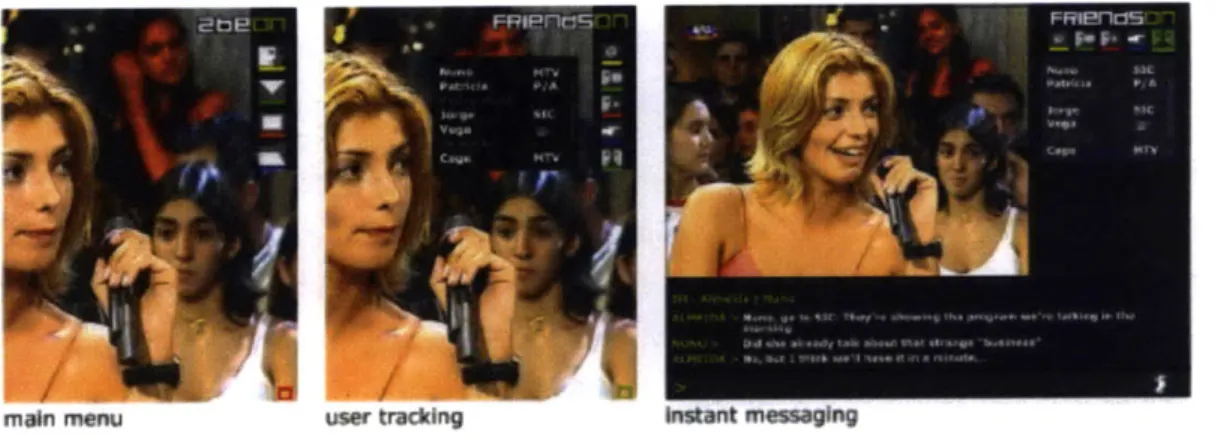
3-1 Interface to the 2BeOn system. . . . . 23
3-2 (a) An emoticon push in AmigoTV. (b) Buddy mosaic displayed on the televi-sion screen . . . . 24
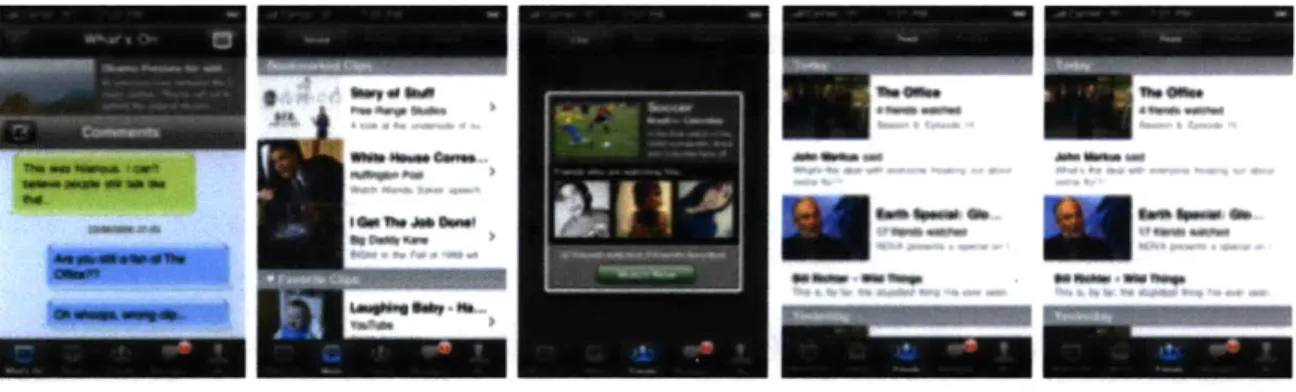
3-3 NeXtream's smartphone controller and its feature of accessing one's social net-work while watching video. . . . . 25
4-1 Back Talk system setup with its components. . . . . 31
4-2 Cell phone interface with audio circle, sonic avatars, and controls. . . . . 32
4-3 Back Talk System Diagram . . . . 34
5-1 Visual Module: Camera mounted near the television. . . . . 38
5-2 Facial points as detected by the tracker. . . . . 40
5-3 Directional microphone pointed at viewers. . . . . 41
5-4 Comparison of microphone inputs in the presence of television signal. . . . . . 42
5-5 Galvanic skin response sensor package fitted to the back of the phone. . . . . . 43
5-6 Galvanic skin response sensor electrodes worn on the hand, not attached to the phone. . . . .. 44
6-1 User study locations: a,c -first location, b,d -second location. . . . . 48
6-2 User study location with directional microphone, GSR sensor, cell phone. . . . 50
6-3 User study location with camera and stereo speakers. . . . . 51
6-4 User study location setup... . . . . . . . . . . . 52
6-5 User study location with directional microphone and speakers. . . . . 53
6-6 ROC curves for detection of spoken comments using directional and non-directional m icrophones. . . . . 58
7-1 Cell phone and television units processing engagement. . . . . . . . . . 65
Chapter 1
Introduction
The last few years have seen a surging interest in the area of social television (social TV). This trend could partly be attributed to an increase in new content consumption patterns; on-demand options have gained huge popularity. Synchronicity was the glue that broadcast offered in creating shared experiences around content. With availability on one big screen in a typical living room, locality also played a major role in fostering a communal viewing experience. With broadcast on its way out, and an array of portable screens (with content easily accessible) to choose from, consumption of video content in general and television content specifically has become individualized. In turn, these new trends have led to innovative solutions and applications that attempt to embed social elements into whatever may be a viewer's consumption preference.
Creating social television experiences, in practice, has for the most part focused on adding com-munication options, rating content, recommending programs, participating in polls, and one-click shopping. Evident in most of these solutions are aspects of our current web communication practices
-chat clients, tweets, thumbing-up or down content. Some of these attempts have proven useful, while others have been discarded for being too intrusive or distracting, or simply for consuming too much screen real estate. However, a key observation that repeatedly emerges is that some content and experiences are consumed better when shared with one's social circle. This leads us to real-ize the possible importance of fluid and richer presence of people (from our social circle) to share a viewing activity, for instance, a television show. This thesis describes research that addresses the
de-sire of providing seamless access to people with whom we choose to share our viewing experience, in a setting that mimics a group watching content together in the same room.
A4c Cn4 1
-~ 4A
I
Figure 1-1: Watching television together affordances: peripheral awareness and communica-tion.
Our approach is motivated by the interactions possible when a group of people congregate around a television -this setting affords communication and peripheral awareness of co-viewers. We have selectively moved away from traditional text-based chat clients - that typically get exported from our web interactions to social television applications. Our aim is to offer free-form interaction that characterizes unmediated person-to-person communication in the setting of television view-ing. Central to this design is audio-based co-presence of non-collocated friends which includes an open audio channel for voice communication. Creating an auditory environment around the viewer leverages the rich and fluid nature of audio and an individual's capacity to selectively tune in to or tune out from audio information. The system focuses on augmenting a viewer's auditory space with peripheral awareness of distributed friends. This is achieved by passively sensing viewer activity and engagement in the form of laughter, emotional arousal, and general attentiveness - looking at
the television or not. The primary interface for accessing co-viewers is an application on a mobile phone - it precludes the need for an additional controller, and moreover, is a personal communica-tion device.
Our system, called Back Talk, is an attempt at promoting sociable television watching even when participants are non-collocated. The name derives from the fact that it is primarily audio-based and captures conversations and activity in the background of television watching; the "back talk" as it happens is not the main focus of the activity but contributes to the overall experience.
Scenario
Tom and his friends regularly watched the TV series Lost together when in college. Recently, their respective jobs have required them to relocate to different cities. Howeve, they can still catch up together every week on their virtual couch using Back Talk. Tom invites his buddies to their virtual couch (Figure 1). They turn on their televisions and are ready to start. They have a voice channel that allows them to communicate with each other. Matt, is quite scared by the shocking death of the character "Boone". His galvanic skin response sensor detects sudden emotional arousal as evidenced by his skin conductance values. His friends in the virtual couch hear a mild screech like sound in their auditory environment coming from Matt's sonic avatar This prompts a conversation between them. Half way through the show, Layla who was running late
from
work joins herfriends
using Back Talk. Immediately, her buddies hear a set of footsteps indicating her presence. When Matt'sfriend,
John, has to leave twenty minutes into the show, remote co-viewers are signaled with the sound of a door shutting. They communicate frequently during the show and laugh at Tom's futile attempts to defend his favorite character's machinations. Overall, they have an enjoyableexperience.
Thesis Statement
The fundamental questions this thesis attempts to answer are:
How do we create a sociable television watching experience for distributed viewers? Does our prototype -Back Talk -convey presence effectively through an auditory en-vironment around the listener?
Contribution
The thesis has a two-fold contribution. In the realm of social television applications, it is an attempt at making television viewing sociable. As compared to previous solutions we use a combination of synthetic and spoken audio to create presence of distributed friends. The second contribution is a novel way of automatically capturing and translating engagement into an auditory environment to create peripheral awareness of remote friends.
Structure of the thesis
The rest of this thesis is divided into 6 chapters: background, related work, design, implementation, evaluation and conclusion. The background chapter introduces various terms key to understanding our system design and some literature related to sociability. In the chapter on related work we review previous work in the area of social television and audio environments. The design chapter details design aspects of the interface, the auditory environment, overall system design, and server-client architecture. It illustrates how each engagement sensing module fits in the overall system design. We discuss the making of each engagement sensing module, the server, the client cell phone interface and finally the output auditory environment in the chapter on Implementation. The chapter on evaluation describes our two-pronged method: evaluation of the completion of the project and our experimental method in answering the main questions this thesis addresses. We also discuss the results of a user study conducted to evaluate the working of the system and the experience of using it. We conclude with lessons learnt from the experience of building the Back Talk prototype, and discuss the implications of our results on possible future iterations of our system in the chapter on future work and conclusion.
Chapter 2
Background
This chapter introduces the motivation of our research in the area of sociable television watching. There have been a number of solutions that have attempted to address social interaction between distributed co-viewers. Hence, it is important to take a step toward seeing the big picture of ap-plications in social TV with the view of placing our prototype in the bigger scheme of social TV applications. We also introduce and describe terms key to understanding issues of presence of re-mote participants in shared activities.
The New York Times featured an article titled "Watching TV Together, Miles Apart" (Jan 3, 2010) [1]. It discusses the story of Emma McCulloch and Jennifer Cheek ...
"(they) used to meet to watch "Dancing With the Stars" together, but that ritual ended when Ms. Cheek moved to Hawaii. "
Now physically-separated, creating the same level of interaction and experience of watching tele-vision, could only be made possible by intervening communication technology. In their case, they set-up Skype to video chat while they watched the show. This article brings out a tacit viewer need and behavior relevant to Back Talk as a sociable television watching prototype: the need to share a television watching experience, and in a micro-social network (friends, family and close acquain-tances) participants are comfortable sharing audio and even video and may even go to the extent of setting up ad-hoc solutions toward this end. Such consumer behavior has opened challenges for
researchers to create innovative solutions that bridge distances and allow new forms of shared expe-riences. At the same time, television manufacturers like LG, Panasonic and Samsung are equipping televisions with webcams and connectivity through Skype to facilitate video communication. In the light of such emerging solutions by consumer electronics organizations, and those put together by consumers, our prototype is positioned somewhere between these two ends.
2.1 Co-presence
Co-presence is the participation of a group of people in a common activity or experience, and it can be either virtual or real. It is defined in [2] as:
It (co-presence) is a condition in which instant two-way human interactions can take place."Instant" human interaction refers to real-time or near real-time human communication, which does not include diachronic exchanges like postal correspondence; and "two-way" human interaction refers to reciprocal or feedback-based human communication, which excludes unidirectional"para-social" behaviors like watching TV or listening to radio ...
2.1.1
Co-presence Around Activities
Co-presence is a vital component of group sociability [3], and traditionally group sociability was grounded in a shared activity. For example:
1. A family watching a television program. 2. A set of friends playing or watching a game.
In all of the above activities socializing is an inherent part and usually a major objective of that activity, but with the advent of technology the socializing component moved from being an inextri-cably linked component to an optional component. For example, consider the following scenarios which support the previous observation:
1. I can more easily watch a TV show the next day in my free time than collect all my friends to watch at the same time.
2. I can more easily play or watch a game online than meet with friends to play it physically.
My thesis seeks to plug back social experiences into a common activity: Television viewing. By anchoring co-presence information to an activity it is more easy to supply context information. For instance, if my friend laughs I can know that she laughed watching a particular show. This enables passive sharing of co-presence information which can enable sharing of non-textual information
1.
2.1.2 Why Co-presence Around Television?
Traditionally, television enabled shared social experiences by virtue of being a communal resource coupled with synchronicity made possible by its broadcast nature, and around which people spend a huge amount of time [4]. In essence, watching television is a social experience, and requires that viewers participate in a mutual effort [5] of understanding and decoding what they see on the
screen [6]. Our work aims at aiding this mutual effort with people that a viewer chooses to share it
with, despite their physical separation. We have designed the system to fit a micro-social network2 of people as opposed to a massive multi user experience. This design choice is believed to make sharing the viewing experience easier with audio as the primary means of communication. Since our system is primarily audio-based, familiarity with co-viewers' voices -that comes with knowing participants beforehand -contributes positively to making the experience more sociable. Moreover, viewers would be more willing to share audio and engagement data with an intimate group as opposed to sharing this information with an anonymous group.
2.2
Audio Environments: Affordances and Limitations
A survey of previous solutions that create sociable television watching reveals that an audio channel between distributed participants promotes communication in a natural way -discussed in detail in Facebook, Twitter and other forms of social networking services can be seen as providing varying degrees of cop-resence information usually unanchored to any common activity. Reiterating, while Facebook, Twitter and other social services can be seen as active forms of socialization, I propose a more passive form of sharing social networking via shared co-presence information around an activity.
chapter 3. Audio environments have also been found to allow the user to simultaneously perform other tasks while listening or speaking [7]. Further, voice is more expressive and efficient than text, as it places less cognitive demands on the speaker and permits more attention to the content of the message [8]. This obvious advantage immediately justifies choosing voice over text. We also antic-ipate that television audio would dominate the viewers' listening experience, and, so, any auditory environment synthesized for creating sociable interactions would primarily be a background pro-cess. It has been discussed in [9] that audio easily fades into the background, but users are alerted when it changes; we use this property to construct our ambient audio environment. Our system is also designed to support multiple viewer audio streams. The "Cocktail Party Effect" [10] provides the justification that listeners can in fact attend to multiple background processes via the auditory channel as long as sounds corresponding to each process are distinguishable. This informs our choice of audio cues; we selected easily distinguishable cues for our set of events that trigger them. Additionally, we add some more scope for distinguishing viewer audio streams using left/right pan-ning where position to the left and right can be manipulated by the primary listener through the cell phone interface. More on selection of audio cues and the auditory environment can be found in chapter 4.
The downside of using purely an audio environment for conveying a large set of actions is that viewers are required to adjust to the library of audio cues used. Moreover, when a cue is played there is a chance that it is not heard by the user, and hence lost - our auditory environment is ephemeral and events are not recorded and played again.
Chapter 3
Related Work
Socializing around the television has been around almost as long as television itself [11]. In fact, the television experience was conceived of as a sociable one. Recent years have seen researchers trying to sieve out the most important elements that made television watching sociable; the two most important reasons for this were societal change and technological innovation - increasing distribution of viewers (that once watched television together) and possibilities to watch content on-demand. Consequently, this work led to solutions attempting to redesign viewing to support sociability among viewers, that took into account physical separation of viewers and on-demand viewing behavior. Our work is primarily directed at shared viewing when users are non-collocated. As such, we will review previous work that has promoted sociable viewing in the synchronous case when participants are distributed. There are many examples to choose from the literature in this space. This chapter however, will focus on two aspects among a subset of these solutions - creat-ing television presence information and channels used to create social presence. More specifically, I will highlight how Back Talk is novel in capturing, sharing and the channel itself for conveying presence. Additionally, this chapter will also review past work on audio environments for conveying
activity and connecting distributed groups in both social and work settings.
The first step in connecting distributed people that desire to share a viewing experience is providing a communication channel. With intervening communication technology, this is possible in a variety of forms. Some of the earliest solutions include SMS (short message service) and IM (Instant
Messaging) clients for instant text communication. Audio and video have also been experimented with in some solutions and will be compared with our prototype later in this chapter. The other important step is providing awareness of remote viewers -presence. The importance of presence and conveying a feeling of presence -co-presence -have been discussed earlier in chapter 2.
3.1 Previous Work in Social Television: Same-Time, Different-Place
We will survey systems that have aimed at promoting new ways of sociable television watching. This section is not restricted to research explorations only, but, discusses commercial systems that have contributed to this space. We will use pictures depicting the essence of the solution in cases where visual elements of the related work are important to understanding the how the system com-pares with Back Talk.
" Reality Instant Messaging [12] offers presence of remote viewers through their "buddy surf-ing" option -an awareness that friends are watching the same program; the interface includes an IM client -on the television screen -that facilitates text chats between viewers and provides some conversation promoting information related to the television content playing.
" 2BeOn [13] also addresses interpersonal communication through IM chat, texts, voice or video. The interface to these communication modes was the television screen as seen in Figure 3-1.
" AmigoTV [14] was prototyped and tested by Alcatel to connect viewers real-time through a voice channel. The interface for initiating communication, and viewer avatars are located on the television screen (Figure 3-2). A related feature was expressing emotions via emoti-cons -these were image, video or audio based (Figure 3-2). Unlike Back Talk which senses engagement and activity passively, this application required viewers to emote manually.
* Media Center Buddies [15] developed by Microsoft Research again offered a text-based IM client for co-located viewers. It differs from applications described earlier in that it promotes a new idea of simultaneously allowing multiple viewers to access their online buddies through
mestan mesagmg
Figure 3-1: Interface to the 2BeOn system.
the same interface. This is a modified way of having a group of viewers connect to their respective remote buddies through a common IM client. Again, this solution was primarily text based.
" Examining presence and lightweight messaging in a social television experience [16] was
conducted by Motorola Labs. They were interested in exploring simpler ways of conveying connectedness to understand if these lightweight options could replace voice chat. Results from this study indicate that participants expressed a strong desire for a free-form communi-cation. This study advised our design to maintain an option for voice communication between distributed viewers.
" ConnecTV [17] describes a large-scale field trial carried out to investigate the use of text-based chat through an IM-like interface on the television as a means to connect to remote friends. Their results showed an increase in television consumption by participants.
" Lycos Cinemal is a virtual cinema experience where viewers can watch a movie together and text-chat about the content.
" Joost2 is a service that offers internet-based television, created by the developers of Skype. Further, it provides options for viewers to chat while they watch and rate content.
lhttp://cinema.lycos.com
2
http://labs.joost.com/tv/
... ... .. ....
. .... ... .. . ... . .... ... . . . ...
(a)
(b)
Figure 3-2: (a) An emoticon push in AmigoTV. (b) Buddy mosaic displayed on the television screen
* The Virtual TV Couch described in [18] had a similar goal in trying to connect micro-social networks. They use an audio channel to connect distributed people but add impulsive
inter-actions like "quick bets" and voting on content; the interface for these inter-actions is presented on
the television screen. In contrast, our work propose a similar layer of interactivity, instead we choose to automatically sense engagement and convey it to remote participants.
There have also been applications in this realm developed at the Media Laboratory. Here, we list some of the most relevant ones.
" neXtream [41] is a recent example of work in social television in the Information Ecology group. Similar to Back Talk, this system also focused on the use of a smartphone as the controller, and for accessing one's social network, albeit through a chat feature (Figure 3-3). It also provided a social layer through a collaborative filtering model of content selection.
" VisionTelevision [19], developed in the Object-based Media Group, is capable of detecting faces of viewers and transmits them to remote locations. The approach focused on visual presence - images of participants placed at the bottom of the screen. Our solution also detects the number of people in the room, but, we use this information in a different way and for a
-SWNO M AW"-f&
Figure 3-3: NeXtream's smartphone controller and its feature of accessing one's social network
while watching video.
different purpose: number of people in the room is conveyed as an audio cue to convey a sense of people coming and leaving, and this information serves as a background indicator of entry/exit patterns that may lead up to conversations between distributed co-viewers.
"
iCom
[42] also from the Object-Based Media group was a media installation that connected different locations. In this solution awareness of remote activity was primarily through a video channel. The focus of this project was to have an always-on presence mechanism between remote locations.*
Reflexion [20] is cited in this section to list solutions that convey presence of participants in ways other than text or audio. It is an example of a system connecting remote participants pri-marily through video. Video streams from each participant are composed into a homogeneous display on the bottom of the screen." Television Meets Facebook [21] was another related project carried out in the Information Ecology Group. The main portal for socializing around television content is the social net-work site, Facebook. This net-work uses elements used in online sharing to enhance the social experience - posting data (recommendations, upcoming viewing schedule, viewed content) to one's profile page for friends to see. sharing content, recommendations and viewing schedule to the site. It presents an interesting technique for making television viewing sociable, but, unlike our system is not restricted to same-time viewing.
* Telemurals [43] was a project from the now erstwhile Sociable Media Group. This system consisted of two portals that connected spaces through an audio and a video link. The goal was to facilitate instantaneous social interaction between groups. Our system focused on linking remote groups of people that choose to connect, whereas this system was more about providing a medium and catalysts for serendipitous interactions that could be sustained.
3.2 Previous Work in Audio Environments for Conveying Presence
In this section we review examples of audio based solutions aimed at conveying information and presence of distributed people. Among early examples we have Thunderwire [22] that created an audio-only media space for workgroups. It connected distributed members of a small group; ev-ery member could simultaneously connect to and listen to streams from the rest of the group. The authors' two month long field study showed that the system afforded sociable interactions and a telepresent environment for its users. These findings influenced our choice of an audio-only pres-ence environment (as opposed to using a mix of audio and video).
Our second example Designing Audio Aura [23] explored a range of audio cues in the context of a work environment. This research offered us insights into appropriateness and user acclimati-zation to audio cues. Our setting despite being more recreational benefitted from the knowledge of viewer behavior and perception of audio cues mapping to specific activities.
Nomadic Radio [24] was a project developed the Media Laboratory. It is a wearable computing platform for managing communication and information services in a mobile environment primarily through an auditory interface. We examined findings from this research because of its feature for spatial presentation of digital audio. Their results reveal that auditory notifications are useful when the user is engaged in some other requiring a "hands and eyes-free" approach.
3.3 Design Choices Derived from Previous Work
We arrived at the design of the Back Talk system after carefully going over directly and indirectly related solutions in connecting distributed groups of people watching television. The examples listed above and heuristics listed in [25] played an important role in helping us understand options that were more likely to be well-accepted by our target audience. This was mostly through studies and user experiences described in these works. Our work distinguishes itself from previous solutions as a result of the following design choices:
" no visual indicators of presence are displayed on the television screen, in order to keep the viewing experience minimally distracting and screen space free of additional artifacts;
" text chat and IM clients are not part of the design - to avoid the look-and-feel of online environments and text input to the system that can potentially distract a viewer, co-viewing buddies are presented through the cell phone interface;
e engagement and activity are captured automatically by the system; consequently it does not require viewers to manually send emoticons or actively emote;
" an auditory environment around the viewer - with synthetic audio cues and viewer audio - is key in enhancing a viewer's social experience of watching television;
e an auxiliary personal device -a cell phone -is the primary controller of the auditory environ-ment around the viewer.
An important distinguishing element that exists in the design of BackTalk is the feature for auto-matically sensing a viewer's engagement and activity without any requirement for active input from the user. The system scans a viewer's audio track for laughter, measures overall activation through galvanic skin response, detects people coming and going, and gaze direction to capture general attentiveness. This sensed information triggers audio cues that are played for remote viewers.
Chapter 4
Design
4.1 Overview
This section describes interface design elements, setup of different system components and the overall system design. The cell phone acts as the primary interface to the Back Talk system. We introduce the couch metaphor used in designing the cell phone interface. Presence of remote friends is primarily conveyed through an audio environment around the listener; we attempt to recreate the
living room ambience by spatially distributing audio cues. These elements are key to understanding
the system as a whole and will be referred to in sections to follow. We also describe the physical set up of various system components: stereo speakers, directional microphone, camera, galvanic skin response sensor.
4.2 System Design
We have designed Back Talk to create a sociable television watching experience. We achieve this using a combination of sensing modules to capture engagement of remote viewers and translate this data into audio cues. This involves two main modules: an engagement sensing module and an audio generation module.
4.2.1 Engagement Sensing Module
This module comprises three sub-modules that contribute to the overall engagement capturing pro-cess.
" Visual: for detection of number of faces and gaze direction. " Audio processing: for detection of laughter and spoken comments.
* Galvanic skin response sensing: for detection of sudden arousal.
We have selected this combination of sensing techniques as they indicate presence, general attentive-ness (looking at the screen vs. not looking) and convey some understanding of a viewer's reaction to content based on comments. We do not consider this set of sensed values exhaustive enough to give a complete picture of a viewer's engagement; however, they provide sufficient clues for ambient awareness of remote co-viewers to serve as indicators of presence and even conversation starters [11]. Details of how these sub-modules measure data are discussed in the next chapter.
4.2.2 Audio Generation
The sound generation process requires two different sources of input: spoken communication and what is sensed beyond. The engagement sensing module is the source of sensed data that triggers the audio module to play iconic audio cues. Spoken communication is transmitted directly to co-viewers. All incoming audio is played through the viewer's cell phone through a set of stereo speakers.
4.3 System Setup
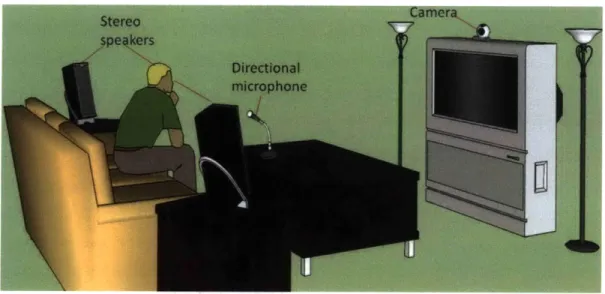
The Figure 4-1 sketches out the Back Talk system setup. A typical setting includes a camera mounted on the television for the visual module. A set of stereo speakers is arranged on either side of the viewer's couch to play audio cues around a viewer. Spoken communication and laughter
are picked up by a directional microphone pointed in the viewer's direction. This microphone is connected to a computing device for processing input audio. The directional microphone can also be replaced by a headset with a microphone to capture spoken comments.
Figure 4-1: Back Talk system setup with its components.
4.4 Cell Phone Interface
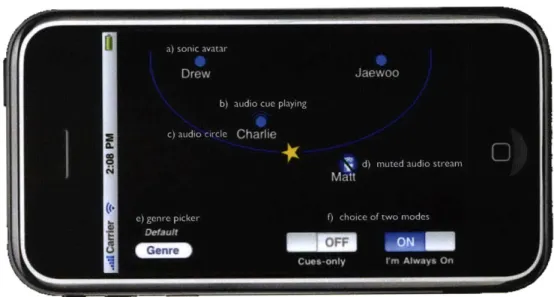
Back Talk users access their co-viewing buddies primarily through their cell phones. The selection of the phone precludes the need for an additional controller - it is a portable device that users would almost always carry with them. Figure 4-2 shows the interface depicting a virtual couch. Each remote co-viewer is represented as a "sonic avatar". We refer to these representations as sonic avatars because they represent sources of audio in a user's physical surroundings. These sonic avatars are movable icons that are associated with the physical listening space around the "primary listener". The primary listener is represented as a star icon in the interface. When a user wishes to quiet an audio stream from a co-viewer, she can do so by dragging the sonic avatar outside the "audio circle". This results in muting the manipulated avatar (Figure 4-2). Controls at the bottom of the interface allow a user to limit the amount of audio she transmits to remote co-viewers by selecting "cues-only" mode. If a user turns on "I'm always-on" mode, the system is designed to
transmit cues, and, detect and transmit whenever the user speaks. While playing an audio cue for a particular co-viewer the corresponding sonic avatar is highlighted visually with a volume icon (Figure 4-2). This additional feedback is intended for the viewer to have a quick glance at the source of the audio cue in case spatial distribution does not provide sufficient disambiguation of the source exuding a particular cue. The current prototype also has an option to select "genre" -a selection of comedy, drama, and sports. This action activates a different set of cues depending on the selection. For instance, selecting the sports genre activates a vuvuzela sound for indicating sudden arousal measured through the galvanic skin response sensor. Likewise, selecting drama results in a two-tone beep indicating entry of people.
4.5 Audio Environment
A key contribution of this system is the auditory environment that provides remote co-viewers a new way of being co-present with friends. In the Back Talk system we have two classes of sound sources: natural sounds from users and synthetic sounds (cues) to indicate activity. All these different sound sources are mixed into a stereo signal, where location in one dimension is obtained by left/right panning of each sound source. The location of a sound stream from a sonic avatar is mapped to its location on the phone screen. Audio cues and spoken comments are heard through a set of stereo speakers on either side of the viewer's couch Figure 4-1.
4.6 Audio Cues
Users of our system are physically distributed. Our process of translating engagement data into an auditory environment requires audio cues representative of the sensed data and also suitably indicative of presence of a co-viewer. From a range of possibilities, we chose to detect - 1) number of people watching, 2) people entering and leaving, 3) laughter, 4) arousal (overall activation) and
5) spoken comments.
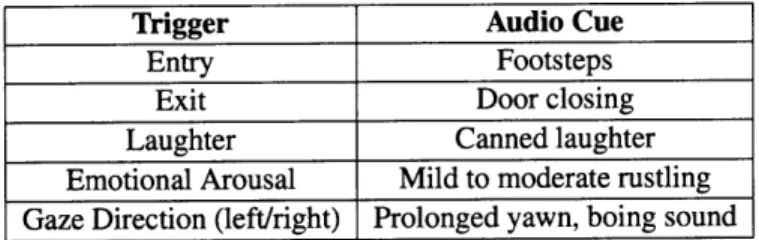
The choice of using these elements derives from our motivation to mimic a real-life viewing expe-rience - we are aware of people watching with us, likewise, when they exit, how they react to the show and so on. At the level of the listener, each sensed element is played as an audio cue. Table 4.1 lists triggers and their corresponding audio cues. In order to create a sense of a group of people around the viewer; we spatially place these cues to the left/right of the viewer.
Table 4.1: Captured engagement values and corresponding audio cues
Trigger Audio Cue
Entry Footsteps
Exit Door closing Laughter Canned laughter Emotional Arousal Mild to moderate rustling Gaze Direction (left/right) Prolonged yawn, boing sound
4.7 System Design Diagram
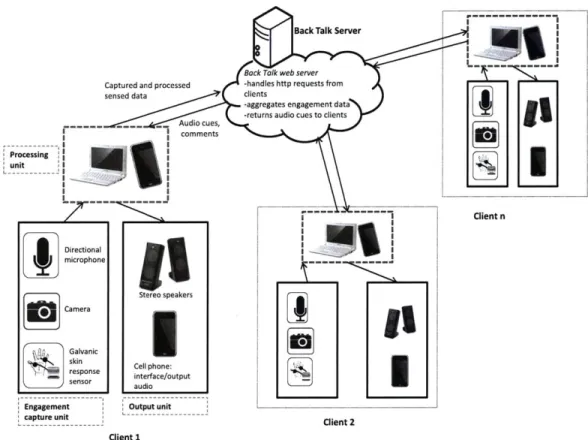
The diagram below (Figure 4-3) illustrates how the different modules and components - hardware and software -are connected. We will refer to this diagram when describing our system implemen-tation.
Captured and processed sensed data Directional microphone Stereo speakers Camera Galvanic skin Cell phone: response interface/output
sensor aui
Engagement Output unit capture unit
Client 2
Client 1
Client n
Figure 4-3: Back Talk System Diagram
Chapter
5
Implementation
5.1 Overview
The Back Talk system prototype is one implementation among many applications related to sociable television watching. This prototype combines a suite of engagement sensing techniques to capture useful information about a viewer and convey it to remote friends. The experience is grounded in a common show being watched by the audience. A key design consideration in building this prototype was avoiding additional visual notifications on the television screen of the viewer. As a result we chose to move presence information to an auxiliary device (in our case, a cell phone) and use the space around a viewer for presence information conveyed fluidly as audio.
A group of non-collocated users are connected to the system through their cell phones. We built the Back Talk system prototype to address the question: how can television watching be made sociable with presence of non-collocated friends. The underlying intent was to explore new ways of conveying presence by sensing engagement.
This chapter describes the two basic parts to the implementation of Back Talk: server-client archi-tecture and the engagement sensing modules.
5.2
Back Talk Server
The Back Talk system has a central server that connects cell phone clients associated with a virtual couch (Figure 4-2). These clients are distributed friends that decide to watch a particular television show together. Each couch is assigned a URI and each viewer in the couch streams engagement data to this central server. This server model can easily be extended to have multiple such servers, each connecting clients of a particular couch. Network connections between server-clients are essentially HTTP requests over the Internet. The main role of this server is to aggregate engagement data from each remote viewer and serve this information to querying clients.
The server is a PHP-based web server. It accesses a MySQL database to add and retrieve en-gagement data for each user. Clients update time-stamped enen-gagement data through HTTP POST requests. In a similar fashion, clients also query the server for engagement data of co-viewers.
5.3
Back Talk Client
In our prototype we refer to the combination of the suite of engagement sensing modules and the
cell phone interface as the Back Talk Client. Figure 4-3 shows a detailed depiction of the various
components that comprise a typical Back Talk client. The client interface in this case is located on the cell phone - an iPhone (it could be any other touch based hand-held device). We further breakdown the client into a processing unit and an input-output unit. In our implementation, a local computing device (a laptop) and cell-phone comprise the processing unit. The local computing device processes data received from the engagement sensing modules before sending it to the Back Talk server. The cellphone queries the server for co-viewer engagement data and plays a crucial role in translating this data into visual and auditory output. The input-output unit includes the engagement sensing modules and a combination of a stereo speaker system and cell phone. The rest of this section describes these units in detail.
5.3.1 Processing Unit
In the current version of our prototype, we use a laptop as the computing device that handles incom-ing engagement data from the various modules. The cell phone is also part of this unit and its role is primarily to receive incoming engagement data from the Back Talk server. Together these two de-vices act as intermediaries between the input-output client elements and the Back Talk server (refer textitprocessing unit in Figure 4-3). In future iterations of the Back Talk system, the roles of these two devices can be shared between a television and cell phone. Also, the engagement capture and output units could merge into the processing unit; this can be appropriately achieved by harnessing the cell phone to perform audio and galvanic skin response sensing and using the television as the processing device for the visual module.
5.3.2 Engagement Capture Unit
Our prototype has three sensing modules that pick up engagement data (refer to engagement
cap-ture unit in Figure 4-3). These are the visual module -for detection of number of faces and gaze direction; audio processing module -for detection of laughter and spoken comments; and galvanic
skin response sensing -for detection of sudden arousal.
Visual Module
Detection of number of people in the room and gaze direction of viewer(s).
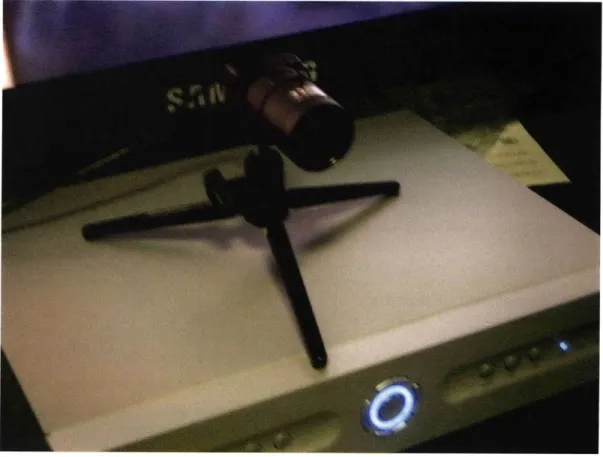
Setup: This module uses a camera placed near the television, (refer Figure 5-1) to detect the number of people watching television. Our prototype uses a Firefly MV USB Camera 1 and a Tamron 1/3",
5.0-50mm lens. We used this combination of lens and sensor after preliminary experiments revealed
that a regular webcam was insufficient for our purpose of detection and tracking of faces of people at distances - 8ft away from the camera. A regular webcam (in our case, a Logitech Quickcam
Pro 5000) does not have enough resolution and optical zoom to create a feature rich image of the 1
subject(s) to be tracked. Instead an optical zoom lens allows us to obtain a high resolution image of the region of interest.
Figure 5-1: Visual Module: Camera mounted near the television.
Processing: We used OpenCV (Open Computer Vision) [26] for detection of multiple faces as seen by the camera. Face detection is based on the object detection algorithm proposed by Viola and Jones [27] and further improved by Leinhart [28]. Detection is based on Haar-like features that encode the existence of oriented contrasts between different regions of the image. They are called Haar-like features because they are computed similar to the coefficients in Haar wavelet transforms2.
The classifier in this detection method is first trained with several (a few hundred) sample views of the object to be detected (in our case, faces), called positives and similarly negatives -arbitrary images of the same size as the positives. The classifier is in fact a "cascade" of "boosted" classifiers
2
working with Haar-like features. The word cascade in the name means that the resultant classifier is a combination of several simpler classifiers. A positive or negative result is arrived at only once the region of interest in a candidate image has cascaded through each of the classifiers and has either passed all the stages or has been rejected. Boosted classifier means that classifiers at each stage are complex themselves and using an appropriate boosting technique, in this case Adaboost [29].
Once trained, the classifier can be applied to a region of interest in an input image (same size as training images) to detect if the region is likely to show the object (i.e. a face). An important advantage of this classifier is that it can be easily resized to find objects of interest at different sizes, which proves more efficient than resizing the image itself. OpenCV comes with several cascade files for detecting both frontal and profile faces. We use a cascade file for frontal faces for detection of number of faces in the room. This module is designed to update the Back Talk server with the most recent number of faces detected.
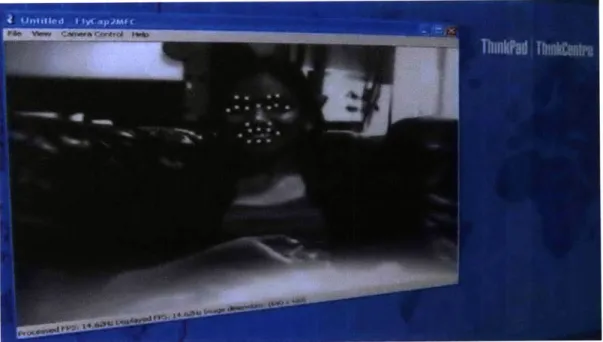
In order to convey attentiveness of a remote co-viewer, we use Google Tracker3 for tracking faces. The current implementation is capable of reliably tracking one face. The tracker offers 22 feature points for tracking (Figure 5-2). Normally, feature points on the nose are chosen as central points. Likewise, we identify a feature point on the nose as the fiducial point. Points to the left of the fiducial point are referred to as left feature points, similarly points to its right are referred to as "right feature points". We calculate the following two distances: sum of distances between "left" feature points and the fiducial point and sum of distances between "right" feature points and the fiducial point. When a viewer's gaze is directed at the television, these two distances are approximately equal. However, when a viewer tilts his face (changes gaze direction) we observe a change in these above two distances calculated. If the ratio of the left sum of distances to the right sum of distances is less (or more) than the predefined threshold, Lilower (or L-upper), then we say the person is looking left (or right). If the ratio is between these two thresholds, we say the person is looking at the television screen. In our experiments, we've set Lilower to 0.85 and L-upper to 1.15. As soon as a change in direction is detected, the software communicates this information to the Back Talk server.
3
Figure 5-2: Facial points as detected by the tracker.
Audio Processing Module
Detection of spoken comments and laughter
Setup: i) Directional microphone pointed at viewers (Figure 5-3). ii) Non-directional microphone4
Processing: Spoken comments detection: The process of picking up spoken comments from the user is fraught with extraneous sources of audio in a typical television viewing setting. While we could choose to transmit everything picked up by the microphone in the viewer's room, we decided that it would deteriorate the auditory experience. This is because the microphone would also be picking extraneous audio signals contributed to in a large part by television audio. We addressed this issue by using a directional microphone, Sennheiser MKE 3005 pointed at the user that could detect spoken comments coming from the direction of the viewers and ignore television audio. Figure 5-4 shows the input recordings from a directional microphone and non-directional
4
Plantronics PC microphone.
5
Figure 5-3: Directional microphone pointed at viewers.
microphone. Both these recordings are in the presence of television audio playing at a volume comfortable for viewers6. Input captured by the directional microphone by virtue of the properties of the device, tends to have portions of speech significantly distinguishable from background noise. It is this difference that we leverage in computing speech segments from the microphone input.
As a first step in the process, we measure the energy of samples in every window of one second length. The first five seconds of the start of the viewing experience is usually assigned as a cali-bration period. During this time, the energy of the microphone input samples is averaged to obtain the average level of ambient noise in the room with the television playing. Energy calculation is done based on amplitude of samples - sampling rate 8000 Hz, 16 bits per sample, PCM encod-ing. The process is designed to detect the onset of spoken comments by the viewer as seen by a
6
Each recording had 3 speech segments with the last one spoken at a lower volume.
0.5 0 -0.5 -1
Directional microphone response
-0 1 2 3 4 5 6 7 8
Time (in seconds) -4
Non-directional microphone response
0.5 -0 -0.5
-0
1
2 3 4 5 6 7 8Time (in seconds) -4
Figure 5-4: Comparison of microphone inputs in the presence of television signal.
sudden change (significant increase) in energy in a given window. The algorithm keeps flagging windows as "speech segments" until the energy calculated is below the set threshold. Finally, the Back Talk server makes available the buffered speech segments for all clients that register at the start of the viewing session. Prior to arriving at this process for capture of viewer comments, we experimented and explored a number of different techniques. However, these were not ideal for real-time processing. Refer to appendix A for details of related experiments.
Laughter Detection: Whenever speech segments are detected, they are processed to detect laughter. The laughter detection module is a nearest-neighbor classifier trained on 10 laughter/no laughter samples each from 5 users. We use a representation based on the mel-cepstrum coefficients of the speech signal sampled at 8000 Hz. Each instance consists of 12 mel-cepstral coefficients7 along with the log of the energy, Oth cepstral coefficient, delta and delta-delta coefficients for each frame. Each instance is a window of 1 second of audio data split into 256 frames. Dynamic time warping (DTW), a distance metric for sequences based on dynamic programming, was used as the distance metric. We chose to use mel-cepstral coefficients as features based on our survey of previous work in laughter detection. Knox's experiments [30] clearly indicate that MFCC features outperform pitch related features. Similar results were also seen in [31].
7http://en.wikipedia.org/wiki/MelFrequencyCepstraLCoefficients
Galvanic Skin Response (GSR) Sensing
For measuring overall activation.
Setup: The sensor module is designed to be fitted easily on the back surface of the cell phone or worn detached from the cell phone.
Processing: The use of the GSR sensor is exploratory in nature. We were interested in looking for non-speech cues of attentiveness to augment the co-viewing experience. An important benefit of a GSR sensor is that it offers a quick way of sensing emotional arousal [32]. In our current prototype we use a small sensor fitted with an Arduino Mini micro-controller and Bluetooth Mate to transmit sensor output to the processing unit. The sensor package is designed to be attached to the back of the cell phone, Figure 5-5, or worn on the user's hand Figure 5-6. We calibrate the response of a user for the first ten minutes till the sensor data is stable to obtain our base-line reference. After this initial calibration period, the system detects peaks in data corresponding to sudden arousal in the subject.
Figure 5-5: Galvanic skin response sensor package fitted to the back of the phone.
5.3.3 Output Unit
A set of stereo speakers and a cell phone comprise the output unit (Figure 4-3). Together, they create the output auditory environment around the primary viewer. The Back Talk system has a
GSR sensor electrodes+
bluet th module
Figure 5-6: Galvanic skin response sensor electrodes worn on the hand, not attached to the phone.
central server that connects cell phone clients associated with a virtual couch (Figure 4-2). Network connections between server-clients are essentially HTTP requests over the Internet. The client in this case is an iPhone (it could be any other touch based hand-held phone). The client periodically queries the server to get most recent engagement cues and spoken comments for each co-viewer. On the cell phone we use OpenAL (Open Audio Library) to create an Open AL listener (the primary viewer represented by a star icon), OpenAL sources (co-viewers or "sonic avatars") and OpenAl buffers (audio cues for different engagement data). For every data point conveying co-viewer en-gagement, the client plays an appropriate audio cue for the corresponding "sonic avatar". Audio cues are pre-loaded on the client. The set of stereo speakers are connected to the cell phone to play the audio cues. We use OpenAL to position sonic avatars on either side of the primary listener and achieve left/right panning of the sound source. The positions of these avatars can be manipulated by moving them around on the screen.
In order to play spoken comments, the iPhone streaming client receives audio data in MP3 format from the server and funnels this data to the Audio File Stream Services [33], part of the iOS Audio Toolbox framework [34]. The Audio File Stream Services component is used to parse the data as we receive it continuously from the server. This data is then sent to Audio Queue Services [35], another component in the Audio Toolbox framework, which can handle low-level playing and recording of audio data. The Audio Queue comprises of multiple buffers which are filled at one end by parsed data from the Audio File Stream Services and played at the other end. As the buffers in the Audio Queue are filled the system plays the data in the buffers. The streaming process runs in a separate thread to keep the GUI responsive at all times.
Chapter 6
Evaluation
6.1 Overview
In order to evaluate the success of this thesis, we conducted two different kinds of user studies. The first was a User Experience Study and the second was an Engineering System Performance Study. As their names suggest the former was conducted to get a holistic idea if the experience we designed for meets the expectation of users. The second study had a focus on evaluating perfor-mance of all engineering components that were built as part of this thesis. The aim was to highlight areas that contributed positively and robustly to the overall system and areas that did not perform as expected. We will also discuss directions for improvements in future iterations based on our system
evaluation.
6.2 User Experience Study
This study was conducted during the semi-final matches of the FIFA World Cup 2010. These sports events rendered themselves ideal for a television watching session that could potentially have a lot of conversation between groups. We picked two locations in the Media Lab where the soccer matches were being screened. It was observed that these two locations attracted quite a few viewers
and hence chosen. Figure 6-1 show the set up in these two locations -MIT Media Lab, E-15 344
and E-14 5th floor cafe .
(a)(b
(C)
(d)
Figure 6-1: User study locations: a,c -first location, b,d -second location.
6.2.1 Experimental Setup
The Back Talk system is designed to support multiple distributed viewers in a common viewing experience. The model is ideal for single viewers aggregating through their virtual couch. Our user experience study deviated from this model in that it was primarily a multi-viewer test -based on our design this should have triggered audio activity for only one sonic avatar placed on the primary listener's couch. However, we attempted to create the same effect we designed for, that is,
'These pictures are representative of the audience setting during the days of the study. We did not take pictures of the audience in these locations during the study as we did not obtain prior permission for the same.