HAL Id: hal-00811958
https://hal.archives-ouvertes.fr/hal-00811958
Submitted on 8 Mar 2016
HAL is a multi-disciplinary open access
archive for the deposit and dissemination of
sci-entific research documents, whether they are
pub-lished or not. The documents may come from
teaching and research institutions in France or
abroad, or from public or private research centers.
L’archive ouverte pluridisciplinaire HAL, est
destinée au dépôt et à la diffusion de documents
scientifiques de niveau recherche, publiés ou non,
émanant des établissements d’enseignement et de
recherche français ou étrangers, des laboratoires
publics ou privés.
Configuration and Management Tool for Laboratory
Training
Saher Arnous, Arnaud Lelevé, Khalid Kouiss, Patrick Prévot
To cite this version:
Saher Arnous, Arnaud Lelevé, Khalid Kouiss, Patrick Prévot.
Configuration and Management
Tool for Laboratory Training. 6th IEEE ICELIE, Oct 2012, Montréal, Canada. pp.A-1242 / 2,
�10.1109/ICELIE.2012.6471156�. �hal-00811958�
DR
A
FT
Configuration and Management Tool
for Laboratory Training
Saher ARNOUS LIRIS (CNRS UMR 5205), Université de Lyon F69621 Villeurbanne Cedex-France +33 (4) 72 43 60 47 [email protected] Arnaud LELEVE Ampère (CNRS UMR 5005), Université de Lyon 69621 Villeurbanne Cedex-France +33 (4) 72 43 60 47 [email protected] Khalid KOUISS LIMOS, (CNRS UMR 6158), Campus Scientifique des Cézeaux BP 265, F63170 Aubière France +33 (4) 73 28 81 07 [email protected] Patrick PREVOT LIRIS (CNRS UMR 5205), Université de Lyon F69621 Villeurbanne Cedex-France +33 (4) 72 43 82 94 [email protected]
Abstract- Electronic Laboratories have been growing during the last decade, but till now, configuring a complex automated system shared between several institutes and used for several disciplines, is a process restricted to qualified staff. Moreover, authoring and managing lab resources (programs, learning scenarios, documentation for both instructors and trainees) is a complex task as soon as the number of instructors, disciplines, different levels… grows up. This paper introduces a software tool aiming at helping in the lab resource management and session configuration.
I. INTRODUCTION
Laboratory practicals (also called hands-on training), are considered as a key training kind especially in technical and scientific disciplines, through which students can confront their theoretical knowledge with reality [1]. The way of supporting this training has evolved through years since the end of seventies by getting advantage of the advancement of Computer Technologies and, later, Information and Communication Technologies (ICT). Indeed laboratories have become more and more computerized and qualified as Computer Assisted Lab (also known as Computer Aided Lab [2] or even “ICT aided experiments in real labs”) [3]. Moreover, they have also evolved into two complementary forms: Virtual Laboratories (V-Labs: experiments by simulation program) and Remote Laboratories (R-Labs: experiments on a real but remote apparatus); in [4] we introduced the global term “Electronic Laboratories” (E-Labs) to represent all of these enhanced forms of laboratories. ICT provide users with the ability of better controlling operations on real (and virtual) hardware, enabling task automation, data acquisition and archiving, … such as in [5, 6]. The role and the design of E-Labs in the state of art were widely discussed in the context of distant learning [7,8] although Computer Assisted Laboratories are widely used in local learning as well. Indeed, remote manipulation and development of computerized interface for controlling an apparatus are well documented, as in [9, 10]. In this
paper, we approach the topic of managing and preparing resources for a complex lab session (in this case, in automation discipline, using an Automated Production System (APS). Indeed, configuring such a system, shared between several institutes and used for several disciplines, is a process restricted to qualified staff. Moreover, authoring and managing lab resources (programs, learning scenarios, documentation for both instructors and trainees) is a complex task as soon as the number of instructors, disciplines, different levels … grows up.
The rest of this paper is structured as follows. In the second section we present the context and environment of this project. In the third section we introduce the Configurator tool functioning while, in the fourth section, we depict its implementation and we sum up related experimental results. Finally, we end this paper by a conclusion of the elaborated work and a perspective on future works.
II. CONTEXT ANDENVIRONMENT
In AIP RAO Primeca workshop1 (a workshop used by several institutes of Rhone Alpes area in order to share high cost software and hardware laboratory resources), we observed that the process of (re)configuring the APS, in order to prepare a hands-on training session, is time consuming. Indeed, a rigorous procedure must be followed: fetching and loading Programmable Logic Controller (PLC) and industrial robot programs, fine-tuning mechanical aspects, filling part stocks, restarting robots and related Automated Systems ... This procedure varies according to training sessions and/or the level of applying trainees.
Moreover, we remarked that this procedure requires a global expertise of handled systems, which often prevents instructors to perform it on their own (for instance, every industrial engineering instructor is not specialist in automation). Thus, because of the small size of teams and their heavy workload, a unique person, in charge of these systems, has acquired this necessary experience.
1
DR
A
FT
This person performs these preparations when instructors are not autonomous (non-automatician instructors, temporary ones, new ones ...). Besides this person, a part of this expertise is spread among all system users.
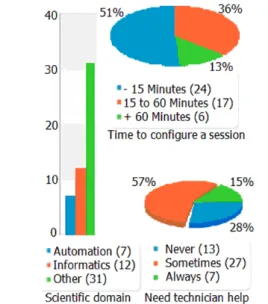
To overview the difficulties of preparing hands-on training sessihands-ons, we recently launched a survey targeted at scientist teachers in neighbour universities. The total number of contributors was 47 from several scientific fields where 15% work in automation, 25% in informatics and the rest work in other fields (Industrial Engineering, Electrical Engineering, Mechanical Engineering, Chemistry & Physics, Thermal Engineering and Management Science). This survey (visible in Fig. 1) revealed that 40% of the contributors need between 15 to 60 minutes to prepare a laboratory session and 72% of them require the help of a technician (even in automation 5 contributors declared needing this help).
Moreover in order to write off expensive laboratory resources, they are shared between several colleges, institutes, for various disciplines [11], and even sometimes, for scientific experiments, as not every university can afford up to date laboratory hardware, not to forget the devoted time for installation, training of the technical staff [12, 13] and the costs of maintaining and repairing them [14]. A heavy sharing imposes a shuffled schedule where the configuration of each hardware has to be regularly modified between two sessions. Moreover, their intense usage implies to reduce the required time for this reconfiguration.
Beside these considerations, we also observed that the organization of laboratory resources could be enhanced: each instructor develops his own programs with hardly no feedback to the user community. As they do not have a global view
about who programs what and who uses this system for which usage, the experience exchange is difficult.
More generally, for a few years, E-Labs have progressively integrated the use of learning scenarios [15] through Learning Management Systems (LMS, such as Moodle2, for instance). This evolution, combining e-learning support with hands-on activities, is motivated by the need of exchanging and reusing pedagogical resources. As nowadays, laboratory desktops are equipped with computers, the use of a LMS enables instructors to provide online resources more efficiently than traditional printed ones. In the one hand, trainees can directly answer questions and provide their report inside the LMS which facilitates the management of high quantities of trainees and, on the other hand, it enables laboratory learning scenario authors to manage their scenarios with specialized ICT authoring tools and manage the evolution of versions and the trainee reports. On that note, half of contributors of the survey declared being interested by improving the reusability of pedagogical resources and by getting a way to better manage them. In the aforementioned survey, we found that 83% of the contributors reuse their own resources while 63% reuse colleagues' ones and half of them believe that the configurations he/she developed can be reused. In addition to 74% of them think of archiving their configurations where a dedicated library will be useful for this goal (see Fig. 2).
In this context, we propose to automate as many preparation operations as possible, for laboratory sessions in automation discipline, in order to reduce the procedural critical configuration time and to make instructors more autonomous. We built this response through the design of an E-Lab framework, which provides the same materials (programs, learning scenarios, documentations for
2
See http://moodle.org/
Fig. 1. Survey results: disciplines, configuration time and help requirement.
DR
A
FT
instructors and trainees ...) as in traditional laboratories, but, in this case, being managed, controlled and maintained through a specific software.
Optimizing the preparation time of laboratory sessions requires to previously organize every required resource (programs, documentation, learning scenarios ...). As a part of these resources is common and reused in different configurations (similar apparatuses/programs, different levels for the same pedagogical objectives, same apparatus and documentation for different disciplines …), we have set the coverage of this software to the root of the process by: managing resource versioning and assembly. Their design is left to specialized software (authoring tool for learning scenarios, automation development tool for PLC programs …). The proposed software acts as an organizer and assembler of, at first, source resources (such as source code, editable files...), and at the end of the process, ready-to-use sets of resources (compiled programs, SCORM packaged learning scenarios, PDF documentation…), which we call “configurations”.
III. CONFIGURATOR:ACTORS,REQUIREMENTS AND FUNCTIONAL STRUCTURE
This project capitalizes the experience from two previous projects: ICTT@Lab middleware for adapting generic learning scenarios to apparatuses similar, in terms of functions, but possibly different in terms of hardware [16] and LIMOS methodology for designing IEC 61131-3 function blocks for automation programs [17] using a component-based approach. The following describes the Configurator application through its actors, main functions and process.
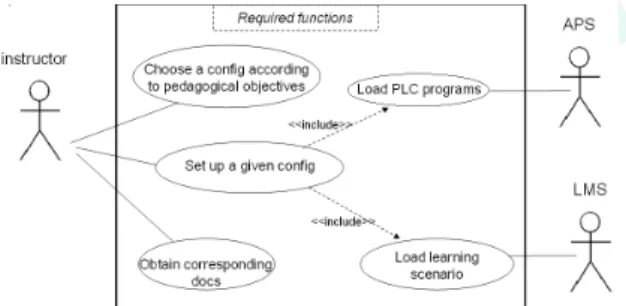
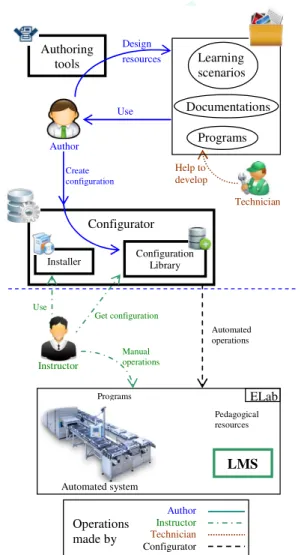
A. The actors and main process of the system Configurator tool will be available to both instructor(s) and author(s). It will serve to prepare a laboratory apparatus and the needed resources for hands-on training session. Authors are specialist in their domain (scheduling, robotics, MES3 ...) but not necessarily specialist in automation. Their role (see Fig. 3) is to prepare configurations ready to use through practical training on some automated system while Instructors’ role consists in choosing a configuration according to pedagogical objectives, setting it up and finally using it with trainees. A Technician, specialist in automation, may be charged to develop the required PLC programs and maintain the functioning of the automated system.
Besides these human actors, non-human actors are the APS, the LMS and possibly an E-Lab management system (ElaMS) [16]. The APS is, in
3
MES: Manufacturing Execution System.
our case, the main laboratory support resource which requires to be reprogrammed and/or configured at each session change. The LMS is used by Configurator to load corresponding learning scenarios and to deliver them towards instructor and trainees. Finally, the ElaMS is a middleware to manage the communication between LMS and APS during a pedagogical activity. It requires a configuration depending on pedagogical activities and the APS functioning.
B. The main tool functions and data
The tool consists in an Authoring Management Tool (AMT), a Configuration Library and an Installer. The AMT enables the author to create and manage configurations according to pedagogical objectives. This does not include the content authoring (programs, learning scenarios, documentation) itself: this function is left dedicated to specific external existing tools (any authoring tool for learning and documentation design, PLC development suite for PLC programming). So, the author coordinates the resources developed by means of other tools. Authored configurations are stored into the Configuration library. Once chosen by an instructor, these configurations are then loaded on the PLC and LMS by mean of the Installer. It is charged to perform the higher number of automatable operations, the rest of them being manually performed with the help of the appropriate documentation prepared for this reason (see Fig. 4). A configuration is a set of ready to use resources: PLC programs, learning scenario package(s) (in SCORM format) and pieces of documentation (in PDF/Web format) and possibly an ELaMS configuration file.
Data classification hierarchical structures are provided to categorize source elements and to enable keyword based search by indexing them. A first hierarchy defines the pedagogical domain a configuration can belong to (“Automation”, “Industrial Engineering”... for instance). In this hierarchy, the children of each domain define more precise topics (PLC programming, Production scheduling…). A second hierarchy is built to define which APS system component a given configuration (or sub element) focuses on. This enables researches from a component point of view and it affords the opportunity to search for
DR
A
FT
configurations related with RFID or industrial vision (for instance) regardless of aforementioned pedagogical domains. Previous both hierarchies remain generic in the sense that they provide information about tagged elements (documentation, learning scenarios...) independently of a real system. The third hierarchy provides the link between these configurations (and their elements) and a dedicated real system (the Automated Elevator #1 of our lab, the vertical store, …) and their children define more precise links towards subparts of these systems (for instance, station #1, Conveyor #2, HMI, …). Crossing keywords from these three taxonomies enable to retrieve documentations, learning scenarios… for a given apparatus, and (if necessary) more precisely concerning an interesting sub part about a specific topic (Production Scheduling for instance).
C. The main process
Starting from a desired pedagogical objective, instructors search and choose a corresponding configuration from the tool configuration library. The tool then loads corresponding PLC programs on the APS and learning scenario on the LMS. In addition it provides auxiliary documentation
necessary for the manual non-automated configuration operations (see Fig. 3).
These configurations are built, each one, from a kind of source configuration (this configuration contains the same resources but in editable form) which we call component. We follow the component based programming paradigm in order to enable and facilitate the reusing of existing resources. A Component represents either a reusable part of a configuration or a final assembled set of resources ready to be compiled into a final configuration. A Component contains only source information (for instance, program pieces stored in OpenPLC format). More precisely, it features links towards related (atomic and previously assembled) source resources to be employed in a practical training session. Components can nest other components and reuse part of their resources (encapsulation and inheritance properties).
D. Indexing atomic and aggregated data
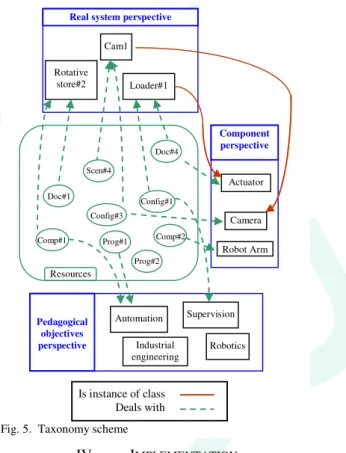
Three ontologies have been built and self expend as new content is added into the software. They represent three points of view to reference each node (document, scenario, component…): “Component perspective”, “Real system perspective” and “Pedagogical objectives perspective”.
The “Component perspective” provides a hierarchy of automation component terms one can find in an automated system (presence sensor, pneumatic cylinder, PLC…). In term of ontologies, this hierarchy defines a set of classes. It enables to tag nodes to perform component based researches. “Real system perspective” is a hierarchy of tags representing real systems in a workshop and/or their subparts (for example: Loader#1, Vertical store#3, Station#4 of Assembly System#2…). In term of ontologies, this hierarchy defines instances of aforementioned classes, in order to associate a given node with a particular system or subsystem. The “Pedagogical objectives perspective” provides general terms corresponding to learning topics (supervision, scheduling, robotics, etc.). Each term of this list can have on or more references towards terms of “Component perspective” list which gives a wider organized categorization of the created resources. According to this scheme (see Fig. 5), search functions can afford three levels of granularity: specific search according to a given category (created by the user: Loader#1 for instance), component type based search which retrieves all specific resources related to a given component (Loader, Robot arm… for instance) and learning topics based search which retrieves all resources related to a topic and classified according to component types they belong to. Components contain references towards atomic data pieces to enable their sharing between different components.
Author Instructor Design resources Configurator Create configuration Technician Configuration Library Authoring tools Use Get configuration Help to develop Automated system LMS Manual operations Programs Pedagogical resources ELab Author Instructor Technician Configurator Operations made by Installer Use Learning scenarios Documentations Programs Automated operations
DR
A
FT
IV. IMPLEMENTATION
This software is ought to be used by several actors at different moments in time in several places. A networked application is thus necessary. Moreover, users' computer configurations are various (IOS, any Microsoft Windows version, linux …), which tends to a web based solution. Regarding its functions and data process (multi author content management, versioning, metadata indexing), we opted for a Content Management System (CMS) customized for the configuration needs.
A. Prototype
For the development of a prototype, we chose Drupal4 open source Content Management System (CMS). It is long and widely supported and we already had some experience with it.
Concerning pedagogical content authoring, in order to design LMS-ready learning scenarios (in SCORM format), slides, printed and online documentation by means of a single software, we chose Opale publishing chain software (based on Scenari5 platform) dedicated to realize learning scenarios in addition to the creation of distributable web documentation. For learning scenario delivery, we use Moodle6LMS as it is the one deployed in our institute but the only constraint is to use a SCORM compliant LMS. PLC programming is
4 See http://drupal.org/ 5 See http://scenari-platform.org/ 6 See http://moodle.org
performed with Schneider Electric Unity software as our PLC come from this supplier.
We appealed to Content Construction Kit (CCK) module to create different kinds of data: subprogram, piece of documentation, learning scenario element, component and configuration. The source files (for each atomic data type) are stored as attached files with each data node. The taxonomy functions have been used to index each piece of data and enable keyword based searching.
the previous three perspective functions are implemented in the form of three taxonomies. Complementary functions have been added to create clear HMI, to provide a finer versioning for each node, to assemble components to create a hierarchy of them and to generate a configuration from one of these components (the atomic resource compilation and their loading on LMS and PLC are, for this prototype and for time reasons, manually performed by external tools).
B. Experimentation
In order to prove the applicability of this tool, we developed a use case for a few lab sessions on a “Vertical Store” (see Fig. 6). Three different sessions can be performed on this apparatus. Their objectives start from learning how to program an automated system and end on learning how to synchronize two separated automated systems. The operative part of this system features two subsystems: a vertical store allowing storing (manually on one side and automatically on the other one) in pieces. Nacelles rotate inside to transport and present at the door pieces to deliver. Besides, a loader can present and fetch back pieces inside the store and set them on a few parking lots.
1. Preparing resources
For pedagogical resources, the author designs, by means of Opale software, learning scenarios including demonstration scenarios in addition to the training ones. As many pieces of documentation are common to the three sessions, they are created as 37 different pieces (for three sessions and instructor and trainees) inside Opale and registered in Configurator. Opale enables by itself the reuse of these pieces of documentation when necessary.
Fig. 6. Vertical store system.
Real system perspective
Loader#1 Cam1 Rotative store#2 Pedagogical objectives perspective Robotics Automation Supervision Industrial engineering Component perspective Actuator Camera Robot Arm Scen#4 Doc#1 Doc#4 Comp#1 Prog#1 Prog#2 Config#1 Config#3 Is instance of class Deals with Resources Comp#2
DR
A
FT
These documentations are prepared for both of students and instructors with the idea to reuse by reference/inclusion every piece of yet written information in order to prevent rewriting and facilitate their update and the propagation of updates.
For the automated system, the author developed required programs, with the help of a technician with the same approach: creating subsections of programs which can be reused in the three sessions.
2. Building generic configurations
Six configurations were created (Vertical Store and/or Loader, demo or training). Each one shares a number of atomic data pieces (initialization programs, sub-programs for mode management, ..., reference documentation for programming the PLC, system description, current program structure, PLC inputs/outputs, ...). Six different PLC programs are built up from 18 subprograms according to each pedagogical need: Vertical Store Demo (one coupled with and the other one without the loader), Loader Demo (coupled with the vertical store or not). In addition, 3x4 additional documents (such as “System description documentation for student”, “Instructions for instructors” …) are also built from 37 pieces.
The time needed to prepare store and loader configurations (around 1 to 1:30 hour considering that there already existed a basis) is longer than a simple copy/paste solution but the gain appears only after this first step when creating a new configuration from existing resources (store + loader: 1h) and when changes occur on pieces of resources so that several configurations are impacted and require to be updated (a few minutes per configuration). With the prototype, as program and learning scenario loading functions were not developed, these steps had to be performed manually. So, no time gain could be recorded yet.
V. CONCLUSION
In this paper we presented a configuration tool to help the author/instructor to prepare a hands-on session configuration on an automated system. The experiment presented in this paper already revealed time gains with a small automated system and very few related configurations. The continuous use of the Configurator should result in a richer library of configurations with different pedagogical objectives which should enhance again the reusing and exchange of resources and, in turn, authoring time gains. Experimentations on a larger automated system featuring more subsystems and configurations with common parts will be performed to test further the gains of such an approach. Later, we think to integrate this tool into the process of training technical staffs of firms supplying automated systems as the core of training
cases is not different from the one exposed in this paper.
REFERENCES
[1] Feisel, L. D. & Rosa, A. J., “The Role of the Laboratory in Undergraduate Engineering Education,” Journal of Engineering Education, 2005, 121-130.
[2] Kaiser, F. & Staudenmaier, H., “Computer aided laboratory instruction,” Computer Physics Communications, 1978, 15, 335 – 339.
[3] A. Mani et C. Patvardhan, "A study of ICT enabled laboratories," India Conference, Annual IEEE , ISBN 1-4244-0369-3, doi: 10.1109/INDCON.2006.302765, New Delhi, India, 15-17 sept. 2006.
[4] Coquard, P.; Guillemot, M.; Lelevé, A. & Noterman, D.and Benmohamed, H., “AIP-Primeca RAO Remote Laboratories in Automation,” International Journal of Online Engineering (iJOE), 2008, 4 , 12-18
[5] Consonni, D. & Seabra, A. C., “A modern approach to teaching basic experimental electricity and electronics,” IEEE Transactions on Education, 2001, 44, 5-15
[6] Williams, J. M.; Cale, J. L.; Benavides, N. D.; Wooldridge, J. D.; Koenig, A. C.; Tichenor, J. L. & Pekarek, S. D., “Versatile hardware and software tools for educating students in power electronics,” IEEE Transactions on Education, 2004, 47, 436-445
[7] Fujii, N. & Koike, N. "A New Remote Laboratory for Hardware Experiment with Shared Resources and Service Management Information Technology and Applications,” in International Conference on, IEEE Computer Society, Vol 2, pp.153-158, 2005.
[8] U�ur, M.; Sava�, K. & Erdal, H. "An internet-based real-time remote automatic control laboratory for control education," in Procedia - Social and Behavioral Sciences, Vol 2, pp. 5271 - 5275, 2010.
[9] Harward, V. J.; del Alamo, J. A.; Lerman, S. R.; Bailey, P. H.; Carpenter, J.; DeLong, K.; Felknor, C.; Hardison, J.; Harrison, B.; Jabbour, I.; Long, P. D.; Mao, T.; Naamani, L.; Northridge, J.; Schulz, M.; Talavera, D.; Varadharajan, C.; Wang, S.; Yehia, K.; Zbib, R. & Zych, D. “The iLab Shared Architecture: A Web Services Infrastructure to Build Communities of Internet Accessible Laboratories,” Proceedings of the IEEE, 2008, 96, 931-950
[10] Montes, M., Swiatczak, J., Lesniewski, P.J., Thomas, J.C. & Golczak, M. “Universal Laboratory Networking System (ULabNet),” Instrumentation and Measurement Technology Conference, 2006. IMTC 2006. Proceedings of the IEEE 2006, pp. 986-991
[11] Dittmar, R. & Kahlcke, T., “Multiple use of an industrial-distributed control system in control engineering education Computer Applications,” in Engineering Education, Wiley DOI:10.1002/cae.20473, 2011,
[12] S. Rapuano and F. Zoino. “A learning management system including laboratory experiments on measurement instrumentation,” Instrumentation and Measurement, IEEE Transactions on, 55(5):1757–1766, 2006.
[13] T. Kikuchi, S. Fukuda, A. Fukuzaki, K. Nagaoka, K. Tanaka, T. Kenjo, and D.A. Harris. “Dvts-based remote laboratory across the pacific over the gigabit network,” Education, IEEE Transactions on, 47(1):26–32, 2004. [14] H.M. Langa. “Design and implementation of a laboratory
practicals management tool,” AFRICON, 2004. 7th AFRICON Conference in Africa, 2:965–968 Vol.2, Sept. 2004. 15-17 Sept. 2004.
[15] D. Kolberg, S and; Courivaud and M. Ozbek, “Lms and interactivity - technical issues for remote laboratories,” in Proceedings of IEEE 18th International Symposium on Personal, Indoor and Mobile Radio Communications (PIMRC 2007), IEEE, Ed., Athens, Greece, Sept. 2007. [16] Benmohamed, H.; Leleve, A. & Prevot, P. ,Generic
framework for remote laboratory integration,, Proc. of IEEE 6th International Conference on Information Technology Based Higher Education and Training (ITHET 2005), 2005, T2B/11-T2B/16