Object-focused Environments Revisited
Doctoral Dissertation submitted to the
Faculty of Informatics of the Università della Svizzera Italiana in partial fulfillment of the requirements for the degree of
Doctor of Philosophy
presented by
Fernando Olivero
under the supervision of
Prof. Dr. Michele Lanza
Dissertation Committee
Prof. Dr. Theo D’Hondt Vrije Universiteit Brussel, Belgium
Prof. Dr. Stéphane Ducasse INRIA Nord, France
Prof. Dr. Marc Langheinrich University Of Lugano, Switzerland
Prof. Dr. Oscar Nierstrasz University of Bern, Switzerland
Prof. Dr. Cesare Pautasso University Of Lugano, Switzerland
Dissertation accepted on April 2013
Research Advisor PhD Program Director
Prof. Dr. Michele Lanza Prof. Dr. Antonio Carzaniga
I certify that except where due acknowledgement has been given, the work presented in this thesis is that of the author alone; the work has not been sub-mitted previously, in whole or in part, to qualify for any other academic award; and the content of the thesis is the result of work which has been carried out since the official commencement date of the approved research program.
Fernando Olivero Lugano, April 2013
Abstract
In the object oriented programming (OOP) paradigm, programs are composed solely of objects. The computational model is based on a world of collaborating objects, where they send each other messages to carry out tasks. The programs are crafted with the aid of tools, which enable to describe their components and behavior in a human readable form. With the advent of the graphical user interface came the pinnacle tool for software development, the integrated development environment (IDE).
IDEs include numerous tools to effectively construct, debug, and test the programs. The tools work on a static textual representation of the program – the source code– which conceptually conflicts with the dynamic nature of the computational model of OOP. The use of a tool-based interface also produces technical problems, which relate to navigating the system, preserving the task context, and manipulating finer grained entities than the coarse grained per-spective offered by the tools.
In this thesis we investigate an alternative interface for OOP environments, which is based solely on direct manipulation of objects. It alleviates the con-ceptual and technical problems of tool-based IDEs, by giving prominence to the objects themselves within the interface.
We propose an Object-focused environment, composed of a 2D surface hosting behaviorally complete graphical representations of the objects. We pro-vide prototype implementations named Gaucho and Ronda, which illustrate the application of our approach to a broad range of tasks, such as modeling, pro-gramming, program comprehension, and collaborative software engineering.
To validate our thesis, we conducted a summative evaluation, instrumented as a controlled experiment where we compared Gaucho with a traditional IDE, finding that it is indeed a viable alternative to the current state of the art.
Acknowledgements
It was four years ago when I crossed the ocean and landed in Switzerland, and since then i’ve met many people who have greatly helped me along the way into completing my Ph.D studies. I extend my gratitude towards all of them, starting from my advisor Michele Lanza, to former and current REVEALER’s: the Doc Romain, Ricky, Mr D, Mircea, Lille, Alberto, Roberto, Remo, Luca, and Tommaso. It was great sharing an office, playing calcio, climbing in Vezia, traveling to conferences, and collecting anecdotes from Il Fornaio.
Michele, thanks for enlightening me with the ways of the word, and for all the support, patience and coolness you emanated during my time in Lugano.
I would also thank the members of my committee, for asking both interesting and tough questions, which greatly improved the contents of this dissertation.
To my former employers, Leandro and Valeria, thank you for teaching me so much in so little time; and to my former professors, Hernan and Carlos, who greatly inspired me to pursue a dissertation on such a interesting topic.
Needless to say, I greatly appreciate the effort and sacrifices that all my family endured during my extended european stay, GRACIAS TOTALES to all of you in the end of the world!
Wioleta, you made everything better, with your love and support. Thank
you for an amazing time in Lugano, Kocham Ci˛e.
Fernando Olivero April 2013
Contents
Contents vii
List of Figures xi
List of Tables xiii
1 Introduction 1
1.1 Symbolic Programming . . . 2
1.2 On the writing of programs . . . 3
1.3 Programming is more than just writing . . . 4
1.3.1 Integrated Development Environments . . . 4
1.4 Object-Oriented Programming . . . 6
1.5 The Problem . . . 7
1.5.1 The Conceptual Problem: Tools vs Objects . . . 7
1.5.2 Technical Problems . . . 8
1.5.3 Summary . . . 13
1.6 Thesis . . . 14
1.7 Contributions . . . 15
1.8 Structure of the Document . . . 16
2 State of the Art 17 2.1 Smalltalk . . . 18
2.1.1 Browsers and Inspectors . . . 18
2.2 Code-Centric Environments . . . 20 2.2.1 Relo . . . 21 2.2.2 Code Canvas . . . 22 2.2.3 Code Bubbles . . . 23 2.2.4 Summary . . . 23 2.3 Modeling Environments . . . 24 2.4 Direct-Manipulation of Objects . . . 28 vii
viii Contents
2.4.1 The Tools and Desktop Metaphor . . . 28
2.4.2 From Structured Text to Graphical Objects . . . 29
2.4.3 Self . . . 32 2.4.4 Morphic . . . 33 2.4.5 Naked Objects . . . 33 2.5 Conclusions . . . 34 3 Object-Focused Environments 37 3.1 Motivation . . . 38
3.1.1 From reality to the program . . . 38
3.1.2 Scenarios . . . 40
3.1.3 Summary . . . 43
3.2 Gaucho . . . 44
3.2.1 Gaucho in a Nutshell . . . 44
3.2.2 The Sessions and The System . . . 45
3.2.3 The Pampas . . . 46
3.2.4 The Shapes . . . 46
3.2.5 Implementation . . . 47
3.3 Modeling with Gaucho . . . 48
3.3.1 The MDE Shapes . . . 48
3.4 Programming in Gaucho . . . 50
3.4.1 Classes . . . 51
3.4.2 Methods . . . 52
3.4.3 Test Cases . . . 53
3.4.4 Packages . . . 54
3.4.5 Producing Fine-Grained Changes . . . 55
3.4.6 Navigating the System . . . 58
3.4.7 Task Context Support . . . 61
3.5 On the interface of Gaucho . . . 62
3.5.1 On the Textual Representation of Methods Statements . . 64
4 Evaluation 65 4.1 Instrumenting the Evaluation of Software Tools . . . 66
4.1.1 The Crux of Human-centric Experiments . . . 67
4.1.2 Biscuit: Tracking Human-Centric Controlled Experiments 69 4.2 Context . . . 72
4.3 Experimental Design . . . 73
4.3.1 Research Questions . . . 73
ix Contents
4.3.3 Baseline . . . 74
4.3.4 Object system & Treatments . . . 75
4.3.5 Tasks . . . 75
4.4 Experimental Operation and Results . . . 77
4.4.1 Operation . . . 77 4.4.2 Pre-Experiment Questionnaire . . . 77 4.4.3 Experiment Questionnaire . . . 79 4.4.4 Debriefing Questionnaire . . . 86 4.4.5 Data collection . . . 87 4.4.6 Results . . . 89 4.5 Reflections . . . 94
4.5.1 On the correctness of the performed tasks . . . 94
4.5.2 On the completion time of the performed tasks . . . 95
4.5.3 Threats To Validity . . . 95
4.6 Conclusions . . . 96
4.6.1 Biscuit to the Rescue . . . 97
5 Object-Focused Collaboration 99 5.1 On Object-Focused Collaborative Environments . . . 100
5.1.1 Shared Development Sessions . . . 100
5.1.2 Object-focused environments . . . 101
5.2 Ronda . . . 102
5.2.1 Awareness of Fine-Grained Changes . . . 102
5.2.2 Shared Development Sessions . . . 104
5.2.3 Change Authoring and Trust Levels . . . 104
5.2.4 Avoiding Conflicts . . . 104
5.3 Tea Time . . . 106
5.3.1 Customizing TeaTime for Ronda . . . 106
5.4 Summary . . . 107 6 Conclusions 109 6.1 Contributions . . . 110 6.2 Future Work . . . 112 6.2.1 Semantics . . . 112 6.2.2 Relations . . . 112 6.2.3 Education . . . 112
6.2.4 Live Programming Tools . . . 113
x Contents
A Experiment Design with Biscuit 115
A.1 Modeling and Running an Experiment . . . 115 A.2 The User Interface of the Experiment Run . . . 116 A.3 Designing the Experiment on Gaucho . . . 117
Figures
1.1 University students translating their programs onto punch cards 3
1.2 An IDE with a graphical user interface for Smalltalk . . . 5
1.3 Tool-based IDEs with different real-state management . . . 9
1.4 The Tools of a Smalltalk Environment . . . 12
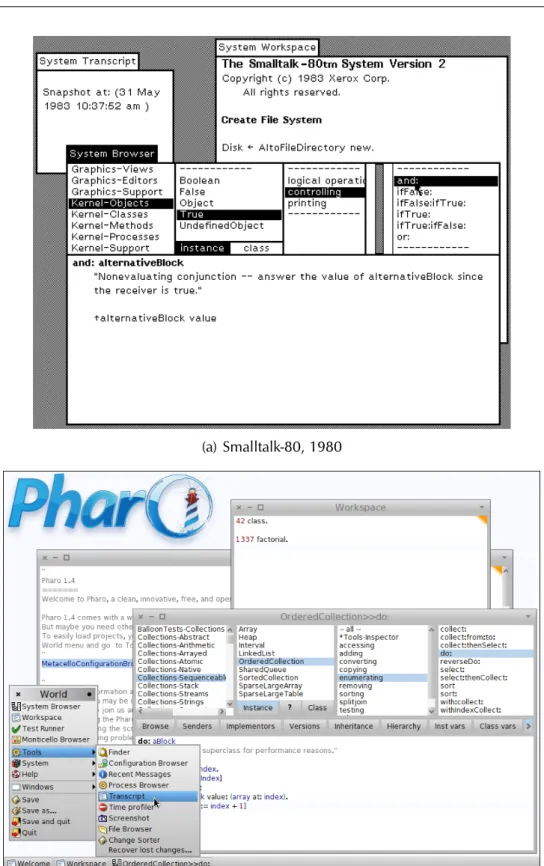
2.1 Basic tools included in Smalltalk, from the original Smalltalk-80 to the modern Pharo IDE . . . 19
2.2 Code-centric mainstream IDEs . . . 20
2.3 Relo . . . 22
2.4 Code Canvas . . . 23
2.5 Code Bubbles . . . 24
2.6 Cell: a simple modeling tool . . . 25
2.7 Argo UML: a complete UML environment . . . 26
2.8 Modeling tools . . . 27
2.9 The evolution of the Smalltalk programming tools . . . 30
2.10 The inspector: a generic tool for manipulating objects . . . 31
2.11 Self: the seminal object-focused environment . . . 32
2.12 The Morphic UI framework implemented in Squeak Smalltalk and the Lively Kernel for Javascript . . . 33
2.13 The Naked Objects Framework . . . 34
3.1 Our view on the programming process . . . 38
3.2 An abstract scenario of our view on the programming process . 40 3.3 The workflows of the three practices under consideration . . . . 41
3.4 Gaucho: an object-focused environment . . . 44
3.5 The overall design of Gaucho . . . 45
3.6 Distinct Gaucho shapes populating a pampas . . . 46
3.7 First-class Model enhancements to Smalltalk . . . 48
3.8 MDE shapes: TicTacToe example . . . 49
3.9 Programming in Gaucho . . . 51 xi
xii Figures
3.10 The shape representing the class shape itself . . . 52
3.11 A class with several of its methods surrounding the shape . . . . 53
3.12 Test Case shapes with different test results . . . 54
3.13 The system view presents all the available packages . . . 54
3.14 Presenting the Changes of a Session . . . 55
3.15 Adding classes in Gaucho . . . 56
3.16 Changing a Class with the Pie Menu . . . 57
3.17 Changing a Class with the Daisy Menu . . . 58
3.18 Adding and modifying methods . . . 59
3.19 Navigating the system from a class shape . . . 60
3.20 Navigating through interconnected shapes . . . 61
3.21 Task context support within Gaucho . . . 62
3.22 Gaucho Shapes present high level views of the objects . . . 63
4.1 An experiment run instrumented with Biscuit . . . 71
4.2 A System Browser of the Pharo IDE . . . 74
4.3 The questions presented by Biscuit at the start . . . 78
4.4 The Introduction presented by Biscuit for the treatment using Pharo 79 4.5 The outline of the tasks of the experiment . . . 80
4.6 The tasks of the experiment . . . 81
4.6 The tasks of the experiment (cont) . . . 82
4.6 The tasks of the experiment (cont) . . . 83
4.6 The tasks of the experiment (cont) . . . 84
4.6 The tasks of the experiment (cont.) . . . 85
4.7 The post-experiment questionnaire presented by Biscuit . . . 86
4.8 Biscuit running on top of the Pharo IDE . . . 87
4.9 Biscuit output: reliable and precise data . . . 88
4.10 The time and correctness of the subjects on the performed tasks 89 4.11 The Subject’s Perceived Difficulty of the Tasks . . . 96
5.1 Self and Kansas: collaboration within an object-focused IDE . . 100
5.2 Syde: collaboration support within the Eclipse IDE . . . 101
5.3 A Ronda session: the Pampas including several Shapes . . . 103
5.4 Ronda: the initial display . . . 103
5.5 Two ronda sessions depicting generation and awareness of changes105 5.6 The infrastructure for collaboration in Ronda . . . 107
A.1 The Classes that model an experiment in Biscuit . . . 115
Tables
4.1 Treatments presented to the subjects . . . 75
4.2 The fourteen tasks of the experiment . . . 76
4.3 Referenced questions from Silito’s framework . . . 77
4.4 The declared expertise of the subjects . . . 78
4.5 The Completion Times and Correctness (incorrect answers are colored red) of the subjects on the performed tasks . . . 90
Chapter 1
Introduction
Computer programming is an art, because it applies accumulated knowledge to the world, because it requires skill and ingenuity, and especially because it produces objects of beauty.
—DONALD E. KNUTH
In his 1974 ACM Turing Award Lecture, Knuth defended his decision to include the word art in his renowned series of books entitled: “The art of computer programming” [1]. In the lecture, Knuth related programming to art, because it requires skill and the application of knowledge to master complexity, to ultimately produce beautiful programs [2].
In any form of art, humans playing the role of artists make use of several tools to produce their pieces. For example to produce the Venus of Milo, an ancient greek sculpture, the artist used a hammer and a chisel to carve out the feminine figure from an shapeless piece of marble rock. In this dissertation, we focus on the tools that computer programmers use to create programs; digital-age artisans crafting their pieces of art.
Tools are the means to an end, which is the crafting of computer programs. Computer programmers create and manipulate the elements that make up the software system, by interacting with several tools. Therefore, the choice com-puter programmers make on which tools to use is important, because tools have a great influence on how they approach problems and describe solutions. Dijkstra took this argument further by stating that tools enable computer pro-grammers to think and express solutions to problems [3].
2 1.1 Symbolic Programming
1.1
Symbolic Programming
We established that programmers use tools to craft and manipulate programs, without defining what constitutes a program. Since the dawn of general pur-pose mechanical and electronic machines, humans have devised mechanisms to instruct them to perform tasks. We define this series of instructions, in a broad sense, as a program. The purpose of a program is to aid human labour or augment human intellect by instructing a general purpose machine –the computer– to perform a series of operations.
Programs are expressed following an interface mechanism between humans and computers, namely the language. Programs represent solutions to problems within the design space delimited by a language. Ingalls stated that the purpose of a language is to provide a framework for communication, that serves as an interface between the models in the human mind and the computer [4].
The framework of communication initially evolved from basic machine in-structions to assembly language, easing the writing of programs by abstracting the instructions and memory locations into a human readable form consisting of a combination of symbols and letters. A program written in assembly lan-guage consists of a series of operation codes mapping one to one to machine instructions, together with labels referencing memory locations, instead of a plain succession of ones and zeroes closer to the computer hardware.
The prose of humans and computers started to diverge with the appearance of high-level languages, such as Fortran, Lisp, Simula and Smalltalk. Programs evolved from simple tasks executing machine operations, to more complex tasks involving concepts such as control flow statements, arrays, files, functions, and objects. The latter are not directly available from the machine instruction set, but rather enabled via multiple layers of abstraction.
Programming languages gradually came closer to a human readable form. The framework of communication was based on a symbolic representation of the program, where programmers make use of symbols and rules, to compose and specify programs, and its relation with the other parts of the system.
In our work, we focus on the programming languages that represent pro-grams in a textual form, that is propro-grams that are defined by a piece of text –the source code– that specifies the constituents and the behavior of the program, whose content is governed by the syntactic and semantic rules of the language.
3 1.2 On the writing of programs
1.2
On the writing of programs
From early psychological theories of programming to the present, programming is acknowledged as a form of writing [5], thus while fulfilling programming tasks, the editing and reading of a textual representation of the program –the source code– is paramount. The former applies to programming languages that are based on symbolic programming, which are our focus.
Since the dawn of computing, programmers used pencil and paper to write down the programs in a particular language, translating the solutions to prob-lems in a form that computers can understand. At first, the instrumentation of the human-computer interaction was based on encoding the symbolic program onto punch cards (see Figure 1.1). The cards represented one statement of the program encoded with the presence or absence of holes, then fed into a card reader machine to ultimately become understandable by the computer.
Figure 1.1. University students translating their programs onto punch cards
The removal of the intermediate step of encoding the programs on punched cards, came with the advent of one line editors such as teleprinter machines, and their graphical counterpart included in timesharing systems with terminal displays. Human-computer interaction became more interactive, given that pro-grammers could now directly modify the programs one line at a time, instead of using the batch processing mode of yore [2].
4 1.3 Programming is more than just writing Once the terminal displays and personal computers with graphical user in-terfaces became widespread, the appearance of software applications known as word processors raised the level of interactivity and flexibility of the pro-gramming tools. Word processors enabled the viewing and editing of multiple lines of the program at once, as opposed to the single line editing of command line editors. Word processors became an important programming tool, central to the instrumentation of human-computer interaction.
Nowadays, programmers use customized source code editors, evolved from general purpose text editors, for manipulating programs written in a particular language. Modern source code editors provide advanced features to aid pro-grammers when writing and reading programs, such as automatically checking the syntactic rules to augment the view with relevant information, and the au-tocompletion of typed prefixes according to the context of the selected text, i.e. classes within a package or methods within a class hierarchy.
1.3
Programming is more than just writing
We established that programming involves the writing and reading of a textual representation of the program, thus programmers make use of some form of word processor to craft programs.
Nevertheless, the whole programming process involves a broad range of other activities, such as the transformation of source code into an executable artifact, the monitoring of running programs to detect and fix problems, and the creation of assertions on the quality and correctness of the programs.
1.3.1
Integrated Development Environments
During the late 70’s and the mid 80’s, programming became widespread due to the appearance of more interactive programming tools –word processors in terminal displays and personal computers–, and of simpler programming lan-guages such as BASIC. Programmers made use of several different tools to ac-complish diverse programming tasks, for example they use debuggers, com-pilers, linkers, and source-code editors. All the tools were running within the same operating system, yet each one remaining a standalone application.
The lack of a common interface and of interoperability between the tools, favored the appearance of the integrated development environment (IDE), a single application that included all the necessary tools.
5 1.3 Programming is more than just writing The use of an IDE eased the undertaking of programming tasks, by providing a uniform interface to all the tools, which became accessible and were managed within one single entry point: the IDE.
One of the first IDEs to be widely adopted was Turbo Pascal, an IDE for the Pascal language that ran on the DOS-based personal computers of the 80’s. Turbo Pascal enabled the running, compiling, debugging and editing of pro-grams within a keyboard-based environment.
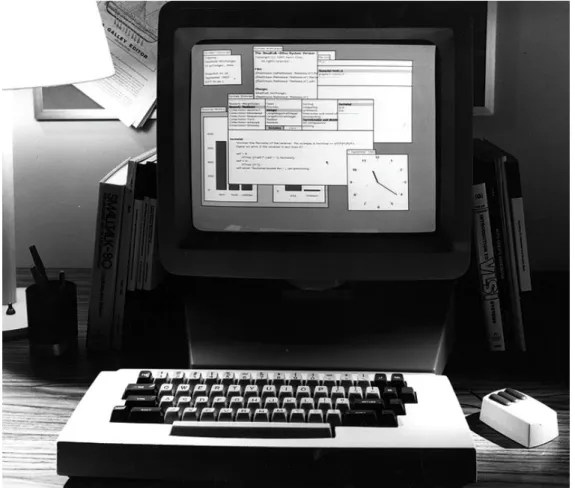
Nevertheless, the concept of the IDE was conceived a decade before the irruption of the personal computer era in the 80’s, in the group working at the XEROX Palo Alto Research lab that created Smalltalk, the first dynamic object oriented programming (OOP) language. Figure 1.2 depicts a Smalltalk environment running on one of the first personal computers designed at XEROX Parc during the 70’s.
6 1.4 Object-Oriented Programming Nowadays, programmers craft programs with the use of IDEs, and interact with the source code and executables through graphical user interfaces inspired from the early Smalltalk systems, which consisted of a dynamic OOP language and an interactive development environment. Smalltalk was the first language to enable OOP via a graphical user interface that grants access to the underly-ing objects of the system, solely through graphical elements on the computer display, and the use of pointing devices and keyboards [6].
In this dissertation we focus on IDEs for programing in dynamic OOP lan-guages, and use Smalltalk as the target language for our thesis.
1.4
Object-Oriented Programming
When asked what that means he replies, "Smalltalk programs are just objects." When asked what objects are made of he replies, "objects." When asked again he says "look, it’s all objects all the way down. Until you reach turtles."
—ALAN KAY
From the first high-level programming languages such as Fortran and Al-gol, programmers designed the programs around abstract data types and pro-cedures, making a clear distinction between (inert) data and the functionality to modify it. Around the late 60’s, a different programming language paradigm emerged as a result of the work of Alan Kay, based on the metaphor of com-municating objects. Kay designed a system built from the ground up entirely on this metaphor, whose first implementation was the Smalltalk environment developed at Xerox Parc during the 70’s [7].
Kay advocated the "disappearing of data" using only methods and objects. Objects subsume the concept of data and procedures into an entity which has state and behavior (methods), and the computation model is entirely based on message passing: the system is a collection of well behaved objects that ask each other to perform computation.
The key concepts of this new approach to computing came from biological cell communications modeled as networked whole computers. Kay was in-spired by his biology and mathematics background, his work on the ARPAnet, which became the Internet, and the inheritance mechanism present in the Sim-ula language [7]. Another source of inspiration was the Sketchpad, a computer aided design tool developed by Sutherland as part of his doctoral dissertation [8], which also introduced the concept of classes and instances.
7 1.5 The Problem The OOP paradigm proved to simple, flexible, and powerful. Object ori-ented programming radically changed the computing programming culture. In the present, the OOP paradigm is widely recognized and adopted by academia and industry, in its various flavors: dynamic (Smalltalk,Python), type-based (Java,C++), and prototype-based (Self,Javascript).
1.5
The Problem
We concluded that programming is a form of writing, and that the need to edit a textual representation of the program is satisfied by modern source code editors, which go beyond general purpose text edition facilities, by providing more specific features tailored to a programming language.
Nevertheless, programmers spend most of their time analyzing the program [9], performing maintenance tasks that require an understanding of the system. In doing so, programmers seek the aid of several tools because software systems are hard to understand [10]. The tools provide a means to wander around the system, learn about the composition of objects, and explore the relationships between them.
Nowadays, programmers use IDEs that provide numerous tools to effectively construct and maintain object-oriented programs. Besides source code edi-tors, modern IDEs include compilers, debuggers, modeling, and testing tools, amongst many other specific tools. The main tool for programming –the IDE– emphasizes the manipulation of tools for writing and reading the programs [11]. The user interfaces of modern IDEs are built around a tools metaphor [12], be-cause developers visualize and interact with tools for editing and manipulating the objects of the system. We expand this discussion in Section 2.4.
The tool-based environments produce both conceptual and technical prob-lems when programming in OOP languages, discussed next.
1.5.1
The Conceptual Problem: Tools vs Objects
In object-oriented languages, the most important concept is that of an object. Moreover, in dynamic OOP languages –which is our focus–, the system is com-posed solely of objects, suppressing the arbitrary distinction between run-time and compile-time, to enhance the liveliness of the system.
The conceptual problem occurs because a tool-based environment treats objects as lifeless entities, that can be only manipulated through a set of tools. For example, to add or remove methods from a class, Smalltalk programmers
8 1.5 The Problem use System Browsers that provide the means to do so. Nevertheless, method addition or removal might also be achieved by sending messages to the class, because in Smalltalk, classes are just another kind of live object in the system.
This dichotomy, between inert and live human-object interactions, results from the former promoting a message-based interface, whereas the latter em-powers a tool with the responsibility of modifying inert data. In non-dynamic OOP languages, a tool-based IDE is instrumental because in such languages at compile time programmers deal solely with an inert specification of the pro-gram: the source code. Therefore, tools are the only possible means of manip-ulating data. On the other hand, in dynamic OOP languages a tool-based IDE is conceptually detrimental because it diverges from the philosophy behind the language: a computational model based on a world of live objects [4].
Nonetheless, programmers have become efficient on creating and main-taing programs using tool-based IDEs [13], thus we stress that the former is a conceptual problem, which hinders the understanding of the importance of the role of objects in dynamic OOP languages.
1.5.2
Technical Problems
In this section we discuss problems of the tool-based IDEs which are more prac-tical in nature, and result from contrasting developers needs to the interfaces of the tool-based development environments. We categorized the problems into three categories: the first relates to a more fine-grained manipulation, the sec-ond to the real estate management of finite computer displays, and the third to the representation of the objects in the interface of the IDE.
Fine-grained Manipulation of Objects
The file-based view of mainstream OOP IDEs prevents the manipulation at a finer-grained level than source code files. In a study on programmers habits
while using Eclipse 1, while performing maintenance tasks, Ko et al. elicited
the requirement that IDEs should provide a fine-grained manipulation of the program entities [14]. Ko advocates for finer-grained representations of the sys-tem, because programmers tend to form working sets of classes, methods and packages, pertaining to the task at hand.
IDEs fail to meet this need, because they provide tools that enable a coarse manipulation of the objects, in the form of whole file navigators and editors as in IDEs for mainstream OOP languages such as JAVA.
9 1.5 The Problem Similarly, Smalltalk environments, include system browsers that grant access to packages, classes, and methods within the same tool. Kersten et al. stated that this problem is aggravated when the structure of the system is not aligned with the structure of the task, and propose a degree of interest model that de-fines a task context, to aid programmers into forming those working sets [15]. Real Estate Management
The user interface of modern IDEs are populated by diverse tools that enable a whole range of programming tasks. In this section we analyze the different mechanisms to arrange the tools within the interface, to detect shortcomings, and find opportunities for improvement. Figure 1.3 depicts several tool-based IDEs, that differ in how they handle the available real estate.
(a) Eclipse (b) Visual Studio
(c) Pharo (d) Visual Works
10 1.5 The Problem One possible form of arranging several elements is through a tab-based in-terface. Figure 1.3(a) depicts an Eclipse IDE with the central pane containing two tabs, each one viewing a single file, which in non-dynamic OOP languages represents and stores the classes of the program. Tabs are displayed within a container pane or window, that in Eclipse assumes the main role for program-ming. The use of tabs forces a single focus of attention: the contents of a single tab can be manipulated at a time [16].
A single focus of attention conflicts with the programmer’s needs to create side by side views of the constituents of the program [17]. Sillito et al. com-piled a series of questions asked during programming tasks [10] that highlights comparing programs elements to gain an understanding of the system.
On the other hand, an interface based on tiles allows the arrangement of side by side views of the objects. Tiles are contiguous rectangular panes which are confined within a parent container. Mainstream IDEs allow a tile-based interface, besides a tab-based one. One example is the Visual Studio IDE for
the C# language2, depicted in Figure 1.3(b).
Nevertheless, the use of tiles imposes constraints, because tiles are arranged contiguously in the parent container, according to a fixed layout such as a grid or flow layout [18]. The constrained layout hinders flexibility when creating custom views of the program, while forming the working sets.
Smalltalk environments provide more freedom for laying out the objects of the system. The interface consists of a 2D area spawning the whole display, that includes multiple windows, which in turn each host one tool. The windows may overlap, to make better use of the scarce real estate, confined within the finite dimensions of the computer display.
A multiple overlapping windows scheme, can either be implemented within a single operating system (OS) window, as in Pharo an open-source Smalltalk
environment 3, or match every smalltalk window to its own OS counterpart, as
in Visual Works, a commercial Smalltalk4, see Figure 1.3(c) and Figure 1.3(d).
The overlapping windows share the scarce real estate, enabling programmers to potentially handle more graphical elements than the tab or tile based interfaces. Thus, the workspace often becomes crowded with many opened windows, due to the number of objects and relationships a developer needs to examine.
The window plague can be mitigated by an automatic mechanism that finds and removes unused (or unwanted) windows [19]. Nevertheless, problems re-main, because of the generic purpose of the tools: the manipulated objects
2http://www.microsoft.com/visualstudio/
3http://www.pharo.org
11 1.5 The Problem depend on the current selection of the tools. The selection can be modified, thus the mapping of windows to the objects is not persistent, which complicates the reasoning behind the automatic scheme.
The problem of the explosion of graphical elements within the interface, occurs also when using tabs or tiles. Moreover, all the mentioned schemes can be used in conjunction: tabs and tiles may coexist within the interface, and smalltalk windows can include tabs.
To summarize, tool-based interfaces work on a coarse-grained level, which conflicts with programmers need to form working sets of objects, which may spawn across all the modules of the system. Another missing opportunity oc-curs because the mentioned schemes confine the graphical elements to a fi-nite 2D area, which prevents programmers from using a spatial memory and reasoning for the whole system [20], given that the clutter in the interface is proportional to the number of objects relevant to the task at hand.
Representation of the Objects in the Interface
Software is intangible [21; 22], thus the visual appearance of objects is an extrin-sic characteristic. Nevertheless, the objects must be represented in a graphical form throughout the IDEs, because programmers interact with the system using computer displays. Despite the intangible nature of software, objects have a structure and composition that serves as a guideline for designing their visual appearance. For instance, the containment relationship between a class and its methods, or between a package and its classes, serves as a guideline for the representation of the program, either in a textual or a graphical form.
The visual appearance of objects is an important concern when performing programming and program comprehension tasks. For example, the use of soft-ware visualization enable programmers to gain an understanding of the system by exploiting metrics or intrinsic properties of the target of study: packages, classes, methods, or the system itself [23]. In this dissertation we focus on tools for programming in OOP languages, thus our concern is the visual representa-tion of objects within the interface.
The IDEs of mainstream non-dynamic OOP languages are file-based, mak-ing it explicit that source code is stored in operatmak-ing system files. File-based IDEs represent the program in a textual form, namely the source code, split into files containing one or more elements of the program. Figure 1.3(a) depicts Eclipse, a mainstream IDE with a standard arrangement of panes in the inter-face, which includes several sub-panes surrounding a main tabbed pane that presents the source code, following a bento-box model [24].
12 1.5 The Problem The source code is the complete specification of the program, it defines all the objects, their behavior and composition. When the programmer writes or reads the code, he has to deal with the complexity of the syntactic rules of the language, and process information to effectively modify the program. There-fore, IDEs make use of graphical elements which abstract over the raw code, such as code elision or class overview widgets. Code elision is the folding of meaningful portions of code on demand, to hide irrelevant sections of the objects, to aid programmers when reading complex source code files [25]. Sim-ilarly, IDEs provide another means of viewing and navigating the composition of classes and packages, in the form of overview widgets, which enable a tree view interaction with the objects, depicted in Figure 1.3(a).
IDEs that provide the latter favor chunking. The method of presenting in-formation known as chunking consists in splitting concepts into smaller pieces, which are easier to manage and understand [26]. In this manner, file-based IDEs enhance the usability of the interface at the expense of providing more than one representation of the objects.
On the other hand, Smalltalk environments use a single representation of the objects: a tool-based representation. In Smalltalk the source code is pre-sented in small chunks within the panes of the tools named browsers, that allow navigating the system, and editing packages, classes and methods. The tool-based interface of Smalltalk inherently favors chunking. Figure 1.4 depicts the two main tools included in Smalltalk systems: the browser for manipulating the objects that make up the program –classes, methods and packages—, and the inspector for manipulating instances.
(a) System Browser (b) Inspector
13 1.5 The Problem The downside of a tool-based interface is a single object may be presented by more than one tool, thus the identity property of OOP languages is not con-veyed in the interface [11]. Another related problem is that tool-based interfaces present the many different objects of the system using the same set of widgets. Classes, methods, and packages appear as a list item in the browsers columns, or in a textual description when the selection of the browser points to a specific object. Figure 1.4 depicts a system browser with a selection on the class String, and the code pane presenting a textual representation of the class description. There are missing opportunities in this scheme, because the semantics of the objects may be only conveyed by icons in the list item denoting the name of the objects, as opposed to designing a visual appearance for each kind of object, tailored to reflect its type, structure, behavior, and state.
1.5.3
Summary
We started by discussing the conceptual problem of using a tool-based interface for programming in dynamic OOP language.The problem is that objects remain hidden behind the tools, which a have prominent role in the interface. Thus, objects are perceived as inert data that can only be manipulated by the use of a tool. This conflicts with the essence of OOP, which is based on a computational model of a world of live objects.
Secondly, we discussed the real estate management of current IDEs, for both dynamic and non-dynamic languages, to find out that current interfaces present the objects in tab- or tile-based interfaces, or a multiple overlapping windows scheme, confined within the finite boundaries of the computer display. We detailed how the traditional interfaces hinder the use of spatial memory and reasoning, effectively used for software visualization approaches, such as class blueprints [27] and software cartography [28].
Lastly, we analyzed how IDEs represent the objects that make up the pro-gram in the interface, to find missing opportunities of the tool-based interfaces for conveying the semantics of the many different kinds of objects. IDEs present the objects either in a textual form –the source code–, or within one or more generic tools, making it difficult to denote changes to the objects due to a loss of identity, and presenting a uniform appearance regardless of the kind of object being displayed. For instance, a Class is different than a Method, and a Num-ber is different than a Color, nevertheless these objects have the same visual appearance within tool-based interfaces.
14 1.6 Thesis
1.6
Thesis
Computer programmers craft programs with the aid of tools, which evolved from simple pen and paper to those using a graphical user interface based on windows, icons, menus and a pointing device. Nowadays, programs are created, maintained and executed with Integrated Development Environments (IDEs), which are built on a tool-based interface.
In this dissertation we focus on programs which are described entirely by objects, following a computational model of a world of objects that collaborate by sending each other messages, i.e., we focus on the development environ-ments of Object-Oriented Programming languages.
The dynamic nature of a world of living objects is lessened in the interface of modern IDEs, which revolves around a textual representation of the program, namely the source code. In this sense, programming with traditional IDEs re-sembles the composing of musical tunes: both activities specify a dynamic artifact with a static one, method statements and class definitions in the former, and pentagrams with notes in the latter.
The tool-based interface of IDEs prevents programmers to directly engage into conversations with the underlying objects of the system. On the other hand, the interfaces built on the desktop metaphor make explicit the presence of the manipulable entities, and provide the means to interact with them.
We investigate the application of the desktop metaphor to an object oriented development environment with an interface solely based on direct manipula-tion of objects, which we name an Object-focused environment.
We formulate our thesis as:
An Object-focused environment supports an extensible set of soft-ware engineering tasks, eliminates the need for extrinsic tools that work on the source-code, and conveys the dynamic nature of a world of living objects.
To validate our thesis, we designed and implemented an object-focused environment, and applied the novel interface to several software engineering tasks, ranging from modeling to program comprehension tasks.
15 1.7 Contributions
1.7
Contributions
In the light of our described thesis, the contributions of this dissertation are: The definition of an object-focused interface for software development [29].
We describe in Chapter 3 the building blocks of our design of a develop-ment environdevelop-ment based on a desktop metaphor, a plausible alternative to the tool-based interfaces of traditional IDEs.
The application of the object-focused interface to modeling and OOP [30]. In Chapter 3 we also describe the shapes of the environment, which are the behaviorally complete graphical counterparts of the objects that form the models (see Section 3.3), and the programs ( see Section 3.4).
The implementation of an object-focused environment [31]. We implemented Gaucho, an object-focused programming environment for the crafting of models composed of objects, described in class-based object oriented languages. Gaucho is publicly available and has been used in academic research. We present our tool in Section 3.2.
The empirical validation of our approach through a controlled experiment [32]. We performed a controlled experiment to compare traditional IDEs and Gaucho with respect to a set of program comprehension tasks ex-tracted from the literature, such as creating, navigating, refactoring, and understanding an object-oriented system. We present the experiment, and reflect on the findings in Chapter 4.
The design and implementation of a tool to support human-centric con-trolled experiments [33]. We present Biscuit in Section 4.1. Biscuit is an automated experiment runner toolset to support conducting experiments for evaluating software tools with human subjects.
The application of the object-focused interface to collaboration [34]. To demonstrate the extensibility of our approach, we augmented the single developer environment Gaucho into a collaborative development ronment. In Chapter 5 we investigate the use of an object-focused envi-ronment to support collaboration and real-time awareness of fine-grained changes to the system.
The implementation of a tool to support collaboration [34] In Section 5.2 we describe Ronda, an object-focused environment that provides first-class support for collaborative development sessions.
16 1.8 Structure of the Document
1.8
Structure of the Document
We structured the remainder of this dissertation as follows:
Chapter 2. We start with a historical perspective on our work, by describing the evolution of the tools used by programmers to craft programs. We discuss the tool-based nature of IDEs, describe their problems, and present several alternative user interfaces that alleviate them.
Chapter 3. We continue by describing our approach: the Object-focused en-vironment. An extensible re-design of object oriented development envi-ronments, with applications to different areas of software engineering. We present Gaucho, the object-focused environment that enables model-ing, programming and program comprehension tasks, by interacting with shapes representing the objects.
Chapter 4. Next, we present a controlled experiment we performed to vali-date our approach. We also describe Biscuit, an automated experiment runner toolset we implemented to support researchers when performing controlled experiments with human subjects to evaluate software tools. Chapter 5. After describing the evaluation and its instrumentation, we present
Ronda, an enhancement to the single developer environment Gaucho which adds support for the collaborative nature of programming.
We implemented Ronda to demonstrate the extensibility our approach, and investigate the application of object-focused interfaces to collabora-tive development environments.
Chapter 6. We conclude this dissertation by discussing our approach and sum-marizing the contributions of this work, and detailing future research di-rections.
Chapter 2
State of the Art
It has to do with the influence of the tool we are trying to use upon our own thinking habits. I observe a cultural tradition, which in all probability has its roots in the Renaissance, to ignore this influence, to regard the human mind as the supreme and autonomous master of its artefacts.
—EDSGERW. DIJKSTRA
From the beginning of the computer age, computer scientists have underes-timated the influence that tools have upon our working habits and the quality of the artifacts we produce [3]. For example, Weinberg recalls the skepticism sur-rounding the development of Fortran amongst fellow programmers, who chal-lenged the adoption of high level languages on the grounds that programmers would always produce more efficient code [5]. On the other hand, several re-searchers pondered on the impact of tools. Dijkstra advocated for better tools to struggle against their inadequacies, enabling programmers to focus on solv-ing the problems [3]. Knuth envisioned the use of tools that are a pleasure to use, encouraging programmers to write better programs, by providing more interactivity than the batch processing of early punch card based systems [2].
In this chapter we describe the tool-based development environments for programming in object oriented languages. We start by describing the inter-faces that give a prominent role to the tools, which are separate from the ob-jects of the system, whose generic nature enables the manipulation of many elements of the program. We gradually move towards environments that favor fine-grained manipulation of software artifacts –objects, code–, where the tools permeate throughout all the environment, to solve the manipulation, layout and visualization problems discussed in Section 1.5.
18 2.1 Smalltalk
Structure of the chapter. We present Smalltalk, from the original versions
that introduced the IDE, to more modern implementations in Section 2.1. In Section 2.2 we describe several environments with alternative interfaces for programming in code-centric languages. We detail modeling environments for languages that abstract away from the source code to models, in Section 2.3. We conclude this chapter in Section 2.4 by describing the environments which are closer to our approach, the ones which favor direct manipulation of objects.
2.1
Smalltalk
The Smalltalk language was the precursor of both object oriented programming, and the integrated development environment. The original environments de-veloped at Xerox PARC during the 70’s introduced many of the tools that are still in use today, such as object inspectors, debuggers, and code editors and navigators. Differently than other programming languages that make a clear dis-tinction between the source code and the running programs, in Smalltalk the environment and the language are strongly coupled. This coupling results from the computational model of Smalltalk: a world of live objects, that collaborate by sending messages to each other. The graphical user interface to interact with the objects was developed together with the language [7].
2.1.1
Browsers and Inspectors
From the beginning, Smalltalk systems were built around a tools metaphor [12], providing numerous tools for editing and manipulating the objects of the sys-tem. The basic tools included in a Smalltalk environment are: Inspectors for manipulating instances –objects–, Browsers to manipulate the classes, meth-ods, and packages of the system, Workspaces for sending messages by eval-uating expressions, and the Transcript as a global console for the system [35]. Modern Smalltalk systems evolved to include Test Runner tools for running tests and refactoring browsers [36].
Figure 2.1 depicts two Smalltalk systems, which resemble one another, de-spite having been implemented in different decades, including the basic tools of the environment: a browser selected on the True class displaying the method named and:, an inspector on the Array object, a workspace with valuable ex-pressions, a transcript and a test runner.
19 2.1 Smalltalk
(a) Smalltalk-80, 1980
(b) Pharo, 2012
Figure 2.1. Basic tools included in Smalltalk, from the original Smalltalk-80 to the modern Pharo IDE
20 2.2 Code-Centric Environments
2.2
Code-Centric Environments
We stated previously that nowadays developers write programs, aided by inte-grated development environments (IDEs); and that IDEs feature numerous tools that provide the means to construct programs.
In this section we describe the mainstream IDEs, that are built around a textual representation of the program, namely the source code. We refer to these IDEs as code-centric, because performing textual editions of the source code is the main mechanism for programming.
Moreover, the files which host the code take a primary role within the in-terface, an often adopted fashion is to arrange the various tools in a bento box model, around the source code. Mainstream IDEs are file-based, because they make explicit that source code is stored in operating system files.
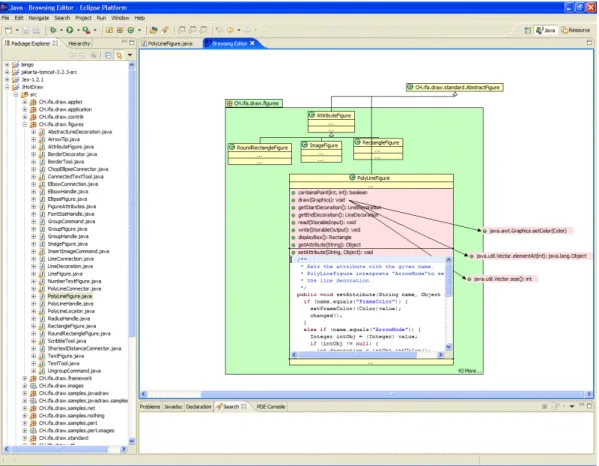
We depict Eclipse, a code-centric IDE for JAVA in Figure 2.2.
(a) Eclipse
21 2.2 Code-Centric Environments The design and usage of Code-centric IDEs produces some problems we discussed in Section 1.5.2, enumerated next:
• The fine-grained manipulation of the software artifacts.
• The real estate management that enables or impedes to layout the artifacts in an meaningful manner.
• The level of refinement of the visualization of the programs elements within the interface.
Next we describe several alternative code-centric environments, designed for manipulating source-code in a non-traditional interface, to alleviate or avoid the enumerated problems at all. The mentioned approaches are either tools that complement the IDE or full-blown development environments.
2.2.1
Relo
Relo is a program comprehension tool, that augments the Eclipse IDE with an interactive diagram that includes a graphical representation of the code.
Relo aids programmers to comprehend complex systems with large code-bases, by making explicit the context while exploring the code. Figure 2.3 depicts the tool within the Eclipse IDE.
The tool is designed on the premise that when exploring large codebases programmers follow a bottom-up approach, starting from a relevant artifact, and adding the related ones by exploring their relationships. Therefore, RELO starts with a clean diagram, and provides the means to add elements from the system, and to easily navigate to other elements by interacting with the diagram. The tool provides a fine-grained manipulation of the classes, methods and packages of the program, thus addressing the first problem.
The nodes of the diagram are graphical elements representing the classes, methods and packages of the system. The source code is abstracted into a vi-sual language resembling the unified modeling language (UML), to ease the comprehension of the objects. The nodes are automatically arranged following topological constraints, for example the inheritance edges between two classes are drawn vertically, while method calls are drawn horizontally. Even though RELO includes some form of real estate management, the tool lacks an over-all system layout management, because the diagrams are focused into smover-all portions of the system, providing a graphical context for exploring parts [37].
22 2.2 Code-Centric Environments
Figure 2.3. Relo
2.2.2
Code Canvas
Code Canvas is a zoomable user interface for software development. The project documents are laid out in a 2D surface, to leverage spatial memory and keep developers oriented.
The canvas houses editable thumbnails of the code, which represent a shrunk down version of the source files, with a customizable level of detail through a semantic zooming mechanism ( see Figure 2.4). Methods are con-tained within the classes, which in turn are concon-tained within packages. The inner details of an element is only displayed when zoomed in. For example, the statements of a method are only visible when the containing class has a high level of detail, and is focused on that method.
Code Canvas uses a spatial representation of editable development docu-ments to allow developers to use spatial memory to find them [24], to ease the preservation and communication of task contexts across multiple sessions.
23 2.2 Code-Centric Environments
Figure 2.4. Code Canvas
2.2.3
Code Bubbles
Code Bubbles is a programming environment that represents code as editable fragments called bubbles, forming concurrently visible working sets that avoid the continuous back and forth navigation typical of traditional IDEs [17]. The code bubbles exist and are placed on a non-overlapping 2-D surface [38]. The bubbles are interactive views of source code fragments such as a method or a collection of member variables ( see Figure 2.5).
2.2.4
Summary
To ease the comprehension, and to favor chunking, RELO and Code Canvas represent the programs elements in a visual manner, either using a language similar to UML that minimizes the details of the code, or by adopting semantic zooming for controlling the level of detail.
The tools enable a fine-grained manipulation of those graphical elements, thus satisfying developer needs to create side by side views of individual pro-gram elements for comparison, and the forming of working sets that may span the system.
24 2.3 Modeling Environments Code Canvas and Code Bubbles both address the real estate management on the large scale, the use of spatial memory and reasoning of a layout of the whole program, persisted across multiple development sessions. On the other hand, RELO limits the size of the diagrams to enable exploration of small portions of the system, minimizing the presented information.
Figure 2.5. Code Bubbles
2.3
Modeling Environments
In this section we analyze the tools that support both formal and informal mod-eling practices. The design of modmod-eling tools relates to our discussion on the interfaces of development environments, because they address similar concerns such as the visual representation and placement of the elements that make up the models, which are generally mapped to classes, methods, and packages.
Modeling is the use of something in place of something else for some cogni-tive purpose. A model is an abstraction, in the sense that it cannot represent all aspects of the real world [39]. We discuss further the differences and similarities of modeling and programming practices in Chapter 3.
25 2.3 Modeling Environments Informal Modeling
Modeling its simplest form is accomplished with the whiteboard, or other kind of free-form sketching mechanism, to draft the concepts and overall architecture of a software system. The use of digital tools designed to leverage the flexibility of such approaches, result in tool-based informal modeling practices, which en-able persisting and sharing the created models, that are described using simple
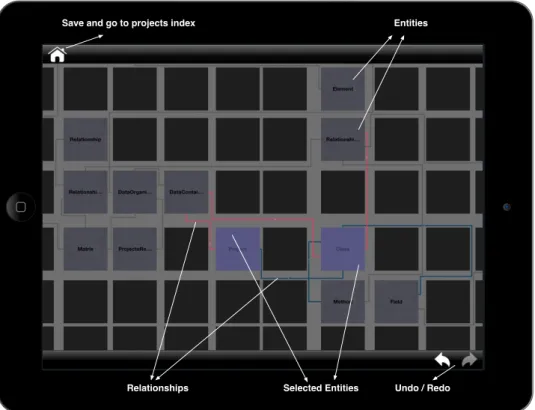
visual notations. One exemplar is CEL1, a multitouch tablet application that
provides the essential means to model software systems, based on a minimalis-tic set of elements that represent: concepts, generic relations, and containment [40]. CEL uses a matrix-based visual metaphor, and semantic zooming to ad-dress the problems of the small screen size of tablet computers ( see Figure 2.6).
UIWindow
768 x 1024
Save and go to projects index Entities
Selected Entities Undo / Redo Relationships
Figure 2.6. Cell: a simple modeling tool
26 2.3 Modeling Environments Formal Modeling
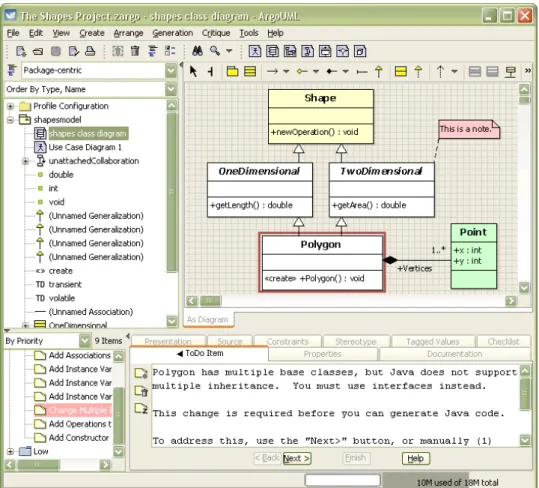
In formal modeling practices, the models are described using a more complex and rigorous language, generally expressed through the use of diagrams and visual notations. The unified modeling language (UML) is the de-facto stan-dard for describing models [41]. Many tools support the creation and edition of UML diagrams. Figure 2.7 depicts ArgoUML, an open source UML
model-ing tool 2. ArgoUML is an interactive, graphical software design environment
that supports the design, development and documentation of object-oriented software applications.
Figure 2.7. Argo UML: a complete UML environment
27 2.3 Modeling Environments Summary
Similarly to the alternative code-centric environments, modeling tools make use of fine-grained manipulation of the concepts, arranged within diagrams to leverage the use of spatial memory, and presented as editable graphical ele-ments which abstract from an otherwise cumbersome textual representation.
The limitations of the UML-based tools are associated to the laying out of the elements in the diagrams, because choosing an arrangement is a non-trivial task when depicting large scale diagrams [42]. The visual presentation can be as disorganized and confusing as the original source code. There are some UML tools that automatically transform diagrams into source code, by generat-ing templates of code from the diagrams. The tools can also infer the diagrams from the source code, thus they are deemed round-trip engineering tools. For
instance, UML Lab 3 is a modeling IDE where design and implementation of
software remain consistent at all times, see Figure 2.8. Even though external modeling tools are better suited for program comprehension than IDEs, there are several reasons for which developers are reluctant to use anything but the IDE for their activities: One of them is that they are not willing to invest time and effort in learning new tools if they do not perceive a tangible benefit [43]. Moreover, the developer has to be aware of two artifacts which stem from dif-ferent stages of the development process, increasing the cognitive overhead.
Figure 2.8. Modeling tools 3http://www.uml-lab.com/en/uml-lab/features/roundtrip/
28 2.4 Direct-Manipulation of Objects
2.4
Direct-Manipulation of Objects
In this section we describe an alternative metaphor for building development environments, based on direct manipulation of objects.
Hutchins et al. state that direct manipulation systems continuously present the objects of interest, replace the use of complex syntax by the use of labeled buttons (amongst other widgets), and provide reversible operations specified in a higher level language interface, whose impact is shown immediately. The effect of direct manipulation in the interfaces reduces the distance between the user’s intentions and the facilities provided by the system, therefore reducing the effort of the user to accomplish goals [44].
The alternative code-centric environments and modeling tools we reviewed in the previous section, use some form of direct manipulation of either of por-tions of source-code defining classes, methods and packages, or the compo-nents of a model. We discuss next the two contrasting metaphors for building interfaces, and describe the environments that were designed to minimize the presence of tools, in favor of direct manipulation of objects.
2.4.1
The Tools and Desktop Metaphor
The mission of the XEROX Palo Alto Research Center (PARC) was to leverage the potential of computers in the late 60’s. The team led by Alan Kay sought to accomplish that goal by making computers accessible to everyone, not just technical people. Kay and his fellow scientists conceived the nowadays om-nipresent concept of a personal computer, with a graphical user interface (GUI) based on overlapping windows, menus, and icons [7]. Kay was building on the previous work of researchers such as Douglas Engelbart, head of the Stanford Augmentation Research Center Lab, who designed the mouse and the first GUI. The Smalltalk-72 system, implemented in 1972, was the first environment to include a GUI, which included tools contained within the windows, that presented the content of the system: the objects. The objects were modified by performing textual edits with the keyboard, and pointing to actions in the contextual menus with the mouse. Nowadays, many environments use a similar interface to the Smalltalk systems, giving prominence to the tools.
On one hand, we have the Tools metaphor, and on the other hand we have the Desktop metaphor. The interfaces of both metaphors consisted on a graphical user interface including windows, menus, icons and a mouse. They differ in the target of the actions, and the primary role within the interface.
29 2.4 Direct-Manipulation of Objects In tool-based interfaces, the users first open the tool, and then select the content to work upon, i.e., which may be data file or an object. Whereas, in interfaces using a desktop-metaphor the users do not invoke the tools, but rather interact with the objects themselves. The desktop is a working environment, which resembles the top of an office desk were various pictures of familiar objects reside: documents, folders, file drawers, etc.. The pictures are named icons, and are the visible concrete embodiments of the corresponding physical objects. Icons represent the objects in the form of a picture that react to the actions of the user. Editing the objects involves invoking the associated tool by pointing and clicking the icon with the mouse, or on a menu [12].
The desktop metaphor pushes users toward their data rather than toward the tools, employing analogies with the physical world, at the expense of cou-pling the objects to assigned tool. In this dissertation, we explore a system that merges the icon with the associated tool into a single graphical representation of the objects populating an infinite desktop, an Object-Focused Environment. The ubiquitous association between an object and a single tool, strengthens the notion that the manipulable “icon” is the object, which provides all the nec-essary features to change the object. For example, the tool representing a class of the system must provide features for renaming, adding or removing methods and variables, navigating to related classes and to the containing package. We describe the genesis of object-focused environments in the following sections.
2.4.2
From Structured Text to Graphical Objects
The first Smalltalk systems presented the objects as structured text contained in the windows of the system. Figure 2.9(a) depicts a Smalltalk 76 system, the cen-tral window is presenting the class named DocWindow, subclass of Window, displaying several methods of the Event Responses and Image protocols.
In Smalltalk 76, the tool support for modifying the classes and methods of the system was based on editing a textual representation of the objects [45]. Modern IDEs for mainstream OOP languages still rely on this interface, a cocentric interface with augmented text editors for changing the system. We de-scribed the mainstream IDEs in Chapter 2.2.
The following versions of Smalltalk replaced the structured text representa-tion and manipularepresenta-tion for a tool-based interface, that abstracted away from the source-code. Figure 2.9(b) depicts a Smalltalk 80 system with several opened windows containing the tools, the most important being a system browser, de-signed by Larry Tesler: a multi-paned class “browser” which allowed one to quickly and easily traverse all the classes and methods in the system [7].
30 2.4 Direct-Manipulation of Objects
Each of the windows shown in the figure belongs to some subclass ofWindow; the subclass handles the
specific content. In figure 2, for example, the user has awakened a window for editing the text of a class. Specific to this content is the ability to select text with the stylus, scroll the text up and down by entering the scroll bar at the window's left, and send specific editing messages by entering the menu at its right. The class has thus provided a simulation of itself as structured text (which is needed for printing anyway). This text in turn furnishes a text editor to display the text and allow it to be manipulated. Finally, the window provides a spatial channel for the flow of information in both directions between the user and the subject of investigation. As shown in figure 2, the user has just drawn the stylus through the
text of the messageshow, and the editor has responded by highlighting the text and noting the selection
internally.
In figure 3, the currently active window supports freehand drawing. It provides a large menu from which to choose brush shape and paint tone to be applied when the stylus is depressed. Another window interfaces to one of the character fonts, allowing the user to design new fonts at will. Yet another displays the time of day. Each of the windows brings its own semantics to the uniform "syntax" of stylus motion and keyboard action available to the investigator. In this way, the underlying metaphor of
used with Smalltalk, and they are not the subject of this paper.
Figure 2. Editing text
Page 4 of 16 Smalltalk-76 Programming System
30/11/2001 http://users.ipa.net/~dwighth/smalltalk/St76/Smalltalk76ProgrammingSystem.html
(a) Smalltalk 76: Structured Text
(b) Smalltalk-80: The Browser
31 2.4 Direct-Manipulation of Objects Smalltalk systems include the Inspector tool, for visualizing the state of any object, enabling change by sending messages in an embedded code pane, to satisfy a fundamental design principle of Smalltalk which states that: “every object should be able to present itself in a meaningful way for observation and manipulation” [4]. Figure 2.10 depicts a standard Smalltalk object inspector tool, and a modern version part of the Glamour framework, inspired from the Mac Finder where every object can have multiple presentations through which
it can be interacted with 4.
The inspector presents any object, including the ones used to create pro-grams: classes, methods, and packages. A Smalltalk programmer can modify the programs by inspecting classes and sending messages in the code pane.
On one hand, many different types of objects make up the program in a class-based OOP language. On the other hand, prototype-based OOP lan-guages omit the class and instance dichotomy, in favor of a uniform object model with parent delegation. The environments of the latter do not distinguish between browsers and inspectors, the uniformity of the language enabling the use of a single tool for manipulating all the objects.
Next, we discuss Self, the seminal OOP language based on prototypes, adopting an object-focused environment based on the desktop metaphor.
(a) The Inspector (b) The Glamourous Inspector
Figure 2.10. The inspector: a generic tool for manipulating objects
32 2.4 Direct-Manipulation of Objects
2.4.3
Self
Self is a seminal object-focused environment [46]. Self is both a language and an interface for direct manipulation of uniform graphical objects that populate a malleable world. Figure 2.11 depicts the Self environment.
The term object-focused environment was coined by Ungar et al. [11], because Self fosters the notion that developers are in direct contact with the objects themselves, by coupling operations and representations into the same graphical element, removing the need for tools in the interface.
In Self, the programming tasks take place through direct manipulation of graphical elements that represent the objects, see Figure 2.11. Self is based on prototypes instead of classes and instances: the language includes a single kind of object. The uniformity permeates throughout the whole interface, where any Self object has a single outliner tool that reveals the inner structure and provides the means to manipulate itself [46].
33 2.4 Direct-Manipulation of Objects
2.4.4
Morphic
Morphic is a user interface framework designed to support direct-manipulation of graphical objects named Morphs. Morphic first appeared in the SELF envi-ronment [47], then in the Squeak Smalltalk envienvi-ronment [48], and lastly in the Lively Kernel environment for web development [49] (see Figure 2.12).
Directness and liveness are the two design principles behind Morphic, con-sisting in a simple architecture based on composable morphs, which define a visual appearance, a set of children in the form of sub-morphs, and an event handler for the mouse and keyboard events [49].
While Morphic allows one to easily navigate between live objects to its source-code, using the standard tools of the environment, the framework itself was not designed for the manipulation of the objects that make up the program, i.e. classes, methods and packages. Nevertheless, the framework provides the means to construct higher-level composite morphs from a set of basic ones, that can better accommodate for custom operations related to performing system changes.
(a) Squeak (b) Lively Kernel
Figure 2.12. The Morphic UI framework implemented in Squeak Smalltalk and the Lively Kernel for Javascript
2.4.5
Naked Objects
The Naked Objects framework was designed to support the Ph.D. thesis of Pawson [50], aimed at solving the problem of separation of procedure and data in OOP, resulting from the implementation of user interfaces.
34 2.5 Conclusions Pawson remarks that the objects representing the business entities, Cus-tomer, Product or Order, are often behaviorally weak, and that the missing functionality resides in procedures external to the object, which hinders behav-ioral completeness in object designs.
Thus, in naked objects all the domain objects are exposed explicitly, such that all user actions consist of viewing objects, and invoking behaviors on them by using contextual menus [50].
As opposed to traditional user interface frameworks, the presentation layer is provided automatically. Naked objects involves auto-generating a user interface from the business model definitions. Figure 2.13(a) depicts a user interface for a booking application, which includes objects such as customers, cities, bookings, and locations.
The objects that make up the program are manipulated with a custom IDE, in the spirit of traditional code-centric IDEs. A naked objects environment en-ables direct-manipulation of instances of a running program, whereas packages, classes, methods and unit tests are edited in a separate manner. Figure 2.13(b) depicts the developer’s view of the project, the IDE of the framework.
(a) The User Interface (b) The Developer’s View
Figure 2.13. The Naked Objects Framework
2.5
Conclusions
We described the genesis of our approach, starting from the early Smalltalk systems with tool-based interfaces, to direct manipulation environments of