En vue de l'obtention du
DOCTORAT DE L'UNIVERSITÉ DE TOULOUSE
Délivré par :Institut National Polytechnique de Toulouse (INP Toulouse) Discipline ou spécialité :
Réseaux, Télécommunications, Systèmes et Architecture
Présentée et soutenue par :
M. GIANG SON TRAN le mercredi 4 juin 2014
Titre :
Unité de recherche : Ecole doctorale :
COOPERATIVE RESOURCE MANAGEMENT IN THE CLOUD
Mathématiques, Informatique, Télécommunications de Toulouse (MITT) Institut de Recherche en Informatique de Toulouse (I.R.I.T.)
Directeur(s) de Thèse :
M. DANIEL HAGIMONT
Rapporteurs :
M. DIDIER DONSEZ, UNIVERSITE GRENOBLE 1 M. JEAN-MARC MENAUD, ECOLE DES MINES DE NANTES
Membre(s) du jury :
1 M. NOËL DE PALMA, UNIVERSITE GRENOBLE 1, Président
2 M. ALAIN TCHANA, INP TOULOUSE, Membre
To my family...
No one’s born a computer scientist, but with a little hard work, and some math and science, just about anyone can become one. Barrack Obama.
Acknowledgement
Firstly, I would like to express my gratitude to all the members of the jury who spent invaluable time to evaluate my work. I would like to thank especially the reviewers Mr. Jean-Marc Menaud and Mr. Didier Donsez who have given me the constructive critics. I also would like to thank Mr. Daniel Hagimont, Professor at Institute National Polytechnique de Toulouse for his supervision throughout my work. His advices were important and essential for my research during these years.
I was very happy to swork within the SEPIA research team at IRIT-ENSEEIHT. I deeply felt the working spirit of our team in each weekly meeting. Thanks Alain Tchana for a lot of your welcome and help in my personal life when I initially joined the group, and for our joint work as a background of my thesis. Thanks Larissa Mayap - my office mate - for our discussions and works during our thesis. I also would like to thank Laurent Broto, Suzy Temate, Aeiman Gadafi and Ekane Brice for all of your help.
I would like to thank the Vietnamese Government, the Institute of Information Technology (IOIT) and the University of Science and Technology of Hanoi (USTH) for the grant to work in France. Many thanks to the laboratory IRIT for funding all of my trips to the conferences.
Finally, I would like to express my deep gratitude to my parents who have raised me, covered me and educated me for such a long time. Thank you my little sister for all the fun we have had and shared together. Last but not least, I cannot finish my work without everyday help and encourgement from my family members, my wife and my little princess. They are my source of love and strength to continue my pursuit of science.
Abstract Recent advances in computer infrastructures encourage the separation of hard-ware and softhard-ware management tasks. Following this direction, virtualized cloud infrastructures are becoming very popular. Among various cloud models, Infrastruc-ture as a Service (IaaS) provides many advantages to both provider and customer. In this service model, the provider offers his virtualized resource, and is responsible for managing his infrastructure, while the customer manages his application deployed in the allocated virtual machines. These two actors typically use autonomic resource management systems to automate these tasks at runtime.
Minimizing the amount of resource (and power consumption) in use is one of the main services that such cloud model must ensure. This objective can be done at runtime either by the customer at the application level (by scaling the application) or by the provider at the virtualization level (by migrating virtual machines based on the infrastructure’s utilization rate). In traditional cloud infrastructures, these resource management policies work uncoordinated: knowledge about the applica-tion is not shared with the provider. This behavior faces applicaapplica-tion performance overheads and resource wasting, which can be reduced with a cooperative resource management policy.
In this research work, we discuss the problem of separate resource management in the cloud. After having this analysis, we propose a direction to use elastic vir-tual machines with cooperative resource management. This policy combines the knowledge of the application and the infrastructure in order to reduce application performance overhead and power consumption. We evaluate the benefit of our coop-erative resource management policy with a set of experiments in a private IaaS. The evaluation shows that our policy outperforms uncoordinated resource management in traditional IaaS with lower performance overhead, better virtualized and physical resource usage.
R´esum´e L’´evolution des infrastructures informatiques encourage la gestion s´epar´ee de l’infrastructure mat´erielle et de celle des logiciels. Dans cette direction, les infra-structures de cloud virtualis´ees sont devenues tr`es populaires. Parmi les diff´erents mod`eles de cloud, les Infrastructures as a Service (IaaS) ont de nombreux avantages pour le fournisseur comme pour le client. Dans ce mod`ele de cloud, le fournisseurs fournit ses ressources virtualis´ees et il est responsable de la gestion de son infra-structure. De son cot´e, le client g`ere son application qui est d´eploy´ee dans les ma-chines virtuelles allou´ees. Ces deux acteurs s’appuient g´en´eralement sur des syst`emes d’administration autonomes pour automatiser les tˆaches d’administration.
R´eduire la quantit´e de ressources utilis´ee (et la consommation d’´energie) est un des principaux objectifs de ce mod`ele de cloud. Cette r´eduction peut ˆetre obtenue `a l’ex´ecution au niveau de l’application par le client (en redimensionant l’application) ou au niveau du syst`eme virtualis´e par le fournisseur (en regroupant les machines virtuelles dans l’infrastructure mat´erielle en fonction de leur charge). Dans les in-frastructures de cloud traditionnelles, les politiques de gestion de ressources ne sont pas coop´eratives: le fournisseur ne poss`ede pas d’informations d´etaill´ees sur les ap-plications. Ce manque de coordination engendre des surco`uts et des gaspillages de ressources qui peuvent ˆetre reduits avec une politique de gestion de ressources coop´erative.
Dans cette th`ese nous traitons du probl`eme de la gestion de ressources s´epar´ee dans un environnement de cloud virtualis´e. Nous proposons un mod`ele de ma-chines virtuelles ´elastiques avec une politique de gestion coop´erative des ressources. Cette politique associe la connaissance des deux acteurs du cloud afin de r´eduire les coˆuts et la consommation d’´energie. Nous ´evaluons les b´en´efices de cette approche avec plusieurs exp´eriences dans un IaaS priv´e. Cette ´evaluation montre que notre politique est meilleur que la gestion des ressources non coordonn´ee dans un IaaS tra-ditionnel, car son impact sur les performances est faible et elle permet une meilleure utilisation des ressources mat´erielles et logicielles.
Contents
1 Introduction 1
2 Cloud and Resource Management 4
2.1 Cloud Computing . . . 5
2.1.1 Introduction and Definition . . . 5
2.1.2 Classifications . . . 7
2.1.3 Advantages and Disadvantages . . . 11
2.1.4 Synthesis . . . 14
2.2 Virtualization . . . 15
2.2.1 Definitions . . . 15
2.2.2 Classifications . . . 17
2.2.3 Advantages and Disadvantages . . . 20
2.2.4 Synthesis . . . 20
2.3 Resource Management in a IaaS . . . 22
2.3.1 Resource Management by the Provider . . . 23
2.3.2 Resource Management by the Customer . . . 24
2.4 Synthesis . . . 24
3 Motivation and Orientation 25 3.1 Fixed Size Virtual Machine . . . 26
3.1.1 Resource Holes . . . 27
3.1.2 Performance overhead . . . 28
3.2 Elastic Virtual Machine . . . 31
3.3 Cooperative IaaS . . . 36
3.3.1 Approach overview . . . 36
3.3.2 Characteristics . . . 39
3.3.3 Comparison with a conventional IaaS or a PaaS . . . 40
3.4 Synthesis . . . 43
4 State of the Art 44 4.1 Resource Management with Static Virtual Machines . . . 45
4.1.1 Traditional Resource Management . . . 45
4.1.1.1 The Customer Side . . . 45
4.1.2 Multi-Level Resource Management . . . 51
4.1.2.1 Uncoordinated Policies . . . 52
4.1.2.2 Cooperative Policies . . . 53
4.2 Elastic Virtual Machines . . . 56
4.3 Synthesis. . . 58
5 Contribution: Cooperation Design 60 5.1 Cooperation Protocol . . . 61
5.1.1 Tier Subscription . . . 61
5.1.2 Changing Tier Resource . . . 61
5.1.3 Splitting or Merging Tier Instances . . . 63
5.2 Quota Management . . . 65
5.3 Cooperation Calls . . . 70
5.3.1 Upcall . . . 71
5.3.1.1 Proposals of Virtual Machine Allocation . . . 71
5.3.1.2 Notifications of Virtual Machine Allocation . . . 72
5.3.1.3 Elasticity Proposals . . . 72
5.3.2 Downcall. . . 74
5.3.2.1 Requests . . . 74
5.3.2.2 Confirmations . . . 75
5.4 Synthesis. . . 75
6 Contribution: Cooperative Resource Management System 76 6.1 jTune Framework . . . 77
6.1.1 System Representation . . . 77
6.1.2 Application Deployment . . . 80
6.1.3 Control Loop . . . 81
6.1.4 Communication between Components . . . 82
6.1.5 Runtime Management . . . 82
6.1.6 Usages . . . 84
6.2 jCoop: Cooperative Resource Manager . . . 87
6.2.1 XenManager . . . 87 6.2.2 AmpManager . . . 91 6.3 Synthesis. . . 93 7 Evaluations 95 7.1 Experimental Setup . . . 96 7.1.1 Hardware Testbed . . . 96
7.1.2 Customer Application: RUBiS . . . 96
7.1.3 Metrics . . . 98
7.1.4 Workload Profile . . . 98
7.2 Evaluations . . . 99
7.2.1 Scalability and Elasticity . . . 101
7.2.2 Performance Overhead . . . 102
7.2.3 Virtual Machine Occupation . . . 104
7.2.4 Physical Server Utilization . . . 105
7.3 Synthesis . . . 106
8 Conclusion and Perspectives 107 8.1 Conclusion . . . 107
8.2 Perspectives . . . 108
8.2.1 Short Term Perspectives . . . 109
8.2.2 Long Term Perspectives . . . 110
Chapter 1
Introduction
Computing systems are continuously becoming more and more complex. These structures evolved from a single machine (personal computer or large mainframe) to clusters, to grids, and recently to hosting centers with complicated distributed systems. The rapid increase in number of machines leads to the complexity of administration. This is often considered as an error-prone and costly task: the administrator not only deploys the applications into the system, but also maintains its state and repairs as failure occurs. Maintaining such large clusters or grids needs to be automated in order to be cost- and time-effective.
Autonomic administration was proposed as a potential option to solve the com-plex problem of managing clusters and grids [40]. In an autonomic administration system, the system self-manages with given high-level objectives from the admin-istrator, such as application deployment or reactions to failures. As a result, the intervention from the administrator is greatly reduced. TUNe [22] was developed as an autonomic administration system with a high-level formalism for the specifi-cation of deployment and management policies. TUNe has been experimented with a variety of application domains: web applications, grid computing systems, and cloud computing systems.
Cloud computing is becoming a global trend for companies to externalize their hardware resources instead of managing themselves. The companies managing the hardware, so-called providers, are expected to ensure quality of service for their customers while minimizing costs. Power consumption in data centers in 2011 was predicted at 100 billion kWh with peak load at 12GW, equivalent to 25 baseload power plants. Additionally, American Society of Heating, Refrigerating and Air Conditioning Engineers (ASHRAE) estimated that by 2014, infrastructure and en-ergy would contribute 75% to the total IT cost of companies [16]. Many solutions
CHAPTER 1. INTRODUCTION 2 are proposed and applied to address this power issue. Virtualization, being one of the answers, allows resource mutualization of users on the same resource pool. With virtualization, hardware resources are divided and encapsulated inside virtual ma-chines. The usage of virtual machines in cloud computing increases utilization rate of data centers and speedups application deployments.
To effectively manage resources in cloud infrastructures, the provider and the customer are interested in using autonomic administration systems to handle their resource management tasks. Using such a system, the customer dynamically allo-cates and dealloallo-cates his virtual machines to fulfill his resource needs at runtime, to deal with different load situations of his application and to minimize resource cost. To do this, the customer defines his resource management policy before deployment and instructs his autonomic administration system to follow this predefined plan. On the other hand, the provider specifies his resource management policy so that a minimum amount of physical resources is used. This strategy aims at reducing en-ergy cost for the provider. These resource management policies are complementary and should be coordinated. Very few works in literature focused on exploiting the benefit of a cooperative management policy between these two actors. From this point of view, the objectives of this research work are: (1) pointing out the missing potential cooperation between the customer and the provider, and (2) contributing to the exploration and confirmation of this benefit.
This document presents the work done in the domain of autonomic administra-tion in a cooperative resource management policy. This dissertaadministra-tion is organized as follows.
• Part 1: Thesis context
This part consists of chapter2, describing the context that motivates this work. This chapter gives an overview of cloud computing in section2.1. Section 2.2
reviews the base of cloud computing: the virtualization technology. Section
2.3 briefs resource management policies in cloud infrastructures. • Part 2: Thesis position
This part covers the problem analysis, approach and state of the arts with the above management policies. It includes chapter3and 4. Chapter 3motivates our work by discussing the problems of fixed-size virtual machine (section3.1) and analyzing elastic virtual machine as a straightforward solution (section
3.2). It then presents the general orientation of our research in section 3.3. Finally, chapter 4presents the related works with respect to this orientation. • Part 3: Contributions
CHAPTER 1. INTRODUCTION 3 The main contributions of this research work are presented in this part, in-cluding an in-depth explanation of the specifications for a cooperative resource management policy in chapter6. Chapter 6details the design and implemen-tation of the jTune autonomic administration framework, and jCoop as the implementation the cooperation specification. This part also covers the eval-uation of our policy with jTune and jCoop in chapter7. Finally, we conclude our work and discuss the future works in chapter 8.
Chapter 2
Cloud and Resource Management
Contents
2.1 Cloud Computing . . . 5
2.1.1 Introduction and Definition . . . 5
2.1.2 Classifications. . . 7
2.1.3 Advantages and Disadvantages . . . 11
2.1.4 Synthesis . . . 14
2.2 Virtualization . . . 15
2.2.1 Definitions . . . 15
2.2.2 Classifications. . . 17
2.2.3 Advantages and Disadvantages . . . 20
2.2.4 Synthesis . . . 20
2.3 Resource Management in a IaaS . . . 22
2.3.1 Resource Management by the Provider. . . 23
2.3.2 Resource Management by the Customer . . . 24
2.1. CLOUD COMPUTING 5
2.1
Cloud Computing
2.1.1
Introduction and Definition
The difficulties of self-managing infrastructures.
Computer infrastructure has been evolving very quickly, from a single machine to clusters and grids. Large companies usually require large amount of machines to host their business applications (for example: web servers, application servers, database servers, file servers, email servers, authentication services, load balancers, etc). These servers must also be secured from intrusions. On the other hand, small companies need to reduce initial investment for IT to focus on their business. These requirements lead to the following difficulties in order to build and maintain the company’s computer infrastructure [15]:
• Increasing human power. More complicated infrastructures also mean more requirements on the deployment, configuration, launch, and reconfiguration at runtime. These tasks are either manually performed or automatically man-aged (but still need to be supervised) by the IT department of the company. However, the first deployment of the whole infrastructure (setting up servers, networks, cooling systems) still must be manually done. Human power invest-ment for the IT departinvest-ment is usually underestimated.
• Waste of resources. After deployment, the infrastructure must be well uti-lized (i.e. it must have load and not being idle). Idle machines not only contribute to the initial investment but also waste power at runtime. Electric-ity for operating the whole computer infrastructure is always one of the highest parts contributing to the Total Cost of Ownership (TCO). The average cost for powering the servers and their cooling systems accounts for 20% of the total cost [48]. The company must ensure that it provides enough power to keep these servers running. As a result, the company usually needs to improve the usage of the infrastructure, to reduce resource and energy waste.
• Difficulties to dimension the IT infrastructure. The infrastructure’s workload at runtime cannot be perfectly predicted and allocated at deployment time. There are idle and peak load phases (e.g. during the night and in business hours, respectively). If being over-dimensioned to deal with peak loads, the infrastructure will be more under-utilized during idle periods and contribute to the resource waste. Therefore, it must have the ability to self-adapt to the current load by increasing or decreasing the number of active servers to
2.1. CLOUD COMPUTING 6 handle application’s needs. To do this, the design of the infrastructure must be flexible enough to deal with such various situations.
What is cloud computing.
Cloud computing is now a current trend for companies to externalize their com-puting infrastructure into another type of company. The first actor is called cus-tomer, and the later is provider. This movement is to improve the concentration of each actor: the customers only focus on their business and leave the infrastructure management to the providers. By improving the dedication of each actor, cloud computing model connects the customer’s needs with the provider’s services.
Since there was no exact formal definition of cloud computing, we can quote a proposal definition, which is rather widely accepted in the research community, from National Institute of Standards and Technology (NIST1): “Cloud
comput-ing is a model for enablcomput-ing ubiquitous, convenient, on-demand network access to a shared pool of configurable computing resources (e.g., net-works, servers, storage, applications, and services) that can be rapidly provisioned and released with minimal management effort or service provider interaction” [42]. From this definition, we can summary the following characteristics of cloud computing:
• On-demand Self-service: the customer can request more or less computing re-sources at runtime. These requests will be automatically served by the service provider without any human intervention.
• Remote Access: the resource is available and can be accessed remotely over the network. With the vast improvement of network infrastructures, accessing resource over the network is not a challenge for the customers.
• Resource Pooling: the provider’s resource is shared by multiple customers. These resources are dynamically assigned and reassigned to different customers at runtime, when requested. The customer generally does not have any knowl-edge about the physical location of his allocated resources.
• Rapid Elasticity: the provided resource can be elastically expanded and col-lapsed rapidly at runtime, according to the customer’s request. From the customer’s view, this resource pool often appears with unlimited amount and can be requested at any time.
2.1. CLOUD COMPUTING 7 • Monitored and Measured: the cloud manager monitors its resource usage with various metrics, and tries to optimize the resource pool in an efficient way. These activities are often transparent to the customer.
Cloud computing is the combination and adoption of many existing technologies. Cloud computing is similar to grid computing in terms of hardware deployment and management, but different as cloud computing mostly provides its resource by uti-lizing virtualization [33]. This is the main technology behind cloud infrastructure’s manageability and portability of resources. Additionally, utility computing concepts are widely used in cloud computing [34]: resources (such as CPU, memory, storage and bandwidth) provided to the customers are metered and billed. The pay-as-you-go billing model is very popular in cloud services nowadays.
In cloud computing, resource sharing is the nature and the main factor bringing the benefit: the provider switches off unused resources while sharing his resource pool among the customers to satisfy their resource needs. Therefore, Service Level Agreements (SLAs) are offered by the provider to the customer. A typical type of SLA consists of a set of metrics regarding the Quality of Service (QoS) that the provider must ensure at runtime. These metrics can be the number of allocated pro-cessors or FLOPS2, dedicated memory, storage or network bandwidth, etc. Without
SLA, the provider may overcommit a lot of customer-booked resources into a small set of physical resources, therefore the customers would not have their desired com-puting capabilities. SLA is a way to protect the customers to certainly have the resources they booked.
This section briefly shows the overview of cloud computing. Various ways to classify different cloud computing models and their characteristics will be described in the next section.
2.1.2
Classifications
Cloud computing has a long time of evolution. During this time, there appeared many types of cloud, some of which overlapped some others. In the literature, cloud computing has two major official ways of categorizing: by Service Model or by Deployment Model.
When classifying cloud computing byService Model, we use the type of service that the cloud infrastructure provides to the customer. There exists three main types
2FLoating-point Operations Per Second
2.1. CLOUD COMPUTING 8
IaaS PaaS SaaS
Application Databases Security Virtual Machine Storage Networking Hypervisor Servers Application Databases Security Virtual Machine Storage Networking Hypervisor Servers Application Databases Security Virtual Machine Storage Networking Hypervisor Servers Level of Control Level of Abstraction Managed by Customer Managed by Provider
Figure 2.1: Components of each Cloud Service Model
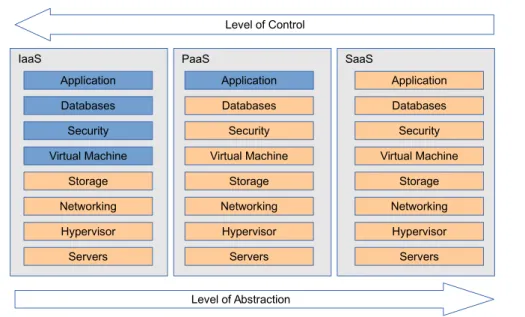
of cloud services: Infrastructure as a Service (IaaS), Platform as a Service (PaaS) and Software as a Service (SaaS). Other models are also proposed as cloud service: Network as a Service (NaaS) and Communication as a Service (CaaS). However, this section only briefly describes the three major types of cloud computing. Figure 2.1
summarizes the management role of each cloud actor, level of control and level of abstraction of each service model.
Infrastructure-as-a-Service is the most basic model of the cloud service. The IaaS provider offers physical machines or virtual machines (the later is more popular, will be described in section2.2) and other basic resources like network, load balancer, storage. In a virtualized cloud, virtual machine is the primitive form of resources being provided to the customer. The customer is responsible for controlling the op-erating systems in the provided virtual machines and deploying his own applications on it. In this model, the customer is typically billed on a utility computing basis, meaning based on the amount of allocated resources. The most notable examples of IaaS providers are Amazon Elastic Compute Cloud [1], Google Compute Engine [5], Windows Azure Cloud Services [12].
Platform-as-a-Service is on a higher level when compared to a IaaS: the PaaS offers a virtualized execution platform with predefined set of application program-ming interfaces (APIs), libraries, services and other tools. The customer develops using these APIs and deploys his application on to the PaaS execution environment. After being deployed, the application is executed in the provider’s cloud infrastruc-ture. The customer does not have control of the cloud platform, including network,
2.1. CLOUD COMPUTING 9
Figure 2.2: Cloud Service Models in Vertical Stack3
servers, operating systems, etc. The process of balancing and scaling the customer application is generally performed by the provider’s cloud manager and is transpar-ent to the customer. In this model, the customer can focus more on the application business without the need to manage balancing and resizing of his application at run-time. Google App Engine [3], Amazon Elastic Beanstalk [2] and IBM SmartCloud Application Services [8] are major examples of PaaS.
Software-as-a-Service is the highest level of service compared to the above two: the SaaS offers well-defined, pre-developed software to the client. The application is accessible from various client devices with a thin client interface (e.g. a web browser) or the client-side application interface. The provider manages his infrastructure (network, servers, balancing) and the application itself. The provider also develops and maintains the provided application. The customer acts like an end user: he only uses the software from the cloud. The most popular SaaS applications are Google Documents [6], Google Apps [4] and Microsoft Office 365 [9].
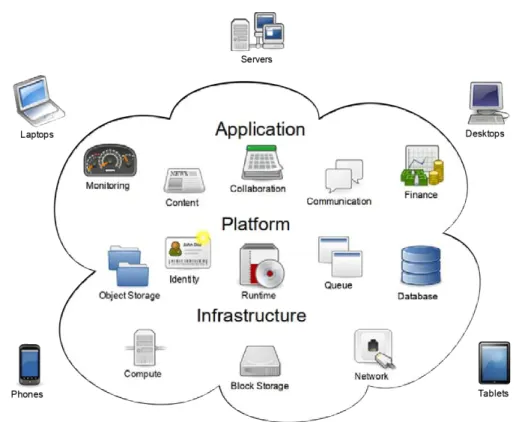
Figure 2.2 summarizes the basic components of each service model (IaaS, PaaS, SaaS, respectively) in a bottom-up point of view: the IaaS is the basic foundation of the cloud, the PaaS is usually built on top of a IaaS, and finally applications are then developed on the provided platform.
2.1. CLOUD COMPUTING 10
Hybrid Cloud
Private Cloud Community Cloud Public Cloud
Figure 2.3: Classification based on Deployment Model
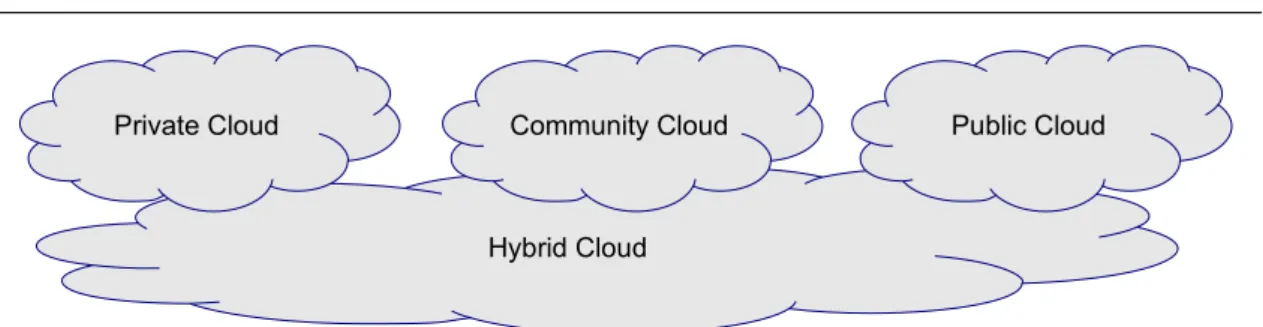
On the other hand, when cloud computing is classified byDeployment Model, we use the scope of the cloud elements as the main criterion (figure2.3). This scope also takes into account the customer type. In this type of classification, we identify the following kinds of cloud computing: private cloud, community cloud, public cloud and hybrid cloud.
A private cloud is a cloud infrastructure that is only used by one specific organization (e.g. a company, a military or a nonprofit organization). The private cloud is usually deployed, managed and accessed by the organization itself. This type of cloud has more control compared to the others, because the owner have access to both physical and logical resources. There are also virtual private cloud providers (like Amazon, Google, or HP), offering secured and isolated private clouds in a public cloud environment. Although with better security and isolation, virtual private cloud still does not bring full control like a physical private cloud.
A bigger cloud environment, community cloud, is targeted by a type of or-ganization (e.g. academic institutions in a country) with a common concern. The goal of a community cloud is to provide the organization with the benefit of a public cloud (such as pay-as-you-go billing model) but with the added level of privacy, se-curity and other requirements which are usually satisfied with a private cloud. The community cloud is owned, deployed and managed by one or more organizations in the community. Its infrastructure is shared among the users.
Being the biggest cloud environment,public cloud is open to public use without any limitation on the type of the customer (either personal, business, military or academic institution). A cloud provider has full ownership of the cloud platform with his own policy and shares his resource pool between the public cloud users through network access, mostly through the Internet. This cloud infrastructure serves any kind of applications, depending on the customers, and generally falls into PaaS or IaaS. This is the most popular type of cloud service nowadays. Beside big
2.1. CLOUD COMPUTING 11 and popular providers (Google App Engine, Amazon EC2), there exists more and more smaller providers like Terremark4, DreamHost5, EMC6, etc.
A hybrid cloud solution is usually proposed to meet the requirements of the customer. The cloud infrastructure in this case is a combination of two or more smaller infrastructures (private, community or public). These small infrastructures are bound together by the requirements of the customer, either his goals, security concerns, or proprietary technologies. A typical application of hybrid cloud solutions is to extend the capacity of a small cloud during peak load, by requesting additional resources from a public cloud. This method is called cloud bursting. By using hybrid cloud, organizations can obtain both performance (no Internet connectivity is required when the private cloud is used locally) and availability (more resources are available on the community/public cloud when the private cloud is out of resource).
It is also notable that the software required to power these types of cloud in-frastructures is still a topic of research and enhancement. The cloud software is categorized as proprietary (e.g. VMWare vCloud) or open source (e.g. OpenStack, CloudStack). It depends on the customer and the provider to choose what cloud software is best appropriate for their cloud requirements.
This section summarized the various kinds of cloud computing, based on the clas-sification model (Service Model or Deployment Model). The next section discusses their benefits and drawbacks to each actor of cloud computing.
2.1.3
Advantages and Disadvantages
Cloud computing, like many other computing systems, has its benefits and draw-backs. This section summarizes the main advantages and disadvantages of this popularity-gaining [15] computing model.
Advantages
Cloud computing brings many benefits to both the customer and the provider, mainly because of each actor’s dedication. On the customer side, he simply uses the provided application (SaaS), or is freed from taking care of the availability and main-tainability of the computing infrastructure, and focuses on his business application instead (PaaS or IaaS). On the other side, the provider is dedicated to deploying
4http://www.terremark.com/ 5http://www.dreamhost.com/ 6http://www.emc.com/
2.1. CLOUD COMPUTING 12 and managing the infrastructure (IaaS), developing his platform with more services (SaaS), or developing the application (SaaS). This dedication improves each actor’s performance, increases hardware utilization rate and reduces power waste.
For the customer, the computing capability of the whole infrastructure often appears to be unlimited. That means the client can request as much as he wants to deal with the computational needs. Generally, the client needs to deal with idle or peak loads at runtime of his application. To do that, an autonomic resource management system (ARMS) is implemented. In a peak load, the ARMS deploys many instances of the customer’s application on the cloud infrastructure to keep the application response time as low as acceptable. The cloud computing capability allows the customer to allocate resources for his application as much as requested.
Combined with the pay-as-you-go billing model, this type of on-demand resource allocation brings benefit to the client because he only pays for what is used: only booked and used resources are billed. By effectively using the cloud infrastructure from the provider, the customer does not need to spend on the computing infra-structure himself, and therefore reduces the initial investment cost. This reduction is critical to many startups and small companies. Large corporations also benefit be-cause their computing infrastructure is huge. Deploying, maintaining and extending such infrastructures are costly, both in terms of human resources and equipments.
The provider shares his own resource pool between various cloud customers. By doing this, the provider has better infrastructure utilization rate: the same hardware can be used to serve many clients at the same time (by providing virtual machines to each customer). After initial investment to deploy the cloud infrastructure, it is mainly the customers who pay for the hardware being used. This model is similar to renting the hardware: the provider benefits from charging his customers for each fraction of his hardware.
Not only does cloud computing benefit in terms of cost for the provider and customer, it also helps in protecting the environment as a form of green computing. By mutualizing the computing resources, both actors have lower physical hardware needed to run the customer applications when compared with virtualized, non-cloud infrastructure. Minimizing the amount of occupied physical hardware also means minimizing the energy powering this hardware, and reducing the amount of emitted CO2 used for generating electricity.
Issues
While cloud computing continues to gain popularity among enterprises, it also raises concerns about its various drawbacks. The main drawbacks include (but not
2.1. CLOUD COMPUTING 13 limited to) data privacy, system security, standardization and resource management. They affect both the provider and the customer in their operations.
A typical and one of the most important concerns of the customer about cloud computing is his data privacy. As cloud computing is a way of outsourcing data and applications, the customer needs to put his data into the cloud, in which the provider shares resources with other customers. The customer naturally raises a question about their privacy of his data in the provider’s cloud infrastructure. Therefore, there is a need for implementing appropriate mechanisms to isolate data between customers. Additionally, the cloud provider should be prevented from exploiting the customer’s data.
The cloud infrastructure’s security is also one of the main concerns. The security issues for cloud computing are generally divided into two categories, according to the point of view of the cloud provider or the customer. On the customer side, physical control of a private cloud (in a local building) is usually considered more secure than having the equipment at the provider’s data center. Physical control also means the ability to have direct visibility of the equipments, and is easier to ensure that the infrastructure is not compromised. In the case of a IaaS, the customer needs to enforce better security to his provided virtual machines (including kernel, operating system, virtual network, and the deployed application itself) than in the case he deploys his application in a private data center. A higher security level is required because many customers share the same physical network in the provider’s infrastructure. On the provider side, beside the usual security policies employed in a typical data center, an additional level of security must be enforced: the Virtual Machine Monitor (or hypervisor, the virtualization software that separates hardware and the virtual machines, see section 2.2.1). It poses more tasks for the provider: the virtualization level must be properly configured, managed and secured [52]. If a Virtual Machine Monitor in one host is compromised, the attacker has access to all the virtual machines running on that host, regardless of the network security system implemented on these virtual machines. Therefore, both actors need to ensure security at their own levels.
Another problem blocking the adoption of cloud computing for enterprises is the lack of standardization. Each cloud provider offers his own APIs for the clients, applications and users to interact with the cloud. This obstructs the development of the cloud ecosystem by preventing users from easily switching between differ-ent providers. For example, there is currdiffer-ently no standardized way to seamlessly translate security requirements and policies across cloud offerings [49]. More im-portantly, proprietary APIs overburden the integration process to the cloud from the company’s legacy system (i.e. traditional servers). Additionally, virtualization technology among cloud platforms is not standardized: each cloud provider has his
2.1. CLOUD COMPUTING 14 own choice of virtualization platforms (e.g. Xen [17], OpenVZ [10], VMware [11], etc). These hypervisors do not interoperate because they do not share the same virtualization techniques, file formats, network and storage architectures.
The research community made many efforts to bring open standards to the cloud. IEEE Standards Association (IEEE-SA) is one of the main organizations (beside Distributed Management Task Force, Open Grid Forum and National Institute of Standards and Technology) contributing to the open standards of cloud comput-ing [49]. For example, IEEE-SA has published two working drafts for standardizing the portability and interoperability profiles, as well as for intercloud interoperability and federation. Open Cloud Computing Interface develops the various standards for cloud management tasks, enabling interfacing between IaaS cloud implementations. However, these proposals are not yet finished, accepted and implemented. Cloud computing still needs a long time to have full standards.
Last but not least, there is no unified resource management policy in the cloud. The provider and the customer have their own ways of implementing resource man-agement to solve the cost and scalability problems. The customer tends to reduce the number of allocated virtual machines, because he is billed according to the num-ber of requested VMs in the cloud. The provider wants to minimize the numnum-ber of running physical servers, because doing this will reduce resource waste and energy consumption. The lack of coordination in the cloud prevents these resource man-agement policies at both levels (the virtualized level and the application level) from fully bringing benefits to all cloud actors.
2.1.4
Synthesis
We summarized the basis of cloud computing, its definition, characteristics and two ways to classify cloud models. We also briefed the benefits and drawbacks when adopting cloud computing to the enterprises. As previously discussed, cloud computing is a means to connect the need of customers with the services of providers. This connection not only improves the dedication and performance of each actor, but also brings benefits to them. The success of cloud computing is backed by virtualization technology. We will describe virtualization in the next section.
2.2. VIRTUALIZATION 15
Hardware Hypervisor
Host OS Guest OS Guest OS
Guest Processes Guest Processes
Figure 2.4: Bare Metal Hypervisor (Type 1)
2.2
Virtualization
Virtualization is the most important technology in cloud computing because it provides isolation and flexibility for managing computing resources. With virtualiza-tion, the provider can easily offer different shares of his hardware to the customers, allowing these resources to be allocated, relocated and deallocated at runtime. This section gives an overview of virtualization, its various types, benefits and drawbacks.
2.2.1
Definitions
Virtualization is a software- and/or hardware-based solution for building and running many operating systems simultaneously on the same bare hardware. Most current implementations of virtualization platform use a software to separate phys-ical hardware and the executing operating systems. These virtualization systems are usually supported by the underlying hardware: the hardware provides architec-tural support that facilitates the performance, management and isolation of virtual machines.
A virtualized system uses its Virtual Machine Monitor (VMM ), the virtualizing software responsible for hardware emulation and communication, to share its hard-ware resources among the guest operating systems (Guest OS ). The VMM guaran-tees the independence and isolation among the guest OSes, and therefore provides better security for applications running inside the guest OSes than the same applica-tions deployed in an unvirtualized environment. The VMM is also called hypervisor. Most hypervisors support many instances of various operating system (e.g. Unix, Linux, Windows). There exists two main types of hypervisor [46]:
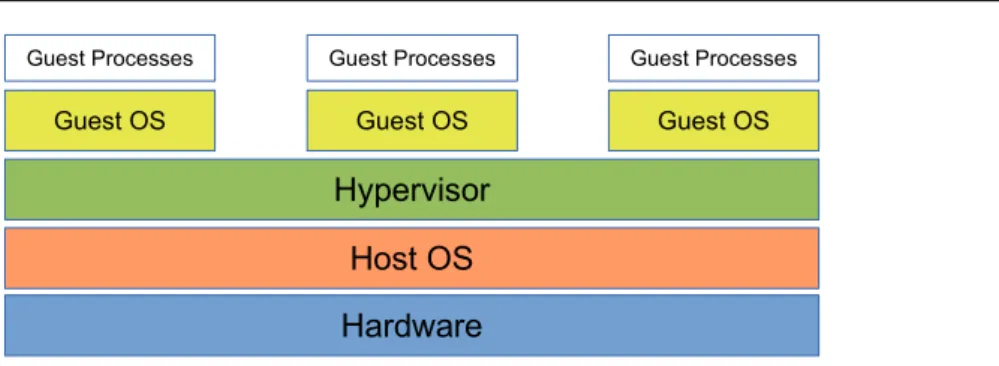
• Type 1: also called native or bare metal hypervisor. This type of hypervisor runs directly on the host’s hardware as an intermediate level between hardware
2.2. VIRTUALIZATION 16
Hardware Hypervisor
Guest OS Guest OS Guest OS
Host OS
Guest Processes
Guest Processes Guest Processes
Figure 2.5: Hosted Hypervisor (Type 2)
and the guest OSes. Therefore, the guest OS runs at another level above the hypervisor (figure 2.4). This model represents the classic implementation of virtual machine systems. The main benefit of bare metal hypervisor is having less overhead: only does the hypervisor layer stay between the guest OSes and the physical hardware. However, this type of hypervisor is hard to deploy on an existing (and running) system: many type-1 hypervisors require a full hard drive repartition and format during their installs. Most popular examples of type 1 hypervisors include XenServer and VMware ESX/ESXi.
• Type 2: also called hosted hypervisor. These hypervisors run on top of a normal operating system. The guest OSes suffer from two levels overhead: the host operating system and the hypervisor (figure 2.5). Therefore, hosted hypervisors generally have lower performance than bare metal ones. However, they are easier to adopt in a running system: their installation usually includes kernel drivers and a normal front-end application. They do not severely affect the host operating system and do not require full system format. VMware Workstation and VirtualBox are two main examples of hosted hypervisors.
To support the execution of each guest OS, the VMM emulates a virtual ma-chine, providing complete system platform with a complete set of resource (similar to a physical machine): CPUs, memory, graphic cards, audio cards, storage drives, network interfaces, etc. These virtual machines are usually based on an existing architecture, such as Intel x86, ARM, PowerPC. After finishing virtual machine al-location (i.e. allocate physical resources for the virtual machine), the VMM starts the guest OS inside this virtual machine. During the guest OS runtime, the VMM can dynamically allocate additional resources to the virtual machine.
Virtualization ensures isolation among the guest OSes by wrapping each guest OS in a separated virtual machine, similar to real operating systems running on different servers. The VMM isolates its virtual machines both in terms of resources and performance. Accessing resource of another virtual machine (storage, memory, etc) is strictly prohibited (and generally there is no way to perform such tasks from a
2.2. VIRTUALIZATION 17 virtual machine). The VMM also ensures the performance of each virtual machine by protecting resources from other virtual machines’ abuse. For example, each virtual machine cannot use more than the defined amount of CPU cycles, memory limit or network bandwidth. The VMM balances the physical resources being used between virtual machines while ensuring performance for applications running on top of these guest OSes.
Virtual machine live migration [26] enables the modification of the customer’s virtual machine placements in the provider’s data center. It helps the provider to satisfy customers and to reduce energy cost. In a cloud infrastructure with dynamic virtual machine allocation, live migration can pack or spread running virtual ma-chines among physical servers, based on their resource needs. Idle virtual mama-chines can be gathered into as few servers as possible, enabling the possibility to switch off or to suspend the freed servers. On the other hand, overloaded virtual machines can be distributed to less busy servers to ensure their performance to decrease the risk of SLA violation. All of these migrations are executed at runtime, and most likely do not affect the performance of the applications inside these virtual machines. More importantly, the application is guaranteed that there will be almost no message loss during the migrations [26]. As a result, server utilization is greatly improved and power consumption is reduced with live migration.
2.2.2
Classifications
As virtualization has a long time of evolution (dated back to 1960s [18]), there exists many different types of virtualization. In this section we categorize various virtualization technologies in two directions: hardware level and operating system level.
At the hardware level, the hypervisor is responsible for emulating complete virtual machines with all types of hardware resources: CPU, memory, storage, I/O devices, etc. In this virtualization architecture, the hypervisor and the host operating system are separated. Access to all hardware resources is provided by the hypervisor through virtual devices. Additionally, this type of virtualization requires a complete copy of an additional operating system running in each virtual machine, including the kernel, device drivers and all basic system services (e.g. modules to handle different file systems). Note that each operating system instance consume a portion of the storage and memory of each virtual machine. This part can be considered as memory and disk overhead of hardware-level virtualization.
2.2. VIRTUALIZATION 18
Hypervisor Unmodified
Guest OS UnmodifiedGuest OS UnmodifiedGuest OS
Hardware
Figure 2.6: Full Virtualization
Hypervisor
Host OS Guest OSModified Guest OSModified
Hardware
Figure 2.7: Paravirtualization
The most straightforward solution in this level is full virtualization. A full virtu-alization architecture emulates all necessary hardware to allow an unmodified guest OS to be executed and isolated (figure 2.6). This includes the emulation of CPU (along with its architecture and instruction sets), storage (hard drive or optical drive, with its controller), graphic card, etc. Full virtualization is usually based on a tech-nique called binary translation, in which all CPU instructions being executed in the virtual machine are parsed, translated and executed in the host CPU (which may be different from the emulated CPU). One of the key challenges for full virtualization is the interception and simulation of privileged operations, such as I/O instructions. As a result, full virtualization is complicated to implement and has low performance when compared to a physical, unvirtualized system.
However, one of the main advantages of full virtualization is the ability to keep the guest OSes unmodified: they are fully abstracted from the underlying hardware by the virtualization layer. In this case, the guest OSes are not aware of being virtualized and do not need to be modified. This advantage is important for running proprietary operating systems (such as Windows, Solaris). Open source operating systems do not need to be run in full virtualization, because they can be modified to meet the virtualized requirements.
Paravirtualization (or OS Assisted Virtualization) exploits such modifications to the guest OS to allow it to be virtualized (figure 2.7). It is different from full virtualization in the sense that the guest OS is aware of being virtualized. The changes to the guest OSes to support paravirtualization are generally minimal and non-intrusive. Because of the possibility to modify the guest OS, paravirtualization has better performance, less overhead and easier implementation when compared with full virtualization. However, paravirtualization is limited only to modifiable operating system, and this limitation greatly reduces the number of supported plat-forms.
Hardware Assisted Virtualization is a form of full virtualization which uses the support from the hardware (primarily from the host’s processor) to ease and increase performance of the guest OSes. As virtualization gained popularity, hardware ven-dors started supporting it by incorporating features in their hardware to simplify
2.2. VIRTUALIZATION 19
Hardware
Virtualization Layer & Host OS
Container Guest Processes Container Guest Processes Container Guest Processes
Figure 2.8: Operating System Level Virtualization
virtualization techniques. This support reduces performance overhead when exe-cuting virtual machines and reduces changes to the guest OS. Intel and AMD have their own instruction set extensions for virtualization, called VT-x and AMD-V, re-spectively. However, not all processors and hardware have this capability, and this limits the adoption of hardware assisted virtualization. Most popular virtualization platforms use hardware assisted virtualization when the host hardware is capable of it.
There exists both open source and proprietary implementations of hardware-level virtualization: qemu, VirtualBox, VMware Workstation (full virtualization); Xen, Sun’s Logical Domains, VMware ESX/ESXi (paravirtualization).
At the operating system level, virtualization is integrated inside the oper-ating system. The guest processes are encapsulated into entities called containers (figure 2.8). These containers share the operating system kernel with the host and take parts of the hardware resources. Note that each container has its own view of available resources: the number of CPU cores, the amount of available memory, storage size, etc. In this category, the hypervisor and the host operating system are merged. This type of virtualization supports a certain form of isolation, but less separated than hardware-level virtualization. With the nature of sharing the same operating system instance among containers, OS-Level virtualization has less per-formance overhead when compared with hardware level virtualization: there is one layer less in the virtualization stack. The customer’s applications running in the containers can have doubled throughput when compared with hardware-level virtu-alization solutions [53]. Live migration for containers is also possible in OS-Level virtualization. Another advantage of OS-Level virtualization is the ability to easily manage the size of allocated resources on-demand. However, security issue is the main concern in OS-Level virtualization, because all containers share the same op-erating system kernel with the host. If the attacker can exploit a vulnerability in the guest kernel, it also means that he has exploited the host kernel and theoretically has access to the whole physical system. Major examples of OS-Level virtualization include OpenVZ, Linux Container (LXC) and Solaris Containers.
2.2. VIRTUALIZATION 20
2.2.3
Advantages and Disadvantages
Virtualization brings many benefits to the hosting industry. One of the main advantages of virtualization is cost reduction, both for hardware cost and for main-tenance cost. Many server applications can share the same physical hardware to improve hardware utilization rate, without compromising each server’s security. For instance, one physical server can be used for a web server in VM1, a database server in VM2, an application server in VM3. If one server has security breach, the other two are still safe in other virtual machines. In an unvirtualized system, these sys-tems take 3 different physical servers (wasting power when underutilized) to have the same security level. Additionally, virtualized resources are easier to manage with autonomic management systems. A virtual machine acts both as a physical entity (a machine) and a logical entity (a manageable software). Autonomic man-agement systems can interact with the virtualization software to allocate, migrate, or stop virtual machines at runtime. This helps in reducing resource usage and cost. Furthermore, virtualization helps the customer in deployment and dependency man-agement: a prebuilt image of a virtual machine disk containing the application with its dependencies can be easily deployed and replicated into the cloud. The usage of prebuilt virtual machine images can reduce deployment time for additional applica-tion instances to serve load peaks. Finally, the ability to migrate virtual machines provides the flexibility of placing them in the infrastructure, according to the actual load status of physical servers.
However, similar to cloud computing, virtualization still lacks of open standards to help interoperability among virtualization platforms. This fact leads to the vendor lock-in problem: when a virtual machine is created using one virtualization platform, it is not easy to port it to another one seamlessly. Furthermore, virtualization introduces performance overhead when compared to a unvirtualized system: the hypervisor itself consumes system resources, as well as all access to the resources from the virtual machines needs to be processed and translated by the hypervisor. In ideal cases, the computing performance overhead is as low as 3% [17], but real world applications and benchmarks showed much larger values, up to 46% [13] when compiling a Linux kernel inside a virtual machine.
2.2.4
Synthesis
Despite of the various drawbacks, virtualization is still widely used in the hosting centers, mostly because its advantages outweigh the disadvantages: hosting centers and customers benefit from cost reductions. Key factors contributing to this success
2.2. VIRTUALIZATION 21 include: domain isolation, virtual machine migration (server consolidation) and dy-namic resource allocation. Isolation improves security in application server. Virtual machine live migration reduces the number of running physical machines. Dynamic resource allocation minimizes allocated resources and reduces cost for the customers.
Resource allocation is further enhanced by various resource management policies, both at the physical level and at the virtualized level. The next section describes in-depth these policies.
2.3. RESOURCE MANAGEMENT IN A IAAS 22
2.3
Resource Management in a IaaS
Resource management is one of the most important tasks in cloud computing. Inefficient resource management has a direct negative effect on performance and cost. Ensuring performance and effective use of the resources is a challenge for both provider and customer. In this research work we consider a cloud as a IaaS, in which the provider offers his resources with virtual machines to the customer. This section summarizes various resource management tasks in the cloud for the provider and the customer.
The primitive resource container provided to the customer in a IaaS is in the form of virtual machines. As described in the previous section, each virtual machine has all typical resource types: computing power (CPUs), memory (virtual memory), storage (hard drives), connectivity (virtual network interfaces, IP addresses). Note that most current IaaS providers offer fixed-size virtual machines: the amount of allocated resources for each virtual machine cannot be changed at runtime without stopping the virtual machine first. Resource allocation in cloud infrastructures is mostly based on the allocation, relocation and deallocation of the virtual machines.
In cloud computing, various metrics are defined when allocating resource for a customer. A resource reservation is defined as a minimal threshold for the resource that the provider must ensure. That means the reservation is used to specify a minimum guaranteed amount of resources: the customer’s allocated resource is pre-vented from being heavy overcommited. This type of threshold is typically defined in terms of absolute units, such as Megahertz for CPU, the number of CPU cores, or Megabytes for dedicated memory of each virtual machine. On the other hand, a resource limit is used as a means to restrict the customer from resource abuse. A limit is used to define an upper bound on resource consumption that the customer cannot exceed. Most virtualization platforms support this ability on all major types of resources: CPU cap, memory quota, storage limit, network bandwidth restric-tions, etc. Similar to reservation, a limit is also expressed in terms of absolute units, such as Megabytes or Megabits per second.
Resource allocation in a IaaS needs to take into account a lot of various factors, including the heterogeneity of machines. As cloud infrastructure grows, it is difficult for cloud providers to have a large number of identical machines: they need to be added over time. The differences in architectures, hardware specifications and computing capabilities increase the complexity of deciding which physical resource will be allocated upon a resource allocation request. These differences also need to be considered when migrating a virtual machine from one physical server to another. For example, a VM running on a physical machine at 3GHz CPU with 50% quota
2.3. RESOURCE MANAGEMENT IN A IAAS 23 must have a different quota value when being migrated to another server at 2.0GHz CPU. This leads to the resource allocation problem: how to effectively distribute the virtual machines, which contain the customer’s application instances, among physical servers using the predefined metrics?
This problem is considered at two levels: virtual resource management and ap-plication instance management (i.e. at the IaaS layer and at the apap-plication layer, respectively).
2.3.1
Resource Management by the Provider
There exists two types of resources that the IaaS provider manages: physical resources and virtualized resources, in the forms of physical servers and virtual ma-chines. The provider is responsible for managing these resources effectively to reach his goal: minimizing operation cost.
Physical servers has only few basic and manageable tasks: power off, power on, suspend and resume. These actions allow the provider to dynamically start and stop the physical machines, and therefore resize the server pool at runtime. Notice that the main difference between power on/off and suspend/resume is the time to execute the operation: starting up a server is much slower than resuming it from sleep state. A cold boot often takes up to several minutes, while a resume task takes less than 10 seconds. The provider needs to take into consideration this difference when deciding to decrease the pool size (during idle periods). Powering off implies a bigger latency when a peak load occurs, so most providers suspend their unused physical servers for saving energy instead of powering them off.
Virtual machines has more options for the provider to deal with peak loads or idle states. The provider can migrate his virtual machines: they can be placed and moved anywhere, on any physical server, without any interruption. This ability ensures performance for the customer and server consolidation for the provider.
To reach the goal of reducing cost, the provider manages his physical servers and allocated virtual machines at the same time, by (1) relocating virtual machines, in order to span as few servers as possible, then (2) switching off or suspending the unused servers to save energy.
2.4. SYNTHESIS 24
2.3.2
Resource Management by the Customer
On the customer side, allocated resources can also be managed: the more unused virtual machines, the more cost for the customer. The ultimate goal for the customer is also to minimize operation cost. To achieve this goal, the customer tends to minimize the number and size of his allocated virtual machines.
To do this, an autonomic administration system (AAS), a branch of autonomic computing [40], is implemented to monitor and manage the customer application instances. The customer’s AAS usually includes a set of probes, a decision core, and an effector. The probes monitor each application instance, see if it is idle or is dealing with high load. The information gathered is then submitted to the decision core. This component, in turns, takes into consideration all loads of all instances and selects a choice among (1) keeping the current application instances as is, or (2) reducing the number of application instances in idle states, or (3) increasing the number of application instances to deal with peak loads. This decision is then transmitted to the effector. This last component, depending on the architecture of the application, interacts with the cloud infrastructure to allocate or deallocate virtual machines according to the decision.
2.4
Synthesis
After presenting the resource allocation in the IaaS from different actor’s point of views, we conclude that the goal of both actors is to minimize costs, but their way to achieve this goal is different. The provider minimizes the number of physical machines by migrating the allocated virtual machines on as few physical machines as possible, then switching off the freed machines. On the other hand, the customers minimizes his number of running virtual machines with his own AAS.
However, a problem is raised when these resource management policies are oper-ating separately. This problem and our approach toward solving it will be presented in the next chapter.
Chapter 3
Motivation and Orientation
Contents
3.1 Fixed Size Virtual Machine . . . 26 3.1.1 Resource Holes . . . 27 3.1.2 Performance overhead . . . 28 3.2 Elastic Virtual Machine. . . 31 3.3 Cooperative IaaS. . . 36 3.3.1 Approach overview . . . 36 3.3.2 Characteristics . . . 39 3.3.3 Comparison with a conventional IaaS or a PaaS. . . 40 3.4 Synthesis . . . 43
The previous chapters showed the goal and approaches of each cloud actors to-ward minimizing operating costs in a conventional IaaS. In summary, the customer dynamically requests the allocation and deallocation of fixed-size virtual machines to serve his application. On the other side, while satisfying the customer’s de-mand for computing resources, the provider ensures server consolidation to mini-mize power consumption by live migrating allocated virtual machines and suspending freed servers.
There exists several ways to optimize the infrastructure utilization rate. This chapter discusses various issues in resource management in a conventional IaaS and describes our proposal to solve these problems.
3.1. FIXED SIZE VIRTUAL MACHINE 26 H T T P L B
Apache tier Tomcat tier
Apache tier MySQL tier
Mod_JK
JDBC
Client
Figure 3.1: Typical J2EE Architecture
3.1
Fixed Size Virtual Machine
Most IaaS providers currently offer a set of fixed size virtual machines: any allocated virtual machines are assigned with a fixed set of resources and cannot be resized at runtime. To resize a virtual machine, the customer firstly need to stop it, change the required resource size and finally restart it. This limitation poses inconvenience to the customer when he wants to resize his virtual machines according to the application load.
A naive approach to have dynamic application size at runtime with fixed size virtual machines is to use application replication: instead of having a single applica-tion instance, the customer uses multiple instances. When the workload increases, new application instances are dynamically added. In contrast, running instances are removed when workload decreases. Depending on the application type, parts or all of the application instances can be replicated. This mechanism is effective with master-slave applications using load balancers.
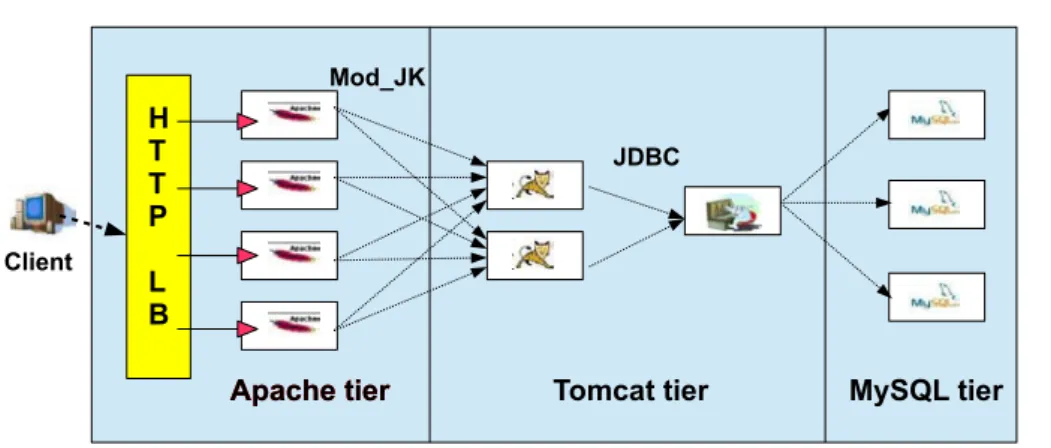
For instance, a typical web application in Java 2 Platform Enterprise Edition (J2EE) is a popular example of a master-slave application being deployed in the cloud (figure3.1). Such application represents the commonly hosted applications in cloud platforms. Its design consists of a web server tier (e.g. Apache), an application server tier (e.g. Tomcat) and a database server tier (e.g. MySQL). When a HTTP request is received, it refers either to a static web document (e.g. HTML, CSS), in which case the web server directly returns the requested document to the client; or to a dynamically generated document, in which case the web server forwards the request to the application server. In turn, the application server executes requested application components (e.g. Servlets, EJBs), creating queries to a database through a JDBC driver (Java DataBase Connection driver). Finally, queried data from the
3.1. FIXED SIZE VIRTUAL MACHINE 27 database (e.g. MySQL) is processed by the application server to generate a web document which is returned to the client.
In this example, the customer application is replicable, consisting of 3 tiers: the web server tier, the application tier and the database server tier. Each of these tiers can be replicated to deal with important of work load: to serve a large number of static files (e.g. static images at the web server), to finish a complicated task in the application (calculations at the application server), or to execute a long query in the database (making reports from multiple large tables in the database server). Each load balancer distributing incoming requests to application tiers should be able to take into account the weight of each managed tier instances: instances deployed with more resources is forwarded with more requests than instances with less resources. When being deployed in a cloud environment, each tier instance can be wrapped inside a virtual machine to ease the management of the tier instances.
3.1.1
Resource Holes
In a conventional IaaS, the provider usually offers fixed size virtual machines from a set of different instance types (specified size for each type of resource). These instance types allow the provider to have a wide range of customers. When fixed size virtual machines are created and released dynamically at runtime, the provider’s infrastructure gradually becomes fragmented, similar to filesystems in storage disks. As a consequence, resource holes appear at runtime in the cloud and the provider has less flexibility for server consolidation. The resource holes at runtime depend on the allocated virtual machine sizes. From the provider’s point of view, the ability to move virtual machines (also called the flexibility of virtual machines) between physical machines to ensure server consolidation is the most important factor. Small virtual machines are more flexible for migration than big ones, because they are more likely to fit available slots in physical machines. As a result, small virtual machines are better to fill the holes.
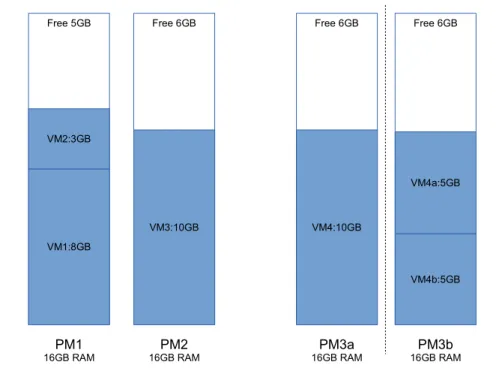
An example to show the flexibility of small virtual machines over big ones is described on figure 3.2. This illustration considers memory as the main resource-constraint factor. The left part shows two occupied physical machines (PM1 and PM2) with associated virtual machines on each. The allocated memory for each virtual machine and free memory are also noted. PM3a denotes a case when the customer uses a big virtual machine. PM3b shows another situation when the same customer uses two smaller virtual machines, each consumes 5GB of memory, instead of a big 10GB one.
3.1. FIXED SIZE VIRTUAL MACHINE 28
Free 5GB
VM1:8GB VM2:3GB
PM1
16GB RAM 16GB RAMPM2 16GB RAMPM3a Free 6GB VM4:10GB PM3b 16GB RAM Free 6GB VM4b:5GB VM4a:5GB Free 6GB VM3:10GB
Figure 3.2: Example of Flexibility from Small Virtual Machines
If one big virtual machine is allocated (PM3a), the provider does not have the ability to migrate it to PM1 or PM2, because the free memory on PM1 or PM2 is not enough for this big virtual machine (requiring 10GB of memory). In this situation, although the total free memory (11GB) fits VM4 (10GB), the provider still need to keep all 3 PMs running. In contrast, if the customer chooses the second placement (two virtual machines, each consuming 5GB of memory), like in PM3b, the provider has the ability to migrate these virtual machines to PM1 and PM2 to shut down PM3b.
From this example, it is clear that fixed size virtual machines do not bring flexibil-ity to the provider for the best possible optimization regarding server consolidation. Another issue with fixed size virtual machine is performance overhead, which will be described in the next section.
3.1.2
Performance overhead
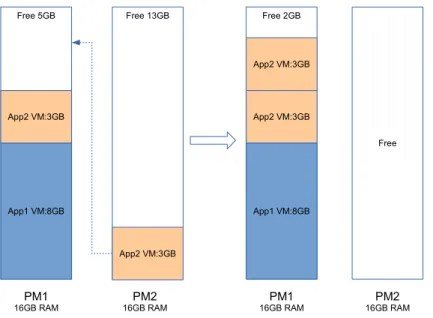
Because a fixed-size virtual machine cannot be resized after its allocation, the customer needs to add or to remove application instances (wrapped into virtual machines) to deal with workload fluctuation at runtime. He typically requests to allocate new virtual machines to deal with the increase of the application’s workload. As a result, there exists situations where multiple virtual machines of the same
3.1. FIXED SIZE VIRTUAL MACHINE 29 Free 5GB App1 VM:8GB App2 VM:3GB PM1 16GB RAM Free 2GB App1 VM:8GB App2 VM:3GB PM1a 16GB RAM App2 VM:3GB Elastic VMs Fixed Size VMs Free 2GB App1 VM:8GB App2 VM:6GB PM1b 16GB RAM
Figure 3.3: Dealing with Load Increase
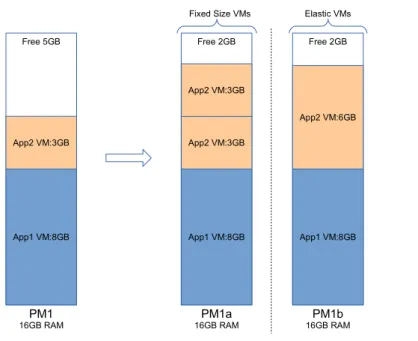
application are running on the same physical machine. An example is illustrated in figure 3.3: to deal with a load peak, App2 allocates another fixed-size virtual machine. In this example, two virtual machines of the same application 2 are running on PM1a. This placement (PM1a) generates several types of performance overhead:
• Virtualization overhead is the performance penalty caused by the hypervisor. Since the hypervisor is a software itself, it consumes system resources, including CPU cycles and memory. CPU is used in the hypervisor for doing all virtu-alization tasks, including making decision for the next virtual machine time slice, processing hypercalls, looking up memory pages for guest OS memory access, etc. Xen, a typical hypervisor, introduces 3% to 45% CPU overhead in benchmarks [13,17]. Hypervisors use a part of the host’s memory for managing virtual machine, hash tables in content-based page sharing, etc. Having more virtual machines on a host means more hypercalls, more pagetable lookups, more allocated memory for virtual machine’s page mapping, etc. As a re-sult, the more virtual machine shares the same host, the more virtualization overhead is introduced.
• Balancer overhead occurs when requests to the customer’s applications are passed through a load balancer. A balancer needs to maintain a list of managed tier instances and distributes its requests to the worker instances. Introducing a new layer (balancer) into the application architecture also adds one more step in the request flow, further increasing application response time.
3.1. FIXED SIZE VIRTUAL MACHINE 30 Reducing the number of application instances acts as an important factor to reduce performance overhead. For the hypervisor, a reduced number of virtual ma-chines leads to less virtual machine’s context switches, less physical-to-machine mem-ory mapping tables, more cache hit, etc. Similarly, with a smaller number of virtual machines, the IO virtualization system has less network interfaces and disk images to virtualize, reducing overhead. At the highest level, the balancer is less stressed with less number of tier instances.
To summary, this section described the two main problems introduced in the cloud infrastructure when using fixed size virtual machine, namely resource holes and performance overhead. A straightforward solution is to use variable size virtual machine for resource allocation and deallocation. This direction will be discussed in the next section.