HAL Id: hal-00705420
https://hal-imt.archives-ouvertes.fr/hal-00705420
Submitted on 7 Jun 2012
HAL is a multi-disciplinary open access
archive for the deposit and dissemination of
sci-entific research documents, whether they are
pub-lished or not. The documents may come from
teaching and research institutions in France or
abroad, or from public or private research centers.
L’archive ouverte pluridisciplinaire HAL, est
destinée au dépôt et à la diffusion de documents
scientifiques de niveau recherche, publiés ou non,
émanant des établissements d’enseignement et de
recherche français ou étrangers, des laboratoires
publics ou privés.
JerkTilts: Using Accelerometers for Eight-Choice
Selection on Mobile Devices
Mathias Baglioni, Eric Lecolinet, Yves Guiard
To cite this version:
Mathias Baglioni, Eric Lecolinet, Yves Guiard. JerkTilts: Using Accelerometers for Eight-Choice
Selection on Mobile Devices. ICMI (ACM International Conference on Multimodal Interaction), Nov
2011, Alicante, Spain. pp.121-128. �hal-00705420�
JerkTilts: Using Accelerometers for Eight-Choice
Selection on Mobile Devices
Mathias Baglioni
Télécom ParisTech - LTCI-CNRS –Alcatel Lucent Bell Labs 46 rue Barrault 75013 Paris, FRANCE
[email protected]
Eric Lecolinet
Télécom ParisTech - LTCI-CNRS
46 rue Barrault 75013 Paris, FRANCE
[email protected]
Yves Guiard
Télécom ParisTech - LTCI-CNRS
46 rue Barrault 75013 Paris, FRANCE
[email protected]
ABSTRACT
This paper introduces JerkTilts, quick back-and-forth gestures that combine device pitch and roll. JerkTilts may serve as gestural self-delimited shortcuts for activating commands. Because they only depend on device acceleration and rely on a parallel and independent input channel, these gestures do not interfere with finger activity on the touch screen. Our experimental data suggest that recognition rates in an eight-choice selection task are as high with JerkTilts as with thumb slides on the touch screen. We also report data confirming that JerkTilts can be combined successfully with simple touch-screen operation. Data from a field study suggest that inadvertent JerkTilts are unlikely to occur in real-life contexts. We describe three illustrative implementations of JerkTilts, which show how the technique helps to simplify frequently used commands.
Categories and Subject Descriptors
H5.2 [Information interfaces and presentation]: User Interfaces. - Graphical user interfaces.
General Terms
Design, Human Factors.
Keywords
Interaction techniques, handheld devices, input, accelerometers, gestures, Marking menu, self-delimited.
1. INTRODUCTION
Suppose you want to quickly check on your smartphone whether a certain email is there, but you are wearing gloves or for some reason your fingers are greasy. Since the only thing the device can understand is a sequence of touches performed by a bare and reasonably clean fingertip, you are stuck for a moment. JerkTilts, the input technique we are introducing in this paper, would avoid
you that frustration. In essence a JerkTilt is a quick, jerky to-and-fro rotation of the device, which works as a one-step gestural shortcut, making it possible to directly access a command from a small set of favorites with no reason to care about mode—because a JerkTilt is a self-delimiting gesture.
A standard PC has both a keyboard, with some special modifying keys designed to be used in parallel, and at least one pointing device equipped with a number of state buttons. One severe shortcoming of commercially available smartphones, in comparison with PCs, is that they essentially rely on a single input channel: the touch screen. These devices can be carried away because they have been made small, but the inevitable cost is an impoverishment of their input equipment.
To be fair, it must be noted that handhelds have one input channel with no fewer than six degrees of freedom (three translations, three rotations) since onboard technology used to detect self 3D-motion (accelerometers, gyroscopes, etc.) has been available for years [17]. However, tilts are often indistinguishable from everyday motions (e.g., walking) and often need an delimiter. In response to this difficulty, [20] have proposed DoubleFlip, a unique motion gesture that acts as a delimiter for other motion gestures. Our option is to merge the gestural command and its delimiters. The JerkTilts technique involves a set of
self-delimiting gestures, which avoids the need for explicit delimiters.
Because JerkTilts consist of abrupt back-and-forth movements whose kinematic signature is unique, inadvertent activations are very unlikely.
The JerkTilts technique rests on rotations of hand-held devices. Unlike a device translation, often impracticable in many public situations, a rotation of the device about itself requires minimal workspace. Also, provided that angular amplitudes are moderate, the screen of a rotating device may remain visible for users, enabling them, when necessary, to receive output information. Using tilts gestures has also the advantage to be performable one-handedly [22]. This is an important factor in the context of mobility since the second hand is often reserved for an alternate use (carrying a bag, holding the subway handrail, etc.). Finally, partitioning 360° into eight angular sectors is an easy matter for the human cognition, who has a familiar name for each sector (East, North-East, etc.). Eight-item angular selection has been repeatedly proven to be reliable with hand gestures in the context of Marking menus [12].
Selection techniques are often expected to accommodate fairly large sets of items or commands. 2D motion of fingertips on the
Permission to make digital or hard copies of all or part of this work for personal or classroom use is granted without fee provided that copies are not made or distributed for profit or commercial advantage and that copies bear this notice and the full citation on the first page. To copy otherwise, or republish, to post on servers or to redistribute to lists, requires prior specific permission and/or a fee. ICMI’11, November 14– 18, 2011, Alicante, Spain. Copyright 2011 ACM 978-1-4503-0641-6/11/11...$10.00.
device and 3D motion of the device can be combined to define a rich vocabulary of input actions. In practice, however, users of handheld devices often face fairly small sets of high-probability possibilities (e.g., making a phone call, sending an SMS, etc.). In this context one-step commands seem attractive.
The two experiments to be reported below investigated the workability for command or item selection of quick, jerky rotations of a smartphone. We will also report the data of an experiment that investigated the usability of JerkTilts in the context of everyday life, paying special attention to the problem of inadvertent command activation.
In a final section we will present three applications that take advantage of JerkTilts. These implementations are illustrations of the fact that JerkTilts is fully compatible with standard applications and can enhance interaction on mobile devices by providing eyes-free and quick shortcuts commands.
2. RELATED WORK
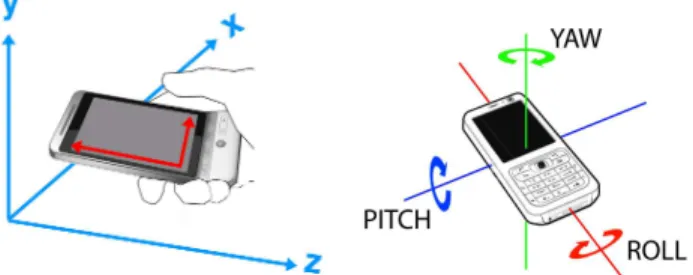
3D-gesture interaction on mobile devices is possible thanks to sensors like accelerometers, in fact low-cost micro electro-mechanical (MEM) systems. Accelerometers report the accelerations of the device they are embedded in, allowing the recording of translational motion. In commercial products they mainly serve to detect coarse shaking of the device. But they can be used to determine the absolute orientation of a motionless device. Indeed, by analyzing the projection of the constant gravity acceleration on the three axes, it is possible to determine pitch and roll orientation (Figure 1). However, accelerometers do not allow the determination of static yaw orientation [6].
Figure 1. The two motion space on/of the device (left). The three axes of rotation of the device, defined in its own
coordinate system (right).
As argued by Kauppila [10], real-time recognition of complex gestures used to be difficult on mobile device due to shortage of computing power, but things are rapidly improving. Due to their earlier appearance on commercial products, to date accelerometers have been more widely used for interaction than alternative sensors, but it is smooth device tilts [16] that have been mainly considered, with the problem that weak acceleration signals from slow gestures may be difficult to distinguish from background noise. This problem, to anticipate, is avoided with the JerkTilts technique, which capitalizes on pretty strong acceleration signals. Combinations of button presses and gestures have been considered in a number of studies, particularly to make it possible to identify the start and end of gestures [13][14][23]. In fact smooth tilts cannot be used for issuing commands in the absence of a discrete validation act because, for a typical user, handheld orientation is highly variable and essentially unpredictable. Note that the final-validation requirement vanishes with JerkTilts, a technique that permits to issue self-delimiting commands.
Rahman et al. [16] evaluated the dexterity of users asked to tilt a device using just the wrist. These authors showed that up to 16 different angular sectors could be recognized by the system and provided guidelines for one-handed mobile tilting interaction. However the gestures considered in the Rahman et al. study were relatively slow tilts of the device, and they were dependent on visual control.
Oakley and Park [13] evaluated device tilting for activating commands in a Marking menu and reported that recognition rates were better with single-step rather than multiple-step selection. With TiltType [14], device tilts served for text entry on a wrist-watch-like device, a physical button working as a gestural-mode controller. The authors evaluated the incidence of inadvertent activation due to background noise in a traveling bus, offering solutions based on signal filtering. With TiltText [23] device tilts were also combined with a key press to allow text entry on a mobile phone. Examples of tilting the device for menu navigation or scrolling were offered in [5] and [17]. We must also mention TimeTilt [19] for navigation among applications: smooth tilts were used for novice-mode navigation where the user needs to look at the screen. The paper also reported using jerks along the longitudinal axis of the handheld to quickly reach the previous/next opened application with a backward/ forward jerk. Previous work that considered dynamic tilts involves [2], [3], [20] et [21]. As already mentioned, DoubleFlip [20] is a specific motion gesture that acts as a delimiter for other motion gestures. [21] and [3] are dedicated to text entry, a different purpose than ours. More specifically [3] investigated four different input modalities, screen touch, device tilt, speech, and foot tap: if touch-screen interaction produced the highest throughput for text entry, the tilting technique was fastest for making a selection. Finally, four-directional gestures were used in [2] for interacting between mobile phones and distant displays but this short paper does not provide an evaluation nor a precise analysis of the gestures that were actually used.
Other research has been conducted on gestural interaction but much of it is irrelevant to mobile devices (for example Gestext [8]). New kinds of gestures have been proposed that are in fact inapplicable to a mobility context, like for example [18]. That is also true of commercial products. The Wii, the Wiimote, and the Kinect platform have familiarized game players with new ways of interacting with gestures. But these large amplitude gestures can hardly be performed out of the living room, as they will interfere with the physical as well as social environment. Small-amplitude rotations like those used in JerkTilts are more compatible with the social and physical constraints of the usual environment.
3. THE JERKTILTS TECHNIQUE:
CONCEPT AND IMPLEMENTATION
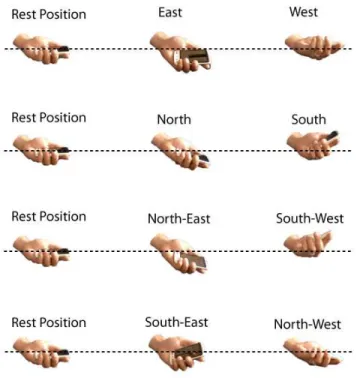
The JerkTilts technique involves quick, short-extent tilting gestures that rely on various combinations of device roll and device pitch (Figure 2 presents each gesture according to rest position).
One important characteristic of a JerkTilt is that it consists of one complete cycle of to-and-fro movement: the device is tilted in a certain direction and immediately brought back to its initial rest position thanks to the natural elasticity of the wrist. The return phase of such movements is quite automatic, the mechanical energy stored as elastic potential energy in the antagonist muscles of the forearm during the initial tilt being converted back into kinetic energy during the return to rest [9]. This helps understand
why the spontaneous execution of this sort of movement takes remarkably little time and costs remarkably little effort.
Figure 2. The eight quick back-and-forth tilting directions regarding to rest position.
Eight different directions, obtained by various combinations of device roll and pitch, can be differentiated by users and discriminated by the system. JerkTilts are not exclusive of touch-screen interaction. They are respectful of the social context and require little 3D space. Perhaps most importantly, they can be performed eyes free.
We evaluated the gestural technique in three steps, detailed below. Experiment 1 asked about the discriminability of tilting directions, paying special attention to between-individual variability. No feedback was given to participants on recognition of the gesture by the system. Not only did we need to record the tilting movements that the participants would judge representative of the eight specified directions, but our recognizer (detailed below) required a pre-existing gestural database. Recognition could thus only be performed post hoc, based on a sufficient sample of gestures from participants. Thus the goal of Experiment 1 was both to evaluate to what extent users were able to realize the specified gestures in the absence of system feedback, and to build a learning base for our gesture recognizer.
We used a K-Nearest-Neighbors algorithm for automatic gesture recognition [11]. K was empirically fixed to 5, a value that turned out to be optimal—in fact, the KNN algorithm is pretty stable and the setting of K affects the results only to a marginal extent, provided that the K value is reasonably small relative to the number of data points representing each class in the database. A six-dimension vector, Euclidean distance serving to compute the distance between pairs of data points, characterized each gesture. The six dimensions were based on the measurement of acceleration during a complete to-and-fro gestural cycle. As soon as the device left its neutral position with an acceleration of at least 4m/s², we started to record accelerations. The dimensions of the vector were the following:
• Peak of acceleration on the X axis (positive or negative) • Peak of acceleration on the Y axis (positive or negative) • Mean of accelerations on the X axis
• Mean of accelerations on the Y axis • Median of accelerations on the X axis • Median of accelerations on the Y axis
These six dimensions, which were chosen empirically, provide a concise but efficient signature of a gesture. Using just the peak values proved insufficient. The median and the mean values during a gesture, which summarize the entire set of its acceleration values, turned out to be effective for improving recognition. While complementary dimensions may further improve recognition, they would also require more computation time, especially for computing distances (the KNN algorithm, at least in its standard version, compares the sample to be recognized to all the samples of the learning base). Our six dimensions signature hence seems to offer a reasonable compromise between computation speed and recognition accuracy.
Finally, in order to avoid wrong detections, the gesture had to be performed in a small enough amount of time. As JerkTilts are quick back-and-forth gestures, this means that the device must be turned back to its (approximate) initial position in less than 500ms. The gesture was otherwise ignored and had no effect. Experiment 2, which focused on an eyes-free task, aimed at comparing the performance of device tilts vs. thumb motion on the touch screen (i.e., as in Marking menus [12], a technique that is notoriously efficient and served here as a baseline). Contrary to Experiment 1, here each gesture was followed by recognition feedback, as would happen in real life applications where the user normally knows if (s)he has successfully performed the desired command.
Another difference is that the recognition algorithm was then run in adaptive mode. A personal learning base was created for each user. This learning base initially contained all the gestures collected during Experiment 1, except a few outliers, which were manually removed. Then, each time the user performed a correct gesture, it would be added to its own personal learning base. This simple algorithm enabled the recognition system to adapt to the specific gestural repertoire of each user. Such an algorithm makes sense in the context of mobile interaction because smartphones are essentially personal devices—it does not prevent other people from using the device, but it improves performance for the device owner.
Two improvements were added to this adaptive algorithm. First, when recognition results seemed good enough we stopped adding new gestures to the learning base not to excessively raise the recognition computing time, which depends on the number of gestures in the learning base. Second, it appeared that South-East and North-East gestures are more difficult to perform and recognize than other gestures. The previous algorithm does not work well in this case: as "difficult gestures" tend to be poorly recognized (especially when the learning base has not been personalized yet), very few of them would be added to the personal learning base, so that the learning base would never adapt to this sort of gestures. This would result in an unbalanced database, containing a small percentage of difficult gesture samples. The adaptive algorithm would then decrease
performance for these gestures instead of improving their recognition.
We used an heuristic approach to solve this problem: wrongly recognized samples of difficult gestures are added to the learning base if they are close enough to a sample of the expected gesture that is already in the database (“closeness” here corresponds to the number of votes of the KNN algorithm). In other words, we forced the algorithm to consider some wrong gestures as correct, which helped it to learn the user’s more or less unique way of making difficult gestures.
We also developed a simple self-calibration mechanism that allowed users to perform the gesture from any arbitrarily chosen hand position. This mechanism just consisted in resetting the neutral point after a stationary episode of at least 200ms. Hence, users were asked neither to hold their device slanted at a specific angle nor to reposition it in Experiment 2 (this mechanism was not used in Experiment 1, aimed at collecting raw gestures). Finally, in a third experiment, we asked about the inadvertent activation of the gestures. For this purpose we developed a logging system for evaluating whether accidental accelerations of the device could lead to false identifications of JerkTilt gestures.
4. EXPERIMENT 1: SMALL JERKY
DEVICE ROTATIONS
We wished to get a first sense of the extent to which a set of eight different back-and-forth rotations of the handheld device induced by fast, short-amplitude hand movements mainly involving the wrist could be recognized by the system. In this first experiment there was no online system recognition as a learning algorithm was used. Another question was whether the rotations would still work with the thumb maintained in contact with the screen. In this experiment the visual stimulus indicating the particular tilt that had to be produced appeared on the handheld screen, and that screen also served to signal device horizontality, and so the participants permanently fixated the device. Note, however, that the participants received no real-time feedback on whether their tilt gestures had been recognized by the system, the gestures made in this first experiment actually serving to create the database for recognition to be later exploited in Experiment 2.
4.1 Method
4.1.1 Equipment
We used an HTC Hero device running Android 2.1, with a 3.5’, 320x480pixel touch screen. The software was developed in Java with Google Android API. The participant were comfortably seated, handling the device in their right hand—all our participants were right-handed and all happened to manipulate their own handheld with that hand.
4.1.2 Task and conditions
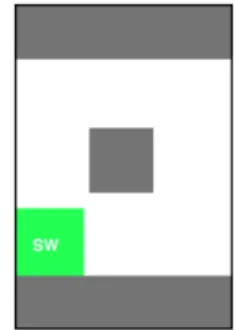
Each trial consisted of the participant performing, in response to a visual stimulus (Figure 3), one of eight possible tilts resulting from differing combinations of pitch and roll motion (for example, a counter-clockwise roll produced by wrist supination was labeled “West”, and the same roll component combined with an upward or downward pitch produced a tilt that was labeled “N-W” or “S-“N-W”, respectively, etc.).
The participants were to perform the gestures either with or without the thumb in contact with the screen. The device had to be brought back to its horizontal orientation after each tilt, horizontality being signaled by a grey square appearing at screen center. The trial was validated by a terminal thumb tap (or a thumb release in the thumb-on condition), which triggered the presentation of the next stimulus.
Figure 3. The stimulus being still displayed (green square), the central gray square signals device horizontality. A thumb tap
(or release) will trigger the delivery of the next stimulus.
4.1.3 Procedure
After some warm up terminated by the participant’s decision that (s)he felt familiar enough with the task, four 32-trial blocks were run, each composed of four occurrences of each of the eight possible directions. Twelve adult volunteers (all right-handed, ten male) participated in a single 15-min session. We used a within-participant design, with 2 postural conditions x (8 gestural directions x 4 times a block) x 4 blocks = 256 individual movements per participant.
4.1.4 Recognition Algorithm
A K-nearest-neighbors algorithm served, after the experiment, for automatic gesture classification [11]. The data of even-numbered blocks were reserved for algorithm training, the remaining blocks serving for recognition. Each individual data set was submitted to the algorithm twice, after training with the data of all but this particular participant and after training with the participant’s own data.
4.1.5 Results and Discussions
Recognition rates were fairly high, especially with the participant-specific training algorithm (Figure 4). The hand-posture factor exerted no significant effect (F1,11<1) neither did it interact with training type (F1,11<1). This suggests the possibility that the thumb be used—e.g., as a mode controller—to enrich the gestural input vocabulary. 0% 20% 40% 60% 80% 100%
Group training P-specific training
% correct recognition
Thumb off Thumb on
Figure 4. Offline recognition rate for the two gesture recognition options, and with the thumb off vs. on the touch screen. Error bars are confidence intervals based on
As expected, the recognition rates were consistently higher with the individually-trained algorithm (F1,11=33.90, p<.0001), presumably a reflection of subtle individual idiosyncrasies in the making of gestures. This result confirms the improved efficiency of recognition algorithms that adapt themselves to the user. Another interesting result is that recognition rates remained just as high with the thumb in contact with the screen, a promising outcome, as will become apparent later in this paper.
5. EXPERIMENT 2: DEVICE TILTS VS.
THUMB MARKING
This experiment exploited the database built in Experiment 1, with the participants now receiving immediate feedback, after each gesture, on how the tilt had been classified by the system. But here JerkTilts were evaluated in a more realistic and more challenging setting than in Experiment 1. Participants have no indication of device orientation instead a self-calibration mechanism was triggered whenever the device, no matter its orientation, remained stationary for 200ms. Device rotations being now relative, the participants no longer had to start the gesture from the horizontal.
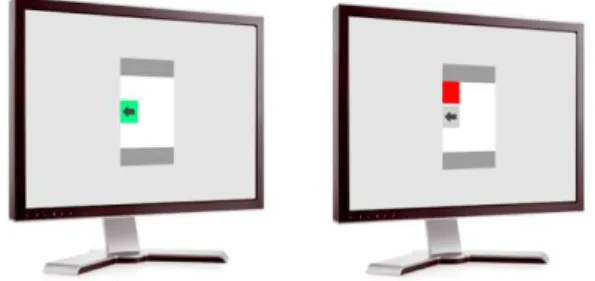
Another important difference was that in Experiment 2 all gestures had to be carried out eyes-free. The system recognition feedback that followed each gesture was presented away from the handheld, on a vertical screen facing the participant at usual viewing distance (Figure 5). The participants were actually not allowed to look at the mobile device during this experiment. This setting mimicked the case of users navigating an application, say a music player, without looking at the device, using non-visual (auditory) feedback.
Selection performance was evaluated with device tilts in comparison with touch-screen thumb slides, implementing the notoriously efficient Marking menus, the reference baseline. The rationale was to compare the efficiency of the two sorts of motion of Figure 1 (left) for making an eight-item radial selection.
Figure 5. Examples of the feedback delivered on an external screen after a selection classified by the system as correct (left) and incorrect (right). The gray arrow indicate the intended tilt
direction.
5.1 Method
We used the same HTC Hero device as in Experiment 1, but now the output came from an external 22’ screen (Figure 5) placed at a distance of about 50 cm. The stimulus was an arrow appearing over a square whose color varied. It was initially displayed in grey and turned green in response to a correct selection (Figure 5, left). Following an error the square would remain grey, the response recognized by the system being shown as a red square (Figure 5,
right), and the movement had to be made again. The participant’s hand and the mobile were out of sight.
5.1.1 Procedure
Twelve adults volunteers (all right-handed, one female) participated in a single 25min session. After some warm up, each participant ran ten 32-trial blocks with each technique, each block requiring four times each of the eight different movements in a random order. Participants held the device in their right hand, the preferred option for all.
Data inspection having revealed that performances had taken several blocks to stabilize (unsurprisingly, since the learning algorithm needs time), we decided to discard the first three trial blocks as warm up. Warm up gestures were still integrated in the database. Our within-participant design thus involved 2 techniques x (8 directions x 4 times per block) x 7 blocks = 448 gestures per participant overall.
5.1.2 Results and Discussions
Our dependent variables were recognition rate and total selection time (TT), the latter representing the sum of a reaction time (RT) and a movement time (MT). Below we will leave aside the negligible amount of time taken by the algorithm for input processing, which never exceeded 50ms.
Concerning performance accuracy, on average the recognition rates (Figure 6) were similar, 91.0% and 92.6%, for the JerkTilts and the thumb slides (F1,11<1). The only significant effect for this dependent measure was movement direction (F7,77 =2.25, p<.04), an effect common to both technique (for the interaction, F7,77 =1.41, p>.2). The direction effect was consistent but quite small in the absolute, mean recognition rates revolving around a pretty acceptable 92%.
Figure 6. Mean recognition rate for the two techniques and the eight directions.
Concerning performance speed, it took participants on average 936ms and 707ms to prepare and perform a JerkTilt and a thumb slide respectively (F1,11=8.19, p<.02), as illustrated in Figure 7. Mean MT was shorter with the tilts (177.2ms vs. 211.3ms) but not significantly so (p>.05). On RT the difference was in the opposite direction (694.8ms vs. 494.9ms) and it was significant (F1,11=19.8,p<.001).
There was a significant technique x direction interaction on TT (F7,77=2.44, p<.03) (Figure 7): unsurprisingly, the fastest directions were not exactly the same for the two kinds of gestures. For example, the South direction was somewhat favorable to the thumb and somewhat unfavorable to the tilts.
Figure 7. Mean total selection time for the two techniques and the eight directions.
It should be realized that our implementation of the baseline technique, i.e. thumb slides, was rather benevolent, the marking gestures being doable in the absence of any modal change. In actual practice, implementing Marking menus on mobile devices would require activating a software or hardware button first (entailing additional time) because, unlike mouse-based interfaces, passive touch screens do not provide interaction states [1]. In contrast, current interfaces do accommodate JerkTilts. Thus while the data of this experiment suggest that JerkTilts are no less accurate as Marking menus, there is every reason to expect them to be faster than Marking Menus for one-handed shortcut activation. JerkTilts can work as gestural shortcuts to input commands directly, without having to enter a mode. The reason why Marking menus require either a physical/soft button press or a time out is simply because they rely on finger slides, which are already interpreted by applications (e.g., for scrolling). The lack of an interaction-state control, like the mouse right button, on passive touch screens of mobile devices raises a tricky mode problem, which JerkTilts solve without sacrificing the possibility of single-handed input. Thus the efficiency of Marking menus can only drop in the case of one-handed device utilization, due to the biomechanical limitations of thumb movements in such conditions, described by [4]. Such an observation seems quite relevant as many users routinely operate the touch screen with the thumb of their holding hand.
In our experiment performance was eyes-free, which entails an error cost for both techniques. Such a condition might look harsh, but it is far from being unrealistic on a mobile device, especially for activating shortcuts (e.g. launching a given application or rapidly switching from one to another).
6. EXPERIMENT 3: REAL-WORLD
LOGGING
We finally conducted an experiment with permanent logging of all accelerations of a mobile device to evaluate the workability of JerkTilts in the context of real-life mobility. Even if JerkTilts are performable we want them to be actually practicable without jeopardizing other input resources. Our main concern was the false positive, the misinterpretation of an involuntary acceleration as a JerkTilt.
We developed a logging system and recorded all acceleration signals from the device during twenty-four hours of normal use (but not when phone was in sleep mode). We sent e-mail to recruit
volunteers, attaching the application package to install and instructions on a PDF document. Fourteen users accepted to apply for the experiment (12 using their own phone and 2 using our device, a HTC Hero). The application logged every acceleration of the device and after twenty-four hours of recording proposed to users to send the data files by FTP. To preserve anonymousness users were able if they wished to ask for the destruction of their data once analyzed.
Table 1. Mean false detection and awake time. Mean 95% confidence interval False Detections 0.7 0.02 1.4
Awake Time (min) 665 340 992
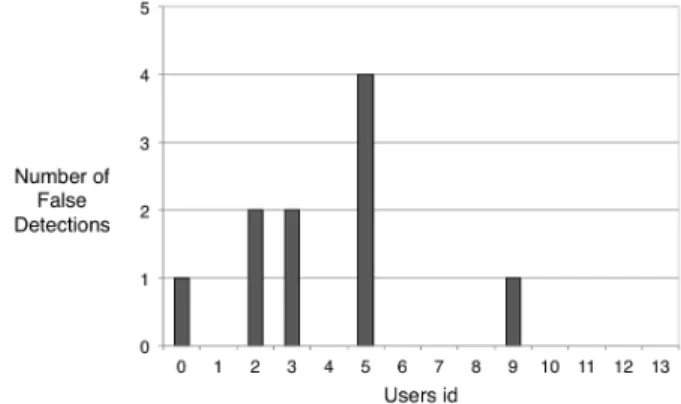
On average we found only 0.7 false detections a day per user, for an average awake time (i.e., with phone logging) of 665 minutes (Table 1, Figure 8). This result suggests that JerkTilts are suitable for everyday use. We were not surprised by this outcome, because, as already mentioned, a JerkTilt is by definition a jerky sort of gesture that generates quite conspicuous accelerations signals.
Figure 8. Number of false positives per participant over the 24h real-world logging period.
We plan to conduct a more extensive long-term study to confirm these results and to study how users perform in various real-world conditions, including public transportation, which impose constraints on attention and gesturing space.
7. SOME APPLICATIONS OF THE
JERKTILTS CONCEPT
Various applications can benefit from JerkTilts. In general it is possible with 3D gestures to design gestural commands that do not interfere with standard on-screen interaction and do not require standard menu widgets. Moreover recourse to gestures allows eyes-free commands to be triggered easily. The concept of proprioception itself encourages gestures for one-handed interaction, users being well aware of the spatial location and the posture of their hand, and hence of the location and orientation of the device they are holding. These gestures, we believe, enjoy a light cognitive load.
We have started to design and develop three sorts of exploitation of JerkTilts. One, JerkTilts Window, takes place at the system level and is conditional upon thumb contact to minimize the risk of false detections. The other two, JerkTilts Copy&Paste and JerkTilts Music Remote, take place at the application level
7.1 JerkTilts Window
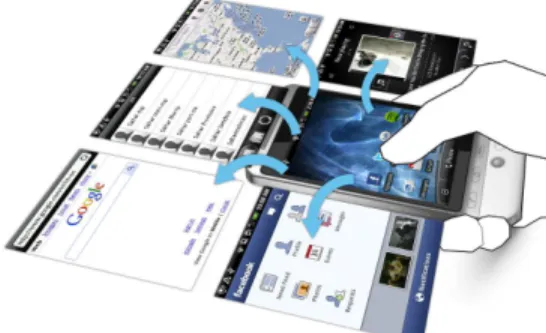
JerkTilts Window is a technique for quickly switching between application windows on a mobile. We have developed two different versions, one for navigating within the set of currently opened applications, and the other for navigating among favorite applications. With these implementations one can easily switch applications, as suggested in Figure 9. One sensible option is to minimize the risk of false detections at the top level by making JerkTilts conditional on thumb contact on the touch screen.
Figure 9. An example of an implementation of JerkTilts for switching among applications.
This application reduces the actual sequence of action a user has to face on commercial mobile devices to switch to another application. In the state of the art, switching between application requires at least two actions: clicking a button (often with a delay or a double-click for instance) then selecting the correct application. To open a favorite application one typically needs to first return to the home screen and then select the application. In the same vein, JerkTilts can be used to easily reach previously saved favorite bookmarks in a web browser application. Users will be in a better position to concentrate on and interact with the page they are looking at if access to their favorite web pages does not require navigation through a list of thumbnails or a classic menu interface.
7.2 JerkTilts Copy and Paste
We have implemented a version of JerkTilts that makes it possible to copy and paste an object between two different applications in a three-step sequence: (1) copy an object, (2) switch applications, and (3) paste the object. For example, one may copy an image from a web page to another application as shown in Figure 10. The same logic obviously applies to the cut-and-paste operation. In comparison with the complex manipulations required on current smartphones, with delays and/or multiple pointing actions, this application reduces user actions to a considerable extent.
Figure 10. An example of a copy-and-paste operation between two different applications. A JerkTilt to the South copies whatever object is under the thumb; a JerkTilt to the East switches applications; a JerkTilt to the South-West pastes the
object at the location designated by thumb contact.
7.3 JerkTilts Music Remote
Let us describe an implementation of JerkTilts that seems tailor-made for an eyes-free utilization of handheld devices. We have developed two versions of the technique for controlling a music player. One version makes it possible to control the player of a laptop, the mobile playing the role of a remote control; in the other version JerkTilts serves to control music playing on the mobile itself, with the advantage that the user can still control the music when the device is locked. In either version the gestures are mapped onto the commands as shown in Figure 11. The suggested layout of commands is consistent with the old conventional arrangement for sound players. Also notice that the most frequently used commands correspond to the four cardinal directions: the gestures they require are easiest to make for users.
Figure 11. Association between gesture and music player commands.
The version of this technique that we have developed provides users with wireless remote control over a computer music player, using AppleScript. This application can easily be adapted to video players.
8. CONCLUSIONS AND FUTURE WORK
JerkTilts are quick back-and-forth device tilts that can be performed eyes free, relying on fast open-loop control and leveraging the natural elasticity of the wrist. They actually do not require any resetting of device orientation and they need not start from a horizontal orientation. No mode-switching button presses are required with JerkTilts, these input gestures being self-delimiting. Therefore they do not interfere with common interaction techniques based on touch screen events and they can serve as gestural shortcuts in most application contexts (one obvious exception being games that involve 3D gestures). The JerkTilts technique requires little space because the motion consists of an essentially stationary rotation of the handheld device. The gestures are discreet, thanks to their short duration and amplitude, meaning that JerkTilts should be practicable is most social contexts. And because the technique relies on large amplitude acceleration signals, it is well immune to the risk of inadvertent false detections.
In this paper we reported some performance data illustrating the efficiency of JerkTilts in a laboratory selection task. Our participants were able to make eight-item selections as accurately with JerkTilts as with touch-screen thumb movements, and nearly as fast—in fact there is reason to expect thumb moves to be slower in realistic settings, where touch-screen operation actually requires mode switching, than in our experiment. We also showed
that JerkTilts can be as efficiently performed with the thumb either on or off the touch screen, meaning the thumb may be used in combination with JerkTilts.
We developed three applications that illustrate how the JerkTilts gestures can be exploited. By reducing the number of steps required to express highly-frequent commands, these applications alleviate some tricky interaction problems that have been a real concern so far for mobile users.
Designing efficient methods for the parallel exploitation of finger motion on touch screens (leveraging the opportunities offered by multi-touch technologies) and device motion in 3D space is probably one of the most important challenges currently faced by HCI research [7]. In the future we plan to perform a long-term field study so as to extend our first data about false detections. We also envision studying the use of the gyroscope to enhance gesture recognition and will test alternative recognition algorithms. We want to go further in the exploitation of JerkTilts. Of special interest, we believe, are combinations of JerkTilts and on-screen marking thumb gestures, which leverage the complementary advantages of the two techniques. While JerkTilts allows quick activation of discrete commands, marking gestures can be very useful to control continuous values as shown in [15].
9. ACKNOWLEDGMENTS
This work was funded by Ubimedia, a joint research laboratory of Alcatel-Lucent Bell Labs and Institut Telecom. We thank anonymous reviewers for thoughtful criticisms and constructive suggestions.
10. REFERENCES
[1] Bragdon A., Nelson E., Li Y., Hinckley K. 2011.
Experimental Analysis of Touch-Screen Gesture Designs in Mobile Environments. In Proc. CHI’11.
[2] Dachselt, R., Buchholz, R.: Natural Throw and Tilt Interaction between Mobile Phones and Distant Displays. In Proc. CHI '09 Extended Abstracts.
[3] Dearman, D., Karlson, A., Meyers, B., and Bederson, B. 2010. Multi-modal text entry and selection on a mobile device. In Proc GI’10.
[4] Francone, J., Bailly, G., Lecolinet, E., Mandran, N., and Nigay, L. 2010. Wavelet menus on handheld devices: stacking metaphor for novice mode and eyes-free selection for expert mode. In Proc. AVI’10.
[5] Harrison, B. L., Fishkin, K. P., Gujar, A., Mochon, C., and Want, R. 1998. Squeeze me, hold me, tilt me! An exploration of manipulative user interfaces. In Proc. CHI’98,
ACM/Addison-Wesley, p. 17-24.
[6] Hinckley, K., Pierce, J., Sinclair, M., and Horvitz, E. 2000. Sensing techniques for mobile interaction. In Proc. UIST’00. ACM, New York, NY, 91-100.
[7] Hinckley K., Song H., 2011. Sensor Synaesthesia: Touch in Motion, and Motion in Touch. In Proc. CHI’11.
[8] Jones, E., Alexander, J., Andreou, A., Irani, P., and Subramanian, S. 2010. GesText: accelerometer-based gestural text-entry systems. In Proc. CHI '10. ACM, New York, NY, USA, 2173-2182.
[9] Guiard, Y. 1993. On Fitts' and Hooke's laws : simple harmonic movement in upper-limb cyclical aiming. Acta Psychologica, 82, 139-159.
[10] Kauppila M. 2008. Filler Models for Accelerometer Based Continuous Gesture Recognition. Sc.Thesis, Dept. of Mathematical Sciences, University of Oulu, May 2008. [11] KNN:
http://en.wikipedia.org/wiki/K_nearest_neighbor_algorithm [12] Kurtenbach, G. and Buxton, W. 1991. Issues in combining
marking and direct manipulation techniques. In Proc UIST '91. ACM, New York, NY, 137-144.
[13] Oakley, I. and Park, J. 2007. A motion-based mark-ing menu system. In Proc. CHI’07. ACM, New York, NY, 2597-2602. [14] Partridge, K., Chatterjee, S., Sazawal, V., Borriello, G., and
Want, R. 2002. TiltType: accelerometer-supported text entry for very small devices. In Proc. UIST '02.
[15] Pook, S., Lecolinet, E., Vaysseix, G., and Barillot, E. 2000. Context and interaction in zoomable user interfaces. In Proc. AVI '00. ACM, New York, NY, USA, 227-231.
[16] Rahman, M., Gustafson, S., Irani, P., and Subrama-nian, S. 2009. Tilt techniques: investigating the dex-terity of wrist-based input. In Proc. CHI’09. ACM, New York, NY, 1943-1952.
[17] Rekimoto, J. (1996). Tilting operations for small screen interfaces. In Proc. UIST '96. ACM, .167-168.
[18] Rehm, M., Nikolaus, B., and André, E. 2008. Wave like an Egyptian: accelerometer based gesture recognition for culture specific interactions. In Proc. BCS-HCI '08, Vol. 1. British Computer Society, Swinton, UK, UK, 13-22.
[19] Roudaut A., Baglioni M. et Lecolinet E. 2009. TimeTilt: Using Sensor-Based Gestures to Travel Through Multiple Applications on a Mobile Device. In Proc. INTERACT'09. [20] Ruiz J., Li Y. 2011 DoubleFlip: A Motion Gesture Delimiter
for Mobile Interaction. In Proc. CHI '11. ACM Press. [21] Sazawal, V., Want, W., and Borriello, G. 2002. The
Unigesture Approach. In Proc. Mobile HCI '02. Fabio Paternè (Ed.). Springer-Verlag, London, UK, 256-270. [22] Van Tonder, B., and Wesson, J. 2010. Is tilt interaction better
than keypad interaction for mobile map-based applications?. In Proc. SAICSIT '10. ACM, New York, NY, USA, 322-331. [23] Wigdor, D. and Balakrishnan, R. 2003. TiltText: using tilt for
text input to mobile phones. In Proc. UIST’03. ACM, New York, NY, 81-90.