Publisher’s version / Version de l'éditeur:
https://publications-cnrc.canada.ca/fra/droits
L’accès à ce site Web et l’utilisation de son contenu sont assujettis aux conditions présentées dans le site
Internal Report (National Research Council of Canada. Institute for Research in
Construction), 2005-08-22
READ THESE TERMS AND CONDITIONS CAREFULLY BEFORE USING THIS WEBSITE.
https://nrc-publications.canada.ca/eng/copyright
NRC Publications Archive Record / Notice des Archives des publications du CNRC :
https://nrc-publications.canada.ca/eng/view/object/?id=c6b8760e-3484-4c44-a772-714dfa284006 https://publications-cnrc.canada.ca/fra/voir/objet/?id=c6b8760e-3484-4c44-a772-714dfa284006
NRC Publications Archive
Archives des publications du CNRC
For the publisher’s version, please access the DOI link below./ Pour consulter la version de l’éditeur, utilisez le lien DOI ci-dessous.
https://doi.org/10.4224/20377340
Access and use of this website and the material on it are subject to the Terms and Conditions set forth at
Fire tests tool: technical document
Fire Tests Tool –
Technical Document
IRC Internal Report No. IR-866
Date: August 22, 2005
Authors:
Abderrazzaq Bounagui
Noureddine Bénichou
Jared Haines
Published byInstitute for Research in Construction National Research Council Canada Ottawa, Canada
TABLE OF CONTENTS
TABLE OF CONTENTS ... i
LIST OF TABLES AND FIGURES ...iii
List of Figures:... iv
Fire Tests Tool - Technical Document ... 1
INTRODUCTION... 1
1 Fire Test Database ... 1
1.1 Tests Table... 1 1.2 Users Table ... 2 1.3 UserTestRelations Table... 2 1.4 Measurements Table... 2 1.5 VideoFiles Table... 3 1.6 PhotoFiles Table ... 3 1.7 DataMaps Table ... 3 1.8 TestSummaries Table ... 3 1.9 Personnel Table ... 4 1.10 Combustibles Table ... 4 1.11 Reactions Table... 4 2 DATABASE RELATIONSHIPS ... 6
3 FIRE TESTS TOOL ... 6
3.1 Purpose ... 6
3.2 Description of Forms ... 7
3.2.1 The Login Form ... 7
3.2.2 Fire Tests Form (frmTests)... 8
3.2.3 Edit Data Form (frmUpdate) ... 9
3.2.4 View Measurements Form (frmMeasurements) ... 10
3.2.5 View Picture Form (frmPicture) ... 11
3.2.6 View Video Form (frmVideo) ... 12
3.2.7 View Data Map/Test Summary Form (frmReadTextFile) ... 13
3.2.8 View Combustibles Form (frmCombustible) ... 14
3.2.9 View Personnel Form (frmPersonnel) ... 15
3.2.10 Add New User Form (frmAddUser) ... 16
3.2.11 Edit/Remove Users Form (frmEditUsers) ... 17
3.2.12 Reactions Form (frmReactions)... 18
3.3 Description of Modules and Class Modules ... 19
3.3.1 Fire Tests Module... 19
3.3.2 Database Agent... 19
3.3.3 CReadFiles... 19
4 CONCLUSION ... 19
4 TASKS ... 3 Appendix – B... 1
LIST OF TABLES AND FIGURES
Table 1. Tests table... 1
Table 2. Users table ... 2
Table 3. User-Test relations table ... 2
Table 4. Measurements table... 2
Table 5. Video files table... 3
Table 6. Photos table ... 3
Table 7. Data maps table ... 3
Table 8. Test summaries table... 3
Table 9. Personnel table ... 4
Table 10. Combustibles table... 4
Table 11. Reactions table ... 4
Table 12. List of Controls for login frame (frmLogin)... 1
Table 13. Functions and Subroutines for frmLogin ... 1
Table 14. List of Controls for frmTests ... 1
Table 15. Functions and Subroutines for frmTests ... 2
Table 16. List of Controls for frmUpdate ... 3
Table 17. Functions and Subroutines for frmUpdate ... 4
Table 18. List of Controls for frmMeasurements ... 5
Table 19. Functions and Subroutines for frmMeasurements ... 5
Table 20. List of Controls for frmPicture... 6
Table 21. Functions and Subroutines for frmPicture... 6
Table 22. List of Controls for frmVideo... 6
Table 23. Functions and Subroutines for frmVideo... 6
Table 24. List of Controls for frmReadTextFile ... 7
Table 25. Functions and Subroutines for frmReadTextFile... 7
Table 26. List of Controls for frmPersonnel... 7
Table 27. Functions and Subroutines for frmPersonnel... 7
Table 28. List of Controls for frmCombustible... 8
Table 29. Functions and Subroutines for frmCombustible ... 8
Table 30. List of Controls for frmAddUser... 8
Table 31. Functions and Subroutines for frmAddUser ... 8
Table 32. List of Controls for frmEditUsers ... 9
Table 33. Functions and Subroutines for frmEditUsers ... 9
Table 34. List of Controls for frmReactions... 10
Table 35. Functions and Subroutines for frmReactions ... 10
Table 36. Functions and Subroutines for the Fire Tests module ... 11
Table 37. Functions and Subroutines for the Database Agent class module ... 11
List of Figures:
Figure 1. Fire Tests Tool ... 1
Figure 2: Relationships between tables in the fire tests Database ... 6
Figure 3. Login Form... 7
Figure 4. Fire Tests Form... 8
Figure 5. Update form ... 9
Figure 6. Measurements Form... 10
Figure 7. Picture Form ... 11
Figure 8. Video Form ... 12
Figure 9. ReadTextFile Form ... 13
Figure 10. Combustible Form... 14
Figure 11. Personnel Form ... 15
Figure 12. AddUser Form... 16
Figure 13. EditUsers Form ... 17
Fire Tests Tool - Technical Document INTRODUCTION
The advent of performance-based evaluation of fire safety in the built environment has brought a great demand for information on the fire conditions in real fires and its impacts on both life and building fire safety. Therefore, the Fire Research Program at the Institute for Research in Construction (IRC) is developing a database to hold information obtained from a fire test and a tool to allow the users to view fire test information and obtain quantitative data from a number of actual fires. A detailed project plan is presented in Appendix A.
The development of the Fire Tests Tool has used Microsoft Access 2000, to create the Fire Tests database and Microsoft Visual Basic 6 to create the user interface to interact with the database. The Database Agent (Visual Basic Class) is responsible for establishing the closing and connection to the database and performing all the database transactions. This is the only module that can directly access the database. Figure 1 shows how the various components of the Fire Tests Tool interact between each other. Figure 1. Fire Tests Tool
Initially, this report presents the structure of the fire test database, and then describes the Fire Tests Tool that uses the database.
1 Fire Test Database
The following sections describe the structure of the fire test database. 1.1 Tests Table
This table holds general information about each test. Table 1. Tests table
Field Name Description Example
Database
Agent Fire Test
Database Fire Test User
ProjectID ID of the project to which the test belongs PJ-5789 ProjectName Name of the project Design Fire ProjectManagerFirstName Project manager’s first name Michel ProjectManagerLastName Project manager’s last name Ben TestDate Date the test was performed 01/10/2005 TestLocation Location where the test was performed East facility TestType Type of test performed Free Burn Sponsor Sponsor of the test Company A
1.2 Users Table
This table holds information on the database users, their passwords and their administrator privileges (permission to edit the database).
Table 2. Users table
Field Name Description Example
UserID Primary key 2
UserName Name of the user administrator UserPassword User’s password abc123 AdminPrivileges A Yes/No value for whether or not the user has
administrator privileges with the Database
Yes
1.3 UserTestRelations Table
This table is used to relate the Users table and Tests table. It is used since the user-test relations can be many-to-many (a user has access to multiple tests and/or multiple users have access to a specific test).
Table 3. User-Test relations table
Field Name Description Example
UserID Foreign key used to relate to the Users table 2 TestID Foreign key to relate to the Tests table 1 1.4 Measurements Table
This table holds information on the measurements file taken for each test. It should be noted that every table containing paths to data files stores only the file’s path within the database’s directory to ensure portability.
Table 4. Measurements table
Field Name Description Example MeasurementID Primary key. 2 TestID Foreign key used to relate
to the Tests table
1 MeasurementName Name of the measurement
file
Test_Nov25_2004.xls MeasurementLocation Location of the
measurement file
Test
#1\Measurements\Test_Nov25_200 4.xls
1.5 VideoFiles Table
This table holds information for the video files of each test. Table 5. Video files table
Field Name Description Example VideoID Primary key 2 TestID Foreign key used to relate to the Tests
table
2
VideoFile The location of the video file Test #1\Videos\FPH-081104-1-1-basement.mpg
VideoName The name of the video file FPH-081104-1-1-basement.mpg
1.6 PhotoFiles Table
This table contains information of the photos taken of each test. Table 6. Photos table
Field Name Description Example PhotoID Primary key 3 TestID Foreign key used to relate to the Tests
table
1
PhotoFile The location of the photo file Test #2\Photos\DSC00037.JPG PhotoName The name of the photo file DSC00037.JPG
1.7 DataMaps Table
A data map file holds a description of the measurement in each slot used in the data acquisitions during the fire test. The DataMaps table holds information for the data map files of each test.
Table 7. Data maps table
Field Name Description Example
DataMap Location of the data map file Test #1\DataMaps\Data map-2.doc
DataMapID Primary key 2 TestID Foreign key used to relate to the
Tests table
1
DataMapName Name of the data map file Data map-2.doc
1.8 TestSummaries Table
This table contains the locations of summary files for each test. Table 8. Test summaries table
1.9 Personnel Table
This table holds information on the personnel involved in a test. Table 9. Personnel table
Field Name Description Example PersonnelID Primary key. 1 TestID Foreign key used to relate to the
Tests table
2
FirstName First name of the employee employeeFirstName LastName Last name of the employee employeeLastName JobClass Job class TO3
1.10 Combustibles Table
This table contains descriptions of the combustibles involved in a specific test. Table 10. Combustibles table
Field Name Description Example CombustibleID Primary Key for integrity of information 2
TestId Foreign key to relate to the Test table 3
CombustibleName The name of the combustible 2 seat sofa Description Description for the combustible Love seat with
wood frame Composition Contents of the combustible Sofa with 30%
of wood, 60% foam and 10% of paper Width The width of the combustible 0.8 m Length The length of the combustible 2.0 m Height The height of the combustible 0.7 m Weight The weight of the combustible 35 kg Manufacturer Manufacturer of the combustible ikea Specific Heat
Constant Pressure
Specific Heat Constant Pressure of the material kJ/kg/K
1.42 Ignition temperature The ignition temperature of the material 380 Density The mass per unit volume for the material kg/m3 1190 Burning Rate Max The maximum burning rate of the material
kg/m2/s
0.028 Heat of Vaporization The Heat of Vaporization of the material kJ/kg 1620 Heat of Combustion The Heat of Combustion of the material kJ/kg 25200
Thermal Diffusivity The Thermal Diffusivity of the material m2/s 0.000007 Thermal
Conductivity
The Thermal Conductivity of the material w/m/K 0.0003 Thickness The Thickness of the material m 0.012
1.11 Reactions Table
This table contains reaction information. Note: The Reactions table is not related to the Tests table.
Table 11. Reactions table
Field Name Description Example ReactionID Primary key. 1 Reaction Name of the reaction Propane
Description Chemical formulation of the reaction C3H8 Reference Reference from which the information has been taken SFPE Molecular Weight of
Fuel
Molecular Weight of Fuel 44 Energy Per Unit
Mass Oxygen
Energy Per Unit Mass Oxygen N/a
Fuel N2 Fuel N2 N/a
Ideal Stochiometric Coefficient O2
Ideal Stochiometric Coefficient O2 5 Ideal Stochiometric
Coefficient CO2
Ideal Stochiometric Coefficient CO2 3 Ideal Stochiometric
Coefficient H2O
Ideal Stochiometric Coefficient H2O 4 Soot yield Soot yield 0.01 Radiative Fraction Radiative Fraction 0.3
2 DATABASE RELATIONSHIPS
The relationships between tables in the fire test Database are shown in Figure 2: Figure 2: Relationships between tables in the fire tests Database
3 FIRE TESTS TOOL 3.1 Purpose
The primary purpose of this tool is to allow existing users to view data from tests that they have access to. If a user has administrator privileges, they can add new users, delete existing users, and control which tests users access. In addition, they may add, remove, and edit tests. The tool uses the database described in section 2.
3.2 Description of Forms
What follows is a brief description of the purpose and function of each form in the Fire Tests tool.
3.2.1 The Login Form Figure 3. Login Form
This form serves as the entry-point of the program. The user has to enter a valid username and password then the user is prompted to locate the fire tests database.
3.2.2 Fire Tests Form (frmTests) Figure 4. Fire Tests Form
This form displays the most recent tests available to the current user. The user may control which tests are displayed by using the filter options in the top right corner, and select a test from the list to view its information in the fields in the bottom right corner. Once a test has been selected, the user may select a data type in the drop-down list and click “View” to load a form displaying the selected data. In Figure 4, four of the most recent tests are displayed. Test FS-3 is selected, and the user chooses to view the measurements data. The user may also select the “Edit Test Data” button, as well as the “Add New User” and “Modify Existing Users” buttons if they have administrator
3.2.3 Edit Data Form (frmUpdate) Figure 5. Update form
This form displays a list of all tests. An administrator may select a test and edit its information and add/remove data files (video files, data maps, etc.). The user may also add new tests or delete existing tests.
3.2.4 View Measurements Form (frmMeasurements) Figure 6. Measurements Form
Here the user is presented with a list of all measurement files associated with the selected test (if no files are available a warning message is displayed). Once a measurement file has been selected from the drop-down list, the Parameters listbox underneath is populated with a list of all parameters contained in the measurement file. The user may then select parameters and create graphs of the selected parameters with respect to time.
3.2.5 View Picture Form (frmPicture) Figure 7. Picture Form
This form contains a list of all photo files related to the current test. Upon loading, the first picture in the list is automatically displayed (if no files exist a warning is issued). The user may select a specific file from the list, or navigate through the photos using the “<<” and “>>” buttons at the bottom of the form.
3.2.6 View Video Form (frmVideo) Figure 8. Video Form
This form displays a list of video files associated with the current test. When a file is selected from the list, it is displayed in the mediaplayer control.
3.2.7 View Data Map/Test Summary Form (frmReadTextFile) Figure 9. ReadTextFile Form
Because they are of the same file type(s), this form is used to display both data maps and test summaries. Upon loading the form, the user is presented with a list of files (data maps or test summaries, depending on what was selected in frmTests). Once a file is selected, it is displayed on the form. If the file is a pure text file (.txt), then it is displayed inside a textbox. If the file is of a different format (.doc, .rtf, etc.), it is embedded in an OLE container on the form (see Figure 9).
3.2.8 View Combustibles Form (frmCombustible) Figure 10. Combustible Form
This form lists all combustibles associated with the test. When selected from the list, the combustible’s information is displayed in the appropriate fields.
3.2.9 View Personnel Form (frmPersonnel) Figure 11. Personnel Form
3.2.10 Add New User Form (frmAddUser) Figure 12. AddUser Form
This form allows a user with administrator privileges to add new users and set which tests they will have access to and whether or not they will have administrator privileges. If the passwords entered into the two password fields do not match, a warning will be generated. Additionally, a warning will be issued if the username supplied already exists in the database.
3.2.11 Edit/Remove Users Form (frmEditUsers) Figure 13. EditUsers Form
On this form a user with administrator privileges will be presented with a listing of all existing users. The user is then able to modify which tests a user may access, and whether they have administrator privileges.
3.2.12 Reactions Form (frmReactions) Figure 14. Reactions Form
This form allows the user to view reaction data. They may also add new reactions, or edit/delete existing ones.
3.3 Description of Modules and Class Modules 3.3.1 Fire Tests Module
This module contains a main() method which declares several objects and then loads frmLogin.
3.3.2 Database Agent
The Database Agent class module contains functions and subroutines for interacting with the fire tests Database, as well as recordset objects for each table in the Database. 3.3.3 CReadFiles
This class module contains functions for connecting to and extracting data from measurement files. The supported formats of the file are tab delimited (fields in the file are delimited by tabs) and csv delimited (fields in the file are delimited by commas (comma-separated values).
4 CONCLUSION
The fire test database holds the necessary information for the fire test. The Fire Tests Tool allows users to identify a specific fire test along with its experimental data.
Appendix – A
1 PROJECT OBJECTIVE
This project aims at developing a fire test database to hold information from an
experimental test carried out at the Fire Research Program at NRC/IRC. The user of the fire test database should select and view the test on which he/she has permission and obtain quantitative data on a number of realistic fires.
2 FUNCTIONAL REQUIREMENT
• The user should contact the administrator to become a user by providing a unique name and password.
• The administrator should grant the user access to the specific test that will allow the user to view.
• Users should select and view a test on which he/she has permission.
• The administrator should create and delete a user.
• The administrator should update, delete and edit the fire test database.
• The database should have tables that relate the fire test information including: users, measurements, video files, photo files, data maps, test summaries, personnel, combustibles, and reactions.
• A graphical user interface should be designed to provide access to the database
3 ARCHITECTURE
3.1 Milestone I: Database Schema
The application should include a well-designed data model. Therefore the first milestone is the design of a database schema. A good schema requires normalized tables, primary keys for each table and foreign keys for relations.
Representation of the following entities is required:
• User: {name, password}, which shall hold the information about the users
• FireTests: which shall hold the general information about the fire test
• Personnel: which shall hold the personnel involved in the fire test
• Combustibles: which shall hold information about the combustibles used in the fire test
• PhotosFiles: which shall hold the photos taken during the fire test
• Measurements: which shall hold the measurements taken during the fire test
• VideoFiles: which shall hold the videos taken during the fire test
• DataMaps: which shall hold the description of the measurement in each slot used in the data acquisitions during the fire test.
• Test Summaries: which shall hold the summary for the fire test.
• Reactions: which shall hold information about the reactions but this table shall not relate to the main test table.
3.2 Milestone II: Database Agent
In a well-designed database application, the details of database communication must be hidden from the business components (User Interface Components that require to
access the database). Therefore this project requires that a single class (namely DBAgent) takes responsibility of handling all interface calls and provides the business components with relative information.
Fire Test Database Fire Test database User Interface DBAgent
Below is the operations list, which the database agent must perform:
o Checking if a user is registered: o It should report yes or no. o Adding a new user.
o If the user is already registered, it should result in an exception from the database.
o Authentication:
o where <user> is the name of the user and <password> is the password provided for the user name. It should report yes or no.
o Add a new entry:
o This operation, if it succeeds, should return a unique entry id assigned by the database. An exception should rise if any required field is not
provided. o Display Test:
o This operation should display the last 4 tests that the users accessed and allow the user to select any additional test by querying the database by project name, user name, location, or date.
o Delete an entry:
o This is an administrator operation only. It should delete the test record from the database. Also since <id> is a foreign key it should trigger a cascading delete.
o Display an entry:
o This operation should fetch the message text corresponding to the id.
• Login
o Type in a user id and password
• Fire Tests
o Display the last 4 test that the user accessed o Link to view measurements
o Link to view photos taken during the test o Link to view videos taken during the test o Link to view a data map/summary for the test o Logout
• Admin view
o Perform all the user actions o Add fire test
o Delete fire test o Add user o Edit fire test 3.4 Milestone IV: Testing
A test plan should be developed to demonstrate the functionality and the consistency of the fire test application.
4 TASKS
Dr. Bounagui Abderrazzaq will manage the process of the development of the fire test application.
Tasks Description Responsible Tentative date
Deliverable Milestone I Database schema
and normalization
Zaq/Jared Data structure document, database technical document and a database Milestone II Database Agent Jared Document about the
database agent Milestone III Interface
Development
Jared Document interface Milestone IV Testing Irene/Joe Test plan
Appendix – B
The following tables list the controls and functions that are used for each form in the Fire Tests Tool.
Table 12. List of Controls for login frame (frmLogin)
Control Name
Label/Caption Purpose
txtUserName User Name: Input field for a valid user name. txtPassword Password: Input field for a valid password.
cmdSubmit Submit Queries the Database and verifies the supplied username and password. If they are valid, frmTests is loaded
Table 13. Functions and Subroutines for frmLogin
Function or Subroutine
Input(s) Output Calls Description Private Sub
cmdSubmit_Click()
None None DataBaseAgent.authe nticate()
Checks to see if the username and password are valid. If so, frmTests is loaded.
Private Sub Form_Resize()
None None None Repositions controls
Table 14. List of Controls for frmTests
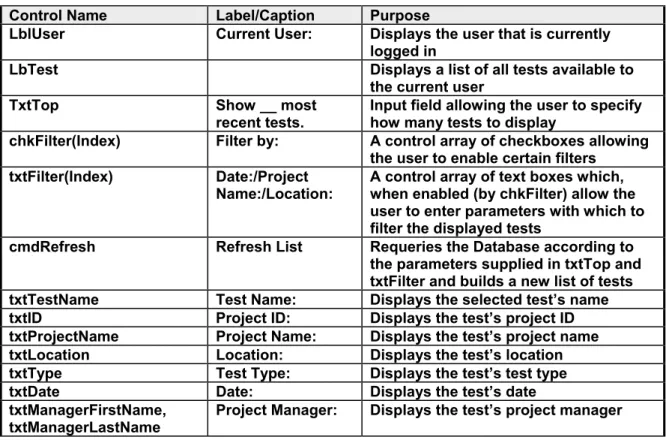
Control Name Label/Caption Purpose
LblUser Current User: Displays the user that is currently logged in
LbTest Displays a list of all tests available to the current user
TxtTop Show __ most recent tests.
Input field allowing the user to specify how many tests to display
chkFilter(Index) Filter by: A control array of checkboxes allowing the user to enable certain filters
txtFilter(Index) Date:/Project Name:/Location:
A control array of text boxes which, when enabled (by chkFilter) allow the user to enter parameters with which to filter the displayed tests
cmdRefresh Refresh List Requeries the Database according to the parameters supplied in txtTop and txtFilter and builds a new list of tests txtTestName Test Name: Displays the selected test’s name
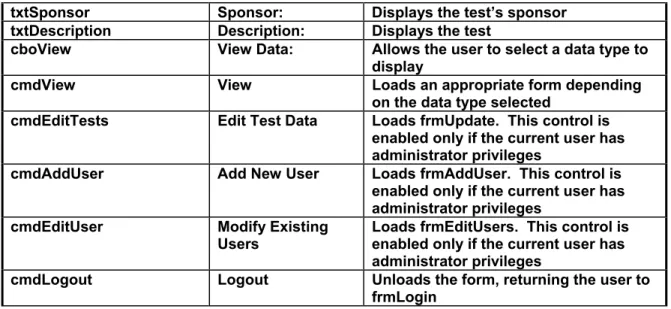
txtSponsor Sponsor: Displays the test’s sponsor txtDescription Description: Displays the test
cboView View Data: Allows the user to select a data type to display
cmdView View Loads an appropriate form depending on the data type selected
cmdEditTests Edit Test Data Loads frmUpdate. This control is enabled only if the current user has administrator privileges
cmdAddUser Add New User Loads frmAddUser. This control is enabled only if the current user has administrator privileges
cmdEditUser Modify Existing Users
Loads frmEditUsers. This control is enabled only if the current user has administrator privileges
cmdLogout Logout Unloads the form, returning the user to frmLogin
Table 15. Functions and Subroutines for frmTests
Function or Subroutine
Input(s) Output Calls Description Private Sub
chkFilter_Click()
Index As Integer
None None If a checkbox in the control array has been checked, make its associated textbox visible, if the box has been unchecked, clear the textbox’s contents and hide it Private Sub
cmdAddUser_Click()
None None None Load frmAddUser Private Sub
cmdEditTests_Click()
None None None Load frmUpdate. Private Sub
cmdEditUser_Show()
None None None Loads frmEditUsers Private Sub
cmdLogout_Click()
None None None Unloads the form, returning the user to frmLogin
Private Sub
cmdRefresh_Click()
None None DatabaseAgent.displayUs erTest()
Requeries the Tests table (including any specified filtering options) and refreshes the test list
Private Sub cmdView_Click()
None None None Loads the appropriate form depending on which data type is selected in cboView
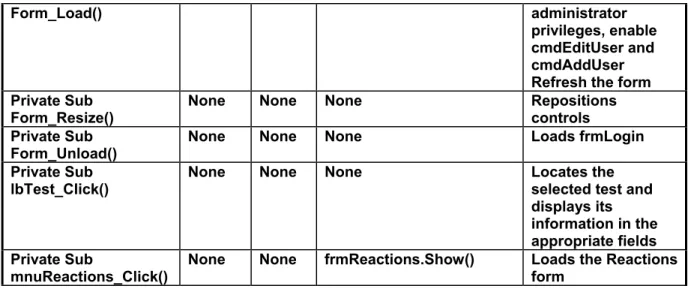
Private Sub Form_GotFocus()
None None cmdRefresh_Click() Refreshes the form. Private Sub None None cmdRefresh_Click() If the user has
Form_Load() administrator privileges, enable
cmdEditUser and cmdAddUser Refresh the form Private Sub
Form_Resize()
None None None Repositions controls
Private Sub Form_Unload()
None None None Loads frmLogin Private Sub
lbTest_Click()
None None None Locates the selected test and displays its information in the appropriate fields Private Sub
mnuReactions_Click()
None None frmReactions.Show() Loads the Reactions form
Table 16. List of Controls for frmUpdate
Control Name Label/Caption Purpose
lbTest Test Displays a list of all tests available to the current user
txtFireTest Fire Test Displays the selected test’s name txtProjectName Project Name Displays the selected test’s
project name
txtProjectID Project ID Displays the project id txtTestLocation Test Location Displays the test location txtTestDate Test Date Displays the test date cboTestType Test Type Displays the test type txtProjManagerFirstName,
txtProjManagerLastName
Project Manager Displays the project manager txtSponsor Sponsor Displays the sponsor of the test tstDescription Fire Test Description Displays the fire test description cmdNew New Creates a new test
cmdSave Save Saves all changes made to the current test
cmdDelete Delete Deletes the currently selected test, and all Database entries related to that test
cmdClose Cancel Unloads the form and returns the user to frmTests
lbFileList(Index) Measurement File, Video File, Picture File,
Data Map File, Test Summary, Personnel, Combustibles
Control array of listboxes displaying lists of data files related to the currently selected test
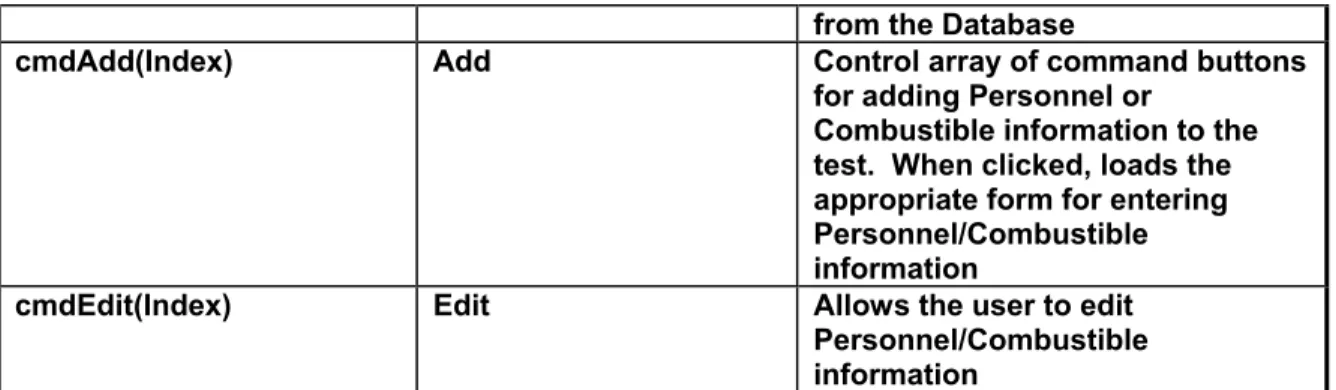
from the Database
cmdAdd(Index) Add Control array of command buttons for adding Personnel or
Combustible information to the test. When clicked, loads the appropriate form for entering Personnel/Combustible information
cmdEdit(Index) Edit Allows the user to edit Personnel/Combustible information
Table 17. Functions and Subroutines for frmUpdate
Function or Subroutine Input(s) Output Calls Description Private Sub
cmdAddFile_Click()
Index As Integer
None refresh_Info() Depending on which button was clicked, an appropriate dialog is displayed prompting the user to select a file to add. The selected file is then added to the appropriate table Private Sub cmdAdd_Click() Index As Integer None frmEditCombustible.Sho w(), frmEditPersonnel.Show()
Loads the appropriate form for entering new Personnel or Combustible information Private Sub cmdEdit_Click() Index As Integer None frmEditCombustible.Sho w(), frmEditPersonnel.Show()
Loads the appropriate form for editing existing Personnel or Combustible
information Private Sub
cmdClose_Click()
None None Nothing Unloads the form, returning the user to frmTests
Private Sub cmdDelete_Click()
None None DatabaseAgent.cascaded Delete(), Form_Load()
Deletes the selected test, and all records related to it
Private Sub cmdNew_Click()
None None DatabaseAgent.addNewT est()
Creates a new test Private Sub cmdRemoveFile_Click( ) Index As Integer
None refresh_Info() Deletes the selected file from the
appropriate table Private Sub
cmdSave_Click()
None None DatabaseAgent.updateTe st()
Saves all
modifications made to the selected test Private Sub
Form_Load()
None None DatabaseAgent.displayU serTest(), refresh_Info()
Builds a list of tests available to the current user
Private Sub refresh_Info()
None None DatabaseAgent.refreshTa bles()
Requeries each data file table for all files related to the selected test, and populates each file list
Function or Subroutine Input(s) Output Calls Description Private Sub
Form_Resize()
None None Nothing Repositions controls Private Sub
Form_Unload()
None None None Cancel any unsaved updates, and unload the form, returning the user to frmTests Private Sub lbFileList_Click() Index As Integer
None None Locate the selected file in its appropriate recordset
Private Sub lbTests_Click()
None None refresh_Info() Locate the selected test, and refresh the form with that test’s information
Table 18. List of Controls for frmMeasurements
Control Name Label/Caption Purpose
cboMeasurement Measurement: Lists all measurement files related to the current test. lbParamList Parameter(s): Lists all parameters contained in the selected
measurement file
cmdPlot Plot Plots the selected parameters versus time in chtGraph cmdClear Clear
Selection
Deselects all selected parameters in lbParamList
Table 19. Functions and Subroutines for frmMeasurements
Function or Subroutine Input(s) Output Calls Description Private Sub
cboMeasurementFile_C lick()
None None buildParamLi st()
Finds the selected measurement file, opens it, and calls buildParamList() Private Sub
cmdClear_Click()
None None Nothing Deselects all selected items in the parameter list. Private Sub
Form_Load()
None None DataBaseAge nt .refreshTable s() Builds a list of available measurement files Private Sub Form_Resize()
None None Nothing Resizes chtGraph Private Sub
lbParamList_Click()
None None checkVariabl eSelected() As long as at least one parameter is selected, enable cmdPlot Private Sub buildParamList() ByVal strFileNa None CReadFiles.R ead_Excel()
Opens the selected measurement file,
cmdPlot_Click() parameter versus time on chtGraph Private Function checkVariableSelected( ) None checkVaria ble Selected As Boolean
None Returns True as long as at least one item is selected in lbParamList
Table 20. List of Controls for frmPicture
Control Name
Label/Caption Purpose cboPicture Choose
picture:
Lists all photo files related to the current test olePhoto Displays the currently selected photo
lblCaption Displays the current photo’s filename
cmdPrevious << Displays the picture preceding the currently displayed photo. If the current photo is the first in the list, the last photo is displayed
cmdNext >> Displays the next photo in the list. If the current photo is the last in the list, the first photo is displayed
Table 21. Functions and Subroutines for frmPicture
Function or Subroutine
Input(s) Output Calls Description Private Sub
cboPicture_Click()
None None Nothing Locates the selected file and links it in an OLE container
Private Sub Form_Load()
None None reCaption() Builds a list of photos related to the current test. Displays the first photo in the list
Private Sub
cmdPrevious_Click()
None None reCaption() Displays the previous photo, jumping to the last photo if the current photo is the first Private Sub
cmdNext_Click()
None None reCaption() Displays the next photo, jumping to the first entry if the current photo is the last
Private Sub Form_Resize()
None None Nothing Repositions controls Private Sub
reCaption()
None None Nothing Overwrites lblCaption with the name of the current photo
Table 22. List of Controls for frmVideo
Control Name Label/Caption Purpose
cboVideo Choose Video: Lists all videos related to the current test. mpVideo Loads and plays the currently selected video
Table 23. Functions and Subroutines for frmVideo
Function or Subroutine
Input(s) Output Calls Description Private Sub
cboVideo_Click()
None None None Locates the selected file and loads it into the mediaplayer control
Private Sub Form_Load()
None None None Builds a list of video files related to the current test
Private Sub Form_Resize()
None None None Repositions controls
Table 24. List of Controls for frmReadTextFile
Control Name
Label/Caption Purpose
cboSelectFile Select File: List all Data Map/Test Summary files related to the current test
rtxtViewFile Displays the selected file if it is a text file (.txt) oleViewFile Displays an embedded version of the selected file
Table 25. Functions and Subroutines for frmReadTextFile
Function or Subroutine
Input(s) Output Calls Description Private Sub
cboSelectFile_Click()
None None None Locates the selected file and displays it either in a rich textbox or embedded in an OLE container
Private Sub Form_Load()
None None None Builds a list of test summary/data map files related to the current test
Table 26. List of Controls for frmPersonnel
Control Name
Label/Caption Purpose
txtFirstName First Name Displays the employee’s first name txtLastName Last Name Displays the employee’s last name Job Class Job Class Display the employee’s job class
Table 27. Functions and Subroutines for frmPersonnel
Function or Subroutine
Input(s) Output Calls Description Private Sub
Form_Load()
None None None Loads the form and displays the first Personnel entry related to the current test
Private Sub Form_Resize()
None None None Repositions controls Private Sub
cmdNext_Click()
None None None Displays the next Personnel entry. If the last entry has been reached, jump to the first entry
Table 28. List of Controls for frmCombustible
Control Name Label/Caption Purpose
cboCombustible Combustible Lists all combustibles related to the selected test
Table 29. Functions and Subroutines for frmCombustible
Function or Subroutine Input(s) Output Calls Description Private Sub
Form_Load()
None None None Loads the form and populates cboCombustible with all
combustibles related to the selected test
Private Sub
cboCombustible_Click()
None None None Displays the selected combustible’s information
Table 30. List of Controls for frmAddUser
Control Name Label/Caption Purpose
txtUserName User Name: Input field for the new user’s name. txtPassword(Index) Password:/Confirm
Password:
Duplicate password input fields. If the contents of the two fields do not match, a warning will be issued
chkAdmin Give this user Administrator privileges.
Checkbox for setting whether or not the new user will have administrator privileges lbTests Select test(s) to
associate with new user:
Contains a list of all tests in the Database. List elements may be checked to give the new user access to specific tests
cmdSave Save Adds the new user to the Database, and creates appropriate entries in the user-test relations table to give the new user access to any checked tests in lbTests
cmdExit Exit Unloads the form, returning the user to frmTests. Any unsaved information is discarded
Table 31. Functions and Subroutines for frmAddUser
Function or Subroutine
Input(s) Output Calls Description Private Sub
cmdExit_Click()
None None None Unloads the form, returning the user to frmTests. Private Sub
cmdSave_Click()
None None DatabaseAgent.addNewUser() ,
DatabaseAgent.addUserTestR elation()
If the specified username does not already exist, add a new user to the Database and create user-test relations to give the new user access to all
selected tests Private Sub
Form_Load()
None None DatabaseAgent.displayTests() Build a list of all existing tests. Private Sub
Form_Resize()
None None None Reposition controls
Table 32. List of Controls for frmEditUsers
Control Name
Label/Caption Purpose
lbUser User: Contains a list of all existing users.
chkAdmin Administrator Checkbox for setting whether or not the selected user has administrator privileges
lbTestAccess Test Access: Contains a list of all tests in the Database. List elements may be checked or unchecked to add/remove access to a specific test for the selected user
cmdSave Save Changes
Updates the user entry to the Database, and creates/deletes appropriate entries in the user-test relations table to add or remove test access for the selected user
cmdDelete Delete User Removes the currently selected user from the Database, and deletes all user-test relations entries for that user cmdCancel Cancel Unloads the form, returning the user to frmTests. Any
unsaved information is discarded
Table 33. Functions and Subroutines for frmEditUsers
Function or Subroutine
Input(s) Output Calls Description Private Sub
cmdCancel_Click()
None None None Unloads the form, returning the user to frmTests
Private Sub cmdDelete_Click()
None None DatabaseAgent.updateUse rTestRelation(),
Form_Load()
Deletes the currently selected user and all associated user-test relations, and then refreshes the form Private Sub
cmdSave_Click()
None None DatabaseAgent.updateUse rTestRelation()
Saves all changes made to the current user
Private Sub Form_Load()
None None DatabaseAgent.displayTe st()
Populates the two listboxes with a list of users and a list of tests
Private Sub Form_Resize()
None None None Repositions controls Private Sub
lbUser_Click()
None None None When a user is selected from the list,
Table 34. List of Controls for frmReactions
Control Name
Label/Caption Purpose
cboReaction Reaction: Lists all available reactions
Text1(Index) A control array of textboxes that display the currently selected reaction’s information
cmdEdit Edit Allows the user to edit the selected reaction cmdNew New Creates a new reaction entry
cmdSave Save Saves all changes made to the current reaction Delete Delete Deletes the selected reaction
Cancel Cancel Cancels any unsaved changes made and exits the form
Table 35. Functions and Subroutines for frmReactions
Function or Subroutine
Input(s) Output Calls Description Private Sub
Form_Load()
None None None Builds a list of available reactions and displays the first entry
Private Sub Form_Unload
None None cancel_edit() Cancels any editing in progress, closes the recordset, and unloads the form
Private Sub
cboReaction_Click()
None None cmdSave_Click(), cancel_edit()
Displays the selected reaction. If the previously selected reaction was edited, the user is prompted to save or discard changes first Private Sub
cmdCancel_Click()
None None None Exits the form. Private Sub
cmdDelete_Click()
None None None Deletes the selected reaction
Private Sub cmdEdit_Click()
None None None Unlocks the Text1() control array, allowing the user to edit the selected reaction
Private Sub cancel_edit
None None None Cancels any editing in progress, and disables any further editing Private Sub
cmdNew_Click()
None None None Adds a new entry and enables editing Private Sub
cmdSave_Click()
None None cancel_edit Saves all changes made to the current record, and disables editing
mnuTests_Click() None None cmdSave_Click() Prompts the user to save or discard any unsaved changes, then unloads the form, returning the user to frmTests
Table 36. Functions and Subroutines for the Fire Tests module
Function or
Subroutine
Inputs Output Calls Description
Sub Main() None None DatabaseAgent.GetCo nnection()
Initializes public DatabaseAgent and CReadFiles objects,
establishes a Database
connection, and loads frmLogin
Table 37. Functions and Subroutines for the Database Agent class module
Function or Subroutine
Input(s) Output Calls Description Public Sub
getConnection()
None None getIDs() Initializes a recordset object for each table in the fire tests Database, and establishes a Database connection
Private Sub getIDs() None None None Queries each table and stores the maximum primary keys in variables to be used for
assigning primary keys to new entries Private Function isUserRegistered() ByVal username As String isUserRegist ered As Boolean
None Attempts to locate the supplied username in the Database. Returns True if the user is found, and False otherwise Public Function authenticate() ByVal username As String, ByVal password As String authenticate As Boolean isUserRegist ered() Attempts to locate the supplied username in the Database. If the user exists, and the password provided is correct, the function returns True Public Sub addUserTestRelation ByVal strTestName
None None Adds an entry in the User-Test Relations
Function or Input(s) Output Calls Description Subroutine
Boolean Relations table
relating the current user to the
specified test Public Sub
addNewtest()
None None None Adds a new test containing some
default values, and adds an appropriate user-test relation entry Public Function displayUserTest() ByVal strProjectNa me As String, ByVal strTestLocat ion As String, ByVal strTestDate As String, ByVal displayNum As String displayUser Test As Boolean
None Queries the Database for tests related to the current user, using the supplied strings to filter the output. Returns True if the query was successful Public Function displayTest() None displayTest As Boolean
None Queries the Database and
returns all existing tests. Returns True if successful Public Sub updateTest() ByVal strTestName As String, ByVal strProjName As String, ByVal strTestDate As String, ByVal strDescripti on As String, ByVal strTestType As String, ByVal strTestLocat ion As String, ByVal strProjID As String, ByVal
None None Updates the currently selected test with the values provided
Function or Input(s) Output Calls Description Subroutine strFirstNam e As String, ByVal strLastName As String, ByVal strSponsor As String Public Sub refreshTables()
None None None Re-queries each data file table for all files related to the current test Public Function cascadedDelete() None cascadedDel ete As Boolean
None Deletes all data table entries related to the current test. returns True if successful Public Sub setDBPath() ByVal StrPath As String
None None Splits the supplied file path up into file
name and path strings
Public Function getDBPath()
None getDBPath As String
None Returns the path to the database
Table 38. Functions and Subroutines for the CReadFiles class module
Function or Subroutine
Input(s) Output Calls Description Public Function Read_Excel() ByVal fileName As String, filePath As String Read_Excel As ADODB.Recordset
None Opens an Excel
spreadsheet and reads its contents into a recordset Public Function Read_Text_File() ByVal fileName As String, filePath As String Read_Text_File As ADODB.Recordset
None Opens a delimited text file (i.e. csv) and reads its contents into a recordset. This function is currently not used by the program