Publisher’s version / Version de l'éditeur:
Vous avez des questions? Nous pouvons vous aider. Pour communiquer directement avec un auteur, consultez la
première page de la revue dans laquelle son article a été publié afin de trouver ses coordonnées. Si vous n’arrivez pas à les repérer, communiquez avec nous à [email protected].
Questions? Contact the NRC Publications Archive team at
[email protected]. If you wish to email the authors directly, please see the first page of the publication for their contact information.
https://publications-cnrc.canada.ca/fra/droits
L’accès à ce site Web et l’utilisation de son contenu sont assujettis aux conditions présentées dans le site LISEZ CES CONDITIONS ATTENTIVEMENT AVANT D’UTILISER CE SITE WEB.
Research Report (National Research Council of Canada. Institute for Research in
Construction), 2009-11-12
READ THESE TERMS AND CONDITIONS CAREFULLY BEFORE USING THIS WEBSITE. https://nrc-publications.canada.ca/eng/copyright
NRC Publications Archive Record / Notice des Archives des publications du CNRC :
https://nrc-publications.canada.ca/eng/view/object/?id=edae4a49-6e13-4465-966e-324ded7faba2 https://publications-cnrc.canada.ca/fra/voir/objet/?id=edae4a49-6e13-4465-966e-324ded7faba2
Archives des publications du CNRC
For the publisher’s version, please access the DOI link below./ Pour consulter la version de l’éditeur, utilisez le lien DOI ci-dessous.
https://doi.org/10.4224/20373862
Access and use of this website and the material on it are subject to the Terms and Conditions set forth at
Entertainment-based system for visual construction technology
transfer: Lessons Learned
Entertainment-based System for Visual Construction
Technology Transfer: Lessons Learned
IRC-RR-293
J o h n D i c k i n s o n
Q i H a o
R o b e r t o C a n a s
S t e v e K r u i t h o f
N i a l l M u r r a y
November 2009
A version of this document is published in / Une version de ce document se
trouve dans: NA
The material in this document is covered by the provisions of the Copyright Act, by Canadian laws, policies, regulations and international agreements. Such provisions serve to identify the information source and, in specific instances, to prohibit reproduction of materials without written permission. For more information visit http://laws.justice.gc.ca/en/showtdm/cs/C-42
Les renseignements dans ce document sont protégés par la Loi sur le droit d'auteur, par les lois, les politiques et les règlements du Canada et des accords internationaux. Ces dispositions permettent d'identifier la source de l'information et, dans certains cas, d'interdire la copie de documents sans permission écrite. Pour obtenir de plus amples renseignements : http://lois.justice.gc.ca/fr/showtdm/cs/C-42
Table of Contents
1
Background ... 3
2
Requirements ... 4
2.1
Audience ... 4
2.2
Avatars ... 5
2.3
The Scenarios ... 6
2.4
Game Feedback and User Evaluation ... 7
3
Prototype Framework and Content ... 7
3.1
Content ... 8
3.2
Game Framework ... 9
3.3
Game Walkthrough ... 9
4
Team Observations and External Feedback ... 12
4.1
Technology ... 12
4.2
Game Framework ... 13
4.3
Content ... 13
4.4
External Feedback ... 13
List of Figures
Figure 1: Screen capture of game at start-up... 10
Figure 2: Screen showing step selection menu (lower left) and step instructions
(lower right). ... 10
Figure 3: Final game screen. ... 11
1
Background
Historically, expensive hardware, the need for specialized developer knowledge and
prolonged development times have been significant barriers to the widespread adoption and use of rich visual environment technologies for knowledge transfer in any area. Thus, the application of these visual environment technologies has been especially limited in the construction sector to specialized or more costly tasks.
However, two recent developments have warranted that this technology’s potential for use in this sector be reviewed again. One is the growing need to improve training of workers in the construction sector due to changing demographics, rising industry demand and the rapid introduction of new products for sustainable and green construction. The second is the recent advances in the capabilities of computer gaming platforms, their widespread adoption by the public and the improving ease of use of gaming development suites.
This report aims to summarize the conclusions the project team derived from the project, “Entertainment-based System for Visual Construction Technology Transfer” to investigate the viability of creating educational tools using simulation technology implemented on home entertainment equipment, such as video game consoles and HD televisions which are widely available, and easily accessible. The goal of the project was to investigate both the
capabilities and limitations of a representative example of the current generation of entertainment systems, the Xbox360™ and the process of creating knowledge content for the system to deliver. The project achieved its goals by designing and building a simple prototype framework application for delivering content and a single prototype module of content. The prototype was developed and evaluated in partnership with educational researchers and college educators including Professors Kathy Hibbert and Ron Hansen of the Faculty of Education of the University of Western Ontario and multiple members of Conestoga College’s staff including the Acting Head of the Construction Trades program, Greg White.
The prototype tool developed was an adoption of a window assembly installation scenario abstracted from a PC-based interactive construction guide being developed in another concurrent project. The plan was to realize a training system capable of teaching the material and evaluating the knowledge retained by the user using interactive rich visual and audio media supported by game-based systems. The new entertainment-based system must consider the functionality of gaming systems, game players’ motivation modes and how users interact with specialized game consoles.
Modern games on game consoles are often very free-flowing and non-linear in nature, though often with specific objectives to be met by the player during each period of play. The project was initially proposed to develop two games to teach and evaluate two types of knowledge transfer technologies. The first prototype was to make a game to communicate the steps necessary to properly install and seal a window in an exterior wall during new construction as based on Section 3.3.08 of a best practices guide, “Building Envelope Guide for Houses”, as published by Homeowner Protection Office of British Columbia. The
development of this prototype was paralleled by a similar effort based on the PC-platform. The second prototype was envisaged to focus on the health and safety aspects on the construction site and would exhibit more clearly the free-flow, action and consequence driven interaction scheme typical of many console games.
To provide a basis for judging the capabilities of the current technology state to facilitate knowledge transfer, this report summarizes the functional requirements from the project’s perspective, the capabilities of the resulting prototype framework and the extent of the example content realized. Other observations provided by the external advisors about knowledge transfer are also included to support future work in this area.
2
Requirements
The ultimate goal was the assessable knowledge transfer, and for the first prototype, the knowledge to be transferred was the proper sequence of steps required to install a window assembly. Thus, a tool was required to both present the knowledge and provide a
mechanism to assess the knowledge retained by the user. Outside advisors indicated that knowledge could not be transferred effectively without engaging the recipient, which is the basic premise of work in the domain of “serious games” or “edutainment”. In fact, by making it a game, the transfer and assessment of knowledge could be done interactively and concurrently as opposed to traditional passive mechanisms like instructions, guidelines, videos, and tutorials. The model of interactive evaluation through rich and immediate feedback was thought to be particularly appropriate for the training of construction trades personnel as they are accustomed to learning while doing through step-by-step instructions or by assisting other trades people in performing the tasks.
Further external advice emphasized the importance of making the game experience not only entertaining, and thus engaging, but also realistic so that the knowledge transfers to the “site” of application, naturally. With the guiding principles of engagement, assessment and realism for effective knowledge transfer, gaming systems seem to be a natural match. They provide a solid platform that promotes the player’s involvement through the presentation of realistic real-time visual and audio responses to the user interactions.
The following subsections outline in more detail the specific requirements identified for the development of the Window Assembly Installation game demo and the implemented gaming system. Note, that the goal was not to design and implement a game specific to the
installation of a window only, but rather to prototype a game framework engine that could be easily reconfigured to present any sequence-based construction work with the addition or replacement of new content, i.e. a set of 3D geometries and task descriptions.
2.1 Audience
Several possible audiences for the application were considered as the construction industry is not homogenous in nature. Each audience is seeking the application for a different purpose, and thus, using it in a different way. The perceived audience of the game has an impact on the interaction scheme(s) to adopt. Several meetings with Professors Kathy Hibbert and Ron Hansen of the Faculty of Education at the University of Western Ontario shed some light on the best interaction schemes to effectively engage the users and communicate the knowledge.
The first audience considered was new apprentices who are still learning the basics. They will need to:
be guided through the window installation process have access to supplementary information
o expanded how-to presentations for complex steps (possibly vignettes) o explanations about why certain steps are necessary
control over the pace of the knowledge presentation and even be able to back up to earlier steps
the opportunity to test their knowledge either after the entire presentation or potentially after each step or sets of steps
The explanation of why a particular step is needed and how it is done is important since understanding why something is done often facilitates the retention of the order and allows the user to extrapolate when new, but similar, issues arise on the site. Simulations or canned vignettes of consequences of correct or incorrect steps will help communicate in an engaging and intuitive way the knowledge of “why”. Once the novice user has reviewed the entire installation process the game should provide an opportunity to test their understanding. The second audience group considered was more experienced workers who want to update their knowledge to carry on new jobs, make new products or refresh their memories if it has been a long time since they last performed a given task. They may want to immediately leap to testing their knowledge to see if they can respond correctly from their past experience and be guided if they need updating. Or, they might wish to skip through to a step they are uncertain about to review how it should be done.
The ability to present information in both an audio and written format in both official languages was considered important and alternative languages should be considered in communities where the demographics of the target audience warrant the effort.
2.2 Avatars
Some essential key factors to the success of the user’s interaction with the scenario are the richness of the content, the appropriate level of challenge posed by the problems and an interactive and intuitive engaging framework. These factors are objectives of the game development by nature and the effectiveness with which they are addressed is somewhat independent of the targeted player. It remains that subjective factors will decide of the adoption and the full participation of the student. The idea is to get the scenario to do what a human teacher/mentor would do, and to do it in a way that matches each individual learner by introducing avatars in the equation.
An avatar represents one party, a pedagogical agent, in an interactive exchange with the objective of increasing the motivation of the players.
1. A typical case in e-learning and edutainment occurs when the avatar emulates a teacher or an instructor to coach and to guide the student through the teaching
material and then to correct and to give explanation on any mistake made. The avatar is always present in the background and can intervene and help the student
overcome an obstacle by giving clues based on the level of proficiency of the student. In our implementation, the supervisor (aka foreman) is represented by an avatar and gives the orders to the student by describing the problem that needs to be solved using voice over.
2. Another common kind of avatar operates as an autonomous agent of the application and simulates human activity. These avatars can be represented using
be represented purely using sound i.e. sound of hammer in the background, etc.... and are present to enhance the level of realism of the scene.
3. Finally, the student can control his own avatar in the simulation and interact with other characters in the scene to perform teamwork activities i.e. virtual social network, multi players’ scenarios, etc.... This aspect was not implemented in this prototype.
By engaging and motivating the learner, the character simulation enhances the soft skills of the student allowing for a quantitative and a qualitative evaluation. Some benefits from using avatars are:
Simulated characters motivate learners by being credible, trusting, helpful, and always present for the student.
Simulated characters induce interest and fun. Simulated characters enhance soft skills learning.
Simulated characters improve how the message is delivered.
Simulated characters can drive higher learning by allowing higher rates of completion, learning and retention.
The instructor has potentially more control over the learning environment and interactions than in a classroom setting due to the one on one communication between the simulated characters and the students.
Systems based on simulated characters provide the potential to capture a large amount of rich data, both quantitative and qualitative by logging the interaction as it occurs.
2.3 The Scenarios
The nature of the information to be communicated and assessed by the game is: The scenario consists of a lengthy sequence of steps that must be performed in
order.
There is a book-based instruction/guideline script for assisting a trainee to correctly do the required job. The script includes both textual descriptions in multiple
languages and corresponding audio presentations.
A simple avatar (e.g. a cartoon-like paperclip in Microsoft Office, or inlaid instructional video-clips) might be desirable for the instructor
Rules might apply to certain steps or configurations Later extensions could include:
Flexible descriptions of alternative work procedures such as different sequences of steps
Configurable questions to check user knowledge of specific requirements for performing a task such as operation location or other operational detail beyond specifying the correct step order
2.4 Game Feedback and User Evaluation
As mentioned earlier, feedback and user evaluation is an important part for meeting
engagement, assessment and realism goals. The following approaches were discussed with the external advisors:
During the course of the knowledge presentation, visual and audio realism is very important.
Visual and audio clues need to be available for both correct and incorrect actions in a step
o Vignettes, animations or simulations of correctly performed steps in 3D convey the most information for a physical task
o Similarly, for incorrectly performed steps, they can convey most effectively the consequences of incorrect actions
o Including key audio elements matching expected sounds associated with correctly and incorrectly performed actions
Feedback can be provided immediately, at the end, or after a number of steps to give an opportunity to go back and correct an error.
Hints help encourage the user to think in a different way about a step and avoid frustration
Strategic use of extra study material can also improve the understanding of the user Common game feedback mechanisms include scores and tracked performance
attributes including
o Number of steps done correctly so far o Number of steps incorrect
o Time for current step o Overall time
o Best and average time and correctness in your class (or among all players) Upon completion the user could be presented with:
o Final score o Class ranking
o Steps that this trainee has trouble with and which steps included a significant delay or multiple hesitant partial choices made before the correct step was selected.
o Remedial lesson material (for example, related to incorrect steps and what are the rules/knowledge behind the step?)
o History of trainee’s score (learning curve)
o Some sort of reward for success like a certificate, special animation or logging of a trainee’s name in a class shared progress chart
3
Prototype Framework and Content
Three major game platforms existed at the time this prototype was developed, the
Xbox360™, the Wii™, and the PlayStation™. The Xbox360™ was selected for the prototype development platform due to its free development architecture. The other platforms required large fees and restrictive memberships in order to access development tools. This is one major impediment to realizing knowledge transfer tools using entertainment system-based technologies.
A game framework was conceived and developed based on the requirements above and the nature of the available content. This section summarizes the resultant prototype game and content, based on the requirements.
The game would present the task in an immersive navigatable 3D environment that is common to most 3D games. The user would be able to view the position of all materials in each step from any angle. Other content, such as menus, current status and scores would be displayed in 2D overlays on the 3D scene. In order to best describe the game itself, the nature of the available content will be presented first.
3.1 Content
Given that the content available was being derived principally from a “best practices” manual which broke down many common construction tasks, like window installations, into smaller steps for somewhat experienced construction practitioners, there was no source of
supplementary material or vignettes. The content was limited to the series of steps, textual step instructions in French and English and manually created 3D geometries referenced in the steps. Further content extrapolated and developed include a selection of icons to represent possible actions for each step and a selection of a number of sounds appropriate for some of the actions being performed. Environmental geometry models were also
developed to provide a virtual 3D construction scene model for the content to be presented contextually. Anticipating multiple construction task scenarios could be presented in the same context; the configuration of geometry describing the environmental world was
encoded in a separate xml file and the related geometry files were grouped into pre-defined directories.
Similarly, specific configuration and instructional information associated with the steps of the task were encoded in a separate xml file. Any referenced geometry and audio files specific to the scenario were also grouped into their own directories.
It is important to note that the availability of a mechanism to allow adding or updating content for the game as implemented on the Xbox360™ was not clear or obvious. Updating the content required simply placing new configuration files and reference audio or geometries in the appropriate directories and recompiling. Though simple, this does limit the addition or updating of the content by providers by forcing them to make, add and recompile the application with new content and then redistribute the application.
A test of adding embedded video into the application was done and was successful but was not included in the final prototype due to concerns about the legal use of video content developed by other parties even if it is was found in the public domain.
The technical feasibility of embedding and using links to web-based auxiliary content seems remote as the XNA libraries were not designed to support general Internet activities
according to the XNA developer’s website. The libraries do support multi-person game development connected over the Internet and thus might allow for some content update or score sharing through significantly more complex mechanisms. Like adding content, limitations are imposed by the functionality of development libraries available to the development team.
3.2 Game Framework
XNA provides a basic game framework which was adopted to support this application. In general terms, the essence of the game is a repetitive process of updating the elements and displaying elements that are visible that are added to the game components collection. For smooth interaction the goal is to have the game update and display everything a minimum of 20-30 times a second.
In this implementation the graphics elements of the 3D scene have little or no logic associated with them. They are loaded at start-up and added to the XNA framework’s content and told to be “not visible” until they are required in the scene. The logic resides in the menu element (which is also displayed in 2D – see the next section) and the base game element which contains the state of the game and can turn on visual elements and display appropriate instructions according to the configuration files. As different steps are completed, there is a transitional state for the intent of graphically flying the new 3D visual elements into place that results from the proper selection of the action for a step. This helps highlight, for the user, the impact of a step in a visual fashion. This is especially important for many steps where it would otherwise be hard to see the sudden appearance of very small pieces of geometry like “caulking” or other sealants.
The menu element displays the choices available to the user at each step and knows when the proper or incorrect step has occurred and signals the base element to update
appropriately.
3.3 Game Walkthrough
A quick walk-through of the game will facilitate explaining the capabilities and limitations of its implementation.
Figure 1 captures what the user sees at start-up:
Upper Left: Display of same state information being monitored that could be logged for instructor feedback or use in changing the behaviour of the game. Data that can be tracked includes noting all of the user’s selections, progress and failures.
Lower Left: Empty step selection boxes illustrated in use in the next screen capture. Lower Right: Scenario step instructions (available in either language). These can be displayed or turned off to adjust the difficulty of the game. Audio versions of these instructions could also be triggered by the user in either official language.
Foreground splash: Introduction to the application and reference to the National Research Council.
Background: Interesting 3D world to be explored.
Figure 2 illustrates a user-adjusted viewpoint (supported by the richly modelled 3D world) and the active use of the selection menu in an attempt to pick the icon best representing the next step.
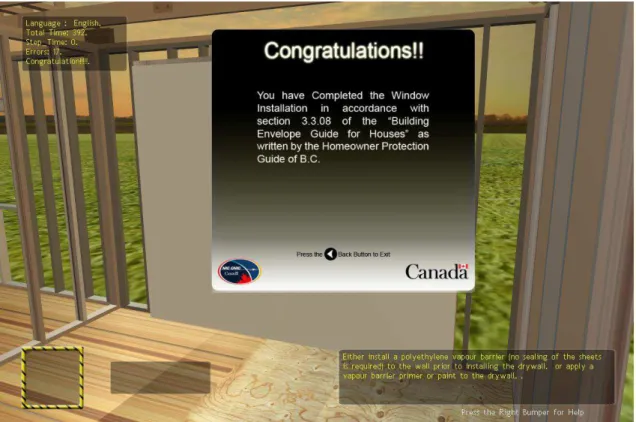
Figure 3 illustrates the end game screen where the window has been successfully installed in the building envelope.
Figure 1: Screen capture of game at start-up.
Figure 3: Final game screen.
In succinct terms, once the user has started the game they are presented with the challenge of correctly identifying the next action to take in installing the window. Written (and possibly verbal) instructions are optionally available for each step and the choices provided are randomly selected from a small collection of “likely” options defined in the scenario file. Each choice is signified by an icon representing the tool required by the action and accessed through a trigger on the game controller. Selection of an incorrect choice will result in an error sound and multiple errors on that step will lead to the correct choice being highlighted. Selection of the correct choice will result in new geometry being flown into the scene
representing the completion of that step. Best practice notes are assessable by using another trigger on the game controller. The user is able to change their view point and viewing direction using the game controller joysticks. This ability, combined with functionality to repeat adding the geometry, allows the user to get a good look at what the step should accomplish. Ambient construction noises play in the background.
Internally, the game simply tracks the user’s progression along the sequence of steps, their current score and the time taken for the current step and the overall time. Some of this data is displayed and some is not. Given a mechanism to share results, the game could send the numbers back to a teacher for use in review curriculum progress, grading, etc. As mentioned above in the XNA development environment used for the Xbox360, this mechanism is not easily accessible.
Visually, the game accurately presents in 3D each actual construction step being undertaken and multiple choices forcing the user to actually work out the proper action to take instead of just flipping through the guide and not really absorbing the material. Further discussion of potential extensions and limitations of the application are included in the next chapter.
4
Team Observations and External Feedback
4.1 Technology
In essence the game reads the configuration files, loads the appropriate geometry into the 3D scene and allows the user to view the scene from any viewpoint and angle by using a game controller to interface with the system. In general, we found the joysticks and triggers in the controller to be intuitive mechanisms for changing the view and selecting tools from a menu.
As expected, the responsiveness of the system visually and audibly was rapid and smooth and illustrated that the significant sophisticated content could be presented in an interactive fashion, natural to the user.
The control flow of the application currently allows for linear progression forward through the scenario and does not support multiple solutions or going backward. Adding these
capabilities would require a redesign of the internal data structure that tracks user progress in the scenario - something that is advocated for in any rate to simplify other extensions of the framework. There is no inherent reason these requirements cannot be supported on gaming platforms.
Thus, from the perspective of requirements related to the end user audience, the gaming platform provides an engaging, naturally interactive and realistic experience capable of presenting complex situations in an intuitively understandable fashion. It is for this reason that gaming platforms seem to be ideal candidates for incorporation into new curriculum development.
Unfortunately, if commercialized or used to supplement formal educational settings, the ability to add content without redistributing the application, the ability to access and reference external content, and the ability to upload student progress information would be very
important. It is in this area that game systems seem to have the greatest limitations. These limitations seem to be driven by the design of the development tools that deliberately handicap the exchange of information between systems due to the privacy and security concerns of Microsoft, and other gaming platform OEMs.Although workarounds do exist, since multi-player networked games are not uncommon, they seem to be quite limited in nature, and technically difficult to realise efficiently or economically for small audiences. A further challenge exists in the creation of content as the XNA environment has proven to be a difficult environment in which to successfully create high quality 3D geometry. These difficulties can be overcome, though significant expertise with and the use of powerful modelling packages are often required. Again, this can be viewed as a significant impediment to the use of this technology by developers of local college curricula.
The team also discovered that distributing XNA-based games to windows platforms can be complex and, in some cases, an impossible task without installing the developer’s
environment on the recipient computer. This is due to the lack of availability of library support for some basic elements of the XNA framework outside of the XBOX360™ platform.
4.2 Game Framework
In general, it is the opinion of the team that much could be done with an entertainment system-based knowledge transfer framework. However, content development remains a significant challenge and must be left to experts who are familiar with the material being presented to work in conjunction with media development professionals to realize the potential of the entertainment platform. However, a well-designed and powerful underlying framework would considerably ease the content development process and encourage the use of this medium.
The prototyped framework of the application does need a redesign to support a generic way to define multiple paths to a solution, doubling back, constraints from earlier choices and hints to enabling different educational approaches and more types of construction scenarios. Furthermore, the opportunity to show the consequences of actions (an important part of interactive knowledge transfer) is not included in the current prototype. Adding the ability to show vignettes upon satisfaction of specific conditions (e.g. correct or incorrect actions) would be easy to achieve. Adding more sophisticated animations (showing a construction operation in detail) is also a simple extension of the current structure of the framework. However, making use of the underlying computational power of the system to use simulation to display consequences would be fundamentally more challenging. This advance would simplify content creation for domains where simulations were available and make knowledge transfer a much more engaging investigatory process. The costs of developing such a simulation would be significant though, and only areas of high risk, or significant
consequence or areas that are particularly challenging to present (e.g. takes years to occur or can’t be visually observed and thus captured on video) would warrant this effort, currently.
4.3 Content
Visual and audio realism is, in the most part, limited by the resources the content developers have to create these elements. Geometry models will become more easily available as digital design becomes prevalent in the construction industry, but simplifying the individual elements and adding realistic textures to simulate materials requires significant expertise and
specialized, though available, tools. The same can be said for creating the necessary audio special effects for successful and unsuccessful steps. Capturing voice-overs for instructions is a simpler and more common task.
The existence of a reconfigurable framework supporting the use of common elements, like sounds and videos, makes realizing this content less arduous and thus, more feasible. The end result can be reusable and accessible to many which could, in the long run, save effort reaching the traditional audience, like apprentices and beyond to include active
professionals. For common structures of knowledge, specialized templates for the content could further reduce the content development effort required.
4.4 External Feedback
The demo was presented to the Faculty of Education of UWO and Conestoga College. The following specific feedback (grouped by theme) was received on the implementation and should be considered during any further work in this area:
Less text – non virtual elements the better:
The display of total time spent and time spent on each step is distracting. The Best Practice Notes occupy a lot of space and contain too much textual
information. Make it a vignette?
The whole game is a step-by-step instruction, not an engaging game. We should present information with minimum text. Some alternatives to consider:
o Limit the space of text boxes and allow the player to scroll through the text;
o Let the player approach information rather than present it at the beginning. An alternative to toggled menus would be approaching a table with an instruction
book, best practices guide, troubleshooting guide, other help documents and tools for measuring, etc.
Game play and evaluation:
Instead of presenting textual instruction, a better way is to ask questions and allow the player to explore information, get answers, and proceed with correct actions.
Evaluation process: allow the player to do whatever he likes (make errors) and present an evaluation at different times:
o At the end of the whole process: Include ways to leap to the step and review what should have been done versus what was done. Potentially, provide feedback on the consequences of wrong actions. Appropriate for showing experts and “newbies” that there is more to learn.
o A few steps down the line: Potentially, where one can no longer do the next task because of errors introduced. Again, take the user back to the task where the error was made and illustrate the proper step.
o Immediately, through a sound or other negative feedback: Again, for experts who just want to see where things have changed/differ from their understanding or intuition.
Give the player more control over their learning process, for example, o Skip steps;
o Start from steps in the middle; o Move forward and backward; o Escape / exit the game.
Fly different choices of materials in place (even if the choice is wrong) rather than just allowing the correct component to be installed. This way the player can see the effect of wrong actions and, potentially, undo the actions later.
Add red-herrings to make users re-think.
Preferable to have different game settings and feedback that fit the needs of players at different experience levels or age groups.
o Words are secondary to practice for young novices;
o Players see different levels of details of the same game: big pictures and small pictures.
o For experienced people, assist them with highlights in code changes rather than go through the whole installation process.
Realism:
The sound effects need to be appropriate to the context. The sound of breaking glass is okay but the “ta-da” sound is not appropriate. Prefer sounds specified for each task/action.
Add sound effect of the chosen tool as a part of background sound, for example, a power nailer.
Add background sound of a typical construction site. Realistic content is a big issue, for example:
o Hammer is barely used in construction any more;
o Use short phrases, or jargon, to present knowledge, for example, “Best Practice Note” “Getting It Right”
o Some descriptions in steps are not correct.
o Make good use of audio; otherwise they are seldom being used. Less wooden and more engaging, tell a story.
o Measuring the size of the window and window opening before doing jobs. o Make the content more interesting. Present information in a story-telling
style, for example, (prelude) a foreman telling what was happening in B.C. or other links to contextually appropriate and current examples (e.g. audio of interviews).
Authenticity of the content is very important to deliver correct knowledge.
o The window opening at the beginning of the game is not correct. Heading and supporting studs are missing.
4.5 Conclusion
As mentioned earlier, the appeal of entertainment platforms and their ability to engage users through rich realistic interaction offers considerable potential in comparison to traditional mediums. The underlying technology is certainly there though challenges remain in easing remote distribution and content development by people who are not gaming industry experts. Addressing these challenges is especially important as the easier it is to realize content the broader the potential audience is and the more cost effective the work. Without engaging, useful and realistic content the success of any knowledge transfer, through this medium, is unlikely.
As also noted by the educational experts, further work is required to realize a more flexible framework to support more exploratory style learning with free-flowing user-directed actions followed by realistic consequences. Admittedly, the example of the proper window installation steps was not conducive to a free-flowing game and a second prototype was envisaged to teach construction site health and safety material more in this style. This second prototype will not be realized in the context of this project due to the recent formation of a new collaboration with a number of colleges to realize a similar goal.
It should be noted that entertainment systems are not the only hardware platform capable of delivering edutainment. Common personal computers also have this capability and though they are often more expensive and less robust than game systems, the price gap is closing for lower end portable computers and, as general purpose machines, they often fill many other applications in the construction environment. Multiple competing content delivery environments also exist for standard computers that are capable of delivering rich interactive applications, as well as traditional media like text and videos, over the Internet. Some few examples include:
3dvia - http://dl.3dvia.com/software/3dvia-player/ Google’s O3D API - http://code.google.com/apis/o3d/
X3D (next generation of VRML as a standard) - http://www.web3d.org/ Ajax3D - http://www.ajax3d.org/
Papervision3D (for Flash) - http://blog.papervision3d.org/
Some of these are built on languages that are already broadly in use and have an
established development community including small and large operations in contrast to a more limited community of developers capable of producing content for specific
entertainment platforms. Also, they can be used on many competing hardware platforms and can support more flexible and open mechanisms for updating content or sharing results. Where they are currently weaker is in the ability to support dynamic realistic 3D immersive content which makes knowledge transfer about physical situations as natural as possible. However, these languages are constantly evolving and this state of affairs cannot be expected to remain unchanged for long.
Generating a similar list for computer desktop libraries supporting rich 3D application development would be difficult simply due to the large number of possible development environments. Libraries attached to major established programming languages perhaps offer the best opportunities including Java3D (Java) and OpenSceneGraph (C++) found at
http://java.sun.com/javase/technologies/desktop/java3d/ and
http://www.openscenegraph.org/projects/osg/wiki/Community/Contractors, respectfully. The unique potential embodied by cheap game systems, with their significant underlying computational power that can rival specialized workstations, remains mostly untapped outside the entertainment industry. This power could support more than pre-packaged knowledge or enumerated cause and effect interactions. It could support actual computation of complex cause and effect interactions modeled in simulations. The authors are aware of some PC-based applications (mostly for research) that already allow experts to explore or optimize solutions to construction problems or general contractors to simulate entire construction operations on-site for planning analysis. However, the hardware required is quite expensive and/or significant expertise is required to use the software. The same could be done on entertainment systems for less hardware and development cost (using existing gaming engines) but this will not occur unless a real need in the construction sector is
identified that cannot be well addressed by other existing tools. The authors think this is most likely in multi-person interactive simulations of complex construction operations for
specialized tasks where rehearsal is important because of the high risks, or significant consequences are associated with the failure of the operation.