Appletite: Data Reduction for the Wireless Platform A Restaurant Recommendation System
By:
Mukul Kundu
Submitted to the Department of Electrical Engineering and Computer Science
in Partial Fulfillment of the Requirements for the Degree of
Master of Engineering in Electrical Engineering and Computer Science
at the Massachusetts Institute of Technology
January 19, 2001
Copyright 2000 Mukul Kundu. All rights reserved.
The author hereby grants M.I.T. permission to reproduce and distribute publicly paper and electronic copies of this thesis and to
grant others the right to do so.
Department of Electrical Engineering and Computer Science January 19, 2001
Certified by.
Prof. Pattie Maes
Thesis Supervisor
Arthur C. Smith Chairman, Department Committee on Graduate Theses Accepted by MASSACHUSETTS INSTITUTE M9ASSACHUSETTS INSTITUTE OF TECHNO1. OGY J U L I I U S LIBRARIES Author 6' 7
Appletite: Data Reduction for the Wireless Platform A Restaurant Recommendation System
By: Mukul Kundu
Submitted to the
Department of Electrical Engineering and Computer Science
January 19th 2001
In Partial Fulfillment of the Requirements for the Degree of Master of Engineering in Electrical Engineering and Computer Science
ABSTRACT
The Appletite system was developed as a proof of concept for utilizing active collaborative filtering (ACF) to address the issue of small screen real estate and low user interactivity on enabled mobile phones. Developed for the Nokia 7110 WAP phone and Java enabled web-browsers, Appletite consists of a restaurant recommendation system for the downtown Boston, MA area. This thesis presents a system implementing ACF algorithms in a reliable, scalable, and device agnostic fashion. Appletite effectively reduces 150 restaurants to a list of 4 restaurants based on what a particular user is searching for at that instant, and on how the user's friends have rated different restaurants. The recommendations are of high quality and trustable because the user's personal preferences are utilized. While the number of users never reached a critical mass for an enterprise-level website, the system shows that ACF can work effectively for many information services available via web-enabled mobile phones.
Thesis Supervisor: Prof. Pattie Maes MIT Media Laboratory Software Agents Group
ACKNOWLEDGMENTS
I would like to thank my parents, Nikhil Kundu and Manjushree Kundu, my brother, Malay Kundu, and the rest of my family for constant support and encouragement.
I would also like to thank Prof. Pattie Maes for supervising the project and providing direction and guidance.
Finally, I would like to thank the members of the Software Agents Group at the MIT Media Lab for their considerable feedback and discussion that inspired many of the features created in this thesis.
TABLE OF CONTENT
ABSTRACT ... 2
ACKNOWLEDGMENTS ... 3
1 INTRODUCTION ... 7
1.1 PREMISE: ACCESS ANY INFORMATION... ANYWHERE... ANYTIME...7
1.2 PROBLEM: Too MUCH INFORMATION... TOO LITTLE SCREEN REAL ESTATE ... 7
1.2.1 Importance of Accuracy and Quality ... 8
1.3 SOLUTION: DATA REDUCTION AND EXPEDIENT USER INTERFACE ... 8
1.4 CONTRIBUTION: USING ACTIVE COLLABORATIVE FILTERING... 9
1.5 ROADMAP TO THE THESIS ... 10
2 THE APPLETITE AND WAPPLETITE EXPERIENCE ... 11
2.1 THE APPLETITE USER EXPERIENCE ... 11
2.2 THE WAPPLETITE USER EXPERIENCE... 13
2.3 C U STOM PROFILES ... 14
2.4 C IRCLE OF FRIEND S... 15
3 BACKGROUND TECHNOLOGY... 17
3.1 COLLABORATIVE FILTERING ... 17
3.2 ACTIVE COLLABORATIVE FILTERING ... 18
3.3 R ELA TED W ORK ... 19
3.3.1 Tapestry - the origin of collaborative filtering ... 20
3.3.2 Ringo -Music Recommendation System ... 20
3.3.3 Firefly Network Inc. - Collaborative Filtering for the Internet... 21
3.3.4 Vindigo - Restaurant Guide for the Palm PC... 21
3.3.5 Vicinity - Location Based Brand Name Finder ... 22
3.3.6 Where Appletite Fits into the Picture... 22
4 DESIGN CONSIDERATIONS ... 24
4.1 COMPONENT MODULARITY ... 24
4.2 A THREE TIER SYSTEM - MODULAR AND SCALABLE ... 25
4.3 ADVANTAGES OF THE JAVA PROGRAMMING LANGUAGE ... 26
4.4 WIRELESS APPLICATION PROTOCOL (WAP) AND MARKUP LANGUAGE (WML)... 27
4.5 HDML, HTML AND DEVICE AGNOSTIC DESIGNS... 29
5 SYSTEM OVERVIEW ... 31
5.1 COMPONENT LAYOUT ... 31
5.2 LOGIC COMPONENT INTERACTION ... 31
5.3 INTERFACE COMPONENTS ... 32
5.4 USER INTERFACES (FRONTEND COMPONENTS) ... 33
5.4.1 Dynamic Page Creation (READFILE) ... 33
5.4.2 Login and menuing system... 34
5.4.3 The USER component ... 35
5.4.4 W eb D isp atch ... 35
5.4.6 W eb Circle of Friends M anager... 36
5.4.7 W eb Custom Profiles M anager ... 37
5.4.8 W eb Browse User Interface... 38
5.4.9 M obile phone interface and W M Ldispatch... 40
5.5 BACKEND LOGIC COMPONENTS ... 41
5.5.1 Circle of Friends component (CIR C)... 42
5.5.2 Profiles component (PR OF) ... 42
5.5.3 Evaluations component (E VA L)... 43
5.5.4 Browse component (BR O W SE)... 43
5.5.5 Recommendation list component (RECOMMENDER) ... 44
5.6 RUN-TIM E OPERATION ... 44
5.6.1 Login procedure ... 44
5.6.2 Providing Evaluations... 45
5.6.3 M anaging Circle of Friends... 45
5.6.4 M anaging Custom Profiles... 46
5.6.5 Finding Restaurants ... 46
5.6.6 Running from a WAP phone... 47
6 RECO M M EN D A TIO N E I E ... 49
6.1 A CTIVE COLLABORATIVE FILTERING (A CF)... 49
6.1.1 User's Utility Function... 49
6.1.2 Importance of Circle of Friends... 49
6.2 W HY IS THIS H YBRID USED? ... 50
6.3 A LGORITHM AND IMPLEMENTATION ... 51
7 RESULTS AND CONCLUSIONS ... 53
7.1 PROOF OF THE CONCEPT ... 53
7.2 Q UALITATIVE RESULTS ... 53
7.3 FUTURE W ORK... 54
LIST OF FIGURES: FIGURE 2.1: FIGURE 2.2: FIGURE 2.3: FIGURE 2.4: FIGURE 2.5: FIGURE 2.6: FIGURE 4.1: FIGURE 4.2: FIGURE 4.3: FIGURE 5.1: FIGURE 5.2: FIGURE 5.3: FIGURE 5.4: FIGURE 5.5: FIGURE 5.6: FIGURE 5.7:
APPLETITE MAIN USER INTERFACE ... 11
ENTERING EVALUATIONS INTO THE SYSTEM ... 12
USING THE NOKIA 7110 TO ACCESS WAPPLETITE. ... 13
USER PROFILE MANAGER... 14
USING PROFILES ON WAPPLETITE ... 15
CIRCLE OF FRIENDS MANAGER ... 16
A MODERN THREE-TIER SYSTEM... 25
WIRELESS COMMUNICATION USING WAP. ... 28
WML PAGE DECK OF CARDS STRUCTURE ... 29
COMPONENT LAYOUT OF THE APPLETITE SYSTEM AND INTERFACES ... 31
LOGIN PAGE TO APPLETITE ... 34
APPLETITE'S MENU SYSTEM ... 34
THE WEBEVAL COMPONENT ... 36
THE WEBCIRC COMPONENT ... 37
THE WEBPROF COMPONENT ... 38
THE WEBBROWSE COMPONENT ... 40
LIST OF TABLES: TABLE 3.1: COLLABORATIVE FILTERING FOR MOVIES ... 18
TABLE 5.1: APPLETITE COMPONENTS AND FUNCTIONS... 32
LIST OF EQUATIONS: EQUATION 6.1: USER'S BASIC UTILITY FUNCTION ... 51
EQUATION 6.2: CORRELATION BETWEEN TWO DIFFERENT USERS... 51
EQUATION 6.3: USER EVALUATION SCALING EQUATIONS ... 52
1
INTRODUCTION1.1 Premise: Access any information... Anywhere... Anytime
In this new information age, people can access virtually any information within minutes through the Internet. There are billions of web pages discussing and documenting topics of all sorts, and anyone connected to the Internet has this information at their disposal. Within all of this information are people's thoughts about different companies, foods, movies, etc. Anyone who has a thought about anything can quickly vocalize his opinion on the Internet.
Moreover, this wealth of information may be accessed from anywhere with the emergence of portable devices such as Palm PilotsTM, Pocket PCTM devices, and web-enabled mobile phones. A person now may check a review on a product, movie, or restaurant whenever he desires. Currently only a small percent of the population uses the wireless Internet. The low quality of the user experience is the primarily responsible for the slow adoption of the wireless Internet (Grossman 2000).
1.2 Problem: Too much information... too little screen real estate
While it is possible to fully research a decision about a purchase, a movie, or a place to eat before committing to a decision, no one has the time or patience to traverse through all the available information. For instance, a standard web-enabled mobile phone offers only four to six lines of text information on its small display, which requires the user to scroll through an archaic stream of information to find the significant piece of the review he is looking for. Personal digital assistants offer a larger screen, but at the expense of bulkiness that is not convenient to carry everywhere.
Also, current wireless networks operate at considerably less data transfer rates than wired networks. This adds to the low quality of the user interface by increasing the time a user must wait to retrieve the information. Although the bandwidth will increase over the next couple of years, a faster network will still not address the problem of a poor user interface. The higher bandwidth also does not address the problem of low quality information on portable devices.
1.2.1 Importance of Accuracy and Quality
Quality of the information refers to the value that a user will give to the piece of information. For instance if a user reads reviews about movies by a noted film critic, the user will trust that review more than a review by John Doe from Middle America. He values the critic's review very highly and considers it as a high quality review. He is therefore more likely to use the critic's review as opposed to John Doe's when deciding which film to watch.
Accuracy refers to whether or not the user agreed with the critic's recommendation, which only has an indirect relationship with the critic's credibility. Since each user is different, a particular review may be very accurate for one user and inaccurate for another. Through a trial and error learning process, a user eventually finds a review, which may be John Doe's, that he agrees with and can consider both accurate and of high quality.
This process of determining which review is most accurate could take quite a while since there are thousands of reviews and films to choose from. In order to simplify this process people may read many reviews and choose a film by considering what the majority recommends. Now the user becomes frustrated with the low usability when trying to retrieve and read that many reviews on a wireless Internet device.
1.3 Solution: Data reduction and expedient user interface
There are two approaches to solving the problem of low usability for the wireless Internet. One approach is to simply offer a large screen and the processing power found in a computer as a mobile device. Many new sub-notebook computers combine a very powerful processor with a high-resolution screen in a small and light package. When combined with a wireless Internet connection via a mobile phone or wireless data modem, the device provides a rich and simple to use interface. Although data transfer speeds remain very slow, the wireless infrastructure will be able to provide high-speed access within a couple years. However, this wireless Internet solution not only remains expensive, but also is quite large and bulky when compared with a web-enabled mobile phone.
The other approach to this problem is to increase the quality and expediency of the user interface by employing information filtering technology so that more personally relevant information is
displayed. An expedient user interface would allow a person to find the useful portions of information from a page of data much faster than by traversing through it. Also, by implementing filtering methods to the information, the quality of information will significantly increase. Lastly, the user must be able to trust the filtering system so that he does not have to search multiple sources for the same information.
1.4 Contribution: Using Active Collaborative Filtering
The contribution of this thesis is to use recommendation technology called Active Collaborative Filtering (ACF) to implement the second approach to the low usability problem of wireless Internet devices. As will be discussed later, ACF uses information from other people and the user to make accurate recommendations for products or services. By implementing a variation of this technology, large amounts of review data have been drastically reduced into a high quality piece of information.
This thesis presents an architecture designed and implemented to provide an expedient and high quality interface to generate and present that vital piece of review data. This architecture is device agnostic and therefore may be used for wireless Internet devices as well as wired computers. The reviews are generated by the user's friends and reduced using ACF based on the user's input. Since the user's input is directly used to reduce the data, he trusts the information generated by the system.
The system may be applied to many different products and services, but as a proof of concept a restaurant recommender system was created using this architecture. Zagat's Restaurant Guide currently provides a review service where thousands of people rate restaurants based on features such as the quality of food, decor, and service for a particular restaurant. This system was inspired by that service and thus requires the user to tell the system his food type preferences, maximum price he wants to pay, and the importance of food, decor, service, and distance to his current location for the restaurant he desires. Then by applying ACF, the system generates a small list of restaurants ideal for the particular user. This allows the user to efficiently search and retrieve information so he can make a decision as to where to eat.
1.5 Roadmap to the Thesis
This thesis begins by detailing the scenario of a user interacting with the Appletite and WAPpletite system. It narrates the user's actions as he accesses the system from both his computer web-browser and his web-enabled mobile phone. It also describes the experience as the user interacts with the different user components of the system such as profile management and
the Circle of Friends manager.
The next section discusses previous work related to this thesis. It discusses in detail the similarities and differences between collaborative filtering and active collaborative filtering and how to use both technologies. It then describes several projects and products similar to the Appletite system and the related technologies. The next section discusses several important design considerations. It also details the reasons why particular technologies were chosen for the implementation in this thesis.
The system overview follows the design considerations section. It begins with a high-level description of the system layout and the functions of the different software components. It then provides a detailed discussion about the various user interfaces implemented in this system, which is followed by a discussion about the backend components of the system. Finally the section narrates how all of the different components interact and interconnect with each other as a user interacts with the various modules of the system.
After the system overview, the thesis discusses in detail the recommendation engine used at the core of the system. It describes how the active collaborative filtering was implemented to create an expedient user interface. It also discusses particular design choices on why active collaborative filtering was used in this system. The thesis ends with results and conclusions as well as a list of future work that may be built on top of the Appletite system.
2 THE APPLETITE AND WAPPLETITE EXPERIENCE
The Appletite and WAPpletite system provides a restaurant recommendation service to the user based on his personal preferences. The user accesses the Appletite system using a standard web browser and the WAPpletite system using a web-enabled mobile WAP phone. Both systems run similarly and provide the service for downtown Boston. The user has a computer at his office with a Java capable web browser and uses a Nokia 7110 web-enabled mobile WAP phone.
2.1 The Appletite User Experience
en00
Not
CCNXr
h.
No'rt End HANOVE.
CBELDWIN
Your Proflies
shopping and hungry
Type of Food
A ~meao(rdtinl
Coffeeshopo z
Food Decor Serice Dist Price($)
F -13 2
5
112AReconmended
RestaurantsA±
Hu 11CNot 7 . Country Lie Vegetarian lZagatj
*>. DERS F I Hl rk I $ Cr" a No 9 Park (Zagat)
Q WYRTLE ?*on Hit b AneAt And H y sio J4. Engl West Street Grile [Zagat)
CKNEY rGi (Zagat]
m SOS o jr0d. ar Valt The Igagat)
* krkbetrV Houot, V9W Cttngo NDi
Ir te B~jri i BWVI Skoe looss Whr Wmap, The
wTr Address:
*t 082 Water St. (bet. Congress St. & Libe rty Sq.), Boston
e M(Food Type:
S4 American (New)
diCh H d odep ChkdrwKsMaseu F: 16 D: 11 S: 14 Price: $10
Circle of Friends Personal Profiles Evaluate Restaurants Find Restaurants Logu
_Q Done -t Internet
Figure 2.1: Appletite Main User Interface
Suppose the user wants to eat lunch at a simple and inexpensive place with good food. He starts up the web browser and logs into the Appletite system. He now has several options: he can evaluate restaurants he has already been to, change his circle of friends, alter a custom feature
profile, or get a restaurant recommendation. The interface shows a map of downtown Boston, and has list boxes for custom profiles, food types, and several boxes to indicate what the user is actually looking for.
The user then clicks his current location in the map and assigns the appropriate weightings, on a scale of 0 to 9, to the importance of particular restaurant features. He indicates food quality and distance as important and decor and service quality as less important. He indicates that $12 is his maximum price for a meal, a drink, and a dessert. He then browses different restaurant food types and examines the restaurant recommendation list that appears below (Figure 2.1). The system indicates next to each restaurant name, which friend had the most influence on that particular recommendation.
As he clicks on the different restaurants in the list, a square-X indicates its location on the map. Basic restaurant information such as address, food type, Zagat ratings, and price appear. The user decides on a restaurant and eats lunch there. Next time he logs into the system he submits a personal evaluation of that particular restaurant (Figure 2.2). That evaluation tunes the recommendation engine, as discussed in Section 6, so that it may make better recommendations.
Evaluate Restaurants
Restaurant Types American (Traditional) Chinese Coffeeshops French Restaurants SeasonsWest Street Grille
PIa III -The Kansas City Steakhouse Vault. The
Food(O-9) Decor(O-9) Service(l-9)
Subtn
Enter Restaurant Evaluation.
2.2 The WAPpletite User Experience
Suppose the user is now in Boston Common with a friend visiting from out of town and wants to eat at a nice place. In this case he wants high quality Food, okay Decor, high quality Service, and does not mind spending a little more on the meal. Using his Nokia 7110 web-enabled mobile WAP phone, he logs into the WAPpletite system. From the very first page he is allowed to choose a pre-defined custom profile and retrieve the restaurant recommendation list.
Although accurate location information will become more prevalent in the near future, it is not currently available. For this reason this implementation currently requires the user to input his GPS coordinates. This portion is considered only temporary until GPS location information becomes available on mobile phones. Since location information is used to generate the restaurant recommendation list, this information is necessary.
The user enters his current location and chooses to manually pick restaurant features instead of using a pre-defined custom profile. The next page allows the user to input food type, weighting values for food, decor, service, and distance, and set a maximum price for a meal, a drink, and a dessert. The user then retrieves the restaurant recommendation list and browses a list of four restaurants. The system indicates next to each restaurant name, which friend had the most influence on that particular recommendation. As the user browses through the list, the phone displays basic information about the venue. He decides on a restaurant and enjoys his meal.
-estaurant Type- -American (Now)- - Wrp h
Food (0-9) Country Life' Sq) Boston
Figure 2.3: Using the Nokia 7110 to access WAPpletite.
(a) Choosing Restaurant Features (b) Browsing the list of Restaurants (c) Detailed information about Restaurants.
WAPpletite's user-interface is very streamlined to allow the user to quickly weigh features and retrieve the restaurant recommendation list. The system runs as a thin client only transferring a minimal amount of data back and forth between the phone and the server. If this was a common restaurant search for the user, he may have utilized a custom profile and retrieved the restaurant recommendation list immediately.
2.3 Custom Profiles
In the Appletite interface the user is allowed to define custom profiles to make finding restau-rants easier. When a user searches for a restaurant, he has to type in Food Type, and rate the importance of Food, Decor, Service, Distance, and Price. Suppose that the user frequents low price, high food quality Italian restaurants. He can create a custom profile "Italian" that contains his search criteria for that type of meal. Next time when he searches for cheap Italian restaurants, he clicks his location and the "Italian" profile to generate the restaurant recommendation list.
Edit User Profiles
Profile Name: jLunch Restaurant Type: Ameia(Taiinl Chinese Coffeeshops French Italian
Food(0-9) Decor(0-9) Service(0-9)
7 12 3
Distance (0-9) Price($)
Profile deleted.
Figure 2.4: User Profile Manager
When the user logs into WAPpletite, he can immediately choose "Italian" on the first page and generate the restaurant recommendation list immediately. Also, if the user prefers the weighting assigned in the "Italian" profile, but prefers a different food type, he may also choose an alternate
Profiles:
Chinese Takeout Italian
cuisine on this page. Since the process only requires two different pages, it makes finding restaurants very fast and simple. Also if the user decides to manually pick important features, he has the option of saving those settings as a new profile. This new profile now appears in both Appletite and WAPpletite's profile lists allowing the user to utilize it immediately.
Pick Profile. -av--ae Profile
[italian] Profile Name
[EMUMfMM [myprof]
6PS Coords:
W 71 deg +
Options Options
Figure 2.5: Using Profiles on WAPpletite
(a) Choosing a profile to user. (b) Creating and saving a profile. 2.4 Circle of Friends
The quality of the recommendation is maintained by the use of active collaborative filtering. The user provides the system with a Circle of Friends, which consists of people he considers to have similar tastes in restaurants as he does. When the system makes recommendations, it looks at how the user's friends have evaluated the restaurants in consideration. If there are no friends who have evaluated a particular restaurant, then Zagat's rating guide is used as the primary source. Since the system uses the evaluations of the user's friends and orders the restaurants based on the importance of features chosen by the user, a high quality and trusted restaurant recommendation list is generated.
The design of the system assumes that anyone with access to a web-enabled phone will also have access to an Internet connected computer. The user can only create an account, edit profiles, and change his Circle of Friends using a computer web browser. The interface is designed simply with a list of friends in the user's circle, an input box, and two buttons, an "Add" and a "Remove." The user identifies his friend using either an email address or phone number and
chooses to add or remove the friend from his circle. No matter how many changes the user makes to his Circle of Friends, each of his friend's circles remain the same. If the user adds a friend who does not yet have an account on the system, the system stores the identifier and automatically adds the friend when he registers on the system.
Edit User's Circle of Friends
Friends Circle:Ankur Chandra
Malay Kundu
sup ersri@hotmail. com (Not User Yet)
6175551212 (Not User Yet)
ID (Email or Phone #)
Add Remove
Friend Added.
3
BACKGROUND TECHNOLOGY
3.1 Collaborative FilteringCollaborative filtering (CF) is a technology for information filtering and product recommendations based on the actions or evaluations of other people (Firefly Network Inc.). For example if two people evaluate a series of movies similarly, collaborative filtering assumes that these two people have similar taste. If the first person also liked a movie that the second person has not yet seen, the CF system would recommend that movie to the second person. Since it already established that the two people have similar taste, it is likely to be accurate in recommending the movie to the second person.
Collaborative filtering works best when qualitative features such as the feel of a place or the flavor of the other people attending are considered important. For instance, recommending a computer to a person can be done using a very logical algorithm that matches price, speed, and storage memory to a person's needs. But a person may enjoy a movie because of the cinematic style or the use of color in the costumes. These features are very difficult to define and filter on using simple algorithms. Since CF uses the evaluations from other people who have similar tastes, it can still make an accurate recommendation although it does not know why one movie is better than another.
Table 3.1 shows how typical CF works. A movie recommendation system considers five movies and three people. First it establishes that Person A and Person B have similar tastes because they both enjoyed Movie 1 and Movie 2. Then it establishes that Person C is most like Person B because they both enjoyed Movie 3 and disliked Movie 4. Since Person B enjoyed Movie 3, it recommends it to Person A and similarly recommends against Movie 2 to Person B. Also, it realizes that the best recommendation for Person C it can make is Movie 1.
Table 3.1: Collaborative Filtering for Movies
Movie 1 Movie 2 Movie 3 Movie 4 Movie5
Person A Enjoyed Disliked Enjoyed
Person B Enjoyed Enjoyed Disliked Enjoyed
Person C Enjoyed Disliked Disliked
1. Recommend Person A to watch Movie 3.
2. Recommend Person B against watching Movie 2 3. Recommend Person C to watch Movie 1.
Since CF makes different recommendations to different people, it behaves in a highly personalized way. Moreover, there are usually thousands of different people who have each seen many different movies. This makes finding a person with similar tastes much simpler and making accurate recommendations more common. Moreover CF can find similarities with many different people to consistently make accurate recommendations.
This basic form of CF does not scale very well with millions of users because of the amount of processing power required to find similarities between people within such a large database. It works accurately and expediently on groups of people clustered together. Also, CF will not necessarily work accurately on everything. Just because two people may have similar preferences in movies, does not mean that they'll have similar preferences for restaurants. However, when used correctly, CF will produce very good recommendations (Shardanand 1995).
3.2 Active Collaborative Filtering
There are two types of CF: Passive Collaborative Filtering and Active Collaborative Filtering. In active collaborative filtering (ACF) the user takes a more active role in receiving a recommendation from the system. The user usually provides some extra information to the system beyond personal reviews of products. It generally emerges as a hybrid of a simple
constraint algorithm and basic CF. Typical ACF is defined as CF where the user specifies which other people's evaluations should be used.
By more actively involving the user, two important things happen. First the user will tend to trust the source of the recommendation more because it is clearly based on his personal input. Second the quality of the recommendation will inherently be better since more information about what the user wants is available. A basic CF engine may recommend a movie that the user would enjoy, but not necessarily one that is both "modern" and "action." An ACF recommendation engine would recommend a movie the user would enjoy, but make sure that it was a "modern action" movie. Moreover, it may only use action movie evaluations to determine the most similar people to this user. This would increase accuracy because it's searching based on a new parameter of what the user wants right now.
Another advantage of active collaborative filtering (ACF), is that it can be made to handle the scaling issues of basic collaborative filtering. A particular recommendation system may ask the user to associate himself with a subgroup of people, which would have a three-pronged effect. Since each subgroup is considerably smaller than the whole user base, there are fewer users to compare evaluations between, which makes the processing task manageable. Second, since the user chooses his subgroup, the system will have a more accurate characterization of the user and can make higher quality recommendations. Lastly, the user will tend to trust the recommendations more because he knows that he had a real input into how this recommendation was made.
3.3 Related Work
There has been much research on collaborative filtering techniques and its uses. Several systems discussed below either studied a new form of collaborative filtering or implemented CF to see how well it worked for recommendations. This section also discusses implemented information systems that handle small screen issue by using a data reduction system other than CF. Several research projects and industry products are discussed below.
3.3.1 Tapestry - the origin of collaborative filtering
The most basic system of collaborative filtering originated with the Tapestry project at Xerox PARC, where people shared pointers to interesting documents and sources of information (Maltz 1995). Tapestry was developed as a way to automate sharing of pointers in order to filter large amounts of information. Users would share information that allowed other users to make more informed decisions as to what information to retrieve. Since a user is filtering information based on what other users have indicated, this made Tapestry a collaborative filtering system, in the most fundamental sense.
Tapestry allowed users to annotate specific articles with their thoughts about the article. These annotations could range from detailed explanations of why a particular article was good, to a simple "likeit" or "hateit." Then as users searched the information database, they could read the annotations by other users before reading a full article, thus filtering the information by using the knowledge of other people. However, Tapestry never reached a critical mass of users because of its implementation on a commercial database did not allow for mass distribution of the system. Also, the user interface to Tapestry was SQL based and counter intuitive. Regardless, Tapestry did introduce the process of collaborative filtering.
A variation of this system called Grouplens was designed to work with Usenet Net-News (Maltz 1995). Similar to Tapestry, users would read articles and numerically rank how useful the article was. By having many people evaluate many different articles as they read through them, users are effectively voting on which are articles are best. Then when a new user joins the system, Grouplens would correlate that user with some other particular user and recommend articles. This system never reached critical mass, but did illustrate the potential use of CF for information filtering.
3.3.2 Ringo -Music Recommendation System
The Ringo system was developed as a system to automate the "word of mouth" process of making music recommendations. Developed at the MIT Media-Lab, Ringo ran both as a website and as an email based system. It contained a database of many music artists and was used by more than 20,000 people. At first, Ringo incorrectly recommended music to users, but after just a few weeks of use it became very accurate.
Collaborative filtering made up the core of Ringo's recommendation engine. The system kept a user profile as a record of the user's ratings for specific items. It would then compare the profile with other user profiles to find the closest matches. Then it would use multiple similar profiles to recommend music to the new user. Each user begins by describing his music preference using a scale of 1 to 7 for several music selections. Users keep improving their profile by rating new music artists and their impression of them as they used the system. As more and more users joined the system and indicated new music preferences, the system became very accurate. Since user preferences were compared with every other user in the system, Ringo could be considered an implementation of passive or automated collaborative filtering (Shardanand 1995).
3.3.3 Firefly Network Inc. - Collaborative Filtering for the Internet
Firefly Network Inc. focused on bringing the power of collaborative filtering to Internet websites. At its core, Firefly utilized a hybrid of content-based filtering and collaborative filtering called Feature-Guided Automated Collaborative Filtering (FGACF) (Firefly Network Inc.). Similar to Tapestry and Ringo, users would be able to browse any product, movie, music selection, etc. and tap into the knowledge of other users who have browsed through the same products.
FGACF created a more accurate form of CF by allowing users matching user profiles based on categorical evaluations. It would find similar users based on particular categories as opposed to using full profiles. For instance, if a particular user is very similar another user for classical music and similar to a different user for rock music, the Firefly technology could detect that difference and create a more accurate recommendation.
Firefly Network Inc. implemented a generic version of this collaborative filtering engine for many different products. The user base grew to about 1.5 million users and was eventually acquired by Microsoft Corp. and incorporated into their services department.
3.3.4 Vindigo - Restaurant Guide for the Palm PC
Vindigo addresses the issue of small screen real estate on wireless devices by using content-based filtering (Vindigo Inc.). Specifically, it implements a static database of restaurants, descriptions, locations, and ratings for Palm PCs. The user may input his current location into the
system, and the program will return restaurants within his vicinity effectively reducing the number of restaurants to consider by using location. This system, however, does not make recommendations or implement any type of filtering.
Currently Vindigo is not available on a wireless platform, however it is currently being developed for web-enable mobile phones. Vindigo also allows users to reduce the number of restaurants to consider by allowing browsing by food type, price, and distance. This browsing mechanism works well on the Palm PC platform because the screen size is big enough to provide a very navigable user interface. However, for mobile phones, users usually are limited to four lines of text and minimal amounts of graphics. In order to build an effective user interface for this system, Vindigo will need to filter the information further.
3.3.5 Vicinity - Location Based Brand Name Finder
Vicinity provides a service very similar to Vindigo's restaurant guide for other types of products. It allows users to search their location for particular brand names such as bank ATMs, restaurants, retail chains, etc. The service runs on a wireless platform for Palm PCs as well as web-enabled mobile phones. The user indicates his current location to the system, and by using a distance and content based filtering mechanism, Vicinity reduces the number of services to a particular brand name and location.
This effectively reduces the number of services presented to the user. However, its focus on brand names and location makes it very specialized and does not allow users to browse across many different features. It also requires the user to know where exactly where he wants to go, and aids in finding that place. Since it does not make any recommendations, Vicinity is used primarily as an informational tool for location and cannot be adapted to other services on the wireless platform (Vicinity Inc).
3.3.6 Where Appletite Fits into the Picture
The many different projects and products discussed above address the issues of too much information in very specific ways. Tapestry and Grouplens implement collaborative filtering for news articles, Ringo lets users interact to find accurate music tastes, and Firefly Network Inc. allowed many domains and Internet websites to utilize collaborative filtering. Vindigo and
Vicinity more specifically addressed the issue of small screen real estate on wireless devices and provides useful information to the user. However, both of them use content-based filtering techniques to reduce the information and do not successfully create user interfaces for web-enabled mobile phones.
The Appletite system developed in this thesis merges the wireless information providing aspect of Vindigo and Vicinity with the collaborative filtering engines of Grouplens and Firefly. To create an effective user interface that accurately filters the data based on features the user is currently looking for, Appletite uses active collaborative filtering (ACF) in a new way. ACF was used because data reduction is very critical for an expedient mobile phone interface. Appletite implements this technology for restaurant browsing in the downtown Boston area. The system is implemented for both Java enabled web browsers as well as web-enabled mobile WAP phones.
4
DESIGN CONSIDERATIONS
4.1 Component ModularityModularity was the most important design consideration throughout this thesis. This system conducts many different functions such as allowing the user to manage a Circle of Friends, evaluate different restaurants, create personalized profiles, browse restaurants on a map, and generate a restaurant recommendation list. Each task has a separate component designed specifically to perform all the functions for it. Breaking up the system into the several modules allows for a more straightforward design, faster debugging, and robust operation.
In a good modular design, each component is self-contained and uses similar communication structure between each other. This allows for faster development because each individual module may be created separately, optimized, and debugged without requiring any changes to the rest of system. Since each function runs independent of the other modules, programming errors are easier to identify and correct.
The system's communication structure was built around the idea of serving a web page. One of the simplest forms of information transfer between any two things is plain text. This implementation uses plain text for all communication between components. Every function command is executed by a web browser applet. It begins as a simple text command that is dispatched to the appropriate component where the function executes and produces a simple text result handed back to the web browser applet.
Plain text communication is very elegant for three primary reasons. First, a simple form field web page may be used to debug any component. Second, data security will be very easy to add since a large amount of security software exists for simple text already. Third, the main drawback for using text vs. binary codes is that as straight text each command uses a byte for each character, which becomes larger than necessary when sending information back and forth. However, the data size would only be an issue for thin connections to the Internet (-56Kbs). Since most 56K modems automatically implement data compression, the commands sequences are compressed causing little loss of bandwidth.
4.2 A Three Tier System - Modular and Scalable
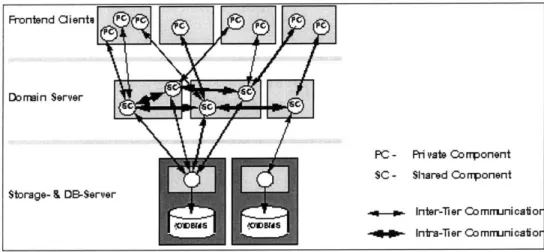
A modern three-tier architecture was used to build Appletite. Three-tier systems breakup web functionality into three major modules: Data Storage, Logic, and Web Interface. Data storage consists of a database that stores all of the critical information. The Logic tier works as a type of application processing unit that executes components that access the database, manipulate, and pass on the data. Most of the server processing occurs on the Logic tier. The Web Interface tier controls the user interface by dynamically creating web pages with data pass on from the Logic
tier.
Frontend Clienti o
Domain Server
PC - Pri vate Co rrponent SC - Shared Corrponent Storage- & DB-Server
.4- . Inter-Tier Comrrunicatior
-04-- Inira-Tier Co mrunicatior
Figure 4.1: A Modern Three-Tier System
The Web Interface tier never directly accesses the database, and the Logic tier is never exposed to the user. This type of architecture imposes three very distinct modules that ease programming complexity by modularizing the whole system. If a component in one of the tiers is altered to increase performance, the other two tiers require no changes since the communication structure between the three tiers does not change. This architecture effectively creates a robust and flexible system. This architecture also makes it possible to easily add different frontends that access the same Logic components. The different frontends can offer users multiple interfaces while maintaining the exact same functionality.
When designed a certain way, the three-tier architecture handles scalability issues very well. Scalability has become a major issue for many Internet web sites. The ability to handles millions of simultaneous users without considerably performance drop is critical for the survival of dotcoms. Although this thesis was created as a research project, the system architecture was
designed so it can be scaled to handle millions of users at once. With minimal changes to the components, the system will execute on high traffic enterprise level servers.
In order to maintain scalability, all user data must reside on the database tier. The Logic and Web Interface on the server must remain stateless. When the Logic components are accessed, they retrieve the necessary data from the database, manipulate it, pass on the new data, and then remove any memory indicating that this particular instance of this component was used. With this design method, many instances of a Logic component could be running, and the user could access one instance at one time and a different instance at another time while remaining completely oblivious that he accessed two different instances. This means that many different servers may be linked together in the Logic tier executing thousands of instances of the Logic components. When user action requires a component, he can access whichever server is least loaded and therefore not notice any performance difference although millions of other users are using the system.
This idea of expanding the capacity of the Logic tier by linking multiple servers works just as well for the Web Interface and Data Storage tiers. Since each module may now be expanded to extremely high capacities, the Appletite system as a whole will be very scalable to users. For an enterprise level website, each tier may reside over several servers. Only one machine was used in the implementation of this thesis.
4.3 Advantages of the Java programming language
The Java programming language has recently emerged as the programming language of choice for web applications and consequently has been used in this implementation. The immense popularity of Java is mostly due to its well-designed architecture and philosophy. Java is an open-source language endorsed by Sun Microsystems TM. While there may be hundreds of implementations for the same Java routines, each one adheres to the specification put forth by Sun. The Sun version of Java 2 was used to create the different components in this thesis.
Java's simple yet powerful programming style is its primary advantage. It is widely considered as one of the best-designed object oriented programming languages. Moreover, Java programs are very robust, and rarely crash an operating system; this makes it very appealing for server-side programming. Java was chosen primarily for its superior design, simplicity of use, and extensive
Servlet Architecture. Java Servlets are mini-programs that execute tasks on the server and produce dynamic web pages.
Java's most well known feature, platform independence, is possible because the all programs are only partially compiled. The programs run in a Java code interpreter that completes the compilation for a particular platform and then executes the program. Since Java code interpreters are available for every major system platform, the programs execute the same regardless of the computer type. However, such a system reduces the performance of Java programs considerably when compared with native code programs. This performance tradeoff was preferable for implementing this research in Java. Also, since many companies are finding ways to drastically increase Java performance, the performance reduction will not be significant if the system were used at an enterprise level.
This device independence makes Java ideal for the user interfaces. Since most modem web-browsers are Java enabled, a rich and portable user interface can be created. Java applets allow a moderate amount of processing and image rendering to occur on the client computer. Also, they can easily communicate with server to receive data as it changes. The main drawback to using applets as user interfaces is the uncertainty of screen rendering. Current web browsers implement Java 1, an older version, and have inconsistent rendering of interface components across platforms. The inconsistencies are only minor and retain the same feel on each platform allowing richer interaction between the user and the system.
4.4 Wireless Application Protocol (WAP) and Markup Language (WML)
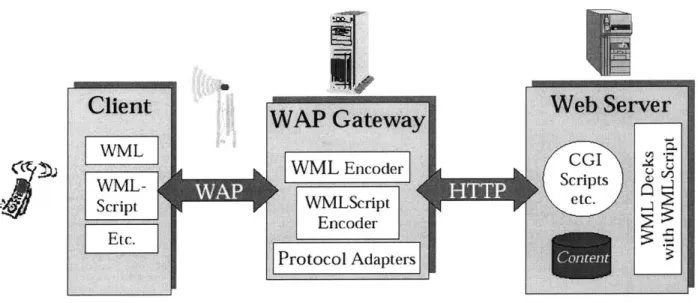
The Appletite system uses WAP technology in order to connect with the mobile web. WAP was primarily developed to handle the low bandwidth problems of wireless Internet devices. A wireless Internet user sends a request for a web page to a WAP gateway, which in turn requests the web page using standard Internet protocols such as HTTP. The page is retrieved as plain text written in Wireless Markup Language (WML), which is also designed for wireless Internet devices. The WAP gateway then compresses the plain text web page into a binary form, which significantly reduces the size of the page. Then it sends the data to the client where it is decompressed back into WML and displayed to the user.
rWML Encodes
Script WMLScript etc.
Encoder Protocol Adapters
Figure 4.2: Wireless communication using WAP.
The Wireless Markup Language (WML) was specifically designed for use with WAP devices. WML is written using the Extensible Markup Language (XML) technology so that it can benefit from XML design. Using the XML standard any device can read and interpret a web page written in WML and convert it appropriately to another markup language. WML also offers a scripting language so that the thin clients may run small programs on the devices themselves. Since most wireless Internet devices have very limited processing power, these scripted programs may not be used for too much processing.
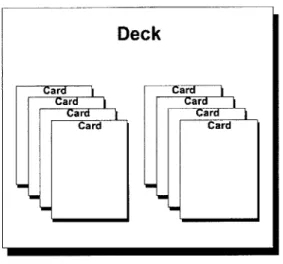
WML is designed as a way to "pre-cache" information and provide navigation tools for a wireless Internet device. Each WML page defines a deck of cards, which contains all of the data for a page (Figure 4.3). Each card contains information to be displayed and links that navigate the user to other cards in the deck or another web page. When a card sends the user to another card in the same deck, the data transfer appears instant because the device had already loaded the card with the rest of the deck. Clever usage of decks and cards can create a very rich and interactive user interface.
Deck
Figure 4.3: WML page Deck of Cards structure
WML also allows a web page to define functions for particular buttons, softkeys, on the wireless device. For instance, a user may be able to press a particular button to bring up a list of favorite links at one time and use the same button to make a phone call at another time. That same button may be programmed to execute a WML script that generates a random answer to a "yes" or "no") question. In each case the softkey changes function depending on the WML page currently displayed to the user.
4.5 HDML, HTML and Device Agnostic Designs
Handheld Device Markup Language (HDMiL) was the precursor WML as a wireless Internet markup language. HDML is written using a structure very similar to standard HTML web pages and does not utilize XML features. HDMIL also offers the concept of a deck of cards for creating interactive wireless web pages as well as definitions for softkeys. However, it does not allow client side scripting the way WML does. Also, HDML uses an Unwired Planet (UP) server as its gateway as opposed to a WAP server. The UP server does not implement any compression for HDML web pages.
Many currently available wireless Internet phones implement web browsers that read primarily HDML web pages. In order to accommodate a large number of wireless Internet phones, a system must be able produce HDML web pages as well as WML web pages. By generating an HTML interface as well, the system allows the user access via standard Internet devices such as personal computers.
Card ar
Card Card
Card Card
A system capable of communicating using these various markup languages are said to be Device
Agnostic. This refers to a design that allows users to interact with the system through many
different endpoints and while maintaining a similar experience on each device. The ability to do this requires many important design aspects. The server should be very modular so that it only loosely integrates with any particular web-access platform. This allows it to easily interface with multiple web-access devices. Since wireless web devices are becoming very prevalent, remaining device agnostic was a major design aspect of the Appletite system.
This implementation interfaces with computer web-browsers such as Internet Explorer and Netscape as well as Nokia web-enabled WAP phones. The user interfaces for the computer web browsers are Java applets that offer rich interactivity with the user. Mobile phones lack not only the processing power necessary to execute Java applets, but the screen size available to computer web browser. In order to accommodate those devices, all critical processing must occur on the server. This allows mobile phones to access the system without any significant processing occurring. Since WAPpletite (the mobile phone version of Appletite) runs on a three-tier platform, it scales with users very well.
The modularity of the multiple tier system used in this thesis plays a major role in supporting many different devices. All of the Logic components used for WAPpletite and Appletite reside in the same tier as the same objects. Both devices perform the exact same functions and only differ in the information presentation to the user. The only addition necessary to support a WAP or HDML phone was another web-interface component. Connecting this component with the rest of the system was extremely simple, and very reliable as a result of the modular system design.
5 SYSTEM OVERVIEW
5.1 Component LayoutThe Appletite system consists of two different types of components that communicate using standard HTTP protocol and the Internet. The client side is primarily made up with Java Applets executing on the user's computer. The server side runs as Java Servlets and execute completely on the Appletite server while the Internet provides a communication layer between the two sides. Mobile phone users connect directly to a special interface component, WMLDISPATCH, to communicate to the server logic components.
Figure 5.1: Component Layout of the Appletite System and Interfaces 5.2 Logic Component Interaction
Each Logic component executes specific functions for a particular aspect of the user experience. The DISPATCH component negotiates all of the communication to and from the Logic tier. Each Web Interface component sends plain text commands using Hypertext Transfer Protocol (http) to DISPATCH. DISPATCH then instantiates the appropriate Logic component and hands it the command sequence. After the processing completes, the component returns a page of plain
WEB Browse
WEB Eval
User Web Interface WEB Circ
WEB Prof
Web Login Page
CIRC DISPATCH EVA L [PRORF BROWSEAcesDtbe RECOM MIENDER WML DISPATCH USRMobile Web---., Internet RAFL ServrSd Client Side
text containing the command results. DISPATCH then returns the data to the Web Interface component.
Each Logic component directly accesses the Microsoft AccessTM database using Standard Querying Language (SQL). A Logic component receives a database connection pipe from DISPATCH when it instantiates. The connection is established using standard JDBC and ODBC database connection drivers. This design not only allows one connection to be shared by many components and users, but also provides flexibility in the database used. If the system were to switch to Oracle, only two lines in the DISPATCH code would require any changes.
Since the DISPATCH component is also designed as a stateless and scalable component, many different users may access the same object. Every time a DISPATCH object instantiates, it establishes a database connection, a fairly expensive task from a performance point of view. Since it executes within the Logic tier of the system, most of the time a user will access an already instantiated object and therefore benefit from the performance boost.
Table 5.1: Appletite Components and Functions Web Interface Component: Logic Component: Functions:
WebCirc Circ Circle of Friends Manager
WebProf Prof Custom Profile Manager
WebEval Eval Restaurant Evaluations Manager
WebBrowse Browse Restaurant browsing capabilities
WebBrowse Reclist Recommendation Engine
5.3 Interface components
For Appletite, each user interface consists of a Java applet that executes on the client computer. The applet allows for rich interactivity while increasing the performance of the server by moving the user interface to the user's computer. However, the interface components contain no data, they just simply format it. Each interface applet sends http plain text requests to the DISPATCH
component on the server. DISPATCH then passes the command to the appropriate Logic component and returns the data. The applet then presents it appropriately to the user.
The WAPpletite interface is used for web-enabled WAP phones. The interface works through a different component known as WMLDISPATCH. It instantiates the same Logic components as DISPATCH, but rather than passing along the results, it processes them into a WML page. To aid in processing, WMLDISPATCH utilizes a READFILE component that uses text documents on disk to generate WML pages. The user then interacts with the page on the phone and sends requests back to WMLDISPATCH.
The modularity of having all of the Logic components running separately allows for multiple user interfaces. DISPATCH and WMLDISPATCH are merely different implementations of the Web Interface tier. While for Appletite, the user interface frontend runs as an applet on a web-browser, WAPpletite simply serves web pages like any other website. An applet style interface is not possible because of the low processing power and small memory available on mobile phones.
Since both DISPATCH and WMLDISPATCH are stateless in order to remain scalable, the system needs some way of identifying each user. Every command issued to the components contains a user identification code (UserID). The logic components then use the UserID when retrieving information from the database. DISPATCH and WMLDISPATCH return the processed data to the appropriate user.
5.4 User Interfaces (Frontend Components)
5.4.1 Dynamic Page Creation (READFILE)
The READFILE component allows different components to dynamically create web pages from text files. It mimics the functionality of Java Server Pages (JSP), but from a Servlet perspective. The text files contain the framework for an HTML or WML page and inside are tags indicating where to insert dynamic information. For instance, each login error page is identical other than the actual error message. Each one allows indicates that there is an error and allows the user to login again. Only one text file exists for all the error pages. READFILE adds this dynamic web page generation functionality to the other components.
5.4.2 Login and menuing system
When the user first accesses the system, he reaches a static web page prompting him for a user identifier or a password. The user identifier is either the user's email address or phone number. This guarantees an identifier that is both uniqueness and easy to remember. The page POSTs the information to the Login Servlet.
Welcome to Appletite.
Email or Phone #.Password:
Login
Are you a New User?
Figure 5.2: Login Page to Appletite
First, the Servlet searches the database to confirm the user. If the user does not exist, the Servlet returns an error page and a link to creating a new user. In the case of an incorrect password, the user receives a different error page and a login form to try again. When the user is confirmed, the Servlet generates a dynamic web page. Appletite's main page is a dynamically created web page that uses frames to implement the menu system.
Circle of Friends Personal Profiles Evaluate Restaurants Find Restaurants Logout
AppIet stared Internt
Figure 5.3: Appletite's Menu System
The actual menu frame is a JSP that contains links to bring the appropriate applet into the main frame. JSP allows the server to easily create dynamic web pages based on the input. In this case the page simply appends a UserID tag to each menu link so that the system can identify the user.
Each link points to a different JSP page that initializes the appropriate interface applet with the right user.
5.4.3 The USER component
The USER component is the one major component that stands by itself. It handles all login, new user, and user identification functions. Since the user may use either a phone number or an email address as his identifier, the USER component first determines which identifier is used. Then it searches the database and returns the appropriate web page.
USER also plays a major role in the Circle of Friends functionality. When a new user joins the system, he identifies himself with a phone number and an email address. After USER writes the new information to the database, it checks if the new user was entered as a friend in any of the
Circle of Friends lists. It then updates all of the new circles for current users. This allows the
recommendation engine to use the restaurant evaluations of this user to make better recommendations to other users.
5.4.4 Web Dispatch
The DISPATCH component negotiates connections to the Logic components. In order to maintain simplicity and scalability, DISPATCH was designed as type of command shell for the frontend components. Each frontend component requires a backend component to access and manipulate the database. Each user interface issues a component name and command to DISPATCH which then executes the proper Logic component.
The user interfaces all access the Logic components through only one Servlet. This effectively abstracts all backend components very well. The programming involved with the Logic components can now be altered without requiring any changes in the user interface components. Also, the command shell style interface between the User Interface and Logic components allows the interface to easily change without any changes in the Logic components.
5.4.5 Web Evaluations
The WEBEVAL component handles the user interface for submitting personal evaluations. It runs as a Java applet on the client computer and uses standard http to communicate with the