An Architectural Comparison of Distributed Object
Technologies
by
Jay Ongg
Submitted to the Department of Electrical Engineering and Computer Science
in Partial Fulfillment of the Requirements for the Degrees of
Bachelor of Science in Computer Science and Engineering
and Master of Engineering in Electrical Engineering and Computer Science
at the Massachusetts Institute of Technology
May 19, 1997
@ Copyright 1997 Jay Ongg. All rights reserved. ... The author hereby grants to M.I.T. permission to reproduce and
distribute publicly paper and electronic copies of this thesis and to grant others the right to do so.
Signature of Autho ...
. ...
... ..
De a• ment'f Electrical Engineering and Computer ScienceMay 23, 1997
Certified by ... ... •.. ... .g..$.1 ...
Nishikant Sonwalkar
,--~-irector, Hypermedia Teaching Facility "visor
Accepted by ...
.e... .Gatith Chairman, Department Committee on Graduate Theses
An Architectural Comparison of Distributed Object Technologies
by
Jay Ongg
Submitted to the
Department of Electrical Engineering and Computer Science
May 19, 1997
In Partial Fulfillment of the Requirements for the Degree of Bachelor of Science in Computer Science and Engineering
and Master of Engineering in Electrical Engineering and Computer Science
ABSTRACT
As developers develop larger systems, distributed object technologies came into the foreground to handle complexity. This thesis examines popular architectures of
component software which can be scaled to handle large scale distributed systems. These architectures include OLE by Microsoft, CORBA by the Object Management Group, and Java Beans by Sun. Many issues need to be examined, such as what platforms will the system run on and the size of the network the system will run on. The decision of what architecture is suitable for a given complex system is crucial. This thesis provides a comparative analysis to provide a rational basis for selection.
Thesis Supervisor: Nishikant Sonwalkar Title: Director, Hypermedia Teaching Facility
TABLE
OF
CONTENTS
1. INTRODUCTION AND BACKGROUND ... 8
1.1 COMPONENT SOFTWARE... 8 1.2 OBJECTS ... 8 1.2.1 Encapsulation... 9 1.2.2 Polymorphism... 9 1.2.3 Inheritance ... 9 1.3 OUT-OF-PROCESS OBJECTS ... ... 10
1.3.1 Local Out-of-process Objects ... 11
1.3.2 Remote Objects... 11
1.4 DISTRIBUTED OBJECT TECHNOLOGIES... ... 12
2. CO RBA SPECIFICATION ... 13
2.1 OVERVIEW ... 13
2.2 ARCHITECTURE... ... 14
2.2.1 Object Request Broker (ORB)... 14
2.2.2 IDL ... 15
2.2.3 Object Adapters... ... 16
2.2.4 Interface Repository (IR) ... ... 16
2.2.5 Implementation Repository ... 16
2.2.6 Dynamic Invocation Interface (DII) ... 16
2.2.7 Dynamic Skeleton Interface (DSI)... ... 17
2.2.8 Internet Interoperability Protocol (IHOP) and the Intergalactic Object Bus... 17
2.3 CORBASERVICES AND THE OBJECT MANAGEMENT ARCHITECTURE (OMA)... 18
2.4 CORBAFACILITIES AND CORBADOMAINS... ... 18
3. OLE... 20
3.1 COMPONENT OBJECT MODEL (COM) AND DISTRIBUTED COM (DCOM) ... 20
3.1.1 Interfaces and Classes ... ... 21
3.1.2 IUnknown and its members... ... 21
3.1.3 M IDL and RPC... ... 21
3.1.4 Object Registration... 23
3.1.5 Local/Remote Transparency ... ... 23
3.1.6 COM Services and Features ... ... 24
3.1.7 Distributed Component Object Model (DCOM) ... ... 24
3.2 OLE AUTOMATION ... ... 24
3.2.1 Dispinterfaces and ID ispatch... ... 25
3.2.2 Locales... 26
3.2.3 Remote Automation ... ... 26
3.3 ACTIVEX AND THE INTERNET ... 26
3.3.1 Architecture and Example ... 27
3.3.2 ActiveX controls and the Internet... 27
4. JAVA SO LUTIONS ... ... 29
4.1 APPLETS ... 29
4.1.1 Untrusted Applets... 29
4.1.2 Trusted Applets... 30
4.2 JAVA DISTRIBUTED OBJECT M ODEL (RM I) ... 30
4.2.1 Dynamic Class Loading ... ... 31
4.2.2 ByteCode Passing... 31
4.3 JAVABEANS ... ... 31
4.3.2 B ridging ... ... ... 32
4.3.3 Downloading and Packaging ... ... 32
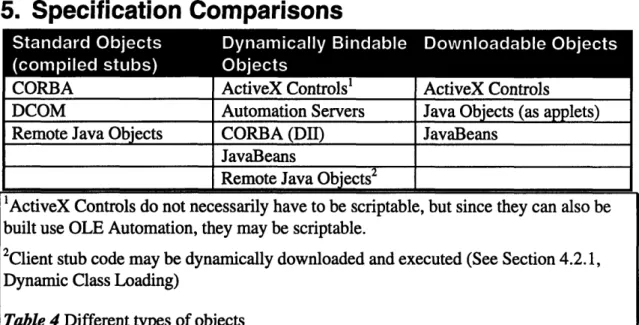
5. SPECIFICATION COMPARISONS ... 34
5.1 ARCHITECTURES ... ... 34
5.1.1 Standard Objects ... 35
5.1.2 Dynamically Bindable Objects... ... 37
5.1.3 Downloadable Objects... ... ... 37
5.2 LANGUAGES AND DEVELOPMENT TOOLS ... ... ... 39
5.2.1 CORBA Language Support... ... 39
5.2.2 DCOM Language Support ... 43
5.2.3 OLE Automation ... ... ... 49
5.2.4 ActiveX Controls ... .. ... 51
5.3 REUSABILITY ... ... 53
5.3.1 Interface Reusability... ... ... 54
5.3.2 Implementation Reusability ... ... 54
5.3.3 Legacy Systems Integration ... 57
5.4 SERVICES ... ... ... ... 59
5.4.1 Naming and Object Location ... ... 60
5.4.2 Relationships and Lifecycles... ... ... 60
5.4 .3 E vents... ... 60
5.4.4 Transactions... ... ... 61
5.4.5 P ersistence ... ... 61
5.4.6 Querying and Database Access... ... 62
5.4.7 Licensing... ... ... 62
5.4.8 V ersioning ... ... 63
6. CORBA IM PLEM ENTATIONS ... 64
6.1 BEA - OBJECTBROKER ... ... 66
6.2 VISIGENIC - VISIBROKER... ... 66
6.3 IBM - SOM. ... ... 66
6.4 SUN - JOE/NEO ... ... 66
6.5 HEWLETT-PACKARD - ORB PLUS ... ... 66
6.6 O RBIX ... ... ... 66
6.7 EXPERSOFT - POWERBROKER... ... 67
6.8 ICL - DA IS ... ... ... ... 67
6.9 CHORUS SYSTEMS - COOLORB... ... ... 67
6.10 UNIVERSITY OF BERLIN - JACORB ... ... 67
7. IMPLEMENTATION COMPARISONS ... 68
7 .1 P LA TFO R M S ... 6 8 7.2 SOFTW ARE D EVELOPM ENT ... ... 69
7.2.1 COM and CORBA Development... ... 69
7.2.2 Visual Development... ... ... 70
7.3 B U SINESS ISSUES ... ... 7 1 7.3.1 P rice... ... . . . . 71
7.3.2 Support... ... 71
7.4 SECURITY AND ENCRYPTION... ... 74
7.4.1 Distributed Object Security ... ... 75
7.4.2 Component Security... 77
7 .5 S C A LA B IL IT Y ... 7 8 7.5.1 Object Registration and Publication... ... 78
7.5.2 Fault Tolerance ... ... ... 78
7.5.3 W ire Protocols... ... ... 79
7.6 INTEROPERABILITY OPTIONS ... 80
7. 6.1 W ire Protocol Interoperability... 80
7.6.2 Parallel Interoperability... 80
7. 6.3 Orthogonal Interoperability... 81
8. EXISTING PROJECTS ... 83
8.1.1 United Kingdom Immigration Service... 83
8.1.2 Cariplo Bank ... 84
8.1.3 W ells Fargo ... 84
8.1.4 M ITRE... 85
9. EXAMPLE CORBA IMPLEMENTATION ... 86
9.1 M ANDELBROT SET AND FRACTALS... ... 86
9.2 EXAMPLE DESIGN... 86
9.2.1 Overview of Example Design ... ... 86
9.2.2 Example Interfaces... 87
9.2.3 Example Implementation Details ... 88
9.2.4 D isplay Implementation Code... ... 90
9.2.5 Fractal Implementation Code ... ... 95
9.3 CORBA IMPLEMENTATION CONCLUSION... ... 98
10. EXAMPLE COM IMPLEMENTATION ... 99
10.1 EXAMPLE DESIGN... 99
10.1.1 Interfaces... 99
10.1.2 Objects ... 100
10.1.3 Fractal Server Code ... ... 103
10.1.4 Display Server Code... 106
10.2 DCOM IMPLEMENTATION CONCLUSION ... ... 109
11. ALTERNATIVES ... 110
11.1 THE OPEN GROUP... 110
11.2 XEROX ... 110
11.3 NEXT... 111
11.4 RING SERVER PROJECT ... ... 111
11.5 INFORMATION TECHNOLOGY PROMOTION AGENCY (JAPAN)... 111
12. CO NCLUSIO N ... ... 113
12.1 STANDARD OBJECT TECHNOLOGIES ... 113
12.2 DOWNLOADABLE TECHNOLOGIES ... 114
12.3 IMPLEMENTATION COMPARISONS ... 114
12.4 BOTTOM LINE ... 114
1. Introduction and Background
The point of having distributed object technologies is to write powerful yet maintainable applications. The "distributed" makes the system powerful, allowing scaleable solutions that can overcome single machine performance limits as well as geographical boundaries. The "object" makes the system maintainable, allowing extensive software reuse. An organization can use distributed object technologies to gain an advantage in the market while at the same time building a foundation for future applications. This introduction first looks at what an "object" is, and the issues involved in distributing them. The rest of this thesis will describe existing technologies as well as a comparison of them.
1.1
Component Software
In a computer, the hardware performs relatively simple operations, such as OR and XOR. Constructing user-level applications by manipulating these primitives directly is nearly impossible for a human being, so there was a need for high-level languages, such as Pascal, C, LISP, and Algol. Compilers for these languages attempted to abstract the programmer from the low-level microprocessor details. As a result, the complexities of the executing hardware system becomes less of a factor.
However, complexity in software is now becoming a problem. There are trends in modem software requirements:
1. Developers are taking on more complex projects. Examples include the Therac-25 radiation treatment system [LT] and the Patriot anti-missile system. Computers are not just used in code-cracking anymore, but are also used in systems where a failure can be lethal.
2. People are requiring distributed systems. The decentralization of systems is often a tradeoff in maintainability and scalability. An example is the Denver International Airport Automated Baggage system, which ran $55 million over budget and continues to be unreliable [Swartz]. In addition, these systems often contain different platforms and require conformance to legacy systems.
The main problem is complexity. So just like software was used to eliminate the complexities of hardware, a new technology has emerged, still in its infancy, to reduce the complexity in writing software. Perhaps a misnomer, this technology is called component software.
The lines between component software and classical software are not as clean cut as those between software and hardware. Component software is software, but such software follows a specific architecture that allows distribution and interoperability with other components.
1.2
Objects
One way of designing component software is with object-oriented technology (OOT). An object is a data type, similar to structures in C. The difference is that:
1. Objects can contain functions (known as methods) in addition to variables (known as members).
2. Objects can hide members and methods from a caller.
Depending on who one talks to (e.g. Microsoft or the rest of the world), "object-oriented" may mean different things. OOT, according to mainstream thought, is built on
top of encapsulation, polymorphism, and inheritance.
1.2.1 Encapsulation
A well-designed object will permit only itself to manipulate its internal data, and in addition will not haphazardly manipulate data structures outside its scope of functionality. This is the main idea of encapsulation.
The "internal data" refers to private member variables and methods, which outside clients can not access. Outside entities can only interact with the object through its public members and variables. Thus, the details of the implementation are abstracted away from the user. The object provides an interface which the caller can use. The interface is a group of methods which act as a contract between the caller and implementer of the object. In the paradigm of object oriented programming languages like C++ and Java, one object provides one interface. In the architecture defined by OLE, an object may provide more than one interface.
1.2.2 Polymorphism
Suppose an air traffic controller wants to tell Planes A, B, and C to land. He doesn't need to know what models the planes are. Each plane knows how to land itself (think of a plane as an object, forget the fact that inside there is a pilot controlling it and other details). The air traffic controller doesn't need to know that A is a Boeing 747, B is a Concorde, and C is an Airbus. He just knows that they are all planes, and all planes have the ability to land, so all he has to do is say, "Plane A, land on airstrip #24", etc.
This is the idea of polymorphism. The caller of a method won't need to know the type of the object the method belongs to. It just knows that the method will perform the appropriate action according to its type. A common way of implementing polymorphism (the only way in some languages) is through the use of inheritance, explained below.
1.2.3 Inheritance
Traditionally, objects in an 00 system can inherit attributes and methods from another object. This provides a convenient form of software reuse; programmers can create an object by inheriting from a previously-created object. They do not even need the source code to the object they are inheriting from.
Inheritance can be viewed as an is-a relation, as in "a circle is a shape". However, the idea of instantiation is often viewed as an is-a relation. This brings into question just one of the fundamental issues of inheritance. The philosophy of inheritance is a lot deeper than one may think at first glance.
There are many uses of inheritance, but Microsoft has omitted direct inheritance from its OLE architecture. This has been a point of criticism for many purists, but Microsoft had decided to provide the inheritance functionality through other means.
Inheritance is an aspect of OOT that needs to be looked at more closely, because Microsoft's OLE eschews it.
Kraig Brockschmidt, a member of the OLE design team, wrote:
"Inheritance is a means to polymorphism and reuse--inheritance is not an
end in itself. Many defend inheritance as a core part of OOP, but it is nothing of the sort. Polymorphism and reuse are the things you're really after." [Brockschmidt]
Microsoft implemented reuse and polymorphism in OLE through other means, and Brockschmidt's response implies that those two features are the only reason why inheritance is necessary. This thesis examines these object technologies' methods of reuse in Section 5.3, Reusability.
1.3 Out-of-process Objects
When the first object-oriented programming languages were designed and implemented, designers only thought that clients would invoke methods on objects that were local to the client. Therefore, object oriented technology evolved with this view of in-process objects; programmers never thought about where the objects existed, and millions of lines of code were written without taking this into account. This is, along with simplicity, is one reason why transparency of distribution is important.
In the 1980's, the Open Software Foundation (OSF) started its Distributed Computing Environment (DCE) research, and designed the Remote Procedure Call (RPC). It created a platform independent and transport independent method of calling procedures running in different processes. The remote procedures do not necessarily have to be running on machines with the same architecture as the calling process; thus it
enabled the proliferation of heterogeneous networks. DCE RPC was not designed to work with objects, though. Microsoft's DCOM (described in Section 3), however, uses a superset of the DCE RPC wire protocol for its method invocations; they call it Object RPC (ORPC). The Object Management Group, in deciding what to use for IDL in describing objects, considered using DCE RPC's IDL as a basis (like Microsoft).
Figure 1 Polymorphism. The Controller does not need to know anything about the
However, they decided to design their own unencumbered IDL instead. Many CORBA vendors, however, build on top of RPC for object communication.
1.3.1 Local Out-of-process Objects
When an object is on the same machine as the client, but in a different process, there are many issues that every method invocation needs to address. When a method is invoked wbith parameters, the data must be marshaled and transmitted to the process the object exists in. The server process must then unmarshal the arguments and invoke the method. Similar marshaling/unmarshaling must be done with any return values.
In C++ and C, many data structures contain pointers to parts of memory (buffers or other data structures). Such data structures have to be specially marshaled, the
designer of the object needs to write or generate marshaling code. The burden of this falls on the object implementer, not the user.
On the same machine, two processes can share memory; this is faster than
marshaling and unmarshaling data. Some CORBA vendors use this method to share data locally.
Objects also need to pass around other objects, not just unencapsulated data. Objects are usually not copied around if they are mutable or not explicitly copied. The reason is that changes made to one object may need to be reflected in one single location so that other clients may be able to access the changed object. Since objects can only be passed by reference, each object needs a particular object reference to distinguish it from other instances.
These are some of the issues that need to be addressed in out-of-process objects.
1.3.2 Remote Objects
The issues that affect local servers also affect remote objects. Since remote objects reside on other machines, method invocations need to work over a network. Network lines may fail and then work again; it is up to the distributed object infrastructure to detect when remote servers become unavailable and reconnect to them if necessary. Different strategies work best in different situations.
Once there are remote objects, the number of objects possible increases by orders of magnitude. Therefore each object infrastructure should have a way to detect how objects are located and their interfaces obtained. Since distributed object technologies are only recently being deployed in large quantities, many shrink-wrapped object technology systems are very limited in managing these systems. As of now, no distributed object technology infrastructure provides adequate support for managing large graphs of objects; companies need to develop or contract such management software [Newman]. Many CORBA venders provide adequate dynamic naming services that allow clients to choose which objects to use. Richer trading services should come out at the end of 1997
[OHE2].
Finally, clients will have to be written to make use of these trading services and dynamically bind to them. When Rapid Application Development tools like Visual Basic and Delphi came out, they provided a strong glue for component software. If these components can reside on other servers, then the reach and power of these programs increases tremendously.
1.4
Distributed Object Technologies
With a defined description of objects, it is necessary to see how they can be used by programmers. This thesis does not look at or compare object-oriented languages like Smalltalk, C++, or Java. Distributing objects requires more than just a language; it needs a whole architecture.
Effectively allowing remote objects is not as simple as it sounds. Providing the capability to distribute objects is only part of the problem; effective distributed object architectures need to provide a good infrastructure for managing those objects effectively. Architectures need to provide a good set of services and capabilities that make object distribution as simple as possible. The rest of this thesis will examine and discuss the merits of various technologies. These technologies include the Object Management Group's (OMG) Common Object Request Broker Architecture (CORBA), Microsoft's Distributed Common Object Model (DCOM), and Java solutions.
2,
CORBA Specification
The Object Management Group (OMG) was formed in 1989 to handle the growing complexities of software development. It creates and publishes specifications that allow interoperability and hasten the development of standardized distributed object software. Currently it has more than 700 members.
The OMG was the group that created the Common Object Request Broker Architecture (CORBA). CORBA is only a specification, allowing venders to implement the architecture in any way they wish.
2.1 Overview
The main goal of CORBA is to allow interoperability between objects on distributed systems. With the newest specification of CORBA, version 2.0, different vendors can now communicate with each other, creating the "intergalactic object bus". Thus, CORBA provides a good architecture for working with distributed objects on a heterogeneous network; this aids greatly in integration of legacy applications.
Figure 2 A traditional method invocation where the
object is in the same process as the caller
CORBA works by allowing clients and servers to communicate without worrying about the network protocol and other communication aspects. In this description of CORBA, the "client" is the process that makes use of an object and the "server" is the process that contains the instantiated object. The client does not need to know where the server is; the client can work just as if the object it is working with exists in the same
Process
-0-Client Stub --O-Client
Server
ORB
Figure 3 A method invocation using CORBA (different processes) Server Stub
o
-Process
Server
Client
process space. A CORBA implementation achieves this by creating client stubs and server skeletons; they marshal and unmarshal requests and responses. Transparency was an important design goal of CORBA.
Figure 2 and Figure 3 illustrate the difference between a traditional method invocation and one that uses an ORB. Note that the client and server do not know the whereabouts of the other; the ORB handles it all.
The next section talks about various parts of the architecture in more detail.
2.2 Architecture
The client and server are connected by the Object Request Broker (ORB). The ORB does much of the work, taking the communications work from the client and server. The object must first be described not in the language it is implemented in, but in an Interface Description Language (IDL). The IDL specifies a contract between the caller and implementer of the object. This way the implementer and user of the object do not have to be the same person. An interface in CORBA represents a group of methods and members variables. The member variables may also be read-only.
Figure 4 is a more detailed diagram of the workings of the ORB than Figure 3. There are more visible components to the ORB in this diagram.
2.2.1 Object Request Broker (ORB)
The Object Request Broker (ORB) provides the "glue" between the client and server. It directs requests and replies between clients and servers. The specification does not dictate how to implement it, so there is room for competitors; it can be an integral part of the operating system, a daemon running in the background, or just a pair of libraries.
To help it with its task, the ORB has two main parts -the Interface Repository and Implementation Repository.
2.2.2
IDL
The Interface Description Language (IDL) is a purely declarative language that specifies the interface that an object should implement and a client must use. It is a superset of a subset of C++. But, since it is declarative, a user cannot write a functioning program in IDL.
The IDL declarations map into a programming language in a standard OMG-decided way, so a client and server can be "ported" to other CORBA implementations with little or no code change. Official mappings currently exist for C, C++, Smalltalk, and Ada95. In progress are mappings to Java and COBOL. In the rush to jump on the Java bandwagon, some companies have
already implemented their own mappings to Java.
The IDL file is used to generate stub files for the client and server; it marshals parameters and sends them to the ORB. Thus, the client and server do not need to know location information; allowing tne programmer to concentrate on
the object implementation, not myprog_chh Header file for use with the
network handling. client
Figure 5 is an example of an myprog_c. cc Implementation of client stub
IDL file. Car is an interface. It code
contains two attributes and a myprog_s hh Header file for use with the
method. The attributes, speed and server
direction, map to get/set methods. myprog_s cc Implementation of server
The Police_Car interface inherits skeleton code
irom Car, meaning mat it can use the same functions as Car. Also note that since attributes map to methods, setting siren_on = TRUE may invoke a method. This is a convenient way for a user to activate the siren, for instance.
When an IDL compiler for C++ processes it, it produces files similar to those in Table 1. The client stub and server skeleton files are to be linked into the client and server programs, respectively.
Figure 6 depicts the role of the IDL compiler. When a client invokes a method, a method from myprog_c is actually invoked. This stub method marshals the
interface Car (
attribute float speed; attribute float direction; void drive(in float distance);
It
interface Police_Car : Car { attribute boolean siren_on;
parameters and tells the ORB to pass them along to the server. The server skeleton myprog_s then receives the call, and passes it along to the real object. The response is handled in a similar fashion.
2.2.3 Object Adapters
There are so many ways to implement and object that there must be a standardized way for the ORB to work with the object. This is provided by the Object Adapter. They are responsible for:
*Registering implementations
*Generating and interpreting object references
*Mapping object references to their corresponding implementaions eActivating and deactivating object implementations
*Invoking methods
*Coordinating interaction security
[Siegel 78]
The OMG has standardized one Object Adapter, called the Basic Object Adapter (BOA). There are other Object Adapters in the standardization process right now. Going into the details of the Basic Object Adapter is beyond the scope of this thesis.
2.2.4 Interface Repository (IR)
The Interface Repository (IR) is an important part of the ORB that contains type information for interfaces. The IR requires a form of persistent storage to store the
interfaces. The information in an IDL file is sufficient to be stored in the IR. However, an object can add, modify, or delete an interface in the IR during runtime. This opens up the field to allow dynamically constructed invocations, described below.
The IR is necessary in the use of the Dynamic Invocation Interface, which allows invocations to be constructed during runtime. This will be explained below.
Note that even though the Implementation Repository and Interface Repository both have the same initial letters, IR is used to denote the latter.
2.2.5 Implementation Repository
The Implementation Repository is a part of the ORB that contains information on where to locate objects as well as which objects are currently instantiated. A system
administrator can register objects manually, or a server can register objects during runtime. The implementation repository is used by the ORB when a client wants to connect to a particular object or activate a new one.
2.2.6 Dynamic
Invocation
Interface (DII)
As mentioned above, the Dynamic Invocation Interface (DII) is used to create invocations during runtime, as opposed to using client stubs (note that using client stubs to invoke a method uses the Static Invocation Interface, or SII). This allows a client to use an interface that it was not compiled with. A user can thus browse through the IR, see any new objects he might want to use, and then invoke a method.
Using DII invocations is more complex than using the SII. So in general, the DII should be used only when necessary; when interface information is not available. One common place to use the DII is in scripting languages. This all happens on the client side; a server can not tell whether an invocation was made using the SII or DII.
To aid in scripting, dynamically invoked methods can have named value pairs. This integrates well with many popular macro languages, including Microsoft Visual Basic. Thus, it is possible to call a function with something like:
Address = Lookup(ID = 12345, Name = "Jay Ongg")
Similar to OLE Automation (in Section 3.2), the complexities involved in making a dynamic request make macro languages the best medium to use DII.
2.2.7 Dynamic Skeleton Interface (DSI)
The Dynamic Skeleton Interface (DSI) is a new addition to CORBA 2.0. It lets the ORB pass requests to other ORBs or non-CORBA systems. This makes the DSI very important in a heterogeneous network, especially one with legacy systems. One can view
the DSI as a "filter" for method invocations.
Similar to the DII, a client can not tell whether the object they are using is accessed using the DSI or not.
2.2.8 Internet
Interoperability
Protocol (IIOP) and the Intergalactic
Object Bus
CORBA 2.0 also required ORB implementers to support the Internet
Interoperability Protocol. This protocol works on top of TCP/IP and allows CORBA 2.0 compliant ORBs to communicate with each other. This way, the Internet can be used as the network in which object data is transmitted. This is what CORBA supporters call the "Intergalactic Object Bus". There then becomes no limits on where an object may reside; a client may invoke a method on an object halfway across the globe as easily as it can on an object on the same computer. The system administrators just have make sure the ORBs are configured correctly, and the necessary security precautions are in place.
When a client wants to communicate with an object on another ORB, it simply communicates with its local ORB and the local ORB will forward the request
appropriately.
Interfaces to be used outside a local domain will need an identifier that is unique in space and time. Therefore, a human generated name like "MyInterface" is not good enough.
CORBA allows two ways of identifying interfaces: via a human generated name, or via a Universally Unique Identifier (UUID). The UUID is a 16 byte number generated by an algorithm that the Open Software Foundation discovered to help its development of the Distributed Computing Environment. The algorithm looks at the current time as well as the MAC number of the computer's ethernet card (if it contains one) to guarantee uniqueness. If the computer does not have an ethernet card, then the algorithm will not guarantee uniqueness, but the chances of collision then become extremely unlikely (i.e. the chances of quantum mechanics affecting the macroscopic world are higher than this
algorithm producing a conflict. So it's safe to say that pigs will fly before the algorithm produces a duplicate ID).
2.3
CORBAservices and the Object Management
Architecture (OMA)
The infrastructure defined above is sufficient for objects to communicate with each other. However, the OMG wanted to create a fundamental set of interfaces that vendors could implement for users. They defined the Object Management Architecture (OMA), and divided it into two parts: The CORBAservices and CORBAfacilities.
The CORBAservices are still being specified, so not many vendors have
implemented them yet. They comprise low level interfaces that should be implemented, and the CORBAfacilities will build on top of them.
Here is a partial list of the CORBAservices:
* Lifecycle Service: Provides services and conventions for creating, deleting, copying,
and moving objects
* Persistent Object Service: Provides services that simplify the creation of persistent objects (i.e. objects that exist when the ORB is shutdown and restarted)
* Externalization Service: Provides services, interfaces, and protocols that allow an object to be written as a stream of bytes.
* Naming Service: Provides an interface for an object to be bound to a name.
* Trader Service: Provides an interface for an object to be bound to a particular category. One may think of the Naming Service as the "White Pages" and the Trader Service as the "Yellow Pages".
* Event Service: Provides an interface for an object to send asynchronous events to its client.
* Transaction and Concurrency Control Services: Provides services and interfaces that allow transactions and concurrency control.
* Property Service: Allows the user to add a property to an already defined and instantiated object. A property is a string binding to any data structure.
* Security Service: Provides services that enable security in the distributed object model.
2.4
CORBAfacilities and CORBAdomains
While the CORBAservices create a rich infrastructure that a programmer can use to develop CORBA applications, an infrastructure is not enough for a developer to build component software. With what we've talked about already, a user can not just pick a spreadsheet, attach it to his word processor, and start typing.
The OMG is in the process of specifying the CORBAfacilities, which are these application-level objects. CORBAfacilities are to be implemented using the
CORBAservices. The CORBAfacilities are a set of horizontal APIs that have a general purpose use. The CORBAfacilities are divided into four basic areas:
eUser Interface: For interaction with the user.
eSystems Management: For managing complex, multivendor information systems
*Task Management: For automating work processes.
The CORBAdomains will cover specific vertical markets. Currently, the OMG has groups working on interfaces for Healthcare, Telecommunications, Transportation, Financial Services, Manufacturing, Electronic Commerce, and Business Objects. These names are self-explanatory, except for the Business Objects group. This group is working on a standard that will model people, entities, and anything active in the business domain.
3. OLE
OLE is a general term for Microsoft's object-based infrastructure for component software. OLE originally stood for Object Linking and Embedding, the capability for one program to link or embed data for another program. The overused example is that of embedding an Excel table in a Word document; then when the user double-clicks on the Excel table, Excel pops up in a new window.
Then came OLE 2, which enabled in-place activation. Now when a user double-clicks on the Excel table, they can work on the Excel table in-place, without opening a new window. OLE 2 was also built on an object model called the Component Object Model (COM). COM is what forms much of the glue between components.
As OLE evolved, Microsoft just got rid of the version number and called the whole architecture OLE. New features were added: OLE Automation, OLE Controls,
Local/Remote Transparency, and other services. Anyone can see that Microsoft has created a rich architecture for component software.
Where CORBA was designed with distributability in mind, OLE was not. OLE was an aid in the trend towards the document-centric desktop; the computer shouldn't make the user care about applications, just documents. Microsoft has recently
incorporated distribution into OLE, with the advent of the Distributed Component Object Model (DCOM).
Finally, with the explosion in growth of the Internet, Microsoft jumped on the bandwagon with its ActiveX technology. One may have heard about the debate between ActiveX and Java; such a comparison is beyond the scope of this thesis.
One interesting thing about Microsoft and its OLE technology is that they write the specifications (if any) and until recently, were the only implementers. So, in the past, behavior and requirements have changed, to the chagrin of developers everywhere. In fact, with ActiveX, since Microsoft jumped on quickly, there are many undocumented parts of it and there was not even a specification on what defines an ActiveX control.
It is impossible to cover all the aspects of OLE in a Master's Thesis; entire books have been written on fractions of it. The following sections should provide the reader a good background to understand the comparisons of it that will come later.
3.1
Component Object Model (COM) and Distributed
COM (DCOM)
The Component Object Model (COM) is the fundamental basis of all of OLE. In fact, the other major parts of OLE (Automation, DCOM, and ActiveX) all build on COM.
CORBA does not care how implementations handle the objects. The requirement is that a CORBA ORB must be accessible through code created with the IDL. COM, however, is a binary specification; it matters very much what the compiled code looks like;
COM works with pointers and arrays of pointers. One bad side effect of this is that executables created with Microsoft's Visual C++ will work with COM, whereas those
3.1.1 Interfaces and Classes
A COM object can be accessthrough an interface. Unlike in CORBA, a COM interface can not hold member variables, just methods. A COM interface is identified by an Interface Identifier (IID). An IID is represented by a UUID
(described in Section 2.2.8), which Microsoft renamed as a Globally Unique Identifier (GUID).
A COM object is an implementation of one or more interfaces. It is also identified by a GUID, known as a Class Identifier (CLSID).
A COM object can only be manipulated through an interface; a client can not work directly with the class itself. This is one of the fundamental concepts of COM.
That was a quick run-through of various terms used in COM. For a concrete example, look at Figure 7. The class CDictionary implements the interfaces IUnknown, IDictionary, and IThesaurus. Those are all human-readable names; to a computer, CDictionary, IUnknown, IDictionary, and IThesaurus would be represented by 16 byte GUIDs. This is an example of an object that implements more than one interface.
3.1.2
IUnknown
and its members
One interface that all COM objects must implement is IUnknown. It contains three methods necessary for COM to work: QueryInterface, AddRef, and Release.
Querylnterface allows a client to ask an object whether it implements a certain interface. So, through QueryInterface, a client may ask an instance of CDictionary, "Do you implement IDictionary?" and get a response. AddRef and Release are used for reference counting; the object is only destroyed when the reference count is 0.
Not only must all COM objects implement IUnknown, but every COM interface must also implement QueryInterface, AddRef, and Release. This way, a client can access other interfaces of an object no matter what interfaces it currently knows about.
3.1.3 MIDL and RPC
The architecture that Microsoft uses to marshal arguments and pass them across
boundaries is based on the Microsoft's Remote Procedure Call, based on the RPC from the Open Software Foundation's Distributed Computing Environment. Similar to CORBA, COM/OLE and OSF RPC use an IDL language. Microsoft Interface Description Language is often called IDL or MIDL; this document will refer to it as MIDL. Interfaces 0---IDictionary IThesaurus Class
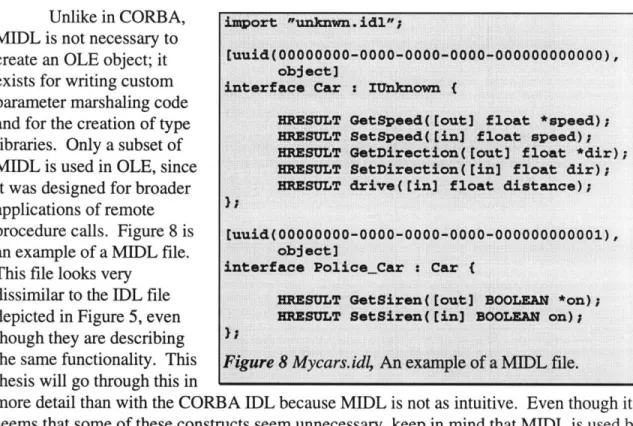
Unlike in CORBA, MIDL is not necessary to create an OLE object; it exists for writing custom parameter marshaling code and for the creation of type libraries. Only a subset of MIDL is used in OLE, since it was designed for broader applications of remote procedure calls. Figure 8 is an example of a MIDL file. This file looks very
dissimilar to the IDL file depicted in Figure 5, even though they are describing the same functionality. This thesis will go through this in
more detail than with the CORBA IDL because MIDL is not as intuitive. Even though it seems that some of these constructs seem unnecessary, keep in mind that MIDL is used by RPC, not just OLE.
There are two interfaces here, Car and Police_Car. Each interface is preceded by a tag that indicates the UUID of the interface, and the fact that the interface is to be used by an object.
In the interface lines, each interface inherits from IUnknown (the IUnknown interface is visible because of the import statement at the top of the file). This gives the interface the QueryInterface, AddRef, and Release methods necessary to all COM objects.
Finally, for each of the actual interfaces themselves, not how they are declared. For OLE to use an interface, it must return an HRESULT (which is a 32 bit error return code). Any return values must come through the parameters. Like CORBA, there are in and out parameters.
One thing to note is that even though Police_Car inherits from Car, this only exemplifies interface inheritance. In general, OLE does not use inheritance to reuse implementations. In OLE, reuse is achieved through multiple interfaces, via aggregation or containment. This will be discussed in more detail in Section 5.3, Reusability.
import Ounknwn. idl";
[uuid(OOOOOOOO-OOOO-ooo0-oooo-oooooooooooo), object]
interface Car : 1Unknown (
BRESULT Getfpeed( Eout] float *speed);
HRESULT Setfpeed( [inl float speed);
MEsZULT OetDirection(t out] float *dir); 1KsotLT setIirection( rinl float dir); HRESUT drive ( [in] float distance);
Euuid(OOOOOOOO-OOOO-oooO-oooo-ooooooooooo1),
object)
interface Police_Car
C
Car
(
HRSMULT Get Siren ( [out] BOOLEAN *on);
HlZsUMT setairen( tinj BOOMan on);
Figure 8 Mycars.idii
An example of a MIDL file.
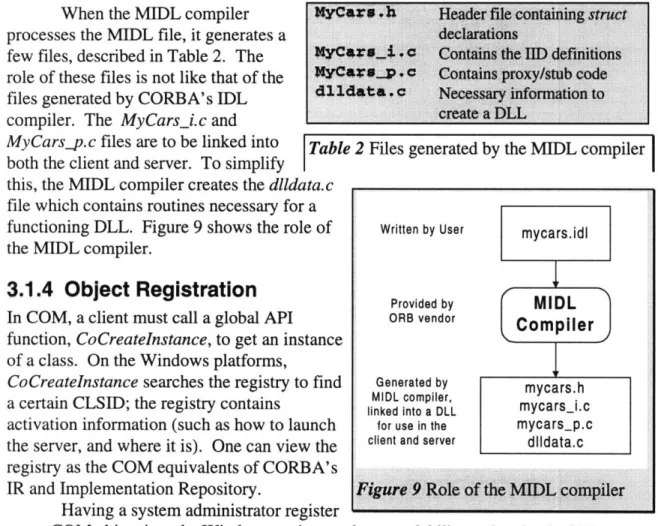
When the MIDL compiler processes the MIDL file, it generates a few files, described in Table 2. The role of these files is not like that of the files generated by CORBA's IDL comniler The MvCars. i.c and-- .. . .. . . . .
MyCars__p.c flies are to be linked into Table 2 Files generated by the MIDL compiler
both the client and server. To simplify
siht the MTIDLT comnile.r creates the dlldata c
file which contains routines necessary for a functioning DLL. Figure 9 shows the role of the MIDL compiler.
3.1.4 Object Registration
In COM, a client must call a global API function, CoCreatelnstance, to get an instance of a class. On the Windows platforms,CoCreatelnstance searches the registry to find a certain CLSID; the registry contains
activation information (such as how to launch the server, and where it is). One can view the registry as the COM equivalents of CORBA's IR and Implementation Repository.
H--avino a .qvstetum administrntnr rp istpr
every COM object into the Windows registry reduces scalability and maintainability. Therefore, there is a shift to creating servers that register their objects on startup. The disadvantage is that the operating system can not launch a server; it must already be running to make its objects available.
3.1.5 Local/Remote Transparency
Like CORBA, COM has a method of accessing objects outside the process of the client application. Like in CORBA, there are rules required in accessing an object; if these rules are followed, then COM can marshal arguments and transmit them for in-process servers, local servers (same machine, different process), and remote servers.
When an interface pointer to a COM object is obtained, it can point to two things: 1. A pointer to the real object itself (if the object is in-process)
2. A pointer to a proxy object that will marshal the arguments over to the server.
Most objects use standard marshaling. Standard marshaling is COM's default marshaling routine. However, method invocations on certain classes of objects can be optimized more; COM allows a programmer to do this with custom marshaling. Thus, if a developer feels that Microsoft's marshaling method is not optimal for his object (and for immutable objects it is often a waste of network bandwith or interprocess
communications), he can rewrite the marshaling code (by implementing a particular M5r0a 9 4 Header file containing struca
declarations
XYC*##_t1P. Contains the IID definitions XyC*V.p V, Contains proxy/stub code
4114#ta C Necessary information to
create a DLL Written by User Provided by ORB vendor Generated by MIDL compiler, linked into a DLL
for use in the
client and server
Figure 9 Role of the MUI
L compiler
-: · :::: :: ::: .. ::: :::: : · ::::-:
interface called IMarshal). Since this is an option, an object developer can implement an object without worrying about the remote procedure calls to it, unless he wants to.
3.1.6 COM Services and Features
Like CORBA, COM provides more than just an infrastructure or rules for working. Although COM and CORBA share many different services, COM was developed on Microsoft Windows, so there is a definite desktop-oriented flavor to the services it provides. Many of these features enable interaction between different applications and contribute to a document-centric operating system. Among them are:
* Persistence: Similar to CORBA, COM provides a mechanism for persistent objects. * Structured Storage: COM provides an interface for reading and writing to files. The
implementation of this is called Compound Files. This feature allows a programmer to write data in an organized fashion to a file; it simulates a file system within a file to facilitate storage and retrieval of data streams.
* Connection Points: Arising from Windows' use of callback functions, connection points allow an object to call interfaces on a client easily.
* Monikers: After Microsoft's experience in developing desktop applications, they needed a method to keep track of names of linked and embedded objects. They therefore provided and extra level of indirection to facilitate this, and called them monikers.
* Uniform Data Transfer: This is an interface that grow from desktop application interactions. Originally, there were different methods that a program had to use to communicate with other programs, the clipboard, embedded objects, etc. Microsoft designed the Uniform Data Transfer interface which objects can implement and clients can call. Now to communicate with different objects, a client can just use this
interface regardless of what object implements it.
3.1.7 Distributed Component Object Model (DCOM)
When Microsoft released Windows NT 4.0, they also released an extension to COM called DCOM, for Distributed Component Object Model. DCOM allows applications to work with objects on other computers. This is what brings COM from the desktop to the network. Almost nothing has to be done by a programmer to make a client or object distributed.
However, since DCOM is mainly an extension of COM, little has been done on various distributed issues; such as object announcement, trader services, etc. New features like this will come out in Windows NT 5.0.
3.2
OLE Automation
COM is a good infrastructure for compiled programs that wish to make use of objects. Each interface in COM is compiled into the code, similar to CORBA stubs. COM interfaces do not provide as much flexibility and speed for dynamic invocations, and in addition, not all COM interfaces have type information associated with. Thus, to
dynamically invoke a COM interface, there is a lot of complexity involved in obtaining an object's type information.
Because of this, COM is not well-suited for macro language use. In general, macro languages dynamically bind objects during run-time (and in the case of Visual Basic, during editing to aid with programming). Scripting languages need a different way of working with objects, a late-binding mechanism. OLE Automation, which arose from the Visual Basic team, is Microsoft's solution. There is a change in terminology: a client
is called a controller, since Automation was developed to allow Visual Basic programs to control other applications (such as Microsoft Word).
3.2.1 Dispinterfaces and
IDispatch
OLE Automation is built on top of COM; it provides an extra level of indirection. Automation servers export their objects through an interface called a dispinterface. Dispinterfaces are similar to standard COM interfaces except that:
1. Dispinterfaces can contain properties, which are simply member variables (it is also possible to specify whether they are read/write or read-only.
2. Each method or property in a dispinterface must have associated with it a displD. No two methods or properties in a dispinterface can share the same displD.
PdehodDestipio
Invoke
GetIDsOfNames GetTypeInfoCount GetTypelnfo
Given a dispID and other necessary parameters, calls a method or access a property in this dispinterface.
Converts text names of peroperties and methods to their corresponding displDs.
Determines whether there is type information available for this dispinterface, returning 0 (unavailable) or 1 (available).
Retrieves the type information for this dispinterface if GetTypelnfoCount returned successfully.
Table 3 The methods of IDispatch [Brockshmidt2 643]
Once an Automation server is developed to export a dispinterface, then it must implement the IDispatch COM interface to use it. This interface is the key interface of OLE
Automation. The methods of the IDispatch interface is shown in Table 3. The controller must use this to access dispinterfaces. How the controller actually makes use of this interface is beyond the scope of this thesis. Note that IDispatch is not a dispinterface, it is a COM interface that enables the server and client to work with dispinterfaces.
When working with OLE Automation objects, it is possible to pass data structures and Visual Basic data types (currency, date/time, etc.). It is not possible to pointers, since they make almost no sense in a macro language. However, starting with Visual Basic 5.0, Microsoft will specify a protocol so that the controller can pass in callback functions to the server.
To simplify the use and manipulation of dispinterfaces, MIDL can also describe them. This lets programmers describe the methods of a dispinterface for use in a type
library. Once a type library is made, 4GL tools may make use of them to simplify development.
3.2.2 Locales
One advantage of dynamic binding that OLE Automation takes advantage of is that Automation servers can give their dispinterfaces and methods different names. For
localization of Automation controls, this feature is very useful. For a regular COM object, it is not as flexible since so much is programmed into the object itself.
A server can also support multiple locales. "Locale" covers more than just language; there are the issues of date/time formats and currency, too. Programmers tend to want to program in English because all system APIs are in English and all the lower-level programming tools and languages express their capabilities in English. A higher lower-level user, however, would prefer scripting in his native language. An OLE Automation server can allow both groups of users to work the way they want, with the same object. Thus an end-user can drive the object with his personal script, which, at the same time, is driven by a corporate developer's script in English.
In fact, an OLE Automation server can support every locale available, but this ideal situation is probably not going to happen.
3.2.3 Remote Automation
Before DCOM came out, Visual Basic 4.0 Enterprise Edition allowed distributability of OLE servers and clients through Remote Automation. Remote Automation allows
Automation controllers and servers to be physically apart, and in addition lets Automation controllers make asynchronous method invocations. It also aids greatly in making three tiered client-server architectures.
3.3
ActiveX and the Internet
From the technologies of embedded documents and in-place activation of thsese
documents arose a type of object called an OLE control. Many OLE controls were also OLE Automation servers; this allowed controls to be scripted.
OLE controls were simply objects that could be embedded in a container (such as Visual Basic 4.0 or Microsoft Internet Explorer 3.0). In a standard OLE document embedding (like the Excel into Word clich6 ), the inner document is activated by the contained. This is called Outside-In activation. An OLE control, however, can have Inside-Out activation; thus it can send events out to its container.
With the explosion of the Internet, Microsoft decided to leverage its OLE controls for use over the Internet. Most home users have modem speed connections, so Microsoft cut down the number of interfaces required to implement a control, and renamed them ActiveX controls. This section talks about how ActiveX controls are used over the Internet.
3.3.1 Architecture and Example
An ActiveX control is adynamically linked library that a user can install on his system. These controls implement specified interfaces that a control container can use. The control can fire events that the container can detect; this makes a control most useful in a scripting environment.
Figure 10 is an example of an ActiveX control. The stoplight is an ActiveX control; it interacts with the container (the web browser) through JavaScript, a scripting
language. The buttons are not ActiveX controls; they are part of the HTML page which the
user uses to interact with the Figure 10 An ActiveX control in a container
control itself. I
Any container would interact with the control in a similar manner.
3,3.2
ActiveX controls and the Internet
Since an ActiveX control is embeddable in a web page, Microsoft pushed to have the WWW consortium modify HTML to include embeddable objects. So now Internet Explorer can download objects over the web and install them. The main two problems with this approach are:
1. Portability 2. Security
Most ActiveX controls are compiled to run on Windows 95 or Windows NT. Therefore, they can only run on the "Wintel" platforms. This can be a problem in a heterogeneous environment.
As for security, there are many issues here which will be covered in Section 7.4, Security and Encryption. Briefly, an ActiveX control can do anything on your computer that any normal program can do. This can make for very powerful controls. However, it is impossible to verify whether or not an ActivAX control does something malicious; this is a major security hole..
Microsoft and Verisign have introduced Authenticode technology which helps certify who wrote the control. But it does not verify what the control does, and
attributing a control to its author doesn't necessarily mean anything. There is an ActiveX control called "Exploder" described at http://www.halcyon.com/mclain/ActiveX to demonstrate the security problems with ActiveX. What the control does is wait 10
seconds, then shutdown the user's computer. Microsoft has threatened the author of the ActiveX control with legal action, so he took it off his web site.
Downloading ActiveX control randomly off the Internet is probably not the safest thing to do. The problem is not that trojan horses and viruses can exist in ActiveX
controls; they can exist anywhere, including Netscape plug-ins. The difference is that ActiveX controls are so easy to download, install and run.
However, ActiveX controls in an intranet situation is a practical option. It is safe to assume that the servers are trustworthy and would not serve unsafe controls.
4. Java Solutions
One of the hottest topics that the media debate is: "ActiveX or Java?" As much as Microsoft's competitors like to make users think, ActiveX controls and Java applets do not necessarily compete. Java is an object-oriented language, not an object-oriented infrastructure for distributed computing. In fact, Java can make use of ActiveX controls and features of OLE (although the tools and technology that provide this are not as mature as those for C++).
Java is very similar to C++. However, one important factor is that it takes the burden of memory management away from the programmer. Memory management
problems account for a large percentage of C++ bugs, so Java's built-in garbage collection is a boon to those writing large programs.
Another much-touted aspect of Java is its inherent portability. Even though languages are standardized to ease portability, very few large programs can compile on more than one platform. In addition, Java compiles into a standard bytecode, an
executable format that platforms must either interpret or compile. This portable bytecode has spawned a class of programs called applets.
4,1 Applets
Even though onecan write full- import java.awt.*;
fledged applications public class Hello extends java.applet.Applet (
in Java like any public void paint(Graphics g) (
other language, one g.drawString("Hello Worldl", 100, 100);
unique aspect of Java is its portable
executable format. Figure 11 Hello, World! applet A web page can
contain a Java applet that will execute when the user loads the page. This allows a web page to contain transparent active content; the user does not need to close his web browser, reboot his computer, or even tell the browser to download the program.
4.1.1 Untrusted Applets
One important difference between an applet and an application is the security necessary with an applet. A user downloads an applet without necessarily knowing that he is downloading anything at all, and runs it. Anyone could have written that applet; it does not necessarily have to be the owner of the web page. There is a potential for malice.
Therefore, untrusted applets run in a sandbox, a term indicating an environment that they can not break out of. In general, untrusted applets can not:
1. Read or write from persistent storage on the local machine.
2. Communicate with any computers other than the machine it was downloaded from.
Java's security model is not perfect, however. There were many security problems which, bit by bit, were fixed. As of now, there is no mathematical model of Java, which making it impossible to prove its security. The current way of testing the security is to run the implementation of Java on test cases.
4.1.2 Trusted Applets
Trusted applets are applets which do not have to run in a sandbox. Trusted applets can effectively be treated like applications.
The question is: what's the difference between a trusted applet and an application, then? Trusted applets, like untrusted applets, can be downloaded off the web. However, a trusted applet need to be extracted from a package that was signed with a digital signature. Microsoft uses a packaging format called a cabinet file. Microsoft has used cabinet files (with the extension .CAB) to distribute software for a long time. CAB files are well integrated with the Windows 95 and NT 4.0 operating systems. Sun has been pushing a type of packaging called a Java Archive (.JAR) file. JAR readers and writers are written in Java, thus ensuring their portability.
Either way, JAR and CAB files perform essentially the same function: package and compress many files in one archive, as well as hold digital signature information. It is this digital signature information that separates a trusted applet from an untrusted one.
4.2
Java Distributed Object Model (RMI)
Sun designed a distributed object model for use with Java. It uses a lightweight method invocation paradigm, called Remote Method Invocation (RMI). Distributed objects are different from local objects in that:
1. Clients of remote objects only interact with interfaces, not classes.
2. Nonremote data are passed by copy rather than by reference. The reason is that object references are only useful in the same virtual machine.
3. Remote objects are passed by reference, not by copying the actual remote implementation.
4. Since remote objects require more failure modes than local objects, each method of a remote interface must be able to throw an exception indicating this.
Java RMI is a lightweight method invocation tool to be used with the Java distributed object model. It is composed of three parts:
1. The Stub/Skeleton Layer
The stub/skeleton layer provides the static client stubs and server skeletons. This is what the Java program will use to communicate with the lower levels.
2. The Remote Reference Layer
This layer handles the object references and management. 3. The Transport Layer
This layer is simply the Internet transport protocol used. Sun provides and implementation that uses TCP/IP; but someone else could replace it with UDP if he wishes.
Each of these three a s
interchangeable; they do not depend on the other layers. This allows someone to provide an alternate layer without requiring replacing the others. These layers are illustrated in Figure 12.
4.2.1 Dynamic Class
Loading
Since Java executables are the same no matter what platform the virtual machine is running in, it is possiole to
do an applet-like download of client stub code. This means that a Java RMI client can work with remote objects it never knew existed. The mechanism is different from that of loading an applet from a URL; the mechanism requires an intimate knowledge of the workings of Java's ClassLoader class and security.
4.2.2 ByteCode Passing
Since Java is inherently supposed to be portable, it is possible to pass behavior, not just interfaces, around. This means that method invocations can work with actual object instantiations and their bytecodes. This is one advantage that DCOM and CORBA can never have, because they involve heterogeneous networks (and they do not allow passing of executable code in parameter lists).
4.3
JavaBeans
As of recently, the only popular way of inserting downloadable components was to use ActiveX controls. While it is true that there are other embeddable object technologies in existence, like Apple/IBM's OpenDoc, web browsers do not support downloading them on the fly like with ActiveX controls.
However, Sun has recently developed a competitor to ActiveX controls, and popular web browsers will or already do support them. The infrastructure is called
JavaBeans.
"A Java Bean is a reusable software component that can be manipulated visually in a builder tool."
[JavaBean p.9]
JavaBeans is very similar to ActiveX. Each component is called a Bean, and the infrastructure is designed to work well with other existing component infrastructures. There are plans to develop bridges for ActiveX, OpenDoc, and LiveConnect. This
Application
Client
Server
Stubs
Skeletons
RMI System
Remote Reference Layer
Transport
interoperability could be a boon to component software developers; they could then use mature tools like Visual Basic to design platform-independent Beans.
Java Beans are different from applets in that they enable reusability very easily. A development tool or component container can introspect a Java Bean to see what
interfaces it supports. Java Beans are also visual, so programmers can use RAD tools to work with a Bean.
4.3.1 JavaBeans Features
Java Beans support many features of ActiveX, otherwise a good bridge could not be written. Java Beans may have a user interface (most would), and support persistence, events, and properties. Java Beans, like ActiveX controls and OLE Automation servers, are active at design time as well as runtime, to determine what properties and methods it supports. Sun calls this feature introspection.
With introspection, a client does not need to statically link stubs to work with an object. Like OLE Automation, a client can discover what properties and methods a Bean supports. This dynamic bindability of this component architecture is useful both at runtime and development time.
Sun is pushing "Write Once, Run Anywhere, Re-Use Everywhere" as JavaBeans' motto. The reusability part is one very important feature of JavaBeans. Through
introspection, a developer can use a Bean in his own applications. The visual aspect of a Java Bean is useful in developing component software; that is one advantage a Bean has over a class library. However, objects which do not need visual modification or are immutable, such as a mathematical function library, probably do not need the overhead of Beans.
4.3.2 Bridging
With bridging JavaBeans to other infrastructures, a Bean is locked into the platforms that support those technologies. Sun is therefore promoting its "100% Java" campaign; if all components and software were written in Java, then there would be no portability problems.
The main disadvantage with JavaBeans right now is that they are an immature technology. Although Sun has had experience with downloadable objects (and correcting
security problems in the sandbox model) in their Java applet technology, JavaBeans itself is immature. There are few development tools out there that will directly develop a Bean. Even though bridges will be developed, using a bridge limits a Bean to the functionality of the architecture it is bridged from.
4.3.3 Downloading and Packaging
Beans can be packaged in a compressed archive (JAR file) that contains all the classes that it needs to operate. Similar to ActiveX, a developer can sign a Bean with a digital
signature that would authenticate who wrote it. This runs into the same security problems that ActiveX encounters. However, since the extent of damage is limited to the Java virtual machine, it can do less than an ActiveX control (which isn't to say it isn't much). Java Beans and ActiveX controls may both delete files on one's hard drive, but only an




![Table 3 The methods of IDispatch [Brockshmidt2 643]](https://thumb-eu.123doks.com/thumbv2/123doknet/14075446.462958/25.918.77.733.546.745/table-methods-idispatch-brockshmidt.webp)

![Figure 12 The Java RMI architecture [JavaRMI p. 17]](https://thumb-eu.123doks.com/thumbv2/123doknet/14075446.462958/31.918.72.738.131.538/figure-java-rmi-architecture-javarmi-p.webp)