Context-Sensitive Multimedia
by
Nathan Shalom Abramson
S.B., Computer Science and Engineering
Massachusetts Institute of Technology
(1990)
SUBMITTED TO THE
MEDIA ARTS AND SCIENCES SECTION, SCHOOL OF ARCHITECTURE
AND PLANNING
IN PARTIAL FULFILLMENT OF THE
REQUIREMENTS FOR THE
DEGREE OF
MASTER OF SCIENCE IN VISUAL STUDIES
at the
MASSACHUSETTS INSTITUTE OF TECHNOLOGY
February 1993
©
1992 MIT All Rights Reserved
Signature of Author:
Certified by:
Accepted by:
Media Arts and Sciences Section
September 16, 1992
Walter Bender
Pr ncipal Research Scientist, MIT Media Lab
'7I
. ThesisSupervisor
Stephen A. Benton
Chairperson
Departmental Committee on Graduate Students
MASSACHUSETT WN~TUTE OF TECHNP' "v
MAR
111993
LBRARIESd0tr-;-(1
am*
Context-Sensitive Multimedia
by
Nathan Shalom Abramson
Submitted to the Media Arts and Sciences Section, School of Architecture and Planning
on September 16, 1992 in partial fulfillment of the requirements for the Degree of
Master of Science in Visual Studies at MIT
ABSTRACT
The current growth of multimedia applications illustrates the need for standard-ized object libraries. This thesis suggests that an object-oriented context-sensitive approach may provide the needed flexibility. This thesis describes the construction of an environment for developing and experimenting with context-sensitive multimedia objects. These objects are designed for use across a wide variety of applications: they are active processes which can adapt themselves to the context in which they are used.
The research testbed for object-oriented multimedia developed in this thesis is called 0. The design and implementation of 0 is described. The initial use of 0 to support context-sensitive multimedia is examined in two applications: an interactive movie map and a personalized news presentation.
Thesis Advisor: Walter Bender
Principal Research Scientist, MIT Media Lab
Context-Sensitive Multimedia
by
Nathan Shalom Abramson
Thesis readers
Reader:
-lorianna Davenport
Assistant Professor of Media Technology, MIT Media Arts & Sciences Section
Professor of Music and Media, MIT Media
od Machover
Arts &ciences
Section
Reader:
Contents
1 Introduction
1.1 Prom ises . . . . 1.2 Paradigms . . . . 1.3 Adaptability . . . . 1.4 Context-sensitive multimedia . . . . 1.5 Context-sensitive multimedia and current1.6 0 . . . . 2.1 2.2
2.3
2.4 2.5 2.6 2.7 2.8. . . .
. . . .
. . . .
. . . .
multimedia systems
. . . .
Glossary . . . . Story of 0 . . . . Module networks... OSpace . . . . Transportable Objects . . The Host/OStream modelApplications Interface Future directions for
0
3 Context-Sensitive Multimedia
3.1 Object-Oriented Multimedia 3.2 Context-sensitive multimedia2 0
. . . .
11
. . . .
15
. . . .
24
. . . .
4 2.
. . . .
4 9
. . . .
55
. . . .
60
. . . .
6 2
63
63
72. . . .
. . . .
3.3
Applications of context-sensitive multimedia . . . .
73
3.4
C ontext . . . .
74
3.5
Contextual hierarchy . . . .
78
3.6
Context-sensitive multimedia and 0 . . . .
79
4 Demonstrations 85 4.1 The Bush Demo. . . . . 85
4.2 The Interactive Hallways Demo . . . . 88
5 Conclusion 93
List of Figures
2.1 Movie player with many decoders
2.2 Universal movie player using entbedded decoders . .
2.3 Levels of programming in 0 . . . . 2.4 Module network split across machines . . . .
2.5 A module network . . . . 2.6 An OModule . . . . 2.7 A module group . . . .
2.8 A remote alias module . . . . 2.9 A module group inheriting configuration information 2.10 Immediate versus queued message delivery . . . . .
2.11 An OStream . . . . 2.12 Remote object location using Oservers . . . .
2.13 Oserver starting an OStream . . . .
2.14 Stdio OModule class type . . . .
2.15 Dtype client OModule class type . . . . 2.16 OModules being transported . . . . 2.17 OStream forking . . . .
2.18 Host/OStream model . . . .
2.19 Application interface . . . . 3.1 Context-sensitive movie object . .
4.1 Object-oriented State of the Union . . . . 86
4.2 The Bush demo system . . . . 87
4.3 Context-sensitive hallways of MIT . . . . 90
Chapter 1
Introduction
1.1
Promises
Multimedia is the term used to describe presentations that involve multiple modes of
communication. Traditionally these modes have included film, video, photos, draw-ings, sound, and text. These media forms become more effective, memorable, and entertaining when used in combinations.
However, the process of combining multiple media elements is difficult. Creating multimedia presentations requires knowledge of design techniques, as well as a working knowledge of several media forms. It is also expensive, requiring equipment that is specialized to each media type (slide projectors, video machines). Once a multimedia presentation is created, the actual display of the work may once again require a great deal of knowledge and equipment. Finally, multimedia is extremely limited in distribution, e.g. a slide/video show is difficult to package and sell to thousands of customers.
For these reasons, the computer has become very popular-as a multimedia cre-ation/presentation device. A computer with the ability to manipulate media objects eliminates the need for individual pieces of expensive equipment dedicated to a single media form. Computers can also be multimedia display devices, so that the
presen-tation of a multimedia work can be done with the same equipment that was used to create that work. Finally, computer technology has made great advances in the ability to distribute information between people. Multimedia can take advantage of this technology, resulting in multimedia presentations that can be packaged and distributed.
Recent technological advances have brought computer, or electronic, multimedia within affordable reach of the population. The result has been an explosion of re-search in multimedia technology, as well as countless methods and approaches for actually using multimedia in an electronic form. The first phase of the explosion is over, meaning that just about all traditional media forms now have electronic
rep-resentations (however crude they may be) that can be manipulated by a computer. Photos, video, and film are now digital video. Sound is now digital audio. Printed text in all its richness and variation can also be represented, in one of many electronic forms.
The next step is to figure out how to put these multimedia elements together. Vendors, programmers, and designers have been working on this problem, each one crafting a unique way of thinking about electronic media integration, and a unique approach for carrying it out. What is needed now is a consolidation of these results, with the goal of a common model of multimedia integration.
While this common model will have its roots in traditional non-electronic mul-timedia, there will be major differences. Computers became popular in multimedia because they made multimedia cheap and easy to use. But computers have far more potential because they are "intelligent": they know about their users, they know about their environment, and they know about other computers they can talk to.
A computer can take a multimedia presentation one step farther than the
multime-dia designer could by personalizing the presentation, enriching the presentation, and combining the presentation with other presentations.
1.2
Paradigms
The most popular approach for integrating multimedia is to create an application which uses multimedia objects. The application is in complete control of the presenta-tion; the objects provide data for the application to use. In such an arrangement, the application and its data tend to be tightly coupled, which means that the multimedia objects will only work on that particular application. However, some of those objects may be valuable in other applications, so there should be some way of decoupling the applications from their objects. For this reason, several interchange standards are evolving which provide a common way of representing multimedia data. This will allow multimedia designers to create presentations that can be used in-several appli-cations. "Libraries" of shared multimedia objects can be created, which designers can access to create presentations (assuming copyright laws do not interfere). And mul-timedia can also be transported using these standards - the MIME standard [BF92], for example, is a method for transporting multimedia through Internet mail.
As multimedia objects begin to proliferate in this manner, two things will happen. First, multimedia objects will become more complex, with more interactive behav-ior. For instance, an object may display itself in a more text-oriented or a more video-oriented manner, depending on what the user prefers. Second, multimedia applications will become more dynamic, with presentations being assembled out of objects received "on the fly". For example, a multimedia news reader will constantly be updating itself with new multimedia news items received from news servers.
These changes will require applications to give up their total control over the presentation. The application will no longer know all about the multimedia objects it will have to handle, nor will the application be able to interpret all the behaviors
a multimedia object may need to carry out.
As control shifts away from the application, that control is going to have be taken up somewhere else. The logical choice is to give that control over to the multimedia objects. But not all control should be shifted to the objects. Instead, the behavior
of the system will be shared between application and objects. The application knows the direction of its presentation and what the user wants to see. The objects know their content and how they would best be presented in different situations. Together, the application and the objects can "negotiate" and work together to form the best possible presentation for the user.
1.3
Adaptability
The idea of application/object cooperation is going to require fundamental changes in the way that objects are represented. Currently, multimedia objects are strictly static data, usually encoded in one of several standard static formats. These objects may find themselves being used in various applications, on different platforms, for different users. It is unlikely that the same object will behave identically in all cases, especially if that object is a complete multimedia presentation. Therefore, the object must no longer be represented as static data, but as adaptable data. The following are examples of situations in which adaptable multimedia objects will be superior to static multimedia objects.
1.3.1
Scalable resource use
Displaying multimedia requires resources (e.g., screen space, network bandwidth, and computing resources), and some applications/platforms will have more resources than others. For example, a home entertainment center will probably have more bandwidth
(and screen space) than a portable video player. Or, multiple media objects may be combined into a single application and will have to divide their resource usage according to their relative priority, as determined by the application. An adaptable multimedia object will be able to respond to varying availability of resources by scaling its operations accordingly. For example, an object may choose to reduce the size of its video to fit available screen space, or to switch to a text stream if the network
bandwidth cannot support video data rates.
1.3.2
Presentation modes
Some multimedia objects will be able to present themselves effectively through a variety of presentation modes (e.g., video, audio, text). An adaptable object will be able to determine which modes to use, based on the display capabilities of the applications, the available resources, and the needs or preferences of the user. For example, the same multimedia news article may present itself in full video and text at the breakfast table, but switch to audio only when taken onto a crowded subway.
1.3.3
Content
An adaptable object will not only fit several platforms and displays, it will also fit several purposes. The same multimedia presentation may be called on in an instructional setting, or in an entertainment setting. A single presentation may be shown to different age groups or different nationalities, and will be expected to adjust itself accordingly. A multimedia news article might be placed into a conservative or a liberal newspaper, and be expected to rewrite itself to fit the tone of the newspaper. Multimedia with these abilities will be the valuable and versatile members of a shared multimedia library, and will also be the key to truly personalized applications.
1.4
Context-sensitive multimedia
If multimedia objects must be represented as adaptable data, how is this adaptability
expressed?
The first natural approach is to express these multimedia objects in an
object-oriented design. In this design method, an object comes complete with data and methods. To access the different behaviors of the object, an application would invoke
the design built into the object. This way the application can use an object and the object's functions without knowing the inner workings and representations of the object.
Object-oriented design is a good first step towards making adaptable objects. With this design, the application can relate the current situation to the object by invoking certain methods, and the object can reconfigure itself as it sees fit.
Object-oriented multimedia is slowly appearing in commercial contexts. For ex-ample, Hype rMedia [Ber90] has its own particular scheme for representing objects, a hypercard stack, which can also be used to represent multimedia. These hypercard stacks can easily be shared and reused by other programmers, which is one of the
important qualities of object-oriented programming. QuickTime from Apple
[Poo9l]
also takes a stab at an object-oriented approach for time-based media. QuickTime movie objects can easily be used by a wide variety of Macintosh applications. How-ever, both of these systems do not completely espouse the object-oriented model since a great deal of the object-oriented design is hard-coded into the objects. Users are not completely free to add their own methods - in the case of HyperMedia, the scheme for linking objects is built into the design, and in the case of QuickTime, most of the runtime operation and interaction is hidden in the QuickTime objects. Despite these discrepencies, it is clear that the industry is starting to recognize object-oriented design as an important element in future multimedia applications.However, object-oriented design still places the application in control of the situ-ation. The object remains a passive entity which can only respond to directions from the application. As mentioned before, the object will have to take a more active role in the presentation for a number of reasons: the object may need to initiate a negotia-tion with the applicanegotia-tion for further resource allocanegotia-tion, the object may be in contact with other entities such as news servers, and will have to maintain those connections, etc. In other words, a multimedia object will be a self-aware, self-controlling, active process, which negotiates with, supplies data to, and receives user interaction from
the application.
The concept of a multimedia object which is an active, self-aware entity is the central idea of context-sensitive multimedia. Context-sensitive multimedia is a model for representing active objects that are adaptable to a variety of situations, or contexts. Context-sensitive multimedia is also a model for building applications which establish and manipulate the contexts in which context-sensitive objects will operate.
1.5
Context-sensitive multimedia and current
mul-timedia systems
As mentioned before, several current multimedia systems are beginning to espouse an object-oriented method in their design. Apple's QuickTime [Poo9l] and Fluent's FM/1
[Flu90],
for example, realize the benefits of encapsulating decoding behaviors, mostly as a means for gracefully extending applications to take advantage of evolving productions. In all cases, however, the application controls and keeps track of every piece of media that runs through the application. For example, a QuickTime movie contains several media tracks, each of which can hold video, sound, text -potentially a rich multimedia presentation. However, it is still the job of the application to figure out which tracks are appropriate to use and when, which is a lot to ask from the application. Even though the application may know what it is aiming for in terms of its presentation and content, the application is not necessarily familiar with the content of the movies it is playing. This means that the application is not in the best position to arrange an unknown multimedia object to its full potential.Context-sensitive multimedia takes a different approach, by putting the applica-tion and the media on more equal footing. The applicaapplica-tion "knows" what it wants to present, the media "knows" what it can show. This "knowledge" might be repre-sented as a series of complex behaviors, so it may be very difficult for the media to turn over all of its knowledge to the application, or vice versa. Instead, the application
and the media keep their behaviors to themselves, but communicate with each other what they know about themselves. In effect, the media and the application negotiate with each other, towards the common goal of making the most effective and efficient use of the media's capabilities while still maintaining the direction and intent of the application.
This shift of decision-making from application to media is what is missing from current multimedia systems. The need for this shift will become more apparent as media objects become richer and multimedia research begins to focus on content selection and understanding.
1.6
0
O is a prototyping testbed for exploring the ideas of object-oriented and context-sensitive multimedia. 0 is itself a research project developed by the author over the past year. Being a research project, 0 includes as many different features as it can for exploring multimedia concepts. While this makes 0 somewhat large and bulky, it also allows 0 to be used to explore other topics besides object-oriented multimedia, such as networked digital video.
O is patterned after the object-oriented design method espoused by MAX [PZ] and Data Explorer [IBM91]. This method is based on the design of a real-time process, where the flow of data is directed between functional modules through a network of
connections. Like MAX and Data Explorer, design and programming of an 0 data flow network is done through a graphical editor', rather than a text editor.
O is specially designed for object-oriented multimedia. Objects in 0 are OModules, which are "black boxes" with inputs and outputs. The inputs and outputs allow an OModule to be connected to other OModules or to an application. An OModule can be many things: a piece of code, an executable program, a server, or even a group
of OModules. An OModule can be as complex or as simple as desired, which means that both high-level designs and low-level implementations can be expressed using the 0 model.
O's networked multimedia capabilities come from O's ability to distribute OMod-ules to different machines on the network, while still keeping their connections intact. This distribution is kept abstract for the 0 programmer, which simplifies the me-chanics of experimenting with networked multimedia systems.
Another of O's features is the ability to allow OModules to communicate with each other through an isolation barrier. so that one faulty OModule can not crash the others. This feature is expanded later into the Host/OStream model, and is the model used to create applications that run context-sensitive multimedia.
The remainder of this thesis explores the techniques and applications of object-oriented/context-sensitive multimedia. The next chapter describes 0 in detail, and is aimed more towards those using this thesis as a programming reference for 0. The remaining chapters explore the concepts of context-sensitive multimedia in theory and application. These latter chapters do not assume knowledge of 0, but the concepts in these chapters will be more tangible if the reader is familiar with the concepts of 0. Even if the reader completely skips the 0 chapter, the discussions in the remaining chapters should be understandable on an intuitive level.
Chapter 2
0
o
is a research testbed for exploring issues in multimedia, specifically object-oriented, network-based multimedia. 0 was designed and developed by the author for the Entertainment and Information Technology group in the MIT Media Lab. 0 has been in development for over a year, and is currently in its third revision.In addition to being a prototyping environment for object-oriented multimedia, 0 is also its own research project. The model for representing a distributed multimedia object has undergone several revisions throughout the development of 0, a reflection of our changing ideas about object-oriented multimedia. 0 will continue to evolve, hopefully to incorporate the results of the multimedia research being performed with
0.
The model for 0 is similar to the ViewStation project proposed by Chris Lindblad
[Lin92],
which is also based on a distributed object-oriented environment.ViewSta-tion attempts to integrate the manipulaViewSta-tion of temporally sensitive data with tem-porally insensitive processing by using media entity programming (a form of object-oriented programming), and time-stamped streams to move data around. However, the ViewStation project is primarily designed to meet temporally sensitive specifica-tions, not high-level functional specifications. 0 is designed to implement high-level functional specifications, with the assumption that the 0 model can expand to include
temporally sensitive functions.
This chapter outlines the motivation and evolution of 0, followed by a detailed description of the 0 model. Consult [Abr92c] for a more complete description of 0 programming and implementation.
2.1
Glossary
The following is a glossary of the terms that will be used throughout this chapter.
Dtype Client OModule An OModule class generated by an OServer, which is han-dled by a Dtype server. Section 2.4.1.
Dtype environment A list of keyword/value pairs, used to allow OModules to in-herit configuration information from parent OModules. Section 2.3.5.
Dtype reference A method of matching a value to a keyword in a Dtype environ-ment, used to allow OModules to inherit configuration information from parent OModules. Section 2.3.5.
Dtypes A generalized data type that is easy to transport between machines. Dtypes are used to represent messages which are passed between 0 objects. Section
2.3.1.
Eval OModule A special OModule class which can be configured to a variety of behaviors through a SCHEME-like language. Section 2.3.5.
Executable OModule An OModule class generated by an Oserver, which is han-dled by a program that can have multiple inputs and outputs. Section 2.4.1.
Host/OStream isolation Part of the Host/OStream model, which guarantees that Hosts and OStreams are isolated, so that an object cannot easily crash an application. Section 2.6.1.
Host/OStream model A model for writing 0 applications, in which the applica-tion is a Host, which forks off OStreams that are used to run the objects which
the application uses. Section 2.6.
o
A system for creating and running distributed object-oriented processes. SectionOModule The basic 0 object - a single functional unit with inputs and outputs.
Section 2.3.2.
OModule class The type of the OModule. An OModule's behavior is determined
by its class. Section 2.3.3.
OModule instance A specific OModule generated from an OModule class. Section
2.3.3.
OSCRIPT The original language for describing 0 objects - text-based, similar to
C. Section 2.2.3.
OSpace The set of all OModules on all machines which can potentially connect with
each other. Section 2.4.
OStream The actual program which runs a set of OModules, maintains a message queue, and also acts as a network server to communicate with other OStreams. Section 2.3.8.
OStream forking The process of causing an OStream to split into two separate, fully-functional OStreams. Section 2.5.4.
Omodtest An interactive test program for running OModules. Section 2.3.8. Oserver A program which allows 0 objects to locate classes on remote machines.
SCHEME A programming language similar to LISP, with a very simple syntax.
Section 2.3.1.
Stdio OModule An ONlodule class generated by an Oserver, which is handled by a
program that takes input from stdin and sends output through stdout. Section 2.4.1.
X toolkit A library of objects used to form interfaces for X applications. Section
Xiface module A special OModule class which allows quick generation of an X
interface to running OModules. Section 2.3.8.
built-in OModule An OXlodule class which is defined by every 0 system. Section
2.3.4.
class registration The process of making a class known to an Oserver, thereby making that class available to all 0 objects. Section 2.4.1.
configuration information The information supplied to an OModule when it is created, which specifies the behavior of the OModule, according to the OMod-ule's class. Section 2.3.5.
connection An 0 element which carries messages from the output of one OModule to the input of another OModule. Section 2.3.7.
delayinst module A special OModule class which can delay the instantiation of other modules. Section 2.5.3.
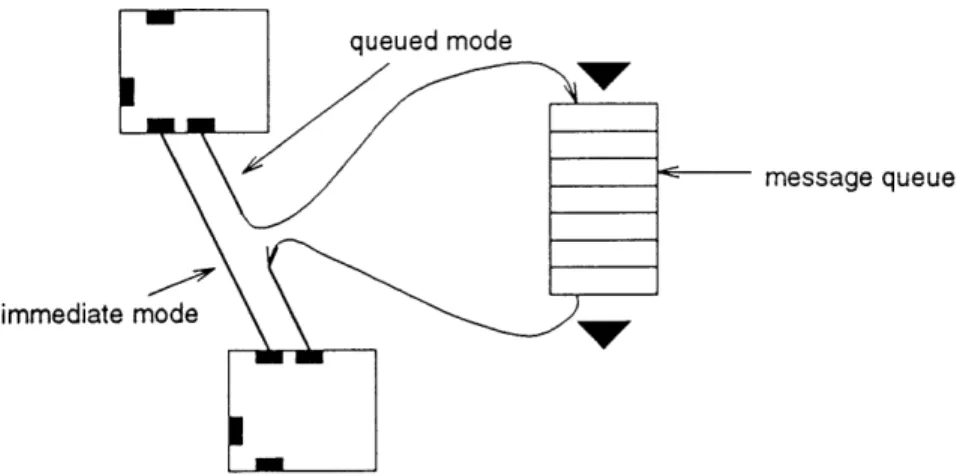
delivery mode The options selected for delivery of a message - currently includes immediate, queued, unregistered, and registered delivery. Section 2.3.6.
delivery mode filter A property of connections which allows a connection to affect the delivery mode of messages going through the connection. Section 2.3.7.
delivery notification output A special output on every OModule which emits a
signal whenever a registered message from that OModule is delivered to its destination. Section 2.3.5.
hostname A name given to a machine on a network, which serves as part of a
hostname/port address, used to address network servers. Section 2.5.1.
immediate delivery A message delivery mode which guarantees that a message will
immediately be delivered to its destination. Section 2.3.6.
instantiation number An identifier for~O Module instances, which is unique among
OModules of the same class. Section 2.3.3.
message passing A method of cominiiicating information and invoking actions
between objects in an object-oriented system. Section 2.3.1.
modsend module A special OModule class which can send other modules over the
network to be handled on a remote machine. Section 2.5.2.
module alias An OModule which represents another OModule. Section 2.3.4. module group An OINodule class which is defined by a group of OModules. Section
2.3.4.
object encapsulation The act of combining data and functions into a single unit,
an object. Section 2.2.2.
port number A number used to address a specific network server on a specific
ma-chine. Section 2.5.1.
queued delivery A messag-e delivery mode which directs a message to be sent to a
queue, for later delivery. Section 2.3.6.
registered delivery A message delivery mode which causes the source OModule to
resource A specific channel of communication used in the communication between
toparent and tochild OModules. Section 2.6.2.
server/client A network communication arrangement in which one entity, a client,
forms a single two-way connection with another entity, a server, and requests the server to perform tasks or deliver information. Section 2.2.1.
tochild module A special O.Module class used in the Host/OStream model, which
allows a Host to talk to an OStream. Section 2.6.2.
toparent module A special O.lodule class used in the Ilost/OStream model, which
allows an OStream to talk to aI Host. Section 2.6.2.
transportable objects The 0 pr)emise that all objects can be moved to different machines, or split across difFerelt machines. Section 2.5.
uninstantiated module An ONlodule which has no class. Section 2.3.4.
unregistered delivery A message delivery mode which does not cause the source
OModule to emit a delivery notification message. Section 2.3.6.
2.2
Story of 0
2.2.1
Motivation
The basic premise of 0 is that distributed media in the computing environment no longer has to be static data which is transported from one place to another. Instead, the data can have instructions and methods included with it. What this means is that the behavior of the multimedia is deterined neither by the sender or the receiver, but by the encoded behaviors embedded into the media itself.
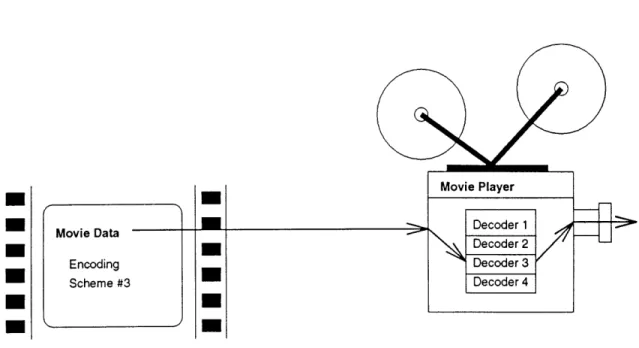
This model arose to alleviate the time-consuming process of writing an entirely new encoder/decoder pair (see figure 2.1) for every new video coding scheme developed
Movie Data Decoder1
Encoding Decoder3
Scheme #3 Decoder4
Figure 2.1: Movie player with many decoders
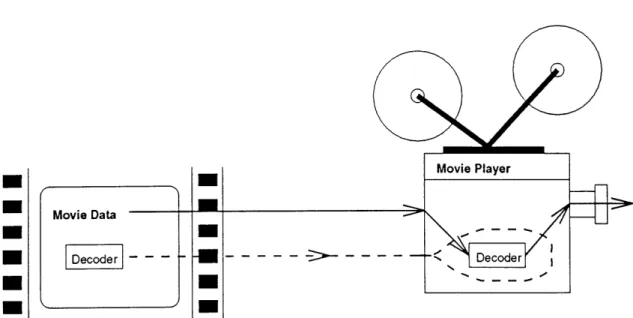
within our group (the Entertainment and Information Technology group at the Media Lab). What we really wanted was to write one universal server and client, and somehow embed the encoding and decoding instructions into the movie itself (see figure 2.2).
The idea of embedding instructions into a multimedia stream is not new. MIME [BF92], for example, specifies a multimedia representation for Internet mail. While MIME supports several encoding schemes, the specification also allows for an
appli-cation to be included in the mail, where that appliappli-cation may serve as an interpreter
for the rest of the mail. This is only one way in which behavior might be encoded in transmitted data. For our research, we have been conducting a structured exploration of embedded behavior through a series of stages:
Embedded decoding methods
This is the basic model already put forth, in which the encoded byte stream car-ries its own decoding instructions. These instructions are expressed in a universally established language. Every movie player will have an interpreter for this universal language.
Movie Data
- - - - - -
>
- DecoderFigure 2.2: Universal movie player using embedded decoders
Embedded interaction methods
Traditionally the application program has had the burden of handling interaction with the user and interpreting that interaction into something which is used to directly manipulate the movie objects. With 0, the movie's response to user interaction can also be embedded as a behavior that is interpreted by the universal movie player. This way, pressing the "'rewind" button on a movie might do something different than pressing the "rewind" button on a multimedia newspaper, and the application doesn't have to know the difference.
This is where we enter the world of object-oriented multimedia. We can start thinking of multimedia as closed packages which have a few hooks that applications can adjust. Besides the explicitly stated hooks, applications shouldn't have to worry about what happens.
Transportable methods
With the addition of embedded interaction methods, we have moved our model of distributed multimedia from a byte stream to an object-oriented package. However the traditional object-oriented model says little about how an object might be split
across two entities, such as a sender and a receiver. Thus the notion of embedded behaviors had to be developed carefully around the idea that some of these behaviors would have to be transported from one machine to another, that the object could actually exist on several machines at once.
In order to make this advance, we need an addition to the underlying architecture
- the Oserver. On every machine that will be expected to "host" these multimedia objects, there must be some process listening and waiting for multimedia objects to arrive, knowing what to do with them when they do arrive, and of course there must be a protocol set up to support this model of an object with transportable methods.
Context-sensitive methods
The final stage of the 0 idea is a model built on the rest of 0. In this stage, the series of adjustments that goes on between application and 0 multimedia object is formalized. The application explains to the 0 object what will be expected of it and what resources are available to it. The 0 object adjusts itself in turn, or perhaps negotiates with the application if it finds any of those terms disagreeable. 0 objects with this embedded behavior are called "context-sensitive", and applications which follow this model are called "contexts".
This final stage will require a protocol for negotiating an agreement between con-texts and movie objects. This will also require something from the support system -a b-ack ch-annel of communic-ation. R-ather th-an h-aving -a single st-ation bro-adc-asting to many clients, each server/client connection will now have to be a two-way stream. While this may seem unreasonable in the present reality of broadcast television, it is actually not far off - already there are some cable companies experimenting with real-time feedback from their viewers. And in the future, media can be distributed on compact disks or over phone lines to private home servers (the VCR of the future).
2.2.2
Design goals of 0
Once the basic ideas of 0 were put forth, a design was developed for the implemen-tation of 0, and also for how 0 would be visible to applications and users. The following design goals were observed:
Ease of use
One of the major problems with multimedia, and especially with networked multi-media, is the daunting complexity of working with any of it. Too many fields are encompassed all at once (networking, movie coding, etc.) that most people who start from the bottom never actually make it all the way to the top.
0 is a serious attempt to take away all that complexity, to encapsulate everything
in a model that is clear, easy to understand, yet still fully functional and configurable. This is O's primary goal, and many of the following goals are derived from it.
Object encapsulation
Object encapsulation (from which, incidentally, 0 derives its name) is one of the design goals of 0. This means that object encapsulation will be used consistently through all levels of multimedia design, not just at the top application interface level.
Two (three) levels of programming
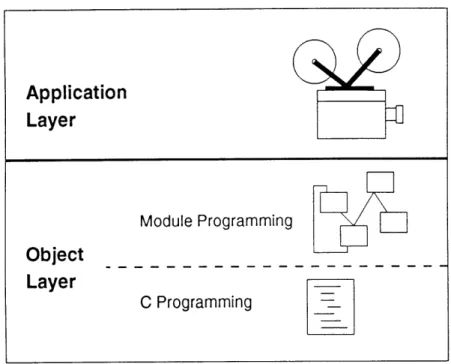
One of the keys to ease of use is to separate programming into two distinct levels - an application level and an object level. The application level is most straightforward and is designed for interacting with existing multimedia objects. The object level is more complex (and more functional) and is meant for creating multimedia objects.
This is similar to the X toolkit programming model [N090]. Widgets are pre-constructed objects, and the interface for using them is relatively simple. However, a lesson can be learned here, because writing widget objects is extremely difficult. Only a tiny fraction of X toolkit users are actually capable of creating a new widget.
Figure 2.3: Levels of programming in 0
This problem suggests an additional division of object programming into two more levels. The purpose of these two levels is to push all C programming down to the lower of the two levels, and make the higher of the two levels much easier to use. The trick is to balance ease of use with functionality, and also with efficiency in the real-time environment. Adhering to the object-oriented design goal, the higher of the two levels is achieved by providing a set of built-in objects that can be wired-together to produce the more complicated multimedia objects. The lower programming level can be used to create new low-level objects, but programming on this level should in general be unnecessary.
Network invisibility
The network is a daunting creature to most applications programmers, and it is one of the favorite things for big systems to abstract away (NFS, X, etc.). In the same tradition, 0 tries as hard as possible to make the network invisible, or at least model the network in a very simplistic way. This is true on all three programming levels
Application
Layer
Module Programming
Object
Layer
C Programming
mentioned above. For the application level, it is the most true, so that the application doesn't even have to know that there is a network out there. On the object level, the programmer must be aware that there are separate machines that the object may be running on, but that is modeled and abstracted so heavily that it can hardly be called network programming. Even on the C programming level, there are the Dtype
[Abr92b] and dsys [Abr92a] libraries to keep networking as far away as possible. This also means that all machine architecture differences have to be abstracted away, which is done mostly through the dsys and Dtype libraries.
Remote object location
One of the last things to be added onto 0 is remote object location. This feature enables 0 to locate objects which may be distributed at different sites throughout
the network.
While this seems like a "fringe" feature for 0, it is actually essential to achieving the network invisibility goal. This way objects can refer to other objects which may
be local or remote, and 0 can properly locate these objects automatically.
2.2.3
Evolution of object encapsulation in 0
As mentioned before, the object-oriented idea of embedding behavior into data is not new to multimedia. However, the idea of an object which can be split across several machines is tricky to develop into a design, as is the delicate balance between ease of use, functionality, and efficiency.
The primary question is, when someone wants to program an object, what descrip-tion language will they use? How are the instrucdescrip-tions embedded into the objects? The following explains what methods were tried as 0 evolved.
OSCRIPT
The first idea was to make the description language into a traditional language syntax, called OSCRIPT, based heavily on C. The reason was that such a language would be fully functional, it would be familiar to C programmers, and it could be run through a compiler that would turn it into something that could be interpreted efficiently.
Then, the transportable methods issue must be addressed. To do this, the lan-guage was broken down in such a way that entire functions could be sent across the network, so that a function called "sender()" night be running on the server ma-chine, and a function called "-receiver()" might be running on the client machine. Special constructs were included in the language for allowing the separated functions to communicate with each other.
However, serious problems arose with this approach. A C-like language, while
fully functional, is problematic in that it is highly disorganized. This becomes very
difficult to work with in a ruLing distributed process. In such a situation, it is very important to keep track of who is causing what to happen when, how to send replies back, synchronization, etc. C, and in fact most traditional programming languages,
are very bad at organizing real-time processes in this manner.
Omodules
The second method that was attempted was a graphically based process description language, similar to MAX [PZ] from IRCAM and Data Explorer [IBM91] from IBM. Here, specific functional elements (modules) are wired together (with connections) in such a way that it is graphically obvious how information is flowing. All activity occurs in a consistent manner, through message passing between objects.
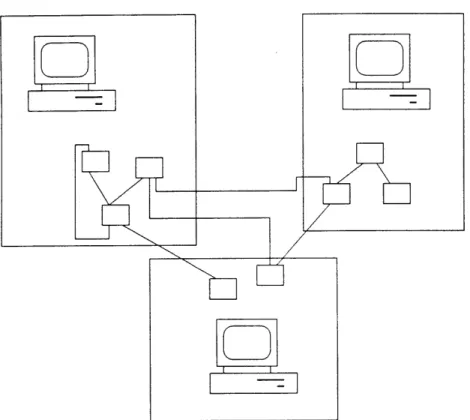
With this model, the transportable methods issue becomes simple. Given a net-work of modules and connections, one can specify that certain modules should run on one machine, other modules should run on another, and the underlying system will automatically preserve the connections between the modules, even across the
Figure 2.4: Module network split across machines
network, all invisibly to the programmer (see figure 2.4).
The problem with this approach is that while the high-level concepts are nicely packaged into powerful objects, the more mundane programming and housekeeping tasks become very tedious and difficult to write using boxes and lines.
Omodules and Evaluator
The first two approaches reveal the need for a third combination. The graphically based process could be used for estalishing the high-level behaviors, while the pro-gramming details could be done in some more traditional propro-gramming language. This is the third and final approach. Here, the modules and connections concept remains the same as previously described. However, a new kind of module, an
eval-uator module, has been added. This module is fully programmable and configurable
using a SCHEME-like syntax (which is similar to LISP). This language was chosen for many reasons (not the least of which is that it is trivial to interpret).
In the end, what we have is a clearly laid out network which describes the behavior of an object through the flow of information. The basic elements of the network are either preconstructed, or else modules whose behaviors have been described in a text-based SCHEME-like programming language.
2.3
Module networks
The basic model of describing the behavior of an 0 object is through modules and connections. Modules are coinputational elements with inputs and outputs. Each module has a specification which relates its outputs to its inputs. Communication into and out of a module (through the inputs and outputs) occurs through message passing. Messages are encapsulated in a standard method (Dtypes).
Connections are used to carry messages from the output of one module to the input of another module. A single output may connect to any number of destinations, and any number of sources may connect to a single input.
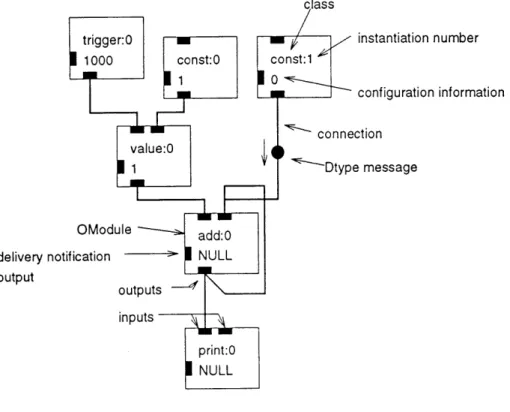
A network of modules is a set of modules and their connections. Figure 2.5 shows
an example module network. This figure identifies all the elements of the network, many of which have not yet been discussed. These elements will be described later, and this figure can then be used as a reference.
2.3.1
Message Passing
Message passing is the basic means of communication between modules. Message passing is also the basic indicator and carrier of activity in the module network. Most modules do nothing until a message is passed to them, which causes them to process the message and send other messages as output. Connections carry the output messages to the inputs of other modules. Of course, there must be "instigator" modules to start the process. Such modules would send messages spontaneously, either according to a timer or else in response to some other activity on the system.
instantiation number
configuration information
OModule
delivery notification
-output
Figure 2.5: A module network
All messages are passed using a standardized data structure called a Dtype. The
following is a brief description of Dtypes, but the Dtype manual [Abr92b] should be consulted for a full description of DtVpes.
Dtypes
Dtypes are typed data structures, which are used to represent many commonly used data types in a universal format. The data types supported include integers, reals, strings, variable-length lists, and packets of raw bytes. Dtypes are supported by a library of functions which construct, destroy, interpret, print, load, save, send and receive Dtypes. The following is an exanple of a Dtype:
(3 4 "hello" (2.4 -3.6))
This is a typical Dtype consisting of a list of integers, strings, and reals. The following code would generate this Dtype:
DtypeCreate(DTYPELIST, DtypeListCreate(DTYPE_INT, 3, DTYPEINT, 4, DTYPESTRING, "hello", DTYPELIST, DtypeListCreate(DTYPEREAL, 2.4, DTYPEREAL, -3.6, NULL), NULL))
One of the biggest problems with distributed computing is that very few facilities exist for sending anything besides raw bytes between machines. Programmers of dis-tributed processes often spend a lot of time writing routines that convert information into raw bytes that can be sent to another process, and routines that can convert raw bytes back into information. The Dtype library is an attempt to write this code once and set it as a standard that all programmers can use. The only real catch is that programmers must be prepared to express their information as Dtypes, and also be prepared to interpret Dtypes as information. But once programs are set up to use Dtypes, they can instantly send information back and forth through functions in the Dtype library.
The Dtype library also contains support for two important applications. The first application is Dtype servers, which are servers that communicate with their clients through Dtypes. The Dtype library has enough support for this application that setting up a fully-functional multiclient Dtype server takes a couple of hours at the most. The second application is the Dtype evaluator, which can interpret Dtype lists as expressions or programs, in the style of LISP or SCHEME. The Dtype evaluator is a lightweight interpreter for such expressions, which is useful in a situation where an interpreted language needs to be "thrown in" to an applicat.ion.
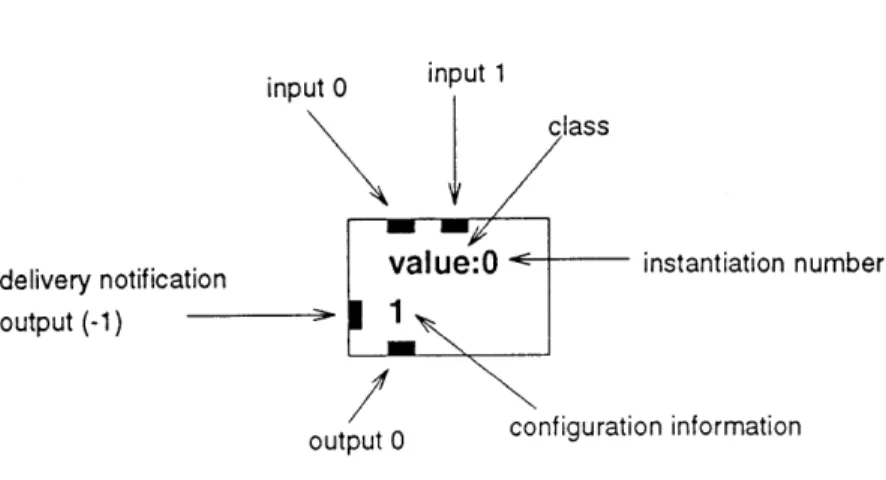
input 0 input 1
class
delivery notification value:O < instantiation number
output (-1)
output 0 configuration information
Figure 2.6: An OModule
An OModule is the basic unit of the 0 system. An OModule can be visualized as a box, with a number of inputs and outputs (see figure 2.6). What is inside the box can be any number of things, but no matter what is inside the OModule, or for that matter no matter where the OModule is located on the network, the interface to the OModule and the behavior of the OModule remains consistent.
As a point of reference, the inputs and outputs are numbered in order, from left to right, starting with 0.
2.3.3
OModule classes and instantiations
An OModule's class is what determines the behavior of the OModule. All OModules in the same module network which have the same class name will all have the same behavior. The behavior is determined by the handler which is assigned to the OMod-ule. The process of translating OModule class names into OModule handlers is called "'module instantiation". The process of module instantiation is a little tricky, since the handler assigned to an ONIodule class depends partially on the environment of the OModule - i.e., which module network it is in, which machine it is on. In general,
the module instantiation process is pretty clear, with a few oddities.
Every OModule also has an instantiation number, which is used to differentiate two OModules of the same class. Within a single module network, no two
OModules
of the same class should have the same instantiation number. Therefore, withina single module network, a <class>:<instantiation> name is enough to identify a specific module.
2.3.4
OModule types
As mentioned earlier, what behavior, or handler, is put into an OModule box is determined when the OModule is instantiated. After that, it doesn't matter on the outside of the OModule what is actually inside the box.
However, to get a handle on what's going on, it is often useful to know what is inside the box. There are three basic ONlodule types, one of which is selected when the OModule is instantiated.
Built-in modules
The built-in module classes are the module classes that come prepackaged with every
o
system. Any module which bears the name of one of these built-in classes will automatically have the handler from that class assigned to it. These handlers are actual C subroutines that are included in the 0 library, and a catalog exists which documents the behavior of each of these classes. In most cases, these modules are very simple, such as modules which add, or hold values, or send out timing pulses at regular intervals. However, these modules are basic and powerful enough to do just about anything when wired together in the right combination.Module groups
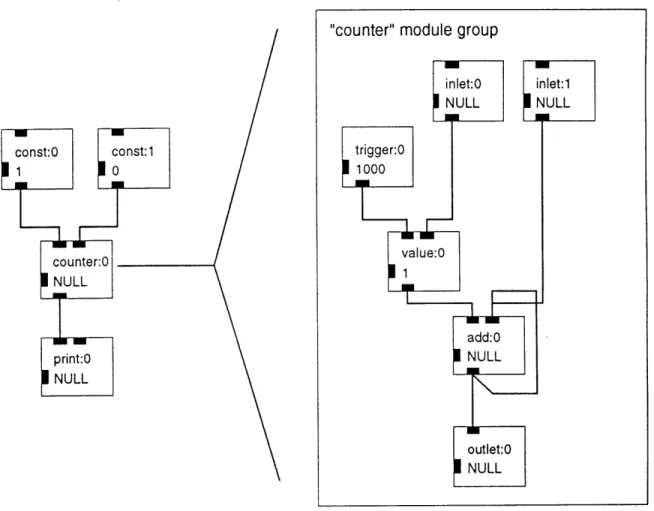
Module groups are the first level of abstraction in 0. Once a network of modules and connections has been made, that entire network can be turned into a module group if it is given a name. If an OModule uses that name as its class, then its handler will be that entire module network. Of course, we must emphasize again that to whomever is using that OModule, the fact that there is an entire module network inside that OModule is completely hidden. It looks just like any other module.
"counter" module group
Figure 2.7: A module group
Just like any other OModule, a module group receives messages through its inputs and sends messages out through its outputs. To the module network which defines the module group, the inputs and outputs are represented by special built-in modules called inlets and outlets. Messages which go in to the OModule are passed into the module group through inlet modules. Messages which the module group sends to outlet modules are passed through the output of the OModule.
Figure 2.7 shows a module group being used in a module network. Note the inlet and outlet modules in the module group, and their relation to the inputs and outputs of the "counter" module.
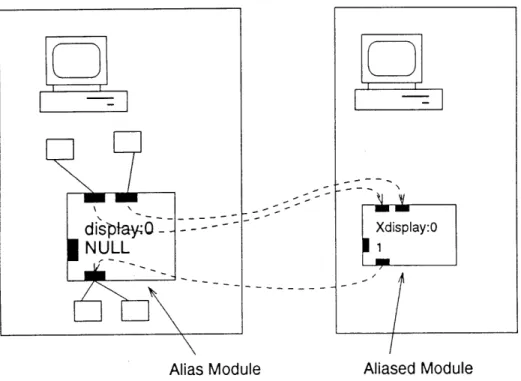
displayQ - - - - ~ Xdisplay:O
NULL
1Alias Module
Aliased Module
Figure 2.8: A remote alias module
single OModule, that OModule is called the "parent" of the underlying modules, and those underlying modules are the "children" of the OModule. There is also no limit to the nesting of module groups - a module group may contain modules which are themselves module groups, etc. Also, note that from now on "module group" and "module network" will be used interchangeably, since they both refer to the same concept'.
Module aliases
Module aliases are the means by which one OModule can represent another OModule. An OModule alias always has a target ONlodule which is what the original OModule aliases to. Any messages sent to the aliased OModule are rerouted to the target, and any messages originating from the target are rerouted back through the outputs of the original OModule (see figure 2.8).
1 "Module group" usually implies a module network that is being used as a single module within
another module network
OModule aliases are the mechanism for hiding the fact that an OModule may exist on another machine. In that case, whoever is using the OModule can still send
it messages just as if it were a normal ONlodule, but because the module is actually an alias to some remote machine, messages are automatically and invisibly rerouted to and from the target OModule.
Uninstantiated modules
This is actually more of an ONlodule non-type. An uninstantiated module is com-pletely nonfunctional - messages sent to it do absolutely nothing, and it generates no messages.
All modules are uninstantiated when first created. Sometimes it is desirable to
leave a module uninstantiated. This occurs most often when there is a module that is going to be sent to a remote destination - in this case, there is no point in instantiating the module until it gets to its destination, so the module remains uninstantiated until
it is sent.
2.3.5
Configuration information
Every OModule, in addition to being identified with a class and an instantiation number, also has configuration information. This is a single Dtype which the module uses to control its operation. Every module class will use the configuration in a different way. For example, a module which "ticks" at regular intervals might expect the configuration information to be an integer specifying the tick interval. A general convention is to have the configuration information be an initial configuring value, but also to use one of the inputs to allow that value to be changed during runtime.
For the built-in module classes, what configuration information is expected for each class and how that configuration information is used is included in the built-in module catalog listbuilt-ing. When the module network is created by a designer, the configuration information for each module in the network is also specified at that time
by the designer.
Inheriting configuration information
According to the description above, the configuration information for each module is a static field which is determined at the time the module network is designed. However, it may be desirable to allow that configuration information to change at runtime. Here is an example:
Suppose a module group is created to output numbers at regular intervals. Such a module group would require a few modules and a ticker module at the center. The configuration information of the ticker module determines the rate at which the numbers will be sent out.
Once this module group has been created, it can be treated as a single module and incorporated into other module networks. However, these module networks have no control over the timing interval of the module group, since the timing interval is preset as the configuration information of the ticker module, which is hidden away in the module group.
What is needed is a way to pass configuration information into a module group, and have that configuration information be distributed to the proper modules. In a sense, the module group itself needs to be configured. This fits perfectly, since a module group appears to be a single module, and like any other module it gets its. own configuration information. So, the issue is how to pass configuration information specified for the module group down to the individual modules in the group - how is configuration information inherited through different levels of the module group
hierarchy?
The 0 answer to this problem is to use a feature of the Dtype library called environments and Dtype references. A Dtype environment is simply a list of
keyword/value pairs, such as the following:
The configuration information for a module group is such an environment.
The complement of a Dtype environment is a Dtype reference. A Dtype refer-ence is a way of "looking up" values in a Dtype environment. A Dtype referrefer-ence has the following form:
(0
ticktime)
When processed through the above environment, the entire Dtype reference is translated into "2000". The Dtype reference process is also recursive, so that if the following Dtype were passed through the environment:
(20 30 (0 ticktime) 3.5)
it would be translated into the following: (20 30 2000 3.5)
The Dtype environments and Dtype references are used to allow modules to inherit configuration information from their parents. When a module is instantiated, its con-figuration information is first passed through as a Dtype reference, using the parent's configuration information as a Dtype environment. This way, any configuration in-formation parameters that should be inherited are specified as Dtype references, and when the module group is included in a module network, those parameters should be specified in a Dtype environment as the configuration information to the module group.
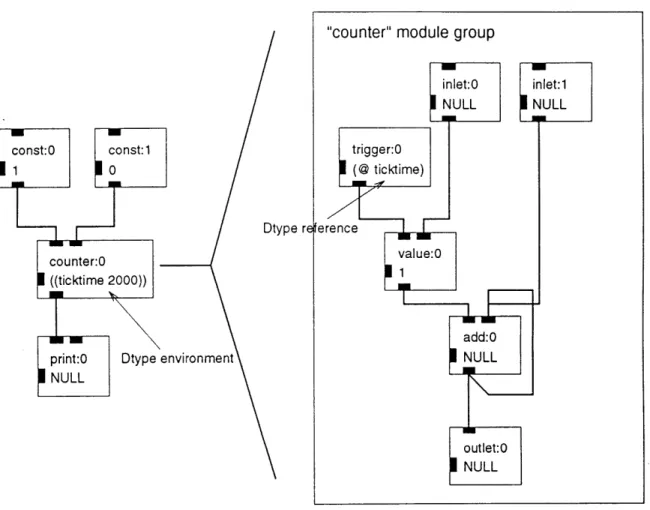
For example, refer to figure 2.9. This shows the same "counter" module group example as before, except now the module group's "ticker" gets its timing parameter from the parent's configuration information.
This process is extended to work even when module groups are nested several layers deep. When a module uses a Dtype reference to specify a parameter, the search for that parameter first occurs in the configuration information of the parent.
If not found there, the search continues to the grandparent, then the level above that,
'counter" module group
Dtype reference
iter:0 value:0
time 2000))
W-- add:0
:0 Dtype environment NULL
outlet:0
NULL
The delivery notification output
Sending messages from an OModule is not necessarily a synchronous process. Mes-sages may be delayed in a queue, they might be delayed traveling through the network, etc. It is often difficult to tell exactly when a message has arrived at its destination. Sometimes it is useful to know when a message has been delivered to its desti-nation. Take for example an application which is trying to send video frames from a source to a destination as fast as possible. The source will want to know when the frame it just sent to the destination arrives, so that it can immediately send out another one.
To handle this situation, every module includes an extra output called the delivery
notification output. Visually this is represented as an output on the left side of the
module - out of the way since it is rarely used, but always available.
The purpose of a module's delivery notification output is to signal every time
a registered message sent by that module has been delivered. Whenever a message
sent by that module is delivered to its destination, an integer is sent out the delivery notification output. The value of that integer is the output number that sent the
message.
Not all messages are registered. By default, messages are unregistered, but that status can be modified by the connections, as explained later.
The delivery notification output, like all other outputs, has a number, which is -1.
The Eval OModule
The basic set of built-in OModule classes is sufficient to perform just about any computation. However, in actual use it was awkward to build a useful module network out of such small pieces, somewhat akin to building a computer purely from logic gates.
The electronic hardware solution to this problem is a logic device called a PAL, for Programmable Array Logic. On the outside, a PAL is just a normal logic device.
On the inside, however, is a tiny bit of software which configures how the inputs and outputs of the PAL behave. This software can be easily changed to fit different applications, which makes the PAL act like a universal logic device.
The 0 analog to the PAL is called the Eval OModule. On the outside, the eval module is just like any other built-in module class. However, within the configuration information of the eval module is a program which describes how the inputs and outputs of the module behave. This program is written in a SCHEME-like language which is handled by the Dtype evaluator (described in the Dtype manual). The reason for choosing this syntax is that it is simple to learn, simple to interpret, and trivial to fit into the Dtype syntax which is required for configuration information.
As an example, consider a module takes in 4 numbers, adds the first three and multiplies the result by the fourth and sends the final result out output number 0. Without using an eval module, this module would best be written as a module group with 4 inlet modules, 1 outlet module, 3 add modules and 1 mult module.
Or, this could be done in a single eval module with the following configuration information: (1 0 () (out 0 ("1*"1 (11+1 (in 0) (in 1) (in 2)) (in 3))))
In case this syntax appears foreign, here is a quick explanation - for every ex-pression contained in parentheses, the first element of the list is a function name, the remaining elements are arguments. The entire list is evaluated by evaluating the arguments, passing them to the function, and what the function returns is the result of the evaluation. Some functions have side-effects, such as the "out" function which causes its second argument to be sent out the output number specified by the first