Publisher’s version / Version de l'éditeur:
MobileHCI '10 Proceedings of the 12th international conference on Human
computer interaction with mobile devices and services, pp. 427-430, 2010-11-01
READ THESE TERMS AND CONDITIONS CAREFULLY BEFORE USING THIS WEBSITE. https://nrc-publications.canada.ca/eng/copyright
Vous avez des questions? Nous pouvons vous aider. Pour communiquer directement avec un auteur, consultez la première page de la revue dans laquelle son article a été publié afin de trouver ses coordonnées. Si vous n’arrivez pas à les repérer, communiquez avec nous à [email protected].
Questions? Contact the NRC Publications Archive team at
[email protected]. If you wish to email the authors directly, please see the first page of the publication for their contact information.
NRC Publications Archive
Archives des publications du CNRC
This publication could be one of several versions: author’s original, accepted manuscript or the publisher’s version. / La version de cette publication peut être l’une des suivantes : la version prépublication de l’auteur, la version acceptée du manuscrit ou la version de l’éditeur.
For the publisher’s version, please access the DOI link below./ Pour consulter la version de l’éditeur, utilisez le lien DOI ci-dessous.
https://doi.org/10.1145/1851600.1851697
Access and use of this website and the material on it are subject to the Terms and Conditions set forth at
ALEX: Mobile Language Assistant for Low-Literacy Adults
Munteanu, Cosmin; Lumsden, Joanna; Fournier, Helene; Leung, Rock;
D’Amours, Danny; McDonald, Daniel; Maitland, Julie
https://publications-cnrc.canada.ca/fra/droits
L’accès à ce site Web et l’utilisation de son contenu sont assujettis aux conditions présentées dans le site LISEZ CES CONDITIONS ATTENTIVEMENT AVANT D’UTILISER CE SITE WEB.
NRC Publications Record / Notice d'Archives des publications de CNRC:
https://nrc-publications.canada.ca/eng/view/object/?id=78270351-d4e6-4d8e-9b13-01a47103d30b
https://publications-cnrc.canada.ca/fra/voir/objet/?id=78270351-d4e6-4d8e-9b13-01a47103d30b
ALEX: Mobile Language Assistant for Low-Literacy Adults
Cosmin Munteanu
1 [email protected]Joanna Lumsden
1,2 [email protected]Hélène Fournier
1 [email protected]Rock Leung
1,3 [email protected]Danny D’Amours
1 [email protected]Daniel McDonald
1 [email protected]Julie Maitland
1 [email protected]1) National Research Council of
Canada
Institute for Information Technology Fredericton, NB, Canada
2) Aston University
School of Engineering & Applied Science
Birmingham, UK
3) University of British Columbia
Department of Computer Science Vancouver, BC, Canada
ABSTRACT
Basic literacy skills are fundamental building blocks of education, yet for a very large number of adults tasks such as understanding and using everyday items is a challenge. While research, industry, and policy-making is looking at improving access to textual information for low-literacy adults, the literacy-based demands of today's society are continually increasing. Although many community-based organizations offer resources and support to adults with limited literacy skills, current programs have difficulties reaching and retaining those that would benefit most from them. To address these challenges, the National Research Council of Canada is proposing a technological solution to support literacy programs and to assist low-literacy adults in today's information-centric society: ALEX© – Adult Literacy support application for EXperiential learning. ALEX© has been created together with low-literacy adults, following guidelines for inclusive design of mobile assistive tools. It is a mobile language assistant that is designed to be used both in the classroom and in daily life, in order to help low-literacy adults become increasingly literate and independent.
Categories and Subject Descriptors
H5.2 User interfaces: Voice I/O, Natural language, User-centered design, Evaluation/methodology. K3.1 Computer Uses in Education: Computer-assisted instruction.
General Terms
Design, Experimentation, Human Factors.
Keywords
Mobile computing, interface design, educational interfaces, mobile learning, assistive technology.
1. BACKGROUND
In 2000, nearly 25% of adults (aged 16 to 65) in the world's richest countries were reported to be functionally illiterate [7]. In Canada, 50% of adults are considered to have low literacy skills [6]. For these, understanding everyday items such as bus schedules, food labels, news articles, or medical information is a challenge. In addition to the impacts on an individual’s daily life, this has serious consequences for the economy – businesses are struggling to find local workers who have the basic skills necessary for the demands of today's information-centric society. Several solutions are proposed that provide reading assistance to low-literacy adults, ranging from audio-visual interfaces [3] to applications converting text into simpler forms [8]; however, economic analysis suggests that increasing adult literacy is essential to improving low-literacy adults' work performance and quality of life [2]. Unfortunately, basic adult education is often seen as marginal to compulsory schooling. Community organizations offer resources and support to adults with limited literacy skills, but barriers such as work, lack of financial resources, childcare, and transportation often prevent potential learners from taking part in and benefiting from such programs [1].
The portability and affordability of mobile devices offers a realistic opportunity to provide novel, context-sensitive literacy resources both within and, more importantly, outside community programs. At the National Research Council of Canada (NRC), by actively involving adult literacy students and literacy facilitators in a series of focus groups and participatory design sessions, we
Copyright 2010 Her Majesty in Right of Canada.
This article was authored by employees of the National Research Council of Canada. As such, the Canadian Government retains all interest in the copyright of this work and grants to ACM a nonexclusive, royalty-free right to publish or reproduce this article, or to allow others to do so, provided that clear attribution is given both to the NRC and the authors. MobileHCI’10, September 7–10, 2010, Lisbon, Portugal.
developed ALEX© – a mobile Adult Literacy support application for EXperiential learning (Figure 1 and detailed in [5]). ALEX© is designed to facilitate, in a manner sympathetic to the needs of functionally illiterate adults, a series of language-related support tools. Our ultimate goal for ALEX© is that it will provide practical support to functionally illiterate adults in their daily life experiences and, in so doing, allow such adults to push beyond their comfort zones to become increasingly literate and independent.
2. A MOBILE APPROACH TO ADULT
LITERACY
New Brunswick is the Canadian province with the largest percentage of adults with low literacy levels. As such, the NRC has partnered with Government of New Brunswick's Community Adult Learning Services (CALS) to address the adult literacy problem in this province. CALS is an integrated network focused on adult learning services, including computer, literacy, and workplace training, operating under the Province's Department of Post Secondary Education, Training and Labour. ALEX© is one of the outcomes of this ongoing research partnership.
3. OVERVIEW OF ALEX©
ALEX© is a mobile application that is designed to assist adults enrolled in literacy programs or workplace essential skills training. It is designed to be used in an assistive capacity during everyday literacy-based tasks or in conjunction with formal adult literacy or workplace essential skills training. Example tasks range from more traditional scenarios such as classroom exercises and homework, to any other activity involving reading or writing such as reading the newspaper, interpreting a safety notice posted in a public space, writing a letter, and filling-in documents at home. ALEX© is designed to help develop language skills and knowledge acquisition pertaining to real life by providing intuitive access to various language-based tools, as shown in Figure 1. Furthermore, it helps students develop other essential skills in conjunction with literacy skills, such as computer usage and information-focused thinking. ALEX©'s aim is to increase students' independence, to empower learners outside of a classroom, and to adapt to and meet different needs of different learners. It is a useful assistant not only for students, but also for teachers, by providing them with an additional tool to enhance the classroom experience.
The ALEX© interface was designed through a participatory design approach, involving teachers and students from CALS' adult literacy classes. It was developed according to the guidelines for inclusive design of mobile assistive tools [4]. The principles that were followed included multimodal output (text and speech), suggestive labels for buttons, instructions worded in simple language, soft keyboard with both alphabetic and qwerty layouts, and the use of a dictionary with definitions of appropriate literacy level for the target population. ALEX facilitates learning by allowing users to access several language-based tools, as described in the remainder of this section.
Dictionary
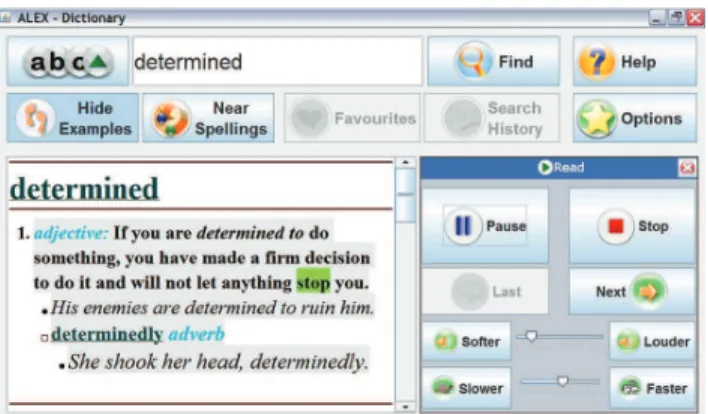
The main feature of ALEX© is the dictionary look-up, as illustrated in Figure 2. Through the configuration menu (the “Option” button), users can specify which of the pre-installed dictionaries to search. By default, searches will be conducted in all available dictionaries. The dictionaries are stored as XML files, thus facilitating customization such as altering existing dictionaries or creating ones, through external applications. If supported by the electronic (XML) dictionary, word usage examples are also shown under each definition entry, which users can turn off or on.
For the study presented later in this paper, the “Collins Cobuild Advanced Dictionary of American English” 1st
Edition © HarperCollins Publishers 2007, and the “Collins Gem Thesaurus” 6thEdition © HarperCollins Publishers 2009, were embedded on
the devices provided to participants.
Audio spelling
Text-to-speech functionality is present in ALEX© to assist adult learners in reading definitions (Figure 2). Users can select a word or sequence of words to be read. If no words are selected, invoking the read feature will produce an audio spelling of the entire definition displayed at that moment. Audio level and reading speed are two parameters of the text-to-speech function that a user can adjust ‘on-the-fly’ .
Users can also choose to enable text-to-speech for buttons and menus, in order to have labels read to them. Typically, this feature is turned on by default – once users become more familiar with the application, they can deactivate it (from the “Options” panel).
Keyboard
In order to increase the portability of ALEX©, a virtual keyboard is provided can be accessed through the “abc” icon (top left corner of the main screen). Users can choose between a
QWERTY layout and an ABC (alphabetic, vowel-aligned) layout, as illustrated in Figure 3.
Spelling assistance
Since many adult learners enrolled in literacy programs struggle with correct spelling of words, a near spelling feature was introduced in ALEX©, that display words of similar spelling. Users typically invoke this when they look up a word that is incorrectly spelled for its intended use, but nevertheless forms a correctly spelled word. This is useful in both showing alternatives for misspelled words and presenting users with more choices when they are not sure of the correct spelling of a word (Figure 4). Spelling assistance is automatically activated for incorrectly-spelled words.
Favourites and search history
To facilitate a wider range of learning activities, ALEX© allows words to be saved in a persistent, favourites-type list (Figure 5). Users have full control of the list, being able to remove words and to perform most functions offered by ALEX© directly within the list. A non-persistent list is also available in the form of a search history that displays the most recent word look-ups. The favourites and history lists implement metaphors from web browser that most users are familiar with.
Thesaurus
ALEX© can be customized to provide access to the various resources of the installed electronic dictionaries. For the current study, synonyms and antonyms look-up (Figure 6) was provided, as activities based on these are an essential part of the adult literacy curricula.
Pronunciation practice
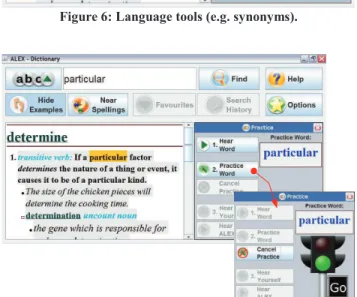
Beside text-to-speech, ALEX© makes use of the built-in automatic speech recognition system to provide adult learners with a pronunciation practice feature (Figure 7). Users can access this feature by selecting (highlighting) a word and following a wizard-like process to determine the correctness of their own pronunciation of the selected word. The practice allows users to first hear the correct pronunciation, then record their pronunciation and be informed of its correctness. Users can hear
Figure 3: Alphabetic and QWERTY text input.
Figure 4: Suggestions of similarly-spelled words.
Figure 6: Language tools (e.g. synonyms).
Figure 7: Pronunciation practice.
their own recording, thus being able to compare their pronunciation with the correct one. For the recording step, the traffic light metaphor was used in order to correctly prompt the users to utter the selected word. Pronunciations can be scored using the speech recognition engine provided by the operating system (e.g. Microsoft SAPI) or an external engine. Users are not given a numerical score for their pronunciation; a color-based dial is used instead, accompanied by positive reinforcement messages (“you did great”, “try again, you're still doing great”, etc.)
4. CURRENT EVALUATION WITH ADULT
LEARNERS
The goal of the ALEX© research project is to explore how adults enrolled in literacy programs and workplace essential skills training can benefit from a mobile assistive technology that supports experiential learning, and furthermore demonstrate that this particular solution can improve the efficiency of the programs and increase student enrollment and retention levels.
In preparation for a larger-scale evaluation, pilot testing with five users was conducted for three weeks at the end of the Fall 2009 semester. The participants were adult learners (4 females, 1 male) enrolled in CALS' literacy programs. A typical student attending these clases has completed some years of formal schooling (usually up to the end of middle school) and works full-time in a non-professional position (e.g. cleaning, farming, etc.). They are able to carry out non-complex reading/writing tasks, such as some newspaper reading, writing a very simple letter, etc. The CALS sessions are usually conducted in an informal setting, resembling one-on-one tutoring. There is no formal evaluation of academic progress. The teachers' role is to facilitate the learning process and to guide students in their quest for self-improvement at the students own pace toward their own individual goals.
During the pilot study, each participant received one ultra-mobile device running ALEX©, to be used both in the classroom as well as in environments outside the classes. Users were encouraged to explore the functionality of ALEX© without any constraints placed on the way the application was to be used. Data collected from the pilot study is currently being analyzed. Early observations and preliminary analysis of semi-structured interviews with participants have, however, revealed that ALEX© is well received by adult literacy learners. It is perceived to help students in the classroom when working on exercises that involve the use of language resources (e.g. dictionaries, thesauri), as well as with the pronunciation of difficult words (which is an essential component of the literacy programs). It also provides them with assistance when doing homework – one student reported being able to complete twice the regular amount of homework in a week with the assistance of ALEX©. Furthermore, our pilot study has revealed that ALEX© is being used outside prescribed academic activities in an exploratory manner – mainly reading, such as magazines and books, and word pronunciation practice.
5. THE ROAD AHEAD
The current literacy levels of working adults do not meet the demands of today's information-centric society. Since, in Canada at least, existing literacy programs only reach a small number of those who would benefit from them [2], there is clearly a need for ground-breaking approaches to adult literacy training. To meet this challenge, we propose a mobile application that enables adults to improve their language skills outside the confines of literacy programs, and bring them closer to functional literacy and independence. The encouraging results of our preliminary study warrant further investigation into the use of mobile language tools to assist low-literacy adults. A larger-scale longitudinal study of ALEX© is being carried out in 2010, with twelve users enrolled in two literacy programs for a duration of eight months. It aims to determine the effectiveness of ALEX© with respect to literacy skill development and the confidence of target users, while evaluating the effectiveness of ALEX© for adult literacy programs. The study will also investigate the implementation of such applications in general adult learning programs.
6. ACKNOWLEDGEMENTS
NRC would like to acknowledge HarperCollins Publishers Limited for providing access to the following Works in support of this research study: “Collins Cobuild Advanced Dictionary of American English” 1st Edition © HarperCollins Publishers 2007 Dictionary Text, and “Collins Gem Thesaurus” 6th Edition © HarperCollins Publishers 2009 .
7. REFERENCES
[1] ABC Canada. Who Wants to Learn? ABC Canada Literacy
Foundation Report (2001)
[2] Conference Board of Canada. Adult Literacy Rate — Low-Level Skills. Education Report (2010)
[3] Dhakhwa, S. et al. Sambad – Computer Interfaces for Non-literates. In Proc. of HCI International (2007)
[4] Leung, R., & Lumsden, J. Designing Mobile Technologies for Individuals With Disabilities. In Handbook of Research on User
Interface Design and Evaluation for Mobile Technology (2008)
[5] Lumsden, J. et al. ALEX©: A Mobile Adult Literacy Experiential Learning Application. In International Journal of Mobile Learning
and Organization. (2009)
[6] Stats Canada. Building on our Competencies: Canadian Results of the International Adult Literacy and Skills Survey. Human
Resources and Skills Development Canada Catalogue no. 89-617-XIE (2003)
[7] UNESCO. Trouble with Reading. UNESCO Education Report (2002)
[8] Watanabe, W. M. Facilita: reading assistance for low-literacy readers. In Proc. of SIGDOC (2009)