HAL Id: hal-01493815
https://hal.archives-ouvertes.fr/hal-01493815
Submitted on 29 Mar 2017
HAL is a multi-disciplinary open access
archive for the deposit and dissemination of
sci-entific research documents, whether they are
pub-lished or not. The documents may come from
teaching and research institutions in France or
abroad, or from public or private research centers.
L’archive ouverte pluridisciplinaire HAL, est
destinée au dépôt et à la diffusion de documents
scientifiques de niveau recherche, publiés ou non,
émanant des établissements d’enseignement et de
recherche français ou étrangers, des laboratoires
publics ou privés.
Copyright
Supporting Decision-making Activities in Multi-Surface
Learning Environments
Lili Tong, Audrey Serna, Sébastien George, Aurélien Tabard
To cite this version:
Lili Tong, Audrey Serna, Sébastien George, Aurélien Tabard. Supporting Decision-making Activities in
Multi-Surface Learning Environments. Proceedings of the 9th International Conference on Computer
Supported Education (CSEDU 2017), Apr 2017, Porto, Portugal. pp.70-81. �hal-01493815�
Supporting Decision-making Activities
in Multi-Surface Learning Environments
Lili Tong
1, Audrey Serna
1, Sébastien George
2and Aurélien Tabard
31Univ Lyon, CNRS, INSA-Lyon, LIRIS, UMR5205, F-69621, Villeurbanne, France 2UBL, Université du Maine, EA 4023, LIUM, 72085 Le Mans, France
3Univ Lyon, CNRS, Université Lyon 1, LIRIS, UMR5205, F-69622, Villeurbanne, France {lili.tong, audrey.serna, aurelien.tabard}@insa-lyon.fr, [email protected]
Keywords: Decision-making, collaboration, Computer Supported Collaborative Learning (CSCL), Computer Supported Cooperative Work (CSCW), Multi-Surface Environments (MSE).
Abstract: Collaborative decision-making is one of the emphasized student skills required by educators from different domains including science, technology and society. Multi-surface environments (MSE) appear particularly well suited for such learning activities, with large shared surfaces dedicated to the overview of information and context awareness, while personal surfaces serve browsing and analytical purposes. In this study, we present the design of Pickit, a MSE tool supporting collaborative decision-making activities. We show how Pickit is used by four groups of high school students as part of a learning activity. We analyze students’ interactions with digital devices that are related to given phases of the decision making process. Our results show that MSE are particularly interesting for such learning activities as they enable to balance personal and group work. The introduction of personal devices (tablets) makes free riding more difficult, while enabling development of personal judgment. By using Pickit, students successfully made their decisions and meanwhile better knew about the decision-making process.
1
INTRODUCTION
Collaborative decision-making broadly consists of ex-ploring alternative options, defining criteria, weight-ing options, and choosweight-ing one among them. Educa-tors have highlighted the importance of collaborative decision-making skills in scientific education (Rat-cliffe, 1997; Grace, 2009; Evagorou et al., 2012), as it can help students to appropriating knowledge. Col-laborative decision-making becomes even more rele-vant in multi-disciplinary education, such as when ed-ucators tackle socio-scientific issues (Evagorou et al., 2012), e.g., sustainable development. These issues are often ill-structured, and always involve consider-ation for technical, economical, and ethical aspects.
However, the literature (Ratcliffe, 1997; Grace, 2009; Evagorou et al., 2012) emphasize that students struggle with such complex issues, especially with multi-dimensional analyses. The underlying prob-lems lie in difficulties to: become familiar with the material, evaluate choices and reach a decision to-gether, follow a process, know what others are doing and adjust behavior accordingly.
In the meantime, tabletops have demonstrated
their ability to support collaborative activities (Shen et al., 2003). They can lead to greater awareness of group activities (Rogers and Lindley, 2004). They afford the introduction of external regulation mecha-nisms (DiMicco et al., 2004) through the design of ap-plications or visual indicators of participation. Multi-surfaces environments (MSE) seem suited to support decision-making and problem-solving activities (Dil-lenbourg and Evans, 2011). Large shared displays are excellent at providing an overview of informa-tion, while personal devices support individual activi-ties and enable participants to conduct analytical tasks in parallel.
Our focus in this article is to better understand how digital devices and MSE can support learning decision-making process. We co-designed Pickit with teachers, a learning environment enabling students to explore various locations on a map on a shared dis-play and decide which is the most appropriate regard-ing several criteria. Students can use personal devices to analyze the characteristic of each location. We con-ducted an in-situ study of Pickit with 12 students from a vocational school.
tightly-coupled collaboration and loosely-coupled parallel work in the decision-making process. Groups reached motivated decisions for their choices, while broadly following the decision-making process we implemented in our application. We outline the de-vice use in MSE and link them to the behaviors in the decision-making process. We further derive a set of considerations for designing decision-making activi-ties using MSE in classrooms.
2
RELATED WORK
2.1
Decision-making Process in
Education
Decision-making is a process of gathering informa-tion, identifying and weighing alternatives, and se-lecting among various alternatives based on value judgments (Uskola et al., 2010). Several models of decision-making processes have been introduced in the learning literature over the past years (Janis and Mann, 1977; Aikenhead, 1985; Kraemer and King, 1988; Ratcliffe, 1997; Roberto, 2009). These models differ mostly in how they scope the decision-making process. They define however similar stages and all underline the non-linear nature of the process. The most generic model, proposed by (Ratcliffe, 1997), draws upon common elements in normative and de-scriptive decision-making models (Janis and Mann, 1977). This decision-making process consists of 6 stages that can be intertwined: 1) Listing options; 2) Identifying criteria; 3) Clarifying information; 4) Evaluating the advantages and disadvantages of each option according to the criteria previously identified; 5) Choosing an option based on the analysis under-taken; 6) Evaluating the decision-making process, and identifying any possible improvements.
This process of critical analysis of information is widely used in basic scientific education and is well suited to the co-construction of knowledge (Hong and Chang, 2004; Grace, 2009; Evagorou et al., 2012). Making complex decisions in science courses involves many aspects of critical thinking, such as understanding procedures for rational analysis of a problem, gathering and using of available informa-tion, clarifying the concerns and values raised by the issues, or coordinating hypotheses and evidence (Rat-cliffe, 1997; Siegel, 2006). Students evaluate the rel-evance and relativity of evidence and make choices by considering and respecting different viewpoints. Whenever a group makes a collective decision, each member of the group should reach the same decision
individually (Deneubourg and Goss, 1989). Students should develop their own judgment and understand-ing on the problem, and exchange opinions with the group.
To improve students’ ability to make decisions, it is necessary not only to focus on the result of their discussions but also on how the students carry out the decision-making process, such as how they are able to evaluate and take into account the available infor-mation individually (Uskola et al., 2010). Learning environments supporting decision-making processes should enable both collective and individual activi-ties, including exploring and analyzing data, model-ing, votmodel-ing, or analyzing decisions.
2.2
Collaborative Learning with
Multi-surface Environments
Tabletops have been widely recognized as well suited to co-located collaborative activities (Shen et al., 2003). They provide shared spaces for organizing and controlling simultaneously information (Dillenbourg and Evans, 2011), and support for cognitive offload-ing and shared awareness (Judge et al., 2008).
Former studies have shown that using tabletops in collaborative learning activities promotes higher-level of thinking and more effective work (Kharrufa et al., 2010; Higgins et al., 2012). Collaborative decision-making applications can thus leverage table-top’s properties: promoting equal access to all group members, and direct interaction with digital informa-tion displayed on an interactive surface (Rogers et al., 2004; McCrindle et al., 2011). However, support-ing the development of personal judgments in these shared environments can be a challenge (Gutwin and Greenberg, 1998; Häkkinen and Hämäläinen, 2012). Introducing personal devices, such as tablets can be helpful to address that problem.
Multi-surface environments (MSE) typically ex-pand shared tabletop or vertical surfaces with extra devices for personal data exploration. For instance, in Caretta (Sugimoto et al., 2004), groups of students work together on urban planning tasks with a shared surface combined with several PDAs. The shared sur-face supports the city construction, on which students can manipulate physical objects and make decisions on the city evolution. PDAs are used as personal spaces where students can experiment ideas running simulations on different parts of the city.
Other research on MSE applications in analytics or decision-making range from basin (oil/gas) explo-ration (Seyed et al., 2013), to emergency response planning (Chokshi et al., 2014). In most cases, large shared displays support groups in prioritizing
infor-mation, making comparisons, and structuring data that embodies the working hypotheses (Wallace et al., 2013). While auxiliary displays are used to simul-taneously control and exploit additional information (Seifert et al., 2012).
Former work in decision-making support with tabletops and MSE focused mostly on the system de-sign and collaboration results. This article focuses more precisely on how students pursue decision-making learning activities by using the combination of devices. To this end, we define below the be-haviors relevant to decision-making activities derived from previous literature and teachers interviews.
3
APPLICATION DESIGN
3.1
Decision-making Behaviors
Supported
To understand teachers’ requirements and expecta-tions regarding the design of an environment for learning decision-making processes, we organized several workshops with four teachers from a voca-tional high school. Based on the discussions and workshops, we found that the decision-making pro-cess was often too complex for our target students.
Teachers emphasized the needs for developing students’ analytical skills. Considering Ratcliffe’s model, three stages (stage 3, 4 and 5) were par-ticularly relevant to teachers’ pedagogical concerns. These concerns are strengthening students’ abilities to analyze and evaluate different options, weighing the benefits and drawbacks, expressing their own reason-ing, considering others’ opinions, and reaching group decisions. Other stages of the decision-making pro-cess such as defining criteria or searching for options (Siegel, 2006) are not the main focus for the targeted learners. The knowledge about the activity, including the options, criteria and context would be developed in previous classes. Teachers would prepare these supporting material beforehand.
Our proposition thus focuses on supporting the an-alytical process in decision-making activities. In or-der to structure the design and evaluate the activity, we identified four broad categories of behaviors rele-vant to decision-making activities based on the litera-ture and the discussions with the teachers:
1. Exploring content; 2. Discussing options;
3. Maintaining group and activity awareness; 4. Regulating the activity.
Exploringis mostly an individual behavior, with which students can develop their own opinions. Ex-ploring consists of browsing content, running simu-lations or conducting data analyses. It corresponds to behaviors linked to clarifying information and sur-veying described in several models (Janis and Mann, 1977; Ratcliffe, 1997).
Discussingis the main collaborative behavior in the decision-making process. It happens when stu-dents are talking about and exchanging their ideas. According to the different models (Aikenhead, 1985; Kraemer and King, 1988; Ratcliffe, 1997), this be-havior occurs when participants are building common ground (Clark and Brennan, 1991) on the options and collectively evaluating them. Ratcliffe identified sev-eral subcategories when analyzing discussing includ-ing discussinclud-ing options, discussinclud-ing criteria, discussinclud-ing information, comparing options, and choosing with reasoning.
Awarenessis necessary for collaborative activities to enable participants to adjust to the group progres-sion. It involves being aware of the activity as it un-folds: its progress, what other people are doing and how the group is behaving as a whole (Dourish and Bellotti, 1992; Hornecker et al., 2008).
Regulationis built upon awareness and relates to people’s ability to plan, monitor, and evaluate the joint activity (Vauras et al., 2003; Volet et al., 2009; Rogat and Linnenbrink-Garcia, 2011). It is important in group activities, even more so in a learning context, in which students are still in the process of develop-ing collaboration skills (Hadwin et al., 2011). In a classroom environment, regulation can come from the teachers or the students themselves.
3.2
Scenario
The decision-making activity is part of a larger paper-based learning game focusing on a non-determinist and pluri-disciplinary pedagogical situation. The goal of the game is to set up a sustainable company breed-ing and sellbreed-ing insects. Students are split into groups of three people and must choose one kind of renew-able energy and the family of insect to breed and sell. Our application focuses on the selection of the best location to establish the insect farm. Students must analyze the geographical and abiotic data of four optional locations and decide which location is best. To do so, they should consider the breeding and living conditions of their insects, logistics requirements, and sustainable development principles. Teachers defined six criteria before the session for students to help them analyze: 1) moisture for breeding the insect; 2) tem-perature for breeding the insect; 3) feasibility of using
wind energy; 4) feasibility of using solar energy; 5) accessibility (transport, communication routes); and 6) neighborhood.
To support students’ progress throughout the ac-tivity, but also to monitor and evaluate the analytical process, we decided to structure the activity around three steps:
1. Survey: students explore, analyze the data and rate the four locations before they can move to the next step. We merge clarifying information (stage 3) and evaluating option (stage 4) of Ratcliffe’s model into this step because of the close relation between these two stages and the non-linear na-ture of the process.
2. Choice: students decide which location to choose. Once a location is picked, they can move to the fi-nal step. This step is based on choosing an option (stage 5) of Ratcliffe’s model.
3. Justification: students produce an explanation of their choice, explaining how the location meets their requirements based on the criteria. This step is essentially required by the teachers for the eval-uation of students analytical skills.
3.3
Application
Pickit, the application developed, uses the combina-tion of a tabletop and tablets to support analytical decision-making process (Figure 1). The tabletop is mostly dedicated to viewing the decision-making con-text and the tablets are dedicated for browsing the data about each location, i.e. the options in the decision-making model.
Figure 1: Three students using Pickit.
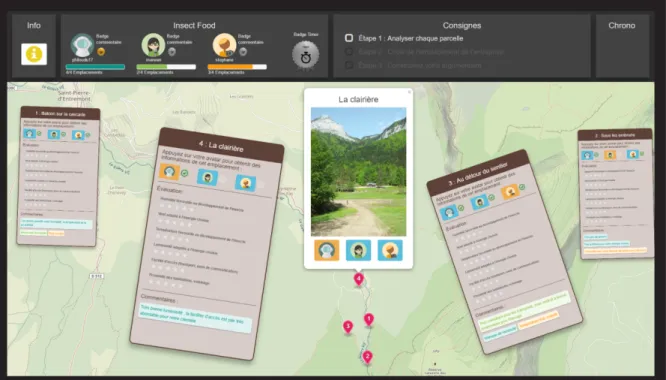
The tabletop displays a large map with four mark-ers corresponding to the four locations to consider (Figure 2). To get the information about a location on their tablets, students need to tap a marker on the map, then tap their avatars in the pop-up box. An in-formation button in the menu bar in the top left corner
lets students get information about the energy and the insect they chose.
On their tablets, students can then see data about light intensity, wind strength, soil temperature, and humidity (Figure 3). The students can analyze each location based on six criteria defined by the teachers. Students must rate each location based on these crite-ria on a scale from one star to five stars. While explor-ing, they can also submit comments about the loca-tions to help them build an argument and support later discussions. Such arguments can also be recorded to build a justification of the final decision. Each student has an individual color for their comments.
These evaluations appear as four cards represent-ing the four locations to support group discussion (brown cards in Figure 2). On these cards, students can see each other’s comments. When all the group members finish their rating, they can get the aver-age of the group rating results on the cards. These cards can be dragged and scaled, which allows stu-dents to organize and compare different options when discussing. It also allows students to orient cards eas-ily when sitting on the side of the tabletop.
We introduced several features to foster awareness and facilitate group regulation. For example, when a student picks a location to explore, the background color of his/her avatar on that option card will change on tablets in order to indicate who is exploring which location. Once a student has finished rating a location, a green checkmark appears on that option card next to his/her avatar as a sign of completion. On the menu bar, there are rating progress bars for each student and
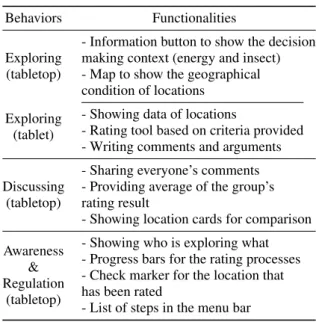
Table 1: Functionalities of the application to support decision-making behavior.
Behaviors Functionalities
Exploring (tabletop)
- Information button to show the decision making context (energy and insect) - Map to show the geographical condition of locations
Exploring (tablet)
- Showing data of locations
- Rating tool based on criteria provided - Writing comments and arguments Discussing
(tabletop)
- Sharing everyone’s comments - Providing average of the group’s rating result
- Showing location cards for comparison Awareness
& Regulation
(tabletop)
- Showing who is exploring what - Progress bars for the rating processes - Check marker for the location that has been rated
Figure 2: Pickit on tabletop. A screenshot of the survey stage.
Figure 3: Pickit on one student’s tablet, from the top to bot-tom showing the location title, location information, rating, comment for the location, and comment in general.
step-lists with the current step highlighted, to help stu-dents understand their progress and the ongoing task.
Table 1 shows the functionalities of the application that support these decision-making behaviors.
We used AngularJS to develop a Web applica-tion running on tabletops and tablets. All the de-vices connect wirelessly to an external server hosted on Heroku, and they communicate via Web sockets.
4
STUDY
We conducted the activity described above in the high school to study whether and how our application sup-ported the four categories of behaviors that were de-fined before, and how the devices were used when stu-dents were performing those behaviors.
4.1
Participants
Four groups of three students from the same high school class took part in the activity (12 in total). The students were between 16 and 19 years old (mean: 17.5, SD: 0.78), including seven females and five males. They knew each other well and had already worked together as groups in their former classes. Two teachers joined us to follow groups and gave in-structions on task. Teachers underlined that it was challenging for students from this class to collaborate.
4.2
Apparatus
Each group had a capacitive 27-inch horizontal touch screen with a resolution of 1920x1080 pixels, and a tablet per student (Galaxy Note 8 with protective cov-ers). The touch-screens were positioned on round ta-bles. Students all sat on the same side of the table and could rest the tablets on the table in front of the touch-screen (see Figure 1). All the devices were wirelessly connected to the network.
4.3
Task Organization
Each session lasted about 30 minutes. The study took place in the high school library. Two groups performed the task at the same time. A teacher fol-lowed each group to give instructions. Before the task, the teacher explained the application to the stu-dents, and let them play with the application to fa-miliarize themselves with all the functionalities. Sev-eral bookshelves isolated the two groups, to avoid any external influence during the task. Competition or collaboration between groups was neither encouraged nor discouraged.
4.4
Data Collection / Recording
We used one camera set in front of the table to record the tabletop screen, students’ interactions, gestures, and postures. We also collected logs to quantify in-teractions on the tabletop and tablets and comple-ment the videos, e.g. know what was displayed on the tablets of the participants. After the experiment, students were asked to fill in a questionnaire con-taining 5-point Likert-scale and free-form questions about their perception of learning and their feelings on using the combination of devices to carry out the activity.
4.5
Analysis Method
We focused our analysis on the four behaviors iden-tified earlier. We used two type of data sources, the recorded videos, and logs. The goal of the analysis was not to provide quantitative data of the activity but to give qualitative insights on how students behaved and collaborated in MSE. We tried to understand how the design of our application impacted activity and device usage, and contributed to the decision-making process. To do so, we defined a coding scheme for the analysis of videos based on the literature presented previously (Ratcliffe, 1997; Hornecker et al., 2008; Rogat and Linnenbrink-Garcia, 2011).
Two coders analyzed the videos independently on different samples. They did an inter-rater reliability test with the result of 85% agreement. Then one re-searcher analyzed three groups and the other analyzed one group. Both of them went through the videos twice. The first time, they used the coding scheme and the second time, they noted down devices usage (for instance who was interacting on the shared dis-play or how students used their tablets and the table-top to discuss a specific option).
4.5.1 Video Coding Scheme
For exploring behaviors, we noted the sequence of ex-ploring options of each student on a timeline. This timeline is used to analyse how students chose the op-tions to explore, how long they spent on each option, and whether their exploration strategies were influ-enced by others.
To analyse discussing behaviors, we used the cat-egories defined by Ratcliffe’s (Ratcliffe, 1997):
D-O. discussing options; D-C. discussing criteria;
D-I. discussing context (background knowledge or information);
D-CMP. discussing benefits and drawback of op-tions (comparing);
D-R. choosing with reasoning.
We coded awareness behaviors when they were di-rectly linked to the MSE configuration and to the dis-tribution of the interface among the different devices, for instance when someone was looking or taking a glance at one another to check what others are doing (Rogers and Lindley, 2004):
AW. looking what others are doing.
We split regulation between group regulation (RG) and teachers initiating group regulation (RT). We coded regulation when observing monitoring and planning of the task, as in (Rogat and Linnenbrink-Garcia, 2011).
RG-1. one group member reminds others of the time or the task progression;
RG-2. one group member offers help to others; RT. teacher gives instructions on how to use the application or provides instruction/information to help students understand the decision they should make.
When analyzing these behaviors, we also ob-served how students were using the different devices. We observe device usage from two dimensions: the number of students involved in the activity, and the devices students focused on.
4.5.2 Log analysis
We focused our analysis on the number of actions on the large display including zooming and dragging the map or the location card, pressing buttons, selecting avatars, etc. We computed students’ ratings to see whether their final choice was the location for which they gave the highest score. We also counted the num-ber of comments and justifications of each student.
5
RESULTS
We now describe how the different groups performed the decision-making activity, focusing on the behav-iors defined previously.
5.1
Overview of the Activity
All the groups succeeded in analyzing locations, mak-ing decisions and providmak-ing reasonable justifications. Groups spent different amount of time on their tasks (G1 = 38m14s, G2 = 25m37s, G3 = 31m33s, G4 = 23m02s). We were interested in observing how groups structured the analytical process and which be-haviors were involved in the different steps. We ob-served that three groups (G1, G2 and G3) explored options and began to discuss and compare them at the same time, during the survey step. Discussions al-ways happened when one student finished browsing an option and wanted to exchange ideas with others. Such discussions only happened when students were checking or had already checked the location. But if other students did not check the location yet, the dis-cussion would not be initiated.
Group 4 acted differently. The students explored options individually and did not discuss during this step, which made it much shorter comparing to other three groups (time percentage of the survey step for each group: G1 = 65.4%, G2 = 77.7%, G3 = 77.8%, G4 = 55.1%). Group 4 also had fewer interactions on the shared display (G1 = 102, G2 = 156, G3 = 50, G4 = 35) but a higher amount of individual comments for each location (G1 = 14, G2 = 15, G3 = 16, G4 = 26).
G1, G2 and G3 spent a little time on the choice step as they already had discussions and changed their ideas in the former step. On the contrary, G4 be-gan to discuss various options in the choice step, us-ing the individual comments written on the previous step. Consequently, this step was longer than for the other groups (time percentage of the choice step: G1 = 1.6%, G2 = 6.5%, G3 = 3.2%, G4 = 14.3%).
5.2
Exploration
Exploration happened mostly during the survey step. Students checked the information about breeding re-quirements of their insects, their chosen energy and geography of locations on the shared surface, and browsed each option and criteria (such as the tem-perature for breeding the insect or the feasibility of using wind energy) on their tablet. In G1, G2 and G3, students did not double check options in the last two steps, which indicated they knew well about these op-tions after the survey step. Only G4, who did not dis-cuss during the survey step, re-visited some locations in the choice step.
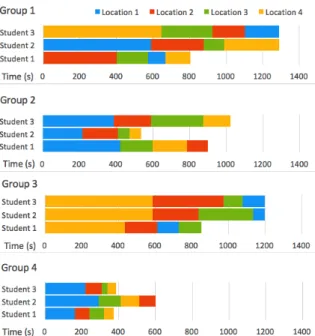
Figure 4: Location analysis sequence of each student based on the timeline. Four colors represent four locations.
During the exploration, students acted individu-ally when choosing a location to analyze on the map. We observed nevertheless implicit coordination in the choice of locations. From the figure 4 we can see that three groups (G2, G3 and G4) started the exploration with the same location. When a participant selected another location, s/he was later followed by the two others. According to the speed of exploration of each student, we can observe adjustments and switches in the exploration sequences. For instance, in G3, af-ter the second location visited, students 2 and 3 broke the order chosen by student 1, who is quicker than the other two. They chose the location that student 1 was exploring at this moment so they could dis-cuss together. We can find several periods in these three groups when students were checking the same location together. One reason for this could be they
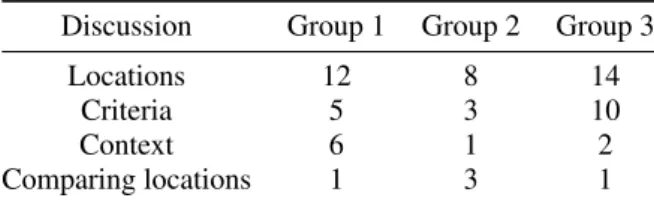
Table 2: Discussion in survey: the number of discussions on locations, criteria, context and comparing locations by each group (expect group 4 who did not discuss in this step).
Discussion Group 1 Group 2 Group 3
Locations 12 8 14
Criteria 5 3 10
Context 6 1 2
Comparing locations 1 3 1
were influenced by the interface, choosing the marker that showed up on the display. The other reason could be that students wanted to evaluate together the same locations so they could discuss and share opin-ions. Only students of G1 adopted a different strategy. They chose different locations to explore on purpose during the whole survey.
5.3
Discussion among group
5.3.1 Discussion in survey
We counted the number of discursive acts in the sur-veystep and we observed how devices were used dur-ing the discussions. Options and criteria were mostly the main focus of discussions whereas discussing the context and comparing options occur few times in this step (Table 2). We observed mostly two participants focusing on one tablet during discussions followed by two or three students focusing on the shared display and hybrid chat using both shared display and tablet. Students had most discussions dyadically and used tablets to discuss, especially when the discussions were related to options and criteria. They used tablets to check a specific option, analyzing the data accord-ing to the criteria and exchangaccord-ing ideas. The shared display was often used when students discussed about the context and their preferences (example of a dis-cussion in Table 3).
Regarding group coordination, groups that tended to explore the same options in parallel on their tablets (G2 and G3) preferred to discuss using their tablets. Group 1, where students explored the location inde-pendently on their tablets, used mostly the tabletop to discuss. Group 4 did not have discussion in this step. 5.3.2 Discussion in choice and justification Discussions in the choice and justification steps were more concentrated in comparison to the survey step where they were fragmented. Therefore, we consid-ered discussion durations instead of counting occur-rences in our analysis (Table 4). Group 4 spent more time in these steps compared with other groups since they did not discuss during the survey. All the groups
Table 3: An extract of G3 discussion on a location.
Student A and B have the same location on their tablets:
- A: “What do you think about the humidity?" (A looks at B.)
- B: “It’s too humid." (B looks at his own tablet.) - A:“Too humid? What about the wind speed?" (A takes a look at her tablet, then looks at B.) - B: “We don’t care about wind, we use solar energy." (B looks at A.)
- A: “Yes, but the light intensity is also not good enough." (A looks again at her tablet, then looks at B.)
- B: “No, it only has 1017 lux." (B looks at his tablet.)
Table 4: Duration of discussions in choice and justification on: comparing locations and choosing with reasoning.
Discussion G1 G2 G3 G4
Comparing locations 142s 20s 37s 184s
Choosing with reasoning 12s 16s 11s 53s
discussed around tabletop. This tends to indicate that the shared display supported groups in synchronizing opinions and reaching a decision. In group 4, we also observed one student looking at the tabletop while two others looked at their tablets, when they had diffi-culty deciding which option was better and needed to check the data on their tablets again. Possibly, tablets served as supportive tools for debating during discus-sion when more information was needed.
Location cards played an important role during the discussion. The ratings on the cards helped students to quickly find the options with the highest scores. Students could zoom out and put aside the options with lower scores and only focus on the best ones. We observed several times students were organizing the cards on the shared display together to compare options. The comments they added to the cards also reminded them of their reasoning and supported them in building justifications. In the end, each student submitted his/her justifications through his/her tablet. We observed two ways students used for submitting their justifications. In two groups, students submitted the group justification that they discussed and agreed upon. In two other groups, students distributed their justifications, each one submitting the justifications that concerned some specific aspect. From the logs, we saw that members of a group did not always have the same preferences, but all groups chose the option that had the highest average score.
5.4
Awareness and Regulation
Awareness and regulation behaviors happened mainly in the survey step, when students were individually exploring options. The maintenance of awareness was subtle. For example, when one student chose an option on the tabletop, other students working on their tablets would take a glance at the tabletop. This slight head movement indicated that students could be aware of others actions on the tabletop. In group 2 and 3, although we did not observe students explicitly looking at each other, they still knew which option their partners were exploring and talked with them about that option. Awareness was mainly maintained by the shared surface, such as one student looking at another’s interaction on the tabletop.
We did not observe many regulation behaviors in which students reminded others of their progress or time (RG-1) (mean = 1.25, SD = 0.96). In con-trast, regulation in the form of supporting one another (RG-2) happened more frequently (mean = 17, SD = 10.7). For example, in group 1, student A was look-ing at the location card on the tabletop and saw stu-dent B dragging the map looking for the next location to explore. A pointed at a location card and said to B: “This one you haven’t evaluated." Such behaviors happened mostly over the tabletop when they were tapping avatars for others, showing others the picture of a location on the map, or passing location cards. At a more minor level we also observed regulation behavior while students shared a tablet.
Teachers intervened mostly at the beginning of each step to regulate the activity. It mainly involved explaining the task and the application functionalities. They also answered students’ questions about the cri-teria and the decision-making context, ensuring rele-vance of students’ analysis.
5.5
Learning Experience
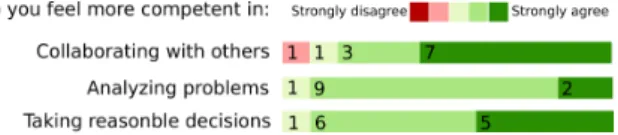
After the activity, we gathered students’ feedback (Figure 5). They were all positive about their learn-ing experience and the skills developed durlearn-ing the ac-tivity. In particular, they felt more competent in col-laborating with others, analyzing problems and taking reasonable decisions at the end of the activity. Be-sides that, they also enjoyed the activity (see Figure 6). Most of them thought using a personal tablet with a shared display helped them collaborating.
We also interviewed teachers after the activity. They were all satisfied with the activity progress. Teachers were positively surprised to see that students collaborated well and could listen to others opinions as they used to have problems on collaborating.
Figure 5: 5-point Likert questionnaires on learning results: do you feel more competent in collaborating with others (top), analyzing problems (middle), and taking reasonable decisions(bottom).
Figure 6: 5-point Likert questionnaires on learning experi-ence: enjoy the activity (top) and using a personal tablet with a shared display helps collaboration(bottom).
6
DISCUSSION
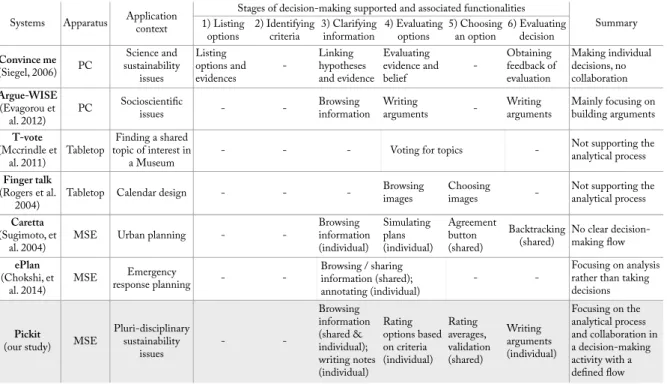
We compare Pickit with former systems supporting decision-making that mentioned in the related work (Table 5). Some of these systems do not focus on decision-making processes, but still support some decision-making stages, such as Caretta (Sugimoto et al., 2004) and ePlan (Chokshi et al., 2014).
6.1
Main Findings
Our study showed that the analytical process con-ducted during decision-making activities in classroom can benefit from MSE properties. The combination of devices enabled tightly-coupled collaboration and loosely-coupled parallel work in the decision-making process, avoiding free-riding situations. The shared display seemed to increase students’ awareness of the ongoing activity, and led students to explore the same option synchronously, but with a high level of free-dom and without interfering with each other. In this sense, the tablets improved independent exploration of options within groups. Students were able to de-velop their own judgments on the various options us-ing criteria. And hence increased their understand-ing. During discussions, the shared display supported students in synchronizing opinions and reaching a de-cision whereas tablets served as supportive tools for debating when more information was needed.
From an educational point of view, according to teachers, students all succeeded in making reasonable decisions and providing justifications to support their decisions. Students learned to argue and to struc-ture better a decision-making activity. Teachers also underlined the positive effects of the application on
Table 5: Comparison of Pickit with former systems supporting decision-making. For the systems that use MSE, we also clarify the role of devices.
Systems Apparatus Application context 1) Listing Stages of decision-making supported and associated functionalities Summary options 2) Identifying criteria 3) Clarifying information 4) Evaluating options 5) Choosing an option 6) Evaluating decision
Convince me (Siegel, 2006) PC Science and sustainability issues Listing options and evidences -Linking hypotheses and evidence Evaluating evidence and belief -Obtaining feedback of evaluation Making individual decisions, no collaboration Argue-WISE (Evagorou et al. 2012) PC Socioscientific
issues - - Browsing information Writing arguments - Writing arguments Mainly focusing on building arguments
T-vote
(Mccrindle et al. 2011) Tabletop
Finding a shared topic of interest in
a Museum - - - Voting for topics
-Not supporting the analytical process
Finger talk
(Rogers et al.
2004) Tabletop Calendar design - -
-Browsing
images Choosing images - Not supporting the analytical process
Caretta
(Sugimoto, et
al. 2004) MSE Urban planning -
-Browsing information (individual) Simulating plans (individual) Agreement button (shared) Backtracking
(shared) No clear decision-making flow
ePlan (Chokshi, et al. 2014) MSE Emergency response planning - -Browsing / sharing information (shared); annotating (individual) - -Focusing on analysis rather than taking decisions
Pickit
(our study) MSE
Pluri-disciplinary sustainability issues - -Browsing information (shared & individual); writing notes (individual) Rating options based on criteria (individual) Rating averages, validation (shared) Writing arguments (individual) Focusing on the analytical process and collaboration in a decision-making activity with a defined flow
students’ cross-disciplinary skills. They were more inclined to collaborate with others even though they usually have great difficulties to listen to others and consider other opinions. Former studies have demon-strated that prior friendship had a significant, large negative impact on group performance (Maldonado et al., 2009). Our findings suggest that MSE may ad-dress this issue as using Pickit allows students to col-laborate better than in a classic classroom situation.
6.2
Implication for Design
6.2.1 Structuring Decision-making Applications and Taking Advantages of MSE
The design of decision-making activities should take into account the properties of MSE to balance indi-vidual and collaborative work and to help students in structuring their analytical process.
As underlined by previous literature (Roberto, 2009), we observed that according to the groups, the stages of the analytical process could be strongly in-tertwined. Many times students were discussing dur-ing the individual exploration builddur-ing gradually their choice. The structure promoted more independent an-alytical work nonetheless. Students rated their op-tions independently and were able to construct their personal opinions. We did not observe free-riding
be-haviors in class that was prone to it according to the teachers. We attribute this partly to the design of the application: the analysis being connected to each par-ticipant through their tablets, which made everyone accountable in a way.
In addition, distributing content on tablets enabled to avoid conflicted viewing and analyzing, especially in our case where the information was abundant and challenging to display at once.
6.2.2 Supporting Discussion
Overall, tablets became supportive tools for debat-ing, and supported discussions. Tablets also en-abled students to freely analyze options at their own pace. However, analyzing different options in parallel tended to impede discussion. We observed how con-fusion could arise from students discussion a specific criteria but not referring to the same option/location.
We also hypothesize that group 4 did not discuss at all in the survey stage, because one student did not let others look at her tablet. We assume that letting students going through options together may promote more discussions. Moreover, giving an overview of analysis elements on the shared surface can support students in comparing options. We observed several times that students were organizing the cards accord-ing to the scores of options. The comments added
during the survey and displayed on the cards also sup-ported students in building justifications.
6.2.3 Better Supporting Awareness
In our application, we distributed the controls be-tween the shared display and tablets. For instance, in order to control what was displayed on their tablet, students needed to use the tabletop. An alternative could have been to offer tabs on the tablets so that all the locations would be directly available. How-ever, we noticed that our strategy led to a good aware-ness of students’ actions, status and progress. Stu-dents could notice when their partners finished one location and switched to the next. In addition, the features designed in the application, such as avatars showing who is exploring which option, progress bars and step-list, contributed to maintaining a good level of awareness.
6.3
Limitations
The design of Pickit was focused on the analytical process in decision-making activities. In agreement with the teachers, we decided to not support several aspects of the process, such as searching for options, and identifying criteria. We assume that more features would be required in the application when support-ing the whole process of decision-maksupport-ing. Also, we should investigate deeper whether the design of the application could influence or introduce some bias in the behaviors we analyzed. In particular, it remains difficult to establish if the sequences of location ex-plored during the survey followed a specific strategy or if it was a consequence of the interface, displaying the last location chosen by someone.
7
CONCLUSION
We presented Pickit, an application supporting decision-making process for multi-surface environ-ments. Our application design is grounded in work-shops with teachers and an in-depth analysis of the literature on decision-making process. Based on these dual requirements from teachers and the literature, we focused on the analytical process of the decision-making activity, which involves four broad categories of decision-making behaviors: exploring, discussing, awareness and regulation.
We conducted a study with 12 high school stu-dents to understand how our application would sup-port in a complex decision-making scenario, involv-ing the consideration of multiple options, criteria and
background information. A second purpose of the study was to understand how students interact with personal and shared devices in such an environment. Our results show that the proposed MSE application supported the analytical decision-making process. It helps students develop their own ideas and makes free-riding more difficult. Students were all succeed in making reasonable decisions and providing justifi-cations to support their decisions.
ACKNOWLEDGEMENTS
This research would not have been possible with-out the teachers Cerise, Pascaline, Xavier, Cécile, Sébastien and Caroline who participated to the design and made the activity possible, as well as the amaz-ing students from LPA la Martellière in Voiron. This work was partially funded by the China Scholarship Council PhD program and the ANR project JENlab (ANR-13-APPR-0001).
REFERENCES
Aikenhead, G. S. (1985). Collective decision making in the social context of science. Science Education, 69(4):453–475.
Chokshi, A., Seyed, T., Marinho Rodrigues, F., and Maurer, F. (2014). eplan multi-surface: A multi-surface envi-ronment for emergency response planning exercises. In Proceedings of the Ninth ACM International Con-ference on Interactive Tabletops and Surfaces, ITS ’14, pages 219–228, New York, NY, USA. ACM. Clark, H. H. and Brennan, S. E. (1991). Grounding in
com-munication. Perspectives on socially shared cogni-tion, 13(1991):127–149.
Deneubourg, J.-L. and Goss, S. (1989). Collective patterns and decision-making. Ethology Ecology & Evolution, 1(4):295–311.
Dillenbourg, P. and Evans, M. (2011). Interactive table-tops in education. International Journal of Computer-Supported Collaborative Learning, 6(4):491–514. DiMicco, J. M., Pandolfo, A., and Bender, W. (2004).
In-fluencing group participation with a shared display. In Proceedings of the 2004 ACM conference on Com-puter supported cooperative work, pages 614–623. ACM.
Dourish, P. and Bellotti, V. (1992). Awareness and coor-dination in shared workspaces. In Proceedings of the 1992 ACM conference on Computer-supported coop-erative work, pages 107–114. ACM.
Evagorou, M., Jimenez-Aleixandre, M. P., and Osborne, J. (2012). “Should we kill the grey squirrels?” A study exploring students’ justifications and decision-making. International Journal of Science Education, 34(3):401–428.
Grace, M. (2009). Developing high quality decision-making discussions about biological conservation in a normal classroom setting. International Journal of Science Education, 31(4):551–570.
Gutwin, C. and Greenberg, S. (1998). Design for indi-viduals, design for groups: tradeoffs between power and workspace awareness. In Proceedings of the 1998 ACM conference on Computer supported cooperative work, pages 207–216. ACM.
Hadwin, A. F., Järvelä, S., and Miller, M. (2011). Self-regulated, co-Self-regulated, and socially shared regulation of learning. Handbook of self-regulation of learning and performance, 30:65–84.
Häkkinen, P. and Hämäläinen, R. (2012). Shared and per-sonal learning spaces: Challenges for pedagogical de-sign. The Internet and Higher Education, 15(4):231– 236.
Higgins, S., Mercier, E., Burd, L., and Joyce-Gibbons, A. (2012). Multi-touch tables and collaborative learn-ing. British Journal of Educational Technology, 43(6):1041–1054.
Hong, J.-L. and Chang, N.-K. (2004). Analysis of ko-rean high school students’ decision-making processes in solving a problem involving biological knowledge. Research in science education, 34(1):97–111. Hornecker, E., Marshall, P., Dalton, N. S., and Rogers, Y.
(2008). Collaboration and interference: awareness with mice or touch input. In Proceedings of the 2008 ACM conference on Computer supported cooperative work, pages 167–176. ACM.
Janis, I. L. and Mann, L. (1977). Decision making: A psy-chological analysis of conflict, choice, and commit-ment.Free Press.
Judge, T. K., Pyla, P. S., Mccrickard, D. S., Harrison, S., and Hartson, H. R. (2008). Studying group decision making in affinity diagramming.
Kharrufa, A., Leat, D., and Olivier, P. (2010). Digital mys-teries: designing for learning at the tabletop. In ACM International Conference on Interactive Tabletops and Surfaces, pages 197–206. ACM.
Kraemer, K. L. and King, J. L. (1988). Computer-based sys-tems for cooperative work and group decision making. ACM Computing Surveys (CSUR), 20(2):115–146. Maldonado, H., Klemmer, S. R., and Pea, R. D. (2009).
When is collaborating with friends a good idea? in-sights from design education. In Proceedings of the 9th international conference on Computer supported collaborative learning-Volume 1, pages 227–231. In-ternational Society of the Learning Sciences. McCrindle, C., Hornecker, E., Lingnau, A., and Rick, J.
(2011). The design of t-vote: a tangible tabletop appli-cation supporting children’s decision making. In Pro-ceedings of the 10th International Conference on In-teraction Design and Children, pages 181–184. ACM. Ratcliffe, M. (1997). Pupil decision-making about socio-scientific issues within the science curriculum. In-ternational Journal of Science Education, 19(2):167– 182.
Roberto, M. A. (2009). The art of critical decision making. Teaching Company.
Rogat, T. K. and Linnenbrink-Garcia, L. (2011). Socially shared regulation in collaborative groups: An analy-sis of the interplay between quality of social regula-tion and group processes. Cogniregula-tion and Instrucregula-tion, 29(4):375–415.
Rogers, Y., Hazlewood, W., Blevis, E., and Lim, Y.-K. (2004). Finger talk: collaborative decision-making us-ing talk and fus-ingertip interaction around a tabletop dis-play. In CHI’04 extended abstracts on Human factors in computing systems, pages 1271–1274. ACM. Rogers, Y. and Lindley, S. (2004). Collaborating around
vertical and horizontal large interactive displays: which way is best? Interacting with Computers, 16(6):1133–1152.
Seifert, J., Simeone, A., Schmidt, D., Holleis, P., Reinartz, C., Wagner, M., Gellersen, H., and Rukzio, E. (2012). Mobisurf: improving co-located collabora-tion through integrating mobile devices and interac-tive surfaces. In Proceedings of the 2012 ACM inter-national conference on Interactive tabletops and sur-faces, pages 51–60. ACM.
Seyed, T., Costa Sousa, M., Maurer, F., and Tang, A. (2013). Skyhunter: a multi-surface environment for support-ing oil and gas exploration. In Proceedsupport-ings of the 2013 ACM international conference on Interactive table-tops and surfaces, pages 15–22. ACM.
Shen, C., Everitt, K., and Ryall, K. (2003). Ubitable: Im-promptu face-to-face collaboration on horizontal in-teractive surfaces. In International Conference on Ubiquitous Computing, pages 281–288. Springer. Siegel, M. A. (2006). High school students’ decision
mak-ing about sustainability. Environmental Education Re-search, 12(2):201–215.
Sugimoto, M., Hosoi, K., and Hashizume, H. (2004). Caretta: A system for supporting face-to-face col-laboration by integrating personal and shared spaces. In Proceedings of the SIGCHI Conference on Human Factors in Computing Systems, CHI ’04, pages 41–48, New York, NY, USA. ACM.
Uskola, A., Maguregi, G., and Jiménez-Aleixandre, M.-P. (2010). The use of criteria in argumentation and the construction of environmental concepts: A university case study. International Journal of Science Educa-tion, 32(17):2311–2333.
Vauras, M., Iiskala, T., Kajamies, A., Kinnunen, R., and Lehtinen, E. (2003). Shared-regulation and motivation of collaborating peers: A case analysis. Psychologia, 46(1):19–37.
Volet, S., Vauras, M., and Salonen, P. (2009). Self-and social regulation in learning contexts: An integrative perspective. Educational psychologist, 44(4):215– 226.
Wallace, J. R., Scott, S. D., and MacGregor, C. G. (2013). Collaborative sensemaking on a digital tabletop and personal tablets: prioritization, comparisons, and tableaux. In Proceedings of the SIGCHI Confer-ence on Human Factors in Computing Systems, pages 3345–3354. ACM.