Development of an Autonomous
Robotic Air Hockey Player
by
Bee Vang
Submitted to the
Department of Mechanical Engineering
in Partial Fulfillment of the Requirements for the Degree of
Bachelor of Science in Mechanical Engineering
at the
Massachusetts Institute of Technology
June 2013
©
2013 Bee Vang. All rights reserved.
VASSACHUSIFTTS
INST
rJi.
EJLj
3
L B RAR iE
The author hereby grants to MIT permission to reproduce and to
distribute publicly paper and electronic copies of this thesis document
in whole or in part in any medium now known or h reafter created.
Signature of Author:
Certified by:
Departm
f
al Engineering
May 10, 2013
Karl D. Iagnemma
Principal Investigator of The Robotic Mobility Group
Thesis Supervisor
Accepted by:
Anette Hosoi
Professor of Mechanical Engineering
Undergraduate Officer
Development of an Autonomous
Robotic Air Hockey Player
by
Bee Vang
Submitted to the Department of Mechanical Engineering
on May 10, 2013 in Partial Fulfillment of the
Requirements for the Degree of
Bachelor of Science in Mechanical Engineering
ABSTRACT
Air hockey is a widely played sport in the United States and is expanding to other countries. It is
usually played on a frictionless table between two or more people. The dependency of another
individual makes it impossible for a person to practice or play alone.
An autonomous two-link manipulator was designed and developed to allow a person to
individually play air hockey. The two-link manipulator consisted of a mechanical, electrical, and
software system. The mechanical system was designed to actuate the two-link manipulator
through geared motors and a belt transmission while being self-contained. The electrical system
was designed to provide feedback of the physical system and motor control capabilities. The
software system was designed to integrate the information from the mechanical and electrical
systems to create the controls and behavior of the mechanical arm.
The autonomous two-link manipulator proved to be a robust design. It had a
68.5
percent hit rate,
suggesting that the design will be capable of playing air hockey.
Thesis Supervisor:
Karl D. Iagnemma
Acknowledgements
I would like to thank Professor Karl Iagnemma for giving me the opportunity to explore
my interest in robotics. With his guidance and support, I was able to lead the development of my
project from conception to a working prototype.
Contents
1. Introduction ...
11
2. M echanical System Design...12
2.1 Design Constraints ...
12
2.1.1 Vicon Infrared Cam era System ...
13
2.1.2 M otor Torque and Speed Requirem ents ...
14
2.2 Two-link M anipulator ...
17
2.3
M otor and Gearhead Selection...
17
2.4 Kinem atics and Controls ...
19
2.4.1 System Kinem atics and Analysis...20
2.4.2 Proportional-Derivative Controller...
21
2.5 Com plete M echanical System ...
22
3. Electrical System Design ...
25
3.1 M otor Controllers ...
25
3.1.1 M otor Controller Selection ...
25
3.1.2 Arduino M icrocontroller...
27
3.2 Encoders ...
27
3.2.1 Encoder Selection ...
28
3.2.2 Phidgets Highspeed Encoder Board...
29
3.3 Visual System ...
29
3.4 Electrical System Layout...30
4. Software System Design ...
32
4.1 Boost C++ Libraries and M ulti-Threading...
32
4.2 OpenCV and Visual System ...
33
4.3 Phidgets Libraries and Encoders ...
34
4.4 Serial Com m unication and Arduino...
35
4.5 Graphic User Interface and GTKm m ...
35
4.6 Arm behavior and Controls ...
36
5. Experim ental Evaluation
...
39
5.1 Perform ance V alidation
...
41
6. Sum m ary and Conclusion
...
43
6.1 Future W orks
...
43
7. Bibliography ...
45
8. A ppendices
...
47
A ppendix A : M atlab Code
...
47
A ppendix B : C++ Code
...
51
A ppendix C : Arduino, Code
...
87
List of Figures
Figure 2.1: The C-structure of the Robotic Anm Table Mount allowed the adjustable...13
Figure 2.2: A histogram of the average puck velocities collected from a Vicon IR...15
Figure 2.3: A histogram of the average puck acceleration collected from a Vicon IR... 15
Figure 2.4: A histogram of the average mallet velocity collected from a Vicon IR...16
Figure 2.5: A histogram of the average mallet acceleration collected from a Vicon IR ...
16
Figure 2.6: The torque-speed curve of the shoulder motor at 12V...18
Figure 2.7: The torque-speed curve of the distal motor at 12V ...
19
Figure 2.8: System diagram of the two-link manipulator with the origin at the...20
Figure 2.9: The settling time of the system with a step input ...
22
Figure 2.10: The complete mechanical system; a two-link manipulator that was...23
Figure 2.11: The bearing support structure for the joint motors...24
Figure 3.1: The SyRen 50A Regenerative Motor Controller was selected to ...
26
Figure 3.2: The SyRen 10A Regenerative Single Channel Motor Controller ...
27
Figure 3.3: A sample output of a quadrature encoder...28
Figure 3.4: A complete electrical system diagram...30
Figure 4.1: The HSV color space uses Hue-Saturation-Value to determine ...
33
Figure 4.2: The image on the left was captured by a webcam...34
Figure 4.3: A Graphic User Interface built from the GTKmm libraries ...
36
Figure 4.4: The layout of the software system...37
Figure 5.1: The complete setup of the two-link manipulator system ...
39
Chapter 1
Introduction
Air hockey is a widely played sport in the United States and is expanding to other countries.
It first became popular in the 1970s where it could be found in arcade rooms [1], but has since
found a common place in personal entertainment rooms and competitive tournaments. Air
hockey is played on a frictionless table (usually a thin sheet of air) with side railings to prevent
the puck and the mallet from exiting the area of play. There are many variation to the rule of
play, but the game is simple. There are two players on opposing ends of the table who try to
strike a puck with a mallet into the opponent's goal. The game of air hockey has not experienced
much change since its birth. One of the difficulties of playing air hockey is the dependency of
another player. A robotic arm was developed to address this issue. This thesis discusses and
evaluates the development of an autonomous robotic arm to allow an individual to independently
play air hockey.
The arm's design and development was heavily influenced by a Do-It-Yourself mentality.
The overall cost of the arm and electrical components, excluding the computer, was
$469.53.
The end goal was to design an arm that could be easily reproduced by a person with minimal
mechanical engineering background and workshop experience. It also had to be affordable,
autonomous, self-contained, and played with realistic force and movements. A two-link
manipulator with a webcam visual system was designed to address the problem with these
constraints in mind. The two-link manipulator consisted of three individual systems: mechanical,
electrical, and software. The mechanical system was designed to actuate the two-link
manipulator through geared motors and a belt transmission while being self-contained. The
electrical system was designed to provide feedback of the physical system and motor control
capabilities. The software system was designed to integrate the information from the mechanical
and electrical systems to create the controls and behavior of the mechanical arm.
Chapter 2
Mechanical System Design
The mechanical system was the starting point in the design process of the robotic arm. The
placement and selection of the actuators and links determined the necessary components in the
electrical and software systems. The mechanical system was designed to house all the electrical
and mechanical components in one transferable unit. This allowed the arm to be moved easily
from one table to another. In the design of the mechanical system, many constraints had to be
defined in order to create a robotic arm capable of playing air hockey with the speed and force of
a person.
2.1 Design Constraints
The robotic arm was designed with consideration of cost, end-effector speed and torque,
adaptability to different table sizes, ability to reach the area of play, and self-containment.
Although there was no set cost, the arm was designed to be low cost and easy to reproduce for
people who already owned an air hockey table. This design constraint limited the types of motors
and electronics that could be used in this project. In order to create an arm that was capable of
playing on various table sizes, the arm needed a versatile mount. This led to a design that used
clamps to hold the arm onto the table, shown in Figure 2.1. The clamps hooked onto the table
with a C-structure and was secured to the air hockey table with an adjustable screw.
Figure 2.1: The C-structure of the Robotic Arm Table Mount allowed the adjustable
screws, shown in red, to secure the mount to the table.
The most deterministic constraint was the end-effector speed and torque. These constraints
determined the arm's movement speed and force, the motors, the motor controllers and the
design of the mechanical structure. A Vicon Infrared Camera system was used to gather the
necessary data to estimate the average human hand speed and force being applied to a puck on
impact. The implementation of these design constraints kept the arm's movements within that of
an average person.
2.1.1 Vicon Infrared Camera System
A Vicon Infrared (IR) Camera System was used to gather the position data of the puck and
mallet to determine the respective average speed and acceleration during play. This information
was used to determine the required end-effector speed and torque to simulate a person playing air
hockey. The physical implementation of these design constraints was in the choice of the joint
motors.
The Vicon IR system consisted of six individual IR cameras mounted to observe a fixed
area. The cameras used IR reflectors to determine the location of objects in three-dimensional
space with millimeter precision. The position data was then uploaded to a laptop running the
Vicon Tracker software. The Vicon Tracker software forwarded this data wirelessly to another
computer that used MATLAB to process the incoming data.
MATLAB processed the position and time data from the Vicon cameras to calculate the
velocity and acceleration of the puck and mallet. The velocity was calculated using the forward
difference, backward difference and centered difference methods, expressed by equation 2.1, 2.2,
and 2.3 respectively [2]. In the equations, x is the position data, i is the calculated velocity, h is
the time step between each data point, and i is the location of the current data point.
1
X
=(*x
- XL)
(2.1)
1
X
= -
(x
-
-*
(2.2)
h
1
x
= -*x- xi_
1)
(2.3)
2h
The forward and backward difference are first order approximation, while the center difference is
second order. This means that the center difference is typically a more accurate approximation.
However, the center difference could not be used at the beginning and end of each data set,
because it would require additional data. In these situations, the forward and backward difference
was used.
A second order center difference calculation was used to determine the acceleration of the
puck and mallet. The second order center difference equation is given by [2]:
1
X
= T* (x
1_
1-
2x + xi+)
(2.4)
Instead of starting and stopping at the first and last data point, this calculation started at the
second and stopped at the penultimate data point to avoid the same issue in the velocity
calculations.
2.1.2 Motor Torque and Speed Requirements
The calculated average speed and acceleration from MATLAB was used to select
appropriate motors. Figure 2.2, 2.3, 2.4, and 2.5 shows the resulting histogram of the average
speed and acceleration of the puck and mallet. This data was gathered from a person playing air
hockey on a goal-less table in which the puck could not leave the area of play. The puck
experienced an acceleration of less than 60
m/sA2for approximately 80 percent of the time and a
velocity of less than 3 m/s for 90 percent of the time. The mallet experienced similar results for
the acceleration, but its velocity was below 2 m/s for 90 percent of the time. From the data, it
was determined that the maximum end-effector speed needed to be 3 m/s and the acceleration
needed to be 60
m/sA2.
0.7 0.6 = 3 0.10
3 2 4 6 8 10 12 14 16 18 2C Velocity (m/s)Figure 2.2: A histogram of the average puck velocity collected from a Vicon IR
0.5
0.45 0.4 0.35 0.3 % 0.25 S0.2 0.15 0.1005
-0 L*mh 0 20 40 60 80 100 120 140 160 180 200 Acceleration(m/s2 )Camera system.
Figure 2.3: A histogram of the average puck acceleration collected from a Vicon IR Camera system.
11=
.
.
.
.
.
.
.
'
-0.5 0.45 0.4 0.35 0.3 C G 0.25 0 LL0.2 0.15 0.1 0.05 0 0 1 2 3 4 5 6 7
8
9 10 Velocity (m/s)Figure 2.4: A histogram of the average mallet velocity collected from a Vicon IR Camera system.
0.5 0 45 0.4 0.35 0.3 C =0.25 .
02
0.10.-0.05
0 IN0
20 4060
80
100120
140 160 180 200 Acceleration(m/s2 )2.2 Two-Link Manipulator
A two-link rotational joint manipulator was chosen as the ideal candidate, because it
fulfilled all the design requirements. It was selected over a two-axis prismatic design and a
slide-and-piston design. The two-link manipulator can transverse over the area, A, as a function of the
length of link one, 11, and link two,
12-A
=
r *((11 +
12 2 -(1
-12)2)
(2.5)
It required less infrastructure, utilized rotational motors, and has well understood dynamics and
controls. It also resembled a human arm, making it easier for people to grasp its purpose.
The dynamics of a two-link manipulator is expressed by equation 2.6. This equation does
not include gravity, because the arm is mounted on a horizontal plane perpendicular to gravity.
The torques on the motor, r, depends on the inertia matrix, H, the coriolis and centripetal torque
matrix, C, the viscous dissipation matrix, D, the angular acceleration, 4, and the angular velocity,
H4 +CQ4+ D = -r
(2.6)
2.3 Motor and Gearhead Selection
To actuate the two-link manipulator, direct current (DC) motors and proper gearheads were
chosen according to the design requirements for speed and torque. DC motors were chosen,
because they are generally cheaper than both servo and stepper motors with the same motor
specifications. The appropriate motor for the shoulder joint needed to be able to rotate the fully
extended arm at 3.0 radian/s with an angular acceleration of 60.6 radian/sA2. The motor
requirements for the distal joint only needed to be able to rotate the distal arm at 6.8 radian/s
with an angular acceleration of 136.9 radian/sA2. If both of these conditions are met, the
maximum desired end-effector speed and angular acceleration will also be met.
The torque-speed curve of a motor needed to be analyzed to determine if that motor met the
required specifications. The torque-speed curve shows the maximum power, the stall torque and
the no-load speed. The maximum power is when the motor is operating at half the no-load speed
and half the stall torque. The no-load speed is the maximum rotational speed of the motor and the
stall torque is the maximum output torque of the motor. If the maximum speed and torque
requirement of the joint motors were below the torque-speed curve of a specific motor, that
motor will be able to actuate the arm. It is better to have the design requirements fall closer to the
no-load speed, because the motor will be more efficient and will operate for longer periods of
time without damage [3].
A RS-550 motor with a back-shaft and a P60 Gearbox with a gear ratio of 81:1 was chosen
as the shoulder joint actuator. The torque speed curve of this motor and gear head combination is
shown in Figure 2.6. The power requirement for this joint motor was below the torque-speed
curve of the motor and gear head combination. This indicated that the motor was sufficient to
actuate the arm. If the motor was to operate at the maximum required torque, it will have a very
low efficiency, because the majority of the input power will be converted to heat. However, the
motor and gearhead combination was adequate in driving the arm, because the motor only
needed to operate for short amount of time between each strike.
6000
-Torque-Speed Curve
X Maximum Motor Power Requirement
5[00 -- Max Motor Power
4000 -0 3000 -2000 -1000
-X
0 0 50 100 150 200 250 Speed (RPM)Figure 2.6: The torque-speed curve of the shoulder motor at 12V. The required
maximum power output is well below the motor's torque-speed curve. This indicated that
the motor and gear head combination was sufficient to drive the arm at the required
end-effector speed and torque.
A geared motor from Pololu was chosen to drive the distal arm. It has a stall torque of 200
was
65.4
rpm and
85.7
oz-in. The requirements fell close to the maximum power of the chosen
motor. This meant that the motor could not operate at the required end-effector speed and torque
for an extended period of time. The torque-speed curve of the distal motor is shown in Figure
2.7.
200
Torque-Speed Curve
180 X Maximum Motor Power Requirement - -Max Motor Power
160 140 --2 120 100 - 60-40 -0 050 100 150 Speed (RPM)
Figure 2.7: The torque-speed curve of the distal motor at 12V. The power requirement
for this joint motor was close to the maximum power output of the chosen motor. This
indicated that the motor would not be able to operate at the maximum end-effector speed
and torque for a prolong period of time.
2.4 Kinematics and Controls
The kinematics of the arm was used to control the arm's movement to a desired location.
This project did not consider the system's dynamics in its control scheme to keep the controller
simple. The controller was designed to move the end-effector to a desired position through the
control of the joint angles.
2.4.1 System Kinematics and Analysis
The mechanical system consisted of two links with two rotational joints. The system moved
in a two-dimensional plane on 'the air hockey table. Figure 2.8 shows the arm's configuration
along with the joint angles, q, and q
2, and the length of the links, 11 and
12.The joint angle q,
was measured with respect to the x-axis and the joint angle q
2was measured with respect to q,.
Figure 2.8: System diagram of the two-link manipulator with the origin at the shoulder
joint. Angle q, was measured with respect to the x-axis and q
2was measured with
The forward kinematic equation for the end-effector is given in equation 2.7 where the shoulder
joint is the origin for the position plane. A Proportional-Derivative position controller was
chosen over a more complex controller that also considered the dynamics to reduce the
implementation and testing time
x
=11
cos
q,
+ 12 cos(q
1+
q
2)
(2.7)
y
=11
sin q,
+
12
sin(q
1+ q
2)
Inverse kinematics was used to determine the joint angles for any desired position. The
control objective of this project was to move the arm to the desired joint angles. Equation 2.8
gives the inverse kinematic equation for a desired position
(Xd, Yd).These equation shows that
there are two possible solution for any given position: elbow up or elbow down.
co
11
X dYd
S1x 2 + 12 2 q, = tan -d_ -1 os d Xd)1,
d(2.8) q2 =' IT - cos- 112+22_X21112
d2
In order to resolve this issue the arm was limited to a right-handed orientation. This was
accomplished by allowing the computer equation solver to use the first solution for q, and q
2when
Xdwas positive. When
Xdwas negative, q, was adjusted by equation 2.9. This proved to
be robust enough to control and determine the position of the arm's end-effector with a
right-handed orientation.
(ya
x2
y2
+ 12 _22q, = 7 - tan-1
)
-cos-1
Xd +Yd +
2
(2.9)
Xd
2
11Nxd2 +
Yd
22.4.2 Proportional-Derivative Controller
A Proportional-Derivative (PD) controller was designed to move the end-effector from its
current position to a desired position. The PD controller factored in the distance from the current
position, (x, y), to the desired position,
(Xd,
ya), and the velocity, i, of each joint. The controller
is given in equation 2.10. It used a constant gain factor, K, and Kd, to scale the motor output.
This controller design simulated a spring and dashpot behavior between the current location and
the desired location. The controller was implemented through the software system.
output signal =
-K
(
(x -
xay)+
(y
-
Ya?))-
Kai
(2.10)
The gains were determined experimentally. The arm was tested with many gain factors until
the performance and motion of the arm was deemed stable and satisfactory. It was not possible to
use a root locus to determine the best gains, because there was no direct conversion from
pulse-width-modulation (PWM) to motor power. The PWM signals will be discussed in chapter three.
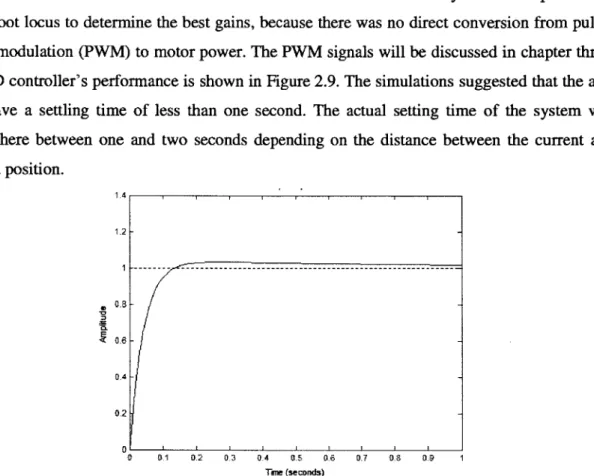
The PD controller's performance is shown in Figure 2.9. The simulations suggested that the arm
will have a settling time of less than one second. The actual setting time of the system was
somewhere between one and two seconds depending on the distance between the current and
desired position.
1.4i 1.2 -1 --- --- ~--- *0.8--0.4 --0.2 -0.1 0.2 0.3 04 05 06 0.7 0.8 0.9 1 Tne (seconds)Figure 2.9: The settling time of the system with a step input. The simulations suggested
that the arm will move to the desired location within one second.
2.5 Complete Mechanical System
The mechanical system served as the structure of the robotic arm. A two-link manipulator
was designed to strike a moving puck with comparable speed and force to that of a person. The
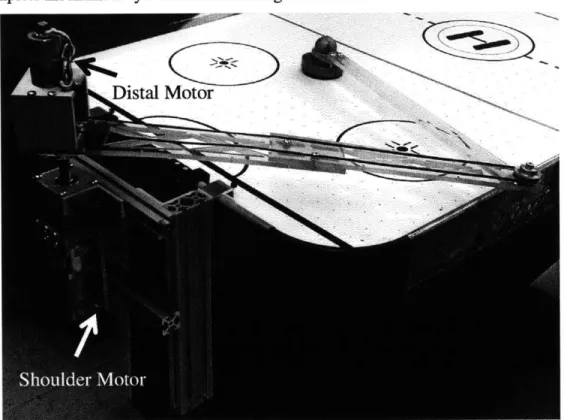
shoulder motor was connected directly to the first link. The distal motor drove the distal arm
through a belt and pulley system. The torque created by the distal motor's mass was eliminated
choice reduced the required motor torque of the shoulder joint motor and lessen the overall cost.
The complete mechanical system is shown in Figure 2.10.
Distal Motor
Figure 2.10: The complete mechanical system; a two-link manipulator that was driven
by two rotational motors. The shoulder joint was directly connected to the first link while
the distal motor drove the distal link through a belt and pulley. This design tried to place
all the mass of the system on the axis of rotation at the shoulder joint.
A bearing support structure was also designed to protect the motors from backlash
and bending moments. Each motor shaft was connected to a drive shaft by a shaft coupler
and then supported at two points by ball bearings. The bearing structure is shown in
Figure 2.11.
Figure 2.11: The bearing support structure for the joint motors. The motors are shown in
teal, the shaft couplers are shown in green, the bearings are shown in red, and the drive
shafts are shown in blue and black. The bearing support structure prevented the motor
shaft from experiencing backlash and bending moments.
Chapter 3
Electrical System Design
The electrical system integrated the controls and sensing aspects of the arm. It took in data
via encoders and a webcam and output the motor commands to an arduino and motor controller.
The electrical system allowed the arm to gather the data from the physical world and used it to
determine the movement of the arm.
3.1 Motor Controllers
The direction of the current and the voltage determines the speed and direction of the motor.
Special circuit boards can be used to manipulate these properties to control the motors. In this
case two circuit boards were used for each motor: a microcontroller and a motor controller. The
motor controller connected a power supply to the motor and provided the circuit necessary to
manipulate the voltage and current. The microcontroller was used to transmit control signals
from a computer to the motor controller.
3.1.1 Motor Controller Selection
The motor controller is a circuit board designed to control the speed and direction of motors.
Important factors to keep in mind are: operational current, maximum current, voltage, and
control signal. It is important to select a motor controller that can operate above the motor
specifications so that the motor controller does not get damaged.
The SyRen 50A Regenerative Motor Controller, shown in Figure 3.1, was chosen to operate
the shoulder motor. This motor controller can handle a continuous 50Amp current, a peak current
of 10OAmps, a 12 Volt input, and a PWM control signal. The shoulder motor operates at 12
Volts with a stall current of 85 Amps. From Figure 2.6, it can be inferred that the maximum
operational current of the shoulder motor will not exceed 50Amps. Therefore, the SyRen 50A
motor control was a suitable motor controller for the shoulder motor.
Figure 3.1: The SyRen 50A Regenerative Motor Controller was selected to control the
shoulder joint.'
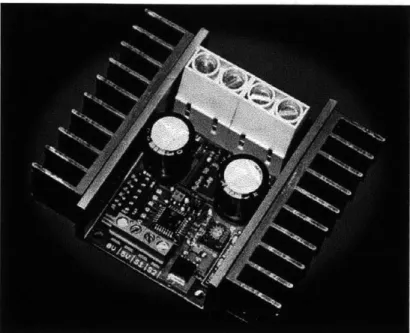
The SyRen 10A Regenerative Single Channel Motor Controller, shown in Figure 3.2, was
chosen to drive the distal joint. The distal motor operates at 12 Volts with a stall current of
5
Amps. The motor controller can handle a continuous 10 Amp current, a peak current of 15
Amps, a 12 Volt input, and a PWM control signal. The maximum current draw from the distal
motor will not exceed the peak current. From Figure 2.7, the maximum operational torque is near
the maximum motor power, therefore the motor will not experience a current draw close to the
stall current. As a result, the SyRen 1OA was a suitable choice for the distal motor.
Image courtesy of www.robotmarktplace.com
Figure 3.2: The SyRen lOA Regenerative Single Channel Motor Controller was selected
to control the distal motor.
2A microcontroller was used to control the motor controller with PWM signals. The
microcontroller received its information from a computer and output that command as a PWM
signal to the motor controller.
3.1.2 Arduino Microcontroller
A microcontroller is a compact integrated computer. The microcontroller board has
everything it needs in order to run calculation and execute computer codes. It has a processor,
memory, and digital/analog inputs and outputs. The Arduino Uno microcontroller was chosen for
this project, because it was inexpensive and has PWM output pins, a strong support community,
and C language based integrated development environment (IDE).
The microcontroller acted as a relying agent for the motor controller. It received data from a
computer, process it, and sent the motor controller a PWM signal. The Arduino used the code in
Appendix C to actuate the motors.
3.2 Encoders
Quadrature encoders were used to measure the joint angles. The encoders had a spinning
disc with a sensor that recorded "ticks" or markers on the spinning disc. Quadrature encoders
output two signals that can be processed to determine the number of ticks and motor direction.
Figure 3.3 shows an example of the encoder output. The order of the output signals indicates
direction and the frequency of the signals indicates speed [4].
Figure 3.3: A sample output of a quadrature encoder. The order of the two signals
indicates direction and the frequency of the signals indicates speed [4].3
The joint angles were used to calculate the position of the end-effector and determined the
respective joint angular velocities. These measurements were important in determining the
control signals for the PD controller. There were some calibration issues with the encoder that
affect the accuracy of the end-effector. The most notable issues were the rotation of the motor
shafts when the end-effector was physically constrained from moving and the backlash of the
motor shafts. Both of these issues will be discussed later.
3.2.1 Encoder Selection
An E4P OEM Miniature Optical encoder with 100 counts per revolution was chosen for the
shoulder motor. With the gear ratio, this encoder measured 8100 counts per revolution of the
motor shaft. The distal arm had a built-in encoder with 64 counts per revolution. With the
gearhead, this encoder measured 4331 counts per revolution of the motor shaft. The counts per
28
3 Image courtesy of www.pololu.comrevolution was used to calculate the angle change over time for each joint. The joint angles were
calculated using equation 3.1. This equation states that the current joint angle is equal to the
current joint angle plus the amount of ticks over a time period, ticks, multiplied by a tick to angle
conversion factor. The ticks also took the direction of rotation into consideration.
q
1=
q
1+ ticks
*()
T,
0-0(3.1)
q2=
q
2+ ticks
*(7(43311
3.2.2 Phidgets Highspeed Encoder Board
The PhidgetEncoder HighSpeed 4-Input board was selected to interpret the output signals of
the encoders. The encoder board utilizes a hardware and software interface to allow a computer
to read important information from the encoders via usb. The board takes in the encoder signals
and process it into relative position change, incremental position, and time data. The encoder
information is called upon by the software system to determine the location of the end-effector
and the arm's joint angular velocities.
3.3 Visual System
For the two-link manipulator to be completely autonomous, it needed to be able to detect the
location of the puck in relation to the end-effector. This was accomplished through the use of a
webcam. The webcam was mounted above the manipulator with a field of view of the table
surface. A software system was used to process these images to determine the puck's speed and
position. The puck's speed and position allowed the arm to predict where the puck will be and
how to best reach it. A webcam was chosen because it was affordable and accessible.
3.4 Electrical System Layout
The overall goal of the electrical system was to provide input and output streams for the
software system so that it could control the mechanical arm using real physical parameters.
Figure 3.4 shows a complete diagram of the electrical system.
Webcas
LAPTOP
Ardulno Ulno Mcrocastroler
SyRem 50 A Motr Controer y
Distal Joint Motor/Encoder
Shoulder Joint Motor
Shoulder Joint Encoder
Figure 3.4: A complete electrical system diagram. The blue arrow shows the flow of
data. The computer took in input from the Phidgets encoder board and the webcam and
then output motor commands to the Arduino microcontroller.
The subsystems interacted together to allow the arm to move, track the puck, and determine the
location of the end-effector. The central part of the electrical system was the computer. The
encoders were connected to the Phidgets encoder board which was connected to the laptop. The
Plafget Encoder Beard
motors were connected to the motor controllers, then to the arduino microcontroller and then to
the laptop. The arrangement of the subsystems created a closed-loop feedback of the whole
system.
Chapter 4
Software System Design
The software system acted as the brain of the robotic arm. It gathered data from the
electrical components and decided how to best actuate the mechanical system. The software
system was composed of many separate libraries that functioned together to allow the computer
to process the input data and output the control command in real time. The integration of the
software system allowed the arm to be completely autonomous.
4.1 Boost C++ Libraries and Multi-Threading
The most important subsystem of the software system was the ability to task or
multi-thread. This allowed the computer to process many data input streams, calculations, and output
streams in real time. Without this library, the computer would only be able to execute one
process at a time which would greatly increase the computation time and result in a slower arm
reaction.
Each of the subsystem in the software system existed on a separate thread, and in some
cases, created their own sub-threads. The special thing about the boost library is that it
automatically utilizes the multiple cores in a computer's processor. Once the subsystems use all
the process capability of one core, boost automatically delegate task to the other cores to allow
for continuous data processing and to reduce the delay time between data input and output.
4.2 OpenCV and Visual System
The visual processing subsystem was built with the OpenCV libraries. OpenCV is an open
source, multi-platform software that implements many of the standard image processing
techniques. It is used widely in computer vision applications.
The main OpenCV functions used in this project were: color space transformation, color
detection, image threshold, and contour detection. The color transformation converts an image
from the standard Red-Green-Blue (RGB) color space to the Hue-Saturation-Value (HSV) color
space. The HSV color space was beneficial because it arranges the color in a way that makes it
easier to specify a range of similar colors by only varying one value. The difference between the
RGB and HSV color space is shown in Figure 4.1. The hue determines the color, for example
red, blue, green, yellow. The saturation level defines the intensity of the color. The value
represents the brightness of the color. Both the saturation and value are affected by adding black
or white to the hue.
HSV Color Space
RGB Color Space
Hug
255,5,25
Saturation
Value
Figure 4.1: The HSV color space uses Hue-Saturation-Value to determine a color, while
the RGB color space uses Red-Green-Blue. The HSV color space arrange the colors in a
way that makes it easier to select a gradient of one color.
4The color detection algorithm was used to process the image to look for the red puck in the
HSV color space. The image threshold process was used in conjunction with the color detection
algorithm to create a black and white image. The white represented areas on the image where the
color of interest was found. The black represented everything else. By creating this black and
white image, the computer can easily determine where a color is on the image.
The contour detection process took the threshold image and found the boundary lines of the
white spaces. Then a contour area of each contour was calculated and compared so that only the
largest white space was taken into consideration by the software system. This proved to be robust
enough to locate the red puck on the air hockey table through all trials. A sample output of the
vision system is shown in Figure 4.2.
Figure 4.2: The image on the left was captured by a webcam. The software system used
the OpenCV algorithms to locate the red puck and to create a threshold image, shown on
right. It then drew a circle on the captured image to make it easier for the user to see
which object the software system was tracking.
4.3 Phidgets Libraries and Encoders
The Phidgets libraries were used to retrieve the encoder data. The Phidgets encoder board
requires this certain library to communicate with the computer. The Phidgets board took the
encoder signals and created increment position, relative position, and time data. The Phidgets
libraries also created multi-threads in the software system to listen for changes in the encoders
and to notify the software system. This allowed for the real time detection of the end-effector
location.
4.4 Serial Communication and Arduino
The arduino requires a serial communication to exchange data with the computer. The serial
library from www.teuniz.net was selected because it was built for C++ and the call functions
were easy to comprehend. The serial communication link was created on a separate thread that
allowed the arduino and computer to communicate without interruptions. The serial
communication line can only transmit one byte at a time. This meant that only one character
could be sent at a time. For example, if the computer wanted to send "1500" to the arduino, it
would have to break "1500" into four parts: "1", "5", "0", "0". On the arduino end, it would
receive these four bytes, but it would not know that the data should be "1500".
Because of this, a code was implemented on the arduino to sum the data together. In order to
distinguish between the two motors, a motor code was assigned: "a" for the shoulder motor and
"b" for the distal motor. Also, an end signal, "\n" indicating an empty space in characters, was
added to tell the arduino that the computer was done sending data for a specific motor. With this
system, if the computer wanted to send "1500" to the shoulder motor, it would send "a", "1",
"5", "0", "0", "\n". The arduino would read the "a" and assign the resulting value to the shoulder
motor. The complete code and byte calculation is shown in Appendix C.
4.5 Graphic User Interface and Gtkmm
A Graphic User Interface (GUI) is a visual interface that allows a user to interact with the
software system. The same user interface could have been created with only text inputs, but a
GUI was determined to be more effective and easier to use. The GUI allowed for the control of
the arm in manual and autonomous modes and for the input of physical constraints. In the
manual mode, the user could control the motors through the use of the keyboard or text inputs
into the GUI. The autonomous mode disabled the user's control and placed it in the software.
This mode allowed the arm to autonomously play air hockey.
C++ does not come with its own GUI library. GTKmm was selected as an open source GUI
library, because it is cross platform, uses the C++ language, has a GUI builder, and has many
built-in functionality that make the GUI run effectively. GTKmm was used to create the GUI,
along with the interactive buttons, text inputs, and labels. This created an informative, interactive
display for the user in the operation of the arm. The air hockey GUI is shown in Figure 4.3.
Air HOckLy
Conbtr-I.
Figure 4.3: A Graphic User Interface built from the GTKmm libraries. The GUI
consisted of buttons, text inputs, and display labels. The GUI allowed for the control of
the robotic arm.
4.6 Arm Behavior and Controls
The arm's behavior and control thread took in the camera data and the end-effector location
to determine a PD control output. The arm was programmed to strike the puck if it was moving
toward the arm and in an area specified by the software system. If there is no puck or the puck is
moving away from the arm, the arm would go to a home position and wait. The area was
designated to prevent the arm from hitting the edge or getting stuck in its own goal. When the
end-effector hit the edge or was caught in its own goal, the encoders reported change in joint
36
11'5ao
J
Me Position(CM)0 9 tm Rbo
1
-oA
ArrnCab~mn- T.--- TtCoto Can-iixto - --
---_______ bcn -4 o- thtwmto fow pptirmtcskvt tw
Amm~ afs -___________)
angles when, in actuality, the end-effector was not moving. The end-effector was physically
constrained by the wall or goal from moving outside the play area, but the motor shaft kept
spinning and caused the shaft couplers or timing belt to slip. This caused the software system to
lose track of the real position of the end-effector and prevented the arm from hitting the puck.
4.7 Software System Layout
The layout of the software system is shown in Figure 4.4. The main thread was the GUI
window. From the main window, other threads were created to handle the various task of the
software system.
Camera
Phidgets
Thread
Thread
Encoder
Listener
Thread
GUI
...
Serial
PD
Update
Thread
Controller
GUI
Thread
Thread
Mcro-controller
Software
Figure 4.4: The layout of the software system. The main thread was the GUI window.
Subsequent threads were created to break up the various task in the software system. The
most important threads are shown in the figure.
The camera thread initialized the webcam to capture a live stream at 30 frames per
second of the air hockey table and puck. It used the OpenCV libraries to process the
images and to determine the puck's location. The position data was passed to a global
variable that was shared among all the threads. The Phidgets thread initialized the
PhidgetEndcoder HighSpeed board and created additional sub-threads to listen for
changes in the encoders and to notify the GUI. The serial thread opened a communication
link via usb between the computer and microcontroller. It was used to pass control
signals from the GUI and PD controller thread to the motor controllers. The PD controller
thread processed the data from the input sensors and determined where the end-effector
should go to hit the puck. The Update GUI thread updated the labels on the GUI to reflect
the real time information.
Chapter
5
Experimental Evaluation
The robotic arm was tested on a Harvard Acclaim 4.6 ft. Air-Powered hockey table. The
table was on the smaller spectrum of air hockey tables, but it was within the design space. The
performance test of the arm began with the mechanical assembly. The two joint motors were
mounted along the rotational axis of the shoulder joint. Then the electrical components were
connected to the mechanical structure to provide the sensory input and output for the software
system. The webcam was mounted above the shoulder joint with an extension on the arm table
mount. An overview of the assembled robotic arm is shown in Figure 5.1.
Figure 5.1: The complete setup of the two-link manipulator system. The two-link
manipulator was mounted on the Harvard Acclaim air hockey table. The electrical
sensors and actuators allowed the arm to autonomously play air hockey. A computer
interpreted the sensory data and used it actuate the mechanical arm.
The shoulder motor was powered by a 12 Volt, 100 Amp PowerMax DC power supply. The
distal motor was powered by a 12 Volt, 3 Amp DC power supply. These power supplies were
chosen to accommodate the stall current of each motor. After many trials, it was observed that
the maximum current on both motors never exceeded 3 Amps. This confirmed that the power
supplies were adequate in providing power to each motors.
Before any testing could be done, the webcam needed to be calibrated to the same
coordinate plane as the end-effector. Four end-effector positions were used to calibrate the
webcam. The four points made a rectangle in the end-effector plane, but a converging
quadrilateral on the camera image. The configuration points are shown in Figure 5.2.
Top View of Air Hockey Table Webcam Image of Air Hockey Table
(XpixeB3,.YpixeB3)
(XreaL3, YreaL3)
(XreaL4, Yreal4)
(3)
0
XpixeWs
.YpixeM4)(Xpixei1, Ypixel) (XpixeL2. Ypixet2) (Xreali, Yrea ) (Xreal2> Yrea 2)
o1
0
Camera
Figure 5.2: The end-effector plane is shown on the left. Four calibration points were used
to calibrate the camera's perspective to the end-effector coordinate system. The camera's perspective, on right, shows the perpendicular lines of the real system converging to a point near the center.
To compensate for the converging image, a set of linear equations were used to relate the pixel
position, (Xpixei, Ypixet), to real end-effector position, (Xreat,Yrea). Equation 5.1 relates the y
positions.
Yreat =my * Ypixet + by (5.1)
where
__Yreaii-Yreai2
MY
=
YeireI _by
=Yreai1
-my
*Ypixei1
The x position required a bit more work because the x-pixel length is dependent on the y values.
Equation 5.2 defines the
xrea
position transformation as a function of the current values
Yreal, Ypixel, and
Xpixeiand calibration points
xreall, Xreal2, XrealiXreal
=7m*
Xpixei + bx
(5.2)
where
Xreali - Xrea12
m = C1 - C2 ,
b,
=Xreal1 -mx
*c
1, C1 = mC1 * Ypixei+
bc
1,
Xpixei1
-X pixel3
MC
1 = ,bci
= Xpixeli - mc 1 *Ypixel.
Ypixel.
Ypixel3
and c
2is defined similarly to cl using points 2 and 4.
The purpose of this project was to design and develop a robot that allowed a person to
independently play air hockey. Therefore, the most compelling validation of the robotic arm's
performance is its ability to autonomously hit the puck.
5.1 Performance Validation
The arm was given 73 attempts to autonomously hit a moving puck. To hit a moving puck,
the computer had to calculate a desired striking point. First, it used a center difference method to
find the velocity of the puck. Then, it estimated the puck's position in ten milliseconds using the
current position and velocity vector. Ten milliseconds was experimentally chosen as the time
step, because it gave the arm enough time to reach the puck from anywhere on the table. Out of
the 73 attempts, the arm was able to strike 50 pucks resulting in a 68.5 percent hit rate. This was
an excellent result for the first prototype. Due to the complexity of the system and the simplicity
of the controls, the hit rate was expected to be lower than 10 percent.
The behavior of the arm was observed to follow the programmed behavior and controls. The
arm did not attempt to strike at pucks that were moving away from it or too close to the walls. It
returned to its home position after every attempt and did not move when there was no puck
present.
Although the results were promising, there were many issues in the operation and
controls of the robotic arm. The largest issue was the misalignment of the end-effector position
and the calibrated camera position. Sometimes, the motor overshot the puck's position and hit
one of the side walls. In this case, the motors kept rotating but the end-effector did not move. As
a result, the computer lost track of the real end-effector position and could not hit the puck
accurately.
Another issue was the backlash in the joint motors. The distal arm had a five to ten
degree of rotation before the encoder registered any movement. The shoulder motor had even
greater backlash. The backlash also resulted in miscalculations of the end-effector position.
Chapter 6
Summary and Conclusion
Air hockey is a sport that is usually played between two or more individuals. There is an
inherent issue with the dependency of another person. Sometime, it is more favorable to play air
hockey by oneself. An autonomous robotic arm was designed and developed to allow a person to
independently play air hockey. The robotic arm consisted of three main systems: mechanical,
electrical, and software. The mechanical system was designed as a two-link manipulator with
Proportional-Derivate
position
control.
The electrical
system
contained
encoders,
a
microcontroller, motor controllers and a webcam. The encoders were used to determine the joint
angles. The microcontroller and motor controllers were used to actuate the joint motors. The
webcam was used to track the position of the puck. The software system used the sensory data
to control and actuate the mechanical system.
The robotic arm's performance was well above the expected value. The arm had a hit rate of
68.5
percent and behaved as expected. This indicated that the arm was not hitting the puck by
chance. The result suggests that the arm will be able to autonomously play air hockey, but it
could be improved by making a few adjusts as outlined in the future work.
6.1 Future Work
Many improvements can be made to increase the performance and robustness of the
robotic arm. The major issue that needs to be addressed is the calibration between the real and
calculated end-effector position. A more sensitive encoder, more ticks per revolution, might be
able to resolve the miscalibration issues. It is also possible that the bearing support structure and
shaft couplers are not rigid enough to transfer the rotation of the drive shaft to the motor shaft
and encoder.
Instead of a hardware fix, a software solution might prove to be the better option. The
webcam can be programmed to track the puck and end-effector in the pixel coordinate system. A
control loop can be found to move the end-effector to any desired pixel coordinate. In this
solution, the location of the puck and end-effector will always be known and in the same
coordinate system. This should prevent the miscalibration issues of a calculated end-effector
position that only depended on the encoders. The encoder will still be useful as a velocity sensor
and secondary estimate of the end-effector position.
Other secondary improvements can be made to the camera, controller design, and
behavior and strategy. Through experimental observation, the current camera at 30 frames per
second was not able to track fast moving pucks. A faster camera capable of capturing more
frames per second can give the software system a better estimate of the real position and velocity
of the puck. A more complex controller design that takes into account the dynamics and
kinematics can also improve the arm's performance. And lastly, the arm's behavior and strategy
can be improved to make the arm play at a more realistic and competitive level.
Bibliography
[1] Dazadi, "Air Hockey History," 18 Feb 2009, www.dazadi.com (24 April 2013).
[2] George Konidaris
et
al., Math, Numerics, & Programming (for Mechanical Engineers), 2011.
[3] S. Colton. Notes on DC Motors. 2011.
[4] Pololu Robotics & Electronics, "67:1 Metal Gearmotor 37Dx54L mm with 64 CPR
Encoder," 2013, www.pololu.com (26 April 2013).
%%this script is used to process velocity and acceleration of puck/striker%%
%clean workspace
close all clear all
clc
%load data (the coords are in mm) %column 1 = marker number
%column 2 = x coord %column 3 = y coord
%column 4 = z coord %column 5 = blank
load('puck3.mat');
figVar = figure; %create figure MarkerPosVar = MarkerPosVar/1000; %V = 1/(2h) *
(
F(xi + 1) - F(xi-1))
Velocity = zeros(iCounter-1,2); %x and y velocity
1. 2. 3. 4. 5. 6. 7. 8. 9. 10. ll. 12. 13. 14. 15. 16. 17. 218. 19. 20. 21. 22. 23. 24. 25. 26. 27. 28. 29. 30. 131. i 32. 33. 34. 35. 36. 37. 38. 39. 40. 41. 1,3) end end
Velocity(i,2) = 1/(2*timeLap(i)) *
(
MarkerPosVar(%y velocity
-
MarkerPosVar(i--
MarkerPosVar(i-i+1,2) -
MarkerPosVar(i-i+1,3) -
MarkerPosVar(i-VelMag sqrt(Velocity(:,1).A2 + Velocity(:,2) A2);
tempA = find( VelMag > 20); VelMag(tempA) = [] plot([1:size(VelMag,1)],VelMag); xlabel('Time (s)') ylabel('Speed (m/s)')
Appendix A
Matlab Code
for i =1:(iCounter-1)
if
i
== 1%do foward difference at the start of data Velocity(1,1) = 1/timeLap(1) * ( MarkerPosVar(2,2) MarkerPosVar(1,2) ); %x velocityVelocity(1,2) =
l/timeLap(1)
* (MarkerPosVar(2,3)
MarkerPosVar(1,3)
); % y velocityelseif i == (iCounter - 1) %do backward difference
Velocity(i,1) = 1/timeLap(i) *
(
MarkerPosVar(i,2) 1,2))
%x velocityVelocity(i,2) = 1/timeLap(i) * ( MarkerPosVar(i,3)
1,3) ); %y velocity
else %do centered difference
Velocity(i,1) = 1/(2*timeLap(i)) *
(
MarkerPosVar( 1,2));
%x velocity42. %43. 44. 45. 46. 47. 48. 949. 50. S51. 52
~53.
54 55. 156. 57. 158 V59. 60 61. 62. 63. 64. 65. 66. 67. 68. 69. 70. 71. 72. 73. 74. 75. 76. 77. 78. 279. %%histogram calculations%% clear all close all clc 80.load(
pucK1Lalc.mat )81.
load('puck2Calc.mat'); 182. load('puck3Calc.mat'); 183. load('strikerCalc.mat'); 484. 85. allPuckVel = [PucklVelMag;Puck2VelMag;Puck3V 186. allPuckAcc [PucklAccelMag;Puck2AccelMag;Pu 187. ,88. puckVelFig figure; 189. [puckN,puckXOut] = hist(allPuckVel,20); 90. bar(puckXOut,puckN/size(allPuckVel 1)); L91. xlabel('Velocity (m/s)'); 92. ylabel('Frequency')title('Puck Velocity Histogram');
95. puckAccelFig = figure;
96. {puckN2,puckXOut2] = hist(allPuckAcc,20); 97. bar(puckXOut2,puckN2/size(allPuckAcc,1));
98. xlabel('Acceleration(m/s^2)');
99. ylabel('Frequency')
100. title('Puck Acceleration Histogram');
elMag]; .k3AccelMag];
48
title( 'Striker Velocity')fig2 = figure; %acceleration figure accel = zeros(iCounter-3,2);
for i = 2:(iCounter-2)
accel(i-1,1) = (1/timeLap(i)42) *
(
MarkerPosVar(i-1,2) 2*MarkerPosVar(i,2) + MarkerPosVar(i+1,2));
%x accelaccel(i-1,2) = (1/timeLap(i)A2) * ( MarkerPosVar(i-1,3)
-2*MarkerPosVar(i,3) + MarkerPosVar(i+1,3) ); %y accel
end
Accel.Mag = sqrt( accel(:,1).^2 + accel(:,2)^2 )A tempB = find( AccelMag > 200);
AccelMag(tempB)= plot([1:size(AccelMag,i)],AccelMag); xlabel('Time (s)') ylabel('Acceleration (m/sA2)') title('Striker Accel') fig3 = figure; mass-puck = 12.4/1000;
force = massipuck * accelMag;
plot(time(2:iCounter-2),force); xlabel('Time (s)') ylabel('Force (N)') title('Striker Force') %}