HAL Id: hal-01913065
https://hal.inria.fr/hal-01913065
Submitted on 6 Nov 2018
HAL is a multi-disciplinary open access
archive for the deposit and dissemination of
sci-entific research documents, whether they are
pub-lished or not. The documents may come from
teaching and research institutions in France or
abroad, or from public or private research centers.
L’archive ouverte pluridisciplinaire HAL, est
destinée au dépôt et à la diffusion de documents
scientifiques de niveau recherche, publiés ou non,
émanant des établissements d’enseignement et de
recherche français ou étrangers, des laboratoires
publics ou privés.
Learning to program in a constructionist way
Mattia Monga, Michael Lodi, Dario Malchiodi, Anna Morpurgo, Bernadette
Spieler
To cite this version:
Mattia Monga, Michael Lodi, Dario Malchiodi, Anna Morpurgo, Bernadette Spieler. Learning to
program in a constructionist way. Proceedings of Constructionism 2018, Aug 2018, Vilnius, Lithuania.
�hal-01913065�
Constructionism Working Group 6
Michael Lodi
∗Alma Mater Studiorum -Università di Bologna Italy [email protected]
Dario Malchiodi
Mattia Monga
Anna Morpurgo
[email protected] [email protected] [email protected] Università degli Studi di MilanoItaly
Bernadette Spieler
Technische Universität Graz Austria
ABSTRACT
Although programming is often seen as a key element of construc-tionist approaches, the research on learning to program through a constructionist strategy is somewhat limited, mostly focusing on how to bring the abstract and formal nature of programming languages into “concrete” or even tangible objects, graspable even by children with limited abstraction power. However, in order to enable constructionism in programming several challenges must be addressed. One of the crucial difficulties for novice programmers is to understand the complex relationship between the program itself (the text of the code) and the actions that take place when the program is run by the interpreter. A good command of the notional machine is a necessary condition to build programming
∗Also with INRIA Focus, Italy.
Permission to make digital or hard copies of part or all of this work for personal or classroom use is granted without fee provided that copies are not made or distributed for profit or commercial advantage and that copies bear this notice and the full citation on the first page. Copyrights for third-party components of this work must be honored. For all other uses, contact the owner/author(s).
Constructionism, August 20–25, 2018, Vilnius, Lithuania © 2018 Copyright held by the owner/author(s).
skills, as is recognizing how a relatively low number of abstract patterns can be applied to a potentially infinite spectrum of specific situations.Programming languages and environments can either help or distract novices, thus the choice is not neutral and their characteristics should be analyzed carefully to foster a good learn-ing context. The mastery of the notional machine, however, is just the beginning of the game: to develop a real competence one must be able to think about problems in a way suitable to automatic elaboration; to devise, analyse, and compare solutions, being able to adapt them to unexpected hurdles and needs. Moreover, it is important to learn to work productively in a team, in an “organized” way: agile methods seem based on common philosophical grounds with constructionism.
1
INTRODUCTION
Educators, generals, dieticians, psychologists, and parents program. Armies, students, and some societies are programmed. [Alan Perlis]
Constructionism [Papert and Harel 1991] is a strategy of educa-tion which has its roots in Piaget’s constructivist theory of learning as an active process, in which people actively construct knowledge from their personal experience of the world. In general, students
do not just receive pre-built ideas from teachers: they have to make them up by engaging themselves with problems, projects, and other people (instructors, but also peers). Papert’s constructionism indeed emphasizes the importance of having personally-meaningful goals and “public artifacts” (not necessarily concrete ones: either “a sand castle on the beach or a theory of the universe” [Papert and Harel 1991]) that can be shared and discussed with others interested in the same (learning) enterprise [Resnick 1996]. This is sometimes summarized with the four P-words: Projects, Peers, Passion, Play and this motto indeed inspired successful educational initiatives such as the Scratch programming language [Resnick 2014].
1.1
Constructionism and programming
However, while programming is often seen as a key element of constructionist approaches (starting from Papert’s LOGO, a pro-gramming language designed to enable the learning of geometry), the research on learning to program through a constructionist strat-egy is somewhat limited, mostly focusing on how to bring the abstract and formal nature of programming languages into “con-crete” or even tangible objects, graspable even by children with limited abstraction power [Hauswirth et al. 2017;Horn and Jacob 2007;Resnick et al. 2009]. Notwithstanding this, constructionist ideas are floating around mainstream programming practice and they are even codified in some software engineering approaches: ag-ile methods like eXtreme Programming [Beck and Andres 2004], for example, suggest several techniques that can be easily connected to the constructionist word of advice about discussing, sharing, and productively collaborating to successfully build knowledge together [Resnick 1996]; moreover the incremental and iterative process of creative thinking and learning [Resnick 2007] fits well with the agile preference to “responding to change over following a plan” [Beck et al. 2001].
The iterative process described by Resnick in [Resnick 2007] originated by observing how kindergarteners learn, and is now called "creative learning spiral" (Figure1), that describes MIT’s view on how to learn creatively [Resnick 2017]. When you learn by creating something (e.g. a computer program) you imagine what you want to do, create a project based on this idea, play with your creation, share your idea and your creation with others, reflect on the experience and feedback received from others, and all this leads you to imagine new ideas, new functionalities, new improvements for your project, or new projects. The process is iterated many times.
This spiral describes an iterative process, highly overlapping with iterative software development cycle (see5.1).
2
WHAT DOES IT MEAN TO LEARN
PROGRAMMING?
The basic assumption/premise behind programming — i.e., produc-ing a precise description of how to carry out a task or to solve a problem — is that an interpreter, different from the producer of the description, can understand it and effectively carry out the task as described. There are thus two distinct but tightly tied aspects in programming:
(1) the program itself (the text of the code),
Figure 1: Creative learning spiral [Resnick 2017]
(2) the actions that take place when the program is run by the interpreter.
We thus need to know the interpreter in order to program, in particular we need to know:
• the set of basic actions it is able to perform,
• a language it is able to understand, with rules on how to compose basic actions,
• the relation between syntax and semantics, that is what ac-tions it will perform given a description, and, conversely, how to describe a given sequence of actions so that it will perform them.
The first aspect, that is the program source code, is explicit, visible. The second one instead, that is the actions that take place when the program is run, is somewhat implicit, hidden in the execution time world, and not so immediate to grasp for novices. Moreover, this aspect is sometimes underestimated by both teachers and learners: teachers, as experts, give it for granted; learners tend to construct personal intuitive, not necessarily coherent, ideas of what will happen.
This dichotomy of programming — its static visible code and its implicit dynamics — emerges as a critical issue when learning to program, as shown by studies from different perspectives. To cite a few [Sorva 2013]:
• Phenomenography studies show how novice programmers tend to perceive programming as no more than the produc-tion of code, missing to relating instrucproduc-tions in the program to what happens when the program is executed.
• Studies on programming misconceptions point out how most of programming misconceptions have to do with aspects that are not readily visible in the code but are related to the execution time, both in term of what will happen and of what will not unless explicitly specified in the code. • Threshold concept theory identifies program dynamics as a
candidate threshold concept in programming as it has many of the features that characterise threshold concepts; among others: it is a troublesome barrier to student understanding,
it transforms how the student perceives the subject, it marks a boundary between programmers and end users.
To help novice programmers take into account also the dynamic side of programming, the concept of notional machine has been proposed. A notional machine is a characterisation of the computer in its role as executor of programs in a particular language (or set of languages, or even a subset of a language) for didactic purposes. It thus gives a convenient description of the association syntax-semantics. The following learning outcomes should therefore be considered when teaching to program:
•the development by students of a perception of programming that does not reduce to production of code, but includes re-lating instructions to what will happen when the program is executed, and eventually comes to include producing ap-plications for use and seeing it as a way to solve problems; •the development of a mental model of a notional machine that allows them to make the association (static) syntax - (dy-namic) semantics and to trace program execution correctly and coherently.
In particular this latter outcome goal will include the development of the following skills:
•given a program (typically one’s own) and an observed be-haviour:
– identify when debugging is needed, – identify where a bug has occurred, – be able to correct the code;
•given a program and its specifications, be able to test it; •understand that there can be multiple correct ways to
pro-gram a solution.
If this is a crucial point in learning to write executable descrip-tions, however, programming is indeed a multifaceted competence, and the knowledge to construct and the skills to develop span over several dimensions, besides predicting concrete semantics of abstract descriptions given via programming languages:
•understanding general properties of automatic interpreters able to manipulate digital information;
•thinking about problems in a way suitable to automatic elab-oration;
•devising, analysing, comparing solutions; •adapting solutions to emerging hurdles and needs; •organizing team work and productively eliciting, organizing,
and sharing the abstract knowledge related to a software project.
2.1
Constructionism and learning to program
In some sense programming is intrinsically constructionist as it always involves the production of an artifact that can be shown and shared. Of course when teaching programming, this aspect can be stressed or attenuated.
Failure rates and dropout percentages in traditional program-ming courses and the urge to introduce programprogram-ming early in school curricula have fostered new approaches to teaching pro-gramming, where this aspect has gained importance. Indeed the following points are given particular consideration:
• motivation:programming tasks should be engaging to keep pupils’ motivation high;
• syntax:novices should be introduced first to the logical as-pects of programming and only at a later stage to the syntax; • a constructivist approach:the construction of knowledge is to be fostered, for example through unplugged activities that are more suitable to group work and shared meta-cognition; • constructionism:the production of personal projects and
ar-tifacts must be encouraged.
In this perspective, for educational purposes visual programming languages (Section3), have been developed and unplugged activities have been designed. In particular visual programming languages allow novices to concentrate on the logical aspects of programming without having to strive with unnatural textual syntactic rules. Moreover, they make it possible to realise small but meaningful projects, keeping students motivated, and support a constructionist approach where students are encouraged to develop and share their projects — video games, animated stories, or simulations of simple real world phenomena.
2.2
Computers Unplugged
Offline or unplugged programming activities were often used to ex-plain important concepts or vocabulary to students without actually using a PC, laptop, or smartphone, e.g., x/y coordinates, the need for precise instructions for computers/robots, or variables and lists. Examples are to program a classmate like a robot, paint instructions, pack a rucksack, or send “broadcast messages” to colleagues.
Unplugged activities in small groups have become popular over the years to introduce basic computer science concepts in non vocational contexts. They offer a number of advantages:
inexpensive set up: they usually require very basic and inex-pensive materials, so they can be easily proposed in different contexts;
no technological hurdles: they do not involve the use of technology, with which not all teachers are at ease; a constructivist environment: indeed
•by manipulating real objects or dramatising processes, pupils can observe what happens, formulate hypotheses, validate them through experiments, i.e. develop a scientific approach to the construction of their knowledge; •by working in group, pupils are encouraged to participate,
share ideas, verbalise and uphold their deductions. As the results of the activities, be they the execution of a proce-dure, the design of a solution or the construction of an object, are always shared in the class, unplugged activities also have a con-structionist flavour and can be the first phase of a more structured constructionist proposal.
The following two examples, taken from CSUnplugged1 and ALaDDIn2, illustrate typical unplugged approaches to introduce
children to programming.
In CSUnplugged “Rescue Mission”, pupils are given by the teacher a very simple language with only three commands: 1 step forward, 90 degrees left, 90 degrees right. The task is to compose a sequence of instructions to move a robot from one given cell on a grid to a given other cell. Pupils are divided into groups of three where each one has a role: either programmer, bot, or tester. This division
1https://csunplugged.org/ 2http://aladdin.di.unimi.it/
of roles is done to emphasise the fact that programs cannot be ad-justed on the fly; they must be first planned, then implemented, then tested and debugged until they work correctly. So the programmer must write down the instructions for the task, then pass them to the tester, who will pass them on to the bot and will observe what happens; its role is to underline what doesn’t work and hand them back to the programmer, who can then find the bug and fix it.
ALaDDIn “Algomotricity and Mazes” is an activity designed according to a strategy called algomotricity [Bellettini et al. 2012,
2013,2014;Lonati et al. 2011], where pupils are exposed to an informatic concept/process by playful activities which involve a mix of tangible and abstract object manipulations; they can investigate it firsthand, make hypotheses that can then be tested in a guided context during the activity, and eventually construct viable mental models. Algomotricity starts “unplugged” [Bell et al. 2012] and ends with a computer-based phase to close the loop with pupils’ previous acquaintance with applications [Taub et al. 2012].
“Algomotricity and Mazes” focuses on primitives and control structures. The task is that of verbally guiding a “human robot”(a blindfolded person) through a simple path. Working in groups, initially pupils are allowed to freely interact with the “robot”, then they are requested to propose a very limited set of primitives to be written each on a sticky note, and to compose them into a program to be executed by the “robot”. Also, they have the possibility of exploiting three basic control structures besides sequence (if, repeat-until, repeat-n-times). Groups may try their solutions as they wish and, when they are ready, each group is asked to execute its own program. Then the conductor may decide to swap some programs, so that a program is executed by the “robot” of another group. This allows the instructor to emphasise the ambiguity of some instructions or the dependency of programs on special features of the “robot” (e.g., step/foot size). In the last phase, students are given computers and a slightly modified version of Scratch. They are requested to write programs that guide a sprite through mazes of increasing complexity and foster the use of loop control structures3.
2.3
Notional machines
Alan Perlis, in his foreword to “Structure and Interpretation of Computer Programs” (SICP) [Abelson et al. 1996], sets the stage for learning to program: “Our traffic with the subject matter of this book involves us with three foci of phenomena: the human mind, collections of computer programs, and the computer. Every computer program is a model, hatched in the mind, of a real or mental process.” And then: “The source of the exhilaration associated with computer programming is the continual unfolding within the mind and on the computer of mechanisms expressed as programs and the explosion of perception they generate. If art interprets our dreams, the computer executes them in the guise of programs!”.
This seems an important intuition for approaching programming from a constructionist perspective: programs are a join point be-tween our mind and the computer, the interpreter of the formal description of what we have in mind. Thus, programs appeal to (or even exhilarate) our curiosity and ingenuity and are wonderful
3The pictures shown in the first page show the first and last phase of the “Algomotricity
and Mazes” activity, respectively.
artifacts to share and discuss with other active minds. Such a shar-ing, however, assumes that the interpreter is a “common ground” among peers. When a group of people program the same ‘machine’, a shared semantics is in fact given, but unfortunately people, es-pecially novices, do not necessarily write their programs for the formal interpreter they use, rather for the notional machine [Berry and Kölling 2014;Sorva 2013] they actually have in their minds.
A notional machine is an abstract computer responsible for exe-cuting programs of a particular kind [Sorva 2013] and its grasping refers to all the general properties of the machine that one is learn-ing to control [Boulay 1986]. The purpose of a notional machine is to explain, to give intuitive meaning to the code a programmer writes. It normally encompasses an idealized version of the interpreter and other aspects of the development and run-time environment; moreover it should bring also a complementary intuition of what the notional machine cannot do, at least without specific directions of the programmer.
To introduce a notional machine to the students is often the initial role of the instructors. Ideally this should be somewhat incremental in complexity, but not all programming languages are suitable for incremental models: in fact most of the success for introductory courses of visual languages (see3.5) or lisp dialects (see3.4and3.1) is that they allow shallow presentations of syntax, thus focusing the learners on the more relevant parts of their notional machines4.
An explicit reference to the notional machine can foster meta-cognition and during team work it can help in identifying mis-conceptions (see2.5). But how can the notional machine be made explicit? The discussion with novice programmers should be guided by an effort of tracing the computational process and visualizing the execution, in order to make as clear as possible what one expects the notional machine will do and what it actually does.
2.4
Abstract programming patterns
One of the most relevant competencies to be mastered when learn-ing computer programmlearn-ing is that of recognizlearn-ing how a relatively low number of abstract patterns can be applied to a potentially infinite spectrum of specific conditions. This is often a challenge for novices, given that most of the times the discipline is taught using a two-step procedure based on: (i) introducing one or more primitive tools (say functions, variables, or control flow statements), and (ii) showing some (small number of) examples highlighting how these tools can be combined together in order to solve specific problems. This might lead to the rise of misconceptions of pupils w.r.t. the above mentioned tools (see2.5for more details).
The concept of role of variables [Proulx 2000;Sajaniemi 2002] has been proposed in order to suggest a more constructionist-like learning path in which knowledge about variables is built exploit-ing some concepts at an intermediate level between those of the operational definition of a variable as the holder of a mutable value
4On the other hand, several languages of widespread use by experienced programmers
are in this sense more complex to handle in the context of introductory courses on programming. This is due to the fact that they force the novice to perform true leaps of faith in accepting an intricate syntax required even to write the simplest programs, and definitely obfuscating the underlying notional machine. Just to state an example, implementing in Java a canonical “hello, world!” requires the programmer to (i) define a class, (ii) add to the latter a public, static, void method, (iii) provide a contract for this method, written in terms of an array of strings, and (iv) actually write the only relevant line of code, yet invoking a static method on a class variable of a system class.
Figure 2: Roles of variables, organized in a constructionist-like hierarchy where the predecessor of an arrow is a prerequisite for learning the corresponding successor (source: [Sajaniemi 2002])
of a given type (say, of a float variable storing numeric quantities) and its specific use cases in order to solve given problems (for in-stance, that of computing the maximal value within a sequence of numeric quantities). Here, the key concept is related to an abstract use of variables — regardless of their type — following a small number of roles (namely: fixed value, stepper, follower, most-recent holder, most-wanted holder, gatherer, transformation, one-way flag, temporary, and organizer). Just to state a couple of examples,
• most-wanted holderidentifies the role of a variable storing the most appropriate value found at any intermediate execution time in order to solve a problem (e.g., the variable typically containing the maximal encountered value while scanning a sequence), and
•the follower role applies to all variables whose values is always copied from other variables when the latter are about to be changed (like in the naive algorithm used in order to teach how to generate the Fibonacci sequence without introducing recursion or the golden ratio).
Keeping up with the example of finding a maximal value, instead of jumping right away to the algorithmic solution, there is a great opportunity in letting pupils reason about how this problem is in fact a special case of the more general quest for an optimal value which can be found exploiting a greedy strategy. This strategy consists in using a most-wanted holder to be compared each time with a new element of the sequence, possibly updating the former if the new element allows us to find a more precise solution. This general-purpose method easily fits the search of the maximal value, as well as the minimal one, but it allows us to efficiently handle less obvious cases such as that of finding the distinct vowels occurring in a sentence.
The roles themselves fit the constructionist approach also be-cause they can be gradually introduced following the hierarchy illustrated in Figure2, starting from the concept of literal (e.g., an integer value or a string) and building knowledge about one role on the top of the knowledge of already understood roles.
while True:
value = input('insert a positive, odd value') if value > 0 and value % 2 == 1:
break
print('the value is not valid')
Figure 3: A typical loop and a half pattern applied to the repeated validation of external input to a procedure
Loop patterns [Astrachan and Wallingford 1998] are an analo-gous interesting teaching subject when the concept to be learned identifies with iterations. For instance, the loop and a half pattern is introduced as an efficient way of implementing a processing strategy to be applied to a sequence of elements whose end can be detected only after having accessed at least one of the elements themselves. The pattern here resorts to rebuilding the almost ex-tinguished repeat/until iterative structure [Roberts 1995] using an infinite loop whose body accesses the next sequence element and subsequently checks whether or not it is the last one. If it is, the loop is escaped through a controlled jump, otherwise some special actions (such as printing a warning) are executed before proceeding to the next iteration. In this way, there is no need of duplicating code lines (typically accessing the first element in the sequence outside the loop), and the check concerns the end of sequence rather than its logical negation (which could be harder to grasp if it involves non-trivial logical connectives). Figure3shows one of the canonical incarnations of this pattern, namely the possibly repeated check of a value given as input via keyboard, detecting and ignoring invalid entries; other incarnations concern in general the handling of external inputs (for instance when reading from a file), or the serialization of sequences which have been generated computationally. It is worth noting that a loop might encompass more than one pattern simultaneously: for instance the code in Figure3is also an example of polling loop.
Loop patterns fit well within a constructionist-based learning path also because they naturally arise when critically analyzing a less efficient implementation of a loop: for instance, the previous polling loop could be the point of arrival of a reasoning scheme which started from the detection of a duplicated line of code in a quick-and-dirty implementation proposed by pupils.
In general, abstract programming patterns are provided in a short number, so as to be easy to fully cover this subject within a standard introductory course in computer programming; moreover, the related concepts are easily and rapidly grasped by experienced computer science teachers [Ben-Ari and Sajaniemi 2004], thus they can be embedded in already existing curricula with low effort.
2.5
Misconceptions
Sorva defines a misconceptions as understandings that are defi-cient or inadequate for many practical programming contexts[Sorva
2013].
Some authors [Ben-Ari 2001] believe that computer science has an exceptional position in constructivist’s view of knowledge con-structed by individuals or groups rather than a copy of an ontologi-cal reality: in fact, the computer forms an "accessible ontologiontologi-cal reality" and programming features many concepts that are precisely defined and implemented within technical systems [...] sometimes a novice programmer “doesn’t get” a concept or “gets it wrong” in a way that is not a harmless (or desirable) alternative interpretation. Incorrect and incomplete understandings of programming concepts result in unproductive programming behavior and dysfunctional pro-grams[Sorva 2013].
According to Clancy [Clancy 2004] there are two macro-causes of misconceptions: over- or under-generalizing and a confused com-putational model. High-level languages provide an abstraction on control and data, making programming simpler and more powerful, but, by contrast, hiding details of the executor to the user, who can consequently find mysterious some constructs and behaviors.
Much literature about misconceptions in CSEd can be found: we list some of the most important causes of misconceptions, expe-rienced especially by novices, divided into different areas, found mainly in [Clancy 2004;Sirkiä 2012;Sorva 2013] and in works they reference. For a complete review see for example [Qian and Lehman 2017].
English Keywords of a language do not have the same mean-ing in English and programmmean-ing. For example, the word whilein English indicates a constantly active test, while the construct while can test the condition again only at the be-ginning of the next iteration. Some students believe that the loop ends at the precise moment the condition is falsified. Similarly, some of them think of the if construct as a test continuously active and awaiting the occurrence of a con-dition, others believed that the then branch is executed as soon as the condition becomes true.
SyntaxAlthough one may think the syntax is one of the biggest sources of misconception, studies show that it is a problem only in the very early stages. In particular, some students were able to write syntactically valid programs, which, how-ever, were not useful for solving the given problem, or were semantically incorrect.
Mathematical notationReported by many authors, classical is the confusion that generates the assignment with the = symbol (for example, seen as an equation or as a swap of values between variables) or the increment (a = a + 1) thought of as an impossible equation.
Examples of over-generalizationSome authors found a se-ries of non-existent constraints (e.g., methods in different classes that must have different names, arguments that can only be numbers, “dot” operator usable just in methods) dictated by the fact that the students had not seen any coun-terexample for such situations.
Similarities The analogy “a variable is like a box” can foster the idea that - like a box - it can contain more elements at the same time. The analogy “programming with the computer is like conversing with it” can bring to attribute intentionality to the computer and therefore to think that it:
•has a hidden intelligence that understands the intentions of the programmer and helps him achieve his goal (the so-called “superbug”);
•has a general vision, knowing also what will happen in lines of code that it is not currently running.
Some aspects of programming are particular carriers of miscon-ceptions.
Sequence Many misconceptions are due to lack of understand-ing of the program flow: all lines active at the same time “magic” parallelism, order of instructions not important,
dif-ficulty in understanding the branches.
Passing parameters Students present difficulties in this area, for example by confusing the types of passing (by value, by reference ...), making confusion with the return value or with parameters scope.
Input Input statements are particularly problematic. Students do not understand where the input data come from, how they are stored and made available to the program. Some of them believe that a program remembers all the values associated with a variable (its “history”).
Memory allocation There are considerable difficulties in un-derstanding the memory model of languages where alloca-tion happens implicitly.
3
PROGRAMMING LANGUAGES FOR
LEARNING TO PROGRAM
Ptydepe, as you know, is a synthetic language, built on a strictly scientific basis. [...] There are many months of intensive study ahead of you, which can be crowned by success only if it is accompanied by diligence, perseverance, discipline, talent and a good memory. And, of course, by faith. [Václav Havel]
From a constructionist viewpoint of learning, programming lan-guages have a major role: they are a key means for sharing artifacts and expressing one’s theories of world. The crucial part is that artifacts can be executed independently from the creator: someone’s (coded) mental process can become part of the experience of others, and thus criticized, improved, or adapted to a new project. In fact, the origin of the notion itself of constructionism goes back to Pa-pert’s experiments with a programming environment (LOGO, see
3.1) designed exactly to let pupils tinker with math and geometry (a similar approach applied to physics had a smaller impact) [Papert 1980]. Does this strategy work even when the learning objective
TO CIRCLE REPEAT FOREVER [ FORWARD 1 RIGHT 1 ]
Figure 4: A procedure to draw a circle in LOGO
is the programming activity itself? Can a generic programming language be used to give a concrete reification of the computa-tional thinking of a novice programmer? Or do we need something specifically designed for this activity? Alan Kay says that program-ming languages can be categorized in two classes: “agglutination of features” or “crystalization of style” [Kay 1993]. What is more important for learning effectively in a constructivist way? Features or style?
In the last decade, a number of block-based visual programming tools have been introduced which should help students to have an easier time when first practicing programming. These tools, of-ten based on web-based technologies like Adobe Flash and later JavaScript, CSS, and HTML5, as well as an increase in the number of modern smartphones and tablets, opened up new ways for innova-tive coding concepts [Kahn 2017]. In general, they focus on younger learners, support novices in their first programming steps, can be used in informal learning situations, and provide a visual/block-based programming language which allows students to recognize blocks instead of recalling syntax [Tumlin 2017]. Many popular efforts for spreading computer science in schools, like [Goode et al. 2012] or the teaching material from Code.org [Code.org 2018] rely on the use of such block based programming environments. In addition, such tools are broadly integrated in primary through secondary schools, and even at universities, thus they have been adopted into many computing classes all over the world [ Meerbaum-Salant et al. 2010].
3.1
LOGO
LOGO was designed (since 1967) for (constructionst) educational purposes by Wally Feurzeig, Seymour Papert and Cynthia Solomon [ Pa-pert 1980]. Its syntax was heavily influenced by Lisp (at the time the standard language for Artificial Intelligence research) and LOGO featured a graphical (at least in principle) environment: the in-structions the programmer writes are directed to a “turtle” (a small isosceles triangle in which the acutest angle marks the head) who moves around the screen, possibly leaving a colored trace. The turtle should help learners (typically 6th-8th graders) with a sort of self-identification: its movements have a clear correspondence with their movements in the real world, (although the turtle moves in a 2D space). The patterns drawn by the turtle can be the way the learners build their understanding of 2D geometry, discovering in the process even deep mathematical truths as the fact that a circle can be approximated by a high number of straight segments [ Abel-son and DiSessa 1986] (see Figure4).
LOGO was conceived to empower learners of geometry and kinematics, not programming. Programming is just a means of ex-pression, but one with a great epistemic potential. According to
Papert: “in teaching the computer how to think, children embark on an exploration about how they themselves think. The experience can be heady: Thinking about thinking turns every child into an epistemologist, an experience not even shared by most adults” [ Pa-pert 1980]. Also, by expressing something in a way even the LOGO turtle can “understand” can be fruitful even for real world activities. Juggling, for example, a complex motoric activity which requires dedicated training, can be analyzed with LOGO: the identification of proper sub-activities (i.e., sub-routines like TOP-RIGHT to rec-ognize when one juggling ball is at the top of its trajectory going to the right, or TOSS-LEFT to throw the ball with the left hand) may shorten significantly the time for acquiring juggling skills (from days to hours, according to [Papert 1980]). And here ‘proper’ should be understood as appropriate to the task, but also as “fit-ting properly with the programming language idiomatic way of describing computational processes”. LOGO had many independent implementations and its approach is still very popular, even Python has a turtle package in its standard library.
3.2
Smalltalk
Smalltalk [Goldberg and Kay 1976] also has its roots in construc-tionist learning. Back in the early seventies, at the Learning Re-search Group within the Xerox Parc ReRe-search Center, people were envisioning a world of personal computing devices: they should have intuitive user interfaces and an explicit “programmability”. Smalltalk, with whose lineage traces clearly to LOGO and Lisp, was designed with a general audience in mind, since everyone should be comfortable with programming and computing devices should become ubiquitous in learning environments “along the lines of Montessori and Bruner” [Kay 1993]. Thus, although clearly designed to foster a personal learning experience, Smalltalk was not directed specifically to children and it has conquered a wide professional audience. In Smalltalk everything is an ‘object’ able to react to ‘messages’. RìThere follows a highly consistent object-oriented approach and code can be factored out by inheritance and dynamic binding. Smalltalk introduces also the idea that everything in the system is programmable: in fact, the tool-chain itself and the application a programmer is writing are indistinguishable and available for modifications, even at run-time. By design, such a dynamic environment encourages a trial-and-error approach. A common practice for Smalltalk developers is programming with the constant support of the debugger: instead of creating a method before its call, one sends a message that an object “does not under-stand”, then they use the debugger to catch the exception and write the code that is needed. A specific Smalltalk system for children was designed later as an evolution of Squeak Smalltalk: E-toys [Kay et al. 1997] provided a world of “sprites”, funny characters that can be moved (concurrently) around the screen by programming them in Smalltalk. E-toys then evolved in Scratch (see3.5), where the programming part was replaced by visual blocks.
3.3
BASIC, Pascal
The search for programming languages suitable for students in fields other than hard sciences and mathematics was in fact started in the sixties. In 1964 at Dartmouth College rose BASIC (Beginner’s All-purpose Symbolic Instruction Code) [Kurtz 1978]. It seems legit
to mention BASIC in a paper on constructionism and program-ming: for years BASIC has been the elective language for personal projects and even before widespread Internet connectivity, several communities shared BASIC programs in Bulletin Board Systems and magazines. Its popularity among self-taught programmers, however, was due mainly to its availability on personal and home comput-ing devices. Moreover, the language was typically implemented using an interpreter, thus naturally fostering the trial-and-error and incremental learning styles typical of a constructionist set-ting. A generation grown with BASIC still thinks it is a wonderful approach to get children hooked on programming (see for exam-ple [Brin 2016]). However, many believe BASIC is not able to foster good abstractions and fear that BASIC programmers will bring bad habits to all their future computational activities5.
In 1970 Niklaus Wirth published Pascal [Wirth 1993], a small, ef-ficient ALGOL-like language intended to encourage good program-ming practices using structured programprogram-ming and data structuring. For about 25 years, Pascal (and its successors like TurboPascal or Modula-2) was the most popular choice for undergraduate courses and a whole generation of computer scientist learned to program through its discipline of well-structured programs popularized by Wirth in his book “Algorithms + Data Structures = Programs”. Only Java had a similar success in undergraduate courses. However, while Java popularity was (and is) influenced by trends in software indus-try, Pascal was appealing mainly for its intrinsic discipline, which matched the academic sentiment of the time. Alan Perlis, in his fore-word to “Structure and Interpretation of Computer Programs” (see
3.4), says: “Pascal is for building pyramids—imposing, breathtaking, static structures built by armies pushing heavy blocks into place. Lisp is for building organisms—imposing, breathtaking, dynamic structures built by squads fitting fluctuating myriads of simpler or-ganisms into place. The organizing principles used are the same in both cases, except for one extraordinarily important difference: The discretionary exportable functionality entrusted to the individual Lisp programmer is more than an order of magnitude greater than that to be found within Pascal enterprises. Lisp programs inflate libraries with functions whose utility transcends the application that produced them. The list, Lisp’s native data structure, is largely responsible for such growth of utility. The simple structure and natural applicability of lists are reflected in functions that are amaz-ingly nonidiosyncratic. In Pascal the plethora of declarable data structures induces a specialization within functions that inhibits and penalizes casual cooperation. It is better to have 100 functions operate on one data structure than to have 10 functions operate on 10 data structures. As a result the pyramid must stand unchanged for a millennium; the organism must evolve or perish.”
Structured programming had also some LOGO-like descendants, the most famous one is probably Karel [Pattis 1981], in which the programmer controls a simple robot that moves in a grid of streets (left-right) and avenues (up-down). A programmer can create additional instructions by defining them in terms of the five basic instructions, and by using conditional control flow statements with environment queries.
5A recent anecdote: Brian Kernighan — one of the designers of C — called a book
written by a BASIC programmer “the worst C programming textbook ever written”! Seehttps://wozniak.ca/blog/2018/06/25/Massacring-C-Pointers/index.htmlfor the full story.
3.4
Scheme, Racket
Scheme [Abelson et al. 1998] is a language originally aimed at bring-ing structured programmbring-ing in the lands of Lisp (mainly by addbring-ing lexical scoping). The language has been standardized by IEEE in 1999 and nowadays it has a wide and energetic community of users. Its importance in education, however, is chiefly related to a book, “Structure and Interpretation of Computer Programs” (SICP) [ Abel-son et al. 1996], which had a tremendous impact on the practice of programming education. The book derived from a semester course taught at MIT. It has the peculiarity to present programming as a way of organizing thinking and problem solving. Every detail of the Scheme (which, being a Lisp dialect, has lightweight syntax) notional machine is worked out in the book: in fact at the end, the reader should be able to understand the mechanics of a Scheme interpreter and to program one by her/himself (in Scheme). The book, which enjoyed widespread adoption, was originally directed to MIT undergraduates and it is certainly not suitable either for children or even adults without a scientific background: examples are often taken from college-level mathematics and physics. Its emphasis on “organized abstraction” and “procedural epistemology” makes it a fundamental reading for anyone reflecting on teaching and learning how to build complex systems.
A spin-off of SICP explicitly directed to learning is Racket. Born as ‘PLT Scheme’, one of its strength is the programming environ-ment DrScheme [Findler et al. 2002] (now DrRacket): it supports educational scaffolding, it suggests proper documentation, and it can use different flavours of the language, starting from a very basic one (Beginning Student Language, it includes only notation for function definitions, function applications, and conditional expres-sions) to multi-paradigm dialects; this flexibility is relatively easy in a Lisp-like world, since most of the “syntax” is in fact provided by macros, that can be active or not6. The DrRacket approach is
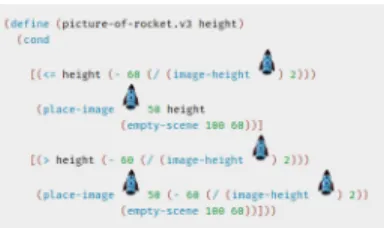
sup-ported by an online book “How to design programs” (HTDP)7and it has been adapted to other mainstream languages, like Java [Allen et al. 2002] and Python. The availability of different languages di-rected to the progression of learning should help in overcoming what the DrRacket proponents identify as “the crucial problem” in the interaction between the learner and the programming en-vironment: beginners make mistakes before they know much of the language, but development tools yet diagnose these errors as if the programmer already knew the whole notional machine. More-over, DrRacket has a minimal interface aimed at not confusing novices, with just two simple interactive panes: a definitions area, and an interactions area, which allows a programmer to ask for the evaluation of expressions that may refer to the definitions. Simi-larly to what happens in visual languages, Racket allows for direct manipulation of sprites, see an example in Figure5.
The authors of HTDP claim that “program design — but not programming — deserves the same role in a liberal-arts education as mathematics and language skills.” They aim at systematically designed programs thanks to systematic thought, planning, and understanding from the very beginning, at every stage, and for every step. To this end the HTDP approach is to present “design
6A small syntactic improvement of Racket over Lisp, very useful for beginners, is
that nested parentheses can be matched easily by using different bracket families: for example, (- {/ [* (+ 2 3) 4] 2 } 1)
Figure 5: Racket code for “landing a rocket”
recipes”, supported by predefined scaffolding that should be iter-atively refined to match the problem at hand. This is indeed very close to the idea of micropatterns discussed in2.4.
3.5
Scratch, Snap!, Alice, and others
EToys worlds (see3.2) with pre-defined — although programmable — objects, evolved in a generic environment in which everything can be defined in terms of ‘statement’ blocks. Scratch [Resnick et al. 2009], originally written in Smalltalk (but this is hidden to most users: only a “secret” key combination can bring the Smalltalk environment alive), is the most popular and successful visual block based programming environment. Launched in 2007 by the MIT Media Lab, the Scratch site has grown to more than 25 million registered members with over 29 million Scratch projects shared programs.
Unlike traditional programming languages, which require code statements and complex syntax rules, here graphical programming blocks are used that automatically snap together like Lego bricks when they make syntactical sense [Ford 2009]. In visual program-ming languages, a block represents a command or action and they are arranged in scripts. The composition of individual scripts equals the construction of an algorithm. The building blocks offer the possibility, e.g., to animate different objects on the stage, thus defin-ing the behavior of the objects. In addition to the basic control structures, there are event-triggering building blocks/conditions for event-driven programming [Georgios and Kiriaki 2009]. Famil-iar concepts such as variables, variable lists, Boolean logic, user interface design, etc. are provided as well. Furthermore, most visual programming environments offer the possibility to integrate graph-ics, animations, music, and sound to create video games, movies, and interactive stories. In that way, creative and artistic talents of the students are displayed in their games, stories, and applications. Thereby, these visual languages offer the same programming logic and concepts as other (text-based) programming languages.
Some characteristics of the Scratch environment [Maloney et al. 2010] are particularly relevant in the constructionist approach.
Liveness The code is constantly executed and can be changed on the fly, immediately seeing the runtime effects of the change; this encourages users to tinker with the code. No error messagesWhen you play with Lego bricks, they
stack together or they don’t - the same happens in Scratch; program always run: syntax errors are prevented from the block shapes and connections, and also runtime errors are avoided by doing something “reasonable” (e.g., in the case of an out-of-range value); this is particularly important not to frustrate kids and to keep them iterating and developing:
“A program that runs, even if it is not correct, feels closer to working than a program that does not run (or compile) at all” [Maloney et al. 2010].
Other characteristics are useful to help novices avoiding miscon-ceptions that often arise when starting to learn to program.
Execution made visible A glowing yellow border surrounds running scripts; moreover version 1.4 (and Snap!, for exam-ple) provides a “single-stepping” mode, where each block is highlighted when it is executed; this is very helpful in program reading and debugging, and helps students form a correct mental model of the notional machine underlying the program execution.
Making data concrete You can see in a variable box, auto-matically shown, its current value: again, this is helpful for making the underlying machine model visible.
Finally, other characteristics introduce important software engi-neering and development concepts.
Open sourceEach shared project has a “see inside” button that brings you to the project source; you can read and edit the blocks to see what happens.
Remixing If you edit someone else’s project, you create a remix: you are the author, but the system automatically gives credits to the original author (at any depth, keeping track of multiple remixes in a tree) and suggests you to explicitly declare what changes you made.
The main limitation of Scratch programs is that they do not scale well from the abstraction point of view: only since version 2 you can “make a new block” that is, a procedure with optional parameters. These blocks have no possibility to return a value (like a number or a boolean) and so can’t be nested inside other blocks, forcing you to modify global variables if needed.
Snap!8(originally BYOB, Build Your Own Blocks) is an extended reimplementation of Scratch with functions and continuations. These added capabilities make it suitable for a serious introduction to computer science for high school or college students: in fact, Snap! is used as the basis for an Advanced Placement CS course at Berkeley9.
The Scratch approach was also ported to mainstream program-ming languages: in Alice [Dann et al. 2008] visual blocks are in fact Java instructions. Alice worlds are 3D: this choice makes it very attractive and appealing to pupils, who can program amazing 3D animations. It also adds many complexities, since moving objects in a 3D space is not trivial.
Recently, several block-based development environments for web-browsers were published (even the last version of Scratch is web based, thus abandoning its Smalltalk inner soul). The most pop-ular is probably Google’s Blockly10, which allows for programming
both with blocks and textual programming languages (Javascript and Python): the programmer can see the source code in different interchangeable ways. MIT has developed a version of Blockly that can even be used to create Android applications, to be executed on mobile phones and that can take advantage of sensors and Google
8https://snap.berkeley.edu/ 9https://bjc.berkeley.edu/
services like maps (App Inventor11). Even Apple recently proposed a block-based interface for its Swift programming language12and
other Android-based visual programming language environments exist. For example, Pocket Code allows the creation of games, sto-ries, animations, and many types of other apps directly on phones or tablets, thereby teaching fundamental programming skills [Slany 2014]. The free and open source project Catrobat13was initiated
2010 in Austria at TU Graz. This team develops free educational apps for teenagers with the aim to introduce young people to pro-gramming. With a playful approach, young people can be engaged and game development can be promoted with a focus on design and creativity. The drag and drop interface provides a variety of bricks that can be joined together to develop fully fledged programs. The app is freely available for Android at the Google’s Play Store14and
soon it will be available on the Apple App Store for iOS. The target audience for Pocket Code are teenagers between the age of 11 and 17 years old who have access to or own an Android smartphone.
Since its first versions, Scratch had blocks able to connect and program external (physical) robots. In fact most of the mentioned environments can connect to physical devices and sensors, with the goal of increasing the constructionist appeal of block programming, and opening to the world of “tinkering” with electronics. Resources like the ‘Makey Makey’15tool became popular for activities during
coding workshops with innovative forms of production and do-it-yourself work [Schön et al. 2014;Sheth et al. 2012].
All in all, visual programming languages seem to provide an easier start and a more engaging experience for learners. The ease of use, simplicity, and desirability of new visual programming envi-ronments enables young people to imagine complex goals. A study which compared three classes that used either block-based (Scratch), text-based (Java), or hybrid blocks/text (Snap!/JavaScript) program-ming languages showed that students generally found block-based programming to be easier than the text-based environments [ Wein-trop and Wilensky 2015]. Some researchers, however, argue that students are not fully convinced that a visual language can help them learn other programming languages [Lewis et al. 2014].
3.6
Common features
The above short survey of programming languages for education shows they have some recurrent traits that link them to the themes discussed in Sect.2.
PersonificationThe interpreter becomes a “persona”, com-putation is then carried out through anthropomorphic (or, better, zoomorphic, since animals are very common) actions. This seems to contradict a famous piece of advice coming from no less than E. W. Dijkstra [Dijkstra 1985]. Speaking of anthropomorphism in computer science, he noted: “The trouble with the metaphor is, firstly, that it invites you to identify yourself with the computational processes going on in system components and, secondly, that we see ourselves as existing in time. Consequently the use of the metaphor forces one to what we call ‘operational reasoning’, that is reasoning
11http://appinventor.mit.edu
12https://www.apple.com/swift/playgrounds/ 13https://www.catrobat.org/
14https://catrob.at/pc 15https://makeymakey.com/
in terms of the computational processes that could take place. From a methodological point of view this is a well-identified and well-documented mistake: it induces a combinatorial explosion of the number of cases to consider and designs thus conceived are as a result full of bugs.” The reasoning in terms of the computational processes, however, is what is probably needed for a novice in order to familiarize with the notional machine. Some sort of operational reasoning seems also important to foster the basic intuition needed by a constructivist approach, in which concrete, public actions are key.
Visualization and trackingComputational processes that evolve in time are described by static texts: the mapping between the two is not trivial and it requires an understanding of the notional machine. Educational programming environments often try to make the mapping more explicit with some visu-alization of the ongoing process: the trace left by the LOGO turtle, or some other exposition of the changing state of the interpreter.
Appeal Engagement of learners is crucial: to this end it is important to give learners powerful libraries and building blocks. It is not clear, however, how to properly balance amazing effects in order to avoid they become a major dis-traction: sometimes children may spend their (limited) time in changing the colors of the sprites, instead of trying to solve problems. While they surely learn something even in these trivial activities, they also risk to lose their opportu-nity of recognizing the thrill which comes when solving computational problems by themselves.
4
LEARNING TO THINK
COMPUTATIONALLY
The expression “Computational Thinking” (CT) has a very special relationship with Papert’s constructionisim: the first ascertained attestation is in Papert’s seminal book Mindstorms [Papert 1980]. As already stated in3.1, Papert was not focused on teaching computer science concepts, but on the use of computation as a means of self expression and as a tool for learning ideas and concepts of other disciplines.
The expression almost completely disappeared (except for a Papert’s work about math [Papert 1996]) till 2006.
In 2006 Jeannette Wing brought the expression “Computational Thinking” back to the discussion [Wing 2006], gaining a massive attention16. In that seminal article, Wing didn’t give a definition,
but tightened the concept to the computer science discipline, stating “Computational thinking involves solving problems, designing systems, and understanding human behavior, by drawing on the concepts fundamental to computer science” or that “thinking like computer scientists” is a fundamental skill for everyone.
In the following years she proposed (along with Cuny, Snyder and Aho) a formal definition: CT is “the thought processes involved in formulating problems and their solutions so that the solutions are represented in a form that can be effectively carried out by an
16Currently (August 2018), the paper has more than 3800 citations, according to Google
information-processing agent” [Wing 2010]. Wing argues that chil-dren who are introduced to CS learn more than just programming and that this opens a new way of thinking [Wing 2008]. Moreover, students should think first about possible solutions to a given prob-lem (probprob-lem solving skills), and second impprob-lement their ideas by using a computing device (programming skills [Lye and Koh 2014]). In order to successfully implement their own solutions, students have to apply different programming concepts, such as loops and conditions, as well as practices, such as abstraction and debug-ging [Kafai and Burke 2013]. For teachers, however, developing computational thinking skills in students is actually a challenging task [Sentance and Csizmadia 2015]. After Wing’s articles, the dis-cussion about the nature of CT and how to teach it in fact exploded. In [Corradini et al. 2017] authors analysed different CT defini-tions and frameworks, finding out that all definidefini-tions agreed on the fact that CT is a way of thinking (thought process) for problem solvingbut specifying that it is not just problem solving: the formu-lation and the solution of the problem must be expressed in a way that allows a processing agent (a human or a machine) to carry it out.
Moreover, authors in [Corradini et al. 2017] noticed that each definition listed some characteristics of CT, from thinking habits to specific programming concepts. They classified them in four categories. We quote here their findings.
Mental processes:Mental strategies useful to solve problems.
• Algorithmic thinking: use algorithmic thinking to design a sequence of ordered steps (instructions) to solve a problem, achieve a goal or perform a task. • Logical thinking: use logical thinking and reasoning to make sense of things, establish and check facts. • Problem decomposition: split a complex problem in simpler subproblems to solve it more easily; modu-larize; use compositional reasoning.
• Abstraction: get rid of useless details to focus on relevant information / ideas.
• Pattern recognition: discover and use regularities in data, problems.
• Generalization: use discovered similarities to make predictions or to solve more general problems. Methods:Operational approaches widely used by computer scientists.
• Automation: automate the solutions; use a computer or a machine to do repetitive tasks.
• Data collection, analysis and representation: gather information/data, make sense of them by finding patterns, represent them properly; store, retrieve and update values.
• Parallelization: carry out tasks simultaneously to reach a common goal, use parallel thinking. • Simulation: represent data and (real world)
pro-cesses through models, run experiments on models. • Evaluation: implement and analyze solutions to
judge them, in particular for what concerns effec-tiveness, efficiency in terms of time and resources.
• Programming: use some common concepts in pro-gramming (eg. loops, events, conditionals, mathe-matical and logical operators).
Practices:Typical practices used in the implementa-tion of computing machinery based soluimplementa-tions. • Experimenting, iterating, tinkering: in iterative and
incremental software development, one develops a project with repeated iterations of a design-build-test cycle, incrementally building the final result; tinkering means trying things out using a trial and error process, learning by playing, exploring, and experimenting.
• Test and debug: verify that solutions work by try-ing them out; find and solve problems (bugs) in a solution/ program.
• Reuse and remix: build your solution on existing code, projects, ideas.
Transversal skills:General ways of seeing and op-erating in the world; useful life skills enhanced by thinking like a computer scientist.
• Create: design and build things, use computation to be creative and express yourself.
• Communicate and collaborate: connect with others and work together to create something with a com-mon goal and to ensure a better solution.
• Reflect, learn, meta-reflect: use computation to re-flect and understand computational aspects of the world.
• Be tolerant for ambiguity: deal with non-well speci-fied and open-ended real-world problems. • Be persistent when dealing with complex problems:
be confident in working with difficult or complex problems, persevering, being determined, resilient and tenacious.
As you may notice, a lot of concepts are involved. Sometimes this led to critiques [Hemmendinger 2010]: some of these concepts are not exclusively associated with CS, but taught in other disciplines (e.g., math) or are general skills that children have been learning for a long time before the birth of CS. Anyway CS brings to the discussion some characteristic problem solving methods (e.g., the possibility to effectively execute a solution/a model/an abstraction by running an implementation of its algorithm [Martini 2012]). Constructionist’s spirit emerges mainly in practices and transversal skills, but we should pay attention not to forget mental processes and CS methods: loosing this connection may lead to misconcep-tions about the nature of computational thinking, de-empowering Wing’s idea of the importance of “thinking like computer scientists” in many human activities.
The most used technique to teach CT is teaching to program (with languages suitable for the learner’s age and capacity). Pro-gramming is in fact the main way computer scientists express their solutions and so the main way they learn to think computationally. Teaching to program leads to problems and opportunities discussed in the previous sections. Nonetheless, unplugged activities (see
computer, becoming aware of the underlying notional machine (see
2.3).
5
LEARNING TO PROGRAM IN TEAMS
Working in teams requires new skills, especially because software products (even the ones in the reach of novices) are often tangled with many dependencies and division of labour is hard: it inevitably requires appropriate communication and coordination. Therefore, it is important that novice programmers learn to program in an “organized” way, thus discovering that as a group they are able to solve more challenging and open-ended problems, maybe with interdisciplinary contributions.
To this end, agile methodologies seem to fit well with the needs of a constructionist team of learners and they are increasingly exploited in educational settings (see for example [Kastl et al. 2016;
Missiroli et al. 2016]):
•agile teams are typically small groups of 4–8 co-workers; •agile values [Beck et al. 2001] (individuals and interactions
over processes and tools; customer collaboration over con-tract negotiation; responding to change over following a plan; working software over comprehensive documentation) relate well with constructivist philosophies;
•agile teams are self-organizing and emphasize the need of reflecting regularly on how to become more effective, and tune and adjust their behavior accordingly;
•typical agile techniques like pair programming, test driven development, iterative software development, continuous integration are very attractive for a learning context.
5.1
Iterative software development
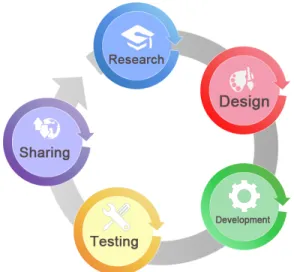
For program development cycles, concepts of agile and iterative software development can be used to leverage this process and to see first results very quickly [Davies and Sedley 2009; DeMarco-Brown 2013]. Figure6visualizes the process of game design in reference to agile methods. As the scope of this paper is limited, only a simplified life cycle is visualized to describe the process of how a team works in iterations to deliver or release software.
The first step, Research, includes the development of the core idea by producing a simple game concept or a storyboard. In this phase the story, title, genre, and theme of the game should be selected, as well as a rough concept about the structure and gameplay.
In the second step, during the Design, the artwork, game content and other elements (characters, assets, avatars, etc.), and the whole gaming word is produced.
The Development phase, includes all of the actual programming, followed by Testing the code and the software (playtesting). Several iterations between testing and bug fixing are possible.
As a final step, the Release phase is planned. This could include several beta releases or a final release for end users. The agile model required to get started with the project works to bring customer satisfaction by rapid, continuous delivery of useful software.
“In an iterative methodology, a rough version of the game is rapidly prototyped as early in the design process as possible. This prototype has none of the aesthetic trappings of the final game, but begins to define its fundamental rules
Figure 6: Agile Development Cycle [Davies and Sedley 2009;
DeMarco-Brown 2013]
and core mechanics.” [Salen and Zimmerman 2003, p. 11]
To phrase it differently, before focusing on every detail of the project, focus on the smallest step the games needs for playing it, e.g., limited interface control but basic game functionality.
Collaborative work and the connection with a real world prob-lem makes their learning valuable [Jaime and Ruby 2011]. Project work is always student-centered and task oriented. The final arte-facts of this project work can be shared with a community, thus fostering ownership. The benefits of learning through projects in-clude enhanced students’ participation within active learning and self-learning, enhanced communication skills, addressing of a wider set of learning styles, and improved critical thinking skills. This collaboration is needed for developing the game idea, communi-cating, sharing, and managing assets and codes, playtesting and documentation.
Teachers have to consider how to support collaboration and com-munication during the whole game production process [Ferreira et al. 2008]. They must therefore stick to certain design patterns and iterative cycles (e.g., agile) and explain game elements and rules. The project in general should foster the teamwork in producing game assets and software. Teachers have to take into account the different preferences of students, e.g., if they feel more confident in the role of developers or artists, or that students do not shy away from switching roles. Finally, the teacher has to ensure that the ideas for the project are simple and clear, as well as reduce the size and complexity of the game projects.
5.2
Test-driven development and debugging
Within the agile framework, a special constructivist emphasis is provided by test-driven development, or TDD for short [Beck 2003]. This technique reverses the classical temporal order between the implementation of code and the test of its correctness. Namely, the specification of the programming task at hand is actually provided
![Figure 1: Creative learning spiral [Resnick 2017]](https://thumb-eu.123doks.com/thumbv2/123doknet/13485099.413660/3.918.515.788.128.391/figure-creative-learning-spiral-resnick.webp)
![Figure 2: Roles of variables, organized in a constructionist-like hierarchy where the predecessor of an arrow is a prerequisite for learning the corresponding successor (source: [Sajaniemi 2002])](https://thumb-eu.123doks.com/thumbv2/123doknet/13485099.413660/6.918.192.732.153.396/variables-organized-constructionist-hierarchy-predecessor-prerequisite-corresponding-sajaniemi.webp)