HAL Id: hal-00881020
https://hal.inria.fr/hal-00881020v2
Submitted on 4 Apr 2017
HAL is a multi-disciplinary open access
archive for the deposit and dissemination of
sci-entific research documents, whether they are
pub-lished or not. The documents may come from
teaching and research institutions in France or
abroad, or from public or private research centers.
L’archive ouverte pluridisciplinaire HAL, est
destinée au dépôt et à la diffusion de documents
scientifiques de niveau recherche, publiés ou non,
émanant des établissements d’enseignement et de
recherche français ou étrangers, des laboratoires
publics ou privés.
Distributed under a Creative Commons Attribution| 4.0 International License
User and System Cross-Learning of Gesture Commands
on Pen-Based Devices
Peiyu Li, Manuel Bouillon, Eric Anquetil, Grégoire Richard
To cite this version:
Peiyu Li, Manuel Bouillon, Eric Anquetil, Grégoire Richard. User and System Cross-Learning of
Ges-ture Commands on Pen-Based Devices. 14th International Conference on Human-Computer
Interac-tion (INTERACT), Sep 2013, Cape Town, South Africa. pp.337-355, �10.1007/978-3-642-40480-1_21�.
�hal-00881020v2�
User & System Cross-Learning of Gesture Commands on
Pen-Based Devices
PeiYu Li, Manuel Bouillon, Eric Anquetil, Grégoire Richard
IRISA/INSA Rennes, Campus de Beaulieu, 263 Avenue du Général Leclerc, 35042 Rennes, France
{Pei-Yu.Li, Manuel.Bouillon, Eric.Anquetil, Gregoire.Richard}@irisa.fr
Abstract. This paper presents a new design and evaluation of customizable
ges-ture commands on pen-based devices. Our objective is to help users during the definition of gestures by detecting confusion among gestures. We also help the memorization gestures with the guide of a new type of menu “Customizable Gesture Menus”. These menus are associated with an evolving gesture recogni-tion engine that learns incrementally, starting from few data samples. Our re-search focuses on making user and recognition system learn at the same time, hence the term “cross-learning”. Three experimentations are presented in details in this paper to support these ideas.
Keywords: Handwritten gesture recognition, Marking Menus, Customizable
gesture interfaces.
1
Introduction
To facilitate the interaction between human and computers, a lot of new concepts appeared, like interactive tablets (using a finger or a pen). These tablets offer users a new way to interact: a user can draw a gesture to run a command. It is easy to remem-ber all gestures for a simple application with less than ten commands. But when there are too many possible commands, it becomes difficult to remember them all directly. This is one of the challenges of the research on Pen-based Human Computer Interac-tion nowadays.
In this paper we study how to obtain natural cursive gestures and how to design a framework which helps users learn them efficiently. We can identify several ways to improve the learning process of the user to memorize all the gestures. The first point we have identified in our experiments, reported below, is that it is easier for users to memorize gestures if they have defined the set of gestures themselves. In fact, a “meaningful” gesture for a command can be memorized more easily than an arbi-trary gesture without meaning. A meaningful gesture should have a semantic meaning or an ergonomic meaning. Several questions are interesting to address to go in this way: How to define a meaningful gesture? How to help users define and memorize
their set of gesture commands? To offer the user the ability to define their own ges-tures, we use a gesture recognition system able to learn from scratch with very few samples. Moreover, this recognition system learns incrementally with the user interac-tion to improve its performance during its use. As user and recogniinterac-tion system learn at the same time during utilization, we study the notion of “cross-learning”.
Besides, to help users learn their gestures, we would like to take advantage of Marking Menus [1, 2] which can organize gestures in semantic and graphical way. We adapted them to personalized gestures and present in this paper the new concept of Customizable Gesture Menus.
The last concept we illustrate in the paper is the necessity of helping users during the definition of their gestures. In fact, as the user is able to personalize his gestures, confusing gestures can be introduced by the user during the initialization phase. Thus we introduce an automatic mechanism to help the user during the definition of his gestures to avoid confusing gestures. This mechanism is based on a conflict detection system.
In this paper, we first analyze the state-of-the-art of help on learning gestures for users. Then the self-evolving recognition system is described briefly. From the third section, we present three different experiments. Each experiment justifies one objec-tive of our research. The first experimentation explains why we chose to leave the user the freedom to personalize his gestures. The second one compares the help of learning in the form of menus and table. And in the end, the last one evaluates the new concept of help on gesture definition before the conclusion.
2
Context and State-of-the-Art of this Study
2.1 How to Help Users Learn Gestures?
Main approaches of gestures’ learning help are based on Marking Menus [2] which propose two ways of utilization: the novice mode where the user has menus displayed to help him finalize his gesture and the expert mode where he only needs to draw the gesture needed and a recognizer will try to understand which command is invoked. First enhancement of the Marking Menus is their hierarchical version [1]. They allow multiple levels of menus so that commands can be organized by family and more commands’ gestures can be presented.
New improvements have taken off afterwards. Zone and polygon menus proposed compound multi strokes to execute one command [3,4]. These hierarchical menus are cut between levels. Each stroke is a simple straight line. The display of these menus does not take a lot of space since each time only one level appears. For the same rea-son, the accuracy is also good so that more gestures can be included. But the final gesture of one command cannot be drawn in one stroke, which makes it slower.
All these approaches help users to memorize gestures by making them practice drawing. Evidently, the final form of gestures depends strongly on the menus’ ergo-nomics. For user’s familiarization and learning, this is a big constraint.
Another interesting example is Octopocus [5]. In fact, Octopocus went a step fur-ther: it permits natural fluid gestures. The interaction on novice mode is also
interest-ing. Firstly it uses a colorful aspect to help the learning [13]. Secondly, in novice mode, it gave a continuous feedback. It highlights the currently recognized command, and weakens gradually the others. This approach helps users’ learning and it has a good accuracy. The gestures in this case were predefined too.
2.2 Evolving Classification Systems
With the increasing use of touch sensitive screens, there is a growing demand for handwritten gesture recognition systems. Two strategies exist for building a handwrit-ten gesture recognition system: using a writer independent training set or a writer dependent one.
The first require a lot of different writers to gather a heterogeneous training data-base to build a system independent of the user. This approach has limited perfor-mances, in particular if in the end user writes his gestures differently from the training users, his gestures won’t be recognized well. The second strategy only uses data sam-ples from the final user to train the system. This allows better performance, since the system is designed for a specific user, but requires him to spend a lot of time writing training gestures.
More recently, new approaches have been proposed to put up with those draw-backs. Paper [15] suggested turning a writer independent system into a writer depend-ent one. Doing so limits the need for end users to train the system and at the same time improves recognition performance. However, recognized classes are pre-specified, and end users can't add new classes. Paper [16] proposed a very simple template matching classifier (the 1$ classifier) with very few training requirements. It enables end users to easily build a classifier and allow them to add new gestures. On the other hand, such a simple system has limited performance compared to common statistical classifiers such as Support Vector Machines or Multi Layer Perception.
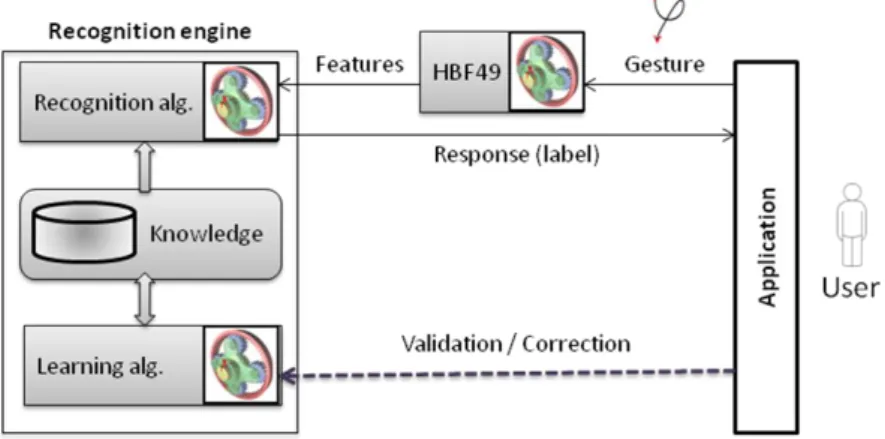
To go further in that direction, we use an evolving classification system that can start from very few training samples and learn incrementally during its use [9]. Inter-facing of the gesture command application with the evolving recognition engine is illustrated in Figure 1.
Evolving classification systems have appeared in the last decade to meet the need for recognizers that work in changing environments. They use incremental learning to adapt to the data flow and cope with class adding (or removal) at runtime. This work uses such an evolving recognizer, namely Evolve [10], to recognize gesture com-mands. Evolve is based on a fuzzy inference system that learn incrementally and cope with class adding. As Evolve is a statistical classifier, and not a matching classifier, it needs to extract features from gesture drawings, as illustrated in Figure 1. In our case of gesture commands, class templates are chosen by end users, which make it difficult to design a feature set. Because of that, we chose to use the Heterogeneous Baseline Feature set (HBF49) [6] which had been optimized on several well-known handwrit-ten gesture databases to be the most general possible. Besides, using such an existing and available feature set enables easy classifier comparisons.
3
First Experimentation: Personalization?
3.1 Background
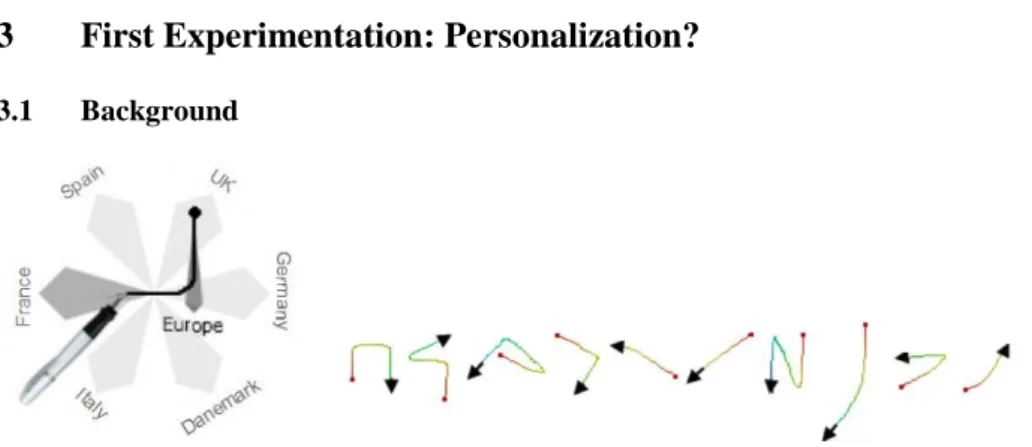
Figure 2. CMM (on the left) and their generated gestures (on the right).
After studying many variations of Marking Menus, we chose one approach to analyze how it works: Continuous Marking Menus (CMM) [7]. This approach is based on Hierarchical Marking Menus, so gestures are organized by families and have multiple levels. It allows cursive mono-stroke gesture, and it offers a continuous feedback on novice mode, to guide users by darkening the chosen gesture and lightening others. The table of some gestures is presented in Figure 2. We proved that user learning im-proved with the help of these menus [19]. But after an opinion poll, surprisingly we received some negative feedback from testers. We discovered that while CMM allow continuous cursive gestures, the final form of gestures still depends strongly on the menus’ ergonomic. For users, these gestures look simple, but it is difficult to link them to specific commands. The most important is that they did not like the idea that we forced them to use pre-defined gestures. That is how we came to think about the personalization of gesture commands on pen-based devices.
3.2 Experimental Protocol
Our hypothesis is that users learn better their own personalized gestures than prede-fined ones. We want to evaluate this hypothesis in the context of a real application.
For that purpose, we made a picture editor in which users can manipulate pictures with some basic commands, like: “copy”, “select”, “zoom”, etc. There are twenty-one commands in total for this application, which are separated into seven different fami-lies. For gesture recognition in this picture editor, we use the Evolve recognizer with incremental learning presented in section 2.2, so we can also test the behavior of this recognizer in a real application.
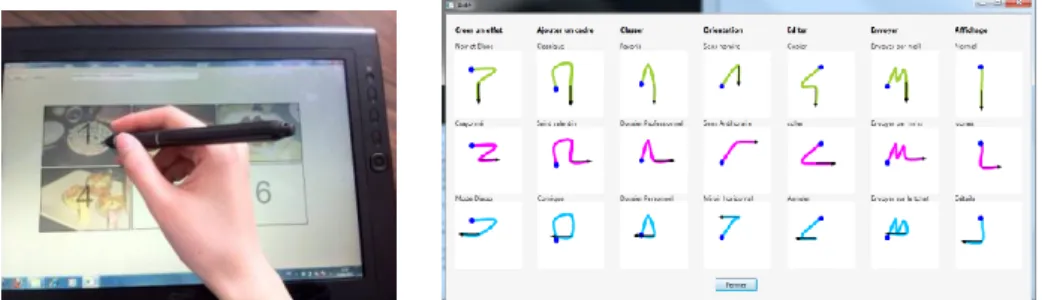
Users were divided into two groups. Group 1 needed to choose by themselves twenty-one gestures for all commands, while group 2 needed to manipulate the appli-cation with twenty-one predefined gestures as shown in Figure 3. The experimentation was divided into five phases as follow.
Initialization phase. Group 1 defined all gestures and practiced them twice. On the other hand, we showed a table of predefined gestures to group 2, and they repeated them 3 times. Both groups draw each gesture three times and this gave three sam-ples for the classifier to learn.
First learning phase. It was made of thirty-four questions, each of them correspond-ing to a command. Moreover, some commands were asked more often than others. This was to illustrate the utilization of real applications. Six of them were asked three times, four were asked twice and eight were asked once. The remaining three commands were not asked at all. During the learning phases, users had access to a help window with a table of all the gestures [Figure 3].
First test phase. During the test phase the user would be asked to achieve once each of the twenty-one gestures in a random order. The help window would not be dis-played if the user could not remember the gesture.
Second learning phase. Same as the first learning phase. Second test phase. Same as the first test phase.
Figure 3. View of application (on the left) and Table of predefined gestures (on the right).
During learning phases, the help window was presented in the same way as this table.
When a gesture was made, it was sent to the recognizer. If the gesture was correct-ly recognized, the visual effect of the command applied so the user could be informed that he had successfully performed his gesture, and then another question would be asked. On the other hand, if the answer of the recognizer was different from the ges-ture that was asked in the question, we must know if the recognizer failed or if the user performed a wrong gesture. So, in this situation, a window would pop up to show the user the expected gesture and the gesture he drew. In this window, the user had to state whether or not he had performed the right gesture. If he drew the correct gesture,
the visual effect applied and the test went on. However if he drew a wrong gesture, he would then have to try again. When a gesture was correctly recognized, the classifier used it to strengthen its learning for this class.
3.3 Results
The parameter we compared between two groups here is the capability of user & recognition system cross-learning.
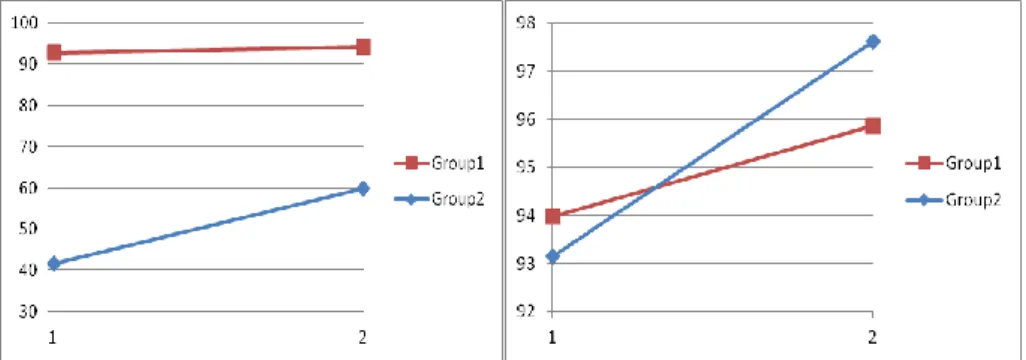
Thirty persons participated in the experiment, with fifteen persons in group 1 and fifteen persons in group 2. The mean learning curves are presented in the left part of
Figure 4. We can see in the graph that Group 1 got a better score of memorization during first test phase (>90%) than group 2 (41%). This advantage is kept for the second test phase where we got always more than 90% for group 1 and only 60% for group 2. We can see that group 2 made a big improvement from test 1 to test 2, but it could still not overtake the memorization rate of group 1. The statistics test on our results proved the same. Group 2 made significantly more progress on learning rate than group 1. However group 1 always made significantly better score than group 2 (p-value < 0.001). This validates our initial hypothesis that personalized gestures are easier to be remembered and accepted by users.
Figure 4. Mean learning curves of users (on the left) and of recognition system (on the
right) for the two groups. The abscissa presents the two test phases. The ordinate presents the learning rate.
As mentioned above, we would also like to see the learning of the recognition sys-tem (cf. right part of Figure 4). We noticed that both curves increased. Group 1 got a better score at the first test point (94%) compared to 93% of group 2. But group 2 took over group 1 at the second test point with an increase of nearly 5% while group 1 made an increase of 2%. This does not mean that the recognizer worked better on group 2’s scenario. After a test of significance, we can only say that the recognizer increased significantly for both groups, but there is no significant difference between the improvement in group 2 and the one in group 1 (Sign. > 0.05). We proved that the recognizer really learnt incrementally during the experimentation so it obtained a better score in the end. We then concluded that by looking at the learning rates of both users and recognizer (cross-learning), the personalization of gestures permits a better memorization of gestures.
4
Second Experimentation: Help on Gesture Learning
We were not totally satisfied with this result. From a design point of view, the help list in the form of an additional window (a table of gestures) is neither practical nor visually appealing. On a tablet device, it takes the place of nearly the whole interface and hides the information of the application main window. Compared to this, Marking Menus are much more advantageous because they take less space and do not hide main information. Some of them can show dynamically commands that we are inter-ested in [5]. So an adaptation of Marking Menus on personalized gestures is necessary for improvement: we designed Customizable Gesture Menus [18] which are Marking Menus adapted for personalized gestures.
4.1 Customizable Gesture Menus
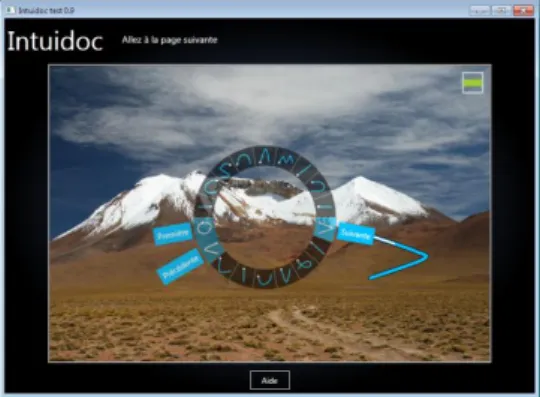
Since the gestures are personalized, the construction of menus is much more complex. It means the construction should be dynamic, and should guarantee a good presenta-tion of all gestures at the same time. These gestures are presented in a circle (similar to Wave Menus’ form [8]. Strokes are smoothed by Canonical Spline to give a clearer appearance to gestures [11]. The place where each gesture is put on the circle is not random. It depends on the initial direction of user’s gesture. For example, a gesture with an initial direction from left to right will be placed on the right part of the circle. The exact position is decided by the initial angle.
Once the application detects that user’s stylus is moving very slowly or not moving at all, he will be considered as novice. And the menus will be displayed. Moreover, the menus are colorful. According to research of [13], a colorful aspect helps the learning. The center of the circle is an inactive (empty) zone. Without raising the stylus, user can go through all icons of gestures and the corresponding command la-bels will be displayed, as well as the gesture at bigger size. We decided to show a label just near the circle, unlike other menus which show the label at the end of ges-ture [2,3,5]. It makes it easier for the user to see the right command as he does not need to search too far to know if it is the right one, especially in case of long gestures. Once the user finds the command that he is looking for, he just needs to follow the gesture shape (his drawing can be approximate), and he will see a continuous feed-back in the menu, where the stroke spline fills with white color during his move-ments. The rest of menus lighten little by little. As he finishes the stroke, the com-mand will be validated and executed (cf. Figure 5).
An advantage of hierarchical marking menus is that they organize commands by family, so final gestures of commands share a semantic meaning among them. As mentioned before, Customizable Gesture Menus present commands one by one, so the commands from the same family may not be found side by side. For example, com-mand “next page” and comcom-mand “previous page” belong to family “page manipula-tion”. And we associate a line from left to right and a line from right to left as gesture for these two commands. Since they do not have the same initial direction, they will not be placed side by side. So when user is looking his gesture for “next page”, he will neither think about, nor learn at the same time, his gesture for “previous page”.
Since our menus are one-level menus, our solution to conserve the semantic meaning of gestures is when user’s stylus moves on one command; the other commands of the family are highlighted too. In this way, even they are not side-by-side; they are still displayed at the same time (cf. Figure 5).
Figure 5. Selection of gesture on Customizable Gesture Menus.
4.2 Experimentation to evaluate Customizable Gesture Menus
Figure 6. View of the application during the learning phase with the table of gestures
lay-ered. The table is displayed directly in front of test interface when user asks for help.
We wanted to test if menus really bring an advantage compared with the help dis-played as a table of all gestures. We made two groups, each using a different form of help, either the menus or table. Group 1 defined all their gestures and the help was presented by a simple table of gestures (cf. Figure 6). Group 2 defined also all their gestures but they were helped with Customizable Gesture Menus (cf. Figure 7).
Figure 8. Screen shots of initialization phase. Left part presents the interface when user
de-fined all gestures. Right part presents the interface when user repeated twice each gesture for the initial learning of the recognizer.
We used eighteen commands (separated into six families). During learning phase, in each family, there was one command which was asked three times; one command which was asked once and another command which was not asked at all. This is to simulate the utilization of a real application where some commands are used more often than others.
The process of tests is the same for the two tests. Tests are constructed of four phases:
Initialization phase. Users could just fill each case of eighteen commands with a stroke to define gestures. Then for each group, users needed to repeat their gestures once so that the recognizer got another sample to be initialized from (cf. Figure 8). First evaluation phase. The user would not have access to help (neither “Gesture
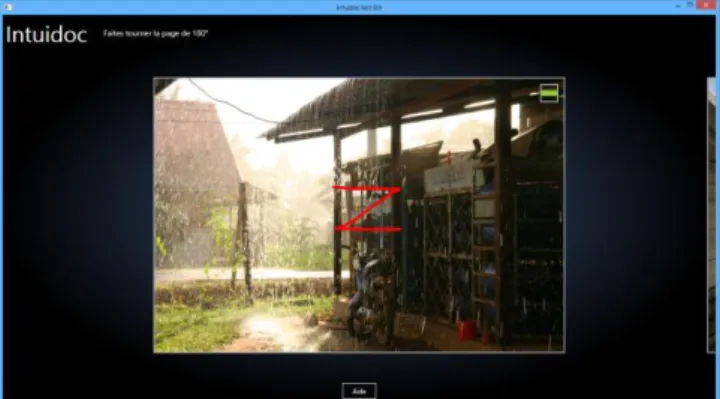
menu” nor “table of gestures”). But once he made an error, a pop-up message would be displayed. It showed the user the expected gesture and the recognized gesture, and the user had to tell the system if it was his fault (he draw a wrong ges-ture) or the recognizer’s fault (he drew the right gesture but the recognizer did not recognize it). So in the first evaluation, user and recognizer could still continue to learn. Compared to the previous experimentation, we did not put a first learning phase before the first evaluation phase so that we know if the user is able to memo-rize all gestures right after their definition. Because if all users were able to learn by heart all gestures since the beginning, neither menus nor table of gestures would be necessary during the utilization of application to help users. And the whole tests comparatives would make no sense.
Learning phase. This phase includes several sequences of questions. Each question concerns one command. If the user knew the gesture asked in the question, he could draw it directly (cf. Figure 9). Otherwise, user of Group1 and Group2 could access help from a classic table of all gestures or with our Customizable Gesture
Menus respectively (cf. Figure 7 and Figure 8). The user might draw unconstrained gestures, and the recognizer is not able to recognize them. In this case, constructive feedback is necessary to help user understand that he made an error [14]. In this phase, in case of error, the user would have the table of gestures or Customizable Gesture Menus respectively displayed in a pop-up. We showed him the recognized gesture at the same time. It was up to the user to tell us if it was him who drew a wrong gesture or if it was the recognizer who gave the wrong answer. If it was us-er’s fault, the same question would be asked again for the user to practice. If it was the recognizer’s fault, the misunderstood gesture would be used to improve the recognizer by incremental learning. And the user moved on to the next question. So in case of error, both recognizer and user could still learn via the pop-up win-dows. Then the user would move on to the next question.
Second evaluation phase. The same as the first one, but no pop-up would be dis-played in case of error because the learning for user and recognizer had stopped al-ready.
Figure 9. Application interface during learning phase. Here is an example where user knew
the gesture asked in question, so he just draw it directly without asking any help.
4.3 Results
For this experimentation, fifty-nine persons participated in the tests. They are from twenty-two-year-old to forty-two-year-old. For group 1, there were nineteen persons. For group 2, there were thirty nine persons. They are all familiar with computers. The parameter we compared between the two groups is also the capability of user & system cross-learning.
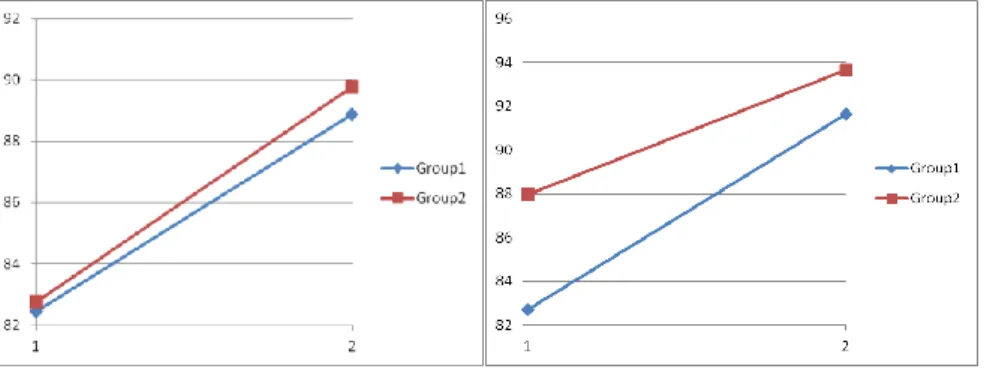
To analyze users learning, we made learning curves by collecting the results of the two evaluation phases (cf. Figure 10 left part). Few users (13%) succeeded to have 100% of learning rate from the beginning (first evaluation phase). This proves that even if gestures are all personalized, few people are able to learn them all by heart directly. The learning curves of the users for each group are presented. First we can observe that the gradient of learning is quite the same for the two groups (6.4% of progress for group1 and 7% for group2). According to statistical tests, there is no significant difference between learning rates of group 1 and group 2 for either results
collected from test phase 1 or results from test phase 2. Both group 1 and group 2 made a significant progress of learning (results from test phase 2 are better than re-sults from test phase 1). But there is no significant difference between these two pro-gresses (Sign. > 0.05). This experiment shows that Customizable Gesture Menus does not disturb user’s learning of gestures in comparison with classical tabular presenta-tion.
To analyze the recognition system learning (cf. Figure 10 right part), we can see that there is an improvement between the two evaluation phases of the recognition rate of the evolving recognition engine for both groups (6.9% of progress for group1 and 5.7% for group2) . According to statistical tests, the recognizer engine succeeded to learn better and better significantly for both groups, but there is no significant differ-ence between the recognizer improvements for each of the two groups (Sign. > 0.05). Customizable Gesture Menus allow a more compact presentation of all gestures that is a key point to deal with the relatively small size of tablet screen. This experi-ment demonstrates that both user and recognition engine can improve, at the same time, their capabilities of learning respectively: how to draw the gestures for the users and how to recognize the gestures for the recognition engine.
Figure 10. On the left users' mean learning curves. On the right recognizer's mean learning
curves. The abscissa presents the two test phases. The ordinate presents the learning rates.
5
Third Experimentation: Help on Gesture Definition
In the two previous experiments, we have presented a real cooperative interaction between the user and the evolving recognition engine, that are both able to learn from each other to improve their capabilities of respectively, reproducing and recognizing gestures, in the context of real applications. But by taking a precise look on obtained gestures from the second experiment, we noticed that even when we asked users to define a unique gesture for each command, there were still persons who defined too similar gestures that induce confusions. In this case, the Evolve recognizer can have strong difficulties to discriminate these too similar classes of gestures. Moreover we can assume that it could be also more difficult for the user to memorize these similar gestures. So we decided to design an automatic mechanism which detects potential conflicts between gestures defined by the user.
To introduce this third experiment, we firstly tested the conflict detection system on the second experiment to see how many users had defined confusing gestures. Then we added this conflict detection algorithm on the initialization phase of our applica-tion and made a third experimentaapplica-tion.
5.1 Conflict Detection with Recognition System
A gesture is said to be confusing when the classifier gives it high probabilities of be-longing to multiple classes. In other words, a gesture is not confusing when the rec-ognizer gives it a high probability of belonging to a single class, and low probabilities of belonging to other classes. In our application, we state gesture classes as confusing when the third gesture sample (of the initialization gestures) of this class is found confusing by the classifier after learning the two first gesture samples.
A fuzzy inference system, like Evolve, is composed of several fuzzy rules that are each associated with a cluster of the input space. If every rule participates in the recognition process of every class, each cluster is mainly associated with a single class. Any gesture that is between two or more cluster, and any clusters that are too close to each other, should be signaled as confusing. Such a confusing gesture will activate several rules to similar levels and will likely be given similar probabilities of belonging to multiple classes.
We use this property to compute a confidence degree as the difference between the activations of the most activated rule (“rule first”) and the second most activated rule
(“rule second”) normalized by the activation of the most activated rule.
first
second firstrule
activation
rule
activation
rule
activation
=
confidence
(1) (1)This confidence degree varies between 0, when two rules are equally activates, and 1 when a single rule is activated. It allows us to flag gestures as confusing when confidence is below a defined confidence threshold (0.09 in our case). The choice of the threshold is explained in our paper [17].
When conflicts are detected, we suggest a change of gestures for the corresponding class. If the user doesn't want to change his gestures, then more gesture samples are asked to try to reduce the conflict between classes.
5.2 Utilization of Conflict Detection on Previous Experiment Data
As mentioned above, our first objective is to find out how many users draw potential-ly confusing gestures in the last experiment. To stay homogeneous, we took onpotential-ly users from group 2 where users were helped by Customizable Gesture Menus.
We have developed an application which present all gestures defined by users one by one. Figure 11 shows one specific user of group 2. The histograms present the con-fidence degree of each gesture. On the top of each histogram, there is a sample of each gesture. By fixing the threshold at 0.05, we detect 2 confusing gestures, and we
can tell that apparently they look very similar, so the conflict detection algorithm works well.
Figure 11. Screen shot of the application showing all 18 gestures of one specific user. The
confusing gestures are marked in red while others are in blue since they are all different.
We made this test on all forty users, and then separated them into two categories. In the green category, no user made confusing gestures for the recognizer. In the red category, every user made at least two potentially confusing gestures. Finally we got nine persons in green category and thirty-one persons in red category. This big differ-ence proved that people really need help to avoid making confusing gestures during the definition of their gestures.
5.3 Experimentation 3 with Conflict Detection during Gesture Definition
Our second objective by using the conflict detection is to add it on the initialization phase. Our hypothesis is to see if it really helps on the gestures’ definition and if it can bring any advantage on cross-learning results.
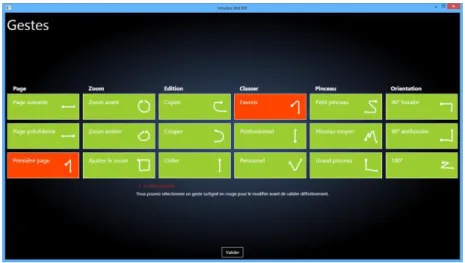
Figure 12. New interface of initialization phase.
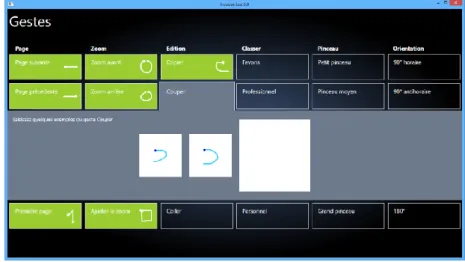
The third experimentation is nearly the same as the second one. It followed also the proceedings: initialization phase - test phase 1 - learning phase - test phase 2. We just made some changes on the design of initialization phase. Instead of separating the definition of gestures and practice of gestures for recognition system, we combined them together (cf. Figure 12). By clicking on the label of each command, we reached
the definition box of this command. We needed to give three samples of gesture and one sample would be shown by the side of command’s label as a preview. In this way, the user can always have a general idea of gestures that he has already defined, and he can change gestures easily. When there was no conflict detected, all gestures were shown in green. This detection of conflict was checked each time three samples of one command were submitted.
Figure 13. Initialization phase with one detected conflict. In this example, we have the same
gesture for the command “first page” (column 1, line 3) and the command “file in favorite folder” (column 4, line 1). These commands are marked in red while other commands already defined are in green because they are different from one another. The user can choose either to
enter a fourth sample to one of two confusing commands or to change completely all samples of one command.
Figure 14. Conflict can also be detected in the end once we click on "validate". If according
to him, these gestures are different between them, he can click again on “validate” to force the learning of gestures by the recognition system.
When a conflict was detected, the two concerned gestures would be shown in red as shown in Figure 13. Moreover, a final check would be done once all gestures of commands were defined (cf. Figure 14). If there was any conflict, the user just needed to enter the definition box by clicking on command’s label to change the gesture. If from his opinion, the highlighted red gestures were not confusing at all, he could choose to add one sample or more to one command, or to force the recognizer to learn as it was by clicking on “validate”.
5.4 Results
Figure 15. Conflict detected for 2 gestures.
Sixteen users participated in this new experiment. They are around twenty-two-year-old. They are all familiar with computers. In this experiment, users were alerted if they made similar gestures thanks to the conflict detection algorithm. There were always users who decided to force the learning of gestures for recognition system even there was still conflict (cf. Figure 15). But it was up to them to decide so.
We also obtained the learning rates of user (memorization rates) and recognition system (recognition rates). Users from this new experiment are called as Group 2. We compared them to results obtained by group 2 in the second experiment which is named as Group1 here. Group 1 is separated into Group1+ (users who made less than three confusing gestures) and Group1- (users who made at least 3 confusing gestures). We than got twenty seven persons in Group1+ and twelve users in Group1-. We can see that in average score (cf. Figure 16 left part), Group1+ and Group2 are both better than Group1-, either for test phase 1 or for test phase 2. We obtained similar results for mean recognizer learning rates too. But it is not enough to say that our hypothesis is true. As we see in the right part of Figure 16, we have a lot of variation within each group. So we need to make a signification test to justify our hypothesis.
The results of the pairwise tests to compare Group1+ to Group1– and Group2 to Group1– are shown in Table 1 and Table 2. We can see that Group1+ is significantly better than Group1- for almost all measure, while Group2 is significantly better than
Group1- too. We did not obtain any significant difference between Group2 and Group1+. This is as we expected since Group2 was helped by the conflict detection system and it should be as good as Group1+ which made few confusing gestures. From these statistical tests, we can conclude that both Group2 and Group1+ obtained better performance than Group1- in term of cross-learning of the user and the recog-nizer.
Figure 16. At left, bar plots of users’ mean memorization rates and mean recognition rates
at two test phases of all groups. At right, Box plots of memorization rates, of recognition rates for all groups.
Table 1. Group1+ compared to Group1-.
Rates Statistical formulas Significance
memo-test1 Nothing Nothing
memo-test2 χ2 = 5.0743, df = 1, p-value = 0.02428 Group1+ > Group1- Significant reco-test1 F(1, 13.133)=3.6463, p-value=0.07 Group1+ > Group1- Hardly Sign. reco-test2 χ2 = 3.8429, df = 1, p-value = 0.04996 Group1+ > Group1- Significant Table 2. Group2 compared to Group1-.
Rates Statistical formulas Significance
memo-test1 χ2 = 4.0617, df = 1, p-value = 0.04387 Group2 > Group1- Significant memo-test2 χ2 = 3.2602, df = 1, p-value = 0.07098 Group2 > Group1- Hardly Sign. reco-test1 F(1,15.644)=5.2093, p-value = 0.0368 Group2 > Group1- Significant reco-test2 χ2 = 4.8478, df = 1, p-value = 0.02768 Group2 > Group1- Significant
6
Conclusion
In this paper, we analyzed “user & system cross-learning” of gesture commands through several new concepts. We reported three experiments, summarized in Table 3, to support our approach for designing pen-based interfaces for complex application needing more than ten gestural commands: the first concept is to offer users the pos-sibility to personalize their gestures; the second concept is to use Customizable
Ges-ture Menus to help users memorize gesGes-tures; the third concept is to help users during the definition of their gestures prevent too similar gesture definition. On this last con-cept, more tests need to be done to consolidate the efficiency of the conflict detection algorithm (because all rates are not significantly better). Moreover the reported results show that using an evolving gesture recognition engine that learns incrementally, starting from few data samples, is a really promising strategy to induce a cross-learning of user and recognition engine. We summarize that personalized gestures can offer an easier way to interact with software on pen-based devices. The handover of software offering the gesture’s personalization should be separated into two steps: the help on definition of gestures and the help on memorization during the utilization. Besides these new concepts, we know that Marking Menus can offer more ad-vantages on interactive devices compared to traditional way with either menu bar or tabular menu, like entering text or parameters [12, 13]. Integration of these extension concepts will be our future work.
Table 3. Overview of 3 experiments.
Exp Goal Help on
gesture learning Help on gesture definition Result 1 Determine if it is important to leave user the freedom to personalize their
gestures
Table None Personalized gestures are better than pre-defined ges-tures
2 Determine which form of help suits better user and tabletops to memorize gestures
Evaluate the cross-learning of user & recognition engine Table vs Customizable Gesture Menus
None Menus are equal to table to help users learn gestures Both (the user and the recognition engine) can improve, in the same time, their capabilities of learning 3 Avoid confusing gestures Customizable
Gesture Menus
Conflict detection algorithm
With the help of the conflict detection system on gestures’ definition, the user and the recognition engine learn better
References
1. Kurtenbach, G., Buxton, W. The limits of expert performance using hierarchic marking menus. Proc. INTERACT 1993, ACM Press (1993), 482–487.
2. Kurtenbach, G., Moran, T.P., Buxton, W., 1994. Contextual animation of gestural com-mands. Computer Graphics Forum 13 (5), 305–314.
3. Zhao, S., Agrawala, M. and Hinckley, K. Zone and Polygon Menus: Using Relative Posi-tion to Increase the Breadth of Multi-stroke Marking Menus. Proc. CHI 2006, ACM Press (2006), 1077-1086.
4. Zhao, S. and Balakrishnan, R. Simple vs. Compound Mark Hierarchical Marking Menus. Proc. UIST 2004, ACM Press (2004): 33-42.
5. Bau, O., Mackay, W.E. OctoPocus: a dynamic guide for learning gesture-based command sets. Proc. UIST 2008, ACM Press (2008), 37–46.
6. Delaye, A. and Anquetil, E. “Hbf49 feature set: A first unified baseline for online symbol recognition” Pattern Recognition, vol. 46, no. 1, pp. 117 – 130, January 2013.
7. Delaye, A., Sekkal, R. and Anquetil, E. Continuous Marking Menus for learning Cursive Pen-based Gestures. Proc. IUI 2011, ACM Press (2011), 319-322.
8. Bailly, G., Lecolinet, E. and Nigay, L. Wave Menus: Improving the Novice Mode of Hier-archical Marking Menus. Proc. INTERACT 2007. Springer (2007), 475—488.
9. Almaksour, A., Anquetil, E., Quiniou, S. and Cheriet, M. Evolving Fuzzy Classifier: Ap-plication to Incremental Learning of Handwritten Gesture recognition Systems. Proc. ICPR 2010.
10. Almaksour, A. and Anquetil, E. Improving premise structure in evolving Takagi-Sugeno neuro-fuzzy classifiers. Evolving Systems, 10.1007/s12530-011-9027-0, 2:25-33, 2011. 11. Petzold, C. “Canonical Splines in WPF and Silverlight.”
http://www.charlespetzold.com/blog/2009/01/Canonical-Splines-in-WPF-and-Silverlight.html
12. Guimbretiére, F. and Winograd, T.: FlowMenu: combining command, text, and data entry, Proceedings of the 13th annual ACM symposium on User interface software and technolo-gy, p.213-216, November 06-08, 2000, San Diego, California, United States [doi>10.1145/354401.354778].
13. Igarashi, T., Matsuoka, S., Kawachiya, S., & Tanaka, H. Interactive beautification: a tech-nique for rapid geometric design. Proc. UIST '97, ACM Press (1997), 105-114.
14. Norman, D.A., 2010. Natural user interfaces are not natural. ACM Magazine Interactions 17 (3), 6–10.
15. LaViola, J., and Zeleznik, R. "A Practical Approach to Writer-Dependent Symbol Recog-nition Using a Writer-Independent Recognizer", IEEE Transactions on Pattern Analysis and Machine Intelligence, 29(11):1917-1926, November 2007.
16. Wobbrock, J.O., Wilson, A.D. and Li, Y. (2007). Gestures without libraries, toolkits or training: A $1 recognizer for user interface prototypes. Proceedings of the ACM Symposi-um on User Interface Software and Technology (UIST '07). Newport, Rhode Island (Octo-ber 7-10, 2007). New York: ACM Press, pp. 159-168.
17. Bouillon, M., Li, P., Anquetil, E. and Richard, G. Using Confusion Reject to Improve User and System Cross-Learning of Gesture Commands. Proc. ICDAR 2013, to be appeared. 18. Li, P. and Anquetil, E. Graphical Gesture Commands’ learning with the help of
Customi-zable Gesture Menus. Proc. IGS 2013, to be appeared.
19. Li, P., Delaye, A. and Anquetil, E. Evaluation of Continuous Marking Menus for Learning Cursive Pen-based Commands. Proc. IGS 2011, 217-220.