Web2.0, Knowledge Sharing and Privacy in E-learning
par Hicham Hage
Département d'informatique et de recherche opérationnelle Faculté des arts et des sciences
Thèse présentée à la Faculté des arts et des sciences en vue de l’obtention du grade de Doctorat en Informatique
Juillet, 2010
Université de Montréal Faculté des arts et des sciences
Cette thèse intitulée
Web2.0, Knowledge Sharing and Privacy in E-learning
présenté par: Hicham Hage
a été évalué par un jury compose des personnes suivantes:
Louis Salvail, président-rapporteur Esma Aïmeur, directrice de recherche
Claude Frasson, membre du jury Julita Vassileva, examinatrice externe
Resumé
Quand le E-learning a émergé il ya 20 ans, cela consistait simplement en un texte affiché sur un écran d'ordinateur, comme un livre. Avec les changements et les progrès dans la technologie, le E-learning a parcouru un long chemin, maintenant offrant un matériel éducatif personnalisé, interactif et riche en contenu. Aujourd'hui, le E-learning se transforme de nouveau. En effet, avec la prolifération des systèmes d'apprentissage électronique et des outils d'édition de contenu éducatif, ainsi que les normes établies, c’est devenu plus facile de partager et de réutiliser le contenu d'apprentissage. En outre, avec le passage à des méthodes d'enseignement centrées sur l'apprenant, en plus de l'effet des techniques et technologies Web2.0, les apprenants ne sont plus seulement les récipiendaires du contenu d'apprentissage, mais peuvent jouer un rôle plus actif dans l'enrichissement de ce contenu. Par ailleurs, avec la quantité d'informations que les systèmes E-learning peuvent accumuler sur les apprenants, et l'impact que cela peut avoir sur leur vie privée, des préoccupations sont soulevées afin de protéger la vie privée des apprenants. Au meilleur de nos connaissances, il n'existe pas de solutions existantes qui prennent en charge les différents problèmes soulevés par ces changements. Dans ce travail, nous abordons ces questions en présentant Cadmus, SHAREK, et le E-learning préservant la vie privée. Plus précisément, Cadmus est une plateforme web, conforme au standard IMS QTI, offrant un cadre et des outils adéquats pour permettre à des tuteurs de créer et partager des questions de tests et des examens. Plus précisément, Cadmus fournit des modules telles que EQRS (Exam Question Recommender System) pour aider les tuteurs à localiser des questions appropriées pour leur examens, ICE (Identification of Conflits in Exams) pour aider à résoudre les conflits entre les questions contenu dans un même examen, et le Topic Tree, conçu pour aider les tuteurs à mieux organiser leurs questions d'examen et à assurer facilement la couverture des différent sujets contenus dans les examens. D'autre part, SHAREK (Sharing REsources and Knowledge) fournit un cadre pour pouvoir profiter du meilleur des deux mondes : la solidité des systèmes E-learning et la flexibilité de PLE (Personal Learning Environment) tout en permettant aux apprenants d'enrichir le contenu d'apprentissage, et les aider à localiser nouvelles ressources d'apprentissage. Plus précisément, SHAREK combine un système recommandation multicritères, ainsi que des techniques et des technologies Web2.0, tels que le RSS et le web social, pour promouvoir de nouvelles ressources d'apprentissage et aider les apprenants à localiser du contenu adapté. Finalement, afin de répondre aux divers besoins de la vie privée dans le E-learning, nous proposons un cadre avec quatre niveaux de vie privée, ainsi que quatre niveaux de traçabilité. De plus, nous présentons
ACES (Anonymous Credentials for E-learning Systems), un ensemble de protocoles,
basés sur des techniques cryptographiques bien établies, afin d'aider les apprenants à atteindre leur niveau de vie privée désiré.
Abstract
E-learning emerged over 20 years ago, and was merely book like text displayed on a computer screen. With the changes and advances in technology, E-learning has come a long way, providing personal and interactive rich content. Today, E-learning is again going through major changes. Indeed, with the proliferation of E-learning systems and content authoring tools, as well as established standards, it has become easier to share and reuse learning content. Moreover, with the shift to learner centered education and the effect of Web2.0 techniques and technologies, learners are no longer just recipients of the learning content, but can play an active role into enriching such content. Additionally, with the amount of information E-learning systems can gather about learners, and the impact this has on their privacy, concerns are being raised in order to protect learners’ privacy. Nonetheless, to the best of our knowledge, there is no existing work that supports the various challenges raised by these changes. In this work, we address these issues by presenting Cadmus, SHAREK, and privacy preserving E-learning. Specifically, Cadmus is an IMS QTI compliant web based assessment authoring tool, offering the proper framework and tools to enable tutors author and share questions and exams. In detail, Cadmus provides functionalities such as the EQRS (Exam Questions Recommender System) to help tutors locate suitable questions, ICE (Identification of Conflicts in Exams) to help resolve conflicts between questions within the same exam, and the topic tree, designed to help tutors better organize their exam questions and easily ensure the content coverage of their exams. On the other hand, SHAREK (Sharing REsources and Knowledge) provides the framework to take advantage of both the rigidity of E-learning systems and the flexibility of PLEs (Personal Learning Environment) while enabling learners to enrich the learning content, and helping them locate new learning resources. Specifically, SHAREK utilizes a multi-criteria content based recommender system, and combines Web2.0 technologies and techniques such as RSS and social web to promote new learning resources and help learners locate suitable content. Lastly, in order to address the various needs for privacy in E-learning, we propose a framework with four levels of privacy, and four levels of tracking, and we detail ACES (Anonymous Credentials for E-learning Systems), a set of protocols, based on well established cryptographic techniques, to help learners achieve their desired level of privacy.
Table of Contents
Chapter 1 : Introduction ... 1
Chapter 2 : Background ... 6
2.1 E-learning ... 6
2.1.1 Components of an E-learning System: LMS and LCMS ... 6
2.1.2 E-learning Standards and Specifications ... 10
2.1.3 E-learning Platforms ... 18
2.1.4 E-testing ... 22
2.2 Web 2.0 ... 24
2.2.1 Social Web ... 27
2.2.2 Rich Internet Application ... 28
2.2.3 Service Oriented Architecture ... 30
2.2.4 E-learning 2.0 ... 33
2.2.5 Personal Learning Environments ... 37
2.3 Security of E-learning systems ... 37
2.3.1 Pillars of security ... 38
2.3.2 Security Threats ... 40
Chapter 3 : Issues to solve ... 43
3.1 E-testing ... 43
3.2 LMS and PLE ... 45
3.3 Learner Privacy ... 46
3.4 Related work ... 47
Chapter 4 : Cadmus ... 51
4.1 EQRS - Exam Questions Recommender System ... 54
4.1.1 Content-Based Filter ... 58
4.1.3 Feedback ... 61
4.1.4 Testing and Results ... 62
4.2 ICE - Identification of Conflicts in Exams ... 63
4.2.1 Similarity Function ... 65
4.2.2 TF-IDF weighting ... 66
4.2.3 ICE Process ... 66
4.2.4 Testing and Results ... 72
4.3 Topic Tree: increasing the accuracy of ICE ... 73
4.3.1 Related Work and Preliminaries ... 74
4.3.2 Topic Tree ... 75
4.3.3 Testing and Result ... 79
Chapter 5 : SHAREK ... 82
5.1 Adding Resources ... 85
5.2 Sharing and Accessing Resources ... 88
5.3 Multi-criteria recommender system ... 90
5.4 Managing Resources ... 95
5.5 Implementation and Validation ... 97
5.6 Results and findings ... 98
5.6.1 Recommender System testing and results ... 100
5.6.2 Results and findings ... 101
Chapter 6 : Privacy preserving E-learning ... 104
6.1 The Impact of Privacy on Learning... 105
6.1.1 Testing procedure ... 106
6.1.2 Test results ... 109
6.2 Privacy Preserving E-learning ... 113
6.2.1 Learning Process ... 114
6.2.2 Framework for Privacy Preserving E-learning ... 115
6.2.3 Desirable Properties and Considerations ... 118
6.3 Related work on privacy in E-learning ... 120
6.4.1 Pseudonymous and Anonymous Credentials... 122
6.4.2 Cryptographic preliminaries ... 123
6.5 Anonymous Credentials for Privacy-Preserving E-learning ... 127
6.5.1 Blind Signature on a Pseudonym ... 127
6.5.2 Obtaining Anonymous Credentials ... 128
6.5.3 Prevention of Anonymous Credentials Sharing ... 133
6.5.4 Showing an Anonymous Credential ... 133
6.5.5 Legitimacy of Anonymous Credentials ... 133
6.6 Discussion ... 134
List of Figures
Figure 1: Learner Centered education ... 1
Figure 2: E-learning Lifecycle ... 6
Figure 3: General architecture of an E-learning system ... 7
Figure 4: LMS and LCMS ... 9
Figure 5: Example of an Assessment ... 16
Figure 6: IMS QTI Example ... 17
Figure 7: IMS QTI Example XML ... 18
Figure 8: E-testing Life Cycle ... 23
Figure 9: Web1.0 vs. Web2.0 illustrated (Webilus, 2008) ... 26
Figure 10: Web2.0 pillars (adapted from (Webilus, 2008)) ... 27
Figure 11 : Cooliris preview ... 29
Figure 12 : Coolpreview ... 30
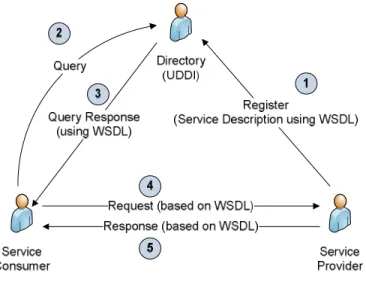
Figure 13 : Simple SOA - adapted from (Booth, et al., 2004) ... 31
Figure 14 : Web service scenario ... 33
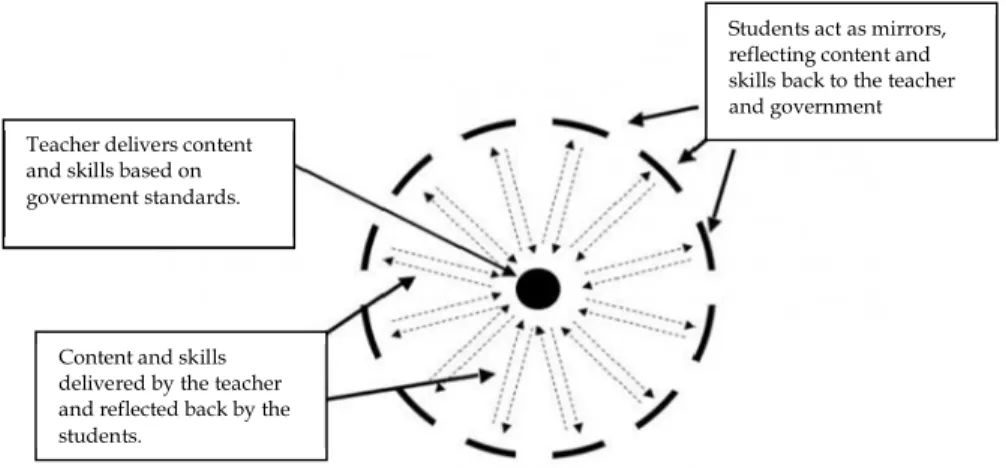
Figure 15: Tutor-centered education (Webilus, 2008) ... 34
Figure 16: Learner-centered education (Webilus, 2008) ... 34
Figure 17: Information route from user's PC to web server ... 38
Figure 18: Image Hot Spot into a Multiple Choice ... 43
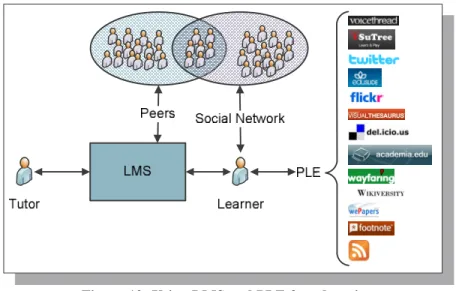
Figure 19: Using LMS and PLE for education ... 46
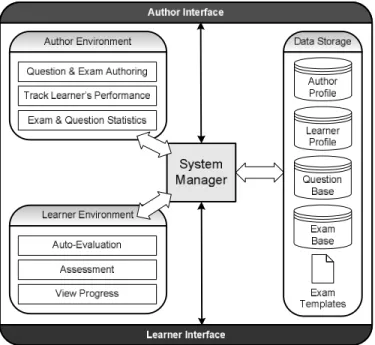
Figure 20: Cadmus Architecture ... 51
Figure 21: EQRS Architecture ... 57
Figure 22: Question Search ... 59
Figure 23: Search Result ... 60
Figure 24: Ranking Partition ... 63
Figure 25: Top Ten ranking ... 63
Figure 26: ICE process ... 67
Figure 27: ICE – Replace Question ... 71
Figure 29: Results after increasing T ... 72
Figure 30: ACM CCS – partial ... 75
Figure 31: Topic Tree Sample ... 77
Figure 32: ICE Initial Results ... 79
Figure 33: ICE Accuracy Comparison ... 81
Figure 34: Combining LMS and PLE ... 82
Figure 35: SHAREK within an ITS ... 84
Figure 36: SHAREK process ... 85
Figure 37: Resources data model ... 86
Figure 38: SHAREK illustration ... 90
Figure 39: CF in a single rating setting (Adomavicius & Kwon, 2007) ... 92
Figure 40: CF in a multi-criteria rating setting (Adomavicius & Kwon, 2007) ... 93
Figure 41: Partition of answers to the survey’s question #1 ... 99
Figure 42: Average of answers to the survey’s question #4 ... 99
Figure 43: Partition of answers to the evaluation question #2 ... 99
Figure 44: MAE comparison ... 102
Figure 45: Average MAE interpretation ... 103
Figure 46: First test (no privacy) environment. ... 107
Figure 47: Capturing the Emotional state ... 109
Figure 48: Age group partition... 110
Figure 49: Education level partition ... 110
Figure 50: Learning Process ... 114
Figure 51: Learner’s data ... 116
Figure 52: Proposed levels of privacy ... 117
Figure 53: Public Key Cryptosystem ... 124
Figure 54: Digital Signature System ... 125
List of Tables
Table 1: LMS vs. LCMS ... 10
Table 2: E-learning Platforms ... 19
Table 3: Web1.0 vs. Web2.0 (O'Reilly, 2005) ... 24
Table 4: Weights Values ... 58
Table 5: Question Values... 61
Table 6: Teacher's Profile Values ... 61
Table 7: Keywords summary ... 68
Table 8: Results Summary ... 73
Table 9: Summary of survey ... 110
Table 10: Correlations for average score and time ... 111
Table 11: Paired samples t-test for average score and time ... 112
Acknowledgements
I would first like to express my appreciation to my supervisor, Prof. Esma Aïmeur, for her guidance and support. Prof. Aïmeur, besides your intellectual and wise counsel, I cherish the most your personal qualities, your understanding and your kindness, especially during the difficult times I went through. I will hold in memory that I had an excellent research director.
A special thought goes to my wife, Mariette. Without your unwavering support and dedication, I would not have made it this far. I promise I will make up for all the nights and week-ends I spent away working late.
To my boys, Carl and Marc I dedicate this work. No Carl, you cannot draw on these pages, and no Marc, you cannot put these pages in your mouth.
I would like to extend my gratitude to the members of the jury for your time, and all the constructive comments to help me improve this work.
To everyone in the Heron lab, thank you for your help and feedback. Specifically, I would like to extend a special acknowledgment to Flavien Serge Mani Onana and Pierre Chalfoun. Flavien Serge, thank you for your help and guidance. I really appreciate the times when you selfishly took time, away from your work and family, to help me. Pierre, I will miss our coffee break together, and in particular, our discussions and the way you always challenged my ideas, pushing me to excel.
Chapter 1 : Introduction
When looking for the definition of E-Learning, one would come across different interpretations (LiNe-Zine, 2000). We summarize the definition of E-learning with the following statement: E-learning is the delivery and support of educational and training material using computers.
E-learning is an aspect of distant learning, where teaching materials are accessed through electronic media and where teachers and students can communicate electronically (email, chat rooms, forums, skype, ...).
E-learning emerged over 20 years ago, and consisted solely of text, like a book on a screen, and was ineffective and unpopular with learners. Today, E-learning has become richer with multimedia content and more interactive. With E-learning, education is shifting from being Tutor Centered, where the tutor is the center and has access to the resources, and becoming more Learner Centered, where the student is the center and has access to a multitude of resources (Figure 1).
Figure 1: Learner Centered education
E-learning is very convenient and portable; the student is not bound by physical space since study material is accessible remotely. Furthermore, the student is not bound by time, since he can study at his own pace, and can have access to assistance through email or message boards. E-learning is also very flexible; students can skip material or chapters they already know. Students can choose instructor-led or self-study courses and can choose from a variety of learning tools that best fit their style. In addition, E-learning
involves a great collaboration and interaction between students and tutors or specialist. Such collaboration is made easier by the online environment. For example, a student in Canada can have access to a specialist in Europe or Asia through email or assist to his lecture through a web conference. Despite the advancement in E-learning, many aspects still require further development; such aspects include Knowledge Sharing and Learner
Privacy.
Knowledge sharing, from the tutors’ perspective, is important since it reduces the cost in time and resources of redeveloping learning material that already exists. Moreover, in many cases, re-using learning material with well established statistics is imperative, specifically in E-testing. E-testing offers several advantages over traditional paper tests, such as sound and multimedia content, adaptive testing techniques, quick scoring and feedback. Despite these advantages over traditional test, E-testing suffers from the various limitations. One such limitation is Question Type support: E-testing systems only support a limited set of question types such as True/False and Multiple choice questions, while disregarding other question types, such as Image Hot Spot, which are important and supported by E-learning standards. Another limitation in E-testing is due to the lack of standardization and the fact that various systems store learning material using an internal format, and only the author has access to his material. Thus, in order to share learning material, authors must resort to import/export facilities that are not always available, not to mention the process of locating that material. Finally, Content Coverage refers to the verification that questions in tests and exams cover properly the subject matter. This issue is accentuated further by the fact that exam questions are usually selected at random within the E-testing system.
Knowledge sharing from the learners’ perspective, or harnessing the learner’s
knowledge, is another aspect that is starting to get more and more attention in E-learning.
Specifically, learners regularly access learning content and tools from outside the scope of the content defined by the tutor, and the tools provided by the E-learning system. This is further accentuated with the fact that learning is becoming more learner centered, where the learner has an access to a multitude of resources. This knowledge is very important since it can enrich the learning content, hence benefitting both the tutor and learners. Indeed, the learner is no longer just a recipient of learning content, but rather he
can be an active participant in the creation of such content. Nonetheless, there are no existing mechanisms within E-learning systems to efficiently harness and share this knowledge.
Finally, another aspect of E-learning that requires attention is privacy. One of the main advantages of E-learning is its adaptability to the learner’s specific needs and preferences. But in order to do so, the E-learning systems must collect large amounts of information about the learner (Arroyo & Woolf, 2005), information that could be misused, and therefore violating his privacy, which is the claim of individuals to determine what information about themselves is known to others, as well as when and how it is used (Westin, 1967). The security aspects of E-learning systems do offer some privacy protection; nonetheless it remains unsatisfactory on several levels. Other than the case of Head-in-the-sand privacy (by which the learner wants to keep secret his ignorance even from himself), learners might need to keep private different parts of their profile for different reasons. For example, a learner who is following a professional training course, for competitive reasons, would rather keep his identity hidden; yet, he wouldn’t mind leaving a trace of his activities in the E-learning system. On the other hand, a secret agent would rather take the training course for a top-secret mission without revealing his identity and without even leaving a trace that someone took this training. Consequently, we propose Cadmus, to address knowledge sharing from the tutor’s perspective, SHAREK (SHAring REsources and Knowledge) to address knowledge sharing from the learner’s perspective and finally we present Privacy Preserving
E-learning to provide a learner’s privacy preserving environment for E-E-learning. Although
the three approaches are introduced separately in this work, they could be all integrated within the same E-learning system.
The name Cadmus comes from Phoenician and Greek mythologies: Cadmus was a Phoenician prince who went looking for his sister Europa, abducted by Zeus. During his journey, Cadmus introduced the Phoenician alphabet to the Greeks, who then adapted it into the Greek alphabet.
Cadmus, our system, is an IMS QTI (Question and Test Interoperability) (IMS, 2006) compliant E-testing system. Cadmus is presented to address the limitations of knowledge sharing from a tutor’s perspective, in the context of an E-testing system. Hence, since
IMS-QTI supports most question types, and in order to increase Question Type support, Cadmus stores questions and tests following the IMS-QTI format. Moreover, Cadmus stores questions and tests in a shared repository, thus allowing authors to implicitly share their knowledge and E-testing material. Nonetheless, authors still have the option of sharing or keeping private the authored material. For such a question-and-exam repository to be beneficial it must contain extensive information on questions and exams. The bigger and more useful the repository becomes, the more dreadful is the task to search for and retrieve necessary information and material. Although there are tools to help teachers locate learning material (Tang & McCalla, 2003; Walker, Recker, Lawless, & Wiley, 2004), to our knowledge there aren’t personalized tools to help the teacher select exam material from a shared data bank. Consequently, Cadmus incorporates an Exam Questions Recommender System (Hage & Aïmeur, 2005) to help teachers find and select questions for exams. The recommender uses a hybrid, feature-augmentation recommendation approach (Burke, 2002, 2004). Additionally, the recommender system gathers implicit and explicit feedback (Cabena, Hadjinian, Stadler, Verhees, & Znasi, 1997) from the user in order to improve future recommendations. However, selecting questions depending merely on the teacher’s preference cannot guarantee a flawless exam with no conflicts. Indeed, we define that a conflict exists in an exam if two or more questions are redundant in content, and/or if a certain question reveals the answer of another question within the same exam. Such conflicts might be frequent typically when a teacher is using shared questions (authored by others), and especially in the automation of the exam creation process. As such, we introduce ICE (Identification of Conflicts in Exams), a module within Cadmus that uses IR (Information Retrieval) techniques to identify conflicts within an exam. ICE (Hage & Aïmeur, 2006a) is based on the vector space model using the cosine function and TF-IDF weighing technique (Singhal, 2001). Furthermore, ICE combines the EQRS techniques in order to recommend replacements for conflicting questions. Finally, Cadmus incorporates the Topic Tree (Hage & Aïmeur, 2007), a hierarchy of different topics, of which the author can select those that are covered in the exam, such as the question selection is performed from each to ensure
On the other hand, SHAREK (SHAring REsources and Knowledge) is intended to help learners to share their knowledge and resources. Inspired by the Web2.0 (Schauer, 2005) approach at harnessing collective intelligence, SHAREK (Hage & Aïmeur, 2008b) allows learners to augment the learning material proposed by the tutors by adding or attaching, to a course or lecture, learning resources that they have found (or created). As such, learners can be active contributors into enhancing and enriching the course’s learning resources, while maintaining the integrity of the learning material developed by the tutor. In order to achieve this, SHAREK combines Web2.0 technologies and techniques (such as tagging, comments, rating and RSS) with recommendation techniques, notably a multi-criteria collaborative filtering recommender system to help learner manage, share and easily discover learning resources.
Finally, in order to satisfy various privacy needs, we adapt the levels of Privacy and the levels of Tracking introduced in (Aïmeur, Brassard, Fernandez, & Mani Onana, 2007a) to the context of E-learning. In particular, learners are able to receive anonymous transcripts and anonymous degrees such as to prove their achievements to third entities (employers, other E-learning systems, etc.) without compromising their private data. Moreover, in order for the learner to prove that he is the rightful owner of the anonymous transcript or degree, we introduce the concept of Blind Digital Certificates, a digital certificate that does not reveal the learner’s identity. Finally, we propose Anonymous Credentials for
E-learning Systems (ACES), a set of protocols that preserves the learners’ privacy(Aïmeur,
Hage, & Mani Onana, 2008). We are aware that not everybody will embrace our wish for privacy. Nevertheless, as many would agree, we consider privacy to be a fundamental human right: it is not negotiable! This is why we introduce Privacy-Preserving E-learning as an alternative to standard E-learning. Of course, the final choice belongs to each learner.
This document is organized as follows: Chapter 2 offers background information. Chapter 3 details the three issues raised with regards current E-learning systems and offers an overview of related work. Chapters 4, 5 and 6 respectively introduce our proposed solutions to the issues raised in Chapter 3. Specifically, Chapter 4 details Cadmus and the various components, Chapter 5 highlights SHAREK, and Chapter 6 details privacy preserving E-learning. Chapter 7 concludes this work.
Chapter 2 : Background
This section offers background information. Specifically, it introduces E-learning by detailing the components of an E-learning system, as well as by providing an overview of current standards and specification, and a listing of major E-learing systems and their components. The Section also introduces Web2.0 and defines its three pilars. Moreover it offers an over view of how Web2.0 is affecting E-learning.
2.1 E-learning
2.1.1 Components of an E-learning System: LMS and LCMS
There are four parts in the life cycle of E-learning (Figure 2): Skill Analysis, Material
Development, Learning Activity and Evaluation.
Skill Analysis: analysis and evaluation of the learner’s current skill, and the skill level expected after the training.
Material Development: develop and decide on the course material needed to attain the course objective.
Learning Activity: the learner goes through the prepared material. Evaluation: the new acquired skill or knowledge is tested and assessed.
Figure 2: E-learning Lifecycle
Throughout the E-learning lifecycle, there are many components collaborating in order to analyze the learner’s skills, develop and deliver proper training material, and evaluate the learning process. Figure 3 illustrates a simplified example of an E-learning system.
Figure 3: General architecture of an E-learning system
Here is a brief explanation of each component, and then a small example to illustrate the interaction between these different components.
The Learner is the person who will be going through the learning/training process. He can be a student, an employee in a company, or anyone who wants to increase their skill and knowledge through distant learning.
The Developer or Teacher is the person developing the training material. He can be a specialist developing training material, a teacher adding or changing some data, or another E-learning system from where training material is imported. Content Authoring Tools are available to help the developer create or edit
learning material, classify the content, or add a few notes on a subject.
The Content Manager is used to structure the content for search and retrieval, to add/remove/update content, and for version control.
The Content Repository is used to store learning material in self contained reusable packages.
The Course Manager is for managing and deciding the content to be delivered to the learner.
The Delivery Environment is how and where the training content is delivered. The Delivery Environment depends on the media type of the training material. The Evaluation or Assessment tool evaluates the learner’s current skill, the skill
level expected after the training, and evaluates what the learner gained from the training.
The Learner Profile Manager is used to keep track of the learner’s goals and learning history, and to manage his preferences and learning environment.
The Learner Profile Repository is where all the information about the learner is stored and accessed by the Learner Profile Manager.
The Collaborative Environment is a set of tools available for the learner to help him in the learning process; tools such as email, internet, forums, library, etc.
The following example illustrates the interaction between the various components of an E-learning system. Consider a person (the learner) who wants to learn how to cook an omelet. For this matter, assume a cooking E-learning system. To simplify the example, assume that: preparing an omelet has only two parts: preparing the ingredients (eggs and vegetables), and cooking the omelet.
The training content is already developed (by a Chef for example) and stored in the Content Repository. To start the learning process, the Course Manager will check with the Learner Profile Manager and get information about the learner, such as: the preferred Delivery Environment (reading, illustration with pictures, or a demonstration), and what are the skill level and previous training of the learner related to preparing an omelet (does the learner know how to break the eggs, how to prepare the vegetables, …). Now that the Course Manager knows what training the learner needs and in which context, it will query the content manager to look up the training material. In this example, if the learner already knows how to prepare the vegetables, but not the eggs, and prefers to read the instructions with illustrations, then the Course Manager will query the Content Manager only for training material on how to prepare the eggs, in the format of text and illustration (web page, a manual from the library …). At this point, the Course Manager will relay the gathered information to the Delivery Environment and the learner will go through the
learning process, relying on the Collaborative Environment for more help if needed. After the learning process is over, an Evaluation, or an Assessment, of the new acquired skill is done (a cooking test and a tasting of the omelet), and the information is reported to the Learner Profile Manager that will record the new training done by the learner, and the newly acquired skills.
The components of an E-learning system are usually divided into two distinct systems: an LMS (Learning Management System) and an LCMS (Learning Content Management System). Although both parts share a similar name and acronym, they have two completely different functions. The LMS primary objective is to manage the learner, and monitor his performance and progress. On the other hand, the LCMS manages the content and the learning material. If we refer back to Figure 3, and we want to order the variable components of the E-learning system under the LMS or the LCMS, we get the result illustrated in Figure 4.
Figure 4: LMS and LCMS
It is important to note that functionalities may sometimes overlap between the LMS and the LCMS, i.e. an LMS system might include some LCMS functionality or vice versa. Table 1 highlights some of the main differences between an LMS and an LCMS.
Learner Profile Manager Course Manager Evaluation/ Assessment Collaborative Environment Delivery Environment Content Manager Content Authoring LMS LCMS
Table 1: LMS vs. LCMS
LMS LCMS
Management of: Learner Learning Content
Classroom management Yes (not always) No
Learner profile data Yes No
Event scheduling Yes No
Skill analysis Yes Yes (in some cases)
Content creation No Yes
Content organization No Yes
Manage the content development process No Yes
Delivery of content No Yes
Most existing E-learning systems actually combine both of the LMS and the LCMS functionalities. Such a system is usually referred to, in the literature, as an LMS (Learning Management System).
2.1.2 E-learning Standards and Specifications
Up until recently, creation and implementation of E-learning material was restricted to a private internal use only, in organizations such as schools, universities, and training departments of companies. In order to deliver the training material, various organizations chose different delivery media, different LMS, different platforms/operating systems and different authoring tools. If an organization upgraded or changed any of its information technologies, the course might not operate, and a change to one component of the course would affect the entire course. Standards and specifications help simplify the development, the use and reuse of E-learning material. As stated in the ADL (Advanced Distributed Learning Initiative) goals, standards and specifications ensure that E-learning material is:
Reusable: modified easily and can be used on different development tools. Accessible: available as needed by learners or course developers.
Interoperable: functional across different hardware or software platforms. Durable: easy to modify and updated for new software versions.
Currently, there are many organizations developing different standards for E-learning, each promoting its own standards. Some of the leading organizations with the most widely accepted standards are:
IEEE Learning Technology Standards Committee
The LTSC (Learning Technology Standards Committee) is a committee of the IEEE (Institute of Electrical and Electronic Engineering) to develop standards for learning technology. (ltsc.ieee.org/)
ADL (Advanced Distributed Learning Initiative)
ADL was started, in 1997, by the U.S. Department of Defense and the White House Office of Science and Technology Policy (OSTP). The purpose of the ADL is to standardize E-learning while collaborating with the government, industry, and academia. (www.adlnet.org)
IMS (Instructional Management System Project)
The IMS is an open consortium of industry, government and education members. It was started in 1997 by the National Learning Infrastructure Initiative of EDUCAUSE. The IMS provides a neutral forum for the development of standards and specifications for interoperability and reuse. (www.imsproject.org)
Some of the most widely accepted standards and specification for E-learning are: SCORM (Sharable Content Object Reference Model), LOM (Learning Object Metadata), QTI (Question and Test Interoperability) and LIP (Learner Information Packaging).
2.1.2.1 Sharable Content Object Reference Model
The ADL combined E-learning specifications from international standard groups (IEEE, IMS, AICC and ARIADNE) into a single specification, SCORM. To define SCORM, it is simply a set of standards for developing, packaging and delivering training materials. The SCORM standard has three components: Content Packaging, Runtime Communication, and Course Metadata.
Content Packaging is the packaging of all the material and components necessary for the delivery of a course. In order for a course to be properly shared, the architecture and the learning resources should be included in the course. SCORM requires each course to
include an XML file containing this description. This file is called imsmanifest.xml. The imsmanifest file has four sections:
The preamble section: contains XML pointers to schemas for validating the file. The metadata section: contains general course information, such as the title. The organization section: contains the sequence and the order of the course
material.
The resources section: contains a list of all the files and resources used in this course.
Many courses require adapting to the learner’s actions during the course. Runtime Communication occurs when such a course communicates with the LMS. SCORM runtime communication requires two elements: runtime commands to communicate the learner’s information to and from the LMS, and the learner’s metadata to store the data on individual learners. Presently, in SCORM there are 8 runtime commands, and 49 student metadata elements.
The SCORM Course Metadata is information packaged within a course when it is archived. The course metadata allows students, teachers or course developers to search through the archives, and easily identify the content of the course. Course metadata can contain the course title, description, etc. SCROM contains a dictionary of metadata terms that can be used for the course description. SCROM uses the IMS Learning Resources Metadata specification, which is based on the IEEE Learning Technology Standards Committee and ARIADNE (Alliance of Remote Instructional Authoring and Distributions Networks for Europe).
2.1.2.2 Learning Object Metadata
LOM (Learning Object Metadata) is a standard for defining the attributes of different LO (Learning Objects1), it is an index information used to search and reuse LOs. LOM is a hierarchy of data elements. Nine categories exist at the top level of the hierarchy: general, life cycle, meta-metadata, educational, technical, rights, relation, annotation and
1
classification categories. What follows is the exact definition of the categories from the LOM specifications (ltsc.ieee.org/):
a) “The General category groups the general information that describes the learning object as a whole.”
b) “The Lifecycle category groups the features related to the history and current state of this learning object and those who have affected this learning object during its evolution.”
c) “The Meta-Metadata category groups information about the metadata instance itself (rather than the learning object that the metadata instance describes).”
d) “The Technical category groups the technical requirements and technical characteristics of the learning object.”
e) “The Educational category groups the educational and pedagogic characteristics of the learning object.”
f) “The Rights category groups the intellectual property rights and conditions of use for the learning object.”
g) “The Relation category groups features that define the relationship between the learning object and other related learning objects.”
h) “The Annotation category provides comments on the educational use of the learning object and provides information on when and by whom the comments were created.”
i) “The Classification category describes this learning object in relation to a particular classification system.”
The following are examples of the data elements hierarchy, where the dot separates each level in the hierarchy:
General.Title
LifeCycle.Contribute.Date Technical.InstallationRemarks
For each data elements the LOM defines: a name, to refer to the data element,
an explanation, to define the data element, a size, that is the number of values allowed, an order, to specify the order of the values, an example, an illustrative example,
a value space, to define the set of allowed values of the data element, a datatype that indicates the type of the value of the data element.
2.1.2.3 Learner Information Packaging
LIP (Learner Information Packaging) sets a list of specifications used in order to exchange learner information, such as name, address and other information. LIP presents the learner information in a defined package. LIP allows profile servers to store learner information in their own format, and provides means to import and export that data between different profile servers. Profile servers use a broad range of information on learners. LIP provides an extensive set of elements to cover most of the data used by profile servers. Most of the LIP elements are optional, thus implementers can only include the specific elements of their actual application. LIP defines eleven segments to group the learner’s data:
Identification: contains basic information about the learner such as name, address, phone number and email
Goal: contains information about the learner’s personal goal and aspirations. A nested structure provides the ability to identify sub-goals.
QCL: specifies the Qualifications, Certifications, and Licenses. Reflects the achieved accomplishments and indicates the source of the QCL and the level attained.
Accessibility: contains the learner preferences such as language, disability or accessibility, and technical or physical preferences.
Activity: contains educational and training actions. This area goes beyond the recording of the activity and result; it provides a space to include a digital representation related to the activity, e.g. a digital representation of a work of art. Competency: contains skills the learner has acquired though formal/informal
training or work history. These skills can be related to information in the Activity and/or QCL sections.
Interest: contains information on the learner’s hobbies and recreational activities. These items can be related to information in the QCL section, and can also contain digital representations.
Transcript: contains a summary of academic achievement. This section introduces the concept of an exrefrecord which is a structure that allows the referencing of external data formats, e.g. a document can be stored in an EDI or in a PDF format. Affiliation: contains information and description of organizations affiliated with
the learner, such as clubs and professional associations.
Security Key: contains the learners’ security information such as passwords, and security keys.
Relationship: contains descriptions of the relationships between data contained in the other segments.
2.1.2.4 Question and Test Interoperability
IMS QTI (Question and Test Interoperability) (IMS-QTI, 2006; Sclater & Low, 2002) sets a list of specifications used in order to exchange assessment information, such as questions, tests, and results. QTI allows assessment systems to store their data in their own format, and provides a mean to import and export that data, in the QTI format, between various assessment systems. QTI is composed of two parts: the ASI (Assessment
Section and Item) relates to the test contents, and the Results Reporting relates to the test
results. To avoid any ambiguity, QTI uses its own terminology. QTI refers to tests as
assessments. In order to properly deliver a question, there are other things to know, such
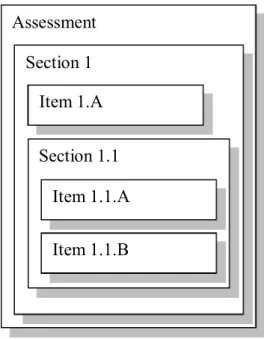
as the score for getting it right, and the layout of the question. Therefore, QTI refers to questions and their respective information as items. QTI also refers to a group of items in an assessment as a section. A section can contain items and/or sections (Figure 5).
Figure 5: Example of an Assessment
QTI makes available a number of the most used question types: multiple choice, true/false, multiple response, image hot spot, fill in the blank, select text, slide, drag object drag target, order objects, match items, and connect points.
Results in QTI relate to a single learner. However, since a learner can do more than one test, results can contain several results for several assessments. The result reporting data model is made of four constructs:
Summary: contains data on the test, such as the highest score, and the number of attempts made.
Assessment: as in the ASI model Section: as in the ASI model Item: as in the ASI modem
As an alternative result reporting mechanism, one can use the IMS LIP (Learner Information Packaging).
Figure 6 represents a simple True and False example. Figure 7 illustrates the corresponding XML to represent the question of Figure 6 following the IMS QTI standard. The example is taken form the ASI Best Practice & Implementation Guide. For purpose of practicality, the response processing was left out, and only the representational part of the question illustrated in Figure 7. Due to concerns that the IMS QTI is becoming
Assessment Section 1 Section 1.1 Item 1.1.A Item 1.1.B Item 1.A
increasingly complex, IMS developed a cut down version of the QTI specification, QTI Lite. QTI Lite deals only with Items, Sections and Assessments are not included. Furthermore, the only item implemented is multiple choice single response. There is support for text and images, but not for video and audio, and QTI Lite maintains a simplified response processing.
Figure 7: IMS QTI Example XML 2.1.3 E-learning Platforms
E-learning has come a long way from being just a book-like content. As illustrated earlier, E-learning systems have become very complex and involve many utilities and tools. This section highlights some of the E-learning systems available in the market, and
<questestinterop> <qticomment>
This is a simple True/False multiple-choice example using V1.2. The rendering is a standard radio button style.
Response processing is incorporated. </qticomment>
<item ident="IMS_V01_I_BasicExample001"> <presentation label="BasicExample001"> <flow>
<material>
<mattext>Paris is the Capital of France</mattext> </material>
<response_lid ident="TF01" rcardinality="Single" rtiming="No"> <render_choice> <flow_label> <response_label ident="T"> <material><mattext>Agree</mattext></material> </response_label> <response_label ident="F"> <material><mattext>Disagree</mattext></material> </response_label> </flow_label> </render_choice> </response_lid> </flow> </presentation> </item> </questestinterop>
offers a comparison of the various utilities available in each system. In addition, it lists some of the available virtual universities.
There exist many E-learning platforms in the market today. The following table introduces some of the most known E-learning platform, their manufacturer, and the platform’s website. For detailed information on these platforms, please refer to EduTools (EduTools, 2006); which offers a complete and independent analysis of the various E-learning platforms.
Table 2: E-learning Platforms
Platform Company
ANGEL 6 Adv. Research & Technology Institute
Anlon 4.1 Anlon Systems, Inc.
Atutor 1.3 University of Toronto (ATRC)
Bazaar 7 University of Athabaska
BlackBoard 6 Blackboard
Bodington University of Leeds
BSCW 4.0.6 OrbiTeam Software
Click2learn Aspen 2 Click2learn Colloquia 1.3.2 University of Wales
COSE 2.051 Cambridge Software Publishing
CourseWork Stanford University
Educator Ucompass
Eledge 3.1 Chuck Wright
Embanet hosting ANGEL Embanet Corporation Embanet hosting BlackBoard Embanet Corporation
FirstClass 7 Centrinity Inc.
Groove Workspace 2.5 Groove Networks, Inc. IntraLearn SME 3.1.2 IntraLearn
Janison Toolbox 6.2 Janison
KEWL 1.2 University of Western Cape
KnowEdge eLearning Suite Inter Netion
Learnwise Granada Learning
Manhattan Virtual Classroom 2.1 Western New England College Teknical Virtual Campus Teknical Ltd
Virtual-U 2.5 Virtual Learning Environments Inc. WebCT Campus Edition 4.1 WebCT
WebCT Vista 2.1 WebCT
Whiteboard 1.0.2 Todd Templeton
These different E-learning platforms offer different functionalities, which are divided into 5 categories: Communication Tools, Productivity Tools, Student Involvement Tools, Course Delivery Tools, and Curriculum Design Tools.
2.1.3.1 Communication Tools
Communication Tools are available for electronic communication between teacher and students, and among students themselves. Communication tools are grouped into:
Discussion Forums: online tools to capture and exchange messages over a period of time (days, weeks). Threaded discussion forums are forums where the messages are divided into categories.
File Exchange: tools to allow learners to upload and share files with teachers and other students.
Internal Email: email tools used from inside the course.
Online Journal/Notes: tools to allow learners to keep journal entries or personal notes.
Real-time Chat: tools to exchange messages in real time.
Video Services: tools to allow the teacher to either stream video within the system, or enable video conferencing.
Whiteboard: offers an electronic dry-erase board that can be used in a virtual classroom environment, and other synchronous functionalities such as application sharing.
2.1.3.2 Productivity Tools
Productivity tools are available to help the learner be more productive. Productivity Tools are grouped into:
Bookmarks: tools that allow the student to mark important pages, from within or outside the course, and then easily come back to them at a later time.
Calendar/Progress Review: tools that allow the students to keep track of course progress and assignments plan.
Orientation/Help: tools to help the student use the different tools in the course management system.
Searching Within Course: tools that allows student to search and find course material using keywords.
Work Offline/Synchronize: tools to allow student to complete their work offline, and then synchronize the completed work into the course the next time they login.
2.1.3.3 Student Involvement Tools
Student involvement tools are available to help the students to interact with one another. Student involvement tools are grouped into:
Group work: tools that provide the capacity to split the class into groups, and provide groups work space, which enables the teacher to assign specific assignments and projects for different groups.
Self-assessment: tools to allow student to take and review assessment tests. These assessments usually do not count in the final grade.
Student Community Building: tools that offer a space to create clubs, study groups, or collaborative teams.
Student Portfolios: tools that offer a space for student to display their work, along with personal information.
2.1.3.4 Course Delivery Tools
Course Delivery tools are made available for teachers in order to help them with the delivery of the course material. Course Delivery tools are grouped into:
Automated Testing and Scoring: tools that allow the teacher to create, distribute, and score the tests.
Course Management: tools that allow the teacher to control the progress of the class through the course material.
management.
Online Grading Tools: tools to help the teacher grade and provide a feed back to the student, and manage a grade book.
Student Tracking: tools to allow the teacher track the usage of the course material by the students, and to allow the teacher to perform analysis and reporting on a class or on an individual level.
2.1.3.5 Curriculum Design Tools
Curriculum Design tools are intended to help the teacher create and design the course content. Curriculum Design tools are grouped into:
Accessibility Compliance: is meeting the standards that allow access for people with disabilities to learning material.
Course Templates: tools that help the teacher create the initial structure/template for a course.
Curriculum Management: tools to provide students with customized programs according to previous testing or prerequisites.
Customized Look and Feel: tools to allow the customization of the look and feel of the course, including the ability to institutionally brand a course.
Instructional Design Tools: tools to help the teacher create the learning sequence, for example with a wizard or a course template.
2.1.4 E-testing
Referring back to E-learning life cycle (Figure 2), E-testing is the evaluation and
assessment of the learner’s knowledge after the learning activity. As with learning,
E-testing relies mainly on computers to assess the learner’s knowledge. E-E-testing offers many advantages, when compared to a traditional paper exam, such as sound and multimedia content, adaptive testing techniques, quick scoring and feedback. Moreover, learners tend to have better attitudes towards computer based testing. (Butler, 2003) performed an experiment with 908 student volunteers from 25 different classes at Ball State University. Some students were tested with computer based exams, other with traditional paper exams. Students were surveyed on their attitudes towards: grades and
learning, anxiety and readiness, sense of control, cheating and discussing the exam. Students who took the computer based exams showed better attitude about the grade they received, and were more positive towards a higher number of exams. Moreover, they were less anxious about exams, although there was no effect on the feeling of readiness. In addition, students who took the computer based exams reported higher feelings of control, a higher likelihood to cheat, and a higher tendency to discuss the exam’s questions.
The E-testing life cycle is composed of three stages (Figure 8) (Brusilovsky & Miller, 1999): Preparation, Delivery and Assessment.
Figure 8: E-testing Life Cycle
The Preparation stage consists of preparing the E-testing material and is composed of three steps:
Authoring: the actual creation of the questions using either a question markup language or GUI (Graphical User Interface) tools.
Storage: authored questions may be stored in a static manner, such as an html quiz, or in Question Banks where they can be reused in different quizzes.
Selection: this step consists of selecting and adding questions to exams. One way to do that is selecting the questions manually, or the E-testing system can select questions randomly from question pools.
During the Delivery stage, the learner takes the quiz or the exam prepared in the previous step. Depending on the delivery environment, questions can be presented to learners using some of the following: HTML, PHP, ASP, Java, and/or Macromedia Flash. Moreover, during the delivery of the quiz, the E-testing system could interact with the learner by offering personalized hints (Mabrouk, 2006), feedback on answers, and adapting the test to the student (such as Item Response Theory (Baker, 2001)).
After taking the quiz, the learner’s performance is evaluated in the Assessment stage which consists of the following steps:
Evaluation: determine if the answer is correct, partially correct or false. Most question types can be computer scored, and Artificial Intelligence techniques are used to score more complex questions such as short essay (Jordan, Makatchev, & Vanlehn, 2003; Ventura et al., 2004).
Grading: the grade is granted depending on whether the answer to the question is correct, false, or partially correct and the grade assigned to question
Feedback: provide the learner feedback about his answer: whether the answer is correct, incorrect, or partially correct, why it is incorrect, and where to find more information. Feedback can be at two stages (Mathan & Koedinger, 2003): after each question is answered and evaluated or after the whole test is evaluated. Moreover, feedback is sent to the author, and could be explicit (ask the learner for feedback/evaluation) or implicit (in the form of statistics: how many learners answered correctly/incorrectly …).
2.2 Web 2.0
Although the term Web2.0 suggests a new version of the World Wide Web, it does not refer to an update or any technical specifications, but rather to changes in the ways software developers and end-users perceive and use the web. Indeed, the term Web2.0 refers to a perceived second generation of web-based communities and hosted services (such as blogs, Wikis, etc.) which aim to facilitate creativity, and to promote collaboration and sharing between users. Table 3 (O'Reilly, 2005) formulates a sense of what is Web2.0 by example:
Table 3: Web1.0 vs. Web2.0 (O'Reilly, 2005)
Web1.0 Web2.0
Britannica Online Wikipedia Personal websites Blogging
Publishing Participation
Directories (taxonomy) Tagging ("folksonomy") Content Management Systems Wikis
Specifically, Britannica (http://www.britannica.com/) is the online version of the renowned Encyclopedia Britannica. The content of an encyclopedia is usually authored and validated by well established scholars, and the access to that content costs a certain amount of money, whether by buying the book collection, or an online membership. On the other hand, Wikipedia is a free multilingual encyclopedia, authored by the public at large. Wikipedia has more than 15 million articles, in more than 270 languages, written collaboratively by volunteers around the world (Wikipedia, 2010). Almost all of its articles can be edited by anyone who can access the Wikipedia website.
Generally, Content Management Systems (CMS) enable one or several authorized users, usually the site owners, to easily update the content of websites, whereas Wikis are websites that generally allow visitors at large to modify their content. Additionally, the access to modify a wiki can be restricted to certain authorize users, providing a simple and effective environment for collaborative work. For instance, when relying on email for collaboration, each user must review and modify the document, then email the updated version to the others, who might have already performed some modification, resulting in many versions of the same document. In contrast, in a wiki environment all users access the same document in the wiki and apply their modifications there, where changes can be tracked to the users directly.
The purpose of a blog, or a web blog, is very similar to a personal website: the owner uses it to publish information on a certain subject, including the owner himself (as an online diary). The personal website is usually static: its content is updated, but not on a regular basis. Whereas the blog is usually dynamic: the author adds regular entries and commentary, descriptions of events and/or other multimedia. The blog entries are commonly displayed in reverse-chronological order, and visitors can leave comments on the entries.
Simply defined, taxonomy is the categorization, or classification of an item into a properly defined set of classes or categories. For instance: the classification of music into genres, where the possible classes (classical, rock, pop, etc.) are predefined by domain experts, and rarely change. In contrast, a Tag is freely entered and assigned by users. As such, in the case of music classification, users can freely Tag the song genera, and are not restricted to a predefined taxonomy, hence the name “folksonomy”.
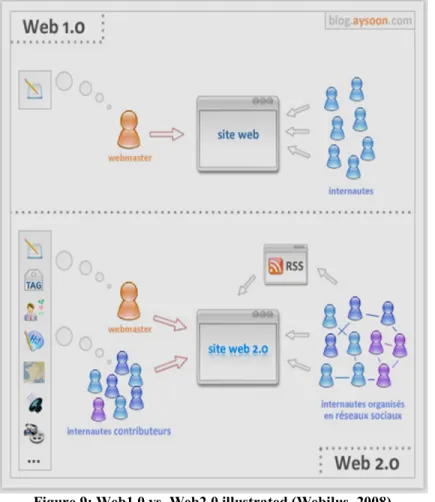
The following point somewhat summarizes the difference between web1.0 and web2.0: publishing vs. participation. Specifically, in Web1.0 (publishing) the content is controlled by the publisher, and the internet users are just the recipient of the information. Whereas in Web2.0 (participation) the users are no longer passive recipients of information, but are active participants in the creation of such information (Figure 9), whether by building personal blogs, participating in Wikis, tagging, rating, sharing, and/or referring websites. A recently published report (Lenhart, Madden, Macgill, & Smith, 2007) indicates that 64% of online teenagers in the US, ages 12 to 17, engage in at least one type of content creation. Moreover, both YouTube and Wikipedia are listed among the top 10 most visited sites by Alexa (Alexa, 2008). Both sites rely heavily on user input.
Figure 9: Web1.0 vs. Web2.0 illustrated (Webilus, 2008)
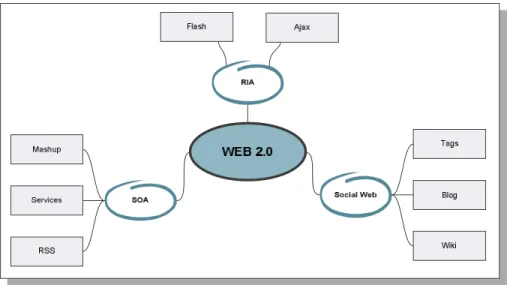
Web2.0 relies on three pillars: the Social Web, Service Oriented Architecture (SOA) and Rich Internet Application (RIA).
Figure 10: Web2.0 pillars (adapted from (Webilus, 2008)) 2.2.1 Social Web
The Social Web refers to the “social interactions” between the users of the web, and the resulting virtual “social groups”. It allows users to share their writings, videos, photos, and more with their friends, family, colleagues, or the public at large. For instance, the Social Web includes simple publishing through a blog or a wiki. As such, in the case of the blog the owner of the blog and his faithful readers can become a social circle where the readers can comment on the blog posts, or each other’s comments. Similarly, with the Wiki, the users who regularly visit add or maintain the Wiki become a virtual social community centered on the Wiki.
Another aspect of the Social Web are the Social Networking Sites (SNS), where users can create a public, or semi-private profile in order to stay in contact with other users of the site, referred to as Friends. Specifically, SNS such as MySpace.com or Facebook.com enable users to create a profile page, add other users to their friends list, share photos, and other multimedia content. Other specialized SNS focus on certain aspects of social networking, such as LinkedIn.com which provides an environment for professional networking, and provides specific functionalities such as to recommend someone for a position or a job. Similarly, Academia.edu provides a social networking environment for academics, where researchers can connect and offers particular functionalities, such as to share research paper or to help locate other users with similar research interests.
The main drive behind the Social Web is collaboration and the harnessing of collective intelligence. Common features that exist in the Social Web, such as tagging, rating, comments and recommendation exploit and share the knowledge and experiences of the users. As an example, we will consider social bookmarking sites, such as delicious.com or StumbleUpon.com. Such sites enable users to bookmark their favourite web sites. Moreover, users can share their favourite web sites with other users, or a community of friends. Additionally, users can add tags, comments, even rate these websites (such as thumbs up or thumbs down in stumbleupon). Furthermore, users can search for web sites using the tags, or even receive recommendations based on their profile – stumbleUpon provides a collaborative based recommendation based on the ratings of the users.
2.2.2 Rich Internet Application
Rich Internet applications (RIAs) are web applications that provide functionalities and interactions similar to desktop applications. Typically, RIAs are delivered through browser add-ons or directly through the webpage by using for instance an Ajax framework (such as Spry or Jquery) or Macromedia Flash.
Consider the following two applications to illustrate how RIA is delivered through a browser add-on: Cooliris (http://www.cooliris.com/) and Coolpreview
(http://www.coolpreviews.com). Cooliris provides an interface to help users when searching for images. Specifically, Cooliris takes the result of a search engine (such as Google image search), and renders it in a animated, flexible interface. For instance, consider a user who is searching the web for images of dogs, particularly the German Shepherd. The user can go to an image search engine and perform the search. Through the search result page, the user is presented with a small preview of the images, and if he wants to view the original version, he must click on the thumbnail, which will take him to the web page hosting that particular image, where he must locate the image. At this stage, if the user is not satisfied, he must return back to the search result page and browse through the remaining thumbnails.
With Cooliris, the user has the option to perform the search within the Cooliris interface, or he can switch to Cooliris from the search result page. In the first case, the user must specify which image search engine to use, including Google, Yahoo, Flickr and
YouTube. All the thumbnails are organized in rows on a wall where the number of rows is user specified and ranges between 1 and 7 inclusively. A scroll bar allows the user to browse the wall (Figure 11 - a), and when the user clicks on the certain thumbnail, the image is automatically enlarged (Figure 11 - b) and the user has the option to go back to the wall (just by clicking outside the enlarged image) or he can either add the image to his favourites, email it to a friend, or go the original website where the image is hosted. Note that in order to add an image to the favourites or send it to a friend, the user must register for an account with Cooliris. Moreover, when the user goes to the website containing the specific image, Cooliris is minimized and a button is made available for the user to revert back to Cooliris. Note that in the case when searching for videos within Cooliris, when the user selects a certain thumbnail and it is enlarged, the user has the option to play the video directly from within Cooliris.
a) Scrolling and browsing the wall b) Previewing a thumbnail image
Figure 11 : Cooliris preview
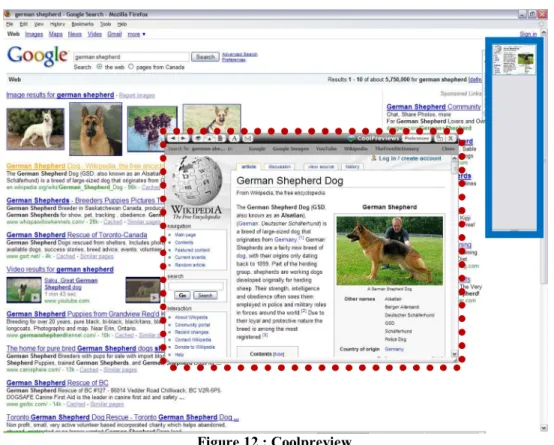
Similarly to Cooliris, Coolpreview is designed to help users while browsing the web. While the first is designed for images and videos, Coolpreview is designed for web pages. Specifically, Coolpreview offers the user the possibility to preview the page attached to with a link, without ever leaving the current page. For instance, consider again the case of the user interested in the German Shepherd dog, but now he is searching for websites instead of images. After performing the search on Google, usually the user has one of three options: first, following each link returned by Google, then using the browser’s back button to return to the search result page; second, opening each link in a
new browser window, and third opening each link in a new tab. On the other hand, Coolpreview offers the user with the possibility to open a virtual window that displays the target website (Figure 12 in the middle, highlighted in the red dotted square). Additionally, Coolpreview offers many functionalities, including the possibility to display the next link on the page (or in this case the next web site), add the page to a temporary bookmark stack (Figure 12 on the right hand side, highlighted in blue solid square), open the page in a new tab or even email the link.
Figure 12 : Coolpreview
On the other hand, there is a multitude of web pages that illustrate the use of RIA are the web-based virtual computers, such as G.ho.st (http://g.ho.st/). Such environments provide a virtual computer accessible online, which provides many functionalities and tools, including disk space (5 Gbytes in the case of G.oh.st), media player, even an office suite to create and store documents, spreadsheets and presentations.
2.2.3 Service Oriented Architecture
Service Oriented Architecture (SOA) (Booth et al., 2004) is an architectural style where the main goal is to relax the dependencies between various components and to achieve