HAL Id: hal-01323474
https://hal.inria.fr/hal-01323474
Submitted on 5 Sep 2016
HAL is a multi-disciplinary open access
archive for the deposit and dissemination of
sci-entific research documents, whether they are
pub-lished or not. The documents may come from
teaching and research institutions in France or
abroad, or from public or private research centers.
L’archive ouverte pluridisciplinaire HAL, est
destinée au dépôt et à la diffusion de documents
scientifiques de niveau recherche, publiés ou non,
émanant des établissements d’enseignement et de
recherche français ou étrangers, des laboratoires
publics ou privés.
A Better Grasp on Pictures Under Glass: Comparing
Touch and Tangible Object Manipulation using Physical
Proxies
Mathieu Le Goc, Pierre Dragicevic, Samuel Huron, Jeremy Boy, Jean-Daniel
Fekete
To cite this version:
Mathieu Le Goc, Pierre Dragicevic, Samuel Huron, Jeremy Boy, Jean-Daniel Fekete. A Better Grasp
on Pictures Under Glass: Comparing Touch and Tangible Object Manipulation using Physical Proxies.
Proceedings of the International Working Conference on Advanced Visual Interfaces (AVI), Jun 2016,
Bari, Italy. �10.1145/2909132.2909247�. �hal-01323474�
A Better Grasp on Pictures Under Glass: Comparing Touch
and Tangible Object Manipulation using Physical Proxies
Mathieu Le Goc
1,2,4, Pierre Dragicevic
1,4, Samuel Huron
3,4, Jeremy Boy
5, Jean-Daniel
Fekete
1,41Inria,2Université Paris-Sud,3Telecom ParisTech,4Université Paris-Saclay,5New York University
{
mathieu.le-goc, pierre.dragicevic, jean-daniel.fekete}@inria.fr, {cybunk,myjyby}@gmail.comABSTRACT
We introduce a novel method based on physical proxies for investigating fundamental differences between touch and tan-gible interfaces. This method uses physical chips to emulate the flat, non-graspable objects that make up touch inter-faces, in a way that supports direct comparison with tangible interfaces. We ran an experiment to test the effect of ob-ject thickness on participants’ behavior, performance and subjective experience in spatial rearrangement tasks. We found that for the tasks tested, thick objects are faster but less accurate to operate, and that their graspability is only used occasionally. We also found that coarse manipulation of multiple thin objects is error-prone, an issue that only thick objects may allow to alleviate.
CCS Concepts
•Human-centered computing → User studies; Empir-ical studies in HCI;
Keywords
Tangible user interfaces; touch interfaces; physical proxies.
1.
INTRODUCTION
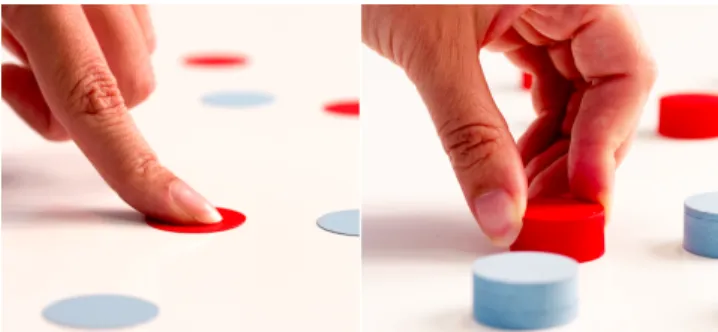
In this article, we introduce a novel proxy-based methodol-ogy for comparing touch and tangible interaction paradigms. We use thin physical chips (0.2mm) as surrogates for the graphical elements of a direct manipulation touch interface, which we compare with thicker pucks (see Figure 1) in order to isolate the effect of object thickness on spatial rearrange-ment tasks.
Touch interfaces are commonly thought to support rich and engaging interactions, and are often showcased in fu-turistic movies and concept videos. At the same time, Bret Victor eloquently argues that touch interfaces are nothing but “pictures under glass” [23], and that the gestures they
AVI ’16, June 07-10, 2016, Bari, Italy
ACM ISBN 978-1-4503-2138-9.
DOI:http://dx.doi.org/10.1145/2909132.2909247
Figure 1: Chips (left) and pucks (right) as used in our study.
rely on are only a tiny fraction of what human hands are capable of doing.
While such viewpoints can be inspiring, it is also important to evaluate claims rigorously, and to try to pinpoint the fun-damental differences between touch and tangible interaction paradigms. Granted for many applications, both interaction styles are likely to be complementary, but understanding how they differ will inform design decisions and future research. Many studies have suggested that people are more effective at operating tangible interfaces (TUIs) (e.g., [2, 16, 17, 19, 21]) — presumably because TUIs support a richer manipu-lation vocabulary. These findings are consistent with Bret Victor’s assertion that touch interfaces do not allow us to fully “use our hands” [23]. However, previous studies do not provide robust explanations as for these advantages — they do not investigate fundamental differences between the two interaction paradigms, i.e., differences that are technology-independent and are likely to hold in future implementations. Our interest is to establish technology-agnostic methods for answering precise questions regarding differences between touch and TUIs. To illustrate such methods, we used flat and thick objects in order to isolate the effect of object thickness on participants’ speed and accuracy when performing spatial rearrangements of multiple objects on a 2d surface. As such, our main contributions are:
• a novel technology-agnostic method based on physical proxies for studying how (and how well) people sponta-neously manipulate typical touch and tangible objects, and
• an assessment of the effect of object thickness on the manipulation of collections of objects, with implications for the design of both touch and tangible interfaces.
2.
BACKGROUND
There is no general consensus on how touch and tangible interfaces should be defined [20]. Therefore, we propose the following working definitions for the purpose of this article:
Touch interfaces are user interfaces where digital information is manipulated through skin contact with the surface of a single physical object. Tangible interfaces are user interfaces where digi-tal information is manipulated by changing the spatial arrangement of multiple physical objects. These definitions are by no means authoritative: they are purely stipulative and meant to clarify upcoming discussions. Although they focus on input, they align well with what is generally understood by both terms [20], and capture a broad range of interactive systems. However, our definition of touch excludes all interfaces that employ contactless (mid-air) sensing, as well as all interfaces that have moving parts; and our definition of tangible excludes single-device input (e.g., regular, gyroscopic or 3D mice, or mobile phones with accelerometers), but includes space-multiplexed input device setups [9].
Given these definitions, how do touch interfaces compare to tangible interfaces? Although some studies have looked at differences in subjective experience (e.g, [1]), most studies focused on performance. An early evaluation of TUIs by Fitzmaurice and Buxton [9] demonstrated the benefits of space-multiplexed input (one physical device per function) over time-multiplexed input (a single generic device – e.g., a computer mouse). However, tabletop systems supporting multipoint direct touch input rendered this distinction less useful [22].
Over the past years, several studies have been conducted comparing multitouch tabletop setups with tabletop TUIs on object manipulation tasks. A replication of Fitzmaurice and Buxton’s study revealed that tangibles are still superior [22]. Similar results have been found for puzzle sorting tasks [2, 21], spatial arrangement tasks [16, 17] and collaborative layout optimization tasks [19]. Observed benefits include faster task completion times, less errors and more user satisfaction, and are generally explained by the fact that tangibles support richer as well as more efficient gestures. For example, people spontaneously rotate physical objects using multifinger grips, which is presumably more efficient than pinch gestures [22]. Besides user performance, many of the previous studies report observational data on the gestures used. For example, North et al [17] identified several gesture types in their study, some of which (e.g., lift or stack) were only possible with TUIs.
While informative, previous studies have so far focused on comparing specific implementations of touch and tangible interfaces. As a result, findings are hard to interpret and gen-eralize. In some studies, touch interfaces may have been given an unfair advantage by supporting more advanced features and interaction techniques. For example, one study [16] pro-vided undo, lasso selection and snap-dragging on the touch in-terface but not on the tangible one. Similarly, contact shape sensing is rarely implemented (but see [2]), thus limiting the potential expressiveness of touch [4, 25] and potentially giving tangibles an advantage. Moreover, researchers have recently discovered that the lag produced by any currently
available touch system negatively impacts performance and user experience [14].
To summarize, previous studies are insightful but often suffer from experimental confounds that make it hard to understand the fundamental differences between touch and tangible interfaces — i.e., differences that will persist and remain relevant as both touch and tangible technologies mature. Thus it would seem beneficial to explore comple-mentary methods that do not depend on currently available technology.
3.
METHODOLOGY
Here, we explain and motivate our proxy-based method for comparing touch and tangible interfaces.
3.1
Rationale for Using Physical Proxies for
Touch
The goal of a physical proxy is to help empirically investi-gate user interfaces that are hard to build, or that may only exist in the future. Nevertheless, we stress that a physical proxy necessarily differs from the user interface it emulates. Physical proxies have already occasionally been used for comparing 2d and 3d visualization techniques. Dwyer has proposed hand-crafted physical models to emulate perfect 3d displays [8, pp. 39–45], while Jansen has suggested to use static physical visualizations in user studies as substitutes for future self-actuated physical visualizations [12, p. 133].
Although both touch interfaces and TUIs will keep improv-ing, touch will only ever allow flat objects to be operated from above, while TUIs allow objects with volume to be pushed sideways, grabbed, lifted, etc. Therefore, we use thin discs or “chips” as proxies for touch-operated objects, and cylinders or “pucks” as proxies for tangible objects (Figure 1). The proxy for the complete touch interface consists of a collection of chips placed on a planar surface to emulate GUI icons that can be freely dragged around. This setup necessar-ily differs from today’s touch interfaces in several respects, while sharing several characteristics with an “idealized” touch interface. More specifically, the differences are:
Df 1. with enough effort, the proxies can be grasped and lifted, something that is impossible on actual touch interfaces; Df 2. the proxies can slide and fall off the surface if it is inclined—which means that our particular proxy imple-mentation is inappropriate for hand-held and mobile touch devices;
Df 3. the proxies’ collision behavior is unusual for tradi-tional touch interfaces: the proxies can both push each other and overlap—unlike graphical objects which ei-ther interpenetrate or collide, depending on the chosen metaphor; and
Df 4. the proxies do not support abstract gestures or advanced commands (e.g., selection, grouping, undo), which are common in touch interfaces.
Nevertheless, this proxy setup can help us learn more about how touch interfaces may differ from tangible interfaces by making the comparison fairer in other respects, since the setup:
• has zero-lag: lag on any current touch interface has been found to be noticeable and detrimental [14]; • has infinite resolution, both in terms of input and
output;
• provides physically realistic direct manipulation, both for single and multiple objects [4, 25];
• provides realistic rendering: in particular, no light is emitted by the surface (similar to, e.g., an e-ink display);
• provides realistic touch haptics [3]: object edges can be felt, and no skin friction occurs when an object is dragged.
Currently, only TUIs have all these characteristics. How-ever, none of them are fundamentally incompatible with touch interfaces, for which both display and sensing tech-nology is quickly improving: a lag of 1 ms has been recently achieved in research prototypes [14], as well as tactile feed-back [3].
3.2
Research Questions
Our goal is to compare how (and how well) chips and pucks are spontaneously manipulated, in order to assess the sole im-pact of object thickness, a fundamental (i.e., implementation-independent) difference between touch and tangible interac-tion paradigms. Our two major research quesinterac-tions are:
1. Does the extra thickness of pucks present any manipu-lation benefits? That is, do people spontaneously make use of the extra spatial manipulation strategies offered? 2. How good is our physical proxy implementation? That is, to what extent do Df 1—Df 4 affect the way in which chips are manipulated vs. the way we expect them to be manipulated in an idealized touch interface?
3.3
Rationale for the Choice of Setup and Tasks
For the comparison between chips and pucks to be fair, and to address Df 2 at the outset, we chose to simulate tabletop touch and tabletop tangible interfaces, which is what has been compared in the vast majority of previous studies [2, 16, 17, 19, 21, 22]. To address Df 4, we limited our study to manipulative gestures [15], which both setups support. Direct manipulation is the main interaction style in TUIs and it is also dominant in modern touch devices; and while in principle TUIs could support symbolic gestures, most currently do not.
Finally, to understand how users manipulate collections of objects (chips and pucks), we chose to use repetitive spatial rearrangement tasks—in a similar fashion to previous studies such as North et al [17]. Such tasks are reasonably complex in the motor domain (compared to, e.g., target acquisition tasks), while at the same time devoid of high-level cognitive components that are typically present in real-world tasks, but that could interfere with motor and manipulative behavior. Our study focuses not on high-level cognition, but on how people naturally and spontaneously “use their hands” [23].
4.
EXPERIMENTAL PROCEDURE
We now describe in more detail our setups, tasks, proce-dure, and experiment design.
4.1
Physical Proxy Setup
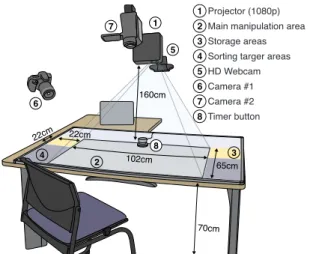
The touch and TUI proxies shared the same setup (see Figure 2). The setup included a white plastic support surface, with 3 mm-thick edges to prevent objects from sliding off.
We digitally-fabricated forty 0.2 mm thick disks (chips), and forty 12 mm thick cylinders (pucks); all had a diameter of 25.75 mm (the size of a 2-euro coin). The chips were made of transparent laser-cut mylar sheets, and weighed roughly 0.2 g (see Figure 1 left). We chose mylar as it remains rigid,
22cm 70cm 160cm 65cm 22cm 102cm 2 4 6 1 5 8 7 3 2 4 6 1 5 7 8 3 Projector (1080p) Main manipulation area Storage areas Sorting targer areas HD Webcam Camera #1 Camera #2 Timer button
Figure 2: The experimental Setup. Colors indicate areas – the surface was entirely white except for 3
whose boundaries were marked.
even when very thin. This way, chips would be difficult to bend and therefore difficult to grasp. The pucks were made of several layers of laser-cut transparent acrylic sheets glued together, and weighed roughly 7.5 g (Figure 1 right). We informally verified that mylar and acrylic had similar friction properties. Finally, all chips and pucks were spray-painted, half of them blue and the other half red. Chips were only painted on top, and pucks were painted on top and on the sides. Thus both object types had an unpainted bottom.
4.2
Tasks
An experimental task consisted of moving all objects from an initial configuration to a final configuration. There were 3 different types of configurations, all involving the same 40 objects (20 blue and 20 red, see Figure 3):
• Random-packed : all objects are packed within a disc of diameter 24 cm at the center of the workspace. They fill 46% of the disc area, with an inter-object spacing of ∼0.5 cm.
• Random-spread : same arrangement but within a larger disc of diameter 40 cm (density 17%, separation ∼2.5 cm). • Sorted : all red objects are placed on one side of the
table, while all blue objects are placed on the other. Object location within the area is not important. From these three configurations we derive four different tasks:
• Packed sorting: from random-packed to sorted. • Spread placement: from sorted to random-spread. • Spread sorting: from random-spread to sorted. • Packed placement: from sorted to random-packed. Since the final configuration of a task is also the initial configuration of the next task, these tasks could be performed in sequence and looped over without the need for actuation or experimenter intervention. Object colors in placement
Figure 3: Visual targets for a spread placement task (left) and a packed placement task (right).
configurations were randomly shuffled, and sorting areas were randomly swapped. We henceforth refer to a sequence of four successive tasks as a block. A block can start with any of the four tasks above, thus four different block designs are possible.
Tasks were given to subjects by top-projecting the desired final configuration on the workspace, during the entire task duration. Visual targets were made dim enough so as not to interfere with physical manipulation. For placement tasks, individual object targets were shown with red and blue semi-circles 120% the size of objects (30.9 mm) (see Figure 3). For sorting tasks, a red line and a blue line were displayed on each side of the table. Objects simply had to be moved across the lines.
The use of semicircles instead of circles is due to limitations of the top projection setup. Since the projector could not be oriented perpendicularly to the table, pucks casted a shadow, which pilots suggested might impair puck placement tasks. The use of semicircles addressed this issue, at the cost of rendering placement tasks less well-specified. This was addressed by instructing participants not to focus on accuracy, and by later analyzing both completion times and placement accuracy.
4.3
Task Instructions
We wanted to observe spontaneous manipulation behavior, thus no instruction was provided in the way objects were to be manipulated. In particular, the touch proxy was not presented as such, and no reference was made of touch or tangible interfaces. Objects were referred to using the neutral names chips and pucks. At no point did the experimenter manipulate chips or pucks in front of participants.
Participants were instructed to be as fast as possible with-out committing any obvious placement error, i.e., all objects were required to be approximatively placed within their re-spective targets (or beyond lines for sorting) with no color inversion. Emphasis on speed was used as an incentive for participants to converge to optimal motor strategies. It is reasonable to assume that similar optimal strategies will be developed in natural settings after extended use of such user interfaces.
The system did not check for correct object placement. Instead we told participants that a photo snapshot will be taken each time they complete a trial, and trials will be later examined for correctness. Correctness was also enforced by the experimenter during practice trials.
5.
PROCEDURE
The participant was asked to sit comfortably at the table and was given an instruction sheet. All 80 objects had been previously placed in storage areas (3 in Figure 2), with chips and pucks stored in their respective areas.
The participant was first asked to bring all objects from one storage area to the main area (chips or pucks depending on the participant) and to complete a discovery block – i.e., four tasks in sequence – where she could get acquainted with the experiment logics without time pressure. Then the participant was asked to switch object type (see procedure below) and complete a training block with time pressure but no performance recording. The participant then switched objects again and went on performing the experimental trials. An experimental trial consisted in the administration of a single (placement or sorting) task and proceeded as follows:
1. A message invites the participant to press the timer button (8 in Figure 2) when she is ready to start, upon which a two-second countdown appears on the table.
2. Two seconds later the configuration to achieve is dis-played, and a beep sound is played signifying that the timing started.
3. The participant moves the objects to their final desti-nation (4 for sorting tasks or 2 for placement tasks). 4. As soon as the task is completed, the participant presses
the timer button again and a second beep sound is played, signifying that the timing stopped. The pro-jected configuration disappears and a message invites the participant to lean back and get her hands off the table.
5. Two seconds later, a photo snapshot of the workspace is taken (using 5 in Figure 2), accompanied with a camera shutter sound. The invite message for the next trial is then displayed (step 1 above).
This trial design together with the unpredictable order-ing of colors prevented participants from pre-plannorder-ing their motor actions. This incentivized participants to interleave motor planning with motor execution, a strategy closer to typical UI object manipulation scenarios. Participants were however allowed to place their hands as they wished during the two-second countdown, as long as they were not touching any object. Thus hand placement, which was irrelevant to the purposes of the experiment, was not included in task times.
Every two blocks, the participant was asked to switch to the other object type (chip or puck). Object switching followed the following procedure: The participant is asked to move all current objects in one of the storage areas, then move all the objects from the other storage area in front of her. Then the final configuration from the last task is displayed and the participant is invited to place all objects, without time pressure.
All experiment instructions were given through short mes-sages and visual annotations, all projected on the table (using
1 in Figure 2). Each participant was recorded from different angles using two cameras (6 and 7 in Figure 2). At the end of the experiment, the participant was asked to fill in a brief questionnaire. The experiment lasted 35 minutes on average.
5.1
Design
Our independent variables were object type Object ∈ {Chips, Pucks} and type of task Task ∈ {Packed-placement,
Spread-placement, Packed-sorting, Spread-sorting}, both within-subject factors. Each combination of Object and Task was administered four times, i.e., four Block were generated per Object condition. Our dependent variables were time-on-task Time, and placement accuracy Accuracy.
Accuracy was only measured for Packed-placement and Spread-placement tasks. For each trial, the position of all 40 objects was extracted from photo snapshots through im-age processing and visual inspection. Positions were then matched to the nearest slot in the placement template. Then, for each slot, a position dispersion was computed by taking the unbiased estimate of the positions’ standard distance deviation (SDD). Four distance measurements were used in computing each SDD (one per repetition). SDDs were then averaged across all 40 slots, yielding an accuracy measure
0 10 20 30 40 50 60 (sec) All Tasks Packed Sorting Spread Sorting Spread Placement Packed Placement Placement Accuracy 1.6 1.0 1.2 1.4 1.6 1.0 0.8 1.2 1.4 Chips Pucks 6.0 6.5 7.0 7.5 (mm)
No effect Pucks better
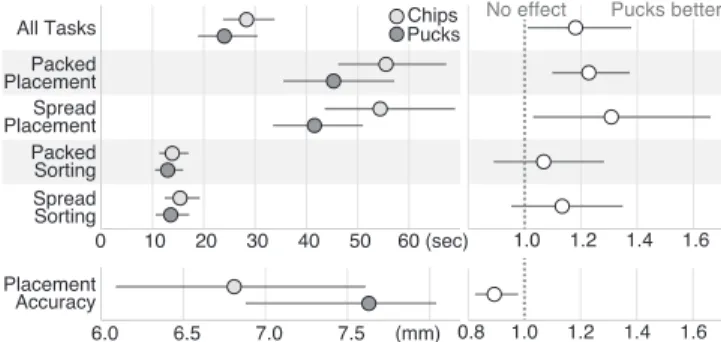
Figure 4: Mean task completion times and accura-cies per condition (left), and within-subject ratios between chips and pucks, where values > 1 indicate an advantage for pucks (right). Error bars are 95% CIs.
for each Object and Task ∈ {Packed-placement, Spread-placement} combination.
To reduce learning effects, Object was switched every two blocks. In addition, the presentation order of the first Object was counterbalanced across participants as well as the first task presented in all blocks, yielding 2 × 4 = 8 unique designs. Red and blue colors in task configurations were fully randomized.
Overall the experiment consisted in 2 Object × 4 Task × 4 Block = 32 trials, yielding 32 measures of Time and 4 measures of Accuracy per participant.
5.2
Participants
We recruited 8 participants (5 male), all naive to the purposes of the experiment, by email announcement to our lab. Ages ranged from 24 to 32 with a median of 28. All had a university degree, from Bachelor to PhD. They were all right-handed, owned a touch device and were familiar with such technologies (as reported in the post-experiment questionnaire). All participants agreed to be videotaped.
6.
PERFORMANCE AND SUBJECTIVE
EX-PERIENCE
Due to growing concerns about the limits of null hypothesis significance testing for reporting and interpreting results [7], we base our analyses on simple effect sizes with confidence intervals (CIs). See [6] on how to interpret plots with CIs.
6.1
Time
We perform our time analyses on log-transformed data [18]. We thus report geometric means, and all comparisons are expressed as time ratios. CIs assume lognormal distributions.
Completion times were averaged per participant for each combination of Object and Task. The results shown in Figure 4 confirm that pucks are overall faster than chips. There is strong evidence for placement tasks, and a possibly similar trend for sorting tasks, but the evidence is much weaker.
6.2
Accuracy
Accuracy observations were averaged per participant and per Object condition, and population means (in mm) as well as within-subject ratios (dimensionless) were estimated using 95% BCa bootstrap CI. Results are shown also in Figure 4: on average, object placement variability ranges
1 Felt Fast Felt Efficient Enjoyement Felt Physical Felt Like Touch
2 3 4 5
Chips Pucks
Figure 5: Questionnaire responses regarding subjec-tive experience. Error bars are 95% bootstrap CIs. from 6 to 8 mm, with clear signs that chips tended to be positioned more consistently than pucks on placement tasks. Thus it appears that pucks can be manipulated faster than chips under our setup, but their advantage is less apparent in sorting tasks. They also tend to be positioned slightly less accurately.
6.3
Subjective Experience and Feedback
Our post-experiment questionnaire included five items to assess participants’ subjective experience, and also invited them to elaborate on their responses. Figure 5 shows partici-pants’ mean responses, given on 5-point Likert scale.
Unsurprisingly, participants strongly agreed that pucks “felt physical”. However, participants were also reluctant to admit that chips felt like a touch interface. Looking at spon-taneous comments, tactile feedback seems to have strongly influenced their experience. One participant commented that “the tactile feedback is different [from a touch interface]”.
Responses revealed a remarkably more positive experience with pucks. Participants reported that they “became increas-ingly frustrated with [their] inability to pick and place the chips”, while “pucks are easier to handle and[...] more com-fortable to manipulate”. Participants reported that pucks made them feel more efficient and more in control: “You feel more in control with the pucks, they are easier to grasp”.
A participant further elaborated “Because pucks could be picked up and placed, they allowed for a wider array of place-ment strategies [...]. Moving the last few chips into position often required sliding them all the way around the already placed ones, which felt cumbersome. I preferred having the ability to use multiple placement strategies with the pucks and their physicality was satisfying”.
6.4
Discussion
Participants’ comments give us hints as to why pucks were manipulated faster and yielded a better subjective experience. Participants seemed frustrated that the chips could not be grasped and lifted. Indeed, we observed that placement tasks required more caution not to muddle up already placed chips while sliding new ones in. In contrast, pucks could be easily picked and placed anywhere. Arguably, in many real touch interfaces dragged objects go through other objects, thus emulating “pick and place” operations. This was not possible with chips. Note that it is also not possible with touch metaphors that implement collision detection [2, 4, 25]. However, this metaphor also generally ensures that objects never occlude each other, which was not the case for our proxy.
Despite the limitations of our proxy, there is still evidence that pucks yielded benefits that even an idealized touch interface could not provide. First, the sorting task is a coarse motor task that should not have suffered from chip collision and overlap – yet, our results suggest that pucks
might have been still faster. Second, as we will see with the video analysis, issues with overlap were not that common and chips appear to have suffered from problems unrelated to overlap and collision.
7.
VIDEO ANALYSIS
We now report on a video analysis of the gestures per-formed by participants in the Chips and Pucks conditions.
7.1
Manipulation Gesture Typology
The first step of the coding process consisted in agreeing on an initial set of gestures. We focus on physical gestures, not gestures in the traditional HCI (input ) sense. We therefore decided to identify recurrent gestures based on video footage. Doing so we noticed common manipulation errors—i.e., ma-nipulations with unintended consequences. We thus agreed on a typology that included a total of 21 gestures and errors, of which we report 13 here (this selection will be explained later on). The manipulation gestures were:
Fine drag: Move object(s) while pushing against their top surface with one or more fingertips.
Coarse drag: Move object(s) while pushing against their top surface with another body part (e.g., flat hand). Grasp drag: Move object(s) by grasping and not lifting them.
Lift: Move object(s) by grasping them and lifting them. Bulldozer push: Move object(s) by pushing sideways, with the body in contact with the surface.
Throw: Move object(s) by grasping / pushing and releasing contact during transport.
Separate: Move object(s) in order to break contact with surrounding object(s).
Whereas the manipulation errors were:
Miss: Contact with object(s) is not achieved while intending to initiate a manipulation.
Loss: Contact with object(s) is unexpectedly lost.
Collision: Object(s) being manipulated accidentally collide with surrounding objects.
Overlap: Moving several overlapping objects while intend-ing to move less of them.
Stick: Object sticks to skin when attempting to release con-tact.
Escape: Object moves by itself instead of remaining still.
7.2
Method
We wanted to focus on close-to-optimal strategies and thus only analyzed two blocks (8 trials per participant) from the video recordings: the last block involving chip manipula-tion and the last block involving puck manipulamanipula-tion. This represented about 30 minutes of video for all 8 participants. Two coders (co-authors) independently annotated video logs using ChronoViz [11]. Each time any of the 21 gestures or manipulation errors was seen occurring, the coder annotated its exact starting time as well as the hand used. This process took each coder about 30 hours, for a total of 5000 gestures and manipulation errors reported.
7.3
Inter-Coder Agreement
In order to estimate inter-coder agreement, annotations had to be temporally aligned. We used a three-pass algo-rithm. The first pass searched for matching annotations. A match was defined by two annotations having the same category, the same hand and being close in time (±350 ms).
Coder 1 Coder 2 Coder 1 Coder 2 Coder agreement
Fine Drag 29% 28% 16% 15% 0.67 Coarse Drag 7.3% 4.6% 8.4% 6.5% 0.59 Bulldozer Push 4.1% 4.6% 2.9% 3.2% 0.71 Separate 4.1% 3.2% 0.0% 0.0% 0.68 Lift 0.7% 0.6% 4.7% 4.2% 0.76 Throw 0.3% 0.6% 1.7% 1.4% 0.60 Grasp Drag 0.0% 0.0% 2.3% 2.7% 0.55 Loss 2.0% 4.1% 1.0% 2.0% 0.36 Collision 2.0% 3.8% 1.4% 3.7% 0.38 Overlap 3.1% 2.5% 0.0% 0.0% 0.27 Miss 2.4% 1.7% 0.5% 0.6% 0.33 Stick 0.3% 0.5% 0.0% 0.0% 0.41 Escape 0.3% 0.2% 0.4% 0.5% 0.43 Non-Dominant 52% 50% 46% 46% 0.56 Dominant 48% 50% 54% 54% 0.55 n oit alu pin a M Errors Hand Used Chips Pucks n oit alu pin a M Gestures
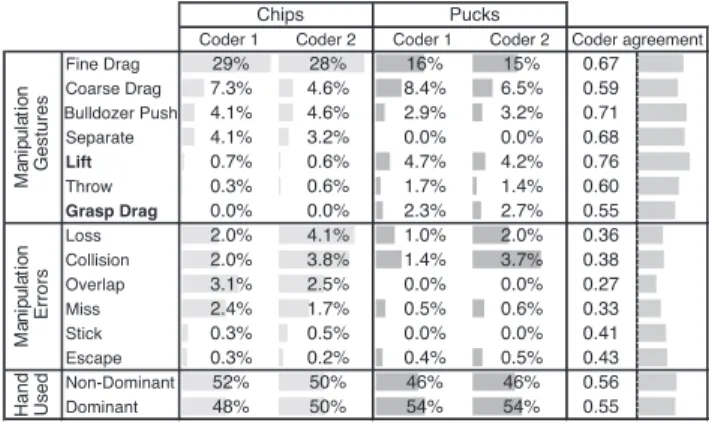
Figure 6: Frequencies of occurrence of manipulation gestures and manipulation errors, for Chips and for Pucks.
A second pass then searched for non-matches, defined as two annotations having the same hand, being close in time, but having different categories. Remaining annotations were discarded.
We assessed inter-coder agreement using Cohen’s Kappa (K) [5]. K ranges from -1 to 1, with 1 being a perfect agreement, 0 what would be expected by chance. We added the hand used (left or right) to our 21 categories, yielding a total of 42. The coder agreement was K=0.47, a “moderate” agreement [5]. We noticed that one coder annotated more gestures than the other (12% more), revealing that micro-movements were not consistently taken into account. These micro-movements were thus discarded in the rest of the analysis, leading to a “substantial” agreement of K=0.79.
7.4
Results
Figure 6 reports gesture occurrence frequencies per Object condition and per coder. Error frequencies are relative to the total number of gestures. The last column reports per-gesture coder agreements, ranging from “fair” to “substantial”.
Looking at the diversity of manipulation gestures, fine drags (typical of touch interfaces) represents the vast majority of gestures in the Chips condition. Coarse drags and bulldozer push gestures, are also relatively common. Both are possible with touch interfaces, although not often implemented [4, 25].
Surprisingly, fine drags are also the most common gesture with Pucks: participants typically manipulated pucks as if they were using a touch interface. However, the gestures are also more diverse, with more throw gestures, and gestures like lifts and grasp drags that are impossible with touch. Lifts have been observed only very rarely with Chips, confirming that Df 1 was not a problem with our proxy setup.
Despite lower coder agreements, both coders reported much more manipulation errors with Chips. Approximately twice as many losses are reported (e.g., a few chips are left behind during bulldozer pushes), and misses (e.g., a finger lands next to a chip) also seem much more common.
These results also help us understand to what extent chip overlap (Df 3) was a problem. Overlaps caused manipulation errors in only about 3% of all gestures, and only 3–4% of all hand gestures were for separating overlapping chips. This suggests that although the effect of chip overlap is measurable, other issues such as losses or misses are at least as important. Finally, the dominant and non-dominant hands were used about equally often in both Object conditions.
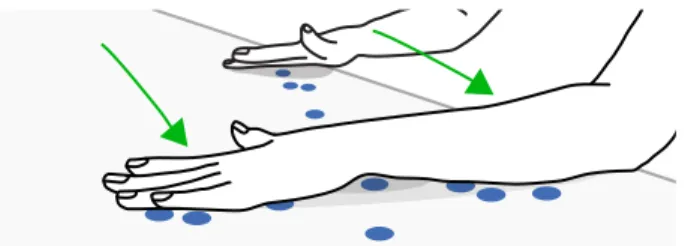
Figure 7: Four chips lost during a bulldozer push.
7.5
Understanding Chip Losses and Misses
Video recordings revealed that chip losses happened dur-ing bulldozer pushes and coarse drags. Figure 7 shows an instance.
We informally experimented with bulldozer pushes by lin-ing up chips so overlap is impossible. It appeared that chips are lost because it is hard to maintain a large contact area between the body and the surface. Full contact is not required with pucks because they are too thick to slip below the arm. Similarly we repeated coarse drag gestures and found that chips are lost because it is hard to distribute body pressure on several chips. With pucks, this is much easier because the empty space around makes it possible to orient and shape the hand in different ways, and the intervening space allowed the flesh to deform in a way that distributes forces more equally.
Misses cannot be easily explained by taking a two-dimensional perspective, since chips and pucks have the same radius. However, since pucks “stick out”, they likely facilitate quick establishment of lateral contact. This additional error toler-ance on the third dimension may have made puck acquisition both less error-prone and less attention-demanding, consid-ering that bimanual tasks spanning a large surface like ours require split visual attention. Also, failure or success to acquire a puck is signaled with more distinctive haptic and auditory cues, thus likely reducing the need to visually mon-itor for misses. As one participant mentioned, it was harder to manipulate the correct amount (of chips), especially if you do not look at them.
8.
GENERAL DISCUSSION
We turn back to our initial research questions and attempt to answer them based on the empirical data we collected.
8.1
Are Chips a Good Proxy for Idealized Touch
Interfaces?
People spontaneously manipulated chips as if they were using direct touch interfaces, i.e., by dragging one or more with their fingertips. Coarser gestures were also used to manipulate many chips concurrently, which is also possible on touch interfaces using contact shape sensing [4]. A single participant used once a strategy consisting in regrouping chips, lifting them together, and placing them one by one. This can easily be avoided in future experiments through explicit instructions.
The way chips physically interacted may have been un-usual for a touch interface. While touch interfaces either always allow object overlap during manipulation or never do (through collision detection), physical chips implement a mix of both. Some participants complained about both un-intended overlaps and the necessity to avoid already-placed chips. This issue needs to be addressed in future proxy setups,
for example by designing ultra-flat objects that consistently collide.
Concerning self-reported subjective experience, chips felt less “physical” and more “touch-like” than pucks, but they still felt much more physical than current touch interfaces. Participants were highly sensitive to the tactile feedback, while the realistic visual “rendering” and the absence of lag may have also significantly contributed to this experience. All these factors only confirm that chips are not a good proxy for today’s touch interfaces, which is not what chips are trying to emulate. Device vendors have been successfully building touch devices that provide a much more physically plausible experience than old touch screens, and this trend is likely to continue.
8.2
Does Object Thickness Present Benefits?
Our study seems to suggest this was the case, but not necessarily for the reasons often mentioned in the literature. First, while previous studies find that tangibles afford more accurate manipulation [13, 22, 24], we found that chips are positioned more precisely than pucks. This result points out benefits of touch interfaces that may have been overlooked. In particular, because they are flat, touch interfaces can be more legible, as objects do not occlude content as much as tangible objects. This may in turn facilitate precision tasks. Second, it has been argued [10, 23] and observed [17] that tangibles support richer gestures. Our study calls for more nuance. When repositioning objects in a 2D workspace, finger drag is a dominant gesture even with tangibles. It appears to be the best for positioning small objects. Being “graspable” thus does not necessarily lead to grasping behavior. Naturally, our findings only apply to a specific type of task, and to a particular tangible form-factor appropriate for the task.
Despite this, tangibles were often lifted and grasped, and it is clear that this extra flexibility yielded a much more positive subjective experience. However, it is not clear whether the same difference in satisfaction would have been observed had participants been able to drag chips over other chips, as is often the case in touch interfaces. This finding thus calls for further studies before we can make any strong claim about speed or subjective benefits of thick objects.
A key insight provided by our empirical method is that when multiple objects need to be manipulated at a time, touch interfaces are limited not because objects cannot be grasped, but because human hands and arms are too irregular to interact in elaborate ways with flat surfaces. Indeed, coarse manipulations yielded many unintended chip losses, a problem that is easily addressed by the extra thickness of pucks. Despite previous experimentations with contact shape sensing and coarse manipulation gestures similar to what we observed [4, 25], touch interfaces may be sub-optimal for such tasks. This issue will likely become more apparent as contact shape sensing becomes mainstream, and may require specific interaction techniques and/or mid-air (thus non-touch) sensing equipment.
Finally, we found that thick objects were easier to acquire, likely because i) they “stick out” as targets and ii) they generate haptic “error messages” when mis-acquired. This suggests that touch surfaces may be less comfortable for carrying out complex coordinated tasks over large areas, even with full support for haptic rendering [3]. Nevertheless, participant comments suggest that tactile feedback is a key component of the perceived “physicality” of a touch interface.
9.
CONCLUSION AND FUTURE WORK
We were interested in comparing touch interfaces with tangible interfaces for repositioning collections of objects on a 2D workspace. The use of physical proxies allowed us to isolate the effects of object thickness (flat vs. thick), a fun-damental difference between touch and tangibles interfaces irrespective of the available technology to implement them. Like previous studies, we observed that graspable objects are manipulated faster than their flat counterparts. However, they were also positioned less accurately, presumably because of the occlusions they entail. Video analysis also revealed that in both conditions, participants favored finger dragging gestures typical of touch interfaces, although they grasped and lifted thick objects when it was more convenient.
Meanwhile, we raised two possible limitations of touch that may seem obvious in retrospect but should probably be given more emphasis, as they may be inherent to any touch interface: i) touch objects are more prone to acquisition errors as they are not necessarily acquired orthogonally, ii) touch surfaces are flat but human hands and arms are not, which can cause object losses when trying to drag or sweep many objects at a time. Adding thickness to objects solves this issue, making the manipulation of multiple objects more comfortable, less error-prone and less attention-demanding. All these factors may contribute to a more positive subjective experience.
The physical proxy approach definitely has limitations and will never replace traditional evaluation methods, but it can be a useful complement – it provides a totally different way of looking at comparative questions. We hope this work will encourage further research in this direction.
10.
ACKNOWLEDGMENTS
We would like to thank Wesley Willett, Yvonne Jansen, Evanthia Dimara and Cl´ement Riant for their help.
11.
REFERENCES
[1] A. Alzayat, M. Hancock, and M. Nacenta. Quantitative measurement of virtual vs. physical object embodiment through kinesthetic figural after effects. In Proc. CHI 2014, pages 2903–2912. ACM.
[2] A. N. Antle and S. Wang. Comparing motor-cognitive strategies for spatial problem solving with tangible and multi-touch interfaces. In Proc. TEI 2013, pages 65–72. ACM.
[3] O. Bau, I. Poupyrev, A. Israr, and C. Harrison. Teslatouch: electrovibration for touch surfaces. In Proc. UIST 2010, pages 283–292. ACM.
[4] X. Cao, A. D. Wilson, R. Balakrishnan, K. Hinckley, and S. E. Hudson. Shapetouch: Leveraging contact shape on interactive surfaces. In TableTop 2008, pages 129–136. IEEE.
[5] J. Cohen. Weighted kappa: Nominal scale agreement provision for scaled disagreement or partial credit. Psychological bulletin, 70(4):213, 1968.
[6] G. Cumming and S. Finch. Inference by eye:
Confidence intervals and how to read pictures of data. American Psychologist, 60(2):170, 2005.
[7] P. Dragicevic. Fair statistical communication in hci. In Modern Statistical Methods for HCI, pages 291–330. Springer, 2016.
[8] T. Dwyer. Two-and-a-half-dimensional Visualisation of Relational Networks. PhD thesis, Univ. of Sydney, 2005. [9] G. W. Fitzmaurice and W. Buxton. An empirical
evaluation of graspable user interfaces: towards specialized, space-multiplexed input. In Proc. CHI 1997, pages 43–50. ACM.
[10] G. W. Fitzmaurice, H. Ishii, and W. Buxton. Bricks: laying the foundations for graspable user interfaces. In Proc. CHI 1995, pages 442–449. ACM.
[11] A. Fouse, N. Weibel, E. Hutchins, and J. D. Hollan. Chronoviz: a system for supporting navigation of time-coded data. In CHI Ext. Abs. 2011, pages 299–304. ACM.
[12] Y. Jansen. Physical and tangible information visualization. PhD thesis, Univ. Paris-Sud, 2014. [13] Y. Jansen, P. Dragicevic, and J.-D. Fekete. Tangible
remote controllers for wall-size displays. In Proc. CHI 2012, pages 2865–2874. ACM.
[14] R. Jota, A. Ng, P. Dietz, and D. Wigdor. How fast is fast enough?: a study of the effects of latency in direct-touch pointing tasks. In Proc. CHI 2013, pages 2291–2300. ACM.
[15] D. Kammer, J. Wojdziak, M. Keck, R. Groh, and S. Taranko. Towards a formalization of multi-touch gestures. In Proc. ITS 2010, pages 49–58. ACM. [16] A. Lucchi, P. Jermann, G. Zufferey, and P. Dillenbourg.
An empirical evaluation of touch and tangible interfaces for tabletop displays. In Proc. TEI 2010, pages 177–184. ACM.
[17] C. North, T. Dwyer, B. Lee, D. Fisher, P. Isenberg, G. Robertson, and K. Inkpen. Understanding multi-touch manipulation for surface computing. In Proc. INTERACT 2009, pages 236–249. Springer. [18] J. Sauro and J. R. Lewis. Average task times in
usability tests: what to report? In CHI 2010, pages 2347–2350. ACM.
[19] B. Schneider, P. Jermann, G. Zufferey, and P. Dillenbourg. Benefits of a tangible interface for collaborative learning and interaction. In TLT 2011, pages 222–232. IEEE.
[20] O. Shaer and E. Hornecker. Tangible user interfaces: past, present, and future directions. Foundations and Trends in HCI, 3(1–2):1–137, 2010.
[21] L. Terrenghi, D. Kirk, A. Sellen, and S. Izadi.
Affordances for manipulation of physical versus digital media on interactive surfaces. In Proc. CHI 2007, pages 1157–1166. ACM.
[22] P. Tuddenham, D. Kirk, and S. Izadi. Graspables revisited: multi-touch vs. tangible input for tabletop displays in acquisition and manipulation tasks. In Proc. CHI 2010, pages 2223–2232. ACM.
[23] B. Victor. A brief rant on the future of interaction design.http://tinyurl.com/bvrant, 2011.
[24] M. Weiss, J. Wagner, Y. Jansen, R. Jennings, R. Khoshabeh, J. D. Hollan, and J. Borchers. Slap widgets: bridging the gap between virtual and physical controls on tabletops. In Proc. CHI 2009, pages 481–490. ACM.
[25] A. D. Wilson, S. Izadi, O. Hilliges, A. Garcia-Mendoza, and D. Kirk. Bringing physics to the surface. In Proc. UIST 2008, pages 67–76. ACM.