HAL Id: edutice-00000399
https://edutice.archives-ouvertes.fr/edutice-00000399
Submitted on 10 Mar 2004
HAL is a multi-disciplinary open access
archive for the deposit and dissemination of
sci-entific research documents, whether they are
pub-lished or not. The documents may come from
teaching and research institutions in France or
abroad, or from public or private research centers.
L’archive ouverte pluridisciplinaire HAL, est
destinée au dépôt et à la diffusion de documents
scientifiques de niveau recherche, publiés ou non,
émanant des établissements d’enseignement et de
recherche français ou étrangers, des laboratoires
publics ou privés.
Stéphane Crozat, Olivier Hû, Philippe Trigano
To cite this version:
Stéphane Crozat, Olivier Hû, Philippe Trigano. A Method for Evaluating Multimedia Learning
Soft-ware. ICMCS’99, Jun 1999, Florence, France. �edutice-00000399�
A Method for Evaluating Multimedia Learning Software
Stéphane Crozat, Olivier Hû, Philippe Trigano
UMR CNRS 6599 HEUDIASYC - UTC - FRANCE
Email : [email protected], [email protected], [email protected]
Abstract
We submit a method (EMPI: Evaluation of Multimedia, Pedagogical and Interactive software) to evaluate multi-media software used in educational context. Our purpose is to help users (teachers or students) to decide in front of the large choice of software actually proposed. We struc-tured a list of evaluation criteria, grouped through six approaches: the general feeling, the technical quality, the usability, the scenario, the multimedia documents, and the didactical aspects. A global questionnaire joins all this modules. We are also designing software that could make the method easier to use and more powerful. We present in this paper the list of the criteria we selected and organ-ised, along with some examples of questions, and a brief description of the method and the linked software.
1. Introduction
Knowledge transfer takes an increasing place in our societies. Different ways of teaching appear, concerning more and more people, beginning earlier and earlier and ending later and later. We do need new tools to answer this new demand. Learning software could be particularly useful in case of distance learning, along-the-life learning, very heterogeneous skills in classes, children helping,… Our thesis is clearly not to pretend that learning software could replace teachers or schools. Nevertheless, in spe-cific cases, new supports are particularly advantageous, and can be integrated in the classical teaching process. But close to this new politic, we have to take into account that today’s learning software are not so much used. There is no reason why this support should not find its role along with the books, the traditional teaching meth-ods in schools or firms. Thus we think that its relative failure is due to the poor quality of the current products, compared to what they could offer and what the public expects them to offer.
The one hand, one of the problems linked to that ob-servation is the difficulty of choice of a product, and more widely the problem of evaluation: How to discriminate poor contents hidden behind an attractive interface? On the other hand, how to feel in front of good pedagogical
software, but which is hard to use? How to find the most adapted software for a requested situation? Does the learning software really use the potentiality of multimedia technology? To answer these questions, we need tools to characterise and evaluate the multimedia learning soft-ware. The one we submit is a helping method for the Evaluation of Multimedia, Pedagogical and Interactive software (EMPI).
After having quickly presented the main characteristics of our evaluating system, we shall describe our six ap-proaches: the general feeling, the technical quality, the usability, the scenario, the multimedia documents, and the didactical aspects. In the last part we shall briefly present the method in itself and the validations we made on it.
2. Characteristics of our evaluating system
Multimedia learning software evaluation comes from two older preoccupations: The pedagogical supports evaluation (scholar books for instance) [Richaudeau 80] and the software and human-machine interfaces (mainly in industrial context) [Kolsky 97]. Managing an evalua-tion can based on several techniques: users inquest, proto-typing, performance analysis,… But whatever is the method used, it needs at least to answer three questions [Depover 94]:
− Who evaluates: In our case it will be the user, the decider of the pedagogical strategy, a manager of learning centre, …
− What do we evaluate: We want to deal directly with the software, not with its impact on users, in terms of usability, multimedia choices, didactical strategy,… − When do we evaluate: The method is expected to be
used on manufactured products, not in a fabrication process.
Our model is based on various propositions of [Rhé-aume 94] [Weidenfeld & al. 96] [Dessus, Marquet91] [Berbaum 88], such as the layer representation (from the technical core to the user), the distinction between peda-gogical strategy, the information, the way of evaluat-ing, …
− The general feeling takes into account what image the software offers to the users
− The computer science quality allows the evaluation of the technical realisation of the software
− The usability corresponds to the ergonomics of the interface
− The multimedia documents (text, sound, image) are evaluated in their structure
− The scenario deals with the writing techniques used in order to design information
− The didactical module integrates the pedagogical strategy, the tutoring, the situation,…
For each of this six modules, we submit relevant crite-ria and a questionnaire to measure them. The ergonomics has already been deeply studied [Hû, Trigano 98] [Hû & al 98], the aspects linked to the scenario and the multime-dia are being validated [Crozat 98], and the didactical module is yet actually designed. In the following parts we present the criteria list for each module.
3. General feeling
Several experiences we made drove us to the idea that software provides a general feeling to the users. This feel-ing is issued of graphical choices, music, typographic, scenario structure,… The important fact is that the utilisa-tion of the software is concretely influenced by these feel-ings. For instance we could think that the software seems complex, or attractive, or serious,… And the impressions the user feels deeply affect the way he learns. We studied
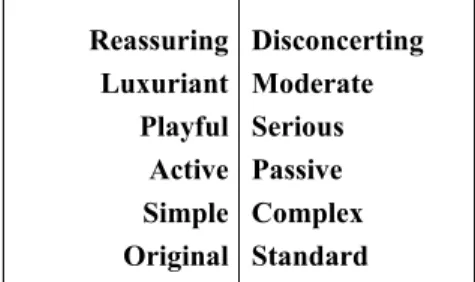
various fields, such as visual perception theories [Gibson 79], image semantic [Cossette 82], musicology [Chion 94], cinematography strategies [Vanoye, Goliot-Lété 92],… With these theories and the practical experiences we drove, we managed to submit a list of six pairs of cri-teria. We shall precise that these criteria are expected to be neutrals: they are used to describe the feelings, not to judge them directly. The evaluator is the only one that could decide if the feeling we characterised is adapted or not to the pedagogical context.
Reassuring Luxuriant Playful Active Simple Original Disconcerting Moderate Serious Passive Complex Standard
Table 1. General feelings criteria
4. Technical quality
This part of the questionnaire concerns the classical as-pects of software engineering. It was not our main concern to deeply research on this subject, since former researches already investigated these areas. For instance [Vander-donckt 98] for the Web aspects.
1. Portability Is the software able to work on any operating system (Windows, Mac OS, Unix)? 2. Installation Does the software install other applications (QuickTime for instance)?
3. Speed Is the software quick enough (independently of a volunteer pedagogical slowness)? 4. Bugs Is there any kind of bugs? Are they fatal or only just embarrassing?
5. Documentation Is there paper utilisation documentation? Is it well written and useful? 6. Web aspects Are the linked updated? Are the pointed sites relevant?
Table 2. Technical quality criteria and examples of associated questions
5. Usability
Usability evaluation has been widely studied, espe-cially within the industrial context [Ravden & al 89], [Vanderdonckt 94], [Senach90], [MEDA 90]. The ones
we chose are mainly based on INRIA criteria [Bastien, Scapin 94].
1. Guidance Did you ever happen not to know what to do to keep on?
1.1 Prompting When you have to execute a specific action, does the system indicate it? 1.2 Grouping by location Are there any distinct zones for distinct functions?
1.3 Grouping by format Are the icons, images, labels and symbols easily understandable? 1.4 Feedback Is each user action followed by a system feedback?
2. Workload Did you find that there was too much or too little information on the screen? 2.1 Minimal actions Do you find that too many menus and submenus were necessary to reach a goal? 2.2 Perceptive charge Did you find the screen too ornate to perceive the important information?
3. User control Is the user able to stop any treatment, for instance because it is too long? 4. Software help Is there a general online-help? A specific context-dependent help? 4.1. Errors managing Is there any error message if the user do an inappropriate action? 4.2. Help message Are the help messages understandable? Enough context-dependant? 4.3. Help structure Is the help documentation correctly written and readable?
5. Consistency Has a same interactive element always the same function?
6. Flexibility Is the software interface able to be modified by an experimented user? 6.1. Users habits Can the software memorise some particular parameters of the user? 6.2.Interface choices Can the user control the graphic attributes of the interface?
Table 3. Usability criteria and examples of associated questions
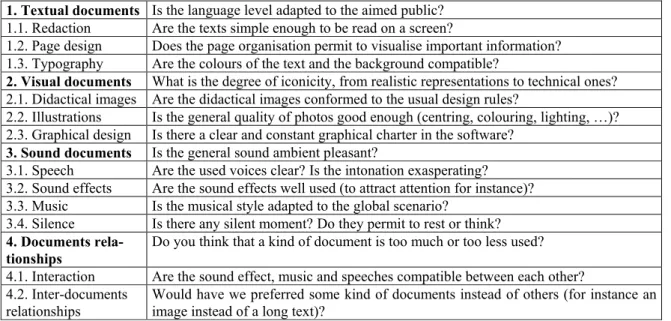
6. Multimedia documents
Texts, images and sounds are the constituents of the learning software. They are the information vectors, and have to be evaluated for the information they carry. But the way they are presented is also an important point, be-cause it will influence the way they are read. To build this
part of the questionnaire, we had to explore various do-mains, for instance the semantics of images [Baticle 85], the textual theories [Goody 79], the didactical images works [Costa, Moles 91], the photography [Alekan 84], the audio-visual [Sorlin 92],…
1. Textual documents Is the language level adapted to the aimed public? 1.1. Redaction Are the texts simple enough to be read on a screen?
1.2. Page design Does the page organisation permit to visualise important information? 1.3. Typography Are the colours of the text and the background compatible?
2. Visual documents What is the degree of iconicity, from realistic representations to technical ones? 2.1. Didactical images Are the didactical images conformed to the usual design rules?
2.2. Illustrations Is the general quality of photos good enough (centring, colouring, lighting, …)? 2.3. Graphical design Is there a clear and constant graphical charter in the software?
3. Sound documents Is the general sound ambient pleasant?
3.1. Speech Are the used voices clear? Is the intonation exasperating? 3.2. Sound effects Are the sound effects well used (to attract attention for instance)? 3.3. Music Is the musical style adapted to the global scenario?
3.4. Silence Is there any silent moment? Do they permit to rest or think? 4. Documents
rela-tionships
Do you think that a kind of document is too much or too less used? 4.1. Interaction Are the sound effect, music and speeches compatible between each other? 4.2. Inter-documents
relationships
Would have we preferred some kind of documents instead of others (for instance an image instead of a long text)?
Table 4. Multimedia documents criteria and examples of associated questions
7. Scenario
We define the scenario such as the particular process of designing documents in order to prepare the act of read-ing. The scenario does not deal directly with information, but with the way they are structured. This suppose a original way of writing, dealing with non-linear structure,
dynamic data, multimedia documents,… Our studies are oriented toward the various classification of navigation structures [Durand & al 97] [Pognant, Scholl 97], and the fiction integration in learning software [Pajon, Polloni 97].
1. Navigation Is the user usually felt lost in the navigation structure?
1.1. Structure What kind of structure is used in the software? Linear? Tree-like? Net-like? 1.2. Reading tools Does the software provides tools to manage the reading (index, maps, …)? 1.3. Writing tools Is the user able to write on the provided documents?
1.4. Links with di-dactical strategy
Are the navigation choices coherent with the chose pedagogical strategy (for in-stance a net structure is better for encyclopaedic strategy)?
2. Fiction Are there any fictive aspects in the software scenario (quest, characters, …)? 1.1. Narrative What degree of story is applied in the scenario? Total? Partial?
1.2. Ambient Is the general ambient of the software compatible with the pedagogical context? 1.3. Characters Is the student identified to a character in the scenario? The tutor?
1.4. Emotion Are the generated emotions relevant? Do they permit to maintain attention?
Table 5. Scenario criteria and examples of associated questions
8. Didactics
Literature offers plenty of criteria and recommenda-tions for the pedagogical application of computer technol-ogy, for instance [Dessus, Marquet91], [Marton94], [MEDA 90], [Park & al 93]. We also used more specific studies, such as reflections on interaction process [Vivet 96], or practical experiences [Perrin, Bonnaire 98].
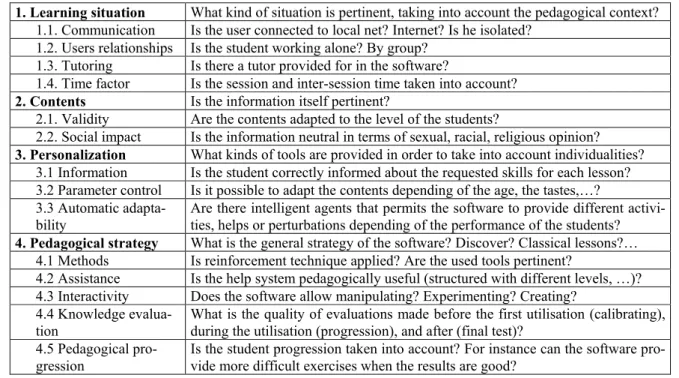
This last part of the questionnaire is expected to evalu-ate the specific didactical strevalu-ategy of the software. Our goal is not impose such or such strategy, saying it is the
better one. This normalising approach can not be applied (whereas it was possible for ergonomics or technique), for two main reasons: We do not have enough experience with learning software to impose a way of doing things and the evaluation of a didactical strategy is totally con-text dependent. That means that our method is not able to directly evaluate the criteria, but what it can do is giving the evaluator a main grid to determine on each point what kind of strategy is chosen and if this is relevant regarding the particular context of the learning situation.
1. Learning situation What kind of situation is pertinent, taking into account the pedagogical context? 1.1. Communication Is the user connected to local net? Internet? Is he isolated?
1.2. Users relationships Is the student working alone? By group? 1.3. Tutoring Is there a tutor provided for in the software?
1.4. Time factor Is the session and inter-session time taken into account? 2. Contents Is the information itself pertinent?
2.1. Validity Are the contents adapted to the level of the students?
2.2. Social impact Is the information neutral in terms of sexual, racial, religious opinion? 3. Personalization What kinds of tools are provided in order to take into account individualities?
3.1 Information Is the student correctly informed about the requested skills for each lesson? 3.2 Parameter control Is it possible to adapt the contents depending of the age, the tastes,…? 3.3 Automatic
adapta-bility
Are there intelligent agents that permits the software to provide different activi-ties, helps or perturbations depending of the performance of the students? 4. Pedagogical strategy What is the general strategy of the software? Discover? Classical lessons?…
4.1 Methods Is reinforcement technique applied? Are the used tools pertinent?
4.2 Assistance Is the help system pedagogically useful (structured with different levels, …)? 4.3 Interactivity Does the software allow manipulating? Experimenting? Creating?
4.4 Knowledge evalua-tion
What is the quality of evaluations made before the first utilisation (calibrating), during the utilisation (progression), and after (final test)?
4.5 Pedagogical pro-gression
Is the student progression taken into account? For instance can the software pro-vide more difficult exercises when the results are good?
Table 6. Didactical criteria and examples of associated questions
9. The EMPI method
Our method is founded on a questionnaire that allows the marking of each previously quoted criterion. Software is actually being made, but we already use a prototype version realised as a database. Here are some of the main principles of this questionnaire:
The variable depth: The method is progressive and al-lows navigating between the different criteria. At the higher level, we find the main criteria (usability, scenario, didactics, …). The evaluator can give an instinctive
evaluation and precise the criterion by evaluating corre-spondent sub-criterion (homogeneity, navigation, …). The third and last level is composed by the questions. This ap-proach allows the evaluator to deepen or not each aspect, depending on his own skills and interests.
Contextual help: A structured help is provided for each criterion and question, in order to objective the evaluation. This help allows questions reformulation,
con-cepts’ definition, theoretic fundaments explanation and some characteristic examples.
Question weighting: The influence of a question under a criterion can be either essential or secondary, to express the fact that some aspects or defaults are more important than others.
Characterisation and evaluation: Some questions are subdivided in two phases: A first one to characterisation the software’s situation, and a second one to evaluate the relevance of this situation. For instance, in order to evalu-ate the structure of the software, we will first determine what kind of structure is concerned (linear, arbores-cent,…) and then if it is a correct one.
Exponential marking: For the main part of the ques-tions, a non-linear marking is used, in order to have the defaults underlined. For instance : Did you happen not to know what to do to keep on using the software? Always (-10), Often (-6), Sometimes (0), Never (+10).
Instinctive and calculated marks: The evaluating sys-tem manage two kind of marks: The instinctive marks (++; +; =; –; – –) that are directly attributed to the criteria by the evaluator, and the calculated marks that are attrib-uted to the criteria by the software using the answers the evaluator gave to the questions. A confrontation is possi-ble between the marks, using the consistency rating (that determine if the instinctive marks are coherent between themselves) and the correlation rating (that indicate if the instinctive and calculated marks converge).
Final mark: The evaluator, with a synthesis of the in-stinctive and calculated marks and the correspondent rat-ings, is submitted a final mark by the evaluating system. But the human evaluator keeps after all the capacity of judging the final mark of each criterion.
Results visualisation: A graphic visualisation is possi-ble through several forms. At the moment we use a Pareto graph, in order to permit a quick view of defaults and qualities. In this restitution phase the evaluator can visual-ise a global graphic of the six main criteria, a global graphic of all criteria, or a local graphic for sub-criteria of a determined main criterion. These different points of view will help him to compare software between themselves, and to compare a software to a given learning context.
10. Validation experiments
Several versions of the questionnaire have been suc-cessively set up. The first researches, centred on ergonom-ics, revealed the necessity to take into account didactics and multimedia aspects. Various validations have been made, mainly on the ergonomic module. New ones are programmed to test new aspects of the questionnaire.
The first validation program (1996) implied ten evalua-tors towards thirty learning software. It enable to improve the usability module and to begin with the other ones. The second validation (1997) permits to compare forty-five evaluations of the same software, using a stability rating. Here could be underlined some weak parts of the ques-tionnaire. The third study (1998) was mainly centred on the comparison between our method EMPI and the MEDA method, only commercial evaluating method based on questionnaire. We shall refer to other articles for the details of these studies, [Hû & al 98] for instance. Now, our aim will be to extend the validations of the for-merly described questionnaire.
11. Conclusion and perspectives
We are ending the integration of the different modules through the same questionnaire, redacting the questions on the same model. Problems we meet are linked to the fact that we need to unify concepts like navigation, which depends both on usability, scenario and didactics. The very short-term objective is to get a coherent and com-plete analysis grid.
A second parallel axe, is the making of the software that would integrate this questionnaire. We are thinking a second prototype based on databases and object language as Visual Basic. As described in the previous chapter, we want to use this prototype next semester, in order to vali-date the whole questionnaire. We then aim to realise a beta version, for the end of academic year, and distribute it for validation on site.
12. References
[Alekan 84] H. Alekan, "Des lumières et des ombres", Le syco-more, 1984.
[Barthes 80] R. Barthes, "La chambre claire: Note sur la photo-graphie", Editions de l’Etoile, Gallimard, Le Seuil, 1980. [Bastien, Scapin 94] C. Bastien, D. Scapin, Evaluating a user
interface with ergonomic criteria. Rapport de recherche INRIA n°2326 Rocquencourt, aout 1994.
[Baticle85] Y Baticle, "Clés et codes de l’image: L’image numé-risée, la vidéo, le cinéma", Magnard, Paris, 1985.
[Berbaum 88] J. Berbaum, "Un programme d’aide au dévelop-pement de la capacité d’apprentissage", Université de Gre-noble II, Multigraphié, 1988.
[Chion 94] M. Chion, "Musiques: Médias et technologies", Flammarion, 1994.
[Cossette 83] C. Cossette , "Les images démaquillées", Riguil Internationales, 2ème édition, Québec, 1983.
[Costa, Moles 91] J. Costa, A. Moles, "La imagen didác-tica",Ceac, Barcelone, 1991.
[Crozat 98] S. Crozat, "Méthode d’évaluation de la composition multimédia des didacticiels", Mémoire de DEA, UTC, 1998.
[Depover 94] C. Depover, "Problématique et spécificité de l’évaluation des dispositifs de formation multimédias", Edu-catechnologie, vol.1, n°3, septembre 1994.
[Dessus, Marquet 91] P. Dessus, P. Marquet, "Outils d'évalua-tion de logiciels éducatifs". Université de Grenoble. Bulletin de l'EPI. 1991.
[Durand & al 97] A. Durand, J-M. Laubin, S. Leleu-Merviel, "Vers une classification des procédés d’interactivité par niveaux corrélés aux données", H²PTM’97, Hermes, 1997. [Fleury 93] M. Fleury, "Implications de certains principes de
design pour le concepteur de systèmes multimédias interac-tifs", Educatechnologie, vol.1, n°2, déc. 1993.
[Gagné & al. 81] R.M. Gagné, W. Wagner, A. Rojas, "Planning and authoring computer-assisted instruction lessons", in Educational Technology, 21 (9), 17-26, 1981.
[Gaussens & al 97] D. Gaussens, R. Parise, N. Vigouroux, J-P. Macchion, "L’Enseignement Assisté par Ordinateur: Le fac-teur distance", EIAO’97, Hermes, 1997.
[Gibson 79] J. J. Gibson, "The ecological approach to visual perception", LEA, London, 1979.
[Goody 79] J. Goody, "La raison graphique: La domestication de la pensée sauvage", Les Editions de Minuit, 1979.
[Hannafin, Peck 88] M.J. Hannafin, K.L. Peck, "The Design, Development and Evaluation of Instructional Software", NY, MacMillan Publishing Company, 1988.
[Hû & al 98] O. Hû, P. Trigano, S. Crozat, "E.M.P.I.: une méth-ode pour l’Evaluation du Multimédia Pédagogique Intérac-tif", NTICF’98, INSA Rouen, novembre 1998.
[Hû 97] O. Hû, "Méthodologie d’évaluation du multimédia pédagogique", Mémoire de DEA, UTC, 1997.
[Hû, Trigano 98] O. Hû, P. Trigano, "Proposition de critères d’aide à l’évaluation de l’interface homme-machine des logiciels multimédia pédagogiques", IHM’98, Nantes, sep-tembre 1998.
[Kolsky 97] C. Kolski , "Interfaces Homme-machine : applica-tion aux systèmes industriels complexes", Hermes, 1997. [Léglise 98] M. Léglise, "Un logiciel en situation dans un
dispo-sitif d’apprentissage de la conception", CAPS’98, Université de Caen, juin 1998.
[Marton 94] P. Marton, "La conception pédagogique de systèmes d’apprentissage multimédia interactif : fondements, méthodologie et problématique", Educatechnologie, vol.1, n°3, septembre 1994.
[MEDA 90] MEDA, "Evaluer les logiciels de formation", Les Editions d’Organisation, 1990.
[Pajon, Polloni 97] P. Pajon, O. Polloni, "Conception mul-timédia", cd-rom, CINTE, 1997.
[Park & al. 93] I. Park, M.-J. Hannafin, "Empiically-based guidelines for the design of interactive media", Educational Technology Research en Development, vol.41, n°3, 1993 [Parker, Thérien 91] R.C . Parker, L. Thérien, "Mise en page et
conception graphique", Reynald Goulet, 1991.
[Perrin, Bonnaire 98] H. Perrin, R. Bonnaire, "Un logiciel pour la visualisation de mécanismes de gestion des processus du système UNIX", NTICF’98, INSA Rouen, novembre 1998. [Pognant, Scholl 96] P. Pognant, , C. Scholl "Les
cd-romculturels", Hermès, 1996.
[Ravden & al. 89] S.J. Ravden, G.I. Johnson, "Evaluating usabil-ity of Human-Computer Interfaces : a practical method". Ellis Horwood, Chichester, 1989.
[Rhéaume 91] J. Rheaume, "Hypermédias et stratégies péda-gogiques", in de la Passardière B., et Baron G.-L., Ed. Hy-permédias et apprentissages, Paris, MASI, INRP, 1991. [Rhéaume 94] J. Rheaume, "L’évaluation Des Multimédias
Pédagogiques : De L’évaluation Des Systèmes A L’évaluation Des Actions", Educatechnologie, Vol.1, N°3, Sept. 1994.
[Richaudeau 80] F. Richaudeau, "Conception et production des manuels scolaires", Paris, Retz, 290p, 1980.
[Salesse 97] O. Salesse, "Méthodologie d’évaluation pour le multimédia pédagogique: Etat de l’art et critères d’évaluation", Mémoire de DEA, UTC, 1997.
[Scapin 86] D. Scapin, "Guide ergonomique de conception des interfaces Homme/Machine". Rapport technique INRIA Rocquencourt, n°77, octobre 1986.
[Scapin, Bastien 97] D. Scapin, J.M.C. Bastien, "Ergonomic cri-teria for evaluating the ergonomic quality of interactive sys-tems", Behaviour & Information Technology, n°16, 1997. [Scapin, Bastien 98] D. Scapin, J.M.C. Bastien, "Ergonomie du
multimédia et du Web: Question et résultats de recherche" , Assises du GDR-PRC I3, juin 1998.
[Senach 90] B. Senach, "Evaluation ergonomique des interfaces Homme/Machine : une revue de la littérature". Rapport INRIA, Sophia-Antipolis, n°1180, Rocquencourt, mars 1990.
[Sorlin 92] P. Sorlin, "Esthétiques de l’audiovisuel", Nathan, 1992.
[Vanderdonckt 94] J. Vanderdonck, "Guide ergonomique de la présentation des applications hautement interactives", Presses Universitaires Namur, 1994.
[Vanderdonckt 98] J. Vanderdonckt, "Conception ergonomique de pages WEB", Vesale, 1998.
[Vanoye, Goliot-Lété 92] F. Vanoye, A. Goliot-Lété, "Précis d’analyse filmique", Nathan, 1992.
[Vivet 96] M. Vivet, "Evaluating educational technologies: Evaluation of teaching material versus evaluation of learn-ing?", CALISCE’96, San Sebastian, juillet 1996.
[Weidenfeld & al. 96] G. Weidenfeld, M. Caillot, G-M. Co-chard, C. Fluhr, J-L. Guerin, D. Leclet, D. RiCo-chard, "Tech-niques de base pour le multimédia", Ed. Masson, Paris, 1996.