Agent-based Programming Interfaces for Children
Supporting Blind Children in Creative Computing through Conversation
by
Tina Quach
Submitted to the Department of Electrical Engineering and Computer
Science
in partial fulfillment of the requirements for the degree of
Bachelor of Science in Computer Science and Engineering
at the
MASSACHUSETTS INSTITUTE OF TECHNOLOGY
June 2019
c
Massachusetts Institute of Technology 2019. All rights reserved.
Author . . . .
Department of Electrical Engineering and Computer Science
May 17, 2019
Certified by . . . .
Andrew Sliwinski
Research Scientist
Thesis Supervisor
Certified by . . . .
Mitch Resnick
LEGO Papert Professor of Learning Research
Thesis Supervisor
Accepted by . . . .
Katrina LaCurts
Chairman, Master of Engineering Thesis Committee
Agent-based Programming Interfaces for Children
Supporting Blind Children in Creative Computing through Conversation
by
Tina Quach
Submitted to the Department of Electrical Engineering and Computer Science on May 17, 2019, in partial fulfillment of the
requirements for the degree of
Bachelor of Science in Computer Science and Engineering
Abstract
Children that learn to express themselves creatively and think computationally are empowered to create rather than solely consume technology. They practice creativ-ity and learn strategies for solving problems, designing projects, and communicating ideas. However, children with visual impairments cannot access most programming experiences designed for beginners. This deprives these children of the chance to play with expressing themselves through programs that they design and create themselves. In this paper, we introduce Codi, a software agent that children can talk to in order to create, play, modify, and explore programs built using natural language. Through the design and implementation of Codi, I explore how agent-based programming in-terfaces can make programming accessible to children with visual impairments and multiple disabilities. Interviews, workshops, and test sessions with visually impaired children at Perkins School for the Blind led me to draw two conclusions: (1) Agent-based programming interfaces like Codi can facilitate meaningful creative learning experiences for children who cannot see. (2) In order to support children’s engage-ment with computational thinking concepts and practices, agent-based programming interfaces need onboarding experiences, learning resources, and facilitation that helps learners surface and pursue their own interests and integrate computational thinking concepts.
Thesis Supervisor: Andrew Sliwinski Title: Research Scientist
Thesis Supervisor: Mitch Resnick
Acknowledgments
I have so many people to thank! I find myself almost overwhelmed with gratitude. Andrew, working with you has helped me grow a lot during this project. Thank you for believing in me and giving me the chance to shape and pivot my project. You’ve consistently provided guidance along the way to help me imagine what is possible and turn ideas into reality. Of course, I can’t tackle all my ideas at once. Thank you for being critical and constructive and balancing my tendency towards breadth-first with advice to narrow, focus, and prioritize. You are a role model for me, and I’ve been so lucky to have your mentorship. Thanks for sharing yourself— your stories and insights—to help me grow technically, academically, mentally, and emotionally.
I also want to thank all of Lifelong Kindergarten (LLK) and the Scratch Team. You have provided such an amazing home base and community. Our shared mission— engaging people in creative learning experiences—has shaped my own journey working on this project. Every time I’ve shared my work, you all have been so helpful with constructive feedback. Every question you’ve asked about it, every expression of care helped me keep going when times got tough. You all inspire me with the care and hard work you put into spreading the powerful ideas behind creative learning.
Almost every week, LLK Grads Dinner was another dip into a creative learning spiral. Thank you, Lily, Sean, Jaleesa, Shruti, Carmelo, Samarth, Lena, Carolina, Marian, Yusuf, Moran, Joy, Andrew, Mitch, and Natalie for the joy and opportunity to grow in that way.
I’d also like to thank students and staff at Perkins School for the Blind for sharing their interests and time with me! It has been so fun. Additional thanks to Vo for hosting my first visits to Perkins and helping me learn about how I can support children with visual impairments. The enthusiasm and experience you brought to design reviews and test sessions strengthened my excitement and deepened my passion for the work. And Miriam—thank you for being my point of contact at Perkins throughout the entire project. Your observations and insights helped make me a more effective facilitator and gave me more context to aid with understanding students as they engage with Codi.
Kara and Willow, thank you working with me to make it possible to create Scratch programs through natural language. It was amazing to collaborate and share ideas with you. We didn’t know what we were doing at first, but our explorations helped us find an approach that works and provides children with new ways to engage with creative computing.
Beast of past and present, thank you for being home, keeping me company during late nights, for always cheering me on, and for bringing love and spontaneous fun to my life all the time. You are so special.
To my brother Ken, thanks for play testing my project and inspiring me. To my sister Nina, thanks for being supporting me and giving me more reasons to laugh. And finally, to my parents, Alan and Trang Quach, thank you giving me the opportunity and space to act on my own motivations. I wouldn’t have made it here without you.
Contents
1 Introduction 17
1.1 Scratch as Inspiration . . . 18
1.2 Why a conversational interface? . . . 19
1.3 Codi . . . 19
1.4 Outline . . . 20
2 Foundations of Creative Learning and Computational Thinking 21 2.1 Papert’s Theory of Constructionism . . . 21
2.2 The 4 P’s of Creative Learning . . . 22
2.3 The Creative Learning Spiral . . . 23
2.4 Empowering Consumers to Create . . . 24
3 Challenges for Children with Visual Impairments in Creative Com-puting 27 3.1 Most programming experiences are not accessible to children who are blind. . . 28
3.2 Assistive technologies for the blind have steep learning curves and are difficult to use. . . 29
3.2.1 Screen readers have a steep learning curve, making them time consuming to learn. . . 30
3.2.2 Screen reader usability is hindered by keyboard input and audio-only output. . . 32
3.3 Intersectionality in the identities and experiences of children with
vi-sual impairments is not uvi-sually recognized. . . 33
3.4 Children without sight face technical, logistical, and personal barriers to creative programming experiences. . . 34
3.4.1 Technical Barriers . . . 34
3.4.2 Logistical Barriers . . . 35
3.4.3 Personal Barriers . . . 36
4 Related Work 37 4.1 Creative Programming Experiences for Children with Visual Impairments 37 4.1.1 Computational Construction Kit for the Blind . . . 37
4.1.2 Accessible Visual Programming Languages . . . 38
4.1.3 Accessible Text-based Programming Languages . . . 38
4.2 Conversational Agents . . . 39
4.2.1 Current User Experience of Voice Assistants . . . 39
4.2.2 Relationship Between a Child and an Agent . . . 42
4.2.3 Programming Conversational Agents . . . 43
4.3 Voice and Natural Language as a Medium for Programming . . . 45
4.3.1 Programming by Voice . . . 45
4.3.2 Programming through Natural Language . . . 47
5 Research and Design 49 5.1 Accessibility and Intersectionality . . . 49
5.2 User Experience . . . 51
5.2.1 First Encounter . . . 51
5.2.2 Creating a Project . . . 52
5.2.3 Playing and Exploring a Project . . . 53
5.2.4 Debugging a Project . . . 54
5.2.5 Editing a Project . . . 56
5.3 Conversations as Transitions through a State Machine . . . 57
5.3.2 Audio Cues and Background Music . . . 59
5.3.3 Coding Conversationally with Natural Language . . . 60
5.4 The 4 P’s of Creative Learning . . . 62
5.4.1 Projects . . . 63
5.4.2 Passion . . . 64
5.4.3 Peers . . . 66
5.4.4 Play . . . 67
5.5 Computational Thinking . . . 67
5.5.1 A Formal System and Tool to Create With . . . 67
5.5.2 Computational Thinking Concepts . . . 70
5.5.3 Computational Thinking Practices . . . 74
5.5.4 Avoiding Confusion in CS Education . . . 77
5.5.5 The Relationship Between the Child and the Agent . . . 79
5.6 Reflections . . . 82 6 Implementation 85 6.1 State Machine . . . 85 6.2 Actions . . . 86 6.3 Arguments . . . 89 6.4 Handling Utterances . . . 90
6.5 Constructing Programs with Natural Language . . . 92
6.5.1 Designing a Grammar . . . 95
6.5.2 Syntactic-Semantic rule pairs . . . 95
6.5.3 Generalizing to Various Inputs . . . 98
6.6 Virtual Machine . . . 102
7 Evaluation 105 7.1 An agent-based interface can facilitate meaningful creative learning experiences for children who cannot see despite usability challenges. . 106
7.1.1 Creative Learning Spiral . . . 106
7.1.3 System Intelligence . . . 115
7.1.4 Usability Challenges . . . 117
7.1.5 Boosting Usability . . . 119
7.1.6 Supporting Self-Expression . . . 121
7.2 Onboarding, learning resources, and facilitation are needed to effec-tively promote engagement with computational thinking concepts and practices. . . 123
7.2.1 Computational Thinking Concepts . . . 123
7.2.2 Computational Thinking Practices . . . 130
7.3 Feedback . . . 131 7.4 Methodology . . . 132 7.5 Summary . . . 133 7.5.1 Findings . . . 133 7.5.2 Limitations . . . 134 8 Conclusion 135 8.1 Contributions . . . 135 8.2 Future Work . . . 136
8.2.1 Promoting Community around Codi . . . 136
8.2.2 Agent Customization and Personalization . . . 137
8.2.3 Increasing Tinkerability through Immediate Feedback . . . 138
8.2.4 Extending What You Can Create with Codi . . . 139
8.2.5 Extending Where You Can Create with Codi . . . 139
8.2.6 Abstracting, Modularizing, and Compiling in Codi’s Program-ming Language . . . 140
8.2.7 Making Codi More Conversational . . . 140
A Tables 143 A.1 Codi Actions . . . 143
B Figures 147 B.1 Learning Resources . . . 147 B.1.1 Reference Cards from Wizard of Oz testing . . . 147 B.2 Interview Questions . . . 152
List of Figures
2-1 The creative learning spiral is an approach to learning that goes through Imagine, Create, Play, Share, Reflect, and back to Imagine. It’s a spi-ral and not a circle because of the growth and learning that occurs with each iteration. The creative learning spiral helps learners develop creative-thinking skills and practices that promote flourishing. . . 23 3-1 Screenshot of using VoiceOver on MacOS to navigate scratch.mit.edu.
The screen reader’s focus is on the “Ideas” link in the toolbar. VoiceOver provides feedback that suggests what keypress combination the user may want to do next, “You are currently on a link. To click this link, press Control-Option-Space.” The text spoken by VoiceOver is simul-taneously visually represented as text in a box on the screen. . . 29 3-2 Screenshot of using VoiceOver on MacOS to navigate an online
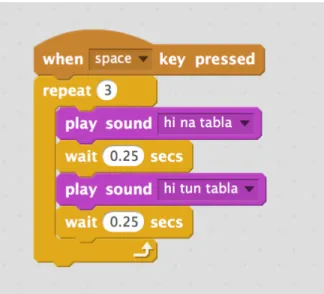
arti-cle. The screen reader’s focus is on a paragraph in the article, which VoiceOver is reading aloud. The text spoken by VoiceOver is simulta-neously visually represented as text in a box on the screen. . . 30 5-1 A Scratch program that plays drum sounds when the space key is pressed. 68 6-1 Overall System Architecture: User speech gets converted into text
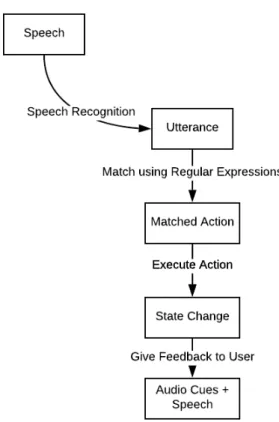
which then gets matched to possible actions the system can take. The system attempts to take the first matched action, which often results in a state change and feedback given to the user via audio cues and speech synthesis. . . 86
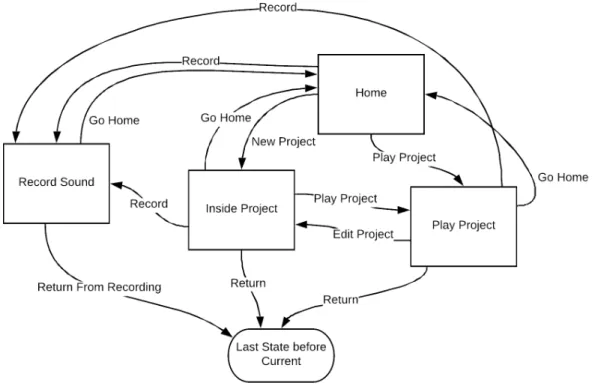
6-2 This diagram depicts the transitions between states. When children first interact with Codi, they start off in the Home state. They can record a sound, create a new project, or play an existing project. When they are playing a project, they may either edit the project, go to the home state, or ask to return to whatever state they were previously in. When they are inside a project, they can record a sound, play the project, go home, or go back to the state they were previously in. If they are recording a sound, they may return to their previous state. 87 6-3 This state machine depicts the portion of the system that deals with
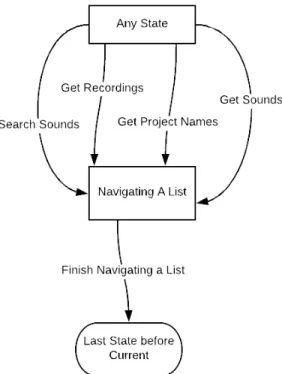
list navigation. This occurs when the child asks a question that has answers involving multiple items. From any state, a child can ask questions that may put them in the list navigation state in which they can hear the current, previous, or next three items. When they are done navigating, they return to their previous state. . . 88 6-4 The project is modeled as a simple state machine that maintains whether
the project has been named and whether instructions have been added to it. . . 88 6-5 Textual natural language input is translated into a script through a
system built on regular expressions, syntactic, and semantic rules. . . 93 6-6 Parse tree generated for the command “make a variable called x” . . 93 6-7 Parse tree rules: the start symbol maps to an instruction (S). The
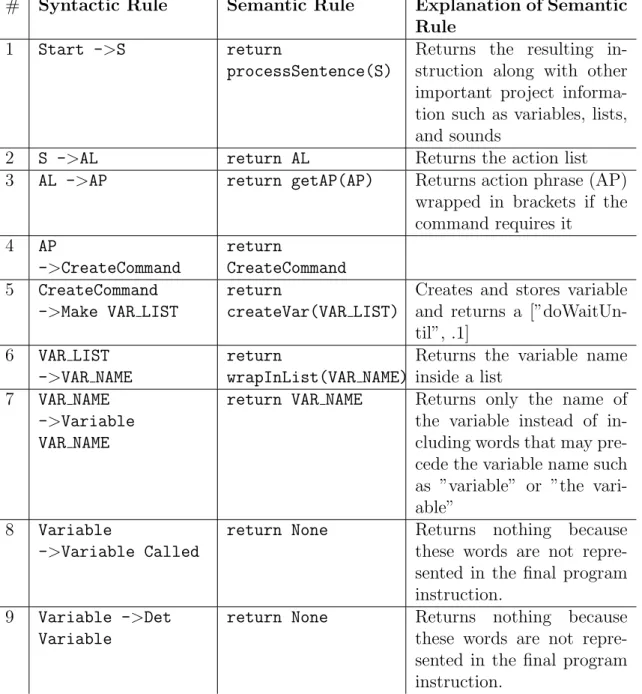
in-struction S could be expand as an action list (AL). An action list can contain a single action phrase (AP). Action phrases included commands for creating (CreateCommand). The rest of the syntactic rules are de-signed to allow the grammar to be flexible to different ways to tell Codi to make a variable. . . 96
7-1 Resource card with instructions for creating a “Give me a compliment” project. . . 124
7-2 Resource card with instructions for creating a “Tell a knock knock joke” project. . . 124 7-3 Resource card with instructions for creating a “Make silly sounds”
project. . . 125 7-4 Resource card with instructions for creating a “There’s an anxious
cow” project. . . 125 7-5 Resource card with list of sound commands understood by Codi. . . . 125 7-6 Resource card with instructions for creating a “There’s an anxious
cow” project using loops. . . 126 7-7 The code system, derived from the project goals, consists of six groups
of codes. Hierarchy in the codes denote relationships between ideas in the same group. . . 133 B-1 Learning resource card from Wizard of Oz testing that lists commands
you can say anytime. . . 147 B-2 Learning resource card from Wizard of Oz testing that lists commands
for editing projects. . . 148 B-3 Learning resource card from Wizard of Oz testing that lists commands
that work when you’re in the “Home” state. . . 148 B-4 Learning resource card from Wizard of Oz testing that lists loop
com-mands. . . 148 B-5 Learning resource card from Wizard of Oz testing with instructions for
renaming projects. . . 149 B-6 Braille learning resource card from Wizard of Oz testing with
instruc-tions for making the “Give me a compliment” project. . . 149 B-7 Steps 1 through 4 of the “There’s an anxious cow” project as braille
cards for the Wizard of Oz testing. . . 150 B-8 Steps 5 through 9 of the “There’s an anxious cow” project as braille
Chapter 1
Introduction
How can we empower children with visual impairments to engage with the powerful ideas in computational thinking through creative learning?
Creative learning and computational thinking promote flourishing in today’s so-ciety, where creativity and the ability to understand, use, and build technology are critical. However, most programming experiences are not accessible to children with visual impairments. Visual programming languages like Scratch [76] are extremely popular among proponents of computer science education. However, visual program-ming languages pose difficulties for children with visual impairments [49, 77, 50] and need to be made compatible with assistive technologies. Still, assistive technologies for the blind have steep learning curves and are hard to use [47]. To support chil-dren with visual impairments in engaging with creative learning and computational thinking, we must recognize intersectionality in the identities and experiences of chil-dren with visual impairments. Chilchil-dren may have multiple disabilities including a cognitive disability.
This project has three overlapping goals:
1. To create a platform for creative learning experiences accessible to children with visual impairments
2. To support children in engaging with computational thinking concepts and prac-tices
3. To support children in expressing themselves through projects in ways that build creative confidence
In this thesis, I explore how an agent-based programming interface called Codi can make programming accessible to children with visual impairments and multiple disabilities.
1.1
Scratch as Inspiration
Codi’s design is inspired by Scratch. Scratch is both a block-based, visual program-ming language and an online community through which millions of children create and share interactive stories, games, and animations. Scratch is used in a variety of contexts including schools, after-school programs, and at home. It empowers its users to be active and engaged creators of technology and members of society. With Scratch, children create projects inspired by their passions and share with and learn from their peers. Although Scratch aims to be a platform that empowers children of all backgrounds and abilities to express themselves by creating programs, accessi-bility issues have been regularly raised by users [49, 77]. For example, it is difficult for color-blind users to identify block categories which are distinguished by color [71]. We hear from educators, parents, and children about the struggles of using Scratch with low vision in both formal and informal learning environments such as schools and after-school programs. In 2015, a parent, advocating for her son, posted in a Scratch discussion forum, “Scratch 2.0 is being used in Math club. The text is so small, and the graphics’ detail is relatively subtle for a visually impaired person so he hasn’t been able to use it, even when enlarged. Wondering if there is an accessible version out there, or what advice there is to make this more accessible for the visually impaired. He is quickly losing his interest in programming as a result” [72].
1.2
Why a conversational interface?
Exploring accessibility with blindness as a focus, I first explored designing and im-plementing screen reader compatibility for block-based programming. This involved designing workflows around keyboard controls and audio representation for the blocks. However, most children with visual impairments are not proficient screen reader users. Although designing and implementing screen reader compatibility would make Scratch technically accessible (meeting a standard form of access), many children— and adults—face large learning curves when learning to use a screen reader.
In order to engage with a screen reader accessible block-based programming lan-guage, children who are blind would have to first learn how to use a screen reader to access a web browser on a computer. Then, they would learn how to navigate the code editing interface. After, they must build an understanding of the blocks before they can learn programming concepts by building with the blocks. This implies that screen reader compatibility isn’t enough for this audience to get started.
Just as Scratch’s visual language lowers the barrier to entry for sighted children, a conversational, voice-based interface for programming could lower the barrier for children with visual or motor impairments to engage with computational thinking through creative learning. The conversational interface, designed for a screenless experience, is inspired by voice assistants and demonstrates the potential for pro-gramming through conversation. The ubiquity of conversational agents in mobile and home devices presents conversation with technology as a natural way to interact, especially for children who have not yet developed computer skills.
1.3
Codi
Codi is a computer program and agent that children can talk to in order to create, play, modify, and explore computer programs. As an agent, Codi provides a con-versational, voice and text-based interface that is accessible to children regardless of visual ability. Designed to support creative learning experiences, Codi facilitates a
creative process that minimizes cognitive load, integrates audio cues, and supports coding conversationally with natural language. In order to effectively support compu-tational thinking, Codi must avoid common confusions in computer science education and provide agency in the creative process. As a result, Codi is designed to be a for-mal system and tool and only provides information and suggestions when the child asks for them. With Codi, children create projects consisting of programs that inter-act with sounds and audio recordings. A project could facilitate a game, tell a story, communicate a personal message, or be art or music. In this way, Codi supports children’s expressing themselves through projects.
1.4
Outline
Chapter 2 describes some of the underlying educational philosophy for the project. Chapter 3 provides background on the challenges children with visual impairments face when engaging with computing and the limited opportunities they have to en-gage in creative learning. Chapter 4 situates my work in relation to related work in the domains of designing creative learning experiences for children with visual im-pairments, child robot interaction, programming by voice, and programming through natural language. In Chapter 5, I present the research and design decisions behind Codi. In Chapter 6, I share key ideas and architectures I used to implement an agent-based interface. I follow this in Chapter 7 with in-depth, qualitative evalua-tion of Codi based on two blind students’ experiences interacting with Codi in March 2019. Finally, in Chapter 8, I suggest ways to extend this research through improved natural language processing, further design of the agent’s personality, and broadening of the creative possibilities on the platform.
Chapter 2
Foundations of Creative Learning
and Computational Thinking
In this section, I share and discuss foundations of creative learning and computational thinking because they drive the design and evaluation of Codi and are core to the project goals.
2.1
Papert’s Theory of Constructionism
The Lifelong Kindergarten group at the Media Lab, led by Mitch Resnick, is ded-icated to engaging people in creative learning experiences. Lifelong Kindergarten is inspired by Seymour Papert’s theory of constructionism [68]. Constructionism is built on Jean Piaget’s “constructivist” theories, which assert that knowledge isn’t just transmitted from teacher to students, rather students actively build the knowledge in their mind through experience [44]. Papert’s theory of constructionism adds to Jean Piaget’s theory, claiming that learners make ideas and knowledge when they are ac-tively engaged in making an external artifact (such as a poem, machine, or painting) upon which they can reflect and share with others [44]. In constructionism, learners construct knowledge by building concrete artifacts about their interests and passions [44].
acqui-sition in only cognitive terms, constructionism recognizes the importance of affect, “forming new relationships with knowledge is as important as forming new represen-tations of knowledge” [44]. People form relationships with knowledge when working on personally meaningful projects. Furthermore, “Constructionism also emphasizes diversity: It recognizes that learners can make connections with knowledge in many different ways...encourag[ing] multiple learning styles and multiple representations of knowledge” [44]. Piaget and Papert’s Theory of Constructionism and its prioritization of affect and diversity guides the design of Codi as an agent and tool meant to give children the ability to express themselves and engage with their passions creatively and relationally through concrete creations.
2.2
The 4 P’s of Creative Learning
Lifelong Kindergarten’s approach to engaging people in creative learning is based on four key elements we call the 4 P’s of Creative Learning—projects, passion, peers, and play. In “Give P’s A Chance”, Mitch Resnick elaborates on each of the P’s [67]: • Projects. People learn best when they are actively working on meaningful
projects—generating new ideas, designing prototypes, refining iteratively. • Peers. Learning flourishes as a social activity, with people sharing ideas,
col-laborating on projects, and building on one another’s work.
• Passion. When people work on projects they care about, they work longer and harder, persist in the face of challenges, and learn more in the process.
• Play. Learning involves playful experimentation—trying new things, tinkering with materials, testing boundaries, taking risks, iterating again and again. I see value in the way projects create focused goals and environments for people to apply, think, and learn—not only by doing projects that matter to them, but also by collaborating and sharing with peers. Furthermore, creativity is supported by a playful spirit in which children have fun, take risks, and discover for themselves.
2.3
The Creative Learning Spiral
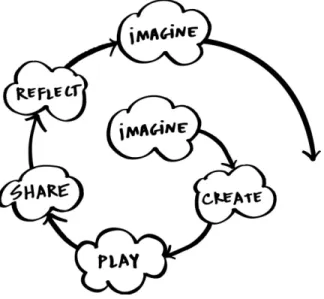
The creative learning spiral is an approach to learning inspired by kindergarten and developed by Mitch Resnick (See Figure 2-1) [65]. The spiraling process is one in which “children imagine what they want to do, create a project based on their ideas, play with their creations, share their ideas and creations with others, reflect on their experiences—all of which leads them to imagine new ideas and new projects.”
Figure 2-1: The creative learning spiral is an approach to learning that goes through Imagine, Create, Play, Share, Reflect, and back to Imagine. It’s a spiral and not a circle because of the growth and learning that occurs with each iteration. The creative learning spiral helps learners develop creative-thinking skills and practices that promote flourishing.
This spiral is immensely powerful in that those deeply engaged in a creative learn-ing cycle could say they are flourishlearn-ing. This is because they are simultaneously engaging with five elements of flourishing: positive emotions, engagement, relation-ships, meaning, and achievement [78]. Children working on projects about things they care about are likely to be completely absorbed in the activity (engagement) and find meaning in their work and play. As they make progress on their projects and eventually complete the project, they feel a sense of accomplishment and success (achievement). As they create and share projects with peers, they connect with others (relationships), and as they play, they have fun and feel good (positive emotion).
2.4
Empowering Consumers to Create
As Mitch Resnick writes in “Learn to Code, Code to Learn”, “the process of learn-ing to code, people learn many other thlearn-ings... In addition to learnlearn-ing mathematical and computational ideas (such as variables and conditionals), they are also learning strategies for solving problems, designing projects, and communicating ideas. These skills are useful not just for computer scientists but for everyone, regardless of age, background, interests, or occupation” [66]. Computational thinking empowers con-sumers of digital media to practice creativity through programming in an age where the future of human work is imagination, creativity, and strategy [63, 64]. In his book Lifelong Kindergarten, Mitch Resnick makes the case for a transition to a creative so-ciety [69]:
As the pace of change in the world continues to accelerate, people must learn how to adapt to constantly changing conditions. Success in the future—for individuals, for companies, for nations as a whole—will be based on the ability to think and act creatively...One of the best ways to help young people prepare for life in a creative society is to make sure that they have the chance to follow their interests, to explore their ideas, to develop their voices.
In 2010, Cuny, Snyder, and Wing defined computational thinking as the thought processes involved in formulating problems and their solutions so that the solutions are represented in a form that can be effectively carried out by an information-processing agent [31]. This definition ties computational thinking to an expression of ideas and solutions that can leverage computing. Computational thinking is even more powerful because we are surrounded by digital technologies; with computational thinking, we can understand and create digital technologies rather than just use them.
Through computational thinking, we can develop a better understanding of the digital world in which we live. People can use computational thinking concepts to express themselves and their ideas through projects. Through creative learning, peo-ple learn to break down compeo-plex ideas into simpeo-pler ones, to test ideas, assumptions,
and prototypes after developing smaller parts, and to debug and fix issues as they arise. People equipped with computational thinking skills and experience creating technology are able to be not just consumers, but creators of technologies.
Chapter 3
Challenges for Children with
Visual Impairments in Creative
Computing
As technology continues to advance and be integrated into classrooms and schools, its accessibility becomes even more important. Introducing technologies that are not accessible to everyone in the classroom widens and creates gaps in learning and achievement. Even worse, they may lead to feelings of exclusion and decreased self-esteem. We must think about how we can design inclusive technologies and learning experiences. Supporting accessibility for all is challenging. It involves implementing compatibility with existing assistive technologies and designing interfaces that users can customize to their abilities. To reduce the scope of the design problem, I prioritize supporting children with visual impairments.
When I was investigating creative learning experiences for children with visual impairments, I visited The Perkins School for the Blind in Watertown, Massachusetts. Perkins has a Grousbeck Center for Students and Technology (GCST) where mentors and students come together to create and play with podcasts, computers, toys, craft materials. On a weekly basis at GCST, Miriam Zisook leads Maker Club, where students and volunteers collaborate with each other on hands-on projects. These projects utilize inexpensive craft materials and usually last for a single ninety-minute
session. Most students with visual impairments do not go to a school like Perkins and likely have fewer opportunities to engage in creative learning. Even at Maker Club, students do not practice computational thinking through programming.
3.1
Most programming experiences are not
acces-sible to children who are blind.
Efforts to lower the barrier to computer science and programming for novices, es-pecially children, have employed strategies such as visual block-based programming interfaces [76, 8], tangible block-based interfaces [10, 16, 22], and new text-based languages that are compatible with assistive technologies [45].
Visual block-based coding has been particularly pervasive as the dominant paradigm because it removes the need to worry about syntax and embeds visual cues in the shape of the blocks to indicate what pieces fit together and thus how someone might approach constructing a program. Rather than type out a particular command with perfect syntax, a child can simply drag the corresponding block from their toolbox and drop it into their workspace. Then, the child can supply arguments if the block allows for it. The blocks provide abstractions, scaffolding, and direction. The success of visual block-based programming interfaces motivates creators of toy robots like, LEGO Mindstorms [40], Anki Cozmo [13], and Sphero [20] to adopt them as the inter-face children use to program their robots. However, visual block-based programming interfaces are currently not accessible to children with visual impairments.
Tangible block-based programming interfaces have potential because they involve encoding information in the spatial and physical connections between different blocks and do not need to rely on vision. Yet many products using tangible interfaces are not fully accessible because they rely on visual cues. Text-based languages that are compatible with existing assistive technologies work for some, but they are still error-prone and require children to overcome the steep learning curve associated with assistive technologies.
3.2
Assistive technologies for the blind have steep
learning curves and are difficult to use.
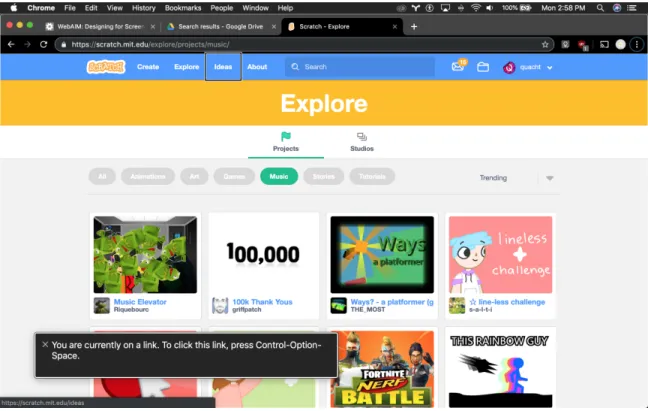
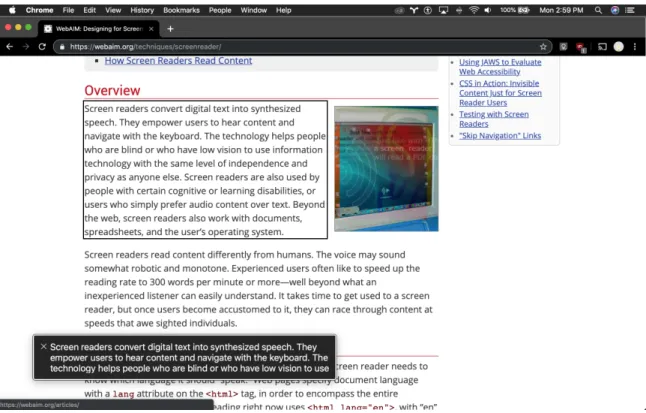
Assistive technologies for the blind include braille displays, which are electro-mechanical devices that display Braille characters by raising dots through holes in a flat surface, and screen readers, which are software programs that convert visual content on a computer screen into text that can be communicated via speech synthesis or a braille display (See Figures 3-1 and 3-2). The difficulty brought on by using screen readers comes from both its steep learning curve and its limitations.
Figure 3-1: Screenshot of using VoiceOver on MacOS to navigate scratch.mit.edu. The screen reader’s focus is on the “Ideas” link in the toolbar. VoiceOver provides feedback that suggests what keypress combination the user may want to do next, “You are currently on a link. To click this link, press Control-Option-Space.” The text spoken by VoiceOver is simultaneously visually represented as text in a box on the screen.
Figure 3-2: Screenshot of using VoiceOver on MacOS to navigate an online article. The screen reader’s focus is on a paragraph in the article, which VoiceOver is reading aloud. The text spoken by VoiceOver is simultaneously visually represented as text in a box on the screen.
3.2.1
Screen readers have a steep learning curve, making
them time consuming to learn.
Let’s step into the shoes of Jess, a screen reader user. On her MacBook laptop computer, she uses her keypress combinations to control VoiceOver, the free screen reader that comes with Apple devices. On her smartphone and tablet, she uses swipes and taps. To use a screen reader on a computer with ease and efficiency, she memorizes some basic keypress combinations that allows her to jump to the next or previous element, paragraph, heading, form, link, and button and activate the current element. She learns that there are over a hundred different keyboard shortcuts she could try to memorize, but she’s not really sure when she should use a certain shortcut, and it could be several months before she even tries all the different shortcuts. Using the subset of the keyboard controls she knows, she creates and relies on specific workflows to navigate through web pages. Although tutorials help
by providing an interactive tour of the basics, she still finds it difficult to determine what keyboard controls apply at every step of using the screen reader.
Jess’s struggle exemplifies why there are many screen reader workshops, train-ing sessions, and bootcamps offered to people of all ages [18]. Furthermore, people learning to use screen readers turn towards online tutorials and forums for resources. One Reddit user posted about the learning curve for JAWS (a free screen reader compatible with the Windows operating system) [86]:
“I have started listening to some of the daisy audio tutorials from the freedom scientific website and I have JAWS 18 installed on a computer. However, I am feeling a little overwhelmed. So here are my questions -are there resources I should be exploring aside from the freedom scientific website?
-how long did it take before you felt comfortable with JAWS? Not neces-sarily all features I know there are a lot.”
One user responded, “your state’s Bureau of Vocational Rehabilitation/state as-sistance...as well as training in JAWS where someone comes to the house to teach him how to use it extensively” [53]. Another said, “I really think the main thing you need is just a lot of hands-on time and experience. I was a hard core Mac OS user for the first 7 years of my life as a blind person. Despite receiving JAWS training at multiple training centers I never spent much time with it or windows, and I never became comfortable with them” [36]. These responses highlight how the steep learning curve for screen readers necessitates outside support and large amounts of time.
In one computer training school for blind and low-vision adults, the students spent four months progressing from learning how to use a screen reader to web navigation, email, and text editing [22]. Lazar et al.’s study of 100 blind screen reader users revealed several ways using the screen reader itself is frustrating [47]. Learning to use a screen reader is similarly frustrating because it requires hands on time and experience with the screen reader. Each new interface or application takes significant time to explore and learn, and the same difficulties faced by these adults remain for
children learning to use screen readers.
Vo, former Coordinator of the Grousbeck Center for Students & Technology (GCST) at Perkins School for the Blind, helped me empathize with the struggle and frustration of students learning how to use a computer. She shared that learning how to use a computer is really difficult for them because they need to learn what a computer is for and what it can do, they need to learn how to touch type, and they need to mentally build and maintain a representation of the computer’s state. And once children have made it past the initial learning curve, the actual content they seek or the games they want to play are still inaccessible. In Vo’s experience, children get defeated after learning how to use an assistive technology and realizing that they still can’t access content.
3.2.2
Screen reader usability is hindered by keyboard input
and audio-only output.
Screen reader usability is limited because screen readers do not convey 2D space. Web-based creative tools with complex interfaces pose another barrier because they are difficult to explore using a screen reader. The layering of screen reader on top of the interface of a complex creative tool is likely to create a large cognitive load 1.
Baldwin et al. observed screen reader usage among novices in a computer training school for blind and low-vision adults for four months and identified three problem areas within audio-only interfaces: ephemerality, linear interaction, and unidirectional communication [22]. Ephemerality refers to how the information conveyed by audio doesn’t persist; rather, it must be kept in working memory or requested again. The linear interaction refers to the need to provide input before receiving output. This contrasts with the sighted experience where every interaction (such as typing) provides almost immediate visual feedback. The unidirectional communication comes from the screen reader’s communicating verbally to the user but the user’s not being able to communicate verbally back.
1In cognitive psychology, “cognitive load” refers to the amount of working memory required to
3.3
Intersectionality in the identities and
experi-ences of children with visual impairments is
not usually recognized.
“It’s not just students who are completely blind. A lot of our students are low vision too...low vision as well as blindness as well as additional disabilities is what you’re trying to encompass.”
— Vo, Faculty at Perkins School for the Blind
My inspiration for this project came from investigating how to make Scratch accessible to children with visual impairments. With this goal in mind, I contacted Scratch users with visual impairments, teachers of students with visual impairments, MIT students with visual impairments, the MIT assistive technology information center, and the Perkins School for the Blind in Watertown, MA. Through these conversations, I learned about the large, unmet need for computing experiences for learners who are blind or have other visual impairments.
“...not many things are accessible for our students, and that’s the problem. They have passions and they want to do these things but they’re being told no because it’s not accessible.”
— Vo, Faculty at Perkins School for the Blind
Before we can understand how to improve accessibility, we must recognize that intersectionality exists across demographics. We cannot just design for the ideal blind child—someone who is financially well off and only has a single disability. We must consider a person at the intersection of cultural background and economic status. We must consider that people may have multiple disabilities. Common types of additional disabilities for children with visual impairments include physical, cognitive, and learning disabilities [9].
Furthermore, children with visual impairments in public schools may be just one or two students in a classroom of thirty students. Children in these contexts may
not have much access to or support for assistive learning technologies. Accessible products are often powerful resources for them, but access to those may be limited too.
3.4
Children without sight face technical,
logisti-cal, and personal barriers to creative
program-ming experiences.
3.4.1
Technical Barriers
Another barrier arises when content is incompatible with the assistive technology. For example, someone might want to play a game with a screen reader, but the game’s user interface elements may not have proper labels to that give the user context for understanding the game. If the game provides visual feedback, there would also need to be a way to integrate audio feedback like audio cues or verbal feedback. Web-sites seeking compatibility with assistive technologies must include code annotated with labels and roles that inform assistive technologies how to navigate the content
2. Compatibility depends on digital accessibility standards for websites, applications,
and assistive technologies. These standards, developed with consideration of human rights and social and economic contexts, prioritize utility and focus on making online information and forms accessible [35]. However, online platforms are implementing more complex interfaces that these standards do not effectively support. Program-ming is a complex task often done with complex interfaces. Current standards and mechanisms for web accessibility were designed for interfaces like simple forms or information websites, not complex creative tools. Researchers and industry profes-sionals are collaborating on an Accessibility Object Model that may provide tools necessary to implement accessible, complex interfaces on the web [27]. Still,
compat-2Accessible Rich Internet Applications (ARIA) is a set of attributes that define ways to make
web content and web applications (especially those developed with JavaScript) more accessible to people with disabilities. It supplements HTML so that interactions and widgets commonly used in applications can be passed to Assistive Technologies when there is not otherwise a mechanism [6].
ibility with existing assistive technology may not enough be ensure usability because the technology may impose a large cognitive load. Unsighted computer users need to maintain a model of their current state and available next actions. This may be difficult to maintain with audio feedback because it is inherently ephemeral, unlike visual elements. Unsighted computer users either use a lot of working memory or quickly situate, reference, and search for information.
3.4.2
Logistical Barriers
Logistical barriers may also lead programming experiences to be inaccessible. In schools with limited staff support and access to digital and physical resources, stu-dents lack access to mentors that provide sufficient scaffolding and learning resources. For example, Miriam, an educator I interviewed, created physical metaphors for pro-gramming concepts using a baking sheet, magnetic braille, and puffy paint. Miriam used these physical metaphors to teach a Perkins student the concept of variable scoping during a computer science lesson. Using the physical representation, the student could rearrange code and use his spatial reasoning and touch to explore the concept. Additional financial resources may be needed in order to put children in environments with access to mentors and staff support that can create these types of accessible learning resources.
For those who can afford it, private schools like Perkins School for the Blind [17] provide education and services for students who are blind, have low vision, or are both deaf and blind. These services go beyond traditional academics by including disability-specific skills focused on independence, vocational training, social engage-ment, and more. Perkins’s Expanded Core Curriculum attempts to use everyday tasks and moments as learning experiences [11]. Many students at Perkins that are participating in the expanded core curriculum lead structured lives. This structure may leave little room for creative play, exploration, and ideation.
3.4.3
Personal Barriers
Engagement with a new tool can be very personal. Someone engaging with a new tool needs enough confidence and security to imagine, explore, and take risks—to try something even if they are not sure it will work. Children without sight are often afraid of taking action in an unfamiliar context. In the Perkins context, this is usu-ally because they are afraid they may cause irreparable damage by doing something unexpected or unspecified. Sometimes, they also fear failure. The activities they do in school are often geared towards accomplishing some task with a concrete, specific goal. However, creative activities are more open-ended and often require one to set goals for oneself. When someone learns through the process of creating something inspired by their own passions, they practice and build their creative confidence. The lack of opportunities to be creative means these children have fewer opportunities to build creative confidence that provides the security to imagine, explore, and take risks.
A playful spirit can relieve pressure in being creative, making it feel okay to try something new. When you can bounce ideas off of someone, when you have a certain area of interest that makes you excited—that’s when creativity can flourish. In their book Creative Confidence: Unleashing the Creative Potential Within Us All, Tom and David Kelley claim that “[a]t its core, creative confidence is about believing in your ability to create change in the world around you. It is the conviction that you can achieve what you set out to do. We think this self-assurance, this belief in your capacity, lies at the heart of innovation” [46]. Creative learning isn’t just about ability to come up with a new idea or something never done before. Creative learning is about making your ideas concrete so they can be shared, studied, and iterated upon with others. The iterative nature of creative learning means that those who go through it get a lot of practice and experience facing and overcoming failure. This allows people to build creative confidence.
Chapter 4
Related Work
In this section, I’ll share existing creative learning experiences for children with visual impairments, insights from research on how children interact with agents, and past approaches to exploring programming by voice and programming through natural language.
4.1
Creative Programming Experiences for
Chil-dren with Visual Impairments
4.1.1
Computational Construction Kit for the Blind
In 2002 at the MIT Media Lab, Rahul Bhargava adapted and extended a computa-tional construction kit 1 and studied its use by blind and visually impaired children [24]. Through a series of themed one-on-one sessions with four children, Bhargava aided each child in getting familiar with the mechanics of interacting with the kit and learning about its capabilities. This experience prompted the children to reflect on the role technologies play in life and how technology may be improved or inspire other projects. Finally, the children partnered with Bhargava to create final projects. Con-versations with the children revealed that the meaningful, interest-driven projects
1Bhargava writes, “A computational construction kit can be described as a set of tools or objects
provided direction and motivation for engaging with computational concepts. His work provides insights about the use of feedback in learning by the blind and visually impaired and how this facilitates or shapes a more ideal creative process for learn-ing. Learning from this research, Codi focuses on project-based learning and makes feedback a critical aspect of interactions between the child and agent.
4.1.2
Accessible Visual Programming Languages
In academia and industry, people have explored how to make visual, block-based pro-gramming interfaces accessible to people with visual impairments. At the Rochester Institute of Technology and the University of North Texas, Stephanie Ludi identi-fies and addresses design issues of visual programming languages [50]. She explores audio cues and workflow design to support access to visual language programming environments for programmers with visual impairments [2]. She also modified and ex-tended Blockly, a library for building visual block-based language, to create a screen reader-accessible, blocks-based language that sighted and unsighted users could use to collaborate together. In November 2017, Lauren R. Milne et al. shared their work building a fully accessible, block-based environment designed for children ages five to seven [54]. The touch-based coding environment uses audio and spatial cues to help blind children learn to program on an iPad. Ludi and Milne’s work is valuable in exploring how to make visual interfaces more accessible to children with visual im-pairments by engaging with audio and touch. Although Codi’s interface is primarily based in voice and natural language, I draw from Ludi and Milne’s research on audio cues.
4.1.3
Accessible Text-based Programming Languages
Kane et al. created Bonk, a programming toolkit that enables novice programmers to explore computer science by developing and sharing interactive audio games [45]. It provides a basic programming interface for manipulating and playing back audio assets. Bonk also supports assistive technologies and accessible inputs and outputs.
Kane et al. tested Bonk with a group of high school students in a week-long workshop, and the participants successfully collaborated to create audio games—pushing the limits of Bonk in ways that informed and spurred additional feature development. For these children, Bonk’s accessible introductory programming activities combat the idea that the field of computer programming is inaccessible. The high school students said they enjoyed learning the basics of a “real” programming language like JavaScript. One student said, “It was our first game in JavaScript and it actually had some substance.” Bonk succeeded as a toolkit for programming interactive audio projects. Codi differs from Bonk mainly in its use of natural language and voice to the lower the floor for blind children (who may have multiple disabilities) to engage with creative computing.
4.2
Conversational Agents
Over the last few years, voice assistants have become popular for information access, entertainment, and companionship. Laptop computers, mobile devices, and smart speakers include voice assistants like Amazon Alexa, Google Assistant, Apple’s Siri, and Microsoft’s Cortana. These voice assistants are conversational agents, software programs that interpret and respond to statements made by users in ordinary natural language. These agents present human-like qualities through their personalities and have the ability to understand and respond to natural language.
4.2.1
Current User Experience of Voice Assistants
Researchers have explored the ways people interact with voice assistants and how people perceive their intelligence. In 2016, a study of 75 regular users of Amazon Alexa highlighted how users must trust the device enough to share information with it before it can actually be a useful tool and accomplish complex tasks [51]. Codi does not ask for personal information because it does not need it. However, Codi still needs the child to trust it if it is to effectively support a creative learning experience in which a child freely plays, tinkers, and shares.
Play is a common and important point of entry for engagement with voice assis-tants [51]. When people play, they discover features—reasons to keep trying different questions and requests. Furthermore, people are most engaged with the agent when they are playfully interacting or exploring the limits of the conversational agents by experimenting with, teaching, and testing it. In my system, I aim to similarly engage people in playful interactions that facilitate learning through experimentation and tinkering.
A user’s technical background will inform the user’s expectations of the capabilities and limits of these agents [51]. People with more technical background tend to predict that agents can do less and be more forgiving and resilient when the agents do not meet expectations. Those with less technical background tend to initially think the agent can do more than it actually can and are likely to believe that the agent is static, unable to learn. Although this study was done with adults, these observations may apply to children because these children are likely to have less technical experience. We must ensure that the agent doesn’t fail before demonstrating capabilities because children may perceive the system’s abilities to be more limited than they actually are. This could close them off to fully exploring and utilizing the capabilities of the agent to express themselves. Luger and Sellen shared that when users failed to get an answer from the agent after successive attempts, they abandoned the task and attempted something they knew that the voice assistant would be able to do. To prevent interactions in which the user gives up on something they want to due to lack of feedback, we must set realistic expectations to scaffold the learning process. This is especially important because creative learning experiences often require grit and iteration. Codi makes giving users an answer a priority so that they will get feedback that ensures that they’ve been heard and can continue trying to work with Codi.
Human conversations often involve a variety of cues that communicate intelligence; these cues serve to initiate a conversation, appropriately interrupt a conversation, provide feedback, handle misunderstandings or errors, and support turn-taking [29]. Without expected cues, people tend to assign human-like qualities (like the ability to understand outside context) to the agent or avoid complex tasks [51]. Some people
limit the type of language they use and gradually abandon attempting to get the conversational agent to do anything out of scope. This is a clear example of a challenge in which designing and building is hindered.
People of all ages use voice assistants, but young children are especially interest-ing to investigate because their conceptions about technology are rapidly developinterest-ing and changing. In 2017, Druga and Williams shared initial explorations of child-agent interaction using the Google Home, Amazon Alexa, Anki Cozmo, and the Julia Chat-Bot with 25 children between the ages of 3 and 10 years old [33]. The children judged an agent’s intelligence relative to their own by reflecting on the agent’s demonstrated knowledge, the questions the agent understood, and the agent’s answers to their ques-tions. Children thought the agent was as smart as they were when the agent could converse and share information about a topic the children already knew about. The children probed the agent with questions to learn more about its personality: what it was, how it worked, and what its limits were—was it able to see and feel? Based on these observations, Druga and Williams’s work suggests that designers of agents should consider the agent’s voice and prosody to support friendliness, consider how embodiment of the agent enables nonverbal communication of emotion, and facilitate understanding by having the agent provide more meaningful feedback and guidance as to why it cannot understand or respond to the user’s input. Codi provides mean-ingful feedback and guidance when it cannot respond to user input, but it is not embodied, and its design does not control prosody.
Sciuto et al. studied in-home conversational agent usage and learned that chil-dren often struggle to use conversational agents because they inaccurately recognize children’s speech [75]. This challenge will likely persist until speech recognition tech-nologies are robust to variations in dialect, language, and prosody (which includes intonation, tone, stress, and rhythm). Codi uses existing speech recognition APIs that similarly struggle with children’s speech. Sciuto et al.’s focus on the in-home context for conversational agents spurred me to consider how an agent’s constant presence allows it to build trust over time. On the other hand, my system is not a general all-purpose assistant; it is a conversational tool for programming that could
be integrated into an all-purpose assistant.
4.2.2
Relationship Between a Child and an Agent
Voice Assistants Represent Us
Voice assistant design and interaction studies raise thought-provoking questions sur-rounding representation, societal stereotypes, and associations. Manufacturers and product designers often make design decisions based on user biases, impressions, and preferences. However this may reinforce stereotypes rather than combat them. For example, most voice assistants have female default voices that tap into the idea that female voices are more friendly and likeable [73]. Commercial voice assistants like Google Assistant, Amazon Alexa, and Siri allow users to change the language and dialect of their speech, but there is still limited representation of styles of talking and of diverse personalities.
In 2018, Hampton et al. tested the role of five different mediators of the associ-ation between similarity between individuals and those individuals liking each other [41]. They found that before two individuals interact with each other, certainty of being liked is the strongest mediator. After individuals interact with other, fun and enjoyment and consensual validation are the strongest mediators. Just as a person is likely to better relate to and like someone similar to them, a user is likely to have more fun and better relate to an agent that talks and sounds like them. Similarity between the child and agent (or the lack of it) frames interactions between the two. Technology must acknowledge and represent a diverse set of people rather than some default set or ideal user.
Agent Personality
Children prefer agents with human-like voices and speaking patterns [33]. Further-more, research suggests that an agent that seems more human is more influential [87]. Children are also more likely to confer human reasoning and emotion to agents with personality. We do not want children to assign human-like reasoning skills to Codi
because that may lead to difficulty in building an accurate mental model of Codi and how Codi behaves as a computer program. A conversational agent may tailor its personality to a child. However, the Codi system does not do this. Rather, the child is empowered to shape the behavior of the system by creating programs that extend Codi’s behavior.
Conversational Agents Can Shape Children’s Perspectives
In Cynthia Breazeal’s Personal Robots Group at the MIT Media Lab, researchers study child-robot interaction. These robotic agents are embodied, which allows them to use bodily cues, reflecting human nonverbal communication. Although my system is not embodied, aspects of this research may still apply to non-embodied conversa-tional agents.
Research in Personal Robots Group demonstrates that agents can powerfully in-fluence children’s perspectives. In 2017, Park et al. found that interacting with a peer-like social robot with a growth mindset can promote the same mindset in children [60]. Children who played with a growth-mindset robot self-reported traits which seem to suggest a stronger alignment with a growth mindset and tried harder during a challenging task, as compared to children who played with a control. In 2018, Williams et al. built on this work by exploring the ability of a robot to affect children’s moral judgements and disobedience. They found that embodied smart toys can influence children to change their judgements about moral transgressions [87]. Al-though Codi is an agent and can influence a child by modeling particular behaviors, Codi does not do so. Codi’s main role is to be a predictable tool for project-based creative computing.
4.2.3
Programming Conversational Agents
The most prominent and popular commercial voice assistants invite consumers to add new skills that extend their functionality. These voice assistants provide program-ming interfaces that people may use to extend their functionality. However, people
looking to create their own Alexa Skills [4] or Actions on Google [3] need to be some-what comfortable with computer programming. In 2018, Google and Amazon began to provide resources and tools that make it easier for everyday people to control their assistant or smart home device. Both Amazon and Google use mobile applications for specifying a command or trigger phrase and mapping that to a sequence of existing commands. Alexa Skills Blueprints takes this further by creating skills that may be easily remixed through an intuitive graphical interface [5]. Alexa Skills Blueprints provides four easy steps: pick a blueprint, fill in the blanks, use your skill, and share with others. These lay the groundwork for making these devices and their associ-ated agents programmable, but do not yet explore programming the agent through conversation.
To program a system, one must have a mental model of the system and of a program, its components, and its execution. Cho’s “Mental Models and Home Virtual Assistants” reveals that people’s mental models about home virtual assistants tend to be functional—users only understand the system in terms of how to use the system rather than understanding how the system actually works [30]. Cho observed two kinds of mental models: push models and pull models. Push models are characterized by a perception of the voice assistant as human-like. Users with a push model will provide background information and context before asking a question, believing that the context will help the assistant answer the question. On the other hand, users with a pull model will ask a series of simple questions in order to get to a final answer. From Cho’s research, it’s clear that the mental model that a child has of a conversational agent will influence what the child deems worth communicating to the agent. Cho’s research provides a sense of how children might interact with Codi depending on how human-like Codi seems. This informs the language and actions Codi is designed to support.
Druga, Williams, and Park also highlighted how important programmability is for helping children make sense of how the mind of computational objects might work. Parents and children were confused when asked if the fact that the robot was programmed means it’s intelligent [34]. Druga, Williams, and Park hypothesize that
if participants could probe and learn the extent of a robot’s ability to autonomously learn and react in new scenarios, they might be less confused [34]. This implies that the system should be explicit about not only its programmability, but how it works.
4.3
Voice and Natural Language as a Medium for
Programming
4.3.1
Programming by Voice
In the last 5 years, voice programming has become a viable alternative to typing for people with repetitive stress injuries or other mobility challenges [58]. However, voice programming has not been done with natural language. Instead, voice programming tools map short voice commands to operations like moving the cursor to the next open parentheses, accepting an auto-complete suggestion, or inserting a commonly used code template [84]. For example, “exbuff” goes to the end of the file, “slap” adds a new line, “dealt” inserts a template for defining a new function, and “jive” transcribes the next utterances directly without evaluating them [84]. In 2013, Tavis Rudd developed a rule-based, non-conversational, voice system that enabled him to code quickly and efficiently by voice [84]. It was a sort of voice-based smart keyboard. He mapped custom, one-syllable commands like “york”, “zork”, and “hork” to controls such as highlighting or jumping to certain markers in the code. His controls relied on visual feedback from the screen and were based on existing software development workflows tied to typical programming program syntax. There aren’t well publicized attempts to combine auditory feedback with voice programming technologies. Rather the majority of existing voice programming interfaces rely on visual feedback. An agent-based interface for programming requires auditory feedback, and my project explores what kind of feedback to give and when should this feedback be delivered. Many text editors interface with screen readers, but the learning curve associated with screen readers is not friendly to newcomers.
Wang, and Gupta presented strategies for voice programming interfaces in their dis-cussion of ALVIN, the voice-based scripting language they created to allow users to define navigation strategies on-the-fly while browsing audio pages, much like people visually browse web pages [56].
Nichols, Wang, and Gupta recognized that “the computer can simply ask the user for additional information needed to solve the problem at hand” in order to resolve ambiguity. In their system, users can define entry points into previous code; this supports a nonlinear editing flow. They followed three design principles in their system: be as close to natural language as possible, give users more ways to write correct code than to generate errors, and make all reasonable efforts to prevent the programmer from having to revisit or edit existing code. Nichols, Wang and Gupta hoped to minimize revisits and edits to existing code, but revisiting and editing existing code is a natural part of learning and tinkering. Resnick and Rosenbaum define tinkering as “a playful, experimental, iterative style of engagement, in which makers are continually reassessing their goals, exploring new paths, and imagining new possibilities” [70]. Code is inherently iterative, so designs should make it easy for the user to go back and edit existing code rather than try to minimize the frequency of editing.
In 2006, Begel and Graham shared “An Assessment of a Speech-based Program-ming Environment” [23]. They recognized that “spoken programs contain lexical, syntactic and semantic ambiguities that do not appear in written programs.” Based on these insights, they designed Spoken Java, a syntactically similar, yet semantically identical variant of Java that is easier to speak. They created a Eclipse IDE plugin to support the combination of Spoken Java and an associated command language. Their evaluation with expert Java developers showed that most developers could eas-ily learn what to say but were reluctant to speak literal code out loud and found programming by voice to be slower than typing. Rather than targeting expert pro-grammers and developers who aim to be more efficient, we aim to create an enjoyable, natural interface for children and beginners to create programs just by talking.
4.3.2
Programming through Natural Language
In 2012, Benjamin M. Gordon and George F. Luger from the University of New Mex-ico shared “Progress in Spoken Programming” in which Gordon writes, “General-purpose speech-based programming languages...suffer” because “existing languages were designed for unambiguous parsing and mathematical precision, not ease of
hu-man speech” [39]. Gordon solves this problem with a new spoken programming
language that comes with its own editing environment. Gordon later builds on the research of VoiceCode and Spoken Java by sharing the programming language he built based on conversational English [32]. Gordon’s work highlights challenges with programming languages modeled after natural language but does not study them in the context of speaking the text or not being able to see the text. This is where Codi can contribute to programming by voice.
In 2015, Wagner and Gray shared Myna as a hands-free, voice-based programming interface for motorically challenged children [85, 80]. Myna provides a set of voice commands that children may use to control the original block-based programming interface. An example of a command is “drag and drop when clicked”, which utilizes the event block “when clicked”. The interface uses commands that are relevant to the graphical interface and relies on sight to provide visual feedback of the execution of the voice commands. When designing for a screenless experience, the natural language is helpful but references to graphical user interface interactions like “drag and drop” are irrelevant. Unlike Myna, Codi does not and cannot rely on visual feedback and references to a graphical interface.
In early 2018, Stefanidi et al. programmed intelligent environments in natural language using ParlAmI, a multimodal conversational user interface in which users create “if-then” rules that dictate the behavior of an intelligent environment (an environment augmented by Internet of Things (IoT) devices) [80]. Stefanidi et al. recognized the importance of giving the user the ability to easily say “No” and provide negative feedback so that the agent may ask, “Where was my mistake?” This approach is similar in spirit to Desilets, Fox, and Norton’s approach with VoiceCode, where they
expect the user to say “not what I said” or “not what I meant” to provide negative feedback. These researchers present great examples of how a conversational interface can effectively ask users clarifying questions to get feedback.
Existing work in voice programming and programming by natural language have only recently begun to explore conversational interfaces in which the system provides visual and auditory feedback.