Cascading Tree Sheets and recombinant HTML:
Better encapsulation and retargeting of web content
The MIT Faculty has made this article openly available.
Please share
how this access benefits you. Your story matters.
Citation
Edward O. Benson and David R. Karger. 2013. Cascading tree sheets
and recombinant HTML: better encapsulation and retargeting of
web content. In Proceedings of the 22nd international conference
on World Wide Web (WWW '13). International World Wide Web
Conferences Steering Committee, Republic and Canton of Geneva,
Switzerland, 107-1
As Published
http://dl.acm.org/citation.cfm?id=2488399
Publisher
Association for Computing Machinery (ACM)
Version
Author's final manuscript
Citable link
http://hdl.handle.net/1721.1/87014
Terms of Use
Creative Commons Attribution-Noncommercial-Share Alike
Cascading Tree Sheets and Recombinant HTML:
Better Encapsulation and Retargeting of Web Content
Edward Benson
MIT CSAIL 32 Vassar Street Cambridge, Massachusetts 02139[email protected]
David R. Karger
MIT CSAIL 32 Vassar Street Cambridge, Massachusetts 02139[email protected]
ABSTRACT
Cascading Style Sheets (CSS) took a valuable step towards separating web content from presentation. But HTML pages still contain large amounts of “design scaffolding” needed to hierarchically layer content for proper presentation. This pa-per presents Cascading Tree Sheets (CTS), a CSS-like lan-guage for separating this presentational HTML from real content. With CTS, authors use standard CSS selectors to describe how to graft presentational scaffolding onto their pure-content HTML. This improved separation of content from presentation enables even naive authors to incorporate rich layouts (including interactive Javascript) into their own pages simply by linking to a tree sheet and adding some class names to their HTML.
Categories and Subject Descriptors
D.2.13 [Software Engineering]: Reusable Software—reuse libraries, reuse models
General Terms
Design, Human Factors, Standarization
1.
INTRODUCTION
CSS took an important step towards separating the con-tent of an HTML document from its presentation. This practice “makes it easier to maintain sites, share style sheets across pages, and tailor pages to different environments” [18]. But significant parts of a modern web page’s design cannot be described by CSS, and are instead defined by “presen-tational” HTML design scaffolding, as well as Javascript, interleaved with “content” HTML.
Content HTML is wrapped in layers of presentational HTML to provide anchor points for CSS, or to control block-level layout beyond CSS’s capabilities. As an example, con-sider the mass of HTML nodes, each holding image frag-ments, that was needed just to place content inside a rounded rectangle before CSS3 introduced a single instruction for do-ing so.
Unlike CSS styles, these masses of presentational HTML cannot be separated from content HTML, which makes HTML documents harder to create, maintain, reuse, and tailor. When an author inspects HTML source, she finds large blobs of presentational HTML wrapping (and often obfuscating)
Copyright is held by the International World Wide Web Conference Committee (IW3C2). IW3C2 reserves the right to provide a hyperlink to the author’s site if the Material is used in electronic media.
WWW 2013, May 13–17, 2013, Rio de Janeiro, Brazil. ACM 978-1-4503-2035-1/13/05.
meaningful content. To reuse markup, she must copy the entire blob, then find and replace the right pieces of content with her own. This might work for replicating an exemplar layout once, but what happens if an author wants to use the same layout repeatedly on many instances—for example, to nicely format each publication in a large list? The labor becomes substantial.
This paper presents Cascading Tree Sheets (CTS), a light-weight language for describing the presentational parts of page design that CSS cannot represent. CTS enables au-thors to encapsulate presentational structure just as CSS enables them to encapsulate presentational style. CTS uses CSS selectors and syntax to graft presentational HTML onto content HTML. As with CSS, a novice author who likes the look of some portion of a CTS-structured page can easily graft that look onto their own page, simply by linking to the tree sheet and setting appropriate classes on their own HTML elements. They get the benefits of the sheet without needing to understand how it is implemented.
Because the grafted HTML can contain Javascript that acts on the content, CTS also provides a simple, generic way for novice authors to wrap their HTML content in pow-erful Javascript presentations (such as D3 Visualizations or responsive design) without seeing a single line of Javascript. At a more sophisticated level, CTS helps a web designer fully partition an HTML document into its content and presenta-tional halves. This makes actual content easier to manage, uncluttered by presentational HTML, and encourages the creation of design HTML that can be reused across pages and tailored to different environments.
This ability to encapsulate, and assign, presentational struc-ture enables a richer ecosystem of content reuse for all layers of the web development ecosystem. Novices can annotate an HTML table with a CSS class that transforms it into a Google Map. Skilled authors can take advantage of themes and proper encapsulation without having to use a Content Management System. For example, a professor could change the layout of every publication on her web site by changing one line of HTML to link to a different tree sheet instead of laboriously modifying the HTML for each publication. And power users can provide web widgets that can be invoked from across the web, just by applying the right CSS classes. CTS offers many benefits that we will describe in the re-mainder of the paper. Among them are:
Separation of presentation and content. CTS com-pletes the separation of presentation from content that CSS started, making web content and presentation even easier to create, maintain, reuse, and tailor. For example, an
au-thor can design a particular blob of presentational HTML once, then make use of it on multiple pages by invoking the appropriate CTS.
Mockup-driven design. CTS enables web developers to express themselves in plain HTML examples rather than template languages. A developer can even write a tree sheet mapping onto a third-party web page, using it as a “tem-plate” even though its author did not plan for this.
Javascript without Javascript. If a mockup includes Javascript, it will be invoked automatically when content is wrapped. This gives novice users the ability to invoke rich Javascript effects and visualizations on their content without ever seeing, much less writing, a single line of Javascript.
Template and Data Scraping. Inverting its obvious behavior, CTS rules can be used to extract both the content (data) and template from a web page.
2.
CONTRIBUTIONS AND OUTLINE
The contributions of this work are CTS language and its open source implementation available at treesheets.org. Our primary claim is that a tree remapping language like CTS is a worthwhile addition to the standard client-side web stack. We evaluate this claim by demonstrating how CTS simplifies and improves a broad array of authoring and reuse tasks for both novices and experts. We also make an argument that CTS provides a way to fix structural prob-lems with encapsulation of web content.
We explore these claims in stages. First, we show how CTS can improve the authoring experience of a web novice— even one who does not know CTS. Next, we consider ad-vanced users who create CTS to produce web sites and talk about best practices. Finally, we discuss the implementation of the CTS language. We show that all of CTS is imple-mented in terms of two basic tree operations with elegant, provenance-preserving properties.
3.
CASCADING TREE SHEETS, BRIEFLY
Tree sheets are just like style sheets. They can be at-tached to a web page through a link, embedded in a style tag, or annotated directly onto an element via the data-cts attribute. Tree sheets contain CTS rules, which describe relations between nodes on one tree and nodes in another tree. These relations use CSS3 selectors1 and look like CSS properties:
TargetSelector { Relation: SourceSelector; } An example relation might be
div.pageTitle { is: #blogTitle; } These rules relate the contents of the target selector when the contents of the source selector. In the example above, this means the contents of the div.pageTitle node are equiv-alent to the contents of the #blogTitle node in the current page. We can perform a tree tranformation in either direc-tion: to wrap raw content with the mockup or to extract content back out of the mockup. The default direction in which transformation occurs is from source to target. 1CTS uses CSS3 selectors for HTML trees, but a key-path expression language for JSON trees
CTS supports the following relations/commands. We de-fine them loosely here, just enough to enable discussion of how CTS improves the authoring process. We return to provide a precise definition in Section 7.
Is Copies nodes from source to target
Are Repeats target nodes for each in source If-Exist Conditions target existence on source
If-Missing
Conditions target nonexistence on source Recast Maps target tree onto source tree, and then
copies the result back to target.
The Is, Are, and Recast rules act on the children of the selections rather than the selected nodes themselves. The prevous example mapped the contents of the #blogTitle node into the div rather than knocking out one node with the other. We expand the CSS3 selector language to en-able selecting attribute nodes by suffixing a selector with the attribute name. For example, a @href selects the href attribute nodes of all a elements.
By default, a selector references the current document. CTS uses CSS-style namespace conventions to create selec-tors that reference documents hosted elsewhere. The follow-ing tree sheet performs the same mappfollow-ing as before, but it selects h1 elements from a different page2.
@prefix TedsPage "http://example.org/ted.html"; div.pageTitle { is: TedsPage | blogTitle; } We now postpone discussion of language specifics to focus on why such a language is worth incorporating for the web author. For this discussion, a high-level understanding is sufficient, but we will develop the ideas of CTS with code examples in each section. We order this discussion from the perspective of the novice to the perspective of the expert, with pointers to running demos on the web.
4.
THE NOVICE USER
The novice author uses CTS like he already uses CSS: to incorporate the look and feel of a web fragment found elsewhere. The “fragment” could be a small widget that vertically aligns some piece of content or a template for an entire page. The author finds the fragment he wants to use while browsing the web or perhaps from a more formally organized library of widgets. Some CSS and Javascript may be part of the widget definition. CTS steps in to complement these two parts by providing a way to wrap the widget’s presentational HTML around the novice’s content.
This process of reuse consists of two steps anyone who has borrowed CSS is familiar with:
1. Add a link to the CTS file in the page header 2. Add the right class names to HTML elements
This section shows how these two steps can provide some-thing as simple as experimental CSS features or somesome-thing as complex as custom shaded electoral map.
2
The CTS engine assumes Cross-Origin Resource Sharing headers are present, and supports a JSON-P proxy-mode for experimentation without CORS.
example.org/widget.html <div id="vcenter-template"> <div class="t-wrapper"> <div class="c-wrapper"> </div> </div> </div> example.org/widget.css .t-wrapper { display: table; } .c-wrapper { display: table-cell; vertical-align: middle; } example.org/widget.cts
@namespace widgets "http://example.org/widget.html"; .vertically-center {
recast: widgets | #vcenter-template; is: widgets | .c-wrapper
}
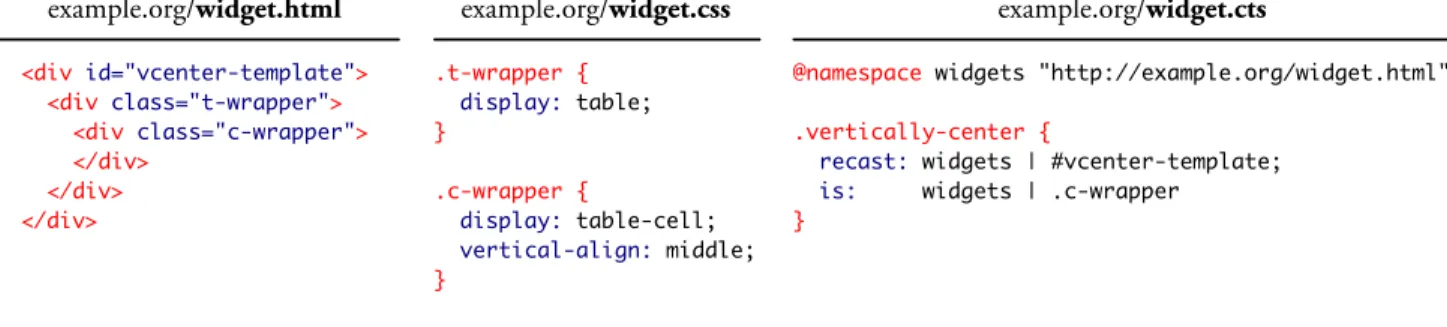
Figure 1: The HTML, CSS, and CTS code required to make a vertical alignment widget available to users through the CSS class vertically-center. The novice does not need to inspect these files, only to link to the CSS and CTS from their page. Whenever the novice uses the class vertically-center in their page, the Javascript CTS engine remaps it to the referenced HTML template (at left) which provides the structural HTML necessary to support the widget’s behavior.
For this section we assume that the examples of style and structure the novice copies are all written with CTS in mind so tree sheets are available for import, just as style sheets would be today. We also assume that resources are made available with Cross-Origin Resource Sharing headers en-abled to avoid problems with the web security model.
4.1
Shimming Experimental CSS Properties
A simple way CTS can help beginners is to shim CSS to include missing (but wanted) features that currently require fancy layout hacking. A good example is vertically centering an element. The vertical-align CSS property applies only to table cells, not block elements like p and div. As a result, the web is filled with how-to guides containing tricks for vertically centering block elements. One such trick is to wrap the content in two containers, the outer told to behave like a table and the inner to behave like a cell. Note that this approach requires HTML scaffolding around the content to be aligned; it cannot be effected using only CSS.
CTS allows this wrapping action to be associated with a CSS class, such as vertically-center. The novice finds a page exhibiting the desired behavior and, inspecting the HTML, observes that the vertically aligned content has been given the vertical-align class. In order to incorporate the same behavior in their own page, the novice adds three links to the head: the CTS Javascript library, the CSS file for the trick, and the CTS file for the trick. Then anywhere they want an element to be vertically centered in its container, they simply apply the CSS class:
<p class="vertically-center"> I am vertically centered. </p>
From the novice’s perspective, that’s it. In Figure 1, we show the code that is making this remapping take place behind the scenes. The user links to both the CSS and CTS files, listed in Figure 1. The CTS file uses the CSS namespace widget to reference another HTML file on the remote server which contains the HTML design scaffolding required to make the trick work. This file is made AJAX-friendly via Cross-Origin Resource Sharing headers.
The stanza of CTS draws two relations between this hosted HTML widget and nodes with the class vertically-center. They take the vertically-center node’s contents, stuff
them into the widget’s c-wrapper node, and then push the resulting contents of the #vcenter-template node back into the vertically-center node. The linked CSS file styles this resulting HTML in the novice’s page.
By conservative estimates, CTS saves the novice from cre-ating two DOM nodes per centered element, and by liberal estimates it saves him from typing three CSS properties as well. It keeps the signal-to-noise ratio in the novice’s HTML high by limiting the amount of structural HTML required. But most importantly, it saves the user from having to track down the appropriate “trick” for vertically centering text— from the user’s perspective, vertical centering has become a “style” as easy to invoke as background color or font selec-tion.
Standards often lag common practice, so there will always be need for shims like this to support features which have not yet been standardized. Examples from CSS2 include drop shadows and rounded corners. These once required even more complicated tricks to achieve, but they are now built-in features of CSS3. CTS provides a simple way to publish and disseminate these tricks and also a clean path of forward compatibility. When a trick becomes an official standard, the tree sheet and widget definition can be up-dated to reflect it, and all sites that link to those resources will automatically inherit the built-in implementations, up-grading with no effort on their part.
4.2
Rich Widgets
Many content authors want to take advantage of rich wid-get libraries, but their lack of Javascript knowledge prevents them from doing so. In interviews with web bloggers, we have found instances of people using relatively heavy-weight Javascript frameworks like Exhibit [11] just for the compar-atively minuscule feature of sortable HTML tables. They reported choosing Exhibit because it offered them a way to accomplish this by just editing HTML, no Javascript neces-sary [2].
The D3 visualization library is another great example [4]. D3 provides the ability to create stunning web visualiza-tions, and the project web site has a gallery of examples for people to copy, modify, and use on their own. The challenge is the difficulty of doing so: using D3 requires knowledge of Javascript, SVG, JSON, and D3’s unique programming
Novice's HTML
<div class="us-choro"> <table class="states"> <tr> <td>Alabama</td><td>36</td> </tr> <tr> <td>Alaska</td><td>65</td> </tr> ...(continued)... </table> </div>CTS Sheet (linked)
@namespace map "http://treesheets.."; .us-choro {
recast: map | #usa; } .us-choro .states tbody {
are: map | #usa .states; } .us-choro .states tbody td:first-child { is: map | #usa .states .name; } .us-choro .states tbody td:last-child { is: map | #usa .states .value; }
Widget Result
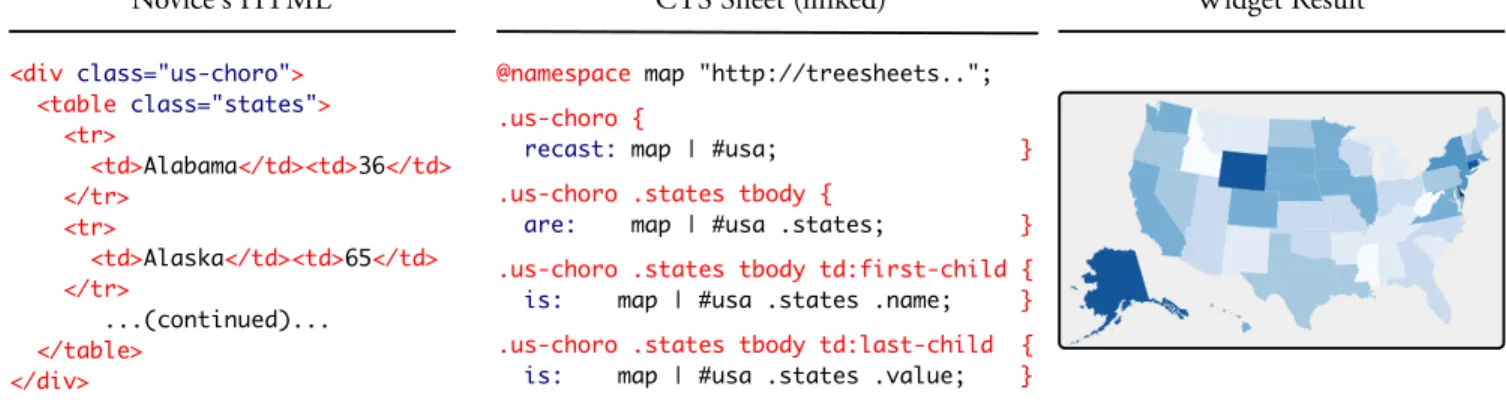
Figure 2: A choropleth widget, implemented with D3 and SVG. Users can invoke this widget with custom data by annotating HTML (at left) with the proper classes; no Javascript is necessary. The center column shows the CTS sheet which maps the user’s HTML onto the widget for conversion into an SVG object.
model. Even for an experienced Javascript programmer, this combination takes time to learn.
CTS provides a general approach to making plain HTML a calling convention into rich widget invocation, making it accessible to novices. Users need only to link to a tree sheet and then mark up their HTML with the right class names. The CTS engine then wraps this HTML with a bootstrap-per for the widget implementation. The HTML the novice provides in this case is not just content to be displayed, but also parameters to pass to the widget, such as pin locations for a map or data for a bar chart.
We implemented several widgets to evaluate this approach3. Figure 2 shows the HTML necessary to use our choropleth widget, which uses the D3 library to create a shaded US electoral-style map. The user only needs to provide a table of state names and numbers, along with the option of color scheme and scaling properties, and CTS maps that onto a bootstrapper that creates the visualization based on the pro-vided data. The CTS sheet shown in Figure 2 is linked to by the user, but does not need to be edited. Section 6.2 shows the pattern for constructing one of the these bootstrappers. The HTML to invoke these widgets can even be pasted straight into the body of a web page. We successfully tested them with the Wordpress post editor—the interface through which many authors publish to the web. The tree sheets we wrote for these widgets are designed to put all parameters into the visual space of the DOM, rather than attributes, further enhancing editability in WYSIWYG environments like Wordpress.
Table 1 shows the effort savings from the perspective of the user. For each widget we created, we list the skills that a user otherwise would have needed to know to know if the CTS widget were not available. We additionally list the lines of Javascript (excluding any CTS-specific code) that the user would have had to either write or modify4.
4.3
Simplifying HTML Editing
Remapping a single DOM node and remapping a whole page are no different for CTS, but the simplifications that 3All are available at treesheets.org/widgets
4
Lines of code are, of course, only useful as approximate measures of complexity, as this measure is affected by factors such as coding style and library usage.
Widget SVG JS JSON Ajax LoC JS
Google Map 3 64 Stock Ticker 3 3 3 32 Choropleth 3 3 3 3 51 Bubble Chart 3 3 3 3 53 Word Cloud 3 3 3 112 Bar Chart 3 3 3 101
Table 1: Skills that CTS saves the web author from
needing to know for each widget we created. We
also list the lines of Javascript that the author would have needed write (or modify) without CTS.
result in the novice’s DOM structure are compounded. Ordi-nary web pages are filled with HTML scaffolding whose only purpose is to provide a structure that CSS uses to create the page design. Once this design is complete, it remains rela-tively static. But the author continues to update and edit the content HTML of the page (adding news items, etc) and must wade through design HTML in order to complete this task.
Consider the case of purchasing a web site template, a big business on the web. These templates arrive as HTML files to be customized by the purchaser. With CTS, they could instead arrive in three pieces: a mockup, a content document, and a tree sheet that relates one to the other. Any content edits would be done to the content document, and any style updates or bug fixes would be done to the mockup.
The complexity savings to the user depend on the scaffold-to-content ratio of the document. For a widget that contains n content fields, CTS requires on average n + 1 DOM nodes to make the mapping—one for each field and a container to hold them—compared to the more arbitrary, design-related number in typical HTML.
At a later time, an author who decides to switch to a different template need not change their content document at all; instead they will simply use a new tree sheet to map their content into a new mockup.
As an exercise, we looked at top five featured blog tem-plates on the Wordpress home page. We extracted the HTML structure which wraps exactly one blog post and calculated
the signal-to-noise ratio as the number of content fields dis-played divided by the number of DOM nodes used to display them. For CTS, we assumed a SNR of n+1n . Table 2 shows the result, in which CTS provides a significant simplification to the user’s HTML in each case.
Theme Nodes Fields SNR SNR with CTS
Responsive 16 6 .38 .86
Pinboard 18 5 .28 .83
Buttercream 13 5 .38 .83
Twenty Eleven 23 6 .26 .86
Montezuma 22 9 .41 .9
Table 2: Signal-to-noise ratio of a blog post widget for the five top featured Wordpress themes, mea-sured meamea-sured by diving the number of fields dis-played by the number of DOM nodes used to display them. CTS provides a better SNR ratio by enabling design scaffolding to be partitioned into a separated document.
Wordpress themes are, of course, made for use with a ver-tically integrated content management system. But many people do hand-edit pages that have a blog-like form: so-called static bloggers, academics who maintain both home pages and group pages, small and medium-sized companies that self-host promotional sites, and so on.
5.
THE WEB DESIGNER
In this section we describe how skilled web designers can use CTS alongside CSS and Javascript. Unlike the novice scenario, this involves authoring tree sheets for use with cus-tom HTML. We first discuss how CTS transformations en-able HTML mockups to be used as themes, eliminating the need for a pseudo-HTML templating language. We then show how mockups—or full pages ex post facto—can be used to create grassroots themeing communities for the long tail of domains.
5.1
Mockup Driven Development
Teams that construct web pages often use a process that consists of three stages. In the first stage, designers use a tool like Adobe Photoshop to create design proposals. In the second stage, a full HTML mockup is created for the selected design, and in the third stage this mockup is cut into small fragments and these fragments are rewritten in a template language.
Each stage consists of making web designs, but each stage uses a different language to do so. This is an unfortunate consequence of the using the right tool for the job: design-ers simply find Photoshop a more efficient way to iterate through visual ideas. HTML is the target language for im-plementing those ideas, but template fragments are the re-quired input to web applications. The format mismatch cre-ates a barrier between design tasks and development tasks. Changes made to the design need to be manually trickled through the pipeline to the templates. When this involves multiple people, the challenges are compounded.
The structural remapping CTS provides can eliminate the mismatch between the last two stages. In a project, HTML mockups can be stored in a /mockups directory that contains the full set of design implementations, from page-level lay-out down to widget look and feel. In a static environment,
developers bind simple content HTML pages to these mock-ups using CTS. In a dynamic environment, developers bind to JSON. Project developers would get all the benefits of us-ing templates: O(1) changes in the design propagate O(n) changes to the application, fragments can be composed, etc. And project designers get to use their mockups as live pro-duction code with no intermediary.
5.2
Grassroots Theming Communities
A.
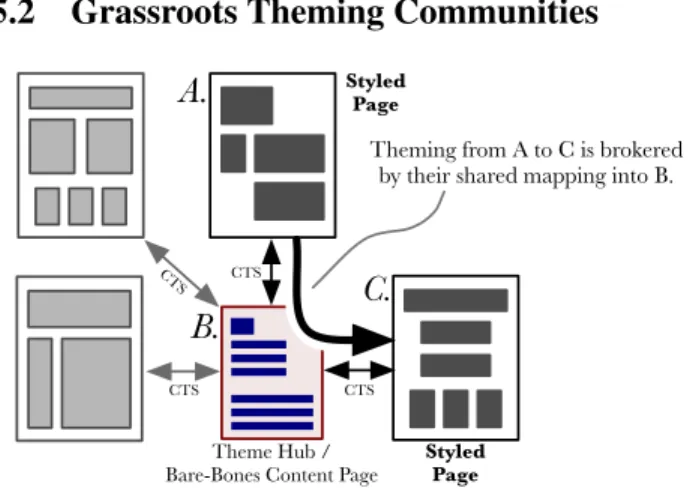
Theming from A to C is brokered by their shared mapping into B.
B.
Theme Hub /
Bare-Bones Content Page StyledPage Styled Page CTS CTS CTS CTS
C.
Figure 4: A hub-and-spokes example of theming
op-erations between members of a community. Each
member uses a set of CSS classes defined by an exm-plar at the hub, and then they can use CTS to remap their site to any of the spokes.
Any current web page can be thought of as an HTML mockup—just one that happens to be published. If a CTS sheet is written to map content onto this page, it can be used as a theme. This section explores what happens when a community of people begin writing CTS sheets that map a common set of CSS selectors onto their web pages: each page becomes a theme in this community ecosystem, and the common set of CSS selectors defines a schema for these themes.
We explore the potential for this new kind of theming ecosystem from the perspective of a professor interested in changing the look of his web site. This professor hears that a group of academics have started using a common set of CSS classes to demarcate the important content on their web pages: lab name, office hours, publications, and so on. Using CTS, they can then re-theme their web page as any other page that uses the same set of selectors.
The academic department publishes a bare-bones example page called a theme hub that contains simple HTML using just these CSS classes. Rendered in a web browser, it ap-pears as a plain-text version of a professor’s personal page. This theme hub is a content mockup rather than a design mockup: it is an example of all the CSS selectors used in this theme microformat. To use the themes in this commu-nity, a professor has three choices: copy the theme hub and customize its contents, write a CTS sheet that maps an ex-isting page onto the theme hub, or simply apply the same CSS classes in the theme hub onto an existing site.
Our hypothetical professor already has a page, so rather than copying the theme hub, he edits his existing web page to use the CSS classes from the theme hub that define a common schema, such as .labName and .officeHours. Like
Retargeting via CTS
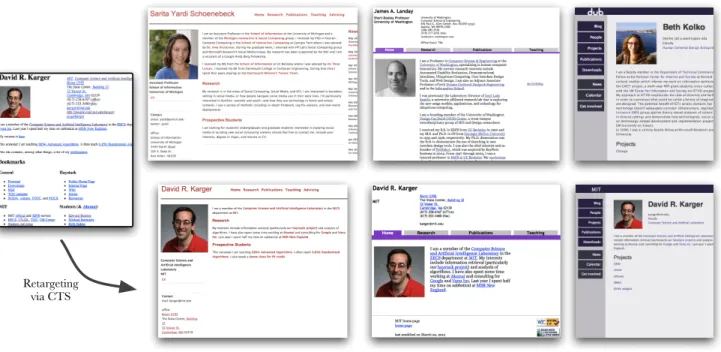
Figure 3: Some remapping possibilities after creating a four tree sheets, relating different professor pages to a common set of selectors. Not every page contains the same semantic information, but the information in common (e.g., name, bio) can be mapped while information lacking (e.g, news updates) is hidden by the retargeting process.
many web authors, this professor did not originally surround all his content with DOM elements: some pieces of informa-tion are entered as raw text with line breaks (<br />). In these cases, the professor has to first wrap the content in a div or span tag before adding the CSS class.
After adding the proper CSS classes, he can retheme his page by just linking to a CTS sheet that maps the theme hub (which he mimics) onto another mockup. Because he mimics the CSS classes in the theme hub, his page now also acts as a design mockup, meaning other academics can remap their content onto his design. This turns every CTS-using web author into a theme creator, a powerful change from existing practice.
Note that in marking up his HTML, the professor is mak-ing use of an emergent “microformat” schema for describmak-ing “professorial content.” The presentational benefits of CTS can lead such microformats to emerge in a grassroots fash-ion. Importantly, there is no need for a critical mass—even the first professor to use CTS benefits from the separation of presentation and content. However, there is a network ef-fect offering greater benefit (in the availability of more tem-plates) as the number of participants grows.
What if this professor could not modify his HTML? Per-haps it is the output of a departmental CMS system that he does not have access to. In this case, he could still gain access to this themeing community by authoring a tree sheet that transforms his page as rendered onto the exemplar page. He then then adds two tree sheets to his page: one to map to the exemplar and another to map from the exemplar to a theme. Figure 4 depicts this as the mapping A → C.
We evaluated this idea by creating tree sheets for a handful of professors’ academic home pages. We mapped domain concepts (such as job title) instead of design concepts (such
as sidebar ), though the latter would an alternate route. For each professor, we wrote one tree sheet relating his or her preexisting web page with a canonical page that represented the theme hub. Each professor page used a different set of CSS selectors, simulating the A → C scenario in Figure 4.
Because tree sheets relate each professor’s page to a theme hub, they can easily retarget their content in the style of each other. Figure 3 shows the output of a test harness that enables browsing the n2 mapping combinations possible5.
As expected, we had to make some changes to each page to add div and span elements to make some pieces of content distinctly addressable by CSS. Table 3 shows the number of rules written for each professor and the number of DOM elements we had to insert. This number varies because dif-ferent professors had difdif-ferent amounts of information on their respective landing pages.
In the abstract, to create a tree sheet that elegantly han-dles failure (i.e., when a piece of data is missing) generally requires two CTS rules for every content slot: one Is rule to map the content, and one If-Exist rule to hide its container if the content is missing. An example visible in Figure 3 is the mapping from David Karger to Sarita Yardi. David does not have news items on his page, so in addition to not dis-playing any news items (handled by the Is command), the news section header should also be hidden (by the If-Exist). The results in Figure 3 demonstrate an interesting chal-lenge: the information on a professor’s landing page can vary wildly. Some showcase links and students; others showcase papers and news. When mapping at such a low level, this can result in both gaps in the resulting page (which expected information that it did not get) and missing content from 5
Professor CTS Rules Written DIVs and SPANs Added
Karger 12 2
Yardi 15 11
Landay 19 5
Kolko 13 6
Table 3: Effort required to author tree sheets for four professor pages found on the web. The result enables the retargeting shown in Figure 3.
the source (because there was nowhere to put it). We believe machine learning approaches like Bricolage [13] may prove useful in finding the sweet spot between layout-centric map-ping and fine-grained data mapmap-ping. We also believe that there is a rich body of work to explore surrounding retarget-and-modify operations rather than just retargeting.
5.2.1
Building a long tail of theme domains
This method of theming could dramatically expand our cultural ideas of when we might use themes. Our current conception of themes is bound to the idea of content man-agement systems, and theme languages are intimately tied to their implementations. Wordpress, Drupal, Blogger, and Tumblr all have roughly the same underlying schema, but a theme written for any one is completely incompatible with the others. This creates two problems: it limits “theme cre-ators” to a specific set of developers who set out specifically to write themes for a particular platform, and it requires committing to a complete server-side architecture in order to use these themes. Could it be that there are no themes for the “professor home page” domain in part because there are no content management systems built for this domain?
The answer is not simply to use client-side templating languages, such as Ember [16] and Mustache [17]. These languages require JSON as a data input, and JSON is a poor format for content authoring due to (among other issues) its lack of support for multi-line strings. They also describe transformations instead of tree relations; they can’t consume a finished web page, after the fact, as input for a remapping operation, or compose multiple relations.
CTS enables theming ecosystems to arise after the fact for arbitrary domains and without the need for content man-agement systems. Mobile app landing pages, art galleries, auctions, yard sales, and academic information are all do-mains with sizeable web user populations but no CMS or theming support. These domains do have many mockups, however, available as live pages on the web or for sale on sites like TemplateMonster.com. CTS enables these design examples to be reused as themes by reference instead of re-quiring them to be cut up and transliterated into a template language by value.
6.
THE CTS AUTHOR
This section addressees two ways CTS can be of service to experts who write code to reuse themselves or give to others for reuse. First we illustrate an encapsulation problem suf-fered by web libraries such as Twitter Bootstrap and show a solution using CTS. Then we demonstrate a pattern for authoring widgets that include Javascript.
6.1
Proper Web Library Encapsulation
Skilled programmers know that proper encapsulation is an important property of software that facilitates maintenance
and collaboration. CTS provides a layer of indirection that enables the kinds of guarantees about consistency and be-havior that software developers expect from other platforms but that don’t exist on the web. It therefore provides a way for widget developers to provide better quality libraries to their users.
Web libraries such as Twitter Bootstrap are implemented in three parts: CSS, Javascript, and HTML. The current web stack doesn’t provide a way to link to and encapsulate HTML, so this part of each widget implementation has to be manually copied and pasted by every user of the library, every time the widget is needed. This creates an encapsula-tion leak: the HTML is part of the implementaencapsula-tion, but it is copied out of the library and into every user’s web page. Between libraries, and sometimes between different versions of the same library, these HTML implementations are in-compatible with other.
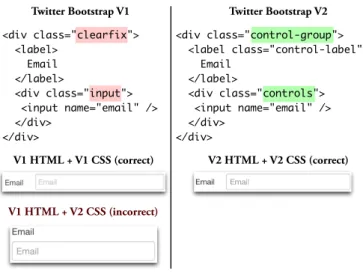
This caused problems for users of Twitter Bootstrap when upgrading from version 1 to version 2. Bootstrap users could upgrade their Javascript and CSS by relinking to the latest files. But the HTML implementation changed as well, as Figure 5 shows. Any site maintainers who did not know the details of these HTML changes, and who did not manually apply them across their HTML documents, risked breaking their page layouts, as Figure 5 shows.
Twitter Bootstrap V1 Twitter Bootstrap V2
V1 HTML + V1 CSS (correct) V2 HTML + V2 CSS (correct) V1 HTML + V2 CSS (incorrect) <div class="clearfix"> <label> Email </label> <div class="input"> <input name="email" /> </div> </div> <div class="control-group"> <label class="control-label"> Email </label> <div class="controls"> <input name="email" /> </div> </div>
Figure 5: The HTML implementation for
Twit-ter Bootstrap’s horizontal form widget changed be-tween bebe-tween version 1 and 2. While users could upgrade their Javascript and CSS by simply relink-ing files, this HTML change had to be made by hand. If it wasn’t made, the form layout was broken.
Suppose Bootstrap consisted of CSS, Javascript, and CTS. When a widget’s HTML implementation changed, the exem-plar page for that widget would be updated, and the CTS sheet would be changed to reflect this update. Since users simply link to the CTS sheet, they would receive the new transformation without having to change their HTML. Even if CTS was introduced late in the process, along with Ver-sion 2 of Twitter Bootstrap, it could be used to roll forward old HTML calling conventions like so:
@namespace Twitter "http://www...."; div.clearfix @class {
is: Twitter | div.control-group @class; }
div.input @class {
is: Twitter | div.controls @class; }
These rules provide a “hot fix” that converts Figure 5’s Version 1 HTML (the target selectors) to Version 2 HTML (the source selectors), ensuring that the rendering does not break due to mismatched HTML and CSS.
6.2
Creating Widgets
In this section we describe a patern that enables advanced authors to create Javascript-laden CTS widgets that can be parameterized and reused by authors who only understand HTML. The widgets referenced in Section 4.2 all use this pattern, and a side-benefit to this style of widgeting is that the widget definition can serve as its own example mockup. To enable Javascript-laden CTS widgets, embedded scripts need to have three basic properties: they need to execute at the correct time, they need to know the element which represents the correct widget instance, and they need some way to access parameters passed from HTML.
We accomplish the first two properties with features of the CTS engine. When a presentational HTML fragment is wrapped around some content, the CTS engine removes any script tags and postpones their execution until the entire subtree has been rendered. This guarantees the get developer that any Javascript can assume that the wid-get HTML is in its final state. CTS does not provide any language-level features for Javascript encapsulation, so wid-get authors must still follow good practice of wrapping code in closures to avoid namespace collisions.
Widget scope is more difficult because Javascript pro-grams do not have access to the DOM location from which their script was loaded. However because the CTS engine defers Javascript execution, it can provide this information. CTS provides a getScope() Javascript method similar to the last_inserted_id() SQL function. Widget scripts can use it to fetch the container of the last grafted-in node, which is the widget from which they are executing. For widgets which require Ajax, this node can be stashed in the XHR object of an Ajax request to persist its pointer for the asyn-chronous response.
Finally, parameter access is accomplished by convention. Widget authors create a hidden DOM element within the widget that contain default parameters, expressed as HTML, for use by Javascript. A user invoking the widget may then override these defaults by using CTS to map custom val-ues into this region of the DOM. In the Choropleth example in Figure 2, the novice’s table element mapped onto a set of nested hidden div elements inside the widget, which the Javascript then used as parameters.
After creating a block of HTML and Javascript that con-forms to these properties, the final step is to create a CTS sheet that maps from some external HTML (probably of the same shape as the hidden data element) onto the widget div.
7.
CTS IMPLEMENTATION
All CTS commands can be expressed in terms of two ba-sic tree relations, Graft and Map. A Graft relation ex-presses an equivalence between two elements, and a Map relation expresses an equivalence between two collections of elements. These relations may be thought of as undirected edges that connect nodes on two directed trees (which may be the same tree). Graft and Map may be evaluated in either direction. In mockup driven development terms, one direction maps your content onto a mockup, and the other direction overwrites your content with the mockup values. In dynamic templating, one direction merges JSON data into a template, and the other direction scrapes JSON data back out of a template.
In this section, we define what constitutes a CTS selection, illustrate the Graft and Map operators in terms of tree swaps, and then describe the CTS rules used in this paper in terms of Graft and Map.
7.1
Selections
A selector is a tree query that, when evaluated against a tree, returns a selection. An CSS3 selector can be used to create an HTML selection, and a key-path selector can be used to create an JSON selection, for example.
Typically—for instance with jQuery—we think of a selec-tion as a set of nodes scss= {n1, n2. . . nn}. A CTS selection is instead a set of groups, where each group is a set of sib-ling nodes of the same parent. To convert an ordinary CSS3 selection into a CTS selection, each node selected is simply transformed into a group of size 1.
scts= {g1, g2. . . gn}; gi= {n1i, n 2 i. . . }
This expanded notion of selection is important because many real-world HTML structures do not enclose each semantic entity in a distinct DOM node. In an enumeration of books on a merchant website, for example, each set of three ta-ble rows may represent one book. The HTML5 Microdata specification seems to ignore this modeling problem when discussing its itemscope operator. Because tr must be the child of table or tbody, for example, it is impossible to ex-press such a multi-node item scope with Microdata. The CTS selection model allows us to handle these situations, providing the selector syntax provides a way to express it6.
7.2
Graft and Is
A Graft relation asserts that two groups are equivalent. One may therefore be replaced by the other. Figure 6 shows the simplest possible Graft, which is a Hello World tem-plating example in which a JSON dictionary value is being grafted onto a span in an HTML document.
The Is rule performs a Graft on a modified selection in which each node in the original selection has been replaced by a group consisting of its children. The Graft relation in Figure 6 is between “World” and “Grace.” The functionally equivalent Is relation is between the span and name.
The Is relation may thus be thought of as Graft with mandatory container-contents semantics that ensures that nodes participating in the CTS relation are not destroyed 6Though not detailed in the paper, our selector syntax con-tains extensions to state grouping properties, such as group size and margins. E.g.: every three table rows, skipping the first two.
h1 Hello, World . name Grace span graft
Figure 6: A simple template operation using Graft
when the relation is operated on. This means that, armed with only the output of a CTS operation and the tree sheet used, all nodes participating in a Is relation can be identified, and their innerHTML represents the related tree fragment from the other tree.
7.3
Map and Are
Map and Are follow a similar pattern in that an Are is a Map with container semantics bolted on. They both simulate the iterative loop found in programming languages. When performed directionally as an operation, Map acts as a functor that operates on both related trees and the CTS relations defined between them. Map duplicates each group in the target for every group in the source. If the source selection is the empty set, Map removes each group in the target selection. If the source selection is a set of size two, map ensures two contiguous copies of each group in the target. Once cardinalities are aligned, Map re-wires the target of any CTS rules relating the subtrees. If the source of the rule is in the ithMap group, then the target is limited to the ithduplicate copy made in each target group.
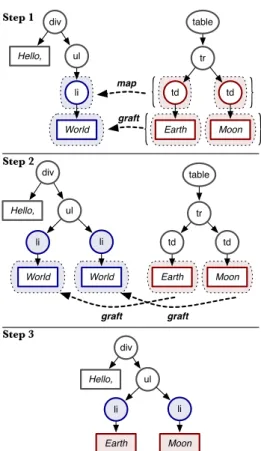
Figure 7 shows the Hello World example using an iteration to greet multiple people. The CTS sheet for this example is written in terms of Is and Are, but Figure 7 shows the resulting execution, which is “compiled” down to Map and Graph operations.
ul { are: tr }
li { is: td }
7.4
If-Exist and If-Missing
The If-Exist and If-Missing commands can be imple-mented using theory-style graph gadgets along with only Graft and Map commands. The Map command comes close to achieving what we want—if the target is the empty set, the source will be removed—but if the target selects multiple groups, then the source will be duplicated, which breaks if’s semantics.
For If-Exist, we use a gadget with the shape A → B → C. We perform a CTS transform from the source of the If-Exist onto this gadget with two rules: source−−→ B andMap source −Graft−−−→ C. If the source was the empty set, B will be removed. If the source was non empty, there will be one copy of B for each group in the source selection.
The final step is to Map the first child of A onto the target of the If-Exist relation. If the source was the empty set, A has no children so this will remove the target. If the source was non-empty A has a first-child so this will duplicate the target once (having no effect) but not rewrite any rules, since the target had CTS relations with the gadget.
div Hello, table tr ul li World td Earth td Moon graft map div Hello, ul tr li World td Earth td Moon graft World graft li div Hello, ul li Moon Earth li table Step 1 Step 2 Step 3
Figure 7: A Map-and-Graft operation which sim-ulates an iteration. Step 1 depicts the starting trees, with the target on left. In Step 2, the target tree, and the remaining CTS relations, have been redrawn by the application of the Map command. Step 3 shows the output after applying the Graft commands. Dotted lines denote a group, and braces denote a selection containing multiple groups.
If-Missing requires a cheat that relies on the fact that the selector language is powerful enough to peek into child nodes, such as CSS37. There are several ways to accomplish this, but we will use the ability to select a specific node A only if it has no children. We denote this selector Anokids. We then create a gadget A → B along with two CTS com-mands: source−If-Exist−−−−→ B and Anokids−If-Exist−−−−→ target. If we control the order in which relations are processed (in the or-der they were written) then this accomplishes the opposite of the If-Exist. The ability to say “a node with no children” sneaks in a not operator via the selector language.
For If-Exist, If-Missing, and Are we can preserve the template structure by hiding nodes via CSS instead of re-moving them. The output document then still contains the unused portion of the web template. This could be useful when data changes, such as automatically re-rendering on an Ajax update.
7.5
Recast
The Recast operator is two simple steps. First, it applies any CTS rules relating the source and target subtrees in reverse direction, from target to source. Then it applies 7For example, a[attr=val] matches a elements whose tar-get attribute is val
a Is operation mapping the source to the target. Because the final operation is Is instead of Map provenance of the recast operation—the node to which the rule is attached—is preserved.
8.
DISCUSSION
Can widgets import other widgets? Yes, and if a language like CTS is adopted, we expect this will be a pow-erful feature to organize and reuse web content. This also means infinite loops (where A imports B, which imports A) are thus possible, but that can be fixed by imposing a maximum stack depth.
What about head content? We currently do not sup-port using CTS to modify the head of a web page because browsers tend to behave unexpectedly when elements are arbitrarily removed or added from the head. The head also does not support containment, which the Is and Are opera-tors rely on. This means that using a tree sheet alone is not enough to borrow content: you need to link to the remote CSS and Javascript, too. Of course, a Javascript-laden CTS widget could always add these CSS and Javascript links for you.
How similar is CTS to XSLT? CTS is different from XSLT on several fronts. CTS describes directionless rela-tions between two trees rather than a transformation from one tree to another; we can run a tree sheet in either di-rection. Second, XSLT requires expressing the output web page in terms of an XML programming language. CTS in-stead uses a mockup driven development approach, which results in artifacts that can be more readily be copied and reused. Finally, XSLT’s failure semantics are to crash on malformed input, which is not realistic for the web, which thrives on the kind of casual, copy-paste-customize program-ming that often results in minor errors. CTS adopts CSS failure semantics and localizes and reports failures instead of crashing.
How similar is CTS to the HTML5 Web Compo-nents and Shadow DOM specs? CTS provides general purpose, externally specified, tree relation language with a simple syntax. This language can be used to describe tem-plating, transclusion, scraping, widgets, and structural en-capsulation. The Web Component and Shadow DOM specs are HTML-specific syntax extensions to provide encapsula-tion and reuse of HTML widgets. The Shadow DOM spec creates a special class of node whose “shadow” subtree is shielded from the rest of the page in certain ways, prevent-ing, for example, CSS namespace collisions that can occur when widgets from different libraries are co-mingled on a page. CTS widget users would benefit greatly from this specification being adopted because of these stronger encap-sulation guarantees.
The Web Components spec provides an HTML syntax for declaring and reusing web widgets. Like CTS, it also provides a way to map content into new widget instances, though these mappings are limited to HTML, while CTS can work with JSON (implemented) or any tree-structured data (theoretical). Web Components also commingle widget def-initions and mapping rules with the HTML document. This prevents mockup-driven development (a component defini-tion is written differently than ordinary HTML) and ex post facto widget and theme creation (e.g. using tree sheets that point at live exemplars found on the web).
9.
RELATED WORK
Work to improve the state of web content authoring typi-cally falls into one of four categories: language-driven, framework-driven, sensemaking, and higher-order interfaces.
Many language-driven approaches seek to formalize design needs into central vocabularies for reuse. HTML5 and CSS3 for example, are vocabulary expansions (with implementa-tion to back them up) over previous versions. Microfor-mats [12], as well as several Semantic Web offerings such as FOAF [5] and Good Relations [9] embed additional specific vocabularies within HTML. Other efforts, such as RDFa [1] and HTML5 Microdata [10] seek to provide ways to embed extensible vocabularies within HTML. Rather than a new method for expression, we provide a simple way to relate existing expressions made out of HTML and JSON
Framework-driven approaches tend to tackle problems as-sociated with the distributed programming model of the web. Templates that Fly [15] automatically pushed template operations into the client side. Sync Kit [3] further provided a simple model for automatically persisting and synchroniz-ing relational data on the client side. Other frameworks work in the reverse, providing automatic server-side persis-tence of mutations that occur in the client [6].
Sensemaking approaches take the current web and help the user better understand and operate upon it. Tools such as WebCrystal [7] and FireCrystal [14] help authors under-stand why a fragment of a web page appears or behaves as it does so that they can repurpose it. Finally, higher-order manipulation tools help the user perform tasks without de-scending into HTML. WYSIWYG editors are the canonical example, but more recent work has focused on retargeting, which is a common practice that until recently was only done by hand. CopyStyler [8] interactively helps users retarget entire pages with an interface that places them side-by-side. Bricolage [13] uses machine learning to perform page-level retargeting automatically.
We believe CTS can be a useful partner to these ap-proaches. CTS annotations could serve as a powerful se-mantic signal for other tools to incorporate. Frameworks could use them for automated editability and persistence. Sensemaking and retargeting tools could use them to pro-vide UI cues or as feature input. Bricolage could use CTS to describe the retargetings that it has constructed so that they can be reused in the future.
10.
CONCLUSION
This paper presented Cascading Tree Sheets, a proposal and implementation of a light weight language that provides the same kind of encapsulation for HTML structure that CSS provides for HTML style. We demonstrated usage sce-narios with working implementations showing how CTS can improve a broad range of authorship tasks for beginners, web designers, and library authors. Finally, we showed the fundamental simplicity of CTS by distilling its commands down to two tree operations that are easy to implement and have beneficial provenance-preserving properties.
11.
ACKNOWLEDGEMENTS
The authors thank Sarah Scodel for her help creating the widgets used in this work.
12.
REFERENCES
[1] B. Adida, M. Birbeck, S. McCarron, and S. Pemberton. RDFa in XHTML: Syntax and processing. W3C Recommendation, 2008.
[2] E. Benson, A. Marcus, F. Howahl, and D. Karger. Talking about data: sharing richly structured information through blogs and wikis. In ISWC 2010. [3] E. Benson, A. Marcus, D. Karger, and S. Madden.
Sync kit: a persistent client-side database caching toolkit for data intensive websites. In WWW 2010. [4] M. Bostock, V. Ogievetsky, and J. Heer. D3:
Data-Driven Documents. IEEE Transactions on Visualization and Computer Graphics, 2011. [5] D. Brickley and L. Miller. FOAF Vocabulary
Specification 0.98. Namespace Document, 2010. [6] B. Cannon and E. Wohlstadter. Automated Object
Persistence for JavaScript. In WWW 2010. [7] K. S.-P. Chang and B. A. Myers. WebCrystal:
understanding and reusing examples in web authoring. In CHI 2012.
[8] M. J. Fitzgerald. CopyStyler: Web design by example. MIT Masters Thesis, 2008.
[9] M. Hepp. GoodRelations: An Ontology for Describing Products and Services Offers on the Web. 2008. [10] I. Hickson and D. Hyatt. HTML5. W3C Working
Draft, 2011.
[11] D. F. Huynh, D. R. Karger, and R. C. Miller. Exhibit: lightweight structured data publishing. In WWW 2007.
[12] R. Khare and T. ¸Celik. Microformats: A Pragmatic Path to the Semantic Web.
[13] R. Kumar, J. O. Talton, S. Ahmad, and S. R. Klemmer. Bricolage: example-based retargeting for web design. In CHI 2011.
[14] S. Oney and B. Myers. FireCrystal: Understanding interactive behaviors in dynamic web pages. In VLHCC 2009.
[15] M. Tatsubori and T. Suzumura. HTML Templates that Fly: A Template Engine Approach to Automated Offloading from Server to Client. In WWW 2009. [16] Tilde Inc. Ember.js.
[17] C. Wanstrath. Mustache: Logic-less Templates. [18] World Wide Web Consortium. HTML & CSS