Publisher’s version / Version de l'éditeur:
Proceedings of the ASLIB:Translating and the Computer, 2009, 2009-11-20
READ THESE TERMS AND CONDITIONS CAREFULLY BEFORE USING THIS WEBSITE.
https://nrc-publications.canada.ca/eng/copyright
Vous avez des questions? Nous pouvons vous aider. Pour communiquer directement avec un auteur, consultez la première page de la revue dans laquelle son article a été publié afin de trouver ses coordonnées. Si vous n’arrivez pas à les repérer, communiquez avec nous à [email protected].
Questions? Contact the NRC Publications Archive team at
[email protected]. If you wish to email the authors directly, please see the first page of the publication for their contact information.
NRC Publications Archive
Archives des publications du CNRC
This publication could be one of several versions: author’s original, accepted manuscript or the publisher’s version. / La version de cette publication peut être l’une des suivantes : la version prépublication de l’auteur, la version acceptée du manuscrit ou la version de l’éditeur.
Access and use of this website and the material on it are subject to the Terms and Conditions set forth at
Building a Collaborative Multilingual Terminology System
Désilets, Alain; Huberdeau, Louis-Phillippe; Laporte, Marc; Quirion, Jean
https://publications-cnrc.canada.ca/fra/droits
L’accès à ce site Web et l’utilisation de son contenu sont assujettis aux conditions présentées dans le site LISEZ CES CONDITIONS ATTENTIVEMENT AVANT D’UTILISER CE SITE WEB.
NRC Publications Record / Notice d'Archives des publications de CNRC: https://nrc-publications.canada.ca/eng/view/object/?id=c37affa2-1c3b-498e-b85f-e5f8700e9cff https://publications-cnrc.canada.ca/fra/voir/objet/?id=c37affa2-1c3b-498e-b85f-e5f8700e9cff
Building a Collaborative Multilingual Terminology System
†Alain Désilets
Louis-Philippe Huberdeau
National Research Council of Canada [email protected] [email protected]
Marc Laporte
Jean Quirion
TikiWiki CMS/Groupware Ottawa University
[email protected] [email protected]
Abstract
Terminology Databases (TDBs) are one of the most commonly used tools by translators. It has been suggested that a massive collaboration process like Wikipedia could have beneficial effects on TDBs, by spreading their creation and maintenance costs across a large number of individuals, and by fostering collaboration between terminologists, translators, domain ex-perts, and even members of the general public. We refer to this process as Collaborative Multi-lingual Terminology (CMT). This paper de-scribes how we designed and implemented soft-ware for supporting CMT, by combining fea-tures from both Terminology Database Man-agement Systems and collaborative wiki sys-tems. Our system, Tiki-CMT, is built on top of the TikiWiki Content Management System.
1
Introduction
Terminology Databases (TDB) are one of the most commonly used tools by translators, and they have not been displaced by corpus-based tools like Translation Memories or Statistical Machine Translation with Post Editing. One disadvantage of Terminology Databases, compared to such corpus-based approaches, is that they are costly to create and maintain, since they rely on human effort. It has been suggested that this labor cost could be distributed across a larger and more diverse group of individuals, through an online collaboration pro-cess like Wikipedia (Désilets et al., 2007, Désilets, 2007). Indeed, if this "Wiki Way" was powerful
enough to enable the creation, in a mere few years, of a complete and relatively high quality en-cyclopedia in several languages, why would it not work for the creation or maintenance of a multilin-gual TDB? We refer to this wiki approach to ter-minology as Collaborative Multilingual Termino-logy (CMT).
In this paper, we describe how we built software for supporting CMT, by combining features from both Terminology Database Management Systems (TDBMS) and collaborative wiki systems. This system, called Tiki-CMT, is built on top of the TikiWiki Content Management System (info.tikiwiki.org). This is a wiki-based collaborat-ive platform which, among many things, has excel-lent features for the creation and maintenance of
multilingual content (Huberdeau et al., 2008)
At first glance, one might think that building a CMT system involves nothing more than opening the gate of a conventional TDB, and allowing a lar-ger crowd to modify its content. As we will show later, this turns out to be overly simplistic. Indeed, open sites like Wikipedia rely on simple but neces-sary tools which allow their community of contrib-utors to coordinate in order to keep chaos at bay and ensure quality of the content. Such features are typically missing from conventional TDBs and TDBMS (although some systems have started in-tegrating rudimentary collaborative functionality such as the ability to add comments to a term).
Conversely, one might think that a CMT system could be built simply by installing a wiki on a serv-er, and letting users create pages for terms in dif-ferent languages, and manually creating hyperlinks
†
between terms in different languages. Again here, we will show that this is inadequate, because most wikis do not have sufficient interlingual capabilit-ies to support the common needs of translators and terminologists. In Wikipedia for example, even a simple terminology-related task like creating a French equivalent for an existing English term re-quires no less than 14 user actions (Désilets et al., 2007). Also, many wiki engines (if not most) do not allow a term in one language to be associated with one or more equivalents in another language.
For a CMT system to be useful, it needs to in-corporate features from both types of systems, and this is what we attempted to do with Tiki-CMT. The design of this system can serve as an example of how to support CMT, and can be useful for the following types of readers:
• developers of terminology systems who want to include collaborative features in their platform
• developers of collaborative systems who want to include terminology features in their platform
• people who need to procure and/or config-ure a platform to support multilingual col-laborative terminology work
The remainder of this paper is organized as fol-lows. In section 2, we discuss the Wiki Way which is at the basis of Wikipedia and collaborative wiki sites of various kinds. In section 3, we review ex-isting systems which might be used for CMT, and point out their respective limitations. In section 4, we describe our Tiki-CMT system, and how it can help support CMT work. Conclusions and future work are then presented in section 5.
2
Understanding the Wiki Way
At this point, it is important to clarify how Wikipe-dia actually works, and dispel some common myths about its Wiki Way. It is well understood that Wikipedia is much more open than a typical encyclopedia or dictionary, in that it allows anyone to modify the content of a page without even hav-ing to register on the site. This is a radical depar-ture from the way in which most high profile, high quality linguistic resources have been produced in the past. What is not so well known however, is that Wikipedia is not a free-for-all where people
can edit without checks and balances. Indeed, modifications made to the content are closely mon-itored by a large group of volunteers, who can rely on clear guidelines and codes of conduct, to de-cide what is and isn't appropriate (Riehle, 2006, Bryant et al 2005).
Note however that the above still falls far from a regimented review process. On Wikipedia, anyone can volunteer to review content, and no one has the final say in any decision. Instead, the community relies on consensus and "moral authority" (which members accrue by contributing relevant content to the site), and even the guidelines and codes of con-duct are subject to change and negotiation (in fact, they were themselves created collaboratively using the same wiki tools employed to create the content of Wikipedia). In addition, there is no formal pro-cess or schedule for reviewing contributions. In-stead, reviewing “happens” through a continuous, organic, grassroots monitoring process which is supported by simple features of the wiki system that powers the Wikipedia site (MediaWiki1).
An example of this kind of feature is the Watch
List, which allows any user to "adopt" a list of
pages. When a page is adopted, the user is notified of every change made to it, and he is provided with a 1-click way to undo that modification if he deems it to be inappropriate. Page History is an-other feature which keeps track of every change made to a page since its creation, and allows easy comparison of differences between versions, as well as 1-click rollback to earlier versions. Talk
Pages, which are tied to a particular page but are
somewhat hidden, allow users to discuss "behind the scene" in order to negotiate what the page should or should not contain.
Although very simple, these kinds of tools are absolutely essential to the proper functioning of Wikipedia. Without them, the site would rapidly collapse into chaos, and one would never dare to allow everyone in the world to modify the content of such an important resource.
Another misconception about Wikipedia is that it leaves little room for "experts". But in fact, people creating or contributing to a page are often experts on that topic. However, these domain ex-perts may be forced to interact and negotiate with less knowledgeable users, and some contributors may find this counterproductive. On the other
1
hand, this may also make the content of the page more readable by non-experts. Indeed, it is quite common for a page on a specialized topic to be sig-nificantly improved by someone who is not a do-main expert, but is an expert writer or communic-ator. Finally, while Wikipedia is the work of hun-dreds of thousands of contributors, several studies have shown that the bulk of contributions are made by a surprisingly small number of very active con-tributors (Priedhorsky et al., 2007, Swartz, Voss, 2005, Kittur et al., 2007). These "elite" contribut-ors are essentially passionate amateur encycloped-ists who excel at finding accurate information sources about any topic, and summarizing them in encyclopedic form. In short, experts can and do contribute to Wikipedia, and they can benefit from interacting with a wider and more heterogeneous group of people.
It is important to note that this Wiki Way of pro-ducing content is not only applicable to large, open sites like Wikipedia. Indeed, this kind of open edit-ing and collaboration has been applied in many ways. For example: coordinating teams of varied sizes (5 people to a hundred) and sharing know-ledge inside medium (100 employees) and large (thousands of employees) organizations. Several examples of this can be found in (Mader, 2007). In addition, a wiki site does not have to be as opened as Wikipedia. Indeed, most wikis used inside cor-porations can only be seen or edited by their em-ployees (so called Intranet Wikis). Other sites, called Extranet Wikis, allow corporations to com-municate with current or potential customers. On such sites, employees typically have more priv-ileges than customers. For example, they may be able to modify the actual content of a page, while external customers are only allowed to post com-ments on them. Alternatively, there may be a group of well known and trusted customers who are al-lowed to edit certain pages (for example, to correct mistakes in the help pages for a product).
It is worth noting that, although these sites are very different in nature from Wikipedia, they can can still benefit greatly from the same kinds of co-ordination features like Watch Lists, Page History and Talk Pages.
As can be seen from the above discussion, the Wiki Way can be applied in a number of different ways, to support different community sizes, differ-ent levels of openness, and differdiffer-ent levels of ex-pert participation. In the context of terminology
work, this means that a CMT system could be used to support a variety of scenarios.
Typically, a CMT system may be called for in situations where terminologists and translators need to collaborate closely with each other, or with some enlarged external community, such as: cus-tomers, domain experts, or even the general public. In such situations, conventional TDBs or TDBMS may not provide the necessary tools for coordina-tion, negotiation and monitoring the contributions made by the various actors. Examples of this kind of situation include:
• Publisher of a large public TDB (ex: TER-MIUM2, GDT3, IATE4) wanting to
lever-age the energy and expertise of its end users for growing and maintaining the re-source.
• A team of terminologists working together to carry out a thematic exploration of the terminology for a particular domain (ex: nanotechnology), possibly with input from domain experts.
• A team of translators working together on a very large document in a specific do-main, which uses specific terminology. • A community of translators and
terminolo-gists working in a particular domain, and wanting to share their terminology expert-ise in that domain.
• An organization wanting to build a data-base of the terminology relevant for its own purposes, by inviting employees of all sectors to contribute.
• A translation agency wanting to build a database of the terminology relevant for a particular customer, where its own lan-guage professionals would work in close collaboration with the relevant employees of that customer.
3
Support of existing systems for CMT
work
In order to efficiently support this kind of use case, a CMT system must combine features from both terminology and collaboration systems. Earlier, we described the kinds of features needed for efficient
2
TERMIUM: http://www.termiumplus.gc.ca/.
3 GDT: http://www.olf.gouv.qc.ca/ressources/gdt.html. 4
collaboration on a wiki site (ex: Watch Lists, Page History, Talk Pages, etc.). As far as Terminology Databases features, we feel that at a the very min-imum, a CMT system should support:
• Compact presentation of standard termino-logy information and fields (ex: term, equivalents, synonyms, contexts, domain, etc) in a way that supports fast decision making in translation or terminology situ-ations.
• Very fast creation of terms and their equi-valents in different languages.
• Possibility for a particular sub-group or or-ganization to standardize by labeling a par-ticular equivalent as “recommended”. In this section, we look at a number of existing systems to evaluate their support for CMT work. We divide them in three categories:
• Conventional terminology systems • Wiki-based collaborative systems.
• Hybrid systems which combine attributes of both.
In conventional terminology systems, we in-clude large Terminology Databases such as: TER-MIUM, Grand dictionnaire terminologique and IATE. We also include commercial Terminology Database Management Systems available in trans-lation suites like MultiTrans, LogiTerm, JiveFu-sion, SDL Trados, Déjà Vu, and Google's Translat-or Toolkit (which has a TDBMS component). The main differences between the above two types of systems is that TDBs already come with content and cannot be installed at any organization's site. In contrast, TDBMS are initially empty of content, but can be installed at any organization's site and populated with that organization's terminology.
However, from the point of view of CMT, both types of systems are similar in that they were de-signed for situations where content can only be created and maintained by a select few, typically terminologists working at the organization that is creating the content. Consequently, these systems have little need for collaborative features, and therefore do not tend to support them. In particular, they only keep the most recent version of a term entry, and they do not record the various
discus-sions and negotiations that went into creating and maintaining it. Note however that some TDBMS products have started incorporating rudimentary collaborative features such as the ability to share a particular TDB with the rest of the world, post comments on a term, or open a chat session with other users of the system. However, these capabil-ities fall quite short of the type of features found on truly collaborative sites like Wikipedia.
By wiki-based collaborative systems, we mean wiki systems which, while they were not designed specifically for terminology work, can and have been employed for that purpose. The best known example is MediaWiki, the Open Source software which powers Wikipedia and Wiktionary (Wiktionary is a close cousin of Wikipedia which focuses on general language words, as opposed to encyclopedic content). In that system, a page can be created for a given word or term in a given lan-guage, and it may include a hyperlink to pages for the same word or term in other languages. While this approach obviously works quite well for the creation of term or word entries in a single lan-guage, the interlingual capabilities of most wiki systems are too weak to support efficient consulta-tion or creaconsulta-tion of multilingual terminology entries (Désilets et al., 2007).
In MedaiWiki for example, the system does not allow for the simultaneous display of term inform-ation in multiple languages at once. Also, a simple terminology task like creating a French entry for an existing English term, requires no less than 19 user actions (an action consisting of either a mouse click, a sequence of text keystrokes, a sequence of navigation keystrokes, or a visual scan). In con-trast, in our Tiki-CMT system, the same task can be accomplished with 3 user actions.
In hybrid systems, we include two specific ex-amples: OmegaWiki5 and Kudoz6. These two
sys-tems are closest in philosophy to our Tiki-CMT system.
OmegaWiki is similar to MediaWiki, but it has stronger capabilities for structuring multilingual terminology information, and this results in a sys-tem that is better suited to the needs of language workers. For example, it allows users to search for a term in one language, and see hits for that term in a second language on a same page. However, if one clicks on one of those hits, he is served with a
5 OmegaWiki: http://www.omegawiki.org/. 6
potentially very long page that provides informa-tion for that term in all languages, an approach which makes it hard for translators to rapidly loc-ate an equivalent in the target language they are currently working on. In addition, creating say, a French equivalent for an existing English term, takes a total of 9 user actions (Désilets et al, 2007). While this is better than Wikipedia's 14 actions, it is still too much for such a routine operation. An-other drawback of OmegaWiki is that its list of fields is very short (term, definition, equivalents) and cannot be extended by end users nor site ad-mins.
Kudoz is part of the ProZ translator community portal. It allows members to ask terminology or translation problem questions for a given language pair (ex: How do you say “swine flu” in French?). Other users can suggest solutions or vote on exist-ing ones. Once a few answers have been received, the initiator of the question can create a rudiment-ary entry summarizing the problem and those solu-tions which he deems acceptable. One disadvant-age of Kudoz is that it is more a repository of ter-minology and translation questions than a proper concept-based TDB. In particular, there is no way to explicitly link together questions that pertain to a same term for different language pairs. For ex-ample, if a translation for “swine flu” has been re-quested in two separate questions, one for English to French, and one from English to Spanish, then it will be difficult for a translator to use this informa-tion to find an equivalent for the French to Spanish pair (because the two questions are not directly linked to each other by the system). Another issue with Kudoz is that it is a proprietary hosted solu-tion. One cannot take that system and install it at an organization's site to support CMT work there. Notwithstanding these limitations, Kudoz is very popular among freelance translators, and is prob-ably the closest thing to an ideal CMT system at the moment.
Our Tiki-CMT system improves over the above systems in several ways. Compared with conven-tional terminology systems, it provides more of the coordination and tracking features which are known to be essential to the good functioning of a collaborative site like Wikipedia. Compared to col-laborative wiki sites, it provides a user interface which is better suited to the needs of translators and terminologists, and a more streamlined process for rapid creation of terms and equivalents. The
same improvements hold over OmegaWiki, but in addition, terminology entries in Tiki-CMT are more elaborate, and can be extended and modified by site admins, and to a lesser extent, by end users. Compared with Kudoz, Tiki-CMT provides a true TDB (as opposed to a repository of questions), and it is an Open Source, non proprietary system which can be installed at any organization's site, and tailored to suit their particular needs.
4
The Tiki-CMT System
Tiki-CMT was developed based on TikiWiki, a very large and versatile platform which can be used to build virtually any kind of collaborative or social media web site. In addition, it has excellent features for the collaborative creation and mainten-ance of multilingual content (Huberdeau et al., 2008). As its name suggests, the core of TikiWiki is a wiki system, but it also includes several other components commonly used in collaborative web sites. For example: discussion forums, blogs, chat rooms, shared calendars, RSS feeds, and much more. In total, the system includes over 1000 cus-tomizable features and options.
This versatility is both a strength and a weak-ness. On the one hand, it means that site admins can customize TikiWiki to deploy pretty much any kind of collaborative social media application. On the other hand, the sheer number of options makes this a complex and intimidating task for novice ad-ministrators. In order to deal with this problem, TikiWiki supports the concept of profiles. These are simple runnable scripts which are used to con-figure the system in a particular way, to achieve particular business goals. For example, Tiki has a
Company_Intranet profile which configures the
system in a way that is appropriate for fostering communication and information exchange between employees of an organization.
The bulk of the work we did to create Tiki-CMT involved little more than creating a
Collaborative_Multilingual_Terminology profile,
with simple statements like these: # Allow multilingual pages feature_multilingual: y
# Allow users to specify the # languages they care about change_language: y
Some CMT features however, like the ability to simultaneously display the content of a page in two languages side by side, required modifications to the code.
We now proceed with a complete description of the features of Tiki-CMT and how it supports CMT work. Note that we describe the system be-havior which corresponds to the default settings specified in the CMT profile. Site admins can however tweak these further to satisfy any specific need of their own organization or community. For example, while the default permission scheme spe-cifies that anonymous users cannot post comments on terms, the admin of a particular site might de-cide to open up that particular door to encourage participation by a larger crowd of contributors.
4.1 Groups, permissions and registration
Even when creating and “open” CMT site, it can still be a good idea to exert some control over who is allowed to modify what. In particular, it is gen-erally a good idea to give known and trusted con-tributors more permissions than say, anonymous contributors.
By default, Tiki-CMT comes with 4 groups of users, each with their own permission levels.
An-onymous users (i.e. users who have not logged in)
can search and view all the content of the site, but cannot modify it, not even to add comments.
Re-gistered users (i.e. users who have logged in) have
essentially the same permissions as Anonymous, except that they can define watch lists, as well as personal preferences (in particular, the languages that they are interested in). Editors is a third group whose membership is controlled by site admins. Members of this group enjoy the same permissions as Registered, but in addition they can also modify or create content. Although they can delete terms from the site, they cannot do so permanently. Also, they cannot change overall settings for all users (just their own personal preferences). Admin is the fourth and last group, and its users have all permis-sions, including the possibility to delete content permanently, change site settings for all users, as-sign group membership and permissions to users, and even ban users from the site.
Tiki-CMT supports self-registration by users, but they must supply an email address which is then validated by the system. Captcha images are
also used to prevent robots from registering auto-matically on the site. Once a user has registered, the site's Admins receive an email notification, and they may then elect to add the new user to the
Ed-itors group. In our experience, these simple
meas-ures are sufficient to prevent most spam and other malicious attacks on the site.
4.2 Searching for terms and viewing them in multiple languages
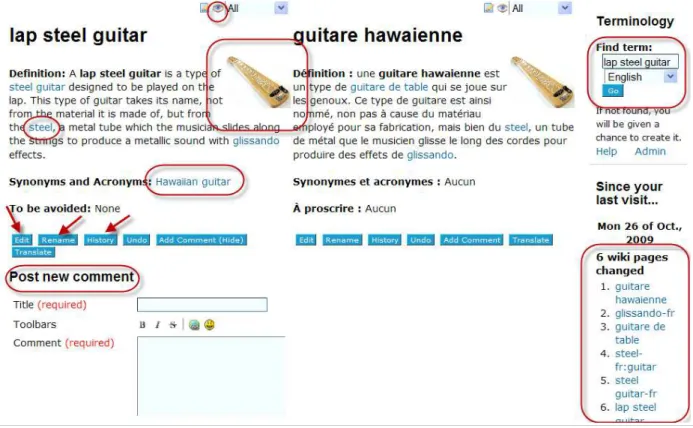
Tiki-CMT provides users with a simple Termino-logy “widget” (“module” in Tiki parlance), shown at the top right of Figure 1. The user can type a term, select the language, and hit Go. If a single exact match is found, the system then displays the term in all languages specified by the user in his personal preferences. The term in the language of the query always appears in the top left, with the user's next language in his list of preferences being displayed on its right. If the term exists in addition-al languages specified by the user in his language preferences, they are displayed below the first two.
Assuming the user specified the source and tar-get languages as the first two languages in his per-sonal preferences, what he will see then is the par-allel source-target display familiar to translators, and available in most TDBMS. This is a unique feature of Tiki-CMT, compared with other wiki systems, and it supports fast and efficient decision making by translators.
When searching for a term, if no exact match is found, or if there are multiple partial matches, then the system displays a list of matches. Clicking on any of them takes the user to the same side-by-side view of the term depicted in Figure 1.
4.3 Commenting and editing terms
Each term entry comes with a comment box which is hidden by default. Clicking on the comments button reveals the comment, and Editors of the site can add comments of their own (see bottom left of Figure 1). Comments can be a low risk way of en-gaging a wider crowd in the creation and mainten-ance of a term entry. For example, one might allow domain experts and even the general public to comment on a term, but only professional termino-logists would be allowed to modify the actual term entry to take those comments into account.
Besides adding comments, Editors can also modify the content of the actual term by clicking
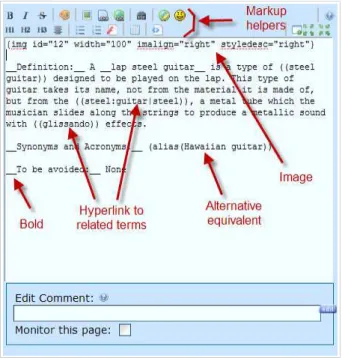
on the Edit button. Content of the page is then presented in a non-WYSIWYG, wiki-markup form (Figure 2). For example, double underscores inser-ted before and after a string signify bolding. While this may be a bit intimidating at first for beginners, the success of Wikipedia demonstrates clearly that even non-technical users will adopt this kind of simple markup if it allows them to collaborate effi-ciently with others. In any case, users do not abso-lutely have to employ markup in their modifica-tions unless they want to. A common guideline given to beginner users of wikis is “if you see
some strange markup that you do not understand, just leave it alone”.
Nevertheless, users who want to invest a bit of time learning the markup can apply common text formatting like bold, italics, color, tables, bullet points, etc. They can also embed any kind of rich media objects in the entry like pictures, videos or sound files. In the case of a highly specialized term, an image can be particularly useful to help translators (who may only have surface knowledge of the domain) form a clearer picture of a physical object that the term refers to. Another interesting feature which may be of particular interest for ter-minologists, is that any part of the text can be se-lected in order to create a hyperlink to another term by that name. For example the term entry depicted
in Figure 1 for “lap steel guitar” contains hyper-link references to three related terms in the guitar manufacturing and playing domains: “steel
guitar”, “steel” and “glissando”. Terminologists
can use this features to create rich, interlinked webs of terms in a given domain.
4.4 Creating terms and equivalents
When the user searches for a term that does not yet exist in the system, it provides him with a button for creating a new entry for that term. When the user clicks it, a new entry is created and pre-filled with a template for a term in the search language. If the user wants nothing more than capture the ex-istence of that term (something which terminolo-gists rarely do, but is common for translators), he can save that template without further modifica-tion. Alternatively, the user may decide to fill the template with information like definition, syn-onyms, variants to be avoided, etc.
Note that the template provided by the system is “soft”, in the sense that users are not forced to abide by it. This is both a strength and a weakness of the system. On the one hand, it means that the term entry is opened to so-called user innovation7.
If the user finds that the template is not quite ap-propriate for a given term, he can extend it on the fly, for example by adding an etymology field. In time, if many users end up making that same in-novation for many terms, the admin may decide to modify the site's term template accordingly, so that future terms will be created with an etymology sec-tion by default.
On the other hand, this soft-templates approach has the disadvantage that one cannot enforce the exact same structure and look for all terms. Also, when the term template is modified, changes apply only to future terms. They cannot be applied retro-actively to terms that have already been created us-ing the old version of the template.
Another interesting way to create a new term, is to create a link to it from another page that already exists. Because that link points to a term that does not yet have an entry, the system will insert a clickable question mark after the selected text. By clicking on it, the user can create an entry for the new term. This particular feature can be very use-ful for terminologists who are conducting a
them-7 Definition of user innovation:
http://en.wikipedia.org/wiki/User_innovation
atic search, i.e., creating entries for all terms in a given domain. In this context, it is quite common for a terminologist to discover new terms which are referred to in the definition of a term they are currently working on. By creating a hyperlink to that term, the user essentially creates a “reminder” that this term needs to be defined. Afterward, the terminologist or his colleagues can then see a list of those reminders by viewing the Wanted Pages list. This is an automatically generated list of all pages which do not yet exist in the system, but have at least one page that point to them.
A third way of creating a term is to add it as a synonym on the entry of another term. This is done using the (alias()) markup in the Synonyms and
ac-ronyms section. For example, the following
markup:
(alias(Hawaiian guitar))
found on the lap steel guitar page in Figure 2, in-dicates that Hawaiian guitar is synonymous with
lap steel guitar. The system then considers the two
page names to be interchangeable. In particular, if
Figure 3: Complete revision history of a term.
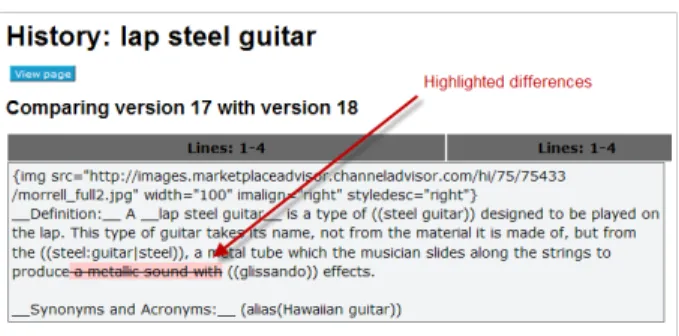
Figure 4: Viewing differences between two revi-sions of a term.
the user searches for “Hawaiian guitar”, he will get a hit, and by clicking on that hit, he will be brought automatically to the lap steel guitar entry. This is very useful in a translation context because it en-sures that the user can find the equivalent of lap
steel guitar in other languages, independently of
whether he searched using that specific term or one of its synonyms. It also means that when consult-ing the entry for a term, he can see all the the other equivalents for that term in the Synonyms and
ac-ronyms section.
To create an equivalent for a term in another language, one simply hits the Translate button loc-ated at the bottom of the page. The user can then choose the language of the equivalent, and specify the equivalent in that language. A new page is cre-ated, filled with the content of the original “source language” term, and opened for editing as in Fig-ure 2. The user can then either “translate” the term entry, or start from scratch using the empty term template in the target language.
4.5 Tracking changes made to terms and re-pairing damage
Like Wikipedia and most wikis, Tiki-CMT allows users to monitor changes made to pages, and easily repair damage (whether malicious or unintentional). By clicking on the watch page icon (the eye at the top of a term entry on Figure 1), a user can ask to be notified by email of every change made to that term. From that notice, he can access a lists of each and every version of that page ever made since its initial creation (Figure 3). For each revision, the system also provides the name of the person who created it, as well as a short de-scription of the nature and purpose of the changes made in that revision. Clicking on the Compare button, the user then sees the differences between the new version and the one that immediately pre-ceded it (Figure 4). If he deems that changes to be inappropriate, he can rollback to the previous ver-sion by clicking on the small b beside it.
This rollback will usually result in a notice be-ing sent back to the user who made the original change (assuming that this other user is watching the page). If he disagrees with the rollback, the second user may decide to contact the first user, in order to discuss and negotiate the difference of opinion. This dialog may be done by email, but more typically, by posting comments below the
term in dispute, so that the discussion is docu-mented on the term's page.
Note that the user is not limited to comparing changes made between the latest version and the one that preceded it. Indeed, he can pick any two versions and compare them. Users often employ this to find differences between the current version and the last version that they themselves produced. Also, users are not limited to watching a single page and can track the site as a whole. In a context where terminologists collaborate on a thematic search with colleagues and domain experts, these global watch features can be useful for staying abreast of the work being done by others. For ex-ample the user may ask to be notified of the cre-ation of any new term. Or, he may look at the
Since your last visit widget (lower right on Figure
1), which shows changes that have happened most recently on the site.
4.6 Asking a question to other users
If a translator looks for an equivalent for a term in a different language and does not find it, he may want to ask a question to other members of the community. The easiest way to do this is by post-ing the question on one of the site's discussion for-ums. By default, Tiki-CMT includes one forum for general questions which are not related to terms per-say (ex: “How do I do X on the wiki?”), and one forum for terminology question in each of the language pairs supported by the site.
However, a more wiki way of asking a question is to create an entry for the term in the source lan-guage, post a comment on that page asking how to translate it in the target language, and then click on the watch page icon. Assuming someone else is watching the creation of new pages, he may then answer the comment and create the equivalent in the other language. The advantage of this second approach is that the process of asking and answer-ing the question ends up generatanswer-ing term entries in both languages. With the discussion forum ap-proach, someone must eventually synthesize the answers and generate entries for the term and its equivalent, something which people may forget to do, or not be bothered to do once they have an an-swer to their question.
We have presented Tiki-CMT, a system that com-bines features of both Terminology Database Man-agement Systems and collaborative wiki systems, to support Collaborative Multilingual Terminology work.
The system is currently deployed at the Québec Agence d'évaluation des technologies et modes d'intervention en santé (AETMIS)8, which is using
it to allow terminogists and domain experts to col-laborate on trilingual (English, French and Span-ish) terminology in the field of health technology. It is also being deployed for a similar similar pur-pose at the Canadian Urban Transportation Associ-ation (CUTA)9, to create bilingual (English and
French) terminology in the area of sustainable urb-an trurb-ansportation.
Finally, the Network of Translators in Education (NTE/RTE)10, is deploying it to foster sharing of
terminology expertise among Canadian translators working in the field of education. Here, the system is being used to replace an existing conventional TDB, which RTE perceives as being too rigid, complex, far from the users of terminology and, above all, static. Their hope is that Tiki-CMT will result in a more dynamic resource that will encour-age participation by education translators as well as domain experts in that field. In turn, they hope that this will lead to a significant increase in con-tent, as well as closer and more dynamic profes-sional ties between members of their constituency.
There are still many ways in which the system could be improved. At the moment, we do not sup-port any means of putting seals of approval on terms. We plan to add this feature using Tiki's cat-egory system. These are tags which can be as-signed to a page, and be made visible to its readers. Moreover, permissions can be on a category, so that only users of a certain group are allowed to as-sign it to pages. By creating a category Approved, which can only be assigned by members of a new group called Normalizer, we should be able to sup-port some kind of terminological standardization.
Categories could also be used to assign domains to terms, based on a pre-established ontology. This would allow users to see the domain a particular term or equivalent, but would also allow searching and browsing of terms by domain.
8
AETMIS: ttp://www.aetmis.gouv.qc.ca/.
9 CUTA: http://www.cutaactu.ca/. 10
NTE/RTE: http://www.rte-nte.ca/.
At the moment, a major irritant when translating a term based on its equivalent in another language is that one needs to translate not only the content of the entry (ex: the definition), but also all the field names (ex: Synonyms and Acronyms). Fortunately, Tiki has a {TR} markup element which can be used to mark a string for automatic translation by a translation table whose content is customizable by site admins. Therefore, it should be possible to ad-dress the problem by activating this markup ele-ment and using it to mark field names the term template.
Tiki also has components for voting on a page or parts of it. This could be used to allow users to vote on which equivalent or synonym they find most appropriate for a given term. Chat rooms are another standard Tiki building block which could be put to use, for example, to allow more direct and synchronous communication between users when negotiating differences of opinion about a particular term. Each term would have an associ-ated chat room in which a user could invite any number of other people to discuss the term, and the log of this chat would be attached to the page for future reference, just like for comments.
When setting out to build a CMT system, a nat-ural question to ask is whether one should start from a Terminology Database Management system and add collaborative functionality to it, or start from a collaborative platform and add terminology building functionality. We took the second path, and have not had cause to regret it. As the above discussion illustrates, Tiki possesses a very large set of building blocks which can be put to good use rapidly (usually in a matter of a couple of days) to implement a wide range of features for collabora-tion.
One thing that we lose by using a wiki system is the luxury of having term data be formally struc-tured as fields in a database, as opposed to the somewhat free-form sections of a wiki page. Among other things, it means that users must enter data in the form of wiki-markup, whereas a proper TDBMS can support a more intuitive forms-based interface. Also, it means that the system cannot en-force consistency in the presentation of records (al-though it can encourage it through templates), and that when a template is changed, it cannot be ap-plied retroactively to existing entries.
But all in all, this seems a small price to pay for having such powerful building blocks for creating
collaborative features. That said, all of the collab-orative features described in this paper could be added (although probably with more effort) to a conventional TDBMS, and we hope that this paper will serve as a source of inspiration and guidance for TDBMS developers who might want to do this.
Acknowledgments
The authors are indebted to André Guyon, of the Translation Bureau of Canada, who provided early feedback on Tiki-CMT and on this paper. We would also like to thank the various pilot users who tried Tiki-CMT and provided us with addi-tional feedback, and in particular: Andrée Sirois, Michel Cayouette and Eric Schvartz of NTE/RTE.
References
Bryant, S. L., Forte, A., Bruckman, A. 2005. Becoming
Wikipedian: Transformation of Participation in a Collaborative Online Encyclopedia. Proceedings of
the 2005 international ACM SIGGROUP conference on Supporting group work table of contents Sanibel Island, Florida, USA
Désilets, A. 2007. Translation Wikified: How will
Massive Online Collaboration Impact the World of Translation? ASLIB Translating and the Computer
29, 29-30 November 2007, London.
Désilets, A., Barrière, C., Quirion, J. 2007. Making
WikiMedia resources more useful for translators.
Proceedings of Wikimania 2007, The International Wikimedia Conference, August 3-5, 2007, Taipei, Taiwan.
Huberdeau, L.-P., Paquet, S., Désilets, A. 2008. The
Cross-Lingual Wiki Engine: Enabling Collaboration Across Language Barriers. Proc. of WikiSym 2008,
Sept 8-10, 2008, Porto, Portugal.
Kittur A. et al. 2007. Power of the few vs. Wisdom of
the crowd: Wikipedia and the rise of the bourgeoisie.
alt.CHI at CHI 2007; 2007 April 28 - May 3, San Jose, CA, USA.
Mader, S. 2007. Wiki patterns. Wiley. ISBN-10: 0470223626.
Priedhorsky, R., Chen, J., Lam, S. T. K., Panciera, K., Terveen, L. Riedl, J. 2007. Creating, Destroying,
and Restoring Value in Wikipedia. Proceedings of the
2007 international ACM conference on Supporting group work, Sanibel Island, Florida, USA.
Riehle, D. 2006. How and Why Wikipedia Works: An
Interview with Angela Beesley, Elisabeth Bauer, and Kizu Naoko. Proc of WikiSym 2006, August 21-23,
2006, Odense, Denmark.
Swartz, A. Who writes wikipedia? http://www.aaronsw.-com/weblog/whowriteswikipedia.
Voss, J. 2005. Measuring Wikipedia. Proc. Scientomet-rics and InfometScientomet-rics. Juen 25-27, 2005, Stockholm, Sweden.