FTL REPORT R85-8
AN ADVANCED SITUATION DISPLAY FOR AIR TRAFFIC CONTROL
Solly Ezekiel
A A
FLIGHT TRANSPORTATION LABORATORY REPORT R85-8
AN ADVANCED SITUATION DISPLAY
FOR AIR TRAFFIC CONTROL
Solly Ezekiel
FLIGHT TRANSPORTATION LABORATORY
MASSACHUSETTS INSTITUTE OF TECHNOLOGY
CAMBRIDGE, MASSACHUSETTS 02139
AN ADVANCED SITUATION DISPLAY FOR AIR TRAFFIC CONTROL
by
SOLLY EZEKIEL
Submitted to the Department of Aeronautics and Astronautics on May 10, 1985 in partial fulfillment of the requirements for the degree of Master of Science in Aeronautics and Astronautics.
Abstract
A new approach to presenting Air Traffic Control (ATC) situation in-formation to controllers has been devised and implemented. The approach allows the controller to spend more time analyzing traffic trends by de-creasing the effort required to issue flight vectors; increases the amount of information available to the controller through the situation display; im-proves the presentation of altitude information; and interfaces the controller with an improved ground-to-air communication system.
These objectives necessitated the use of a raster display device; the particular hardware used for the implementation was a Digital Equipment Corporation (DEC) 100 display. Although the VAXstation-100 machine was adequate for the task, the effort identified shortcomings of raster display technology that must be rectified before raster machines may be used for ATC applications. In particular, the window management system should handle non-rectangular bitmaps.
The use of a positional entry device (PED) was found to be beneficial in accessing the functions of the advanced display, and in alleviating controller workload by reducing the amount of verbal controller-pilot communication. It was found that the functions specified above can be implemented on existing hardware, but that the functions require large computational resources to operate in real time. More data are needed before the benefits of the functions can be quantified.
Acknowledgements
Without a doubt, the first person who comes to mind when acknowledg-ing help is Mr. Lyman R. Hazelton. His insight and advice have impacted on nearly every facet of this project. Thanks also to Dr. John Pararas and Professors Simpson and Elias for hackery, proofreading, and ideas, re-spectively. Finally, special thanks to my parents, who never doubted for a minute.
Contents
Abstract 2
Acknowledgements 3
1 Introduction 7
2 Motivation 10
2.1 Symbolic Control of Aircraft . . . . 11
2.2 Reducing Screen Clutter and Improving Data Access . . . . 12
2.3 Jmproving Presentation of Aircraft Altitude Information . . 13
2.4 Streamlining Information Exchange . . . . 15
3 Abstract Functional Description 18 3.1 The Positional Entry Device and Menu-Driven Functions . 18 3.2 The Situation Map . . . . 20
3.3 Aircraft Data Blocks . . . . 23
3.4 Aircraft Flight Plans . . . . 25
3.5 The Clipboard . . . . 27
3.6 The Altitude Brush . . . . 28
3.7 Customizing the Situation Display . . . . 30
4 Prototype Implementation 33 4.1 General Comments . . . . 33
4.2 The M ouse . . . . 34
4.3 Regions and Icons . . . . 34
4.4 The Situation Map . . . . 35
4.6 The Clipboard . . . . 38
4.7 Special Regions . . . . 41
4.8 Displaying Aircraft Data . . . . 45
4.9 The Altitude Filter . . . . 45
4.10 The Numerical Entry Device . . . . 49
5 Design Tradeoffs 50 5.1 Overlap of Icons . . . . 50
5.2 Problems Associated with Bit Mapping Technology . . . . . 53
5.3 Minimum Icon Size . . . . 53
5.4 Computational Power Required . . . . 55
6 Conclusions and Recommendations 56
List of Figures
4.1 ASCW Screen Showing Situation Map . . . . 36
4.2 ASCW Screen Showing Map Border Menu . . . . 37
4.3 ASCW Screen Showing Aircraft Icons . . . . 39
4.4 ASCW Screen Showing Highlighted Aircraft Icons . . . . . 40
4.5 ASCW Screen Showing Command Region Menu . . . . 42
4.6 ASCW Screen Showing Option Region Menu . . . . 44
4.7 ASCW Screen Showing Aircraft Data Menu . . . . 46
4.8 ASCW Screen Showing Altitude Filter on Clipboard . . . . 48
5.1
fnlarged
Single Aircraft Icon . . . . 515.2 Simultaneous Display of Shaded Aircraft Icons (Enlarged) . 52 5.3 Highlighted and Hidden Aircraft Icons (Enlarged) . . . . . 52
Chapter 1
Introduction
Situation displays are an important part of the air traffic control (ATC) system. From these displays, air traffic controllers receive critical
informa-tion about the arrangement of aircraft in the air, which they use in making their control decisions.
In recent years, with the volume of air traffic increasing at major airports due to deregulation, airports must operate at high capacities in order to cope with the flow of arriving traffic [3]. In situations of high traffic volume, air traffic controllers must oversee large numbers of aircraft, particularly in terminal control areas.
The Advanced Symbolic Controller Workstation (ASCW) is designed to act as an interface between the controller and the advanced ATC automa-tion capability that will be emerging in the next few years [5]. It is hoped that displays such as the ASCW, and the advanced air traffic control au-tomation software that drives them, will free controllers from doing many of the tedious tasks required under the present system, allowing them to concentrate on the traffic trends within their sectors instead. The purpose of this research project was to evaluate the feasibility and potential benefits
of the following innovations:
1. Allowing the controller to devote more time to analyzing traffic trends and configuring solutions to the traffic problems in his sector by de-creasing the effort required in issuing flight vectors;
2. Reducing screen clutter and improving the accessibility of aircraft data by categorizing the data and implementing a menu-driven search capability;
3. Improving the presentation of aircraft altitude information; and, 4. Streamlining the exchange of information between controllers and
pi-lots.
Whereas conventional displays are devices that report position infor-mation about aircraft to the controller, the ASCW represents a system, termed the Advanced ATC Automation System, that maintains in-ternal knowledge about aircraft and other objects in the controller's world. The ASCW is a means by which a controller may interact with and change the world around him.
This ASCW project was conducted at the Flight Transportation Lab-oratory (FTL) of the Massachusetts Institute of Technology. One of the areas of research at FTL is the development of ATC systems employing automated decision support functions. These functions are developed and tested in a real-time, manned simulation environment. The ASCW was designed to operate as the display component of these ATC simulations so that development of the system could be carried out under conditions of dynamic ATC simulation.
The major part of this document is composed of the considerations and tradeoffs that were made during the design of the ASCW; the functionality of the display; and the knowledge gained over the course of the project. It is the hope of the author that this work will be used as a source of ideas for advanced situation displays, both for ATC and for general applications. A great deal of work remains to be done in the area of advanced situation displays; recommendations for future research are made in the final chapter of this thesis.
Chapter 2
Motivation
Conventional air traffic control situation displays resemble maps that present a plan view of the locations of aircraft, navigational aids, and cer-tain geographical features to the controller. Controllers obcer-tain the informa-tion on which they base their decisions from these situainforma-tion displays, with auxiliary, information coming from communication with pilots and other controllers, flight strips, weather reports, and so on.
The Advanced Symbolic Controller Workstation (ASCW) project pre-sented a testbed environment for the design criteria of a situation display that would improve controller productivity by allowing each controller to oversee more aircraft. The insight gained from the implementation of the ASCW provided useful guidelines for the design of advanced ATC displays. Finally, the tradeoffs that were made during the design of the ASCW pro-vided insight into the shortcomings of current display technology, and sug-gested ways in which this technology might be improved.
The following four sections of this chapter each outline one of the in-novations introduced by the Advanced Symbolic Controller Workstation. Briefly, the innovations are:
1. Allowing the controller to spend less effort issuing detailed flight vec-tors, and to play a more strategic role as a traffic manager.
2. Reducing screen clutter and increasing the amount of data available to the controller by categorizing the data and allowing the controller to access information through a menu-driven search utility;
3. Introducing an aid for the controller in visualizing the vertical traffic situation; and,
4. Streamlining the exchange of information between controllers and pi-lots.
2.1
Symbolic Control of Aircraft
Clearly, the efficiency of a controller would be improved by automating the more mechanical tasks, and the Advanced Symbolic Controller Work-station was designed to allow the automation of some of these tasks. How-ever, the greatest improvement would be gained not by mechanizing as many tasks as possible, but by allowing symbolic control of aircraft through the situation display. The idea of symbolic control can be stated as fol-lows: The controller is to be allowed to specify on a map the solutions to
the traffic problems he perceives, and automation software will generate the instructions needed to bring about those solutions.
An ATC situation display that enables symbolic control to be exercised over aircraft is termed a Symbolic Situation Display. Such a display would increase controller productivity by allowing a controller to concen-trate on the larger issues within his sector.
2.2
Reducing Screen Clutter and Improving
Data Access
When an ATC situation display presents the traffic situation in plan view, the horizontal distance separating the various objects in the sector can readily be discerned; to give controllers the altitude information they require to create a mental picture of the vertical traffic distribution, conven-tional displays present a data block beside or beneath each aircraft image showing the altitude if it is known.
Data blocks occupy valuable space on the display screen, and this limits the amount of data that can be displayed in the data block; furthermore, in situations of high traffic congestion, data blocks can unnecessarily clut-ter the display. This problem would be alleviated if the controller could specifically request aircraft data from the Advanced ATC Automation Sys-tem software; in this way, only those data blocks containing information of immediate concern to the controller would be displayed on the screen.
A system under which the controller may call up data has additional advantages. Since fewer data blocks would be visible at a given time, the data blocks can be made larger; furthermore, it is possible to categorize the data, so that the controller may request only a particular class of data to be displayed. For example, the data might be categorized into flight plan data, information regarding the aircraft such as weight classification, and information regarding the pilot, such as ratings held. This information may already be available to the controller under the present system, for example through flight display strips; however, the information is not available to the controller in real time through the situation display. Allowing the controller to access this information through the display would speed access
time, reduce the risk of an error, and reduce screen clutter caused by data blocks.
Finally, other data about the aircraft can be made available to the controller. One example of information that might benefit the controller is the heading of an aircraft. Under the present system, there is no way to tell the controller of the heading of an aircraft in flight. When a controller tells a pilot to look for traffic "at two o'clock," he is guessing at the aircraft heading, given the track and the estimated winds aloft. This problem exists because there is as yet no vehicle for communicating this information from the aircraft to the ground, and might be a feature that advanced situation
displays should include.
If the data block is hidden, it is possible for a dangerous situation to arise and for the controller not to notice the danger. An example of such a situation is an aircraft straying below the minimum safe altitude. Assuming that the'Advanced ATC Automation System software can recognize the situation as dangerous, there should be a way for the display to draw the attention of the controller to the aircraft in question, or to display the data block automatically.
2.3
Improving Presentation of Aircraft
Al-titude Information
In general, if the overall traffic situation is to be presented to the con-troller in plan view, there is no easy way of showing the vertical distribution of aircraft at the same time. One solution to this problem is to present the controller with a second display screen showing the traffic situation in side view. However, since aircraft altitude is discretized into flight levels, two
aircraft at the same flight level would hide one another during an encounter; furthermore, there is the question of which direction the side view should be taken from, which might mislead the controller. Finally, there is an in-creased chance of a mistake on the part of the controller if he must monitor two displays simultaneously.
One possible solution is to give the controller a tool with which he can temporarily visualize the vertical distribution of aircraft. This tool would not be able to operate continuously without causing the display to become cluttered; but on an instruction from the controller, this tool might give the controller a "snapshot" view of the vertical traffic distribution.
An example of such a tool is termed the "altitude brush" concept. The altitude brush would appear on the situation display as a column of num-bers, each representing a flight level. Using a positional entry device, such as a trackball, the controller would sweep through this range of altitudes. When the trackball indicator is within a selected tolerance of the flight level of an aircraft, the image of that aircraft on the display screen would indicate this fact by changing its appearance, perhaps by brightening or by changing color. In this way, the controller could quickly find all of the aircraft at a certain altitude or within a given altitude range.
This function might be extended to allow only images of those aircraft within a given altitude range, or those predicted to enter that range in the near future, to appear on the traffic situation display. This capability necessitates the use of altitude tracking to estimate the current altitude of the aircraft.
When aircraft that are climbing or descending encounter one another, the geometry of the encounter can be complex, and rather than relying on
altitude to maintain separation standards, controllers will try to use lateral separation instead. However, there are times when there is no alternative but to allow one aircraft to pass over another. When this happens, the controller must be informed whether the converging aircraft are sufficiently separated in altitude to maintain safety standards. In this situation, it would benefit a controller to be presented with the vertical situation graph-ically, rather than to have to create a mental picture of the encounter.
An example of a mechanism to allow the controller to visualize the vertical aircraft distribution would be to present a side view of the pair of aircraft in question. It was mentioned at the beginning of this section that a lateral view would be confusing; however, if only two aircraft are displayed, a lateral view can be a useful aid in visualizing the situation. A problem arises when the converging aircraft are not travelling head-on to one another; in that case, the lateral view may be misleading. A possible solution 'to this problem would be to convert the actual situation to an equivalent head-on encounter.
2.4
Streamlining Information Exchange
When using a conventional traffic situation display, a controller exer-cises his control over aircraft by voice transmission, since a conventional display cannot convey instructions of the behalf of the controller to the pilot. Rather, a conventional display is designed to serve only as a means of reporting aircraft activity to the controller.
For the controller, this means that most of the input information comes from the situation display, while all of the output information goes out by voice transmission. In effect, the controller is being asked to make a
transformation between these representations of the information during the time he is assimilating the data and making his control decisions. It is worth investigating the possibility of decreasing the workload of the controller by decreasing the amount of information that he has to transform in this way, or perhaps to eliminate the need for this transformation altogether.
Functionally, this means that the Advanced ATC Automation Sys-tem software must be made to understand instructions from the controller through the medium of the ASCW. If this were accomplished, it would be possible for a controller to issue instructions through the display to the au-tomation system, which would in turn to issue instructions to the aircraft. For example, if the controller wishes to specify a flight plan that a pilot is to fly to, he might issue the instruction to the Advanced ATC Automa-tion System software by drawing the flight plan on his situaAutoma-tion display screen with a positional entry device; then, the specified flight plan would be interpreted by the automation software and a list of flight vectors would be created. These vectors would be issued to the pilot at the appropri-ate times, perhaps through a speech synthesizer or by digital transmission. Additionally, if the flight vectors were explicitly stored by the Advanced ATC Automation System software, the aircraft path conformance could be monitored.
Of course, not all flight vectors can be committed to automation in this way; there are always special instructions that controllers must give pilots that would either be too tedious to automate, or too tedious for controllers to invoke if they were automated. If a controller may instruct the Advanced ATC Automation System through the situation display to issue a vector to a pilot when a given condition is met (when the aircraft passes a
speci-fled waypoint, for example) then the controller could be freed from having to issue that instruction himself, and could queue instructions for future transmission. This functionality would be useful during periods of high controller workload; not only would many of the flight vectors be generated automatically, but the controller could take advantage of periods of calm to ease his workload during busy periods by queueing future instructions to pilots.
It should be noted that much of this functionality is predicated on the availability of some type of digital communication capability, such as the DABS system. When digital communication with aircraft is employed, it becomes possible to transcribe the content of controller-pilot conversations for future access by either the controller or the pilot. The advantages to such a system would be many:
* Thp controller could review his previous or future instructions to pi-lots, for example to recall an instruction such as a flight heading. " The pilot could review the instructions given him by the controller,
for example to recall or verify his commanded altitude.
" The conversation transcripts would be accessible by other controllers or supervisors, for example to brief them about the current air traffic situation.
" Acknowledgement of flight vectors could be at least partially auto-mated. For example, a cockpit display might be designed to receive flight vectors, beep or blink to attract the attention of the pilot, and send an acknowledgement message to the ground after the pilot has read the instruction.
Chapter 3
Abstract Functional
Description
3.1
The Positional Entry Device and
Menu-Driven Functions
In this document, a positional entry device (PED) means any device that translates a physical movement, for example the movement of a posi-tion sensor over a tabletop, into a pair of coordinates on a display screen. When the user physically moves the PED, a marker, termed the PED
pointer, or simply the pointer, moves on the display screen in a
corre-sponding fashion. PEDs are commonly used to single out an object on the display screen for a predefined operation by moving the PED pointer into that
object
and then depressing a button on the PED. For example, if the user wishes to select an item from a menu appearing on a display screen, he moves the PED until the PED pointer overlaps the item in question, and then depresses the button on the PED. This procedure is termed selecting the item. It is worth noting that conventional ATC situation displays make some use of PEDs in the form of trackballs for some operations, such as thecorrelation of data blocks with aircraft; however, relatively little control is exercised by the controller over the display through the PED.
Because data entry in menu-driven applications can be accomplished more quickly through a PED than through a numerical keyboard, controller workload can be alleviated by allowing the controller to interact with the
situation display through a PED. The situation display should be designed to maximize the controller-station interaction handled through the PED, and to make as much of the functionality of the display available through menus.
Menu-driven display systems present several advantages. First, the user is kept informed of all of the options available to him. Although it is to be expected that controllers will be well-trained in any systems that they will use, a controller may not be able to retain the entire range of advanced ATC automation functions available to him for instantaneous recall. Therefore, menus cdn cue the controller about the choices he is faced with.
Menus provide a uniform interface between the controller and the func-tions that he may invoke. Since all funcfunc-tions appear as menu items, the addition of a new item does not constitute a large change in the format of the options a controller is presented with. Accustoming controllers to new functions is therefore facilitated.
The ease with which menus can be modified has some interesting impli-cations. For example, controllers may be given the choice of how they wish the sequence of menu options to be presented to them. This choice can be made on a per-controller basis.
Another example of the benefits of easy menu changes involves the cer-tification of controllers to invoke particular functions. It is possible for a
controller to be authorized to operate an advanced situation display with-out authorization to invoke all of the functions available; if this is the case, the menu items corresponding to the disallowed functions can simply be removed from the options menu. As the controller receives certification to utilize functions, the appropriate menu items can be placed on the option menu.
3.2
The Situation Map
The function of the situation map is to present the controller with a plan view of the locations of aircraft, navaids, and geographical artifacts. This is the most important information used by the controller in making his control decisions, and the situation map therefore occupies the largest and most conspicuous area on the situation display screen.
Sincerthe information used to create situation maps comes from radar sensors, situation maps have traditionally resembled radar displays. Mod-ern situation maps incorporate data from several radar sensors, and "mo-saic" the information to create a composite image of the map.
Under the Advanced ATC Automation System, it is expected that con-trollers will spend more of their time analyzing traffic trends [4]; therefore, it is reasonable to expect that controllers will need more information about traffic conditions, both within their sectors and within other sectors. It is desirable to implement a method of allowing controllers to view the traffic situation in other sectors.
Allowing a controller to view the traffic situation in other sectors neces-sitates the availability of a real-time traffic database that can be accessed by all controllers. From the standpoint of the controller, this means that
a library of situation maps must be available for viewing on his situation display. The list of maps can be presented to the controller in menu form, and displaying a map can be accomplished by selecting the appropriate
item on the map menu, as described in Section 3.1.
The existence of a real-time traffic database has some interesting conse-quences. For example, the creation of a situation map can be accomplished in real time, so that a controller may specify which section of the area cov-ered by the database he wishes to examine. There are many ways for the controller to specify which area the map is to show, and how large an area
the map is to cover. Two examples are listed below:
* The controller might wish to view the traffic between two VOR sta-tions; or,
* The controller might wish to view the situation within a given radius of a Terminal Control Area (TCA).
It would save the controller time to be able to enter the position in-formation needed to specify a new situation map with the positional entry device. However, the areas covered by the proposed situation map would already have to exist on other situation maps so that the controller could select them with the PED. A solution to this problem would be to have a master situation map, large enough to cover the entire local area, and from which the controller could select sections to be enlarged. If air traffic were displayed on the master situation map, it is likely that the map would ap-pear cluttered because of its scale; on the other hand, displaying the traffic on the master map would give the controller a way to examine the entire local area and to decide where the traffic bottlenecks are likely to crop up.
If a controller is allowed to observe different situation maps, it is possi-ble that he may become confused about the scale and location of the map currently displayed on his screen. This is even more likely if the controller is allowed to create maps of arbitrary scale and location. Therefore, the controller must be kept informed about the scale and location of the map currently displayed on his workstation screen. Conventional situation dis-plays present scale information in the form of range rings, usually centered on the radar sensor supplying information to the traffic display. Although conventional displays can present several different sectors, a given controller is certified to control sufficiently few sectors that the risk of becoming dis-oriented is small, and there is no need to present the controller with location information.
It would be inappropriate to use range rings to display map scale on advanced situation maps. The reason for this is that the map is not centered on a single radar sensor, but is instead a mosaic, so that the meaning of the center of the range rings would be unclear. A grid of lines might be more suited; alternatively, the map scale might be displayed in writing along the edge of the map.
To give controllers information about the location of a map, several objects, for example geographical artifacts or navigational beacons, might be labeled. This would have the additional advantage of giving some scale information. However, it is desirable to leave the situation map as unclut-tered as possible; therefore, only the item on the map closest to the map center might be labeled. Alternatively, only those items specified by the controller during the creation of the map might be labeled.
3.3
Aircraft Data Blocks
Aircraft icons, or the images of aircraft on the traffic situation display screen, serve to keep the controller informed about the locations of the aircraft within the sector. With the availability of such data as altitude, supplied by altitude transponders, there is more information available for display than can be conveyed through the location of icons on the display screen.
Conventional displays present the additional data in the form of a list, or "data block," displayed beneath or beside the aircraft position marker on the display screen. At present, the data presented in the data block include the altitude and name of the aircraft. It is to be expected that, as additional data become available, the size of the data block will grow correspondingly.
Because data blocks are always visible on the display screen, and be-cause display screen space is at a premium, the addition on a new item of information to the data block is a rare occurrence. Only those items of in-formation considered essential to the task of the controller are displayed in the data block. Many items of information are unavailable to the controller through the situation display because they are not important enough to appear in the data block.
Since the controller is never examining the data blocks of all aircraft simultaneously, little of the information presented in the data blocks is being used at any given time. However, because the data blocks are always on display, the short data access time justifies the screen space wasted by data blocks not currently being read.
controller about aircraft will continue to increase. For example, the use of digital communication with aircraft will allow controller-pilot conversations to be transcribed for quick reference; or, aircraft heading information may be telemetered to the ground to aid in radar tracking. Although both of these items would be of use to the controller, neither will appear on the data block; heading information is not important enough, and the transcript would occupy too much space.
If data blocks were not always visible, but could instead be displayed at the instruction of the controller, then the number of data blocks displayed at any given time would be reduced. The amount of screen space available for the display of each data block would then increase. The time required to display the data block need not be long; for example, a data block can be displayed by selecting the icon of the aircraft in question with the PED. Conventional aircraft data blocks do not make an attempt to present the data 'in a structured fashion; rather, there is only a list of items of infor-mation near the aircraft position marker. Implementing a system by which a controller may call up information about the aircraft allows the presenta-tion of informapresenta-tion to be more structured; for example, selecting an aircraft icon might initially bring up a menu of choices of the different categories of data available, such as flight plan data, conversation transcripts, data about the aircraft, and so on.
The sequence of menus that must be traversed in order to reach the desired item of information would represent a tree search, and it may be found that the time needed to reach the data is too long with such a search; in that case, the information likely to be needed quickly, for example alti-tude, might be displayed alongside the first menu. The controller can then
select the aircraft icon to bring up the first data block, and either read the important information from it, or use the menu on it to access other information. This feature might be modified by a controller, as described
in Section 3.1, to quickly bring up the information he relies on most. Finally, an aircraft data block can be made to appear on an instruction from the Advanced ATC Automation System software when the controller needs to be informed of some aspect of the aircraft. For example, if two aircraft are insufficiently separated in altitude, data blocks presenting their altitudes might appear near the aircraft; or, if the flight plan monitoring software detects a deviation from the assigned flight plan (see Section 3.4), the data block containing the assigned flight plan might be displayed for the controller.
3.4
Aircraft Flight Plans
As described in Section 2.1, the greatest improvement in controller ef-ficiency would be gained by allowing the controller to specify the solutions to traffic problems in his sector in abstract form, and by automating the generation of flight vectors that would bring about those solutions.
The level of abstraction at which the solutions should be specified, and the specific formalism used in specifying the solutions, are complex ques-tions that merit further study, and are certainly beyond the scope of this thesis. At the lowest level of abstraction, which is none at all, the con-troller must generate solutions, issue instructions to aircraft, monitor path conformance, and so on, all without mechanized help. At the highest level of abstraction, there would presumably be no need for the controller; the Advanced ATC Automation System software would do the entire job, from
generating solutions to issuing flight vectors and monitoring conformance. As a compromise, it was assumed for this project that the controller would be receiving some automated help with the transmission of vectors and with path conformance, but that the solutions to traffic problems would still originate with the controller.
Having decided where an aircraft is to go to avoid a traffic problem, the controller would create the flight plan by drawing the path on the situation map with the PED. The Advanced ATC Automation software would segment the flight plan into a series of legs, and queue the appropriate flight vectors for transmission to the aircraft. The situation display would allow each aircraft to be associated with a flight plan, so that the creation of a new flight plan could trigger a conflict-detection program.
Path conformance monitoring would be performed by the Advanced ATC Automation System software. Since the system would maintain knowl-edge abdut the aircraft, an intelligent path-conformance program could be implemented; for example, information about aircraft type could be used for monitoring such parameters as airspeed and altitude.
To allow the controller to interact with the assigned flight plans of air-craft, the situation display would maintain a flight plan editing program. The flight plan editor would allow a controller to add or delete legs from the flight plan, to observe existing flight plans, or to create new flight plans. The full functionality of the flight plan editor would be available through the PED.
Functions such as the flight plan editor allow a controller to modify the world through the use of the PED and the traffic situation display. Controllers can be expected to exercise caution when using tools such as
the flight plan editor, but from a standpoint of confidence, it would be desirable to prompt the controller for verification before any instructions that modify the world are put into effect. For example, once a controller has entered a flight plan into the flight plan editor, the situation display software might request that the controller select a special region on the
display screen to verify his intentions.
3.5
The Clipboard
As described in Section 3.3, it is possible to reduce screen clutter by dis-playing aircraft data blocks on the workstation screen only on a temporary basis. Aircraft data blocks are an example of special objects that appear on the screen for only as long as they are required by the controller. Another example of an object that appears on the screen temporarily is the altitude brush, dpscribed in Sections 3.6 and 2.3.
Displaying items on a temporary basis conserves space on the display screen, since a given area on the screen may display several items at different times. Furthermore, presenting a controller with only those objects in which he is currently interested helps cue the controller about the actions expected of him.
It would benefit the controller to have an area of the display screen, termed the "clipboard," dedicated to displaying transient items of informa-tion. The clipboard could function as a scratchpad-type area, on which the following items could be displayed:
* Messages from the situation display or from the Advanced ATC Au-tomation System software;
" Items of information requested by the controller, such as information
about aircraft;
" Displays associated with special functions, for example the flight level display of the altitude brush, described in Section 2.3; and,
" Any item of information that the controller might wish to file for future reference. Examples are:
- A note that a controller might wish to leave for himself; or, - A piece of electronic mail from another controller.
In keeping with the philosophy of maximizing the functionality of the display accessible through the PED, the clipboard may be designed so that the controller can perform operations on it with the PED. For example, a controjler might remove an item of information from the clipboard by selecting it with the PED. Because the space on the clipboard is limited, items of information may overlap one another, and the PED might be used by the controller to select which item appears at the top. Also, it would be useful for the controller to be able to clear the entire clipboard at once with the PED.
3.6
The Altitude Brush
The altitude brush concept introduced in Section 2.3, represents a mech-anized aid for the controller in visualizing the vertical distribution of air-craft. This is accomplished by- presenting the controller with a column of numbers signifying flight levels, termed the "flight level display." When
the controller touches a flight level on the flight level display with the PED pointer, all icons of aircraft within a specified tolerance of that flight level
are made to change in appearance.
Since the controller will not require this altitude information on a con-tinuous basis, the flight level display need not always be shown; rather, the flight level display may be brought up on the clipboard (see Section 3.5) at the controller's command.
The altitude brush may serve several functions. First, the flight level display may be used to specify the range of altitudes that the controller is currently interested in; in that case, either all aircraft outside the selected range would not appear on the display at all, or some distinction would be made in the appearance of aircraft icons so as to differentiate those within the selected range.
Alternatively, the flight level display can be used as described in Section 2.3, that'is to say, as a real-time tool to provide a "snapshot" view of the distribution of aircraft in the vertical direction. When the controller moves the PED pointer through a flight level, all icons of aircraft within a specified tolerance of that flight level would change in appearance. The specification of the tolerance can either be done with the PED, or can be entered through the keyboard. It is likely that, once a controller becomes accustomed to using the altitude brush, he will use it frequently and with many different tolerances; therefore, there should be a way for the controller to specify the tolerance quickly.
One way to allow the controller to specify the tolerance quickly using the PED would be to display a pair of pointers, which would delimit the tolerance range, adjacent to the flight level display. Selecting one of the
pointers and moving the PED would cause only that pointer to move; how-ever, selecting the region between the pointers would cause both to move. In this way, the controller would receive visual information not only about the altitude distribution of the aircraft, but about the tolerance range as well.
It is worth noting at this point that there are many situations in which it may be desirable to alter the appearance of some of the aircraft icons on the display screen, an operation termed "highlighting" the icon. For example,
the Advanced ATC Automation System software may use this as a means of attracting the attention of the controller to the icon of a particular aircraft, for example if the aircraft in question had declared an emergency or were deviating from its assigned flight plan. There are many methods by which the appearance of the icon may be made to change, for example by brightening, changing color, blinking, or enlarging. Furthermore, each of these
dhanges
might signify a different condition. It would be of benefit to investigate the different ways in which aircraft icons can be made to change in appearance, and to evaluate the applicability of each alteration to different circumstances in which the attention of the controller might be required.3.7
Customizing the Situation Display
With the use of menu-driven functions and flexible system design, it is possible to implement a situation display whose performance and functions can easily be modified by the operators [2]. There are several reasons why it is desirable to give the capability of modifying the system to the people who will be using it:
" The system can be customized to any particular environment quickly
and efficiently. For example, the system may be modified to take into account the local geography when monitoring aircraft path confor-mance;
" The display can be made to behave differently when used by different controllers. An example of this is allowing controllers to utilize only those functions of the advanced display for which they are certified, as described in Section 3.1; or,
* The display can be customized individually by each controller to suit his own taste. An example of this is modifying the data access search tree described in Section 3.3 to quickly bring up the data that the controller relies on the most.
Allowing a controller to modify the functions of his situation display may seem to be a dangerous idea; however, a privilege system can be im-plemented to allow only certain users to modify the more critical areas of the display. Such privilege systems are already in existence on most modern computers.
To facilitate the modification of displays to individual tastes, it might be advisable to implement an initialization procedure to be invoked at the start of each session with the display, much like a "login" procedure on a computer. As well as being used to establish an environment for the controller, the login procedure might be used to inform the Advanced ATC Automation System software of the identity of the controller; this information can be used for several useful applications. For example, the display can be alerted to the particular traits of the controller, which might
Chapter 4
Prototype Implementation
4.1
General Comments
The Advanced Symbolic Controller Workstation (ASCW) is an exper-imental implementation of a symbolic ATC traffic situation display. The ASCW was developed at the Flight Transportation Laboratory (FTL) of the Massachusetts Institute of Technology, and was designed to run within the environment provided by the LISPSIM, a large air traffic control sim-ulator designed and written at FTL.
The LISPSIM is written entirely in NIL, a dialect of LISP that runs on VAX series computers [1]. The purpose of the LISPSIM is to provide an air traffic control environment for testing innovations such as the ASCW. Furthermore, the LISPSIM simulates air traffic control operations for such analyses as airport runway capacity evaluations. As of this writing, the LISPSIM is still under development by Dr. John Pararas, Prof. Antonio Elias, Mr. Lyman Hazelton, and the author, all of FTL.
The hardware on which the ASCW was implemented is a Digital Equip-ment Corporation (DEC) VAXstation-100, and the software for the ASCW
was written in NIL. The DEC VAXstation-100 is an interactive worksta-tion that includes a display screen, a keyboard, and a posiworksta-tional entry device in the form of a mouse. The VAXstation-100 interfaces with a host VAX computer. The Flight Transportation Laboratory owns a DEC VAX 11/750 machine that runs ATC simulations and serves as the host for the VAXstation-100.
Display software for the VAXstation-100 consists of a set of low-level routines, suppied with the machine, that handle such operations as drawing lines and filling areas; additionally, a set of high-level routines were written by the author to allow an object-oriented display system, such as that described in [6].
4.2
The Mouse
The ppsitional entry device for the VAXstation-100 is a mouse. Most of the interaction between the controller and the ASCW is handled through the mouse, with some additional input handled by a numerical entry device, or keyboard. A button on the mouse allows the user to select an object on the VAXstation screen as descibed in Section 3.1.
Since the mouse was the only PED available with the VAXstation-100, it was not possible to evaluate the relative merits with other types of PEDs, for example trackballs and data tablets. It would be of benefit to compare the performance of controllers using different types of PEDs.
4.3
Regions and Icons
presence of the mouse pointer by creating what are termed selectable
re-gions. When the user moves the mouse pointer into a selectable region,
the region brightens to indicate that the presence of the mouse pointer has been noted. If the user depresses the button on the mouse while the mouse pointer is within a region, a software signal is sent to the host computer indicating that the region has been selected.
The VAXstation-100 screen is highly object-oriented in nature; many different items, for example the images of aircraft and navigational beacons, can coexist on the display screen. In general, these objects are termed "icons;" thus, an "aircraft icon" is the image of an aircraft. Each icon is usually associated with a selectable region so as to enable a controller to select that icon.
4.4
The Situation Map
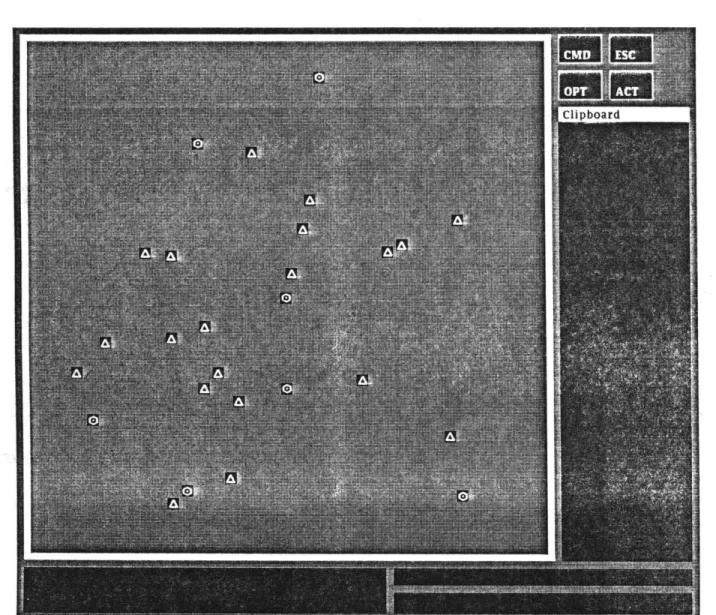
Figure 4.1 shows a typical situation map displayed on the ASCW display screen. The largest area on the ASCW display screen is taken up by the situation map. No aircraft icons are visible in the figure, but navigational artifacts are visible as white triangles (representing waypoints) or hexagons
(representing VOR transmitters) within black squares.
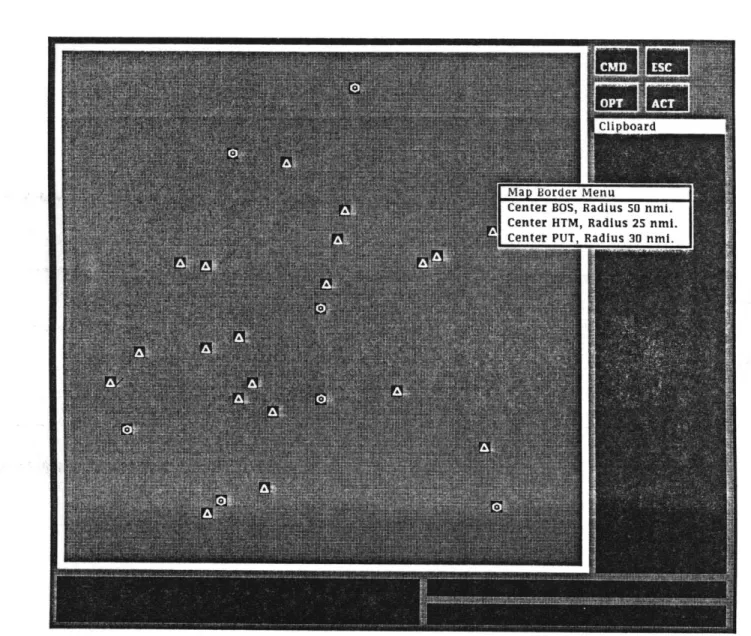
A white border, which is sensitive to the presence of the mouse pointer, separates the situation map from the rest of the ASCW display. When selected, the map border will display a menu of all of the available maps to the controller. Figure 4.2 shows a typical map border menu. The controller may observe other sectors by selecting them through the map border menu. Situation map displays that are implemented on calligraphic machines are by definition line drawings. Since the Advanced Symbolic Controller
map uoraer Center BOS, Center HTM,
idius 50 nmi. adius 25 nmi.
Workstation was implemented on a raster display, this limitation does not apply, and it is possible to shade the various objects on the display screen. Shading the images is desirable, since filled images are more conspicuous than the line drawings found on calligraphic displays. However, when the shaded images were displayed against a black background, it was noted that there was a large amount of contrast between the light and dark areas. In
a darkened room, this contrast led to significant eyestrain.
To alleviate this increase in contrast, it was decided to shade the display background. Furthermore, it was decided to choose the shading so that the map would be readable in a brightened environment. The result is that the situation map is readable in ordinary room light, with no sacrifice in the visibility of the various icons on the screen.
4.5
Aircraft Icons
Figure 4.3 shows a typical ASCW situation map with several aircraft icons visible as black aircraft in plan view within white squares. Heading information is given to the controller through the clock positions of the aircraft silhouettes displayed within the icons.
An aircraft icon can be made to highlight by changing the background color of the icon; Figure 4.4 shows a ASCW situation map with two high-lighted aircraft icons at upper left, visible as white aircraft within black squares.
4.6
The Clipboard
Figure 4.3: ASCW Screen Showing Aircraft Icons
Figure 4.4: ASCW Screen Showing Highlighted Aircraft Icons
screen. While the Advanced Symbolic Controller Workstation is running, messages appear on the clipboard in the form of white or shaded areas
containing written information.
Information usually remains on the clipboard until the controller re-quests that a particular piece of data be removed; alternatively, the con-troller may request that the entire clipboard area be cleared by selecting the white border label at the top of the clipboard.
4.7
Special Regions
There are four special fields on the Advanced Symbolic Controller Work-station display screen that are associated with the more managerial func-tions of the display. These fields are found in the upper right-hand corner of the display screen in Figure 4.1, and appear as four black areas labeled "OPT," "CMD," "ACT," and "ESC." These fields are termed the Option
Region, the Command Region, the Action Region, and the Escape Region,
respectively.
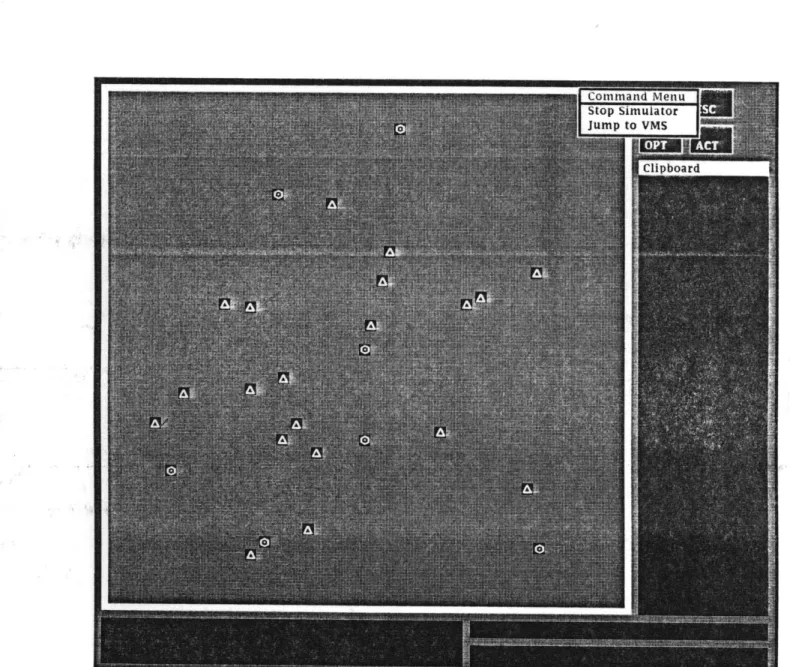
The Command Region is the interface between the ASCW, the ATC simulator that drives the display, and the operating system on the host computer. Selecting this region causes a menu to be brought up that can control the starting and stopping of the simulator, as well as some miscella-neous functions such as leaving the simulation environment and returning to the command level on the computer. A diagram of the ASCW display screen showing the menu associated with the Command Region is shown
in Figure 4.5.
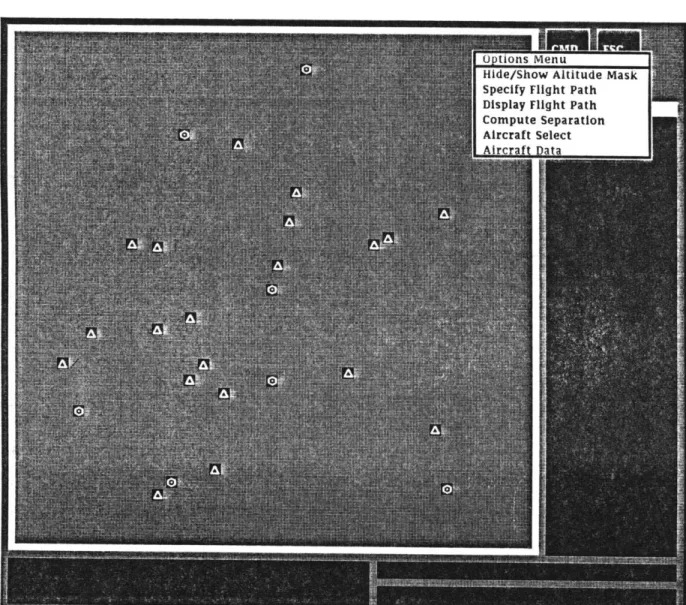
The Option Region controls the most of the special features of the ASCW. Selecting this region causes a menu to be brought up, as shown
-l-v Jumi
in Figure 4.6. The Option Region Menu gives the controller access to the following functions:
" Displaying or removing the current implementation of the altitude brush (see Section 4.9) from the clipboard;
" Computing the distance separating artifacts such as aircraft and nav-aids; and
" Controlling the effect of selecting an aircraft icon. This function changes the action taken by the Advanced ATC Automation Sys-tem software when an aircraft icon is selected. Ordinarily, selecting an aircraft icon causes that icon to be singled out for an operation previously specified by the controller; by selecting this region on the Options Menu, the controller may instead enable the display of air-craft data in response to icon selection.
The Action Region is a region provided so that the Advanced ATC Automation System software can request verification of an action from the controller, as explained in Section 3.4. The controller may select this region with the mouse in order to acknowledge the prompt from the Advanced ATC Automation System software.
The Escape Region is the region that the controller may select in order to abort from any pending operation. When the Escape Region is selected, the ASCW will terminate all pending operations and await further instruc-tions.
Hide/Show Altitude Mask Specify Flight Path Display Flight Path Compute Separation Aircraft Select
4.8
Displaying Aircraft Data
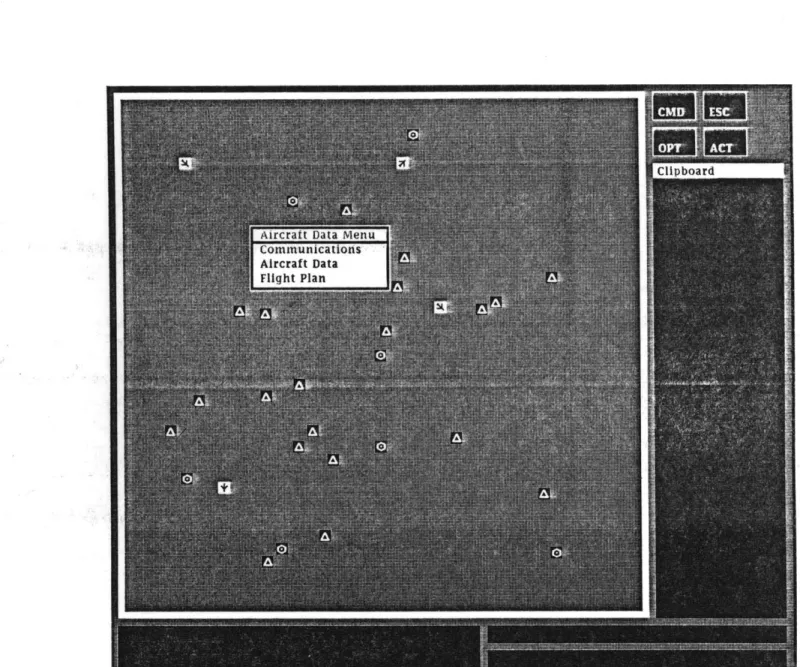
The controller displays aircraft data by first selecting the appropriate item from the Option Region Menu so as to trigger display of aircraft data on icon selection. Selecting an aircraft wil then cause a menu of the available data to be brought up over the aircraft icon, as shown in Figure 4.7. Alternatively, this menu might be displayed upon the clipboard; however, since the menu is visible only for a short period of time, it was felt that having it appear over the aircraft would not present a danger. Selecting one of the regions on the aircraft data menu will cause the appropriate item of information to be displayed upon the clipboard. The controller may request the following information:
1. The current flight plan of the aircraft.
2. A brief transcript of recent digital communications with the aircraft. 3. A brief synopsis of aircraft data, including the type of aircraft, the
name of the pilot, and the weight classification.
4.9
The Altitude Filter
The altitude filter is an implementation of the "altitude brush" concept discussed in Section 3.6. Because of limitations in the computational power of the hardware used for the current implementation, the original idea of the altitude brush was scaled down, and a more limited graphical altitude display designed.
To invoke the altitude filter, the controller first displays the Option Region Menu, and then selects the appropriate menu item to toggle the
Aircralt uata Mel Communications Aircraft Data Fllqht Plan
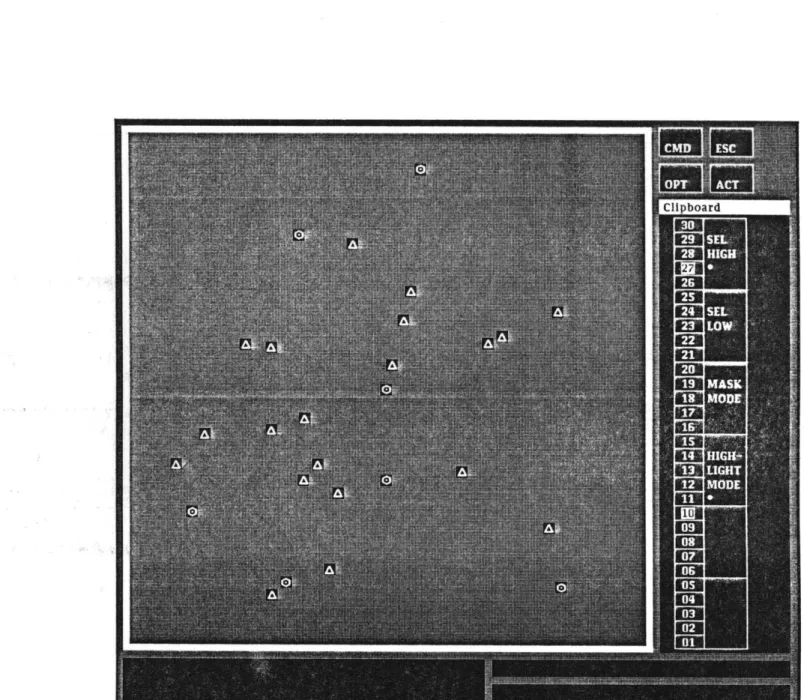
display of the altitude filter, which will appear upon the clipboard. Figure 4.8 shows the altitude filter displayed on the clipboard.
There are three distinct fields visible on the altitude filter. First, there is a set of altitude markers that can be selected by the controller to set the altitude range of interest. The selected altitude range is displayed by highlighting the pair of altitude pointers that delimit the selected range. To change one of these pointers, the controller selects the new altitude with the positional entry device. The new altitude will highlight, and the old altitude will return to its normal appearance.
The second field on the altitude filter consists of a pair of regions with the labels "Set High" and "Set Low". These regions change the effect of selecting a new altitude, namely, whether the new selected altitude will be at the high end or the low end of the range. Attempting to set the low altitude pointer higher than the high altitude pointer, or the high altitude pointer 16wer than the low altitude pointer, will change neither pointer.
The final field on the altitude filter consists of a pair of regions with the labels "Mask Mode" and "Highlight Mode". The altitude filter can mask aircraft by altitude in two ways. First, all aircraft outside of the specified altitude range may simply be erased. This mode of operation is termed
mask mode. Alternatively, all aircraft may be displayed, and the aircraft
within specified range are highlighted. This mode is termed highlight mode. When an aircraft changes altitude, the ASCW software updates the status of the aircraft icon on the situation map display.
An alternative implementation of the altitude filter would be to have the controller enter the altitudes delimiting the range in which he is inter-ested through the keyboard. The current implementation was chosen both
Figure 4.8: ASCW Screen Showing Altitude Filter on Clipboard
for its similarity to the altitude brush concept, and to save the controller the inconvenience of having to type the numbers in and possibly make a mistake.
4.10
The Numerical Entry Device
In addition to using a positional entry device for input, the Advanced Symbolic Controller Workstation may accept input from a numerical entry device, or keyboard. One of the design objectives of the ASCW having been to make full functionality of the display available to the controller through the mouse, the keyboard is not strictly a functional component of the ASCW. However, since the ASCW was developed in an environment of ATC simulation, a keyboard was considered a necessity to enable the programmers to interact with the simulator while the simulator was in operation,; furthermore, as more functions are added to the ASCW, it is likely that a keyboard will become a more necessary part of the functionality of the workstation.
There are several distinct operations for which the keyboard can be used. For example, the ATC simulator can be programmed in real time through the keyboard; or, data can be entered, for example to specify the location and scale of a situation map. Therefore, several typeout areas may be included in the display, with each area being used to display keyboard input of a different type.
Chapter 5
Design Tradeoffs
The tradeoffs made during the design and implementation of the Ad-vanced Symbolic Controller Workstation suggested several shortcomings of current display technology and how these shortcomings might be recti-fied. Many of these shortcomings stem from the fact that the hardware on which the ASCW is currently implemented was not designed to support an interactive ATC situation display, and in general no display device is yet in existence that can perform all of the functions required to interface a controller with the Advanced ATC Automation System software.
5.1
Overlap of Icons
One of the reasons that conventional ATC situation displays utilize calligraphic screens is that these devices produce line drawings, which may be allowed to overlap without obliterating one another. However, when
icons are shaded, such as on the ASCW, they cannot in general share parts of the screen; when two shaded icons overlap, one icon must cover part or all of the other icon.
Figure 5.1: Enlarged Single Aircraft Icon
Figure 5.1 shows an enlarged view of an aircraft icon identical to those shown in Figures 4.3 and 4.4. The texture of the background, and the bit pattern of the icon, can be readily observed in the figure.
It is desirable to allow the controller to see an icon that is beneath another icon, and there are several methods of overlaying icons so that both visible, are at least to some extent. One such strategy is to display the so-called "exclusive-or" of icons, or to illuminate only those pixels illuminated in either (but not both) icons. However, attempts to display the exclusive-or of two icons (see Figure 5.2) have been disappointing.
The solution adopted in the current implementation of the ASCW was to allow one icon to cover the other, and to alert the controller to the fact that there are hidden icons present by highlighting all icons involved. An example of this strategy is shown in Figure 5.3. The controller might further be given real-time control over which of the icons is to appear at the top of the stack of icons.
a it I z a 11
IL 11 it
Figure 5.2: Simultaneous Display of Shaded Aircraft Icons (Enlarged)
Figure 5.3: Highlighted and Hidden Aircraft Icons (Enlarged)
JL -L-JL IL IL
smugness@:
0:8sweves a assuages
5.2
Problems Associated with Bit Mapping
Technology
On a raster display device such as a VAXstation-100, the picture that is displayed on the screen is stored in the form of a "bitmap," or an array of pixels, in the display memory of the machine. The display and movement of icons on the display screen is generally handled by copying bitmaps either from the program memory of the host computer to the display memory, or
between different areas of the display memory.
The screen management software on the VAXstation-100 allows only bitmaps that are rectangular in shape to be copied. This imposes a limita-tion on many of the funclimita-tions of the Advanced Symbolic Controller Work-station; for example, this is the reason that aircraft icons (see Figures 4.3 and 4.4) are rectangular in shape. If it were possible to create circular aircraft icons, the size of the circle might be used as an indication of the lateral separation standards.
5.3
Minimum Icon Size
Calligraphic displays have an advantage over raster machines in res-olution. The lines drawn by vector machines are sharper, and lack the aliasing effects found on raster machines; however, the requirements speci-fied in Chapter 3 would have been difficult to implement on a calligraphic machine.
It would be of benefit to investigate the advantage (if any) of imple-menting an ATC situation display on a raster machine that performs "anti-aliasing," allowing a smooth gradation of pixels from light to dark, over the