HAL Id: hal-01544645
https://hal.archives-ouvertes.fr/hal-01544645
Submitted on 3 Jul 2017
HAL is a multi-disciplinary open access
archive for the deposit and dissemination of
sci-entific research documents, whether they are
pub-lished or not. The documents may come from
teaching and research institutions in France or
abroad, or from public or private research centers.
L’archive ouverte pluridisciplinaire HAL, est
destinée au dépôt et à la diffusion de documents
scientifiques de niveau recherche, publiés ou non,
émanant des établissements d’enseignement et de
recherche français ou étrangers, des laboratoires
publics ou privés.
CamRay: Camera Arrays Support Remote
Collaboration on Wall-Sized Displays
Ignacio Avellino, Cédric Fleury, Wendy Mackay, Michel Beaudouin-Lafon
To cite this version:
Ignacio Avellino, Cédric Fleury, Wendy Mackay, Michel Beaudouin-Lafon. CamRay: Camera Arrays
Support Remote Collaboration on Wall-Sized Displays. CHI ’17, May 2017, Denver, United States.
pp.6718 - 6729, �10.1145/3025453.3025604�. �hal-01544645�
CamRay: Camera Arrays Support
Remote Collaboration on Wall-Sized Displays
Ignacio Avellino
Cédric Fleury
Wendy E. Mackay
Michel Beaudouin-Lafon
LRI, Univ. Paris-Sud, CNRS,
Inria, Université Paris-Saclay
F-91400 Orsay, France
{avellino, cfleury, mackay, mbl}@lri.fr
Figure 1: The WILD (left) and WILDER (right) wall-sized displays running CamRay, and close-ups on the cameras (center).
ABSTRACT
Remote collaboration across wall-sized displays creates a key challenge: how to support audio-video communication among users as they move in front of the display. We present CamRay, a platform that uses camera arrays embedded in wall-sized displays to capture video of users and present it on remote displays according to the users’ positions. We investigate two settings: in Follow-Remote, the position of the video window follows the position of the remote user; in Follow-Local, the video window always appears in front of the local user. We report the results of a controlled experiment showing that with Follow-Remote, participants are faster, use more deictic instruc-tions, interpret them more accurately, and use fewer words. However, some participants preferred the virtual face-to-face created by Follow-Local when checking for their partners’ un-derstanding. We conclude with design recommendations to support remote collaboration across wall-sized displays.
ACM Classification Keywords
H.5.3 [Information Interfaces and Presentation] (e.g. HCI): Group and Organization Interfaces - Computer-supported co-operative work; H.4.3 [Information Systems Applications]: Communications Applications - Computer conferencing, tele-conferencing, and videoconferencing
Author Keywords
Telepresence, Remote collaboration, Wall-sized displays, Camera array
This is the author version of this article.
Permission to make digital or hard copies of all or part of this work for personal or classroom use is granted without fee provided that copies are not made or distributed for profit or commercial advantage and that copies bear this notice and the full citation on the first page. Copyrights for components of this work owned by others than ACM must be honored. Abstracting with credit is permitted. To copy otherwise, or republish, to post on servers or to redistribute to lists, requires prior specific permission and/or a fee. Request permissions from [email protected].
CHI 2017,May 06-11, 2017, Denver, CO, USA © 2017 ACM. ISBN 978-1-4503-4655-9/17/05. . . $15.00 DOI:http://dx.doi.org/10.1145/3025453.3025604
INTRODUCTION
Compared with desktop displays, high-resolution wall-sized displays let users physically navigate large amounts of data [2], scan and find objects more easily [18], and use spatial memory to move and classify objects more efficiently [20]. Because of their large size, such displays also support colocated group work: users can understand and be aware of what their col-leagues are doing, enabling tightly-coupled collaboration [19]. But how can we support such collaboration in remote settings? Current tools for remote collaboration are designed for users sitting at a desk or a video conferencing table, and do not scale to large interactive spaces where users can move.
Our challenge is to create a system in which remote users of wall-sized displays can interact easily with each other, as well as with data on the wall. Most remote collaboration systems use video as an effective surrogate for face-to-face conversation. However, in wall-sized display environments where users move, it is unclear where to position cameras and where to display the captured video.
We introduce CamRay, a platform that captures video of users as they move in front of wall-sized displays using camera ar-rays, and presents this video on remote walls. Using available hardware and open-source platforms, we add cameras to exist-ing large wall-sized displays, stream video to a remote site in real time and display it according to users’ position.
We first examine related work and describe an observational study that informed the design of CamRay, which we then present in detail. We report on an experiment where pairs of users worked on a data manipulation task, while we manip-ulate the position of each other’s video. We conclude with implications for the design of systems for remote collaboration on wall-sized displays and discuss directions for future work.
Our contribution is twofold: 1) CamRay, a platform that cap-tures and displays users as they move in front of wall-sized displays; 2) an experiment that shows how the position of the video feed affects collaboration and communication.
RELATED WORK
We first review Clark’s work on communication as it provides a theoretical basis for our work. We then review previous work on the use of video for remote collaboration and systems that support remote collaboration across large interactive spaces.
Technology-mediated Communication
According to Clark [9], communication is characterized by a series of messages between parties which, once understood, become part of their common ground: the mutual knowledge, beliefs and assumptions shared by partners in communica-tion [9, 10]. Common ground is updated through grounding, the collective process by which participants try to reach mutual belief that what has been said has been understood [8]. This process has a cost in technology-mediated communication, which Clark characterizes and defines [8], e.g., start-up cost to establish communication, delay and asynchrony when it is not purely real-time. Telepresence systems must take these costs into account and attempt to reduce them in order to support effective video-mediated communication.
Personal Video for Remote Collaboration
Previous work has shown the benefits of personal video for remote collaboration. According to Isaacs & Tang [15], a “video channel adds or improves the ability to show under-standing, forecast responses, give non-verbal information, enhance verbal descriptions, manage pauses and express atti-tudes.”Veinott et al. [31] have shown that seeing each other’s faces in collaborative tasks improved the negotiation of com-mon ground, as opposed to using non-video media. Monk & Gale [23] observed that having mutual gaze awareness pro-vides an alternative to non-linguistic channels for awareness of a remote person’s understanding.
Previous work on Media Spaces [4, 22] has leveraged the power of video-mediated communication by creating systems that support peripheral awareness, chance encounters, locating colleagues and other social activities. While Media Spaces have also been used to support focused remote collaboration, they have not emphasized settings where distributed groups work on shared data in large interactive spaces. Our work extends the concept of Media Spaces to such settings. A number of remote collaboration systems have used video to convey more than just people’s faces. Hydras [27] keep spatial relations among remote participants consistent in a multi-party conversation; VideoDraw [30] and VideoWhite-board [29] show the shadow of the remote participant overlaid with the shared space they can draw on. Clearboard [16] ex-pands on this idea by overlapping personal video with a shared task space. More recently, Nguyen & Canny [24] and Bos et al. [5] have explored how trust formation in video confer-encing is affected by spatial distortions and communication channels. Nguyen & Canny [25] also showed how video fram-ing affects empathy. Although previous systems have explored
video as a tool to support remote collaboration, they depend on a static user sitting in front of a display. This does not scale to large interactive spaces that support physical navigation. Personal video has also been used to provide remote awareness in what Buxton calls the reference space [6], by integrating the shared person and task spaces. Three’s Company [28] implements this space by positioning the shadows of the users’ arms on top of shared content, while ImmerseBoard [14] de-forms the user’s arm to place it on top of the content. Although the benefits of reference spaces for video-mediated communi-cation have been demonstrated, research has not focused on wall-sized displays. We believe that creating reference spaces can greatly enhance collaboration across large displays, since they provide ample real-estate to integrate content and people.
Remote Collaboration in Large Interactive Spaces
To support remote collaboration across 3D virtual environ-ments, Beck et al. [3] capture users through depth cameras and present them using a realistic 3D reconstruction in an immer-sive virtual environment. Willert et al. [32] use a 2D array of cameras mounted on the bezels of the screens of a wall-sized display to capture video. They provide an extended window metaphor between two sites, but do not study communication. Dou et al. [11] place RGB and depth cameras on wall-sized displays to capture two remote sites and create a room-sized telepresence system. The goal of this type of systems is to display remote video using the available screen space. They let people see each other and engage in conversation, but make it hard to collaborate on shared objects.
Luff et al. [21] proposed a high-fidelity telepresence system that supports remote collaboration on shared digital objects. Participants engaged in different formations, allowing them to meet the requirements of the task at hand, such as pointing to objects or talking to collaborators. This was possible because physical relations between video and digital objects was kept intact, such that, when users looked or pointed at objects, others knew what they were referring to. Although this system allows to collaborate on digital shared content, our focus is on large interactive spaces where people can walk.
We believe that remote communication on wall-sized displays can benefit from keeping physical relations between people and objects faithful as in a remote site. Avellino et al. [1] used this strategy in a large interactive space and showed that video on wall-sized displays can be used for accurately interpreting deictic gestures: placing video relative to content allows to accurately understand remote indications of shared digital objects. Nonetheless, it does not ensure that people will be able to see each other’s face when collaborating, since they move and might be far from the video.
In summary, previous research has shown that video supports remote collaboration in various settings, but wall-sized dis-plays have received little attention.
OBSERVATIONAL STUDIES
Our goal is to create a system that supports remote collab-oration across wall-sized displays, so that users are able to communicate easily with each other over audio-video links
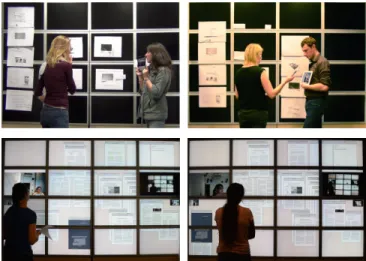
while working on shared content. To inform the design of this system, we created low-fidelity prototypes and conducted sev-eral observations. We simulated two remote sites by dividing a wall-sized display with a curtain, to simplify the setup. In the first prototype, we asked two collaborators to put to-gether a slide show presentation based on text and images from a presentation they had recently worked on. On each side, blank sheets of paper (for blank slides), text clippings, and images were laid out on the display. Two helpers held tablets running a videoconferencing software, enabling col-laborators to see each other. We simulated shared content by manually syncing changes between the two sides (Fig. 2-top). In this session, participants looked at the content on the wall-sized display much more than at each other’s face on the tablets. They only looked at each other when they disagreed, and when they discussed the meaning of objects or where they should be placed. Based on the observation and debriefing, we hypothesized that the participants would have looked at the video feeds more often if they had been located on the wall-sized display, close to the content they were working on. In the second low-fidelity prototype, we displayed the video feeds on the wall-sized display. We set up two cameras on each side: a front camera attached to the bezels of the display, and a back camera placed at the back of the room, facing the display. In this way, we could capture both the face and the back of participants. We asked two collaborators working on a publication to sort their related work using a Wizard-of-Oz prototype application built for this purpose. PDFs of scientific papers were laid out on the two sides of the display; their position and current page were synchronized. Each user had three video feeds (Fig. 2-bottom): on their left, the remote person’s front camera feed; right below, a smaller feed of their own front camera; and, on their right, a feed of the remote back camera. These video feeds had fixed position and size, making it easy to determine when participants looked at them. In this second session, participants physically moved to a spe-cific video feed according to the task they were working on. They used the front-facing camera feed for discussions and arguments about the content of a particular paper, or how to cluster it. They used the back-facing camera feed when in-terpreting references to objects and locations and to maintain common ground—mostly through deictic instructions, e.g., “this one should go there”. In other words, conversational com-municationwas best supported by the front-facing video and gestural communicationby the back-facing video. However, participants had to stop what they were doing to move in front of the fixed video feeds. This interrupted their work and was perceived as annoying.
Based on these observations, it became clear that we needed to capture the users’ faces as they moved in front of the display and present the video feeds in a flexible way. We identified two approaches to place the video feeds:
● close to each user, to support face-to-face conversation; or, ● matching the remote user’s position, to understand where
the user is looking and pointing.
Figure 2. Early observations: assembling a slide-show on a paper proto-type with tablets streaming video (top). Sorting related work with video on the wall-sized display (bottom).
Based on our observations, we believe that the second solution, where the video feed is placed in the context of the shared content, will:
● support the use of deictic instructions in manipulation tasks; ● increase efficiency when manipulating content; and, ● be preferred to other video placements.
However, since we also observed the value of face-to-face communication supported by the first approach, we wanted to create a system that supports both approaches in order to compare them. In addition, while we only observed pairs of users with one user per site, this approach should scale to more than one user at each site, as well as to more than two sites.
CAMRAY: A CAMERA ARRAY FOR TILED DISPLAYS
We created CamRay, a system that adds telepresence capabili-ties to wall-sized displays. Our prototype links two interactive rooms with large tiled displays on our campus:
● WILDconsists of an 8 × 4 grid of 30" LCD screens with 22mm top, left and right bezels and 30mm bottom bezels. It measures 5.5m × 1.8m for a resolution of 20 480 × 6 400 pixels. It is controlled by a cluster of 16 Apple Mac Pros running Linux, each managing two screens.
● WILDERconsists of a 15 × 5 grid of 21.6" LCD screens with 3mm bezels. It measures 5.9m × 2m for a resolution of 14 400 × 4 800 pixels. It is controlled by a cluster of 10 PCs running Linux, each managing a row of 7 or 8 screens. Both wall-sized displays are equipped with a VICON infrared tracking system used to track users with 6 degrees of freedom. We mounted 8 cameras on each display to capture the users’ faces as they move: one camera per column of monitors in WILD(8 in total) and 8 equally-spaced cameras in WILDER. For consistency, we placed the cameras proportionally to the overall horizontal size of each display. On WILD, the cameras are standard Raspberry Pi Camera Modules, placed on the bezels (Fig. 1-left). On WILDER, because of the thinner screen bezels, the cameras are smaller Spy Cameras for Raspberry
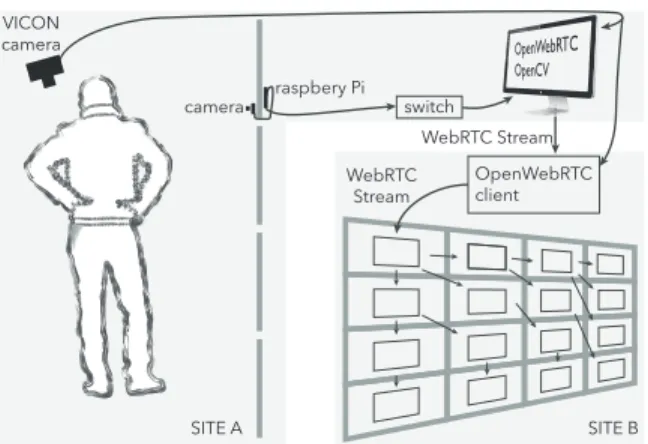
camera raspbery Pi switch OpenWebRTC client WebRTC Stream WebRTC Stream VICON camera SITE A SITE B
Figure 3. CamRay architecture to communicate from site A to site B. A similar setup is used to communicate from site B to site A.
Pi1(8.5mm × 11.3mm) (Fig. 1-right). The cameras are placed on the nearest bezel above eye level on both displays. Each camera is directly connected to a Raspberry Pi2board mounted onto the back of the displays, and the cables are slipped though the gap between two adjacent screens (Fig. 3). The boards are connected using an Ethernet network to a dedicated computer (desktop Mac Pro) that processes the 8 video streams. Each Raspberry Pi captures and encodes video in H.2643 and streams it to the dedicated computer over UDP using GStreamer4, an open source multimedia framework. The videos are captured at 30 frames per second with a resolution of 800 × 600 pixels to avoid overloading the main computer. The dedicated computer runs a custom C++ application based on OpenCV5and OpenWebRTC6. It uses OpenCV to receive all the video streams and automatically select the one that corresponds to the camera in front of the user. To achieve this selection, the custom C++ application receives the user position data sent by the VICON infrared tracking system using Open Sound Control messages. This application uses the OpenWebRTC library to stream the selected video to the remote wall-sized display using the WebRTC protocol, which supports video over firewalls and large-area networks. At the other location, an OpenWebRTC relay server receives the remote video stream and transmits it to the node of the visualization cluster that runs the top-left screen of the wall-sized display. A web application based on NW.js7runs on each node of the cluster. These applications can display the WebRTC video stream that they receive, either from the relay server or from another node, and they can also forward the stream to 2 or 3 others nodes. Using a tree pattern (Fig. 3), all the nodes of the cluster can receive the video stream with low latency. In our experience, this approach is much better than
1
https://www.adafruit.com/products/1937
2
https://www.raspberrypi.org/
3
We use the raspivid command included with Raspbian
4 https://gstreamer.freedesktop.org/ 5http://opencv.org/ 6 http://www.openwebrtc.org/ 7 http://nwjs.io/ Follow-Remote Local Remote Follow-Local Local Remote
Figure 4. The two video modes. The arrows show which participant controls the position of the video displayed at the local site.
overloading the main server by having it send the video feeds to all the cluster nodes at the same time.
Once all the nodes receive the stream, the video of the remote user can be displayed and moved all over the tiled wall-sized display, spanning several screens if necessary. The video window can be displayed on top of any application that may be running on the wall. The relay server notifies all the nodes of the cluster about the position of the video window so that each node can decide whether to display the video or part of it on their associated screens. In addition, the relay server receives the position of the local and remote users through WebSockets, and it uses this information to compute the position of the video window according to the video mode (see below). CamRaycan easily be adapted to a variety of tiled wall-sized displays: the number of cameras can be adapted to the size of the display, and the tree pattern used to distribute the stream can scale to larger clusters. If the main computer becomes overloaded because of the larger number of cameras or higher-quality video, the load can be distributed over several com-puters, each one connected to a subset of the cameras. The WebRTC protocol traverses almost any network, making it possible to connect to diverse sites. CamRay can support more than one user per site since users are identified by the VICON system. CamRay also scales to multiple remote locations be-cause the relay server can simultaneously receive several video streams from different WebRTC connections. In such multi-user, multi-site configurations, CamRay would send one video stream per user and per site, which is still much less than the total number of cameras per site.
Positioning Video Feeds
We implemented the two video modes described in the previ-ous section (Fig. 4):
● Follow-Local: the video window follows the horizontal position of the local user, i.e. the local user has the video window always in front of her. This mode supports, e.g., a face-to-face conversation even if the users are standing at different positions relative to their display.
● Follow-Remote: the video window follows the horizontal position of the remote user. This mode makes it easy to interpret deictic references made by the remote user since
the video feed has the same position relative to the shared content as the remote user.
In both modes the video of the remote user is mirrored hori-zontally to ensure spatial consistency: when a user looks to the left, she is displayed as looking to the left in the video window at the remote location. In other words, the remote user is seen as standing behind the wall-sized display, as in Clearboard [16]. CamRay mirrors the video when capturing it. Face-to-face conversation greatly benefits from eye contact. In video-mediated conversation, eye contact requires that the video feed be close to the camera. CamRay supports arbitrary positioning of the video window, but as recommended by Chen [7], by default it positions the video window right below the closest camera in the camera array. As a result, the video window jumps among 8 discrete positions.
Finally we do not show feedback of the users’ own video, unlike most desktop videoconferencing systems. Surprisingly, nobody asked for it in our observations. Some participants reported that they trust the system to capture them properly, since they do not have to adjust a webcam position as in standard desktop videoconferencing systems.
The two video modes can scale to multiple users and multiple sites. Follow-Remote can simply display the remote users at their remote positions. In case of overlap, the system can either use transparency or a simple physics engine to avoid collisions. For Follow-Local, the system can lay out remote users side by side or in a half-circle, consistently across sites, in the same way as in some multiparty videoconferencing systems.
EXPERIMENT
In order to assess the effects of video position on communica-tion and the trade-offs it incurs, we ran a controlled experiment comparing three ways to display a remote collaborator video on wall-sized displays:
● Follow-Remote: the video windows appears on the wall at the same position as the remote collaborator;
● Follow-Local: the video windows appears on the wall in front of the local user; and
● Side-by-Side(control condition): the fixed video window appears on a separate screen, perpendicular to the wall. In our observations, deictic gestures were better supported when the video was placed in the context of the shared content. Therefore we formulate the following hypotheses:
● H1: participants use more deictic instructions in Follow-Remotethan Follow-Local and Side-by-Side;
● H2: participants manipulate data more efficiently in Follow-Remotethan in Follow-Local and Side-by-Side; and, ● H3: Follow-Remote is preferred for manipulation tasks
when giving and receiving instructions.
Method
The [3 × 2] within-participant design has two primary factors and a secondary factor:
● VIDEO(Follow-Local, Follow-Remote, Side-by-Side); ● LAYOUT(Medium and Hard); and
● ROLE(Instructor and Performer).
LAYOUTcontrols the difficulty of the task, while ROLE ac-counts for the asymetry of the task, as described below. The order of VIDEOconditions is counterbalanced across pairs us-ing a balanced Latin Square; the order of LAYOUTand ROLE
are counterbalanced for each VIDEOcondition.
Participants
We recruited 12 pairs of participants, aged between 23 and 40, all with normal or corrected-to-normal vision, none color blind. Couples were formed as participants were recruited, leading to 9 male-male, 2 female-male and 1 female-female couples. 1 participant used video conferencing systems on a daily basis, 8 on a weekly basis, 6 on a monthly basis, 5 on a yearly basis and 4 almost never.
Hardware and Software
The setup of the experiment is composed of the two wall-sized displays, WILD and WILDER. Local and Follow-Remoteconditions are implemented with CamRay (Fig. 1). The video windows of the remote users move horizontally at a fixed height of 1.75m (center of the window) at both sites. In Side-by-Side, video is displayed on an LCD screen on the left side of the room, at approximately the same height as the window in the other conditions. In all three VIDEOconditions, the video windows have the same size (34.7cm × 26cm). Although WILD and WILDER have different sizes and resolu-tions, we scale the content so that it spans the entire display. We use Webstrates [17] to create and synchronize content. Participants interact with each wall-sized display with a cur-sor controlled by a handheld pointer through raycasting. The pointer is mounted on a smartphone that displays a virtual button for picking and dropping. The orientation and position of the pointers and of the participants’ heads are tracked using the VICON tracking systems in each room.
Procedure
Task Description
During our observations, participants often referred to on-screen objects by pointing and looking at them. To assess whether our setup enables the interpretation of such deictic gestures by remote participants, we need a task that required the production and interpretation of such gestures.
We use a version of Liu et al.’s [20] task, which consists of classifying discs into containers based on their label. In one condition of their experiment, one participant had to tell the other which disc to move into which container. They naturally used deictic instructions, such as “take this one and put it here”. We adapted this abstract data manipulation task to a remote setting: at one site, the Instructor sees the labels and gives instructions, while at the other site, the Performer manipulates the discs. This forces each dyad to produce and interpret deictic instructions.
We divided each wall-sized display into 32 (8 rows × 4 columns) virtual containers holding up to 6 discs each (Fig. 1).
Discs belong to one of 8 classes, represented by the letters C, D, H, N, K, R, X, Z. When more than two discs of the same class are in the same container, they are properly classified and turn green. Misclassified discs are red. On the Instructor side, the disc classes are displayed in a small font (2mm × 2.5mm), forcing the Instructor to move to read the labels.
Layout: when the task begins, the layout features 160 discs, five per container. 12 discs are misclassified, distributed ran-domly across containers. The goal is to classify all the red discs by picking, moving and dropping them into a correct container. We assign a ROLEto each participant: the Instruc-torsees the disc labels but cannot interact with them; the Performer sees green and red discs without labels but can manipulate them with a pointing device. The Instructor must therefore guide the Performer to classify the discs.
We created two types of LAYOUTs by varying the euclidean distance between a red disc and its closest solution8. This dis-tance is between 1.5 and 2.6 for Medium layouts, vs. between 2.7 and 3.5 for Hard layouts. The further away a solution is from a disc, the more navigation is required, making the task harder. We generate random LAYOUTs for both Medium and Hardand pick one at random when starting a new session. Trial description:a trial is the correct classification of a disc. A trial begins when the last disc of the previous trial is dropped, and ends when the disc is correctly classified (which may take several pick and drops).
Participants were welcomed and given paper instructions on how to perform the task. They were instructed to solve the task as quickly and accurately as possible. For each VIDEO condi-tion, each participant performed 2 practice conditions (one for each ROLE), followed by 4 experimental conditions (2 LAY
-OUT×2 ROLE). Participants filled out 5 questionnaires: one for collecting demographic data, one after each VIDEO condi-tion, and one at the end of the experiment. Participants could take a break after each LAYOUTand were encouraged to do so at the end of a VIDEOcondition block. Sessions lasted about 70 minutes including the time to fill out the questionnaires.
Data Collection
We logged each pick and drop event with the time, position of the disc on the screen and number of discs left to classify. Using each room’s VICON tracking system, we recorded kine-matic data of (a) user position, (b) user head direction and (c) cursor movement. Sessions were video recorded.
Pairs assessed their understanding of each other’s actions and use of video in the questionnaire at the end of each VIDEO con-dition. The final questionnaire assessed the strategies and par-ticipant’s preference when acting as Instructor and Performer. We used 5-point Likert scales and open-ended comments.
Analysis Procedure
We analyze three different measures: task performance, move-ment data from the kinematic logs, and conversations.
8
The unit is the size of a container and the distance between two adjacent containers is 1.
Task Performance
We measure performance as Task Completion Time (TCT). The number of pick-and-drops for classifying one disc is a less useful indicator of performance than time, since all layouts were successfully solved with low error rates.TCTis the time required to correctly classify a disc. Since this may require several attempts, TCTstarts when the Performer drops the previous disc and ends on the first drop in the correct container. We observed that some dyads picked one disc immediately and waited for an instruction, whereas others waited for an instruction and then picked a disc. To ensure a fair comparison and account for the time taken to find a container and produce the instruction in all trials, we include the time elapsed from the previous drop until a disc is picked.
Kinematic Analysis
To account for the slightly different sizes of the two wall-sized display, we normalize user position, cursor position and head direction between −1 and 1. After normalization, two users standing at the same relative position, e.g., the center of each room, have the same value, e.g., 0 on the X axis.
Conversational Analysis
Using the sessions’ video recordings, we tagged each pick and drop and coded (I) the Instructor strategy to indicate containers/discs; (II) the Performer error when performing instructions; and, for both roles, (III) the word count, including the amount of deictic instructions.
I. Instructor strategyto indicate containers or discs used the following coding scheme:
● pointing: using the finger to point, no verbal instruction; ● pure deictic: using only deictic instructions (“..goes there”); ● relative to own position: relative to the Instructor’s position
(“here, one up”);
● relative to video: relative to the Instructor’s video (“where I am, second row”);
● relative to disc: relative to where the Performer is moving the disc (“there, one up”);
● relative to container: relative to where the disc is picked (“two to the right, one down”);
● absolute: relative to the display grid (“column 3, row 4”); ● based on previous pick/drop: using the location where the
previous disc was picked or dropped (“put it in the same place as the last one”).
II. Performer error when performing instructions used the following coding scheme:
● understanding error: error when interpreting an instruction; ● instruction error: the Instructor provides a wrong instruction
(the container is not of the same class as the disc); and, ● interaction error: the Performer accidentally drops a disc
while moving it.
III. Word count serves as a measure of the efficiency when producing and understanding instructions. We used a coding scheme based on Gergle et al. [12]. We only coded utterances relevant to instructions, i.e. references to a specific disc and position. We counted words related to acknowledgment of be-havior only when discs were not already dropped and changed
hard medium time (s) 0 5 10 15 15.19 14.06 14.99 14.08 12.39 13.84
follow-local follow-remote side-by-side follow-local follow-remote side-by-side
Figure 5. TCT in seconds for each VIDEO× LAYOUTcondition. Bars show the 95% confidence intervals.
their color to green; once this happened, words were consid-ered redundant for the classification and ignored. We ignored context information not relevant to an instruction (such as discussing the task itself) and back channel responses such as “hmmm”or “so”. Hauber et al. [13] also used this approach for counting words. Politeness forms were not coded, e.g., “could you please”. Finally, repeated terms were counted once, since we identified that many participants repeated utterances, e.g., “that one, yes, yes, yes”).
RESULTS
We registered 4330 pick and drop events (excluding practice trials) and aggregated them into 1728 disc classifications (12 discs * 2 ROLE* 2 LAYOUT* 3 VIDEO* 12 pairs).
Task Performance
We testedTCTfor normality in each VIDEOcondition using a Shapiro-Wilk W test9and found that it was not normally distributed. We tested for goodness-of-fit with a lognormal distribution using Kolmogorov’s D test, which showed a non-significant result for all three VIDEOconditions. Therefore, we ran the analyses using the log-transform ofTCT, as recom-mended by Robertson & Kaptein [26] (p. 316). We also ran all the analyses using the original time data an found the same effects with very similar p values.
We ran an analysis of variance for the modelTCT∼VIDEO× LAYOUT ×Rand(PARTICIPANT) with a REsidual Maximum Likelihood (REML) analysis10. The result of the full factorial analysis (Fig. 5) yields a significant effect on VIDEO(F2,1699= 7.69, p = 0.0005) and LAYOUT(F1,1714=22.41, p < 0.0001); and a non-significant VIDEO× LAYOUTinteraction (F2,1713= 0.50, p = 0.61).
A post-hoc analysis11reveals that in Follow-Remote (MT = 13.23±6.88 s), participants classified discs significantly faster than in Follow-Local (MT = 14.63±7.15 s, p=0.0004) and Side-by-Side (MT = 14.41±7.47 s, p=0.0173). There was no difference between Follow-Local and Side-by-Side. Data
9
All analyses are performed with SAS JMP
10
Unless otherwise specified, all analyses used this method.
11
All post-hoc analysis are performed using a Tukey-Kramer “Hon-estly Significant Difference” (HSD) test
follow-remote follow-local 0 50 100 150 200 0 50 100 150 side-by-side 200 0 50 100 150 200 time (s) time (s) time (s) (a) (b) (c) Performer Cursor Instructor Position
follow-remote follow-local side-by-side 0 -1 1 0 -1 1 0 -1 1 0 50 100 150 200 0 50 100 150 200 0 50 100 150 200 time (s) time (s) time (s) (d) (e) (f) Performer Cursor Instructor Gaze
0 -1 1 0 -1 1 0 -1 1 0.0 0.1 0.2 0.3 0.24 0.19 0.29 0.25 0.21 0.28 Cursor-Gaze Difference follow-localfollow-r emote
side-by-sidefollow-localfollow-r
emote side-by-side hard medium 0.0 0.1 0.2 0.3 0.24 0.17 0.25 0.22 0.14 0.20 Cursor-Position Difference follow-localfollow-r emote
side-by-sidefollow-localfollow-r
emote side-by-side
hard medium
(g) (h)
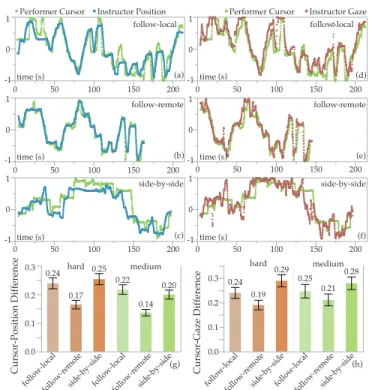
Figure 6. Kinematic data for dyad 9. The paths show a bird’s eye view of the normalized horizontal positions of the participant, cursor and gaze over time. Left: Performer cursor and Instructor position for Follow-Local (a), Follow-Remote (b) and Side-by-Side (c). Right: Performer cursor and Instructorgaze for Follow-Local (d), Follow-Remote (e) and Side-by-Side (f). The histograms show the cursor-position difference (g) and cursor-gaze difference (h) for each VIDEOcondition, with 95% confidence intervals.
shows an improvement of Follow-Remote over Side-by-Side of 8.2% (1.19s); and over Follow-Local of 9.6% (1.41s).
Kinematic Analysis
In Follow-Remote, we observed that after picking a disc, the Performerwould try to predict the target container by looking at the Instructor’s cursor and head direction. Some Performers where even able to interpret target containers with minimal instructions, often following the Instructor and dropping the disc into the container that the Instructor was looking at. We computed two measures to investigate this observation. Cursor-position difference: the horizontal distance between the Performer’s cursor and the Instructor’s position (Fig. 6a-c); and, cursor-gaze difference: the horizontal distance between the Performer’s cursor and the estimated point the Instructor is looking at (based on the direction of the head) (Fig. 6d-f). To get a single value per trial, we average these measures for all kinematic data points between a pick and a drop.
Cursor-Position Difference
We find a significant difference in cursor-position difference for VIDEO (F2,1697=64.09, p < 0.0001) and for LAYOUT
(F1,1711=32.42, p < 0.0001), but not for VIDEO × LAYOUT
(F2,1711=0.023, p = 0.98) (Fig. 6g). A post-hoc analysis shows that Follow-Remote (X = 0.151±0.116) has a signifi-cantly smaller cursor-position difference than Follow-Local (X = 0.228±0.154) and Side-by-Side (X = 0.227±0.155).
Follow-Local Follow-Remote Side-by-Side pure deictic 8 92 43 relative to video 3 318 0 relative to own position 0 0 7 relative to disc 116 61 148 relative to container 221 63 196 established pick order 284 302 257 based on previous drop 58 27 19
based on previous pick 10 5 12 absolute 447 254 435 arbitrary by Performer 80 83 111 none 248 241 247 total 1475 1446 1475
4396 Table 1. Instructor strategies for indicating objects.
Cursor-Gaze Difference
We also find a significant difference in cursor-gaze difference for VIDEO(F2,1697=30.64, p < 0.0001), but not for LAYOUT
(F1,1704=2.28, p = 0.13) nor VIDEO × LAYOUT(F2,1704= 0.9021, p = 0.41) (Fig. 6h). A post-hoc analysis shows that all VIDEOconditions are significantly different from each other. Follow-Remotehas the smallest cursor-gaze difference (X = 0.201±0.190), followed by Follow-Local (X = 0.244±0.216) and Side-by-Side (X = 0.284±0.217).
Conversational Analysis
We analyze the strategies used by the Instructor and the errors produced by the Performer when picking and dropping discs. For this analysis, we use the tagged data for each pick and drop, not the aggregated data for correctly classified discs. While tagging video data two new categories emerged: arbitrary (no instruction), when the Performer picks any disc; established pick order, when the Performer picks in an order defined at the beginning of the session.
4396 events were tagged (Table 1), evenly distributed among the three VIDEO conditions. Note that events that have no
strategy come from the Performer correcting errors (most often due to a failed interaction, such as releasing the disc too soon while moving it), which required no instruction: she would re-pick the disc and drop it in the planned destination. InstructorStrategies
We investigate the role of video on the use of deictic instruc-tions by the Instructor (Instructor strategies orIS). We consider as deictic instructions the following categories: pure deictic, relative to video and relative to own position. For the last two, we always observed that the Instructor used a deictic pronoun to make a reference relative to the position of the video or to herself. We counted 410 deictic instructions for Follow-Remote(318 relative to video; 92 pure deictic), 50 for Side-by-Side(7 relative to own position; 43 pure deictic) and 11 for Follow-Local (3 relative to video, 8 pure deictic). No deictic relative to own were used.
As expected, participants were able to use more deictic in-structions in Follow-Remote (28% of total) than Side-by-Side (3.4%) and Follow-Local (only 0.7%). If we take a closer look at the strategies for disc drop events only, the use of deictic
instructions in Follow-Remote goes up to 45% (265 relative to video, 65 pure deictic; 729 total). These findings support H1. We were surprised to see some participants using deictic in-structions in Side-by-Side. We believe that they tried, failed, and switched to less unambiguous strategies such as using coordinates relative to the container where the disc was picked. We were also surprised that almost all participants pointed with their hands in all VIDEOconditions, even though they clearly knew that pointing would not be correctly understood in Follow-Local and Side-by-Side.
PerformerErrors
We investigate the role of video on Performers producing errors (PE) when interpreting instructions, especially deictic
instructions. We remove instruction and interaction errors from the analysis, leaving 246 misunderstanding errors. Over-all, participants produced fewer errors in Follow-Remote (66, 27% of total), followed by Follow-Local (82, 33% of total) and Side-by-Side (98, 40% of total).
Follow-Remoteaccounted for fewer errors if we consider the total number of deictic instructions produced in each VIDEO
condition. 36% (4/11) of deictic instructions led to an error in Follow-Local and 40% (20/50) in Side-by-Side, but only 5% (21/410) in Follow-Remote. Deictic instructions were better interpreted in Follow-Remote than in the other VIDEO
conditions, supporting H2.
Word Count
We measure word count (WC) as a measure of communica-tion efficiency. Using fewer words to communicate the same information suggests that the communication is more effi-cient, because the information is transmitted through other non-linguistic channels—video in our case. Participants used significantly different number of words in each VIDEO condi-tion (F2,3739=50.0747, p < 0.0001). As expected, in Follow-Remote, Instructors used significantly fewer words (WC = 2.98±2.66 words) per instruction than in Follow-Local (WC = 3.80±3.42 words) and Side-by-Side (WC = 4.07±3.52 words). We tagged the number of deictic pronouns used by Instructors. In Follow-Remote, 272 deictic pronouns were used, 110 in Side-by-Sideand only 70 in Follow-Local.
In summary, when providing instructions in Follow-Remote, Instructors used fewer words but more deictic pronouns than in other VIDEOconditions. To illustrate this point, Instructors in Follow-Local typically used more verbose instructions, e.g., “two to the left, then top”, whereas in Follow-Remote they used short instructions with a deictic pronoun, e.g., “top” once they were in the correct column or simply “there” while pointing.
Qualitative Feedback
We asked participants to answer a short questionnaire at the end of each VIDEOcondition, and a final questionnaire at the end of the experiment. Questionnaires had both Likert scales and open questions.12
The questionnaire for the different VIDEOconditions had two identical parts, one for each ROLE. Most questions were about
12
perceived attention to each other: (Q1) I paid attention to my partner; (Q2) My partner paid attention to me; (Q3) It was easy to understand my partner; (Q4) My partner found it easy to understand me; (Q5) My behavior was in direct response to my partner’s behavior and (Q6) The behavior of my partner was in direct response to my behavior. (Q7) asked to estimate how much time they spent looking at the video when classifying objects (on a scale from 1 to 100), and (Q8) asked to assess how useful was the video of their partner for solving the task. We found a significant effect of VIDEOon how useful the video was when acting both as Performer (F2,22=26.96, p < 0.0001) and Instructor (F2,22=11.34, p = 0.0004). For Performers, the video of the remote partner was significantly more useful in Follow-Remote(mean 4.42) than in Follow-Local (p <0.0001, mean 2.67) and Side-by-Side (p <0.0001, mean 2.25). For In-structors, the video was also more useful in Follow-Remote (mean 2.83) than in Follow-Local (p =0.00003, mean 1.92) and Side-by-Side(p =0.0011, mean 1.50). Also, Instructors had the impression that their partner paid significantly more at-tention to them (F2,22=7.50, p = 0.0033) in Follow-Remote (mean 4.58) than in Follow-Local (p =0.0051, mean 3.92) and Side-by-Side(p =0.013, mean 3.83).
We also found an effect of VIDEOon how much participants looked at video both as Performer (F2,22=13.24, p = 0.0002) and Instructor (F2,22=11.44, p = 0.0004). Performers used the video significantly more in Follow-Remote (% o f time = 87± 17) than in Follow-Local (p =0.0047, % o f time = 53±35) and Side-by-Side(p =0.0002, % o f time = 40±33). Instructors used the video significantly more in Follow-Remote (% o f time = 55±36) than in Follow-Local (p =0.023, % o f time = 30±25) and Side-by-Side (p =0.0003, % o f time = 15±22).
The final questionnaire asked participants (Q1) if they under-stood their partner’s instructions when acting as Performer and (Q2) if their partner understood their instructions when acting as Instructor. It also asked (Q3-4-5) how often they used each Instructor Strategy (IS) in each VIDEOcondition, (Q6-7) their preferred VIDEOcondition as Instructor and as Performer, and (Q8-9-10) a description of how they used the video in each VIDEOcondition.
Participants reported that as Performers in Follow-Remote, they understood their partner’s instructions significantly bet-ter (p =0.0188), and that the most used strategy to indicate objects was to use the video. We found no other significant effects. The vast majority of Performers preferred Follow-Remote(22/24), while Side-by-Side was ranked first twice. Follow-Localand Side-by-Side were ranked as the second pre-ferred strategy by roughly half the participants (12 and 10 respectively) and as least preferred by the other half (12 each). Video in Follow-Remote was used by Performers to “see where [the Instructor] was and then get the column where the object should be”(P5) and “to know on which column I have to place my object”(P6). It also allowed them to “follow [the Instruc-tor’s] position around the wall”(P7). Many Performers used the video “to know what column [the Instructor] wants to pick and sometimes even the row”(P9). We also observed that they used the video to determine gaze and predict the destination
container more quickly: “to get [the Instructor’s] position, even the gaze helped me”(P21). Some Performers cleverly used the video in Follow-Local to estimate their partner’s posi-tion. As people move, CamRay switches from one camera to the next in the array to capture their faces. These Performers counted the “jumps” of the video window to “roughly figure out how much I should move to the left/right”(P23).
Surprising, only half the Instructors ranked Follow-Remote first. Follow-Local was ranked first 10 times, and Side-by-Side 2 times. This was confirmed by participants when asked to describe how they used the video in Follow-Local and Side-by-Side: “to see if [the Performer] was moving the object or not”(P5), “to know if my partner was focusing on the same task”(P6), “to get gaze direction and gestures, not position” (P7) and “to confirm verbal instructions” (P20).
These findings partially support H3: almost all Performers preferred Follow-Remote, but half of the Instructors preferred having the video in front of them or on the side. Instruc-tors liked seeing their remote collaborator as they performed instructions to check for understanding.
To summarize our results, in Follow-Remote participants: ● used more deictic instructions than in other VIDEO
condi-tions, supporting H1;
● classified discs more efficiently, used fewer words and pro-duced fewer misunderstanding errors, supporting H2; and, ● preferred this condition as Performer, but half did not prefer
it as Instructors, partially supporting H3.
DISCUSSION
The above results provide evidence that the increased perfor-mance of Follow-Remote is related to (1) Performers more closely following the Instructors’ position and gaze (cursor-person difference, gaze-position difference); and, (2) Instruc-tors using more deictic instructions (IS), leading to fewer errors (PE); and, (3) Instructors using fewer words (WC).
First, Performers were able to predict the target container as Instructors moved and looked at the display: once an Instruc-torfound a target container, the Performer would already be hovering a disc nearby and gazing in the vicinity, requiring less time to move and drop the disc. Second, as Performers made fewer errors they saved time. Third, awareness of the remote person’s actions allowed for short and simple instructions, such as “just there!” or “one above!”.
These findings can be explained by the natural tendency to min-imize communication costs when generating common ground. Let us consider Clark’s costs of grounding [8] in mediated communication for our experiment. Certain costs do not exist: there is no start-up time, and no delay nor asynchrony since communication was synchronous and real-time. Other costs are the same across VIDEOconditions: production, reception and speaker change, since all conditions used video-mediated communication; fault and repair since the severity of a fault and the time and effort to repair it dependended mainly on the task. We are thus left with three costs: formulation, under-standingand display.
Formulationcost states that “it costs more to plan complicated than simple utterances”and “to formulate perfect than imper-fect utterances”[8]. Different strategies have different costs: an instruction that relies on a coordinate system for absolute mapping, e.g., “on container 3, 2”, or a relative mapping to a container, e.g., “two up, one down” are costlier than pointing and using a pure deictic pronoun, e.g., “there!”. This suggests that Follow-Remote had a lower formulation cost.
Understandingcost states that “the costs can be compounded when contextual clues are missing”[8]. This explains why, when using deictic pronouns in Follow-Local or Side-by-Side, participants produced more errors: the cost of understanding is higher since the context to interpret instructions is missing. Finally, display cost states that “In media without copresence, gestures cost a lot, are severely limited, or are out of the question. In video teleconferencing, we can use only a limited range of gestures.”[8]. This explains why in Follow-Remote, Instructors were able to use more deicitc gestures and these were understood more accurately by Performers, reducing the display cost. This also explains why Performers preferred Follow-Remotewhen interpreting instructions, while half the Instructors preferred Follow-Local or Side-by-Side, since they could more easily check the Performers for understanding. In summary, by presenting video according to the remote col-laborator’s location in Follow-Remote, we enabled participants to use and understand deictic instructions, reducing the overall cost of communication.
Implications for Design
The above analysis leads to a set of recommendations for the design of telepresence systems for wall-sized displays. Camera Arrays support remote collaborationin large interac-tive spaces that allow physical navigation. An array of cameras placed at eye’s level can capture people’s faces as they move across a wall-sized display. Remote displays can present this video feed in various ways to enable collaboration.
Follow-Remote supports deictic instructionswhen collaborat-ing remotely across wall-sized displays. By displaycollaborat-ing the remote participant’s video in the context of the shared space, it creates an instance of Buxton’s Reference Space, “the space within which the remote party can use body language to ref-erence the work—things like pointing, gesturing [and] the channel through which one can sense proximity, approach, departure, and anticipate intent”[6]. Collaborative data ma-nipulation tasks can particularly benefit from this setup, as they often require deictic instructions.
Users should control video positionin order to better support different tasks: when interpreting deictic instructions, Follow-Remoteprovides an image of the remote person in the context of the shared space; when checking for understanding, creating a virtual face-to-face with Follow-Local makes the remote person’s gaze and facial expressions directly available.
CONCLUSION AND FUTURE WORK
This paper introduces CamRay, a platform for remote col-laboration that captures and presents video feeds of remote
participants while working in front of wall-sized displays. CamRayis based on consumer hardware and open software; it can be incorporated into existing wall-sized displays to add telepresence capabilities.
We ran an experiment where we used CamRay to support collaboration on an asymmetric data manipulation task. The video feed either followed the local person’s position (Follow-Local), the remote person’s position (Follow-Remote) or was on the side (Side-by-Side). We investigated how the position of the video feed affects collaboration. Participants were able to manipulate data more efficiently, taking less time, making fewer errors and using fewer words when video followed the remote collaborator. This can be explained by the fact that video enabled them to use and better understand deictic instructions, reducing the cost of communication. However, many participants liked having video always visible, either in front of them or on the side, when checking their partner’s understanding of instructions.
We found that both Follow-Local and Follow-Remote have their own advantages. With Follow-Remote, people are po-sitioned in the context of shared content, allowing them to communicate using deictic gestures. With Follow-Local, non-verbal cues, such as facial expressions and eye contact, are made visible, supporting face-to-face communication. We believe that both approaches can be used in a telepresence system to support different moments in the collaboration. We recommend that collaboration systems for wall-sized displays present video feeds according to the local and remote users’ position, and provide a way to transition between them. This is only a first step for telepresence in large interactive spaces. We believe that CamRay can be used to further explore the role of video in remote collaboration across wall-sized dis-plays. We plan to explore how Follow-Local can support tasks that require discussion or benefit from seeing each others’ faces, such as data visualization or sense making. We are also interested in exploring the benefits of collaboration using asymmetric video positions. We observed that people pre-ferred different video behaviors depending on their role in the task, and we believe there are further benefits in positioning the video feeds independently from each other.
Finally, we are interested in exploring how camera arrays can support collaboration with more than two users and two sites. From a technical perspective, we need to solve the challenge of selecting and displaying multiple video and audio feeds as multiple collaborators are present in multiple sites. From the perspective of collaboration, we need to support the variety of collaboration styles that occur spontaneously in larger groups.
ACKNOWLEDGMENTS
This work was partially supported by European Research Council (ERC) grants n° 321135 CREATIV: Creating Co-Adaptive Human-Computer Partnerships and n° 695464 ONE: Unified Principles of Interaction; and by EquipEx DIGISCOPE (ANR-10-EQPX-26-01), operated by the French Agence Nationale de la Recherche (ANR) as part of the pro-gram “Investissement d’Avenir” Idex Paris-Saclay (ANR-11-IDEX-0003-02).
REFERENCES
1. Ignacio Avellino, Cédric Fleury, and Michel
Beaudouin-Lafon. 2015. Accuracy of Deictic Gestures to Support Telepresence on Wall-sized Displays. In Proceedings of the 33rd Annual ACM Conference on Human Factors in Computing Systems (CHI ’15). ACM, New York, NY, USA, 2393–2396. DOI:
http://dx.doi.org/10.1145/2702123.2702448
2. Robert Ball, Chris North, and Doug A. Bowman. 2007. Move to Improve: Promoting Physical Navigation to Increase User Performance with Large Displays. In Proceedings of the SIGCHI Conference on Human Factors in Computing Systems (CHI ’07). ACM, New York, NY, USA, 191–200. DOI:
http://dx.doi.org/10.1145/1240624.1240656
3. S. Beck, A. Kunert, A. Kulik, and B. Froehlich. 2013. Immersive Group-to-Group Telepresence. IEEE
Transactions on Visualization and Computer Graphics19, 4 (April 2013), 616–625. DOI:
http://dx.doi.org/10.1109/TVCG.2013.33
4. Sara A. Bly, Steve R. Harrison, and Susan Irwin. 1993. Media Spaces: Bringing People Together in a Video, Audio, and Computing Environment. Commun. ACM 36, 1 (Jan. 1993), 28–46. DOI:
http://dx.doi.org/10.1145/151233.151235
5. Nathan Bos, Judy Olson, Darren Gergle, Gary Olson, and Zach Wright. 2002. Effects of Four Computer-mediated Communications Channels on Trust Development. In Proceedings of the SIGCHI Conference on Human Factors in Computing Systems (CHI ’02). ACM, New York, NY, USA, 135–140. DOI:
http://dx.doi.org/10.1145/503376.503401
6. Bill Buxton. 2009. Mediaspace – Meaningspace – Meetingspace. In Media Space 20 + Years of Mediated Life, Steve Harrison (Ed.). Springer, London, 217–231. DOI:http://dx.doi.org/10.1007/978-1-84882-483-6_13
7. Milton Chen. 2002. Leveraging the Asymmetric Sensitivity of Eye Contact for Videoconference. In Proceedings of the SIGCHI Conference on Human Factors in Computing Systems (CHI ’02). ACM, New York, NY, USA, 49–56. DOI:
http://dx.doi.org/10.1145/503376.503386
8. Herbert H. Clark and Susan E. Brennan. 1991. Grounding in communication. In Perspectives on socially shared cognition, L. B. Resnick, J. M. Levine, and S. D. Teasley (Eds.). American Psychological Association, Washington, DC, US, 127–149.
9. Herbert H Clark and Catherine R Marshall. 1981. Definite reference and mutual knowledge. Cambridge University Press.
10. Herbert H. Clark, Robert Schreuder, and Samuel Buttrick. 1983. Common ground at the understanding of
demonstrative reference. Journal of Verbal Learning and Verbal Behavior22, 2 (April 1983), 245–258. DOI:
http://dx.doi.org/10.1016/S0022-5371(83)90189-5
11. M. Dou, Y. Shi, J. M. Frahm, H. Fuchs, B. Mauchly, and M. Marathe. 2012. Room-sized informal telepresence system. In 2012 IEEE Virtual Reality Workshops (VRW). 15–18. DOI:http://dx.doi.org/10.1109/VR.2012.6180869
12. Darren Gergle, Robert E. Kraut, and Susan R. Fussell. 2004. Action As Language in a Shared Visual Space. In Proceedings of the 2004 ACM Conference on Computer Supported Cooperative Work (CSCW ’04). ACM, New York, NY, USA, 487–496. DOI:
http://dx.doi.org/10.1145/1031607.1031687
13. Jörg Hauber, Holger Regenbrecht, Mark Billinghurst, and Andy Cockburn. 2006. Spatiality in Videoconferencing: Trade-offs Between Efficiency and Social Presence. In Proceedings of the 2006 20th Anniversary Conference on Computer Supported Cooperative Work (CSCW ’06). ACM, New York, NY, USA, 413–422. DOI:
http://dx.doi.org/10.1145/1180875.1180937
14. Keita Higuchi, Yinpeng Chen, Philip A. Chou, Zhengyou Zhang, and Zicheng Liu. 2015. ImmerseBoard:
Immersive Telepresence Experience Using a Digital Whiteboard. In Proceedings of the 33rd Annual ACM Conference on Human Factors in Computing Systems (CHI ’15). ACM, New York, NY, USA, 2383–2392. DOI:
http://dx.doi.org/10.1145/2702123.2702160
15. Ellen A. Isaacs and John C. Tang. 1993. What Video Can and Can’T Do for Collaboration: A Case Study. In Proceedings of the First ACM International Conference on Multimedia (MULTIMEDIA ’93). ACM, New York, NY, USA, 199–206. DOI:
http://dx.doi.org/10.1145/166266.166289
16. Hiroshi Ishii and Minoru Kobayashi. 1992. ClearBoard: A Seamless Medium for Shared Drawing and
Conversation with Eye Contact. In Proceedings of the SIGCHI Conference on Human Factors in Computing Systems (CHI ’92). ACM, New York, NY, USA, 525–532. DOI:http://dx.doi.org/10.1145/142750.142977
17. Clemens N. Klokmose, James R. Eagan, Siemen Baader, Wendy Mackay, and Michel Beaudouin-Lafon. 2015. Webstrates: Shareable Dynamic Media. In Proceedings of the 28th Annual ACM Symposium on User Interface Software and Technology (UIST ’15). ACM, New York, NY, USA, 280–290. DOI:
http://dx.doi.org/10.1145/2807442.2807446
18. Lars Lischke, Sven Mayer, Katrin Wolf, Niels Henze, Albrecht Schmidt, Svenja Leifert, and Harald Reiterer. 2015. Using Space: Effect of Display Size on Users’ Search Performance. In Proceedings of the 33rd Annual ACM Conference Extended Abstracts on Human Factors in Computing Systems (CHI EA ’15). ACM, New York, NY, USA, 1845–1850. DOI:
http://dx.doi.org/10.1145/2702613.2732845
19. Can Liu, Olivier Chapuis, Michel Beaudouin-Lafon, and Eric Lecolinet. 2016. Shared Interaction on a Wall-Sized Display in a Data Manipulation Task. In Proceedings of the 2016 CHI Conference on Human Factors in
Computing Systems (CHI ’16). ACM, New York, NY, USA, 2075–2086. DOI:
http://dx.doi.org/10.1145/2858036.2858039
20. Can Liu, Olivier Chapuis, Michel Beaudouin-Lafon, Eric Lecolinet, and Wendy E. Mackay. 2014. Effects of Display Size and Navigation Type on a Classification Task. In Proceedings of the SIGCHI Conference on Human Factors in Computing Systems (CHI ’14). ACM, New York, NY, USA, 4147–4156. DOI:
http://dx.doi.org/10.1145/2556288.2557020
21. Paul K. Luff, Naomi Yamashita, Hideaki Kuzuoka, and Christian Heath. 2015. Flexible Ecologies And
Incongruent Locations. In Proceedings of the 33rd Annual ACM Conference on Human Factors in Computing Systems (CHI ’15). ACM, New York, NY, USA, 877–886. DOI:
http://dx.doi.org/10.1145/2702123.2702286
22. Wendy E. Mackay. 1999. Media Spaces: Environments for multimedia interaction. In Computer-Supported Cooperative Work, Michel Beaudouin-Lafon (Ed.). Wiley and Sons, Chichester, 55–82.
23. Andrew F. Monk and Caroline Gale. 2002. A Look Is Worth a Thousand Words: Full Gaze Awareness in Video-Mediated Conversation. Discourse Processes 33, 3 (2002), 257–278. DOI:
http://dx.doi.org/10.1207/S15326950DP3303_4
24. David T. Nguyen and John Canny. 2007. Multiview: Improving Trust in Group Video Conferencing Through Spatial Faithfulness. In Proceedings of the SIGCHI Conference on Human Factors in Computing Systems (CHI ’07). ACM, New York, NY, USA, 1465–1474. DOI:
http://dx.doi.org/10.1145/1240624.1240846
25. David T. Nguyen and John Canny. 2009. More Than Face-to-face: Empathy Effects of Video Framing. In Proceedings of the SIGCHI Conference on Human Factors in Computing Systems (CHI ’09). ACM, New York, NY, USA, 423–432. DOI:
http://dx.doi.org/10.1145/1518701.1518770
26. Judy Robertson and Maurits Kaptein. 2016. Modern Statistical Methods for HCI. Springer. DOI:
http://dx.doi.org/10.1007/978-3-319-26633-6
27. Abigail Sellen, Bill Buxton, and John Arnott. 1992. Using Spatial Cues to Improve Videoconferencing. In Proceedings of the SIGCHI Conference on Human Factors in Computing Systems (CHI ’92). ACM, New York, NY, USA, 651–652. DOI:
http://dx.doi.org/10.1145/142750.143070
28. Anthony Tang, Michel Pahud, Kori Inkpen, Hrvoje Benko, John C. Tang, and Bill Buxton. 2010. Three’s Company: Understanding Communication Channels in Three-way Distributed Collaboration. In Proceedings of the 2010 ACM Conference on Computer Supported Cooperative Work (CSCW ’10). ACM, New York, NY, USA, 271–280. DOI:
http://dx.doi.org/10.1145/1718918.1718969
29. John C. Tang and Scott Minneman. 1991.
VideoWhiteboard: Video Shadows to Support Remote Collaboration. In Proceedings of the SIGCHI Conference on Human Factors in Computing Systems (CHI ’91). ACM, New York, NY, USA, 315–322. DOI:
http://dx.doi.org/10.1145/108844.108932
30. John C. Tang and Scott L. Minneman. 1990. VideoDraw: A Video Interface for Collaborative Drawing. In
Proceedings of the SIGCHI Conference on Human Factors in Computing Systems (CHI ’90). ACM, New York, NY, USA, 313–320. DOI:
http://dx.doi.org/10.1145/97243.97302
31. Elizabeth S. Veinott, Judith Olson, Gary M. Olson, and Xiaolan Fu. 1999. Video Helps Remote Work: Speakers Who Need to Negotiate Common Ground Benefit from Seeing Each Other. In Proceedings of the SIGCHI Conference on Human Factors in Computing Systems (CHI ’99). ACM, New York, NY, USA, 302–309. DOI:
http://dx.doi.org/10.1145/302979.303067
32. Malte Willert, Stephan Ohl, Anke Lehmann, and Oliver Staadt. 2010. The Extended Window Metaphor for Large High-resolution Displays. In Proceedings of the 16th Eurographics Conference on Virtual Environments & Second Joint Virtual Reality (EGVE - JVRC’10).
Eurographics Association, Aire-la-Ville, Switzerland, Switzerland, 69–76. DOI: