Automating Data Aggregation for Collaborative Filtering in Ruby on Rails By
Daniel R. Malconian
B.S. Electrical Engineering and Computer Science Massachusetts Institute of Technology 2007
Submitted to the Department of Electrical Engineering and Computer Science in Partial Fulfillment of the Requirements for the Degree of
Masters of Engineering in Electrical Engineering and Computer Science at the Massachusetts Institute Of Technology
December 2007
©2007 Daniel R Malconian. All rights reserved.
The author hereby grants to MIT permission to reproduce and to distribute publicly paper and electronic copies of this thesis document in whole or in part in any medium known or hereafter
MASSACHUSETTS INSTITUTE created
OF TECHNO.OGY
NOV 1
3
2008
L BRARIES .. /
Signature of A uthor:... .... ... ...
Tepartment of Electrical Engineering Dec 18, 2007 C ertified by: ... ... ... ... Edward Barrett .-, Senior Lecturer Thesis Supervisor Accepted by: ... ... Arthur C. Smith Chairman, Department Committee on Graduate Theses
1
Automating Data Aggregation for Collaborative Filtering in Ruby on Rails by
Daniel R. Malconian
Submitted to the Department of Electrical Engineering and Computer Science
December 19, 2007
In Partial Fulfillment of the Requirements for the Degree of
Masters of Engineering in Electrical Engineering and Computer Science
ABSTRACT
Collaborative filtering and information filtering are tried and proven methods of utilizing
aggregated data about a website's users to provide catered content. Passive filters are one subset of such algorithms that utilize data about a user's interactions with a website in viewing content, purchasing items, etc. My work develops a set of extensions for Ruby on Rails that, when inserted into an existing application, will comprehensively log information associated with different types of user interactions to provide a sound base for many passive filter
implementations. The extensions will log how users interact with the application server (content accessed, forms submitted, etc) as well as how users interact with that content on their own browser (scrolling, AJAX requests, JavaScript calls, etc). Given existing open-source
collaborative filtering algorithms, the ability to automatically aggregate user-interaction data in any arbitrary Rails application significantly decreases the barrier to implementing passive
filtering in an already efficient agile web development framework. Further, my work utilizes the logged data to implement a web interface to view analytic information about the components of
an application.
Thesis Supervisor: Edward Barrett
Table of Contents
1 Introduction ... 11
1.1 Purpose of the Investigation... 11
1.2 D escription of Problem ... 11
1.3 Collaborative and Inform ation Filtering Background ... 12
1.3.1 Resources for Implementing Collaborative Filtering Systems ... 14
1.4 Ruby on Rails Background ... 15
1.4.1 M odels... 16
1.4.2 Controllers... 16
1.4.3 View s ... 17
1.4.4 D atabase Errata ... ... 17
1.4.5 Plug-in Errata ... ... 18
1.5 M y Thesis and General Approach... 19
1.6 Criteria for Project Success ... ... 20
1.6.1 Success of D ata A ggregation Tools ... ... ... 20
1.6.2 Determining Success of Data Viewing Interface ... .. 21
2 D esign and Im plem entation... 23
2.1 General Approach ... ... 23
2.2 A ctsA sLoggable Plug-in Im plem entation ... .... ... 24
2.2.1 Data Logging ... ... 25
2.2.2 Data Migrations and Object Models ... ... 34
2.2.3 Installation Mechanism and Using Acts as Loggable... .... . 35
2.2.4 Relating Actions to Users ... 36
2.3 LoggableStats Plug-in Implementation ... 38
2.3.1 Application summary ... 39
2.3.2 Controller Summary... ... 39
2.3.3 Action Summary ... 40
3 Results and Discussion ... ... 43
3.1 V alue of D ata ... 43
3.1.1 Value for Application Analytics ... 43
3.1.2 Value for Collaborative and Information Filtering ... 44
3.2 Implementation and Developer Considerations ... ... 47
3.3 Effect on Existing Application ... 48
3.4 Limitations and Shortcomings ... 49
3.4.1 JavaScript ... ... 49
3.4.2 Changing Names ... .... 49
3.4.3 Routing Actions ... ... 49
3.4.4 Complex Relations to User Requests... ... ... 50
3.4.5 Perform ance ... ... 51 6
4 Conclusion ... 53
5 Recom m endations on Future W ork ... 55
6 Appendix ... 57
6.1 Plugin Installation Overview for D evelopers ... ... 57
6.2 Plug-in Source Files ... ... 58
Table of Figures
FIGURE 1: STRUCTURE OF RAILS APPLICATION... 16
FIGURE 2: LOGGING PROCESS ... ... 29
FIGURE 3: DATABASE SCHEMATIC ... 34
FIGURE 4: SCREENSHOT OF APPLICATION SUMMARY ... ... 39
FIGURE 5: SCREENSHOT OF CONTROLLER SUMMARY ... ... 40
FIGURE 6: SCREENSHOT OF ACTION SUMMARY ... ... 41
FIGURE 7: LOGGABLESTATS FILE STRUCTURE... 58
1 Introduction
1.1
Purpose
of the Investigation
The primary goal of my work is to decrease the time required to develop web applications that in some form utilize data about past user interactions in providing content. Primarily, this
encompasses applications which implement collaborative filtering or information filtering
The mechanism for streamlining such development will be providing an automated and packaged solution to collect and manage the necessary user interaction data for these various applications. Because a compressive log of user activity is also valuable in traffic analytics, I will provide an interface to view data across all users for an application's components. My thesis work will thus be divided in two pieces:
1. Develop a set of data aggregation tools for Ruby on Rails web applications that thoroughly monitor and record user interactions with an application
2. Provide a web interface to the logged data granting developers easy access to summary statistics about their application
1.2 Description of Problem
Aggregated information about a website's users and usage provides a decisive advantage for the creators to better tailor content suiting the end viewer. One facet of this is high-level data about a web site's access, for example, the frequency various components are accessed or what time periods are most heavily trafficked. However, it is also valuable to track more specific
information about each individual user's interactions with an application. A record of pages accessed, components used, or actions performed can provide insight into what each individual
likes to do or wants to see. It empowers the application to make automated decisions that improve the user experience by detecting patterns and catering content based on the user's history. Collaborative filtering and information filtering are two popular methods of selecting content relevant to individual users.
There are a plethora of enterprise website analytics programs that document and log data from web servers to monitor traffic and usage. There are also endless sites that develop application-specific means of logging user-interaction data. However, there currently is no good solution for the newer agile web development frameworks and the developer looking for a generic and fast-to-implement means of aggregating the described data. Frameworks such as Ruby on Rails and Django are quickly gaining popularity because they are efficient and significantly cut
development lead times. They have empowered developers to the point where a single person can create a valuable and rich database-backed website in days. Rails significantly decreased the time from conceptualizing an application to implementing it. Similarly, my work will attempt to decrease the time required to realize an idea involving collaborative or information filters.
1.3
Collaborative and Information Filtering Background
Collaborative filtering is a generic term describing different processes that attempt to predict what a user wants based on what he has wanted in the past and what other users have wanted in the past. Many successful websites implement collaborative filtering engines and several, such as Pandora, derive almost nearly entire value from a powerful recommender system. The product recommendation system on Amazon.com is another example of another a popular collaborative filter. Since the web's inception, there has been there has been a great deal of
research about how to leverage aggregated information about users. Collaborative filtering has been one successful solution. While algorithms vary greatly, most are some variant of the following:
* Collect data about what users like or dislike
* Infer how similar a user to other users based on what they like or dislike * Predict what a user will like based on the preferences of other similar users
This computation can take many forms including Bayesian inference, mixture models, dimensionality reduction, and hybrid algorithms. However, conceptually all leverage information about many users to predict information about one.
Gathering information about what a user likes can obviously be done with explicit polling and rating. However, it is not always possible or practical to ask a user about their preferences. In these cases, it is still possible to infer such information by looking at what a user has done in the past.
Collaborative filtering systems thus divided into two categories based on the type of input data: active filtering and passive filtering. Active filtering systems infer information from explicit, self-reported data about a user's past preferences. In practice, this is usually some type of numerical rating. Passive filtering systems, however, rely on data that implicitly defines a user's preference as a replacement for explicit, self-reported data. Purchasing an item, viewing a page, or designating something as a 'favorite' are all actions that convey information about a user's relation with something and can thus be used as a base for passive filtering. More subtle
information can also be valuable in inferring preferences, such as time a spent viewing a page or number of searches for some item.
In both passive and active collaborative filtering, the output of the process is either suggestions or predictions. Algorithms which produce suggestions are generating a set of items from data about all users and all items. They are attempting to infer what things a user would like that they may or may not know about. Amazon.com product recommendations fall into this category. Based on what items a user looks at and what they have purchased in the past, Amazon recommends new items to that user. Algorithms that output predictions are calculating the probability that a user would like a pre-defined item based on the data about all users and all items.
Similar to collaborative filtering, information filtering utilizes passively collected data to tailor content to a user. Instead of predicting specific items a user would like based on correlations with other users, information filtering just looks at a user and the attributes of items he interacted with or rated. For example, by looking at a record of tagged news articles, a website could infer that a user frequently reads articles about New Hampshire and steer such articles toward them.
1.3.1 Resources for Implementing Collaborative Filtering Systems
A developer interested in implementing a collaborative filtering system has a wealth of resources available. There are countless papers suggesting algorithms to implement or ways to improve accuracy of results and efficiency of computation. There are even a decent set of open-source libraries that implement collaborative filtering in C, PHP, Ruby, python, Matlab, and Java by relating generic objects to users.
A developer can theoretically implement an active filtering system reasonably quickly because of simplicity of the input data: users' numerical ratings of some items. He can simply design a system for collecting and storing user ratings and interface that data with some open-source
library. However, implementing a passive filtering system requires more time because of the complexity of aggregating data on user actions and interfacing it with a collaborative filter. If one has an existing web application, adding functionality to store user actions requires modifying server-side code pertinent to any action the developer is interested in logging.
1.4 Ruby on Rails Background
In order to understand the implementation and functionality of this project, it is necessary to have a rudimentary understanding of how a Ruby on Rails application works.
Rails is a development framework for creating database-backed web applications in Ruby, an object-oriented scripting language. It has gained widespread popularity over the recent years for its fast development times and efficient structure for creating Web 2.0 (AJAX-and JavaScript-heavy) applications. Both the Ruby language and the Rails framework have emphasized a simple syntax and code structure for developers.
The structure of a Ruby on Rails application is actually simple, but important to understand. Rails applications strictly follow the Model-View-Controller abstraction. In developing a rails application, one actually creates classes referred to as Models, Views and Controllers. The basic structure can be seen in the figure below. A browser accesses a URL mapped to a controller responsible for returning content. The controller interacts. with the database, processes data, and passes it to a view via models. The view creates the actual HTML that is returned to the client's browser.
T Browser sends request Co)rntroVer inlatrO1cts wth ffidel
(TControler invokes view
4) View renders next browser screen
7
Database
Figure 1: Structure of Rails Application
1.4.1 Models
Ruby on Rails models are classes that inherit from a base class which implements functionality to completely abstract out the database from an application. Every table in a database has a corresponding model in the Rails application. Instead of using SQL to interact with a database, a developer most often user the model's build-in methods, for example, User.find(J) or
User.find_by_name('bob'). All of a table's columns are data members of the corresponding
model. Changing their values (some_user.name = X) and using a save method automatically updates the database freeing the developer from tedium and clutter of database code. Rails further implements a large set of support functions in Models to make validation, callbacks, and object relations simple. For example, adding validates_numericality_of :age, :on= > 'save'" adds validation of age whenever an object is saved, but not created. Typically the developer will implement any utility functions to retrieve data or process it in the Model. This includes
anything from complex SQL queries to a function that parses some field.
1.4.2 Controllers
Controllers handle logic necessary to render a page. While they do not necessarily coincide with Models (ie if there is a 'Book' model, there is a 'Books' controller), they often do. A controller
~ ~1~,1~4
7t wf~
--is compr--ised of actions which represent different blocks of code to be executed on different URL hits. For example, a simple 'Books' controller may have actions for save, view, edit, and delete. After executing the necessary logic in an action, the controller sends data back to the user's browser. In some cases, an action would render a string of text or binary data (AJAX ,
downloads, etc), however, most often an action will render an HTML page by calling a function
render(view_name), which processes a view and sends returned HTML to the client's browser.
1.4.3 Views
Views are typically RHTML files which function similarly to JSP files in java web applications. An RHTML file is simply an HTML file with interleaved ruby code to insert dynamic data and utilize conditional and looping control structures. The view has access to all variables declared in the controller rendering the view. For example, the controller may declare a variable @book
= Book.find(param[:id]) where Book is a Model. The view could then define an HTML and
insert dynamic data using @book.whatever.
1.4.4 Database Errata
One of the benefits of rails is that the database is independent of the application. A user can use any database they choose (MySQL, Oracle, etc) and it does not affect how they code the
application (only one configuration file). Further, Rails has implemented a system to specify specific data tables in Ruby called database migrations. A developer can use migrations to easily create, delete, or populate tables within a database. For example, creating a users table could be done with the following:
create_table "users", :force => true do
It I
t.column :login , :string
t.column :crypted_password , :string, :limit => 40
t.column :salt , :string, :limit => 40
t.column :updated_at , :datetime
t.column :remembertoken , :string
t.column :remember_token_expires_at, :datetime
t.column :patient_id , :integer
t.column :doctor_ id , :integer
t.column :admin , :boolean
end
This is especially useful in designing Rails plug-ins. The plug-in developer can specify any necessary tables with high-level Ruby code, and Rails ensures they are correctly created in the plug-in user's database. A plug-in's developer can thus implement models, views, controllers,
and migrations to wholly package functionality that another developer can insert into his existing application, even though the plug-in's developer knows nothing about the user's database or application.
1.4.5 Plug-in Errata
In addition to adding new models, controllers, views, and migrations, a plug-in can be used to modify or add functionality to an existing model or controller. A correctly structured plug-in will have a point-of-access function that, when declared in any class, will add functionality to it. For example, consider a "Book" model and a declared the point-of-access-function,
enable_writing_hi. The plug-in would specify enable_writing_hi to insert an additional method
to the base class "Book" called write_hi that's returns the text 'hi.' Now, anywhere in the Rails application, the write_hi method could be called from any Book object. While this is a simplistic example, the ability for a function to insert any arbitrary functionality into any model or
1.5 My Thesis and General Approach
The goal of my work is to enable developers to implement passive filtering algorithms in minimal time. I envision the end users to be small agile development teams or individuals attempting to quickly build an application, not developers of large established sites. Ruby on Rails has become increasingly popular because it allows developers to rapidly deploy complex web applications and it is thus frequently used by start-ups and in scenarios requiring fast development lead times. It is the go-to framework for quick agile development. I will thus be using this framework for implementing my solution.
The goal is to provide a package of functionality for logging data that can be implemented in any existing Ruby on Rails application. It should log sufficient data about user interactions so a developer can implement whatever passive collaborative or information filters suit his purpose. As described above, passive filtering algorithms can utilize a vast array of different user actions as base of information. Nearly all of these conceptual actions, however, map in practice to data stemming from page views, remote/AJAX interactions, and client-size JavaScript interactions. My work will attempt to provide sufficient functionality to log data about these events and relevant parameters that will later help developers provide catered content to users in their Ruby on Rails applications.
Beyond just aggregating this data, I will implement a web interface to view high-level statistics about the application. The data collected for passive filtering specifically relates single users to certain actions. However, the same log is also of interest at a higher level in analyzing how various components of the application relate to the entire userbase. The interface will provide statistics about the magnitude and nature of user interaction with each of its components.
Much of the convenience of Rails comes from plug-ins which package rich functionality that can be implemented into any application on-demand. I will use the plug-in format to create a re-usable and efficient solution that works properly irrespective of what else that application does. Though it is more difficult to develop and debug a plug-in as opposed to re-usable source code, the convenience and simplicity of a plug-in for the developer make it the obvious choice.
1.6 Criteria for Project Success
1.6.1 Success of Data Aggregation Tools
The success of the data aggregation tools depend ultimately on how valuable the aggregated data is to developers and the development cost of incorporating the tools into a web application.
The value of the data depends on its accuracy and depth. The logged data should be sufficient for a vast array of conceivable passive filter implementations, not just the standard types based on actions such as viewing items or searching for something. However, even these typical
scenarios should benefit from depth of the data collected. A record of exactly how a user interacted with a page (time spent viewing it, whether they scrolled, etc) conveys more information about how a user likes that page than just a record that a user viewed the page. Equally important as depth is the data's structure and ease of access. It should be contained within the developer's application and easy to extract.
The cost of implementing the tools into a web application depends on several pieces. One critical component is convenience for the developer. If my design is successful, developers should understand how the tools work and be equipped to implement my solution with minimal time and with minimal documentation. It is also important that the actual installation procedure
be quick and painless. Little or no configuration should be required after installing. This also encompasses the amount of additional coding required. Ideally, the application's existing code
should not have to be changed, and minimal code should be required to declare what to log. Finally, it is important to consider performance costs. The aggregation tools should not be a
significant drag on the application's overall performance.
.1.6.2 Determining Success of Data Viewing Interface
The metrics for evaluating the data viewing interface are very straightforward. It should convey useful summary information and be easy to use. Similar to the data aggregation, implementing the functionality should minimally effect the existing application.
2 Design and Implementation
2.1
General Approach
Before beginning implementation, I had to specify what data would actually be aggregated. The overall goal was to track a user's interaction with a website, including any activity that could perceivably be of interest in implementing collaborative filters. In other words, any action that could give an implicit indication of how a user likes or dislikes something is relevant.
Recording what pages a user views and the duration of the views is a good starting point. In Rails, viewing a page actually means executing a certain action within a controller determined by the URL request. The log of the requests should be as specific as possible since the parameters of the request determine what content is rendered. It is also helpful to include additional information about the page view, such as whether or not the user scrolled down the page, the next and previous pages accessed, or even the pixel sizes of the web browser viewing the page.
Similarly valuable in inferring information about how a user likes something is how they click and interact with the page. Specifically, actions which change or modify the content on a page should be recorded (for example, when the user clicks 'expand' to enlarge some information). With the exception of Flash or other plug-ins, content on an HTML page is modified using JavaScript. JavaScript can be purely client-side or can utilize AJAX to contact the server to retrieve new content. Both cases warrant being recorded and should be treated separately.
It was important that the logged data be easily accessible so was best stored and integrated with the existing Rails application. Storing logged data of user interactions in the same database as an
My general design is split amongst into two main components: the ActsAsLoggable plug-in and the LoggableStats plug-in (to be used in conjunction). The ActsAsLoggable plug-in is
responsible for the functionality to actually log data. As described later, this means managing the database tables used in aggregating the data and dynamically inserting functionality on top of the application's existing controllers to actually log the relevant data. The LoggableStats plug-in is responsible for the web interface to view data. LoggableStats is an engine plug-in. An engine plug-in can be thought of as a separate rails application with its own views, models, and
controllers that can be bundled within any other application. The existing application can utilize any of its various components, but its code remains isolated. The implementation of these two components is described in detail.
2.2
ActsAsLoggable Plug-in Implementation
The ActsAsLoggable plug-in's functionality can be split in three parts:
* Data logging functionality
* Database migrations and object models * Installation mechanism
The data logging piece is responsible for providing functionality to an application's controllers and views to log a user's interactions with the page. The database migrations and models are Ruby classes that add support for the logging functionality by creating the necessary data tables defining the corresponding models. Utility functions pertinent to the data are implemented in the models. The installation mechanism simply provides the bridge between the logging source code and the existing application so a user can easily integrate the functionality.
2.2.1 Data Logging
The plug-in's data logging provides the following high-level functionality:
* Log hits to a page
* Log hits for remote (AJAX) functions
* Log JavaScript functions initiated by user-input events * Log data about a user's browser
The functionality to do this is split amongst several components. The first is a helper file which overrides various Rails functions used to create HTML links between pages, to remote functions, or to purely client-side JavaScript. The overridden functions are implemented to provide the same functionality as before with interjected code to send events to the web server from the client's browser. Second, there is a Rails controller that accepts this data from the client browser, processes it, and stores it in the database. Finally, there are filters which wrap existing controllers with functionality to log data and instantiate objects that are later utilized by helper functions when the view is rendered.
The implementation of data logging will be described piece-wise by the type of data logged.
2.2.1.1 Page Views
As previously described, Ruby on Rails maps a URL to a particular action in a controller that is responsible for rendering an HTML file. In logging page hits, the plug-in is really logging instances where a particular action in some controller is executed. The plug-in maintains a table of Pages that represent the set of all actions that have been accessed as a page (as opposed to remotely through AJAX).
The plug-in also maintains a table of Page Views that correspond to a particular instance of a user accessing a page. The following information is logged on a page view:
* Numerical ID of the entry of the row in Pages of the page being accessed * Time the Page was accessed
* The length of time the user viewed the Page
* The ID of the row in Pages of the next Page accessed * Width and height in pixels of the browser used * Width and height in pixels of the monitor used * Time the user first scrolls down the page
* A polymorphic association to the User as defined by the existing Rails application
Although stored in unison, the various data pieces are actually gathered at several different points in the process of a user viewing a page. A set of initial access information is sent to the
database by a function executed as a filter before processing an action of a controller that is being logged. This information includes who the user is, what page is being accessed, what time
the page is accessed, and any other URL parameters of the request. Every controller that includes code to run the point-of-access function actsasloggable in its class definition will automatically call the filter defined by the plug-in to gather the necessary data and write it to the database.
This initial information is stored before HTML is even sent to the client. However, there is also dynamic information that cannot be determined until after the client's browser has loaded the page. This data includes the screen and window size, scrolling time, length viewed, and even
next page accessed. The collection and storage of this dynamic data is slightly more complicated. All of this data is sent to the plug-in via remote AJAX calls at various points within a page view.
The plug-in defines a set of Rails helper functions that write the necessary JavaScript to gather certain information and initiate the relevant AJAX call. These include the following:
* remote_report_page_view() * remotereportAJAX() * remote_report_JavaScript()
These functions retrieve information stored in JavaScript variables and through common JavaScript functions and send it back to the Rails application via AJAX. A final Rails helper,
loggable_headerO, produces the necessary JavaScript to initiate several timers and variables that
are later accessed by the JavaScript produced from the above four functions.
While the four helper functions above produce the necessary JavaScript to report data, this JavaScript has to be executed only at controlled points based on time or activity. This happens two ways. First, the JavaScript code is called by events defined in the JavaScript produced by
loggable_header(). For example, the AJAX call to report the duration of time a user viewed a
page is executed on a window.onunload event. Second, the JavaScript functions are called by events interwoven in the links of page. In Ruby on Rails, the conventional method of linking a page is calling a helper function, link_to, in the .rhtml file that corresponds to the view for a
given action. An example of such a call would be the following:
The link_to function would generate the correct URL from the hash of parameters following "some page" and return a string in the form of :
<a href="[url]">some page</a>.
ActsAsLoggable overrides several similar Rails functions to insert additional functionality for sending data back to the application. The link_to function overridden by ActsAsLoggable would return a string of the following form:
<a onclick="[new javascript]" href="[url]">some page</a>.
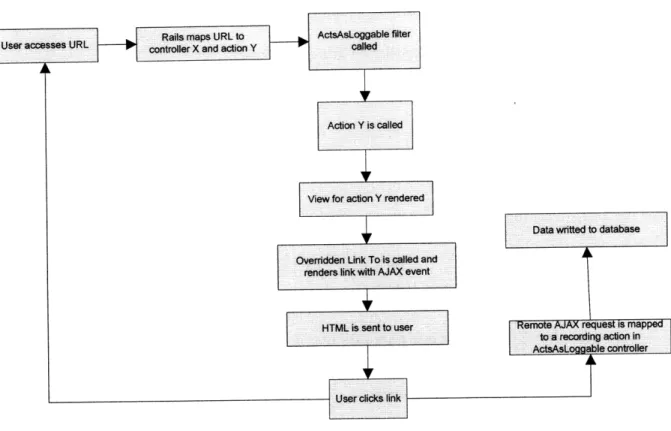
This new JavaScript would include the JavaScript rendered by the remote_reportpage_view() to initiate an AJAX call to the Rails Application reporting the time the user clicked the link, the next page they are accessing, etc. When a user clicks the link, they will be redirected to a new page and also initiate the remote call to report the page view data.
The page rendered to the client is thus equipped to send information back to the Rails
application. ActsAsLoggable must also provide the relevant server-side code to parse and record the information passed back. This is done in a separate Rails controller class. To better
Figure 2: Logging Process
2.2.1.2 Remote functions (AJAX)
A remote function occurs when a client's browser accesses a Rails application via an http request from JavaScript on some rendered page. The request's URL still maps to a controller and action as before, however instead of defining a new page, the returned data is processed by JavaScript in the client browser to update the current page's content. ActsAsLoggable maintains a table of remote functions that represent the set of all actions which have been accessed as a remote function (as opposed to a page view).
ActsAsLoggable also maintains a table of Remote Calls that correspond to a particular instance of a user's browser calling that function. The following information is logged on a remote call:
* Numerical ID of the entry of the row in Page Views of the current page view * Numerical ID of the remote function in Remote Functions
* Time from the loading when the remote function was called * Date and time of call
The mechanism for logging remote calls is similar to the method described above: Rails helpers produce JavaScript to initiate AJAX calls to send data back to the Rails application. The means of calling these helpers, however, is slightly different. As described before, linking to a page in Rails is conventionally done just one way: calling link_to. Remote functions, however, can be called several ways.
First, and most frequently, a developer utilizes link_to_remote. Link_toremote's parameters include a hash of arguments to construct the URL for the remote call. This URL hash includes a controller, an action, and any additional parameters. Link_to_remote also accepts the ID of a div or other HTML block to update with the HTML returned from the remote call. The final output
of link_to_remote returns HTML to create a hyperlink, that, when clicked, executes a remote function and updates some HTML element.
Another method of executing remote calls is the helper function remote function. This method returns a string of JavaScript to initiate an AJAX call for a remote function. This JavaScript can be inserted into any existing JavaScript function or even as an event on an HTML element. For example, a developer could write the following:
Like with page views, the key to initializing the data-reporting AJAX calls back to the application is overriding the helper functions used by developers for creating links or remote calls. Luckily, the Rails implementation of linktoremote utilizes the helper function
remote Junction. This means overriding remote
Junction
to log data actually affects both typical means of executing AJAX in Rails.The ActsAsLoggable implementation of remote function, like the ActsAsLoggable
implementation of link_to, provides the same functionality as the Rails default implementation, but inserts a new AJAX call to report an event. This means hitting the action
ActsAsLoggableController::report_remote_call. Thus whenever the client's browser executes
the JavaScript to initiate the developer's desired remote function, the additional remote function for logging data will also be executed.
It is important to note that AJAX calls could also have been logged using the same filter
responsible for logging page views. In fact, the filter already infers whether or not the request is AJAX and only logs non-AJAX requests. However, had ActsAsLoggable used this method to log remote calls, it could not reliably associate a remote call to a given page view. The only information available to that filter is the time of the request, so it would have to assume a remote call came from the last recorded page view. This will be erroneous whenever a user has multiple tabs/windows open or navigates via a 'back' button and then executes a remote function.
Instead, the ActsAsLoggable filter that is run before rending a normal page creates a new PageView row in the database and passes the row's ID to the view rendering the page. With access to this ID, the remotefunction helper includes the page view ID in the AJAX calls back to the server so the remote call is correctly associated with the page view.
2.2.1.3 JavaScript Calls
The process for logging JavaScript data is simplistic. Like remote calls, JavaScript calls, are
always associated with a page view.
The data stored for JavaScript calls includes:
* Numerical ID of the entry of the row in Page Views of the current page view
* Name of the function as described by developer
* Time from the loading when the JavaScript function was called
* Date and time of call
Unlike logging page views and remote calls, JavaScript functions are identified by a name
specified by the developer. To this point, convention has been overwriting existing linking
functions and logging based on the parameters passed to them (action, controller, URL
parameters, etc). However, unlike link_to and remote function, the helper function responsible
for creating HTML links to JavaScript functions, linkto_ function, cannot adequately classify the
event from the parameters passed to it. Link_to_function has just two parameters: the HTML
representing the item to be clicked and the JavaScript that will be executed. Neither of these can
provide insight as to what the JavaScript actually does. The clickable HTML cannot offer
context since it will most often be text, such as "show more," or an image, such as,
click_button.jpg. Classifying the JavaScript call by the actual JavaScript code is also infeasible
since this would require conceptually inferring what a block of code does, a problem far out of
Because link tofunction has no means of deducing a good description for the function accessed, developers must pass a log_name parameter in the hash of arguments normally given to
linktoJunction. This implementation has a negative side effect: a JavaScript call will only be
logged if the log_name parameter is present. This implies that the developer has to modify existing source code in the views in order to log JavaScript. Logging page views and remote calls, however, only requires the developer to specify acts_as_loggable in the controller. Fortunately, the converse of this is not true. A developer does not have undo the changes made to his source code if he wants to stop logging. All link_tofunction calls that include the extra parameter will still work fine with the non-overridden Rail's default link_to function. Should ActsAsLoggable be removed, there is no need to modify the application source code.
2.2.1.4 Database Schema
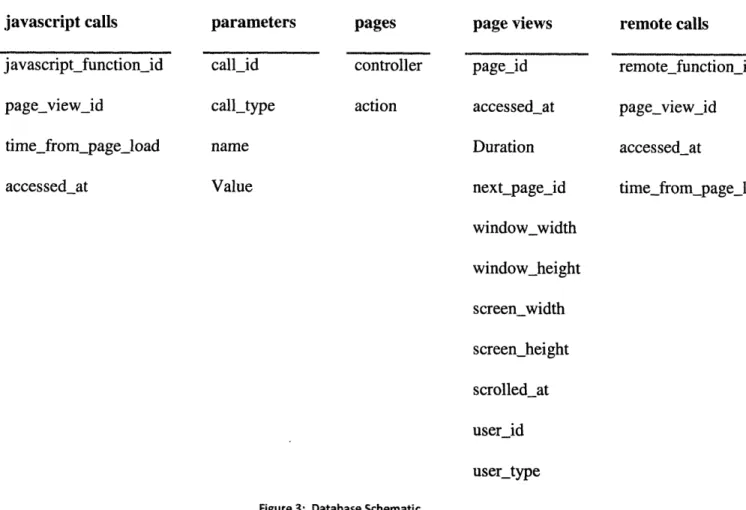
All logged data stems from a particular page hit. Remote functions and JavaScript interactions are both separate tables in the database whose entries are associated with page hits. Data about a user's browser is stored in a page hit entry. The database schema is shown below:
javascript calls javascript_function_id pageview_id time_from_page_load accessed_at parameters pages call id controller call_type action name Value page views page_id accessed_at Duration next_pagejid window_width windowheight screen_width screen_height scrolledat user_id user_type remote calls remotefunction id page_view_id accessed_at time from_page_load
Figure 3: Database Schematic
These tables have all been previously described except parameters. This table is responsible for storing whatever parameters were passed in the URL to an action. It has a polymorphic
association to call that could represent either a page view or remote call. Each entry in the table stores a parameter name and value for whatever object.
2.2.2
Data Migrations and Object Models
The plug-in's data migrations are straightforward and have the sole responsibility of constructing the tables necessary for the plug-in to operate. They are standard Rails data migrations and are compatible with any database for which Rails implements an adapter. The migrations are run a single time upon installing the plug-in.
The models are responsible for representing the table rows as Rail's objects and provide
additional utility functions. The models implement functions that simplify database queries for instances where developers want to search the various tables or aggregate statistics. The functions enable the developer to access the same information on various levels of specificity without having to construct complex queries. For example, one function
PageView. views_by_destination(params) handles reporting the number of hits for the entire
application, amongst all actions of a controller, amongst one action of a controller, or even filtered by parameters. Example calls respectively would have params be nil,
{ :controller=>"books"},
{
:controller=>"books", :action=>"show"}, and {:controller=>"books", :action=>"show", :id=>"5"}. It is also possible to filter by dates and user IDs or access statistics, such as number of remote calls, in the same manner.2.2.3 Installation Mechanism and Using Acts as Loggable A developer implementing ActsAsLoggable would do the following:
1. Run 'script/generate ActsAsLoggable' in the application's base directory
This simply copies the relevant source code to the application and executes the migrations to set up the database
2. Declare actsasloggable in the relevant controllers
By doing so, the developer is actually calling a function which inserts new functions into the controller class. Since ruby is a scripting language, when interpreting the controller class definition, the acts_loggable_line will actually add methods to the class that enable the data storing functionality described previously.
The acts_as_loggable statement additionally tells the controller that whenever rendering an action, it should load the plug-in's helper files that overwrite the various linking functions to include AJAX calls to log the data.
3. Insert function loggable_header in relevant views accessed as pages
Most likely this will only occur once. The application. rhtml layout typically wraps all
views with the appropriate headers and footers so the view is only responsible for HTML between the "body" tags. Thus inserting this in application.rhtml is usually sufficient for the entire application.
2.2.4 Relating Actions to Users
Different Rails applications will use different classes to represent users. The structure of the user data tables will also be different. Anticipating this, the plug-in assumes only two things about how an application stores user data: there is a Rails model for whatever class represents a user and each user has a unique numerical ID. It is unrealistic to make any assumptions about what
class represents a user or how the application knows who the current user is (usually some type session data).
ActsAsLoggable thus infers the current user with a robust method. Upon declaring the plug-in
(acts as_loggable in the controller), the developer must specify the model representing users and
a fragment of code to get a current user's id. The Page View table and model have a polymorphic association to the user such that a logged event can be associated with any legitimate Rails class. The plug-in would be declared as follows:
acts as loggable :user_class=>User do [block]
end
Block would be any executable ruby code that, when executed in the context of a controller
processing a request, returns the current user id on the last line. This block of code is executed whenever an action is stored. In many instances, the block's code would be very simple such as
session[:userid] or an existing function defined by a developed, such as current_user().
However, the only constraint on the code is that it must return an integer so the process of gathering a current user ID can be as complex or simple as required by the developer.
This generic means of relating records to users actually allows the logged data to relate to anything the developer wants, not just a person with a login id and password. For example, a news website may not have any registered users but still want to provide tailored articles to viewers based on what other viewers from their geographic location have been reading. In this instance a 'user' is not a specific person, but a set of people classified by location inferred from their IP address. This could give geographic location or even match a request to an institution, like a college. To log data in this scenario, instead of users table, a developer could implement a
"viewer_locations" that just stores a city and state.
If the developer were to implement a function "get_loc_id(ip_address)" to match an IP address to the ID of a viewer_location, ActsAsLoggable could now be called in the following manner to log actions by view_locations:
actsasloggable :user_class=>ViewerLocations do getlocid(request.env[ 'REMOTE_HOST']) end
This is powerful because it enables logging (and thus collaborative filtering) without individual user accounts. An application can provide steered content to groups of users with
ActsAsLoggable in the exact same fashion as with individual user accounts.
2.3 LoggableStats Plug-in Implementation
The data presentation interface shows summary data about the application's various components. The aggregated data about individual users' interactions with parts of the application can also be valuable when compounded across all users. The LoggableStats provides this information in a web interface that's glanceable and easy to access.
Views are implemented to show summary statistics for the following elements.
* Application summary * Controller summary * Action summary
* Remote call from page summary
The data for any page can be filtered down to a specified range of. All of the pages are built in standard rails practice under a single controller. All of the database logic is contained in the same Models used with ActsAsLoggable. The pages utilize the YAHOO user interface library in
creating the tree navigation and sortable tables. Simple sessions are used to store the date information.
2.3.1 Application summary
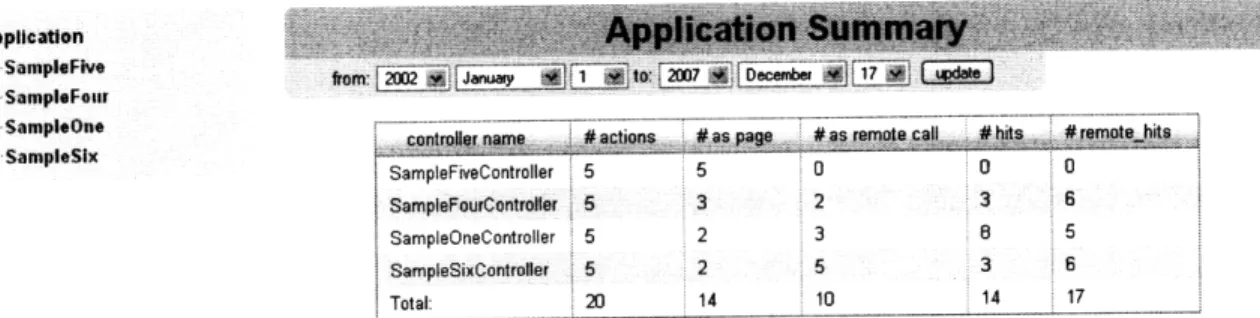
The application summary shows statistics about each controller in the application as well as a total across all controllers. The data is presented in a single table with columns are as follows:
* Name - name of the controller
* Actions - the number of actions defined by the developer
* As page - the number of actions that have been accessed as a page view
* As remote call - the number of actions that have been accessed as an AJAX request * Hits - sum of hits to all actions of the controller as a page view
* Remote Hits - sum of all remote requests to all actions of the controller
contlr name # actions #as page # as remote call # hits #remote hits
SampleFiveController 5 5 0 0 0
SampleFourContiroler 5 3 2 3 6
SampleOneController 5 2 3 B 5
SampleSixController 5 2 5 3 6
Total: 20 14 10 14 17
Figure 4: Screenshot of Application Summary
2.3.2 Controller Summary
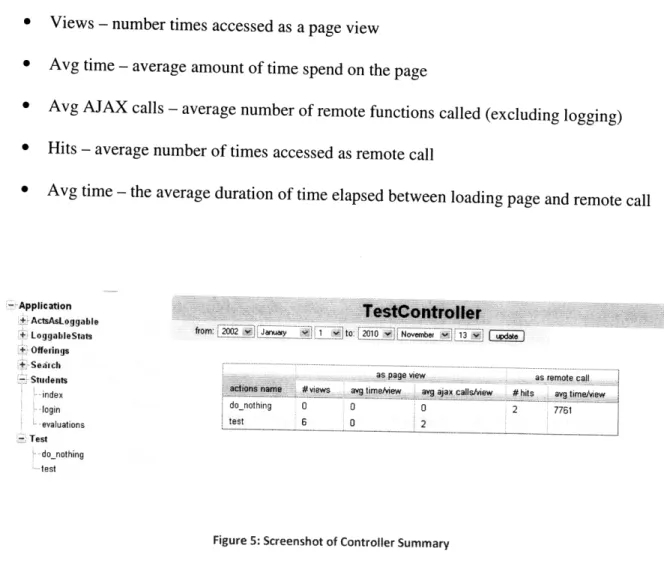
The controller summary displays data for each action of a controller. Two column headers divide the information for each action between 'page view' and 'remote call.' The columns are
as follows: * Action name -- Application +. SampleFive + SampleFoer +" SampleOne +~ SampleSix
* Views - number times accessed as a page view * Avg time - average amount of time spend on the page
* Avg AJAX calls - average number of remote functions called (excluding logging) * Hits - average number of times accessed as remote call
* Avg time - the average duration of time elapsed between loading page and remote call
- Application
+ ActsAsLoggable + LoggahbleStats
+ Offerings
+ Serc
as page view as remote call
- Studens name
#views avgtimeview avgaaxcalsview # hits avg tmvew
index do_nothing 0 0 0 2 7761 Ilogin test 6 0 2 -. evaluations - Test .do_nothing test
Figure 5: Screenshot of Controller Summary
2.3.3 Action Summary
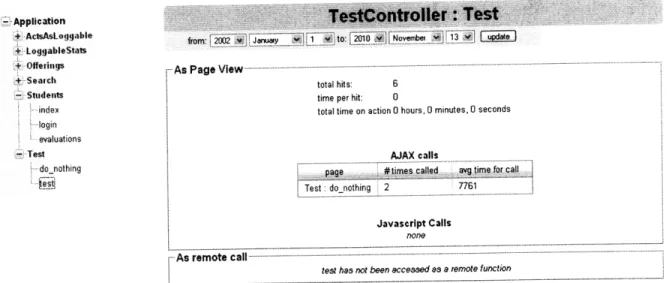
The action summary data is broken into two pieces, the first to display summary information about the action as a page view and the second to display summary data about the action as a remote call. This is necessary because in many cases an action can be used in both contexts. In the box displaying page view information, there are two nested table displaying information for AJAX calls and JavaScript calls.
Application + ActsAsLoggable + LoggableStats + Offerings +: Search - Students index .login S evaluations - Test donothing ,-.es.
Figure 6: Screenshot of Action Summary
r A s P age V iew .... . . . . . . . ..
total hits: 6 time per hit: 0
total time on action 0 hours, 0 minutes, 0 seconds
AJAX calls
STest: donothing 2 7761
Javascript Calls
none
As rem ote call ---... ... .
3 Results and Discussion
The designed system does in fact achieve the desired functionality. As described previously, the goals of the plug-in were to:
* Aggregate data sufficient for implementing a vast array of collaborative filters, information filters, or any other systems that in some way utilizes past user actions * Require minimal effort and documentation for developers to implement
* Not significantly affect the existing application
Utilizing Rails plug-ins enabled positive results by all metrics. The functionality is successfully interjected into an existing application to log data. The end package has a very streamlined and painless implementation procedure. Nearly all configuration to set-up the developer's
application and database could be done automatically by the plug-ins.
3.1 Value of Data
ActsAsLoggable gives developers access to a lot of information about user activity. Once incorporated into a Rails application, it maintains a database of page views, AJAX calls, and JavaScript interactions that can be used in many ways to infer information about users of the application or the application itself.
3.1.1 Value for Application Analytics
With ActsAsLoggable, the developer has access to typical analytic information. Like any other log of web activity, one can see where traffic goes and how it varies in time. However, the unique value provided by the comprehensive logging is information about the nature of user interactions with the various components of the application. Not only can a developer tell how
frequently a page is accessed, he can tell how long the page is typically accessed for, the
frequency of remote calls from that page, whether users scroll, how frequently JavaScript is
executed, or what pages are accessed prior and after.
An added benefit is that this information can be easily retrieved at any level. It is just as easy to
find the described information averaged across every page in the application as it is to find the
described information for a specific action or item. In others words the same function can tell a
developer statistics for the action that is used to display a book for sale or just when that action is
executed to display a certain book.
Having this information stored in-line with the rest of the application's database further enhances
its value. For example, a developer could group users by attributes from their personal
information and see how usage statistics vary amongst its users with little hassle. Or, a
developer can easily mine the data to find patterns between usage of pages showing items and
the attributes of those items.
The LoggableStats plug-in is also beneficial because it provides a visual interface to view the
statistics broken down by components requiring no computation from the developer. This will
by no means come close to the feature set of Google Analytics, however, a simple command line
installation of the plug-in adds a reasonably good summary information interface to any Rails
application in seconds.
3.
.2
Value for Collaborative and Information FilteringThe information provided enables a vast array of passive filtering possibilities. ActsLoggable
records nearly everything a user does. By utilizing this data one could develop many ways of
* Number of times a user has viewed an item
* Length of time spent viewing some item versus average time viewing any item * If and at what point a user scrolls viewing an item
* Frequency with which a user scrolls or clicks a JavaScript link when viewing an item * Number and list of remote calls
To illustrate how this data applies to collaborative filtering in practice, consider a simple
example of website where users create blogs. Initially, this site wants to provide tailored links to blog entries that may be of interest to a reader upon login. As convention in rails, the site would have a controller blogs_entries and an action to render a blog entry, show, which takes a URL parameter 'id' to denote the numerical identity of the article in the database.
A first attempt, one could implement some filtering algorithm looking at the amount of time a user spends reading an article normalized over his average time reading articles. Conceptually, the collaborative filter would match users who have spent significant time viewing similar articles and recommend unviewed articles to users that were read in depth by the similar users. In this case, passing relevant data to a passive filter is simple: the filter's objects are article IDs and the filters users are user IDs. The entire universe of instances where a user looked at any blog entry can be accessed by ActsAsLoggable's PageView.find_by_destination(url,
time_period, user id), where URL would be a hash with controller=blog_entries and
action=show. Finding instances where a user read a specific entry just requires including an ID
in the URL hash. To find all instances where any user read any entry would entail excluding the
userid parameter. The developer can access statistics, such as the average time spent viewing
simplistic for the developer to grab whatever data is necessary for the collaborative filter or constructs a data input matrix of scores by user and article. Because ActsAsLoggable is comprehensive in logging interactions, the developer can tweak his scoring method to include other information (such as remote functions or scrolling) without any additional work. This
gives added benefit of letting a developer experiment using different data types without having to incrementally modify his application to gather the data.
A developer can also utilize submitted form data in the same manner as page views. For
example, the blog site may want to steer content based on what readers search for. An important thing to note is that GET and POST requests are treated identically in Rails and thus in the logging system. Both handled the same way in mapping to an action and controller. In this situation, some arbitrary action within the blog application accepts a set of URL parameters from a form's data and process the search, say based on location and favorite music genre. The values of the form data will be stored as key/value pairs in parameters and accessible same as before through page views. Again, utilizing the built in filters by destination, the application can find instances where a user performed a certain search or all searches performed by a user.
A developer is also free to utilize remote requests and form submissions in the same manner as page views and regular form submissions. Often a site will use AJAX to allow a user to add an item to his shopping cart or comment on some content. These actions can both be valuable
inputs to a collaborative filter. Remote functions information is stored and accessed very similarly to page views and ActsAsLoggable utility functions operate the same so the developer is not constrained.
3.2 Implementation and I)eveloper Considerations
A strongpoint of the implementation is the convenience for developers. First, the installation procedure is quick and painless. One typical shortcoming of rails plug-ins is the complexity or lack of documentation about installing the plug-in to get it running. As easy as the installation or usage of many actually are, they lose their convenience if a developer has to spend time trying to understand and configure the plug-in to make it operational. As seen in the Appendix, there is a very simple one-page summary that informs developers how to install ActsAsLoggable and how to declare controllers to be logged. End-to-end, adding the ActsAsLoggable plug-in and
AppStats plug-in takes under a minute excluding download times.
Equally important as installation is the plug-in's output. The logged information is stored in an intuitive and simple structure right in line with the existing application's database. The
developer thus has immediate access to the logged data, as opposed to many logging solutions, whose output requires additional processing or parsing. All of the logged information is stored alongside user account information and everything else in the application.
The included classes to define the data tables' corresponding Rails models means the developer's application is ready to start logging right after installation. For example, adding the code
has_many :page_views, enables a developer to call a function page_views on his user class the
queries the database and returns a vector of all page views for a user.
User.page_view[O]. remote_calls or User.page_views[O].javascript_calls would return a vector of remote calls or JavaScript calls respectively. Thus with a simple installation and one-line declaration, the developer is immediately able to utilize the logged information in his application.
3.3
Effect on Existing Ap plication
In addition to timeliness, the implemented solution is minimally obtrusive to the existing
application. First and foremost, all of the source for the plug-ins is contained within a single
directory under the "vendor" folder of the Rails application skeleton. Although the web interface
to the statistics data are accessible alongside any of the other controllers in whatever server is
running the application, they were implemented as an engine plug-in, so all of the code for the
models, layouts, views, controllers, and js/css files are entirely separated from the user's core
application directory structure but are still part of the application.
Second, and importantly, the choice to implement the logging functionality by overwriting the
base Rails linking functions means that a developer does not even need to modify existing code
to implement the plug-in. Without overwriting these functions, logging would require creating
special functions like logged_link to be used in place of link_to. This entails that the views
which log data would throw errors whenever their controller stops being logged or
ActsAsLoggable is uninstalled. However, overriding the functions means the application's
views are identical whether or not they are being logged. A developer can simply declare
"actsasloggable" in the controller, and all of its associated views will now log. Further, the
user can now toggle between logging and not logging his information in the controller without
ever having to modify other source. When logging link_to will log, when not, link_to will
3.4 Limitations and Shortcomings
3.4.1 JavaScript
The implementation of JavaScript logging is limited in that it only records the event if a user has defined the :logname parameter to :link_tofiunction. This has two negative effects. First, a user has to modify any link_to function statements to get them to log. Second, ActsAsLoggable will only log JavaScript functions called as a result of a user's clicking a link. Realistically, a developer using this plug-in is primarily interested in functions that are called as a result of user activity (clicking a link or image, for example a 'show' or 'hide' button). Since the convention in Rails to implement such functionality is the link_tofJunction helper, ActsAsLoggable is suitable for many cases.
However, there are different situations in which a developer would want to log JavaScript. The recent popularity of Script.aculo.us, YUI, and other JavaScript UI frameworks have enabled more widespread use of drag/dropping and other complex interactions. These types of activities
are not logged with ActsAsLoggable but can be equally valuable in implementing a passive filter.
3.4.2 Changing Names
If a developer decides to change the names of actions, controllers, or JavaScript functions he must either manually update the existing data or recognize in his code that action a used to be called action b when querying the database.
3.4.3 Routing
Actions
Frequently in Rails applications a developer will route from one action to another. In other words a URL will call action X in controller Y and after some logic, action X will redirect to action W and controller Z. In this scenario, the ActsAsLoggable plug-in will record both of
these actions. Further, the remote calls and JavaScript calls will all be recorded in association with the last action that was executed. While intuitively one can imagine wanting to
comprehensively log all the actions on one URL request, there is no option to do otherwise.
3.4.4 Complex Relations to
User
Requests
All of the logging for a request operates under the assumption that the information describing what a user is requesting is contained with-in the URL. In most cases, this is completely true. In
some complex situations where a page rendered is dependent on session data or another other external factor, that information will not be logged and thus accessible later. To illustrate this, consider a web application with users and cooking recipes. Typically a user viewing recipe X of id 5 would hit a URL in the form recipes/show/5. Now imagine the site has a 'recipe of the day' link on the homepage. There are two ways of doing this. In the first way, the action rending the homepage would retrieve the ID of today's recipe and display a link to recipes/show/5 in its view. The second way is for the view for the home page to like to recipes/show_todays. When clicked, the show_todays action would find today's recipe. In good practice, that action would then redirect to recipes/show/5, however, it also possible to retrieve the recipe and simply render the view for 'show' without exciting the action. In the first situation ActsAsLoggable would record the event of a user viewing recipe 5. In the second situation with redirecting,
ActsAsLoggable would record the event of a user viewing today's recipe and a user viewing recipe 5. In the second situation without redirecting, ActsAsLoggable would never record that a
user viewed recipe 5. A developer implementing such an application would still be able to manually log that data by utilizing the Models provided with ActsAsLoggable. However, by default, that information would not be logged.
3.4.5
Performance
The plug-in do have an impact on the performance of a Rails application in several places. First, there are added transactions with the database on any regular page view as the plug-in's filter sends information about the page view before the page is rendered. This should no add any noticeable time delay for the user, but will increase the load on the database server.
Second, there are additional AJAX calls to the rails application for reporting data from the user's browser. New AJAX calls occur whenever a remote function (or link_to_remote) is clicked, when a regular link_to is clicked, whenever a linktoJunction is clicked, and when exiting the page. The size of the data sent is extremely small (several integers and short strings) and there is no data returned by the rails application. However, this will increase the load on the web server which is responsible for processing these requests.