Labolmage: a workstation environment for
research in image processing and analysis
Alain Jacot-Descombes*, Krassimir Todorov,
Denis F.Hochstrasser
1, Christian Pellegrini and Thierry Pun
Abstract
Numerous images are produced daily in biomedical research. In order to extract relevant and useful results, various processing and analysis steps are mandatory. The present paper describes a new, powerful and user-friendly image analysis system: Labolmage. In addition to standard image processing modules, Labolmage also contains various specialized tools.
These multiple processing modules and tools are first introduced. A one-dimensional gel analysis method is then described. The new concept of 'normalized virtual one-dimensional gel' is introduced, making comparisons between gels particularly easy. This normalized gel is obtained by compensating for the bending of the lanes automatically; no information loss is incurred in the process. Finally, the model of interaction in a multi-window environment is discussed. Labolmage is designed to run in two ways: interactively, using menus and panels; and in batch mode by means of user-defined macros. Examples are given to illustrate the potentialities of the software.
Introduction
Biomedical sciences are a domain where images play a crucial role. In order to analyse them in detail, scientists must often rely on specialized equipment. Computers are sometimes simply used to produce a displayed image with a contrast sharper than the original one, by remapping grey levels (Wesley Davis and Wallenslager, 1986; Lutz et al., 1990). Many other types of processing can, however, be performed, such as enhancement, filtering, edge detection, mathematical transformation and so on (Rosenfeld and Kak, 1982; Gonzales and Wintz, 1987). Typical biomedical applications are the search for contours in vascular networks (Collorec and Coatrieux, 1988), the enhance-ment of chest radiographs (Daponte and Fox, 1988) and cell counting (Preston and Bartels, 1988).
In this context, Labolmage is an image analysis software that provides users with a large choice of processing procedures in a user-friendly environment. Labolmage is not dedicated to a
Centre Universitaire d'Informatique (CUI), Faculty of Sciences. University of Geneva, 12 rue du Lac, CH-1207 Geneve and Numeric Imaging Group, Center for Hospital Informatics, Geneva University Hospital, CH-I2II Geneve 4, Switzerland
*LaboImage is provided free of charge for academic users, interested persons should contact A.J.-D.
specific task, but allows the user to solve a large number of different problems. Specialized tools are also included for more specific matters. Labolmage is typically suited to exploratory research, where one tries to compare different methods. This software has been distributed in various computer centers and universities over the world, and is also used as a platform for an image analysis course given for computer science students at the University of Geneva.
Other software packages also provide environments for image processing (e.g. Vemon and Sandini, 1988; Groen et al., 1988; McEachron et al., 1989); however, they are often dedicated to specific classes of images, such as three-dimensional medical images (Robb et al., 1989). Compared with these, Labolmage tries to provide as general as possible a platform for various scientific investigations, while still offering a few selected, specialized tools. Different approaches are thus available rapidly to determine and evaluate solutions to a given problem.
The main advantage of Labolmage lies precisely in this integration of standard processing methods (such as filters, transforms, etc.) together with particular tools. As a typical application, it is possible to take an input image of a gel, filter it to remove acquisition noise and then perform a one-dimensional gel analysis. The results are kept within Labolmage, allowing comparison, for example, of several processed gels by arithmetic subtraction.
In the Algorithm section, we survey the large choice of processing families and the kind of data this software can process. We also enumerate the specific tools. A section is then dedicated to the one-dimensional gel analysis tool, which is presented in detail. In the Implementation of interaction section, we first explain the underlying interaction concepts on which Labolmage is built. We then discuss the different interactive manners for using Labolmage. A simple example finally illustrates a typical working session.
System and methods
Labolmage presently runs on Sun™ workstations (SUN 3/xxx and SUN 4/xxx) in the SunView windowing system. An adap-tation to more standard windowing and interfacing systems is also planned [e.g. X-Window System™ (Scheifler et al., 1988), OSF/Motif™ (Open Software Foundation, 1990)]. The software is written in C (Kernighan and Ritchie, 1978), and is ~ 50 000 lines long. The executable code uses ~ 2 Mbytes.
Algorithm
Standard processing and data
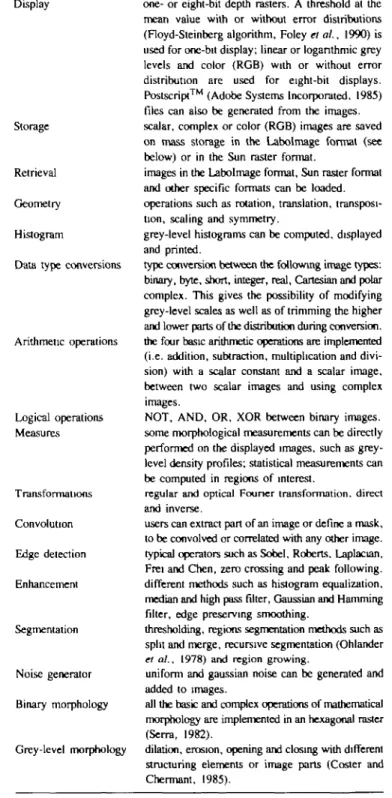
Labolmage currently comprises > 100 operators. They can be grouped in different families, according to their utility and complexity. The most basic operations consist in retrieving an image from mass storage, displaying it and saving it after some processing. However, visualization of images is not the only purpose of such a software. Table I briefly describes the classes of operations as presently implemented; the specialized tools are presented in the next paragraph.
The list of processing families given in Table I gives a general view of the software. In fact, many operators allow free choice of parameters, thereby increasing the actual number of available methods. In addition to these processing methods, some basic utilities are included, such as image padding or color to grey-level transformations.
As can be deduced from Table I, various types of informa-tions are manipulated by Labolmage. Data are stored using two different kinds of arrays: vectors and images planes. Table IT summarizes the data structures used by the software.
N image planes and N vectors are simultaneously available
in central memory, numbered from 0 to N~ 1. N is currently set to 10, but there is no limit to either the number or size of these data structures. Images as well as color tables can be saved on disk. A color table is saved as a file of 3 X 256 bytes, each of the 256 colors being defined by a triplet of red, green and blue. Images are stored on disk in the Labolmage format, i.e. using two files: one containing the image data, the other one storing various pieces of descriptive information (Table HI).
Specialized tools
This paragraph briefly enumerates the more specific processing tools available in Labolmage. The one-dimensional gel analysis tool is described in detail in the next section.
• A help tool, which gives on-line explanations about the operations being performed.
• An interactive color table manipulation tool, which allows the definition of complete look-up tables with RGB or HLS representations (Lutz et al., 1990).
• An image generation tool for making simple monochrome and grey-level images of any size.
• A tool for counting regions defined by their contours or by their grey-level values.
• A tool for pixel-by-pixel correction of an image, making use of a magnifying glass. This, for example, gives the possibility of closing region contours before counting.
• An expert system for guiding image segmentation (Hu et al., 1990).
• A tool for analysing one-dimensional gel autoradiograms (see the next section).
Table I. Classes of operations Display
Storage
Retrieval Geometry Histogram
Data type conversions
Arithmetic operations Logical operations Measures Transformations Convolution Edge detection Enhancement Segmentation Noise generator Binary morphology Grey-level morphology
one- or eight-bit depth rasters. A threshold at the mean value with or without error distributions (Floyd-Steinberg algorithm, Foley el al., 1990) is used for one-bit display; linear or logarithmic grey levels and color (RGB) with or without error distribution are used for eight-bit displays. Postscript™ (Adobe Systems Incorporated. 1985) files can also be generated from the images, scalar, complex or color (RGB) images are saved on mass storage in the Labolmage format (see below) or in the Sun raster format,
images in the Labolmage format, Sun raster format and other specific formats can be loaded, operations such as rotation, translation, transposi-tion, scaling and symmetry,
grey-level histograms can be computed, displayed and printed.
type conversion between the following image types: binary, byte, short, integer, real, Cartesian and polar complex. This gives the possibility of modifying grey-level scales as well as of trimming the higher and lower parts of the distribution during conversion, the four basic arithmetic operations are implemented (i.e. addition, subtraction, multiplication and divi-sion) with a scalar constant and a scalar image, between two scalar images and using complex images.
NOT, AND, OR, XOR between binary images, some morphological measurements can be directly performed on the displayed images, such as grey-level density profiles; statistical measurements can be computed in regions of interest,
regular and optical Founer transformation, direct and inverse.
users can extract part of an image or define a mask, to be convolved or correlated with any other image, typical operators such as Sobel, Roberts. Laplacian, Frei and Chen, zero crossing and peak following, different methods such as histogram equalization, median and high pass filter, Gaussian and Hamming filter, edge preserving smoothing,
thresholding, regions segmentation methods such as split and merge, recursive segmentation (Ohlander
et al., 1978) and region growing,
uniform and gaussian noise can be generated and added to images.
all the basic and complex operations of mathematical morphology are implemented in an hexagonal raster (Serra, 1982).
dilation, erosion, opening and closing with different structuring elements or image parts (Coster and Chermant, 1985).
• A tool for comparing images in a sequence. For example, the grey-level evolution of a specific region can be measured. • A tool for interactive creation and execution of macros (see
the Implementation of interaction section).
Labolmage is constantly evolving; new tools are regularly being added.
Table 11. Available data structures Images
Histogram
binary, byte, short, integer, float complex color (RGB) 1 plane 2 planes 3 planes I vector
Table HI. The two files defining an image Descriptive file type of image elements (T)
number of rows (R) number of columns (C)
minimum, maximum, average and standard deviation for each plane
date and time of image creation comments
Image file R x C elements of type T
The one-dimensional gel analysis tool Overview
The purpose of the one-dimensional gel analysis tool (gel 1D-tool) is automatically to determine the density profiles as well as the profile peaks for one-dimensional gels. The system can be used for analyzing any type of one-dimensional gel, e.g. autoradiograms (Figure 1), Coomassie Blue or silver stained profiles. The only parameter required from the user is the number N of lanes (e.g. 11 in Figure 1).
The first steps of the method are based on an approach fully described in Pun et al. (1985), which is summarized below. However, two new elements have been added, making quan-tization more precise and comparisons between gels much easier. The first addition relates to the determination of the lane boundaries. The imprecision due to the third-degree polynomial fit over the gel boundaries is compensated for and no informa-tion is lost. The second addiinforma-tion concerns the construcinforma-tion of a 'normalized virtual one-dimensional gel'. This new represen-tation allows, in particular, an easy comparison between gels. Determination of the profiles is performed in two stages. The first locates the lane boundaries; the second computes the profiles for each lane, finds the peaks in these density profiles and determines the 'normalized one-dimensional gel'.
Determination of the lane boundaries
In the following explanations i and j are respectively the horizontal and the vertical coordinates in the image, g(i J) the grey level of the pixel located at the coordinates i and j , Sizel and SizeJ the image size in both directions. Lane denotes a one-dimensional lane in the gel, and column means a column of grey-level pixels in the image.
Location of the lane boundaries is done in two steps: a pre-estimation of their position is first performed, which is then followed by a more precise estimation. For the pre-estimation,
Fig. 1. Original image of one-dimensional gel (I I lanes), on which are superim-posed the lane boundaries automatically extracted by the prosuperim-posed method.
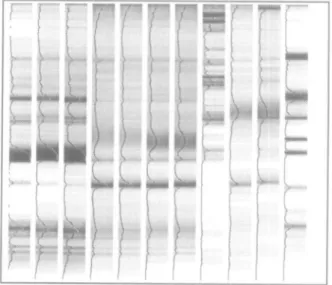
Fig. 2. Virtual normalized gel and density profiles obtained from Figure 1.
each lane is considered to be a straight, vertical zone whose left and right limits are to be determined. The grey levels from all the pixels in each column of the image are first added together. This yields one cumulated grey level function for the whole image, where each value CumGreyLevel(i) corresponds to one image column
SizeJ
CumGrayLev(i) = ^ g(i, line); / = 1...Size/
line - I
(1)
An extremum filter followed by a sliding r-test are then performed over that cumulated grey level function (de Souza,
1983).
The extremum filter replaces the value of the center element in a window of size m by the largest (or smallest) value in that
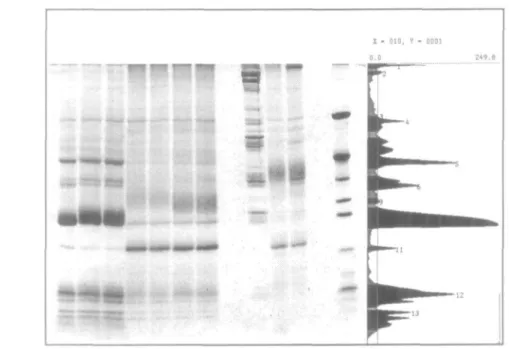
Fig. 3. Original gel together with the profile of lane 1. The peaks are indicated in black, and are numbered sequentially from top to bottom.
window. The largest value is chosen if it is closer than the smallest to the center value. The effect of this filter is to provide a modified cumulated grey level function with large plateaux of constant values.
The sliding f-test will then detect transitions. In a window of size 2m + 1, it compares the average of the m leftmost values
T(\) to the average of the m rightmost ones r(i), using their
normalized difference t(i)
where
w =
no
=
i - i CumGrayLevik)\jmjl
k = i-m CumGrayLev(k)\lm (2) (3) (4) 2-l{i)2 {CumGrayLev{k)]2-l{i) [CumGrayUv{k)]2-fiO2\\hm(m-\)\ (5)The parameter m defining the window sizes of these two operators (extremum filter and sliding f-test) is chosen as a func-tion of the number N of lanes in the image.
m =Size!
Lane boundaries correspond to positions i where |/(/)| is the largest. A maximum of t(i) corresponds to a left boundary of a lane {LefiBoundary), a minimum of t{i) corresponds to a right boundary (RightBoundary). This gives a pre-estimation of the lane positions.
At this stage, we only have as many pairs of boundary co-ordinates as there are lanes in the image, i.e. N. We need now to refine this pre-estimation in order to have N pairs of boundary coordinates per line in the autoradiograph: this will give us the complete lane boundaries.
For the precise determination of the lane boundaries, the locus of the lane axis is first computed. Then, for each lane, on each side of the axis, precise boundaries will be found. The pre-estimaled lanes are scanned line by line. For each line, the center of the current lane is the center of gravity of the pixel values, computed between the pre-estimated boundaries. Thus, for
image line j and for each of the N lanes RighiBoundaryn LefiBoundaryn CenterColumnJj) = RjghiBoundaryn LeftBoundaryn n = I...N (7) \gd,j)\
Here Left Boundary,, and Right Boundary „ denote pre-estimated boundaries in the nth lane as described above. For each lane, the locus of the lane axis is finally approximated by a third-degree polynomial.
APUCATION
Fig. 4. Flow chart of a conventional program.
APUCATION NOTIFIER conjtnjctioa of menu lyucm + muter window tnnifer control to thenodfler rt*d event mouse keyboard call appropriate procedure for the
received event
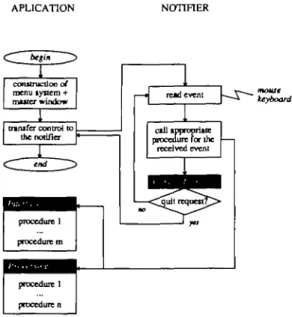
Fig. 5. Scheme of Labolmage, based on a notification system.
Knowing these axes, the precise boundaries can be found using the fact that between two axes there is exactly one right boundary and one left boundary. A sliding r-test is again applied, but this time for each line of the image. The minima and maxima found between two axes are respectively the precise left and right boundaries for the two adjacent lanes. A third-degree polynomial fit is finally done over the boundary points, yielding the precise boundaries (Figure 1). As we can see in Figure 1, a lane is not exactly confined within its boundaries. According to the old method (Pun et al., 1985), the overflowing part was ignored. In order to obtain an integration of the complete profile, this overflowing part is now uniformly distributed inside the boundaries.
Computing the virtual normalized gel and the density profiles
Once the boundaries are known, the profiles and peaks can be evaluated. It is then possible to determine the 'normalized virtual one-dimensional gel' representation. The gel is normalized in the sense that the geometric variations of the lanes have been corrected; comparisons between gels are now possible by simple superposition. For example, several gel images can be processed, yielding several normalized gels; these can be compared by using subtraction.
For each lane, the profiles are computed by averaging the grey-level values along normals to the central axis. This allows correct treatment of slightly curved lanes. Each lane n has its
own profile, represented as a vector of real numbers Pn(f).
Those numbers give for each lane n the quantity of substance at vertical position j .
Finally, the virtual normalized gel is reconstructed using those profiles (Figure 2). It represents an image of the same size as the original. All the lanes have the same width and the inter-lane spacing are considered as being uniformly white. Each normalized lane has constant horizontal values given by the density profile Pn(j).
Determination of the peaks of the density profiles is performed using the second derivative of /*„(/)• The regions in the profiles where this derivative is greater than zero are considered as belonging to a peak. In order to decrease the effect of noise, the profiles can be smoothed using an averaging filter. Also, peaks whose area or amplitude is below some user-specified threshold can be ignored. Once the peaks are known, the program asks the user to specify the quantity of substance in each lane; the quantity in each peak can then be evaluated (Figure 3).
The boundaries of the lanes, the profiles, the virtual normalized gel and the peaks can all be displayed and, if needed, manually modified. All the results can be saved into a file, which can be processed later by other programs or again reloaded into Labolmage.
Implementation of interaction Method of interaction
This section describes the general principle of interaction used in the software. Labolmage is built on top of a so-called notification-based system; the difference between such a system and a conventional program is presented below.
In a classical program, all components reside in what is called the application part. This means that the control loop, the inter-face with users and the general flow of processing are defined in advance and cannot be altered (Figure 4). Such a scheme is typical of a command interpreter. The software first reads the command; if it is a quit request, the program terminates execution, otherwise parameters are read and the process corresponding to this input is executed.
Welcome to Labolmage
Copyright: The 41 and Vision Group Computing Science Centre (C.U.I) University of Geneva, SuHzerland Wed Jun 27 15:53:47 199B
Standard read: file /cuisunb/u4/jacot/nnt — > 8
binary Morphology gray scale Morphology
[QUIT
HELP: COFF
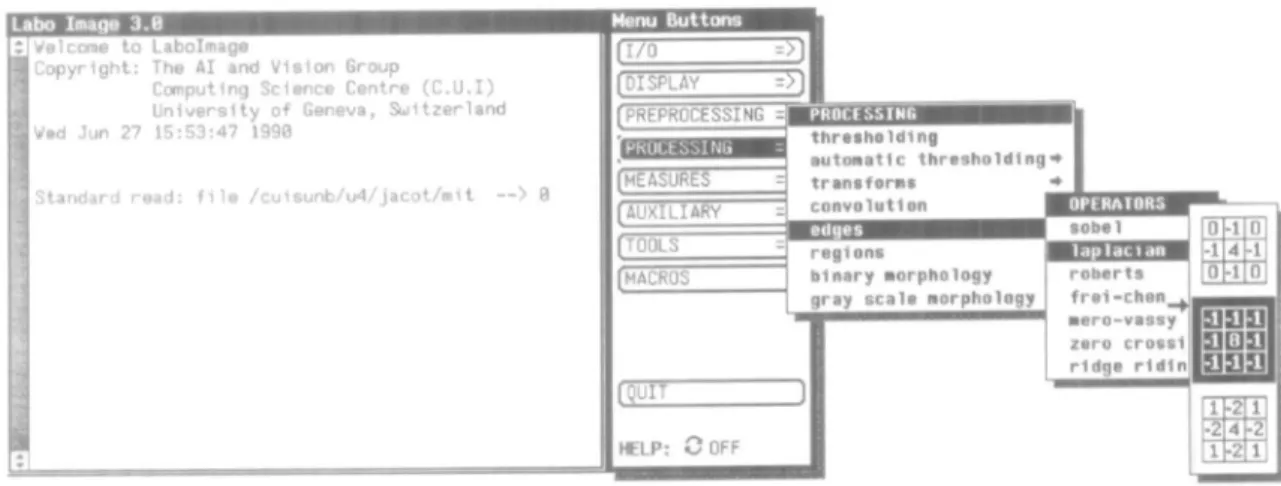
Fig. 6. The master window with its attached menu system (a bilingual English and French implementation is available).
In a notification-based system, the control loop is moved from the application part to the so-called notifier, which reads the events and calls the corresponding procedure. This scheme is the underlying structure of Labolmage (Figure 5). The full menu system with procedures associated with each item is first constructed in the application part, then control is passed to the notifier. From that moment, the user is just sending events to the notifier by choosing items with the mouse. The notifier then analyzes the received events and possibly calls an inter-face procedure to ask for parameters. This is done using a panel. In this case, the notifier receives the parameters from the keyboard as events and sends them to the interface procedure. The correct processing procedure is finally called; after termina-tion, control is returned to the notifier.
In summary, a classical program only allows for a very linear flow of operations that is controlled by the program. On the other hand, the flow of execution of a notifier-based program is not predetermined, and is controlled by user requests (through menus and mouse).
User interface
Labolmage can run in two modes: interactive or automatic. In the first mode, the software is driven by a menu system attached to each button of the master window, giving users a hierarchical list of processing procedures and tools (Figure 6). Desired items are selected with the mouse. If the chosen processing requires parameters, specific pop-up panels are opened, asking the user for the missing information. Parameters are very often the numbers of source and destination image planes, i.e. the image on which the processing is made and the one on which to store the result. Sometimes parameters specific to an operation are required, e.g. an angle of rotation in a geometrical transform. During the entire session, a trace of all the operations appears in the master window and is simultaneously written in a log-file. In the automatic mode, another kind of data (called a macro) is used to control the sequence of processings. A macro is a set of operations that are to be applied sequentially. Making
a parallel with computer programming, we can say that macros are like programs. We can simultaneously have up to M macros in centra] memory, numbered from 0 to M— 1 (M is 10 in the current implementation). They are written on disk in ASCII format. A tool called Macrotool is included in Labolmage; it allows the creation and manipulation of such macros. For crea-tion, the user chooses items with the menu system and introduces parameters as in the interactive mode; however, no processing is executed at this stage, but the data structure for the current macro is created and updated. After this, macros can be run in different ways:
• Fully automatic — the macro is executed as it is, without any changes, i.e. without interaction. This means that the set of instructions is executed exactly with the same parameters as in the recorded macro. • Fully manual — confirmation is required for all
parameters.
• Images numbers — only numbers of source and destination planes are required.
• Parameters — only specific parameters are required; plane numbers are those initially stored.
A simple example of utilization
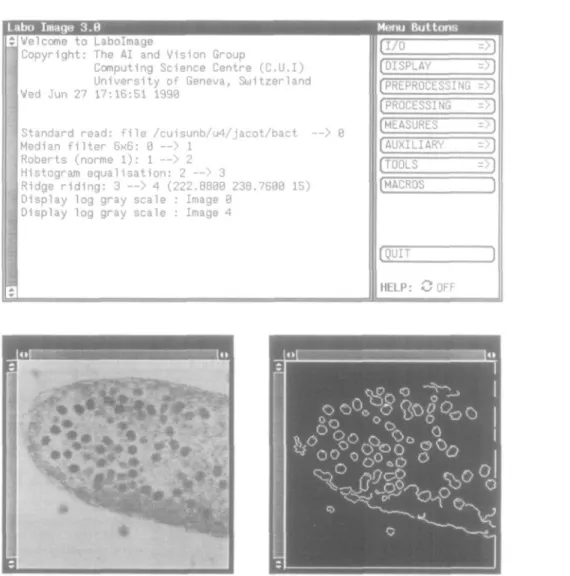
Edge extraction on a bacterial cell image is given below as a simple processing application. This example is performed interactively by choosing all operations with the menu. The first step is to load the image to be processed into the system. This is made by the 'Acquisition' menu, and the image is stored into one of the N buffers. We then decide to apply a median filter for noise reduction purposes. After this, we choose the Roberts operator followed by the peak-following method in order to obtain edges. We finally want to visualize both the original and resulting images. Figure 7 shows the master window together with both images; the master window contains the trace of
Labo Imaqe 3.B
JVelcome to Labolmage
lCopyright: The AI and Vision Group
Computing Science Centre (C.U.I) University of Geneva, Switzerland IVed Jun 27 17:16:51 1990
I Standard read: file /cuisunb/u4/jacot/bact — > 0 (Median filter 6x6: 0 — > 1
1 Roberts (norme 1): 1 --> 2 [Histogram equalisation: 2 — > 3
Ridge riding: 3 — > 4 (222.8800 238.7600 15) [Display log gray scale : Image 0
I Display log gray scale : Image 4
Menu Buttons [I/O [DISPLAY [PREPROCESSING [PROCESSING [MEASURES [AUXILIARY [TOOLS [MACROS [QUIT =>)
=>l
= >)
=>)
=>)
=
>)
=>J
)
)
I 0LM3T0 TO 9 WITH / c u 1 « u n b / u 4 / j « c o t / b » c t P S £ £ l t « F I FRON 8 TO 1 WITH 8 0PRDEDSR06 FROM 1 TO 2 WITH 1 PREHEQ FRM 2 TO 3
PROEDCRRI FROM 3 TO 4 WITH 2 2 2 8888 23a 7896 13 DISSM.OG FROM 9
D I S 3 W . 0 C FROM 4
Fig. 7. A session example with Labolmage. The master window displays all operations executed to extract edges from the bacterial cell image (original image from E.Kellenberger, in Molecular Biology of the Cell by B.Alberts, D Bray, J.Lewis, M.Raft, K.Roberts, J.D.Watson, Garland Publishing Inc . 1983; reproduced with permission).
operations. If the result is not satisfactory, we can take an intermediate image at any stage of the process and try other operations.
Once a satisfactory set of processing procedures is found, we can create a macro by using the same menu system. This allows us to manipulate a set of processing steps as a single entity. This macro can later be executed automatically without interaction or just by changing some parameters, as explained in the previous section. The same result as in the interactive mode will be obtained. Figure 8 shows the tool for manipulating macros. The displayed macro is the same set of processing steps as used above to extract edges from the bacterial cell image.
Discussion
Digital image processing and analysis is very useful for processing various scientific images, but powerful and user-friendly softwares have also to be available for non-specialized users. Labolmage is an answer to such a need. It provides
Fig. 8. The tool for manipulating macros The displayed macro corresponds to the operations of Figure 7. The name of each macro depends on the place where it stands in the menu system. For example. 1 OLIMSTD is 'I/O' opera-tion, 'load image", 'standard' format.
researchers with various image processing methods through an easy-to-use interface. The major advantage of such a software is its large variety of processing procedures and specialized
tools: many different problems can be solved using a single system. It also provides the possibility of comparing various methods and of designing well-adapted solutions. The one-dimensional gel analysis tool is an example of how useful Labolmage can be.
Finally, we emphasize the implementation model which clearly separates the interface part of the system from the processing part. This conception allows easy adaptation of Labolmage to new theoretical methods or practical tools.
Acknowledgements
This paper is the result of a research development by the vision group of CUl. University of Geneva We gratefully acknowledge the work done by all researchers and students actively involved in this project, in particular R.W Lutz We would like also to thank the Medical Imaging Group of Geneva University Hospital for its collaboration.
SerraJ. (1982) Mathematical Morphology and Image Analysis. Academic Press, New York.
Vernon.D. and Sandini.G. (1988) VIS: a virtual image system for image-understanding research. Software—Practice and Experience, 18, 395—414. Wesley Davis.G. and Wallenslager.S.T. (1986) Improvement of chest region
CT images through automated gray-level remapping. IEEE Trans. Med.
Imag., MI-5, 30-34.
Received on August 27, 1990: accepted on Noven\ber 15, 1990
Circle No. 12 on Reader Enquiry Card
References
Adobe Systems Incorporated (1985) PostScript Language Reference Manual Addison-Wesley, Reading, MA.
Collorec.R. and CoatrieuxJ.L. (1988) Vectorial tracking and directed contour finder for vascular network in digital subtraction angiography. Pattern
Recognition Lett., 8, 353-358.
Coster,M. and ChermantJ.-L. (1985) Pricis d'Analyse d'Images Editions du Centre National de la Recherche Scientifique, Pans.
Daponte.J.S. and Fox.M.D. (1988) Enhancement of chest radiographs with gradient operators. IEEE Trans. Med. Imag., Ml-7, 109—117.
de Souza.P. (1983) Edge detection using sliding statistical tests. Comput. Vision,
Graphics, Image Process., 23, 1 — 14.
Foley.J D , Van Dam,A.. Feiner.S.K. and Hughes.J.F (1990) Computer
Graphics: Principles and Practice, 2nd ed. Addison-Wesley, Reading, MA.
Gonzalcz.R.C. and Wintz.P. (1987) Digital Image Processing. Addison-Wesley, Reading, MA.
Groen.F.C.A.. Ekkers.R.J. and De Vries.R. (1988) Image processing with personal computers. Signal Process., 15, 279—291.
Hu.Z.P., Pun.T. and Pellegrini.C (1990) An expert system for guiding image segmentation. Comput. Med. Imag. Graphics, 14, 13—24.
Kemighan.B.W. and Ritchie,D.M. (1978) Vie C Programming Language Prentice-Hall, Englewood Cliffs, NJ
Lutz.R.W., Pun.T. and Pellegrini.C. (1990) Colour displays and look-up tables: real time modification of digital images. Comput. Med. Imag. Graphics, in press.
McEachron.D.L.. Hess.S , Knecru.L.B. and True,L.D. (1989) Image processing for the rest of us: the potential utility of inexpensive computerized image analysis in clinical pathology and radiology. Comput. Med. Imag. Graphics, 13, 3 - 3 0 .
Ohlander.R., Price.K. and Reddy.D.R. (1978) Picture segmentation using a recursive splitting method. Comput Graphics Image Process., 8, 313-333. Open Software Foundation (1990) OSF/Motif™ Programmer's Reference
Prentice-Hall. Englewood Cliffs, NJ.
Preston.K.. Jr and Bartels.P.H. (1988) Automated image processing for cells and tissue. In Newhouse.V.L. (ed.). Progress in Medical Imaging. Springer-Verlag, New York, pp. 1-121.
Pun.T., Trus.B., Grossman,N., Leive.L. and Eden.M. (1985) Computer automated lanes detection and profiles evaluation of one-dimensional gel electrophoretic autoradiograms. Electrophoresis. 6, 268-274.
Robb.R.A., Hanson,D.P., Karwoski.R.A., Larson,A.G.. Workman,EL. and Stacy,M.C. (1989) Analyze: a comprehensive, operator-interactive software package for multidimensional medical image display and analysis Comput.
Med. Imag. Graphics. 13, 433-454.
Rosenfeld.A and Kak.A.C. (1982) Digital Picture Processing, 2nd cd. Academic Press, New York.
Scheiner,R.,GettysJ.andNewman,R. (1988) X-Window System™ CLibrary