HAL Id: hal-01367011
https://hal-enac.archives-ouvertes.fr/hal-01367011
Submitted on 23 Sep 2016
HAL is a multi-disciplinary open access
archive for the deposit and dissemination of
sci-entific research documents, whether they are
pub-lished or not. The documents may come from
teaching and research institutions in France or
abroad, or from public or private research centers.
L’archive ouverte pluridisciplinaire HAL, est
destinée au dépôt et à la diffusion de documents
scientifiques de niveau recherche, publiés ou non,
émanant des établissements d’enseignement et de
recherche français ou étrangers, des laboratoires
publics ou privés.
Could tangibility improve the safety of touch-based
Interaction?
Jean-Luc Vinot, Catherine Letondal, Sylvain Pauchet, Stéphane Chatty
To cite this version:
Jean-Luc Vinot, Catherine Letondal, Sylvain Pauchet, Stéphane Chatty. Could tangibility improve
the safety of touch-based Interaction?. HCI-Aero 2016, International Conference on Human-Computer
Interaction in Aerospace, Sep 2016, Paris, France. �10.1145/2950112.2964581�. �hal-01367011�
Could tangibility improve the safety of touch-based
Interaction? Exploring a new Physical Design Space
for Pilot-System Interfaces
Jean-Luc Vinot
Catherine Letondal
Sylvain Pauchet
Stéphane Chatty
Université de Toulouse - ENAC
7 av. Edouard Belin, 31055 Toulouse, France
{jean-luc.vinot, catherine.letondal, sylvain.pauchet, stephane.chatty}@enac.fr
ABSTRACTTouchscreen technologies will most probably replace current instrument panels in future aeronautical cockpits. However, while safety and performance require interactive instruments to maximize the perception, action and collaboration spaces offered to pilots, the literature highlights the limits of touch-based interaction regarding these aspects. Our objective is thus to explore how tangible embodied interaction (TEI), associated with a touch-based flight deck device, could address this issue. In this paper, we contribute a structured design space for pilot-system interactions based on an analysis of the design properties of physical interaction as described in the literature, and on relevant usability, safety and industrial requirements. Keywords
Touch-based; tangible and embodied interaction; organic user interfaces; cockpit; safety; design principles.
INTRODUCTION
The instrument panels of modern commercial airliners!such! as the Airbus A350 and the Boeing 787 contain screen displays and physical controls (knobs, switches, etc.) that are each dedicated to presenting information from one specific aircraft system or to interacting with this system. In contrast, future cockpits are gradually evolving towards aggregate systems with fewer and larger screens and a progressive digitalization of pilot-system interfaces. The trend is towards the replacement of instrument panels by touchscreens that combine both the input and output role. The objective for manufacturers in doing so is to manage the increasing complexity of systems with greater flexibility and lower costs. Having widely explored and promoted touch interaction in the aeronautical domain, we recognize its benefits in terms of usability and performance in routine situations. However, we have also noted its limits in critical or degraded contexts
(e.g. smoke inside the cockpit, turbulence, stress or cognitive load). Unlike physical controls, which take full advantages of a global sense of touch and proprioception, touch screens are not well suited to eyes-free interaction and less reliable in dynamic environments subjected to vibrations and acceleration. Touch interaction also provides poor sensory feedback and is less good than physical controls at reinforcing mutual awareness. What digitalization brings to flexibility and performance, it takes from robustness. New interaction technologies, especially those collectively named as tangible interaction technologies, create a continuum between the two extremes that are touch-based interfaces and physical controls. As researchers in HCI, we consider that our responsibility is to explore this new design space as early and as widely as possible, so as to provide cockpit designers with a better understanding of the tension between digitalization and sensory feedback.
In this paper we take a design research approach, exploring the design space of touchscreens augmented with tangible interaction. We seek to understand how designs can take into account the sensory-motor skills of pilots and allow for more effective collaboration, thereby overcoming the limitations of touch interaction in aeronautical safety-critical systems. Our technological design space is potentially large, since fostering physicality may involve many research areas, such as tangible interfaces, haptics, embodied interaction or organic interfaces. Because our goal, at an early stage of the project, is comprehension rather than product design, there is no point in reducing this space through technological choices. The purpose of this article is to frame a view of the potential solutions for our problem that is abstracted from a technological solution. Thus, we will explore the tangible and embodied design space (the "physical design space") through an analysis of the current literature.
Our contribution is a design space in which the state of the art of available and possible technologies is structured. This design space is based on 1) abstracted design properties and 2) a set of clarified aeronautical requirements related to the use of touch-based technologies in the cockpit. This approach builds on research works such as [24] or [28] that each contributes a thematic framework describing the positive properties of a given modality. It is also inspired by methods such as [16], that
Permission to make digital or hard copies of all or part of this work for personal or classroom use is granted without fee provided that copies are not made or distributed for profit or commercial advantage and that copies bear this notice and the full citation on the first page. Copyrights for components of this work owned by others than ACM must be honored. Abstracting with credit is permitted. To copy otherwise, or republish, to post on servers or to redistribute to lists, requires prior specific permission and/or a fee. Request permissions from [email protected].
HCI-Aero '16, September 14-16, 2016, Paris, France
© 2016 ACM. ISBN 978-1-4503-4406-7/16/09…$15.00 DOI: http://dx.doi.org/10.1145/2950112.2964581
intend to improve design practices by making it easier to speak about design at an appropriate level of abstraction. It provides a review of the related work associated with a generic usability issue raised by a technological choice in a sensitive context, as opposed to a characterization of the dimensions associated with a specific functionality.
In the first part of this paper, we describe the context of our problem in terms of cockpit designs issues; we then specify the problem raised by touch-based technology for safety, performance and cooperation in the cockpit. In the second part, based on a clarified set of aeronautical requirements, we propose a design space that builds on an analysis of the properties that we find in the technologies that could involve more physicality. In a final section, we discuss this approach and outline our future work.
CONTEXT AND PROBLEM
Toward the digitalization of pilot-system interfaces In the 1980s, the concept of Glass Cockpit radically changed the flight deck interfaces of commercial aircraft, replacing dozens of analog mechanical instruments (dials, gauges, artificial horizon, etc.) by a digital display of the information from aircraft systems. This information is grouped in functional units and displayed on different screens, specifically dedicated to each of the crew's main activities. The crew interacts with these systems and digital displays through physical controllers: knobs, switches, pull buttons, sticks... These finely tuned physical control devices have proven their effectiveness for pilot-system interaction [12], situational awareness and cooperative work. Moreover, physical devices guarantee the pilot's ability to interact with systems even in degraded contexts of use (poor flight conditions, degraded vision, instability, pilot fatigue, cognitive load or stress).
Following on from the glass cockpit concept, the currently dominant concept of Interactive Cockpit (e.g. Airbus A380 or Boeing 787) has become a computer-like environment. It features keyboard and pointing input devices, such as the KCCU (Keyboard Cursor Control Unit) and uses a single cursor per pilot in order to interact with numerous graphical widgets displayed on multiple screens. These WIMP interactions, adapted to cockpit interfaces in the ARINC 661 specification [3], are still limited to non-critical functions. Touch-based cockpit: a new challenge for aeronautics Recently, many manufacturers in the aeronautical field have proposed innovative interface designs for the cockpit based on the use of touchscreens. These designs may be used in multiple civil and military avionics platforms, and allow manufacturers to build flexible and lower-cost innovative product lines for the cockpit.
For example, Thales Avionics has developed two exploratory concepts for future cockpits based on touch technology. The EU project ODICIS [7], with its touch-screen-based single-display fight deck concept, allows information to be presented in new ways in a dynamically reconfigurable user interface. Similarly, the Thales Avionics 2020, founded on the principles of direct
manipulation and task-oriented human-machine interfaces, integrates a large display area made up of multiple touch screens. According to their designers, both these concepts enable a new type of information representation that is flexible for pilots, synthetic and contextual.
Closer to current operations, Rockwell Collins has modernized its “Pro Line Fusion” product line for helicopter or aircraft cockpits, generalizing the use of touchscreens. Touch-based interactions are available for all cockpit displays, including the Primary Flight Display (PFD), but all avionics control functions available via touchscreen can also be accessed on the standard cursor control and multifunction key panel interface units. Beechcraft Corporation, a manufacturer of general aviation and military aircraft, recently announced that it has received type certification from the Federal Aviation Administration for this new Pro Line Fusion-equipped Beechcraft King Air 350i/ER turboprop.
Many other aircraft manufacturers or electronics providers, such as Garmin, Honeywell, Barco, Lockheed Martin, etc., have already implemented touch-based technology in new integrated products for flight deck interfaces.
Touch-based interfaces: potential risks to Air Safety In the life-critical context [8] of air safety, replacing physical controllers with only touch interaction may introduce risks of use when in highly degraded flight situations. Various studies have compared the performance of touch interaction and physical controllers, either in nominal situations or in more degraded contexts. Addressed issues include limitations of touch interaction in terms of measurable performance and use contexts.
Limitations related to performance
Voelker et al. [52] demonstrate that adjusting a physical rotary knob from an initial position to a target position is 20% faster than the same task with touch-based widgets. Furthermore, the study notes that the error rate (overshoot of the target value) is significantly higher in touch interaction (using one or two fingers) than with a physical button. Alapetite et al. [2] also observed that changing a flight plan remains more efficient using a conventional Multi-function Control and Display Unit (MCDU) than with a multitouch Navigation Display (ND). While the task is performed equally fast, there is a greater error rate in completing a concurrent task. Lower task completion speed and a greater number of errors due to the lack of physical dimension can also be found in touch vs tangible comparative studies [32, 27]. Barbé et al. [4] highlight that the physical effort of touch pointing without hand support could alter the accuracy of the action.
Limitations related to use context
During a flight, pilots perform constant ocular movements and fixations between systems to gather and compile information, in addition to frequent visual transitions between the inside and the outside the aircraft. This visual monitoring must not be overly impeded by the visual attention required during interaction with input devices. As highlighted in the study of Voelker [52], touch-based interaction, as opposed to physical controls, places high
demands on the visual channel to adjust the action and control the precision of the movement. In the case of tasks requiring gaze indirection (when the visual result of the action is distant) touch surface performance is greatly degraded while that of physical buttons is constant. Tory [46] and Harrison [20] demonstrate that visual focusing is required during touch interaction, whereas it is unnecessary with a physical or mixed system (touch + physical guide). Touch-based interaction, compared to tangible interfaces, does not favor mutual awareness and crew collaboration [11,9]. The growing use of touch interaction may alter the situational awareness (SA) that, as Casner [10] highlighted, determines the ability of the crew to regain control following the disengagement of the autopilot.
Furthermore, touch devices can trigger ergonomic problems. Bachynskyi et al [5] investigate the performance and ergonomics factors of various types of touch surfaces and their impact in terms of postures and the expected fatigue in sustained interaction. More specifically, [4] proposes to define the physical ergonomics needs of touch interaction in the cockpit using anthropometric data (female & male database 2040) and 3D modelling of the theoretical pilot postures in the cockpit space. This work highlights that some display locations and task durations can affect significantly the interaction of the pilots and cause muscular fatigue or musculoskeletal disorders. Hourlier et al. [25] question the efficiency of touch-based interaction in a context of aeronautical turbulence by presenting a valuation method based on a simulator reproducing faithfully the physical sensations of a phenomenon of turbulence. Noyes [36] similarly reports degraded performances of touch-based interaction in dynamic context (turbulence, vibration). AERONAUTICAL REQUIREMENTS
Our goal is to analyze how new interaction technologies and modalities have the potential to address the problems described above. However, before performing this analysis, we need to formalize our problem into a set of clarified requirements. For this purpose, we extracted requirements from the literature [54, 42], from our own previous works (e.g. [50, 30, 31]), and from user studies (4 contextual interviews, 2 workshops, 1 design walkthrough with pilots and flight instructors). From these sources, we sought both the requirements that directly arise from the specific problem of reconciling touch screens with critical needs in aeronautics, and the unavoidable general safety and industrial requirements. In the following, we group the resulting requirements in three classes: 1) usability concerns, 2) safety processes, and 3) industrial constraints.
Usability Requirements
RU1. Direct localization perception. Even for experts, as
described by a senior pilot we interviewed, "flying feels like you are in a 'non-usual' universe... you are in the middle of the sky, without any landmark, so you do not immediately know 'where you are'". For this purpose, pilots need devices that provide just a few accurate and directly reachable parameters (altitude, speed, heading, artificial horizon).
RU2. Situational awareness. Pilots need to be able both to
obtain information related to the context of the flight (e.g. closest air traffic) and to predict the state of the system (e.g. autopilot), in order to avoid cognitive conflicts and anticipate actions.
RU3. Collaborative awareness. Major procedures must be
collaboratively performed by the crew and each action must be visible to the other crew members and shareable.
RU4. Operational performance. Devices and interactors
should show a high degree of usability, for instance to enable the selection of discrete values (e.g. button with notches) while not requiring too much focus. These devices should provide perceptible feedback (e.g. force feedback of the gas throttle) while providing protection from unwanted irreversible action (e.g. guarded buttons).
RU5. Usability in degraded context. In the cockpit, both
environmental and cognitive factors can dramatically degrade the performance of human operators. Extreme lighting conditions, vibrations or degraded flying conditions (weather, aircraft failure), in addition to physical and cognitive overload (fatigue, stress, time pressure), might greatly downgrade efficiency. Interactive solutions that remain efficient in degraded contexts must be included from the start of the design process. While this requirement also meets safety objectives (e.g. certification), it primarily addresses HCI concerns.
Safety Requirements
RS1. Safety-Critical System. The certification process
imposes compliance with specific standards, requirements or processes such as RTCA DO-178B (Software considerations in airborne systems and equipment certification) [42], and the use of formal methods to describe advanced interactions in the cockpit as [18].
RS2. Resilience. Interactive systems are required to
withstand various potential breakdowns or vulnerabilities of power, light, visibility (smoke), noise, etc. The techniques and modalities used (e.g. for alarms) must support critical context and enable alternative modes.
RS3. Availability. Redefining cockpit interactive devices
requires the re-examination of availability and physical reachability issues. For example, interface elements and displayed data must be dynamically adapted to the phase of flight. Mobile or detachable objects pose a challenge both as unreachable elements, let alone as potentially dangerous projectiles.
Industrial Requirements
RI1. Dynamicity and adaptability. Interactive components
should dynamically adapt to digital information flow (hence the progressive introduction of software components).
RI2. Engineering. The cost of designing, developing and
certifying flight deck devices should be optimized. Proof-of- concept and design methodologies need to be provided with disruptive technologies.
RI3. Configurability. Suppliers promote the design of
product lines adaptable to different aircraft programs. They seek technologies that are flexible enough to enable inexpensive component reuse and reconfiguration.
A DESIGN SPACE FOR PHYSICAL INTERACTIONS In this section we analyze the state of the art of tangible and embodied interaction according to the above requirements, keeping in mind that “physicality” is a central concern in the treatment of the problem. To do so, we propose a design space in which a collection of abstract properties is organized along three axes (see Figure 1). The abstract properties, such as graspability and universality, are deduced from previous works [51, 30] and from existing conceptual frameworks such as [24, 28]. We have chosen to structure this design space according to our priorities, drawing on our requirements. Firstly, several requirements related to easy access (RU1, RS3), graspability (RU4, RS2) and eyes-free interaction (RU5, RS2, RS3), call for a form
[26] and device shape dimension (magenta sector in Figure 1). Secondly, a dimension based on embodied perception and action, in particular TPK-based perception (tactile, proprioceptive and kinesthetic), meets requirements related to
performance (RU1, RU4), awareness (RU2) and degraded context (RU5, RS2). They are grouped in the cyan sector in
Figure 1. A third dimension of programmability, even for physical objects, follows current development toward providing more dynamic software-based contextual information (RI1, RU2). Here, cost-effective (RI2) interface components show a high degree of configurability (RI3) and
adaptability (RS3). This is represented in yellow in Figure 1.
The three resulting dimensions, that is shape, embodied perception and action, and programmability, are used below to review the state of the art.
Device Shape Properties
Current digital technologies offer good support for some perception senses, particularly visual perception. However,
the use of flat input surfaces implies missing tactile, proprioceptive and kinesthetic (TPK) properties. In contrast, former analog systems used such properties as eyes-free
interaction and graspability (RU4, RS2) to support the
transmission of critical information. Physical shapes are also relevant for collaborative and contextual awareness [24] (RU2, RU3), particularly during access to distant systems: pilots are able to perceive a changed position for a salient device more easily than a change on a distant display area. Non-flat shapes have thus been explored in previous works, with a focus on either input or output.
INPUT
Figure 2 : (a) Ghost (generic, highly-organic shape-changing interfaces); (b) Tuna knobs
Cubtile [39] is a cubic input device that enables the manipulation of 3D models. It relies on multitouch and bimanual gestures to close the gap between digital manipulation and its physical counterpart. Touché [43] enables tactile input on everyday objects through Swept Frequency Capacitive Sensing. Shape transformation can be used as input for example in Gummi [44] and Ghost [14] (see Figure 2a). Tangible User Interfaces (TUI) [47], use physical objects to interact with digital systems using for instance camera vision, RFID tags or QR codes. However, RS3 challenges tangible devices as mobile and potentially dangerous projectiles. Even vertical and adhesive devices such as [29] (magnetic adhesion) or Vertibles [22] and Tuna DJ Gear (vacuum adhesion) (see Figure 2b) are difficult to certify as safely attached objects.
OUTPUT
Figure 3 : (a) inFORM MIT Media lab; (b) Emirai Mitsubishi
Tilt Displays [1] is a 3D reshapable display surface made of a collection of individual display components each of which can tilt along one or more axes and move vertically up and down, adapting its shape to the context (RI3, RU5). The Emirai cockpit concept of Mitsubishi, shown in Figure 3b, provides both non-flat graspable input capabilities through a non-developable curved interactive surface and dynamic output through physical non-flat buttons. inform, shown in Figure 3a,
is a Dynamic Shape Display that can render digital information physically (RS2, RU5).
Embodied perception and action
Interaction may benefit from a better use of universal human
perceptive channels by being able to rely on non-visual
information in case of degraded visibility or extreme lighting conditions (RU5, RS2). This approach may also improve performance (RU4) and directness (RU1), in order to provide multimodal information. Fusion of this information is a major factor in enhancing perceptive precision [15, 45] and motor control [37, 40].
Artificial Haptic Stimulation
Haptic stimulations may be achieved through different devices. Force-feedback and tactile devices address kinesthetic and tactile perceptions respectively. Reverse electrovibration [6] provides haptic feedback on any object. Perceptions are differentiated by frequency and force capabilities. Today, one of the challenges associated with these artificial stimulations is integrating both these components in a single efficient device. This association should ensure high dexterity for operators by using all the capabilities of their fingers and thus fostering physical skills. This issue is explored for the automotive market by the Happiness project [19], a recent European project to develop a smart conformable surface able to offer a large number of tactile sensations.
Tangible Interaction
Tangible interaction principles [12, 24], which consist in the reuse of physical space and objects for interaction, apply to the design of the interactive cockpit, as shown in [35]. Analyses such as [28] explain why tangible interaction results in better performance (RU4) and [24] describes how properties such as non-fragmented visibility and performative
actions would be particularly suited for the cooperation
between pilots (RU3).
Semiotic Gestures
Interaction metaphors on touchscreens are generally inspired by physical manipulations. Actually combining these solutions with semiotic gestures could be relevant for awareness (RU3) (RU4) by interacting without obstructing the view of the other pilot, relying on eye-free interaction and non-fragmented visibility. Gestures may also be used to provide embodied proprioceptive perception: based on [48], we conducted a preliminary exploration for multi-finger interaction on a tactile surface to implement guarded or complex actions for the Primary Flight Display and Navigation Display (RU4).
Imaginary Interfaces
Palm-based interfaces, as demonstrated in [17], combine
finger tip and palm perception to perform efficient
interactions such as selection (RU1, RU4), even in blind or poor light conditions (RU5). Furthermore, they are accessible and non-detachable (RS3). A challenging application could be to let a pilot use their palm and fingers as an embodied interface to select a value, e.g a frequency or a heading, using gestures camera-based detection.
Virtual and Physical Programmability
Software–based components bring industrial benefits related to cost (RI2, RI3) and provide both rich contextual
information and feedback (RU2). For instance, SVS PFD
display is a synthetic geographical 3D view that merges aircraft and navigation data to reduce perceptual distance (RU1). Advanced technologies [such as …] now let hardware elements show the same degree of contextual dynamicity.
Organic User interfaces
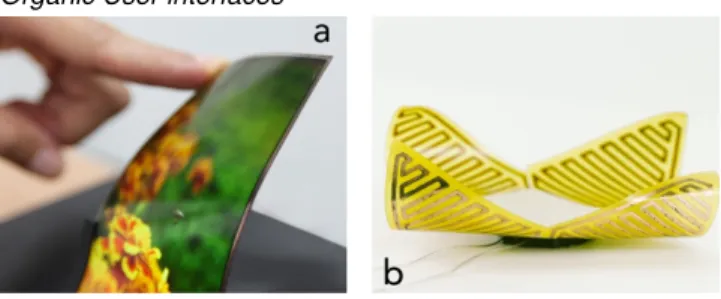
Figure 4 : (a) LG Flexible OLED; (b) Unimorph
Organic User Interfaces (OUI) [38, 49] is an emerging paradigm bringing physical dynamicity where: input equals output; function equals form; form follows flow [23]. Self-actuated flexible devices adapt their shapes to offer better affordance such as Morphees [41]. The development of flexible displays technology promise many advances in the
short term and hence future integration in OUI (Figure 4a). A possible exploration could be for instance to associate different display modes according to distinct bendings of the HUD.
Smart Material Interfaces
Smart Material Interfaces (SMI) [53] take advantage of recent generations of engineered materials that have capabilities of dynamically altering physical properties such as shape, texture and colour. SMI explore how to use material properties as programmable features for enhancing interaction. As opposed to tangible interfaces, where coherence might be an issue, especially for (RU5), they exhibit a coherent information space [33]. SMI can for instance change their shape as in uniMorph [21] (see Figure 4b) or change their physical texture in GelTouch [34].
Design Principles
The design properties from this analysis are summarized in the diagram of Figure 1, where we aim at relating them to both a given design dimension and our aeronautical requirements. This mapping results in a set of design
principles (e.g: favor physical skills), where requirements (e.g RU1 direct localization) are related to properties observed in the related technology or modality (e.g
proprioceptive perception). What we illustrate through this
diagram, is how using an analysis of the related work framed
RU1 - Direct localization perception
Reachability: through the physical reachability of the body parts.
à à
Easy and direct access: build on the potential physical space.
à Favor physical skills: mo e easily atta ned r i through bodily capacities such as bima-nuality, proprioception, the use of the body to constrain actions and spatial physical knowledge
à Reduce perceptual distance: a synthe-tized view of the situation helps a better localization.
RU2 - Situational awareness
à Contextual awareness: build on the potential (a common) physical space.
à Contextual information: build on physical and software dynamicity to comply with awareness needs
RU3 - Collaborative awareness
à Comprehensibility: can be achieved through the properties of non-fragmented visibility and performative actions as analysed by [23] in tangible and embodied interaction. à Contextual information: (see R.U.2) à Shared visibility: build on the potential better
visibility of non-flat objects in physical space
-RU4 - Operational Performance
à Coherence physical-digital. à End-user customisation à Favor physical skills: (see R.U.1).
à Not too much focus.
à Perceptible feedback: directly available à Shape & relief expressivity:
à
for example, enables to provide only relevant information to the pilots.
RU5 - Usability in degraded context
à Degraded context coping with degraded: context more easily achievable through the reachability and availability of body parts. à Coherence physical-digital
à Robustness
RS1 - Safety-Critical System
à Adapted constraints: from physical and software dynamicity.
à Avoid dangerous projectiles: better achieved with safely attached objects; this contrasts with the major part of TUIs that could become dangerous projectiles.
RS2 - Resilience
à Alternative modes: relies on dynamicity or graspability, which is according to Fitzmaurice [13] one of the most fundamental property in tangible interaction.
à Resilience: achievable through the accessibi-lity and availabiaccessibi-lity of body parts.
RS3 - Availability
à Reachability:
à Availability given phase of flight:
(see R.U.1).
à Availability: availability to the hands through graspability.
relies on dynamicity.
à Easy and direct access: (see R.U.1) à Moveability: relies in the cockpit context on
the dynamic composition possibility offered for instance by large interactive surfaces.
-RI1 - Dynamicity and adaptability
à Adaptability: builds either on dynamicity, property of a technology to offer the shape and the geometry of the interactive device as a design property.
à Internationalization: basic human sensorial perception are generic, so that there is no need to adapt the user interfaces.
-RI2 - Engineering
à Cost effective, reusable and programmable: thanks to genericity.
à Fewer training: (same as internationalization). à Internationalization: the need to anticipate
for internationalization may decrease when using basic human sensorial perception. à Reusable shapes:
structure enabling manufacturers to reuse a device in different program lines.
à Customer needs: compliance to customer à Modularity: relies in the cockpit context on
the dynamic composition possibility offered for instance by large interactive surfaces. better visibility of non-flat objects in the
through explicit requirements helped us, in the case of the "touch screen safety problem", to formulate relevant design principles. Although emerging from this mapping in the context of a specific dimension, design principles can be taken as general, and this generality will enable to explore and reformulate them in each of the three design dimensions. In Table 1, we summarize the resulting design principles, sorted by requirement, and detail them.
DISCUSSION
In the present exploration, interactions properties are mapped back to the requirements, that have helped to frame the design space into three dimensions. This allows some traceability, that is indeed supported through the diagram of Figure 1 and Table 1: we know where design properties come from, as we know which requirement is translated in which design principle, based on which properties.
In this paper, we adopt a design research approach where technological breakthroughs are anticipated, but are not a goal per se. This might seem contradictory with our concrete goal of informing the design of future cockpits. However, aeronautics have a singular relationship to innovation in user interaction. Its safety requirements often lead to the identification of new questions, and to innovations that can be later generalized to other application domains. But the same safety constraints require verifications and adaptations that can delay the adoption of these innovations. For both reasons, it is important to focus on safety issues as early as possible, because “embedding” safety concerns early in the designs can be less costly than adapting designs later. Our aim is, through a structured exploration of the design space associated with our "touch-safety" problem, to get a better understanding of what adding "physicality" would mean in the context of the touch-based cockpit. A first insight on this question is that we cannot limit our exploration to a single interaction paradigm through a linear process. We need to bring each of them face to face, which is the purpose of having three dimensions that enables us to cross-fertilize design principles. Through this exploration, we hope to explore two types of designs: firstly, those produced by a re-embodiment process aimed at better leveraging human-environment interaction skills in existing interactions; secondly, new interactions, at a physical level, such as enabling to program physical objects or the way we perceive them. CONCLUSION AND FUTURE WORK
In this paper, we provide a three-dimensional design space and we identify a set of design principles for touch-based and tangible-embodied interaction in the cockpit. Our objective in the AIRTIUS research project1 is to iteratively both,
design and evaluate flight deck device prototypes (TRL 4 - 5) – hence safety (RS*) and industrial (RI*) constraints – and refine our requirements. We will start with the participatory design of demonstrators that explore and combine described features in order to produce new interaction techniques, and as a mean to better understand pilot needs.
_________
1.!AIRTIUS, an ANR research project, www.airtius.net
REFERENCES
1. Alexander, J., Lucero, A., Subramanian, S., Tilt Displays: designing display surfaces with multi-axis tilting and actuation. In Proc. of MobileHCI 2012.
2. Alapetite, A., Fogh, R., Zammit-Mangion, D. et al. Direct Tactile Manipulation of the Flight Plan in a Modern Aircraft Cockpit. In Proc. of HCI Aero 2012
3. ARINC 661-4 (2010). Prepared by Airlines Electronic Engineering Committee. Cockpit Display System Interfaces to User Systems. ARINC Specification 661-4; 4. Barbé J., Mollard, R. and Wolff, M. 2014. Ergonomic
approaches to integrate touch screen in future aircraft cockpits. JESA volume 48 11/2014.
5. Bachynskyi, M., Palmas, G., Oulasvirta, A., Steimle, J. and Weinkauf, T., 2015. Performance and Ergonomics of Touch Surfaces: A Comparative Study using Biomechanical Simulation. In Proc. of CHI '15.
6. Bau, O., Poupyrev, I., REVEL: tactile feedback technology for augmented reality. ACM Trans. Graph. 31, 4, Article 89 (July 2012).
7. Becouarn, L. (coordinator), 2012. Final Report - ODICIS (One DIsplay for a Cockpit Interactive Solution), http://cordis.europa.eu/publication/rcn/14021_en.html 8. Boy, G.A., 2012. What do we mean by Human-Centered
Design of Life-Critical Systems? In Proc. of the 2012 IEA World Congress on Ergonomics, Recife, Brazil.
9. Scott, B., Ishii, H. and Dahley, A. 1998. Tangible Interfaces for Remote Collaboration and Communication.
In Proc. of the CSCW 1998
10. Casner, S.M., Geven, R.W., Recker, M. P. and Schooler, J.W. 2014. The Retention of Manual Flying Skills in the Automated Cockpit. Human Factors: The Journal of the Human Factors and Ergonomics Society.
11. Cohen, P.R., and McGee, D.R. 2004. Tangible Multimodal Interfaces for Safety-Critical Applications. Communications of the ACM 47.
12. Dubey, G. and Moricot, C., 2006. La polyvalence du Rafale ou l'objet total : la relation entre une technologie nouvelle et ses utilisateurs. Ed. Centre d’études en sciences sociales de la défense. Les Documents du C2SD
13. Fitzmaurice, G., Ishii, H., Buxton, W., Bricks: laying the foundations for graspable user interfaces. CHI'95. 14. GHOST a collaborative EU project, FET-Open program.
http://ghostfet-prod.cs.bris.ac.uk/
15. Graziano, M.S.A., Cooke, D.F. et Taylor, C.S.R. (2000). Coding the location of the arm by sight. Science, 290, pp. 1782–1786.
16. Green, T. R. G. (1994). The cognitive dimensions of information structures. Technical Communication, 544-548 17. Gustafson, S., Rabe B., Baudisch, P., Understanding palm-based imaginary interfaces: the role of visual and tactile cues when browsing. In Proc. of CHI '13.
18. Hamon, A., Palanque, P., Silva, J.L., Deleris, Y., Barboni, E., 2013. Formal description of multi-touch interactions. In Proc. of EICS '13, pp. 207-216.
19. HAPPINESS - Haptic Printed Patterned Interfaces for Sensitive Surfaces. http://happiness-project.eu/
20. Harrison, C. and Hudson, S. E. 2009. Providing Dynamically Changeable Physical Buttons on a Visual Display. In Proc. of CHI '09. ACM, NY. 299-308. 21. Heibeck, F., Tome, B., Della Silva, C., and Ishii, H.
2015. uniMorph - Fabricating Thin-Film Composites for Shape-Changing Interfaces. In Proc. of UIST 15
22. Hennecke, F., Wimmer, R., Vodicka, E., Vertibles: using vacuum self-adhesion to create a tangible user interface for arbitrary interactive surfaces. TEI 2012.
23. Holman, D, and Vertegaal, R. 2008. Organic User Interfaces: Designing Computers in Any Way, Shape, or Form. Communications of the ACM 51.
24. Hornecker, E., Buur, J., Getting a grip on tangible interaction: a framework on physical space and social interaction. In Proc. of CHI '06. ACM.
25. Hourlier, S., Guérard, S., Barou, J.L and Servantie, X., 2015. Testing Touch Screens in Realistic Aeronautic Turbulent Conditions (Light to Severe). SAE International Journal of Aerospace 8.
26. Jung, H. and Stolterman, E. Digital form and materiality: propositions for a new approach to interaction design research. In Proc. of NordiCHI '12.
27. Kincaid, R., 2012. Tactile Guides for Touch Screen Controls. In Proc. BCS HCI 2012
28. Klemmer, S.R., Hartmann, B. and Takayama, L. How bodies matter: five themes for interaction design. DIS '06. 29. Leitner J. and Haller, M. 2011. Geckos: combining magnets and pressure images to enable new tangible-object design and interaction. In Proc. of CHI 2011. 30. Letondal, C., Castet, J., Vinot, J.L, de la Rivière, J.B and
Pauchet, S. (2014).!Exploring the Physical Design Space for Situation Awareness and Performance in the Interactive Cockpit. TEI 2014!WIP paper!(poster). 31. Letondal, C., Zimmerman, C., Vinot, J.L, Conversy, S.
(2015). 3D Visualization to Mitigate Weather Hazards in the Flight Deck: Findings from a User Study. 3D UI 2015. 32. Lucchi A., Jermann, P., Zufferey, G. and Dillenbourg, P., 2010. An Empirical Evaluation of Touch and Tangible Interfaces for Tabletop Displays. In Proc. TEI 2010 33. Minuto, A., Vyas, D., Poelman, W., Nijholt, A. Smart
Material Interfaces: A Vision. In Proc. INTETAIN '11. 34. Miruchna, V., Walter, R., Lindlbauer, D. et al. 2015.
GelTouch: Localized Tactile Feedback Through Thin, Programmable Gel. In Proc. UIST 15.
35. Nomura, S., Hutchins, E. and Holder, B.E. The uses of paper in commercial airline flight operations. CSCW ’06. 36. Noyes, J.M. and Starr, A.F. 2007. A Comparison of
Speech Input and Touch Screen for Executing Checklists in an Avionics Application. Int. J. Aviation Psychology 17 37. Prablanc, C., Echallier, J. F., Komilis, E., et al. Optimal response of eye and hand motor systems in pointing at a
visual target. Biological cybernetics, 1979, 35 (2), 113-124. 38. Rasmussen, M.K., Pedersen, E.W., Petersen, M.G.
Hornbæk, K. Shape-changing interfaces: a review of the design space and open research questions. CHI '12. 39. de la Rivière, J.B, Kervégant, C., Orvain, E., Dittlo, N.,
CubTile: a multi-touch cubic interface. Proc. VRST '08. 40. Rossetti, Y., Desmurget, M., Prablanc, Claude. Vectorial
coding of movement: vision, proprioception, or both?
Journal of Neurophysiology, 1995, n°1, 457-463.
41. Roudaut, A., Karnik, A., Löchtefeld, M. and Subramanian, S. 2013. Morphees: Toward High Shape Resolution in Self-Actuated Flexible Mobile Devices. In Proc. of CHI’13.
42. RTCA DO-178B / EUROCAE ED-12B, Software Considerations in Airborne Systems and Equipment Certification, RTCA EUROCAE Joint Commitees, 1992. 43. Sato, M. Poupyrev, I. and Harrison, C. 2012. Touché:
enhancing touch interaction on humans, screens, liquids, and everyday objects. In Proc. of CHI '12.
44. Schwesig, C. Poupyrev, I. and Mori, E. 2004. Gummi: a bendable computer. Proc. CHI '04, p. 263-270.
45. Sober, S.J., Sabes, P.N. Multisensory integration during motor planning. The Journal of Neuroscience, 2003, vol. 23, no 18, pp. 6982-6992.
46. Tory, M., and Kincaid, R., 2013. Comparing Physical, Overlay, and Touch Screen Parameter Controls. In Proc. of ITS’13
47. Ullmer, B. and Ishii, H. 2001. Emerging Frameworks for Tangible User Interfaces. In HCI in the New Millenium, John M. Carroll, Ed. pp. 579–601.
48. Vernier, F. LIMSI-CNRS. 2008-2010. MultiTouch Widgets. http://vernier.frederic.free.fr/MTWidgets/ Multitouch_Widget/MT_Widgets.html
49. Vertegaal R. and Poupyrev, I. 2008. Introduction. Commun. ACM 51, 6 (June 2008), pp. 26-30.
50. Vinot, J.L. and Athenes, S., Legible, are you sure?: an experimentation-based typographical design in safety-critical context. In Proc. of CHI 2012.
51. Vinot, J.L., Letondal, C., Lesbordes, R., Chatty, S., Conversy, S. and Hurter, C., 2014. Tangible Augmented Reality for Air Traffic Control. Interactions 21, 4 (July 2014) ACM, New York, NY, USA, 54-57
52. Voelker, S., Øvergård, K.I., Wacharamanotham, C. and Borchers, J. 2015. Knobology Revisited: A Comparison of User Performance between Tangible and Virtual Rotary Knobs. In Proc. of ITS’15
53. Vyas, D., Poelman, W., Nijholt, A., De Bruijn, A., Smart material interfaces: a new form of physical interaction. In Proc. of CHI 2012.
54. Yeh, M., Jin Jo, Y., Donovan, C. and Gabree, S., 2013. Human Factors Considerations in the Design and Evaluation of Flight Deck Displays and Controls. Final Report. FAA. DOT-VNTSC-FAA-13-09