A Cost-Effective Portable Telemedicine Kit for Use in Developing Countries by
Ari T. Adler B.S., Physics Brandeis University, 1996
Submitted to the Department of Mechanical Engineering In Partial Fulfillment of the Requirements for the Degree of
Master of Science in Mechanical Engineering
at the
Massachusetts Institute of Technology May 2000
@ 2000 Massachusetts Institute of Technology All rights reserved
Signature of Author...
Department of Mechanical Engineering May 19,2O00
Certified by... ...
Joseph A. Paradiso Principal Rese ch Scientist, Media Laboratory The i4 Supervisor
Certified by... ...
Woodie C. Flowers Professor, Department of Mechanical Engineering 'T esis Reader Accepted by...
Ain A. Sonin Chairman, Department Committee on Graduate Students
MASSACHUSETTS INSTITUTE OF TECHNOLOGY
SEP 2
0 2000
A Cost-Effective Portable Telemedicine Kit for Use in Developing Countries by
Ari T. Adler
Submitted to the Department of Mechanical Engineering on May 19, 2000, in partial fulfillment of the requirements for the Degree of Master of Science in
Mechanical Engineering
Abstract
Telemedicine is currently being used to bridge the physical distance between patients in remote areas and medical specialists around the world. Developing countries have had little experience or success with telemedicine, in part because of the prohibitively expensive equipment and connectivity costs involved. Developing countries require low-cost, sustainable telemedicine solutions for the local delivery of primary healthcare and efficient access to medical expertise when needed. A low-cost (approximately $8,000 in small quantities) portable telemedicine kit was designed and built to address these needs. The kit was developed as part of the Little Intelligent Communities (LINCOS) project, which is bringing satellite telecommunications, education and telemedicine services to underserved areas of Latin America and the Caribbean. This is accomplished through the use of modified ISO shipping containers that become 'digital town centers.'
The telemedicine kit consists of a durable case that houses a portable computer and several medical peripherals: a digital stethoscope, an ECG recorder and a medical imaging system. The kit allows a health practitioner in a remote area to capture patient data in the form of audio, video, and images in a asynchronous fashion and forward them over the Internet to a doctor for a diagnosis.
This document addresses various aspects related to the implementation of a low cost telemedicine kit. It also explores some of the technologies that will enable the creation of new types of telemedicine devices in the future, not only for remote diagnostic applications, but also for home health monitoring. A wireless transceiver board was also designed and built so that it could be embedded into consumer medical and electronic devices in a general fashion. It allows the devices to communicate wirelessly with a base station either for home health monitoring applications, or for a cordless version of the portable telemedicine kit.
Thesis Supervisor: Joseph A. Paradiso
Acknowledgements
First, I would like to thank my advisor Joe Paradiso, who in addition to offering me a great amount of help, encouragement and advice over the past two years has also been a great person to work for.
I would also like to thank Woodie Flowers, my departmental thesis reader, for spending the time advising me and always giving me interesting things to think about.
I would like to acknowledge and thank Nisha Checka, who worked endless hours with me on this project as a UROP. She has made significant contributions to the research described in this thesis.
I would like to thank Leslie Regan in the M.E. department for all of her help and administrative advice over the past two years.
I would also like to thank Sandy Pentland and Jose Maria Figueres for promoting my involvement, and always keeping me enthusiastic about the
LINCOS project.
I thank Glenn Vonk at Becton-Dickinson and Jim Sheats at Hewlett-Packard for providing medical devices and computing equipment for my research.
I would like to thank David Boor and IBM for sponsoring me through the IBM Media Lab fellowship.
I thank Juan Barrios, director of the LINCOS project for all of his help, advice and friendship over the past two years. It has been a pleasure working with him.
I would like to acknowledge Alejandro Valerio, Don Armando Bonilla, Franklin Hernandez and students from the TEC for the many contributions that they made to this project including the software, electronics and graphical design for the telemedicine kit.
I would like to thank my office-mates AN Benbasat and Ara Knaian for their company, and their expert help and advice about pretty much anything. I have tremendous respect for both of them.
I also thank the other members of the Responsive Environments Group, and my friends and colleagues at the Media Lab and MIT for making my experience stimulating and rewarding.
Finally, I would like to thank Melissa for her encouragement and understanding, and my family for all of their love and support.
Contents
Abstract... 3
Acknowledgements... 5
Contents ... 7
List of Figures... 9
Glossary of Terms and Acronyms ... 11
Overview... 13
1. Introduction...15
1.1 Definition of Telemedicine... 15
1.2 Telemedicine Systems in the Industrialized World... 16
1.3 Telemedicine in Developing Countries... 19
1.4 The LINCOS Project ... 20
2. The Design of the LINCOS Units ... 21
2.1 The Physical Construction of the LINCOS Units... 22
2.2 Internet Connectivity for the LINCOS Units... 25
2.3 The Computer Laboratory... 27
2.4 The Information Center ... 28
2.5 The Telemedicine Center... 29
3. The Prototype Telemedicine Kit... 31
3.1 Specifications of the Telemedicine Kit ... 33
3.2 The Peripheral Medical Devices ... 34
3.3 Electronics and Power for the Telemedicine System... 41
3.4 Software Interface for the Telemedicine System ... 41
4. Important Factors in the Development of the Telemedicine System... 45
4.1 Quality of the Data Captured ... 45
4.2 Real-Time Vs. Store-and-Forward Methods of Telemedicine ... 47
4.3 Medical Approval for Peripheral Devices ... 51
5. Telemedicine in the Future ... 53
5.1 Technological Advances ... 54
5.2 Home Health Monitoring ... 60
6. Conclusions T .. dE...67
6.1 S um m ary ..g ... ... ... 67
6.2 wThe Future m... ... ... 69
Appendix A: Telemedicine Kit Electronics ... 71
A.1 Signal Diagram ... 71
A.2 Power Diagram ... 72
A.3 Stethoscope Am plifier Circuit ... 72
Appendix B: Telemedicine Kit Software...73
Appendix C: Wireless Board Electronics...75
0. 1 Schematic ... 75
C .2 P C B Front ... . 76
C .3 P C B B ack ... 77
Appendix D: Wireless Telemedicine Software...79
D.1 Transm itter PIC Code... 79
D .2 Receiver PIC C ode... 83
D.3 Base Station C C ode... 85
Appendix E: Component Specifications... 87
E.1 AMD 2500 General Examination Camera ... 87
Related Internet Links ... 93
T elem edicine ... . 93
C om m ercial ... 93
Research ... 93
List of Figures
Figure 1: High-End Telemedicine System ... 17
Figure 2: NASA Telemedicine Kit ... 18
Figure 3: LINCOS Digital Town Center... 21
Figure 4: LINCOS Container Layout... 22
Figure 5: LIINCOS Container Plan View... 23
Figure 6: ISO Container Being Transported ... 24
Figure 7: Canopy Model ... 25
Figure 8: LINCOS Computer Laboratory ... 27
Figure 9: LINCOS Information Center ... 28
Figure 10: Remote Weather Probe... 29
Figure 11: LINCOS Water Testing Kit... 30
Figure 12: Telemedicine Kit ... 31
Figure 13: Telemedicine Kit Control Panel ... 34
Figure 14: Telemedicine Kit Stethoscope ... 35
Figure 15: Stethos Frequency Response Chart... 36
Figure 16: ECG Recorder... 37
Figure 17: Sample ECG Data File ... 38
Figure 18: Polarized Image of the Eye Taken with Imaging System... 39
Figure 19: Star Trek Tricorder ... 56
Figure 20: Wireless Telemedicine Concept ... 61
Figure 21: Wireless Transceiver Board ... 62
Figure 22: Transceiver Board in Scale ... 63
Glossary of Terms and Acronyms
AGC CAD CCD CMOS CODEC CPR CT DSL E3 EMR FDA Frame Relay 1/0 IP IR ISDN ISO ISP JPEG LCD MODEM MPEG NASA PCMCIA PDA PIC POTS RF RS-232 TLA USB VR VSATAutomatic Gain Control Computer Aided Design Charge Coupled Device
Complementary Metal Oxide Semiconductor Coder-Decoder
Computerized Patient Record Computed Tomography Digital Subscriber Line Everest Extreme Expedition Electronic Medical Record Food and Drug Administration
A high-speed packet-switching protocol Input/Output
Internet Protocol Infrared
Integrated Services Digital Network
International Organization for Standardization Internet Service Provider
Joint Photographic Experts Group Liquid Crystal Display
Modulator-Demodulator
Moving Picture Experts Group
National Aeronautics and Space Administration
Personal Computer Memory Card International Association Personal Digital Assistant
Programmable Integrated Circuit Plain Old Telephone Service Radio Frequency
Interface Between Data Terminal Equipment and Data Communications Equipment Employing Serial Binary Data Interchange.
Three Letter Acronym Universal Serial Bus Virtual Reality
Overview
This master's thesis describes the research that I did at the MIT Media Laboratory to develop a low cost telemedicine kit for the Little Intelligent Communities (LINCOS) project, which consists of deploying information technology infrastructure into remote areas of developing countries by using recycled ISO shipping containers. Although the kit can be used as a general solution for bringing affordable telemedicine to developing countries, it will be described in this document primarily in the context of LINCOS because the telemedicine architecture was designed to work within the LINCOS framework. Additionally, I have been heavily involved with LINCOS since its launch in December of 1998 and was responsible for many of the decisions that created the framework for the telemedicine applications. In the course of this thesis, I will be addressing various aspects of diagnostic telemedicine, mostly related to the underlying technologies and their future possibilities rather than to the infrastructure, implementation and costing structure (which are all things that need to be addressed thoroughly in order for a telemedicine effort to have a chance of succeeding). This document was written assuming no prior familiarity with telemedicine and in general, technical terms are explicitly defined. I have also included a glossary of terms and acronyms at the beginning of this document for reference.
Below is a description of the major issues that each chapter addresses:
Chapter 1 introduces the concept of telemedicine and gives a background of
some historical telemedicine projects in the developed world as well as a discussion of some of the efforts to create effective telemedicine programs in developing countries. The LINCOS project is also introduced as a partial solution to many of the problems that developing countries face today.
Chapter 2 explains the design of the LINCOS units in order to set a framework
for the telemedicine application. The physical construction of the LINCOS units, their connectivity and each of the physical spaces (and their applications) are
described in detail.
Chapter 3 describes four aspects of the development of the prototype
telemedicine kit: specification selection, integrating the peripheral medical devices, building the electronics and power system and defining the software requirements.
Chapter 4 addresses some of the important factors considered during the
development of the telemedicine system. Factors such as acceptable sound, image and video quality are investigated and a comparison is given between the store-and-forward and real-time method of telemedicine. The last section discusses the issues of FDA approval for medical devices and its implications for device use in developing countries.
Chapter 5 looks at telemedicine of the future in the context of the technologies
that will enable the creation of a TeleCorder, which is a low cost, multi-diagnostic telemedicine and personal communications device that is inspired by the futuristic Tricorder from Star Trek. Relevant advances in the fields of computing, artificial intelligence, electronic medical records (EMRs), data compression, wireless communications and sensor technologies are discussed in this chapter. Also addressed is home telemedicine, which is recognized as one of the most effective ways of delivering health services to patients. The last section in this chapter describes a wireless application that was developed to demonstrate the feasibility of monitoring health at home in a pervasive and non-invasive manner.
Chapter 6 offers a summary and concluding remarks about the research that was
done and the applications that were developed. Some issues that were not addressed in this thesis are described here in the context of future work.
1
Introduction
New technologies in sensing, medical imaging and wireless data communications are allowing telemedicine-the practice of healthcare at a distance-to be done at a much lower cost than in the past, enabling the development of new widespread remote medicine initiatives. These advances in technology have the potential to transform the way healthcare is provided throughout the world.
This chapter introduces the concept of telemedicine and gives a background of some historical telemedicine projects. We also introduce the LINCOS project, which will be described in detail throughout this document.
1.1 Definition of Telemedicine
Telemedicine means literally medicine at a distance. The concept has been described in many ways and in different contexts, but there has yet to be a universally accepted definition. The World Health Organization (WHO) for example, describes telemedicine as:
...the practice of medical care using interactive audiovisual and data communications including medical care delivery, diagnosis, consultation and treatment, as well as education and the transfer of medical data'.
Another, future-oriented definition offered by Bauer and Ringel:
Telemedicine is the combined use of telecommunications and computer technologies to improve the efficiency and effectiveness of health care service by liberating caregivers from traditional constraints of place and time and by empowering consumers to make
informed choices in a competitive marketplace [Bauer99, 8].
Many definitions such as the ones above have described this field, but it seems difficult-if not impossible-to adhere to any one of them because of the rapid
rate at which telemedicine is evolving. For the purposes of this document, we will use the general definition offered by Bashshur, Sanders and Shannon:
Broadly, telemedicine involves the use of modern information technology, especially two-way interactive audio and video telecommunications, computers and telemetry, to deliver health services to remote patients and to facilitate information exchange between primary care physicians and specialists at some distances from each other [Bashshur97, 9].
1.2 Telemedicine Systems in the Industrialized World
The industrialized countries of North America, Europe, Japan and Australia have a considerable amount of experience with telemedicine; it has been practiced in these countries to some degree for over 50 years. The Nebraska Psychiatric
Institute for example, in 1959 was one of the first in the world to use a closed-circuit television link with the Norfolk Hospital 112 miles away. The link was used by doctors who consulted with each other on patient cases and also gave psychiatric consultations to patients on the other end of the link. Another significant early implementation of telemedicine was a microwave video link set up in April of 1968 between the Massachusetts General Hospital (MGH) and Boston's Logan airport. The link was established to provide immediate health services to airport employees and passengers. It eliminated the need to have physicians permanently assigned to the clinical facilities at the Airport, while avoiding the delays associated with patient transportation. Examinations at Logan included radiology, dermatology and cardiology [Bashshur75].
Telemedicine has advanced significantly in the developed world since then; it is now used in a wide variety of settings ranging from simple doctor-patient telephone and email consultations, to sophisticated Virtual Realty (VR) enhanced telesurgery. It is used in remote areas, correctional institutions, in the military and in space. The most common use of telemedicine is in areas where there are shortages of doctors and specialists that can diagnose specific medical conditions. For example, the patient in Figure 1 is getting an ear examination by a general practice doctor and his assistant, while a live video stream of her inner ear is transmitted to a specialist across the country. Since it is inconvenient for
both the patient and the doctor to travel the distances required to see each other in person, videoconferencing technology is used to bridge the physical distance that exists between them.
I
I
Figure 1: High-End Telemedicine System
The National Aeronautics and Space Administration (NASA) has also been doing remote medical monitoring since the early manned missions and is currently developing advanced life support systems for the International Space Station [Studer99]. Because of the obvious shortage of medical specialists in space, NASA's Earth-based doctors rely heavily on the use of telemedicine to monitor astronaut's vital signs. The astronaut's telemetry can provide critical information to doctors on Earth in the event of a medical emergency in space. One of NASA's telemedicine instrumentation Packs (TIPs) is shown in Figure 2 and is
described below.
Extended stays in orbit, such as those anticipated onboard the international space station, require a more sophisticated system for rapid diagnosis of illness. NASA has developed a suitcase-sized package, called the telemedicine instrumentation pack. It contains an endoscope, ophthalmoscope, dermatology macro-imaging lens, ECG, automatic blood pressure sensor, electronic stethoscope, pulse oximeter, and a computer with a two-way voice and video control. [Freiherr97].
... ... ... . . . ... ....
Because of the time delay associated with communication between Earth and a manned mission to Mars for example, NASA has real challenges to develop intelligent telemedicine systems that can help astronauts make life saving decisions when they are millions of miles from the nearest doctor.
Figure 2: NASA Telemedicine Kit
Another groundbreaking use of telemedicine (in a completely different setting) occurred in 1998, when a team of researchers from Yale and MIT collaborated with several of their research sponsors on the Everest Extreme Expedition (E3) to monitor climber's physiological and performance parameters using 'bio-packs' as they scaled the highest mountain on Earth [Lau98]. The system used on Mount Everest provided audio and video communications to a medical unit at the base camp via satellite and to experts at MIT, Yale Medical and Walter Reed Army Hospital.
In the Industrialized world, doctor-to-doctor consults using telemedicine are becoming increasingly common, as are electronic consultations between doctors and patients by email and videoconference.
In general, the outlook for telemedicine in industrialized countries is good. There are hundreds of successful programs already in place, and many more pilot programs in development that have the potential to revolutionize the way healthcare is delivered, not only in remote areas, but also in the home. Home healthcare will be discussed further in Chapter 5 which addresses the future of telemedicine.
1.3 Telemedicine in Developing Countries
The developing world has had relatively little experience or success with telemedicine. This is in part because of the high costs associated with Internet connectivity, high-end videoconferencing systems and sophisticated peripheral medical devices. Expensive technologies are simply out of the reach of health organizations in developing countries, which may have more immediate priorities (such as providing nutrition, sanitation and vaccinations to the population). To make things worse, developing countries have very high patients-per-doctor ratios, which are a general indicator of the amount of healthcare-or lack thereof-that exists in a region. As a point of comparison, industrialized countries such as the US have one doctor for every 200 to 500 people, while developing countries In East Africa have as little as one doctor for every 40,000 people [Wright97, 10]. "The state of health of a population is a direct determinant of its development, and investment in health is a prerequisite to economic and social progress [Wright97, 6]." Developing countries need low cost, sustainable solutions for the local delivery of primary healthcare and efficient access to
medical expertise when needed.
Pilot programs in recent years have proposed introducing telemedicine technologies into rural communities at a much lower cost (and complexity) scale than has been attempted in the past, in order to deliver high quality medical care
to patients in rural areas of developing countries at affordable costs. The Little Intelligent Communities (LINCOS) project, which is described in the next section, is one effort that is attempting to accomplish this goal.
1.4 The LINCOS Project
The MIT Media Laboratory has been working with the Costa Rica Foundation for Sustainable Development and other educational institutions on the LINCOS project. The project's general goal is to quickly and efficiently bring high quality Internet connectivity, telecommunications, education, and telemedicine services into rural communities of developing countries: "The goals of the LINCOS project are to empower people and promote their well-being through the application of cost effective and available technologies within a framework of sustainable development2."
The Media Laboratory became involved in this project because of the opportunities to use it as a 'test bed' for many ongoing research projects that explore breakthroughs in communications, design, epistemology and learning, health, e-development and new technologies in general.
The services provided to the communities (public telephones, fax machines, access to the Internet, distance education and telemedicine) will share a common data connection to the outside world. By 'bundling up' the data in this fashion, the costs of connectivity can be shared, providing substantial savings over the alternatives3. These services are provided by introducing 'digital town centers' into the communities. The design and capabilities of these centers will be discussed further in the next chapter.
2 Jos6 Maria Figueres (former President of Costa Rica), Things That Think consortia presentation
at the MIT Media Lab, March 1999.
3 The alternative, more costly solution is for each service to be run independently from different
2
The Design of the LINCOS Units
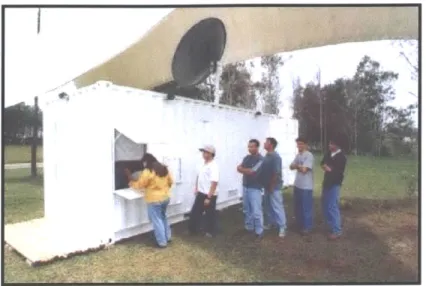
Figure 3: LINCOS Digital Town Center
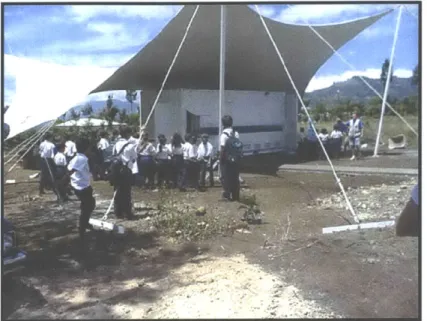
The LINCOS project is accomplishing its goals by introducing 'digital town centers' initially into rural areas of the Dominican Republic and Costa Rica, then expanding into other developing regions. These centers (referred to as the LINCOS units) are constructed from modified ISO shipping containers covered by a tensile structure. They house a computer lab, an information center and a telemedicine laboratory. This chapter will discuss the overall design of the LINCOS units in order to explain the framework in which the telemedicine and health services are provided to the communities. Figure 3 shows one of the first prototype LINCOS units constructed in Costa Rica.
// //
V
x N N N N N N N N N NIFigure 4: LINCOS Container Layout
2.1 The Physical Construction of the LINCOS Units
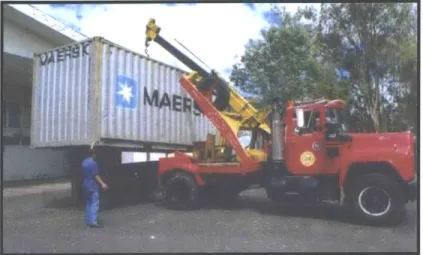
Shipping containers were chosen for the construction of the LINCOS units because they offer many benefits: standardization, security, structural integrity and low cost (because there is a large recycled after-market for them). Also, there already exists a widespread infrastructure for their transportation-they can be carried from their construction site to their final destination by boat, train, truck or helicopter. Figure 6 shows a 20-foot long container being transported by truck to a site outside of San Jose, Costa Rica where will be modified and turned into a
Computer Lab Information Center Telemedicine Center
ELE
Figure 5: LIINCOS Container Plan View
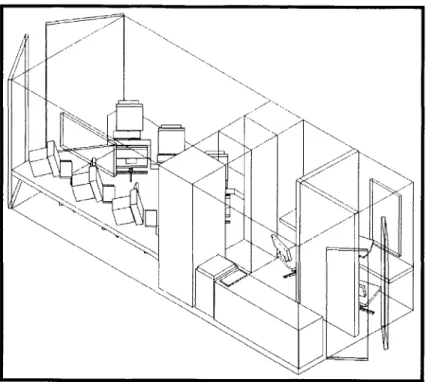
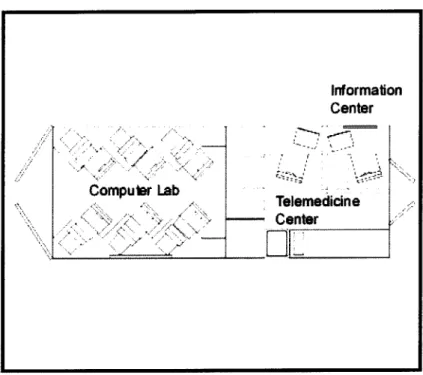
The structural modifications to the containers are relatively simple: first they are opened in several places in order to create doors for a second entrance, vents for cooling purposes and windows. Next, walls and furniture are installed to create the spaces for a computer lab, an information center and a telemedicine laboratory. Figures 4 and 5 show the container layout in its most common configuration.
The LINCOS unit is covered by a tensile structure that provides a covered area for hosting community events while protecting the container and its contents from exposure to direct sun and rain. It is important to keep the container from reaching extreme temperatures because of the possibility of equipment malfunction and discomfort to the users inside. Air conditioning or heating can be used when necessary, but are costly to sustain, particularly in areas where there
is limited or no electrical connectivity4. For this reason, the tensile structure, or canopy, was also designed to promote passive ventilation of the container when used in hot or humid areas.
Figure 6: ISO Container Being Transported
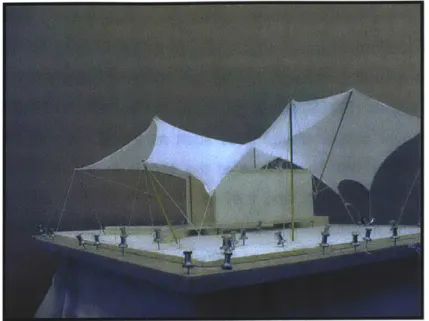
By properly orienting the LINCOS unit, winds are directed over the container causing a pressure difference between the outside and the inside through four vents on the ceiling. Another set of twelve vents located near the floor of the container permit the flow of cool air in through the bottom. In this fashion, passive air circulation is achieved, reducing or eliminating the need for air conditioning, thus providing substantial energy savings. One of the early models of the canopy is shown in Figure 7.
4 In the cases of no electrical connectivity, the container will have alternate sources of energy
such as gasoline or wind generators, solar panels, or a hybrid solution that combines several of these technologies.
Figure 7: Canopy Model
2.2 Internet Connectivity for the LINCOS Units
A VSAT (Very Small Array Terminal) antenna provides direct voice and data satellite connectivity to the LINCOS container when it is located in an area without phone lines or a broadband Internet connection. This satellite connection sustains the various activities that take place at the container. Economical connectivity can be obtained from companies such as Tachyon (based in San Diego, CA) that purchase unused bandwidth from existing geo-stationary satellites and then resell it at discounted rates to end-users through their partner Internet Service Providers (ISPs). Currently they can offer almost immediate 2 Mbps connectivity to most areas in the US, Canada and Mexico. By 2001 Tachyon expects to be able to offer such connectivity to virtually any area of the world5. In addition to providing telecommunications at the LINCOS site, the satellite link extends connections to telephones and computers in the nearby schools, offices and homes. This can be accomplished with wired lines, or short-range microwave links (operating above 800Mhz) that can extend the connection
s Source: Tachyon website www.tachyon.net/main.html
-capabilities of the LINCOS center to within several miles6. When they exist,
landlines are preferred over the (generally more expensive) satellite link, as long as they have enough bandwidth to support the needs of the LINCOS unit. Plain old telephone lines (POTS) would generally not be sufficient, but other services that operate over copper phone lines such as frame relay or DSL would work well. The activities that take place at the container can also be planned with bandwidth savings in mind, and they can be prioritized in such a way that the most important information gets transferred first. In addition, web-caching schemes can be used as a way of reducing redundant network traffic while still providing ample Internet functionality. It is becoming feasible for example, to purchase disk drives with hundreds of Gigabytes of storage capacity at increasingly lower costs (see Section 5.1.1 on advances in computing). These drives could cache millions of commonly accessed web pages for off line viewing, updating them only when their content has changed.
6 One disadvantage of the microwave link setup is that it requires line-of-sight between antennas
in order to operate without interference, a requirement that is not always easy to satisfy in highly mountainous regions.
Figure 8: LINCOS Computer Laboratory
2.3 The Computer Laboratory
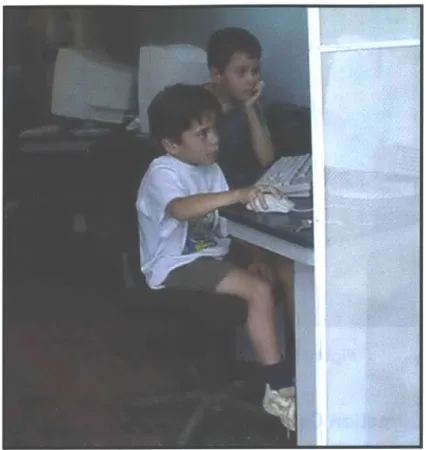
The LINCOS computer laboratory provides members of the community with access to the Internet and to a variety of software applications for education, finance, commerce and entertainment. The lab houses six multimedia PCs with peripherals for scanning, printing and recording video or images. Typically, computer classes would be offered to school children and to adults during part of the day and the rest of the time the computer lab would be open for general use. The lab provides tools for learning new skills and for gaining access to information technology. The intention is to help the communities "participate as equals in the global economy7." Figure 8 shows the computer lab in use by school children in San Marcos de Tarrazti, Costa Rica, the site of the first full LINCOS installation.
Figure 9: LINCOS Information Center
2.4 The Information Center
Figure 9 shows the information center at the LINCOS container. It is a
multi-service booth that provides information and multi-services to community members on everything from agriculture techniques and weather forecasts to government and social security forms. The attendant working at the info-center is equipped with a computer that has access to various information sources, both on the Internet and on local servers. The attendant also serves as the administrator for the public telephones, fax machines, copiers and computers at the LINOCOS center. In addition he or she can run an email post office and messaging center that would allow community members to stay in touch with their friends and family abroad without needing to know how to use a computer.
Figure 10: Remote Weather Probe
2.5 The Telemedicine Center
The telemedicine center provides the space and tools for a health practitioner to perform telemedical consultations. In addition, it houses a small environmental testing and monitoring lab. The telemedicine room consists of a small private space within the container that contains an examination table, a mobile sink, a desk and cabinet space for storing medical instruments and supplies. A portable telemedicine kit was designed to be used primarily at the telemedicine center in order to take advantage of the connectivity at the LINCOS container. The kit consists of a laptop computer and several medical peripherals that allow the health practitioner to capture a patient's medical data in the form of text, graphics, video, audio and data files. This information is subsequently forwarded over the Internet to a doctor for diagnosis. The telemedicine kit will be discussed further in Chapter 3.
Figure 11: LINCOS Water Testing Kit
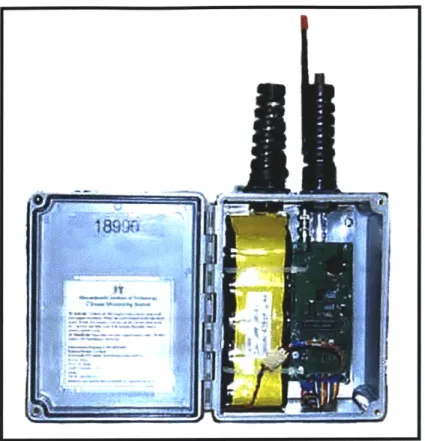
The telemedicine center also has an area that can be used as an environmental testing lab. Environmental testing is considered important in this context because of the effects of the state of the environment on the health of the population. Pollution, hazardous waste and other environmental problems create major health threats to communities around the world, a condition that is especially critical in developing countries because of the lack of awareness and enforcement of environmental regulations. Local water and soil parameters-such as pH, hardness and Chloride concentrations in water, and the levels of Nitrogen, Phosphorus, Potassium and pH in soil-are measured with test strips and solutions in the health lab (Figure 11 shows the LINCOS water testing kit). The results from these environmental tests along with meteorological data that is collected from sensors such as the environmental probe shown in Figure 10 can be sent from the lab to environmental and meteorological institutions for analysis and monitoring8. The results of these soil and water tests can also be valuable to local farmers, who can monitor and treat crops when necessary.
8 The weather probe shown in the figure was developed by Media Lab students Rich Fletcher and
Matt Reynolds. They were originally used on Mt. Everest, and then in Antarctica to transmit local
.
--3
The Prototype Telemedicine Kit
Figure 12: Telemedicine Kit
A portable telemedicine kit was designed and built to address the remote diagnostic needs of patients in rural communities of Cost Rica and the Dominican
readings of temperature, pressure, sunlight and wind speed from the remote areas directly to a satellite, which then posts the information to a publicly accessible website.
-Republic. The kit is intended to be used primarily at the LINCOS town centers, however, because of its portability it can also be taken to the local clinics, or to patient's homes9. The kit is shown in Figure 12- it consists of a durable plastic
case that houses a portable computer running custom telemedicine software and has several integrated medical peripherals for capturing patient's diagnostic information. The total cost of the components in the first kit that was built cost around $8,000 (this is the cost of the prototype, i.e., everything was purchased in quantities of one). It is expected that the cost per unit could be reduced significantly by manufacturing several of them and also by evaluating alternatives for some of the more expensive components. Section 4.3 further addresses some of the cost issues for medical devices.
The research that was done to develop this prototype system can be categorized into four general areas:
1. Defining the appropriate specifications for the telemedicine system.
2. Integrating the peripheral medical devices into the system in a user-friendly fashion.
3. Designing and building the electronics hardware for the system. 4. Defining the software requirements for the systeml .
The following sections contain a more detailed description of the work that was done in these four areas.
9 A GPS unit (like the DeLorme EarthMateTM for $90) can be easily attached to the telemedicine kit and used to record the exact location of the consultation. This information can be useful for research on the spread of diseases in rural areas.
10 Although I was involved in defining the specifications for the custom software, the actual development was carried out by a group of professors and students at the Instituto Tecnol6gico de Costa Rica (TEC).
3.1 Specifications of the Telemedicine Kit
The specifications of the first telemedicine prototype kit are based on studies that were conducted to determine the most common medical needs in rural communities of Costa Rica and the Dominican Republic. Medical needs have been found to vary significantly between countries and even between regions within the same country [Wright97]. In Costa Rica for Example, the Ministry of Health carried out an exhaustive national study in 1996 to assess the medical needs of the population. This study also looked to determine the feasibility of implementing a widespread telemedicine program in Costa Rica, a country that has had no prior experience in this area [Barrios96].
In 1999, a medical research team from the Center for Future Health at the University of Rochester carried out a Rapid Assessment Procedure (RAP) in Costa Rica and the Dominican Republic in order to quickly and efficiently assess the actual needs of the population that would be served by the LINCOS units.
The RAP process in public health program planning and evaluation is equivalent to the market research process in new product development, which ensures that devices, systems and concepts are relevant and comfortable to consumers prior to implementation. [Dye98].
Although the medical needs of different communities varied, it was determined through these studies that the telemedicine kit should provide the following five general capabilities:
1. Recording high quality audio from a patient's heart and lungs with a digital stethoscope.
2. Capturing a 12-Lead Electrocardiogram.
3. Capturing high-resolution external images and video of the eyes, ears, nose, throat and skin.
4. Recording a patient's blood pressure, pulse, body temperature and weight.
5. Uploading and downloading files to a networked database of electronic medical records that are also accessible by the consulting physicians.
3.2 The Peripheral Medical Devices
Several peripheral devices interface with a portable computer" in order to capture medical data in the form of text, graphics, audio and video. When they are not being used, these peripheral devices get stored inside the case along with the computer and the power source (in this case, a rechargeable battery or a regulator for plugging directly into a wall socket). The peripheral devices interface with the computer through an access panel on the inside of the case. This is done in order to make the kit simple to set up and to eliminate any uncertainty about how the devices should be connected (in other words, all of the intricate connections are done internally). Figure 13 shows the access panel, which has a series of standard internationally recognizable icons indicating where and how the various peripherals should be plugged-in.
Figure 13: Telemedicine Kit Control Panel
For the prototype unit we used a 300Mhz Toshiba Satellite 2595CDS running WindowsTM98.
Most of the peripheral devices in this kit are not extremely expensive telemedicine devices, but rather moderately priced standard medical devices that were integrated in such a way that they could be used in this application. All of the modifications that were done to the devices are in accordance with Food and Drug Administration (FDA) regulations in order to maintain safety and quality of the patients' data. Section 4.3 covers the important issues concerning FDA approval for modifications to medical devices used in the US and elsewhere. The various peripheral devices are described in more detail in the following sections.
Figure 14: Telemedicine Kit Stethoscope
3.2.1 Electronic Stethoscope
The telemedicine unit has an electronic stethoscope to capture sounds from a patient's heart and lungs. Electronic stethoscopes are becoming widely used, especially in educational settings (so that medical students can all hear the heart of a patient that is being examined by their instructor). Electronic stethoscopes, which have an audio pickup at the diaphragm coupled to a headset, have several advantages over the standard acoustic versions: elimination of sound loss and resonance effects, the ability to set different levels of amplification, active noise filtering and the ability to isolate sounds within a given frequency range. For this
application, the Stethos12 digital stethoscope was chosen because of its relatively low cost and its high performance in these areas. A frequency response chart comparing the Stethos with a standard acoustic stethoscope is shown in Figure
15. From the chart it can be seen that at different volume levels, the Stethos
does its job of amplifying the preferred low frequency sounds while reducing the undesirable high frequency ambient noise. Since the electronic stethoscope is made for listening-not recording, a minor modification was made to the cable of the device in order to direct the audio signal into the input of the computer instead of going to a standard earphone set (this can be seen in Figure 14). In addition, the signal from the stethoscope was amplified to the proper levels in order to obtain a high quality recording on the computer and to allow the practitioner to simultaneously listen to the stethoscope output on a set of headphones plugged into the main access panel13. Appendix A contains more
details on the stethoscope amplification circuitry.
Diaphragm Mode Frequency Response Graph of HP STETHOS vs Acoustic Stethoscope
+40 - _ _ _ _ _ _ _ _ _ _ _ _ _ _ _ _ _ _ _
HP STETHOS at volume level 8
+20-- HP STETHOSat 0oO- - Acoustic -20-_-E -40 HP STETHOS at -40. _ volume leve 1a -60 10 100 1,000 10,000 Frequency (Hz)
Figure 15: Stethos Frequency Response Chart
1The StethoTM is manufactured by Agilent Technologies and costs approximately $300 in small
quantities.
1 In order to reproduce frequencies that are below about 100Hz accurately the listener must wear earphones that completely enclose the ear, forming an airtight seal. [Bashshur97, 89].
Figure 16: ECG Recorder
3.2.2 Electrocardiogram Recorder
Heart conditions are a common cause of death throughout the world and they are often not diagnosed early enough. Electrocardiogram (ECG) recorders are used to monitor the electrical activity of the heart and can detect abnormal heart rhythms, inadequate blood and oxygen supply to the heart and an excessive thickening of heart muscle (which can result from high blood pressure). It is only until recently that portable, PC based ECG systems have become available in the $2000 range. Standard ECG systems were generally large in size, costly and usually could only print their traces to paper, making it difficult to share the information electronically without a scanner. In order to provide electrocardiography diagnostic capabilities, the telemedicine kit was equipped with a 12 lead PC based ECG unit (manufactured by Brentwood Medical of Torrence, CA). The device allows a health practitioner to capture and forward a full patient electrocardiogram to a cardiologist for diagnosis. One of the major advantages of this system over others of its kind is that it is interpretive: the software gives feedback on the signals that it receives. This means that if the patient has a recognizable heart problem, it is brought to the practitioner's attention immediately, allowing them to take appropriate action without having to wait for a reply from the cardiologist. The software for the ECG unit is integrated
with the telemedicine software that will be described later on in this chapter. The
ECG is shown being used in Figure 16 and a sample data output file is shown in
Figure 17.
Figure 17: Sample ECG Data File
3.2.3 Medical Imaging System
A medical imaging system is used in the telemedicine kit for capturing images and video of a patient's skin (and can also be used for external examination of the eyes, ears, nose and throat). Skin conditions are common in the developing world, often showing up as symptoms of other diseases. The practice of teledermatology requires high resolution and properly illuminated color images and video.
The telemedicine prototype contains a high-resolution (410,000 pixel) medical 1
inch CCD camera with an integrated uniform illuminator. This general examination camera (distributed by American Medical Development in Lowell, MA) is the single most expensive item in kit (it costs about $4,000 in small quantities). It is expensive relative to the other peripheral devices because it is a highly specialized FDA approved medical device, and has several features that
can not be found on a standard video camera: automatic gain control (AGC), polarization that eliminates reflections off of the surface being examined, 1-200x zoom range, white balancing and freeze-frame. One of the most important features of the AMD general exam camera is that it has a built in uniform illumination source, which is especially useful in mobile applications where lighting conditions may not be easily controlled. Surprisingly, stand-alone medical illumination sources are extremely expensive, as they are usually high quality fiber optic units costing several thousand dollars. Appendix E contains more information on the camera's technical specifications.
Figure 18 shows a polarized image of the eye taken with the AMD general
examination camera.
Figure 18: Polarized Image of the Eye Taken with Imaging System
CCD and CMOS imager chips have advanced a great deal in the last few years; today USB video cameras (or web cams used for internet conferencing) can be purchased for as little as $5014. Also, consumer digital cameras capable of
14 For example, Creative's Video Blaster@ Webcam 3 for US$50 (www.creative.com).
-producing Mega pixel resolutions are becoming available in the $500 range, making them viable alternatives for teledermatology in the store-and-forward
mode. Sections 4.1 addresses the issues of image quality for remote diagnosis of
skin conditions and Section 4.2 compares the store-and-forward and real-time methods of telemedicine.
3.2.4 Blood Pressure, Temperature and Other Measurements
A portable blood pressure meter allows the health practitioner to take an accurate and quick reading of a patient's systolic and diastolic blood pressure as well as their pulse rate. The blood pressure monitor used in the telemedicine kit consists of a small portable device (manufactured by Becton-Dickinson) that costs approximately $50 and is extremely simple to use: the cuff is inflated automatically by pressing a single button and within 30 seconds the device outputs an accurate reading to its LCD screen.
Also included in the kit is a digital thermometer, which is placed in the inner ear for a temperature reading accurate to 0.5 OF. This device uses an optical method of determining temperature by looking directly at the infrared (IR) energy radiated by the eardrum (which is one of the most stable, effective and non-intrusive ways of measuring body temperature5).
In addition to the blood pressure meter and thermometer, there are other 'unconnected' digital devices in the telemedicine kit such as a scale, an ear fluid monitor and a blood glucose meter. In regions with different diagnostic needs, these devices could be replaced with more appropriate equipment, medications or tests.
In the short term, the practitioner will manually enter the readouts from these devices into the patient database on the portable computer. In the future, this
information could be wirelessly transmitted to the computer by embedding small, low power transceivers into the devices. Chapter 5 describes this wireless concept in much more detail.
3.3 Electronics and Power for the Telemedicine System
Electricity and rechargeable batteries power the prototype telemedicine kit, but alternate forms of energy are considered for areas with little or no electrical connectivity. Systems such as fuel cells, hand-cranks and solar power could become efficient and sustainable ways to power the unit in the future. Ideally the peripheral devices themselves could be equipped with rechargeable batteries and could get charged when they are 'docked' into the case.
In addition to the electronics for powering the unit, there is custom circuitry in the kit to amplify the stethoscope signal before it is recorded on the computer.
Appendix A contains details on the electronics that provide power to the system
and charge the rechargeable battery, as well as a schematic of the amplification circuitry for the stethoscope.
3.4 Software Interface for the Telemedicine System
Software running on the computer in the telemedicine kit aids the facilitating practitioner in creating, viewing, capturing and forwarding patient medical information. The software was developed primarily by the TEC and it was designed to be intuitive, graphic, fast and user friendly. Its primary users are the local health practitioners in the communities and the consulting physicians at the other end. The telemedicine program requires that all users have individual accounts set up by a central administrator in order to control access to the records and preserve patient confidentiality. The four basic components of the program are explained in the sections below.
3.4.1 Database Management
The practitioner can either create new entries, or search the networked database for existing patient records. They can base the search on a number of different criteria and access patient information that was created or modified at any location. Section 3.4.4 discusses the networking and database interface capabilities of the software program.
3.4.2 Text Entry of Patient Data and Measurements
The practitioner enters or updates patient history information (name, age, sex, address, social security number, family history, previous and current symptoms, medications, etc.) They also take measurements with the appropriate peripheral devices (e.g. blood pressure meter, thermometer and scale) and update the patient records.
3.4.3 Capture of the Telemedical Data
The practitioner is given a choice of what data to capture: either audio with the digital stethoscope, an electrocardiograph file with the ECG recorder, or images/video with the general examination camera. In each of these cases, the telemedicine software interfaces with the appropriate programs to capture the files that are created.
3.4.4 Network Communications
Once the capture session is complete and the practitioner is satisfied with the changes that they have made to the patient record, they access the network and incorporate the patient files back into the central database. This network connection can be established in the telemedicine room at the LINCOS unit, or from any telephone jack. At this time the practitioners also notify the consulting physician that the records are ready for review by email or telephone1 6. From the
16 In future versions of the software, the consulting physicians will be notified automatically by
other end, the consulting physician (equipped with the same telemedicine software on a desktop PC) downloads the record and performs an evaluation, entering text in the diagnosis area. When they are done, they establish a network connection and upload the file to the central database, notifying the practitioner that the diagnosis is complete. Last, the practitioner downloads and opens the patient record, reads the doctor's diagnosis and can then take appropriate action.
Appendix B includes screen shots of the various program modes of the
4
Important Factors in the Development of the
Telemedicine System
Several important issues were considered when developing the telemedicine kit such as sound, image and video capture quality, the tradeoffs of choosing store-and-forward vs. real-time telemedicine and the regulations for FDA approval of new or modified medical devices in countries outside of the US. Each of these issues are considered in the sections below.
4.1 Quality of the Data Captured
There are cost trade-offs associated with the quality of data that is captured, stored and transmitted over networks such as the Internet. Higher quality data usually equates to larger file sizes, which in turn means longer network transfer times. Choosing appropriate audio, image and video quality for telemedicine is important to ensure accurate diagnoses on the part of the doctors, while keeping network traffic down. Advances in data compression techniques as well as the rapid growth of bandwidth available for network communications (see Section
5.1) makes many of the limitations encountered today become less of an issue in
the near future. The effects of quality on the diagnostics are briefly discussed below for each type of data file.
4.1.1 Quality of Audio Recordings
The dynamic range of the heart and lungs is 20Hz to 2KHz [Bashshur97, 89]. In order to preserve sound quality during recording, sampling should be done at a
rate that is at least twice the highest frequency of interest (2kHz in the case of the heart and lungs). This is known as the Nyquist sampling rate-the rate at which no aliasing occurs [Proakis94, 109]. Of course it is better to sample at a rate higher than 4kHz, for improved sound quality. As a point of comparison, a 10 second uncompressed (16 bits per sample) mono audio file sampled at 8kHz
produces a file that is approximately 83 kilobytes, while the same recording at 44.1 kHz takes up approximately 390 kilobytes of memory7. Subsequent
compression of these files can reduce their sizes by significant factors (Section
5.1.3 treats data compression in more detail.)
Considering that the audio files of the heart and lungs are likely to be short (on the order of several seconds) and that the network connections available at the LINCOS container will be reasonably fast (on the order of 128 kbps or higher), then high quality recordings can be transferred quickly over the Internet in the store-and forward fashion. Real time audio (to accompany video in most cases) can be digitized at 128 kbps (8kHz for 16 bit mono), which is sufficient to reproduce the full human auditory frequency spectrum from 20Hz to 20Khz [Bashshur97, 89].
4.1.2 Quality of Still Images and Video
Images and video need to have certain quality characteristics in order to be acceptable for remote diagnostics. The quality required is highly dependant on the application: for example an image taken to show the general region of a rash on a patient's hand can be of very low quality (i.e., 200 x 200 pixels, 8 bits, grayscale intensity resolution) and still serve it's purpose. Similarly, modern digital Computed Tomography (CT) scans can be processed so that images that are only 256 x 256 pixels and 8 bit grayscale can be transmitted for effective diagnoses [Bashshur97, 87]. However, a digitized chest x-ray for example, needs to be of a much higher quality (2000 x 2000 pixels with a 12 bit dynamic range) in order to be useful for remote diagnoses. Krupinski and researchers at the University of Arizona conducted a study to evaluate the effectiveness of digital photography for dermatological diagnoses by comparing them with in-person visits. They found that there was 83% concordance between in-person visits and
17 These recordings were tested using the sound recorder in Windows 9 8TM, which is also what
the teledermatology diagnoses (using a Cannon PowerShot600 digital camera at 832 x 608 pixels and 24 bit color resolution). [Krupinski99]. Unfortunately, the study did not measure the effects that reducing the image size and dynamic range would have on the specialists' diagnostic capabilities.
There seem to be no general formulas; image quality needs to be matched to the application in which it is used and addressed on a case-by-case basis [Argy99, 3].
The same guidelines apply to live or store-and-forward video: the appropriate frame rates and image sizes depend highly on the application. Telepsychiatry for example, doesn't require the highest image quality, but needs high frame rates (15-30 fps) for a consultation to be effective. Other applications (such as teledermatology) must use higher resolution images, but do not necessarily
require such high frame rates.
4.2 Real-Time Vs. Store-and-Forward Methods of Telemedicine
The telemedicine unit for LINCOS was designed primarily to use the store-and-forward (asynchronous) method of telemedicine and despite some disadvantages, this modality has the potential for substantial time and cost savings compared to the real-time (synchronous) method.The store-and-forward modality of telemedicine typically consists of a local health practitioner capturing patient data independently (images, audio, data files, patient symptoms in a text file, etc.) and then sending them over the Internet to a specialist who can asynchronously perform a diagnosis. In the real-time mode, the specialist is 'present' during the capture process, usually by means of a videoconferencing system. In the US for example, dermatology (which represents the largest overall volume of telemedicine cases-roughly 30%) is the
most common type of store-and-forward application18 while psychiatry (the
second largest in overall volume-roughly 20%) is the most common mode for real-time consultations [Webster99, 267].
There are significant time efficiency and cost differences between the store-and-forward and real-time methods of telemedicine. The specialists offering the consultation almost always have constrained and costly time schedules. An asynchronous method (such as store-and-forward) fits in better with their schedules; they wouldn't need to coordinate the exact times at which they will give their consultations and they would have virtually no set-up time [Robinson88, 40]. There is also a good amount of time spent on the social formalities between doctors and practitioners or patients in real-time communications and although this contact is valuable for educational for interpersonal reasons, it is still time consuming. During a real-time consultation, patients also tend to ask questions that are not directly related to their current condition, a phenomenon that is rarely seen in the store-and-forward method
[Bashshur97, 230].
Another important consideration is turn-around time: the length of time that it takes patients to receive a diagnosis from the time that they first schedule the
appointment with the referring practitioner. Studies by Krupinski, et al. at the University of Arizona suggest that the major difference between real-time and store-and-forward cases is in the time between the contact of a consulting clinician and the actual consultation [Webster99, 269]. This is because real-time
sessions require coordinating the schedules of the patient, the referring clinician, the specialist and any other relevant support staff. Real-time sessions typically take 10 to 20 minutes, while store-and-forward sessions tend to take less-5 to
10 minutes [Bashshur97, 232]. But once the real-time session is scheduled and
18 Other applications that commonly use the store-and-forward technology include ophthalmology,
does take place, the recommendations to the patient (diagnosis) are almost immediate, while there is a delay associated with store-and-forward diagnoses.(in the University of Arizona study, this delay was on average approximately 12 hours). The results of the study showed that the majority (67%) of the store-and-forward cases observed had a total turn-around time of less than 72 hours, while the majority of real-time cases (72%) had a total turn around time of more than 72 hours. On average, real time cases took 180 hours more than their store-and-forward counterparts [Webster99, 267].
There are also cost savings associated with using the store-and-forward instead of the real-time method. The savings come from not needing costly video-conferencing equipment or a high bandwidth line to support it. This is an important issue, especially in developing countries, where the costs of high bandwidth Internet connections are very high19. Also, not needing to recover the investment on expensive equipment for real-time communications means that consultations can be offered at affordable prices to community members.
An advantage of the store-and-forward method in terms of functionality is that the telemedicine kit can be transported to locations that do not need to have Internet connections. This is an important capability in rural areas, because it allows the health practitioners to make visits to patients' homes or to give consultations at a nearby health center and forward the information to a specialist for diagnosis at a later time.
Despite the advantages in terms of time and money saved, there are also disadvantages of using the store-and-forward method. For instance, the consulting doctor may require more than one forwarding session from the practitioner (this can occur when the practitioner fails to provide enough information for them to successfully diagnose the condition). After examining a