
HAL Id: hal-00943294
https://hal.archives-ouvertes.fr/hal-00943294
Submitted on 16 Dec 2014
HAL is a multi-disciplinary open access
archive for the deposit and dissemination of
sci-entific research documents, whether they are
pub-lished or not. The documents may come from
teaching and research institutions in France or
abroad, or from public or private research centers.
L’archive ouverte pluridisciplinaire HAL, est
destinée au dépôt et à la diffusion de documents
scientifiques de niveau recherche, publiés ou non,
émanant des établissements d’enseignement et de
recherche français ou étrangers, des laboratoires
publics ou privés.
RT-MaG: an open-source SIMULINK Toolbox for
Real-Time Robotic Applications
Augustin Manecy, Nicolas Marchand, Stéphane Viollet
To cite this version:
Augustin Manecy, Nicolas Marchand, Stéphane Viollet. RT-MaG: an open-source SIMULINK Toolbox
for Real-Time Robotic Applications. ROBIO 2014 - IEEE International Conference on Robotics and
Biomimetics, Dec 2014, Bali, Indonesia. �hal-00943294�
RT-MaG: an open-source SIMULINK Toolbox
for Linux-Based Real-Time Robotic Applications
Augustin Manecy
1,2, Nicolas Marchand
2and St´ephane Viollet
1Abstract— The new open-source Matlab/Simulink toolbox called RT-MaG presented here generates reliable standalone robotic applications running on real-time embedded Linux targets such as tiny Computers On Module (e.g., Gumstix boards). This toolbox gives direct access from Simulink to the main communication drivers classically used in robotics: network interfaces (via UDP), asynchronous and synchronous serial port interfaces (RS232, SPI), Pulse-width-modulation (PWM), general purpose input-output (GPIO) and analog-to-digital converters (ADCs). A Simulink model is automatically converted into a standalone multi-task program, which guaran-tees a repeatable execution time within each sampling time. The toolbox includes efficient debug modes which detect problems such as unsuitable configurations and hardware failure. The main features of the toolbox and its structure are described here. We also discuss the real-time performances and I/Os delays and show that a control loop can be implemented at frequencies of up to 1kHz. The tests performed show that RT-MaG can be used to efficiently implement all the control laws involved in stabilizing a quadrotor.
ACRONYMS
RT-MaG: Real-Time Marseille and Grenoble toolbox.
COM: Computer-On-Module.
RT: Real-Time.
I/Os: Inputs and Outputs.
RMS: Rate Monotonic Scheduler
PIL: Processor-In-the-Loop.
I. INTRODUCTION
Research in the field of robotics is constantly expanding and the robotic market is booming. An increasingly large number of robots are becoming available these days on the market. However, most of these commercial robotic platforms cannot be easily adapted or customized because of the lack of open hardware and software. Researchers are therefore often obliged to develop their own robots, their own hardware and software as well as designing real-time appli-cations, which have to be both light and powerful in terms of the computational resources used. Some open projects such as Arduino ([1]) require fewer language programming skills than previously thanks to the existence of built-in libraries. However, some minimum programming skills and hardware know-how are still necessary. Several Simulink toolboxes 1Augustin Manecy and St´ephane Viollet are with Aix-Marseille Universit´e, CNRS, ISM UMR 7287, 13288, Marseille
cedex 09, France, [email protected],
2Augustin Manecy and Nicolas Marchand are with GIPSA-lab laboratory , Control Systems Dept., SySCo team, CNRS-Univ. of Grenoble, ENSE3 BP 46, 38402 St Martin d’H`eres Cedex, France, [email protected]
using Simulink Coder, such as the Real-Time Interface (RTI) toolbox developed by dSPACE [2], have resulted in highly reliable real-time (RT) applications. But the dSPACE processor boards are too bulky to be suitable for embedded robotic applications such as those required to develop micro-aerial vehicles. The company Microchip® recently developed a toolbox ([3]) which can be used to directly program various dsPic chips via the Simulink environment. This tool was previously used at our laboratory to program the dspic embedded in a twin-engine aerial ([4]). Arduino was also integrated into Simulink ([5]) so that applications could be directly generated from a block diagram, and used for example for electromyographic (EMG) processing purposes and to actuate advanced hand prostheses ([6]). These tools dramatically reduce the knowledge required about the hard-ware, but these programming tools were intended only for micro-controllers with very limited computational resources (8 or 16 bits, fixed-point architecture, etc.). During last years, a lot of robotic projects chose to use Computer-On-Module (COM) which are powerful controllers able to run embedded Operating System as Linux to manage the real-time tasks. For example [7] addressed road following with a quadrotor using an IGEP COM as main controller, [8] used a Gumstix Overo COM for their palmed sized quadrotor, and [9] used also a Gumstix COM to validate attitude tracking algorithms of quadrotors. In addition Linux is witnessed of a lot of collaborative projects, such as ROS ([10]), which have greatly simplified the development of systems capable of performing complex tasks in a wide range of robotic platforms. However, ROS is mainly a middle-ware program designed to simplify the interconnections involved in various robotic applications and platforms (nodes) and does not provide solutions for real-time tasks.
The aim of this paper is to present a new open-source toolbox, which can be used to directly design Linux-based real-time applications for Computer-On-Module (COM) us-ing Matlab/Simulink software. RT-MaG (Real-Time Mar-seille and Grenoble toolbox) looks like a classical Simulink toolbox, in which several masked blocks give direct ac-cess to the hardware resources of a Computer On Module (COM). Via Matlab Simulink, RT-MaG provides a high-level of abstraction user interface making it possible to design robotic applications and giving access to classical robotic communication interfaces, even when fairly little is known about the hardware. Since the development time is thus drastically reduced, users can focus on the algorithms and the control systems (autopilots). This toolbox is therefore particularly attractive for academic and applied research
pur-poses because it can be used to directly implement simulated controllers on embedded targets.
This paper therefore focuses on the description of a new open-source toolbox called RT-MaG ([11]). First, the moti-vations and reasons for developing this toolbox are presented in section II, and some of the main applications for which RT-MaG is suitable are suggested. In section III, the main features of the toolbox and how it can be used are described. The section IV outlines the structural options available and describes how the real-time application is mapped along with the underlying Linux and hardware. Lastly, section V presents the performances obtained with RT-MaG when it was used to stabilize a quadrotor and confirm the reliability of the generated applications under a heavy CPU load.
II. MOTIVATIONS A. Objectives and motivations
Many powerful Linux-based processor boards are being marketed these days which are ideal for embedded applica-tions because of their low mass and small size. Although Linux was not initially designed as a real-time operating system, there now exist some distributions with useful real-time possibilities. As Linux is an highly configurable open-source operating system, it is an ideal candidate for robotic projects. However, developing an efficient and reliable real-time application in an embedded Linux system is still a tricky task requiring a thorough knowledge of the real-time mechanisms and methods of mapping the application to the hardware.
The aim of the RT-MaG toolbox is therefore to provide an efficient tool with which to automate the various steps involved in the development. The RT-MaG device blocks for Simulink provide a friendly user interface with a high level of abstraction in order to facilitate customizing and configuring the access to the various I/Os. The toolbox also provides efficient debugging modes and feedback information about the real-time performances, giving users several possible metrics for optimizing their applications. This tool will also make it possible to perform real-time monitoring via a ground station and tune the parameters of the algorithms in real time. In short, the main advantage of the RT-MaG toolbox is that it drastically decreases the development time and the code reuse (versatility).
B. Which Applications
The RT-MaG toolbox is suitable for robotic applications involving the use of a Linux-based Computer-On-Module (COM) such as the Gumstix board, the Beaglebone, the Raspberrypi, the IGEP module, etc. This toolbox gives a high level of integration of the classical I/Os used in robotics in the Matlab/Simulink environment (a data flow graphical programming language tool which can be used to model, simulate and analyze multi-domain dynamic systems): it is therefore an ideal tool for the fast prototyping of new control algorithms. As the toolbox relies on an embedded real-time Linux operating system, it is possible to achieve a maximum
sampling frequency of 1kHz for the main loop involved in the program.
III. PRESENTATION OF THE TOOLBOX A. Features
The RT-MaG toolbox automatically generates a standalone real-time application for the embedded COM, based on a Simulink model. The aim of the toolbox is to provide via Simulink a high-abstraction tool with which users can focus on the algorithms and control design and easily monitor and tune the robotic application. RT-MaG toolbox is an open-source software distributed under the GPLv3 license, which is publicly available on the following website ([11]): http://www.gipsa-lab.fr/projet/RT-MaG/.
1) Embedded and ground station nodes: The RT-MaG
toolbox was also designed to provide real-time monitoring of the embedded application via a ground station. Figure 1 gives a classic scheme for the communications between the embedded application and the ground station. The toolbox is composed of two main parts:
• a real-time embedded application running a Simulink
model in real time on a Computer-On-Module (COM),
• a real-time host application running another Simulink
model in real time on a host computer (or a ground station). On the one hand, the host computer sends high level setpoints and parameters to the embedded application. On the second hand, the host computer monitors all the signals of interest to the user.
2) The Simulink blockset: This toolbox provides a new
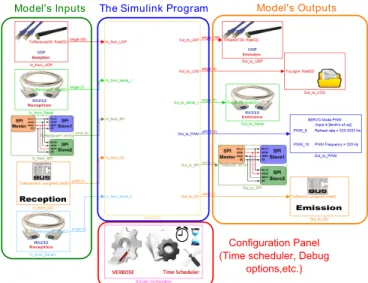
Simulink blockset giving direct access to the peripherals of the COM and configuring the I/Os with a high level of abstraction. The peripherals classically used in robotics are readily available and can be configured by specifying a large number of parameters such as the number and type of data to be transmitted or received, the sampling time, the device to be mapped (e.g., /dev/ttyOx in the case of a serial port). Depending on the device, various protocols can be configured. For example, each RS232 stream can be preceded by a header byte allowing to detect the beginning of a stream in case data loss. As another example, the clock polarity and the clock phase of a SPI device can be adjusted. Information about each block, its associated parameters and how to use it are available on the website [11]. Figure 2 gives an example of a classic COM simulink model using all the blocks provided by the toolbox.
RT-MaG toolbox provides also different debugging tools. For example, before generating a Simulink model, RT-MaG checks the configuration you chose for each device and eventually reports errors (e.g, two blocks use the same resource but with two incompatible configurations, etc.) You can also activate some timing debugging options to determine the exact execution time taken to perform the different parts of the program. i.e, the time spent to read and write each I/O and the execution time corresponding to each task (a task gathers all the Simulink blocks having the same sample time). Finally, a verbose mode is available and details the
Embedded Linux 3.5.0 Sensors values Control inputs Serial Real-Time Application: Monitoring Set Points Quarc Real-Time Windows Target
High level SetPoints Parameters Console Application root@gumstix:~$ WIFI Estimates, control inputs... High level SetPoints, parameters Linux Commands Task monitoring Serial SPI I2C ADC GPIO WIFI SSH UDP WIFI WIFI SSH UDP Serial
Gumstix COM
Ground Station
RT-MaG Application RT-MaG Application SIMULINK®
Embedded
COM Model
Fig. 1. a) A classic communication scheme including the RT-MaG toolbox. The embedded Simulink model working in real-time on the Computer-On-Module uses directly the various I/Os. The embedded application can be linked to a ground station via a wifi connection in order to tune the embedded controllers or exchange data in real-time. A Processor-In-the-Loop mode is available if the COM is linked via a RS232 connection to a ground station simulating the behavior of a robot. Users can start or stop the real-time application wirelessly (via a console) and receive contiuously useful information about the embedded application (the CPU load, task execution time, the occurrence of overruns, etc.
eventual I/O errors thanks to explicit error messages (Re-source temporally unavailable, destination unreachable, etc.) Theses information can be directly printed to the console or logged to a file to not disturb the real time execution.
In addition, RT-MaG provides a general configuration block which can be used to specify the behaviour of your real time application. You can choose the scheduler to use, the priority of the main task and the timing mode, i.e. the mechanism used to cadence your application (I/O interrupts, or an internal clock). All these parameters can be configured via a masked Simulink configuration block (figure 2). More information about each block and how to use it can be found at [11].
In short, the RT-MAG toolbox make it possible to:
• Automatically generate a multi-rate application from a
Simulink model to a real-time embedded Linux envi-ronment,
• Render new developments really easy, fast and bug free,
• Develop the embedded application directly in 32-bit
floating points (most COMs work with FPU),
• Obtain access directly to the I/Os via a high level of
abstraction GUI (Graphical User Interface), configure the protocol required to use and control the access method (blocking read/send or not),
• Validate the solution developed step by step via an
intermediate Processor-In-the-Loop (PIL) mode,
• Monitor, log and plot the data sent by the COM in real
time via a Serial or a Wifi connection,
• Design applications which are fully compatible with
all Simulink blocks (embedded matlab functions, s-functions, matlab data-structure, etc.),
• Send high level setpoints in real time to the controllers
embedded on the COM,
• Tune in the flight controller’s gains and parameters via
the Simulink host computer,
Model's Inputs The Simulink Program Model's Outputs
Configuration Panel (Time scheduler, Debug
options,etc.)
Fig. 2. Overview of the RT-MaG blockset. This example is composed of one wifi connexion (reception and emission), two serial ports (reception and emission), one SPI bus (reception and emission), one output to a log file, and two PWM outputs. The Simulink program is encapsulated in a sub-system block and all the configuration options are set via a specific block.
• Start and stop the application at any time (via WIFI),
• Continuously monitor the CPU load, signal any
over-runs and specify the execution time of each task,
• Have access to several ”debug modes”: the detailed
execution time corresponding to each task, the I/O access time, and clearly perceptible warnings about I/O errors,
• Test programs in both Processor-In-the-Loop (PIL) and
B. Requirements
1) Development machine: The RT-MaG toolbox requires
to work properly several software on the host computer and specific Matlab toolboxes as follows:
• Visual Studio: to compile real-time applications for the
host computer,
• Matlab Embedded Coder: to generate the C-Code of the
embedded application and the host application,
• QuaRC (Quanser [12]) or Real-Time Windows Target
(MathWorks): to execute the host application in real time.
The embedded Linux used for the COM requires:
• the Patch PREEMPT-RT to enable the kernel to execute
real-time applications,
• the gcc and g++ compilers to compile the C-Code
generated by the toolbox,
• some libraries and tools to compile the applications (see
our website [11] for more information).
2) Supported Computer-On-Module: The toolbox was
designed to work with many different COMs. This means that each COM which features a Linux kernel with the PREEMPT-RT patch and is equipped with a gcc compiler can be used with the toolbox. Some peripherals which are natively supported by Linux are available for use as network interfaces and serial interfaces (serial port, SPI, I2C). Additional peripherals can also be used if the specific Linux drivers required are available.
For example, the small (58mm x 17mm x 4.2mm), light (12.3g with the Pinto-TH breakout board) Gumstix Overo and Verdex XL6P COM boards are fully supported by the RT-MaG toolbox. Their custom Linux Images are available with the toolbox (see the RT-MaG website [11]). The fol-lowing peripherals (device block drivers) are either already available or will soon be available:
• up to 3 simultaneous serial port connection (maximum
baud rate of 3,686,400 bits/s),
• UDP connections (wifi connections and/or wired
con-nections),
• up to 4 PWM Output signals (with a maximum clock
frequency of 4MHz), ONLY for Gumstix Overo,
• file logging (to save data in a file),
• SPI bus (master only with a maximum clock frequency
of 24MHz),
• up to 3 I2C bus (master only),
• GPIO (work in progress),
• ADC input (work in progress).
In this paper, we present the results obtained with a Gumstix target, but any Linux computer-on-module (COM) with a PREEMPT-RT patch and a gcc compiler can be used with the RT-MaG toolbox.
IV. TECHNICAL CONSIDERATIONS
In this part, we described how the toolbox can be used to convert a Simulink model into a real-time standalone application. The various steps in generating the C-Code are described, we explain how the real-time tasks are mapped
to the underlying Linux, we describe the mechanisms used to synchronize the various tasks and how the application is interfaced to the hardware devices.
A. Generation work-flow
Wifi
Embedded Coder RT-MaG Coder RT-MaG Coder RT-MaG Image RT-MaG Image RT-MaG Library RT-MaG Library TM RT-MaG Application RT-MaG Application SIMULINK® Embedded COM Model C-Code Generation Encapsulation for Real-Time executionHOST Model COM Model
Real-Time Tuning & Monitorin g C-Code compilation gcc FTP server Linux Kernel I/Os
COM
HOST COMPUTER
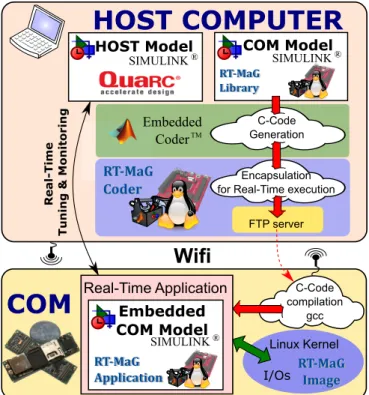
Real-Time Application SIMULINK® SIMULINK®Fig. 3. The work-flow of the RT-MaG toolbox. The Simulink model was designed using classical Simulink blocks to design the algorithms and the RT-MaG block library to access the various I/Os. The C-Code corresponding to the Simulink model is then generated using Mathworks’ Embedded Coder. The RT-MaG toolbox encapsulates the C-Code of the Embedded Coder in a C container so that a RMS can be applied to the various tasks and the functions generated can be mapped to the various I/Os. The final C-Code is then downloaded onto the COM and compiled automatically. Lastly, the RT-MaG embedded Simulink model is executed in real time on the COM: it can be monitored via a Simulink model running on the Host computer sending parameters in real time to the embedded COM model.
Figure 3 shows the various in order steps performed by the toolbox to obtain a real-time application from the Simulink model.
1) The Simulink model for the COM can be designed classically, except that the I/Os blocks have to be obtained from the new RT-MaG library. The building sequence can then be run.
2) Mathworks’ Embedded Coder generates the C-files (.c and .h) describing a set of functions correspond-ing to the computation described by the block diagram. 3) The RT-MaG coder generates a main.c file in order to create the standalone application. The main.c file sets up the different tasks and describes all the behavior of the application. i.e., it defines the priority of the tasks, calls them up at the specified sampling time, gives access to the underlying hardware (I/Os), manages the communication with the remote ground station and enables the debugging modes (file logging, time
logging, etc.)
To achieve these goals, the toolbox uses a set of C-templates we developed, which are customized at each generation in order to fit the current configuration. 4) The COM downloads an archive of the full project
from the host computer and build it using gcc. The choice of building the final application in the embed-ded device is discussed in section IV-B.
B. Toolbox design and structural choices
1) The I/O blocks: In this part, we explain how the
various devices available are managed and mapped with the underlying Linux and hardware.
With the RT-MaG I/O blocks, the access to the underlying hardware of the COM can be easily done via Simulink, and the parameters of the device can be easily specified. You can choose the number and the type of data to be read or written, and the refresh sampling time. You can also decide whether the read/write operations are blocking operations (you can even coose a blocking timout). An I/O can also be used to cadence the main task by associating a Linux signal with it (SIGIO), which can be catch asynchronously (see subsection IV-C).
As classically done on the Linux systems, the RT-MaG I/O blocks give access to the I/Os from the user space via the filesystem nodes (/dev/x). The real interactions with the hardware are managed by the kernel drivers and mod-ules from the kernel space. The latest Linux systems often include classical devices such as Serial port /dev/ttyOx, I2C /dev/i2c-x and SPI /dev/spidev1.x. Moreover, additional I/Os can be added, such as a PWM managed by a custom kernel module. In the case of the Gumstix Overo COM, we used a custom kernel module designed for OMAP3 based Linux systems to generate PWM using the corresponding /dev/pwmx device.
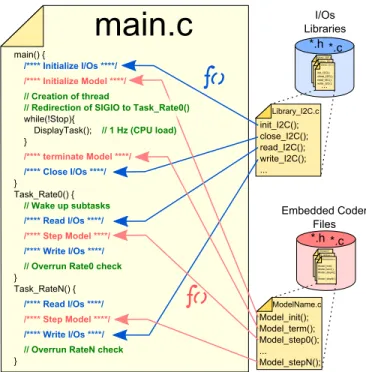
The RT-MaG toolbox also includes a C-library for each device, which makes it possible to perform specific read and write operations via the filesystem nodes. The main.c generated by the toolbox just calls these libraries to access to the I/Os. These libraries provide means of properly initializing and ending the devices, and formatting the data so that it can be transmitted from the application to the device interface (in the corresponding filesystem node /dev/x). Each library device provided by RT-MaG toolbox features at least one initializing function, a terminating function and other functions for reading and writing the device with various kinds of data and operations (blocking, non blocking, etc.).
2) Versatility: The RT-MaG toolbox was designed to
simplify the addition of other devices. The toolbox is fully open-source, and we have worked hard to provide complete instructions for its use for both simple users and developers. The versatility of the RT-MaG toolbox was achieved thanks to the following two principles:
• The toolbox provides developer tools (a set of Matlab
functions) with which the main.c file can be auto-matically generated. As described by figure 4, these
functions are used to automatically construct the main file by inserting lines into a skeleton (i.e., a template with spaces to be filled) to call up the various libraries. The whole procedure was designed to simplify the inclusion of new devices in the toolbox, and a procedure describing how to add a new device can be found on the website [11]. In other words, the toolbox provides tools for developers which simplify the updating and the customizing of the toolbox.
• The toolbox generates archives with all the sources
(C-files and make (C-files) required to build the application, based on the use of standard Linux libraries. The toolbox provides also a set of script to automatically download, build and run a Simulink model on the COM. Since the application is compiled on the embedded target, the same archive can be used with several targets without having to change anything in the Simulink model. This point is discussed in the following part.
*.h *.c Library_UDP.c Library_SPI.c Library_I2C.c init_I2C(); close_I2C(); read_I2C(); write_I2C();... rt_defines.c Embedded Coder Files *.h *.c I/Os Libraries Library_I2C.c Library_UDP.c Library_SPI.c Library_I2C.c init_I2C(); close_I2C(); read_I2C(); write_I2C(); ...
main.c
init_I2C(); close_I2C(); read_I2C(); write_I2C(); ... ModelName.c Model_init(); Model_term(); Model_step0(); ... Model_stepN(); main() { /**** Initialize I/Os ****/ /**** Initialize Model ****/ // Creation of thread// Redirection of SIGIO to Task_Rate0()
while(!Stop){
DisplayTask(); // 1 Hz (CPU load)
} /**** terminate Model ****/ /**** Close I/Os ****/ } Task_Rate0() { // Wake up subtasks /**** Read I/Os ****/ /**** Step Model ****/ /**** Write I/Os ****/
// Overrun Rate0 check
} Task_RateN() { /**** Read I/Os ****/ /**** Step Model ****/ /**** Write I/Os ****/
// Overrun RateN check
} Model_init(); Model_term(); Model_step0(); ... Model_stepN(); rtwtypes.h ModelName.c
Fig. 4. The skeleton of the main.c file used is filled automatically by the toolbox to access to the different I/O as described by the RT-MaG Simulink blocks. The access to the different devices is managed through open-source C-libraries developed during the project.
3) Building tree: The idea of compiling the final
applica-tion on the embedded device reflects our philosophy about the portability of the project and its user-friendliness. Com-piling the source code on the COM ensures that the standard Linux libraries are those of the current Linux distribution which are fully compatible with the hardware. Although this requires having a gcc compiler in the embedded Linux, which greatly improves the portability of the solution. There is therefore no need to install a cross-compiler on the development machine, and a generated model can be used in a wide range of different COMs. Model can be compiled really fast, even on a embedded target (few seconds in the
case of the complete quadrotor autopilot described in section V).
In short, any device including a Linux distribution with Real-Time abilities (PREEMPT-RT patched) can be used to run an RT-MaG model if it includes an embedded gcc compiler. The distribution obviously needs suitable drivers or kernel modules for dealing with the I/Os used in the model. But the classical I/O are often supported by default (RS232, UDP, SPI, I2C).
C. Real-Time Application design
In this part, we describe the mechanisms used to apply RMS (Rate-Monotonic-Scheduling) and meet the Real-Time requirements.
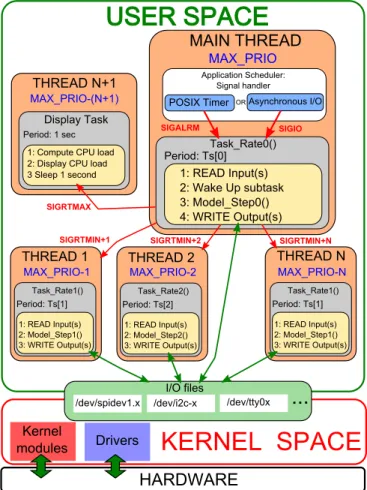
Figure 5 gives a scheme showing how the application is organized. To achieve optimal performances, we decided to decompose the application into constituent tasks. A task corresponds here to one of the sampling times in the Simulink model, i.e., there is as many tasks as sampling times. Each task is executed by a specific thread, which reads the inputs corresponding to this sampling time, steps the model (i.e., makes the computation corresponding to one step in this sampling time), writes the outputs and checks that no overruns have occurred. The priority of the various tasks is automatically managed based on the threads’ priority, which decreases with the sampling time. All the threads are synchronized by the main thread, which simply corresponds to the model’s basic sampling time. This main thread is activated at regular intervals thanks to an interval timer
(based on CLOCK MONOTONIC), which delivers SIGALRM .
The performances (time lags, etc.) of the interval timers and the asynchronous I/Os are discussed in section V. The main thread sends a real-time signal to all the sub-tasks which have to be run (with the corresponding priority, i.e.: the
signalSIGRTMIN+nis send to the sub-task n). The scheduler
policy can be tune by the user and can be that of the real-time
SCHED FIFOorSCHED RRscheduler, which ensures with the
PREEMPT-RT patch that the thread with the highest priority is run as soon as it occurs.
V. EXAMPLES AND PERFORMANCES Here we present the real-time performances of two appli-cations designed with RT-MaG toolbox, using two different timing modes (timer interrupt and I/Os interrupt).
A. Quadrotor autopilot
The first application implements a quadrotor autopilot which was running on a Gumstix Overo AIRSTORM (see figure 6). This powerful COM features a 1GHz 32bits ARM-Cortex-A8 with 512MB of NAND memory. The Gumstix runs a custom-made 3.5.0 Linux patched with PREEMPT-RT, and executes RT-MAG models (the custom-made Linux image is available on the website [11]). The autopilot makes the robots track 3-D trajectories in a Flying Arena which locates the robot accurately in 3D. The Gumstix controller (the high-level controller) receives inertial measurements from an 8-bit Arduino low-level controller via an RS232
MAIN THREAD
Application Scheduler: Signal handler
POSIX Timer Asynchronous I/O
SIGALRM SIGIO OR Task_Rate0() Period: Ts[0] 1: READ Input(s) 2: Wake Up subtask 3: Model_Step0() 4: WRITE Output(s) Display Task
1: Compute CPU load 2: Display CPU load 3 Sleep 1 second Period: 1 sec MAX_PRIO I/O files
USER SPACE
KERNEL SPACE
/dev/spidev1.x /dev/i2c-x /dev/tty0x THREAD 1
MAX_PRIO-1 MAX_PRIO-2 MAX_PRIO-N
...
SIGRTMIN+1 SIGRTMIN+2 SIGRTMIN+N
Task_Rate1() Period: Ts[1] 1: READ Input(s) 2: Model_Step1() 3: WRITE Output(s) Task_Rate2() Period: Ts[2] 1: READ Input(s) 2: Model_Step2() 3: WRITE Output(s) Task_Rate1() Period: Ts[1] 1: READ Input(s) 2: Model_Step1() 3: WRITE Output(s) Kernel modules Drivers
HARDWARE
THREAD 2 THREAD N THREAD N+1 MAX_PRIO-(N+1) SIGRTMAXFig. 5. Description of the mapping of the toolbox with the underlying hardware and the real-time Linux. The application is subdivided into tasks corresponding to specific sampling times, which are executed by specific threads. The base rate and the RMS (Rate Monotonic Scheduling) are applied by timer interrupts implemented with POSIX interval timer or I/O interrupts. The various tasks are then synchronized by the main thread, which runs the fastest task and activates the other tasks using real-time POSIX signals. The real-time management of the I/Os depends on the standard Linux driver and some specific kernel modules managing specific I/Os, such as PWM.
10 cm
http://www.gipsa-lab.fr/projet/RT-MaG/
Gumstix COM
Fig. 6. The 307-gram X4-MaG quadrotor, developed at the Marseille and Grenoble laboratories. The robot weighs only about 307g, and its full span is about 30cm. The maximum complete flight duration is about 10 to 12 minutes without any extra load, and the maximum payload is about 70g. The main controller used here is the Linux-based Gumstix Overo AIRSTORM Computer-On-Module, which runs only RT-MaG programs.
link (at 115200 Baud). The 3-D positions of the robot are sent to the Gumstix via a WIFI interface at a frequency of 100Hz, and the Gumstix sends these data and the control
commands back to the ground station. The robot runs the Simulink model described in the figure 7 in real time. All the computations are performed onboard, i.e., the position control loop operates at 100Hz and the attitude control loop operates at 400Hz.
In this case, the Gumstix application is cadenced by I/O interrupts, i.e., the Gumstix performs one step whenever it receives a RS232 stream from the low-level controller. This simple mechanism makes it possible to simply synchronize the two operating controllers (the low-level 8-bit Arduino micro-controller and the high-level Gumstix COM).
The table I gives the real-time performances of the au-topilot with the two sampling times tested during a 5-minute quadrotor flight. As it can be seen, the synchronization between the two control boards using the RS232 interrupts is well performed and the timing is quiet accurate. The CPU load appears to be relatively high (80%) because the blocking reception was activated on the RS232 port. Since the baudrate is only 115200, the reception takes around 1500µs. The same application without the synchronization option and the RS232 blocking reception (i.e., cadenced by timer interrupts) uses only 22% of CPU.
Task 0 Task 1
Ideal Sampling Time [us] 2500 10000
Mean Period [us] 2497.8 10024.3
Overruns / Nb ticks 2 / 119999 0 / 30000
Min execution time [us] 1038.0 366.0 [us]
Max execution time [us] 2655.0 [us] 1159.0 [us] Mean execution time [us] 1787.1 [us] 417.3 [us]
Mean CPU load 80 %
TABLE I
REAL-TIME ACCURACY OF A2-RATE APPLICATION IMPLEMENTING THE
X4-MAGAUTOPILOT.
B. Performances with a heavy CPU load
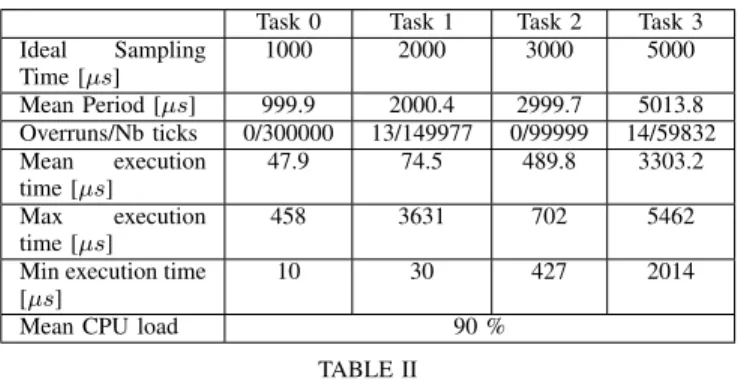
Here we just tested the toolbox for a more complex application featuring four different sampling times and a lot of I/Os with a light CPU load (figure 8) and an heavy CPU load (table II). The CPU load was obtained by using long ”for” loops in each task. This application implement various I/Os of the RT-MaG toolbox: the wifi exchange with the ground station more than 100 float at 1kHz, the serial port 1 and 3 were used to exchange 5 float at 500Hz, 2 PWM were generated and updated at 333Hz, a SPI bus of the Gumstix was jumped on itself to send and receive 5 16-bit integers at a frequency of 200Hz and a I2C bus was used to exchange 5 8-bit integers with an Arduino (NanoWii) at 200Hz.
Figure 8 shows the evolution of sampling times measured in each task versus the time. It can be seen that the real-time requirements were accurately met because the mean sampling time differed by only 0.01% from the target sam-pling time. Any overruns occurred during the test and the standard deviation for sampling time are the same than the ones obtained with the benchmark program ”Cyclictest”.
Table II shows the timing of each task for the same application but with a 90% CPU load. There were very few
Real-Time scheduler
From ground station
From NanoWii To NanoWii
To ground station Position controller Attitude Estimator Attitude controller Thrust mixer
Fig. 7. The Simulink model for the Gumstix auto-pilot performing attitude estimation, attitude stabilization and position tracking. The I/Os of the Gumstix are directly addressed via the RT-MaG toolbox. Here, the auto-pilot receives high level setpoints, the Vicon measurements and several parameters sent by the ground station via wifi at 100Hz and IMU data from the NanoWii at 400Hz. The Gumstix sends the motor commands to the Nanowii and provides the ground station with the estimated data, the control input signals, etc.
overruns, even with a heavy CPU load (less than 0.03% for task 3 and 0.01% for task 1), which shows that the priority of the tasks was taken into account. The I/Os were appropriately updated and are reliable for robotic control applications.
Task 0 Task 1 Task 2 Task 3
Ideal Sampling Time [µs] 1000 2000 3000 5000 Mean Period [µs] 999.9 2000.4 2999.7 5013.8 Overruns/Nb ticks 0/300000 13/149977 0/99999 14/59832 Mean execution time [µs] 47.9 74.5 489.8 3303.2 Max execution time [µs] 458 3631 702 5462
Min execution time [µs]
10 30 427 2014
Mean CPU load 90 %
TABLE II
DETAILS OF TASK TIMING OF A4-RATE APPLICATION INCLUDINGWIFI, RS232, I2C, SPIANDPWM.
C. Discussion
The RT-MaG toolbox was found here to be an efficient and reliable means of generating real-time applications with a high level of abstraction. It drastically reduces the
develop-0 50 100 150 200 250 300 0 1000 2000 3000 4000 5000 6000 0 1000 2000 3000 4000 5000 6000 7000 8000 9000 10000 0 5 10 15 20 25 30
a)
b)
Fig. 8. a) The measured sampling time of the different tasks over the time. The sampling time is well respected by the embedded Linux and the maximum delay measured is about 400 [µs]. The mean sampling time is really accurate as it differs only of 0.1% with respect to the targeted sampling time. b) The distribution of measured sampling time. The standard deviation is relatively small allowing to reach good timing performances up to 1kHz.
ment time and therefore leaves developers much more time for developing the algorithms. However, with the Simulink embedded coder automatically generating the C-Code, it is difficult to optimize and control the code generated. But the RT-MaG toolbox was designed to provide a fast prototyping tool rather than an optimization algorithm tool. And the toolbox includes many debugging and monitoring tools, which can be used to accurately quantify the time taken to perform each task. Theses tools provide developers with useful metric options for developing optimized algorithms.
VI. CONCLUSIONS
The new open-source Simulink toolbox presented here can be used to automatically generate real-time applications for embedded targets. This tool can also be used to test control algorithms in both simulated and real hardware. We established that the RT-MaG toolbox makes it possible to
directly run a Simulink model on a robot, and thus provides roboticists with a whole range of new experimental possibil-ities. The real-time performances of both the application and the I/Os were tested and found to be highly reliable.
This RT-MaG toolbox was successfully used to completely stabilize a quadrotor and to control its position.
ACKNOWLEDGMENT
The authors would like to thank M. Boyron and J. Diperi for their great work on the quadrotor, as well as B. Boisseau, F. Expert, F. Colonnier, J.Dumon and J. Minet for fruitful discussions about the toolbox. This work was supported by CNRS, Aix-Marseille University, the Provence-Alpes-Cˆote d’Azur region and the French National Research Agency (ANR) with the EVA, IRIS and Equipex/Robotex projects (EVA and IRIS projects under ANR grants ANR608-CORD-007-04 and ANR-12-INSE- 0009, respectively).
REFERENCES
[1] “Arduino.” [Online]. Available: http://www.arduino.cc/
[2] “Real-Time Interface® (RTI).” [Online]. Available: http://www.dspace.com/en/inc/home/products/sw/impsw/realtimeinterf.cfm [3] “MPLAB 16-Bit Device Blocks for Simulink,” Jan. 2014. [Online].
Available: www.microchip.com/SimulinkBlocks
[4] L. Kerhuel, S. Viollet, and N. Franceschini, “Steering by Gazing: An Efficient Biomimetic Control Strategy for Visually Guided Micro Aerial Vehicles,” Robotics, IEEE Transactions on, vol. 26, no. 2, pp. 307 –319, april 2010.
[5] “Arduino Target (AT) for Simulink.” [Online]. Available: http://www.mathworks.fr/hardware-support/arduino-simulink.html [6] A. Attenberger and K. Buchenrieder, “An Arduino-Simulink-Control
System for Modern Hand Protheses,” in Artificial Intelligence and Soft Computing, ser. Lecture Notes in Computer Science. Springer International Publishing, 2014, vol. 8468, pp. 433–444.
[7] L. Carrillo, G. Flores, G. Sanahuja, and R. Lozano, “Quad-rotor switching control: An application for the task of path following,” in American Control Conference (ACC), 2012, June 2012, pp. 4637– 4642.
[8] C. Lehnert and P. Corke, “µAV - Design and Implementation of an Open Source Micro Quadrotor,” A. C. on Robotics and Automation, Eds., Dec 2013.
[9] T. Lee, “Robust adaptive geometric tracking controls on SO (3) with an application to the attitude dynamics of a quadrotor UAV,” arXiv preprint arXiv:1108.6031, 2011.
[10] M. Quigley, K. Conley, B. Gerkey, J. Faust, T. Foote, J. Leibs, R. Wheeler, and A. Y. Ng, “ROS: an open-source Robot Operating System,” in ICRA workshop on open source software, vol. 3, no. 3.2, 2009.
[11] “RT-MaG Project,” Jan. 2014. [Online]. Available: http://www.gipsa-lab.fr/projet/RT-MaG/
[12] “QUARC® Real-Time Control Software.” [Online]. Available: http://www.quanser.com/Products/quarc
![Fig. 8. a) The measured sampling time of the different tasks over the time. The sampling time is well respected by the embedded Linux and the maximum delay measured is about 400 [µs]](https://thumb-eu.123doks.com/thumbv2/123doknet/14349943.500721/9.918.81.449.69.425/measured-sampling-different-sampling-respected-embedded-maximum-measured.webp)
