Agent Based Personalized Information Retrieval
by
Joshua David Kramer
Submitted to the Department of Electrical Engineering and Computer
Science
in partial fulfillment of the requirements for the degrees of
Master of Engineering in Computer Science and Engineering
and
Bachelor of Science in Computer Science and Engineering
at the
2
~
MASSACHUSETTS INSTITUTE OF TECHNOLOGY
June 1997
©
Joshua David Kramer, MCMXCVII. All rights reserved.
The author hereby grants to MIT permission to reproduce and
distribute publicly paper and electronic copies of this thesis document
in whole or in part, and to grant others the right to do so.
Author..
dpartment of Electrical Engineering and Computer Science
P-N
June 2, 1997
Certified by.,
Lynn Andrea Stein
"
ssociate Professor
s
ssIjýpervisor
Accepted by..
.
...
Arthur C. Smith
Chairman, Department Committee on Graduate Students
Agent Based Personalized Information Retrieval
by
Joshua David Kramer
Submitted to the Department of Electrical Engineering and Computer Science on June 2, 1997, in partial fulfillment of the
requirements for the degrees of
Master of Engineering in Computer Science and Engineering and
Bachelor of Science in Computer Science and Engineering
Abstract
There is no record being kept by computers about our personal information con-sumption. By capturing the content and context of all the information we interact with, computers can help us manage this information. This thesis describes such a tool, which we call a personal information management system. We build on tradi-tional and personalized information retrieval tools, software agents, and the advanced multi-modal user interface provided by the MIT AI Lab's Intelligent Room.
Thesis Supervisor: Lynn Andrea Stein Title: Associate Professor
Acknowledgments
I must thank Michael Coen first and foremost. For both his mentoring, advice, humor, and friendship as well as his amazing creation, SodaBot. I am honored that he let me tinker under its hood, and after 2 years, I think I finally understand how the heck it works, sorta. I can hardly wait to see HAL, which I know will be slick and will hopefully find your keys for you.
Professor Lynn Stein, thank you so much. I greatly appreciate the time and effort you spent to force me to figure out my own thesis and just what exactly I was trying to say.
Of course, I must mention the Intelligent Room folks. What an awesome play-ground. Special thanks to Kavita Thomas for her work on the speech system and teaching me about Dragon Dictate. And Brenton, without those if tests I'd be nowhere.
On a parellel note, equal thanks to the Haystack folks. I can't wait for the real thing to catch up with my attempts. Special thanks to Mark Asdoorian for the time he spent explaining Haystack internals to me.
How would I have done this without Ian, Tony, JJ, Jared, Dan, and the rest of Zeta Psi. Dan, tell Adam to give me my instruction book back now.
Oh Amy Jane - you keep me going and smiling all the time, you let me know what spring is like on Jupiter and Mars. **H*pp*=
No acknowledgments would be complete without mentioning our historical support by the Richard A. Kramer Foundation. Someday, your building will come.
I have been continually supported my Mom and Dad. Words cannot express my graditude and love.
This research is supported in part by the Advanced Research Projects Agency of the Department of Defense under contract number F30602-94-C-0204, monitored through Rome Laboratory and Griffiss Air Force Base; the National Science Foun-dation under Young Investigator Grant No. IRI-9357761 awarded to Professor Lynn Andrea Stein; and by the Mitsubishi Electric Research Laboratories. Any opinions, findings, conclusions, or recommendations expressed in this material are those of the author and do not necessarily reflect the views of the National Science Foundation.
Contents
1 Introduction
1.1 The Problem ...
1.2 Information Retrieval Can Be Better 1.3 Thesis Overview . . . . .
2 Background
2.1 Personalized Information Management 2.2 Role of the Environment . . . .
2.2.1 The Intelligent Room... 2.2.2 The Room as a Testbed . . . 2.2.3 The Room as a User Interface 2.3 Enabling Technologies . . . .
2.3.1 Agents ...
2.3.2 Information Retrieval . . . . . 2.4 Related Work ...
2.4.1 News, Email, and Web Filters 2.4.2 Collaborative Filtering . . ..
2.4.3 Agents ...
2.4.4 Personal Information Retrieval Systems . . . .
3 The Enabling Technologies
3.1 SodaB ot . . . . 3.1.1 SodaBot in the Intelligent Room . . . .
16 16 18 19 20 22 23 23 24 25 26 27 29 ... ... ... . . . .
3.2 Haystack: Per-User Information Retrieval . ... 36 3.2.1 A Bookshelf ... ... 37 3.2.2 Content Aware ... 37 3.2.3 Annotatable ... 38 3.2.4 User Profiling ... ... .. .. .. .. 39 3.2.5 M ulti-User . .. .. ... .. . . .. .. ... . . . .. . 39
3.2.6 Haystack: The Current Reality . ... 40
4 Putting Agents and IR Together 41 4.1 The Haystack Application Program Interface . ... 41
4.2 The Support Agents ... 42
4.2.1 The Haystack Agent ... 43
4.2.2 The Document Agent ... 45
4.2.3 The Time Agent ... 46
4.3 The User Agent ... 47
4.3.1 Maintaining the Haystack ... 47
4.3.2 Searching the Haystack ... .. .. .. 48
4.3.3 User Agent Naming ... ... 51
4.3.4 Summarizing the User Agent . ... 51
4.4 A Grammar for Speech Based IR ... 52
4.5 The RoomInfo Agent ... ... 54
4.6 Networked Haystacks ... 57
5 Discussion of Results 59 5.1 Sum m ary ... ... . ... 59
5.2 Evaluating this work ... ... 59
5.2.1 Essential Attributes of a Personal IM System . ... 60
5.2.2 Is it Useful and Helpful? . . .. .. . . . . 62
5.2.3 Is it Novel? . . . .. . . . . .. . . . 62
5.3 An Experimental Haystack ... 63
6 Conclusion 66
List of Figures
4-1 The User.NewUrl Request ... .. 49
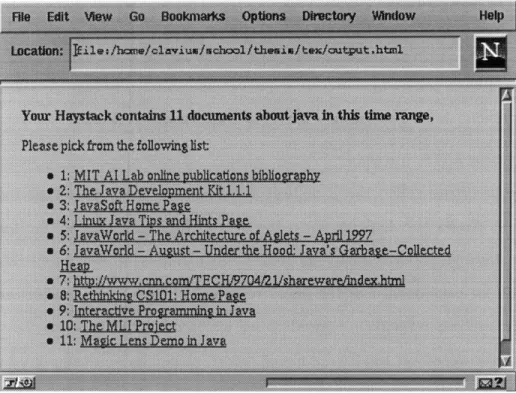
4-2 Results of Query About Java Documents Seen Yesterday... 50
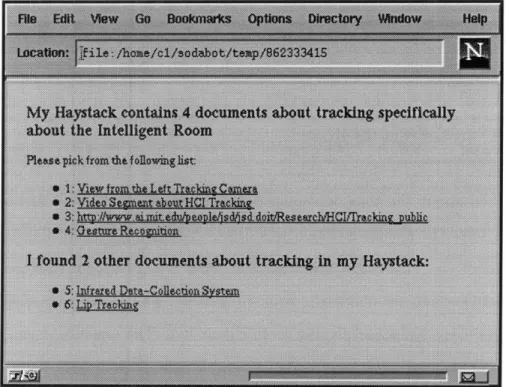
4-3 List of documents about tracking. . ... . 56
List of Tables
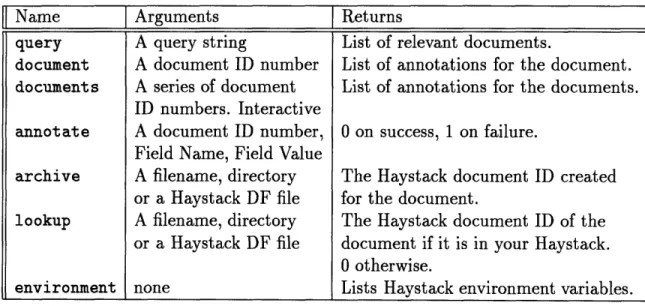
4.1 The Haystack Application Program Interface . ... 43
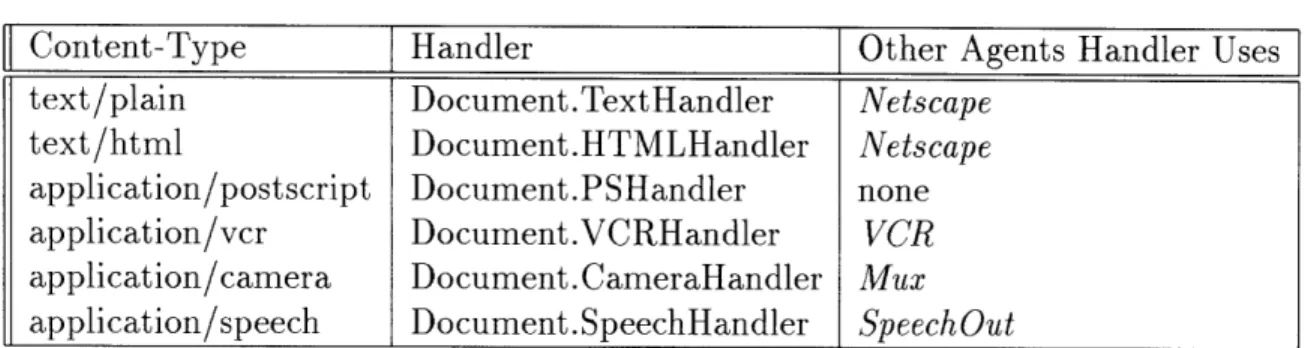
4.2 Content-Type Handlers in the Document Agent . ... 46
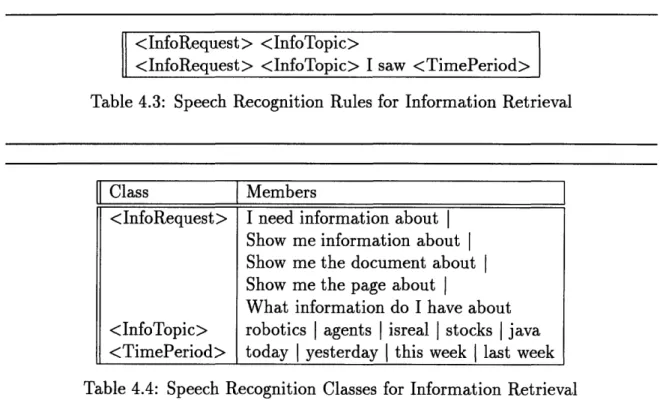
4.3 Speech Recognition Rules for Information Retrieval ... 53
Chapter 1
Introduction
This thesis is about the fundamental need for computers to manage our information. It is about how to embed information retrieval into everything we do. The growth of networked computers has created an information overload problem. People are overwhelmed by both the supply of and demand for information. By expanding the scope and accessibility of current information management tools, new applications can be built which ease this information burden. In particular, not enough information is being kept about our personal information, the documents we read and write, yet this is precisely the type of information which is so often sought after. There are many solutions for managing much larger corpa, such as the set of World Wide Web documents or the set of Wall Street Journal articles; yet there are few tools which facilitate robust management of our personal information. This thesis describes our implementation of a prototypical personal information manager. Our solution involves combining software agents and an information retrieval system. We show how, in the right environment, this combination of technologies is a powerful tool for building a variety of new information enabling applications.
1.1
The Problem
The growing presence of networked computers is dramatically increasing the amount of information we generate and consume as well as our dependence on this
infor-mation. Computers are quickly becoming a crucial component of many workplace functions. More and more paper forms are being converted to online equivalents. Indeed, the possibility of the paperless office is almost realistic; document scanners will soon outnumber document printers. With this growth of information accessibility will come both new applications and new problems. The growth and popularity of the Internet and World Wide Web (WWW) have provided a glimpse into this future. New technologies and applications are emerging which harness the power of these networks. Electronic banking and commerce, new forms of communication, and the ability for anyone to publish on the Web are just a few examples of these new services. However, this tremendous growth has created an entirely new sort of problem: there is too much information. Although all of this information is what ultimately empow-ers and enriches our online experiences, it can also overwhelm us and over-complicate simple tasks. How then can we gain control over this information? From the very start of the Web, at the 10,000 document level, indices were found to be useful. As the Web has grown to the level of 100 million documents, this has not changed.
Indeed, a whole new industry has emerged based on the need for tools capable of searching the Web. These Web sites use a variety of different information retrieval techniques to build what is essentially an index of all the documents they can find on the Web. Given the Web's unstructured nature and enormous size, these search engines have been crucial in making the Web usable. Without any sort of central authority or hierarchy, it is often quite difficult to say where a user should start looking for a document. Hence, Web sites such as Lycos[18] and Yahoo[19] each routinely get over 5 million search requests in a day'. Given the advertising and licensing revenues these sites generate, Internet search engines are here for the foreseeable future. So, while these tools and technologies have gained a handle on the vast wilderness of the Web, are our information problems solved? In the future will natural language queries be answered by powerful Internet search engines which will quickly scour the
'These sites are free services which allow users to perform keyword searches of the entire Web. They were both initially developed in academic environments, but became commercial sites due to the huge demand for their services. They generate revenue by displaying an advertisement to each user.
billions of documents available on the Web and return the list of the 10 documents which best answer our questions? Certainly this technology is excellent at answering questions such as, "What is the population of Ohio?" 2 The ability to quickly find answers to questions like this is one of the reasons the Internet is such a powerful resource.
But what about some other sorts of questions we might be interested in asking? Consider questions such as "What was that paper I read about robots last week?" and "Has Michael read it?" These questions do not want to search the entire Internet for a document. They require a more personalized data store. They represent an entirely new kind of information retrieval which we feel has been largely ignored to date. For the most part, this stems from the fact that computers fundamentally lack any real knowledge about their users. True, they do keep lists of frequent e-mail contacts, hotlists of favorite Web sites, schedules, financial information, and so on. But they don't ever use this knowledge on their own. While computers may have become a unified data store of all our personal information, they rarely make use of this information in any way beyond feeding it right back to the user who put it there in the first place. They don't analyze the data on their own, they don't share the data with each other in interesting ways, and, most importantly, they don't keep enough information about their users. Computers "know" nothing about their users' documents, correspondence, and actions; essentially, the information they create and consume. Put simply, computers rarely do anything with our data beyond what we tell them to do.
1.2
Information Retrieval Can Be Better
By keeping this in mind, we can leverage information retrieval to enhance our personal information interactions. Instead of an information retrieval (IR) system, we would
2
In fact, one can currently go to the Infoseek[7] search engine, enter the query "What is the population of Ohio?" and get back as the best document the 1995 Ohio State of the Environment Report section on population[l]. This tells us that the 1990 census reports a population of 10,947,115 people.
like an information management (IM) system. We envision the following interaction with a fictional computerized personal information agent called Oren:
Lynn: Oren, what information do I have about teaching Java. Oren: Just a moment while I check.
Pause. Then a list of documents with summaries appears.
Oren: There are 3 papers, 2 journal articles, and 13 Web sites you've
already seen. You asked me to remind you about the 1st Web site. Also, Michael highly recommends the 1st paper and he has new 2 Web sites he recently saw which he liked. Finally, you have 37 email messages on the topic.
Lynn: Who else in the Lab might be interested in this?
Pause. Then a new list of documents comes up.
Oren: Besides Michael, Gerry and Hal also have numerous documents
about teaching Java.
While this may seem far fetched, it demonstrates our desire for more personal IM. In particular, while the natural language interaction is currently unrealistic, in Chapter 4 we describe a system that otherwise could do much of this. Our vision of the improved information management system includes four attributes:
* Personalized: The IM system should not be limited to the world of
informa-tion available to everyone (i.e. the Internet). It should concern the personal documents of its user. In this respect the IM system will act like an augmented memory (or a very efficient assistant who can find everything3).
* Ubiquitous: The system should have access to a user's entire online experience.
Simply put, using an IR system as an augmented memory is useless if it doesn't contain what you are looking for in the first place. In the extreme, such a system would quite literally see everything its user sees. In practice, we will see that what is needed is an architecture where it is possible for other programs to have access to information about the documents used and produced by a user. O0r like your mother, who can truly find everything.
* Automated: The fact that this system is essentially watching over users'
shoul-ders, capturing and indexing everything they do, should not really be apparent to users. This is crucial to the system's success. Users should not have to man-ually enter all of their documents into the system. Basically, that just isn't a realistic model - users will forget to enter some documents or simply grow lazy. The goal of the system should be to make information retrieval easier for users, not harder.
* Networked: Finally, by networking personal information management systems together, we create a new kind of web of information. This would allow users to query the information repositories of their colleagues. For searches relevant to their interests, this would yield a far richer set of documents than a similar search of the Internet. These types of searches make an excellent intermediate step between searching your own personal set of documents and searching the world of documents.
The question now becomes, how do we build such a system? Conventional IR systems are by no means user friendly; they typically concentrate more on the engine and less on the interface. Indeed, the online Web search tools are one of the few examples of genuinely useful deployments of information retrieval systems. Why is this? It is primarily due to the programmatic accessibility of documents on the Web. By programmatic accessibility, we mean the ability for programs to easily interact with documents without having to go through a user interface. In the case of the Web, this means that programs can fetch HTML documents directly. This allows Web search engines to effectively seek out and find every document on the Web. Thus, these systems are working with a well defined and very accessible set of documents. Furthermore, the hypertext nature of the Web allows for powerful searching techniques to be applied to this set.
A personal information management system will need a corresponding level of knowledge about a user's personal documents. Essentially the system will need a way to track what users are doing on their computers. This is no easy task. Furthermore,
the system will need to provide users with useful interfaces to these documents. Thus, we propose a marriage of two technologies. We will use software agents to provide the tools for monitoring the user and generating autonomous and distributed applications. Information retrieval systems will provide these agents with powerful and easy access to large data stores. Together, these tools can meet our information needs in novel ways.
1.3
Thesis Overview
The remainder of this thesis describes a system which satisfies many of these desider-ata: a personalized, ubiquitous, automated, and networked information management system. We use the Haystack information retrieval system as the underlying personal data repository for storing, annotating, and querying data. SodaBot software agents provide the tools for ubiquitous and automated information capturing. They also pro-vide us with the connectivity tools for networking as well as the ability to integrate our system into the existing infrastructure of the Intelligent Room. This integration allows us to take advantage of the Intelligent Room's multimodal user interface to create an information retrieval interaction based on a spoken dialog between users and the Room.
This system is innovative in the following additional ways:
* It is integrated into the user's workspace. It provides a framework for cap-turing, indexing, and querying a user's personal information space. This is
demonstrated specifically on Web pages, but is more generally applicable to a range of information sources.
* It supports a grammar for speech based interaction with an information
re-trieval system. This system allows users to verbally query their information repositories.
* It allows users to query each other's personal information spaces. This new source of information is normally not readily available for searching.
* It has been modified to provide a multimedia datastore for more than a human's personal information; it is the information handler for an interactive environ-ment.
The next chapter provides background on this and other similar works, including more detail on the problem and approaches taken. Chapter 3 will discuss the specific projects on which this work builds: the Haystack per-user information environment, The Intelligent Room and its multimodal user interface, and the SodaBot software agent environment and construction system. We'll show how we integrate the these systems and demonstrate our applications in Chapter 4. In Chapter 5, we summarize our results and evaluate our work. Chapter 6 describes some directions for future work using these technologies and provides an overall summary.
Chapter 2
Background
There have been two primary motivations for this work. The first is our desire for a good personal information management system. We have become overloaded with information yet there are few tools for handling this at a personal level. The second is more concerned with our research in human computer interaction in the Intelligent Room at the MIT Artificial Intelligence Lab. We hope to provide the project with a powerful new tool for information storage and retrieval. The Room is an excellent example of a system which is empowered by information, yet does not have adequate means for representing it.
2.1
Personalized Information Management
In Section 1.2, we expressed our desire for an information management system which was personal, ubiquitous, automated, and networked. In many ways we already have IR systems which are ubiquitous for a specific domain, automated, and networked -Web search engines. Systems such as Lycos and AltaVista automatically spider[31] the Web, attempting to find every document on the Web and index it. Furthermore, systems such as SavvySearch[9] and the MetaCrawler[40] send queries to multiple Web search engines and aggregate the results to produce a better result set than any individual engine does. So, what is it we mean by personalized information retrieval,
The key to a personalized information retrieval system is that it should contain all those and only those documents which its user has already seen. This is very different from conventional IR systems where the user is normally searching a large unknown body of documents. Karger and Stein[22] liken this to searching one's bookshelf versus searching a card catalog at a library. Furthermore, the fact that users have most likely already seen the document they are looking for enables more powerful queries. For example the user might be able to place temporal constraints on the query, limiting the search to only those documents placed in the archive during a certain time period. However, even for normal queries, the quality of the documents returned is likely to be far superior to those returned in a search of the global document space. After all, one does not normally keep bad books on one's bookshelf. The key idea is that the average document we read tends to be, from our perspective, of a higher quality and more relevant than the average document on the Web.
Furthermore, by providing facilities to annotate documents, both actively and
passively, we can further increase a given document's perceived utility. By active
annotation we mean giving users the ability to annotate digital documents about their content or relevance. Taking this one step further, we can let our computers annotate our documents with meta-information about how we are using them, as in Hill et al.[16]. This passive annotation requires no explicit action by users and can provide new metrics for evaluating a document's worth. For example, our system automatically annotates each Web page we see with the current time. We can then use this information to constrain future queries. By keeping closer tabs on what we actually do with our documents, computers will be all the more powerful in trying to help us find them at a later date.
Such a system is really more than just a bookshelf. In the idealized case, it is a copy of everything we've ever read, seen, or heard, fully annotated with our thoughts about them. Its purpose is to augment our own all too frail memories. Moreover, unlike our memories, certain portions of this bookshelf are open to the public. This is yet another alternative to searching the entire Internet for a document. Before going to the library, why not check your neighbor's bookshelves? Furthermore, this
presents an exciting new opportunity for resource discovery - someone with a highly annotated set of documents about computer architecture is probably an excellent person to go to for assistance in computer architecture'. Also, users might often have their questions answered by documents in another person's personal IM system, and thus not have to directly disturb the other person.
2.2
Role of the Environment
In designing a personal IM system, it becomes clear that the application will need access to a variety of subsystems. We essentially want our computers to be aware of what we are doing on them. For instance, the personal IM system will want to "know" about each document its user accesses. Most applications, and indeed most operating systems, do not provide this level of service. While several standards for exchanging information between applications (CORBA[46], Microsoft's OLE, Apple's OpenDoc, UNIX IPC, etc.) exist, they are certainly not in widespread use. The simple problem is that there is no single universal interface for applications to communicate with each other about their activities. What is missing is an common infrastructure to support
these activities.
To examine this problem in more depth, let us continue our example. How could our personal IM system know which documents we are reading? In general most programs do not provide a means for other programs to find out what they are doing. When a document is opened in the emacs text editor, how is the IM system told about this? One could imagine re-tooling every application we use to provide such an interface. Indeed, this is not very difficult with a program such as emacs, which is designed to be highly extensible, and whose source code is freely available for modification. But what about when we open a document in Microsoft Word, or view a postscript file, or simply print a postscript file for off-line reading? Another technique would be to monitor a user's actions at a very low level. For instance, the file system 10f course one could easily fill up a bookshelf with books about computer architecture and annotate each with "I didn't understand this one either." But that would be silly. At the very least it would still be a collection of documents on Computer Architecture.
could be patched to notify the IM system whenever a file is accessed. Again, this works fine in an open environment such as Linux, but what about Windows 95? And what about networking these systems together - this presupposes both the ability to easily make use of the network as well as the ability to track groups of users. All together, we are looking for a very complex infrastructure, quite different from the typical computing environment found today.
2.2.1
The Intelligent Room
However, we have chosen to work in an entirely different environment; one which is designed to try and understand what its users are doing in it. This is an environment built around a very powerful and well defined framework of software agents. It is an environment which is not only aware of what documents are being used in it, but hopefully one which has an idea of its occupants' intentions. This environment is the Intelligent Room[45] at the MIT Artificial Intelligence Lab and its system of SodaBot software agents. The Intelligent Room is an experiment in enhanced human computer interaction. The Room is designed as an intelligent conference space void of keyboards and mice, yet fully interactive. The project's goal is to aid the users of the Room in tasks such as information retrieval, teleconferencing, or strategy planning. To this end, the Room tries to interpret and contribute to the activities occurring in it.
The Room uses cameras as its eyes and microphones as its ears. The microphones are attached to real-time speech recognition systems. The Room also contains a speech synthesis system which allows it to interact with its occupants in dialogs. Several output displays are used to show media such as Web pages, videos, camera views, or arbitrary applications. The Room uses a variety of vision systems such as a multiple-person tracker, a finger pointing detection system, and a laser-pointer detection system. These systems provide information about where a person is and where they are pointing. The pointing system, for example, allows users to control a virtual mouse pointer projected onto a wall display. By bringing the computer out into the human's world, we hope to enhance our interactions with it and to use it to
enhance our interactions with each other. This thesis is very much in the spirit of both these goals.
In fact the Room's architecture is designed to provide the type of information we desire. The Room is interested in knowing who does what, where, and when. There are many subsystems each of which can answer part of these questions. The Room's software agents tie this information together to produce a coherent view of the activities occurring in it. Furthermore, they provide this view to any other agents which are interested in it. For example, when a user standing in front of one of the Room's wall displays says "show the map here," agents need to resolve where exactly "here" is referring to. In this particular context, the tracking system is used to locate the speaker in the Room to determine which display to use. Thus, the Room's architecture typically contains agents which know who is in the Room, what they are saying (for a limited grammar), what information they are looking at, and some sense of what they are doing with this information. By working in this environment, our personal information management system is able to make use of these existing agents.
2.2.2
The Room
as a
Testbed
The Intelligent Room has proven to be not only an excellent testbed for new ideas, but also an inspiration for many of these same ideas. Coen[5] has made the point that the Intelligent Room is more than a platform for HCI experiments; it is an excellent environment for conducting core AI research as well. Once we have an environment in which rich interactions with the computer are possible, a whole new set of applications will emerge. The key is to develop a stable platform on which we can build these new applications. Just as the de facto standardization of Microsoft Windows by corporate America brought about an explosive growth in software development, we hope that the Intelligent Room will prove to be the launch pad of many new types of applications. Indeed, in many ways the Room has developed its own new operating system. Much of this is due to the use of the SodaBot software agent system, which is discussed in greater depth in Section 3.1. Essentially, the use of agents as a ubiquitous
middleware has provided the Room with a strong framework for building higher level applications.
Many of the benefits of working in this environment are derived from embedding computers more firmly in their surroundings. The Room has systems for tracking and identifying its occupants, for recognizing what they are saying, and for determining where they are pointing. These systems are accessible to other higher level applica-tions running in the Room. This provides these programs with both powerful new means for interacting with their users and a wealth of information about what their users are doing. By giving applications more access to their operating environments they can provide more context sensitive information to their users. Enhanced informa-tion management is a natural applicainforma-tion for this environment. Imagine annotating documents with who was in the Room and what was being discussed at the time they were displayed. This is in fact largely what we set out to accomplish. We have leveraged this powerful operating environment by building our personal information management system in it.
Providing the Intelligent Room with access to its own information management system is a major contribution of this work. While the Room has an existing interface for using the START[23] natural language information retrieval system, it is very limited in its use. All the information in START has to be entered by hand and is generally high level symbolic information, such as statistical summaries. Thus its data set is quite limited. Since the Room cannot directly add new information to the system, we only use it for searching for information we already suspect is in the system. Our work has given the Room a system for managing the many different sources of information it has at its disposal. It has given the Room the capability to search a datastore of documents which it maintains. One of the primary goals of the Intelligent Room project has been to make the Room more pro-active in providing information. Instead of users constantly initiating information searches themselves, the Room should offer relevant information whenever it is appropriate. For instance, if two occupants are discussing improving the Room's multi-person tracking system, the Room might bring up a list of relevant documents, such as the design specification
of the current tracking system.2 If we can give the Room's systems access to more information, then they can provide more information to its occupants. Creating an integrated information management system for the Room has done just this.
2.2.3
The Room as a User Interface
From a purely human computer interaction standpoint, the Intelligent Room provides a rich multimodal environment. The physical layout consists of two wall projected images which act as the Room's primary output displays. There is a video multiplexer which can route any of a variety of signals to these displays including the output of three different SGI workstations, two VCRs, and nine camera views of the Room. Typically, the main display shows a Netscape Web browser from one of the SGIs. Occupants can point to specific locations on the displays using either their fingers or a hand-held laser pointer. Furthermore, their locations and trajectories are watched using a vision-based tracking system. Occupants wear wireless microphones connected to a speech recognition system which allows them to "talk" to the Room. Conversely, the Room can "talk" back via a speech synthesis system. When necessary, users can always fall back to a standard mouse and keyboard.
Thus, there are several means available for any information exchange between the Room and its occupants. For example, there are many ways to follow a hypertext link in a Web browser being displayed on the wall. Users can point to the link, with either their fingers or a hand-held laser pointer, and verbally command the room to "click here." Alternatively, they can explicitly name the text of the link, as in "follow the 'MIT Home Page' link."
The Room uses a novel speech recognition control system to provide a rich gram-mar for most interactions. This system allows the speech recognition system to dy-namically change its grammar based on the perceived context. For example, when an agent in the Room asks a "yes-or-no" question, the Room can load a subset of its 2In a simpler scenario, when a user in the Room is browsing the Web and goes to the Web page
which describes the Room's tracking system, the Room offers to play a video clip about how the tracking system works.
grammar which allows dozens of ways of replying to these types of questions ("yeah, sure, nope, OK, please do, yes, go ahead," etc.). This is a complex, expressive, and not very limiting set of responses. However, the output of the speech system which the agent gets is a simple "yes" or "no." This allows the Room to support complex input speech grammars with having to support a corresponding complex set of gram-mars for processing what the speech system outputs. That is, the agents do not have to worry about synonyms or equivalence classes. At the same time, humans do not have to worry about memorizing a limited set of commands. This support for natural interactions is what makes the Room such a novel user interface.
2.3
Enabling Technologies
Before we describe our specific implementation technologies, it is useful to abstractly describe what exactly software agents and information retrieval systems are to us. This will provide some basis for evaluating SodaBot and Haystack. It also builds some background for looking at the other systems described in Section 2.4
2.3.1
Agents
Software agents are a recent class of computer programs which have been given many definitions. Qualities ascribed to software agents by Etzioni and Weld[11] include be-ing "autonomous, goal-oriented, collaborative, flexible, self-startbe-ing, communicative, adaptive, mobile, temporally continuous, and having character." This grab-bag of features describes both a very generic tool as well as a very powerful one. Indeed, Stein[43] goes as far as to suggest that there isn't a viable definition of agency at all, that it is simply our individual perceptions of what a program is doing for us which make it an agent. Agents are what we make of them.
For us, software agents are an important part of a solution to our problems of information management. They can act as an intermediary, or buffer, between our-selves and the information we desire. Moreover, they provide the means by which our computers can take a more active role in serving our information needs. It will
be software agents that take care of sorting through all the data returned by simple queries, which automatically catalog our personal stores of information, which keep track of what we do with our computers, and which initiate contact with agents be-longing to other people, or entities, in search of the answers to our questions. The act of "initiating" searches or other activities on our behalf is what makes software agents such a compelling technology for us. Software agents really are many things for us. They are intelligent middleware - providing the glue which interconnects the various components of our system. Yet they are an active glue, able to take actions on our behalf, such as initiating searches. Software agents let us build light-weight abstract wrappers around complex systems which in turn allows us to create higher level applications.
2.3.2
Information Retrieval
One way of looking at agents is to say that agents are empowered by information. They analyze, transport, filter, display, and create information. So the question is, how can they best make use of this data? Specifically, what should be their interface to information? By this we mean, how should agents best internally store and represent the large quantities of information we want them to handle. For this, we turn to Information Retrieval (IR) systems.
Traditional IR systems essentially analyze data (usually some kind of document, for example an e-mail message) and place it in some internal index. They then provide an interface for querying their indices and returning what they decide are the most "relevant" documents. A basic IR system, for example, would simply return all documents which contained any word in a given query3. More advanced systems make use of word frequencies, semantic structure, or complex query specification languages. Essentially, IR systems provide a means for accessing large stores of information through the use of simple, often unstructured, queries. This is important because it replaces the need for agents to maintain structured representations for all their
3
data. By using an IR system to both store and index data, agents gain access to a tremendous knowledgebase of information with a very simple query interface.
We feel that a crucial component of any IR system should be programmatic access to the system. We will only begin to see fundamental improvements in information management applications when we allow other programs to query, parse the results, and generally make use of multiple IR systems for us. By replacing the traditional human interface with an API, we enable a whole new level of information retrieval. So, for us, information retrieval systems are black boxes - the datastore for our documents. By all means, they are certainly a powerful abstraction. But, we make no attempt to explore or improve their internal design. We refer the reader to Salton's[39] excellent overview of this area for a detailed explanation of IR. Thus, the choice of which IR system to use as our underlying engine is not terrible important, and given our choice of Haystack, actually not our choice to make. For, while Haystack is nominally the IR system in our design, it is itself really just an application built around its own pure IR engine.
2.4
Related Work
There are many earlier works which address portions of the personal information overload problem. They too typically make use of an IR engine to enhance higher level applications. Many of these systems are what are called Information Filters -they are designed to act as a firewall between their users and a stream of incom-ing information such as email or the Web. Very few have dealt with the issues of building an integrated personalized information management system. However, given the multi-faceted nature of our work, these systems are fertile ground for inspiration and comparison. We divide the works into four categories. These are pure filtering applications, collaborative filtering, active agents, and personal IR systems.
2.4.1
News, Email, and Web Filters
One of the great inspirations for information filtering is Usenet Net News, the Inter-net's version of a bulletin board. News filtering applications have attempted to deal with the fact that with over 30 million Internet users, news groups are overwhelmed with postings. Yet, for given user only a very small percentage of these articles are interesting and relevant. These applications typically develop an internal profile of their user and then try rank news articles according to this profile. The profile is generally used as an input to a IR engine which contains the set of news articles. Thus, each person can use their filtering tool to generate an individual view of the same data. For example, when reading rec.pets, one person might only be interested in articles about dogs, while another only those about cats. Many of these systems have been modified to support Web and email filtering as well. Email filtering is
notable because mail tends to arrive sporadically, and thus individual messages must be evaluated on their own, not necessarily against a larger set. This information
filtering is slightly different from the information retrieval we are interested in. While
our work does not attempt to provide filtering capabilities, the architecture we deploy both supports and compliments filtering.
The Stanford Information Filtering Tool (SIFT)[50] is an representative example of the simplest implementations of a news filter. It uses a series of weighted keywords provided by the user as a profile. These keywords are then given to a customized IR system which uses a vector space model to find matching news articles which are "close" in vector space. Users can provide relevance feedback, which the system uses to improve the users' profiles. In SIFT, users can simply say they "liked" an article; there is no opportunity for negative feedback.
Relevance feedback is an area of research in and of itself. Essentially, queries can be improved by making use of keywords from good documents and removing the keywords from bad ones. Thus, a system such as NewsWeeder[26] has users rate each article they read using a scale of 1 to 5 (They point out the importance of making the rating process as simple and unintrusive as possible for the user.) This type of
feedback can greatly improve a search, even with just a single iteration[39].
Our framework enables a slightly different sort of feedback. We are able to make use of passive observations to determine how useful a document is to the user. While this may not help an individual search, the goal is to build up information of time about which documents best answer which queries.
Browse[21] is an X windows based system which uses a neural-net to model its users. It uses a binary rating system by asking users to either accept or reject articles. This is not too different from SIFT. However, Browse also supports ad hoc queries of news and attempts to use its model to help answer the question. This is a step in the right direction. It is one of the few examples of a tool which uses a model of its user when answering queries. It is also a direction which we hope our own system will take. In some sense we already do this by modeling users through their documents.
Letizia[28], WebWatcher[2], and Syskill & Webert[35] all take a personalized ap-proach to managing the wealth of information on the Web. While Web search engines have provided a valuable tool for finding sites in general, there is often a lack of lo-cal searching which makes navigating some Web sites difficult. These systems "look ahead" of the user and attempt to determine which links on a given page are most likely to be interesting to the user. The first two work by observing the types of pages the user goes to and learning a profile of the user. Syskill & Webert has the user first rank a series of web pages. It then builds a model based on the content of the ranked pages. Our system is poised to easily support the functionality provided by these tools. We already have access to the Web pages a user browses, and in fact, we keep them in an information retrieval system. So, an crude implementation of this type of tool would be to take the text of each link on a given page and see if the user has a large number of matching documents in their personal information repository. We could then highlight those links which seemed interesting by this criteria.
2.4.2
Collaborative Filtering
While developing a profile of an individual user's interests can be a powerful step in improving their information management, it is often not enough. However, by looking
at the opinions of multiple users, we can provide a more detailed analysis of a given document. The combination of opinions with textual analysis provides a much better feel for a document's relative worth. If we know that we are interested in "robotics," that knowledge enables us not only to pick out documents about robotics, but to select good documents about robotics. This is an area we are eager to explore. As we build networked personal information management systems, it will be possible to use this collaborative network to enhance the information retrieval process.
The Tapestry[44] project at Xerox PARC is an excellent implementation of this idea. The Tapestry project focuses on annotating and filtering electronic mail and recent articles on net-news bulletin boards for a fairly small community of users. Several Usenet news reading tools[29] were modified to let readers vote on articles they like and dislike, as well as to annotate these documents with their comments. The votes are collected, tallied, and distributed using the basic Usenet transport mechanisms (nntp), and readers can view articles based on their total number of votes and who voted for them. This allows for some innovative filtering called Virtual News Groups. A user can essentially choose to see a group as moderated by another user. Another observation is that documents can become more interesting over time
(i.e. as they gets better reviews). One problem, however, is the system's use of a rather complex query language, TQL, the Tapestry Query Language. The language allows users to specify filtering rules which are applied to the set of messages. One novel idea they describe is to first use binary acceptors to quickly filter articles and then rate the articles with appraisers. The GroupLens[36] project has similar goals but is built on a very open framework.
The Agents group of the MIT Media Lab has developed a number of collabora-tive filtering applications. Maxim[27] is a learning collaboracollabora-tive email reader. It is noteworthy for being exceptionally easy to use and thus much more geared toward beginners than Tapestry. FireFly[41] is a collaborative system for recommending new music selections. It uses a nearest neighbor approach to find other users in the system with similar likes. The underlying engine has been adapted for the Web in the form of WebDoggie[32]. An even more general approach is taken in Yenta[12]
which attempts to play the role of match-maker. Yenta attempts to dynamically cre-ate interest groups by introducing people with similar interests who have never met. Yenta requires users to explicitly list their interests. We have a similar idea for using our networked personal information systems to create an expert finder. We envision searching our neighbors personal information systems to find the ones with the most relevant set of documents. Kautz et al.[24] have created a such system to automate the process of finding an expert in a given field. They use "referral-chains" of people with similar expertise to locate the nearest expert to a searcher. Like our own idea, they use a set of personal documents to determine an individual's interests.
2.4.3
Agents
There are a growing number of information agents being deployed. This includes systems on the Web, personal information agents, and "expert" systems for searching specific knowledge bases. The tendency seems to build an agent which can make use of several resources (often Web based) and tie them together in useful and easy to use ways. The University of Washington's collection of Softbots[10] are an example of this approach. They have build up systems for locating users, shopping assistance, travel reservations, and searching the web itself. These are exactly the types of applications which agents are excel at. They make use of a variety of computational resources to either solve high level problems or solve problems more efficiently.
The University of Chicago's FaqFinder[15] is a system for searching the set of FAQs (Frequently Asked Questions) associated with many Usenet news groups. These documents typically are a list of questions and their answers. For a given news group, they can be very informative. FaqFinder takes a natural language query and uses the SMART[38] IR system to find relevant FAQs. It then parses the query further and attempts to find a matching question/answer pair. The START[23] natural language information retrieval system provides similar functionality for its own limited knowledgebase about Bosnia. Unfortunately, both systems are quite limited in their knowledge and tend to have poor failure modes for dealing with queries they have no answer for. Thus, they are only really useful when you already suspect they have the
answer to your question.
Sheth[42] describes Newt, a news reader which makes use of genetic algorithms to develop multiple user profiles. These profiles then compete to yield the best set of keywords to search the news corpus. This work is notable because it describes a generic framework for using genetic algorithms to deploy information agents. The information agents then compete to provide their owner with the best information, regardless of the source. Amalthaea[34] is an attempt to bring a large number of these information agents together. The goal is to collectively meet a user's information
needs instead of building a large, complex, information system.
2.4.4
Personal Information Retrieval Systems
The Remembrance Agent[37] is the project with the most similar goals to our own - augmenting human memory. The system attempts to monitor every document its owner uses and add it to an information retrieval system. By watching windows of the user's last few keystrokes in the emacs text editor, the system attempts to find documents in its repository which best match the current context and suggests these to the users in a side buffer. Its constant stream of suggestions is unique in the field of personal information retrieval. However its current implementation has limited means for automatically adding documents to the repository. Furthermore, it is limited to textual documents saved in the user's file system. It also lacks the networking and annotating capabilities of our system.
Overall, there are relatively few systems for personal information management. AltaVista [17] has introduced a personal version of its popular Web search engine. The program is designed to index a user's hard disk and then provide text based querying. Glimpse[30] is designed to provide keyword searches of a user's file-system. It is essentially a more powerful version of UNIX's grep, which itself has been used as a crude tool for searching personal files for certain words. In fact, even operating system vendor Microsoft now supports a function for finding all files which contain a given text string. However, none of these tools provide the ability to annotate documents, either actively or passively. Furthermore, none of these tools are designed to work in
a collaborative networked environment. Finally, they are not very well integrated into a user's desktop, watching everything, including documents such as transient email or Web pages in a browser, which do not get saved to disk.
Of course, we must mention the Haystack project itself. As we describe in Sec-tion 3.2, its goals are very much in line with and are the inspiraSec-tion for many of our own.
Chapter 3
The Enabling Technologies
Our goal is an autonoumous ubiquitous networked personal information managment system. By providing software agents with an interface to an information retrieval system, we can leverage the active nature of the agents to provide an intelligent interface between humans and information. Moreover, by allowing software agents to easily maintain large stores of data in an IR system, we can simplify the creation (and growth) of new types of databases. We rely on our agent system to provide connectivity and logical control and on our IR system to provide a manageable and annotatable data store. Specifically, we have chosen the SodaBot software agent environment and the Haystack information retrieval system.
Before we begin a detailed look at these two systems, it is important to note that this work makes a claim beyond and our central point is independant of their particulars. It is true that our selection of SodaBot and Haystack is based on the lab in which this work was conducted. The techniques of combining agents with information retrieval are certainly generalizable. What we mean is that agents provide us with a tool which enable a more proactive use of information retrieval technologies. Currently most information retrieval applications involve users explictly requesting information. We see agents as autonomously requesting information for us, as the Rememberance Agent does. As far as our use of Sodabot and Haystack is concerned, we shall see that the SodaBot interface to Haystack is a well defined application program interface (API) - one which many other IR systems could be modified to provide. Given our
black-box view of IR systems this is not too surprising. We must note, though, that Haystack's support for document annotation is not a common feature of most IR systems.
Is SodaBot necessary? Well, it is certainly required for our interactions with the Intelligent Room's existing infrastructure of agents. However, there are several other agent systems which provide similar levels of network accessibility and easy user interaction. AgentTCL[14], and to some extent TeleScript[48], could be used to build a similar infrastructure. Given the functionality gained by building our application in the context of Intelligent Room, SodaBot is the logical choice.
3.1
SodaBot
SodaBot[6] is a software agent environment developed at the MIT Artificial Intelli-gence Lab. It is designed to simplify the specification of agent interactions. SodaBot consists of both an agent programming language, SodaBotL, and a runtime environ-ment to support these agents. One of SodaBot's major strengths is the ease with which it can programmatically make use of new resources made available to it1. For example, SodaBot provides an expect mechanism which allows SodaBot agents to in-teract in a scripted manner with any application which provides a textual interface. In developing SodaBot based applications, one often provides access to a given service - a software device, such as a web browser, or something more physical which has a software interface, such as a VCR - by encapsulating the service within an agent. Other agents in the system can then make use of the service without knowing the specific details of its direct interface. They can simply use a well defined and abstract set of functions provided by an agent. In a sense, SodaBot allows quick and simple deployment of network services for applications which themselves are not inherently networked based. SodaBot abstracts away the distributed networked nature of these services and allows agents to concentrate on the content of their actions, not the
exe-1
By programmatically we mean that agents are able to make use of other software and hardware devices without having to use traditional user interfaces such as a GUI.
cution. Thus only the VCR agent need know the complex set of serial-line instructions for controlling a VCR; other agents can simply use the vcr. play command.
SodaBot consists of two distinct components. The agent programming language, SodaBotL, is used to code agents. Its syntax is similar to Perl[47], but SodaBotL has several additions which make it suitable for agent programming. These additions consist of language primatives which make it simple to specify agent interactions without having worry about the details of the execution. It is comparable to having a built in set of routines for fault tolerant network access and RPC[3]. In some respects SodaBotL is similar to an object oriented language, except that instead of objects, it has agents. We mean this in the simplest possible interpretation: Agents make use of other agents, and there is no code which is not part of an agent. Simple procedure calls are of the form AgentName.FunctionName(Arguments). A typical procedure call might look like:
VCR.Play('The Cog Clip');
In this case we are calling the Play request2 of the VCR agent with the string 'The Cog Clip' as the one argument.
The Agent Platform
The second part of the SodaBot system is its runtime environment, the Agent Plat-form (AP)3. The AP is essentially the operating system for SodaBot agents. Every agent runs on an AP, with multiple agents allowed to run on the same AP. If an agent wants to run on a specific machine, there must first be an AP running there. Each AP has a name, which defaults to the machine name it is running on. When an AP starts, it registers with a site server, a special agent which provides agents with name resolution. These names, which look like Internet email addresses, are of the form apmname(domainname. So, an AP running on a machine named lovebug in the
2A request is analogous to a C++ method, a procedure which other agents can call. We use the
term request synonymously with procedure, function, routine, and method.
3
In the original implementation of SodaBot[6], these were known as Basic Software Agents, or
AI Lab is canonically known as lovebug~ai.mit.edu. Agents can specify which AP they want other agents to run on when making procedure calls. So, the same call to the VCR agent could look slightly different if the agents were running on different APs:
VCR.Play('The Cog Clip') [lovebugoai.mit.edu];
Here, we are using the same agent, request, and argument as above. But in this case, by appending [lovebugfai.mit .edu] to the call, the request will execute on the [email protected] AP. Thus, each agent is uniquely identified by its name and the name of the AP it is running on. In the above call, the agent is named VCR and the AP is lovebugoai.mit. edu.
However, SodaBot also allows agents to register aliases for their APs. For instance, the VCR agent can register an alias of vcr~hciroom for its AP. This makes its actual location transparent to other machines, since they now use the alias in their procedure calls:
VCR.Play('The Cog Clip') [vcrQhci-room];
As we shall see, this will prove useful for representing different users. The important point about the AP and its naming scheme is that it can remove individual machine dependancies on where agents are running.
3.1.1
SodaBot in the Intelligent Room
SodaBot is currently used as the primary control system for The Intelligent Room. It provides the computational glue which seamlessly integrates the various components of the Room by providing both information and control pathways between agents. Each system in the room is represented by an agent. For example, there is a Netscape agent for controlling the Netscape web browser and there is a VCR agent for controlling the Room's two VCRs. There are roughly 20 agents distributed over 10 different workstations with no centralized thread of control. We call this base level control system the ScatterBrain[5].
The ScatterBrain represents what are essentially the Room's reflexes - a set of basic behaviors that are constantly available. For instance, the LaserPointer agent is always running. It scans one of the displays for the location of the characteristic signature of a hand-held laser pointer and updates the mouse pointer on the display to correspond to that location. The agent also recognizes click events and passes them on to the display. This system, once started, is completely autonomous from the rest of the agents running in the Room. The design of the Room's architecture calls for higher level, more complex, applications (such as an information retrieval agent) to be built on top of the base "reflex" layer. These layers of many agents interacting in interesting ways was largely influence by Brooks' subsumption architecture[4] and Minsky's Society of Mind[33]. Coen[5] calls this 2nd tier "intermediate information-level applications."
An example of such a higher level system is a system for controlling a slide pre-sentation. The Slide agent is essentially layered on top of the Netscape agent. It allows a user to define a series of web pages and provides speech control for sequential and random access. By layering it on the Netscape agent, the Slide agent can use several of the Room's default behaviors, such as the LaserPointer agent's ability to send mouse click events to the browser, or a standard vocabulary for browser control which the Netscape agent sets up in the SpeechIn agent. Making every component of the Intelligent Room accessible to the common middleware of SodaBot provides a solid framework upon which to build new high level applications. The ScatterBrain provides the ability to easily build these high level and more complex applications in a multi-modal interactive environment. It is also a natural level at which to integrate our personal IM system into the Room.
3.2
Haystack: Per-User Information Retrieval
The Haystack[22] information retrieval system is an project of the MIT Laboratory for Computer Science. Its goal, much like our own, is to be a "living" personal information retrieval system deployed on a community wide basis. Indeed, much of