HAL Id: hal-00850516
https://hal.archives-ouvertes.fr/hal-00850516
Submitted on 7 Aug 2013
HAL is a multi-disciplinary open access
archive for the deposit and dissemination of sci-entific research documents, whether they are pub-lished or not. The documents may come from teaching and research institutions in France or abroad, or from public or private research centers.
L’archive ouverte pluridisciplinaire HAL, est destinée au dépôt et à la diffusion de documents scientifiques de niveau recherche, publiés ou non, émanant des établissements d’enseignement et de recherche français ou étrangers, des laboratoires publics ou privés.
sexy-rgtk: a package for programming RGtk2 GUI in a
user-friendly manner
Damien Leroux, Nathalie Villa-Vialaneix
To cite this version:
Damien Leroux, Nathalie Villa-Vialaneix. sexy-rgtk: a package for programming RGtk2 GUI in a user-friendly manner. 2èmes Rencontres R, Jun 2013, Lyon, France. pp.103-104. �hal-00850516�
sexy-rgtk: a package for programming RGtk2 GUI in a user-friendly manner
Damien Lerouxa and Nathalie Villa-Vialaneixa,b
a INRA, UR875, MIAT
F-31326 Castanet Tolosan - France [email protected]
b SAMM, Université Paris 1
F-75634 Paris - France [email protected]
Keywords: Gtk2, RGtk2, GUI
There are many different ways to program Graphical User Interfaces (GUI) in R. [1] provides
an overview of the available methods, describing ways to program R GUI with RGtk2, qtbase and tcltk. More recently, the package shiny, for building interactive web applications, was also released (the first version has been published on December, 2012).
The package RGtk2 [2] is probably one of the most complete packages to program complex
and highly customizable GUI. It is based on GTK2 (the GIMP Toolkit, http://www.gtk.
org/), which is a multi-platform toolkit for creating Graphical User Interfaces. GTK2 offers
a complete set of widgets and can be used to develop complete application suites working on Linux, Windows and Mac OS X. Although very flexible, each RGtk2 interface results in a long script that has a counterintuitive syntax for most R users. For instance, the simple window of
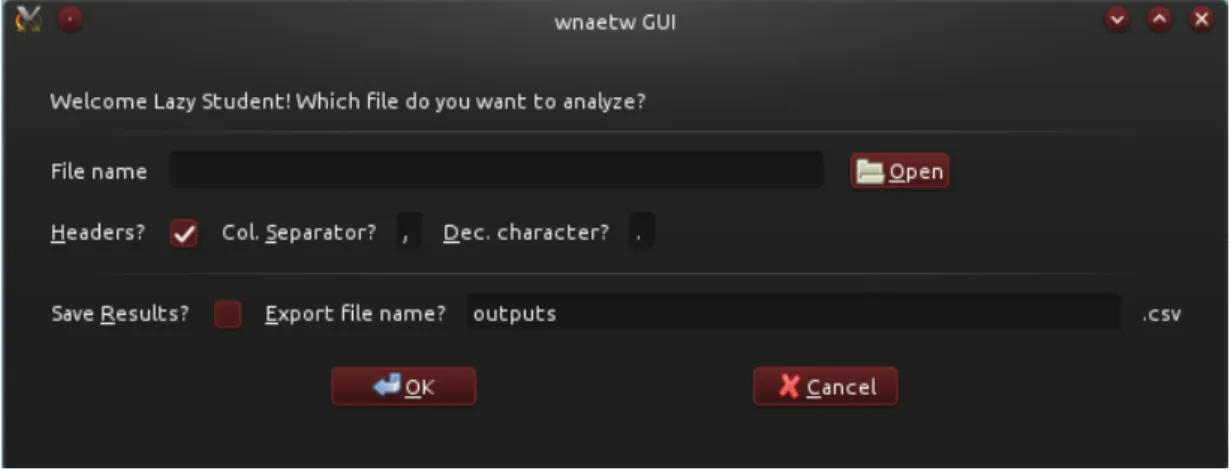
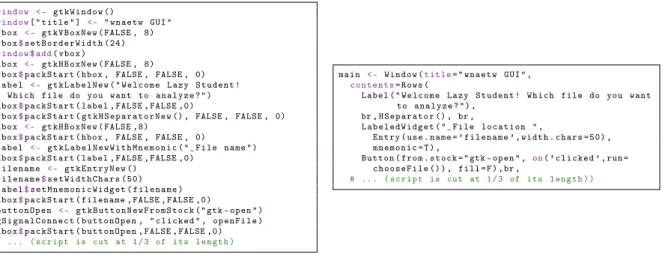
Figure 11 is obtained with the command lines provided in Figure 2 (left).
Figure 1: A simple GUI interface made with RGtk2.
One attempt to overcome the difficulty of the RGtk2 syntax is the package gWidgets but, quoting its reference manual
“The excellent RGtk2 package opens up the full power of the GTK2 toolkit, only a fraction of which is available though gWidgetsRGtk2.”
1obtained on Kubuntu 12.04, Satanic Edition. The window’s appearance differs depending on the OS and
By automatically indexing all objects and methods available in RGtk2, we2developed a method for creating GTK2-based GUI, in a friendlier and more compact manner. Widgets are accessible with simple functions and options, as is more natural for a R language programmer. The window
of Figure 1 is thus generated by the script provided in Figure 2(right).
w i n d o w < - g t k W i n d o w () w i n d o w[ " t i t l e " ] < - " w n a e t w GUI " v b o x < - g t k V B o x N e w ( FALSE , 8) v b o x$s e t B o r d e r W i d t h ( 2 4 ) w i n d o w $ add( v b o x ) h b o x < - g t k H B o x N e w ( FALSE , 8)
v b o x$p a c k S t a r t ( hbox , FALSE , FALSE , 0) l a b e l < - g t k L a b e l N e w ( " W e l c o m e L a z y S t u d e n t!
W h i c h f i l e do you w a n t to a n a l y z e ? " ) h b o x$p a c k S t a r t ( label , FALSE , FALSE ,0)
v b o x$p a c k S t a r t ( g t k H S e p a r a t o r N e w () , FALSE , FALSE , 0) h b o x < - g t k H B o x N e w ( FALSE ,8)
v b o x$p a c k S t a r t ( hbox , FALSE , FALSE , 0)
l a b e l < - g t k L a b e l N e w W i t h M n e m o n i c ( "_F i l e n a m e " ) h b o x$p a c k S t a r t ( label , FALSE , FALSE ,0)
f i l e n a m e < - g t k E n t r y N e w () f i l e n a m e$s e t W i d t h C h a r s ( 5 0 ) l a b e l$s e t M n e m o n i c W i d g e t ( f i l e n a m e ) h b o x$p a c k S t a r t ( f i l e n a m e , FALSE , FALSE ,0) b u t t o n O p e n < - g t k B u t t o n N e w F r o m S t o c k ( " gtk - o p e n " ) g S i g n a l C o n n e c t ( b u t t o n O p e n , " c l i c k e d " , o p e n F i l e ) h b o x$p a c k S t a r t ( b u t t o n O p e n , FALSE , FALSE ,0) # ... ( s c r i p t is cut at 1/3 of its l e n g t h ) m a i n < - W i n d o w (t i t l e= " w n a e t w GUI " , c o n t e n t s= R o w s ( L a b e l ( " W e l c o m e L a z y S t u d e n t! W h i c h f i l e do you w a n t to a n a l y z e ? " ) , br , H S e p a r a t o r () , br , L a b e l e d W i d g e t ( "_F i l e l o c a t i o n " , E n t r y ( use . n a m e = ’ f i l e n a m e ’ , w i d t h . c h a r s = 5 0 ) , m n e m o n i c = T ) , B u t t o n ( f r o m . s t o c k = " gtk - o p e n " , on( ’ c l i c k e d ’ , run = c h o o s e F i l e () ) , f i l l = F ) , br , # ... ( s c r i p t is cut at 1/3 of its l e n g t h ) )
Figure 2: RGtk2 (left) vs sexy-rgtk2 (right).
This method has been used for recoding in a very short and simple manner the basic GUI of
the (toy) package wnaetw3. Also a function has been developed to ease the use of the function
rGtkDataFrame. A data.frame object res can thus be displayed in a window with the single command DataFrame(res) instead of having to define individually each column renderer. This
feature is illustrated in Figure3. The method should be released as a package next summer but
the first scripts, without documentation, as well as the demo code, are available upon request.
p e r f o r m W m t w ( m a i n$f i l e n a m e$ text, m a i n$h e a d e r s$active , m a i n$sep$ text, m a i n$dec$ text, m a i n$ q u o t e $active , m a i n$s a v e r e s$active , m a i n$s a v e n a m e$ t e x t)
# ...
p e r f o r m W m t w < - f u n c t i o n( fn , headers , sep , dec , quote,
save, sn ) { # ... r e a d i n g f i l e res < - a p p l y W m t w ( my .d a t a) # # GUI p a r t r e s G U I < - D i a l o g (t i t l e= " H e r e we are , l a z y s t u d e n t . P l e a s e f i n d b e l o w the m a i n s t a t i s t i c s : " )
D i a l o g R o w s ( resGUI , D a t a F r a m e ( res , row.n a m e s= T R U E ) , br , p a c k ( B u t t o n ( f r o m . s t o c k = ’ C a n c e l ’ , on( ’ c l i c k e d ’ , run = r e s G U I$d e s t r o y () ) ) ,e x p a n d= F , f i l l = T , p a d d i n g =20 , w h e n c e = " end " ) )
Figure 3: Use case example for the function DataFrame.
References
[1] M. Lawrence and J. Verzani. Programming Graphical User Interfaces in R. CRC The R Series. Chapman & Hall, June 2012.
[2] L. Michael and T.L. Duncan. RGtk2: A graphical user interface toolkit for R. Journal of Statistical Software, 37(8):1–52, 2010.
2The authors did not contribute equally to the work: Damien developped the method to extract and interface
RGtk2 objects and methods, whereas Nathalie was the friendly useR and beta testeR.