A Model for Everyday Office
Activities
by
Sanjay Manandhar
B.S., Electrical Engineering and Computer Science
Massachusetts Institute of Technology
(1989)
Submitted to the Media Arts and Sciences Section
School of Architecture and Planning
in Partial Fulfillment of the Requirements for the Degree of
Master of Science
at the
MASSACHUSETTS INSTITUTE OF TECHNOLOGY
June 1991
@
Massachusetts Institute of Technology 1991
All Rights Reserved
Signature of Author
Media Arts and Sciences Section
May 10, 1991
Certified by
Christopher M. Schmandt
Principal Research Scientist
Thesis Supervisor
Accepted by
'
V
Stephen A. Benton
Chairman,
DepAt
NPWmitteeon Graduate Students
OF TECHNOLOGY
JUL 2
3
1991
LIBRARIES
Botch
Activity Server:
Activity Server: A Model for Everyday Office Activities
by
Sanjay Manandhar
Submitted to the Media Arts and Sciences Section School of Architecture and Planning
on May 10, 1991, in partial fulfillment of the requirements for the Degree of
Master of Science
Abstract
The activity server is a program that produces periodic reports of people's locations and activities. It combines three sources of information. A finger server provides information on users' activities on computers within a local network; a phone server tells whether phones are in use; and a location server abstracts physical location of users who wear "active badges." Details of the design and implementation of the finger server (the one built expressly for the activity server) will also be discussed. The main attributes of the activity server are: 1) it maintains history of all the participating users, 2) it coordinates among the many, possibly conflicting, pieces of information from three sources, 3) it distinguishes interdependence of activities among users, and 4) it provides a high-level abstraction about users' activities. This thesis also describes two client applications that allow means of retrieving the knowledge embedded in the activity server; the clients use a graphical and a telephonic user-interface, respectively.
Thesis Supervisor: Christopher M. Schmandt Title: Principal Research Scientist
Contents
1 Introduction 7
1.1 An Example . . . . 8
1.2 Background... ... 10
2 Overview of the system 11 2.1 The Listeners . . . . 11
2.1.1 The finger server . . . . 13
2.1.2 The phone server . . . . 14
2.1.3 The location server . . . . 15
2.2 Data Representation . . . . 16
2.2.1 The generalized linked list . . . . 16
2.2.2 Why a linked list? . . . . 17
2.3 The Socket Manager . . . . 18
3 The Finger Server 20 3.1 Architecture . . . . 20 3.2 Mechanism . . . . 21 3.2.1 Configuration files . . . . 21 3.2.2 Host data . . . . 21 3.2.3 Polling . . . . 23 3.2.4 Callbacks . . . . 24 3
3.3 3.4 3.5 3.6 3.7 3.8 3.9 3.10
Parsing Finger Information . . . Maintaining Finger Information. Updating Finger Information . . Alerts . . . .
Protocols . . . . Client Interaction . . . . Shortcomings . . . . Optimizations . . . . 4 The Activity Server
4.1 Architecture ... 4.2 Mechanism . . . . 4.2.1 Startup... 4.2.2 Event handling 4.3 Data Representation 4.3.1 Server object 4.3.2 Person object 4.3.3 Place object . . . 4.3.4 Machine object 4.3.5 Phone object 4.4 Updating Data Structures
4.4.1 Finger events 4.4.2 Phone events . 4.4.3 Location events 4.5 History Mechanism . 4.6 Client Interaction . . 5 Rules
5.1 Scenario 1: Coming into the Office 4 . . . . . . . . . . . . . . . . . . . .
5.2 5.3 5.4 5.5 5.6 5.7 5.8 5.9 5.10 6 Clients 6.1 The 6.1.1 6.1.2 6.2 The 6.2.1 Directory Client Implementation... User Interaction... Watcher Client . . . . Implementation... 58 58 58 59 60 60 7 Discussion 7.1 Performance... ... ... .. ... .. .. .. .. .. 7.2 Future Work... ... ... .. .. .. ... 8 Summary
A Finger Server Protocol A.1 Introduction . . . . A.2 Byte-stream Protocol . A.3 Output Formats . . . .
A.4 Asynchronous Output
A.5 Messages . . . . A.6 Programmer Interface.
Scenario 2: Leaving the Office . . . . Scenario 3: Visiting Another Office . . . .
Scenario 4: Visitor in Office . . . . Scenario 5: On the Phone . . . . Scenario 6: Logged in on Another Machine Scenario 7: Dialed In . . . . Scenario 8: Remotely Logged In . . . . Final States . . . . Conflict Resolution . . . . . . . . . . . . . . . . . . . . . . . . . . . . . . . . . . . . . . . .
B Activity Server Protocol 77 B.1 Introduction . . . . 77 B.2 Byte-stream Protocol . . . . 77 B.3 Output formats . . . . 78 B.4 Current Activity . . . . 78 B.5 Messages . . . . 78 B.6 History of Activity . . . . 80 C Configuration Files 81 C.1 Finger Configuration Files . . . . 81
C.1.1 Hosts Configuration Files . . . . 81
C.1.2 Users Configuration Files . . . . 82
C.2 Activity Server Configuration Files . . . . 82
C.2.1 Places Configuration Files . . . . 82
Chapter 1
Introduction
The activity server is a program intended to improve interaction of co-workers, given that richer forms of communications like meeting in person, talking over the telephone and electronic mail, etc., are not always possible. It is intended to answer questions like,"Can I have a meeting now with colleagues A, B and C?" or "Where is colleague C?" or "Who came by my office while I was away?" Such everyday questions constantly arise in an office environment and require active participation from the solicitor of the information. It is highly desirable to have instant answers or at least intelligent inferences to such questions. By gathering and maintaining information from three sources that are indicative of office activity, the activity server helps answer many routine questions of the work place.
There are some very well-defined, routine activities in the office. Logging on to a computer to check electronic mail, placing phone calls, visiting another colleague in another office or meeting in a conference room are some routine office activities.
If these routine office activities could be collected and characterized in some fashion,
applying some rules and heuristics, one could devise a tool that could augment coor-dination and query of user activities. This thesis describes such a system, and some client applications which use it.
is assertions about the state of the activity. The reports of these office activities are asynchronous and are called events. These events are gathered from input channels
by three servers: the finger server provides input from the local area network of
computers; the phone server recovers phone activity from the telephone network and the location server monitors special badges that relay their positions relative to a separate network of sensors.
The abstracted outputs of the activity server are made available to client ap-plications via a well-defined set of protocols. It is hoped that the outputs and the clients that use these outputs can benefit small trusting groups of users in the office environment.
At this point, some recurring terms ought to be described. Their full description will ensue in due course. For clarity, the three data gathering sources, the finger server, the phone server and the location server, are called Listeners and unless explicit, the "server" shall refer to the activity server whereas the "clients" shall refer to the client applications of the activity server. An "active badge" is a badge, which periodically emits a coded infra-red signal. It can be tracked by a network of sensors.
1.1
An Example
Let's take a simple example from above: Where is colleague P? To answer this question, the activity server queries its three Listeners. The following are possible answers that it receives:
Phone server: The phone in P's office is not in use.
Location server: Badge P is in P's office; it has been there for the last 10 hours. Finger Server: P is logged in to the machine in her office, idle time is zero minutes
The activity server draws conclusions about the location of colleague P from each Listener response and assigns a confidence level to each. From the phone server alone, it is not clear that P is in her office. From the response of the location server,
P is, in fact, in her office but has not moved for 10 hours. The latter piece of
information undermines the plausible conclusion that she might be in her office. These are conflicting conclusions. But the finger server responds that the idle time on her machine is nil, i.e., she is active. However, she is not active on the console (located in her office), but rather on a pseudo-terminal dO. Since all dX (X is an alpha-numeric) pseudo-terminals are open for dialin access, P has dialed in. Hence, the activity server concludes that P is not around, she has dialed in remotely.
The example above illustrates some of the key attributes of the activity server:
* History: The server needs past as well as present data. This is important in
order to be able to infer the user's activities from his past actions.
e Multiple sources: The server will draw upon its Listeners to get multiple,
pos-sibly conflicting, views on real world activities.
e Multi-party: The activity server monitors many users simultaneously. Every
member of the group may affect the state of other members of the group. For instance, a person visiting another colleague not only changes his own, but also the state of his colleague.
e High-level abstraction: The activity server can assemble many pieces of discrete
information, which by themselves are of little value but cumulatively allow abs-traction of intelligent, high-level inferences of user activities.
1.2
Background
Work in traditional artificial intelligence (AI) has concentrated on plan recognition where it is assumed that there is a precise plan that a user activity will follow [6, 12]. Many researchers working in interdisciplinary fields have proposed models varying in scope, complexity, and computational formality. For instance, in a technical paper from Xerox PARC, many dynamic models at micro and macro levels were provided
[5]. Some newer work argues against planned models since it is very difficult to allow
for unpredictable and unanticipated circumstances [1, 2, 15]. Although not a user modeling effort, the activity server uses a dynamic model that can infer the state of users and adapt continuously. Most of the user modeling work in AI and cognitive science research, including dialog systems [9], expert systems and student modeling have focused on systems that monitor user activities, and react to them. The activity server only monitors and builds an activity model; however, clients of the activity server that benefit from the user model can execute (react) accordingly. In addition, unlike many user modeling efforts that attempt to enhance user-system interaction or understanding, the activity server focuses on augmenting user-user interaction with the help and coordination of many discrete systems.
Many user modeling research efforts depend on a single source of data. There has been much work that rely on a single source of information, such as user-input at a computer, eye tracker information, etc. The activity server, however, benefits from three different sources of information. This redundancy is used effectively to increase reliability of the final activities assertion made by the server.
Chapter 2
Overview of the system
The activity server adopts a client-server model based on underlying TCP-IP socket communication [3]. The activity server itself is a client to its three Listeners (the finger server, the location server and the phone server). Events from these Listeners are funneled through a common event handler which timestamps each event, updates a per user database and triggers some rules (see Figure 2-1). High level inferences made by the rules are saved and are made available to clients.
2.1
The Listeners
Listeners are the indispensable information-gathering servers that the activity server relies on. They are independent and service their own pool of clients; the activity server is a special client because it connects to all the Listeners simultaneously. Each Listener is self-sufficient and is oblivious of other Listeners; only the activity server, which collects data from all the Listeners, has the global view which allows it to make more complex inferences. The rest of the section provides an overview of all the Listeners.
Figure 2-1: Overall system diagram of the activity server
user community
clients
Figure 2-2: Architecture of the finger server.
2.1.1
The finger server
The finger server gathers idle times of users on a number of machines; it is a metric of activity of users on these machines. This server depends on the finger daemon [8] which keeps state (idle times in minutes) of all users on a given machine. The finger server compares information across the entire group of machines it is monitoring (Figure 2-2). For instance, if a user is logged in on more than one machine, the server can tell where the user is most active, whether he is logged in remotely and from where he is logged in. In addition, the finger server can send asynchronous events (called alerts) to clients that express interest in them. Since this server was implemented expressly for the activity server, it will be described thoroughly in the next chapter.
ISDN telephones
5ESS ISDN
switch
clients
Figure 2-3: Architecture of the phone server.
2.1.2
The phone server
The phone server monitors the ISDN protocol that is exchanged between the 5ESS telephone switch and telephone sets. It gets the events of all telephone sets within its jurisdiction (see Figure 2-3). Phone state information such as idle, active, incoming call, dialing, held, etc. can be received from the phone server. For the purposes of the activity server, however, only idle, active and dialing events are critical. Inferences based solely on these three events will be discussed in a separate chapter dealing with the activity server. A crucial assumption that is made is that most users in the user community have their personal phones in their personal offices. For a more complete treatment of the phone server refer to [18].
user community with badges
Figure 2-4: Architecture of the location server
2.1.3
The location server
The location server provides data about locations of special badges which emit infra-red signals. It has a network of infra-red sensors that are placed around the building, in hallways, offices, lab areas and conference rooms. Participating members
of the user community may choose to wear a badge, called the active badge. Since
each active badge has a unique code, this code and the owner of the badge can be mapped in a database. When a user wearing his badge (designed and built by Olivetti Research Laboratory in Cambridge, England), moves around in the building, and the badge is sighted by sensors, the sensors register the unique ID of the badge and report it to the location server. The location server translates the identity of the reporting sensor to its location and translates the ID of the badge to its owner, thus ascertaining the location of the user (see Figure 2-4). The sensors are polled every 5 seconds to check badge sightings; the badges themselves fire every 15 seconds.
p fnt
prev next
type data essage-pointer
Figure 2-5: The link-node: a building block for the generalized linked list.
2.2
Data Representation
Representation of all dynamic data on the finger server as well as the activity server is via objects that are appended to linked lists. One of the design decisions was to pick a data structure that would act as the "common denominator" or a very general mechanism for storing any type of dynamic data. Hence, a generalized linked list was conceived; it provides the "chain" on which any data could be appended. This linked list is described below.
2.2.1
The generalized linked list
The fundamental building block of this generalized linked list is the link-node. It provides facilities for a quadruply linked list with message passing capabilities. Since it is not associated with any data object, it can be used to create linked list of any object contributing to generality and reusability of this model (and its corresponding code). This model represents a slightly general version of a pair of C library calls of
"insque" and "remque."
16
The link-node consists of the type identifier to uniquely identify the data object that is appended to the link (see Figure 2-5). There are parent and child pointers for vertical connectivity and previous and next pointers for lateral connectivity; thus, in the most complex case one can have a quadruply linked list. A message handler points to a table of handlers. Depending on the message type, the appropriate operator for the data object at hand is triggered. Finally, the data part is a pointer to the data object. Whenever the internals of the data object are accessed or changed, the data field of the link must be properly type-casted; but this is a small price to pay for flexibility that the link-node model affords. For instance, the routines that add, delete, select and collect (select all) links (and by extension, their data objects) are the same no matter what kind of data is "carried" by the linked list. Note that the link-node model is not responsible for creation of the actual data objects or the message handler if there is one. It does, however, manage all the link-nodes and
destroys any appended any data objects when the link-node itself is destroyed.
2.2.2
Why a linked list?
There are some very compelling reasons for opting the linked list data structure rather than other data structures. These reasons are as follows:
" Isolation: The linked list operations do not access the data objects. In usual
implementations, the object itself is responsible for linked list operations (e.g. add, delete, move a link, etc.). Under the current scheme, however, the data objects are oblivious of other object (previous, next, parent or child) around them; only the link list nodes need worry about other nodes.
" Reusability: Most operations are common regardless of the data type. The
same add, delete, select, collect operations can be reused.
* Flexibility: Linked lists in general are appropriate for managing dynamic data. Both the activity server and the fingerserver (the two systems built for this
project) use this modified linked list.
9 Access time: Since the number of data objects, hence, the number of links,
in the linked list is small, the access time for walking down the linked list is negligible. For larger numbers of discrete objects, data structures optimized for larger object domains (e.g. hash tables) would be more appropriate, however.
2.3
The Socket Manager
Like the general nature of the linked list described above, the socket manager' provides a general, powerful interface to perform TCP-IP socket communications.
This interface makes the intricacies of socket communication manageable and com-prehensible. The socket manager provides enough features that the temptation to create yet another flavor of socket connection that may duplicate functionalities and effort is slim. Needless to say, the activity server and the finger server use the the socket manager interface whenever the opportunity arises. Some of the attributes that contribute to a powerful socket manager are worth mentioning.
" Abstract operations: The intricate socket-level calls have been subsumed by
more general calls that are understandable and easy to use.
" Asynchronous: Unlike procedural routines, the socket manager provides
call-backs (for reading from sockets, carrying out housekeeping when the socket is destroyed and reporting errors) which are fully asynchronous. Asynchronous notification allows the server to do other duties when not servicing a request. The client, too, need not wait for a reply; it gets notified when the reply arrives.
" Symmetrical: Operations that exist on both the server and the client sides
(e.g. opening, closing socket, registering callbacks, etc.) are the same. Such a symmetry makes the software semantically consistent as well.
e Reusability: As alluded to earlier, the yield of the module because of reusability is immeasurable. In the finger server and the activity server, the socket manager is used in two levels of server-client hierarchy.
Chapter 3
The Finger Server
Idle times provide a very simple and effective means of finding out the activities of users within a network (also known as fingering). Many machines provide a finger daemon that can be queried to retrieve history in idle times of all users on their respective machines. The daemon provides this service at a well-known port (79)1,
which the finger server uses to gets its data.
3.1
Architecture
The architecture of the finger server is based on two levels of client-server paradigm: the finger server is a client to the finger daemons while it is the server to its own clients. Communication between the finger server and the finger daemons of each of the ma-chines, and between the finger server and its clients is via sockets. The polling module within the finger server starts polling all the machines soon after startup. Data is received asynchronously; then the parsing module recovers important pieces of infor-mation such as usernames and idle times and updates internal data structures. The internal data structure consists of three linked lists storing information about users, hosts and clients. The interaction of these data structures among themselves, with
client programs and with incoming finger information is basic to the architecture of the finger server. Upon each update, a consistency check is done, the side effect which
are asynchronous events called alerts.
3.2
Mechanism
The finger server amasses finger information from many, possibly non-homogeneous, machines and stores the data in a manner that can be readily available upon request from clients. This mechanism of amassing finger information is done by polling the machines; the results of the pollings are saved for three principal entities: hosts, users and clients. Their state is maintained in doubly linked lists; queries from clients are serviced by accessing data from these linked lists. The following subsections present some design choices and implementation details of the finger server.
3.2.1
Configuration files
When the server starts up it reads two configuration files that maintain the lists
of users and hosts. These text files are .finger-.config.users and .finger.config.hosts,
respectively. The syntax and examples of these files are given in Appendix C. While the user configuration file lists only users (by username), the host configuration file maintains not only the hostnames (or their aliases), but also other optional fields such as polling frequency (in seconds), host type (Unix, Ultrix, Genera, etc.) and options for the finger daemon. Once the server has started, users and hosts may be added
dynamically using the client protocols.
3.2.2
Host data
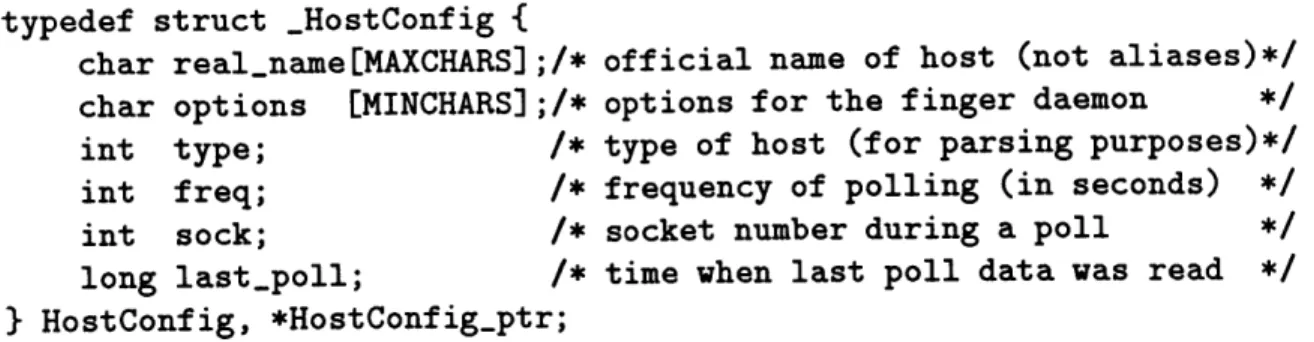
Host configuration parameters and other dynamic host-specific data such as socket identifier, time of last poll is stored in a HostConfig data object (see Figure 3-1). The HostConfig data object maintains polling-specific information - it is not responsible
typedef struct _HostConfig {
char real-name[MAXCHARS];/* official name of host (not aliases)*/
char options [MINCHARS];/* options for the finger daemon
int type; /* type of host (for parsing purposes)*/
int freq; /* frequency of polling (in seconds) */
int sock; /* socket number during a poll
long last.poll; /* time when last poll data was read */
} HostConfig, *HostConfigptr;
Figure 3-1: The HostConfig data object stores polling specific data of each host. for maintaining the results of the pollings (these are stored in a separate object to be described later).
As shown in Figure 3-1, the first four members of the HostConfig data struc-ture are read from the configuration file; except the hostname, the remaining three parameters have defaults so they are optional. The hostname given in the configu-ration file may be an alias of a host; the finger server obtains the official name from system databases using gethostbyname call before it adds it to the reaLname field in the HostConfig structure. The options field provides special directives for the finger daemon. Since finger data that is sent back is dependent on the option, this field is also used as a token that differentiates the various parsing mechanisms. The type field maintains the type of the host; this information, too, is crucial to be able to parse finger information correctly. The freq field is for polling frequency, in seconds. The default frequency is 90 seconds and the minimum frequency is 60 seconds; some hosts may be polled more or less often than the default if the frequency parameter is given in the configuration file. Some remote, slow or heavily loaded machines ought to be polled infrequently.
The remaining two members of the HostConfig object are dynamic polling data. Whenever a socket is opened successfully, the socket identifier is saved in the sock field. When finger information is read, the sock field is reset to -1. Hence, this field can be examined to determine the state of a polling session. The last..poll field holds
the system time when the last poll was read successfully; combination of this field with the frequency field allows the polling module to determine if the host is ready to be polled again.
3.2.3
Polling
Every machine is polled at a certain interval to collect idle time state. The default interval is 90 seconds, whereas the minimum is 60 seconds. Although it is possible to get finger information in fine granularity of minutes and seconds, it is not possible to get other useful information in the same poll (e.g. where the user is logged in); this is a trade-off. In addition, polling frequently enough to recover the granularity in seconds is neither practical nor useful. Some machines may be polled less frequently than the default value, however. For instance, machines with many users or machines at a remote site may trade up-to-the-minute updating for better system performance. There are two important considerations when polling in an asynchronous envi-ronment. First of all, each poll must be contingent upon the success of the previous poll. It is unnecessary to query for finger information from a particular host a second time if the preceding poll has not returned. If the state of the polling session is not maintained, machines that are slow in responding will have a flood of requests from the finger server over a period of time. Since each, request corresponds to a socket, there may be many sockets open to the same machine which is not only wasteful of system resources but can reduce overall system performance.
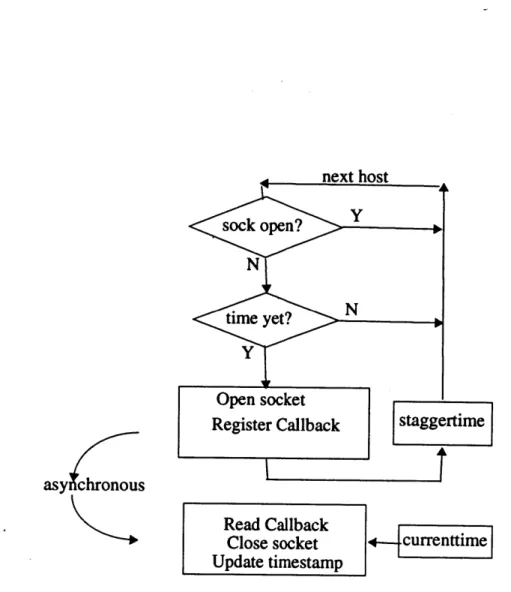
Secondly, coordination of pollings among the machines is important. Even though the replies arrive asynchronously, for similar machines within the same network, those replies can arrive almost simultaneously. Therefore, if all the requests are sent out at the same time, the finger server will be bogged down when all the replies arrive. During this time, client requests and other internal functions (such as updating the data structures) may be backlogged. Hence, the finger server staggers the requests uniformly over the entire polling period. For instance, to poll 25 hosts over 90 seconds,
triggering a request every three seconds is appropriate. Any incoming client request can be handled within the three second window; the maximum delay will be the time it takes to update the data from a single machine. Figure 3-2 shows the entire polling mechanism. The stagger time between polls is achieved by using a timer.
For various reasons it may not be possible to reach the finger daemon of a machine (e.g. the machine is down, the network connection is faulty or the finger daemon has been disabled). In such situations, a simple backoff mechanism is applied to subsequent polls of that machine. After two consecutive failed connections to the daemon, the polling interval of the machine is multiplied by a programmer-defined value (6 in this implementation). If connection still fails at this new interval for 6 times, the interval is yet again multiplied by 6. The rationale is to try connecting every ten minutes or so in the first hour, then every hour or so in the first day, then stabilize at once per day. Note that should the connection succeed, or should the user "add" the machine after it is healthy again, the initial interval is reinstated.
3.2.4
Callbacks
At the time of polling, a socket to a machine is opened and a read and a destroy callback each are registered with the Socket Manager. These callbacks, which are the same for all the pollings, call the routine ReadCallback when the socket has something to be read and DieCallback when the socket is closed. The polling then moves on to the next machine; the server does not wait and block to read from a socket. Hence, the receipt of data is fully asynchronous. When data is available at a socket, its descriptor disambiguates among the many machines that may have outstanding polls (note that HostConfig structure of each machine saves the socket descriptor upon each poll). ReadCallback then reads the data and the finger daemon closes the socket. Although it is a streams connection, the finger daemon keeps the socket open only as long as is necessary; that is, it is not possible to reserve a socket for future pollings. The destroy callback is useful when some number of tasks need
asy chronous
Read Callback Close socket Update timestamp
to be done whenever a socket is closed.
The asynchronous nature of the callbacks allow the finger server to start a query on another finger daemon or even service a client request while waiting for a reply from a machine. The client requests are serviced using callbacks (FsRequestHandler
and FsKillHandler) as well.
3.3
Parsing Finger Information
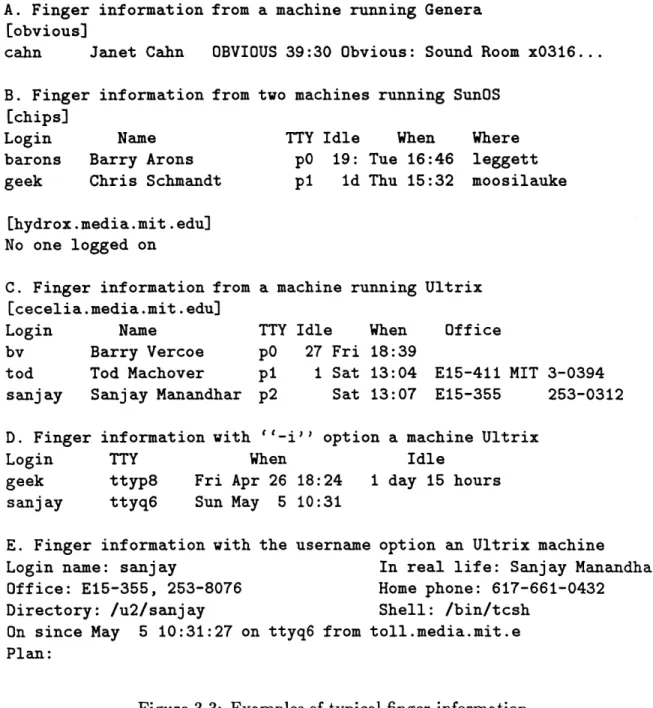
Information returned by the finger daemon is machine-specific. So far, machines that use Unix, Ultrix or Genera (an operating system for Symbolics Lisp machines) are supported. Figure 3-3.A shows finger output from a Lisp machine running Genera; Figure 3-3.B shows output from a machine running Unix and Figure 3-3.C shows output from a machine running Ultrix. Typically the information received will have at least the username, hostname and the idle time; most Unix systems also report the terminal. While idle times indicate the user's activity or lack thereof, the terminal name is useful in locating the user's physical location. If the user is connected to the console ("co") terminal of a machine and has a small or zero idle time, it is evident that no matter where else the user is logged on, she is physically located where the console of that machine is. On the other hand, if the user is on "dX" (X is an alphanumeric) terminal, it is clear that the user has dialed in.
Sometimes multiple rounds of polling is necessary when not all the information is provided by a single poll. If a machine has many users logged in and the finger server is interested in only a small subset of such users, it uses a fast poll that gives a brief list with usernames; then it conducts a poll on only those users who are logged in and are active. It is wasteful to make individual polls on users who may or may not be logged in, especially on slow, heavily loaded or remote machines. Hence, a fast poll (e.g. using the -i option) is used (see Figure 3-3.D). From that information, individualized polls (see Figure 3-3.E) can recover other information such as the host
A. Finger information from a machine running Genera [obvious]
cahn Janet Cahn OBVIOUS 39:30 Obvious: Sound Room x0316 ...
B. Finger information from two machines running SunOS [chips]
Login Name TTY Idle When Where
barons Barry Arons pG 19: Tue 16:46 leggett
geek Chris Schmandt p1 id Thu 15:32 moosilauke
[hydrox.media.mit.edul
No one logged on
C. Finger information from [cecelia.media.mit.edu]
Login Name
by Barry Vercoe
tod Tod Machover
sanjay Sanjay Manandhar D. Finger
Login geek
s anj ay
a machine running Ultrix
TTY p0
p1 p2
Idle When Office
27 Fri 18:39
1 Sat 13:04 E15-411 MIT 3-0394
Sat 13:07 E15-355 253-0312
information with ''-i'' option a machine Ultrix
TTY When Idle
ttyp8
ttyq6
Fri Apr 26 18:24
Sun May 5 10:31
1 day 15 hours
E. Finger information with the username option an Ultrix machine
Login name: sanjay In real life: Sanjay Manandhar
Office: E15-355, 253-8076 Home phone: 617-661-0432
Directory: /u2/sanjay Shell: /bin/tcsh
On since May 5 10:31:27 on ttyq6 from toll.media.mit.e
Plan:
the person is logged in from.
3.4
Maintaining Finger Information
The result from the polls update the user and host data structures. After each host reports, its corresponding host data object along with its internal linked list of users is updated and any state transitions are immediately reported to the clients that requested asynchronous notification. In figure 3-4, the name member corresponds to the official name of the host and the timestamp is the time the host was last updated.
All users logged in to the host are maintained in an internal linked list, the head and
tail pointers of which are also members of the HostInfo object.
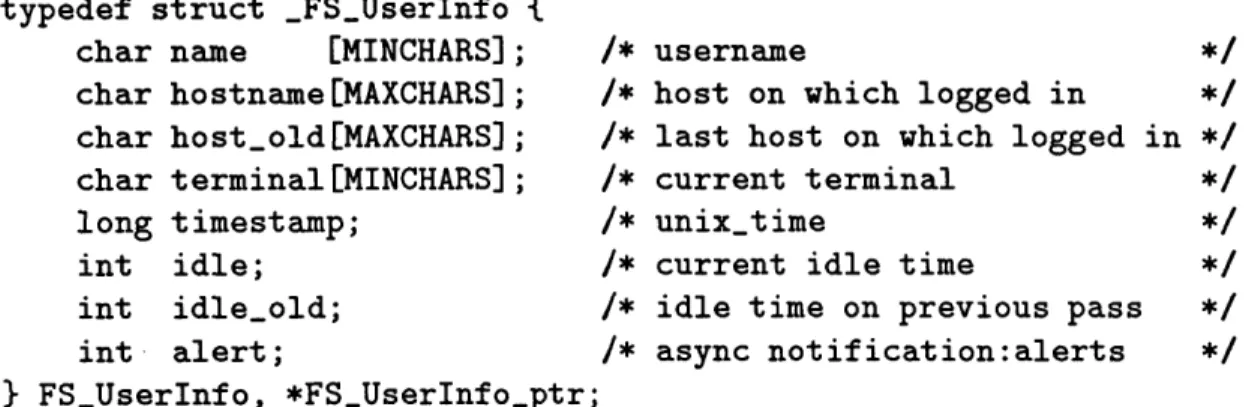
Linked list of users within the hosts consists of UserInfo data object (see Figure
3-5). The name corresponds to the username of the user, the terminal to the terminal
name on which the user is logged in and idle to the idle time of the user at the time of the polling. The idle-old and idle members are sufficient to describe the four state transitions (login, logout, active and dormant) of users within a host (described in the next section). These state transitions are recorded in the alert field. The
host-name and host-old fields of the UserInfo objects are superfluous within the HostInfo
structure. Users that login to the host are added to the list of users within the host, while users that log out are removed. Hence, the HostInfo data object describes the state of any particular host completely. Any query of host information by any client is looked up in this data structure.
The most recent activity of users is maintained in a separate linked list of UserInfo objects. This list provides overall state of any particular user. Hence, a user is not removed from the list when he logs out. When the UserInfo data object is used in this list, the hostname and host-old fields are relevant. In fact, the combination of these two fields along with idle and idle-old can characterize another very important asynchronous event, called moved. All the other fields are relevant and used with
typedef struct _FSHostInfo { char name [MAXCHARS];
long timestamp;
Link *userHead; Link *userTail;
} FSHostInfo, *FSHostInfo-ptr;
* hostname */
/* time of last update */
/* list of users logged on the host */
Figure 3-4: Structure that saves the state of each host. typedef struct _FSUserInfo {
char name [MINCHARS]; char hostname [MAXCHARS]; char host-old[MAXCHARS];
char terminal [MINCHARS]; long timestamp; int idle; int idle-old; int- alert; } FS.UserInfo, *FSUserInfo-ptr; username
host on which logged in
last host on which logged in */ current terminal
unix-time
current idle time */
idle time on previous pass */
async notification:alerts */
Figure 3-5: Structure that saves the state on users. similar semantics as within a HostInfo object.
3.5
Updating Finger Information
Whenever a host successfully returns from a poll, the corresponding host object will be updated. At the very least, the timestamp of the host will be updated. If there are users logged in, their idle times and timestamps are also updated. Immediately after such updating a consistency check is done, as a result of which the data structure may be modified and asynchronous alerts may be issued.
Reporting changes to the user data structure is a little more complex, however. There is no one-to-one correspondence between polling of a host and the user object. The user data structure reflects the most recent activity across the entire gamut of
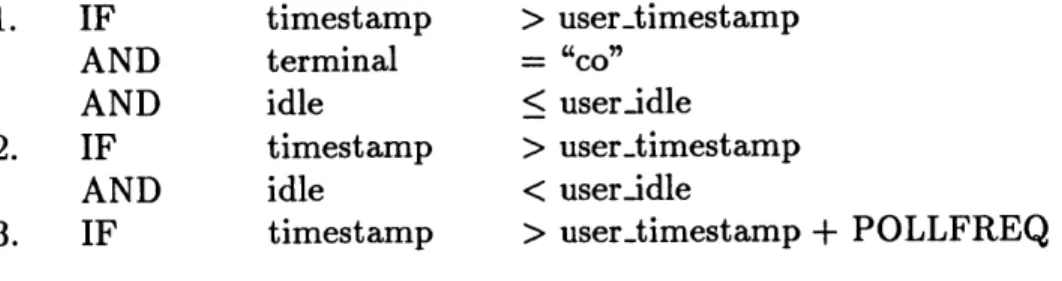
1. IF timestamp > user.timestamp AND terminal = "co"l
AND idle < user-idle
2. IF timestamp > usertimestamp
AND idle < user.idle
3. IF timestamp > user..timestamp + POLLFREQ Figure 3-6: Precedence rule for updating UserInfo object.
hosts. Since not all hosts respond at the same time, and some hosts may respond after other hosts may have been polled more than once, a precedence rule is used to ensure legitimate but slightly old user data is not overwritten. The precedence rule, going from high to low precedence is given in Figure 3-6.
In the rule above, POLLFREQ is normally the default polling frequency. However, if a user is active on a machine which has frequency larger than the default frequency, that larger frequency will have to be chosen. Note that if a user is remotely logged in from machineA to machineB to machineC and is active on machineC, all three machines will register zero idle time but only the first will have zero idle time on the console; hence, only the information from machineA is saved in the user data struc-ture. This is also the machine at which the user is physically located. This paradigm is consistent with the requirements of the activity server, since it is interested in locating the users (and determining their activities) through their machine activity.
3.6
Alerts
Alerts signify transition of user activities from one state to another. Four kinds of asynchronous alerts are provided. These are login, logout, active and dormant. The first three of these can be inferred directly from finger information. The fourth, dor-mant, is an artificial transition from active to dormant state of activity. IDLE.T HRES-HOLD (5 minutes in this implementation) is the ceiling of idle time above which a
State
Transition conditions
LOGOUT: if user..timestamp > host-timestamp
LOGIN: if user-idle-old = -1 and user-idle > -1
DORMANT: if user.idle-old > IDLETHRESHOLD and user-idle > IDLE..THRESHOLD ACTIVE: if user.idle-old > IDLETHRESHOLD and user.idle > IDLETHRESHOLD
DIALIN: if tty = dX
and tty.old != dX
and idle < IDLE.THRESHOLD
MOVED: if hostname != host-old
and idle < IDLE-THRESHOLD
Figure 3-7: Algorithms for alerts.
user is considered not active at the machine. By monitoring these alerts, a client application can construct a dynamic model of user activity. In addition to these four, the user status uses two more, dialin and moved. Dialin is a special case of login or active alert signifying fresh activity at a dialin port of a machine. On the other hand, moved is a special case of active in which the user moved (physically) from one machine to another. The algorithms that mark state transitions are given in Figure
3-7.
3.7
Protocols
There are two levels of finger server protocol. The lower level protocol is at the byte stream level; the second, a C interface, based on the byte stream level, is also available. Once a socket connection to the server is established, simple, case-insensitive, ASCII commands may be sent via the connection. The server uses the same connection to send its replies. This human-readable interface allows for understanding of commands and responses with a minimum experience with the system. A brief mode can be set so that non-human clients may get the important data easily. Appendix A describes
Connected to toll. Escape character is ']'.
locate barons
[PERSON barons] [HOST leggett, TTY co] [IDLE 3 min] 03:21:02 PM
set-mode short OKAY get-host-info leggett barons leggett co 6 03:23:21 PM bye Goodbye.
Connection closed by foreign host.
Figure 3-8: A sample interaction with the finger server. the byte-stream and C interface in greater detail.
Figure 3-8 shows a sample session with the finger server using telnet. (User commands are shown in italics).
3.8
Client Interaction
Clients can determine the form and format of outputs. The cumulative state of all the client requirements are saved in a SockInfo structure shown in Figure
3-9. The user may set these output modes and requirements using the server-client
procotol (Appendix A). The SockInfo structure is created for each client when it connects to the server and is destroyed when it disconnects. The first member of the SockInfo is the name (converted from an integer value to a character string so that searching will be facile and consistent with that of other data objects) of the socket on which the client is communicating. The out-mode holds the output mode that the client requested (default is long mode); see Figure 3-8 for examples of short and long mode of output. The sync-mode field, if asserted will withhold
typedef struct _FSSockInfo { char name [MINCHARS];
int outmode; int syncmode; int all-host-async; int all-user.async; Link *u-asyncHead; Link *u.asyncTail; Link *hasyncHead; Link *h-asyncTail; } FSSockInfo, *FSSockInfo-pt /* socket number
/* output mode (shortilong)
/* flag for sync output mode
/* xmit all hosts async data
/* xmit all user async data /* list of users to track
/* list of hosts to track
Figure 3-9: Structure that saves the wishes of each client.
all asynchronous reporting requests (default is asynchronous). The alLhost-async, if asserted, is an indication to the server to send all asynchronous alerts encountered by the hosts; likewise, alLuser-async indicates that all asynchronous alerts encountered
by the users should be reported. Should the client be interested in only a small subset
of users or hosts, these are saved as linked list objects within the SockInfo object.
3.9
Shortcomings
There are some shortcomings which are inherent in the finger daemon while others were introduced by the finger server itself.
* It is possible not to "see" quick logins and logouts on a machine. Since the polling cycle executes every few minutes, a login-logout pair on a machine by a particular user may not be reported by the finger daemon. Likewise, if a user exceeds the IDLE-THRESHOLD for a few seconds but then hits a key, this DORMANT state of up to 59 seconds is not reported. The granularity of the finger daemon is in minutes up to 59 minutes, then in hours and minutes up to
9 hours and 59 minutes, then in hours up to 23 hours and then in days. On the
" Activity in some programs is not noticeable to the finger daemon. For instance,
activity solely in the gnuemacs editor program will increment the idle time as if the user was away from the terminal.
" The finger daemon reports only the idle time, it does not report what program
may be running. There are other Unix programs and daemons that monitor execution of programs at any particular time but their services were not used for a number of reasons. Not all machines run these daemons (rwho, w, rusers, etc.) but almost all machines keep the finger daemons running. (Some sites disable even the finger daemon for security reasons). Hence, finger server can remain very general and modest in its requirements. Many of the other daemons run by mutual broadcasts and receives. This can put a severe burden on network
and machine performance. Idle time history alone can be fairly useful.
" One of the shortcomings of the finger server is that there is a latency in
asyn-chronous reporting. Should there be a race condition between two hosts report-ing back to the freport-inger server, the updates of the second host on the queue will be delayed by the time it takes the first host to dump all its data and for the finger server to update all its data structures. Typically the latency is in the order of a few seconds.
3.10
Optimizations
Some optimizations were made so that the finger server could service all its clients with minimum latency. Querying the finger daemon to find a limited number of users' idle times is a very costly operation. It hurts network and machine performance. The finger daemon checks some system files such as /etc/hosts file and figures out real names, telephone numbers, office number, etc. Most of this information is extraneous for the purposes of the finger server. Hence, sending appropriate options to the finger daemon will return only the desired information. Non-default options have been used
in two instances for a slow and heavily loaded machine. Unfortunately, these options are not available on all machine types.
Less frequent polling may be used to reduce performance losses. Hence, a separate polling frequency parameter can be set for each machine in the configuration file itself. Infrequent polling can alleviate system latency and also reduce the burden on the responding machines. A design feature, for future implementation could include dynamic adjustment of polling frequency. The system could record the response time and poll machines with poor response times less frequently. Similarly, it is wasteful to poll machines with no one logged on; these too, can be polled infrequently with a
proviso that the original frequency would be reinstated once someone logs in.
Abnormal conditions on machines can cause delay in their responses. Hence, these conditions are noted and a simple backoff mechanism has been used. In future extensions a more complex backoff mechanism could be used.
Chapter 4
The Activity Server
The activity server, the main object of this thesis, provides a mechanism to glean high-level abstraction of the activities of the user community. The activity server gathers data from the Listeners and looks for corroborating, conflicting or complete lack of data. With the help of IF/THEN rules, the activity server attempts its best estimate of user activities; the next chapter is devoted to the rules that the activity server employs. The activity server also saves some history on data from all Listeners so that the rules can benefit from past data. The Listeners provide asynchronous events; the activity server performs further filtering on these events and cross-comparison among Listener events. Querying clients will receive replies generated from this final state of activities. This chapter deals with the design and implementation issues of the activity server while the subsequent chapters will deal with the rules and clients.
4.1
Architecture
The activity server embodies an architecture similar to the one described for the finger server for inter-process communication. There are two levels of client-server socket communications - between the activity server and the Listeners and between
the activity server and its own clients. Much of the flow of control within the activity server is triggered by incoming asynchronous events. The events initially pass through the event handler which does database lookups and determines if the event is valid.
A valid event proceeds to the module that updates the current state of the data
structures; invalid events are discarded. The type of the event will trigger a number of rules in the rule-set; the output of the rule-set is saved in the final state of the system, which is made available to the clients.
4.2
Mechanism
How do the events from the Listeners affect the state of the users? The entire mechanism from system startup to the update of internal data structures will be pro-vided in this section. To this end, many implementation decisions and their rationale will be discussed.
4.2.1
Startup
A number of initializations are done when the activity server starts up. First, the
activity server must open a socket in the advertised port (4502) to add the service; clients may then connect to the server via this port. For diagnostic purposes, a log file saves transcripts (along with timestamps) of interactions with the Listeners as well as with the clients.
Secondly, routine information is cached in memory. For instance, the help file,
.mati-help, that will be sent to clients upon request, is read from disk and saved.
Simi-larly, configuration files that specify the users and places to monitor, .mati.config.users and .mati.config.places, respectively, are read and the contents are used to create
data structures (the format and examples of these files are given in Appendix C). Frequently needed yet static information such as office phone numbers and room
numbers, is also looked up in the database1 and added to the data structures. An interrupt handler is registered so that when an interrupt signal is received, the server can close sockets, update the log file and make a graceful exit.
Next, connection to each Listener is attempted. If the connection is successful, initial state information is solicited. The finger server returns the least idle time and hosts of all users; the location server returns the location of all users and the phone server returns the current state of office phones of all users. The initial requests to all three Listeners are all synchronous. It is assumed that the domain of users that the activity server is interested in is a subset of the domain of users of each of the Listeners. Should this not be true, it will be evident at startup time when the activity server is collecting initial state information. The activity server will try to issue an "add-person" command to the Listener if the user is not one the users monitored by that Listener but if this operation fails, that user will be struck from the list of users being monitored by the activity server.
Once the initial state information is received, each Listener is requested to report asynchronous events. The activity server selects requests to the Listeners that best fit its need. This is the first cut to managing and filtering what could potentially be a deluge of events. For instance, the phone server allows its clients to express interest in a subset of all its telephony events. The activity server expresses interest in only the DIALING, ACTIVE and IDLE events. The rationale for choosing just these three and filtering out the rest is discussed in a later section. Likewise, the activity server requests only changes in physical location - not all user-host activities
- from the fingerserver. From the location server, it solicits tracking information of only the users it is interested in, not all users that may own a badge.
Should the attempt to connect to the Listeners fail, a timer2 is set to attempt reconnect later. Since the Socket Manager allows only one timer, if more than one
'A separate database module can be invoked to create an in-memory representation of the ASCII
database.
2
Listener needs to reconnect, they use the same timer callback.
4.2.2
Event handling
All events, synchronous and asynchronous, pass through the event handler. The
event handler is able to distinguish which Listener is reporting by inspecting the socket the information is received on; it unbundles the data accordingly and updates relevant data structures.
Considerable filtering of events is done by the event handler. Since the events trigger almost all the modules of the activity server, it is advantageous to identify and discard spurious or unwanted events early on. First of all, it discards events for users the activity server is not interested in and if spurious or duplicate data packets arrive, these are also duly ignored.
Next, it ensures that each packet has a consistent username. The phone server sends calling/called telephone numbers and the location server sends real names; these are converted to usernames by doing database lookups.
Events that are not arrested by the filtering mechanism are considered relevant and are timestamped even though all the Listeners return their data with a timestamp. This is necessary because system times vary; a single point of timestamping on a single machine will provide a standard reference point to compare temporal information of
events.
4.3
Data Representation
The activity server needs to keep the state of a number of entities including servers (Listeners), clients, places and people. These entities are modeled as data objects which are described below. The following section will describe how the incoming events modify these data objects.
typedef struct _ServerInfo {
int type; /* type of server */
int upstate; /* health of the server
long timestamp; /* time of last event or downtime */
} ServerInfo, *ServerInfo-ptr;
Figure 4-1: The ServerInfo object saves the state of Listeners.
4.3.1
Server object
The ServerInfo object maintains the name, the server state (up or down) and the last time an event arrived or the time it went down (see Figure 4-1). If a server goes down, the the assertions made by the rules are affected since most of the rules are context-dependent; when a server is down for an appreciable length of time (more than
15 minutes in this implementation) a different set of rules are triggered to compensate
for the loss.
4.3.2
Person object
The PersonInfo object includes a person's username, which is used for addressing, and office location, office phone, and the type and time of the last event. In addition, events from each Listener are stored in its corresponding data structure within the person object. Each of the object representing the Listeners maintain data that is relevant to their corresponding Listeners. As shown in Figure 4-2, the place object is a pointer rather than a real data object. This is because a phone number and a username are unique to a person; hence, use of the phone or the username (on machines) will not affect the activity of any other user directly. However, many people can share the same physical space (office, conference room, etc.). One person's entry or exit may affect the activities of others. If all occupants point to the same place object, dynamic information such as people's entry/exit need be updated in only one
typedef struct _Person {
char name [MAXCHARS]; /*
ASPlaceInfo *place; ASPhoneInfo phone; ASMachineInfo host;
char home-phone [MINCHARS]; /*
char home-office[MINCHARS]; /*
int place-unknown;
int last-event;
long timestamp;
} ASPersonInfo, *ASPersonInfo-pti
username of the person */ current locations */
current and past phone states */ current and past finger alerts */ office phone number (static data)*/
office number(static data) */
flag if badge is not visible */
source of last event */ time of last event */
Figure 4-2: The PersonInfo object saves the state of all persons. typedef struct _PlaceInfo {
char name [MINCHARS]; /* name/room number of the place */
int nfolks; /* number of people in the place */
char folks[MAXCHARS]; /* name of all current occupants */
Link *current-uHead, *current-uTail; /* current occupants */
} ASPlaceInfo, *AS.PlaceInfo.ptr;
Figure 4-3: The PlaceInfo object saves the state of all physical spaces.
4.3.3
Place object
A separate linked list of all PlaceInfo objects is maintained. The place object
consists of the name, for addressing and informational purposes, and the lists of all occupants (and their entry times) currently in the room. Hence, it is possible to retrieve not only the number of occupants in a room, but also their names and the duration they have been there. Figure 4-3 shows the PlaceInfo data structures.
4.3.4
Machine object
typedef struct _MachineInfo {
char name [2*MINCHARS]; /* official name of the machine */
char loc[MINCHARS]; /* physical location of the machine */
char tty[MINCHARS]; /* terminal */
char alert[MINCHARS]; /* async event */
int idle; /* idle time (in minutes) */
long timestamp; /* system time event was registered */
Link *hostHead, *hostTail; /* history of past finger alerts */
} ASMachineInfo, *ASMachineInfo-ptr;
Figure 4-4: The MachineInfo object saves the user state on machines.
typedef struct _PhoneInfo {
char name[MINCHARS]; /* phone number as character string */ char state[MINCHARS]; /* state of the phone */
long in-time; /* time event arrived */
long out-time; /* time symmetrical event arrived *1
Link *phoneHead, *phoneTail;/* linked list of past phone events */
} ASPhoneInfo, *ASPhoneInfo-ptr;
Figure 4-5: The PhoneInfo object saves the state of user phones.
In addition, the physical location of the machine is looked up in the database and stored in the loc field, see Figure 4-4.
4.3.5
Phone object
The PhoneInfo object consists of the phone number, saved in name, the state of the phone, the time the phone was active, in-time, and the time it became idle,
out-time.
4.4
Updating Data Structures
Since events from different Listeners affect and modify different parts of the data structure, each type of event will be considered separately.
barons leggett co 0 Moved 05:25:27 PM
barons leggett co 0 Active 06:38:21 PM hindus hood co 6 Dormant 06:39:58 PM
warlord toxicwaste p0 0 Login 07:16:16 PM
root toxicwaste p1 0 Logout 11:20:23 PM
Figure 4-6: Format of short form of output from the finger server.
4.4.1
Finger events
The finger server was designed with the requirements of the activity server in mind. Hence, the six alerts that the activity server receives, together with the username and the hostname, can be used directly to make useful inferences. Details of the inferences made by the finger server were given in the previous chapter. A sample of the short form of output for "track-location" command, similar to the request of the activity server is provided in Figure 4-6.
4.4.2
Phone events
Although the phone server can provide a wide array of events for each of the phone line it is monitoring, only three suffice for the purposes of collecting phone
activities. These three events are DIALING, IDLE and ACTIVE'. Other events such as incoming call, held, pending, local hold, rejected, etc. are not only extraneous to the activity server, but also add to the complexity unnecessarily.
The three-state transition diagram shown in Figure 4-7 is simple yet sufficient to characterize all the scenarios in which a user's phone may indicate presence or absence of activity. The five scenarios that are possible are given as follows:
1. IDLE - DIALING - IDLE (no answer -outgoing call)
3
The terminology here is consistent with that used by the phone server itself. DIALING is the state of taking the phone off-hook and actually keying in the numbers. If a call connects after dialing or after taking the phone off-hook (for incoming calls), it is in an ACTIVE state. If the phone reverts to the dormant state of polling for incoming calls or dialing instructions, it is in an IDLE state.
Figure 4-7: Five scenarios of the phone server server.
2. IDLE - DIALING - ACTIVE - IDLE
3. IDLE - ACTIVE - IDLE (less than 2s) 4. IDLE - ACTIVE - IDLE (more than 2s) 5. IDLE - IDLE
that are of interest to the activity (call complete - outgoing call)
(transferred, e.g. voice mail) (call complete - incoming call)
(no answer - incoming call)
In scenarios 3, phone becomes active for a fraction of a second, when it is being transferred. Assuming that no conversation is less than 2 seconds long (it is a safe assumption), this scenario can be discarded. Hence, only scenario 4 is a genuine call. From scenarios 1), 2) and 4) one can safely infer that a user is in his office (assuming that user's personal phones are not answered by others, out of common courtesy or otherwise), and the remaining scenarios can be used to infer that the user is not in
his office.
From the argument above, it can be concluded that only a few of the events need be saved to be able to recover useful activity in the past. Although the current state of the phone is saved until the next phone event arrives, only the ACTIVE - IDLE pair