HAL Id: hal-00858725
https://hal.inria.fr/hal-00858725
Submitted on 5 Sep 2013
HAL is a multi-disciplinary open access
archive for the deposit and dissemination of
sci-entific research documents, whether they are
pub-lished or not. The documents may come from
teaching and research institutions in France or
abroad, or from public or private research centers.
L’archive ouverte pluridisciplinaire HAL, est
destinée au dépôt et à la diffusion de documents
scientifiques de niveau recherche, publiés ou non,
émanant des établissements d’enseignement et de
recherche français ou étrangers, des laboratoires
publics ou privés.
Distributed under a Creative Commons Attribution - ShareAlike| 4.0 International
License
Alexandre Bergel, Damien Cassou, Stéphane Ducasse, Jannik Laval
To cite this version:
Alexandre Bergel, Damien Cassou, Stéphane Ducasse, Jannik Laval. Deep into Pharo. Square Bracket
Associates, pp.420, 2013, 978-3952334164. �hal-00858725�
Deep into Pharo
ESUG 2013 Edition
Alexandre Bergel Damien Cassou
Stéphane Ducasse Jannik Laval
This book is available as a free download fromhttp://rmod.lille.inria.fr/deepIntoPharo/.
Copyright © 2013 by Alexandre Bergel, Damien Cassou, Stéphane Ducasse and Jannik Laval.
The contents of this book are protected under Creative Commons Attribution-ShareAlike 3.0 Unported license.
You are free:
to Share — to copy, distribute and transmit the work
to Remix — to adapt the work Under the following conditions:
Attribution. You must attribute the work in the manner specified by the author or licensor (but not in any way that suggests that they endorse you or your use of the work).
Share Alike. If you alter, transform, or build upon this work, you may distribute the resulting work only under the same, similar or a compatible license.
• For any reuse or distribution, you must make clear to others the license terms of this work. The best way to do this is with a link to this web page:creativecommons.org/licenses/ by-sa/3.0/
• Any of the above conditions can be waived if you get permission from the copyright holder.
• Nothing in this license impairs or restricts the author’s moral rights.
Your fair dealing and other rights are in no way affected by the above. This is a human-readable summary of the Legal Code (the full license):
creativecommons.org/licenses/by-sa/3.0/legalcode
Published by Square Bracket Associates, Switzerland.http://SquareBracketAssociates.org
ISBN 978-3-9523341-6-4
Contents
1 Preface 1
I
Libraries
2 Zero Configuration Scripts and Command-Line Handlers 7
2.1 Getting the VM and the Image . . . 7
2.2 Getting the VM only . . . 9
2.3 Handling command line options . . . 9
2.4 Anatomy of a handler . . . 12
2.5 Using ZeroConf script with Jenkins . . . 14
2.6 Chapter summary. . . 14
3 Files with FileSystem 15 3.1 Getting started . . . 15
3.2 Navigating a file system . . . 16
3.3 Opening read and write Streams . . . 19
3.4 Renaming, copying and deleting Files and Directories. . . . 20
3.5 The main entry point: FileReference . . . 21
3.6 Looking at FileSystem internals . . . 26
3.7 Chapter summary. . . 29
4 Sockets 31 4.1 Basic Concepts . . . 31
4.2 TCP Client . . . 33
4.4 SocketStream . . . 43
4.5 Tips for Networking Experiments . . . 48
4.6 Chapter summary. . . 49
5 The Settings Framework 51 5.1 Settings architecture . . . 51
5.2 The Settings Browser. . . 53
5.3 Declaring a setting . . . 56
5.4 Organizing your settings . . . 61
5.5 Providing more precise value domain . . . 65
5.6 Launching a script . . . 68
5.7 Setting styles management . . . 69
5.8 Extending the Settings Browser . . . 70
5.9 Chapter summary. . . 75
6 Regular Expressions in Pharo 77 6.1 Tutorial example — generating a site map . . . 78
6.2 Regex syntax . . . 85
6.3 Regex API . . . 91
6.4 Implementation notes by Vassili Bykov . . . 96
6.5 Chapter summary. . . 97
II
Source Management
7 Versioning Your Code with Monticello 101 7.1 Basic usage . . . 1027.2 Exploring Monticello repositories . . . 113
7.3 Advanced topics . . . 115
7.4 Getting a change set from two versions . . . 120
7.5 Kinds of repositories . . . 121
7.6 The .mcz file format . . . 124
7.7 Chapter summary. . . 126
8 Gofer: Scripting Package Loading 129 8.1 Preamble: Package management system. . . 129
v
8.2 What is Gofer? . . . 132
8.3 Using Gofer . . . 133
8.4 Gofer actions . . . 135
8.5 Some useful scripts . . . 141
8.6 Chapter summary. . . 144
9 Managing Projects with Metacello 147 9.1 Introduction . . . 147
9.2 One tool for each job . . . 148
9.3 Metacello features. . . 149
9.4 A simple case study . . . 151
9.5 Loading a Metacello Configuration . . . 154
9.6 Managing dependencies between packages . . . 155
9.7 Baselines . . . 157
9.8 Groups. . . 160
9.9 Dependencies between projects . . . 163
9.10 About dependency granularity . . . 169
9.11 Executing code before and after installation . . . 171
9.12 Platform specific package . . . 172
9.13 Milestoning development: symbolic versions . . . 176
9.14 Load types . . . 181
9.15 Conditional loading . . . 183
9.16 Project version attributes . . . 185
9.17 Chapter summary. . . 186
III
Frameworks
10 Glamour 191 10.1 Installation and first browser . . . 19110.2 Presentation, Transmission and Ports . . . 194
10.3 Composing and Interaction . . . 200
10.4 Chapter summary. . . 207
11 Agile Visualization with Roassal 209 11.1 Installation and first visualization . . . 209
11.2 Roassal core model . . . 212
11.3 Detailing shapes . . . 218
11.4 Edges: linking elements . . . 220
11.5 Layouts . . . 224
11.6 Events and Callbacks . . . 230
11.7 The interaction hierarchy . . . 231
11.8 Understanding a View’s Camera . . . 235
11.9 Beyond Pharo . . . 238
11.10 Chapter summary. . . 239
12 Scripting Visualizations with Mondrian 243 12.1 Installation and first visualization . . . 243
12.2 Starting with Mondrian. . . 244
12.3 Visualizing the collection framework . . . 249
12.4 Reshaping nodes . . . 250 12.5 Multiple edges . . . 251 12.6 Colored shapes . . . 253 12.7 More on colors . . . 254 12.8 Popup view . . . 256 12.9 Subviews . . . 257 12.10 Forwarding events . . . 258 12.11 Events . . . 259 12.12 Interaction . . . 259 12.13 Chapter summary. . . 261
IV
Language
13 Handling Exceptions 267 13.1 Introduction . . . 267 13.2 Ensuring execution . . . 26813.3 Handling non-local returns . . . 269
13.4 Exception handlers . . . 270
13.5 Error codes — don’t do this! . . . 272
vii
13.7 Signaling an exception . . . 275
13.8 Finding handlers . . . 277
13.9 Handling exceptions . . . 279
13.10 Comparingouterwithpass. . . 285
13.11 Exceptions andensure:/ifCurtailed:interaction . . . 286
13.12 Example: Deprecation . . . 288
13.13 Example: Halt implementation . . . 289
13.14 Specific exceptions . . . 290
13.15 When not to use exceptions . . . 292
13.16 Exceptions implementation . . . 293
13.17 Ensure:’s implementation . . . 297
13.18 Chapter summary. . . 303
14 Blocks: a Detailed Analysis 305 14.1 Basics . . . 305
14.2 Variables and blocks . . . 307
14.3 Variables can outlive their defining method . . . 314
14.4 Returning from inside a block . . . 316
14.5 Contexts: representing method execution . . . 322
14.6 Message execution . . . 325
14.7 Chapter conclusion . . . 328
15 Exploring Little Numbers 331 15.1 Power of 2 and Numbers . . . 331
15.2 Bit shifting is multiplying by 2 powers . . . 333
15.3 Bit manipulation and access . . . 335
15.4 Ten’s complement of a number . . . 337
15.5 Negative numbers . . . 338
15.6 Two’s complement of a number . . . 339
15.7 SmallIntegers in Pharo . . . 342
15.8 Hexadecimal . . . 344
16 Fun with Floats 347
16.1 Never test equality on floats . . . 347
16.2 Dissecting a Float . . . 349
16.3 With floats, printing is inexact . . . 353
16.4 Float rounding is also inexact . . . 354
16.5 Fun with inexact representations . . . 355
16.6 Chapter summary. . . 356
V
Tools
17 Profiling Applications 359 17.1 What does profiling mean? . . . 35917.2 A simple example . . . 360
17.3 Code profiling in Pharo . . . 361
17.4 Read and interpret the results . . . 364
17.5 Illustrative analysis . . . 369
17.6 Counting messages . . . 371
17.7 Memorized Fibonacci . . . 371
17.8 SpaceTally for memory consumption per Class . . . 373
17.9 Few advices . . . 374
17.10 How MessageTally is implemented? . . . 374
17.11 Chapter summary. . . 375
18 PetitParser: Building Modular Parsers 377 18.1 Writing parsers with PetitParser . . . 377
18.2 Composite grammars with PetitParser . . . 386
18.3 Testing a grammar . . . 391
18.4 Case Study: A JSON Parser . . . 393
18.5 PetitParser Browser . . . 398
18.6 Packrat Parsers . . . 410
Chapter 1
Preface
Using a programming language is so far the most convenient way for a human to tell a computer what it should do. Pharo is an object-oriented programming language, highly influenced by Smalltalk. Pharo is more than a syntax and a bunch of semantics rules as most programming languages are. Pharo comes with an extensible and flexible programming environ-ment. Thanks to its numerous object-oriented libraries and frameworks, Pharo shines for modeling and visualizing data, scripting, networking and many other ranges of applications.
The very light syntax and the malleable object model of Pharo are com-monly praised. Both early learners and experienced programmers enjoy the “everything is an object” paradigm. The simplicity and expressiveness of Pharo as well as a living environment empowers programmers with a won-derful and unique sensation.
Deep into Pharo is the second volume of a book series initiated with Pharo by Example1. Deep into Pharo, the book you are reading,
accompa-nies the reader for a fantastic journey into exciting parts of Pharo. It covers new libraries such as FileSystem, frameworks such as Roassal and Glamour, complex of the system aspects such as exceptions and blocks.
The book is divided into 5 parts and 17 chapters. The first part deals with truly object-oriented libraries. The second part is about source code management. The third part is about advanced frameworks. The fourth part covers advanced topics of the language, in particular exception, blocks and numbers. The fifth and last part is about tooling, including profiling and parsing.
Pharo is supported by a strong community that grows daily. Pharo’s community is active, innovative, and is always pushing limits of software
engineering. The Pharo community consists of companies producing soft-ware, casual programmers but also high-level consultants, researchers, and teachers. This book exists because of the Pharo community and we naturally dedicate this book to this group of people that many of us consider as our second family.
Acknowledgments
We would like to thank various people who have contributed to this book. In particular, we would like to thank:
• Camillo Bruni for his participation in the Zero Configuration chapter. • Noury Bouraqadi and Luc Fabresse for the Socket chapter.
• Alain Plantec for his effort in the Setting Framework chapter and its effort to integrate it into Pharo.
• Oscar Nierstrasz for writing and co-editing some chapters such as Regex and Monticello.
• Dale Henrichs and Mariano Martinez Peck for their participation in the Metacello chapter.
• Tudor Doru Girba for the Glamour chapter and the first documenta-tion.
• Clément Bera for his effort on the Exception chapter.
• Nicolas Cellier for his participation in the Fun with Floats chapter. • Lukas Renggli for PetitParser and his work on the refactoring engine
and smallLint rules.
• Jan Kurs and Guillaume Larcheveque for their participation in the Pe-titParser chapter.
• Colin Putney for the initial version of FileSystem and Camillo Bruni for his review of FileSystem and his rewrite of the Pharo Core.
• Vanessa Peña for her participation in the Roassal and Mondrian chap-ters.
• Renato Cerro for his help in proofreading.
• You, for your questions, support, bug fixes, contribution, and encour-agement.
3
We would like to also thank Hernan Wilkinson and Carlos Ferro for their reviews, Nicolas Cellier for the feedback on the number chapter, and Vassili Bykov for permission to adapt his Regex documentation
We thank Inria Lille Nord Europe for supporting this open-source project and for hosting the web site of this book. We also thank Object Profile for sponsoring the cover.
And last but not least, we also thank the Pharo community for its enthu-siastic support of this project, and for informing us of the errors found in the first edition of this book.
Part I
Chapter 2
Zero Configuration Scripts
and Command-Line
Handlers
with the participation of:
Camillo Bruni([email protected])
Weren’t you fed up not be able to install Pharo from a single command line or to pass it arguments? Using a nice debugger and an interactive envi-ronment development does not mean that Pharo developers do not value au-tomatic scripts and love the command line. Yes we do and we want the best of both worlds! We really wanted it to free our mind of retaining arbitrary information. A zero configuration is a script that automatically downloads everything you need to get started. Since version 2.0, Pharo also supports a way to define and handle command line arguments.
This chapter shows how to get the zeroconf scripts for Pharo as well as how you can pass arguments to the environment from the command-line.
2.1
Getting the VM and the Image
First here is a way to download a zero configuration script to download the latest 2.0 Pharo image and vm.
wget get.pharo.org/20+vm
To execute the script that we just downloaded, you should change its permissions usingchmod a+xor invoke it via bash as follows.
Configurations. There is a plethora of configurations available. The URL for each script can be easily built from an image version and a vm following the expression:get.pharo.org/$IMAGE+$VM
Possible values for$IMAGEare:12 13 14 20 30 stable alpha
Possible values for$VMare:vm vmS vmLatest vmSLatest
Of course, one can just download an image as wellget.pharo.org/$IMAGEor just the VMget.pharo.org/$VM
Looking at the help. Now let’s have a look at the script help.
bash 20+vm--help
The help says that the 20+vm command downloads the current virtual machine and puts it into the pharo-vm folder. In addition, it creates several scripts: pharoto launch the system,pharo-uia script to launch the image in UI mode. Finally it also downloads the latest image and changes files.
This script downloads the latest Pharo 20 Image. This script downloads the latest Pharo VM.
The following artifacts are created:
Pharo.changes A changes file for the Pharo Image
Pharo.image A Pharo image, to be opened with the Pharo VM pharo Script to run the downloaded VM in headless mode pharo-ui Script to run the downloaded VM in UI mode pharo-vm/ Directory containing the VM
Grabbing and executing it. If you just want to directly execute the script you can also do the following
wget-O-get.pharo.org/20+vm | bash
The option -O-will output the downloaded bash file to standard out, so we can pipe it tobash. If you do not like the log of web, use --quiet.
wget--quiet-O-get.pharo.org/20+vm | bash
Note for the believers in automated tasks. The scripts are fetched
au-tomatically from our jenkins server (https://ci.inria.fr/pharo/job/Scripts-download/) from the gitorious server https://gitorious.org/pharo-build/pharo-build. Yes we be-lieve in automated tasks that free our energy.
Getting the VM only 9
2.2
Getting the VM only
You can also use different scripts. For exampleget.pharo.org/vmonly down-loads the latest vm.
wget-O-get.pharo.org/vm | bash
Again as any script you can always check its help message.
This script downloads the latest Pharo VM. The following artifacts are created:
pharo Script to run the downloaded VM in headless mode pharo-ui Script to run the downloaded VM in UI mode pharo-vm/ Directory containing the VM
Figure 2.1 shows the list of scripts available that you can get at
http://get.pharo.org.
2.3
Handling command line options
We have now a brand new and nice way to handle command line arguments. It is self documented and easily extendable. Let us have a look at how the command line is handled. As usual we will start to show you how to find your way alone.
How to find our way
Again we love and value self documentation so just use the --helpoption to get an explanation.
./pharo Pharo.image--help
It will produce the following output.
Usage: [<subcommand>] [--help] [--copyright] [--version] [--list]
--help print this help message
--copyright print the copyrights
--version print the version for the image and the vm
--list list a description of all active command line handlers <subcommand> a valid subcommand in--list
Documentation:
A DefaultCommandLineHandler handles default command line arguments and options. The DefaultCommandLineHandler is activated before all other handlers.
Figure 2.1: All the scripts are available athttp://get.pharo.org.
System version and handler list
Two of the default options are importantversionsandlist. Let us have a look to them now.
Getting system version. A typical and important command line option is
--version. Please use it when you communicate bugs and deviant behavior.
./pharo Pharo.image--version
M: NBCoInterpreter NativeBoost-CogPlugin-IgorStasenko.15 uuid: 44b6b681-38f1
Handling command line options 11
NBCogit NativeBoost-CogPlugin-IgorStasenko.15 uuid: 44b6b681-38f1-4a9e-b6ee
-8769b499576a Dec 18 2012
git://gitorious.org/cogvm/blessed.git Commit: 452863
bdfba2ba0b188e7b172e9bc597a2caa928 Date: 2012-12-07 16:49:46 +0100 By: Esteban Lorenzano <[email protected]> Jenkins build #5922
The --versionargument gives the version of the virtual machine. If you wish to obtain the version of the image, then you need to open the image, use the World menu, and select About.
List of available handlers. The command line option --listis interesting since it give you the list of the current option handlers. This list depends on the handlers that are currently loaded in the system. In particular it means that you can simply add an handler for your specific situation and wishes.
The following list shows that handlers available in the system we used when writing this chapter.
./pharo Pharo.image--list
Currently installed Command Line Handlers: st Loads and executes .st source files Fuel Loads fuel files
config Install and inspect Metacello Configurations from the command line save Rename the image and changes file
test A command line test runner update Load updates
printVersion Print image version
eval Directly evaluates passed in one line scripts
Now you probably wonder how certain option should be used. Indeed it does not look like using the config option which handles the loading of Metacello configurations is crystal clear, isn’t. But as you guessed handler are also self described. Let us have a look at this one.
Loading Metacello Configuration. To get some explanation about the use
of the config option, just request its associated help as follows:
./pharo Pharo.image config--help
Note that this help is the one of the associated handler not the one of the command line generic system.
Usage: config [--help] <repository url> [<configuration>] [--install[=<version>]] [
--group=<group>] [--username=<username>] [--password=<password>]
--help show this help message <repository url> A Monticello repository name
<configuration> A valid Metacello Configuration name <version> A valid version for the given configuration <group> A valid Metacello group name
<username> An optional username to access the configuration's repository <password> An optional password to access the configuration's repository
Examples:
# display this help message pharo Pharo.image config
# list all configurations of a repository
pharo Pharo.image config $MC_REPOS_URL
# list all the available versions of a confgurtation
pharo Pharo.image config $MC_REPOS_URL ConfigurationOfFoo
# install the stable version
pharo Pharo.image config $MC_REPOS_URL ConfigurationOfFoo--install #install a specific version '1.5'
pharo Pharo.image config $MC_REPOS_URL ConfigurationOfFoo--install=1.5 #install a specific version '1.5' and only a specific group 'Tests'
pharo Pharo.image config $MC_REPOS_URL ConfigurationOfFoo--install=1.5
--group=Tests
2.4
Anatomy of a handler
As we mentioned it, the command line mechanism is open and can be ex-tended. We will look now how the handler for the eval option is defined.
Evaluating Pharo Expressions. You can use the command line to evaluate
expressions as follows:./pharo Pharo.image eval '1+2' ./pharo Pharo.image eval--help
Usage: eval [--help] <smalltalk expression>
--help list this help message
<smallltalk expression> a valid Smalltalk expression which is evaluated and the result is printed on stdout
Documentation:
A CommandLineHandler that reads a string from the command line, outputs the evaluated result and quits the image.
This handler either evaluates the arguments passed to the image: $PHARO_VM my.image eval 1 + 2
Anatomy of a handler 13
or it can read directly from stdin:
echo "1+2" | $PHARO_VM my.image eval
Now the handler is defined as follows: First we define a subclass of Com-mandLineHandler. HereBasicCodeLoaderis a subclass ofCommandLineHandler
andEvaluateCommandLineHandleris a subclass ofBasicCodeLoader.
BasicCodeLoader subclass: #EvaluateCommandLineHandler instanceVariableNames: ''
classVariableNames: '' poolDictionaries: ''
category: 'System-CommandLine'
Then we define thecommandNameon the class side as well as the method
isResponsibleFor:.
EvaluateCommandLineHandler class>>commandName ^ 'eval'
EvaluateCommandLineHandler class>>isResponsibleFor: commandLineArguments
"directly handle top-level-e and--evaluate options"
commandLineArguments withFirstArgument: [ :arg| (#('-e' '--evaluate') includes: arg)
ifTrue: [ ^ true ]].
^ commandLineArguments includesSubCommand: self commandName
EvaluateCommandLineHandler class>>description ^ 'Directly evaluates passed in one line scripts'
Then we define the methodactivatewhich will be executed when the op-tion matches.
EvaluateCommandLineHandler>>activate self activateHelp.
self arguments ifEmpty: [ ^ self evaluateStdIn ]. self evaluateArguments.
self quit.
In particular we define a class comment since this is this class comment that will be printed when the help is requested.
If you want your image saved at the end of an evaluation script, pass the --saveoption just aftereval.
2.5
Using ZeroConf script with Jenkins
Now that we have such scripts and the possibility to specify option, we can write jenkins scripts which are relying as less as possible on bash.
For example here is the command that we use in jenkins for the project XMLWriter (which is hosted on PharoExtras).
# jenkins puts all the params after a / in the job name as well :( export JOB_NAME=`dirname $JOB_NAME`
wget--quiet-O-get.pharo.org/$PHARO+$VM | bash ./pharo Pharo.image save $JOB_NAME--delete-old ./pharo $JOB_NAME.image--version > version.txt
REPO=http://smalltalkhub.com/mc/PharoExtras/$JOB_NAME/main
./pharo $JOB_NAME.image config $REPO ConfigurationOf$JOB_NAME--install= $VERSION--group='Tests'
./pharo $JOB_NAME.image test--junit-xml-output "XML-Writer-.*"
zip-r $JOB_NAME.zip $JOB_NAME.image $JOB_NAME.changes
2.6
Chapter summary
You can now really easily get access to the latest version of Pharo and build scripts. In addition the command-line handler opens new horizons to be used in shell scripts.
Chapter 3
Files with FileSystem
with the participation of:
Max Leske([email protected])
The library for dealing with files in Pharo is called FileSystem. It offers an expressive and elegant object-oriented design. This chapter presents the key aspects of the API to cover most of the needs one may have.
FileSystem is the result of a long and hard work from many people. FileSystem has been originally developed by Colin Putney and the library is distributed under the MIT license, as for most components of Pharo. Camillo Bruni made some changes to the original design or API. Camillo Bruni in-tegrated it into Pharo with the help of Esteban Lorenzano and Guillermo Polito. This chapter would not exist without the previous work of all the contributors of FileSystem. We are grateful to all of them.
3.1
Getting started
The framework supports different “kinds” of filesystems that are inter-changeable and may transparently work with each other. The probably most common usage of FileSystem is to directly work with files stored on your hard disk. We are going to work with that one for now.
The classFileSystemoffers factory class-methods to offer access of differ-ent filesystems. Sending the messagedisktoFileSystem, returns a file system as on your physical hard-drive. Sendingmemory creates a new file system stored in memory image.
| working |
working := FileSystem disk workingDirectory.
working := FileSystem disk workingDirectory class
−→ FileReference
The message workingDirectory above returns a reference to the directory containing your Pharo image. A reference is an instance of the class
FileReference. References are the central objects of the framework and pro-vide the primary mechanisms for working with files and directories.
FileSystem defines four classes that are important for the end-user:
FileSystem,FileReference,FileLocator, andFileSystemDirectoryEntry. FileSystem of-fers factory methods to create a new file system. AFileReferenceis a reference to a folder or a file and offers methods to navigate and perform operations. AFileLocatoris a late binding reference. When asked to perform concrete op-eration, a file locator looks up the current location of the origin, and resolve the path against it. AFileSystemDirectoryEntryallows one to get the additional information of a file or a directory. These classes belongs to the ’FileSystem-Core’ package, and are explained below in the chapter.
You should not use platform specific classes such as UnixStore or
WindowsStore, these are internal classes. All code snippets below work on
FileReferenceinstances.
3.2
Navigating a file system
Now let’s play with FileSystem.
Immediate children. To list the immediate children of your working direc-tory, execute the following expression:
| working |
working := FileSystem disk workingDirectory. working children.
−→ anArray(File @ /Users/ducasse/Workspace/FirstCircle/Pharo/20/.DS_Store File @ /Users/ducasse/Workspace/FirstCircle/Pharo/20/ASAnimation.st ...)
Notice thatchildrenreturns the direct files and folders. To recursively ac-cess all the children of the current directory you should use the message
allChildrenas follows:
working allChildren.
Converting a string character into a file reference is a common and handy operation. Simply sendasFileReferenceto a string to get its corresponding file reference.
Navigating a file system 17
'/Users/ducasse/Workspace/FirstCircle/Pharo/20' asFileReference
Note that no error is raised if the string does not point to an existing file. You can however check whether the file exists or not:
'foobarzork' asFileReference exists
−→ false
All ’.st’ files. Filtering is realized using standard pattern matching on file name. To find all st files in the working directory, simply execute:
working allChildren select: [ :each | each basename endsWith: 'st' ]
Thebasenamemessage returns the name of the file from a full name (i.e.,
/foo/gloops.taz basenameis'gloops.taz').
Accessing a given file or directory. Use the slash operator to obtain a ref-erence to a specific file or directory within your working directory:
| working cache |
working := FileSystem disk workingDirectory. cache := working / 'package-cache'.
Getting to the parent folder. Navigating back to the parent is easy using theparentmessage:
| working cache |
working := FileSystem disk workingDirectory. cache := working / 'package-cache'. parent := cache parent.
parent = working
−→ true
Accessing directory properties. You can check the various properties of an element. For example, in the following we try with the cache directory by executing the following expressions:
cache exists. −→ true
cache isSymLink. "ask if it is a symbolic link" −→ false
cache isFile. −→ false
cache isDirectory. −→ true
cache basename. −→ 'package-cache' cache fullName
−→ '/Users/ducasse/Workspace/FirstCircle/Pharo/20/package-cache' cache parent fullName
−→ '/Users/ducasse/Workspace/FirstCircle/Pharo/20/'
The methods exists, isFile, isDirectory, and basename are defined on the
FileReferenceclass. Notice that there is no message to get the path without the basename and that the idiom is to useparent fullNameto obtain it. The messagepath returns a Path object which is internally used by FileSystem and is not meant to be publicly used.
Note that FileSystem does not really distinguish between files and folders which often leads to cleaner code and can be seen as an application of the Composite design pattern.
Querying file entry status. To get additional information about a filesys-tem entry, we should get anFileSystemDirectoryEntryusing the messageentry. Note that you can access the file permissions. Here are some examples:
cache entry creation. −→ 2012-04-25T15:11:36+02:00 cache entry creationTime −→ 2012-04-25T15:11:36+02:00
cache entry creationSeconds −→ 3512812296 2012-08-02T14:23:29+02:00 cache entry modificationTime −→ 2012-08-02T14:23:29+02:00
cache entry size. −→ 0 (directories have size 0) cache entry permissions −→ rwxr-xr-x
cache entry permissions class −→ FileSystemPermission cache entry permissions isWritable −→ true
cache entry isFile −→ false cache entry isDirectory −→ true
Locations. The framework also supports locations, late-bound references that point to a file or directory. When asking to perform a concrete operation, a location behaves the same way as a reference. Here are some locations.
FileLocator desktop. FileLocator home.
FileLocator imageDirectory. FileLocator vmDirectory.
If you save a location with your image and move the image to a differ-ent machine or operating system, a location will still resolve to the expected directory or file. Note that some file locations are specific to the virtual ma-chine.
Opening read and write Streams 19
3.3
Opening read and write Streams
To open a stream on a file, just ask the reference for a read- or write-stream using the messagewriteStreamorreadStreamas follows:
| working stream |
working := FileSystem disk workingDirectory. stream := (working / 'foo.txt') writeStream. stream nextPutAll: 'Hello World'.
stream close.
stream := (working / 'foo.txt') readStream. stream contents. −→ 'Hello World' stream close.
Please note that writeStream overrides any existing file and readStream
throws an exception if the file does not exist. Forgetting to close stream is a common mistake, for which even advanced programmers regularly fall into. Closing a stream free low level resources, which is a good thing to do. The messagesreadStreamDo:andwriteStreamDo:may be to use to not have to useclose. Consider:
| working |
working := FileSystem disk workingDirectory.
working / 'foo.txt' writeStreamDo: [ :stream | stream nextPutAll: 'Hello World' ]. working / 'foo.txt' readStreamDo: [ :stream | stream contents ].
Keep in mind that file may be easily overridden without giving any warn-ing. Consider the following situation:
| working |
working := FileSystem disk workingDirectory.
working / 'authors.txt' readStreamDo: [ :stream | stream contents ].
−→ 'stephane alexandre damien jannik'
The fileauthors.txtmay be simply overridden with:
FileSystem disk workingDirectory / 'authors.txt'
writeStreamDo: [ :stream | stream nextPutAll: 'bob joe'].
Reading back the file may gives an odd result:
| working |
working := FileSystem disk workingDirectory.
working / 'authors.txt' readStreamDo: [ :stream | stream contents ].
−→ 'bob joee alexandre damien jannik'
We can also use the messageopenFilestream: aString writable: aBooleanto get a stream with the corresponding write status.
| stream |
stream := FileSystem disk openFileStream: 'authors.txt' writable: true. stream nextPutAll: 'stephane alexandre damien jannik'.
Have a look at the streams protocol ofFileReferencefor other convenience methods.
3.4
Renaming, copying and deleting Files and
Di-rectories
Files may be copied and renamed using the messagescopyTo:andrenameTo:. Note that while copyTo: expects another fileReference, renameTo: expects paths, pathnames or references.
| working |
working := FileSystem disk workingDirectory.
working / 'foo.txt' writeStreamDo: [ :stream | stream nextPutAll: 'Hello World' ]. working / 'foo.txt' copyTo: (working / 'bar.txt').
| working |
working := FileSystem disk workingDirectory.
working / 'bar.txt' readStreamDo: [ :stream | stream contents ].
−→ 'Hello World' | working |
working := FileSystem disk workingDirectory. working / 'foo.txt' renameTo: 'skweek.txt'.
| working |
working := FileSystem disk workingDirectory.
working / 'skweek.txt' readStreamDo: [ :stream | stream contents ].
−→ 'Hello World'
Directory creation. To create a directory use the messagecreateDirectoryas follows:
| working |
working := FileSystem disk workingDirectory. backup := working / 'cache-backup'. backup createDirectory.
backup isDirectory.
−→ true backup children.
The main entry point: FileReference 21
Copy everything. You can copy the contents of a directory using the mes-sagecopyAllTo:. Here we copy the complete package-cache to that the backup directory usingcopyAllTo::
cache copyAllTo: backup.
Note that before copying the target directory is created if it does not exist.
Deleting. To delete a single file, use the messagedelete:
(working / 'bar.txt') delete.
To delete a complete directory tree (including the receiver) usedeleteAll. Be careful with that one though.
backup deleteAll.
3.5
The main entry point: FileReference
While FileSystem is based on multiple concepts and classes such as
FileSystem,PathandFileReference. FileReferenceis the most important for an end-user. FileReferenceoffers a set of operations to manipulate files. So far, we have seen some basic operations. This sections cover the more elaborated operations.
At the design level, a file reference (FileReference) combines two low-level entities: a path (Path) and a filesystem (FileSystem) into a single object which provides a simple protocol to manipulate and handle files. AFileReference
implements many operations ofFileSystem(both are largely polymorphic), but without the need to track paths and filesystem separately.
FileReference information access
First given a file reference you can access usual information using messages
basename,base,extensions...
| pf |
pf := (FileSystem disk workingDirectory / 'package-cache' ) children second.
−→ /Users/ducasse/Pharo/PharoHarvestingFixes/20/package-cache/AsmJit -IgorStasenko.66.mcz pf fullName −→ '/Users/ducasse/Pharo/PharoHarvestingFixes/20/package-cache/AsmJit -IgorStasenko.66.mcz' pf basename −→ 'AsmJit-IgorStasenko.66.mcz'
pf basenameWithoutExtension −→ 'AsmJit-IgorStasenko.66' pf base −→ 'AsmJit-IgorStasenko' pf extension −→ 'mcz' pf extensions −→ an OrderedCollection('66' 'mcz')
Indicators. FileSystem introduces the notion of file reference indicators. An indicator is a visual clue conveying the type of the reference. For now three kind of indicators are implemented,'?'for a non existing reference,'/'
for a directory, and the empty string for a file. FileReferencedefines the mes-sagebasenameWithIndicatorthat takes advantage of indicators. The following expressions shows its use.
pf basenameWithIndicator −→ 'AsmJit-IgorStasenko.66.mcz' pf parent basename −→ 'package-cache' pf parent basenameWithIndicator −→ 'package-cache/'
Path. When there is a need to access portion of a path, the message
pathSegments returns the full name cut into path elements, as strings. Re-member that from a design point of view, strings are considered as “dead” objects so it is often better to deal with the real objects for example using the
pathmessage.
pf pathSegments
−→ #('Users' 'ducasse' 'Pharo' 'PharoHarvestingFixes' '20' 'package-cache' ' AsmJit-IgorStasenko.66.mcz')
pf path
−→ Path / 'Users' / 'ducasse' / 'Pharo' / 'PharoHarvestingFixes' / '20' / 'package
-cache' / 'AsmJit-IgorStasenko.66.mcz'
Sizes. FileReference provides also some way to access the size of the file.
pf humanReadableSize
−→ '182.78 kB' pf size
The main entry point: FileReference 23
File Information. You can get limited information about the file entry itself using creationTime and permissions. To get the full information you should access the entry itself using the messageentry.
| pf |
pf := (FileSystem disk workingDirectory / 'package-cache' ) children second. pf creationTime. −→ 2012-06-10T10:43:19+02:00 pf modificationTime. −→ 2012-06-10T10:43:19+02:00 pf permissions −→ rw-r--r
--Entries are objects that represent all the metadata of a single file.
| pf |
pf := (FileSystem disk workingDirectory / 'package-cache' ) children second. pf entry
pf parent entries
"returns all the entries of the children of the receiver"
Operating on files
There are several operations on files.
Deleting. delete,deleteAll,deleteAllChildren, all delete the receiver and raise an error if it does not exist. deletedeletes the file,deleteAlldeletes the directory and its contents ,deleteAllChildren(which only deletes children of a directory). In addition,deleteIfAbsent:executes a block when the file does not exist.
FinallyensureDeletedeletes the file but does not raise error if the file does not exist. SimilarlyensureDeleteAllChildren,ensureDeleteAlldo not raise excep-tion when the receiver does not exists.
(FileSystem disk workingDirectory / 'paf') delete.
−→ error
(FileSystem disk workingDirectory / 'fooFolder') deleteAll.
−→ error
(FileSystem disk workingDirectory / 'fooFolder') ensureCreateDirectory. (FileSystem disk workingDirectory / 'fooFolder') deleteAll.
(FileSystem disk workingDirectory / 'paf') deleteIfAbsent: [Warning signal: 'File did not exist'].
(FileSystem disk workingDirectory / 'fooFolder2') deleteAllChildren.
(FileSystem disk workingDirectory / 'fooFolder2') ensureCreateDirectory. (FileSystem disk workingDirectory / 'fooFolder2') deleteAllChildren.
Creating Directory. createDirectorycreates a new directory and raises an er-ror if it already exists.ensureCreateDirectoryverifies that the directory does not exist and only creates if necessary.ensureCreateFilecreates if necessary a file.
(FileSystem disk workingDirectory / 'paf' ) createDirectory.
[(FileSystem disk workingDirectory / 'paf' ) createDirectory] on: DirectoryExists do: [:ex| true].
−→ true
(FileSystem disk workingDirectory / 'paf' ) delete.
(FileSystem disk workingDirectory / 'paf' ) ensureCreateDirectory. (FileSystem disk workingDirectory / 'paf' ) ensureCreateDirectory. (FileSystem disk workingDirectory / 'paf' ) isDirectory.
−→ true
Moving/Copying files around. We can move files around using the
mes-sagemoveTo:which expects a file reference.
(FileSystem disk workingDirectory / 'targetFolder') exist
−→ false
(FileSystem disk workingDirectory / 'paf') exist
−→ false
(FileSystem disk workingDirectory / 'paf' ) moveTo: (FileSystem disk workingDirectory / ' targetFolder')
−→ Error
(FileSystem disk workingDirectory / 'paf' ) ensureCreateFile.
(FileSystem disk workingDirectory / 'targetFolder') ensureCreateDirectory.
(FileSystem disk workingDirectory / 'paf' ) moveTo: (FileSystem disk workingDirectory / ' targetFolder' / 'paf').
(FileSystem disk workingDirectory / 'paf' ) exists.
−→ false
(FileSystem disk workingDirectory / 'targetFolder' / 'paf') exists.
−→ true
Beside moving we can copy files. We can also usecopyAllTo:to copy files around. Here we copy the files contained in the source folder to the target one.
The messagecopyAllTo:performs a deep copy of the receiver, to a location specified by the argument. If the receiver is a file, the file is copied. If the re-ceiver is a directory, the directory and its contents will be copied recursively. The argument must be a reference that does not exist; it will be created by the copy.
The main entry point: FileReference 25
(FileSystem disk workingDirectory / 'sourceFolder') createDirectory. (FileSystem disk workingDirectory / 'sourceFolder' / 'pif') ensureCreateFile. (FileSystem disk workingDirectory / 'sourceFolder' / 'paf') ensureCreateFile. (FileSystem disk workingDirectory / 'targetFolder') createDirectory.
(FileSystem disk workingDirectory / 'sourceFolder') copyAllTo: (FileSystem disk workingDirectory / 'targetFolder').
(FileSystem disk workingDirectory / 'targetFolder' / 'pif') exists.
−→ true
(FileSystem disk workingDirectory / 'targetFolder' / 'paf') exists.
−→ true
The messagecopyAllTo:can be used to copy a single file too:
(FileSystem disk workingDirectory / 'sourceFolder') ensureCreateDirectory. (FileSystem disk workingDirectory / 'sourceFolder' / 'pif') ensureCreateFile. (FileSystem disk workingDirectory / 'sourceFolder' / 'paf') ensureCreateFile. (FileSystem disk workingDirectory / 'targetFolder') ensureCreateDirectory.
(FileSystem disk workingDirectory / 'sourceFolder' / 'paf') copyAllTo: (FileSystem disk workingDirectory / 'targetFolder' / 'paf').
(FileSystem disk workingDirectory / 'targetFolder' / 'paf') exists.
−→ true.
(FileSystem disk workingDirectory / 'targetFolder' / 'pif' ) exists.
−→ false
Locator
Locators are late-bound references. They are left deliberately fuzzy, and are only resolved to a concrete reference when some file operation is performed. Instead of a filesystem and path, locators are made up of an origin and a path. An origin is an abstract filesystem location, such as the user’s home directory, the image file, or the VM executable. When it receives a message likeisFile, a locator will first resolve its origin, then resolve its path against the origin.
Locators make it possible to specify things like "an item named ’package-cache’ in the same directory as the image file" and have that specification remain valid even if the image is saved and moved to another directory, pos-sibly on a different computer.
locator := FileLocator imageDirectory / 'package-cache'.
locator printString. −→ ' {imageDirectory}/package-cache'
locator resolve. −→ /Users/ducasse/Pharo/PharoHarvestingFixes/20/ package-cache
locator isFile. −→ false locator isDirectory. −→ true
The following origins are currently supported:
• imageDirectory- the directory in which the image resides in • image- the image file
• changes- the changes file
• vmBinary- the executable for the running virtual machine
• vmDirectory- the directory containing the VM application (may not be the parent ofvmBinary)
• home- the user’s home directory
• desktop- the directory that hold the contents of the user’s desktop • documents - the directory where the user’s documents are stored (e.g.
’/Users/colin/Documents’)
Applications may also define their own origins, but the system will not be able to resolve them automatically. Instead, the user will be asked to man-ually choose a directory. This choice is then cached so that future resolution requests will not require user interaction.
absolutePath vs. path. The message absolutePathreturns the absolute path of the receiver. When the file reference is not virtual the messagespathand
absolutePathprovide similar results. When the file is a late bound reference (instance ofFileLocator),absolutePathresolves the file and returns the absolute path, whilepathreturns an unresolved file reference as shown below.
(FileLocator image parent / 'package-cache') path
−→ {image}/../package-cache
(FileLocator image parent / 'package-cache') absolutePath
−→ Path / 'Data' / 'Downloads' / 'Pharo-2.0' / 'package-cache' (FileLocator image parent / 'package-cache') absolutePath
−→ Path / 'Data' / 'Downloads' / 'Pharo-2.0' / 'package-cache'
References and Locators also provide simple methods for dealing with whole directory trees.
3.6
Looking at FileSystem internals
At that stage, you should be able to comfortably use FileSystem to cover your need about file handing. This section is about the internal of FileSystem. It
Looking at FileSystem internals 27
goes over important implementation details, which will surely interest read-ers willing to have a new kind of file system, for example on a data base or a remote file system.
FileReference = FileSystem + Path
Paths and filesystems are the lowest level of the FileSystem API. A
FileReferencecombines a path and a filesystem into a single object which pro-vides a simpler protocol for working with files as we show in the previous section. References implement the path protocol with methods like/,parent
andresolve:.
FileSystem
A filesystem is an interface to access hierarchies of directories and files. "The filesystem," provided by the host operating system, is represented by
DiskStoreand its platform-specific subclasses. However, the user should not access them directly but usingFileSystemas we show previously. Other kinds of filesystems are also possible. The memory filesystem provides a RAM disk filesystem where all files are stored as ByteArrays in the image. The zip filesystem represents the contents of a zip file.
Each filesystem has its own working directory, which is used to resolve any relative paths that are passed to it. Some examples:
fs := FileSystem memory.
fs workingDirectoryPath: (Path / 'plonk'). griffle := Path / 'plonk' / 'griffle'.
nurp := Path * 'nurp'. fs resolve: nurp.
−→ Path/plonk/nurp
fs createDirectory: (Path / 'plonk'). −→ "/plonk created"
(fs writeStreamOn: griffle) close. −→ "/plonk/griffle created"
fs isFile: griffle. −→ true fs isDirectory: griffle. −→ false
fs copy: griffle to: nurp. −→ "/plonk/griffle copied to /plonk/nurp"
fs exists: nurp. −→ true
fs delete: griffle. −→ "/plonk/griffle" deleted
fs isFile: griffle. −→ false fs isDirectory: griffle. −→ false
Path
Paths are the most fundamental element of the FileSystem API. They rep-resent filesystem paths in a very abstract sense, and provide a high-level protocol for working with paths without having to manipulate strings. Here are some examples showing how to define absolute paths (/), relative paths (*), file extension (,), parent navigation (parent). Normally you do not need to use Path but here are some examples.
| fs griffle nurp |
fs := FileSystem memory.
griffle := fs referenceTo: (Path / 'plonk' / 'griffle'). nurp := fs referenceTo: (Path * 'nurp').
griffle isFile.
−→ false griffle isDirectory.
−→ false
griffle parent ensureCreateDirectory. griffle ensureCreateFile.
griffle exists & griffle isFile.
−→ true griffle copyTo: nurp. nurp exists.
−→ true griffle delete
"absolute path"
Path / 'plonk' / 'feep' −→ /plonk/feep
"relative path"
Path * 'plonk' / 'feep' −→ plonk/feep
"relative path with extension"
Path * 'griffle' , 'txt' −→ griffle.txt
"changing the extension"
Path * 'griffle.txt' , 'jpeg' −→ griffle.jpeg
"parent directory"
(Path / 'plonk' / 'griffle') parent −→ /plonk
"resolving a relative path"
(Path / 'plonk' / 'griffle') resolve: (Path * '..' / 'feep')
−→ /plonk/feep
"resolving an absolute path"
(Path / 'plonk' / 'griffle') resolve: (Path / 'feep')
Chapter summary 29 "resolving a string"
(Path * 'griffle') resolve: 'plonk' −→ griffle/plonk
"comparing"
(Path / 'plonk') contains: (Path / 'griffle' / 'nurp')
−→ false
Note that some of the path protocol (messages like/,parentandresolve:) are also available on references.
Visitors
The above methods are sufficient for many common tasks, but application developers may find that they need to perform more sophisticated opera-tions on directory trees.
The visitor protocol is very simple. A visitor needs to implementvisitFile:
andvisitDirectory:. The actual traversal of the filesystem is handled by a guide. A guide works with a visitor, crawling the filesystem and notifying the vis-itor of the files and directories it discovers. There are three Guide classes,
PreorderGuide,PostorderGuideandBreadthFirstGuide, which traverse the filesys-tem in different orders. To arrange for a guide to traverse the filesysfilesys-tem with a particular visitor is simple. Here’s an example:
BreadthFirstGuide show: aReference to: aVisitor
The enumeration methods described above are implemented with visi-tors; seeCopyVisitor,DeleteVisitor, andCollectVisitorfor examples.
3.7
Chapter summary
FileSystem is a powerful and elegant library to manipulate files. It is a fun-damental part of Pharo. The Pharo community will continue to extend and build it. The classFileReferenceis the most important entry point to the frame-work.
• FileSystem offers factory class methods to build file systems on hard disk and in memory.
• FileReferenceis a central class in the framework which represents a file or a folder. A file reference offers methods to operate on a file and navigate within a file system.
• Sending the messageasFileReferenceto a string character returns its cor-responding file reference (e.g.,'/tmp' asFileReference)
• Creating a file and writing in it is as simple as: (FileSystem disk workingDirectory / 'foo.txt') writeStreamDo: [ :stream | stream nextPutAll: 'Hello World' ].
• FileLocatoris a late binding reference, useful when the file location in a hard disk depends on the running context.
• FileSystemDirectoryEntryoffers a large set of low level detail for a given file.
Chapter 4
Sockets
written by:
Noury Bouraqadi([email protected])
Luc Fabresse([email protected])
Modern software often involve multiple devices that collaborate through a network. The basic approach to set up such collaborations is to use sock-ets. A typical use is in the World Wide Web. Browsers and servers interact through sockets that carry HTTP requests and responses.
The concept of socket was first introduced by researchers from Berkeley University in the 1960s. They defined the first socket API for the C program-ming language in the context of Unix operating systems. Since then, the concept of socket spread out to other operating systems. Its API was ported to almost all programming languages.
In this chapter, we present the API of sockets in the context of Pharo. We first show through some examples how to use sockets for building both clients and servers. The notion of client and server are inherent to sockets: a server waits for requests emitted by clients. Then, we introduceSocketStream
and how to use it. In practice, one is likely to use SocketStream instead of plain sockets. The chapter ends with a description of some unix networking utilities that are useful for experimenting.
4.1
Basic Concepts
Socket
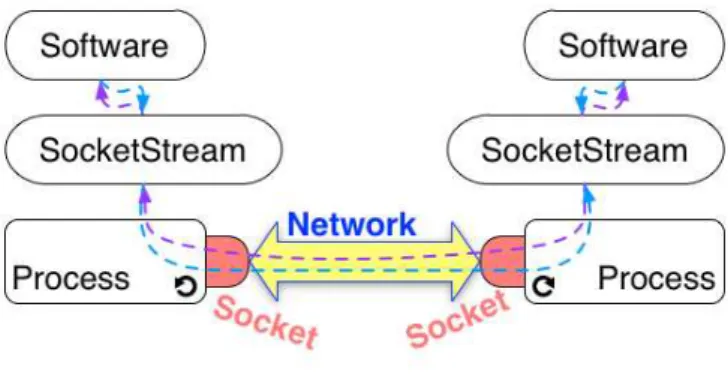
A remote communication involves at least two system processes exchang-ing some data bytes through a network. Each process accesses the network
through at least one socket (see Figure 4.1). A socket can then be defined as a plug on a communication network.
Figure 4.1: Inter-Process Remote Communication Through Sockets Sockets are used to establish a bidirectional communication: they allow both sending and receiving data. Such interaction can be done according to communication protocols which are encapsulated by sockets. On the Inter-net and other Inter-networks such as etherInter-net LANs1, two basic protocols widely
used are TCP/IP and UDP/IP.
TCP/IP vs. UDP/IP
TCP/IP stands for Transmission Control Protocol / Internet Protocol (TCP for short). TCP use guarantees a reliable communication (no data loss). It re-quires that applications involved in the communication get connected before actually communicating. Once a connection is established interacting parties can send and receive an arbitrary amount of bytes. This is often referred to as a stream communication. Data reach the destination in the same order of their sending.
UDP/IP stands for User Datagram Protocol / Internet Protocol (UDP for short). Datagrams are chunks of data which size cannot exceed 64KB. UDP is an unreliable protocol because of two reasons. First, UDP does not guaran-tee that datagrams will actually reach their destination. The second reason is that the reception order of multiple datagrams from a single sender to the receiver may arrive in an arbitrary order. Nevertheless, UDP is faster than TCP since no connection is required before sending data. A typical use of UDP is “heart-beating” as used in server-based social application, where clients need to notify the server their status (e.g., Requesting interactions, or Invisible).
In the remainder of this chapter we will focus on TCP Sockets. First, we show how to create a client socket, connect it to a server, exchange data and close the connection (Section 4.2). This lifecycle is illustrated using examples
TCP Client 33
showing the use of client sockets to interact with a web server. Next, Sec-tion 4.3 presents server sockets. We describe their life-cycle and how to use them to implement a server that can handle concurrent connections. Last, we introduce in Section 4.4 socket streams. We give an overview of their benefits by describing their use on both client and server side.
4.2
TCP Client
We call TCP client an application that initiates a TCP connection to exchange data with another application: the server. It is important to mention that the client and the server may be developed in different languages. The life-cycle of such a client in Pharo decomposes into 4 steps:
1. Create a TCP socket.
2. Connect the socket to a server.
3. Exchange data with the server through the socket. 4. Close the socket.
Create a TCP Socket
Pharo provides a single socket class. It has one creation method per socket type (TCP or UDP). To create a TCP socket, you need to evaluate the follow-ing expression:
Socket newTCP
Connect a TCP Socket to some Server
To connect a TCP Socket to a server, you need to have the object representing the IP address of that server. This address is an instance of SocketAddress
. A handy way to create it is to useNetNameResolver that provides IP style network name lookup and translation facilities.
Script 4.1 provides two examples of socket address creation. The first one creates an address from a string describing the server name ('www.esug.org'), while the second does the creation from a string representing the IP address of the server ('127.0.0.1'). Note that to use theNetNameResolveryou need to have your machine connected to a network with a DNS2, which should
prob-ably be the case. The only exception is for retrieving the local host address,
i.e. 127.0.0.1which is the generic address to refer to the machine that runs your software (Pharo here).
Script 4.1: Creating a Socket Address
| esugAddress localAddress |
esugAddress := NetNameResolver addressForName: 'www.esug.org'. localAddress := NetNameResolver addressForName: '127.0.0.1'.
Now we can connect our TCP socket to the server as shown in Script 4.2. MessageconnectTo:port:attempts to connect the socket to the server using the server address and port provided as parameters. The server address refers to the address of the network interface (e.g. ethernet, wifi) used by the server. The port refers to the communication endpoint on the network interface. Each network interface has for each IP transport protocol (e.g. TCP, UDP) a collection of ports that are numbered from 0 to 65535. For a given protocol, a port number on an interface can only be used by a single process.
Script 4.2: Connecting a TCP Socket to ESUG Server.
| clientSocket serverAddress | clientSocket := Socket newTCP.
serverAddress := NetNameResolver addressForName: 'www.esug.org'. clientSocket
connectTo: serverAddress port: 80; waitForConnectionFor: 10. clientSocket isConnected
−→ true
TheconnectTo:port:message returns immediately after issuing to the sys-tem (through a primitive call) the request to connect the socket. Message
waitForConnectionFor: 10suspends the current process until the socket is con-nected to the server. It waits at most10seconds as requested by the param-eter. If the socket is not connected after 10 seconds, theConnectionTimedOut
exception is signaled. Otherwise, the execution can proceed by evaluating the expressionclientSocket isConnectedwhich obviously answerstrue.
Exchange Data with Server
Once the connection is established, the client can exchange (send/receive) in-stances ofByteStringwith the server. Typically, the client sends some request to the server and then expects for a response. Web browsers act according to this schema. A web browser is a client that issues a request to some web server identified by the URL. Such request is often the path to some resource on the server such as a html file or a picture. Then, the browser awaits the server response (e.g., html code, picture bytes).
TCP Client 35
Script 4.3: Exchanging Data with some Server through a TCP Socket.
| clientSocket data |
... "create and connect the TCP clientSocket" clientSocket sendData: 'Hello server'. data := clientSocket receiveData. ... "Process data"
Script 4.3 shows the protocol to send and receive data through a client socket. Here, we send the string'Hello server!'to the server using thesendData:
message. Next, we send thereceiveDatamessage to our client socket to read the answer. Note that reading the answer is blocking, meaning receiveData
returns when a response has been read. Then, the contents of variabledatais processed.
Script 4.4: Bounding the Maximum Time for Data Reception.
|clientSocket data|
... "create and connect the TCP clientSocket" [data := clientSocket receiveDataTimeout: 5. ... "Process data"
] on: ConnectionTimedOut do: [ :timeOutException |
self
crLog: 'No data received!';
crLog: 'Network connection is too slow or server is down.']
Note that by using receiveData, the client waits until the server ei-ther sends no more data, or closes the connection. This means that the client may wait indefinitely. An alternative is to have the client signal a
ConnectionTimedOutexception if it had waited too much as shown in Script 4.4. We use messagereceiveDataTimeout:to ask the client socket to wait for 5 sec-onds. If data is received during this period of time, it is processed silently. But if no data is received during the 5 seconds, aConnectionTimedOutis sig-naled. In the example we log a description of what happened.
Close a Socket
A TCP socket remains alive while devices at both ends are connected. A socket is closed by sending the messagecloseto it. The socket remains con-nected until the other side closes it. This may last indefinitely when there is a network failure or when the other side is down. This is why sockets also accept the destroy message, which frees system resources required by the socket.
In practice we usecloseAndDestroy. It first attempts to close the socket by sending theclosemessage. Then, if the socket is still connected after a du-ration of 20 seconds, the socket is destroyed. Note that there exist a variant
closeAndDestroy: secondswhich takes as a parameter the duration to wait be-fore destroying the socket.
Script 4.5: Interaction with a Web Site and Cleanup.
| clientSocket serverAddress httpQuery htmlText | httpQuery := 'GET / HTTP/1.1', String crlf,
'Host: www.esug.org:80', String crlf, 'Accept: text/html', String crlfcrlf.
serverAddress := NetNameResolver addressForName: 'www.esug.org'. clientSocket := Socket newTCP.
[ clientSocket
connectTo: serverAddress port: 80; waitForConnectionFor: 10. clientSocket sendData: httpQuery.
htmlText := clientSocket receiveDataTimeout: 5. htmlText crLog ] ensure: [clientSocket closeAndDestroy].
To summarize all steps described so far, we use the example of getting a web page from a server in Script 4.5. First, we forge a HTTP3query. The
string corresponding to our query starts with the GETkeyword, followed by a slash saying that we are requesting the root file of the server. Follows the protocol versionHTTP/1.1. The second line includes the name of the web server and its port. The third and last line of the HTTP query refers to format accepted by our client. Since, we intend to display the result of our query on theTranscript, we state in the HTTP query (see line beginning withAccept:) that our client accepts texts with html format.
Next, we retrieve the IP address of thewww.esug.orgserver. Then, we cre-ate a TCP socket and connect it to the server. We use the IP address we get in the previous step and the default port for web servers: 80. The connec-tion should be established in less than 10 seconds (waitForConnectionFor: 10), otherwise we get aConnectionTimedOutexception.
After sending the http query (clientSocket sendData: httpQuery), we read form the socket the received html text that we display. Note that the we ask the socket to wait at most 5 seconds for the answer of the server (clientSocket receiveDataTimeout: 5). On timeout, the socket answers an empty socket.
Finally, we close the socket and free related resources (clientSocket closeAndDestroy). We ensure the clean up by means of theensure: message sent to the block that performs socket connection and data exchange with the web server.
TCP Server 37
4.3
TCP Server
Now, let us build a simple TCP server. A TCP Server is an application that awaits TCP connections from TCP clients. Once connection established, both the server and the client can send a receive data in any order. A big difference between the server and the client is that the server uses at least two sockets. One socket is used for handling client connections, while the second serves for exchanging data with a particular client.
TCP Socket Server Life-cycle
The life-cycle of a TCP server has 5 steps:
1. Create a first TCP socket labelled connectionSocket.
2. Wait for a connection by making connectionSocket listen on a port. 3. Accept a client request for connection. As a result, connectionSocket will
build a second socket labelled interactionSocket.
4. Exchange data with the client through interactionSocket. In the mean-while, connectionSocket can continue to wait for a new connection, and possibly create new sockets to exchange data with other clients. 5. Close interactionSocket.
6. Close connectionSocket when we decide to kill the server and stop ac-cepting client connections.
Figure 4.2: Socket Server Concurrently Servers Multiple Clients Concurrency of this life-cycle is made explicit on Figure 4.2. The server listens for incoming client connection requests through connectionSocket,
while exchanging data with possibly multiple clients through multiple in-teractionSockets (one per client). In the following, we first illustrate the socket serving machinery. Then, we describe a complete server class and explain the server life-cycle and related concurrency issues.
Serving Basic Example
We illustrate the serving basics through a simple example of an echo TCP server that accepts a single client request. It sends back to clients whatever data it received and quits. The code is provided by Script 4.6.
Script 4.6: Basic Echo Server.
| connectionSocket interactionSocket receivedData |
"Prepare socket for handling client connection requests"
connectionSocket := Socket newTCP.
connectionSocket listenOn: 9999 backlogSize: 10.
"Build a new socket for interaction with a client which connection request is accepted"
interactionSocket := connectionSocket waitForAcceptFor: 60.
"Get rid of the connection socket since it is useless for the rest of this example"
connectionSocket closeAndDestroy.
"Get and display data from the client"
receivedData := interactionSocket receiveData. receivedData crLog.
"Send echo back to client and finish interaction"
interactionSocket sendData: 'ECHO: ', receivedData. interactionSocket closeAndDestroy.
First, we create the socket that we will use for handling incoming con-nections. We configure it to listen on port 9999. ThebacklogSizeis set to 10, meaning that we ask the Operating System to allocate a buffer for 10 connec-tion requests. This backlog will not be actually used in our example. But, a more realistic server will have to handle multiple connections and then store pending connection requests into the backlog.
Once the connection socket (referenced by variableconnectionSocket) is set up, it starts listening for client connections. ThewaitForAcceptFor: 60message makes the socket wait connection requests for 60 seconds. If no client at-tempts to connect during these 60 seconds, the message answersnil. Other-wise, we get a new socketinteractionSocketconnected the client’s socket. At this point, we do not need the connection socket anymore, so we can close it (connectionSocket closeAndDestroymessage).