HAL Id: hal-01575519
https://hal.inria.fr/hal-01575519v2
Submitted on 11 Jun 2018
HAL is a multi-disciplinary open access
archive for the deposit and dissemination of
sci-entific research documents, whether they are
pub-lished or not. The documents may come from
teaching and research institutions in France or
abroad, or from public or private research centers.
L’archive ouverte pluridisciplinaire HAL, est
destinée au dépôt et à la diffusion de documents
scientifiques de niveau recherche, publiés ou non,
émanant des établissements d’enseignement et de
recherche français ou étrangers, des laboratoires
publics ou privés.
Does disabling Wi-Fi prevent my smartphone from
sending Wi-Fi frames?
Célestin Matte, Mathieu Cunche, Vincent Toubiana
To cite this version:
Célestin Matte, Mathieu Cunche, Vincent Toubiana. Does disabling Wi-Fi prevent my smartphone
from sending Wi-Fi frames?. [Research Report] RR-9089, Inria - Research Centre Grenoble –
Rhône-Alpes; INSA Lyon. 2017. �hal-01575519v2�
0249-6399 ISRN INRIA/RR--9089--FR+ENG
RESEARCH
REPORT
N° 9089
August 2017prevent my smartphone
from sending Wi-Fi
frames?
RESEARCH CENTRE GRENOBLE – RHÔNE-ALPES
Inovallée
Célestin Matte, Mathieu Cunche, Vincent Toubiana
∗Project-Teams Privatics
Research Report n° 9089 — version 3 — initial version August 2017 — revised version June 2018 — 16 pages
Abstract: No. For Android, we show that another option, called "Always allow scanning", when activated, makes a device send Wi-Fi frames which can be used to track this device, even if the Wi-Fi switch is off. This option is not clearly described in all Android versions, and sometimes very hard to find. Besides, the Google Maps application prompts the user to activate this option. Similarly, for iOS 11, the Wi-Fi switch in the control center does not prevent Wi-Fi frames from being emitted by some services.
Key-words: Wi-Fi, tracking, Android, iOS, iPhone, privacy
∗ The views and opinions expressed in this report do not necessarily reflect the views of the CNIL or any
Est-ce que la désactivation du Wi-Fi empêche mon
smartphone d’émettre des trames Wi-Fi?
Résumé : Non. Pour Android, nous montrons qu’une autre option, appelée "Always allow scanning", permet à l’appareil d’émettre des trames même si le Wi-Fi est désactivé, exposant ainsi l’utilisateur au traçage Wi-Fi. Cette option n’est pas clairement décrite dans l’ensemble des versions d’Android et est même parfois très difficile à désactiver. De plus, l’application Google Maps demande à l’utilisateur d’activer cette option. Pour iOS 11, l’option Wi-Fi du centre de contrôle n’empêche pas certaines applications d’émettre des trames Wi-Fi.
Contents
1 Introduction 4
2 Wi-Fi on Android 4
2.1 Android Wi-Fi scans . . . 4
2.2 Wi-Fi-related settings in Android . . . 4
3 Wi-Fi in iOS 11 5 4 Analysis of generated Wi-Fi activity 6 4.1 Experimental protocol . . . 7
4.2 Measurement results . . . 8
4.2.1 Galaxy S3 . . . 8
4.2.2 OnePlus One . . . 8
4.2.3 Nexus S . . . 10
4.2.4 HTC WildFire and Galaxy Spica . . . 10
4.2.5 Moto G5 Plus . . . 10
4.2.6 Moto G5S Plus . . . 12
4.2.7 iPhone 6 . . . 12
4.2.8 Summary of the measurements . . . 12
4.3 Probing frequency . . . 13 5 Prompting for location activation 13
6 Airplane mode 13
4 Matte & Cunche & Toubiana
1
Introduction
Wi-Fi signals emitted by mobile smartphones can be exploited to passively track users’ mobil-ity [8, 6]. Turning off the Wi-Fi interface of the device is often presented as a mean to evade those tracking systems1. As a matter of fact this method is sometime suggested by the actors of
the Wi-Fi tracking industry as a way to opt-out from those systems2.
The Android system features an option to enable or disable Wi-Fi on the device. However, disabling Wi-Fi through this option is not sufficient to prevent all Wi-Fi activity of the device [1]. Similarly, iOS possesses a control center allowing to quickly switch Wi-Fi on or off. In iOS 11, this switch does not prevent the phone from scanning anymore3. We performed several measurements
that confirm this behavior on a range of Android and iOS devices.
2
Wi-Fi on Android
2.1
Android Wi-Fi scans
The Android system supports Wi-Fi in order to provide network connectivity. As any other Wi-Fi-enabled system, Android relies on Wi-Fi service discovery mechanisms to detect Wi-Fi access points in range. Unlike what is commonly expected [4], as most mobile systems, Android rely on active service discovery, a mechanism in which the device actively searches for nearby access points. To do so, the device perform scans during which it sends wireless inquiries called probe requests containing its own – and often unique – MAC address. Access points reply to those requests through probe responses, revealing themselves to the device.
Nowadays, Wi-Fi service discovery is also used to get location information. Wi-Fi access points, identified by their unique BSSID (a MAC address), are used as landmarks. Aided by a Wi-Fi-based location engine, a location can be derived from a list of access points detected during a Wi-Fi scans. In Android, Wi-Fi scans are used to enable both network connectivity, and location [3].
However, Wi-Fi scans are not only used by the device to derive its location, analytics compa-nies now leverage the Wi-Fi probe requests to estimate the number of visitors in stores and malls and to record customer mobility. Indeed, by counting the number of unique MAC addresses broadcast in probe requests, retailers can derive the number of smartphone carriers in their store. Location tracking of these customers is performed by following these MAC addresses as they are heard by antennas located in different spots.
2.2
Wi-Fi-related settings in Android
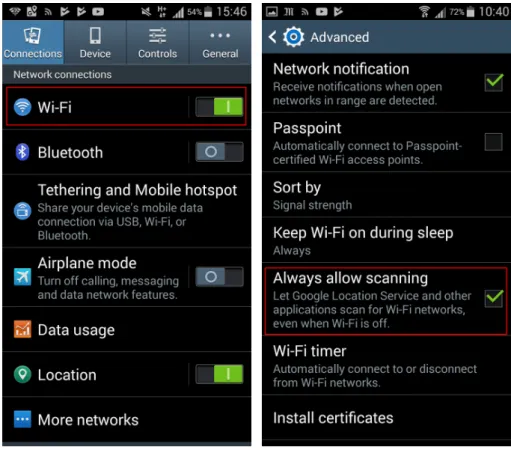
The Android system includes a number of configuration options that can impact the Wi-Fi activity of the device. The most obvious one is the Wi-Fi switch (see Figure 2a). When this switch is activated, the Wi-Fi interface can be fully used by the operating system and the application (provided that they have sufficient permissions). When the switch is off, network connection through Wi-Fi is unavailable and application cannot access the result of Wi-Fi scans. A second option called "Always allow scanning" (see Figure 2b), or "scanning always avail-able", allows the device to perform Wi-Fi scans even if the Wi-Fi switch is off. The description of this option is the following: "Let Google Location Service and other applications scan for
1http://lifehacker.com/how-retail-stores-track-you-using-your-smartphone-and-827512308,https://
nakedsecurity.sophos.com/2014/06/12/apples-ios-8-will-help-keep-out-wi-fi-marketers-and-snoops-but-not-totally/
2https://twitter.com/adhavet/status/891693199424729092
3https://support.apple.com/en-us/HT208086
Wi-Fi networks, even when Wi-Fi is off" (see Figure 2b). On the Android 4.4.4 of a Samsung Galaxy S3 and the Android 4.3 of a Nexus S, this option is located in System → Wi-Fi → Advancedwhereas on the Android 7.0 of a Lenovo Moto G 5, this option is located in Settings → Location → Scanning. On the Android 6.0.1 of a OnePlus One, this option is very hard to find4. In order to deactivate it, users have to go to Settings → Location, then click on
the small dots on the upper right of the screen (see Figure 1), then click on Scanning → Wi-Fi scanning. Tests described later in the paper indicate that the option is activated.
(a) Wi-Fi switch option (b) Wi-Fi switch option (c) Wi-Fi switch option
Figure 1: Locating the "Always allow scanning" option on the OnePlus One. User has to click on the three dots (circled on Figure (a)), then on the Scanning option appearing in the related menu to access a rather hidden option page.
3
Wi-Fi in iOS 11
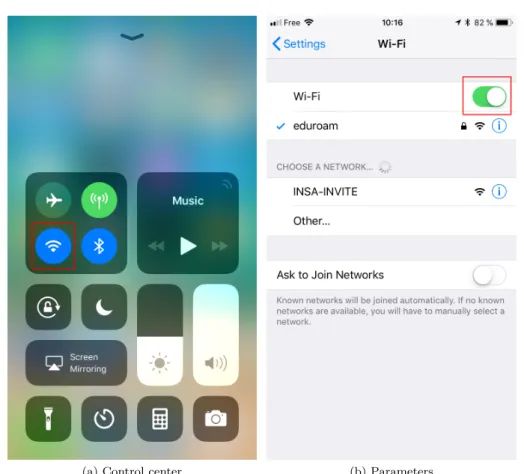
On iOS 11, the Wi-Fi switch in the Control Center does not deactivate Wi-Fi anymore. Similarly to the Android case, Wi-Fi remains active for some applications, including location services. This behaviour is officially documented5. In order to actually disable Wi-Fi, users have to turn it off
in the parameters (see figure 3).
4In a previous version of this report, we stated that this option could not be found. The fact that we did not
find it even though we were actively looking for it suggests how hard to find this option can be.
6 Matte & Cunche & Toubiana
(a) Wi-Fi switch option (b) "Always allow scanning" option
Figure 2: Wi-Fi related options in Android 4.4.4.
4
Analysis of generated Wi-Fi activity
A total of 8devices covering a Android versions ranging from 2.2.1 to 6.0.1 . The devices consid-ered in this study are the following:
• Galaxy S3: Samsung Galaxy S3 (GT-I9...), Android 4.4.4
• Galaxy Tab E: Samsung Galaxy Tab E (SM-T560), Android 4.4.4 • HTC wildfire, Android 2.3.7, CyanogenMod 7.2.0
• Samsung Galaxy Spica, Android 2.2.1, CyanogenMod 6.1.1 • Nexus S, Android 4.3, CyanogenMod 10.2.1.1
• OnePlus One, Android 6.0.1, CyanogenMod 13.1.2 (OxyGenOS, custom ROM produced by OnePlus) item Lenovo Moto G5 Plus, Android
• Motorola G5S Plus, Android 7.1.1 We also tested an iOS device:
• iPhone 6 model MG472ZD/A, iOS version 11.0.3.
(a) Control center (b) Parameters
Figure 3: Wi-Fi deactivation methods in iOS 11.0.3.
4.1
Experimental protocol
We monitored the Wi-Fi traffic generated by each smartphone in different configurations and under different types of activities. Devices were never associated to an access point. Monitoring was performed using a Wi-Fi interface set in monitoring mode and capturing the traffic on a fixed channel. The source MAC address of the collected Wi-Fi frame was used to detect traffic generated by a device. Indeed, all Wi-Fi frames emitted by those devices include their MAC address in the frame header6.
Several configuration options have been considered:
• Wi-Fi switch: the option controlling the activation of Wi-Fi.
• Always allow scanning: the option allowing Wi-Fi scans when the Wi-Fi is off.
• Location: the option controlling the location feature. In some devices, the option is di-vided into 2 options: GPS geolocation and cellular/Wi-Fi geolocation. We only considered the latter.
Several activities, reflecting a typical usage were considered:
8 Matte & Cunche & Toubiana
• Screen on: the screen is on and the device is kept in this state by switching between panels for a few minutes.
• Idle: the device is left untouched for at least 5 minutes after the screen has automatically turned off.
• Leaving idle: the device is put out of idle mode by touching the power key. • Google Maps: the Google Maps application is running on the device. • Starting Google Maps: the Google Maps application is started by the user.
• Uncorrelated: when the event happens without any obvious correlation with the user activity.
For each device and for each combination of the previous options, the Wi-Fi traffic was captured while the device was put through the different type of activity.
All devices except the OnePlus One and the Galaxy S3 had no other source of Internet connection.
4.2
Measurement results
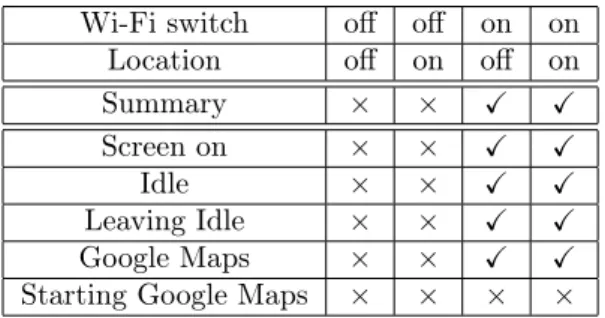
Results of the measurements are presented in Tables 1, 3, 4, 5 and 6. During those measurements, only frames of probe request type were generated by the device.
4.2.1 Galaxy S3
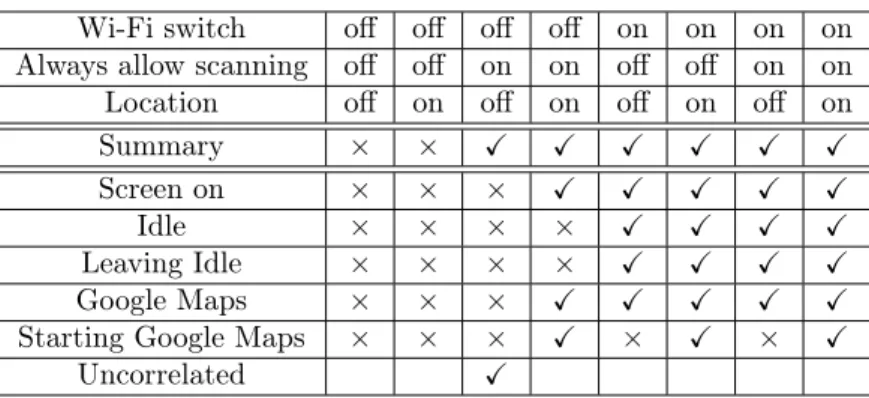
The measurements show that the Wi-Fi activity depends on all three parameters: "Wi-Fi switch", "Always allow scanning" and "Location". Obviously, when Wi-Fi is activated, the device sends Wi-Fi frames at any time and in particular when leaving the idle mode.
Starting Google Maps also triggers the emission of probe requests, but only if Location is activated. Probing is observed both when Google Maps is running or not.
An important observation is that disabling Wi-Fi does not necessarily prevent Wi-Fi activity. For instance, if "Always allow scanning" and Location are both activated, Wi-Fi traffic will be generated when Google Maps is used. This is likely due to the use of Google Wi-Fi-based location engine.
Total lack of Wi-Fi activity was observed in only two configurations when both Wi-Fi and "Always allow scanning" were disabled, regardless of the Location option.
When both Location and Wi-Fi are disabled but not Always allow scanning, we observed Wi-Fi scan events for which we were unable to associate any specific activity on the device. In other words, those scan events seems to happen regardless of the activity on the phone. It is not clear what the purpose of those scans is.
4.2.2 OnePlus One
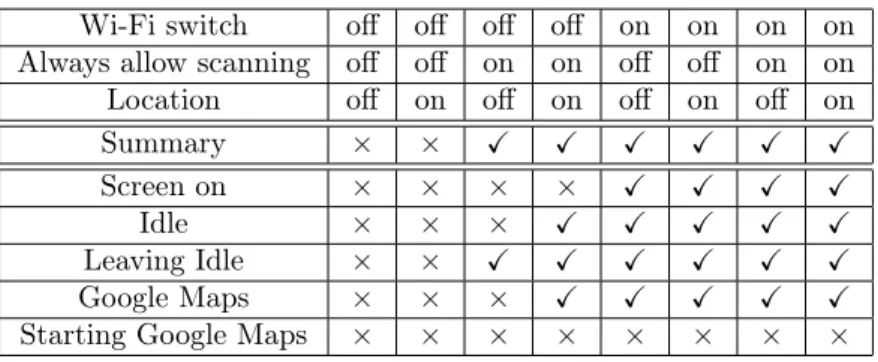
Results for the OnePlus One, presented in Table 3 are similar to the ones of the previous device. One difference subsists: when both the Wi-Fi switch and the location option are off, the device still sends a burst of probe requests each time it leaves idle mode. Reasons for this behavior aren’t clear.
Wi-Fi switch off off off off on on on on Always allow scanning off off on on off off on on Location off on off on off on off on Summary × × X X X X X X Screen on × × × X X X X X Idle × × × × X X X X Leaving Idle × × × × X X X X Google Maps × × × X X X X X Starting Google Maps × × × X × X × X
Uncorrelated X
Table 1: Wi-Fi activity generated in various settings for the Galaxy S3 (with SIM Card).
Wi-Fi switch off off off off on on on on Always allow scanning off off on on off off on on Location off on off on off on off on Summary × × × X X X X X Screen on × × × × X X X X Idle × × × × × X × X Leaving Idle × × × × X X X X Google Maps × × × × X X × X Starting Google Maps × × × × × X × X
Uncorrelated X X
10 Matte & Cunche & Toubiana
Wi-Fi switch off off off off on on on on Always allow scanning off off on on off off on on Location off on off on off on off on Summary × × X X X X X X Screen on × × × × X X X X Idle × × × X X X X X Leaving Idle × × X X X X X X Google Maps × × × X X X X X Starting Google Maps × × × × × × × ×
Table 3: Wi-Fi activity generated in various settings for the OnePlus One. *Device immediately prompts for the user to activate location. Clicking "OK" does so.
Wi-Fi switch off off off off on on on on Always allow scanning off off on on off off on on Location off on off on off on off on Summary ×** × ×** X X X X X Screen on × × × × X X X X Idle × × × × X X X X Leaving Idle × × × X X X X X Google Maps × × × X X X X X Starting Google Maps ×* × ×* × × × × ×
Table 4: Wi-Fi activity generated in various settings for the Nexus S. *Device immediately prompts for the user to activate location. Clicking "OK" does so. **The device, however, sends a burst of probe requests upon activating or deactivating the "always allow scanning" option.
4.2.3 Nexus S
Results for the Nexus S, presented in Table 4, only reveal minor differences with the Galaxy S3. One notable behavior is that, even with Wi-Fi switch and location option turned off, the device sends a burst of probe requests every time the "always allow scanning" option is toggled.
4.2.4 HTC WildFire and Galaxy Spica
Results for the HTC WildFire, presented in Table 5, are not surprising. In this early version of Android where the "always allow scanning" option did not exist, probe requests are sent if and only if the Wi-Fi switch is on. Results for the Samsung Galaxy Spica are not included because very similar, with the only difference that the device was not seen sending probe requests in idle mode or when leaving it.
4.2.5 Moto G5 Plus
Results for the Lenovo Moto G5 Plus are presented in Table 6. It uses a slightly customized version of Android 7.0 and randomization behavior is surprising: the device seems to randomize the MAC address only when probing in idle mode. The "Always allow scanning" is accessible through the Wi-Fi settings but only when Wi-Fi is off and permanently through the "Location settings".
Wi-Fi switch off off on on Location off on off on Summary × × X X Screen on × × X X Idle × × X X Leaving Idle × × X X Google Maps × × X X Starting Google Maps × × × ×
Table 5: Wi-Fi activity generated in various settings for the HTC WildFire. The "Always allow scanning" option does not exist in the early version of Android running on this device.
Wi-Fi switch off off off off on on on on Always allow scanning off off on on off off on on Location off on off on off on off on Summary × × × X X X X X Screen on × × × × X X X X Idle × × × × X* X* X* X* Leaving Idle × × × X X X X X Google Maps × × × X X X X X Starting Google Maps × × × × × × × ×
Table 6: Wi-Fi activity generated in various settings for the Moto G5 Plus. * When the device is idle, it keeps probing but with randomized MAC addresses, otherwise the real MAC address is used
12 Matte & Cunche & Toubiana
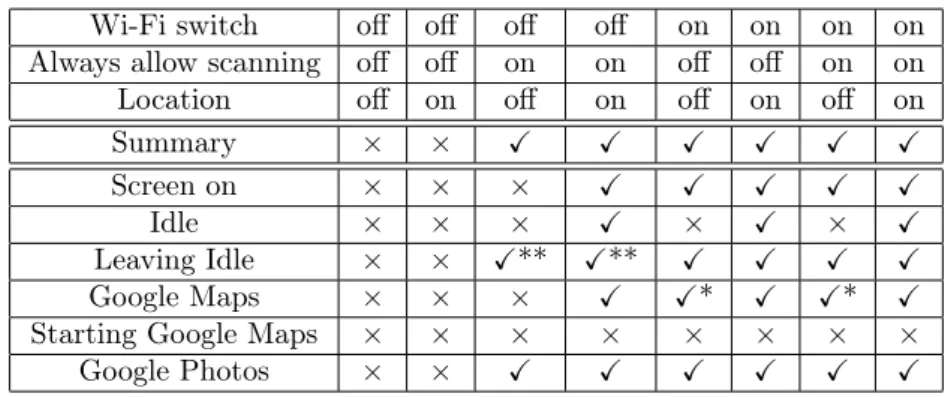
Wi-Fi switch off off off off on on on on Always allow scanning off off on on off off on on Location off on off on off on off on Summary × × X X X X X X Screen on × × × X X X X X Idle × × × X × X × X Leaving Idle × × X** X** X X X X Google Maps × × × X X* X X* X Starting Google Maps × × × × × × × × Google Photos × × X X X X X X
Table 7: Wi-Fi activity generated in various settings for the Moto G5S Plus. *In this case, the scanning rate is lower than when location is activated. Scans may not be initiated by the Google Maps application. **Unconsistently
Wi-Fi switch (parameters) off off off off on on on on Wi-Fi switch (control center) off off on on off off on on Location off on off on off on off on Summary × × × × X X X X Screen on × × × × X X X X Idle × × × × X X X X Leaving Idle × × × × X X X X Plans × × × × X X X X Starting Plans × × × × × × X X Table 8: Wi-Fi activity generated in various settings for the iPhone 6.
4.2.6 Moto G5S Plus
Results for the Motorola Moto G5S Plus are presented in Table 7. It uses a slightly customized version of Android 7.1.1. We note that, with this model, launching Google Photos systematically causes a burst of probe requests, in more cases than the "Starting Google Maps" one.
4.2.7 iPhone 6
Results for the iPhone 6 are presented in table 8. It appears that, as officially documented by Apple, the Wi-Fi switch in the control center does not prevent the device from sending probe requests, provided Wi-Fi is activated in the parameters. It is also true when location is turned off. If Wi-Fi is switched off in the parameters, no probe request is detected.
4.2.8 Summary of the measurements
All devices send Wi-Fi frames when Wi-Fi is activated, which is expected. When the Wi-Fi is deactivated, we observed two different behaviors depending on the version of Android. On older versions (2.2.1 and 2.3.7), no frames were observed when the Wi-Fi is turned off. On most recent versions (4.3 and above), Wi-Fi activity depends on whether the "Always allow scanning" option is activated. Wi-Fi frames are emitted if the "Always allow scanning" is activated no matter what is the status of the Wi-Fi switch. To fully prevent emission of Wi-Fi frames it is necessary
to disable both the Wi-Fi and the "Always allow scanning" options. We note that on OnePlus One, the "Always allow scanning" is very hard to find even when actively searching for it. On iOS, probe requests the state of the Wi-Fi switch in the control center does not affect the ability of the device to emit probe request frames in most cases.
4.3
Probing frequency
Probing frequency varies across devices, configurations and situation. While this work does not aim to review these behavioral differences, it can still be noted that devices in some situation can be lead to send signals at a high frequency. In such case, the possibility of tracking these devices is raised to a fined-grained level. For instance, the OnePlus One sends probe requests every 5 seconds when the Google Maps application is open if either the Wi-Fi switch or the location option is on.
5
Prompting for location activation
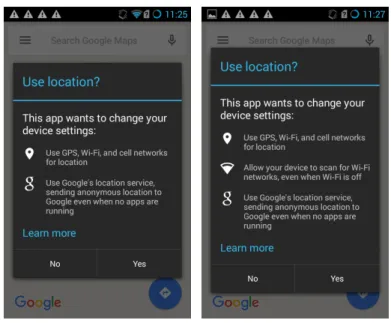
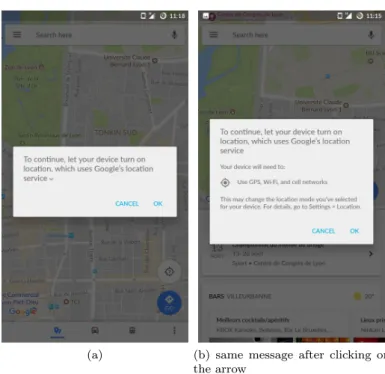
On some versions of Android, devices in which location is not activated will immediately prompt the user to activate it upon launching Google Maps. On the HTC Wildfire, the user is redirected towards the related parameters section. On the OnePlus One, simply replying "OK" to the prompted message immediately activates the option. If the user ignores the message, it is not prompted again in later Google Maps startups. It is, however, prompted again if the user clicks on the location button (top button in the bottom right corner in Figure 4). On the Nexus S, we notice two possible outcomes (see Figure 4):
• If the Wi-Fi switch is deactivated and both location and the "always allow scanning" option are deactivated as well, the device will prompt the user to activate both and do so if the user replies "Yes".
• If the Wi-Fi switch is activated and both location and the "always allow scanning" option are deactivated, the device will only prompt the user to activate location, and remain the "always allow scanning" option untouched.
6
Airplane mode
In airplane mode, devices are supposed not to emit any radio-frequency transmissions. We tested both an Android and an iOS devices (Motorola G5S Plus and iPhone 6) on airplane mode using the most permissive configurations (all switches on). As a result, we did not detect any transmission, suggesting that this mode works properly on both operating systems. However, on Android, while the airplane mode switch automatically turns the Wi-Fi switch off when activated, the latter can manually be turned back on while the airplane mode is active. As a consequence, Wi-Fi frames can be emitted while the phone is in airplane mode, provided the user allows it.
7
Conclusions
On both Android and iOS, disabling Wi-Fi is not necessarily sufficient to prevent the device from sending Wi-Fi frames as some devices still generate Wi-Fi frames after Wi-Fi has been disabled. Therefore, disabling Wi-Fi is not enough to escape data collection by Wi-Fi tracking systems. To prevent an Android device from sending Wi-Fi frame, it is necessary to disable two
14 Matte & Cunche & Toubiana
(a) "Always allow scanning" acti-vated
(b) "Always allow scanning" deacti-vated
Figure 4: Google Maps prompting for Wi-Fi activation on the Nexus S
features on the device: both Wi-Fi and the "Always allow scanning" option must be disabled in order to have a silent device. On some devices this option is very hard to find, meaning that the user has to actually know how to deactivate this behaviour to prevent their phone from sending Wi-Fi frames. On iOS, Wi-Fi must be turned off in the parameters.
Although most recent versions of Android and iOS include MAC address randomization [2, 9], there are still a number of devices that are not supporting this feature. The MAC address randomization feature has been introduced in version 6.0 of Android, and as of April 2018 38.6% of Android devices are still using an older version [5]. Furthermore, on Android, MAC randomization is activated provided that the hardware supports it, which was rarely the case as of 2017 [7]. On iOS, the situation is better, as 95.7% of devices run a version of iOS greater or equal to 9 [10]. It is unknown how many of them actually use MAC address randomization, as hardware support is also required.
Recent news have brought hints of behaviours similar to the one observed in this document for other interfaces on Android: Bluetooth7 and NFC8.
References
[1] Stop android 4.3 from always scanning for wi-fi networks. Retrieved from https://www. cnet.com/how-to/stop-android-4-3-from-always-scanning-for-wi-fi-networks/, 2013. accessed 14-08-2017.
7https://qz.com/1169760/phone-data/
8https://www.xda-developers.com/future-android-smartphones-nfc-to-work-disabled/
(a) (b) same message after clicking on the arrow
Figure 5: Google Maps prompting for Wi-Fi activation on the OnePlus One
[2] Android 6.0 changes. Retrieved from https://developer.android.com/about/versions/ marshmallow/android-6.0-changes.html, 2015.
[3] Android location strategies. Retrieved from https://developer.android.com/guide/ topics/location/strategies.html, 2015. accessed 11-08-2017.
[4] Android scan forum. Retrieved from https://android.stackexchange.com/questions/ 131414/do-android-devices-make-active-or-passive-scan-when-looking-for-wifi-ap, 2015. accessed 14-08-2017.
[5] Android dashboards: Platform versions. Retrieved from https://developer.android. com/about/dashboards/index.html#Platform, 2018. accessed 01-05-2018.
[6] The Washington Post Brian Fung. How stores use your phone’s WiFi to track your shopping habits, October 2013.
[7] Jeremy Martin, Travis Mayberry, Collin Donahue, Lucas Foppe, Lamont Brown, Chad wick Riggins, Erik C Rye, and Dane Brown. A study of mac address randomization in mobile devices and when it fails. arXiv preprint arXiv:1703.02874, 2017.
[8] A. B. M. Musa and Jakob Eriksson. Tracking Unmodified Smartphones Using Wi-fi Mon-itors. In Proceedings of the 10th ACM Conference on Embedded Network Sensor Systems, SenSys ’12, pages 281–294, New York, NY, USA, 2012. ACM.
[9] Katie Skinner and Jason Novak. Privacy and your app. In Apple Worldwide Dev. Conf. (WWDC), June 2015.
16 Matte & Cunche & Toubiana
[10] David Smith.
Inovallée