HAL Id: hal-02909787
https://hal.archives-ouvertes.fr/hal-02909787
Submitted on 31 Jul 2020
HAL is a multi-disciplinary open access
archive for the deposit and dissemination of
sci-entific research documents, whether they are
pub-lished or not. The documents may come from
teaching and research institutions in France or
abroad, or from public or private research centers.
L’archive ouverte pluridisciplinaire HAL, est
destinée au dépôt et à la diffusion de documents
scientifiques de niveau recherche, publiés ou non,
émanant des établissements d’enseignement et de
recherche français ou étrangers, des laboratoires
publics ou privés.
Codeless web testing using Selenium and machine
learning
Duyen Phuc Nguyen, Stephane Maag
To cite this version:
Duyen Phuc Nguyen, Stephane Maag. Codeless web testing using Selenium and machine learning.
ICSOFT 2020: 15th International Conference on Software Technologies, Jul 2020, Online, France.
pp.51-60, �10.5220/0009885400510060�. �hal-02909787�
Codeless Web Testing using Selenium and Machine Learning
Duyen Phuc Nguyen
aand Stephane Maag
bSamovar, CNRS, T´el´ecom SudParis, Institut Polytechnique de Paris, France [email protected], [email protected]
Keywords: Codeless Testing, Web Testing, Automation Testing, Selenium, Machine Learning, SVM.
Abstract: Complexity of web systems lead to development processes always more tough to test. Testing phases are crucial in software and system engineering and are known to be very costly. While automated testing methods appear to take over the role of the human testers, the issues of reliability and the capability of the testing method still need to be solved. In our paper, we focus on the automation of functional tests of websites. A single web page may contain a huge set of important functionalities leading to the execution of critical web service operations. Besides, testing all of these functionalities implemented in a web page service is highly complex. Two current popular research areas for automation web-based testing are Codeless Functional Test Automation and Machine Learning/Artificial Intelligence (ML/AI) in test automation. We therefore define and implement a framework to figure out how to automate the web service product under test, the machine can detect or predict the change and adapt those changes to suitable generic test cases. In our work, we examine on Selenium and the benefits of using machine learning in automated web application testing.
1
INTRODUCTION
Software systems and their complexity distributed through diverse components, sometimes virtualized using different platforms (e.g., Xaas) (Patel et al., 2016), lead to development processes always more complicated to test. However, testing phases are cru-cial in software and system engineering (Kassab et al., 2017). They are known as very costly necessitating resources (including time and people) spent to pre-pare testing architectures, test case scenarios and their execution. That cost is estimated to be between 40% and 80% of the total cost of the service/system devel-opment (Heusser and Kulkarni, 2018). While auto-mated testing methods appear to take over the role of the human testers, the issues of reliability and the ca-pability of the testing method still need to be solved. In our paper, we focus on the functional tests of web-sites. A single web page may contain a huge set of important functionalities leading to the execution of critical web service operations. Besides, testing all of these functionalities implemented in a web page ser-vice is highly complex. For that purpose, several au-tomation tools are available to help the testers and to facilitate the execution of testing processes (Hynninen et al., 2018; Raulamo-Jurvanen et al., 2019). Among
a https://orcid.org/0000-0003-3740-3586 b https://orcid.org/0000-0002-0305-4712
them, we may cite the well known and adopted tools in the industry: Selenium and OpenScript. Recently, it has been shown that Selenium (Selenium, 2020) is very efficient for testing applications which are browser based (Jain and Rajnish, 2018). It runs spe-cific tests on diverse installed browsers and return re-sults, alerting you to failures in browsers as they crop up.
However, automated web-based testing tools like Selenium still have major drawbacks. Indeed, tests have to be repetitive and require resources and a lot of maintenance. A very small change or modification in the content of a web page may cause a test fail. Furthermore, many tests scripts are manually handled which increases the costs and time for testing (Shariff et al., 2019; Ameur-Boulifa et al., 2019). Researchers and industrials are studying and defining optimized approaches to deal with this challenge. Two cur-rent popular research areas for automation web-based testing are Codeless Functional Test Automation and Machine Learning/Artificial Intelligence (ML/AI) in test automation. In here, algorithms are defined and implemented to figure out how to automate the soft-ware/web service product under test, the machine can detect or predict the change and adapt those changes to the suitable test cases. Thanks to codeless testing, testers can drastically reduce the cost of test automa-tion creaautoma-tion, test execuautoma-tion, and maintenance. In our
work, we examine on Selenium and the benefits of using machine learning in automated web applica-tion testing. The motivaapplica-tion is to utilize the selenium framework in the world of automated testing and uti-lize a machine learning approach for codeless testing, enabling to test multiple functional web pages with-out using code.
The main contributions of our paper are:
• Defining a framework named “codeless testing” by combining Selenium and machine learning technique,
• Implementing and applying our framework to run generic test cases in order to test the functionality searchthat is present in multiple web pages, • Through our experiment results, we show that the
success of generic test cases may help to con-tribute in decreasing implementation and main-tenance costs of automated tests of functional browser based applications.
Finally, our paper is organized as it follows. In Sec-tion 2, we present the state of the art about automated codeless testing techniques and tools. Then in Sec-tion 3, we depict the basis used in our paper. Our ML based web testing framework is defined in the Sec-tion 4 and evaluated in the SecSec-tion 5 in which relevant experimental results are presented. We conclude and give perspectives in Section 6.
2
RELATED WORKS
In the literature, there are several papers introduc-ing approaches for automation web-based applica-tions testing by applying machine learning tech-niques (RJ Bhojan, 2019) (Rosenfeld et al., 2018) (Nguyen et al., 2018) (Joshi, 2016). Although we got inspired of these works, none of them has pro-posed novel codeless web service testing. With the same observation, codeless testing approaches have been recently proposed. We may cite (Isha and Re-vathi, 2019) in which the authors proposed an auto-mated API testing tool in providing a GUI with sup-port for codeless testing. However, they do not in-tend to use any learning techniques that could im-prove their work and the problematic we are tackling in our paper. We may note the same lack in (Brueck-mann et al., 2017). Though the technique proposed is not entirely codeless, the authors proposed a frame-work to implement a simple business process by in-tegrating existing services in a mashup with codeless engineering processes. However, they still do not in-tegrate any learning techniques.
Moreover, in the market area, many start-up com-panies with several tools have entered the market re-cently, all with the promise of solving the coding skill conundrum. While no-code or low-code concepts become a trend (following the recent Google patent (Arkadyev, 2017)), companies such as Salesforce pro-mote plug-and-play offers. Some testing tools such as Testcraft1, Ranorex2, Tricentis3, Leapwork4, etc. advertise that they can provide this functionality by building a user-friendly UI on top of the code layer and also enabling switching between two modes. The companies promote that testers can still write scripts and receive detailed feedback but skip the coding part. However, when it comes to test automation, an issue is often raised on how codeless is being interpreted. Moreover, none of these codeless testing tools pro-posed by those companies are open-source.
In our approach, we cope with these above men-tioned issues by defining a machine learning based approach for codeless web automation testing.
3
BASICS
3.1
Selenium
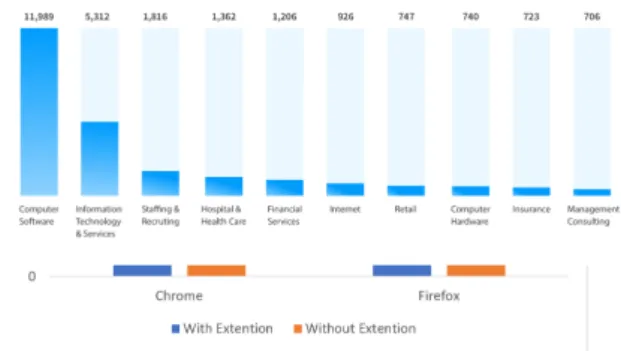
Selenium (Selenium, 2020) is a suite of automation testing techniques and tools which allows the testers to run the tests directly on the target browser, drive the interactions on the required web pages and rerun them without any manual inputs. Selenium has be-come very popular among testers because of the var-ious advantages it offers. With its advent in 2004, Selenium made the life of automation testers easier, highly improved the testing time, costs, detected fail-ures and is now a favorite tool for many automation testers. Selenium was invented with the introduc-tion of a basic tool named as JavaScriptTestRunner, by Jason Huggins at ThoughtWorks to test their in-ternal Time and Expenses application. Now it has gained popularity among software testers and devel-opers as an open-source portable automation testing framework. Nowadays, Selenium is currently used in production in many large companies as Netflix, Google, HubSpot, Fitbit, and more. According to (Enlyft, 2020), there are 42,159 companies that use Selenium, taking 26.83% market share in software testing tool (see Figure 1).
The primary reason behind such overwhelming
1https://www.testcraft.io/ 2https://www.ranorex.com/ 3https://www.tricentis.com/ 4https://www.leapwork.com/
Figure 1: Selenium used by company size.
popularity of Selenium is that it is open source. This not only helps keep the costs in check but also en-sures that companies are using a tool that will get continually updated. Other reasons include the multi-dimensional flexibility that it offers in terms of script-ing languages, operatscript-ing systems, browsers, and in-tegration with other tools. This widens the scale of reach and test coverage, enabling enterprises to de-liver a web application that is highly reliable and functional. Selenium test scripts can be written in Java, Python, C#, PHP, Ruby, Perl and .Net. This al-lows a large number of testers to easily use it without any language barriers. It can be carried out on Win-dows, MacOS, and Linux, using any browsers out of Mozilla Firefox, Internet Explorer, Chrome, Safari, and Opera. This enables a thorough cross browser compatibility testing with strong environment sup-port.
Selenium suite includes three major components (Figure 2), each tool has its own approach for au-tomation testing. The testers or developers can choose tools out of it depending upon the testing require-ments.
• Selenium IDE.
Selenium IDE, earlier known as Selenium recorder, is a tool used to record, edit, debug and replay functional tests. Selenium IDE is imple-mented as an extension to the Chrome browser and add-on in Firefox browser. With Selenium IDE plugin, the testers can do simple record-and-playback of interactions with the browser, they can also export tests in any of the supported programming languages like Ruby, Java, PHP, Javascript, etc.
• Selenium Grid.
Selenium Grid allows the testers to run paral-lel automated tests on multiple machines and browsers at the same time. The main function of this tool is to save time. If the test suite is large, the testers can use Selenium Grid to reduce the time running. Considering how scripts nor-mally run slow on a browser, using
performance-improving techniques such as parallel testing can help with the problem. Testers can also use it to test one application in different browsers in par-allel, when one machine is running Firefox, the other Chrome, and so on. Testers can also cre-ate different configurations with Grid, combining different versions of browsers and operating sys-tems. Needless to say that when used in large pro-duction environments, Grid is a huge time-saver. • Selenium Webdriver.
Selenium Webdriver (which is also known as Se-lenium 2.0 or 3.0 currently version) is an en-hanced version of Selenium RC and the most used tool. Selenium Webdriver is by far the most im-portant component of Selenium Suite. It pro-vides a programming interface to create and ex-ecute automation scripts. It accepts commands via client API and sends them to browsers. Se-lenium WebDriver allows testers to choose a pro-gramming language of their choice to create test scripts. Test scripts are written in order to iden-tify web elements on web pages and then desired actions are performed on those elements. Sele-nium Webdriver currently supports most popular browsers (Chrome, Firefox, Opera, etc.). Every browser has different drivers to run tests. In our ”codeless testing framework”, we use Selenium Webdriver to conduct the automated tests on mul-tiple popular web browsers.
Figure 2: Selenium suite components.
3.2
Codeless Testing
Despite the advantages above listed, Selenium still has limitations. The most challenge of using Sele-nium in automation testing is steep learning curve. Testers require high technical skills to accurately design and maintain test automation. Maintenance including modifications and updating Selenium test code in an efficient way is a very common problem in automated test. The impact of the changes occur in the web page or application under test could suf-fer during its development. Changes or modifications from web User Interface (UI) or from its structure to its elements or its attributes could make the whole
test suites collapse. For that purpose, one of auto-mated testing trends, namely Codeless Testing, was introduced to try resolving those issues.
Codeless Testing for web services refers to the methodology which utilizes a generic test case to test multiple websites. This approach allows any tester without deep programming knowledge to per-form tests. Organizations started adapting tools and approaches to simplify test automation and empower team members who lacked sophisticated program-ming skills. Codeless tools were originally meant to help the tester avoid the hours of programming that are usually necessary to get the most out of testing logic. While their objective was to address program-ming complexity, most tools in the market adapted a no-code approach by avoiding the code, but not really addressing the logical complexity in testing. A com-mon misconception is that codeless test automation tools should completely avoid code. We believe this is actually a disservice, as very soon users will start hitting roadblocks. Testing requirements are typically as vast as application development. It is hard to be-lieve that all testing requirements could be addressed with some canned, pre-packaged solution. Some level of logic development flexibility is required, but in a way so that the user does not get bogged down by the syntactical complexities. Note that, though the name codeless testing, it does not mean it is com-pletely code free. While a tester can generate most of the tests code free, certain tests may still need some coding. Testers can use codeless testing for keeping up with the deployment needs.
3.3
Support Vector Machines
A support vector machine (SVM) (Vapnik and Vap-nik, 1998) is a linear classifier defined by a separat-ing hyperplane that determines the decision surface for the classification. Given a training set (supervised learning), the SVM algorithm finds a hyperplane to classify new data. Consider a binary classification problem, with a training dataset composed of pairs (x1, y1), . . . , (xl, yl), where each vector xi∈ Rnand
yi∈ {−1,+1}. The SVM classifier model is a
hyper-plane that separates the training data in two sets corre-sponding to the desired classes. Equation (1) defines a separating hyperplane
f(x)= wTx+ b = 0 (1) where w ∈ Rnand b ∈ R are parameters that control the function. Function f gives the signed distance between a point x and the separating hyperplane. A point x is assigned to the positive class if f (x) ≥ 0, and otherwise to the negative class. The SVM al-gorithm computes a hyperplane that maximizes the
distance between the data points on either side, this distance is called margin. SVMs can be modeled as the solution of the optimization problem given by (2), this problem maximizes the margin between training points. min w,b 1 2k w k 2
subject to: yi(wTxi+ b) ≥ 1,i = 1,...,l
(2) All training examples label −1 are on one side of the hyperplane and all training examples label 1 are on the other side. Not all the samples of the training data are used to the determine the hyperplane, only a sub-set of the training samples contribute to the definition of the classifier. The data points used in the algorithm to maximize the margin are called support vectors.
4
A ML-BASED WEB TESTING
FRAMEWORK
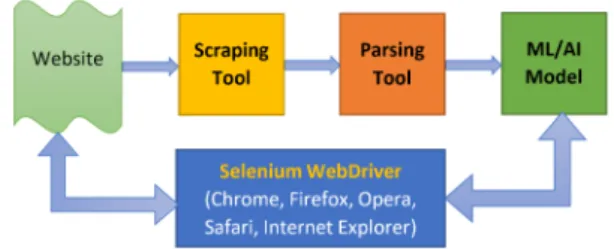
The architecture overview of our codeless testing framework is illustrated in Figure 3.
Figure 3: Our architecture of codeless testing framework.
As mentioned in the previous sections, our frame-work is combined of Selenium and a machine learning algorithm. It is composed by four main components.
• Selenium Webdriver Component.
This is the major module, it plays a role as an en-gine to drive the browser for automating website and for testing. As referring in Figure 2, Sele-nium Webdriver (web, 2020) is the core module of our testing framework. Selenium WebDriver plays as a browser automation framework that ac-cepts commands and sends them to a browser. It is implemented through a browser-specific driver. It controls the browser by directly communicating with it. The flexibility that Selenium Webdriver provides is almost unmatched in the test automa-tion world.
• Scraping Data Component.
We implemented our scraping tool in Python. Besides, we utilize BeautifulSoup (Richardson, 2020) as a web scraping library to pull data out of DOM in HTML or XML format.
• Processing Data Component.
This component has a role to process the data af-ter pulling from HTML DOM file, its main goal is to clean up and extract the useful data, then trans-form the cleaned data to the next stage for train-ing.
• SVM Model.
A machine learning model to recognise and/or predict the search element pattern which appears in HTML data of testing website.
4.1
Scraping and Processing Web Data
Figure 4: The structure of our scraping tool.
The general architecture of our scraping tool is showed in Figure 4. Its main target is exactly as its name - to collect HTML data and their position in the DOM tree from the website which is driven by Se-lenium Webdriver. We use both SeSe-lenium Webdriver and Request library to send a HTTP request to the URL of the webpage we want to access. We discover that some websites with heavy render JavaScript will not response to the request module. Also, some web-sites can detect the request is performed in an auto-mated way (not by human browsing but expected to be a bot) by their tool, it will deny to establish the con-nection. Selenium Webdriver works fine with almost all major websites, however the speed is recorded as very slow since Selenium needs to open the real browsers to perform tasks. Moreover, using differ-ent browsers (Chrome, Firefox, Opera, etc.) may lead to obtain different behaviours of navigation web-sites. For example, some websites are optimized for Chrome but not Firefox or vice versa, or some website may crash down on Microsoft Edge browser. There-fore, we use both modules Selenium Webdriver and Request library (Pypi, 2020) to ensure that our scrap-ing tool can adapt with most of the websites to col-lect as most as data it can. First, using request library for speeding up the test, if a request fails, then Sele-nium Webdriver will easily detect it. Moreover, each website has its different DOM structure, thousands of websites will have thousands of DOM structures, therefore it is a challenge process to retrieve in an au-tomated way the data from multiple of websites
con-currently. Nevertheless, our scraping tool enables to scrape and collect variety of websites. Our scraping tool follows two tasks:
1. Query the website using requests or Selenium WebDriver and return its HTML content. 2. Using BeautifulSoup (Richardson, 2020) and
LXML (LXML, 2020) libraries to go through the HTML structure of each website, parse HTML content and extract the expected data useful to tested the targeted functionality embedded in the website.
4.2
Our SVM Model
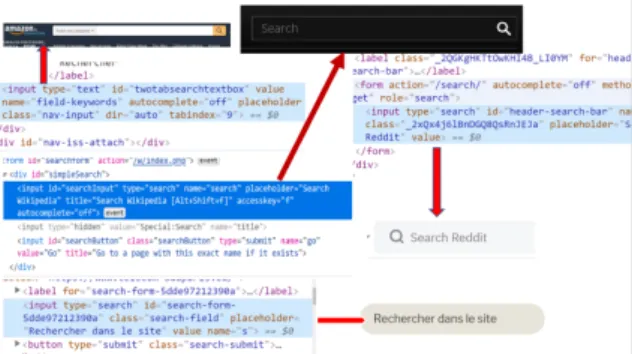
In considering that web HTML elements are keep changing dynamically in both structure and attribute values, it is a very challenging task to adapt test suites with the websites changes. In our proposed frame-work, the objective of SVM model is to recognize the pattern of web elements corresponding to the search box in each website as illustrated in Figure 5. Specif-ically, the SVM model will learn the HTML structure of each website, in case of any modification in terms of web elements, the SVM model will find the similar pattern of HTML web and adjust its model according to the changes.
Figure 5: SVM model detects search box pattern.
For the next testing step, if the website has changed, the SVM model detects its changes and guides the Selenium code to adapt automatically with it. In this case, the test code will not be broken and can be reused. More specifically, the goal of the SVM is to train a model that assigns new unseen web ele-ments into a particular category. It achieves this by creating a linear partition of the feature space into two categories. In each website, structured data is extracted for each HTML element, they have to be turned into proper feature vectors. We use SVM model to recognize the relevant feature of each web element corresponding to its density and apply in the feature importance property of our model. Many fea-tures and preprocessing steps are performed as part
of our cross-validation process, and we kept the ones yielding best performance and moved them in the fi-nal model. Feature importance gives a score for each feature attribute, the higher of the score, the more im-portant or more relevant of the feature is. Therefore, the weight for each element attribute is assigned ac-cording to its frequency and informative ranking.
4.3
Data Collection and Analysis
In order to have the dataset for our training SVM model, we need to gather the large amount of data. By using the scraping tool described above, we are suc-cessful to retrieve the data from the list of 5000 web-sites provided by the Alexa database. This database contains more than one million URLs on top rank-ing of Alexa (Helme, 2020). Our tool can scrape any website that has the search functionality, it pulls down all the web elements corresponding to the search box. However, these elements are collected as raw data in an undesired format, unorganized, and extremely large. Furthermore, these elements may be different from one page to another. We need, for further steps, to use the processing tool to enhance the data quality and, related to our experiments, in particular to extract the elements linked to the search box (our testing pur-pose).
The main steps for preprocessing data are format-ting and cleaning. Data cleaning is applied to remove messy data, duplicate data and manage missing val-ues. Formatting is required to ensure that all vari-ables within the same attribute are consistently writ-ten. Once structured data is extracted for each HTML element, they have to be turned into proper feature vectors.
After this preprocessing phase, vectors with rele-vant features is obtained, our training dataset is built. For that purpose, an important task of labelling is then performed to classify our vectors depending on the structure of the ”search box”. We labeled 1000 webpages to provide three classes according to the three cases detailed in Section 5.1. From this training dataset, an SVM model has been obtained as above explained.
5
EXPERIMENTAL STUDIES
AND RESULTS
5.1
Use Case Studies
To test our codeless testing framework, our expe-riences focus on testing the search-functionality of
websites. To be concrete, let us follow the following scenario: if the users want to use Google to search for the term Codeless Testing, they normally open their favourite browser, let say Chrome, to navigate to the website of Google. After the official site of Google page fully loaded, the users need to locate the search box, then type the search term Codeless Testing. All of this manual steps performed by human can be com-pletely replaced those steps by our codeless testing framework. However, although these steps can be in-deed easily automated for this scenario, our codeless testing approach intends to make it generic enough to test the search functionality on diverse websites. By analyzing the multiple search activities on various websites, we group the search scenario in three use cases:
• Case 1 (Traditional Search): we call it traditional because the search box is appeared directly in the website interface, the user can easily locate it and enter the search query. We studied that 80-90% search websites are designed in this case 1 (Fig. 6). For example: google, youtube, yahoo, ama-zon, etc.
Figure 6: Case 1 search type: traditional search.
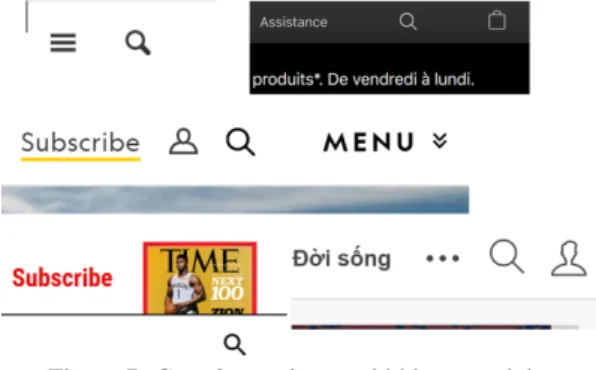
• Case 2 (Hidden Bar Search): The search bar is hidden, the users are required extra step by click-ing the search button to activate/open the search bar. Once the search bar appears, the user can en-ter his search query (Fig. 7).
Figure 7: Case 2 search type: hidden search box.
• Case 3 (Pattern/Condition Search): the websites have many filters/criteria for search, the users
must select the right criteria to proceed. For in-stance, some hotel or housing websites only al-low users to select the special search key in their pattern database (region, type of house, size of house, price, number of rooms, etc.). Further-more, particular websites only allow the users to perform the search on specify content provided in their database. If the users type a random search query, or the query does not correspond to a spe-cific form, nothing is returned (Fig. 8).
Figure 8: Case 3 search type: filters/criteria search.
In order to test the search functionality in a website, we defined three verdicts within our generic test case: pass, fail, error, as it follows.
• The test is considered as pass if a browser has fully loaded the website, the “search term” is en-tered in the search box, the website returns the an-swer corresponding to the “search term”.
• The test is considered as fail if the browser was unable to load the website under test and to navi-gate to the search box.
• The test is considered as error if the website un-der test does not contain any search box or does not have the search functionality in its services. Based on these verdicts and the three above men-tioned use cases, we define other verdicts as it fol-lows:
• When entering “search term” in the search box of the webpage under test, “search term” has to ap-pear into the targeted search box, if not, we deliver the verdict fail.
• The targeted search box has to accept any type of query as input (number, text, special characters, etc.). If not, we deliver the verdict error.
• We do not consider webpages where there are condition/limit/boundary/criteria for the input search (case 3 as described above). In this case, we deliver the verdict error.
• If a website requires more than a step rather than type search term (case 3), we deliver the verdict error.
• A website has to provide the response for the search term. If an answer belonging to the class “no result found or nothing found” is returned, we deliver the verdict pass.
5.2
Experiments Setup
In the experiment phase, we test our framework on the dataset as described in Section 5.3.1.
Testbed.
• OS: x86-64 Microsoft Windows 10 Pro, version 10.0.18363, Build 18363
• Processor: Intel Core i7-7500U CPU @ 2.70GHzx2
• Memory: 16GB • SSD: 512GB • Dataset:
– Metadata: 1.3 Mb in csv format. 1000 rows x 7 columns
– Training set: 70% metadata in npy format (numpy array)
– Test set: 20% metadata in npy format (numpy array).
From this training dataset, our tool processed the SVM model in average 7 minutes using the de-pendencies below mentioned.
• Browsers are detailed in the Table 1
Table 1: Browser Version.
Chrome 78.0.3904.70 (64-bit) Firefox 70.0 (64-bit)
Opera 76.0.3809.132 Internet Explorer 11.418.18362
Microsoft Edge 44.18362.387.0 Build 18362 Project Tools.
In order to run the experiments, we setup our system environment as in the following:
• Python 3.6.8,
• Dependencies: Keras/Tensorflow, scikit-learn: core platform to analyse/process data and training SVM model,
• Libraries: Selenium, Request HTTP, Beautiful Soup, LXML,
• Jupyter Notebook App: online web-based plat-form to visualize the data.
5.3
Results and Discussions
5.3.1 Automation Testing against Multiple Websites
To evaluate the efficiency of our framework, we con-ducted the tests using a generic test case through 1000 websites chosen randomly on the list of Alexa de-scribed above. First, the learning approach has been processed. A sample of raw data with 10 features has been scraped (Fig. 9).
Figure 9: Sample of raw data.
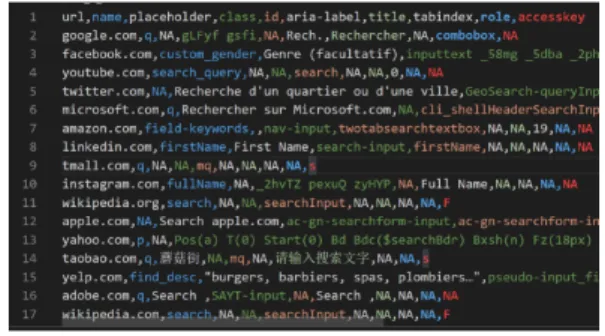
The preprocessing phase and specifically the cleaning step allowed to obtain the seven features and one thousand lines of our training dataset. An illus-tration of these lines are presented in the Fig. 10.
Figure 10: Training dataset sample.
Our testing search functionality has been imple-mented in Selenium, the testing results are showed in the table below (Table 2).
Table 2: Testing against 1000 web sites.
Pass Fail Error Chrome 48% 18% 34%
Firefox 57% 16% 27% Opera 47% 12% 41% Internet Explorer 9% 19% 72% Microsoft Edge 17% 19% 64% First, we may be surprised by the number of fail and error verdicts. Nevertheless, the high percentage of results getting error does not mean that our frame-work is defective. After analysis, we noted that it is due to the fact that we did the test on 1000 websites chosen randomly. Therefore, there are websites that do not have the search functionality. From Table 2, we can see that Internet Explorer and Microsoft Edge perform the worst. It makes sense since Microsoft
has stopped support for Internet Explorer. Microsoft Edge is replaced as the main and fast browser for the Windows OS. However, the Selenium Webdriver for Microsoft Edge is not fully supported and still under development. We encountered that Internet Explorer and Microsoft Edge crashed when testing more than 20 websites concurrently.
Figure 11: Automation testing against multiple web sites.
Through our experimental results for automation testing the search functionality showed in Figure 11, Firefox performs the best in terms of pass cases. Chrome is the best browser to handle the verdicts er-ror. We experienced that Chrome is a good choice when testing the websites which are rendered heavily with JavaScript, while Firefox still suffers for those sites. Opera is fairly good in our test. We were also surprise with the performance of Opera considered that it is not as popular as Chrome and Firefox. 5.3.2 Testing with Extension (Add-on)
During our experiments, we noticed that our tests were interrupted if a pop-up windows suddenly ap-pears during the test. The pop-up can be of any type (advertisement, data privacy, etc.) but the main met one was the pop-up which requires to accept the term and privacy when browsing the website as seen in Fig-ure 12. Without clicking the accept button, there is no way to browse the website further. Considering that the test is running automated under Selenium code, there is no interference by manual hand to click the accept button. Therefore, the tests were most of the time broken when facing with pop-up windows.
In order to solve this problem, we decided to add a blocking pop-up extension to the browsers. This led to a trade-off, adding this extension allows to test pop-up websites, but in return, the test speeds decreased. The reason is that we modified our Selenium scripts in order to detect such pop-up windows and then to add such an extension when it occurs. Therefore, the webdriver had to trigger automatically the extension
Figure 12: Pop-up blocks the browser in Yahoo website.
in the targeted browser, reducing at the same time the performance of our tests (in terms of response time -obtained verdicts).
For the experiments, we chose two extensions be-low due to their efficiency in blocking pop-up win-dows, there are more than 10 millions users using those extensions:
• Ublock: (ubl, 2020) is a free and open-source, cross-platform browser extension for content-filtering, including ad-blocking.
• I dont care about cookie: (Kladnik, 2020) This browser extension removes cookie warnings from almost all websites and saves thousands of unnec-essary clicks, very useful for our codeless testing approach.
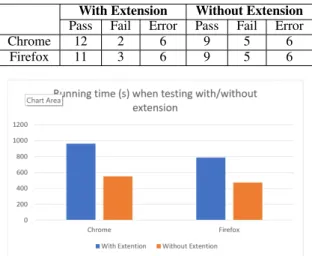
Since the above extensions are only fully supported for Chrome and Firefox, the experiments in this sec-tion were only run on these two browsers. The tests were run on 20 random websites concurrently on each browser in two modes: with extension and without ex-tension. The Table 3 and Fig. 13 illustrate our results.
Table 3: Verdict results when testing with/without exten-sions.
With Extension Without Extension Pass Fail Error Pass Fail Error Chrome 12 2 6 9 5 6
Firefox 11 3 6 9 5 6
Figure 13: Running time with extensions testing.
Within Table 3, we can note that using extension to block the pop-up is very effective during the tests. It helps to enhance the pass case and reduce the fail one. However, the running time when executing the tests with addons is reduced (Fig. 13). We also note that Firefox is more efficient than Chrome in terms of time performance in both cases (with and without extensions).
6
CONCLUSION AND
PERSPECTIVES
In this paper, we proposed a framework to test multi-ple websites in an automation way. The approach is able to use a generic test case to test a single func-tionality through multiple websites by leveraging ma-chine learning technique and selenium on web ele-ment locators. Our technique can adapt dynamically to the changes of the website. This framework called “codeless testing automation” aims to help the tester in reducing the time and efforts that are commonly spent to change or modify the test codes. In our exper-iments, we focus on testing the search functionality of a web service. The test scenario is the following: us-ing our framework, without modify the test code, the framework must be able to test the search functional-ity of multiple websites. Note that the categorization of websites is not a matter, the framework enable to check with any website. From the experiments, the results show that our framework can be efficient to perform the automation testing with most of standard websites by using the generic test case without rewrit-ing the test code into Selenium.
From this work, we intend several perspectives. First, we have to tackle all the use cases mentioned in our paper and in particular the third case in which constraints are given on the search functionality. Fur-thermore, we aim at testing several behaviors at the same time. This aspect will need another testing ar-chitecture to consider the huge amount of data needed to be trained and analysed through our framework. Besides, we expect to propose APIs and generic test scripts to the community in order to assess our tech-nique on diverse functional tests. This is will lead to interesting and relevant comparisons with other ap-proaches. Finally, other learning techniques such as neural based mechanisms are studied.
REFERENCES
(2020). Selenium webdriver document. https: //selenium-python.readthedocs.io/locating-elements.
html. Accessed: 2020-04-02.
(2020). Ublock blocking popup extension. https://github. com/gorhill/uBlock. Accessed: 2020-04-02.
Ameur-Boulifa, R., Cavalli, A. R., and Maag, S. (2019). Verifying complex software control systems from test objectives: Application to the ETCS system. In Pro-ceedings of the 14th International Conference on Soft-ware Technologies, ICSOFT 2019, Prague, Czech Re-public, July 26-28, 2019, pages 397–406.
Arkadyev, A. (2017). Codeless system and tool for testing applications. US Patent 9,697,110.
Brueckmann, T., Gruhn, V., Koop, W., Ollesch, J., Pradel, L., Wessling, F., and Benner-Wickner, M. (2017). Codeless engineering of service mashups-an experi-ence report. In 2017 IEEE International Conferexperi-ence on Services Computing (SCC), pages 402–409. IEEE. Enlyft (2020). Companies using selenium. https://enlyft. com/tech/products/selenium. Accessed: 2020-04-02. Helme, S. (2020). List of top one million websites on alexa
ranking. https://crawler.ninja/files/https-sites.txt. Ac-cessed: 2020-04-02.
Heusser, M. and Kulkarni, G. (2018). How to reduce the cost of software testing. CRC Press.
Hynninen, T., Kasurinen, J., Knutas, A., and Taipale, O. (2018). Software testing: Survey of the industry prac-tices. In 2018 41st International Convention on In-formation and Communication Technology, Electron-ics and MicroelectronElectron-ics (MIPRO), pages 1449–1454. IEEE.
Isha, A. S. and Revathi, M. (2019). Automated api testing. International Journal of Engineering Science, 20826. Jain, V. and Rajnish, K. (2018). Comparative study of soft-ware automation testing tools: Openscript and sele-nium. Int. Journal of Engineering Research and Ap-plication, 8(2):29–33.
Joshi, N. (2016). Survey of rapid software testing using machine learning. International Journal of Trend in Research and Development.
Kassab, M., DeFranco, J. F., and Laplante, P. A. (2017). Software testing: The state of the practice. IEEE Soft-ware, 34(5):46–52.
Kladnik, D. (2020). Idontcareaboutcookie blocking popup extention. https://www.i-dont-care-about-cookies. eu/. Accessed: 2020-04-02.
LXML (2020). Lxml toolkit. https://lxml.de/. Accessed: 2020-04-02.
Nguyen, D. M., Do, H. N., Huynh, Q. T., Vo, D. T., and Ha, N.-H. (2018). Shinobi: A novel approach for context-driven testing (cdt) using heuristics and ma-chine learning for web applications: An analysis of chemosensory afferents and the projection pattern in the central nervous system. In Topographic Organiza-tion of the Pectine Neuropils in Scorpions. INISCOM. Patel, M., Patel, M., et al. (2016). Survey paper on analysis of xaas. International Journal For Research In Ad-vanced Computer Science And Engineering, 2(2):13– 18.
Pypi (2020). Request library. https://pypi.org/project/ requests/2.7.0/. Accessed: 2020-04-02.
Raulamo-Jurvanen, P., Hosio, S., and M¨antyl¨a, M. V. (2019). Practitioner evaluations on software testing tools. In Proceedings of the Evaluation and Assess-ment on Software Engineering, pages 57–66. Richardson, L. (2020). Beautiful soup documentation.
https://www.crummy.com/software/BeautifulSoup/. Accessed: 2020-04-02.
RJ Bhojan, K Vivekanandan, R. G. (2019). A machine learning based approach for detecting non- determin-istic tests and its analysis in mobile application test-ing. International Journal of Advanced Research in Computer Science.
Rosenfeld, A., Kardashov, O., and Zang, O. (2018). Automation of android applications functional test-ing ustest-ing machine learntest-ing activities classification. IEEE/ACM 5th International Conference on Mobile Software Engineering and Systems (MOBILESoft). Selenium (2020). Selenium automates browsers. https://
selenium.dev/. Accessed: 2020-04-02.
Shariff, S. M., Li, H., Bezemer, C.-P., Hassan, A. E., Nguyen, T. H., and Flora, P. (2019). Improving the testing efficiency of selenium-based load tests. In 2019 IEEE/ACM 14th International Workshop on Au-tomation of Software Test (AST), pages 14–20. IEEE. Vapnik, V. N. and Vapnik, V. (1998). Statistical learning