ComicKit: Knowledge Acquisition of Story Scripts
by
Ryan Duane Williams
Submitted to the Department of Electrical Engineering and Computer
Science
in partial fulfillment of the requirements for the degree of
Master of Engineering in Computer Science and Engineering
at the
MASSACHUSETTS INSTITUTE OF TECHNOLOGY
February 2005
©
Ryan Duane Williams, MMV. All rights reserved.
The author hereby grants to MIT permission to reproduce and
distribute publicly paper and electronic copies of this thesis document
in whole or in part.
1/
MASSACHUSETTS INSTffUTE OF TECHNOLOGYJUL 1
8
2005
IB r A uthor ... i.. V .1... 1.... '... ... 3 ... .. ... ..Depak tent of Electrical Engineering and Computer Science
Jan 28, 2005
Certified by.
...
Glorianna Davenport
Principal Research Scientist
Thesis Supervisor
Accepted by ...
Arfiur C. Smith
Chairman, Department Committee on Graduate Students
.
M
-Libraries
Document Services Room 14-0551 77 Massachusetts Avenue Cambridge, MA 02139 Ph: 617.253.2800 Email: [email protected] http://libraries.mit.edu/docsDISCLAIMER OF QUALITY
Due to the condition of the original material, there are unavoidable flaws in this reproduction. We have made every effort possible to
provide you with the best copy available. If you are dissatisfied with this product and find it unusable, please contact Document Services as soon as possible.
Thank you.
Some pages in the original document contain text that runs off the edge of the page.
( Pages 103 - 107 )
ComicKit: Knowledge Acquisition of Story Scripts
by
Ryan Duane Williams
Submitted to the Department of Electrical Engineering and Computer Science on Jan 28, 2005, in partial fulfillment of the
requirements for the degree of
Master of Engineering in Computer Science and Engineering
Abstract
The field of Artificial Intelligence stands poised to make great leaps in emulating human intelligence. The development of a way to acquire and use common sense is the key to this advancement. This thesis describes the design and construction of ComicKit, a tool for acquiring story scripts for a common sense knowledge base. ComicKit's core mechanism is dragging and dropping icons into the panels of a comic. As the user creates a comic, ComicKit makes common sense suggestions for the story.
ComicKit follows on the successful model of Open Mind Common Sense, a web-based activity that thousands of people around the world contributed bits of common sense knowledge to. It is hoped that many people will contribute a few hundred thousand stories through ComicKit, and build a large corpus of common sense story knowledge. Thesis Supervisor: Glorianna Davenport
Acknowledgments
Many thanks are due to Glorianna Davenport for providing advice and support where it was needed. It is much appreciated that Chuck Dages at Warner Brothers Inter-active Entertainment supported this work. Thanks to Barbara Barry for giving me lots of indispensable advice, and helping me stay on track. Push Singh helped me to better understand common sense and human intelligence, which came in handy.
Contents
1 Introduction 7
1.1 Common Sense ... ... 8
1.1.1 Artificial Common Sense . . . . 9
1.1.2 Applications ... ... 9
1.1.3 Difficulty of Artificial Common Sense . . . . 10
1.2 Open Mind . . . . 11 1.3 The X-Nets . . . . 12 1.3.1 ConceptNet . . . . 12 1.3.2 LifeN et . . . . 13 1.4 StoryN et . . . . 13 1.5 Story Scripts . . . . 14 1.6 Why comics? . . . . 15 2 Goals of ComicKit 17 2.1 Natural Language . . . . 17 2.2 Breadth . . . . 18 2.3 Building Comics . . . . 18 2.3.1 V isual . . . . 19
2.4 The user experience . . . . 20
3 ComicKit interface 22 3.1 Login screen . . . . 23
3.3 Editing screen . . . . 25
3.3.1 Panels . . . . 27
3.3.2 Drag and drop mechanism . . . . 28
3.3.3 Selection mechanism for appearance . . . . 29
3.3.4 Division into types . . . . 29
3.3.5 Suggestions . . . . 30 3.3.6 Java mockup . . . . 32 4 ComicKit server 33 4.1 User management . . . . 33 4.2 Story management . . . . 35 4.2.1 Story representation . . . . 37
4.3 Parsing a story for suggestions . . . . 38
5 Related work 40 5.1 StoryW riter . . . . 40 5.2 KidPad . . . . 41 5.3 Daydreamer . . . . 41 6 Evaluation 42 6.1 Comparison evaluation . . . . 42 6.2 Formative evaluation . . . . 45 7 Future directions 47 7.1 Templated Input . . . . 47 7.2 Social . . . . 48 7.3 Better storytelling . . . . 49 7.4 Conclusion . . . . 49 A Interface Code 52 B Server Code 152
List of Figures
2-1 Abstract versus representational objects . Login screen . . . . Gallery screen . . . . Editing screen . . . . Annotated panel . . . . Appearance of objects Appearance of actions
StoryNet Text interface . . . .
ComicKit mockup interface . . . . User Evaluation Subjective Results
. . . . 19 3-1 3-2 3-3 3-4 3-5 3-6 6-1 6-2 6-3 . . . . 2 3 . . . . 2 5 . . . . 2 6 . . . . 2 7 . . . . 3 0 . . . . 3 0 . . . . 4 2 . . . . 4 3 . . . . 4 4
Chapter 1
Introduction
The fifty-year-old promise of machines as intelligent as human beings has not yet come to pass. A wide variety of factors have contributed to this situation. Initially computers were not nearly powerful enough to solve the problems that human beings can. The difficulty terrain of Artificial Intelligence (AI) problems has also not been kind. Tasks that are simple and automatic for human beings, such as distinguishing between two objects visually, still haven't been solved satisfactorily.
Current progress in AI has led to a huge variety of techniques, each of which tackles its own particular problem. There is little commonality between these techniques, or a way to cobble them together into a being that thinks like a human[8]. In part, this situation stems from the natural tendency of AI reserachers to limit the scope of the problem they they are looking at. It appears that human-level AI will not be achieved without some approach that tackles all of the problem at once.
Marvin Minsky, among others, champions common sense computing as the ap-proach that will lead to human-level AI[10]. Common sense computing is based on the idea that meaning and understanding both come from the ability to provide com-plex associations to other ideas. A common sense based solution relies on building a large number of such associations.
This thesis describes the building and design of ComicKit, a knowledge-acquisition tool for common-sense story scripts. Story scripts are a very specific type of narrative, one whose purpose is to teach a machine a small piece of common sense. ComicKit is
an application that users interact with over the Web to create stories. These stories become the basis for a corpus of common sense knowledge called StoryNet.
ComicKit uses a distributed knowledge capture method that was shown to be effective in the Open Mind Common Sense project (OMCS) '. OMCS succeeded at collecting about 700,000 simple commonsense facts from 15,000 contributors around the world. ComicKit takes the same approach - casual, non-expert internet users contribute commonsense knowledge via simple and engaging knowledge acquisition activities on a public website.
To engage these users, ComicKit uses a drag and drop comic format that is easy to learn and very expressive. In the base activity, users drag panels into a sequence, and organize icons into scenes and events. Each story thus created is communicated to a server which maintains StoryNet.
An innovative aspect of ComicKit is its use of existing common sense knowledge bases to help the user in creating the story. Such common sense feedback makes the story creation process more interactive[19].
1.1
Common Sense
Every person has some idea of what common sense is. It's what your mother told you that you didn't have. It's the collection of knowledge that you've acquired throughout your life that allows you to interact meaningfully with the world. Common sense is the knowledge you get through experience. Common sense allows you to know what to do when you're out of food (go to the store) or when you drop a glass (vacuum it
up), and where to find an extra roll of toilet paper at a stranger's house (under the
sink).
More formally, John McCarthy defines common sense thusly:
Common-sense knowledge includes the basic facts about events (including actions) and their effects, facts about knowledge and how it is obtained,
facts about beliefs and desires. It also includes the basic facts about material objects and their properties.[7]
1.1.1
Artificial Common Sense
Artificial common sense is the attempt to teach computers the large corpus of knowl-edge that all humans acquire through the process of growing up. The common sense corpus is enormous, and takes many years for each person to learn (and some people, it seems, never learn common sense).
Part of the difficulty of acquiring common sense knowledge for computers is that human beings do not have a very good grasp of the scope of their own common sense knowledge. Describing it as a series of assertions, e.g., "the floor is beneath your feet," "buildings protect us from the wind and rain," "beer and water are liquids," shows how closely common sense knowledge is tied to our internal models of the world.
The Common Sense Computing project 2 at the Media Lab is an effort to give
machines the ability to think about the world similarly to the way people do. One aspect of this project is the creation of broad knowledge databases. The databases are coupled with inference tools that allow AI to make sophisticated inferences about the state of the world, problem solving, and the meaning of various inputs. There are a huge variety of ways that common sense knowledge can advance the state of the art in a variety of fields - a few are listed here.
1.1.2
Applications
A wide variety of present and future problems can be addressed with common sense.
This list attempts to show the breadth of potential applications of common sense story knowledge, and is not exhaustive.
Detecting terrorists: A large corpus of common-sense knowledge could help to dis-cover terrorist-exploitable weaknesses in an infrastructure or analyze a pattern of behavior to detect a potential attack. It would help answer questions such
2
as "if a terrorist gains access to a water purifying facility, what items could he use in a damaging way?"
- Search (Web, data mining, research): One of the problems with current search tech-niques is that they require the user to know something about the knowledge they are seeking.
- Computer Vision: One approach to computer vision involves working forwards from an internal representation of an object, attempting to locate the object on the scene via pattern-matching. Currently the approach is not feasible for general object recognition because of the enormous number of objects that it would have to try and discard. Common sense ties related objects together, so once a knife is identified, the vision system will quickly look for knives, plates, spoons, and glasses, instead of wasting its time trying to match computers, cars, or trains.
- Game Characters: A robust common sense system would enable computer game de-velopers to quickly create smart non-scripted AI characters. Such characters could respond to novel circumstances in a reasonable way. Suppose your hunting party is running out of arrows, but is far from a town - the common sense characters may decide to cut off some branches and make some more. - Step towards true Al: Common sense is a step towards developing programs that
can think like human beings. Many special-purpose AIs have been developed to emulate human beings at any one particular task. Emulating humans at a variety of tasks requires the sort of large corpus of general knowledge that common sense can grant. In addition to the corpus of knowledge, which is useless on its own, common sense techniques can provide inference methods to draw conclusions and make decisions based on the knowledge.
1.1.3
Difficulty of Artificial Common Sense
Children take years to learn a usable body of common sense knowledge. A median estimate of the amount of common sense required for a human being to go about their daily business hovers around ten million elements of knowledge[11]. This is a lot of knowledge, and worse, this counts only the useful knowledge. Knowledge that is useless, or redundant, or wrong, or inconsistent, or insufficient, must be discarded.
When you start acquiring knowledge, you suddenly start to face the problem of how to store it, and reference it. Common sense knowledge takes a huge variety of forms, from simple facts to entire naive physics models. Common sense knowledge also includes meta-knowledge about the quality of other knowledge, and about good sources of knowledge, and knowledge about how to acquire knowledge. Keeping all of these types of knowledge in a commonly-accessible format is very challenging. The Cyc project developed an extremely complex and thorough knowledge representation system, perhaps the most complete ever[5]. The Common Sense group intends to use standard English fragments for their projects, but even then we've built various different structures for sorting and coordinating these fragments.
Once you've acquired and stored a ton of knowledge, the problem becomes one of using that knowledge effectively. It's not impossible to develop a program that will answer a certain type of question or solve a certain type of problem effectively. However, it remains an open problem to develop systems that can identify the problem at hand, and choose a strategy to solve it.
1.2
Open Mind
Open Mind Commonsense3 is a website developed to address the acquisition of com-mon sense knowledge[14]. Its approach is to get a large number of people to provide semi-structured knowledge. The site contains a variety of activities based around
filling in the blanks in templates such as "A - is often used for ". The input
text is processed later and entered into a database of common sense. This
Because participants on the site are volunteers, essentially dabblers, the site has
3http: //openmind.media.mit
been made in such a way as to encourage people to return often and enter more information. The variety of ways users can input knowledge encourages them to return to play with more. Often the activities allow the user to see what other people have entered previously, providing a small reward for their participation. Though there is not a strong emphasis on making the site fun, it has been successful at pulling in knowledge. Roughly 15,000 users have entered some information at the OMCS site, and the top contributors have entered tens of thousands of bits of knowledge each.
1.3
The X-Nets
The Common Sense group at the Media Lab has already produced several knowledge bases and inference methods. The "-Net" terminology to describe the pairing of a knowledge base with tools to use the information usefully is based on the name of the WordNet project at Princeton '. Thus far the Common Sense group and its collaborators has developed ConceptNet, LifeNet, ShapeNet, GoalNet, and StoryNet. Each Net addresses a different aspect of common sense knowledge.
1.3.1
ConceptNet
The common sense contained in ConceptNet is a graph-like series of associations between textual nodes. Each node is a 'concept' such as an object or an action, or a state of being. Each pair of nodes can be linked by any of a set of link types. The inference methods used on ConceptNet's knowledge traverse this graph structure, using spreading activation.[6]
Among others, there are edges that relate actions to the objects they can be performed on, edges that generalize from the specific, and edges that mean mere closeness. There are around twenty different edge types.
ConceptNet is quite useful for generating synopses of text blocks, since the graph structure lends itself to conceptual locality. The ConceptNet knowledge is essentially
static in time. It captures relationships such as "toothpaste is found in the bathroom," that convey an immediate, timeless bit of information.
ConceptNet's knowledge base was extracted from the OpenMind dataset. Ap-proximately 1.6 million predicates were mined out of the hundreds of thousands of OpenMind assertions.
1.3.2
LifeNet
LifeNet addresses transitions between states of being. It takes first-person proposi-tions, such as "I am at the airport", and connects them to other proposiproposi-tions, e.g. "I am boarding a plane". Each connection represents a probability of one proposition happening after the other[17]. The links do not necessarily represent causality, or even imply a strict ordering. For example, the propositions "I am outside" and "I can see the sky" are linked with high probability, and don't have any direct causal or temporal relationship.
LifeNet is intended to be used for context-related reasoning. Given some infor-mation about a situation, LifeNet can use its knowledge base to suggest what other things might be true, or what sorts of events might happen next.
1.4
StoryNet
StoryNet can be understood as a knowledge base of story scripts. The story scripts serve as a representation for narrative-based knowledge. This knowledge tracks tem-poral order, goals, and dependencies for resolution. By knowing the sequence of events, StoryNet can begin to understand causality. The goals of the stories tell StoryNet about what states might be desirable, and the way that goals are broken down into subgoals tells it about methods of solving a problem. There is currently no large-scale database of such story knowledge[15].
Stories are useful for based reasoning. Given a problem to solve, a case-based reasoner searches through a database of stories to find the ones that solved the most similar problem, and follows along. An important part of following along is
determining the differences between the example story and the current problem that one is trying to solve. Solving a problem by referring to a similar story that solved a similar problem is reasoning by analogy.
Using stories for reasoning does not involve much generalization. For each situ-ation that StoryNet will attempt to reason about, it would need at least one story that is very similar to the situation. Fortunately, StoryNet can rely on the common sense knowledge captured in the other Nets to expand the meaningfulness of a single story. For example, given the story about making a sandwich in the next section, it could generate derivative stories where cheese is replaced by cold cuts, or egg salad.
1.5
Story Scripts
Jerome Bruner makes the case that narratives5 make up most of human memory and experience[2]. An important aspect of narrative is that it is "irreducibly durative", that the events happening in it must take place over time. The study of narrative
is particularly concerned with the construction of a narrative from a story - what elements are included or left out and for what purposes.
A story script is a very particular form of narrative. They are to be distinguished
from Schank-Abelson scripts[13], and should be considered a more restricted form of both narrative and script. The purpose of story scripts is to aid common sense representation, in a more tightly constrained way.
Schank and Abelson describe scripts as the fundamental unit of memory. His scripts are sequences of primitive actions, converted to a formalized representation. Like Schank-Abelson scripts, story scripts also consist of a sequence of primitive actions, but there are additional constraints:
" Story scripts presume the existence of a goal or set of goals, and the purpose of
the story script is to describe the accomplishment of these goals.
" Story scripts are focused and small.
9 Story scripts are didactic.
9 Common sense is a major component of story scripts. Here is a simple example story script:
" Eric took out a loaf of bread
" He saw that his fridge had no cheese in it
" Eric bought some cheese at the corner store
" He then cut slices off of the cheese and put them between bread
" Eric toasted the sandwiches, and ate them.
This simple story contains a lot of information about sandwich-making and the purpose of things like stores. There were two obstacles to the achievement of the goal
- the fact that the bread and cheese were not combined or toasted, and the fact that the cheese was still at the store. The steps taken to overcome these obstacles could serve as a template for other sorts of sandwich-making problems, such as not having any lettuce when making a BLT.
1.6
Why comics?
Examine McCloud's definition of comics: "juxtaposed pictorial and other images in deliberate sequence" [9]. This definition emphasizes their sequential nature as well as the deliberation required to make them. These characteristics fit in with the definition
of a story script.
Comics as a format have much to lend to the acquisition of stories. Comics are a storytelling medium that most people are extremely comfortable with. A sequential series of images, coupled with text, can convey things that no other medium can. Comics can be very efficient in communicating their ideas.
The comic medium is useful for collecting story scripts because of its sequential nature. Composing a comic is the art of arranging images in a sequence, each of which
conveys an idea. This format exactly matches the definition of story scripts. Casting the story script creation task as a comic endeavour immediately sets the tone.
Visual images are very expressive, and can convey ideas that no words can hope to.
By using comics for our knowledge capture tool, we grant the users the expressiveness
of images in creating their stories. The major problem with this approach is that computer interpretation of images is far behind computer understanding of words. The ComicKit attempts to get around this problem by ignoring the visual aspect of its user's creations. Words are an essential part of the ComicKit creation process,
Chapter 2
Goals of ComicKit
ComicKit is quite ambitious in its goals. It is intended to be the primary knowledge acquisition tool for a new and unprecedented knowledge base. ComicKit should make it easy for non-experts to contribute sophisticated and clean story knowledge to this knowledge base. It needs to be easy for a user to casually try it out, and plausible that a user will spend hours of his or her time working on stories with it. Needless to say, it is supposed to be fun to use.
2.1
Natural Language
Natural language is very difficult to work with. Common sense researchers would be much happier if it were easy, because there are literally tons of pieces of common sense knowledge distributed over the internet, books, and audio conversations. Indeed, some are making attempts to tackle these resources with the limited natural language tools that we have at our disposal now.
The very expressiveness of natural language makes it difficult to convert to a knowledge representation. Natural language is context-heavy - most words change meaning in difference circumstances, and pronoun references are sometimes difficult even for human beings to resolve.
This problem with natural language means that researchers wishing to acquire common sense knowledge must use some domain that is more limited. The Cyc team
developed an elaborate logical language that precisely specifies meaning[5]. The Open Mind Common Sense project got most of its useful data from very rigid templates[16]. One of ComicKit's goals is to constrain the input of its users very tightly, so that they do not stray into complex natural language. It is difficult to do this effectively, since natural language is extremely well suited for telling stories.
The approach we are taking is to break the input we receive into categorizable components. These components alleviate some of the burden of discovering the rela-tionships between words in the story.
2.2
Breadth
Competing with the desire to constrain the user's input is the need to acquire a large breadth of story knowledge. Like all common sense, story knowledge will be most
useful if it covers all domains of human experience. One of the concerns we had when designing the ComicKit was that the drag-and-drop interface would unnecessarily limit the scope of the stories people would contribute.
Early user testing suggested that the ComicKit strikes the right balance in this regard. While testers definitely felt limited by ComicKit, they were also inspired to overcome those limitations. Sometimes the limitations of the medium forced a user to improve his or her storytelling, e.g., by breaking one very complex panel into two or more simpler panels that showed the same actions in a clearer way.
2.3
Building Comics
Drag-and-drop comics seem to be a natural match with the goals of a StoryNet acquisition tool. Comics are naturally structured much like the story scripts that we wish to acquire. Building them by compositing them out of pieces takes away a great deal of the complexity that is associated with creating visual images. Complexity issues related to the structure of the story remain, and there is more emphasis placed on the story as a result.
Figure 2-1: Abstract versus representational objects
2.3.1
Visual
One of the debates I had with others in the Common Sense group going into the project was whether or not to use representational images in ther interface. The advantage to using representational images is that they are much more "real" and immediately lend a great deal of visual power to a created comic. Almost all artist-created comics use representational graphics - they are pretty much the raison d'etre of comics as a medium.
There are two huge downsides to using representational images for the compo-nents of the stories. It would take a very great deal of energy to create or find the thousands of graphics that would be required to represent the wide variety of common-sense items that we wanted people to be able to use to construct stories. Additional effort would also be required to associate common sense terms with the graphics, in order to make the suggestions mechanism work properly (if the suggestion's label was "hammer" and the graphic appeared to be a whale, it would be useless as either). The other problem was that no matter how many graphics we acquired, we would still leave enormous gaps in our coverage of common-sense items. It seemed unlikely to us that users would go too far beyond the concepts contained in a set of graphics. We elected to ambiguate the appearance of the graphics because we wanted to keep users' imaginations running. If everything looked like a blob, the user would be forced to rely more heavily on the text label to imagine how the story "really
happened". There is still a great deal of visual power in the arrangement of the abstract shapes in a panel. Relative position plays a large role, as does the addition of flavor in the text of captions and thought bubbles.
2.4
The user experience
The last challenge is how to make the experience rewarding enough that people con-tinue to enter stories. The OpenMind project has had considerable participation despite lacking explicit incentives. Perhaps users feel altruistic pleasure from further-ing the progress of science, or have a desire to make it onto the top 10 list. Whatever the reason, stories are a slightly tougher nut to crack, since creating a story is likely to be more involved than anything currently on OpenMind. Several engagement strategies are suggested by the richer nature of stories:
1. Make stories as easy to create as possible by letting the existing knowledge in
StoryNet and ConceptNet provide suggestions and guide the player.
2. Provide a social element to the activity, such as the ability to share comics, or allow people to embed the comics in their web journals, or encourage coopera-tion/competition by placing comics created by different people in opposition.
3. Create a challenge for the player. The Kit could provide a goal and challenge
the player to create a story that achieves it from a given starting condition. On the creation of a new comic, the Kit could declare a subject area for the story to evolve in ("create a story about finding your keys"). Human judges might preside over a tournament of story creation.
At the current state of the program, only Item 1 is being implemented. In order to implement it, the Kit relies heavily on the ConceptNet knowledge to suggest com-ponents that are likely to be useful. The intent is to provide the objects and actions the player might need without typing them. If the player uses a dog in a panel, the Kit will suggest a dog. If the panel is set in the park, the Kit will make it easy to use a frisbee or a bench.
This suggestion system also works to keep the player from entering too-complex information for the nascent StoryNet. We've discovered from OpenMind that given an empty text field, people will enter unparseably complicated thoughts. It is
under-and StoryNet is below the level of abstraction people normally operate at. In order to reduce the incidence of unparseable input, the Comic Kit should be designed so that it is difficult to create complex stories.
Another way to reduce the amount of effort required to create a story is to have players only author part of the story. OMCS already has a similar concept, allowing players to add a line to an existing story. Players are likely to experience a spirit of cooperation when engaging in this sort of story creation. The OMCS story creation encourages players to 'split' stories by suggesting alternative actions at each step, which tends to prevent stories from getting too long, but also reduces the amount of meaning associated with them. A strategy that make more of an effort to meaningfully involve the player with the currently-unfolding story may yield better retention.
Chapter 3
ComicKit interface
The ComicKit interface has two purposes: for creating stories, and for viewing the stories of others. It has a user management system, which tracks username/password combinations, and associates each story with a username. Once logged in, a user can create a story using the editing interface, the primary thrust of development.
As much as possible, the interface of the Comic Kit is designed so that the user types as little as possible. The primary activity is dragging objects around on a workspace, and it is hoped that sophisticated enough prediction on the part of the program will obviate the need for the user to do anything beyond simply selecting the proper component.
I've broken down the interface into four 'screens' each of which performs a specific function. The login screen handles both new user registration and the authentication of existing users. The gallery screen is a place where users can select stories to edit or view. The viewer scree is for looking at but not editing a story. Most importantly, the editing screen creates comics.
ComicKit is a two-part system: a simple client that handles the user interaction and the graphics, and a server that stores persistent data and computes suggestions for displaying in the client. An interaction with ComicKit is really an interaction with the server mediated by the client. This chapter deals with the interface, also referred to as the client. [insert userloop diagram here]
Figure 3-1: Login screen
3.1
Login screen
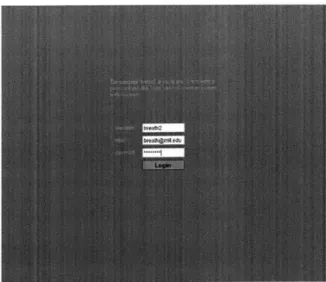
The login window allows existing users to authenticate themselves, and allows new users to register a new account. Both of these functions are handled in essentially the same way, since they differ very little in terms of the information required from the user.
I decided that it was best to give each account a password to prevent users from vandalizing each other's stories. An email address is also associated with each account, so that if a user forgets her password it can be emailed to her. This is decidedly a low-security affair, and no encryption is used in any stage of the process. I believe there is little incentive for users to attack the security of the system, as there is nothing of inherent value contained therein. The only plausible goal for an attacker is to vandalize or delete a story that someone else made. If the ComicKit explodes in popularity and people start using it as a service to keep personally important information, this issue may need to be revisited.
The login process for an existing user is very simple: fill in the username and password fields appropriately and click "Login". At the moment the interface does not support pressing enter after entering the password - this seems to be a Flash bug. The login process for a new user (i.e., a "registration") is equally simple: the user types in the desired username, an email address, and a password, and clicks "Login".
ComicKit distinguishes the login of an existing user from the registration of a new user by checking the server to see if the specified username already exists. It does this with each user keystroke, providing a continually updated message alongside the username box, saying "this username is in use", or "this username has not been registered yet". The email address field appears and disappears based on whether or not the username is determined to be new.
Once the user has clicked the 'login' button the Flash client checks with the server to see if the login/password combination is valid. If it is not, the client displays an error message in red. If it is valid, the client takes one of two actions. If the user is new and has just registered, the client shows the editing screen with a new comic opened up. If the user has already registered, they are taken to their gallery.
In anticipation of people who wish to simply create a story without the hassle of registering a username, the login screen provides a "login anonymously" button. Each screen, if evoked on its own without a login process, assumes that the user is logged in as anonymous. Currently anonymous users can edit each other's stories, making it less useful for common sense story script due to the possibliilty of vandalism or aborted story creation attempts.
The anonymous username is thus a sort of sandbox for trying out the interface. We may find that this is not advantageous, as the burden of registering (admittedly a small burden) encourages users to be responsible with the stories they create.
3.2
Gallery screen
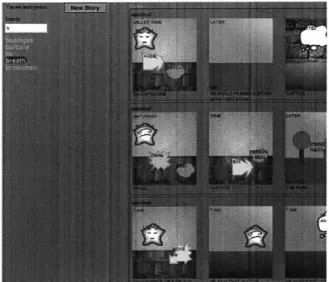
The gallery displays the stories created by each user. There are two main features of the gallery display: a username selection interface on the left, and a story display on the right.
If the user has logged in, the default value of the username selection box is the user's own, so that she can view her own stories. The box is editable so that the viewer can change its contents to view the stories of another person.
Figure 3-2: Gallery screen
on the set of usernames. An incremental find is a search that is performed on an incomplete input from the user. Incremental find is often useful when searching for a word in a large set of words where the user may not be certain of the spelling. As they type more and more letters into the search box, the list of matches grows shorter and shorter. At any time the user can click on a username in the list to have that
username fill the selection box and the stories associated with it displayed. Add
ref-The right side of the screen is a column of rendered stories by each user. Only the erences first few frames of each story are shown - the exact number of shown frames depends to incre-on the pixel size of the user's browser - enough to give the viewer an idea of the mental contents of the story. The user can click on a story to edit it (if the user owns the search. story), or for viewing (if the story was created by someone other than the user). In
the current interface the stories are shown at full size. A future consideration may be to display the stories at a reduced size to fit more onto the page.
3.3
Editing screen
The editing screen is the primary tool of the ComicKit. Most of the development effort has been spent on making this one screen work most effectively. I developed a mockup version of the editing screen in Java over the summer of 2004. Lessons
Figure 3-3: Editing screen
learned from that interface were applied to newer Flash interface developed over the fall of 2004.
The editing screen addresses the biggest goals of the ComicKit. By manipulating the interface provided by the editing screen, the user should be able to easily create as many stories of whatever type she wants. At the same time, the user should be gently guided into creating stories that are common-sense oriented, and mesh well with our existing knowledge bases, while also providing new information not provided
by existing stories.
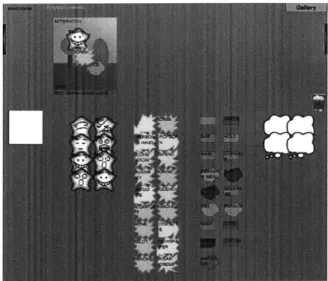
The editing screen is divided into two main components: an upper workspace where the comic is created, and a lower palette region where suggestions appear. There is a clear if invisible line dividing the two sections, and the behavior of draggable items is different depending on which section they've been dropped in.
The workspace is scrollable via the two arrow buttons at its left and right. Clicking and holding one of the buttons causes the panels to move at a fixed rate away from the button (the paradigm is similar to that of a regular scrollbar in that the arrows are perceived as moving the camera and not the panels). The workspace scroll buttons are always visible, even if all of the story's panels are visible onscreen.
Each palette in the lower region is vertically scrollable. The scroll buttons bear a visual resemblance to the horizontal scroll buttons of the workspace. They only
Time field Background selection
Place field,-, Sentence
Descrptive_ wAs OWso selection caption
Figure 3-4: Annotated panel
appear if the palette has more contents than it can currently display. The scrolling mechanism of the palettes is difference from the panel scrolling in that it is punctu-ated. Each click on a palette scroll button moves the contents of the palette by one row. Continued holding has no effect.
The editing interface does not require any explicit action on the part of the user to preserve their story. Each time the user makes a change to the story, the entire story is sent to the server and saved. This process happens at the same time as suggestions are being generated for the palettes.
3.3.1
Panels
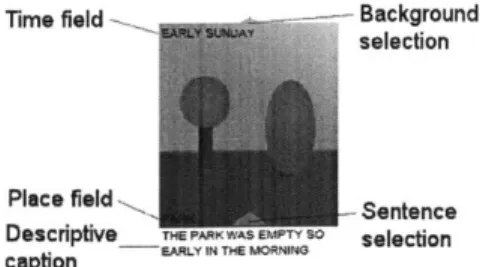
Comics are built as a sequence of panels. Each panel provides the setting for a scene. ComicKit panels have the following elements: a background image, a time-of-event text field, a place text field, and a caption. The user creates stories by filling in the contents of those text fields, and dragging various labeled icons over the background image to create a scene (not necessarily in that order).
Place: is the name of the physical location where the scene happens. It is loosely correlated with the background image, insofar as the background image is supposed to visually represent the place.
Time: is the comic creator's specification for the time at which the scene in the panel takes place.
Caption: contains the textual description of the scene. It could be completely free-form text, or it could be a literal transcription of the labeled icons in the
panel.
ComicKit arranges the panels so that they line up adjoining each other in a line.
By dragging the panels, it is easy to rearrange their order.
3.3.2
Drag and drop mechanism
The editing screen creates stories through direct-manipulation interaction. The pri-mary activity in the story creation process is dragging and dropping labeled icons into panels to compose a scene. The user can drag as many icons onto a panel as are necessary to show the action, and label them with any text.
A labeled icon is an image overlaid with a text field. The user can change the
label of any labeled icon in ComicKit simply by hovering her mouse over the icon. At the moment that her mouse rolls over the icon's boundaries, the text inside the label is selected, and is editable using standard techniques. Note that the text is not contained in a recessed, white-backgrounded text box, but instead is simply overlaid on the graphic. The same strategies that would work with a text box will work with editing the labeled icons (the HOME and END keys work as expected, it is possible to use SHIFT and the arrow keys to select a portion of the text, etc.). As long as the mouse pointer remains over the icon, the text will remain editable. Once the user moves the mouse poitner away from an icon, that icon's text ceases to be editable.
Each labeled icon is draggable to anywhere on the screen. If dropped on the panel portion of the screen, the labeled icon becomes associated with the nearest panel, and moves to stay completely in the bounds of said panel. If it is dropped in a specific position on the panel, the labeled icon always remains affixed to that spot on the panel, even if the panel is moved, until the user drags that particular icon to a new spot. When dropped on the lower, paletted, part of the screen, the labeled icon is added to the correct palette for its type. If dropped on top of a special 'trash' icon, the labeled icon deletes itself.
3.3.3
Selection mechanism for appearance
I discovered from the mockup that users wanted to be able to select the visual
ap-pearance of everything that they dragged onto the workspace. They wanted to select the appearance of the labeled icons, the facial expression of the persons, and the
background images of the panels. I developed a mechanism that supports quick and easy changing of the image of any labeled icon.
The image selection method I developed is a form of pie menu. To change the image of a labeled icon, the user first clicks the yellow arrow. This yellow arrow appears only when the user's mouse is over the labeled icon. Once the arrow is clicked, the available image selections appear arranged in a full or semi circle centered around the existing image. They are spaced far enough apart that there are no overlaps of images. This is a sort of pie menu in the sense that this circle is now also nearly centered on the mouse due to the location of the just-clicked arrow. To select a new image for the icon, the user merely has to click on the desired image in the "pie". The user can dismiss the pie without making a selection simply by clicking on the arrow again.
3.3.4
Division into types
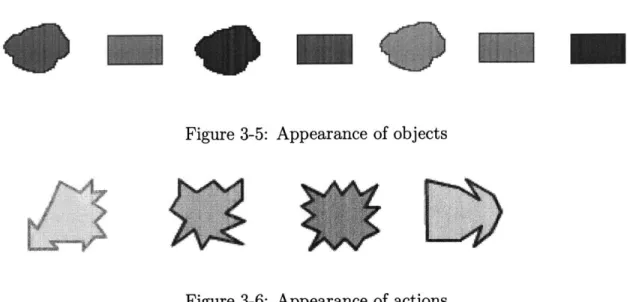
There are four primary icon types: objects, actions, persons, and thoughts/speech. Categorizing them in this way allows each type to have its own set of images, so that an action is always visually distinguishable from an object, for example. Person icons have the additional distinction of expressing one of the seven Ekman emotions[4].
The objects/actions/persons type trio is intended to represent nouns and verbs in simple declarative sentences. Accordingly, the graphics for each type are designed to appear like their part of speech: persons look vaguely face-like, objects look thing-like, and actions look active.
The simplest sort of sentence to parse is a declarative one. ComicKit facilitates the construction declarative sentences through its limitations. It is difficult to ex-press complex tenses, interesting conditionals, and other sentence constructions using
Figure 3-5: Appearance of objects
Figure 3-6: Appearance of actions simple nouns and verbs.
3.3.5
Suggestions
A major component of the ComicKit is its ability to common-sensically provide
sug-gestions of labeled icons for use in the developing story. These sugsug-gestions are based on the parts of the story that the user has already created. Their intention is twofold. First, they sometimes anticipate the user's need. The user may be writing a story about selling a car, and based on the words "sell" and "car", ComicKit would suggest things like "windshield" and "engine", anticipating the user's intention of creating a panel about how what shape the car's engine was in.
Second, they provide a feedback channel to the user. This channel delivers infor-mation about the types of things that our common sense knowledge already knows something about, and about what areas we would like people to create stories in. The suggestions also form a sort of conceptual template for the "common sense mindset". Comics are a hihgly symbolic medium, and it is common for one thing to represent another (e.g. rain representing depression). By providing only suggestions that are common-sensical (e.g. suggesting "water", "drink", "snow" when the user adds rain to the story), the ComicKit shows the sort of relationship that it considers common sense.
ComicKit always provides copies of the labeled icons that are being used in the story, since it is likely that the user will want to use the more than once. In antici-pation of users wanting to define their own labels fairly often, a labeled icon with no text is always the first item in every palette.
Persons do not have a complicated suggestion method. We can presume that the user is very likely to want to reuse the same character's icon in many panels. Therefore the suggestions are limited only to multiple copies of each character in the story. If the user creates a character "Bob", the persons suggestion palette becomes filled with several "Bob" icons, plus the obligatory blank icon. If she adds a second character, "Alice", the persons suggestion panel becomes filled with equal numbers of Bobs and Alices.
Thoughts are never suggested. To some degree, the thought and speech bubbles form an outlet for creative impulses that go beyond simple action sentences. ComicKit merely provides a palette with sufficient thought and speech bubbles.
Action and object suggestions are complex, and based on the entire current con-tents of the story. The actions palette is filled with ConceptNet words/phrases that are either similar to the actions already in the story or can be performed on some of the objects in the story. Similarly, object suggestions are either related to the story
objects or derived from the story actions.
Panel suggestions has not been incorporated into the ComicKit at the time of writing, but I hope to be able to add it soon.
Sentences
ComicKit suggests captions for each panel, based on its contents. This suggestion mechanism has much the same goals as suggesting labeled icons, but is handled through a different interface. Instead of dragging and dropping sentences, users select sentences by choosing from a list that flanks the panel, echoing the method for image selection described in section 3.3.3.
When the server makes sentence suggestions for a panel (which is not all the time), the panel subsequently gains an additional lighted arrow whose position is directly
above the caption (to be distinguished from the background-selection arrow, which is located at the top of the panel). When this arrow is clicked, the panel displays suggested sentences in two columns, one to either side. The sentences can be hidden
by either selecting one, or by clicking on the arrow again.
The caption can still be edited normally by hovering the mouse over it, regardless of the suggestions.
3.3.6
Java mockup
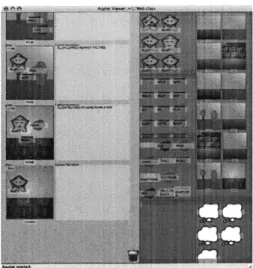
Over the summer I developed a mockup in Java, my programming language of choice. I used the graphical toolkit Piccolo1 to provide support for draggable icons and event handling. For the most part the Java version was very similar to the final Flash version, but the differences are listed here.
e The mockup's interface stacks the growing comics vertically on the left half,
with palettes full of suggestions on the right half. The space available for each panel's caption was thus as tall as the panel itself and somewhat wider, and much roomier than even the most loquacious caption needed.
e Even though the user could edit labels simply by hovering the mouse over
them, input is limited only to the alphanumeric characters. Punctuation is not possible.
* Sentence suggestions are displayed in a palette all of their own, right next to the thoughts/speech palette, and the user would drag a sugggested sentence over a
panel.
e The mockup provided no mechanism for changing the image of a labeled icon,
instead relying on random chance to provide the desired image in one of the sug-gestion palettes. This became an enormous problem, especially for the person labeled icons, where often the user wanted many copies of the same expression.
Chapter 4
ComicKit server
The ComicKit server provides an XML-RPC interface to the individual Flash clients. The server keeps everything centralized and offloads some computation from the client (though this creates a computational bottleneck at the server end). The server is responsible for saving stories to disk, producing the suggestions, maintaining a table of users, and returning stored stories for display.
I'll discuss the server's duties and interfaces by purpose. The first purpose is
to manage users, by validating logins, creating new accounts, and checking for the username conflicts. The second purpose is to store and retrieve stories. The third purpose is to generate suggestions from the common-sense knowledge in ConceptNet.
4.1
User management
User management is the most visible of the server's duties. The Flash client queries the server for the existence of the username as the user is typing it in. The server vali-dates the username/password combination before allowing the user to enter the other parts of the program. When the user wishes to register a new username/password, the server does that as well.
The server's interface to the client consists of four XML-RPC functions, delineated here:
check-username
Arguments: String username
Return value: "1" if the username specified has been registered before, "0" if not.
This function is called by the Flash client with each new character typed in the username box on the login screen, thus allowing the client to remain up-to-date as to whether the username is already registered.
get-incr-usernames
Arguments: String partialUsername The first part of a user-name
Return value: A list of usernames that start with the specified string.
This function is used on the gallery screen, to help the user find the username they want quicker.
new-user
Arguments: String username, String password, String email Return value: The string "done", regardless of status.
checklogin
Arguments: String username, String password
Return value: "1" if the username and password match one of the registered username/password sets in the database,
"0" if they do not (either because of a nonexisting
username or because of the wrong password).
These four functions handle all of the requirements of the login page and of the gallery's incremental username find feature.
The functions perform error checking and format an appropriate database query. The table was created by the following SQL command:
create table user (
uid INT UNSIGNED NOT NULL AUTOINCREMENT PRIMARY KEY COMMENT 'User
ID field',
name CHAR(64) NOT NULL COMMENT 'Textual username',
password CHAR(64) NOT NULL COMMENT 'Plaintext password',
email CHAR(200) COMMENT 'Email address',
addedTime DATETIME NOT NULL DEFAULT 'NOW(' COMMENT 'Date/time that user was added',
loginCount INT UNSIGNED NOT NULL DEFAULT 0 COMMENT 'Number of times
user has logged in',
UNIQUE (name),
INDEX nameIdx(name)
4.2
Story management
The story management aspect of the server maintains a list of stories and the user who created each story. There are a few functions exported through XML-RPC.
createmnew-story
Arguments: String username
Return value: An integer representing the story ID for the newly
created story. This ID must be used when referring
to the story in the future.
This function creates a new story in the database.
get-user-stories
Return value: A list of story IDs.
This function returns the story IDs for all the stories created by the specified user.
get-story
Arguments: int sid
Return value: A story in the representation discussed in the next section.
If you know the ID for a story, you can use this function to get the story's
contents.
delete-story
Arguments: int sid
Return value: The value "1".
This function deletes the specified story. There is a real danger from vandal-ism or mistakes, so in the future it should probably merely hide a story, not delete it completely.
These methods operate on a MySQL story table, which was generated with the following command:
create table story (
sid INT UNSIGNED NOT NULL AUTOINCREMENT PRIMARY KEY COMMENT 'Story
ID field',
uid INT UNSIGNED NOT NULL COMMENT 'ID of the user who owns the story',
numupdates INT UNSIGNED NOT NULL DEFAULT 0 COMMENT 'Number of
updates to the story',
created DATETIME NOT NULL DEFAULT 'NOW(' COMMENT 'Date/time that the
story was created',
modified DATETIME NOT NULL DEFAULT 'NOW(' COMMENT 'Date/time that
INDEX userIdx (uid)
);
4.2.1
Story representation
In being passed from the client to the server for storage and parsing, and for being loaded by the client from storage, the the stories had to be formatted in a consistent way. The storage format I've developed is perhaps not the most readable, but it overcomes some of the limitations of the ActionScript XML-RPC implementation.
The representation is a list of mixed data types, a data structure native to both ActionScript and Python. The following notation is a list is indicated by enclosing brackets, and a list of variable length is indicated by an ellipsis. A variable's type is indicated after the colon, e.g. <username: String> indicates a variable called username which is a string.
<Representation> [<Story title> [ <Panel>, <Panel>, ...
]
[<selected:'0' or '1'>, [<Place:String>, <image:String>, <x:fioat>, <y:float>],
<Panel> := <Caption:String>, <Time:String>, [<Person>,
<Person>, ...], [<Action>, <Action>, ...], [<Object>,
<Object>, ...], [<Thought>, <Thought>, ...]]
[<Name:String>, <image:String>, <x:float>, <Person> :
<y:float>]
<Action> := [<Verb:String>, <image:String>, <x:float>, <y:float>] [<Noun:String>, <image:String>, <x:float>,
<Object> :
<y:float>]
<Thought> := [<Text:String>, <image:String>, <x:float>, <y:float>]
This representation contains exactly the information required to restore a story to the editing interface and little more. The Place, Time, and Caption components of a Panel match the text fields in the client interface. Each Person, Action, Object, and Thought sub-list represents the coordinates, text, and the icon used to represent that particular component. The boolean value of the selected variable is used only by the sentence suggestion part of the backend. It would be too computationally expensive
to generate sentences for every panel each iteration, so the sentences are computed only for the most-recently-modified panel, which is indicated by the presence of a '1' in its selected field.
4.3
Parsing a story for suggestions
Frequently, the client will request a set of suggestions from the server. It does so by using the crunch method (which is labeled crunch3 in the XML-RPC interface for historical reasons).
crunch3
Arguments: int sid, <story representation>
Return value: [<person suggestions>, <action suggestions>, <object suggestions>, <sentence suggestions>]
This function returns a list of lists of icon representations. Each icon rep-resentation is a list containing the label of the icon, and either an image for the icon or the word "random". The sentence suggestions list only contains strings.
This method also saves the story in the MySQL database. The server expects crunch to be called as frequently as the user makes changes in the editing window.
To generate the person suggestions, the server constructs a list of the text labels (i.e., names) of all of the persons from the story, and creates six copies of each name. In generating the action suggestions, the server looks at both the actions and objects in the story. It finds the analogous words to the actions in the story, and compiles them into a list. If finds the actions that can be performed on each object in the story, by searching the graph structure for "CapableOfReceivingAction" and "CapableOf" links to and from those objects. The two lists (analogous actions and actions performed by objects) are interleaved into a final list of action words, which is then converted into a list of icon representations.
story. It construst two lists. The first list is generated by following "CapableOf" and "CapableOfReceivingAction" links from each of the actions in the story, resulting in a list of objects that those actions can be performed on. The second list comes from finding all the concepts that are analogous to each object in the story, and growing the list still further by finding all the concepts that are analogous to those concepts, i.e. concepts two degrees seperated from an object in the story.
The ComicKit server generates sentence suggestions based on the contents of one panel. Sentence suggestions are generated more or less combinatorially. It treats the actions in the panel as verbs, and the objects and persons as nouns. Using the MontyLingua natural language toolkit to convert verbs into a standard tense (simple past), the ComicKit server generates simple sentences in the following forms:
* (The/A) <Noun> <verbed> (the/a) <noun>
" (The/A) <Noun> <verbed> (the/a) <noun> (near the/on the/with the) <noun> " (The/A) <Noun> was with (the/a) <noun>
" (The/A) <Noun> <verbed>
" <any of the previous sentence structures>, thinking <thought>
The server selects the proper pattern for the number of nouns and verbs in the panel, and generates one instance of the pattern for each possible way to arrange the nouns and verbs within it. For example, a panel containing the nouns "man" and
"dog", and the verb "bite", uses the first pattern, and generates the sentences, "The man bit the dog", "The dog bit the man". This method often generates too many possible sentences, especially when many variations simply change out "a" for "the".
Chapter 5
Related work
ComicKit is superficially similar to other story-related systems, but departs signif-icantly in its purpose. The ComicKit can be thought of as a graphical knowledge representation and generation tool, whereas other projects have focused on the learn-ing of the user [18], fosterlearn-ing communication skills [3], and story authorlearn-ing[1].
5.1
StoryWriter
ComicKit as a story creation tool is similar to StoryWriter because users construct a story graphically using a palette of story elements and captions. ComicKit is distinguished by its use of story suggestions and abstract appearance of story ele-ments. ComicKit does not have representational objects like StoryWriter[18] does
- a ComicKit pear does not bear any visual resemblance to a real pear, whereas in StoryWriter pears are identified and used based on their appearance. By deliberately dissociating the appearance of the object from its meaning, we allow the scope of the stories to be limited only by the user's imagination.