Crossroads: A Collaborative Design Notebook For Constructionist Learning Activities
by
Oludotun A. Fashoyin Submitted to the
Department of Electrical Engineering and Computer Science in Partial Fulfillment of the Requirements for the Degrees of Bachelor of Science in Computer Science and Engineering and Master of Engineering in Electrical Engineering and Computer Science
at the
Massachusetts Institute of Technology June 2001
Copyright 2001 Oludotun A. Fashoyin. All rights reserved. The author hereby grants to M.I.T. permission to reproduce and
distribute publicly paper and electronic copies of this thesis
RAK
and to grant others the right to do so.
diVASd-
E-fS. STITUTE
OF TECHNOLOGY
JUL
3 1
2002
LI8RA!ES
Signature of Author
Department of Electrical Engineering and Comp 4r Science May 23, 2001 Certified by Bakhtiar Mikhak Research Scientist ,Thesis Supervisor Accepted by Arthur C. Smith Professor of Electrical Engineering and Computer Science Chairman, Department Committee on Graduate Theses
Crossroads: A Collaborative Design Notebook
For Constructionist Learning Activities
by
Oludotun A. Fashoyin Submitted to the
Department of Electrical Engineering and Computer Science on May 23, 2001
in Partial Fulfillment of the Requirements for the Degrees of Bachelor of Science in Computer Science and Engineering and Master of Engineering in Electrical Engineering and Computer Science
ABSTRACT
The tools and technologies developed in the Epistemology and Learning Group at the MIT Media Laboratory are used everyday in new and exciting ways by children and adults from a wide range of backgrounds in a growing number of settings, both in and out of schools. There is a great opportunity to bring together a strong community of learners, educators, and learning researchers to talk about and reflect on their experiences and practices. This research is intended to facilitate the formation of this community by providing a set of tools that support collaboration and communication among its members. Crossroads is designed to enable people (particularly children) to work together not only to tell others about their thoughts, ideas, and what they create to make these thoughts and ideas concrete and shareable, but also to get feedback and reflect on their ongoing projects. In this thesis, we present the design, implementation, preliminary evaluation, and future development directions of Crossroads, a collection of easy-to-use authoring tools - that support text, image, video, and audio - and simple administrative tools - that make setting up, customizing, and maintaining new sites with different work and connectivity requirements easy.
Thesis Supervisor: Bakhtiar Mikhak
TABLE OF CONTENTS
1
IN T R O D U CT IO N
...
7
2 R E LAT E D W O R K ... 72.1
Q uickPlaceTM ... 16 2.2 javaCA P ... 20 2.3 Belvedere ... 262.4 Closing Rem arks ... 32
3 SCE N A R IO S ... 33 4 D EV E L O PM E N T ... 42 4.1 Evolution ... 42 4.2 D esign ... 44 4.2.1 A rchitecture ... 45 4.2.2 Client A pplications ... 46 4.2.2.1 E ditor ... 47 4.2.2.2 A dm inistrator ... 51 4.2.2.3 Resource Folder ... 55
4.2.2.4 Pro)ect Brow ser ... 58
4.2.3 Server A pplications ... 62 4.2.3.1 Standard Server ... 62 4.2.3.2 A dm inistration Server ... 64 4.3 Im plem entation ... 65 4.3.1 Client A pplications ... 65 4.3.1.1 E ditor ... 65 4.3.1.2 A dm inistrator ... 75 4.3.1.3 Resource Folder ... 80
4.3.1.4 Pro)ect Brow ser ... 82
4.3.1.5 Failures ... 84 4.3.1.6 Perform ance ... 84 4.3.1.7 Potential M odifications ... 85 4.3.2 Server A pplications ... 85 4.3.2.1 Standard Server ... 85 4.3.2.2 A dm inistration Server ... 86 4.3.2.3 Failures ... 86 4.3.2.4 Perform ance ... 86 4.3.3 Resources U sed ... 86 5 PR E LIM IN A RY EVA LU AT IO N ... 89 6 FU T U R E W O R K ... 92 7 C O N CLU SIO N ... 100 A C KN O W L E D G E M E N T S ... 102 BIBLIO G RA PH Y ... 103 A PPE N D IX ... 105 A A pplication A bstractions ... 105 A .1 E ditor abstractions ... 105 A .1.1 CrossroadsEditor ... 105
A .1.2 FileM anager ... 106 A .1.3 E ditM anager ... 106 A .1.4 M ediaM anager ... 106 A .1.5 ToolsM anager ... 107 A .2 A dm inistrator abstractions ... 107 A .2.1 CrossroadsA dm inistrator ... 107 A .2.2 FileM anager ... 107 A .2.3 ToolsM anager ... 108
A .3 Resource Folder abstractions ... 108
A .3.1 CrossroadsResourceFolder ... 108
A .4 Project Brow ser abstractions ... 108
A .4.1 CrossroadsProjectBrow ser ... 108
A .5 Standard Server abstractions ... 109
A .5.1 CrossroadsStandardServer ... 109
A .6 A dm inistration Server abstractions ... 109
A .6.1 CrossroadsA dm inistrationServer ... 109
B U tility A bstractions ... 109
B. 1 Core data abstractions ... 109
B. 1. 1 U ser ... 109 B.1.2 A dm inistrator ... 110 B.1.3 Session ... 110 B.1.4 A ctivity ... 110 B.1.5 Team ... 111 B.1.6 Project ... ill B.1.7 ProjectV ersion ... 111 B.1.8 M ediaContent ... 112 B.1.9 M ediaSource ... 112 B.1.10 M ediaContext ... 112 B.1.11 M ediaResource ... 113
B.2 Server data abstractions ... 113
B.2.1 D atabaseA ccess ... 113
B.2.2 A dm M* D atabaseA ccess ... 115
B.3 N etw ork connection abstractions ... 115
B.3.1 ChentConnection ... 115
B.3.2 ServerConnection ... 116
B.3.3 A dm inServerConnection ... 117
BA Content presentation abstractions ... 117
B.4.1 M ediaPanel ... 117
LIST OF FIGURES
1. Designating access to documents in QuickPlaceTM. ... 17
2. Creating an inner room in
QuickPlace
T M. ... . .. . .. . .. . .. . .. . .. . .. . .. . .. . . 183. Authoring content in QuickPlaceTM.... . . . .. .. . .. . .. . .. . 19
4. The "Problem Presentation" Scene in JavaCAP. ... 23
5. The "Alternatives Selection" Scene in JavaCAP...24
6. The inquiry diagramming tool in Belvedere ... 30
7. Ms. Wilson using the Crossroads Administrator to add Leann and Leroy to T eam 2. ... 36
8. Leroy using the Crossroads Editor to create sample projects...38
9. The architecture of Crossroads ... 46
10. The module dependency diagram for the Crossroads Editor...50
11. The module dependency diagram for the Crossroads Administrator. ... 54
12. The module dependency diagram for the Crossroads Resource Folder...58
13. The module dependency diagram for the Crossroads Project Browser...61
14. The module dependency diagram for the Crossroads Standard Server...63
1
INTRODUCTION
In recent decades, there has been a growing emphasis on supporting collaboration among groups of people in many areas of life, in particular work and school. The rate of technological advancements in networking over the past two decades - which are reshaping how we think about, discuss, and support collaboration - is one of the significant factors that are fueling this growth. In a little over a quarter of a century, a number of new means of communication have become ubiquitous in the developed world.
Starting in late seventies in a handful of research institutions in United States and Europe, and continuing into the early eighties in more and more universities, networks such as BITNET provided students, faculty, and researchers a far more convenient way to distribute information to their colleagues and communities of interest than traditional paper copies. Furthermore, the emergence of the newsgroups and electronic mail systems a few years later helped remove many communication barriers as these tools began to become accessible and attractive to the general public. People could send electronic messages to each other regardless of location, and companies could make transactions with other companies in a matter of minutes.
As the World Wide Web started becoming popular in the early 1990's, collaboration support was reaching new heights. The increasing ease of Internet connectivity and the development of the browser, the Web's powerful and easy-to-use "killer" application, transformed the once relatively unknown Internet into an extensive medium for various kinds of collaboration over continental distances. Furthermore, with the budding interest in peer-to-peer networks, it becomes difficult to disregard the multitude of benefits that collaboration using computer technology has on society today.
One societal area in which collaboration plays an integral part is the workplace. This observation can be attributed to the fact that companies increasingly work in teams. From the top executives who meet regularly to make decisions and discuss the progress of the company to the employees who develop products and services, the company as a whole is working together to achieve a common set of goals.
In this day and age, as technological developments continue to grow exponentially, much interest has been devoted to the implications of computer technologies in the workplace, particularly in facilitating team collaboration. Of worthy mention are the
conferences on computer supported cooperative work (CSCW) [5,6]. These conferences serve as forums for prominent researchers, developers, and other practitioners in educational and business institutions to address issues concerning the use of computer technologies to support collaborative activities. They also help to facilitate engaging discussions on the impact of digital collaboration technologies on users, groups, organizations and society. These conferences are structured in terms of workshops on various topics, including infrastructures for collaboration, organizational culture, shared visual spaces, and web-based customer service.
With increasing Web use, many tools designed to support collaboration in the workplace have adopted the World Wide Web as their host platform. A good example of a tool with these properties is QuickPlaceTM [23]. A popular software application developed by the Lotus@ Development Corporation, QuickPlaceTM allows team members to manage a shared workspace on the Web. It also boasts several communication capabilities including e-mail, chat services, newsletters, and bulletin boards, and other useful features, e.g., a calendar. Chapter 2 includes a more detailed discussion on QuickPlaceTM.
Collaborative learning and work are also increasingly recognized and discussed as fundamental components of our educational institutions. In several classroom activities in K12 schools, students are more frequently divided into teams in order to accomplish a particular task. In addition, teachers and other educators often work together to design activities for their students as part of the school curriculum. In other education-based settings such as after-school centers and museums, students are also assigned team projects, which help to facilitate their learning, both individually and collaboratively.
Interest in the potential impact of technology on collaborative learning has been on rise recently, in a manner quite similar to the integration of technology into collaborative work that was discussed earlier. This interest has been promoted specifically by efforts such as the conference on computer support for collaborative learning (CSCL) [3,4]. This conference, which occurs every two years, is devoted to the exploration of the use of technology in collaborative instruction and learning, and is attended by educators, researchers, designers, and students from various countries specializing in a wide array of disciplines. Previous topics discussed at the conference have included designs for tools
(microworlds, multi-user simulations), theoretical perspectives (pedagogical theories, constructionism), and empirical methods (assessing student achievement) that promote collaborative learning.
There are several existing software tools that help to facilitate collaborative learning in educational institutions. Although much fewer in number than their corporate counterparts, these tools usually require a smooth integration into the activities they are intended to support in order to be used effectively. Like their corporate counterparts, however, most of these tools also rely on the World Wide Web. Two good examples of tools for collaborative learning are JavaCAP [19] and Belvedere [1,20]. JavaCAP allows
students to author cases in teams using existing cases as resources, while Belvedere is used to analyze scientific problems using inquiry skills. Both tools are discussed in detail in Chapter 2.
While tools such as JavaCAP and Belvedere offer a reasonable degree of collaborative features, they do not provide a lot of flexibility in terms of supporting various kinds of collaborative activities. Some activities are specifically designed to facilitate the generally important goals of sharing and discussing of ideas in a learning community, and the number of tools currently available that can make these goals achievable is relatively few in number. This need for effective collaboration-centric tools has led to research on methods to not only consolidate and revitalize existing educational communities, but also to help create new communities and perspectives on learning in the digital age. The research presented here is focused on constructionist learning communities in particular [7].
Over the past two decades, constructionist learning researchers have provided substantial evidence for their central claim that children learn most effectively when they are engaged in designing something that the care about deeply. To this end, they have created many construction kits that enable children to pursue their own interests and styles of learning in many diverse fields - such as robotics and complexity - many of which were previously inaccessible to them. In the constructionist theory of learning, the artifacts created by children play a central role. They allow the learner to externalize his or her ideas in a form that can be discussed and reflected upon. To a constructionist, the social dimension of sharing what you have made and receiving feedback from the experience of making it or from others around you is an integral part of any powerful learning experience. Therefore, it should come as no surprise that constructionist educators, learners, and researchers would value tools that enable them document and share their learning
experiences. Apart from their capacity in building a growing library of experiences and tangible know-how, collaborative tools are also valued deeply by constructionist educators and learners because they can help form a community of practitioners and learners. This extended community of researchers, mathematicians, scientists, educators, teachers, and learners is a notable example of a constructionist community.
The construction kits created to facilitate constructionist learning have enjoyed great commercial success. Millions of children have used the numerous programming and design environments and activities that have been based or have directly grown out of the research of the Epistemology and Learning Group at the MIT Media Laboratory. The Logo [15] and StarLogo [16] programming languages, the LEGO@/Logo [13] project, and the MINDSTORMSTM [10] product from the LEGO Group@ are noteworthy examples. An important remaining challenge - and opportunity - facing the constructionist community is to better document and share the practices, learning activities and stories that are growing around the use of these tools. We will present a detailed scenario in Chapter 3 to give the reader a better sense of not only the nature of the activities that we have in mind, but also of Crossroads, which is the collaborative design notebook that we designed to support these activities.
In order for collaborative tools to support constructionist activities, they need to make use of the right hardware infrastructures. This is particularly the case for collaborative software applications, which are usually designed with specific networking requirements. These requirements range from the simple (one-to-one communication protocols) to the complex (many Internet protocols).
Crossroads is an effort towards the development of the constructionist learning communities described thus far. It is a software system that provides collaborative editing
capabilities in a networked environment, and is designed for use in educational institutions, particularly schools, after school centers, and museums. Learning is an integral aspect of the activities carried out in these institutions, and Crossroads makes it possible to document the results of such learning, both individually and collaboratively. Although the system is designed for use in educational settings, it can be used in a setting that involves groups of people documenting their collective work. Using the system requires a computer network with an intranet infrastructure (at the minimum) and Internet identification.
Crossroads comprises of component tools that provide its collaborative capabilities. Its core component, the Editor, allows a user to create and edit team projects containing different kinds of media, e.g., pictures, video, audio, etc. These projects are saved in a team workspace, and are accessible to other members of the team for further editing. The Editor supports project versioning, which allows team members to access previous versions of a particular project. Crossroads also includes the Administrator, an administrative-level program for administrators who coordinate the activities that several users are involved in. With the Administrator, administrators can add users into the system, and assign them into teams. The system includes two other tools, each of which may be used independently but act primarily as helpers to the Editor and the Administrator. One tool is the Resource Folder, which allows users to access 'media resources' - media objects that other users have made public. These resources include some textual annotation, which makes them useful in various contexts. Another tool, the Project Browser, is similar in functionality to the Resource Folder. It allows users to view projects that have been published by other users within the community. Both the Resource Folder and the Project Browser have browsing and searching capabilities that make sharing media objects and projects possible, respectively.
In order to perform their functions, these tools need access to a network resource where all shared data, such as user information and project data, is stored. This access is provided by the server tools of the system. These tools maintain connections to a central database that stores all shared, persistent data used by the system. The main server program, the Standard Server, provides general server functionality. It allows client tools to update and retrieve projects, media resources, and other system data. The Editor, Resource Folder, and Project Browser all make use of this server. The Administrator, however, uses an Administration Server in order to carry out its tasks. This server updates information about users and teams, which is also stored in the central database. Although both servers are distinct system components, they share some functionality.
The entire system as described above leverages the network structure of its host community. When completely used within an intranet as recommended, server access is generally quick, and, as a result, the average response time of the client applications will be relatively small. If the network structure of the community changes as a result of moving all server programs to remote sites, the system can still be deployed since each computer configured for it is required to have Internet identification. The modifications to the system to support this change are minimal.
It is important to note that while the tools provided by Crossroads allow users to collaborate on an activity, they are not designed as the primary agents of collaboration. Using them successfully requires a smooth integration with offline activity, e.g., science experiments, field trips, etc. The manner in which the tools are used depends on the context. Within the context of an elementary school, for example, teachers would be the administrators of the system while their students would act as the users. In addition, it
would be the teachers' responsibility to determine the settings in which the system would be useful, and the activities that the system's tools use would complement.
This thesis describes Crossroads in detail. Chapter 2 discusses other existing software that facilitates collaborative work and/or learning. Chapter 3 presents a scenario in which Crossroads can be used. Chapter 4 covers the design and implementation of the system. Chapter 5 provides a preliminary evaluation of the system. Chapter 6 describes potential extensions to the system design. Chapter 7 concludes with a reflective take on the Crossroads project thus far.
2 RELATED WORK
In the past decade, many software systems have been developed to enable and support collaborative work and learning - majority for work than learning - and most of them take advantage of the Web as a new medium for communication. With so many systems, one might ask, "Why design another one?" The goal of this chapter is to present a careful study of three collaborative systems - one designed primarily for the work place and the other two for learning contexts - to make the argument for the necessity of yet another collaborative tool and lay the foundation for the design rational presented in chapter 4. The discussion in this chapter will be organized as relatively detailed case studies of the following software systems: QuickPlaceTM by Lotus@ Development Corporation, an application for general collaborative work; JavaCAP by EduTech Institute at Georgia Tech, a collaborative case authoring tool designed specifically for use in elementary and middle school children; and Belvedere by the Learning Research and Development Center (LRDC) at the University of Pittsburgh, a collaborative tool for conducting scientific inquiry.
We believe QuickPlaceTM is an ideal representative because it is popular in team-based work settings and it boasts several features that are designed to enhance team productivity. In the case of software for collaborative learning, we selected JavaCAP and Belvedere because both tools were designed for use in educational settings, and each provided an interesting approach to supporting collaborative work that we thought was worth reviewing. JavaCAP was built for team authoring tasks, which was similar to the tasks that we wanted Crossroads to support, and Belvedere was designed for a highly specific kind of activity, which made it an invaluable resource while developing Crossroads. In addition, the implementation of Belvedere was based on an architecture that was integral to
supporting real-time team collaboration, which we wanted to account for in Crossroads' implementation.
Throughout this review, I have added notes (in italics) that highlight the characteristics of these systems that have informed our design decisions for Crossroads and are particularly useful to keep in mind when reading Chapter 4, which describes the design and implementation of Crossroads.
2.1
QuickPlace
TMQuickPlaceTM is a Web-based software application that facilitates online collaboration within a team. It is designed to increase team productivity by making it more convenient to carry out team duties that were traditionally done offline without a computer or without collaborative software. From another perspective, it supports collaboration by providing a team with a shared online workspace, which can be used as a storage location for documents related to the team's work and as a channel for team communication in real-time. QuickPlaceTM provides each team member with a homepage, suitably referred to as the member's QuickPlaceTM, which serves as a top-level interface to the capabilities available to the member. QuickPlaceTM includes other useful features, such as a calendar, a task list, and a milestone tracker.
From his or her QuickPlaceTM, a user can specify access control settings that dictate which users are capable of browsing and publishing the homepage content, as well as inviting new users. Users invited can be designated as a Reader, an Author, a Manager, or an Anonymous Reader, as illustrated in Figure 1 [14]. Readers only have browsing privileges, while Authors can both browse and publish content. Managers have the highest permission; they can invite new members, add folders and rooms, customize the user interface, as well as
browse and publish new material. Anonymous Readers have only read-access to the homepage's content and are not required to provide authentication to use QuickPlaceTM.
Using these capabilities, a user can easily create a team by first designating himself or herself as a Manager and then inviting other users to participate in the collaborative work.
Security. Vou are the benevolent ruler of this QuickPlace, As swch, you detemria who bas atcess by
filing in the form batow.0
1. To whom would you lioe to grant Reader acce"!
(deckAdd o grant aess) A
Add Oaq.i 2, To wboot woud you We to grant 0%- 4
Author access- Add P4S*g
EdwaidNIeS -tja-*udk*u
NeamiSo "&
Elewnr evrke
In'e10eIl Fdsher
Conalius Lennox Wh~r bodi ng
RO2, 2 To Wlom. would you "e o grant n*%C* A a "M
tiz-Manager ccv1ss?
Ratele Gidin Wh~n Vow 9fnt beces t to Aie Jocksom [ nNM . ,u YU WI 9JnV
(C6CR Ad., togrant 000 &$)et o .MKL019 Pigeoplot4
unt We a r~oenn and to slip t
Figure 1. Designating access to documents in QuickPlaceTM.
As described above, team administration in
QuickPlace
TM can be highy decentrali.Zed Althoughthis capabili_* makes it a more flexible toolfor the general user, it is sometimes not idealfor certain contexts, particularly in educational institutions, as they exist today. For example, in most elementay schools, teachers maintain complete responsibiizy for dividing students into teams when they assign collaborative work. Although students in certain cases can form informal groups, teachers act as the primary administrators in
designed Crossroads with these limitations in mind, we have allowedfor it use in much more free and flexible contexts.
Apart from the standard e-mail, voice-mail, and fax support, QuickPlaceTM grants Managers the permission to create virtual inner rooms. These inner rooms are used to further restrict access to a particular set of users. Furthermore, only the people who can enter these rooms know of their existence. Figure 2 presents a snapshot of a page allowing the user to create an inner room.
Figure 2. Creating an inner room in QuickPlaceTM.
Team members can check out a document from the team workspace provided by QuickPlaceT M, thus preventing other members from modifying the document until it has
been checked back in. The application also maintains a version history for each document, which is updated whenever the document is checked in. After final revisions to a document have been made, a team member can publish the document. Based on how they set up the workspace before the game, team members can have QuickPlaceTM automatically notify other team members when a homepage has been edited, or when new pages have been created.
The versioning mechanism used by
QuickPlace
TM is rather common in many collaborative software tools, though in slight/y diferentforms.
This mechanism has clear benefits in ensuring that all document editsare tracked and synchronized Crossroads employs a closely similar scheme
for
managing project revisions.As an authoring application, QuickPlaceTM includes support for styled and colored text and images only. It also allows users to create pages using existing documents such as Microsoft Word files or HTML files. Figure 3 captures some of QuickPlace's authoring capabilities.
W pas yeBS~ u Are ulh eleetc
~
r'.O v YAW IS 11e uht 3I M~
attenP~kgnq.jrn e H1o0l, Pub h 6ftit as banmer
Type tho tontura of tho page belowe.
Bear Group Sales Vanasers;7
rhink you or your intgerst in qrephtis in h itepllloyees fri ow Arniual Meeting tN rail. I As eientOl ed
fen thA phonq, w.? are shooting for Soptambmr 16th to *hP 19tM Roughly ISO reople wJ1 be alteneng.
5iV~ Ocly,,
Pint of your establi-h'ent, Olcking 'Create' ad 1,
the'Nokel Spindications* form,. Yow can atitao, an, O S
docum-ents vow wodd 1 1e to 6"brit at the bot torm C E N Yom it Vats wold like to sunilt rphi r io n htmi
pg rrat, sriply .nd a-,cr w vAge rYU
We look forovard to visitino beauti(V Scom tdale this
Youtanaddaftchmants bydlikingthe (older !oon belowrr cresiteddle(s) "at You cma lso Ofaq feat fromyour dsi
A useful feature provided by QuickPlaceTM is the ability to work offline. In the
absence of an Internet connection, users can edit a local copy of a page (that was automatically downloaded when the connection was still alive). Once connected to the Internet, QuickPlace synchronizes the local content with its online version.
In summary, QuickPlaceTM is a very effective tool for team collaboration. It makes it very convenient for members of a team to communicate and share documents; and, it provides features that help facilitate team organization, such as calendars and task lists. However, despite these advantages, QuickPlaceTM has its drawbacks, particularly in its authoring capabilities. While it allows users to compose pages with text and pictures, it does not provide support for time-based media such as video. Also, related to this missing functionality, QuickPlaceTM
lacks
of a flexible environment for editing documents. In order to create documents, users have to rely on fixed, standard, HTML interfaces such as text areas, which may be inadequate for some authoring needs. In general, QuickPlaceTM and other collaborative tools may also be unsuitable for some collaborative contexts simply because the capabilities that they offer are limited. These contexts may require deeper functionality from a collaborative software application than access control of shared documents and tools for instant communication.2.2
JavaCAP
JavaCAP
is a Web-based educational software tool for collaborative case authoring. Itallows students to collaboratively author case reports, which are added to a searchable case library. These reports usually suggest approaches to solving a particular problem or provide results found in a study. Students author cases through JavaCAP's authoring component, which provides the tool's core functionality. When applied to the Learning-By-Design
(LBD) context, this component serves as an interface for students to reflect on a recent LBD experience and to document the structured summary of this experience. Once written, these experiences are collected in a library of cases, which in turn can serve as learning models for other students who need to document their own experiences.
JavaCAP
was developed for use for the LBD curriculum at Georgia Tech's EduTechInstitute. One of the primary goals of the LBD is to explore ways of promoting better science learning among middle graders by having them learn science through solving design problems. In LBD activities, students are divided into small groups and are given design problems to study. They are encouraged to brainstorm ideas on how to address a particular problem, research the material needed to understand the problem, and work on their design. Once they have a solution, they are required to test it in order to gain feedback about their design. This testing process is considered crucial to the learning process, since a failure usually indicates that some data has been unaccounted for. In addition to their design, students are also encouraged to come up with alternative solutions, which they compare with the design that they chose.
Note that JavaCAP was designed to support a particular kind of activiy to be conducted in the
specific
context ofprimary and middle school science classes. Furthermore, it imposes a certain structure on how this activiy is coordinated and how the participants, i.e., the students, will learn and reflect on their learning. This bears a signficant difference from Crossroads, which is designed for a broader range of learning and design activities in many different contexts (not restricted to schools), and where each of these activities may be structured quite differently than the activities supported by JavaCAP.The motivation for JavaCAP was to provide case authoring capabilities for students in such a way that students will be able to reflect on their experiences and as a result be able to reflect on and present their experiences in ways that will allow other students to
understand and learn from them. The JavaCAP research team discovered that students where not inclined or able to reflect on their experiences; for example, quotes one of the team members: "our experience shows, as well, that students dislike reflection unless their teachers have introduced it in a way that allows them to see its use and that many teachers are uncomfortable with helping students reflect - it is hard." (Shabo et al., 97) They argued that a framework was necessary to both students and teachers to promote reflection. They sought to find ways of providing frameworks that would complement the kinds of design activities that the students were doing, and support reflection over various aspects of their activity, e.g., the skills needed, the background material required, their approaches, etc. They also wanted to develop frameworks that would integrate in a natural way the reflection that occurred during the design process with the reflection that occurred after design.
In order to support the first kind of reflection, the JavaCAP research team developed design journals that allowed students to make their thoughts and ideas throughout the problem solving process explicit. However, they found it more challenging to provide the second kind of reflection, which usually occurred after solving a problem. They wanted to make it more of a natural for children to reflect on their activities and more readily see its value. Using their previous experience with case-based reasoning and case-based libraries, the research team decided to apply the concept of authoring cases to the design activities that the students participated in. They had seen from an earlier study with college students that students enjoyed reading each other's cases and learned well through case authoring.
JavaCAP
was conceived when the researchers decided to try this concept with middle schoolstudents.
JavaCAP
allows students to document a previous activity as a sequence of scenes.problems being addressed, possible alternatives, their solution, etc. Students fill a scene, by uploading text and images to the scene and annotating them. Once the scenes have been filled, students can group them collectively as a case, to which they attach suitable keywords in order to make their work resourceful. The case can then be published and kept in a library that is accessible to all students.
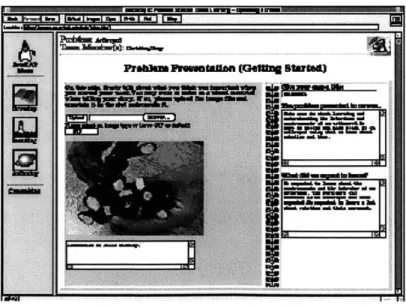
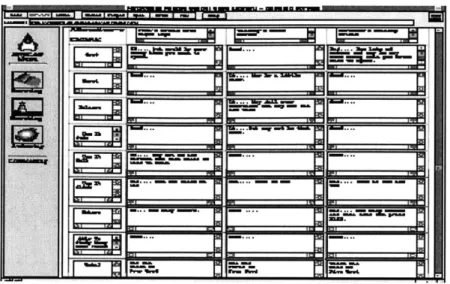
There are four scenes in JavaCAP. The first is the "Problem Presentation" scene, shown in Figure 4, where students specify the problem addressed and the objectives in studying the problem. Following this scene is the "Alternatives Selection" Scene, illustrated in Figure 5, where suggested design alternatives are presented, in a tabular format, allowing them to be weighed against the others according to some specified criteria [8]. In the "Solution" scene, the design chosen is described, as well as the results of implementing it and the lessons learned in the process. The final scene in the case is the "It's A Wrap" scene, which includes additional aspects of the project, which the students considered important or useful, e.g., collaboration experiences.
A
11-
________NFigure 5. The "Alternatives Selection" Scene in JavaCAP.
With the exception of the "Alternatives Selection" scene, each scene is designed as a two-column notebook screen. The left column provides an unstructured area for students to type in their experiences regarding a particular aspect of the design. The column also allows students to attach a scanned photograph with annotation, to help convey their experiences. The right column, on the other hand, is a structured and sequential interface designed to facilitate the reflection process. It provides features for indexing the case and specifying generic textual details about the case. In the "Problem Presentation" scene, for instance, the left column asks students to identify what they considered important upon beginning the design problem, including a picture, if necessary whereas the right column requires a tide for the case, the problem specification, and some learning expectations. This two-column user interface model was designed to facilitate collaboration within the group during the authoring process. One group member could contribute a photograph relevant to the problem being addressed, while another member can define the group's statement of the problem.
The user interface for the "Alternatives Selection" scene is a table of textual components in which students provide a list of suggested alternatives, which are weighed against a set of criteria they used in making their design decision. According to the researchers, this scene is usually considered the most challenging for students since they may not have evaluated their alternatives in such a precise manner.
The user inteface
for JavaCAP
is
highy structured, perhaps in an attempt to increase unformiyin
the presentation of the work carred out by the various teams. While this structure might be perceived as reasonable, it can also be viewed as a restriction on a student's way of expressing what he or she had learned in
the
design process. Crossroads, unlike JavaCAP, provides an open editing areafor
the student toplay
around and present his or her work, without any structural boundaries. Crossroads assumes that structure grows naturally from the nature of the activities and the interactions amongst students and
teachers/mentors.
When used in a well-chosen context, JavaCAP can be an invaluable tool for students to document their design experience in ways that will make this experience resourceful. These benefits can be attributed to the tool's text and graphical annotation capabilities. In addition, its user interface structure allows students to reflect on their design in an approach that is much more guided than those of other collaborative applications. This guidance structure is provided at a price, however, since the target audience for JavaCAP is limited. The tool is also limited in its editing capabilities. While it supports image and text content,
JavaCAP
does not handle the display and manipulation of time-based media such as audio orvideo clips. A student may have collected several video clips of his or her design work, which cannot be integrated into JavaCAP because of this missing functionality. Additionally, owing to its Web-based nature, JavaCAP lacks certain editing operations, including undo-redo functionality, cut-copy-and-paste data transfer, and object dragging. All media imported into JavaCAP are constrained to a particular state and location. JavaCAP also has
its drawbacks as a collaborative tool. Its use is highly dependent on the activity in which it is adopted, and, as a result, it will not be useful in other contexts, not very similar to those it
targets.
2.3
Belvedere
Belvedere is another system aimed to facilitate online collaboration among K12 students. Bearing the same name as the project that it was developed for, Belvedere includes tools and materials designed to help students learn and improve their skills in both individual and collaborative settings. Students are divided into teams to analyze a relevant, though simplified, scientific problem. Each team uses the tools provided by Belvedere to search through online materials such as articles, references, etc. that are related to this problem, and select a subset of these for study. Using a provided diagramming tool, they try to understand the problem by constructing a model consisting of abstract ideas and relationships among these ideas. They can also extend the model by constructing hypotheses and providing evidence to support these hypotheses. The system provides an online coach that can help guide the students throughout this process, although it remains dormant until it is invoked or has highly important advice to offer. The online system is tightly coupled with offline activity usually performed by a scientist - talking with other scientists, reading articles, attending conferences, going on field trips, conducting experiments in the laboratory and in the field.
Belvedere was developed by a research team at the Learning Research and Development Center (LRDC) at the University of Pittsburgh. Founded in 1963, the LRDC aims to find new approaches to enhancing scientific learning using new technologies. A common perspective adopted by many LRDC projects is that of the student as an active
learner who constructs his or her own knowledge as much as a scientist constructs socially shared knowledge.
The application domain of Belvedere is in learning critical inquiry skills in science, which differs from JavaCAP's primary purpose. Using the tool, students can develop these skills, which are applicable in everyday life as well as in science. These skills include acquainting oneself with a field of study, identifying a problem of interest, making hypotheses or proposing solutions, locating evidence that supports the hypotheses or solutions, making conclusions based on the supporting evidence, making a summary of the inquiry, presenting the problem study to others, and conducting and discussing the inquiry process pursued by other students.
According to the researchers, students can learn inquiry skills better by being more active in learning science and as a result see science as a process, and not just a collection of facts. Additionally, through the collaborative nature of the project, students can build a community where they work together to conduct inquiries whether they are brainstorming or collecting evidence. They will be able to reflect upon their work throughout the process, and understand how a scientific community works through scientific problems. As students conduct inquiry, they become more adept at discriminating scientific information from non-scientific elements and more skillful in analyzing and reporting such information. They learn the necessary tasks of working with others and respecting the opinions of others, and as well as utilizing others as resources. In effect, the Belvedere project aims to combine two important, and quite different elements: the process of analyzing scientific information, and collaboration, both in a learning context.
Like JavaCAP, Belvedere is
targeted
towards specific kinds of collaborative activities, paricularly those that involve conductingcritical inquiry.
In addition,it
designedforuse
in contexts that require studentsto conduct a substantial amount of research
in
order to develop a certain perspective on a particular concept or idea. In contrast, Crossroads allowsfor
several syles of research, development, and design. Students can useCrossroads to document work stemming from their research, to experiment with their creative ideas, and to brainstorm about and keep a
journal
of their
design ideas. It could be based on any kind of construction,from
thinking of
new approaches of representing concepts of time and space to building concreteobjects like
robots and planes.
As mentioned earlier, Belvedere provides tools and materials to facilitate the learning of inquiry skills. These include:
" a collaborative inquiry database that contains information about real, though simplified, scientific topics
" an inquiry diagramming tool that enables students to formulate their thoughts, and construct hypotheses and relationships between hypotheses
* an expert-based coach that serves as a guide to students through out the inquiry process when necessary, as opposed to a solution repository
* a chatting facility that enables team members to communicate among themselves
* HTML-based materials that consist of offline articles and other supplementary materials carefully selected for a particular activity upon the teacher's discretion
The manner in which the tools and materials are used is up to the supervisor or teacher. A typical scenario involves a class science project that requires students to do
research on a particular topic and provide an analysis or a solution to a problem stated in the topic. The teacher would first select and prepare a resource set of articles and references and other materials that would help students conduct their background research. These materials would be HTML-based, making them viewable on any computer with a Web browser. Once
these materials have been reviewed, students would be divided into teams and required to think about the problem they were assigned and provide a solution for it, with an explanation of their reasoning and solution.
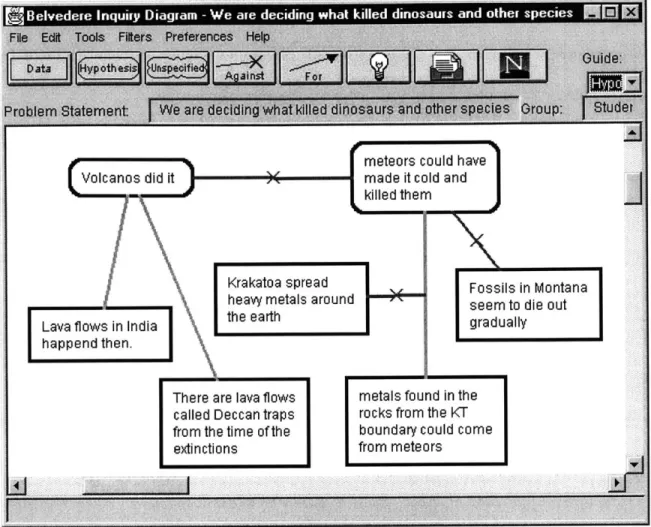
The diagramming tool, which is illustrated in Figure 6, can be used for this problem analysis task [2]. It provides a shared workspace for a team to formulate the assigned problem as a diagram. Members can propose hypotheses, represented as shapes in the diagram that will lead to a solution of the problem. These hypotheses can be related onscreen by lines, which have a thickness value to represent the strength of the relationship. By using this extensible diagram, students see the abstract ideas and their relationships in their design work, which helps to provide a guided focus in their discussions. The state of the diagram is communicated to other team members as it is being edited, through a mechanism commonly referred to as WYSIWIS (what-you-see-is-what-i-see). With the included chatting module, team members can communicate and share ideas during this editing process. After the inquiry has been completed, the team can present these findings to the class. Through the presentation, team members can receive feedback about their work from their peers regarding their inquiry approach, the evidence gathered, etc. They could use this feedback to reevaluate their approach and perhaps repeat the inquiry to account for some new evidence that was previously unaccounted for. Also, such feedback may be useful to the team as far as reflecting on their work. The team can also write a report describing their inquiry process and results. This report is published as HTML, and is accessible to students in the particular team and other teams, as well as teachers and parents regardless of physical location. The only necessity is an Internet connection.
Figure 6. The inquiry diagramming tool in Belvedere.
The above scenario illustrates that the functionali
provided
by Belvedere's diagramming tool can be used for reasoning about the abstract relationships related to a particular scientific concept. Although the system as a whole provides a sufficient level of collaboration in activities that require this kind of reasoning, Belvedere, unlike Crossroads, is constrained in its usabilio to contexts that involve team collaboration in other ways.The system architecture is based on a client-server model. The computers that students, teachers, and parents use contain the necessary client software - Web browser, chat, diagramming tool, and coach - which interacts with the server tools. Since several
Volcanos did it
Krakatoa spre~a heavy metals a Lava flows in India the earth happend then.
There are lava flows
called Deccan traps from the time of the] extinctions
meteors could have made it cold and killed them
d Fossils in Montana
ro u nd seem to die out
gradually
metals found in the
rocks from the KT boundary could come from meteors
updates to a client's state of the system are asynchronous, i.e., chat messages, coach advice, diagram state, each client has a listener module running in a separate thread to listen for these updates from the server. As a result, the server maintains the responsibility of maintaining connections between clients. This mechanism enables a student to pick up a team discussion from where it left off. It also serves as a site of storage in the event of a client shutdown, etc.
The system was built using widely supported computing standards, such as Java,
CGI, Netscape, etc. This was done to achieve a high degree of interoperability and reusability, while minimizing the cost of maintaining the system. As a result, new functionality can be easily integrated into the existing system, and certain aspects of the system may be reused in other software designs, possibly related to educational collaborative software.
Belvedere uses several technologies and computationalparadigms
to
achieveteam
collaboration, which can be suitably adopted into the design and implementation of other collaborative software projects including Crossmads. Ofparticular interest is the overall separation of Belvedere'sfunctionaliy
into client and servercomponents, and how the server is used to keep track of client connections to enable collaborative functions such as chatting.
Belvedere provides several key features such as chatting that make it an effective collaborative tool for the kind of the activities that it was designed to support. Furthermore, it benefits from a flexible and modularized software design, making it possible to extend the system to support new features. However, Belvedere is not without its drawbacks. Like JavaCAP, its audience is limited to only those conducting collaborative inquiry. While this makes its usability focused, it also constrains the overall impact of its collaborative features within the educational community. In addition, the system does not allow for users in a
team to regularly share parts of their ongoing work with other students not in the team. The only form of team-team sharing that it supports occurs through project presentations and online reports shown and distributed in class. As a result, the collaborative strength of the system within a decentralized community may be limited from reaching its full potential.
2.4
Closing Remarks
As observed from the study of the existing software systems described in this chapter, some tools support collaborative learning activities in limited contexts. Some tools, while designed for collaboration, do not integrate capabilities to promote any form of learning. In addition, tools that allow the learner to document the planning, process, and results of collaborative activities are few in number, and do not provide support for manipulating rich media content such as audio and video. Crossroads, the system described in this paper, serves to not only support the process of collaborative learning in a wide variety of activities, but to also capture the process as well. The following chapter describes a scenario that highlights how Crossroads can be used to accomplish both tasks.
3 SCENARIOS
Crossroads is designed to enable and support documentation and discussion around constructionist collaborative learning activities, in a variety of contexts with many different network requirements. In order to get a sense of the kind of scenarios Crossroads would be ideal for, let us consider one hypothetical scenario in detail. The scenario, though hypothetical, is based on the experiences of researchers in the Epistemology and Learning Group at the MIT Media Laboratory in a variety of settings - workshops, after school centers, and classrooms - with incorporating the constructionist tools that they have developed in workshops over the past decade. It is presented as a narrative describing a fictional school that adopts Crossroads into its learning curriculum. The source of this narrative is mostly imaginative, though inspired by prior observations of learning contexts such as workshops either directly or indirectly (through video). It is important to note that this narrative includes both implemented and planned features of Crossroads.
Ms. Wilson is an eighth-grade schoolteacher at the Children's Design School (CDS). A small middle school in Boston, Massachusetts, CDS has been able to obtain constant Internet connectivity with the help of several sponsors. It has a local area network (LAN) infrastructure, through which all computers in the school access the Internet. In addition, there are two computer laboratories in the school, and each having ten computers. Each of these computers contains various software packages, including software for converting recorded video data to electronic files and for audio recording. The entire computer and network infrastructure of the school is managed by a small team of network administrators, who regularly visit the school to ensure the network and other hardware components are functioning properly. These administrators also ensure that all software, including
Crossroads, has been configured successfully on the network. Specifically, they have installed the Crossroads server programs in the several high-memory, high-performance server machines owned by the school, configured all the computers in the laboratories to use the Crossroads client software, and performed comprehensive tests to ensure that the client-server communication line was working well. With this architecture, should the school's Internet connectivity become scarce, no major configuration changes need to be made to ensure that Crossroads is still functioning, as long as the school's intranet is still active. Also, for increased availability, additional servers can be installed within the intranet. Furthermore, in the presence of reliable Internet access, more servers can be placed in locations outside the intranet, and these can be configured for CDS in particular.
Everyday, Ms. Wilson teaches her students, twenty in number in each class, subjects ranging from Math to Science to Engineering. Some of the subjects she teaches require her students to use the computer laboratories to do an assignment, e.g., writing a report, conducting research on the Internet, etc. On one particular day in the month of February, Ms. Wilson, spirited in the constructionist/constructivist kinds of learning, decides to brainstorm activities that will allow her students to work together on projects, and learn from each other in the process.
She decides on the following activity, which she had coordinated the previous semester. The activity is to build doll-like models of creatures. Particularly, the activity would require the building of the creatures' limbs such as hands and legs from a provided set
of materials. Several heads and chests will be provided, although each student participating in the activity could build his or her own - though only as extra credit work. The aim of the activity is to give students a more concrete appreciation of and to generate discussions around the curricular material on the salient differences in the designs and functional
attributes of human and animal limbs. Ms. Wilson divides each of her classes evenly into five teams of four students per team. The limb design and creation part of the activity is expected to last eight weeks. At the end of this period, each team would have to prepare a public presentation and a final report that documents their design process as well as the final artifacts.
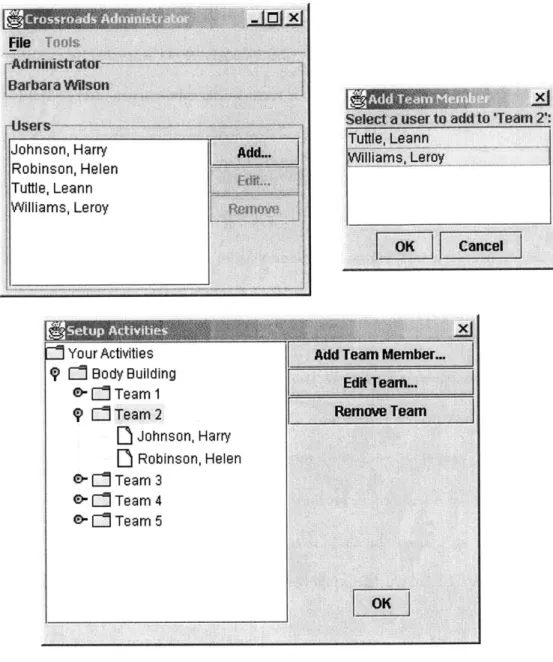
Ms. Wilson has decided to use Crossroads as an integral part of this activity. Specifically, she wants her students to use it as a tool for authoring and sharing. In order to make this possible, she makes sure that her students are registered Crossroads users and creates Crossroads teams for the teams that they belong to. Since she has never setup Crossroads for her class before, she runs the Crossroads Administrator tool to register her students into the system. She assigns each of her students a username/password pair, which each student was required to specify at an earlier time. Once the students have been entered into the system, a virtual activity is created, named "Body Building." Virtual teams are created and added to this activity through the Administrator, and students are assigned to their respective teams. Figure 7 captures this process. It is time to start the activity.
File Tools -Administrator -Barbara Wilson UsTrs I~
X~
Your Activities 9Li
Body Building 0-Team 1
OP
C Team 2D
Johnson, Harry
D
Robinson, Helen
0- 1Team 30-Li
Team 40-
L1
Team 5Add Team Member... Edit Team...
Remove Team
Figure 7. Ms. Wilson using the Crossroads Administrator to add Leann and Leroy to Team 2.
Day 1: Ms. Wilson introduces the activity to her students. She provides them with a set of materials of several kinds, both traditional (wood, metal, plastic, paper) and computational (LEGO@ MINDSTORMSTM products), and points out that they are free to create any sets of legs that they can think of. She also obtains passes for them to use the
Johnson, Harry Robinson, Helen Tuttle, Leann Williams, Leroy
AdiL.
Selet a user to add to Team 2':
Tuttle, Leann
illiams, Leroy
computer laboratories, in case they need to do research on building limbs. As a useful but optional research guide for her students, she mentions a website that references existing projects that were created by students in her former class who participated in this activity the semester before. She also notifies them that they have been registered as Crossroads users and that they should use Crossroads to document their progress.
Day 2: Team 2, which consists of Harry, Helen, Leann, and Leroy meet to decide how to divide up the work. Harry and Helen choose the build various kinds of hands and arms, while Leann and Leroy decide to create legs. They agree to spend the rest of the day sampling the available materials and start building the project the next day.
Day 3: Each team is already getting involved in the activity. In Team 2 particularly, Helen and Leann have been researching websites for tips on how to build hands and legs respectively and have gained some input on doing so. Harry and Leroy, however, decided to forgo research and start building limbs on their own. They were able to come up with some sample limbs by the end of the day. They borrowed a video camera from the school's instrument store, which they used to take some pictures of their work, as well as some short video clips.
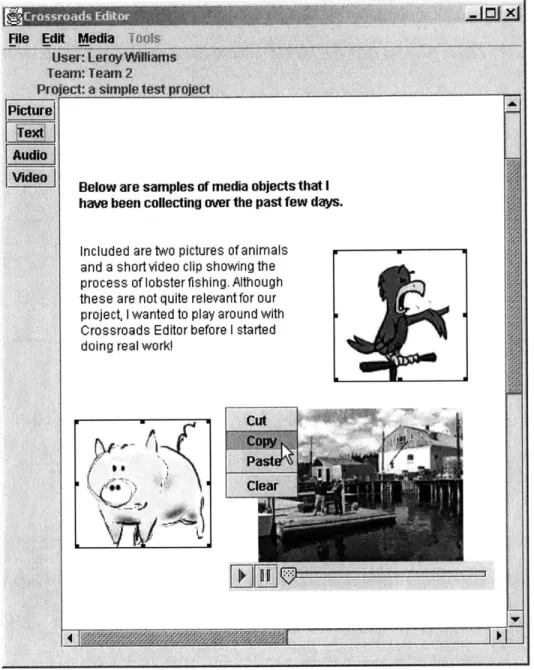
Day 5: Harry and Leroy convert the pictures and video they have collected to media files, which they import into empty projects using the Crossroads Editor, as illustrated in Figure 8. Helen and Leann, on the other hand, are still researching on limbs and are expecting to gather enough hints for them to easily do their work.
tnt
- .. I.as dior
le Edit Media T
Wis
User: LeroyWilliams Teart: Team 2Project: a simple test project Picture
0 Cr I
[ Ed eo] aeno ar e samnpQe nf india nhjncts that I have been collecting over the past few days.
Included are two pictures of animals and a short video clip showing the
process of lobster fishing. Although
these are not quite relevant for our project, I wanted to play around with Crossroads Editor before I started
doing real work!
. cut
Clear
Figure 8. Leroy using the Crossroads Editor to create sample projects.
End of Week 1: Helen and Leann catch up with the work that Harry and Leroy have been doing, respectively. Helen views all the pictures and video clips of hands that Harry has been collecting and places them in the Crossroads Resource Folder, making them available to other teams. Also using the Folder, she comments a
little
on the projects thatHarry had created, describing the various pictures and video clips that he had added earlier in the week. Leann decides that she should publish the most recent version of the project that Leroy has been creating, even though there is still much work to be done. She does this using the Editor, and asks Helen to check if she can view the newly published project in the Crossroads Project Browser. Helen confirms. "Every other team can now see what we've done," says Leann excitedly. Each team also becomes aware that Ms. Wilson has been reviewing their work thus far, owing to the comments she sent to the team via the Administrator regarding their work, as well as the feedback she gave to each individual student. Harry tells the other Team 2 members that Ms. Wilson said that his pictures vividly captured a wide variety of hand forms. "My pictures do make a difference!" he tells Helen.
End of Week 4: Team 2 has built a wide variety of limbs that are suitable for most
kinds of motion - walking, crawling, jogging, running, etc. With these limbs, they have created a few simple bodies, some completely robotic, that can perform some interesting programmable motions such as dancing from side to side and raising a hand up and down. Leroy decides at this time that they should create a project that includes the team's combined efforts. The remaining team members agree. Leroy then creates a project titled "Hand in Hand, Leg in Leg" in which he places images, text, and video clips describing the legs that he and Leann have built so far. He also edits some of the text to make it more apparent that the content he just added is part of a document with a wider focus. He encourages both Harry and Helen to add their content to this project he just created, and Helen mentions that she will do that tomorrow. Helen says that she will publish the version of the project that she creates once she is done. Also, Harry lets everyone in the team know that, in addition to his construction work, he has been documenting the team's plans and progress using the Editor. He mentions that twice a week from home, he reviews all the versions of the