Basic Lisp Techniques
David J. Cooper, Jr.
ii
0Copyright c
Foreword
1
Computers, and the software applications that power them, permeate every facet of our daily lives. From groceries to airline reservations to dental appointments, our reliance on technology is all-encompassing. And, it’s not enough. Every day, our expectations of technology and software increase:
• smart appliances that can be controlled via the internet
• better search engines that generate information we actually want • voice-activated laptops
• cars that know exactly where to go
The list is endless. Unfortunately, there is not an endless supply of programmers and developers to satisfy our insatiable appetites for new features and gadgets. Every day, hundreds of magazine and on-line articles focus on the time and people resources needed to support future technological expectations. Further, the days of unlimited funding are over. Investors want to see results, fast.
Common Lisp (CL) is one of the few languages and development options that can meet these challenges. Powerful, flexible, changeable on the fly — increasingly, CL is playing a leading role in areas with complex problem-solving demands. Engineers in the fields of bioinformatics, scheduling, data mining, document management, B2B, and E-commerce have all turned to CL to complete their applications on time and within budget. CL, however, no longer just appropriate for the most complex problems. Applications of modest complexity, but with demanding needs for fast development cycles and customization, are also ideal candidates for CL.
Other languages have tried to mimic CL, with limited success. Perl, Python, Java, C++, C# — they all incorporate some of the features that give Lisp its power, but their implementations tend to be brittle.
The purpose of this book is to showcase the features that make CL so much better than these imitators, and to give you a “quick-start” guide for using Common Lisp as a development environment. If you are an experienced programmer in languages other than Lisp, this guide gives you all the tools you need to begin writing Lisp applications. If you’ve had some exposure to Lisp in the past, this guide will help refresh those memories and shed some new light on CL for you.
1this Foreword was authored by Franz Inc.
iv
But be careful, Lisp can be addicting! This is why many Fortune 500 companies will use nothing else on their 24/7, cutting-edge, mission-critical applications. After reading this book, trying our software, and experiencing a 3 to 10 times increase in productivity, we believe you will feel the same way.
Contents
1 Introduction 1
1.1 The Past, Present, and Future of Common Lisp . . . 1
1.1.1 Lisp Yesterday . . . 1
1.1.2 Lisp Today . . . 1
1.1.3 Lisp Tomorrow . . . 2
1.2 Convergence of Hardware and Software . . . 3
1.3 The CL Model of Computation . . . 3
2 Operating a CL Development Environment 5 2.1 Installing a CL Environment . . . 5
2.2 Running CL in a Shell Window . . . 6
2.2.1 Starting CL from a Terminal Window . . . 6
2.2.2 Stopping CL from a Terminal Window . . . 6
2.3 Running CL inside a Text Editor . . . 8
2.3.1 A Note on Emacs and Text Editors . . . 8
2.3.2 Emacs Terminology . . . 8
2.3.3 Starting, Stopping, and Working With CL inside an Emacs Shell . . 9
2.4 Running CL as a subprocess of Emacs . . . 10
2.4.1 Starting the CL subprocess within Emacs . . . 10
2.4.2 Working with CL as an Emacs subprocess . . . 10
2.4.3 Compiling and Loading a File from an Emacs buffer . . . 11
2.5 Integrated Development Environment . . . 12
2.6 The User Init File . . . 12
2.7 Using CL as a scripting language . . . 13
2.8 Debugging in CL . . . 14
2.8.1 Common debugger commands . . . 14
2.8.2 Interpreted vs Compiled Code . . . 15
2.8.3 Use of (break) and C-c to interrupt . . . 15
2.8.4 Profiling . . . 16
2.9 Developing Programs and Applications in CL . . . 16
2.9.1 A Layered Approach . . . 16
2.9.2 Compiling and Loading your Project . . . 16
2.9.3 Creating an Application “Fasl” File . . . 17
2.9.4 Creating an Image File . . . 17 v
vi CONTENTS
2.9.5 Building Runtime Images . . . 18
2.9.6 Using an Application Init File . . . 18
3 The CL Language 19 3.1 Overview of CL and its Syntax . . . 19
3.1.1 Evaluation of Arguments to a Function . . . 21
3.1.2 Lisp Syntax Simplicity . . . 21
3.1.3 Turning Off Evaluation . . . 22
3.1.4 Fundamental CL Data Types . . . 22
3.1.5 Functions . . . 25
3.1.6 Global and Local Variables . . . 25
3.2 The List as a Data Structure . . . 27
3.2.1 Accessing the Elements of a List . . . 28
3.2.2 The “Rest” of the Story . . . 29
3.2.3 The Empty List . . . 29
3.2.4 Are You a List? . . . 29
3.2.5 The conditional If . . . 30
3.2.6 Length of a List . . . 30
3.2.7 Member of a List . . . 31
3.2.8 Getting Part of a List . . . 32
3.2.9 Appending Lists . . . 32
3.2.10 Adding Elements to a List . . . 33
3.2.11 Removing Elements from a List . . . 33
3.2.12 Sorting Lists . . . 34
3.2.13 Treating a List as a Set . . . 34
3.2.14 Mapping a Function to a List . . . 35
3.2.15 Property Lists . . . 35 3.3 Control of Execution . . . 35 3.3.1 If . . . 36 3.3.2 When . . . 36 3.3.3 Logical Operators . . . 36 3.3.4 Cond . . . 37 3.3.5 Case . . . 38 3.3.6 Iteration . . . 38 3.4 Functions as Objects . . . 39 3.4.1 Named Functions . . . 39 3.4.2 Functional Arguments . . . 40 3.4.3 Anonymous Functions . . . 40 3.4.4 Optional Arguments . . . 41 3.4.5 Keyword Arguments . . . 41
3.5 Input, Output, Streams, and Strings . . . 42
3.5.1 Read . . . 42
3.5.2 Print and Prin1 . . . 42
3.5.3 Princ . . . 43
CONTENTS vii
3.5.5 Pathnames . . . 44
3.5.6 File Input and Output . . . 44
3.6 Hash Tables, Arrays, Structures, and Classes . . . 45
3.6.1 Hash Tables . . . 45
3.6.2 Arrays . . . 46
3.6.3 Structures . . . 47
3.6.4 Classes and Methods . . . 47
3.7 Packages . . . 48
3.7.1 Importing and Exporting Symbols . . . 49
3.7.2 The Keyword Package . . . 49
3.8 Common Stumbling Blocks . . . 49
3.8.1 Quotes . . . 49
3.8.2 Function Argument Lists . . . 50
3.8.3 Symbols vs. Strings . . . 50
3.8.4 Equality . . . 52
3.8.5 Distinguishing Macros from Functions . . . 53
3.8.6 Operations that cons . . . 54
4 Interfaces 55 4.1 Interfacing with the Operating System . . . 55
4.2 Foreign Function Interface . . . 55
4.3 Interfacing with Corba . . . 56
4.4 Custom Socket Connections . . . 56
4.5 Interfacing with Windows (COM, DLL, DDE) . . . 58
4.6 Code Generation into Other Languages . . . 58
4.7 Multiprocessing . . . 58
4.7.1 Starting a Background Process . . . 58
4.7.2 Concurrency Control . . . 59
4.8 Database Interfaces . . . 60
4.8.1 ODBC . . . 61
4.8.2 MySQL . . . 61
4.9 World Wide Web . . . 62
4.9.1 Server and HTML Generation . . . 62
4.9.2 Client and HTML Parsing . . . 63
4.10 Regular Expressions . . . 64 4.11 Email . . . 64 4.11.1 Sending Mail . . . 64 4.11.2 Retrieving Mail . . . 65 5 Squeakymail 67 5.1 Overview of Squeakymail . . . 67
5.2 Fetching and Scoring . . . 67
5.2.1 Tokenizing . . . 72
5.2.2 Scoring . . . 72
viii CONTENTS
A Squeakymail with Genworks’ GDL/GWL 77
A.1 Toplevel Squeakymail Home Page . . . 77 A.2 Page for Browsing and Classifying . . . 78
B Bibliography 83
C Emacs Customization 85
C.1 Lisp Mode . . . 85 C.2 Making Your Own Keychords . . . 85 C.3 Keyboard Mapping . . . 86
D Afterword 87
D.1 About This Book . . . 87 D.2 Acknowledgements . . . 87 D.3 About the Author . . . 87
Chapter 1
Introduction
1.1
The Past, Present, and Future of Common Lisp
1.1.1 Lisp Yesterday
John McCarthy discovered the basic principles of Lisp in 1958, when he was processing complex mathematical lists at MIT. Common Lisp (CL) is a high-level computer language, whose syntax follows a simple list-like structure. The term “Lisp” itself originally stood for “LISt Processing.” When developing, testing, and running a CL program, at the core is a modern-day version of the original List Processor which processes (compiles, evaluates, etc.) the elements of your program. These elements, at the source code level, are represented as lists. A list, in this context, is just a sequence of items, much like a familiar shopping list or checklist. Originally the list was pretty much the only data structure supported by Lisp, but modern-day Common Lisp supports a wide range of flexible and efficient data structures.
A typical Common Lisp development and runtime environment behaves like a complete operating system, with multiple threads of execution and the ability to load new code and redefine objects (functions, etc.) dynamically, i.e. without stopping and restarting the “machine.”
This “operating system” characteristic also makes CL significantly more flexible than other popular programming languages. Whereas some other languages, such as shell scripts or Perl CGI scripts, need to pipe data around, in CL all data manipulations can run interactively within one single process with a shared memory space.
1.1.2 Lisp Today
The most popular form of Lisp used today, “ANSI Common Lisp,” was initially designed by Guy Steele in Common Lisp, the Language, 2nd Edition (“CLtL2”) — (see the Bibliogra-phy in Appendix B). This version of Lisp became the accepted industry standard. In 1995, the American National Standards Institute recognized a slightly updated version as ANSI Common Lisp, the first object-oriented language to receive certification, and ANSI CL re-mains the only language that meets all of the criteria set forth by the Object Management Group (OMG) for a complete object-oriented language.
2 CHAPTER 1. INTRODUCTION Paul Graham outlines ANSI CL in his 1996 book ANSI Common Lisp, also listed in Appendix B.
Official language standardization is important, because it protects developers from be-coming saddled with legacy applications as new versions of a language are implemented. For example, this lack of standardization has been a continuing problem for Perl developers. Since each implementation of Perl defines the behavior of the language, it is not uncommon to have applications that require outdated versions of Perl, making it nearly impossible to use in a mission-critical commercial environment.
1.1.3 Lisp Tomorrow
Many developers once hoped that the software development process of the future would be more automated through Computer-aided Software Engineering (CASE) tools. Such tools claim to enable programmers and non-programmers to diagram their applications visually and automatically generate code. While useful to a certain extent, traditional CASE tools cannot cover domain-specific details and support all possible kinds of customizations — so developers inevitably need to hand-code the rest of their applications, breaking the link between the CASE model and the code. CASE systems fall short of being a true “problem-solving tool.”
The recursive nature of CL, and its natural ability to build applications in layers and build upon itself — in essence, code which writes code which writes code..., makes CL a much better software engineering solution. CL programs can generate other CL programs (usually at compile-time), allowing the developer to define all parts of the application in one unified high-level language. Using macros and functions, naturally supported by the CL syntax, the system can convert applications written in the high-level language automatically into “final” code. Thus, CL is both a programming language and a powerful CASE tool, and there is no need to break the connection.
Several other features of CL also save significant development time and manpower: • Automatic Memory Management/Garbage Collection: inherent in CL’s basic
archi-tecture.
• Dynamic Typing: In CL, values have types, but variables do not. This means that you don’t have to declare variables, or placeholders, ahead of time to be of a particular type; you can simply create them or modify them on the fly1.
• Dynamic Redefinition: You can add new operations and functionality to the running CL process without the need for downtime. In fact, a program can be running in one thread, while parts of the code are redefined in another thread. Moreover, as soon as the redefinitions are finished, the application will use the new code and is effectively modified while running. This feature is especially useful for server applications that cannot afford downtimes – you can patch and repair them while they are running. • Portability: The “abstract machine” quality of CL makes programs especially portable.
1
While you don’t have to declare variable types, you may declare them. Doing so can help CL’s compiler to optimize your program further.
1.2. CONVERGENCE OF HARDWARE AND SOFTWARE 3 • Standard Features: CL contains many built-in features and data structures that are non-standard in other languages. Features such as full-blown symbol tables and pack-age systems, hash tables, list structures, and a comprehensive object system are sev-eral “automatic” features which would require significant developer time to recreate in other languages.
1.2
Convergence of Hardware and Software
The most common criticism of Lisp usually made by programmers unfamiliar with the language is that Lisp applications are too big and too slow. While this may have been true 20 years ago, it is absolutely not the case today. Today’s inexpensive commodity computers have more memory than some of the most powerful machines available just five years ago, and easily meet the computing needs of a typical CL application. Hardware is no longer the critical factor. Programmers and development time are!
Further, CL programming teams tend to be small, because the inherent features in CL empower developers to do more. Without excessive effort, a single CL developer can create and deploy a sophisticated, powerful program in a much shorter period of time than if another language were used.
1.3
The CL Model of Computation
Programming in CL is distinguished from programming in other languages due to its unique syntax and development mode. CL allows developers to make changes and test them im-mediately, in an incremental manner. In other languages, a developer must follow the “compile-link-run-test” cycle. These extra steps add minutes or hours to each cycle of de-velopment, and break the programmer’s thought process. Multiply these figures by days, weeks, and months — and the potential savings are phenomenal.
Chapter 2
Operating a CL Development
Environment
This chapter covers some of the hands-on techniques used when working with a CL devel-opment environment, specifically, the Allegro CL R environment from Franz Inc. If you
are completely unfamiliar with any Lisp language, you may wish to reference Chapter 3 as you read this chapter.
Ideally, while reading this chapter, you should have access to an actual Common Lisp session and try typing in some of the examples.
When working with Common Lisp, it helps to think of the environment as its own operating system, sitting on top of whatever operating system you happen to be working with. In fact, people used to build entire workstations and operating systems in Lisp. The Symbolics Common Lisp environment still runs as an emulated machine on top of the 64-bit Compaq/DEC Alpha CPU, with its own Lisp-based operating system.
A complete and current listing of available CL systems can be found on the Association of Lisp Users website, at
http://www.alu.org/table/systems.htm
These systems follow the same basic principles, and most of what you learn and write on one system can be applied and ported over to others. The examples in this guide were prepared using Allegro CL for Linux. Where possible, we will note Allegro CL-specific syntax and extensions.
2.1
Installing a CL Environment
Installing a CL environment is generally a straightforward process. For Allegro CL on Linux, this basically involves running a simple shell script which steps you through some licensing information, then proceeds to unpack the distribution, and sets up the CL executable and supporting files.
The Windows installation involves somewhat less typing and more mouse clicking. 5
6 CHAPTER 2. OPERATING A CL DEVELOPMENT ENVIRONMENT
2.2
Running CL in a Shell Window
The most primitive and simplest way to run CL is directly from the Unix (Linux) shell from within a terminal window. Most programmers do not work this way on a daily basis because other modes of use provide more power and convenience with fewer keystrokes.
This mode of working is sometimes useful for logging into a running CL system on a remote host (e.g. a CL process acting as a webserver) when using a slow dial-up connection.
2.2.1 Starting CL from a Terminal Window
To start a CL session from a terminal window, simply type alisp
from the Unix (or DOS) command line. Assuming your shell execution path is set up properly and CL is installed properly, you will see some introductory information, then will be presented with a Command Prompt which should look very similar to the following: CL-USER(1):
CL has entered its read-eval-print loop, and is waiting for you to type something which it will then read, evaluate to obtain a return-value, and finally print this resulting return-value. The USER printed before the prompt refers to the current CL package (more on Packages later), and the number (1) simply keeps track of how many commands have been entered at the prompt.
2.2.2 Stopping CL from a Terminal Window
Now that you have learned how to start CL, you should probably know how to stop it. In Allegro CL, one easy way to stop the CL process is to type
(excl:exit)
at the Command Prompt. This should return you to the shell. In very rare cases, a stronger hammer is required to stop the CL process, in which case you can try typing
(excl:exit 0 :no-unwind t)
Try It: Now try starting and stopping CL several times, to get a feel for it. In general, you should notice that CL starts much more quickly on subsequent invocations. This is because the entire executable file has already been read into the computer’s memory and does not have to be read from the disk every time.
A shortcut for the (excl:exit) command is the toplevel command :exit. Toplevel commands are words which are preceded by a colon [:] that you can type at the CL Command Prompt as a shorthand way of making CL do something.
Try It: Start the CL environment. Then, using your favorite text editor, create a file /tmp/hello.lisp and place the following text into it (don’t worry about understanding the text for now):
2.2. RUNNING CL IN A SHELL WINDOW 7
(in-package :user) (defun hello ()
(write-string "Hello, World!"))
Save the file to disk. Now, at the CL prompt in the shell where you started the CL environment, compile and load this file as follows (text after the “USER” prompt represents what you have to type; everything else is text printed by CL):
CL-USER(3): (compile-file "/tmp/hello") ;;; Compiling file /tmp/hello.lisp
;;; Writing fasl file /tmp/hello.fasl Fasl write complete #p"/tmp/hello.fasl"
NIL NIL
CL-USER(4): (load "/tmp/hello") ; Fast loading /tmp/hello.fasl T
By default, the compile-file command will look for files with the .lisp suffix, and the load command will load the resulting compiled machine-code (binary) file, which by default will have the extension .fasl. The extension “.fasl” stands for “FASt Loading” file.
Note that, in general, simply loading an uncompiled Lisp file (using load) will function-ally have the same effect as loading a compiled binary (fasl) file. But the fasl file will load faster, and any functions, objects, etc. defined in it will perform faster, since they will have been optimized and translated into language which is closer to the actual machine. Unlike Java “class” files, CL fasl files usually represent native machine-specific code. This means that compiled CL programs will generally run much faster than compiled Java programs, but CL programs must be compiled separately for each type of machine on which you want to run them.
Finally, try executing the newly defined function hello by typing the following at your command line:
CL-USER(5): (hello) Hello, World!
"Hello, World!"
You should see the String Hello, World! printed (without double-quotes), then the re-turned String (with double-quotes) will be printed as well. In the next chapter, we will learn more about exactly what is going on here. For now the main point to understand is the idea of compiling and loading definitions from files, and invoking functions by typing expressions at the CL command line.
8 CHAPTER 2. OPERATING A CL DEVELOPMENT ENVIRONMENT
2.3
Running CL inside a Text Editor
A more powerful way of developing with CL is by running it from within a Unix (or DOS) shell that is running inside a buffer in a powerful text editor, such as Gnu Emacs1. One advantage of this approach is that the editor (in our example, Emacs) keeps a history of the entire session: both the expressions the programmer has typed, as well as everything that CL has printed. All these items can be easily reviewed or recalled.
2.3.1 A Note on Emacs and Text Editors
To develop using Common Lisp, you can, of course, use any text editor of your choice, although Emacs happens to be especially synergistic for working with CL, for reasons we will discuss later. With a bit of practice, you will find that the combination of Emacs and Allegro CL provides a more powerful and convenient development environment than any of today’s flashy “visual programming” environments. If you are used to working with the “vi” editor, Emacs comes with several “vi” emulation modes which you may want to experiment with on a transitional basis. If you are used to working with a standard Windows-based text editor, you will find a smooth transition to Emacs.
This guide provides examples using Gnu Emacs.
To work with CL in an Emacs shell buffer, you should be reasonably familiar with the text editor. If you are completely new to Gnu Emacs, go through the Emacs Tutorial, available under the “Help” menu at the top of the Emacs window.
2.3.2 Emacs Terminology
As you will learn in the Emacs Tutorial, when working with Emacs you make frequent use of key chords. Similar to “chords” on a piano, keychords can allow powerful text processing with relatively few sequential keystrokes.
They are key combinations involving holding down the Control key and/or the Meta key, and pressing some other regular key.
See Appendix C for information on which keys represent Control and Meta on your keyboard, and how you can customize these. To begin, try using the key labeled “Control” for Control and the keys labeled “Alt” (or the diamond-shaped key on Sun keyboards) for Meta. If your keyboard has a “Caps Lock” key to the left of the letter “A,” you should consider remapping this to function as Control, as explained in Appendix C.
This guide uses the following notations to indicate keychords (identical to those refer-enced in the Emacs Tutorial):
• M-x means to hold down the Meta key, and press (in this case) the “X” key • C-x means to hold down the Control key, and press (in this case) the “X” key • C-M-q means to hold down the Control key and the Meta key at the same time , and
press (in this case) the “Q” key
1Gnu Emacs comes pre-installed with all Linux systems, and for other systems should come as part
of your Allegro CL distribution. In any case, Emacs distributions and documentation are available from http://www.gnu.org
2.3. RUNNING CL INSIDE A TEXT EDITOR 9 • M-A would mean to hold down the Meta key, and the Shift key (because the “A” is
uppercase), and press (in this case) the “A” key.
2.3.3 Starting, Stopping, and Working With CL inside an Emacs Shell
To start Emacs, type emacs
or
gnuemacs
then start a Unix (or DOS) shell within emacs by typing M-x shell. Now type lisp
inside this shell’s window to start a CL session there. To shut down a session, exit CL exactly as above by typing
(excl:exit)
Exit from the shell by typing exit
and finally exit from Emacs by typing C-x C-c or M-x kill-emacs. Note that it is good practice always to exit from CL before exiting from Emacs. Otherwise the CL process may be left as an “undead” (zombie) process.
When in the CL process, you can move forward and backward in the “stack” (history) of expressions that you have typed, effectively recalling previous commands with only a few keystrokes. Use M-p to move backward in the history, and M-n to move forward. You can also use all of the editor’s text processing commands, for example to cut, copy, and paste expressions between the command line and other windows and open files (“buffers”) you may have open.
Try It: try typing the following expressions at the CL prompt. See what return-values are printed, and try recalling previous expressions (commands) using M-p and M-n:
(list 1 2 3) (+ 1 2 3) (> 3 4) (< 3 4)
Now, of course, you can edit, compile, load, and test your hello.lisp file as we did in Section 2.2. But this time you are staying within a single environment (the text editor environment) to achieve all these tasks.
10 CHAPTER 2. OPERATING A CL DEVELOPMENT ENVIRONMENT
2.4
Running CL as a subprocess of Emacs
An even more powerful way of developing with Allegro CL is by running it within Emacs in conjunction with a special Emacs/Lisp interface provided by Franz Inc. This technique provides all the benefits of running in an Emacs shell as outlined above, but is more powerful because the Emacs-CL interface extends Emacs with several special commands. These commands interact with the CL process, making the editor appear to be “Lisp-aware.” The combination of Emacs with the Emacs-CL interface results in a development environment whose utility approaches that of the vintage Symbolics Lisp Machines, which many Lisp aficionados still consider to be technology advanced well beyond anything produced today. Complete documentation of the Emacs-CL interface can be viewed by pointing your web browser at: file:/usr/local/acl62/doc/eli.htm (you may have to modify this pathname to point to your actual installed location of Allegro CL (acl62)).
2.4.1 Starting the CL subprocess within Emacs
To enable your Emacs to function in the proper manner, place the following expressions in a file named .emacs in your home directory:
(setq load-path
(cons "/usr/local/acl62/eli" load-path)) (load "fi-site-init")
As above, you may have to modify this pathname to point to your actual installed location of Allegro CL (acl62). Once you have added these lines to your .emacs file, you should be able to restart emacs, then issue the command:
M-x fi:common-lisp
to start CL running and automatically establish a network connection between the Emacs process and the CL process (in theory, the two processes could be running on different machines, but in practice they usually will run on the same machine). Accept all the defaults when prompted.
You can also start emacs with the CL subprocess automatically from a terminal window, by invoking emacs with an optional “function” argument, as follows:
emacs -f fi:common-lisp
This will start Emacs, which itself will immediately launch CL.
2.4.2 Working with CL as an Emacs subprocess
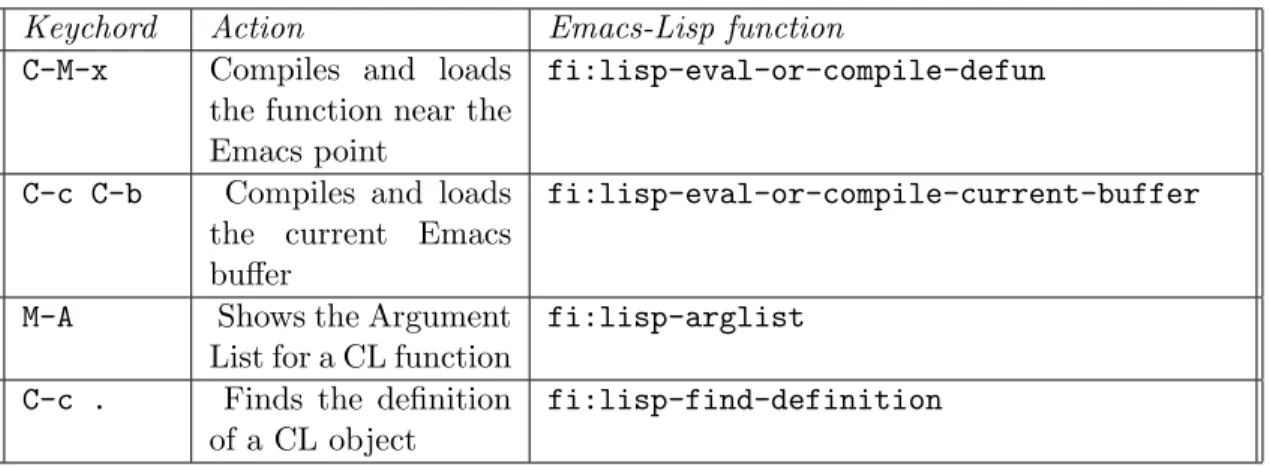
Once you have started CL within Emacs, you will be presented with a special buffer named *common-lisp* which in many ways is similar to simply running CL within a shell within Emacs as above. But now you have several more capabilities available to you, as outlined in Table 2.1.
To summarize, the Lisp-Emacs interface adds capabilities such as the following to your development environment:
2.4. RUNNING CL AS A SUBPROCESS OF EMACS 11 Keychord Action Emacs-Lisp function
C-M-x Compiles and loads the function near the Emacs point
fi:lisp-eval-or-compile-defun
C-c C-b Compiles and loads the current Emacs buffer
fi:lisp-eval-or-compile-current-buffer
M-A Shows the Argument List for a CL function
fi:lisp-arglist C-c . Finds the definition
of a CL object
fi:lisp-find-definition
Table 2.1: Common Commands of the Emacs-Lisp Interface
• Start and stop the CL process using Emacs commands
• Compile and load files into the running CL process, directly from the open Emacs buffer you are editing (no need explicitly to save the file, call the compile-file function, then call the load function, as with the “in-a-shell” techniques above) • Query the running CL process for information about objects currently defined in it
— for example, querying the CL, directly from Emacs, for the argument List of a particular function
• Run multiple read-eval-print loops, or listeners, in different threads of CL execution, as Emacs buffers
• Compile and load specified sections of an open Emacs buffer
• Locate the source code file corresponding to any defined CL object, such as a function or parameter, and automatically open it in an Emacs buffer
• Perform various debugging actions and other general CL help capabilities, directly from within the Emacs session
In short, Emacs becomes a remarkably powerful, infinitely customizable, CL integrated development environment.
2.4.3 Compiling and Loading a File from an Emacs buffer
Try it: Try starting Emacs with a CL subprocess as outlined above. If you have trouble, consult the URL listed above for complete instructions on running the Lisp-Emacs interface. Once you have Emacs running with a CL subprocess, you should have a buffer named *common-lisp*. If your Emacs session is not already visiting this buffer, visit it with the command C-x b *common-lisp*, or select *common-lisp* from the “Buffers” menu in Emacs (see Appendix C for instructions on how to set up a “hot key” for this and other common tasks when working with the Emacs-Lisp interface).
12 CHAPTER 2. OPERATING A CL DEVELOPMENT ENVIRONMENT Now, split your Emacs frame into two windows, with the command C-x 2. In both windows you should now see *common-lisp*. Now move the point2 to the other window with C-x o, and open the hello.lisp file you created for the previous exercise3. If you don’t have that file handy, create it now, with the following contents:
(defun hello ()
(write-string "Hello, World!"))
Now, compile and load the contents of this function definition with C-M-x. Finally, switch to the *common-lisp* window again with C-x o, and try invoking the hello function by calling it in normal Lisp fashion:
CL-USER(5): (hello) Hello, World!
"Hello, World!"
You should see the results printed into the same *common-lisp* buffer.
Try it: Now try the following: go back to the hello.lisp buffer, make an edit to the contents (for example, change the String to "Hello, CL World!"). Now compile the buffer with this change (Note that you do not necessarily have to save the file). Finally, return to the *common-lisp* buffer, and try invoking the function again to confirm that the redefinition has taken effect.
You have now learned the basic essentials for working with the Emacs-Lisp interface. See Appendix C for more information about Emacs customization and convenient Emacs commands specific to the Lisp editing mode.
2.5
Integrated Development Environment
Some CL implementations support or integrate with an IDE, or Integrated Development Environment. Such environments provide visual layout and design capabilities for User Interfaces and other graphical, visual techniques for application development. For example, such a system is available for Allegro CL on the Microsoft platforms. The details of these systems are covered in their own documentation and are beyond the scope of this guide.
2.6
The User Init File
When CL begins execution, it usually looks for an initialization file, or “init” file, to load. When CL loads this file, it will read and evaluate all the commands contained in it.
The default name and location for this initialization file is .clinit.cl
2
In technical Emacs parlance, the point is the insertion point for text, and the cursor is the mouse pointer.
3
Remember that pressing the space bar will automatically complete filenames for you when opening files in Emacs.
2.7. USING CL AS A SCRIPTING LANGUAGE 13 in the user’s home directory on Unix/Linux, and
c:\clinit.cl
on Windows systems.
For example, the init file can be used to define library functions and variables that the user employs frequently, or to control other aspects of the CL environment. An example init file is:
(in-package :user) (defun load-project ()
(load "~/lisp/part1") (load "~/lisp/part2"))
This will have the effect of defining a convenient function the user can then invoke to load the files for the current project. Note the call to the in-package function, which tells CL which Package to make “current” when loading this file. As we will see in more detail in Section 3.7, CL Packages allow programs to be separated into different “layers,” or “modules.” Notice also that in the calls to load we do not specify a file “type” extension, e.g. .lisp or .fasl. We are making use of the fact that the load function will look first for a binary file (of type fasl), and if this is not found it will then look for a file of type cl or lisp. In this example we assume that our Lisp files will already have been compiled into up-to-date binary fasl files.
In Section 2.9 we will look at some techniques for managing larger projects, and au-tomating both the compiling and loading process for the source files making up a project.
Note: the IDE mentioned in Section 2.5 is also a full-featured and powerful project system. The IDE is described in its own documentation, and is beyond the scope of this document.
2.7
Using CL as a scripting language
Although CL is usually used in the interactive mode described above while developing a program, it can be also used as a scripting language in more of a “batch” mode. For example, by running CL as:
lisp -e ’(load "~/script")’ < datafile1 > datafile2
it will load all of the function definitions and other expressions in file script.fasl or script.lisp, will process datafile1 on its Standard Input, and will create datafile2 with anything it writes to its Standard Output. Here is an example of a simple script.lisp file:
(in-package :user) (defun process-data ()
14 CHAPTER 2. OPERATING A CL DEVELOPMENT ENVIRONMENT (let (x j)
;;Read a line of input from datafile1 (setq x (read-line))
;;Remove leading spaces from X (setq j (dotimes (i (length x))
(when (not (string-equal " " (subseq x i (+ i 1)))) (return i))))
(setq x (subseq x j))
;;Write the result to datafile2 (format t "~A~%" x)))
(process-data)
This file defines a function to process the datafile, then calls this function to cause the actual processing to occur.
Note the use of the semicolon (“;”), which is a reader macro which tells CL to treat everything between it and the end of the line as a comment (to be ignored by the CL Reader).
2.8
Debugging in CL
CL provides one of the most advanced debugging and error-handling capabilities of any language or environment. The most obvious consequence of this is that your application will very rarely “crash” in a fatal manner. When an error occurs in a CL program, a break occurs. CL prints an error message, enters the debugger, and presents the user with one or more possible restart actions. This is similar to running inside a debugger, or in “debug mode,” in other languages, but in CL this ability comes as a built-in part of the language. For example, if we call the + function with an alphabetic Symbol instead of a Number, we generate the following error:
CL-USER(95): (+ ’r 4)
Error: ‘R’ is not of the expected type ‘NUMBER’ [condition type: TYPE-ERROR]
Restart actions (select using :continue): 0: Return to Top Level (an "abort" restart) [1] CL-USER(96):
The number [1] at the front of the prompt indicates that we are in the debugger, at Level 1. The debugger is itself a CL Command Prompt just like the toplevel Command Prompt, but it has some additional functionality. The next section provides a partial list of commands available to be entered directly at the debugger’s Command Prompt:
2.8.1 Common debugger commands
2.8. DEBUGGING IN CL 15 • :pop returns up one level
• :continue continues execution after a break or an error • :zoom Views the current function call stack4
• :up Moves the currency pointer up one frame in the stack • :down Moves the currency pointer down one frame in the stack • :help Describes all debugger commands
Franz Inc.’s Allegro Composer product also offers graphical access to these commands, as well as additional functionality.
2.8.2 Interpreted vs Compiled Code
CL works with both compiled and interpreted code. When you type expressions at a Com-mand Prompt, or use CL’s load function to load lisp source files directly, you are intro-ducing interpreted code into the system. This code does not undergo any optimization or translation into a lower-level machine representation — internally to CL it exists in a form very similar to its source code form. CL must do considerable work every time such code is evaluated, since it must be translated into lower-level machine instructions on each use.
When you create compiled code, on the other hand, for example by using CL’s compile-file command in order to produce a fasl file, the code is optimized and translated into an ef-ficient form. Loading the fasl file will replace any previous interpreted definitions with compiled definitions.
Interpreted code is the best to use for debugging a program, because the code has not undergone as many transformations, so the debugger can provide the programmer with more recognizable information.
If you are debugging with compiled code (e.g. after loading a fasl file), and you feel that not enough information is available from within the debugger, try redefining the function in interpreted form and running it again. To redefine a function in interpreted form you can, of course, simply load the lisp source file, rather than the compiled fasl file.
2.8.3 Use of (break) and C-c to interrupt
In order to cause a break in your program interactively, issue the C-c command. When running inside Emacs, you must use a “double” C-c, because the first C-c will be intercepted by Emacs. Depending on what your application is doing, it may take a few moments for it to respond to your break command. Once it responds, you will be given a normal debugger level, as described above.
16 CHAPTER 2. OPERATING A CL DEVELOPMENT ENVIRONMENT
2.8.4 Profiling
CL has built-in functionality for monitoring its own performance. The most basic and commonly used component is the time Macro. You can “wrap” the time Macro around any expression. Functionally, time will not affect the behavior of the expression, but it will print out information about how long the expression took to be evaluated:
CL-USER(2): (time (dotimes (n 10000) (* n 2))) ; cpu time (non-gc) 70 msec user, 0 msec system ; cpu time (gc) 0 msec user, 0 msec system ; cpu time (total) 70 msec user, 0 msec system ; real time 72 msec
It is often interesting to look at the difference in time between interpreted and compiled code. The example above is interpreted, since we typed it directly at the Command Line, so CL had no opportunity to optimize the dotimes. In compiled form, the above code consumes only one millisecond as opposed to 72 milliseconds.
In addition to the basic time Macro, Allegro CL provides a complete Profiler package, which allows you to monitor exactly what your program is doing, when it is doing it, how much time it takes, and how much memory it uses.
2.9
Developing Programs and Applications in CL
For developing a serious application in CL, you will want to have a convenient procedure in place for starting up your development session.
2.9.1 A Layered Approach
The development session consists of your favorite text editor with appropriate customiza-tions, and a running CL process with any standard code loaded into it. While you can certainly develop serious applications on top of base CL, typically you will work in a lay-ered fashion, on top of some standard tools or libraries, such as an embedded language, a webserver, etc.
Using one of the techniques outlined below, starting a customized development session with your standard desired tools should become convenient and transparent.
2.9.2 Compiling and Loading your Project
An individual project will generally consist of a tree of directories and files in your com-puter’s filesystem. We will refer to this directory tree as the project’s codebase.
Usually, it does not matter in what order the files in the codebase are compiled and loaded. Typical CL definitions, such as functions, classes, etc., can ordinarily be defined in any order. However, certain constructs, most notably Packages and Macros, do have order dependencies. In general, CL Packages and Macros must be defined before they can be used, or referenced.
To start a development session on your project, you will generally want CL to do the following:
2.9. DEVELOPING PROGRAMS AND APPLICATIONS IN CL 17 1. Go through your project’s Codebase, finding source files (in the proper order when
necessary, as noted above)
2. For each file found, either load the corresponding binary file (if it is up-to-date), or compile the source file to create a new binary file and load it (if the source file has changed since the most recent compilation)
CL does not dictate one standard way of accomplishing this task, and in fact, several options are available. One option is to use a defsystem package, which will allow you to prepare a special file, similar to a “make” file, which lists out all your project’s source files and their required load order. Allegro CL contains its own Defsystem package as an extension to CL, and the open-source MK:Defsystem is available through Sourceforge (http://www.sourceforge.net).
Using a Defsystem package requires you to maintain a catalog listing of all your project’s source files. Especially in the early stages of a project, when you are adding, renaming, and deleting a lot of files and directories, maintaining this catalog listing by hand can become tiresome.
For this purpose, you may wish to use a lighter-weight utility for compiling and loading your files, at least in the early stages of development. For very small projects, you can use the Allegro CL function excl:compile-file-if-needed, an extension to CL, by writing a simple function which calls this function repeatedly to compile and load your project’s files. The Bootstrap package, available at http://gdl.sourceforge.net, provides the func-tion cl-lite, which will traverse a codebase, compiling and loading files, and observing simple “ordering directive” files which can be placed throughout the codebase to enforce correct load ordering.
For a new project, the best option is probably to start with a simple but somewhat manual loading technique, then graduate into more automated techniques as they become necessary and as you become more familiar with the environment.
2.9.3 Creating an Application “Fasl” File
Fasl files in Allegro CL and most other CL systems have the convenient property that they can simply be concatenated, e.g. with the Unix/Linux cat command, to produce a single fasl file. Loading this single file will have the same effect as loading all the individual files which went into it, in the same order as they were concatenated.
In certain situations, this can be a convenient mechanism for loading and/or distributing your project. For example, you can prepare a concatenated fasl file, email it to a colleague, and the colleague needs only to load this file. Thus, there is no chance of confusion about how (e.g. in what order) to load individual files.
2.9.4 Creating an Image File
Loading Lisp source files or compiled binary files into memory at the start of each session can become slow and awkward for large programs.
An alternative approach is to build an image file. This entails starting a CL process, loading all application files into the running CL process, then creating a new “CL Image.” In Allegro CL, this is done by invoking the function:
18 CHAPTER 2. OPERATING A CL DEVELOPMENT ENVIRONMENT excl:dumplisp
The Image File is typically named with a .dxl extension. Once you have created an Image File, you can start a session simply by starting CL with that Image File, as follows:
lisp -I <image-file-name>.dxl
You must then compile/load any files that have changed since the Image File was created. Starting CL with the Image File has the same effect as starting a base CL and loading all your application files, but is simpler and much faster.
2.9.5 Building Runtime Images
CL Image files built with excl:dumplisp contain the entire CL environment, and may also contain information which is specific to a certain machine or certain site. Allegro CL also provides a mechanism for building runtime images, which contain only the informa-tion needed to run an end-user applicainforma-tion. These Runtime Images can be packaged and distributed just as with any stand-alone software application.
Preparing runtime images for different platforms (e.g. Sun Solaris, Linux, Windows, etc.) is usually a simple matter of running a compilation and building a runtime image for the target platform — application source code typically remains identical among different platforms. See your platform-specific documentation for details about creating Runtime Images.
2.9.6 Using an Application Init File
In some cases, for a finished production application, you will want the CL process to ex-ecute certain commands upon startup (for example, loading some data from a database). However, you do not want to depend on the end-user having the appropriate .clinit.cl in his or her home directory. For such cases, you can specify a different location for the init file, which can be installed along with the application itself. One way to accomplish this is with the -q command-line argument to the lisp command. This argument will tell CL to look in the current directory, rather than in the default location, for the init file.
To use this technique, you would set up an “application home” directory, place the application’s .clinit.cl file in this directory, and start the application with a production startup script. This script would first change into the “application home” directory, then start CL with your application’s image file, or start a Runtime Image. Such a startup script might look like this:
cd $MYAPP_HOME
lisp -I image.dxl -q
In this example, both the application’s init file and the application’s image file would be housed in the directory named by the environment variable $MYAPP HOME.
Chapter 3
The CL Language
If you are new to the CL language, we recommend that you supplement this chapter with other resources. See the Bibliography in Appendix B for some suggestions. The Bibliogra-phy also lists two interactive online CL tutorials from Tulane University and Texas A&M, which you may wish to visit.
In the meantime, this chapter will provide a condensed overview of the language. Please note, however, that this book is intended as a summary, and will not delve into some of the more subtle and powerful techniques possible with Common Lisp.
3.1
Overview of CL and its Syntax
The first thing you should observe about CL (and most languages in the Lisp family) is that it uses a generalized prefix notation.
One of the most frequent actions in a CL program, or at the toplevel read-eval-print loop, is to call a function. This is most often done by writing an expression which names the function, followed by its arguments. Here is an example:
(+ 2 2)
This expression consists of the function named by the symbol “+,” followed by the arguments 2 and another 2. As you may have guessed, when this expression is evaluated it will return the value 4.
Try it: Try typing this expression at your command prompt, and see the return-value being printed on the console.
What is it that is actually happening here? When CL is asked to evaluate an expres-sion (as in the toplevel read-eval-print loop), it evaluates the expresexpres-sion according to the following rules:
1. If the expression is a number (i.e. looks like a number), it simply evaluates to itself (a number):
CL-USER(8): 99 99
20 CHAPTER 3. THE CL LANGUAGE 2. If the expression looks like a string (i.e. is surrounded by double-quotes), it also simply
evaluates to itself:
CL-USER(9): "Be braver -- you can’t cross a chasm in two small jumps." "Be braver -- you can’t cross a chasm in two small jumps."
3. If the expression looks like a literal symbol, it will simply evaluate to that symbol (more on this in Section 3.1.4):
CL-USER(12): ’my-symbol MY-SYMBOL
4. If the expression looks like a list (i.e. is surrounded by parentheses), CL assumes that the first element in this list is a symbol which names a function or a macro, and the rest of the elements in the list represent the arguments to the function or macro. (We will discuss functions first, macros later). A function can take zero or more arguments, and can return zero or more return-values. Often a function only returns one return-value:
CL-USER(14): (expt 2 5) 32
Try it: Try typing the following functional expressions at your command prompt, and convince yourself that the printed return-values make sense:
(+ 2 2) (+ 2) 2 (+) (+ (+ 2 2) (+ 3 3)) (+ (+ 2 2)) (sys:user-name) (user-homedir-pathname)
3.1. OVERVIEW OF CL AND ITS SYNTAX 21 (search "Dr." "I am Dr. Strangelove")
"I am Dr. Strangelove"
(subseq "I am Dr. Strangelove"
(search "Dr." "I am Dr. Strangelove"))
3.1.1 Evaluation of Arguments to a Function
Note that the arguments to a function can themselves be any kind of the above expressions. They are evaluated in order, from left to right, and finally they are passed to the function for it to evaluate. This kind of nesting can be arbitrarily deep. Do not be concerned about getting lost in an ocean of parentheses — most serious text editors can handle deeply nested parentheses with ease, and moreover will automatically indent your expressions so that you, as the programmer, never have to concern yourself with matching parentheses.
3.1.2 Lisp Syntax Simplicity
One of the nicest things about Lisp is the simplicity and consistency of its syntax. What we have covered so far pertaining to the evaluation of arguments to functions is just about everything you need to know about the syntax. The rules for macros are very similar, with the primary difference being that all the arguments of a macro are not necessarily evaluated at the time the macro is called — they can be transformed into something else first.
This simple consistent syntax is a welcome relief from other widely used languages such as C, C++, Java, Perl, and Python. These languages claim to use a “more natural” “infix” syntax, but in reality their syntax is a confused mixture of prefix, infix, and postfix. They use infix only for the simplest arithmetic operations such as
2 + 2 and 3 * 13
and use postfix in certain cases such as i++
and char*
But mostly they actually use a prefix syntax much the same as Lisp, as in: split(@array, ":");
So, if you have been programming in these other languages, you have been using prefix notation all along, but may not have noticed it. If you look at it this way, the prefix notation of Lisp will seem much less alien to you.
22 CHAPTER 3. THE CL LANGUAGE
3.1.3 Turning Off Evaluation
Sometimes you want to specify an expression at the toplevel read-eval-print loop, or inside a program, but you do not want CL to evaluate this expression. You want just the literal expression. CL provides the special operator quote for this purpose. For example,
(quote a)
will return the literal symbol A. Note that, by default, the CL reader will convert all symbol names to uppercase at the time the symbol is read into the system. Note also that symbols, if evaluated “as is,” (i.e. without the quote), will by default behave as variables, and CL will attempt to retrieve an associated value. More on this later.
Here is another example of using quote to return a literal expression:
(quote (+ 1 2))
Unlike evaluating a list expression “as is,” this will return the literal list (+ 1 2). This list may now be accessed as a normal list data structure1.
Common Lisp defines the abbreviation ’ as a shorthand way to “wrap” an expression in a call to quote. So the previous examples could equivalently be written as:
’a
’(+ 1 2)
3.1.4 Fundamental CL Data Types
Common Lisp natively supports many data types common to other languages, such as numbers, strings, and arrays. Native to CL is also a set of types which you may not have come across in other languages, such as lists, symbols, and hash tables. In this overview we will touch on numbers, strings, symbols, and lists. Later in the book we will provide more detail on some CL-specific data types.
Regarding data types, CL follows a paradigm called dynamic typing. Basically this means that values have type, but variables do not necessarily have type, and typically variables are not “pre-declared” to be of a particular type.
Numbers
Numbers in CL form a hierarchy of types, which includes Integers, Ratios, Floating Point, and Complex numbers. For many purposes you only need to think of a value as a “number,” without getting any more specific than that. Most arithmetic operations, such as +, -, *,
1
It should be noted, however, that when a quoted literal list is created like this, it is now technically a constant — you should not modify it with destructive operators.
3.1. OVERVIEW OF CL AND ITS SYNTAX 23 /, etc, will automaticaly do any necessary type coercion on their arguments and will return a number of the appropriate type.
CL supports a full range of floating-point decimal numbers, as well as true Ratios, which means that 1/3 is a true one-third, not 0.333333333 rounded off at some arbitrary precision.
As we have seen, numbers in CL are a native data type which simply evaluate to them-selves when entered at the toplevel or included in an expression.
Strings
Strings are actually a specialized kind of Array, namely a one-dimensional array (vector) made up of characters. These characters can be letters, numbers, or punctuation, and in some cases can include characters from international character sets (e.g. Unicode) such as Chinese Hanzi or Japanese Kanji. The string delimiter in CL is the double-quote character (").
As we have seen, strings in CL are a native data type which simply evaluate to themselves when included in an expression.
Symbols
Symbols are such an important data structure in CL that people sometimes refer to CL as a “Symbolic Computing Language.” Symbols are a type of CL object which provides your program with a built-in mechanism to store and retrieve values and functions, as well as being useful in their own right. A symbol is most often known by its name (actually a string), but in fact there is much more to a symbol than its name. In addition to the name, symbols also contain a function slot, a value slot, and an open-ended Property-list slot in which you can store an arbitrary number of named properties.
For a named function such as +, the function-slot of the symbol + contains the actual function itself. The value-slot of a symbol can contain any value, allowing the symbol to act as a global variable, or Parameter. And the Property-list, or plist slot, can contain an arbitrary amount of information.
This separation of the symbol data structure into function, value, and plist slots is one obvious distinction between Common Lisp and most other Lisp dialects. Most other dialects allow only one (1) “thing” to be stored in the symbol data structure, other than its name (e.g. either a function or a value, but not both at the same time). Because Common Lisp does not impose this restriction, it is not necessary to contrive names, for example for your variables, to avoid conflicting with existing “reserved words” in the system. For example, “list” is the name of a built-in function in CL. But you may freely use “list” as a variable as well. There is no need to contrive arbitrary abbreviations such as “lst.”
How symbols are evaluated depends on where they occur in an expression. As we have seen, if a symbol appears first in a list expression, as with the + in (+ 2 2), the symbol is evaluated for its function slot. If the first element of an expression is a symbol which indeed does contain a function in its function slot, then any symbol which appears anywhere else (i.e. in the rest ) of the expression is taken as a variable, and it is evaluated for its global or local value, depending on its scope. More on variables and scope later.
24 CHAPTER 3. THE CL LANGUAGE As noted in Section 3.1.3, if you want a literal symbol itself, one way to achieve this is to “quote” the symbol name:
’a
Another way is for the symbol to appear within a quoted list expression: ’(a b c)
’(a (b c) d)
Note that the quote (’) applies across everything in the list expression, including any sub-expressions.
Lists
Lisp takes its name from its strong support for the list data structure. The list concept is important to CL for more than this reason alone — lists are important because all CL programs themselves are lists! Having the list as a native data structure, as well as the form of all programs, means that it is especially straightforward for CL programs to compute and generate other CL programs. Likewise, CL programs can read and manipulate other CL programs in a natural manner. This cannot be said of most other languages, and is one of the primary distinguishing characteristics of CL.
Textually, a list is defined as zero or more elements surrounded by parentheses. The elements can be objects of any valid CL data types, such as numbers, strings, symbols, lists, or other kinds of objects. As we have seen, you must quote a literal list to evaluate it or CL will assume you are calling a function.
Now look at the following list:
(defun hello () (write-string "Hello, World!"))
This list also happens to be a valid CL program (function definition, in this case). Don’t worry about analyzing the function right now, but do take a few moments to convince yourself that it meets the requirements for a list. What are the types of the elements in this list?
In addition to using the quote (’) to produce a literal list, another way to produce a list is to call the function list. The function list takes any number of arguments, and returns a list made up from the result of evaluating each argument (as with all functions, the arguments to the list function get evaluated, from left to right, before being passed into the function). For example,
(list ’a ’b (+ 2 2))
will return the list (A B 4). The two quoted symbols evaluate to symbols, and the function call (+ 2 2) evaluates to the number 4.
3.1. OVERVIEW OF CL AND ITS SYNTAX 25
3.1.5 Functions
Functions form the basic building block of CL. Here we will give a brief overview of how to define a function; later we will go into more detail on what a function actually is.
A common way to define named functions in CL is with the macro defun, which stands for DEFinition of a FUNction. Defun takes as its arguments a symbol, an argument list, and a body:
(defun my-first-lisp-function () (list ’hello ’world))
Because defun is a macro, rather than a function, it does not follow the hard-and-fast rule that all its arguments are evaluated as expressions — specifically, the symbol which names the function does not have to be quoted, nor does the argument list. These are taken as a literal symbol and a literal list, respectively.
Once the function has been defined with defun, you can call it just as you would call any other function, by wrapping it in parentheses together with its arguments:
CL-USER(56): (my-first-lisp-function) (HELLO WORLD)
CL-USER(57): (defun square(x) (* x x))
SQUARE
CL-USER(58): (square 4) 16
Declaring the types of the arguments to a function is not required.
3.1.6 Global and Local Variables
Global Variables
Global variables in CL are usually also known as special variables. They can be established by calling defparameter or defvar from the read-eval-print loop, or from within a file that you compile and load into CL:
The surrounding asterisks on these symbol names are part of the symbol names themselves, and have no significance to CL. This is simply a long-standing naming convention for global variables (i.e. parameters), to make them easy to pick out with the human eye.
Defvar and defparameter differ in one important way: if defvar is evaluated with a symbol which already has a global value, it will not overwrite it with a new value. Defparameter, on the other hand, will overwrite it with a new value:
(defparameter *todays-temp* 90) (defvar *todays-humidity* 70)
26 CHAPTER 3. THE CL LANGUAGE CL-USER(4): *todays-temp*
90
CL-USER(5): *todays-humidity* 70
CL-USER(6): (defparameter *todays-temp* 100) *TODAYS-TEMP*
CL-USER(7): (defvar *todays-humidity* 50) *TODAYS-HUMIDITY*
CL-USER(8): *todays-temp* 100
CL-USER(9): *todays-humidity* 70
*todays-humidity* did not change because we used defvar, and it already had a previous value.
The value for any Parameter can always be changed from the toplevel with setq: CL-USER(11): (setq *todays-humidity* 30)
30
CL-USER(12): *todays-humidity* 30
Although setq will work with new variables, stylistically it should only be used with already-established variables.
During application development, it often makes sense to use defvar rather than defparameter for variables whose values might change during the running and testing of the program. This way, you will not unintentionally reset the value of a parameter if you compile and load the source file where it is defined.
Local Variables
New local variables can be introduced with the macro let: CL-USER(13): (let ((a 20)
(b 30)) (+ a b)) 50
As seen in the above example, let takes an assignment section and a body. Let is a macro, rather than a function2, so it does not follow the hard-and-fast rule that all its arguments are evaluated. Specifically, the assignment section
3.2. THE LIST AS A DATA STRUCTURE 27 ((a 20)
(b 30))
is not evaluated (actually, the macro has the effect of transforming this into something else before the CL evaluator even sees it). Because this assignment section is not evaluated by the let macro, it does not have to be quoted, like a list which is an argument to a function would have to be. As you can see, the assignment section is a list of lists, where each internal list is a pair whose first is a symbol, and whose second is a value (which will be evaluated). These symbols (a and b) are the local variables, and they are assigned to the respective values.
The body consists of any number of expressions which come after the assignment section and before the closing parenthesis of the let statement. The expressions in this body are evaluated normally, and of course any expression can refer to the value of any of the local variables simply by referring directly to its symbol. If the body consists of more than one expression, the final return-value of the body is the return-value of its last expression.
New Local variables in CL are said to have lexical scope, which means that they are only accessible in the code which is textually contained within the body of the let. The term lexical is derived from the fact that the behavior of these variables can be determined simply by reading the text of the source code, and is not affected by what happens during the program’s execution.
Dynamic scope happens when you basically mix the concept of global parameters and local let variables. That is, if you use the name of a previously established parameter inside the assignment section of a let, like this:
(let ((*todays-humidity* 50)) (do-something))
the parameter will have the specified value not only textually within the the body of the let, but also in any functions which may get called from within the body of the let. The global value of the parameter in any other contexts will not be affected. Because this scoping behavior is determined by the runtime “dynamic” execution of the program, we refer to it as dynamic scope.
Dynamic scope is often used for changing the value of a particular global parameter only within a particular tree of function calls. Using Dynamic scope, you can accomplish this without affecting other places in the program which may be referring to the parameter. Also, you do not have to remember to have your code “reset” the parameter back to a default global value, since it will automatically “bounce” back to its normal global value.
Dynamic scoping capability is especially useful in a multithreaded CL, i.e., a CL process which can have many (virtually) simultaneous threads of execution. A parameter can take on a dynamically scoped value in one thread, without affecting the value of the parameter in any of the other concurrently running threads.
3.2
The List as a Data Structure
In this section we will present some of the fundamental native CL operators for manipulating lists as data structures. These include operators for doing things such as:
28 CHAPTER 3. THE CL LANGUAGE 1. finding the length of a list
2. accessing particular members of a list
3. appending multiple lists together to make a new list 4. extracting elements from a list to make a new list
3.2.1 Accessing the Elements of a List
Common Lisp defines the accessor functions first through tenth as a means of accessing the first ten elements in a list:
CL-USER(5): (first ’(a b c)) A
CL-USER(6): (second ’(a b c)) B
CL-USER(7): (third ’(a b c)) C
For accessing elements in an arbitrary position in the list, you can use the function nth, which takes an integer and a list as its two arguments:
CL-USER(8): (nth 0 ’(a b c)) A CL-USER(9): (nth 1 ’(a b c)) B CL-USER(10): (nth 2 ’(a b c)) C CL-USER(11): (nth 12 ’(a b c d e f g h i j k l m n o p)) M
Note that nth starts its indexing at zero (0), so (nth 0 ...) is equivalent to (first ...), and (nth 1 ...) is equivalent to (second ...), etc.
3.2. THE LIST AS A DATA STRUCTURE 29
3.2.2 The “Rest” of the Story
A very common operation in CL is to perform some operation on the first of a list, then perform the same operation on each first of the rest of the list, repeating the procedure until the end of the list, i.e. the Empty list, is reached. The function rest is very helpful in such cases:
CL-USER(59): (rest ’(a b c)) (B C)
As you can see from this example, rest returns a list consisting of all but the first of its argument.
3.2.3 The Empty List
The symbol NIL is defined by Common Lisp to be equivalent to the Empty List, (). NIL also has the interesting property that its value is itself, which means that it will always evaluate to itself, whether or not it is quoted. So NIL, ’NIL, and () all evaluate to the Empty List, whose default printed representation is NIL:
CL-USER(14): nil NIL CL-USER(15): ’nil NIL CL-USER(16): () NIL
The function null can be used to test whether or not something is the Empty List: CL-USER(17): (null ’(a b c))
NIL
CL-USER(18): (null nil) T
CL-USER(19): (null ()) T
As you may have deduced from the above examples, the symbol T is CL’s default represen-tation for “true.” As with NIL, T evaluates to itself.
3.2.4 Are You a List?
To test whether or not a particular object is a list, CL provides the function listp. Like many other functions which end with the letter “p,” this function takes a single argument and checks whether it meets certain criteria (in this case, whether it qualifies as a list). These predicate functions ending in the letter “p” will always return either T or NIL:
30 CHAPTER 3. THE CL LANGUAGE CL-USER(20): (listp ’(pontiac cadillac chevrolet))
T
CL-USER(21): (listp 99) NIL
CL-USER(22): (listp nil) T
Note that (listp nil) returns T, since NIL is indeed a list (albeit the empty one).
3.2.5 The conditional If
Before continuing with a number of other basic list functions, we will cover the macro if, which allows simple conditionals. If takes three arguments, a test-form, a then-form, and an else-form. When an if form is evaluated, it first evaluates its test-form. If the form returns non-NIL, it will evaluate the then-form, else it will evaluate the else-form. The nesting of multiple if expressions is possible, but not advised; later we will cover other constructs which are more appropriate for such cases.
Here are some simple examples using the if operator: CL-USER(2): (if (> 3 4)
"yes" "no") "no"
CL-USER(3): (if (listp ’("Chicago" "Detroit" "Toronto")) "it is a list"
"it ain’t a list") "it is a list"
CL-USER(4): (if (listp 99) "it is a list" "it ain’t a list") "it ain’t a list"
3.2.6 Length of a List
Normally you can use the function length to get the number of elements in a list as an integer:
CL-USER(5): (length ’(gm ford chrysler volkswagen)) 4
3.2. THE LIST AS A DATA STRUCTURE 31 CL-USER(6): (length nil)
0
The length function, as with most of Common Lisp, can itself be implemented in CL. Here is a simplified version of an our-length function which illustrates how length might be implemented:
(defun our-length (list) (if (null list)
0
(+ (our-length (rest list)) 1)))
Note that the function uses the symbol list to name its argument, which is perfectly valid as we discussed in section 3.1.4.
In English, this function says basically: “If the list is empty, its length is zero. Otherwise its length is one greater than the length of its rest.” As with many functions which operate on lists, this recursive definition is a natural way to express the length operation.
3.2.7 Member of a List
The member function will help you to determine whether a particular item is an element of a particular list. Like many similar functions, member uses eql to test for equality, which is one of the most basic equality functions in CL (see Section 3.8.4 for a discussion of equality in CL). Eql basically means the two objects must be the same symbol, integer, or actual object (i.e. the same address in memory).
Member takes two arguments: an item and a list. If the item is not in the list, it returns NIL. Otherwise, it returns the rest of the list, starting from the found element:
CL-USER(7): (member ’dallas ’(boston san-francisco portland)) NIL
CL-USER(8): (member ’san-francisco ’(boston san-francisco portland)) (SAN-FRANCISCO PORTLAND)
As with length, we could define member using a function definition which is very close to the English description of what the function is supposed to do3:
(defun our-member (elem list) (if (null list)
nil
(if (eql elem (first list)) list
(our-member elem (rest list)))))
3
The use of the “nested” if statement in this example, while functionally correct, is a violation of good CL style. Later we will learn how to avoid nested if statements.