HAL Id: hal-03117358
https://hal.archives-ouvertes.fr/hal-03117358
Submitted on 21 Jan 2021
HAL is a multi-disciplinary open access
archive for the deposit and dissemination of
sci-entific research documents, whether they are
pub-lished or not. The documents may come from
teaching and research institutions in France or
abroad, or from public or private research centers.
L’archive ouverte pluridisciplinaire HAL, est
destinée au dépôt et à la diffusion de documents
scientifiques de niveau recherche, publiés ou non,
émanant des établissements d’enseignement et de
recherche français ou étrangers, des laboratoires
publics ou privés.
Virtual Secure Mode: Architecture Overview
Aleksandar Milenkoski, Dominik Phillips
To cite this version:
Aleksandar Milenkoski, Dominik Phillips. Virtual Secure Mode: Architecture Overview. [Technical
Report] ERNW Enno Rey Netzwerke GmbH. 2019. �hal-03117358�
Virtual Secure Mode: Architecture Overview
Aleksandar Milenkoski)Dominik Phillips
This work is part of the Windows Insight series. This series aims to assist efforts on analysing inner working principles, functionalities, and properties of the Microsoft Windows operating system. For general inquiries contact Aleksandar Milenkoski ([email protected]) or Dominik Phillips ([email protected]). For inquiries on this work contact the corresponding author ()).
The content of this work has been created in the course of the project named ’Studie zu Systemaufbau, Protokollierung, Härtung und Sicherheitsfunktionen in Windows 10 (SiSyPHuS Win10)’ (ger.) - ’Study of system design, logging, hard-ening, and security functions in Windows 10’ (eng.). This project has been contracted by the German Federal Office for Information Security (ger., Bundesamt für Sicherheit in der Informationstechnik - BSI).
Required Reading
In addition to referenced work, related work focussing on Windows Architecture and Virtual Secure Mode (VSM), part of the Windows Insight series, are relevant for understanding concepts and terms mentioned in this docu-ment.
Technology Domain
The operating system in focus is Windows 10, build 1607, 64-bit, long-term servicing branch (LTSB).
1 Introduction
VSM is a Windows 10 technology for creating and managing a secure operating system environment, isolated from the traditional Windows environment. The secure isolated environment is designed to host security-critical functionalities, protecting them from attacks targeting the operating system.1 VSM uses virtualization as a basis.
2 Virtualization
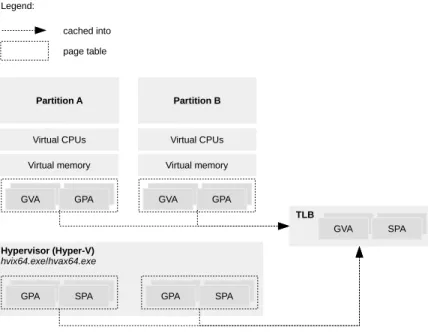
Figure 1 depicts the architecture of a virtualized Windows environment. The Hyper-V hypervisor virtualizes hardware and hosts one or multiple virtual machines, also known as partitions (Partition A and Partition B in Figure 1). The hypervisor provides virtualized hardware resources to each partition and manages these resources. This includes memory resources and virtual CPUs. The hypervisor is implemented in the
%Sys-temRoot%\System32\hvix64.exe (for Intel-based platforms) and %SystemRoot%\System32\hvax64.exe (for
AMD-based platforms) executables.
1https://docs.microsoft.com/en-us/windows-hardware/design/device-experiences/oem-vbs [Retrieved: 2/5/2018]
amilenkoski.client.ernw.net 2019-05-22 13:24:06
Virtual memory Hypervisor (Hyper-V) hvix64.exe/hvax64.exe Legend: cached into Virtual CPUs Partition A GVA GPA GVA GPA Virtual memory Virtual CPUs Partition B GVA GPA GVA GPA GVA GPA
GPA SPA GPAGVA SPAGPA
TLB
GVA GPA GVA SPA page table
Figure 1: Architecture of a virtualized Windows environment
Each partition hosts an operating system environment. If Windows-based, this environment has an architecture consisting of the Windows parts: system support processes, services, applications, the Windows subsystem, ntdll.dll, drivers, kernel, and the hardware abstraction layer. Each partition operates within its own isolation boundary. Isolation boundaries between partitions are created and maintained by the hypervisor. Partition isolation boundaries are realized such that the hypervisor allocates separate memory spaces and virtualized hardware resources to each partition. This implies that a partition cannot access the memory allocated to another partition.
In a virtualized environment, based on Hyper-V, a partition known as the root partition is used for managing and providing services to other co-located partitions. For example, the root partition hosts virtualization services provided by the hypervisor and it provides these services to other co-located partitions. The root partition also hosts device drivers since it is the only partition that has direct access to hardware resources. There are three independent memory address spaces ([Mic17], Section 1.8):
• System physical address space: System physical addresses (SPAs, SPA in Figure 1) define the physical address space of the hardware memory resources as seen by the CPUs and the hypervisor. This space is known as the system physical space. There is only one system physical address space for the platform on which the virtualized Windows environment operates;
• Guest physical address space: Guest physical addresses (GPAs, GPA in Figure 1) define the physical ad-dress space as seen by a partition. This space is known as the guest physical space. The guest physical space is a virtualized abstraction of the system physical address space. This space is virtualized by the hypervisor, which can map GPAs to SPAs. There is one guest physical address space per partition; • Guest virtual address space: Guest virtual addresses (GVAs, GVA in Figure 1) define the virtual address
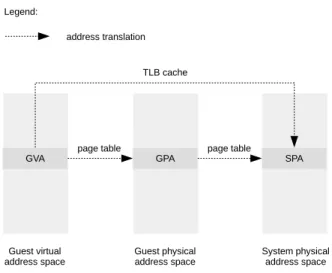
space as seen by a partition. This space is known as the guest virtual space. The guest virtual space is a virtualized abstraction of the guest physical space. There is one guest virtual address space per partition. Translations between addresses that define different address spaces are performed using page tables (see Fig-ure 1 and FigFig-ure 2). Page tables are constructs mapping addresses between different address spaces. They are used by the memory management units (MMUs) of CPUs and kernel routines performing memory operations. Traditionally, each partition leverages software-implemented page tables for mapping GVAs to GPAs when ref-erencing memory locations. These page tables are used by software-implemented MMUs of virtual CPUs and
Legend:
address translation
GVA GPA SPA
Guest virtual
address space Guest physical address space System physical address space page table page table
TLB cache
Figure 2: Address translation
routines of the partitions’ kernel performing memory operations. The GPAs are subsequently translated to SPAs by the hypervisor. This is done by using page tables leveraged by the MMUs of hardware CPUs and rou-tines of the hypervisor performing memory operations. The hypervisor maintains a copy of the page tables used by the partitions. This is because the hypervisor has to keep track of changes of these page tables made by the partitions so that it updates its page table accordingly. The copies of the partitions’ page tables are software constructs.
The use and maintenance of software-implemented page tables is performance-expensive. This is because when a memory location is referenced, its address has to be translated twice – once using the software-implemented page tables and once using the page tables software-implemented in hardware. Page table updates are also expensive operations in terms of performance. Therefore, Hyper-V uses the second-level address trans-lation (SLAT) CPU features. SLAT maps GVAs to SPAs and caches such mappings in the transtrans-lation lookaside buffer (TLB in Figure 1, TLB cache in Figure 2). This is done by caching both GVA to GPA, and GPA to SPA map-pings in the TLB. The use of the SLAT technology significantly speeds-up the use and management of page tables.
3 Virtual Secure Mode
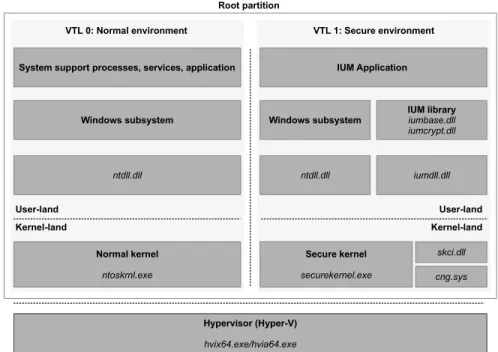
Figure 3 depicts the architecture of a VSM-enabled Windows environment. Hyper-V hosts the root partition. This partition hosts two kernel- and user-mode environments. Each kernel- and user-mode environment operates within an isolation domain, referred to as Virtual Trust Level (VTL). The concept of VTLs enforces isolation at multiple aspects ([Mic17], Chapter 15):
• memory access: each VTL has a set of memory access protections associated with it. This prevents memory associated with a given VTL from being accessed by an entity operating in another VTL;
• virtual processor states: each virtual processor maintains a per-VTL state, where each VTL has a set of private virtual processor registers associated with it;
• interrupts: each VTL has a separate interrupt system for preventing interference in interrupt delivery and procession from entities operating in other VTLs.
The isolation described above is implemented and enforced by Hyper-V as the underlying entity managing the execution of the VSM-enabled Windows environment. At the time of the analysis, Hyper-V implements two VTLs: VTL 0 and VTL 1. VTL 0 hosts the traditional Windows environment consisting of the operating system parts: system support processes, services, applications, the Windows subsystem, ntdll.dll, drivers, and the kernel.
Hypervisor (Hyper-V) hvix64.exe/hvia64.exe Secure kernel securekernel.exe skci.dll ntdll.dll ntdll.dll Windows subsystem
System support processes, services, application
iumdll.dll Windows subsystem IUM libraryiumbase.dll
iumcrypt.dll IUM Application
cng.sys Normal kernel
ntoskrnl.exe
VTL 0: Normal environment VTL 1: Secure environment
User-land Kernel-land
User-land Kernel-land Root partition
Figure 3: Architecture of a VSM-enabled Windows environment
This work refers to this environment as the normal environment and to the kernel running in it as the normal kernel.
VTL 1 hosts a Windows environment for performing security-critical functionalities. We refer to this environ-ment as the secure environenviron-ment. The secure environenviron-ment consists of:
• a kernel and its required modules: The kernel running in the secure environment is referred to as the se-cure kernel in this work. It is implemented in the %SystemRoot%\System32\sese-curekernel.exe executable. The kernel’s required modules are implemented in the %SystemRoot%\System32\skci.dll and
%System-Root%\System32\cng.sys executables. This kernel performs a limited set of security-critical
functionali-ties, such as cryptographic operations.
• a user-mode environment: There are strict security requirements for the processes running in this en-vironment. This includes encrypted interprocess communication (IPC) and verifiable code integrity. This environment is known as the isolated user mode (IUM) and the processes running in it as IUM applica-tions, or trustlets. Trustlets perform security-critical functionalities, such as credential storage. Some trustlets are:
– lsaIso.exe: This trustlet implements functionalities of the Local Security Authority (LSA) support
pro-cess (lsass.exe). This propro-cess manages user authentication. When VSM is enabled, the local security authority process running in the normal environment does not perform the actual credential verifica-tion. This task is delegated to the secure, isolated counterpart of this process running in the secure environment – the IUM application lsaIso.exe. lsass.exe and lsaIso.exe communicate over encrypted IPC channels.2 The isolation of the security-critical functionalities of the LSA prevents abuses of the local security authority for the purpose of accessing user credentials in an unauthorized manner. This includes abuses from a user with administrator privileges.
– BioIso.exe: This trustlets implements security-critical functionalities of the Windows Hello
rics service.3 This service manages user authentication via biometric features. Similar to lsass.exe, the Windows Hello biometrics service delegates security-critical tasks to the IUM application BioIso.exe. The trustlets above are provided by Microsoft and are distributed with Windows 10.
A typical IUM application loads the core IUM library implemented in the iumbase.dll and iumcrypt.dll library files. These, in turn, load the iumdll.dll file. The latter implements the native IUM system call application programming interface (API) interacting directly with the secure kernel.
An IUM application may load standard, traditional Windows libraries to use functionalities of the Windows system by invoking functions implemented in these libraries. For example, lsaIso.exe loads the Windows cryptography libraries implemented in the library files bcrypt.dll, cryptsp.dll, and cryptdll.dll. These load the native system service API implemented in the kernelbase.dll and ntdll.dll library files. Standard Win-dows functionalities are performed by the normal kernel. The secure kernel does not perform these functionalities itself, but relays the trustlets’ invocations of the library functions implementing them to the normal kernel.
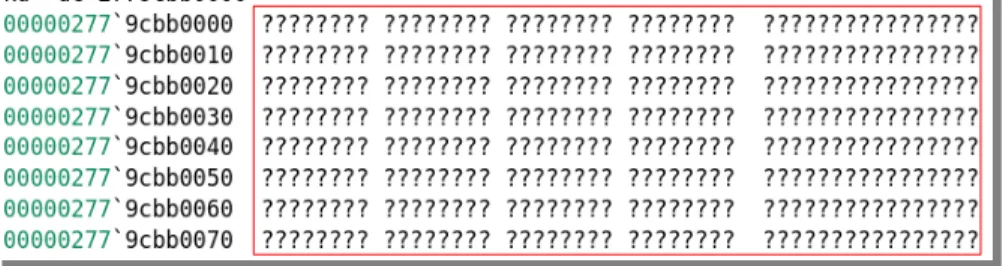
Figure 4 depicts the contents of a memory region beginning at the address 0x2779cbb0000. This region is part of a memory dump of a VSM-enabled Windows environment and is mapped to the lsaIso.exe trustlet. The memory dump is a snapshot of the memory allocated to the root partition hosting the normal and the secure environ-ment, generated after a controlled system crash was triggered. The question mark characters (‘?’) denote unreadable memory. The memory is unreadable since it cannot be accessed outside of the isolation bound-aries implemented by VTL 1, in which lsaIso.exe operates. This demonstrates the VTL-based memory access protections enforced by Hyper-V.
Figure 4: Memory region mapped to lsaIso.exe
The architecture of a VSM-enabled Windows environment consists of core VSM entities and VSM features. The core VSM entities are initialized and executed once Hyper-V is enabled. The core VSM entities are: the normal environment, the secure kernel and its required modules (skci.dll and cng.sys), and the core IUM library. As mentioned earlier, Hyper-V implements VTL-based isolation between the normal environment and the other core VSM entities.
VSM features are VSM entities that need to be explicitly configured to operate. VSM features are implemented as IUM applications or as part of modules of the secure kernel. Sample VSM features are HVCI and Credential Guard. HVCI provides code integrity verification functionalities and is implemented as part of the skci.dll module of the secure kernel. Credential Guard manages user credentials and is implemented in the lsaIso.exe trustlet.
3https://docs.microsoft.com/en-us/windows/security/identity-protection/hello-for-business/hello-biometrics-in-enterprise [Retrieved:
References
[Mic17] Microsoft. Hypervisor Top Level Functional Specification. 2017. Version 5.0b; https://docs.microsoft. com/en-us/virtualization/hyper-v-on-windows/reference/tlfs.