HAL Id: halshs-00281277
https://halshs.archives-ouvertes.fr/halshs-00281277
Submitted on 21 May 2008
HAL is a multi-disciplinary open access
archive for the deposit and dissemination of
sci-entific research documents, whether they are
pub-lished or not. The documents may come from
teaching and research institutions in France or
abroad, or from public or private research centers.
L’archive ouverte pluridisciplinaire HAL, est
destinée au dépôt et à la diffusion de documents
scientifiques de niveau recherche, publiés ou non,
émanant des établissements d’enseignement et de
recherche français ou étrangers, des laboratoires
publics ou privés.
PHOTOGRAMMETRY
André Streilein, Klaus Hanke, Pierre Grussenmeyer
To cite this version:
André Streilein, Klaus Hanke, Pierre Grussenmeyer. FIRST EXPERIENCES WITH THE „ZURICH
CITY HALL“ DATA SET FOR ARCHITECTURAL PHOTOGRAMMETRY. Dans cet article, nous
présentons les résultats des premiers tests issus de l’utilisation de la série de données du CIPA pour
la photogrammétrie à courte distance. Les résultats ont été obtenus à l’aide de logiciels commerciaux
ou universitaires. La mise en œuvre de ces différents logiciels repose sur différentes stratégies (par ex.
nombre d’images utilisées, mode stéréo ou non, compensation par faisceaux). Les logiciels utilisés sont
Canoma, Photomodeler, et Tiphon-Arpe, 2000, Pays-Bas. pp.772-779. �halshs-00281277�
FIRST EXPERIENCES WITH THE „ZURICH CITY HALL“ DATA SET FOR ARCHITECTURAL
PHOTOGRAMMETRY
André Streilein(a), Klaus Hanke(b), Pierre Grussenmeyer(c)
(a) Faculty of Civil Engineering and Geosciences, Delft University of Technology Thijsseweg 11, 2629JA Delft, The Netherlands
Phone: +31-15-2781737, E-mail: [email protected] (b) Institute of Geodesy, University of Innsbruck
Technikerstrasse 13, 6020 Innsbruck, Austria
Phone: +43-512-5076752, E-mail: [email protected] (c) ENSAIS-LERGEC, Polytechnicum of Strasbourg
24, Boulevard de la Victoire, 67084 Strasbourg Cedex, France
Phone: +33-3-88144733, E-mail: [email protected] Working Group V/5
KEY WORDS: CAD, Documentation, International Cooperation, Semi-automation, Software ABSTRACT
In this paper we report about first results and experiences using this CIPA reference data set for digital close-range photogrammetry. Results derived with different commercial or educational packages are presented. These different software packages follow different photogrammetric strategies (e.g. number of images used, stereo/non-stereo, bundle adjustment). The involved software packages are Canoma, Photomodeler, and Tiphon-Arpenteur. The different results are summarised and compared. The extensive comparison is performed regarding the derived results in terms of topology, consistency, accuracy and reliability, the flow of data, the requested input data, the possible export formats, the amount of photogrammetric knowledge necessary to handle the system/tool, the degree of automation, the management of a project, etc.
RESUME
Dans cet article, nous présentons les résultats des premiers tests issus de l’utilisation de la série de données du CIPA pour la photogrammétrie à courte distance. Les résultats ont été obtenus à l’aide de logiciels commerciaux ou universitaires. La mise en œuvre de ces différents logiciels repose sur différentes stratégies (par ex. nombre d’images utilisées, mode stéréo ou non, compensation par faisceaux). Les logiciels utilisés sont Canoma, Photomodeler, et Tiphon-Arpenteur. Les résultats sont résumés et comparés. La comparaison des résultats est basée sur l’analyse des performances des logiciels en termes de topologie, de fonctionnement, de précision et de fiabilité, de flux de données, de données initiales nécessaires, de formats de sortie, de connaissances nécessaires en photogrammétrie pour utiliser le logiciel, du degré d’automatisation, de la gestion du projet, etc.
1 INTRODUCTION
The International Scientific Committee for Documentation and Architectural Photogrammetry (CIPA) is one of the scientific committees of ICOMOS (International Council on Monuments and Sites) and it was established in collaboration with ISPRS (International Society of Photogrammetry and Remote Sensing). ISPRS and ICOMOS created CIPA because they both believe that a monument can be restored and protected only when it has been fully measured and documented and when its development has been monitored, also with respect to its environment, and stored in proper heritage information and management systems. The main purpose of CIPA is the improvement of all methods for surveying of cultural monuments and sites, specially by synergy effects gained by the combination of methods under special consideration of photogrammetry with all its aspects, as an important contribution to recording and perceptual monitoring of cultural heritage, to preservation and restoration of any valuable architectural or other cultural monument, object or site, as a support to architectural, archaeological and other art-historical research.
At the XVII CIPA Symposium in Olinda/Brazil a reference data set for testing and evaluating different software packages and tools of digital close-range photogrammetry for the purpose of heritage recording and documentation has been proposed (Streilein et al., 1999). The main intention of this reference data set is to reflect and share practical experiences about the handling of different systems and tools for the photogrammetric documentation of cultural heritage. The data set in general is suited to apply for any task or sub-task of photogrammetric building reconstruction, such as three-dimensional building reconstruction, bundle adjustment with convergent image rays, stereo
photogrammetry, single image rectification, CAD overlay, etc. The goal is to get measures and reflect practical experiences about the handling of a system/tool, the flow of data, the management of a project, the reconstruction of an object, the derived results in terms of topology, consistency, accuracy and reliability, the import and export of data and data types and file formats that can be handled, and the amount of photogrammetric knowledge necessary to handle the system/tool.
In this paper we report about first results and experiences using this data set. Emphasis is shown with respect to the user-friendliness and practical handling of such a system and of the derived results in terms of topology, consistency, accuracy and reliability. Results derived with different commercial or educational available packages are presented. These different software packages follow different photogrammetric strategies (e.g. number of images used, stereo/non-stereo, bundle adjustment). The involved software packages are Canoma, Photomodeler, and Tiphon-Arpenteur. The different results are summarised and compared.
2 REFERENCE DATA SET
The reference data set is intended to serve as a tool in order to reflect and share practical experiences about the handling of different systems and tools for the photogrammetric documentation of cultural heritage It is generally applicable to any task or subtask of photogrammetric building reconstruction. It consists of a complete description of the interior orientation of the used cameras, the images taken with these cameras and the co-ordinates and the description of the reference points measured on the facades of the building by geodetic means. In addition a questionnaire (CIPA, 1999) related to this reference data set is available.
The city hall of Zurich (see Figure 1) serves as the test object. It is built in the years 1694-98 in the style of the late Renaissance. The city hall is located in the center of the city partly on the river Limmat. Its approximate dimensions are 35x12x18 meters.
For the image acquisition of the test object two standard, point and shoot cameras were used, a Fuji DS 300 and an Olympus C1400L. Both cameras can nowadays be considered as “typical” for the use of digital cameras in heritage documentation applications. They are affordable and easy to use. The quality of the derived images can be judged on the spot and the storage medium has usually enough capacity to hold the images of an entire project. Both cameras record images at a resolution of 1’280x1’000 pixels. The images can be stored in uncompressed TIFF format or in one of three JPEG compression schemes on PC cards in 24-bit color or monochrome. The cameras have a built-in 3:1 optical zoom, which covers focal lengths equivalent to the 35-105 mm range of a 35-mm camera’s zoom lens. The cameras can be operated as a fully automatic point-and-shot device or as a completely manual professional camera. For both cameras the complete set of parameters of interior orientation, determined by a testfield calibration, are available.
Figure1: Zurich city hall (seen from southwest).
Figure 2: Selection of images taken with the Olympus D1400L
The images were taken in order to cover the entire building with all four facades and to enable the complete reconstruction of the building. Therefore the arrangement was set up to be suitable for photogrammetry with convergent image rays as well as for the “classical” stereo photogrammetric approach. The focus of the lens of the cameras was fixed during exposure. The image acquisition with both cameras took place in a very similar way. The main purpose
was to cover any detail of the object with at least two image rays and to allow as well the restitution of the object from stereo image pairs.
The two cameras were used to produce image sets of different file formats, compressed JPEG format on the one hand and uncompressed TIFF format on the other. Hence, with the Olympus D1400L a total of 16 images was taken to cover the entire object. The images are in compressed JPEG format with a file size of approximately 0.8MB each and 12.8MB for the entire set of images. With the Fuji DS 300 a total of 15 images in uncompressed TIFF format was taken. Each image has a file size of 3.75MB, makes 55MB for the entire set. Figure 2 depicts the basic arrangement for the images taken with the Olympus D1400L. The images are taken to cover the entire object and to enable also stereo photogrammetry. For the purpose of self-calibration a number of images was taken with a rotation of 90 degrees. In order to support the photogrammetric measurement in some specific cases (e.g. only the restitution from a part of one facade with one stereopair of images) a set of twenty-one, well-distributed reference points was measured geodetically in a local coordinate system. The reference points were selected amongst the natural points of the object (i.e. no special or signalized), which are easily identifiable and separable. The co-ordinates of the reference points were determined by polar measurements with an electronic theodolite Leica TC 3000 and a reflector-free EDM Leica DIOR3002. It should be explicitly mentioned here again, that the accuracy of the reconstruction is not the main purpose of this reference data set, but the reference coordinates are meant if there is a need for reference points for stereo measurement or for other reasons.
3 SOFTWARE PACKAGES
In this chapter we give a short overview about the characteristics and performance of the software packages used during the first evaluation period. The software packages are namely Canoma (Meta Creations), Photomodeler (EOS Systems), Tiphon (ENSAIS-LERGEC) and Arpenteur (ENSAIS-LERGEC and GAMSAU).
3.1 Canoma
Canoma (Meta Creations, 1999) is a deceptively simple program that creates photo-realistic 3D models from photos and illustrations. Not intended as a precision tool, the models and animations derived with this software product are good enough for quick visualizations and renderings. Canoma, developed and distributed by MetaCreations Corporation, focuses therefore consequently on e-commerce visualization solutions for the World Wide Web. Hence, it is intended to attract users like graphic designers, advertising agencies, 3D artists, architects, urban planners, and property developers, interior designers and game developers.
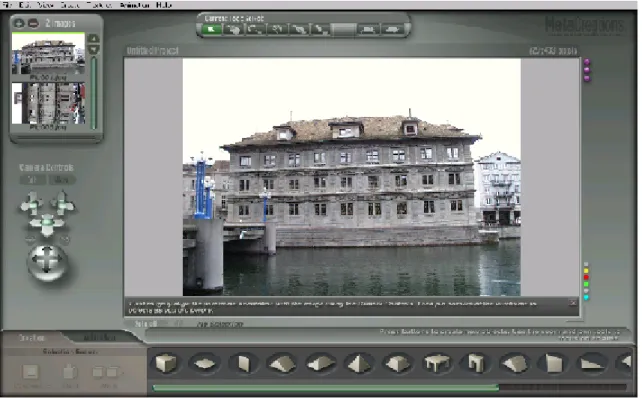
Canoma works in basically two modes: creation and animation. In creation mode, a shape library offers basic 3D primitives, which can be scaled and stretched to align with elements in the image. The user places the vertices of these 3D primitives into the images. Canoma tries to find optimal parameters for camera and objects simultaneously, using given information about how to construct these models, while the user affixes 3D objects to photograph elements, using pins, beads, and glue. In animation mode, one simply moves through the model created using the camera navigation trackball and adds images to “keyframes” by clicking an icon. Canoma will then render the frames in between for smooth playback on its VCR-like player.
At the begin of a project Canoma displays the (first) image in its single window and presents it with a simple palette of 3-D primitives, such as cubes, pyramids, cropped pyramids, and planes, containing tools for constructing the scene's geometry. To model the scene, the user has to pick out a shape in the image and then select a 3-D primitive of similar geometry (see Figure 3). Using a simple pointer tool, the user drags the corners of the primitive to "pin" them to the corners of the object in the image. If the corners are not visible in the image, side “beads” can be attached, to make sure that the edges align the correct perspective. Canoma uses the primitive's geometry to calculate camera location, focal length, object positions, object orientations, and object dimensions. Thereby the software tries to calculate decent parameter values, after each user interaction (measurement). Canoma tries to minimize the stress that can be caused by simple errors, like misplacing a pin, by adjusting across all objects simultaneously. A special Stress Display mode shows any disparity between how you position objects and how Canoma converts those instructions into 3D representations.
Usually scenes are modeled from the ground up, which means that the user has to place objects on the ground, then place objects on top of those, and so on. By default, an object cannot just “float in space.” Modeling with Canoma is based on these restrictions. Each object in the model has parameters, such as a location in three dimensions (X,Y,Z) and an orientation (3 angles). In addition, each object has type-specific parameters. For example, a box has length, width and height. Canoma tries to calculate out all these parameters. To reduce the workload, by default the number of parameters that have to be determined is reduced. So, objects are created on the ground plane (fixing their origin Y-coordinate to 0) and can only rotate around a vertical axis, fixing the other two rotation angles at 0. Creating an object on top of another object, again its origin’s Y (height) coordinate is not free, but bound to however high its base object is.
Figure 3: Layout of Canoma screen.
All this results in specific concepts one has to follow working with Canoma:
• Modeling from less-detailed overview photos to more-detailed or close-up views. Adding more images to supply additional texture detail.
• Selection of a first picture, that shows a lot of the scene. Modeling a few elements in that picture, before even loading additional images.
• Starting by affixing simple 3D objects to a photograph. Using a few simple objects helps establishing the camera parameters for the scene.
• Using temporary objects to set perspective.
• All objects are by default created on the ground plane (except for on top objects.) In addition, objects are by default only able to rotate around their vertical axis.
Although Canoma is probably one of the easiest to use 3D modeling software packages, it still takes some practice to place the primitives correctly, especially in complex scenes.
3.2 PhotoModeler
PhotoModeler (EOS, 2000) was one of the first software products for close range applications that came in a price segment that made it interesting not only for photogrammetric specialists but also for architects, archaeologists and even designers to use the opportunity for creating 3D objects out of simple 2D photos. The program is dedicated for easy handling and supports the Windows GUI in a very rigorous way. The early versions did not support metric or semi-metric cameras (reseau, distortion, ..) but this changed from vers.2 onwards. Now in version 3.1 a general bundle solution is used with almost no limits to the number of photos and points. The measurement process is done in a mono-comparator mode, where the actual point measurement and referencing between photos is done manually. Rubberbands for lines and a "curve & referencing helper" (epipolar lines) are tools to help in this manual work. A "sub-pixel marker" for circular targets (center of gravity in a selected area) shows a trend to further use image procession capacity for the measurement process. Only points are measurable, lines, surfaces (triangles) are only to define between them. A tool for measuring cylinders by marking their outlines in several photos proves to be very useful. A monoplotting facility is available of defined planes. To setup the exterior orientation a definition of coordinate axis or the use of control points is supported. The initial values for exterior orientation are calculated automatically and even a self-calibration process can be performed during bundle adjustment. A kind of integrated spreadsheet, the "table viewer", allows to check the configuration (intersection angle), residuals and computed coordinates of the project. It also supports a kind of post processing to force restrictions to the point set.
The progress and reliability of the restitution is visualized by a 3D-viewing tool using the Windows Direct3D interface. Orthophotos of complex surfaces can be produced and exported as bitmaps. The export formats for the spatial result are wide-spread and include DXF, 3D-Studio and VRML. Full photo-textured 3D "photomodels" may be one of the most interesting results.
The software is accompanied by a camera calibration set which includes not only the software but also a simple 2D target field making it very easy to get calibration values of the used camera.
Figure 4: Layout of PhotoModeler screen.
3.3 Tiphon-Arpenteur
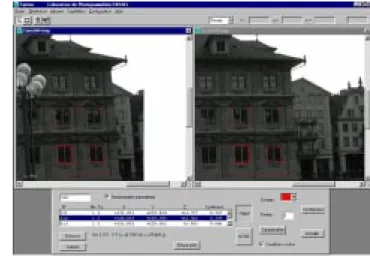
TIPHON and ARPENTEUR are two simple photogrammetric software packages dedicated to stereoplotting and modeling. The TIPHON software (in French "Traitement d'Images et PHOtogrammétrie Numérique") has been developed from 1996 by the Group “Photogrammetry and Geomatics” of the LERGEC Laboratory (Research laboratory in civil engineering) at Strasbourg (Grussenmeyer, et al., 1999). Since 1998, in the frame of a joint project between the LERGEC and the GAMSAU (CNRS Research laboratory of the School of Architecture at Marseilles, France), the TIPHON software has been adapted to the Internet World to become platform-independent and available as an applet on the web by a simple internet browser. This new version called ARPENTEUR (ARchitectural PhotogrammEtry Network Tool for EdUcation and Research) is particularly dedicated to applications based on small format images (Drap and Grussenmeyer, 2000). ARPENTEUR is a Web based tool since photogrammetric concepts are embedded in Web technology and JavaTM programming language. Therefore it can be easily used from anywhere all over the world and with whatever operating system is used. Two servers located in Marseilles and Strasbourg are available to manage project data. Different solutions for the adjustment of the photogrammetric model are currently available as well as a measurement method based on image correlation. Examples are available for education and personal projects can be stored on the servers’ database. An overview of the different photogrammetric functions available in both packages is given in Figure 5.
The design of both packages is based on the measurement of couples of images (close to the normal case or convergent images). Homologous points can be measured by correlation. Area correlation is used to determine the required sub-pixel position in the digital image. In fact the measurement is done semi-automatically. The user has to point exactly the required point on only one image (left or right image), and to point roughly its homologous on the other one. The task is to find the position of a geometric figure (called reference matrix) in a digital image. If the approximate position of the reference matrix in the image is known, then we can define a so-called search matrix. The size of the reference and search matrix can be defined by the user. The semi-automatic measuring function is available at the different steps of
the software (réseau measurement, outer orientation and plotting module, Figure 6). Other image processing functions like brightness and contrast adjustment of the images, zoom in and out are also available.
Relative Orientation Inner Orientation DLT or Bundle adjustment Absolute Orientation (control points or distance and vertical line)
Outer Orientation Two steps One step
Plotting Architectural Modeling
and visualisation
TIPHON (Windows) or ARPENTEUR(www.arpenteur.net) Model definition (2 images only)
(BMP images -TIPHON or GIF images - ARPENTEUR, camera data, control points)
Figure 5: Overview of the current photogrammetric solutions available in TIPHON-ARPENTEUR
Figure 6: TIPHON’s stereoplotting module
A release of TIPHON (in French) with a stereopair of the dataset running on Windows’95/98 can be freely downloaded at http://photogeo.u-strasbg.fr.
ARPENTEUR is also freely accessible via the Internet at www.arpenteur.net where models of the dataset are available by an anonymous login.
4 COMPARISON
The comparison of the different software packages is done with respect to the practical handling of the packages for the purpose of the documentation of architectural buildings. Hence, the entire flow of data was an issue for investigation, in particular, the import of data, the project management, the interior and exterior orientation, the measurement process, the reconstruction of the object and the export of data. The following list gives the major conclusions from these investigations.
Topics Canoma 1.0
Meta Creations
Photomodeler 3.1 EOS Systems Inc.
Tiphon 2.0 ENSAIS-LERGEC Arpenteur 1.4 ENSAIS-LERGEC & GAMSAU Import of data − Image formats − Image depth − Colour Images −JPG, TIFF, PNG, GIF, PSD, BMP −8 to 24 bits −Colour images − TIFF, JPEG, BMP, PSD, PCX, TGA, etc. − 24 bits −BMP −8 bits −B/W only − GIF (usually), JPG − 8 to 24 bits − Colour Images Required parameters of Interior Orientation: − Definition of inner orientation
− Image co-ordinate system − Additional parameters
−None
−Right-handed
Cartesian system, origin in lower left corner.
−None
− Principal distance, principal point, format size (pixel squareness)
− Right-handed
Cartesian system, origin in upper left corner.
− Radial and decentering distortion (polynom)
−Principal distance, principal point coordinates, distortions values (radial) and fiducial marks
−Right-handed Cartesian system whose origin is placed on the image plane center. −Radial distortions (balanced or unbalanced)
Parameters of exterior orientation: − O.O.P introduced − rotation matrix −Location and orientation cannot be introduced −Unknown
− position x,y,z and angles
− omega(x), phi(y), kappa(z)
−Camera attitude parameters and camera position for each photo are used as initial values of the bundle adjustment
−Two rotation matrix are possible depending on the images: Terrestrial = (α, ν, κ); Aerial = (ω, φ, κ)
Control information: − external control information − constraints to be handled − introduction of control information −Single distance −Constraints from the
3D primitive
−Manually measured
distance
− One distance between
two points and a vertical direction − No constraints − 3D points can be
imported from ASCII, DXF, or manually.
−We can use a distance between two points and a vertical direction to realize a simple absolute orientation
−No constraints available
−control point text file (number, X, Y, Z) Is a priori CAD information
usable
No Import via DXF as
control points.
No
Management of the project
Images Cameras
Control information
No limits for images and cameras Just one distance as control information
unlimited images unlimited cameras Control points or (1 distance + 3 axes)
Two images per model
Two different cameras allowed in Arpenteur Control points or (1 distance + 1 vertical line) Visual control of the progress
status achieved
Overlay of vector information onto the images & fly-through visualization
Overlay of model on photos, residuals display, 3D Viewer, Table Viewer spreadsheet
Overlay of vector information onto the images
Overlay of vector information onto the images & VRML visualization Image pyramids No No No No Interior Orientation Definition of interior orientation No By measuring the fiducial marks or automatic orientation for images from digital cameras
By measuring the fiducial marks (réseau crosses or different kind of marks) or automatic orientation for images from digital cameras
Used transformation No translation, rotation, and
x/y aspect ratio.
Plane Affine
Given quality parameters No No Standard deviations and residuals
Measuring process
Measurements on single images
Yes Yes No yes in the bundle
adjustment module
Measurements on two images Yes, object constraints
become less mandatory
Yes quasi-stereoscopic
mode and area-based correlation for the measure of homologous points
manual monoscopic measurements and area-based correlation for the measure of homologous points Measurements on more than
two images
Yes, object constraints become less mandatory
Yes No Yes, but obliged to
measure the photos two by two
Are 2D features available? Predefined 3D
primitives
Lines No architectural entities
(under development)
Are 3D features available? Predefined 3D
primitives
Cylinders No No
Orientation
Solution Bundle adjustment Bundle adjustment DLT is available to calculate initial values for
the bundle adjustment How many images can be
used
Unlimited unlimited Two images (measurement 2 by 2,
all images can be adjusted in one bloc)
self-calibration possible No Yes No
approximate values Automated Automated Manual input or DLT
Definition of rotational values Not known Omega, phi, kappa standard or terrestrial rotation matrix
Automatic error detection None, visual
feed-back, stress display
Some Empirical tool No
Reconstruction of object
Measurement methods Manual Manual and
semi-automatic
See measuring process Which topology can be
measured
Predefined 3D primitives
Points, lines, faces, cylinders, points on surfaces
Points and lines measurement
Points or entity based architectural modeling Measured entities and
contribution to the orientation
Points Points Points Points
Support of monoplotting in one image Yes, even reconstruction from one image Yes No No
3D View) Possibilities of post
processing
No Line and plane fitting of
points
No No
Generation of a Digital Surface Model (DSM)
No Manually Manually Manually
Export of data
Export of object information DXF, MetaStream,
VRML, OBJ DXF, 3DS, OBJ, X, RAW DXF Text files DXF (or DGN), VRML, HTML Animation of the resulting
model
Yes, QuickTime and sequential BMP
no No Visualization in
CosmoPlayer
Standard deviations No yes Yes Yes
Exportation: - interior orientation - exterior orientation - image co-ordinates - DSM No No No No yes yes yes no Yes Yes Yes
Points and lines
Yes Yes Yes Points only
5 CONCLUSIONS
In this paper we reported about initial results of the reconstruction of the Zurich city hall from the CIPA test data set with four different software packages. It should be mentioned that these results are just of preliminary nature and a final report, with more software packages involved, will be presented at the CIPA International Symposium in Potsdam, Germany, September 2001 (http://www.fpk.tu-berlin.de/cipa2001/).
While making this reference data set available for the CIPA community the authors would like to encourage more people from the scientific and from the practical point of view to use this material in order to derive results with different hardware, software and methods. Hence, interested persons are asked in particular to
• use the data set
• use different software packages and/or tools for the reconstruction
• to reconstruct the object in different ways (2D/3D, CAD/map, entire object or parts of it, different degrees of detail)
• critically review the data import and export
• give a description of the data flow / automation, accuracy measurements, statistical data
• to report about their experience by filling in the questionnaire (CIPA, 1999b)
The reference data set as well as the complete questionnaire can be downloaded from the CIPA web site (http://cipa.uibk.ac.at).
REFERENCES
CIPA, 1999. Questionnaire on the processing of the data set “Zurich city hall”. Edited by CIPA Working Group 3 & 4 (A. Streilein, P. Grussenmeyer and K. Hanke) 1999. 8 pages.
Drap, P., Grussenmeyer, P., 2000. Web based photogrammetry. ARPENTEUR: a Network Tool for Small Format Architectural Photogrammetry. In GIM International, March 2000, pp. 13-15.
EOS, 2000. PhotoModeler Product Information (http://www.photomodeler.com)
Grussenmeyer, P., Drap, P., Koehl, M., Blaise, J.-Y., 1999. TIPHON and ARPENTEUR : simple photogrammetric software packages for stereoplotting. ISPRS Comm. V/5 and V/2 International Workshop, Thessaloniki , July 7-9, Greece. In: Int. Arch. of Photogrammetry and Remote Sensing, Vol. 32, Part 5W11, pp. 51-57.
Meta Creations, 1999. Canoma Product Information. (http://www.metacreations.com/products/canoma/) Streilein, A., Grussenmeyer, P., Hanke, K., 1999. “Zurich city hall – A reference data set for digital close range
photogrammetry”. Proceedings of XVII Symposium of the International Committee for Documentation and Architectural Photogrammetry (CIPA) in Olinda/Brazil, October 1999.