HAL Id: hal-01983626
https://hal.inria.fr/hal-01983626
Submitted on 16 Jan 2019
HAL is a multi-disciplinary open access
archive for the deposit and dissemination of
sci-entific research documents, whether they are
pub-lished or not. The documents may come from
teaching and research institutions in France or
abroad, or from public or private research centers.
L’archive ouverte pluridisciplinaire HAL, est
destinée au dépôt et à la diffusion de documents
scientifiques de niveau recherche, publiés ou non,
émanant des établissements d’enseignement et de
recherche français ou étrangers, des laboratoires
publics ou privés.
YOLO: Speeding up VM Boot Time by reducing I/O
operations
Thuy Linh Nguyen, Ramon Nou, Adrien Lebre
To cite this version:
Thuy Linh Nguyen, Ramon Nou, Adrien Lebre. YOLO: Speeding up VM Boot Time by reducing I/O
operations. [Research Report] RR-9245, Inria. 2019, pp.1-18. �hal-01983626�
ISSN 0249-6399 ISRN INRIA/RR--9245--FR+ENG
RESEARCH
REPORT
N° 9245
January 2019 Project-Team StackYOLO: Speeding up VM
Boot Time by reducing
I/O operations
RESEARCH CENTRE
RENNES – BRETAGNE ATLANTIQUE Campus universitaire de Beaulieu 35042 Rennes Cedex
YOLO: Speeding up VM Boot Time by reducing I/O
operations
Thuy Linh Nguyen, Ramon Nou, Adrien Lebre
Project-Team StackResearch Report n° 9245 — January 2019 — 18 pages
Abstract: Several works have shown that the time to boot one virtual machine (VM) can last up to a few minutes in high consolidated cloud scenarios. This time is critical as VM boot duration defines how an application can react w.r.t. demands’ fluctuations (horizontal elasticity). To limit as much as possible the time to boot a VM, we design the YOLO mechanism (You Only Load Once). YOLO optimizes the number of I/O operations generated during a VM boot process by relying on the boot image abstraction, a subset of the VM image (VMI) that contains data blocks necessary to complete the boot operation. Whenever a VM is booted, YOLO intercepts all read accesses and serves them directly from the boot image, which has been locally stored on fast access storage devices (e.g., memory, SSD, etc.). Creating boot images for 900+ VMIs from Google Cloud shows that only 40 GB is needed to store all the mandatory data. Experiments show that YOLO can speed up VM boot duration 2-13 times under different resources contention with a negligible overhead on the I/O path. Finally, we underline that although YOLO has been validated with a KVM environment, it does not require any modification on the hypervisor, the guest kernel nor the VM image (VMI) structure and can be used for several kinds of VMIs (in this study, Linux and Windows VMIs have been tested)
YOLO: Accélération du temps de démarrage de la machine virtuelle
en réduisant les opérations d’I/O
Résumé : Plusieurs travaux ont montré que le temps de démarrage d’une machine virtuelle (VM) peut s’étale sur plusieurs minutes dans des scénarios fortement consolidés. Ce délai est critique car la durée de démarrage d’une VM définit la réactivité d’une application en fonction des fluctuations de charge (élasticité horizontale). Pour limiter au maximum le temps de démarrage d’une VM, nous avons conçu le mécanisme YOLO (You Only Load Once). YOLO optimise le nombre d’opérations “disque” générées pendant le processus de démarrage. Pour ce faire, il s’appuie sur une nouvelle abstraction intitulée “image de démarrage” et correspondant à un sous-ensemble des données de l’image de la VM. Chaque fois qu’une machine virtuelle est démarrée, YOLO intercepte l’ensemble des accès en lecture afin de les satisfaire directement à partir de l’image de démarrage, qui a été stockée préalablement sur des périphériques de stockage à accès rapide (par exemple, mémoire, SSD, etc.). La création d’image de démarrage pour les 900 types des VMs proposées sur l’infrastructure Cloud de Google représente seulement 40 Go, ce qui est une quantité de données qui peut tout à fait être stockée sur chacun des noeuds de calculs. Les expériences réalisées montrent que YOLO permet accélérer la durée de démarrage d’un facteur allant de 2 à 13 selon les différents scénarios de consolidation. Nous soulignons que bien que YOLO ait été validé avec un environnement KVM, il ne nécessite aucune modificatfion sur l’hyperviseur, le noyau invité ou la structure d’image de la VM et peut donc être utilisé pour plusieurs types d’images (dans cette étude, nous testons des images Linux et Windows).
3
YOLO: Speeding up VM Boot Time by
reducing I/O operations
Thuy Linh Nguyen
1, Ramon Nou
2, and Adrien Lebre
11
IMT Atlantique, INRIA, LS2N, France
Email: [email protected], [email protected]
2
Barcelona Supercomputing Center (BSC), Barcelona, Spain
Email: [email protected]
Several works have shown that the time to boot one virtual machine (VM) can last up to a few minutes in high consolidated cloud scenarios. This time is critical as VM boot duration defines how an application can react w.r.t. demands’ fluctu-ations (horizontal elasticity). To limit as much as possible the time to boot a VM, we design the YOLO mechanism (You Only Load Once).
YOLO optimizes the number of I/O operations
generated during a VM boot process by relying on the boot image abstraction, a subset of the VM image (VMI) that contains data blocks necessary to complete the boot operation. Whenever a VM is booted, YOLO intercepts all read accesses and serves them directly from the boot image, which has been locally stored on fast access storage devices (e.g., memory, SSD, etc.). Creating boot images for 900+ VMIs from Google Cloud shows that only 40 GB is needed to store all the manda-tory data. Experiments show that YOLO can speed up VM boot duration 2-13 times under different resources contention with a negligible overhead on the I/O path. Finally, we underline that although
YOLO has been validated with a KVM
environ-ment, it does not require any modification on the hypervisor, the guest kernel nor the VM image (VMI) structure and can be used for several kinds of VMIs (in this study, Linux and Windows VMIs have been tested).
I. INTRODUCTION
The promise of elasticity of cloud computing brings the benefits for clients of adding and
re-moving new VMs in a manner of seconds. How-ever, in reality, users may have to wait several min-utes to get a new VM in public IaaS clouds such as Amazon EC2, Microsoft Azure or RackSpace [1]. Such long startup duration has a strong negative impact on services deployed in a cloud system. For instance, when an application (e.g., a web service) faces peak demands, it is important to provision additional VMs as fast as possible to prevent loss of revenue for this service. Therefore, the startup time of VMs plays an essential role in provisioning resources in a cloud infrastructure.
The startup time of VMs can be divided into two major parts: (i) the time to transfer the VMI from the repository to the selected compute node and (ii) the time to perform the VM boot process. While a lot of efforts focused on mitigating the penalty of the VMI transferring time either by using deduplication, caching and chunking tech-niques or by avoiding it thanks to remote attached volume approaches [2], [3], [4], [5], only a few works addressed the boot duration challenge. To the best of our knowledge, the solutions that investigated the boot time issue proposed to use ei-ther cloning techniques [6], [7] or suspend/resume capabilities of VMs [8], [9], [10]. The former relies on live VMs available on each compute node so that it is possible to spawn new identical VMs without performing the VM boot process. The latter consists in saving the entire state of each possible VM and resuming it when nec-essary (each time a VM is requested, the new VM is created from the master snapshot). Once the new VM is available, both approaches may
YOLO: Speeding up VM Boot Time by reducing I/O operations 4
use hot-plug mechanisms to reconfigure the VM physical characteristics according to the users’ expectations (in terms of number CPU, RAM size, network . . . ). Although these two solutions enable speeding up the boot duration, they have major drawbacks. The cloning technique requires to allocate dedicated resources for each live VM, which limits the number of master copy that can be executed on each node. The suspend/resume approach eliminates this issue but requires a large amount of storage space on each compute node to save a copy of the snapshot of each VM that might be instantiated according to the existing VMIs. Besides, these two approaches have not been designed with high-consolidated scenarios in mind. In other words, the process to launch a VM on the compute note (boot, cloning or resuming) performs I/O and CPU operations that impact the performance. Such an issue has been investigated for traditional boot approaches in recent stud-ies [11], [12] where the authors show that the duration of VM boot process is highly variable depending on the effective system load and the number of simultaneous provisioning requests the compute node should satisfy.
To deal with each of the aforementioned limita-tion (mitigate resource wasting as well as resource competition on each compute node), we designed the YOLO mechanism (You Only Load Once).
YOLOspeeds up the boot process by manipulating
mandatory data to boot a VM as less as possible. At coarse-grained, YOLO has been built on the observation that only a small portion of a VMI is required to boot a VM [3], [10], [13]. Hence, for each VMI, we construct a boot image, i.e., a subset of the VMI that contains the mandatory data needed for booting a VM, and store it on a fast access storage device (memory, SSD, etc.) on each compute node. When a VM boot process starts, YOLO transparently loads the correspond-ing boot image into the memory and serve all I/O requests directly. The way YOLO loads the boot image is more efficient than the normal behaviour as discussed later in the document. Moreover, the boot image that has been loaded can be reused to boot additional VMs as long as the data stays into the memory. By mitigating the I/O operations that are mandatory to boot a VM, YOLO can reduce the VM boot duration 2-13
times according to the system load conditions. In terms of storage requirements, the size of a boot image is in the average of 50 MB and 350 MB for respectively Linux and Windows VMI. Unlike the suspend/resume approach, it is noteworthy that this size is constant and does not increase according to physical parameters of the VM. As an example, we need 40 GB to store all boot images for the 900+ VMI from the Google Cloud platform (3% of the total size).
The rest of this paper is organised as follows. Section II gives some background elements re-garding the boot operation. Section III summarises preliminary studies that led us to propose YOLO. Section IV describes our solution and implementa-tion. Section V presents our experimental protocol and discusses the results we obtained. Section VI deals with related works. Finally, Section VII concludes the article and highlights future works.
II. BACKGROUND
In this section, we first describe the VM boot process so that readers can understand clearly the different steps of the boot operation. Second, we discuss the two types of VM disk that can be used in a QEMU/KVM-based environment, the default Linux hypervisor. Because a VM boot process implies I/O operations, understanding the difference in terms of the amount of manipulated data between these two strategies is important. A. VM Boot Process
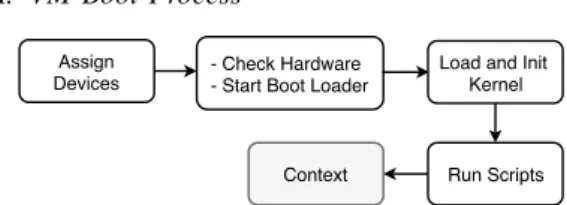
- Check Hardware - Start Boot Loader
Run Scripts Context
Assign Devices
Load and Init Kernel
Fig. 1: Virtual Machine boot process Figure 1 illustrates the different stages of a VM boot process. First, the hypervisor is invoked to create the virtual abstraction of the machine. That is, assigning resources (e.g., CPU, memory, disks, etc.) to the VM. After that a standard boot process happens: first, the BIOS of the VM checks all the devices and tests the system, then it loads the boot loader into memory and gives it the control. Boot loader (GRUB, LILO, etc.) is responsible
YOLO: Speeding up VM Boot Time by reducing I/O operations 5
for loading the kernel. Finally, the kernel invokes the init script that starts major services such as SSH. The last step, i.e., contextualisation of the VM, is made through the invocation of dedicated scripts defined according to the user’s require-ments.
To load the kernel into the memory and to start/configure different system services, a VM not only performs CPU operations, it also generates a significant number of small read and write I/O operations that compete with the other co-located workloads/VMs and that should be considered in the optimisation process.
B. VM Disk Types Hypervisor VM VM Read/Write Read/Write Write Write Read Read Backing file QCOW file QCOW file Hypervisor VM VM Read/Write Read/Write Write Write Read Read Base Image VM disk VM disk Clone Clone (a) shared image (b) no shared image (base image)
Fig. 2: Two types of VM disk
QEMU offers two strategies to create a VM disk image from the VMI (a.k.a. the VM base image). Figure 2 illustrates these two strategies. For the sake of simplicity, we call them shared image and
no shared image strategies. In the shared image
strategy, the VM disk is built on top of two im-ages: the backing and the QCOW (QEMU Copy-On-Write) files [14]. The backing file is the base image that can be shared between several VMs while the QCOW is related to a single VM and contains write operations that has been previously performed. When a VM performs read requests, the hypervisor first tries to retrieve the requested data from the QCOW and if not it forwards the access to the backing file. In the no shared
imagestrategy, the VM disk image is cloned fully
from the base image and all read/writes operations executed from the VM will be performed on this standalone disk.
C. Amount of manipulated data
To identify the amount of data that is manipu-lated during VM boot operations in both VM disk
strategies, we performed a first experiment that consisted in booting up to 16 VMs simultaneously on the same compute node. We used QEMU/KVM (QEMU-2.1.2) as the hypervisor, VMs are cre-ated from the 1.2 GB Debian image (Debian 7, Linux-3.2) with writethrough cache mode (at the opposite of the writeback, each write operation is directly propagated to the VM disk image [15]).
0 200 400 600 800 1 4 7 10 13 16 Number of VMs I/O usa g e (MB) Read Write
(a)shared imagedisk
0 200 400 600 800 1 4 7 10 13 16 Number of VMs I/O usa g e (MB) Read Write
(b) no shared imagedisk
Fig. 3: The amount of manipulated data during boot operations (reads/writes)
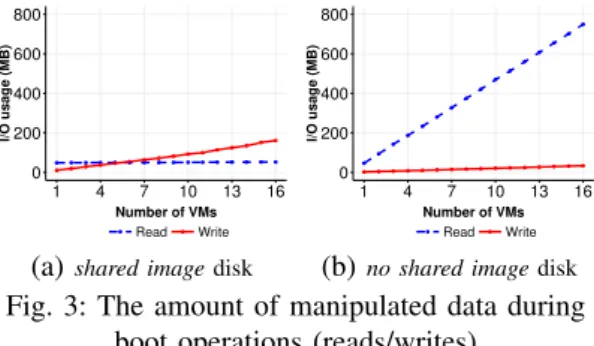
Figure 3 reveals the amount of read/write data when booting up to 16 VMs at the same time.
Although the VMs have been created from a VMI of 1.2 GB, booting 1 VM only needs to read around 50 MB from kernel files in both cases of shared image and no shared image. In addition to confirming previous studies regard-ing the small amount of mandatory data w.r.t. the size of the VMI, this experiment shows that booting simultaneously several instances of the same VM leads to different amount of manip-ulated data according to the disk strategy used to create the VM disk(s). When the VMs share the same backing file (Figure 3a), the different boot process benefit from the cache and the total amount of read data stays approximately around 50 MB whatever the number of VMs started (the mandatory data has to be loaded only once and stays into the cache for later accesses). When the VMs rely on different VM disks (Figure 3b), the amount of read data grows linearly since each VM has to load 50 MB data for its own boot process. Regarding write accesses, both curves follow the same increasing trend. However, the amount of manipulated data differs: the shared
image strategy writes 10 MB data when booting
one VM and 160 MB for booting 16 VMs while the no shared image strategy slightly rises from 2 MB to 32 MB. The reason why the shared image
YOLO: Speeding up VM Boot Time by reducing I/O operations 6
strategy writes 5 times more data is due to the
"copy-on-write" mechanism: when a VM writes
less than cluster size of the QCOW file (generally 64 kB), the missing blocks should be read from the backing file, modified with the new data and written into that QCOW file [16]. To summarise, whatever the disk strategy, this experiment shows us that the number of I/O operations that are performed during boot operations are significant (as depicted in Figure 4) and should be mitigated as much as possible in order to prevent possible interference with other co-located workloads/vms. Loading mandatory data into the memory before starting the boot process may be an interesting approach to serve read requests faster. In the fol-lowing section, we investigate how such a strategy can be achieved. 0 10000 20000 30000 40000 1 4 7 10 13 16 Number of VMs
Number of I/O requests
Read Write
(a)shared imagedisk
0 10000 20000 30000 40000 1 4 7 10 13 16 Number of VMs
Number of I/O requests
Read Write
(b)no shared imagedisk
Fig. 4: The number of I/O requests during boot operations (reads/writes)
III. PRELIMINARYSTUDIES
In this section, we give additional elements regarding how we can reduce the impact of the I/O accesses during the boot operation. These preliminary studies led us to the YOLO proposal.
A. Prefetching initrd and kernel files
In the kernel stage of a normal Linux boot process, initrd [17] is used as a small file system located on RAM disk to run user space programs before the actual root file system is mounted. Because Libvirt [18] offers the possibility to boot a VM from specific kernel and initrd files, a simple way of speeding up the VM boot operation could be to load these files into the page cache before-hand. Such a strategy looks interesting because most VMIs differ only in the set of installed software. That is, we can use the same kernel and
initrd files to serve many VMs that have different VMIs but the same kernel. However, diving into details, we observed that a large part of the I/O operations come after the initrd phase. That is after the kernel has mounted the real file system into the VM disk and has called the /etc/init and other scripts on this real file system to start the services .
To summarise, the initrd and kernel files only represent a small part of the I/O accesses and another approach is needed.
B. Prefetching mandatory data
Leveraging the shared-image disk experiment, we observed that it is possible to mitigate the number of I/O operations by using the cache so that read operations are served from memory rather than from the storage device as long as the page cache is not evicted. To identify which part of a VMI is needed during a VM boot process, we booted one VM on a dedicated compute node with an empty page cache. To determine which pages of the VMI were resident into the cache after the boot operation, we used the Linux mincore function [19]. From that information, we extracted the list of logical block addresses of the VMI that a VM accesses during a boot process.
Fig. 5: Read accesses during a VM boot process. Each dot corresponds to an access at a certain period of the boot process and a certain offset. In addition to the accesses list, we col-lected additional information thanks to the Linux blktrace. This tool allowed us to capture this exact read access pattern according to the time as depicted by Figure 5.
These results are important. First they confirm that there is a large amount of read accesses
YOLO: Speeding up VM Boot Time by reducing I/O operations 7 0 10 20 30 40 1 4 7 10 13 16 Number of VMIs Loading Time (s)
block−sorted prefetching loading boot image time−sorted prefetching
(a)Local volume (HDD)
0.0 0.5 1.0 1.5 1 4 7 10 13 16 Number of VMIs Loading Time (s)
block−sorted prefetching loading boot image time−sorted prefetching (b)Local volume (SSD) 0.0 0.5 1.0 1.5 1 4 7 10 13 16 Number of VMIs Loading Time (s)
block−sorted prefetching loading boot image time−sorted prefetching
(c)Remote attached volume (CEPH)
Fig. 6: Prefetching time comparison
and second that there is an alternation between I/O and CPU intensive phases. Leveraging these results, we investigated the most efficient approach to prefetch the mandatory data into the memory. There are two possibilities either by time or offset order. The time order corresponds to the same or-der a VM reads data during its boot process. This strategy is not optimal because of the small size of the I/O operations and the large number of random accesses. With the offset order, we sort and merge the accesses by the logical block addresses so that we can have a sequential reading of the VM image. This strategy is more efficient. However, the number of accesses is still significant. The best solution would be to extract the mandatory data from each VMI and store it into a single file in the time order. Thanks to this boot image, it would be possible to read the file in a contiguous manner, benefit from the kernel prefetching strategy and thus put mandatory data into the memory in the most efficient manner.
To effectively measure the benefit of the dif-ferent strategies, we developed an ad-hoc script, which uses the vmtouch [20] command, to fetch the content of all the mandatory blocks according to the expected order. Figure 6 shows the compar-ison between the three policies on different stor-age devices emulating respectively locally stored (HDD and SSD) and remote-attached (CEPH [21]) VMIs. We underline that we did not measure the boot time duration but only the time to prefetch the mandatory data while increasing the number of manipulated VMIs (the more VMIs we have to access the more I/O contention we should expect). Hardware and configuration details are discussed in Section V-A. Results confirm that retrieving the data through the two first prefetching strategies
leads to worse performance in comparison the
boot image approach.
To conclude, it would be interesting to create for each VMI its associated boot image and link it to the VM image disk structure in a similar manner of the share image disk strategy (see Section II-B). By this way, the boot process should be modified at the hypervisor level in order to leverage the boot image during the boot process instead of using the VM image disk. However, in addition to requiring modifications at the hypervisor level and the VMI format, this solution has an important shortcoming related to the page cache space that can be claimed by the host OS whenever the memory is needed. In other words, while we expect the mandatory data would be available in the cache, VMs can face corner cases where they have to read the data once again. Consequently, it is not a practical solution especially in an I/O-intensive environment where the page cache of the host OS would be used intensively. Another approach, less dependent from the kernel and the hypervisor should be designed.
IV. YOLO DESIGN ANDIMPLEMENTATION
To leverage the boot image abstraction as well as limiting the cache effect, we designed YOLO as a new method to serve the mandatory boot data for a VM effectively. In this section, we give an overview of our proposal and its implementation. First, we explain how boot images are created. Second, we introduce how yolofs, our custom file system, intercepts I/O requests to speed up the VM boot process.
YOLO: Speeding up VM Boot Time by reducing I/O operations 8
A. Boot Image
In this section we present how we imple-ment the boot image abstraction and we give a few details regarding the storage requirements by analysing the Google Cloud platform as an example with a relevant number of VM images.
1) Creating Boot Image: To create boot
im-ages, we capture all read requests generated when we boot completely a VM. Each read re-quest has: (i) a file_descriptor with file_path and file_name, (ii) an offset which is the beginning logical address to read from, and (iii) a length that is the total length of the data to read. For each read request, we calculate the list of all block_id to be read by using the offset and length information and we record the block_id along with the data of that block. A boot image contains a dictionary of key-value pairs in which the key is the pair (file_name, block_id) and the value is the content of that block. Therefore, with every read request on the VMI, we can use the pair (file_name, block_id) to retrieve the data of that block. In a cloud system, we create these boot images for all available VMIs and store them on each compute node. To avoid generating I/O contention with other operations when accessing these boot images, we store them on dedicated devices for yolofs, which is either local storage devices, remote attached volumes, or even memory.
TABLE I: The statistics of 900+ Google Cloud VMIs and their boot images. We group the VMIs
into image families and calculate the boot images for each image family.
Image No. Size of Size of all Reducing
of images images boot images rate
CentOS 156 223 GB 6.3 GB 97.2 % Debian 180 216 GB 4.7 GB 97.8 % Ubuntu 236 272 GB 16 GB 94.1 % CoreOS 221 173 GB 1.2 GB 99.3 % RHEL 167 302 GB 7 GB 97.7 % Windows 15 191 GB 5.2 GB 97.3 % Total 983 1.34 TB 40.4 GB 97.4 %
2) Storage Requirement: The space needed to
store boot images for the 900+ VMIs available from Google Cloud is 1.34 TB. Then, for each VMI, we built a boot image using the method described in Section IV-A1. In Table I, we can see how the size reduction rate goes from 94% to 99%. Instead of storing all these VM images (1.34 TB)
locally on the physical machines to speed up the VM boot process, we only need to create and store 40 GB of boot images, which is less than 3% of the original size of all VMIs.
B. yolofs
1) Read/Write Data Flow: We developed
yolofs using FUSE (Filesystem in User space) to
serve all the read requests executed by VMs during the boot process via the boot images. FUSE allows to create a custom file system in userspace without changing the kernel of the host OS. Furthermore, recent analysis [22], [23] confirmed that the per-formance overhead when using FUSE against read requests is acceptable. However, other solutions are also possible if the performance will become an issue, for example using library interposition.
dedicated storage device User Space Kernel Space VM VFS page cache Kernelbased File System FUSE yolofs block devices read write Hardwar e 1 2 3 4 5 6 7 /vms/
├ qcow_file /fuse/ ├ backing_file
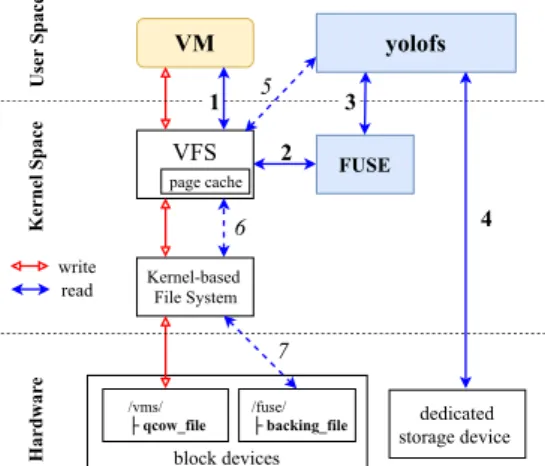
Fig. 7: yolofs read/write data flow In Figure 7, we illustrate the workflow of yolofs along with the read/write data flow for a VM cre-ated with a shared image disk. We start yolofs in a compute node before starting any VM operations. When a VM issues I/O reads on its backing file which is linked to our mounted yolofs file system, the VFS routes the operation to the FUSE’s kernel module, and yolofs will process it (i.e., Step 1, 2, 3 of the read flow). yolofs then returns the data directly from the boot image which already was in the yolofs’ memory (Step 4). If not, yolofs would load that boot image from its dedicated storage device (where it stores all the boot images of this cloud system) to the memory. Whenever the VM wants to access data that is not available in the
YOLO: Speeding up VM Boot Time by reducing I/O operations 9
boot image, yolofs utilises the kernel-based file system to read the data from the disk (Step 5, 6, and 7 of the read flow). All I/O writes generated from the VM go directly to the QCOW file of that VM and they are not handled by yolofs (the write flow in Figure 7).
Algorithm 1: VM Boot time speedup with yolofs
input : boot image B, I/O request R output: data D
1 if R is a write request then
2 forward to a kernel-based file system
to handle R 3 end 4 else 5 of f set, length, f ile_descriptor ← R 6 block_begin ← of f set BLOCK_SIZE 7 block_end ← of f set+length BLOCK_SIZE 8 D ← empty list
9 if boot image B not loaded then
10 load boot image B from
dedicated storage device into yolofs’ memory
11 end
12 for block_id ← block_begin to
block_end do
13 if block_id in boot image B then
14 D ← D + B.get(block_id, f ile_descriptor) 15 end 16 else 17 D ← D + ((block_id, f ile_descriptor) from a kernel-based file system)
18 end
19 end
20 return D
21 end
2) Implementation: We implemented yolofs to
handle the VMs’ I/O requests as shown in Al-gorithm 1. yolofs runs as a daemon waiting to handle I/O requests sent to the FUSE mount point. Write requests do not go through yolofs, the kernel-based file system is used to write this
data to the hardware disk (Line 1 of Algorithm 1). Otherwise, with every read request, we first extract the file_descriptor, offset, and length of the request (line 5). We calculate the begin block_id and the end block_id given the system BLOCK_SIZE (Line 6 and 7). yolofs takes the corresponding boot image B from the local repository and loads it into the memory if needed (Line 9). Next, we iterate over all block_id belong to the range [block_begin, block_end], with each block_id we check the corresponding boot image for the data of that block and return it (Line 12, 13, and 14). After the VM is booted, if the VM needs to read a block which is not in the boot image, that block is read from the kernel-based file system as described in line 17.
YOLO works using any storage backend and is
transparent to the VMs, the hypervisor and the kernel of the host/guest OS as well. This allows
YOLOto be deployed on a wide range of existing
systems.
V. EVALUATION
In this section we discuss the experiments per-formed on top of Grid’5000 [24]. The code of
YOLO as well as the set of scripts we used to
conduct the experiments are available on public git
repositories 1. We underline that all experiments
have been made in a software defined manner so that it is possible to reproduce them on other testbeds (with slight adaptations in order to re-move the dependency to Grid’5000). We have three sets of experiments. The first set is aimed to evaluate how YOLO behaves compared to the traditional boot process when the VM images disks are either locally stored (HDD and SSD) or remotely attached through a CEPH system [21]. The second set investigates the impact of collo-cated memory and I/O intensive workloads on the boot process. Finally, we measured the overheads of using the yolofs during the execution of the VM with the third set of experiments.
A. Experimental Conditions
Experiments have been performed on top of the Grid’5000 Nantes cluster. Each physical node has
1Due to the double blind review, the link towards repositories
will be given later on
YOLO: Speeding up VM Boot Time by reducing I/O operations 10
2 Intel Xeon E5-2660 CPUs (8 physical cores each) running at 2.2 GHz; 64 GB of memory, a 10 Gbit Ethernet network card and one of two kinds of storage devices: (i) HDD with 10 000 rpm Seagate Savvio 200 GB (150 MB/s through-put) and (ii) SSD with Toshiba PX02SS 186 GB (346 MB/s throughput). Regarding CEPH, we used CEPH version 10.2.5 deployed through 5 nodes (1 master and 4 data nodes, using HDD). When needed, CEPH has been used to deliver the remote-attached VM image disks to different VMs (each “compute” node mounted the remote block devices with ext4 format). Regarding the VMs’ configuration, we used the Qemu/KVM hypervi-sor (Qemu-2.1.2 and Linux-3.2) with virtio [25] enabled (network and disk device drivers). VMs have been created with one vCPU and 1 GB of memory and a share image disk using QCOW2 format with the writethrough cache mode. During each experiment, each VM has been assigned to a single core to avoid CPU contention and prevent non-controlled side effects. The I/O scheduler of VMs and the physical node is CFQ.
Regarding the VM boot time, we assumed that a VM is ready to be used when it is possible to log into it using SSH. This information can be retrieved by reading the system log, and it is measured in milliseconds. To avoid side effect due to the starting of other applications, SSH has been configured as the first service to be started.
Finally, we underline that all experiments have been repeated at least ten times to get statistically significant results.
B. Boot Time analysis
For the first set of experiments, we investigated the time to boot up to 16 VMs in parallel. Our goal was to observe multiple VM deployment scenarios from the boot operation viewpoint. We considered four boot policies as depicted in Figure 8:
• all at once: all VMs are booted at the same
time (the time we report is the the maximum boot time among all VMs)
• one then others: the first VM is started. Once
the boot operation is completed, the rest of VMs are booted simultaneously. The goal is to evaluate the impact of the cache we observed during the preliminary study on the
VM A VM B VM C boot time time VM A VM B VM C boot time time VM A VM B VM C boot time time prefetching script VM A VM B VM C boot time time loading/serving boot image all at once one then others prefetching boot YOLO
Fig. 8: Four investigated boot policies. Each block represents the time it takes to finish.
Prefetching bootperforms prefetching in a
parallel fashion to leverage gaps during the booting process of a VMs for faster loading.
YOLOloads and serves boot images whenever
VMs need to access the mandatory data.
0 2 4 6 8 1 4 7 10 13 16 Number of VMs Boot Time (s)
boot images on memory boot images on SSD
Fig. 9: Overhead of serving boot’s I/O requests directly from the memory vs. a dedicated SSD
boot time (see Section III). The boot time is calculated as the time to boot the first VM plus the time to boot all remaining ones.
• Prefetching boot: We used the prefetching
scriptwe developed for the preliminary
stud-ies (see Section III) to fetch the mandatory data from the VMI in the offset order. As depicted the prefetching script and the boot process of VMs are invoked simultaneously. Figure 5 illustrates that there are several time gaps in reading data during the boot
YOLO: Speeding up VM Boot Time by reducing I/O operations 11 0 5 10 15 20 1 4 7 10 13 16 Number of VMs Boot Time (s)
all at once one then others prefetching boot YOLO
(a)HDD 0 5 10 15 20 1 4 7 10 13 16 Number of VMs Boot Time (s)
all at once one then others prefetching boot YOLO
(b) SSD 0 5 10 15 20 1 4 7 10 13 16 Number of VMs Boot Time (s)
all at once one then others prefetching boot YOLO
(c)CEPH
Fig. 10: Time to boot multiple VMs, which share the same VMI (cold environment: there is no other VMs that are running on the compute node)
cess, especially, at the beginning of the boot process and around the fourth second. These non I/O intensive periods, in particular the first one, enables us to start the prefetching script and the boot process of a new VM at the same time. If they were not, the duration needed for the prefetching operation would be almost similar than booting a VM, making this strategy similar to the previous one.
• YOLO: All VMs have been started at the
same time, and when VM need to access mandatory data, YOLO will serve them. We underline that boot images have been preloaded into the YOLO memory before starting VMs. This way enabled us to emulate a non volatile device. While we agree that there might be a short overhead to copy from the non volatile device to the YOLO memory, we believe that doing so is ac-ceptable as (i) the amount of manipulated boot images in our experiments is less than 800 MB (16*50 MB) and (ii) the overhead to load simultaneously 16 boot images from a dedicated SSD is negligible as discussed in the preliminary studies and confirmed in Figure 9.
Finally, we remind that the disk strategy is the shared one (see Section II).
1) VMs deployment with the same VMI:
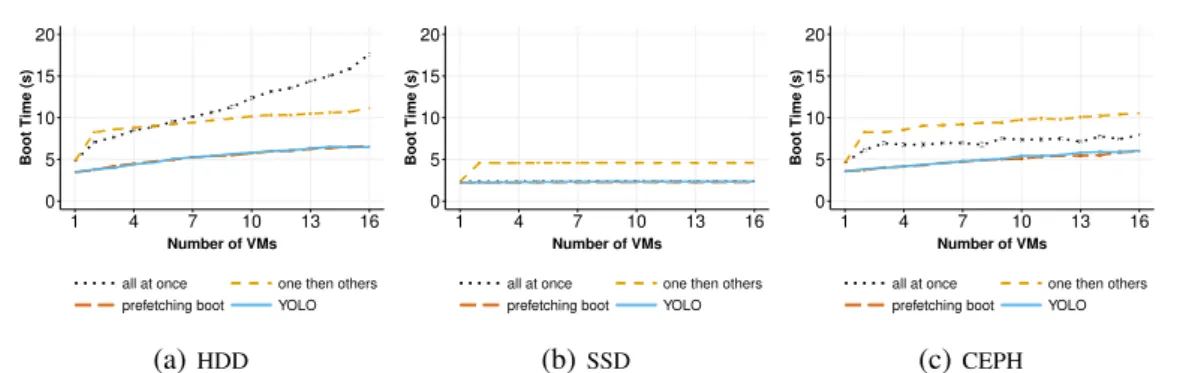
Fig-ure 10 shows the time to boot up to 16 VMs leveraging the same VMI (i.e., the same backing file).
On HDD (Figure 10a), the all at once boot policy has the longest boot duration because VMs perform read and write I/O operations at the same time for their boot processes. This behavior
leads to I/O contentions: the more VMs started simultaneously, the less I/O throughput can be allocated to each VM. When we use the one
then otherspolicy, we can see better performance
in comparison to the previous policy. As already explained, this is due to the cache that has been populated during the boot of the first VM. The boot time raises slightly with the number of VMs (from 2 to 16) due to the I/O writes. Regarding the
Prefetching bootand YOLO strategies, they greatly
speed up the VM boot time compared to other two boot policies because the VMs always get benefit from the cache for reading mandatory data. It is noteworthy that the performance gap between both strategies is not perceptible in this scenario. This is due to (i) the number of I/O requests that is not significant and (ii) that there is not cache eviction (all VMs are using the same VMI).
On SSD (Figure 10b), the boot time of several VMs is mostly constant for all boot policies. The I/O contention generated during the boot pro-cess on SSD becomes negligible because the I/O throughput of the SSD is higher than HDD. The I/O requests executed by the VMs can be handled quickly. Therefore, all at once, prefetching boot and YOLO relatively show the same boot duration. The duration of one then others boot policy is longer because we accumulated the boot time of the first VM.
Using CEPH (Figure 10c), prefetching boot and
YOLO still have the best performance. The boot
duration with one then others, prefetching boot and YOLO policy, which are mostly affected by I/O writes contention, follows the same trends when running on HDD. However, on CEPH, all at
once are faster than one then others, because the
YOLO: Speeding up VM Boot Time by reducing I/O operations 12 0 25 50 75 100 1 4 7 10 13 16 number of VMIs Boot Time (s)
all at once prefetching boot YOLO (a)HDD 0 1 2 3 1 4 7 10 13 16 number of VMIs Boot Time (s)
all at once prefetching boot YOLO (b) SSD 0 10 20 30 40 1 4 7 10 13 16 number of VMIs Boot Time (s)
all at once prefetching boot YOLO
(c)CEPH
Fig. 11: Time to boot multiple VMs, which have different VMIs (cold environment: there is no other VMs that are running on the compute node)
bottleneck on CEPH is not on I/O disk anymore (all I/O operations go through the 10 Gbit network interface and are served by CEPH).
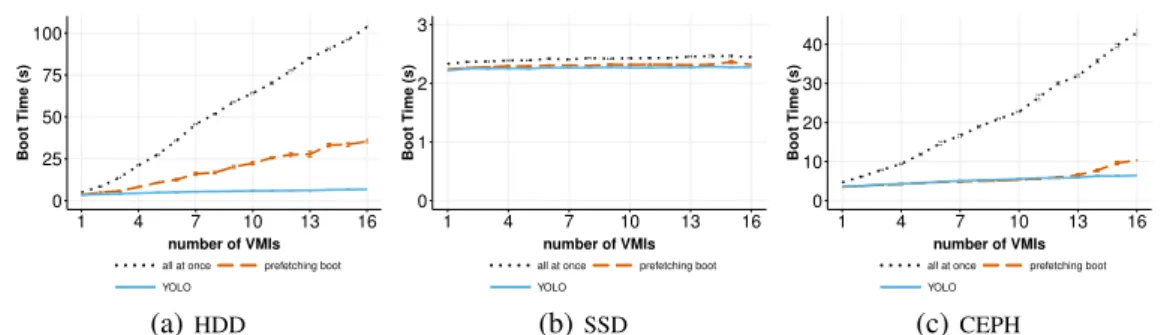
2) VMs deployment with distinct VMIs: We
performed the same experiment as the previous one, but each VM had its own VMI (i.e., backing file). In this particular case, there was no interest to evaluate the one then others because there was no possible gain from the cache. Therefore, we only compared the results of the three other boot policies. Figure 11 depicts the results.
On HDD (Figure 11a), the boot time using
YOLO increases slightly while all at once and
prefetching boot rise sharply. For example, to
boot 16 VMs, prefetching boot and all at once needs 38 s and 107 s, respectively, compared to only 7.2 s by using YOLO. The performance for the prefetching boot strategy is strongly impacted due to the fact that the script has been invoked several times simultaneously (generating a lot of competitions and a large number of seek oper-ations on the HDD). While YOLO would have also suffered from this issue (we remind that the boot images have been preloaded into the memory before booting VMs), the impact would be less important because YOLO reads boot images in a contiguous manner. The all at once boot policy also suffered I/O contentions from random reads generated by multiple VMs simultaneously as in case of prefetching boot. However, the perfor-mance is even worse because of : (i) the I/O virtualization overhead and (ii) the I/O access pattern that cannot benefit from the read-ahead strategy of the host OS.
On SSD (Figure 11b), it takes less than 3 sec-onds to boot VMs in three cases of boot policies.
This behaviour is again explained by the SSD capability.
On CEPH (Figure 11c), YOLO and prefetching
boot rise slightly while all at once increases in a
linear way. However, it is noteworthy to mention that prefetching boot is constant when the number of VMs is less than 13, and then it slightly increases. The reason for this trend is due the number requests sent through the network : when we boot more than 13 VMs at the same time, the traffic is high enough to cause a network bottleneck.
3) Summary: When simultaneously booting
several VMs in a cold environment, YOLO does not improve the boot time on SSD in both cases with or without sharing VMIs. Because SSD has high I/O throughput, the I/O contention generated by VMs from the boot process is negligible. On HDD and CEPH, YOLO speeds up the VM boot time up to 13 times and 6 times respectively when VMs do not have the same VMI and 2 times when VMs are sharing the same backing file.
C. Booting one VM under high consolidation ra-tio
The second set of experiments is aimed to understand the effect of booting a VM in a high-consolidated environment. We defined two kinds of VMs :
• eVM (experimenting VM), which is used to
measure the boot time;
• coVM (collocated VM), which is collocated
on the same compute node to run competitive workloads.
We used the command Stress [26] to generate the I/O and memory workloads. We measured
YOLO: Speeding up VM Boot Time by reducing I/O operations 13 0 30 60 90 120 0 3 6 9 12 15 Number of coVMs Boot Time (s)
normal boot prefetching boot YOLO (a)HDD 0 6 12 18 24 0 3 6 9 12 15 Number of coVMs Boot Time (s)
normal boot prefetching boot YOLO (b) SSD 0 30 60 90 120 0 3 6 9 12 15 Number of coVMs Boot Time (s)
normal boot prefetching boot YOLO
(c)CEPH
Fig. 12: Boot time of 1 VM (with shared image disk, write through cache mode) under I/O contention environment 0 20 40 60 80 0 3 6 9 12 15 Number of coVMs Boot Time (s)
normal boot prefetching boot YOLO (a)HDD 0 3 6 9 0 3 6 9 12 15 Number of coVMs Boot Time (s)
normal boot prefetching boot YOLO (b) SSD 0 5 10 15 20 25 0 3 6 9 12 15 Number of coVMs Boot Time (s)
normal boot prefetching boot YOLO
(c)CEPH
Fig. 13: Boot time of 1 VM (with shared image disk, write through cache mode) under memory usage contention environment
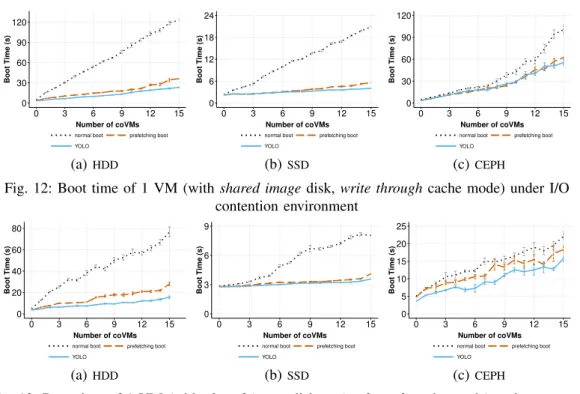
the boot time of the eVM while the multiple coVMs run their workloads (generating I/O and memory interferences). First, we started n coVMs where n ∈ [0, 15], and then we start one eVM to measure its boot duration. Each coVM utilises a separate physical core to avoid CPU contention with the eVM while running the Stress benchmark. The I/O (and respectively) memory capacity is gradually used up when we increase the number of coVMs. Finally, there is no difference between all
at onceand one then others boot policy because
we measure the boot time of only one VM. Hence, we simply started the eVM with the normal boot process.
1) Booting one VM under I/O contention: Figure 12 shows the boot time of one VM on the three storage devices under an I/O-intensive scenario. YOLO delivers significant improvements in all cases. On HDD, booting only one VM lasts up to 2 minutes by using the normal boot policy. Obviously, prefetching boot and YOLO speed up boot duration much more than the normal one because the data is loaded into the cache in a more efficient way. However, the performance, which was almost similar for YOLO and the
prefetching bootwhen manipulating one VMI (see
Figure 10a), is now clearly different and in favour of YOLO.
The same trend can be found on SSD in Fig-ure 12b where the time to boot the eVM increased from 3 to 20 seconds for the normal strategy, 3 to 6 seconds for the prefetching boot, and from 3 to 4 seconds for YOLO. While YOLO is faster than
prefetching boot by a small amount, YOLO is up
to 4 times faster than all at once policy under I/O contention of 15 coVMs. An interesting point is related to the CEPH scenario. When the coVMs are stressing the I/O, they generate a bottleneck on the NIC of the host OS, which impacts the performance of the write requests that are per-formed by the eVM during the boot operation. This leads to worse performance for YOLO and the prefetching boot strategies than in the HDD and SSD scenarios, ranging from 3 to 58 seconds and from 3 to 61 seconds respectively. However, it is still twice faster than the boot time of all at once, which is 107 seconds at 15 coVMs.
To sum up, on a physical node which already had I/O workloads, YOLO is the best solution to boot a new VM in a small amount of time. YOLO
YOLO: Speeding up VM Boot Time by reducing I/O operations 14
reduces the boot duration 5 times on local storage (HDD and SSD) and 2 times on remote storage (using CEPH).
2) Booting one VM under memory contention: We use this scenario to assess the influence of not having enough space to load and keep the boot images into the memory of both prefetching boot and YOLO strategies. Figure 13 gives the results we measured.
On HDD, the normal boot time can reach up to 4 times longer compared to the other two methods. With prefetching boot, the prefetched data stays in the memory to reduce the boot time until the page cache space is claimed. In this situation, the hypervisor might have to to read the prefetching data on the storage device once again. While comparing to YOLO, the boot data stays in YOLO memory space. For this reason, under memory-intensive environment, YOLO is almost 2 times faster than prefetching boot with 15
coVMsthat stress the whole memory. On SSD, the
different between YOLO and prefetching boot is small thanks to the performance of SSD. It is also true for CEPH, which has high read performance in general.
3) Summary: Using YOLO under I/O and
mem-ory intensive scenarios enables faster boot times in comparison to the normal boot approach. We underline that the gain should be even more im-portant under when several VMs would be booted simultaneously under such intensive conditions. Regarding the memory impact, it would be inter-esting to conduct additional experiments in order to better understand the influence of the SWAP for YOLO. Indeed, when there is not enough memory at the host OS level, the YOLO daemon should be impacted by the SWAP mechanism. In such a case, it would be probably better to access boot images directly from a dedicated fast efficient storage device instead of putting the boot image into the YOLO memory. By such a way, it would be possible to prevent YOLO to suffer from SWAP operations. As we already observed in Figure 9, accessing directly a SSD device is almost similar in terms of performance than ac-cessing the memory. Such an experiment under a memory intensive environment should be however performed to confirm this assumption.
D. yolofs overhead
Although booting VMs as fast as possible is the objective of our study, the performance of appli-cations or services running inside VMs should be taken also into account. To this aim, we performed two different experiments to evaluate the I/O per-formance a VM can expect once it has been booted using the YOLO mechanism.
In the first experiment, we compared the read performance when accessing data stored in the backing file with the additional yolofs layer (i.e.,
yolofs +ext4) and the straightforward way (i.e.,
ext4 only). We evaluated both sequential and ran-dom access. For sequential read, we measured the time a VM needs to read sequentially a whole 2.5 GB file. For random read, we read randomly 868 MB on a 2.5 GB file. Table II presents the time we observed. The difference of read perfor-mance of a VM booted by the two methods is at worst 10%.
In the second experiment, we used pgbench [27] to measure PostgreSQL performance (in transac-tions per second). The VMI used in this experi-ment already contained pgbench benchmark (with PostgreSQL 9.4.17). We stored the 1.34 GB test database (with over 5 million rows of data) on a QCOW file of a VM. After booting the VM, we performed pgbench with the default TPC-B test (involving five SELECT, UPDATE, and INSERT commands per transaction). Table III presents the number of transactions per second when we used pgbench to access the database. The read/write accesses to the database of the VM is not handled by yolofs because the database is stored on the QCOW file and it is not located in the yolofs mount point. In other words, only I/O reads access to the files related to PostgreSQL application will go through yolofs. Consequently, YOLO has a similar performance compared to VM boot in a normal way.
To conclude, the overhead caused by FUSE in
YOLOsurfaces when a VM has to read big chunk
of data on the backing file. However, in most practical cases, the backing file contains only es-sential application and system files that are shared with many VMs, other data of those VMs are stored on the QCOW file. This has been confirmed in a study [13], the authors showed that only a small fraction of the VMI is accessed by VMs
YOLO: Speeding up VM Boot Time by reducing I/O operations 15
TABLE II: Time (second) to perform sequential and random read access on a backing file of VMs which are booted by normal boot and YOLO on three storage devices.
HDD SSD CEPH
ext4 yolofs+ext4 ext4 yolofs+ext4 ext4 yolofs+ext4
Sequential Read 19.047 s 19.074 s 3.540 s 4.084 s 9.7 s 10.55 s
Random Read 13.405 s 13.553 s 6.408 s 6.692 s 11.27 s 12.25 s
TABLE III: The number of transactions per second (tps) when running pgbench inside a VM
booted using YOLO and normal way on 3 types of storage devices.
HDD SSD CEPH
yolofs 139 1205 145
Normal I/O path 140 1226 164
throughout its run-time. Accordingly, VMs booted by YOLO still maintain the same performance for running the applications or services.
VI. RELATEDWORK
Rapid VM deployment is one of the most im-portant factors in a IaaS cloud service to provide dynamic scalability and fast provisioning. Many efforts have been made to improve the startup time of a new VM. In our discussion, we analysed the works that focus on improving the VM booting phase. As far as we known, these studies can be divided in groups by the techniques they used: cloning and resuming.
Potemkin [28] marks a parent VM memory pages as copy-on-write and shares these states to all child VMs. It can start new VM by cloning from that parent VM quickly since most mem-ory pages are physically shared. On the con-trary, Potemkin can only clone VMs within the same compute node. SnowFlock [6] and Kalei-doscope [7] are similar systems that can start stateful VMs by cloning them from a parent VM. SnowFlock utilises lazy state replication to fork child VMs which have the same state as a parent VM when started. Kaleidoscope has intro-duced a novel VM state replication technique that can speed up VM cloning process by identify-ing semantically related regions of states. Wu et al. [29] perform live cloning by resuming from the memory state file of the original VM, which is distributed to the compute nodes. The VM is then reconfigured by a daemon inside each cloned
VMs that load the VM-metadata from the cloud manager. These systems clones new VMs from a live VM so that they have to keep many VMs alive for the cloning process. Another downside of the cloning technique is that the cloned VMs are the exact replica of the original VM so they have the same configuration parameters like IP or MAC address as the original’s. Thus, the cloned VMs have to be reconfigured.
Several works [30], [31], [32], [8] attempt to speed up VM boot time by suspending the entire VM’s state and resuming when necessary. To satisfy various VM creation requests, the resumed VMs are required to have various configurations combined with various VMIs, which leads to a storage challenge. If these pre-instantiated VMs are saved in a different compute node or an inventory cache and then they are transferred to the compute nodes when creating VMs, this may place a significant load on the network. Strip-ing the hardware state of VMs (includes vCPUs, memory or disk size, network interfaces, etc.) to the bare minimum VMs with only one vCPU avoids the pre-initiation of VMs with different configurations. So we have a bare minimum VM for each VMI. When a matching request arrives, this VM is resumed and its resources are hot-plugged to satisfy the request’s requirements.
VMThunder+ [10] boots a VM then hibernates it to generate the persistent storage of VM memory data. When a new VM is booted, it can be quickly resumed to the running state by reading the hiber-nated data file. The authors use hot plug technique to re-assign the resource of VM. However, they have to keep the hibernate file in the SSD devices to accelerate the resume process. Razavi et al. [9] introduce prebaked µVMs, a solution based on lazy resuming technique to start a VM efficiently. To boot a new VM, they restore a snapshot of a booted VM with minimal resources configuration and use their hot-plugging service to add more re-sources for VMs based on client requirements. The
YOLO: Speeding up VM Boot Time by reducing I/O operations 16
authors only evaluated their solution by booting one VM with µVMs on a SSD device. However, VM boot duration is heavily impacted by the number of VM booted concurrently as well as the workloads are running on a system [12], thus, their evaluation is not enough to explore the VM boot time in different environments, especially, under high I/O contention.
VII. CONCLUSION
Starting a new VM in a cloud infrastructure is a long process. It depends on the time to transfer the VMI to the compute node and the time to perform the VM boot process itself. In this work, we focus on improving the duration of the VM boot process. This duration highly relies on the number of VM that boots simultaneously and the co-workloads running on the compute nodes. We discussed preliminary studies where we identified that the main factor is related to the amount of I/O requests. To mitigate as much as possible the I/O cost, we proposed YOLO as a new methodology to perform the read operations on the VMI during a VM boot process in an efficient manner. In our solution, we introduce the boot image abstraction which contains all the necessary data from a VMI to boot a VM. Boot images are stored on a dedicated fast efficient storage device and a dedicated FUSE-based file system is used to load them into memory and to serve boot’s I/O read requests. We discussed several evaluations that show the benefit of YOLO. In particular, we showed that booting a VM with YOLO is at least 2 two times and in the best case 13 times faster than booting a VM in the normal way. While those results are promising, we should recognise that additional experiments must be performed to better understand the impact of the SWAP on
YOLO benefits. Current experiments have been
done by emulating non volatile memory devices using the same memory of other collocated work-loads. It would be interesting to complete these experiments to analyse hybrid scenarios where several VMs are booted simultaneously under I/O and memory intensive environments. While using a dedicated SSD can guarantee better performance in comparison to the normal boot, understanding SWAP operations that are performed on the YOLO daemon is something to analyse.
Regarding ongoing and future works, we re-cently started several activities. First, we are inves-tigating the interest of deduplication techniques to reduce the size of all boot images. More specif-ically, if several VMIs differ only in the set of installed applications and share a common under-lying operating system, it would be interesting to generate only one boot image for these VMIs. This improvement should reduce the memory footprint of YOLO overall. Second, we are studying how it can be possible to redirect all the application’s I/O requests to the Virtual Image disk directly, instead of going through yolofs after its boot. QEMU supports a feature to change the backing file of a running VM. Hence, it should be possible to leverage this mechanism to dismiss the FUSE mount point after the boot operation. However, this mechanism requires to restart the VM. To exe-cute such a change in an online fashion, extensions at the hypervisor level are required. Finally, we are currently analysing whether it makes sense to complete the boot image abstraction with the data that is mandatory to start the application services. Current experiments have been done by using SSH as the end of the boot operation (in other words, we put in a boot image all the blocks that are mandatory to reach the start of SSH). The boot image creation process can be extended in order to include the data related to the boot plus the data related to the starting of the expected services. Doing so, it would enable efficient autoscaling (scale in/out techniques).
ACKNOWLEDGMENT
All experiments presented in this paper were carried out using the Grid’5000 testbed, sup-ported by a scientific interest group hosted by Inria and including CNRS, RENATER and sev-eral Universities as well as other organizations (see https://www.grid5000.fr). This work is also a part of the BigStorage project, H2020-MSCA-ITN-2014-642963, funded by the European Commis-sion within the Marie Skłodowska-Curie Actions framework.
REFERENCES
[1] M. Mao and M. Humphrey, “A performance study on the VM startup time in the cloud,” in Cloud Computing (CLOUD), 2012 IEEE 5th International Conference on. IEEE, 2012, pp. 423–430.
YOLO: Speeding up VM Boot Time by reducing I/O operations 17
[2] K. Jin and E. L. Miller, “The effectiveness of deduplica-tion on virtual machine disk images,” in Proceedings of International Conference on Systems ans Storage (ACM
SYSTOR 2009). ACM, 2009, p. 7.
[3] K. Razavi and T. Kielmann, “Scalable virtual machine deployment using VM image caches,” in Proceedings of the International Conference on High Performance
Computing, Networking, Storage and Analysis. ACM,
2013, p. 65.
[4] K. Razavi, L. M. Razorea, and T. Kielmann, “Reducing VM startup time and storage costs by VM image content consolidation,” in Euro-Par 2013: Parallel Processing
Workshops. Springer, 2013, pp. 75–84.
[5] B. Nicolae and M. M. Rafique, “Leveraging collaborative content exchange for on-demand vm multi-deployments in iaas clouds,” in European Conference on Parallel
Processing. Springer, 2013, pp. 305–316.
[6] H. A. Lagar-Cavilla, J. A. Whitney, A. M. Scannell, P. Patchin, S. M. Rumble, E. De Lara, M. Brudno, and M. Satyanarayanan, “SnowFlock: rapid virtual machine cloning for cloud computing,” in Proceedings of the 4th ACM European conference on Computer systems. ACM, 2009, pp. 1–12.
[7] R. Bryant, A. Tumanov, O. Irzak, A. Scannell, K. Joshi, M. Hiltunen, A. Lagar-Cavilla, and E. De Lara, “Kalei-doscope: cloud micro-elasticity via VM state coloring,” in Proceedings of the sixth conference on Computer
systems. ACM, 2011, pp. 273–286.
[8] T. Knauth and C. Fetzer, “DreamServer: Truly on-demand cloud services,” in Proceedings of International Conference on Systems and Storage (ACM SYSTOR). ACM, 2014.
[9] K. Razavi, G. Van Der Kolk, and T. Kielmann, “Prebaked µvms: Scalable, instant VM startup for IAAS clouds,” in Distributed Computing Systems (ICDCS), 2015 IEEE 35th International Conference on. IEEE, 2015, pp. 245– 255.
[10] Z. Zhang, D. Li, and K. Wu, “Large-scale virtual machines provisioning in clouds: challenges and ap-proaches,” Frontiers of Computer Science, vol. 10, no. 1, pp. 2–18, 2016.
[11] H. Wu, S. Ren, G. Garzoglio, S. Timm, G. Bernabeu, K. Chadwick, and S.-Y. Noh, “A reference model for virtual machine launching overhead,” IEEE Transactions on Cloud Computing, vol. 4, no. 3, pp. 250–264, 2016. [12] T. L. Nguyen and A. Lèbre, “Virtual Machine Boot
Time Model,” in Parallel, Distributed and Network-based Processing (PDP), 2017 25th Euromicro International
Conference on. IEEE, 2017, pp. 430–437.
[13] B. Nicolae, F. Cappello, and G. Antoniu, “Optimizing multi-deployment on clouds by means of self-adaptive prefetching,” in European Conference on Parallel
Pro-cessing. Springer, 2011, pp. 503–513.
[14] KVM, “The QCOW2 Image.” 2012.
[On-line]. Available: https://kashyapc.fedorapeople.org/virt/ lc-2012/snapshots-handout.html
[15] SUSE, “Description of Cache Modes,” 2010. [Online].
Available: https://www.suse.com/documentation/sles11/
book_kvm/data/sect1_1_chapter_book_kvm.html
[16] A. Garcia, “Improving the
per-formance of the qcow2 format,”
https://events.static.linuxfound.org/sites/events/files/slides/kvm-forum-2017-slides.pdf, 2017.
[17] Debian, “Initial ramdisk,” 2011. [Online]. Available: https://wiki.debian.org/initramfs
[18] R. Hat, “libvirt: The virtualization api,” 2012.
[19] Linux, “mincore,” 1995. [Online]. Available: https: //linux.die.net/man/2/mincore
[20] H. Doug, “vmtouch: the Virtual Memory Toucher,” 2012. [Online]. Available: https://hoytech.com/vmtouch/ [21] S. A. Weil, S. A. Brandt, E. L. Miller, D. D. Long, and C. Maltzahn, “Ceph: A scalable, high-performance distributed file system,” in Proceedings of the 7th sympo-sium on Operating systems design and implementation. USENIX Association, 2006, pp. 307–320.
[22] B. K. R. Vangoor, V. Tarasov, and E. Zadok, “To FUSE or Not to FUSE: Performance of User-Space File Systems.” in FAST, 2017, pp. 59–72.
[23] A. Rajgarhia and A. Gehani, “Performance and extension of user space file systems,” in Proceedings of the 2010
ACM Symposium on Applied Computing. ACM, 2010,
pp. 206–213.
[24] D. Balouek, A. Carpen Amarie, G. Charrier, F. De-sprez, E. Jeannot, E. Jeanvoine, A. Lèbre, D. Margery, N. Niclausse, L. Nussbaum, O. Richard, C. Pérez, F. Quesnel, C. Rohr, and L. Sarzyniec, “Adding Vir-tualization Capabilities to the Grid’5000 Testbed,” in Cloud Computing and Services Science, ser. Communi-cations in Computer and Information Science, I. Ivanov,
M. Sinderen, F. Leymann, and T. Shan, Eds. Springer
International Publishing, 2013, vol. 367, pp. 3–20. [25] R. Russell, “virtio: towards a de-facto standard for virtual
I/O devices,” ACM SIGOPS Operating Systems Review, vol. 42, no. 5, 2008.
[26] SEAS, “Stress,” 2004. [Online]. Available: http://people. seas.harvard.edu/~apw/stress/
[27] T. P. G. D. Group, “Pgbench benchmark,” 2014. [Online]. Available: https://www.postgresql.org/docs/9.4/ static/pgbench.html
[28] M. Vrable, J. Ma, J. Chen, D. Moore, E. Vandekieft, A. C. Snoeren, G. M. Voelker, and S. Savage, “Scal-ability, fidelity, and containment in the potemkin virtual honeyfarm,” in ACM SIGOPS Operating Systems Review,
vol. 39, no. 5. ACM, 2005, pp. 148–162.
[29] X. Wu, Z. Shen, R. Wu, and Y. Lin, “Jump-start cloud: efficient deployment framework for large-scale cloud applications,” Concurrency and Computation: Practice and Experience, vol. 24, no. 17, pp. 2120–2137, 2012. [30] P. De, M. Gupta, M. Soni, and A. Thatte, “Caching VM
instances for fast VM provisioning: a comparative eval-uation,” in European Conference on Parallel Processing. Springer, 2012, pp. 325–336.
[31] I. Zhang, A. Garthwaite, Y. Baskakov, and K. C. Barr, “Fast restore of checkpointed memory using working set estimation,” in ACM SIGPLAN Notices, vol. 46, no. 7. ACM, 2011, pp. 87–98.
[32] I. Zhang, T. Denniston, Y. Baskakov, and A. Garthwaite, “Optimizing VM Checkpointing for Restore Performance in VMware ESXi.” in USENIX Annual Technical Con-ference, 2013, pp. 1–12.
[33] OpenStack, “Images for OpenStack.”
[On-line]. Available: https://docs.openstack.org/image-guide/ obtain-images.html
[34] R. Schwarzkopf, M. Schmidt, M. Rüdiger, and
B. Freisleben, “Efficient storage of virtual machine im-ages,” in Proceedings of the 3rd workshop on Scientific
Cloud Computing. ACM, 2012, pp. 51–60.
[35] C. Peng, M. Kim, Z. Zhang, and H. Lei, “VDN: Virtual machine image distribution network for cloud data
YOLO: Speeding up VM Boot Time by reducing I/O operations 18
ters,” in INFOCOM, 2012 Proceedings IEEE. IEEE,
2012, pp. 181–189.
[36] D. Jeswani, M. Gupta, P. De, A. Malani, and U. Bellur, “Minimizing Latency in Serving Requests through Differ-ential Template Caching in a Cloud,” in Cloud Computing (CLOUD), 2012 IEEE 5th International Conference on. IEEE, 2012, pp. 269–276.
RESEARCH CENTRE
RENNES – BRETAGNE ATLANTIQUE Campus universitaire de Beaulieu 35042 Rennes Cedex
Publisher Inria
Domaine de Voluceau - Rocquencourt BP 105 - 78153 Le Chesnay Cedex inria.fr