HAL Id: hal-01116298
https://hal.archives-ouvertes.fr/hal-01116298
Submitted on 16 Feb 2015
HAL is a multi-disciplinary open access
archive for the deposit and dissemination of
sci-entific research documents, whether they are
pub-lished or not. The documents may come from
teaching and research institutions in France or
abroad, or from public or private research centers.
L’archive ouverte pluridisciplinaire HAL, est
destinée au dépôt et à la diffusion de documents
scientifiques de niveau recherche, publiés ou non,
émanant des établissements d’enseignement et de
recherche français ou étrangers, des laboratoires
publics ou privés.
Bezel-Tap Gestures: Quick Activation of Commands
from Sleep Mode on Tablets
Marcos Serrano, Eric Lecolinet, Yves Guiard
To cite this version:
Marcos Serrano, Eric Lecolinet, Yves Guiard. Bezel-Tap Gestures: Quick Activation of Commands
from Sleep Mode on Tablets. ACM CHI Conference on Human Factors in Computing Systems, Apr
2013, Paris, France. �10.1145/2470654.2481421�. �hal-01116298�
Bezel-Tap Gestures: Quick Activation of Commands
from Sleep Mode on Tablets
Marcos Serrano Eric Lecolinet Yves Guiard
Telecom ParisTech - CNRS LTCI UMR 5141
46 Rue Barrault, 75013 Paris, France
{marcos.serrano, eric.lecolinet, yves.guiard}@telecom-paristech.fr
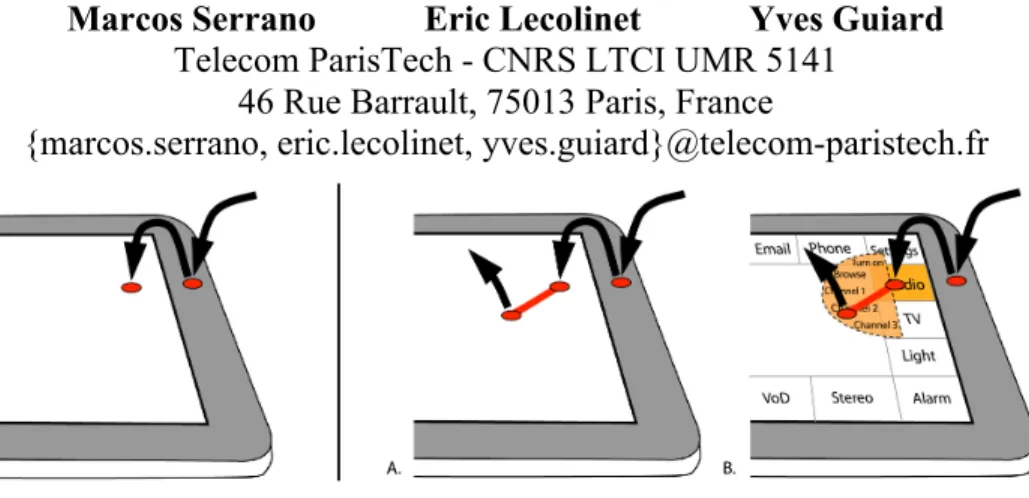
Figure 1: Left: A basic Tap gesture involves a tap on the bezel immediately followed by a tap on the screen. Right: Bezel-Tap Slide, a hierarchical extension of Bezel-Bezel-Tap supporting up to 64 commands. A) Expert mode. B) Novice mode. ABSTRACT
We present Bezel-Tap Gestures, a novel family of interaction techniques for immediate interaction on handheld tablets regardless of whether the device is alive or in sleep mode. The technique rests on the close succession of two input events: first a bezel tap, whose detection by accelerometers will awake an idle tablet almost instantly, then a screen contact. Field studies confirmed that the probability of this input sequence occurring by chance is very low, excluding the accidental activation concern. One experiment examined the optimal size of the vocabulary of commands for all four regions of the bezel (top, bottom, left, right). Another experiment evaluated two variants of the technique which both allow two-level selection in a hierarchy of commands, the initial bezel tap being followed by either two screen taps or a screen slide. The data suggests that Bezel-Tap Gestures may serve to design large vocabularies of micro-interactions with a sleeping tablet. Author Keywords
Interaction techniques; Mobile devices; Bezel Gestures; Accelerometers; Micro-Interaction; Marking Menus. ACM Classification Keywords
H.5.2. Information interfaces and presentation: Interaction. General Terms
Design; Human Factors; Performance; Experimentation.
INTRODUCTION
A limitation of mobile devices is that they provide little support for quick commands. Micro-interactions, which rest on unconditional availability and fast access [3,4], are especially desirable for frequent actions such as, for instance, controlling a media player, checking emails and SMS, calling friends and family, getting the local map or the weather forecast, and more basic actions like copying, pasting, and application switching. Since mobile devices constantly switch to sleep mode to save energy, interaction is hampered by the need to reactivate them whenever they have gone to sleep, typically by pressing a physical button and sliding a widget on the screen. This problem is exacerbated when mobile devices are used to control multimedia devices (TV, set-top box, etc.) and home equipment (home automation, domotics systems), a usage likely to become common in the near future [10, 32]. In this scenario remote commands expand the large set of mobile applications. The challenge, then, is to allow always available and rapid access to a relatively large number of commands.
This paper presents Bezel-Tap Gestures, a novel interaction technique allowing micro-interactions on mobile devices. Not only can the technique serve to open an application and launch a favorite command rapidly, it can also wake the device if asleep. Using a combination of input modalities, it is based on the close succession of two input events: a tap on the bezel, detected by accelerometers, and a press or a sliding gesture on the touchscreen. While primarily designed for tablets, which have quite large bezels, Bezel-Tap Gestures can be adapted to smaller devices such as smartphones. Little visual attention is required and eyes-free operation is possible.
© ACM, 2013. This is the author’s version of the work. It is posted here by permission of ACM for your personal use. Not for redistribution. The definitive version will be published in CHI 2013, April 27, 2013, Paris, France.
We present a field experiment indicating that the technique is robust to the risk of accidental activations (false detections). A second experiment investigated the optimal size of the vocabulary of commands, while exploring the usability of the different regions of the bezel (top, bottom, left, right) with the device in idle mode. We will explain how Bezel-Tap Gestures (and their extensions) can be used for activating a relatively large number of commands in both novice and expert mode, with a seamless transition from the former to the latter. Finally we will report performance data in a third experiment that illustrates the merits of an extension of Bezel Gestures [6] that allows selecting more commands than the original technique, in comparison with Bezel-Tap Gestures, it being understood that the techniques can be combined if desirable.
RELATED WORK
Gestural interaction provides an efficient means for activating commands rapidly, especially when hotkeys are not available as is generally the case on mobile devices. Marking menus [22] are a well-known technique relying on 2D gestures. They have inspired many HCI studies, some of them dedicated to mobile devices [11, 21]. One major merit of these techniques is to make it easy to discover and learn the gestures: all commands are visible in novice mode and gestures are learned incidentally from repetitive use. However, they interfere with common interactions on the screen (e.g. drag to pan), especially on mobile devices, which lack mouse buttons or an equivalent mechanism to differentiate interaction states [7]. The spatial shape or the space-time kinematics of certain gestures can serve as mode delimiters (e.g., pigtails [16], rubbing [26] or rolling gestures [29]). These techniques are well suited for triggering a few dedicated commands at the application level, but we are looking for a more global shortcut mechanism that will not interfere with application shortcuts. Finally, we have the problem that gestural interaction does not work with the device in sleep mode, and unfortunately that is often the case due to the high power consumption of capacitive sensors.
Motion of the device in 3D space is another resource that can be exploited for triggering shortcuts, but the interpretation of 3D gestures poses an even trickier delimiter problem, the system having to distinguish intentional from background motion. DoubleFlip [30] solves this problem with a specific gesture that precedes the actual gestural commands and serves as an input delimiter. JerkTilts [5] extends this idea by merging the gesture delimiter and the command, yielding a vocabulary of up to eight commands. But, again, these interaction techniques seem more well suited for activating a small set of application-specific commands. And, unlike Marking menus, they fail to support a fluid transition from novice to expert mode. They may also be more error prone, especially when the delimiter is merged with the command because 3D gestures are inherently difficult to interpret. Finally, 3D gestures are more appropriate for smartphones than for
tablets because their size and inertial properties make then relatively difficult to move abruptly in 3D space.
Other approaches leverage extra input modalities. For instance, tap input through the pocket [27] has been proposed for embedded interaction on mobile phones without the need to access the keypad. Two other techniques based on acceleration sensing are ForceTap and Whack Gestures. ForceTap [14] distinguishes strong from gentle taps on the screen of a mobile phone. Whack Gestures [18] work by striking the mobile device, worn at the waist, with an open palm. Concerning tap techniques on tablets, TapSense [13] uses a microphone to detect different types of finger taps on the screen (nail, tip or knuckle). Some techniques take advantage of the bezel to perform specific actions. In the seminal work of Hinckley et al. [15] on sensing techniques for mobile devices, touch on the bezel was used to initiate scrolling. Bezel tap has recently been used in a soft keyboard as a complementary input modality to insert a space [23]. Bezel Gestures, which are gestures on the touchscreen that start from the bezel, have been investigated for one-handed interaction on mobile devices in [6]. Results showed mark-based bezel gestures are faster and more accurate than free-form bezel gestures [6]. In [28], bezel swipes were proposed for scrolling and multiple selection on mobile touchscreens. Bezel gestures have been used for opening menus in [17] and in [12], which compares the performance of several menu layouts for mark-based bezel gestures, focusing on eyes-free interaction on small mobile devices and text entry. Today Bezel gestures are present by default on Android and iOS, to make a status panel appear, and on Windows 8 for switching between apps and bringing up items.
BEZEL-TAP GESTURES
The technique we introduce in this paper offers a supplementary input resource: it does not interfere with common interaction techniques, including Bezel gestures [6], and so it is usable without changing user habits on main mobile platforms. Most importantly, the technique makes it possible to both wake up the device and activate a command without the risk of battery over-draining, as explained in detail in a later section.
In its basic form a Bezel-Tap gesture involves two successive events recorded in different input channels, a tap on the bezel immediately followed by a tap (or a slide) on the screen. The first tap is detected by accelerometers and the second tap (or slide) by the touchscreen (Figure 1). As shown in our false positive study below, there is very little risk of inadvertent activation. The fast succession of two events from different input channels (a tap not
concomitant with a screen contact followed within a short time interval by a screen touch) is a low probability event
that can serve as a unique signature. For instance, no Bezel-Tap gesture is recognized if the user double taps the screen or double taps the bezel. Moreover, a tap on the bezel
induces a high instant acceleration compared to background tablet movements and it is preceded by a small amount of time when the device moves very little (in normal usage, the user is holding the device, not shaking it when interacting with it).
This unique succession of input events acts as a mode delimiter, hence avoiding Bezel-Tap gestures to interfere with common interaction techniques, which typically rely on just the touchscreen. It also allows selecting a given command by considering the location of the contact on the touchscreen. Bezel-Tap gestures thus merge a gesture delimiter and a command selection. They can serve as a substitute for keyboard shortcuts on mobile devices, where a physical keyboard is generally absent.
As we will see in Experiment 2, selection performance is fast and accurate up to a fairly large number of commands, even in the absence of any screen feedback. Moreover, we will later present extensions (Tap Slide and Bezel-Tap3) that allow selecting even more commands (Figure 1). We will also propose Bezel-Tap menus, a form of Marking menus [22] that are compatible with Bezel-Tap gestures. As with Marking menus Bezel-Tap menus make it possible to interact in the same way in novice and expert mode and are thus expected to provide a seamless novice-to-expert transition. This feature is indeed important for discovering and learning shortcuts.
Bezel-Tap gestures were primarily designed for tablets, which indeed provide quite large bezels (their width is for instance between 1.8cm and 2cm on the iPad and the Galaxy Tab). Designed for holding the device, bezels favor bimanual interaction [34] and incidentally offer a large surface for tapping. Bezel-Tap gestures can also be used on the top and bottom bezels of smartphones, which are generally large enough. They could also be adapted to devices with very thin bezels by detecting taps on the edge or close to the edge on the back of the device.
Tap detection
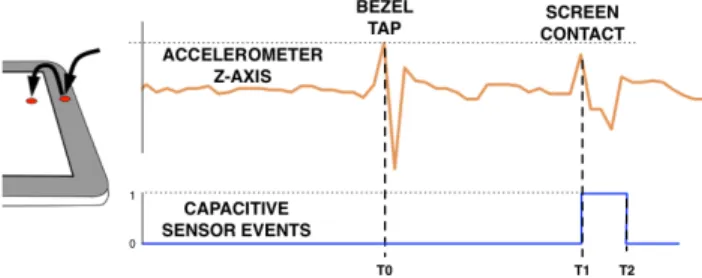
To detect taps accurately using the accelerometer, the sampling must be done at least at a frequency of 100 Hz (1 sample every 10ms). The difference between three consecutive accelerometer samples along the Z axis is calculated in real-time, this giving the instant acceleration within a frame of 20ms (Figure 2). Then we use three conditions to detect a tap on the bezel:
• Threshold: The instant acceleration must be higher than a given threshold. This threshold was determined in a study on which we report at the beginning of Experiment 1. • Sign: The sign of the acceleration along the Z axis
(positive or negative, depending on the orientation of the accelerometer) indicates whether the user taps on the front or on the back of the device. We can thus dismiss all the taps on the back.
• Little acceleration: As said before, this instant acceleration must be preceded by a small amount of time, 30ms from our experiments, with very little acceleration. This property allows making the difference between noise and bezel taps, because normally the user is holding the device before tapping.
Figure 2. Accelerometer and touchscreen signals elicited by the first two events of a Bezel-Tap gesture.
A Bezel-Tap gesture involves a subsequent tap or slide on the touchscreen that must occur within a short time interval (Figure 2). So we have two temporal constraints:
• The time delay between the two events must be greater than a few milliseconds (50ms with our hardware) so that a Bezel-Tap gesture cannot start with a screen tap (this could otherwise happen in the case of a double tap on the screen if the user taps hard).
• The delay must not exceed 600ms to avoid taking unrelated events into account (i.e., a screen contact occurring long after a tap). This value was obtained experimentally from Exp. 1, described below, where mean inter-tap time was 437ms (SD 143ms).
Incidentally, it is worth noticing that Bezel-Tap gestures allows identifying a location on the device (that serves to select a command) but only rely on the touchscreen to do so. While accelerometers could theoretically serve to detect tap locations, hardware currently available on mobiles devices would make this hardly feasible. Using two input modalities (the accelerometer and the touchscreen) solves this problem: the touchscreen provides information the accelerometer is unable to provide while avoiding interfering with normal use of the touchscreen.
Waking-Up from Sleep Mode: Power Considerations Bezel-Tap Gestures make it possible to trigger commands quickly, even with the device in sleep mode. This property is useful even if the device is password protected as many commands are not security threatening, this being especially true when the device serves to control home equipment. And recent surveys reveal anyway that more than 60% of mobile users do not use passwords [19]. This reactivation feature requires the accelerometer to remain permanently powered. The small power consumption of accelerometers makes this feasible without considerably reducing the battery life. This is an interesting property of accelerometers, which contrasts with most other input devices, especially capacitive screens, which require
about 3000µA in idle mode and 5000 µA in active mode. This is why techniques only relying on the touchscreen, for instance Bezel Gestures, would not be appropriate for reactivating the device. Tapping the bezel is also more convenient than pressing a button, a very low consumption input device, simply because it represents a very large target that can hardly be missed.
Some components of a mobile device, such as the GSM and the CPU, remain powered in sleep mode in order to receive calls or SMS. As shown in [8] the power consumption is about 69mW during sleep mode for a 2.5G Android-based smartphone (hence allowing about 45h of battery life). The power needed by the accelerometers used in our prototype (1.2mW) should thus only reduce the battery life of this device by about three quarters of an hour. This figure would be much less using recent, more power-efficient models such as the LIS3DH [24], which may use as little as 7.2 µW. And performance is permanently improving thanks to research on the continuous sensing of human activity through mobile sensors [25, 9]. The solution we are examining in this paper is hence indeed viable in terms of power consumption, especially in the case of tablets, which usually have a fairly large battery (e.g., the battery of the Samsung Galaxy Tab 10.1 supplies 7000mAh).
Tapping on the bezel will power up the capacitive touchscreen of the device for a few milliseconds. While, as seen above, the consumption of a capacitive screen is far from negligible, this is not a problem because such an event will only occur rarely, even in mobile context, as we will see in the false positive study presented below.
The inter-tap time (the amount of time elapsed from the bezel tap to the screen touch) is larger than the time needed to reactivate the touchscreen. In theory, touchscreens have very small reactivation latencies: less than 10ms for an Atmel maXTouch on a Samsung Galaxy Tab tablet. Using a camera, we approximately measured how much time was needed for reactivating an iPhone and an iPad. According to our measurements wake-up takes about 240ms (6 frames in a 25 fps image) after pressing the physical button of these devices. This duration is about half of the inter-tap time we measured in Experiment 2. Our technique is thus already compatible with common commercial devices.
Hardware
We first tested our tap algorithm with a Samsung Galaxy tablet Tab 10.1 (display: 10.1’’, resolution 1280 x 800 pixels, dimensions: 256.7 x 175.3 x 8.6 mm, original weight: 565g) running Android 3.2, containing one built-in three-axis accelerometer situated on the top-right corner of the device (position found from a device tear down). Pre-tests showed that this accelerometer permits to detect taps with sufficient accuracy on the top and right bezel regions (95% of taps detected, this resulting from its location), with a general success rate of 84% over all bezel regions.
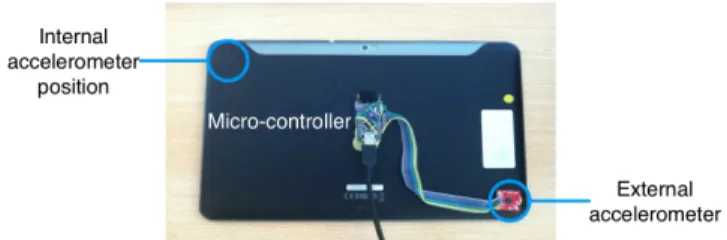
The Bezel-Tap technique can hence already work with existing equipment, but not on all bezel regions. This led us to build a prototype to perform a more general experiment. To do so we fixed an external accelerometer on the back of the bottom-left corner of the device (Figure 3), an easy solution from a manufacturing point of view as accelerometers are cheap, light and small objects (about 2x2x1mm).
Figure 3. Test prototype with an external accelerometer. We used an ADXL335 3-axis +/-3 g accelerometer [1], available in a small (4x4x1.45mm) plastic chip package. The accelerometer was plugged to a micro-controller Arduino Nano 3.0 [2], connected through a USB wire to a PC. The wire was fixed together with the tablet USB power cable in order to minimize its detrimental effect on the manipulability of the prototype. As the power cable had to be plugged anyway during tests, having a wired prototype entailed no significant extra cost. A Java program was written in order to parse values from the external accelerometer and dispatch them to the tablet through the WiFi network. The back of the prototype was shielded in order to resist extensive experimentation and to preserve a handy manipulation.
EXPERIMENT 1: TRUE AND FALSE POSITIVES STUDY The goal of this experiment was first to optimize the threshold for tap detection (true positives), and second to evaluate the probability of false positives when using the tablet in the field. For practical reasons, we only used the built-in accelerometer in this experiment since the external accelerometer needed to be plugged to a computer. Hence, we only considered taps that the built-in accelerometer could detect with sufficient accuracy, that is to say taps on the top and right bezel regions.
Threshold setting
We asked six users to perform 40 taps each, 20 on each of the top and right regions of the bezel. The logging software was running on a PC and there was no visual feedback. The participants were first explained what a bezel tap was and the difference between a tap and a touch. We asked users to tap, in separate blocks of trials, on the two regions of the bezel while holding the tablet in their hands. Region order was counterbalanced.
Figure 4. True positive rate versus tap threshold value in G.
Results
We analyzed logs studying the relationship between tap threshold and the percentage of taps recognized. The results (Figure 4) show that true positive rate starts decreasing above a threshold of 0.35G (3.4 m.s-2). We thus decided to
use this value for tap detection. False Positives: A Field Study
In order to evaluate the probability of inadvertent activations of Bezel-Tap gestures (false positives), we completed a field study with 12 people using a Samsung Galaxy Tab 10.1 equipped with a web browser implementing Bezel-Tap Gestures. We chose a web browser for two reasons: it is one of the most common applications used in tablets [33], and it can be used for displaying various kinds of data. We gave the participants a tablet for 24 hours, asking them to use the web browser for at least one hour in total wherever they wanted.
Data collection
We collected 25 hours and 26 minutes of tablet use from the 12 participants (median 100 min per participant, SD 70 min). We logged the data from the internal accelerometer and the touchscreen input.
Results
All users performed the experiment at home. There were no false positives at all, considering both Bezel-Tap Gestures and the variants we present in the second part of this paper. A few taps were detected by the accelerometer (on average 7.7 taps per hour of use) but none of them were followed by a screen contact in less than 600ms, so that no false positive was detected. This field study suggests that our technique is robust to common usage.
False Positives: Taps in Mobility
We also investigated the effect of carrying the device in mobile context, in public transportation or while riding a bike to see how many taps would be detected by the accelerometer just because of the motion of the device. A high number of detections would increase the probability of inadvertent activations of Bezel-Tap gestures when the user uses the device and drain the battery because taps reactivate the capacitive sensor of the screen. We hence conducted an experiment carrying a Galaxy Tab tablet inside a backpack during subway, bus and bike journeys.
Data collection
The author collected 8 hours and 37 minutes of tablet’s internal accelerometer log in mobile context (3h14min of bus, 1h1min of subway and 4h22min of bike).
Results
On average 6.15 taps per hour were detected: 9.5 taps/hour on bus, 4.9 taps/hour on subway and 3.8 taps/hour on bike. This small number let us drop our concerns. Inadvertent activations should almost be as rare as in the previous study and the added power consumption is negligible.
Conclusion
These studies show there is very little risk of an accidental activation of the bezel tap technique. We only used the built-in accelerometer (and taps on the top and right bezel regions), thus showing that our technique can be implemented using current commercial devices. These results suggest that the risk of false positives would remain very low if a second accelerometer was used for detecting taps on all four bezel regions, as proposed above.
EXPERIMENT 2: BEZEL-TAP PERFORMANCE
The goal of this experiment was to evaluate the performance of Bezel-Tap gestures in terms of speed and precision depending on the size of the command set. Additionally, we also wanted to compare performance for the different regions of the bezel (top, bottom, left, right). Basic Bezel-Tap gestures were used for this experiment (a tap on the bezel followed by a tap on the screen). No help was provided to the participants (the screen of the tablet was full black).
Task and Instructions
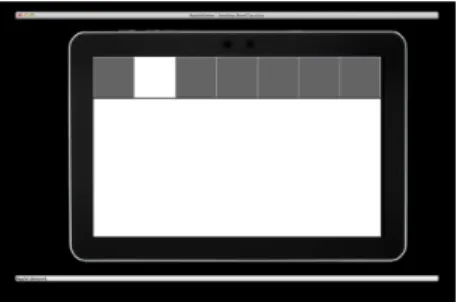
The participants had to use, in separate conditions, the four bezel regions located at the top, bottom, left, or right of the device, and the two-tap sequence served to select within the specified region one item among 4, 5, 6, or 7. The items consisted of squared areas, the same size, laying on the periphery of the touchscreen as shown in Figure 5.
We decided to deliver to our participants visual stimuli that fully specified what they had to do, using a laptop screen placed just in front of them (Figure 5), thus simulating the case of a highly practiced user. Our task instructions emphasized accuracy, asking our participants to minimize their error rate (primary demand) while wasting no time (secondary demand).
Figure 5. An example, with N = 7, of a stimulus of Exp. 2, as displayed on the laptop screen.
The participants were provided with knowledge of results: Following each gestural response, the stimulus display changed on the laptop screen, with the blue target rectangle either turning green in case of a correct response or the wrongly selected rectangle being highlighted in red in case of an error.
Participants
Ten men and two women, aged 26.5 years on average, volunteered for the experiment. Eight were familiar with tablets.
Apparatus
We used the Samsung Galaxy Tab prototype with two accelerometers (the built-in and the external accelerometer, as described in previous section). We managed to remove the status bar that the Android system displays by default at the bottom of the screen, and so we had at our disposal 100% of the screen surface area. Next, we covered the bezel with black tape, hiding the tablet logo and the camera objective, so that the bezel surface was homogeneous all around. The final weight of the experimental device was 650g.
Procedure
This experiment followed a 4 x 4 within-participant design with menu region (top, bottom, left, or right) and number of
menu items (N = 4, 5, 6, or 7) as factors. Four blocks of
trials were run for each menu location, the menu-location factor being balanced by means of a 4x4 Latin square. Each block of trials required 4+5+6+7 = 22 selections, N being increased gradually: the first four stimuli (presented in randomized order) asked for the selection of one item among four, and so on for N=5, 6 and 7.
The sequence of events in a trial was as follows: stimulus onset, then gestural response, then knowledge of results display, then time out. The experiment, in which we recorded a total of 22x16x12 = 4,224 double-tap gestures, lasted about 30 min per participant.
Data Collection
We recorded signals from our two accelerometers (the built-in one plus the external) as well as touch events from the screen tablet. Beside success rates, we measured total trial completion time, from stimulus onset to screen release. The experiment was videotaped from beginning to end. Results and Discussion
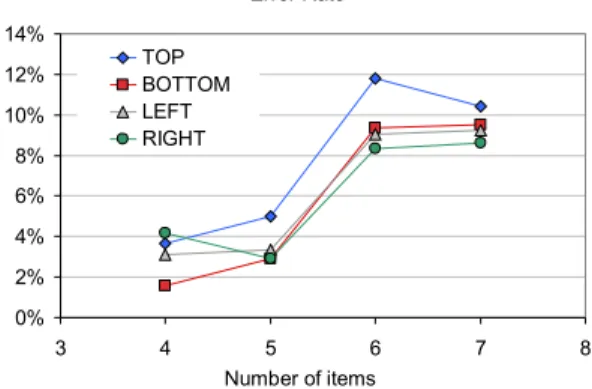
Our experimental manipulations had little or no influence on the speed of performance. It took our participants a pretty constant 1.5s to complete the various gestures, regardless of N and regardless of the menu location. In contrast, as shown in Figure 6, the success rate declined monotonically with the increase in set size. It was on average 96.9% at N = 4, 96.5% at N = 5, 90.4% at N = 6 and 90.6% at N = 7 (F3,33 = 15.87, p<.0001). Although
performance accuracy seems somewhat poorer for the top location, this reflects an effect present in essentially two participants: in fact there was no consistent effect of menu
location (F3,33= 1.05, p=.38), and no consistent interaction
between menu location and N (F9,99<1).
Notice in Figure 6 that the slope of the error-rate curve tends to increase from odd to even but tends to stagnate from even to odd, suggesting that odd-numbered menus, which are symmetric about their central item, allow more accurate performance than even-numbered menus.
An inspection of the confusion matrix in the case N = 5 revealed a better accuracy for odd-numbered than even-numbered items: the error rate was respectively 3.5%, 0.9% and 7.6% for all, odd and even items (t11=3.85, p=.001
one-tailed). Likewise, performance was more accurate for external items, situated at the corners of the screen, than internal items: we recorded 0.3% errors on average over items #1 and #5 vs. 5.7% errors on average over items #2, #3, and #4 (t11=4.31, p=.006). Those results are consistent
with previous research pointing out the fact that corners and physical edges are useful landmarks for both blind and sighted people [20].
Figure 6. Error rate as a function of N, for each menu location.
To sum up, this experiment confirmed the usability of the Bezel-Tap technique in all four regions of the device in sleep mode. Selection times, on the order of 1.5 sec (with the reaction time included), were compatible with the micro-interaction concept [3]. Performance accuracy was not lower for N = 5 (96.5%) than for N = 4 (96.9%). One practical suggestion that arises from these results is that a set size of five items is optimal for the technique. The high accuracy for N = 5 in little-trained participants, confirmed that the technique is worthy of consideration in relation with shortcut commands.
EXTENSIONS AND BEZEL-TAP MENUS
Bezel-Tap Gestures can be extended to allow selecting a large number of items. We propose two new techniques that rest on a hierarchical organization (Figure 1-right). Bezel-Tap3 (BT3) involves three taps: one on the bezel and two on the screen. The second tap selects a group of items and the third tap an item in this group. Bezel-Tap Slide (BTSlide) involves a tap on the bezel followed by a slide on the screen. It works in the same way as BT3 except that the
Error Rate 0% 2% 4% 6% 8% 10% 12% 14% 3 4 5 6 7 8 Number of items TOP BOTTOM LEFT RIGHT
starting and ending points of the slide play the role of the second and third taps.
Both techniques rely on Bezel-Tap menus (Figure 7) for the novice mode. Due to the nature of BT3 and BTSlide gestures, Bezel-Tap menus are hierarchical. Their first level consists of five rectangular items for all four bezel regions (Figure 7). Normal item size is 256x160 px, but according to Experiment 2 results we decided to expand even items and reduce corner items by 15% in order to increase even-numbered items success rate.
The second level of the menu rests on 180° radial menus. The second tap (resp. the starting point of a slide) selects one of these radial menu, for instance the "Radio" menu in Figure 7. The third tap (resp. the ending point of a slide) selects an item in this menu. The selection of the radial menu hence depends on the location of the tap on the screen (which must lay in one of the rectangles on the periphery of the screen) and the selection of the item on the direction of the segment between the this tap and the following one (resp. the direction of the slide).
Menus only appear if the user waits more than 600ms between the second and the third tap. A complete novice user just needs to tap on the bezel then anywhere on the screen and wait for 600ms. The bezel menu then appears and the user can select the proper radial menu and the proper item in this menu. A more knowledgeable user will select the proper radial menu by tapping on the appropriate rectangle, then wait the radial menu to appear to select the desired item. An expert user will bypass these stages by performing all taps (or slides) without any visual feedback. In any case, user interaction is similar in totally novice, partially novice and fully expert modes, a property expected to provide a seamless novice-to-expert transition.
Figure 7. Two-level Bezel-Tap Menus.
To make interaction easier, we did not assign menus to corner items (which can serve as one-step shortcuts for very frequent commands). This design allows for a total of 12 radial menus (3 per region). Each radial menu offers five items over 180° to avoid moves back to the bezel. A Bezel-Tap menu can thus comprise a total of 64 items: 4 one-step shortcuts and 60 menu items (4 regions x 3 menus x 5 items). While this number may seem large for a vocabulary of shortcuts for a standard user, this is useful for the novice mode as the menus can also contain commands that will not
be triggered in expert mode. Having related commands grouped together in menus is convenient and allows incidental learning.
In the next section we will compare the performance in expert mode of BT3, BTSlide and an extension of Bezel Gestures [6]. Interestingly, these three techniques can coexist: Bezel Gestures do not rely on the same initial event as Bezel-Tap techniques, which themselves do not rely on the same second event. Quite a large number of commands (3x64=192) can hence theoretically be provided if these techniques are used together.
EXPERIMENT 3: TWO-LEVEL COMMAND HIERARCHY The goal of this study was to evaluate the usability of Bezel-Tap Gestures for command selection in expert mode. Participants were asked to perform the full gestural sequence illustrated in Figure 8, using either BT3, BTSlide or an extension of Bezel Gestures [6] that allows selecting more commands than the original technique. In our implementation of this technique, the finger starts to slide from the bezel, reaches the selected menu and finally slides out of that menu in one of the five possible directions.
Figure 8. The hierarchical gesture techniques tested in Exp. 3, BT3 (left), BTSlide (center) and Bezel Gestures (right). This experiment also investigated the impact of vision on performance. During a first session, which formed the main part of the experiment, the participants were allowed to watch the tablet (whose screen was black, hence providing no feedback) while carrying out the tasks. But during a second session, run with a subset of the participants, the tablet was hidden, as a test of whether the gestures could be successfully performed in eyes-free mode (Fig. 9).
Figure 9. A participant performing a gesture under an apron in the eyes-free session.
The right hand (of right-handers) usually staying by default near the bottom-right corner of the tablet, the right and bottom regions of the bezel are most easily accessible for tapping. In this experiment we decided to focus on these two comfortable regions, leaving aside the top and left regions.
We again asked participants to minimize their error rate with no waste of time and provided them with knowledge of result. The classification of responses for the first selection (menu) was 2D: if the user touched beyond the menu rectangle, the gesture was judged false. The classification of responses for the second selection (item) in the radial menu was just angular, with no distance limit. Participants and Apparatus
Nine men and three women performed the experiment, aged 27.5 years on average, all right-handed? Six of them also participated in the second session with the tablet hidden. We used the same apparatus as in Exp. 2 and again the experiment was videotaped from beginning to end.
Design
We used a 2x3 within-participant design with menu region (right, bottom) and interaction technique (BT3, BTSlide and Bezel gestures) as factors. In the visible-tablet session, three blocks of trials were run for each interaction technique, the interaction technique factor being balanced by means of a 3x3 Latin square. Each block was composed of 33 trials: 3 shortcuts (corner items) plus 6 menus x 5 items/menu. The Menu Position factor was sorted randomly. The experiment involved 33 x 9 = 297 trials per participant (3,564 in total) and lasted about 30 minutes. In the shorter invisible-tablet session, which lasted about 20 minutes, two blocks of trials were run for each interaction technique, using the same 33 trial-blocks. 33 x 6 = 198 trials were ran per user, 1188 in total.
Figure 10. An example of a stimulus of Exp. 3, as displayed on a laptop screen.
The sequence of events in a trial was as follows: stimulus display, as shown in Figure 10, then gestural response, then knowledge of results display, then time out.
Dependent Measures
We will report data computed on average over participants: the dependent measures are the success rate as well as the total duration of the gestural sequence measured from the stimulus onset to the final release (in practice, we computed within-participant medians rather than means because the time distributions were slightly skewed).
Results and Discussion
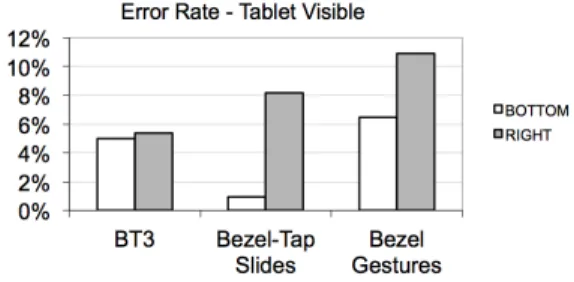
Let us start with the data of the main session, in which the tablet was visible. Concerning accuracy, there was a statistically significant effect of the technique factor on error rate (F2,22 = 5.5, p = .01), with an average error
percentage of 5.2% for BT3, 4.5% for BTSlides, and 8.7%
for Bezel Gestures (Figure 11). While a Tukey post-hoc test indicated no significant difference between BT3 and BTSlide, the difference between BTSlide and Bezel Gesture was significant (p<.05). Thus the selection was less error prone with BTSlides than Bezel Gestures, with a mean advantage of 4.2%. There was also a clear-cut advantage for the bottom relative to the right location of the menu (F1,11 = 12.6, p = .004). There was no significant interaction
between the two factors (F2,22 = 2.15, p = .14).
The large difference in accuracy for the right and bottom bezels mainly comes from outliers (12.5%, 3 std. dev. from mean). Using the median instead of the mean, error rates for BT3 are 4.5% (right) vs. 4.5% (bottom), for BT-Slide 5.5% (right) vs. 1% (bottom) and for Bezel Gestures 9% (right) vs. 5.5% (bottom). Since most users held the left side of the tablet, the difference between the right and bottom error rates may be due to the fact that the tablet is more likely to move on its perpendicular axis when the user interacts on its right side.
With respect to performance speed, we found a significant effect of the technique factor on trial completion time (F2,22 = 50.6, p < .0001). As visible in Figure 12 and as
confirmed by Tukey tests, performance was faster with Bezel Gestures than BT3 and BTSlide (on average a 483ms and a 467ms difference, respectively), with the last two techniques not differing consistently between each other. The effect of the region factor was marginally significant, the difference being now in favor of the right region (F1,11 =
4.76, p = .052). There was no significant interaction between the two factors (F2,22 = 1.12, p > .3).
Figure 11. Error rate for the three techniques and the two menu regions, with the tablet visible.
Figure 12. Performance speed for the three techniques and the two menu regions, tablet visible.
Total Performance Time (s) - Tablet Visible
0.0 0.5 1.0 1.5 2.0 BT3 Bezel-Tap Slides Bezel Gestures BOTTOM RIGHT
Combining the accuracy and speed information, the data from this experiment thus suggest that the two variants of the Bezel-Tap technique allow more accurate but slower performance than Bezel Gestures [6].
For the shorter eyes-free session, error rates were unsurprisingly higher, now with a grand average of 14.5% (to be compared with the 6.1% error rate observed in the visible-tablet session). We found more accurate performance with BT3 and BTSlides, but the effect of the technique was not significant (F2,10 = 1.28, p > .3).
However, the effect of the menu region was significant (F1,5 = 8.81, p = .03), with consistently more errors
recorded in the right rather than bottom region of the tablet (on average 20.4% vs. 8.7%, respectively). The interaction was significant (F2,10 = 4.69, p = .03), reflecting the fact
that the region effect was less marked with the BT3 than the other two techniques.
Turning to performance speed, we found of course that hiding the device under an opaque shield slowed down performance (from 1.47s to 1.75s, on average). The technique factor had a highly consistent effect on trial completion time (F2,10 = 40.3, p < .0001), reflecting the
speed superiority of Bezel Gestures. The effect of the region factor on speed was marginally significant (F1,5 =5.5,
p = .06), reflecting faster performance on the right region. This extra session shows that Bezel-Tap Gestures is quite a robust technique: The success rate remains around 86% and the two-level selection time around 2s in the case of a complete deprivation of visual monitoring.
Conclusion
In sum, it appears that after little training all three techniques allow accurate selection in a two-level hierarchical menu. Bezel-Tap techniques (BT3 and BTSlide) were more accurate than Bezel Gestures (error rates were 5.2%, 4.5% and 8.7%, respectively), but slower. Anyway, the speed was pretty good for Bezel-Tap techniques (1.6s on average), this making them appropriate for micro-interactions, defined in [3] as “interactions with a device that take less than four seconds to initiate and complete”. This result is even more interesting considering that Bezel-Tap gestures can not only select a command but also reactivate the device in this short amount of time. EXPECTED APPLICATIONS
As said before, Bezel-Tap Gestures are especially useful for accessing frequent commands when the tablet is in sleep mode. Mobile devices constantly switch to sleep mode in order to save energy. A recent survey shows that Android users have an average of 177 applications on their phones, using 73 of them occasionally and 32 very often [31]. The study shows some usage patterns that would benefit most from shortcuts, such as re-accessing the last application. Examples are visualizing the weather, map or calendar; controlling music or video player; opening the camera or one of the various video or photo-taker applications (such as Instagram); checking one’s email, SMS, twitter or
Facebook messages. Allowing always-available low-consuming access to most frequent commands will improve mobile interaction.
Novel usages of tablets require even more commands than needed by this already over-populated software environment. In particular, tablets start being used as remote controls for interacting with home equipment and multimedia devices [10, 32]. In this scenario, the challenge is to allow always available and rapid access to commands (e.g., turning on the light, changing the temperature, selecting one’s favorite TV or radio channels, one's favorite Web applications or music streaming services, etc.) Users need methods to organize and access this large set of commands. Bezel-Tap Gestures are especially well suited for this task because more often than not the tablet will be in sleep mode when the user wants to control home equipment.
The extended version of Bezel Gestures can be used as an extra resource if more than 64 commands are needed. As already mentioned, both techniques can be used together because they do not rely on the same initial event. However, Bezel Gestures should be preferred for commands that are unlikely to be performed when the tablet is asleep (typically, commands that are only used once a given application is opened, or commands for copying, pasting, application switching, etc.).
CONCLUSION AND FUTURE WORK
We have presented Bezel-Tap Gestures, a technique that allows selecting commands quickly on mobile devices. Bezel-Tap Gestures do not interfere with common interaction techniques when the device is in active mode. They also work in sleep mode, both waking up the device and triggering a command. We conducted a false positive study that validated the robustness of the technique. Another experiment confirmed the viability of basic Bezel-Tap Gestures with no visual help from the screen. A success rate of 96.5% and a completion time of 1.4s was for instance obtained for a set of 25 items (5 per Bezel region, a set size that seems optimal).
We then proposed two extensions which can accommodate more commands, Bezel-Tap3 (BT3) and Bezel-Tap Slide (BTSlide). These techniques rest on Bezel-Tap menus, which are hierarchical and can contain up to 64 items. The first level (menu selection), arranged all around the screen, contains 4 shortcuts and 12 menus. The second level (item selection within the menu) consists of 180° radial menus containing five item. We performed an experiment to compare the expert-mode performance of BT3, BTSlide and an extension of Bezel Gestures. All three techniques allowed accurate selection, Bezel-Tap techniques being more accurate (around 95% of correct recognition) but slower than Bezel Gestures. The time performance was pretty good for all techniques, making them very appropriate for designing micro-interactions.
How Bezel Tap gestures might help the design of immediate interaction on devices with very thin bezels is a question for future research. As said before, taps could be detected the edge or close to the edge on the back of the device. The size of the device also matters. We implemented a smartphone prototype using a HTC Hero under Android. According to pre-tests, we reduced the size of the hierarchical menu, using 3 items per bezel region for the first level and 3 items for the radial menu in the second level. Preliminary experiments showed the feasibility of the technique using two hands, one for holding the device and the other one for interacting with the bezel and the screen. However, more work is necessary to estimate false positives rates in real usage and to check whether the technique could be used with a single hand.
ACKNOWLEDGMENTS
We acknowledge the financial support of the Quatro2 project funded by Systematic Paris-Region. We thank the anonymous reviewers of this article for their relevant critiques and recommendations. Many thanks to S.T. Perrault and D.-B. Vo for their many suggestions.
REFERENCES
1. ADXL335 Accelerometer, Analog Devices. http://www.analog.com/
2. Arduino Nano board.
http://arduino.cc/en/Main/ArduinoBoardNano
3. Ashbrook, D. Enabling mobile microinteractions. PhD Thesis, Georgia Institute of Technology (2009).
4. Asbrook, D., Baudisch, P., White, S. Nenya:Subtle and Eyes-Free Mobile Input with a Magnetically-Tracked Finger Ring.
In Proc. of CHI 2011, ACM, 2043-2046.
5. Baglioni, M., Lecolinet, E. and Guiard, Y. Jerktilts: Using accelerometers for eight-choice selection on mobile devices. In
Proc. of ICMI 2011, ACM, 121-128.
6. Bragdon, A. et al. Experimental Analysis of Touch-Screen Gesture Designs in Mobile Environments. In Proc. of CHI
2011, ACM, 403-412.
7. Buxton, W. A three-state model of graphical input. In Proc. of
Interact 1990, Elsevier, 449-456.
8. Carroll, A. and Heiser, G. An analysis of power consumption in a smartphone. In Proc. of USENIXATC 2010, USENIX, 21– 35.
9. Consolvo, S. et al. Activity sensing in the wild: a field trial of ubifit garden. In Proc. of CHI 2008, ACM, 1797–1806. 10. Control 4, Smart Home products. http://www.control4.com/ 11. Francone J. et al. Wavelet Menus on Handheld Devices:
Stacking Metaphor for Novice Mode & Eyes-Free Selection for Expert Mode. In Proc. of AVI 2010, ACM, 173-180. 12. Jain, M. and Balakrishnan, R. User Learning and Performance
with Bezel Menus. In Proc. of CHI 2012, ACM, 2221-2230. 13. Harrison, C., Schwarz, J., Hudson, S. TapSense: Enhancing
Finger Interaction on Touch Surfaces. In Proc. of UIST 2011, ACM, 627-634.
14. Heo, S., Lee, G. ForceTap: Extending the Input Vocabulary of Mobile Touch Screens by adding Tap Gestures. In Proc. of
MobileHCI 2011, ACM, 113-122.
15. Hinckley, K. et al. Sensing techniques for mobile interaction.
In Proc. of UIST 2000, ACM, 91–100.
16. Hinckley, K. et al. Design and Analysis of Delimiters for Selection-Action Pen Input Phrases in Scriboli. In Proc. of
CHI 2005, ACM, 451-460.
17. Hinckley, K., Yatani, K. Radial Menus With Bezel Gestures. Publication date: 08/25/2011. Patent publication number 20110209093.
18. Hudson, S. et al. Whack Gestures: Inexact and Inattentive Interaction with Mobile Devices. In Proc. of TEI 2010, ACM, 109-112.
19. Identity Fraud Report. Javelin Strategy (2012).
20. Kane, S. et al. Usable gestures for blind people: understanding preference and performance. In Proc. of CHI 2011, ACM, 413–422.
21. Kin K., Hartmann B., Agrawala M. Two-handed marking menus for multitouch devices. ACM Trans. Comput.-Hum. Interact. 18(3): 16 (2011)
22. Kurtenbach, G. and Buxton, W. 1991. Issues in combining marking and direct manipulation techniques. In Proc. of UIST
1991, ACM, 137-144.
23. Li, F., Guy, R., Yatani, K., Truong, K. The 1Line Keyboard: A QWERTY Layout in a Single Line. In Proc. of UIST 2011, ACM, 461-470.
24. LIS3DH 3-axis accelerometer, STMicroelectronics. http://www.st.com/internet/analog/product/250725.jsp 25. Lu, H. et al. The jigsaw continuous sensing engine for mobile
phone applications. In Proc. of SenSys 2010, ACM, 71–84. 26. Olwal, A., Feiner, S., Heyman, S. (2008). Rubbing and
Tapping for precise and rapid selection on touch-screen displays. In Proc. of CHI 2008, ACM, 295-304. 27. Raikonen, S. et al. Tap Input as an Embedded Interaction
Method for Mobile Devices. In Proc. of TEI 2007, ACM, 263-270.
28. Roth, V. Turner, T. Bezel Swipe: Conflict-Free Scrolling and multiple selection on mobile screen devices. In Proc. of CHI
2009, ACM, 1523-1526
29. Roudaut, A., Lecolinet, E. and Guiard, Y. Microrolls: Expanding Touch-Screen Input Vocabulary by Distinguishing Rolls vs. Slides of the Thumb. In Proc. of CHI 2009, ACM, 927-936.
30. Ruiz, J. and Li, Y. Doubleflip: a motion gesture delimiter for mobile interaction. In Proc. of CHI 2011, ACM, 2717–2720. 31. Shin, C., Hong, J-H., and Dey, A. Understanding and
prediction of mobile application usage for smart phones. In
Proc. of UbiComp 2012, ACM, 173-182.
32. Tsekelves, E. et al. Interacting with Digital Media at Home via a Second Screen. In Ninth IEEE International Symposium on Multimedia Workshops (2007).
33. Understanding Tablet Device Users. AdMob/Google, US (March 2011).
34. Wagner, J., Huot, S., Mackay, W. BiTouch and BiPad : Designing Bimanual Interaction for Hand-held Tablets. In