HAL Id: hal-00816612
https://hal.archives-ouvertes.fr/hal-00816612
Submitted on 22 Apr 2013
HAL is a multi-disciplinary open access
archive for the deposit and dissemination of
sci-entific research documents, whether they are
pub-lished or not. The documents may come from
teaching and research institutions in France or
abroad, or from public or private research centers.
L’archive ouverte pluridisciplinaire HAL, est
destinée au dépôt et à la diffusion de documents
scientifiques de niveau recherche, publiés ou non,
émanant des établissements d’enseignement et de
recherche français ou étrangers, des laboratoires
publics ou privés.
Comparative study between AZERTY-type and
K-Hermes virtual keyboards dedicated to users with
cerebral palsy
Yohan Guerrier, Maxime Baas, Christophe Kolski, Franck Poirier
To cite this version:
Yohan Guerrier, Maxime Baas, Christophe Kolski, Franck Poirier.
Comparative study between
AZERTY-type and K- Hermes virtual keyboards dedicated to users with cerebral palsy. HCI
In-ternational 2011, 2011, Orlando (FL), United States. pp.310-319, �10.1007/978-3-642-21663-3_33�.
�hal-00816612�
Comparative Study between AZERTY-type and
K-Hermes virtual Keyboards dedicated to Users with
Cerebral Palsy
Yohan Guerrier1, Maxime Baas1,Christophe Kolski1 ,Franck Poirier2
1
LAMIH, University of Valenciennes and Hainaut-Cambrésis, Le Mont-Houy, F-59313 Valenciennes Cedex 9, France
[email protected], [email protected] [email protected] 2
VALORIA, University of Bretagne Sud, France [email protected]
Abstract. The aim of this paper is to compare two virtual keyboards for people
with cerebral palsy; many of these users have difficulty performing actions using their upper limbs due to large numbers of unwanted movements. The first is a classical QWERTY type keyboard, called Clavicom NG. The second is the K-Hermes proposed in this paper. K-Hermes is a reduced and monotape keyboard; its entry principles are inspired by the T9 keyboard. The aim of the experiment is to demonstrate the reduced effort and increased speed of typing with the keyboard suggested for people with Cerebral Palsy.
Keywords: Virtual keyboard, text entry, effort reduction, cerebral palsy.
1 Introduction
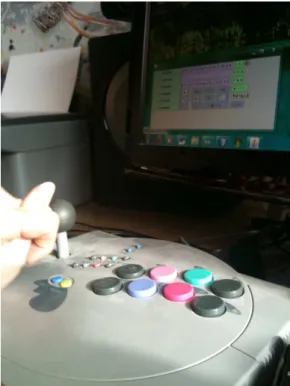
Much research has been done on virtual keyboards and the tiny keyboards of mobile devices. Indeed, they are increasingly used in mobile devices such as mobile phones or tablet PCs. In this paper, we focus specifically on virtual keyboards for people with disabilities. It is not possible to deal with all the existing handicaps due to their large number [18]. Therefore, this article focuses on users with Cerebral Palsy. These people have suffered neurological damage. For many of these users, their movements lack precision [13], which is why they are likely to use a virtual keyboard for text entry. In this case, a joystick is often used for mouse manipulation (other devices are also possible, such as eye-controlled devices), the clicking is done with a pushbutton. For example, the device used by the first author is shown in Fig. 1. In this paper, we begin with a state of the art on keyboards adapted for users with motor impairments. Then we propose the K-Hermes virtual keyboard. An experiment, the goal of which is to compare it with the Clavicom NG keyboard [3] used by many disabled users, is the subject of the next part. The results obtained are described and discussed.
Fig. 1. Pointing device using the K-Hermes virtual keyboard.
2 State of the art on keyboards for people with motor
impairments (cerebral palsy)
Many studies have been conducted in the field of text entry for people with motor impairments [14] [17]. Representative examples of virtual keyboards with the goals of reducing mouse movements and increasing the speed of text input are presented below.
Dvorak [4] is an alternative to the standard physical keyboard. On the Dvorak keyboard, consonants and vowels are most likely placed in the midline of the keyboard. This layout makes it possible to perform less complex finger movements and thus offers more comfortable input while reducing physical fatigue. XPeRT [21] has a similar layout to the qwerty Keyboard. Its principle is to group the most frequent diagrams (groups of 2 letters) in order to reduce the distance traveled by the mouse pointer while typing text. OPTI and FITALI [9] offer the most probable letters in the center of the keyboard. They have both multiple space bars on the sides and a large shift bar on the bottom that make input easier and faster. This result is in accordance with Fitts’s Law [8] that shows that the closer the letters, the faster and the less tiring the input. Métropolis [22] is based on the eponymous global
optimization algorithm. The letters are grouped according to the attraction between them, while taking into account Fitts’s law to shorten the travel distance of the mouse. Sybille [20] is a predictive keyboard that helps the user to type faster by predicting both the most probable letters and words during text input. It should be noted that most keyboards for users with disabilities possess a word prediction system. Dasher [6] allows an input exclusively based on mouse movement by always pointing to the next character in the list of probable letters presented on the right close to the current pointer position. KeyGlass [19] provides, after each letter input, around the key, four semi-transparent buttons representing the most probable following letters.
Chewing Word [5] presents a dynamic keyboard with two rows of letter keys. After each character input, the prediction system rearranges the letter keys according to their probability of occurrence. UKO-II [9] is a keyboard designed for people affected by cerebral palsy. It uses the same principle as T9. There are only four buttons for all the characters. To input a letter, the user must enter the number of the key (from 1 to 4) associated to the letter. Then, a disambiguation algorithm proposes the most probable words according to the sequence of keystrokes. K-Thôt [1] offers a virtual keyboard for people with motor disabilities, which aims at minimizing movements and user fatigue and to maximize the input speed. The input of special characters, such as spaces, backspaces and capital letters is made particularly easy.
CLAVICOM NG [2] is an azerty layout keyboard. It has been chosen as a reference for the evaluation of the K-Hermes keyboard for the following reasons:
(1) it is often used in specialized centers for people with disabilities, (2) it uses a prediction system like the K-Hermes keyboard, (3 the keyboard layout is adaptable by the user.
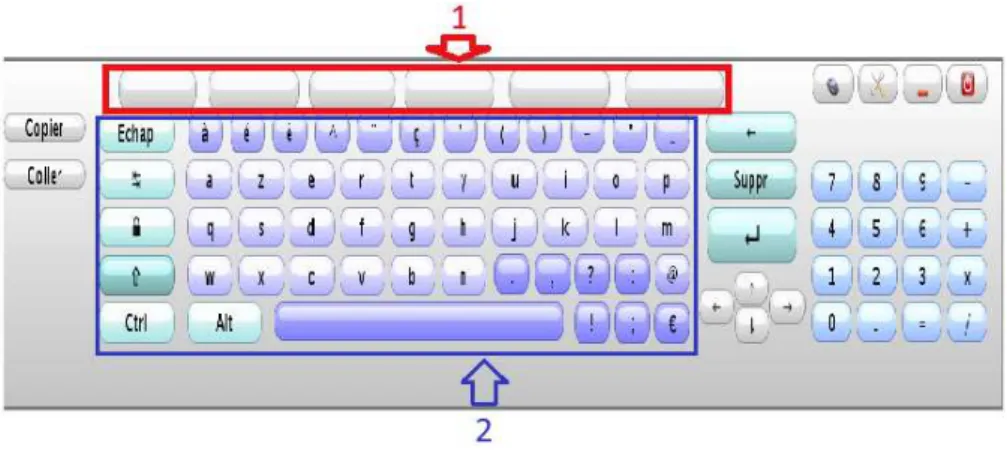
With Clavicom NG, the user enters its desired text by directly clicking on letter keys like a standard azerty keyboard. Word proposals appear inside white buttons located on top of the keyboard (Figure 2). Just click on one of these buttons to automatically complete the current input word and add a space. With this method, the user does not have to input a space before beginning the next word.
3 K-Hermes
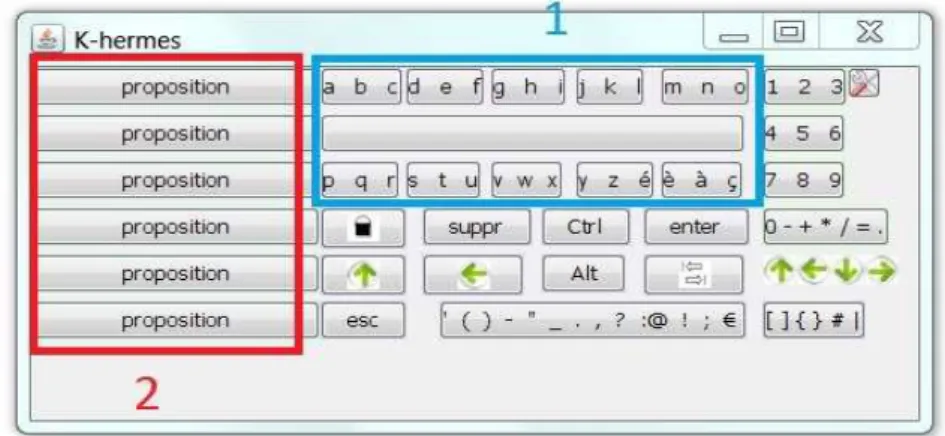
The K-Hermes keyboard has been proposed in [9]. K-Hermes is named K for "keyboard" and Hermes was the Greek god in charge of sending messages. K-Hermes is based on the layout of a T9-type keyboard. It has the advantage of enabling entry with only 9 keys. This reduces movement between the joystick and the pushbutton, and therefore reduces the fatigue of the user (which is essential for Neurological Injury) (Fig. 3). To enter the nth letter of a labeled button, the user must click on the button n times. Thus, to enter "b", he/she must double click on the button labeled "abc." In the figure, the left buttons containing the word "proposition" corresponds to the area of lexical prediction. In the current version of K-Hermes, if the user types "a", the keypad will display the first six words in its dictionary that start with "a". The keys are arranged in alphabetical order so that the user memorizes the location of the letters easily, which helps reduce eyestrain.
Fig. 3. K-Hermes: (1) Word proposals, (2) T9-style keyboard (3 letters per key).
The buttons with the word “proposition” (“proposal” in English), which are located on the left side of K-Hermes, are used to display a set of words in the dictionary. In the current version of K-Hermes, if the user types the letter “a”, the keypad will display the first six words in its dictionary that start with “a”. Note that further information on the word prediction will be provided later in the subsection “Word Prediction”.
For users with cerebral palsy, it is important to clarify in this article that all of these movements if repeated several hundred times a day, can cause muscle pain.
The comparative experiment involving the proposed keyboard and Clavicom NG is the subject of the next part.
4 Experimentation
movement (return of the hand between the joystick and push button, visible in Figure
1) for entering text. This consequently leads to a decrease in fatigue.
To prove the hypothesis, we conducted a series of tests with three different types of people:
• A person with cerebral palsy is the subject of reference for the experiments.
• A group of able-bodied people simulating a disability to use the device seen
in Figure 1 for handling the pointer on the screen. They use their favored hand during testing.
• A group of able-bodied people using a mouse.
People simulating a disability had an additional constraint thus bringing them closer to the extent of physical capacity of a person with cerebral palsy: they had to manipulate the joystick with one hand and a clenched fist. Under these conditions, testers make about the same movements as users with cerebral palsy.
The left joystick is used to direct the mouse pointer. The first four buttons (top two in each row) are used to simulate a left click. The following four (the last two of each line) are used to simulate a right click. This device was designed based on an old joystick which was amended and connected to a box used to translate the electrical impulses emitted by the joystick and buttons into digital data. Click lock is accomplished by holding down the top button of the first line (see Figure 1).
The test was conducted in two sessions for the following reason: Cerebral palsy causes its victims to be plagued with a lot of unwanted movements. Therefore, we decided to conduct only a few sessions. Indeed, when able-bodied people manipulate the joystick for the first time with their fists, they too must undergo a large number of additional movements. Thus making the input conditions close to those of a person with cerebral palsy. Carrying out many of these sessions makes it harder to reach the reality of those conditions, as able-bodied people become used to the constraints, which greatly reduces the involuntary movement.
The time between test sessions was 24 hours. The testers used the following four methods alternately: (1) K-Hermes with word prediction, (2) K-Hermes without word prediction, (3) Clavicom NG with word prediction, (4) NG Clavicom without prediction words. The tests were conducted as follows: (1) the testers filled out a questionnaire about their habits with computers. (2) An explanation was given about the keyboard to use. (3) During a period of 5 minutes, they input a series of 5-letter words. (4) These actions were repeated for the four keyboards over two sessions. (5) A final questionnaire was filled for their thoughts on each keyboard.
Some information has been recorded for the purpose of analysis by more: the distance traveled by the pointer, the average distance between two keys, the number of comings and goings of the hand between the joystick and push button, the number of words per minute (WPM: Words Per Minute), the number of characters per second (CPS: Characters Per Second).
5 Data analysis
Preference: to evaluate the preference of testers for different keyboards, we asked
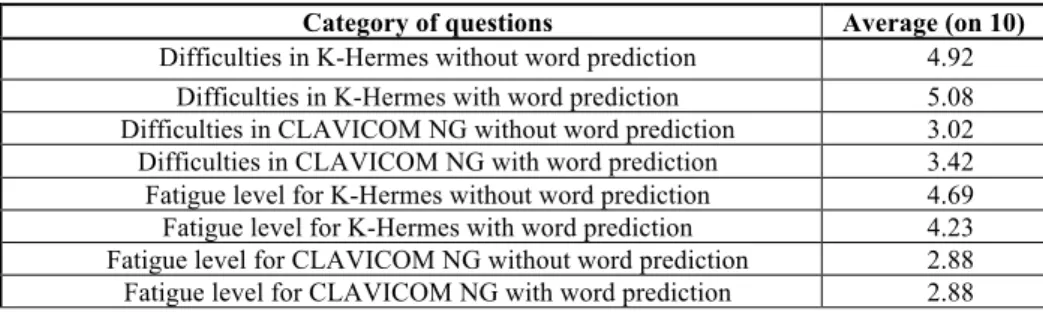
testers to draw a line on an axis of ten centimeters. 0 symbolizes the most negative response (difficult to use or exhausting) and 10 the most positive (easy to use or no fatigue felt). We can see that the Clavicom NG left a better impression with testers, because of their practice with an AZERTY physical keyboard type. In addition, 90% (calculated from the questionnaire) of the participants send their messages from their mobile phones with an AZERTY keyboard (mono-tap).
Category of questions Average (on 10)
Difficulties in K-Hermes without word prediction 4.92 Difficulties in K-Hermes with word prediction 5.08 Difficulties in CLAVICOM NG without word prediction 3.02 Difficulties in CLAVICOM NG with word prediction 3.42 Fatigue level for K-Hermes without word prediction 4.69 Fatigue level for K-Hermes with word prediction 4.23 Fatigue level for CLAVICOM NG without word prediction 2.88 Fatigue level for CLAVICOM NG with word prediction 2.88
Table 1. Results of the questionnaire completed by the testers at the end of each test session. Word Prediction: K-Hermes is more efficient than Clavicom NG. Indeed, the former
predicted 1.82 words per session and the second predicted 0.89 word per session over all the sessions with all the users. These results were calculated by summing the number of words predicted by the keyboards, and dividing by the number of participants, based on the extension of the dictionary [7] of 60 000 to 336 531 words. K-Hermes has an additional advantage in this domain: when the user uses the backspace key, the previously suggested words are proposed again. Consider the following example (see Fig.4).
• the user types on the 'M' key;
• the word prediction proposes the words “Matter”,”Middle”,”Mistake”.
• the user types on the 'O' key;
• The new list of words proposed: “Mother”,”Motor”,”Monster”.
• By deleting the letter "o", the words: “Matter”,”Middle”,”Mistake” are
proposed again.
This system is not implemented in the Clavicom NG software. When the user removes a letter, all proposals are deleted. This means that the tester must complete the entry word and generates additional movements. The selection of proposals will automatically add a space as a word separator, the user does not need to enter it. This last principle is implemented in K-Hermes and Clavicom NG.
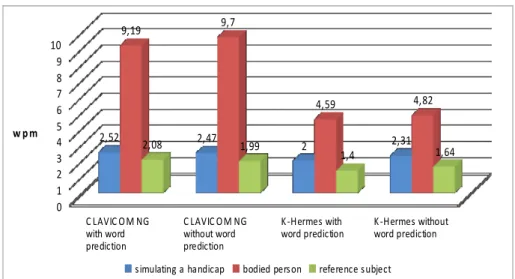
Fig. 5.WPMfor all configuration to 2 sessions.
Number of words per minute: There is a very important difference between the
results obtained for the group simulating a disabled person (see Figure 5) and able-bodied people for Clavicom NG. The cause is the manipulation of the pointer: performing an action with the mouse requires a little more time, just one second (the average mouse pointing time is estimated to be 1.1 seconds according to the Keystrole Level Model(KLM) [2]), whereas with the joystick the same action may take only a few seconds. However, it was also noted that some of those who used a traditional mouse were much more precise with the pointer. First, we thought it was normal fault (handling a pointer with a joystick is not easy), but we later learned that some of the testers were used to playing video games with a joystick. The gamers had just as much difficulty manipulating the mouse pointer. This is due to the sensitivity of the joystick and the effect of reducing the precision of the pointer.
With K-Hermes, the difference between the three groups of testers is reduced. All of the able-bodied people were slower in their entries because of the disambiguation system, the testers had to make an extra effort to select the desired letter on the buttons contrary to Clavicom NG with which the characters are accessible with one click. For the group who simulated a disability, the typing speed difference between the two keyboards with word prediction for the second session was 0.16 words per minute. The reference subject obtained a lower entry speed than the other two groups.
! "#$%! & '()* ( +,-.(+/01( 2031,4-,/5 ! "#$%! & '()* ( +,-./6-(+/01( 2031,4-,/5 7 8930:3;(+,-.( +/01(2031,4-,/5 7 8930:3;(+,-./6-( +/01(2031,4-,/5 < = > ? @ A B C D E =< >FA> >F@C > >F?= EF=E EFC @FAE @FD> >F<D =FEE =F@ =FB@ ; ,:6GH-,5I(H(.H51,4H2 J/1,31(230; /5 03K303543(; 6JL34-! " #
This suggests that the simulation of disability is imperfect. The reference subject made more moves because of his disability during the tests, which reduced the number of words he was able to type.
Error rate per word: for all the groups, the two keyboards are approximately the
same (Clavicom NG: 0.003 errors per word; K-Hermes: 0.002 errors per word). The Multitap system in K-Hermes to choose the desired letter did not disturb the users. The fact of having to count the number of clicks to get a letter requires additional concentration and prevents the user from choosing the wrong letter.
Number of comings and goings of the hand between the joystick and button validation: for a specific period of time, assuming that users of K-Hermes and
Clavicom NG input as many words as they can, the average difference between both keyboards with word prediction is 15 movements, with fewer movements for K-Hermes. If the prediction system is disabled, the number decreases to 10. Table 2 shows the number projections for a complete day. Indeed, the test lasted 5 minutes. Thus, based on the questionnaire, which was completed by all of the testers, they use a computer for an average of 7 hours per day (including breaks). Consequently, in theory, the number would reach 1260 movements within one day (without considering the break time, for example). Such a number of movements has a significant effect on the user’s fatigue level. The length between the joystick and the button used during testing is 8 cm; thus the total length over a day (on such a device) could reach up to more than 20,000 cm (20,160 cm in theory).
Keyboards Average number of moves
K-Hermes without word prediction 99
K-Hermes with word prediction 93
CLAVICOM NG without word prediction 109
CLAVICOM NG with word prediction 108
Table 2. Average number of movements (Number of comings and goings of the hand between
joystick and validation button) during the two sets of tests.
Table 3 includes the average distance traveled by the mouse pointer over all the tests carried out.
Keyboards Average distance G1 (to pixel)
Average distance G2 (to pixel)
K-Hermes without word prediction 108 116
K-Hermes a with word prediction 107 114
CLAVICOM NG without word prediction 164 178
CLAVICOM NG with word prediction 159 180
Table 3. Average distance traveled by the mouse between two keys in the 2 sessions (G1: A
group of people simulating a disability G2: group of able-bodied people).
The difference between the two keyboards for the group simulating a disability with word prediction is 52 pixels. We can come to two conclusions: the user manipulates the joystick less time with K-Hermes, this reduces the movement of the arm. The second observation is on pointing precision. On K-Hermes, the keys are larger
because they represent three letters. According to Fitts' law [8], the tester needs less precision and he/she performs pointing gestures faster. The testers tend to move beyond the appropriate button with Clavicom NG; the consequence is the necessity of additional operations to correct their actions. With K-Hermes, the consecutive letters in a word and finding the consecutive letters on the same key do not require moving the mouse pointer. This is a very important result for users with cerebral palsy. In the light of the different results obtained, we can conclude that our hypothesis has been verified.
6 Conclusion
In this paper, the K-Hermes virtual keyboard has been proposed and described. The purpose of this paper was also to compare the reduction in effort with this T9-style keyboard compared to a QWERTY style keyboard for users with cerebral palsy. Such users greatly benefit from a reduced keyboard to limit their movements during text entry and thus reduce their physical strain. The results obtained during the experiments show a significant decrease in the number of movements. Note that other experiments have reached the following conclusion: a valid user may reach 10.4 words per minute after 10 hours of training with a T9-type keyboard [10]. We are far from this performance, because we chose to do a limited number of tests to remain as close to reality as possible due to operations performed by users with cerebral palsy. However, through our work it was possible to increase the text entry speed while decreasing the physical effort for people with cerebral palsy, which is very promising. Our perspectives focus on improving the prediction system. We are also thinking about different layouts for the keys.
References
1. Baas, M., Guerrier, Y., Kolski, C., Poirier, F. (2010). Système de saisie de texte visant à réduire l'effort des utilisateurs à handicap moteur. G. Calvary, M. Wolff (Ed.), Proceedings of the Ergonomie et Informatique Avancée Conference (12-15 october), ACM, Digital Library, Biarritz, pp. 19-26.
2. Card, S.K., Thomas, T.P., Newell, A. The Psychology of Human-Computer Interaction, London: Lawrence Erbaum Associates, 1983.
3. Clavicom NG : http://code.google.com/p/clavicom/ 4. Clavier Dvorak : http://www.algo.be/ergo/dvorak-fr.html 5. Chewing Word : http://chewingword.wikidot.com/
6. Dasher, site explicatif du clavier : www.inference.phy.cam.ac.uk/dasher/ 7. dictionnaire,
8. Fitts, P. M. The Information Capacity of the Human Motor System in Controlling the Amplitude of Movement. Journal of Experimental Psychology, 47, 381-391.
9. Guerrier, Y., Baas, M., Kolski, C., Poirier, F. Étude comparative entre clavier un virtuel AZERTY et un clavier multitap pour des utilisateurs souffrant d’une Infirmité Motrice Cérébrale de type tétraplégique athétosique. Proc. ASSISTH'2011, 2ème Conférence Internationale Sur l'Accessibilité et les Systèmes de Suppléance aux personnes en situations de Handicap (17-19 janvier), Paris, pp. 148-155.
10. Green, N., Kruger, J., Faldu, C., St. Amant, R. A Reduced QWERTY Keyboard for Mobile Text Entry. CHI Extended Abstracts 2004, 1429-1432, ACM Press.
11. Harbuschn K., Hasan, S., Hoffmann, H., Kühn, M., Schüler, B. Domain– specific Disambiguation for Typing with Ambiguous Keyboards. In EACL 2003 Worshop on Language Modeling for Text Entry Methods, Budapest, April, 2003.
12. Jones, E., Alexander, J., Andreou, A., Irani, P., Subramanin, S. GesText: Accelerometer-Based Gestural Text-Entry Systems. SIGCHI Conference on Human Factors in Computing Systems, ACM Press, 2010.
13. Le site de l’Infirmité Motrice Cérébrale : http://www.imc.apf.asso.fr/
14. Martin, B., Pecci, I. État de l’art des claviers physiques et logiciels pour la saisie de texte. Revue d’Interaction Homme-Machine, vol. 8, n°2, 147-205, 2007.
15. Vella, F. Modèles psychophysiques d’atteintes de cibles pour les personnes souffrant de troubles neuromusculaires. Thèse de Doctorat, Toulouse, 18 décembre 2008. 16. Poirier F., Schadle I. Etat de l’art des méthodes de saisie de données sur dispositifs
nomades. Une typologie des approches. IHM 2004, ACM Press, Namur, p. 133-140. 17. Schadle, I., Le Pévédic, B., Antoine, J.Y., Poirier, F. SybiLettre, Système de
prédiction de lettre pour l’aide à la saisie de texte. Actes TALN 2001, Tours, 2-5 juillet 2001.
18. Site about handicaps (particulary Cerebral Palsy):
http://www.comeunity.com/disability/cerebral_palsy/cerebralpalsy.html 19. Vella, F, Vigouroux, N. Etude de l'optimisation de claviers virtuels au travers des
sujets handicapés versus valides. Secondes Rencontres Jeunes Chercheurs en Interaction Homme-Machine (RJC-IHM 2004), Lacanau, 20-22 octobre, 99-102. 20. Wandmacher T., Antoine J.-Y. Poirier F. Sibylle: an adaptive system for alternative
communication adapting to the context and its user. ACM ASSETS 2007, Tempe, AZ USA, 2007
21. XPeRT (2003). http://www.xpertkeyboard.com/
22. Zhai, S., Hunter, M., Smith, B.A. The Metropolis Keyboard, An Exploration of Quantitative Techniques for Virtual Keyboard Design. In Proceeding of the 13th Annual ACM Symposium on Use Interface Software and Technology (UIST 2000), San Diego, California, 119-128.