HAL Id: hal-02985961
https://hal.archives-ouvertes.fr/hal-02985961
Submitted on 2 Nov 2020
HAL is a multi-disciplinary open access
archive for the deposit and dissemination of
sci-entific research documents, whether they are
pub-lished or not. The documents may come from
teaching and research institutions in France or
abroad, or from public or private research centers.
L’archive ouverte pluridisciplinaire HAL, est
destinée au dépôt et à la diffusion de documents
scientifiques de niveau recherche, publiés ou non,
émanant des établissements d’enseignement et de
recherche français ou étrangers, des laboratoires
publics ou privés.
GyroSuite: General-Purpose Interactions for Handheld
Perspective Corrected Displays
Thibault Louis, Jocelyne Troccaz, Amélie Rochet-Capellan, François Bérard
To cite this version:
Thibault Louis, Jocelyne Troccaz, Amélie Rochet-Capellan, François Bérard. GyroSuite:
General-Purpose Interactions for Handheld Perspective Corrected Displays. UIST 2020 - 33rd Annual ACM
Symposium on User Interface Software and Technology, Oct 2020, Minneapolis (Virtual Event), United
States. pp.1248-1260, �10.1145/3379337.3415893�. �hal-02985961�
GyroSuite: General-Purpose Interactions
for Handheld Perspective Corrected Displays
Thibault Louis, Jocelyne Troccaz, Amélie Rochet-Capellan, François Bérard
University Grenoble Alpes, CNRS, LIG, TIMC, Gipsa-Lab
Grenoble, France
(thibault.louis,jocelyne.troccaz,francois.berard)@univ-grenoble-alpes.fr,
[email protected]
ABSTRACT
Handheld Perspective-Corrected Displays (HPCDs) are physi-cal objects that have a notable volume and that display a virtual 3D scene on their entire surface. Being handheld, they create the illusion of holding the scene in a physical container (the display). This has strong benefits for the intuitiveness of 3D interaction: manipulating objects of the virtual scene amounts to physical manipulations of the display. HPCDs have been limited so far to technical demonstrators and experimental tools to assess their merits. However, they show great poten-tial as interactive systems for actual 3D applications. This requires that novel interactions be created to go beyond object manipulation and to offer general-purpose services such as menu command selection and continuous parameter control. Working with a two-handed spherical HPCD, we report on the design and informal evaluations of various interaction techniques for distant object selection, scene scaling, menu interaction and continuous parameter control. In particular, our design leverages the efficient two-handed control of the rotations of the display. We demonstrate how some of these techniques can be assemble in a self-contained anatomy learn-ing application. Novice participants used the application in a qualitative user experiment. Most participants used the appli-cation effortlessly without any training or explanations.
Author Keywords
Spatial augmented reality, GUI, Drag&Drop.
CCS Concepts
•Human-centered computing → Mixed / augmented real-ity;
INTRODUCTION
Handheld Perspective-Corrected Displays (HPCDs) are ma-nipulable displays, where all the external faces of the display Permission to make digital or hard copies of all or part of this work for personal or classroom use is granted without fee provided that copies are not made or distributed for profit or commercial advantage and that copies bear this notice and the full citation on the first page. Copyrights for components of this work owned by others than the author(s) must be honored. Abstracting with credit is permitted. To copy otherwise, or republish, to post on servers or to redistribute to lists, requires prior specific permission and/or a fee. Request permissions from [email protected].
UIST’20,October 20–23, 2020, Virtual Event, USA
© 2020 Copyright held by the owner/author(s). Publication rights licensed to ACM. ISBN 978-1-4503-7514-6/20/10. . . $15.00
DOI:10.1145/3379337.3415893
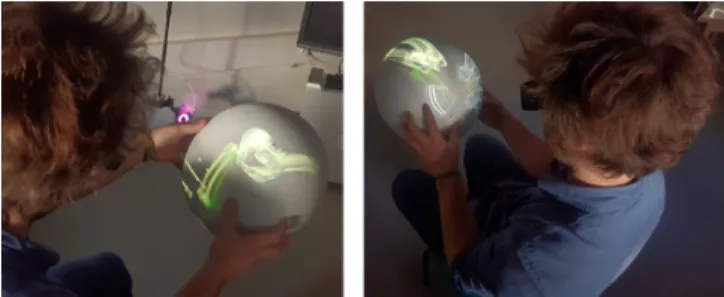
Figure 1. A user viewing a 3D scene (left) and interacting with widgets (right) on a Handheld Perspective Corrected Display (HPCD).
offer a perspective-corrected view on a 3D virtual scene, as illustrated in Figure 1. HPCDs create the strong tangible illu-sion of holding the virtual scene, or holding a porthole through which the user views the virtual scene. Although not offering a wide field of view as with the widespread Augmented Re-ality (AR) and Virtual ReRe-ality (VR) Head-Mounted Displays (HMDs), HPCDs have distinct benefits: they could provide a more comfortable viewing experience as they do not re-quire to wear heavy equipment on the head. The image is formed at a natural distance from the eyes; which affords long usage sessions by reducing eye strain and headaches. The manipulation of the display lends itself to intuitive tangible interaction, and unlike VR devices, HPCDs do not shut the users from their surrounding environment. These benefits may have contributed to a recently observed 17% users’ docking performance improvement when using a HPCD vs. a VR HMD [26].
As the research on HPCDs is quite recent, much of the efforts have been directed towards improving their implementation and towards the fundamental building blocks of 3D interac-tion: object selection and manipulation [20]. These efforts have pushed HCPDs to become credible options to implement realistic self-contained applications such as 3D modeling or training simulations. This requires that a full set of interac-tion is available in addiinterac-tion to viewpoint control and spatial pointing. Mine [28] identified five fundamental forms of in-teraction in virtual 3D environments: user movement, objects manipulation, selection, scaling, and menu/widget interaction. Menu and widget interactions have never been explored for HPCDs and thus are the main motivation for the present work.
In addition, we discuss solutions for efficient selection and scene zooming.
One of the specificities of HPCDs is their handheld nature. As such, at least one hand is used to hold the display. The most recent HPCDs are held with two hands to leverage three main benefits: it allows to get a larger field of view on the virtual scene by holding a larger HPCD, it allows to manipulate the HPCD with more precision than with a single hand, and the two arms sharing the effort of holding the display in the air lessens the gorilla arm effect [19]. We thus focus on HPCDs interactions that satisfy the requirement of the two hands re-maining in contact with the display. As a result, most menu and widget interaction techniques that have been designed in the context of VR and AR cannot be directly transferred to this type of HPCDs, although recent work in VR has inves-tigated similar two-handed tangible interaction [11, 48]. In addition, we focus on a spherical shape for the display because of its seamless surface and its support for the independent and continuous control of the three rotations (yaw/pitch/roll). Our contribution is twofold: we contribute the design and qualitative evaluation of a first suite of interaction techniques allowing the use of HPCDs for full featured 3D applications. In particular, we introduce a fluid combination of direct point-ing and ray castpoint-ing for object selection, and we propose a set of interaction techniques for hierarchical menu selection and parameter control that leverage the rotation of the display. We also contribute the report of a qualitative user evaluation where we tested a subset of our designs in a standalone anatomy learning application.
RELATED WORK High fidelity 3D systems
HF 3D systems go beyond standard desktop computers by achieving a higher fidelity reproduction, in the digital world, of how we perceive and interact with the physical world. Virtual and Augmented Reality are the two main approaches to HF 3D systems. Both approaches use stereo and head coupling [45] for visual perception, and the interaction is often based on the simple isomorphic mapping of the 6 degree of freedom (DOF) of the input device to the virtual object [46].
Passive tangible volumes in VR and AR
Our work focuses on interaction techniques for a passive tan-gible volume that is both a porthole and a handle to the virtual world. Recent research in VR attempted to create the same effect in two different settings: in a CAVE and with a VR HMD. Zielinski et al. experimented with a 26 cm two-handed cube tracked in a CAVE setting [48]. The cube was made of transparent acrylic, weighed more than 2 kg, and was wired to the user. Users reported discomfort from the weight. How-ever, when compared to an interaction technique using two mid-air input devices, the tangible box yielded higher preci-sion and lower task accomplishment time. Using a VR HMD, Englmeier et al. tested a passive tangible sphere also made of transparent acrylic [11]. They experimented with spheres of diameter 25 cm and 40 cm weighting around 1 kg and 2.4 kg, respectively. In addition to 6 DOF control, they experimented with selection on the surface of the spheres with a single touch
of a finger using data gloves. The authors report complaints about the weight of the large sphere, and the difficulty to point with a finger when both hands are required to hold the sphere. We acknowledge this problem and only use finger tapping on the display for validation rather than finger pointing.
Surprisingly, we could not find any research in AR HMD that reproduces this tangible volume porthole to the 3D scene. Sev-eral AR research efforts experimented with various tangible surfacesfor 3D exploration using either HMDs [25] or ex-ternal projection [38]. However, both studies were limited to spatial exploration and object selection. More recently, Issartel et al. used video see-through AR on a tablet to simulate an HPCD [20]. They used this approach because of the complex-ity to implement a “fully portable and self-contained” display. They experimented with applying pressure on the sides of the display as a metaphor to grasping virtual objects. They observed that the metaphor was spontaneously understood by a majority of users. In a later study, Issartel et al. provide a theoretical analysis of the mappings between the motion of the device and the virtual object [21].
Handheld Perspective Corrected Displays (HPCDs)
HPCDs can be seen as in between AR and VR. Similarly to AR the user is not cut from the physical world and the virtual content is embedded in the physical world. However, apart from its strong relation to the physical display, the content is usually not related to the other physical surroundings of the user: it lies in a separated virtual world similarly to VR. Indeed, HPCDs can be seen as an evolution of the Fish-Tank Virtual Reality (FTVR) approach.
Initial FTVR systems used a simple flat display [45], limiting users to look at the scene from a single side. Displays were thus assembled in a cube shape to allow users to move all around the display [40]. However, such approach requires sig-nificant body motion to switch between viewpoints. Similar results can be achieved by directly turning the display in front of the user: this approach is at the core of HPCDs [39, 41]. While cubic displays can be assembled from flat LCD panels, they suffer from the occlusion of the bezels at the edge and from a discontinuity when the gaze moves between the sides of the display. Spherical displays were developed to eliminate these problems [3, 7, 13, 47]. Spherical displays are usually built from a set of projectors assembled at the base of a trun-cated sphere; which does not afford much mobility (if any) for the display. As stereo on both cubic and spherical displays are difficult to implement, some system rely only on head coupling to create a depth illusion [47, 13, 41, 39]. However, a recent study observed that stereo had a strong positive effect on user performance in selection tasks [12].
Combining handheld, spherical, and stereo capabilities in a head coupled display remains a challenge but was demon-strated using external projection: Louis et al. used a 30 cm untethered polystyrene sphere weighting less than 200 g and a ceiling-attached projector to form the image on the sphere [26]. The external projection approach limits the interaction space to the projection frustum, and only allows projection on roughly half of the sphere. These restrictions can be mitigated by set-ting up the projector above the user’s head, sitset-ting the user,
and looking at the sphere from above in a “bent arm” posture. This posture has the benefit of generating the least amount of fatigue in mid-air interaction [19].
A tangible porthole held with two hands can benefit any form of HF 3D systems. Our choice of using an externally projected HPCD in the present work is only directed by the current state of the art in HF 3D systems. In the future, more suitable implementation may come from improvements in AR and VR HMDs, or HPCDs in the form of autonomous spherical OLED displays equipped with inertial trackers. Although primarily designed for HPCDs, the interactions introduced in the present work should generalize to any kind of two-handed tangible volume implementation.
Interacting within virtual environments
Pointing at virtual objects
HF 3D systems usually offer a direct pointing technique: a pointer is isomorphically mapped to a user’s hand motion. An object is pointed at when the pointer gets in contact with it. Direct pointing is often considered as the most intuitive way to point at objects for its similarity to the way we reach for objects in the physical world [27]. On some systems such as mobile AR with video see-through, direct pointing can be a challenge to implement, but it was recently demonstrated by Qian et al [34]. As direct pointing does not allow to access objects that are outside the arms’ reach, several alternative techniques were introduced. Bowman et al. classified these techniques in two main categories: arm-extension and ray casting [8]. They showed that ray casting was more efficient to acquire far away targets than a well-known arm extension technique (go-go [32]), but it was less efficient for manipulation due to the lever-arm effect. Grossman et al. tested various interaction techniques on a volumetric display where the virtual scene is enclosed in a 25 cm glass sphere and thus does not allow direct pointing [15, 16]. They observed a superiority of a ray casting technique over a point cursor in dense target setup. With AR HMDs, recent studies favor using the head rather than the hand for pointing [24, 33, 36]. The head appears to be more accurate and it does not suffer from the gorilla arm effect [33].
Interacting with widgets
Pointing at menus and buttons is very effective on the 2D desktop thanks to the accuracy and stability of the mouse. 2D menus can be extended to 3D using 3D pointing [14], how-ever, pointing in mid-air is less accurate than the mouse and generates more fatigue [5]. Applications using the widespread consumer HMD systems now tend to rely on ray casting to point at 2D widgets using 6 DOF controllers. With AR HMD, Pourmemar et al. observed that hierarchical radial menu selec-tion was faster and generated less fatigue with head gestures than with hand gestures [33].
Validation of the widget selection often relies on pressing a physical button; which may yield a drift of the pointer. Alter-natives have been explored to avoid this problem. Pourmemar et al. used a 1.5 s dwell time. Muller-Tomfelde specifically studied dwell time for manual pointing actions and recom-mended a 350 ms to 600 ms range [31]. He also highlighted the importance of a progressing visual feedback. A dwell time
introduces a delay and requires the pointer to remain stable during this delay. Crossing interaction avoids these by val-idating as soon as the pointer crosses the boundaries of the target [1]. Tu et al. recently studied crossing-based interaction with ray casting in a VR HMD context [43]. Crossing was found more efficient than pointing with button pressing for validation.
DESIGNING AN HPCD INTERACTION SUITE
In this section, we describe the various techniques that we designed and implemented. We also report on observations collected on people using these interactions in early pilot tests. From these observations, we could assemble a subset of the interactions in a self-contained anatomy learning application. This application, detailed in the next section, was used in a qualitative user study that we report in the final section of the paper.
Prototype specificities
We reproduced the HPCD implementation of Louis et al. [26], including the 30 cm diameter polystyrene sphere with roughly 90 dpi of pixel density (depending on the display-projector distance). LCD shutter glasses are used for stereo and a passive marker is attached to the index finger of the dominant hand for detection. End-to-end latency is measured at 27 ms.
General considerations
Reality-Based vs. Efficiency
HPCDs can create a strong feeling of presence of the virtual objects that seem to be contained in the display. This can be leveraged to give the illusion of physicality (i.e. the physical presence) of the virtual objects. For example, when users feelthat a virtual cylinder is rigidly attached along a radius of the sphere, it is intuitive for them to orient the cylinder towards any intended orientation by rotating the display. This approach is well described by the Reality-Based Interaction framework introduced by Jacob et al [22]. They note that this physicality can speed up the learning of the system for novice users, and may also improve performance for experts in situation of information overload. However, the authors note that “much of the power of using computers comes from (...) the ability to go beyond a precise imitation of the real world”. For example, having a gestural shortcut to immediately see the back of a virtual object is notably more efficient, although less physical and less intuitive, than rotating the display to see the back of the object.
In the course of our design, this physicality vs. efficiency appeared quickly as a major trade-off. In the following, we will often refer to it and present alternative designs that may lean towards either side of this trade-off. In the anatomy learning application that we created for the qualitative user study, we made the deliberate choice to favor physicality over efficiency: participants were expected to be novices in HPCD interaction and to use the application only a few times, hence the focus on intuitiveness.
Snow globe vs. porthole
We identified two main modes for the spatial relationship between the display and the virtual scene. The virtual scene
is either display-fixed or world-fixed depending if it is rigidly attached to the display or to the physical world surrounding the user, respectively. When the entire scene is small enough to fit inside the display, the display-fixed mode creates the physical metaphor of a snow globe [6, 39]. Changing the viewpoint on the scene is done intuitively by manipulating the display. Many 3D applications, however, require navigating large virtual scenes, i.e. larger than the display. The world-fixed mode is more suitable in this case. With world-world-fixed scenes, the display acts as a porthole allowing to perceive an otherwise invisible virtual world that is superposed on the physical world, similarly to the boom chameleon [42] but in a 1 to 1 mapping.
Display- and world- fixed can be combined as a way to modify the scene: users activate a trigger to attach a virtual object of interestto the display, while every other objects of the virtual scene remain world-fixed [20]. Moving the display thus moves the object of interest in 6 DOF with respect to the scene until the trigger is released.
With the porthole metaphor, we tested three ways to clip the virtual scene. With full clipping, the scene is only visible where it intersects the current volume used by the display as illustrated on Figure 2, left. Users easily understand the resulting container illusion, but the viewable volume is small. With front clipping, the virtual scene is clipped only between the display and the user. The display shows what is inside and behind with infinite depth as illustrated on Figure 2, middle. This is perceived as a closed window to the virtual world (i.e. the virtual world does not come through the window). With no clipping, the display acts as an opened window to the virtual world: objects in front of the display are viewable. However, HPCDs can only display on their surface: virtual objects in front of the display disappear as the line of sight goes past the boundaries of the display as illustrated with the small cone in Figure 2, right. It is thus difficult to find a physical metaphor for this last alternative; which indicates that it may have less physicality than full- and front- clipping.
For the anatomy learning application, we chose to use the no clipping alternative as the one offering the largest viewable virtual volume. Its non-physical aspect appeared to be subtle enough that it did not disturb participants.
Figure 2. Clipping the scene. The HPCD is represented in light grey, the view cone in light yellow. Visible parts of the scene’s objects are red, clipped parts are white. Left: full clipping, middle: front clipping, right: no clipping.
Rotation control
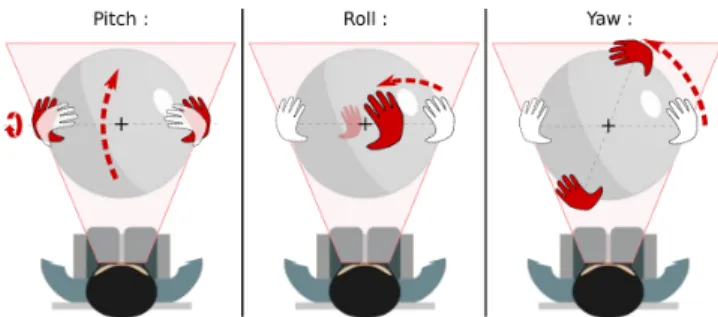
Our three main motivations for focusing on two-handed HPCDs rather than single handed ones are: the larger field of view (FoV) thanks to the use of larger displays, the increase of stability and precision, and limiting the gorilla-arm effect. We observed that holding the sphere with two hands has ad-ditional benefits for the control of the rotations of the display. One-handed rotations are strongly limited by the biomechan-ical constraints of the wrist and the forearm. Two hands can cooperate to reach wider ranges by using various forms of clutching: one hand may be underneath the display and main-taining it while the other hand is repositioned. Fingers can walkon the surface of the display to reposition the hand while holding the display in cooperation with the other hand. Two-handed rotations have the additional benefit of facilitating pure rotations, i.e. rotating the display without moving its center. Pure rotations are useful to change a parameter, e.g. a zoom factor, without translating the display; which would change the viewpoint on the scene.
Hand movements performing the three rotations are illustrated in Figure 3. Rolling the display with two hands is like turn-ing a steerturn-ing wheel. A range of roughly 180° is reachable without clutching. Yaw offers the same range as rolling but it creates more motor fatigue due to increased arm activity, and occlusion occurs as one hand comes between the user and the display. We observed that the pitch rotation is unconstrained when three or more fingers of both hands cooperate to main-tain pressure on the pitch axis and rotate the display. This makes pitch a favored candidate for parameter control. Variations in yaw, pitch, and roll can be measured indepen-dently, allowing the integral control of 3 independent parame-ters. We experimented with the integral control of the width and the center of a range on a linear scale. The resulting in-teraction proved difficult to control. Integral control may only be usable when the parameters are perceived as integral, as suggested by Jacob et al. [23]. We provide an example of an integral control of the orientation of a radius in the section “A control panel using the display’s rotations”.
Object selection
Selecting an object requires that the object be pointed at and the user activate the selection. We experimented with the two main approaches of 3D-object pointing: with direct pointing and with picking, a special form of ray casting. Both ap-proaches use the same pointer and the same activation
mecha-Figure 3. Rotating the display as viewed from above. Initial hand posi-tions in white, final posiposi-tions in red.
nism to validate the selection. The pointer is positioned at the display’s center and represented by a 1 cm 3D cross made of 3 cylinders of 1 mm diameter. The thickness of the cross gives it some volume that contributes to its physicality. Pure rotations of the pointer are notably facilitated by its central position.
Activation
As rotations play an important role in our design, attaching physical buttons on the display was not an option: the buttons would frequently move to uncomfortable positions. We ex-perimented with two forms of activation: foot activation and direct touch on the display’s surface. Although we did not test it, previous research showed that activation by pressure on the sides of the display is an intuitive alternative [20].
We tested foot activation either by pressing physical pedals set on the ground or by tracking a foot with an optical marker. Foot activation is widely used in various professional fields: it was suggested by two medical participants who tested early prototypes of the system. It is a viable solution for seated HPCD usage where the feet remain roughly in the same loca-tion, but this will not be the case as HPCDs evolve to more mobile usage. As the feet are mostly disconnected from the arms, the induced parasitic motion on the display position is negligible.
We also tested touch detection on the display: we tracked the index finger of the dominant hand by attaching a passive marker on the nail as shown on Figure 1, left. Parasitic motion on activation is a well-known problem in mid-air interaction when a single hand performs both the pointing and the acti-vation. We observed that parasitic motion was insignificant when the index finger was raised from the display or when coming in contact, thanks to the two-handed hold on the dis-play. We favored finger activation over foot activation in the anatomy learning application as we observed that it allowed higher activation frequencies and that tapping with a finger required less energy than with a foot.
Various activation modes similar to the left vs. right mouse button can be achieved by using both the foot and the finger as activation mechanisms. Future HPCD implementations may be able to detect which finger is tapping to change the activation mode.
Direct pointing
With direct pointing, users point at an object by moving the display until the pointer gets inside the volume of the target object. In VR HMD, direct pointing is often considered as the most intuitive pointing technique. It also benefits from proprioception: when users have a good perception of the po-sition of the objects around them, their proprioception allows them to greatly improve their direct pointing performance [29]. However, acquiring this spatial knowledge is hindered by the well-studied problem of egocentric distance underestimation in VR [27, 35]. This problem can be mitigated by using stereo, by presenting a virtual replica of the actual room, and by pre-senting an avatar of the user [35]. In the case of HPCDs, stereo is feasible and an ideal perception of the room and the user’s own body is available for free. Indeed, Louis et al. mention that the perception of contextual information from the physical
world may have been an important factor in the high perfor-mance that they observed with an HPCD. This was measured on a docking task that combines direct pointing and orien-tation [26]. In particular, performance was 17% better than when using a VR HMD. This indicates that direct pointing may be well suited for HPCD interaction.
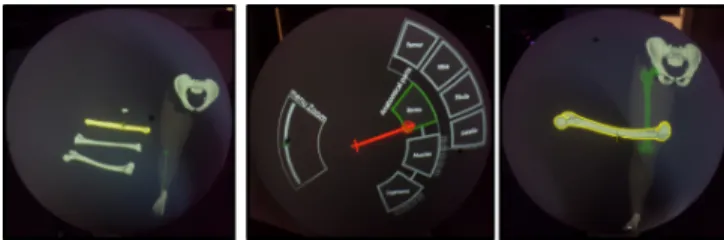
To our surprise, first time users of an HPCD did not always immediately understand the direct pointing interaction. De-spite repeated verbal emphasis to “put the pointer inside the object”; some users kept placing the cursor on the line of sight between the eye and the object, as if performing a picking operation. The pointer was frequently at a large distance from the object; which could indicate that this was a misunderstand-ing rather than a distance perception problem. Some users may have transferred their expectations from their everyday use of mobile and desktop computing: the finger or the pointer remains on the screen plane even when, for instance, pointing at faraway object in 3D scenes. However, once the HPCD’s direct pointing was understood, most users seemed to point at object effortlessly and efficiently. Still, depth perception may also have been a factor for some users. We tested them for stereo perception with the RANDOT test and observed that users with a low score (lower than 6/12) and/or an important visual correction frequently needed corrective gestures before reaching their target. To help these corrections, we provided clear visual feedbacks: virtual objects were highlighted with a yellow outline when they contained the pointer (c.f. Figure 10). To indicate that activation was registered but no object was pointed at, we flashed the pointer in red.
In summary, we observed that direct pointing was very effi-cient when working with objects that were well within arm’s reach but only after breaking a “picking habit”. Instead of breaking it, this habit can be leveraged by providing a picking mechanism; which has the additional benefit of allowing the selection of far away objects.
Picking
We experimented with ray casting techniques as a way to select objects that are at the limit of arm’s reach and further away. A general ray casting interaction involves a one-handed tool that defines the 6 DOF origin and orientation of the ray [15, 47]. With our HPCD, both hands were used to hold the display, we thus implemented a picking interaction (a special form of ray casting): the ray is defined by the user’s eye and the pointer. Picking is the dominant form of pointing on 2D desktops and mobile devices. As with any form of ray casting, it points at the closest object that intersects the ray from the ray’s origin. In conventional picking, the pointer is always in front of the scene, hence picking always points at objects behind the pointer. In the case of HPCDs, we propose that the pointer is inside the virtual scene. This implies that picking occurs towards the eyewhen the object closest to the pointer is be-tween the pointer and the eye. Although unconventional, we observed that this behavior was well understood by partici-pants. This has an interesting side effect: when the pointer is inside an object, both the picking and the direct pointing techniques point at this object. In other word, direct pointing is only a special case of picking where the pointer collides
with an object. As a consequence, both techniques can be offered without the need of a complex mode switch. Indeed, we observed in pilot tests that participants made very fluid transitions between pickings and direct selections.
Picking is ambiguous when used with stereo: the two eyes define two different rays through the pointer that may point to different objects. Valkov et al. investigated a similar issue with direct-touch stereo displays [44]. They observed that users touched the screen between the two stereo projections of the object but closer to the one of the dominant eye. We computed the picked object from both eye rays. In most cases a single object is pointed at, either by both rays or when one of the two rays points in the void. An ambiguity occurs if each ray points to a different object. As this was uncommon in our tests, we arbitrarily chose the right eye’s ray in this case. Dense scenes with many targets may yield more ambiguities. In this case, it may be suitable to configure the system so that it prioritizes the dominant eye of the current user.
Object manipulation
Object selection is frequently the preliminary step towards object manipulation. After a direct pointing and activation, the selected object becomes rigidly attached to the display as in the snow globe metaphor introduced earlier. The manipulation ends when the finger or the foot is lift off.
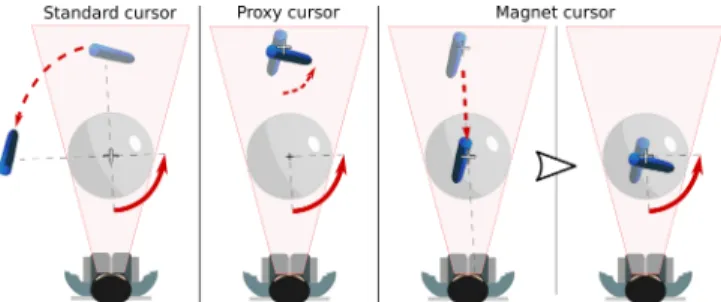
Picking can be used to select an object that is far away behind the display. In this case, due to the rotation center being far from the object, a lever-arm effect causes a rotation of the dis-play to induce a large displacement of the object that is usually not the intent of the user [8, 20]. In addition, with HPCDs the object quickly gets out of the field of view as illustrated on Figure 4, left. More complex interactions must be brought into play. We experimented with two manipulation techniques that either move the pivot point of the rotation (proxy cursor) or move the object itself (magnet cursor). Proxy cursor is inspired by the HOMER technique [8]. After selection, the object is manipulated as if a proxy of the pointer had been created at the picking point: rotations on the display are repro-duced on the object but using the picking point as the pivot, as illustrated on Figure 4, middle. Translations on the display are also applied to the object but with an amplitude that appears to be reduced because the object is further away from the user. For precise manipulations, it may be more suitable to bring the object close to the user. We implemented a magnet cursor that works as follow: after selection, we quickly animate (500 ms) the automatic translation of the object until the picking point coincides with the pointer. From then on, users manipulate the object the same way as after direct pointing. When the manipulation stops, the object remains in place (i.e. it does not come back to its initial position). The magnet cursor is illustrated in Figure 4, right.
Proxy cursor and magnet cursor ease the manipulation of distant objects, but at the cost of a reduced physicality: the illusion of presence of the cursor or the object is impaired by the automatic translations. In addition, the pivot point of the rotation is constrained to the visible surface of the object. Direct pointing provides more flexibility as it allows to define the pivot point in any location inside the object, e.g. at the
tip of the handle of a hammer. We used the magnet cursor in our test application as a way to quickly bring a distant object inside the display. When needed, users could simply release their grasp on the object and follow by a direct pointing to choose the pivot location.
Scaling
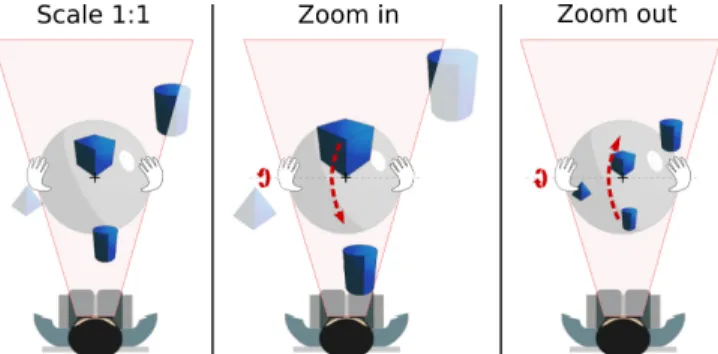
For size changes we support uniform scaling with a dynamic center as often sufficient in virtual environments. Selecting the “zoom” menu command starts scene zooming and it ends with an activation (tapping with the index of the foot). The scale factor is changed by rotating the display on its pitch axis as illustrated in Figure 5. A logarithmic scale is used to homogenize the zooming effect regardless of the current scale factor. During zooming, the scale center is continuously updated to the pointer position. In pilot tests, we observed that the interaction was very intuitive and allowed participants to continuously refine the target of the zooming operation as the scene was enlarged and was revealing more details. Although object scaling was not used in our test application, the same interaction could be used: the scaling would scale an object if the object is pointed at when scaling is activated, or it would zoom the scene otherwise.
Widgets
We now focus on the design of menus, buttons, and sliders. This area remains largely unexplored in the field of HPCDs. As with most current HF 3D systems, we experimented with widgets on 2D planes. These widgets were presented in two kinds of planar containers.
Containers
Previous work on spherical displays used the surface of the display as the widget’s container [4, 30]. This approach affords direct touch interaction on the surface; which is not suitable on a large two-handed display. Furthermore, in the case of our stereo HPCD, users’ visual focus is most of the time on or around the pointer, at the center of the display. In other words, the eyes converge at the center. Switching the visual focus from the center to the surface involves a large change in eye convergence(15 cm); which can become uncomfortable if repeated frequently. To alleviate this problem, we designed flat virtual containers living inside the display. Still, we chose not toplace the containers at the depth of the pointer, as they would frequently be cluttered by the scene’s content. We placed
Figure 4. Object manipulation after picking. Left: with a standard cursor the object rotates around the HPCD center. Middle: with the proxy cursor the object rotates around the selection point. Right: with the magnet cursor the object is brought to the cursor.
Figure 5. Zooming the scene. The pitch rotation defines the zoom while the pointer continuously updates the scale center.
containers 10 cm in front of the pointer, but we helped users transition their eye convergence by quickly (0.3 s) animating the containers in a slow-in/slow-out (SI/SO) motion [10] from a null size at the pointer’s location to the container’s final size and position. With this approach, the change in eye convergence was painless.
We experimented with placing containers in a world-fixed location on the side of the 3D content, the same way as toolbox windows stay on the side of documents. However, while this approach is frequently used in HMDs, we found it unsuitable for HPCDs because of the notably smaller FoV: switching the visual focus between the container and the scene proved inefficient when either one of them went out of view. We thus focused our designs on pop-up containers that dynamically appear on the eye-pointer axis. We used a double activation, e.g. a double-tap of the finger or the foot, as a trigger to show the containers. We tested two types of containers, a marking menu and a control panel, using either the display’s translations or the display’s rotations for item selection.
A marking menu using the display’s translations
We created a marking menu as a way to offer efficient com-mand selection amongst a large set of comcom-mands. Following recommendations from recent research, we display the menu immediately upon invocation [18]. Containers being planar, it would be inefficient to use the 3D pointer for aiming at targets on the plane. We reduced the DOF of the pointing task by defining a menu 2D pointer: the intersection of the menu’s plane with the eye-pointer axis (using the right eye). The 2D pointer is represented by a small red sphere on the menu’s
Figure 6. Pointing in the marking menu: translating the sphere moves the 2D pointer on the world-fixed marking menu (3D pointer as a red cross, 2D pointer as a red sphere).
plane, and leaves a trailing mark (a requirement for marking menus). This 2D pointer is best controlled by 2D translations of the display in a plane that is parallel to the menu, as illus-trated in Figure 6. The menu disappears as soon as the 2D pointer enters a leaf of the hierarchy, or if canceled by tapping the display with the index finger before a command is selected.
We tested a menu with 2 hierarchical levels. We observed that rapid command selection was achievable but only after signifi-cant training from most users. We attributed the steep learning curve to the combination of two factors: low participants’ ex-pertise in the use of marking menus, and low physicality of the 2D pointer. As participants quickly became accustomed to the physicality of the 3D pointer from its volume and natu-ral control, switching to the less intuitive 2D pointer proved difficult.
In addition, using translations of the display for interact-ing with widgets has an important drawback: it changes the pointer’s position and the viewpoint on the scene. Using a small activation radius for the menu allows keeping the trans-lation acceptable for many tasks. Pilot testing oriented us to a 14 mm activation radius as a balanced choice allowing efficient command selection while limiting false activations. However, some commands such as zooming may relate to a precise lo-cation of the pointer when the command is triggered, hence even small pointer translations can be detrimental. This can be solved by using the display’s rotations for item selection.
A control panel using the display’s rotations
As an alternative to the marking menu, we created a control panel with physicality as the main design goal. Selection in the control panel is done with ray crossing on widgets’ boundaries. The ray is materialized by a red rod with 2 mm diameter. The rod appears as stemming from the pointer and rigidly attached to the display. Orienting the rod is thus intuitively done by rotating the display. The rod is initially oriented towards the eye and intersects the panel in its center. The intersection is materialized by a 10 mm disc representing the panel’s 2D cursor. The panel’s widgets are represented by labeled outlines. To optimize space in the limited FoV of the display, the panel has a disc shape, widgets have arc shapes and they are arranged in a concentric rings layout. There is an empty area at the center of the panel to prevent unintended widget activation
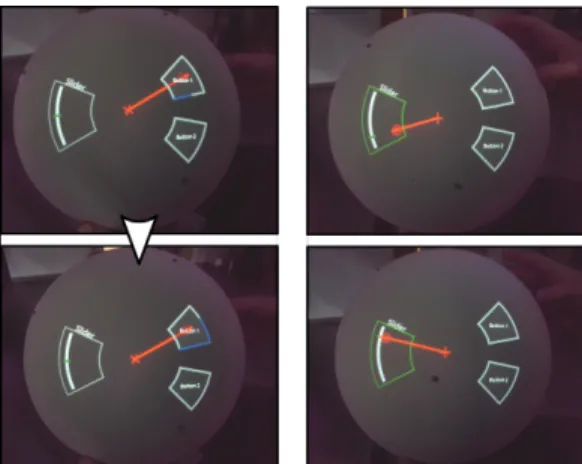
Figure 7. Pointing in the control panel: rotating the sphere moves the 2D pointer on the display-attached control panel. For illustration purpose, stereo is disabled in all pictures of the actual system, except in Figure 1.
Figure 8. Interacting with widgets. Left: progressive feedback during a button’s dwell activation. Right: interacting with the crossing-based slider.
when the panel pops up. The panel, the widgets, the rod and its control are illustrated on Figure 7.
The panel is rigidly attached at its center to the eye-pointer ray. As a result, it is always facing the user and remains fully visible at the center of the display when the display is translated. The rod being also attached to the display, translating the display has a minimal effect on the intersection between the rod and the panel. These behaviors, combined with the transparent background of the panel, allow independently interacting with the panel and navigating the scene by rotating and translating the display, respectively. In addition, triggering commands can be performed without moving the pointer, e.g. the zoom command can be triggered while the pointer remains on the intended scale center. We tested 3 types of widgets in the control panel: buttons, sliders and radial menus.
Buttons
We tested two modes of activation for the buttons. With instant activation, a button is activated as soon as the rod crosses its boundary. While being very efficient, it proved difficult for novice users. Most users have no experience with crossing-based interaction. Transferring their experience from the desk-top computer, many expected to be able to hover on desk-top of buttons and that only a finger tap would activate the button. This resulted in many false activations that could be stressful. We thus introduced a dwell activation mode. As the rod enters a widget, the outline is progressively highlighted in blue, as illustrated in Figure 8, left. The button is only activated if the rod remains inside until the outline is fully highlighted. After pilot testing and in coherence with Muller’s findings [31], we used a 0.5 s dwell time.
Sliders
The value of a slider is continuously updated as soon as the rod enters its boundary. It is defined by the intersection of the slider’s arc-shaped axis and a line between the panel’s center and the 2D cursor, as illustrated in Figure 8, right. As noted by Apitz et al., crossing interaction allows directly aiming at the intended value without having to first acquire a slider’s handle [2]. The boundary of our slider offers the additional benefit of allowing the control of a speed-accuracy trade-off:
Figure 9. A radial hierarchical menu and a slider in the control panel. Left: all sub-menus only show reduced previews. Right: menu option “A” is selected and its sub-menu is expanded.
the further away the 2D pointer is from the panel’s center, the more precision, but at the cost of larger motions. When users have set their intended value, they must move the 2D pointer out of the slider boundary. This exit motion can create an unintended change of value. When a precise value is needed, users can either keep the pointer close to the slider’s boundary, or tap the display with the finger. Finger tapping closes the panel while freezing the slider’s value, at the cost of requiring a subsequent double-tap if further interaction with the panel is needed.
We experimented with a slider to control the zoom factor of the scene as an alternative to the direct display rotation presented in the “Scaling” section. This has the benefit of offering a visual range of zoom values, and to allow direct access, but at the cost of some occlusion of the scene from the panel. Here again, the pointer’s position is used to continuously define the scale center as interacting with the panel does not involve the display translations. We favored the slider over direct rotation in our anatomy learning application so as to homogenize the control of the application in a single control panel and to offer a visual representation for each control.
Radial menu
We implemented a radial menu [37] in the panel as a way to offer a more intuitive command selection mechanism than the previously presented marking menu. Having the menu in the panel is also a way to group all application controls in a single panel. The menu offers hierarchical levels of commands on concentric arcs that are well suited to the disc-shaped panel as illustrated in Figure 9. There is a 200 ms dwell time between selections of sibling items to prevent closing a sub-menu while hovering over the sibling. Miniature versions of the sub-menus are displayed on the external border of their parent node as illustrated in Figure 9. While these miniatures do not allow reading, they serve two purposes: they inform that the parent has a sub-menu and they inform about the number of options. When crossing the external boundary of a parent node, the sub-menu is animated in a SI/SO motion to its normal scale, and it returns to its miniature size in a reverse animation if another sub-menu is selected. Leaves of the menu’s hierarchy behave as the buttons introduced earlier, i.e. with a progressive highlight of the outline.
AN ANATOMY LEARNING APPLICATION
We implemented a test application to evaluate how the various interaction techniques presented in this paper could combine
into a self-contained application. We chose an anatomy learn-ing application. Chen et al. identified mixed and augmented reality as having great potential for medical learning but also remaining under-developed due to technical limitations [9]. Guillot et al. suggest that learning anatomy from realistic 3D virtual objects could reduce the demands on mental rotation abilities; which varies considerably among students and lead to inequalities in the learning process [17]. We also found this application well suited for our study, as it is valuable for its users even with a limited range of functionalities.
The task that users performed on the application was guided by discussions with three professionals involved in medical student training (a faculty and two surgeons that are also teach-ing). The application requires students to correctly position 3D anatomical parts of a leg (bones, muscles or ligaments) in a series of 6 DOF docking tasks. The target location of a part is shown as a semitransparent mesh. Spatial context is provided in the form of a semitransparent mesh of the leg’s skin. When positioning muscles and ligaments, an opaque representation of the bones is also provided. Anatomical parts and target locations are illustrated on Figure 10. Students must first recognize the anatomical part from the target shape and its position within the leg, then select the part and place it.
Selecting an anatomical part
The application can be configured in either one of two modes of anatomical part selection: menu command or picking. With menu commands, users pop-up the control panel with a double tap, then select the anatomical part’s command from a 2-level radial menu, as illustrated in Figure 10, middle. Once the command is selected, the corresponding part pops-up at the cursor as illustrated on Figure 10, right. With picking, all anatomical parts of one category (e.g. bones) are laid alongside the leg as illustrated in Figure 10, left. The magnet cursor is active: when users pick a part at a distance, the part is quickly animated to the cursor.
Positioning the anatomical part
The leg can be moved at users’ will to facilitate the dockings. To solve the task, users alternate a series of 6 DOF drag and drop of the anatomical part and the leg. Once the correct part is docked with the correct 6 DOF pose, it blinks in blue to indicate a correct placement, and the next task begins. The acquisition tolerance is quite permissive as the teaching goal is related to the global relative placement and orientation of the various parts rather than accurate placement.
Figure 10. The demo application. Left: identifying and selecting a part from its shape. Middle: choosing a part from its name. Right: The part chosen in the menu appears in the scene. The yellow outline indicates the part that is currently pointed at.
Controlling the scene scale
As parts greatly varies in size (e.g. a tibia bone vs. a ligament), users need to change the scale factor of the scene, as illustrated on Figure 11. The test application offers scene scaling thanks to a slider in the control panel. The slider has a logarithmic scale ranging from 0.3 to 3.0.
QUALITATIVE EVALUATION Experimental protocol
We welcomed 8 students (4 women, mean age 23.5 [20, 26]) to get first insights about the intuitiveness and the efficiency of the techniques presented in this paper. Three participants had no experience with 3D interaction, 3 had limited experience and 2 had regular experience. Five participants had never experimented with an HPCD before, 3 had tried our system a few times but only with simple demos. No participant had any experience with the interaction techniques designed in this work.
Participant sat on a chair. After a short introduction about the context of the experiment, we only told participants that they would be able to interact with 3D virtual contents by moving and rotating the sphere and by tapping and double tapping with their index finger. In particular, we did not make any reference to the control panel. We launched the application in the radial menu mode for selecting parts, and with the leg displaying a target. Participants discovered the application by themselves for a few minutes and then we revealed the interaction techniques that they missed. We asked them to perform ten docking tasks with a first mode for part selection, then 10 more dockings with the other mode. Finally, we col-lected the participants’ subjective feedbacks in a questionnaire. They rated the application’s fun, how helpful it was to learn anatomy, the discomfort induced by the index finger validation, the muscular fatigue, and the pain that they felt to the head or the eyes. Ratings were expressed on a scale from 1 (not at all), to 5 (totally). Sessions lasted between thirty minutes and an hour.
Observations and participant’s feedbacks
All participants discovered and understood all the interaction techniques in less than three minutes. Only one participant had troubles interacting with the control panel, but this was solved as soon as we suggested that he tries to rotate the sphere. Three participants understood and started the docking tasks before we asked them to. After performing a few trials, all participants were confident using the system, including the
Figure 11. Adapting the scene scale to the task. Left: muscles require a small zoom factor. Right: ligaments require a large zoom factor.
zoom that they used to solve the smallest ligaments tasks. Our deliberate choice to favor physicality in the interaction design may have been an important factor in the discoverability of the interactions.
Compared to the marking menu, we observed that the radial menu was more intuitive as all participants easily mastered it. Still, it was at the origin of most of their difficulties to interact with the system. Three participants reported that the delay to prevent unintended selection on hover was too short and that it caused unintended activations. One participant expressed that he would prefer an explicit validation with finger tapping. Two participants had troubles selecting the first and last items of sub-menus, because they required a large rotation from the display. Yet these problems remained isolated, with only four occurrences in a participant’s session in the worst case. One participant mentioned that she felt her efficiency in manip-ulating the sphere was somehow hindered by having to keep her index finger above the display’s surface. On participant re-ported that she had unintended activations because she forgot to keep her finger above the surface. It should be noted that activation only occurs when the finger lands on the surface, hence the index may remain in contact without triggering an activation. However, this requires the keep the index in contact to prevent false activations.
Half of the participants capitalized on the floating behavior of the control panel: they interacted with the widgets while simultaneously moving the FoV to navigate in the scene. This was used, for example, to look at the details of the target while considering which part to select in the menu.
On several occasions, we observed that participants could use physical motions instead of using the digital tools: one par-ticipant moved her head around the sphere instead of turning objects. Three participants leaned on the sphere to get a closer look rather than changing the scene’s scale. One participant reported that he would unconsciously move the sphere to a far-away object rather than using the magnet cursor, although he was trying to avoid this reflex during the experiment because he realized that it was a waste of time. We see these behaviors as a sign of the strong physicality of the objects and the inter-action: this promoted the reproduction of behaviors occurring when interacting with physical objects. More surprisingly, one participant reported that the magnet cursor was acting like any science-fiction tractor beam and that it felt strangely natural and satisfying to use. This could be the result of a halo effect of the very physical interactions onto the less physical one.
Subjective ratings
Overall participants found the interaction intuitive and effi-cient, with mean ratings 4.47 and 4.08, respectively.
Figure 12 shows the participants’ sensation ratings. All partici-pants indicated that the overall interaction with the system was fun and felt that they learned some things about leg anatomy. In general, participants did not experiment muscular fatigue or pain, and keeping the index raised above the surface of the sphere did not appear as an issue. There were a few exceptions though. Participants usually held the sphere in a comfortable position with their elbows resting on their thighs. However,
● ● ● ● ● ● ● ● ● ● Pain (head/eyes) Muscular fatigue Index discomfort Learning potential Fun 1 2 3 4 5 Subjective rating
Figure 12. Other participants’ subjective ratings, with 95% confidence intervals.
two participants who tended to hold the sphere nearly at the same height as their head reported fatigue in their arms (the gorilla arm effect). Finally, one participant with a corrected myopia reported a slight pain in the eye after her fifty minutes session.
CONCLUSION AND FUTURE WORK
HPCDs are a promising approach for interacting with 3D con-tent. In this work, we provide a first proposition for a set of interaction techniques that designers can build on to move beyond technological demonstrators and towards full-featured applications. This set is the results of our experiences with various forms of object selection, scene scaling, continuous pa-rameter setting and command selection. While largely inspired by the literature, our designs include distinct adaptations to leverage the specificities of a two-handed display also acting as the main input device. In particular, we found that partici-pants’ efficient control of the display’s rotations makes them suitable as first-class means for pointing and parameter con-trol. We combined some of these designs into an application that we put in the hands of 8 novice participants. Participants quickly understood the interactions and were able to use them to achieve complex tasks.
The focus of our study was on intuitiveness in a novice us-age context that was limited in time and with a small set of functionalities. This initial effort should be extended towards more complex applications that imply a more intensive usage context. This will require to experiment with the input of text and numerical values. A virtual keyboard seems to be the most obvious solution if associated with a suitable point-ing technique such as the 2D pointers tested for the markpoint-ing menu and the control panel. More specific approaches may be experimented. We plan to leverage the efficient control of the display’s rotations for numerical input: pitch and roll could be combined, the pitch offering both extended range and precision to set the value while the roll could be used to define the control-value gain of the pitch. Implementing more complex applications such as a 3D modeling software could indicate to what extent long-lasting activites can be achieved with the HPCD alone or if HPCDs should be complemented with more standard interaction means and in which way.
ACKNOWLEDGEMENTS
This work was supported by the An@tomy2020 project ANR-16-CE38-0011.
REFERENCES
[1] Johnny Accot and Shumin Zhai. 2002. More than dotting the i’s—foundations for crossing-based
interfaces. In Proceedings of the SIGCHI conference on Human factors in computing systems. ACM, 73–80. [2] Georg Apitz and François Guimbretière. 2004. CrossY:
a crossing-based drawing application. In Proceedings of the 17th annual ACM symposium on User interface software and technology. ACM, 3–12.
[3] O. R. Belloc, M. R. Nagamura, D. Fonseca, A. Rodrigues, D. A. R. Souza, C. S. Kurashima, M. M. Almeida, E. Z. Borba, R. D. Lopes, and M. K. Zuffo. 2017. OrbeVR: A Handheld Convex Spherical Virtual Reality Display. SIGGRAPH ET (2017), 19:1–19:2. DOI:http://dx.doi.org/10.1145/3084822.3091104
[4] Hrvoje Benko, Andrew D. Wilson, and Ravin
Balakrishnan. 2008. Sphere: multi-touch interactions on a spherical display. In Proceedings of the 21st annual ACM symposium on User interface software and technology. 77–86.
[5] François Bérard, Jessica Ip, Mitchel Benovoy, Dalia El-Shimy, Jeffrey R. Blum, and Jeremy R. Cooperstock. 2009. Did “Minority Report” Get It Wrong? Superiority of the Mouse over 3D Input Devices in a 3D Placement Task. In IFIP Conference on Human-Computer Interaction, INTERACT. Lecture Notes in Computer Science, Vol. 5727. Springer, Chapter 45, 400–414. [6] Francois Berard and Thibault Louis. 2017. The Object
Inside: Assessing 3D Examination with a Spherical Handheld Perspective-Corrected Display, In Proceedings of the Conference on Human Factors in Computing Systems. CHI (2017), 4396–4404. [7] John Bolton, Kibum Kim, and Roel Vertegaal. 2011.
Snowglobe: a spherical fish-tank vr display. In CHI’11 Extended Abstracts on Human Factors in Computing Systems. 1159–1164.
[8] Doug A. Bowman and Larry F. Hodges. 1997. An evaluation of techniques for grabbing and manipulating remote objects in immersive virtual environments. In Proceedings of the symposium on Interactive 3D graphics. 35–ff.
[9] Long Chen, Thomas W. Day, Wen Tang, and Nigel W. John. 2017. Recent developments and future challenges in medical mixed reality. In International Symposium on Mixed and Augmented Reality (ISMAR). IEEE, 123–135. [10] Pierre Dragicevic, Anastasia Bezerianos, Waqas Javed,
Niklas Elmqvist, and Jean-Daniel Fekete. 2011. Temporal distortion for animated transitions. In Proceedings of the SIGCHI Conference on Human Factors in Computing Systems. 2009–2018.
[11] David Englmeier, Isabel Schönewald, Andreas Butz, and Tobias Höllerer. 2019. Feel the Globe: Enhancing the Perception of Immersive Spherical Visualizations with Tangible Proxies. In Conference on Virtual Reality and 3D User Interfaces (VR). IEEE, 1693–1698.
[12] Dylan Fafard, Ian Stavness, Martin Dechant, Regan Mandryk, Qian Zhou, and Sidney Fels. 2019. FTVR in VR: Evaluation of 3D Perception With a Simulated Volumetric Fish-Tank Virtual Reality Display. In ACM Conference on Human Factors in Computing Systems (CHI). 1–12.
[13] F. Ferreira, M. Cabral, O. Belloc, G. Miller, C. Kurashima, R. de Deus Lopes, I. Stavness, J. Anacleto, M. Zuffo, and S. Fels. 2014. Spheree: A 3D
Perspective-corrected Interactive Spherical Scalable Display. SIGGRAPHPosters (2014), 86:1–86:1. DOI:
http://dx.doi.org/10.1145/2614217.2630585
[14] J. Grosjean, J. . Burkhardt, S. Coquillart, and P. Richard. 2002. Evaluation of the Command and Control Cube, In Proceedings. Fourth IEEE International Conference on Multimodal Interfaces. ICMI (2002), 473–478. [15] Tovi Grossman and Ravin Balakrishnan. 2006. The
design and evaluation of selection techniques for 3D volumetric displays, In Proceedings of the 19th annual symposium on User Interface Software and Technology. UIST(2006), 3–12.
[16] T. Grossman, D. Wigdor, and R. Balakrishnan. 2004. Multi-finger gestural interaction with 3d volumetric displays., In Symposium on User Interface Software and Technology. UIST (2004), 61–70.
[17] Aymeric Guillot, Stéphane Champely, Christophe Batier, Patrice Thiriet, and Christian Collet. 2006. Relationship Between Spatial Abilities, Mental Rotation and Functional Anatomy Learning. Advances in Health Sciences Education12, 4 (jul 2006), 491–507.
[18] Jay Henderson, Sylvain Malacria, Mathieu Nancel, and Edward Lank. 2020. Investigating the Necessity of Delay in Marking Menu Invocation, In Proceedings of the Conference on Human Factors in Computing Systems. CHI (2020), 13.
[19] Juan David Hincapié-Ramos, Xiang Guo, Paymahn Moghadasian, and Pourang Irani. 2014. Consumed Endurance: A Metric to Quantify Arm Fatigue of Mid-air Interactions, In ACM Conference on Human Factors in Computing Systems. CHI (2014), 1063–1072. DOI:http://dx.doi.org/10.1145/2556288.2557130
[20] Paul Issartel, Lonni Besançon, Tobias Isenberg, and Mehdi Ammi. 2016. A tangible volume for portable 3d interaction, In Adjunct proceedings of the International Symposium on Mixed and Augmented Reality. ISMAR-adjunct(2016), 215–220.
[21] Paul Issartel, Florimond Guéniat, Tobias Isenberg, and Mehdi Ammi. 2017. Analysis of Locally Coupled 3D Manipulation Mappings Based on Mobile Device Motion. Presence: Teleoperators and Virtual Environments26, 1 (2017), 66–95. DOI:
[22] Robert J.K. Jacob, Audrey Girouard, Leanne M. Hirshfield, Michael S. Horn, Orit Shaer, Erin Treacy Solovey, and Jamie Zigelbaum. 2008. Reality-Based Interaction: A Framework for Post-WIMP Interfaces, In ACM Conference on Human Factors in Computing Systems. CHI (2008), 201–210. DOI:
http://dx.doi.org/10.1145/1357054.1357089
[23] Robert J. K. Jacob, Linda E. Sibert, Daniel C.
McFarlane, and Jr. M. Preston Mullen. 1994. Integrality and separability of input devices. ACM Transactions on Computer-Human Interaction1, 1 (1994), 3–26. [24] Mikko Kytö, Barrett Ens, Thammathip Piumsomboon,
Gun A. Lee, and Mark Billinghurst. 2018. Pinpointing: Precise head-and eye-based target selection for augmented reality, In Proceedings of the 2018
Conference on Human Factors in Computing Systems. CHI(2018), 1–14.
[25] Julian Looser, Raphael Grasset, and Mark Billinghurst. 2007. A 3D Flexible and Tangible Magic Lens in Augmented Reality, In Proceedings of the 6th IEEE and ACM International Symposium on Mixed and
Augmented Reality. ISMAR (2007), 1–4. DOI:
http://dx.doi.org/10.1109/ISMAR.2007.4538825
[26] Thibault Louis and Francois Berard. 2017. Superiority of a Handheld Perspective-Coupled Display in
Isomorphic Docking Performances, In ACM Conference on Interactive Surfaces and Spaces. ISS (2017), 72–81. DOI:http://dx.doi.org/10.1145/3132272.3134124
[27] P. Lubos, G. Bruder, and F. Steinicke. 2014. Analysis of direct selection in head-mounted display environments, In IEEE Symposium on 3D User Interfaces. 3DUI (2014), 11–18.
[28] Mark R. Mine. 1995. Virtual environment interaction techniques. UNC Chapel Hill CS Dept (1995). [29] Mark R. Mine, Jr. Frederick P. Brooks, and Carlo H.
Sequin. 1997. Moving objects in space: exploiting proprioception in virtual-environment interaction, In ACM Conference on Computer Graphics and Interactive Techniques. SIGGRAPH (1997), 19–26.
[30] Shio Miyafuji, Toshiki Sato, Zhengqing Li, and Hideki Koike. 2017. Qoom: An Interactive Omnidirectional Ball Display, In ACM Symposium on User Interface Software and Technology. UIST (2017), 599–609. DOI:
http://dx.doi.org/10.1145/3126594.3126607
[31] Christian Müller-Tomfelde. 2007. Dwell-based pointing in applications of human computer interaction, In IFIP Conference on Human-Computer Interaction.
INTERACT (2007), 560–573.
[32] Ivan Poupyrev, Mark Billinghurst, Suzanne Weghorst, and Tadao Ichikawa. 1996. The go-go interaction technique: non-linear mapping for direct manipulation in VR, In ACM Symposium on User Interface Software and Technology. UIST (1996), 79–80.
[33] Majid Pourmemar and Charalambos Poullis. 2019. Visualizing and Interacting with Hierarchical Menus in Immersive Augmented Reality. In The 17th
International Conference on Virtual-Reality Continuum and its Applications in Industry. 1–9.
[34] Jing Qian, Jiaju Ma, Xiangyu Li, Benjamin Attal, Haoming Lai, James Tompkin, John F. Hughes, and Jeff Huang. 2019. Portal-ble: Intuitive Free-hand
Manipulation in Unbounded Smartphone-based Augmented Reality, In Proceedings of the 32nd Annual ACM Symposium on User Interface Software and Technology. UIST (2019), 133–145.
[35] Rebekka S. Renner, Boris M. Velichkovsky, and Jens R. Helmert. 2013. The Perception of Egocentric Distances in Virtual Environments - A Review. ACM Comput. Surv. 46, 2, Article Article 23 (Dec. 2013), 40 pages. DOI:
http://dx.doi.org/10.1145/2543581.2543590
[36] Shirin Sadri, Shalva Kohen, Carmine Elvezio, Shawn Sun, Alon Grinshpoon, Gabrielle Loeb, Naomi Basu, and Steven Feiner. 2019. Manipulating 3D Anatomic Models in Augmented Reality: Comparing a Hands-Free Approach and a Manual Approach, In International Symposium on Mixed and Augmented Reality. ISMAR (2019), 93–102.
[37] Krystian Samp and Stefan Decker. 2010. Supporting menu design with radial layouts, In Proceedings of the International Conference on Advanced Visual Interfaces. AVI(2010), 155–162.
[38] Martin Spindler, Wolfgang Büschel, and Raimund Dachselt. 2012. Use your head: tangible windows for 3D information spaces in a tabletop environment, In International Conference on Interactive Tabletops and Surfaces. ITS (2012), 245–254. DOI:
http://dx.doi.org/10.1145/2396636.2396674
[39] Ian Stavness, Billy Lam, and Sidney Fels. 2010. pCubee: a perspective-corrected handheld cubic display, In Proceedings of the 28th international conference on Human factors in computing systems. CHI (2010), 1381–1390.
[40] Ian Stavness, Florian Vogt, and Sidney Fels. Cubee: A Cubic 3D Display for Physics-Based Interaction. In ACM SIGGRAPH 2006 Sketches. Association for Computing Machinery, 165–es. DOI:
http://dx.doi.org/10.1145/1179849.1180055
[41] Yichen Tang, Ian Stavness, and Sidney S. Fels. 2014. The new pCubee: Multi-touch perspective-corrected cubic display. In Extended Abstracts on Human Factors in Computing Systems (CHI EA). 419–422.
[42] Michael Tsang, George W. Fitzmaurice, Gordon Kurtenbach, Azam Khan, and Bill Buxton. 2002. Boom chameleon: simultaneous capture of 3D viewpoint, voice and gesture annotations on a spatially-aware display, In ACM Symposium on User Interface Software and Technology. UIST (2002), 111–120. DOI:
[43] Huawei Tu, Susu Huang, Jiabin Yuan, Xiangshi Ren, and Feng Tian. 2019. Crossing-based selection with virtual reality head-mounted displays, In Proceedings of the Conference on Human Factors in Computing Systems. CHI (2019), 1–14.
[44] Dimitar Valkov, Frank Steinicke, Gerd Bruder, and Klaus Hinrichs. 2011. 2d touching of 3d stereoscopic objects, In Proceedings of the SIGCHI Conference on Human Factors in Computing Systems. CHI (2011), 1353–1362.
[45] Colin Ware, Kevin Arthur, and Kellogg S. Booth. 1993. Fish tank virtual reality. In INTERACT ’93 and CHI ’93 Conference on Human Factors in Computing Systems. ACM, 6. DOI:http://dx.doi.org/10.1145/169059.169066
[46] C. Ware and D. R. Jessome. 1988. Using the bat: a six dimensional mouse for object placement, In Proceedings of Graphics Interface. GI (1988), 119–124.
[47] Qian Zhou, Georg Hagemann, Sidney Fels, Dylan Fafard, Andrew Wagemakers, Chris Chamberlain, and Ian Stavness. 2018. Coglobe: A Co-Located
Multi-Person FTVR Experience. In ACM SIGGRAPH 2018 Emerging Technologies. Association for
Computing Machinery, Article Article 5, 2 pages. DOI:
http://dx.doi.org/10.1145/3214907.3214914
[48] D. J. Zielinski, D. Nankivil, and R. Kopper. 2017. Specimen Box: A tangible interaction technique for world-fixed virtual reality displays, In IEEE Symposium on 3D User Interfaces. 3DUI (March 2017), 50–58. DOI: