The Design and Implementation of a Distributed
Photo Sharing Android Application Over Ad-Hoc
Wireless
by
HaoQi Li
Submitted to the Department of Electrical Engineering and Computer
Science
in Partial Fulfillment of the Requirements for the Degree of
Master of Engineering in Electrical Engineering and Computer Science
at the
Massachusetts Institute of Technology
June 2012
@2012 Massachusetts Institute of Technology
All rights reserved.
A uthor...
.
Department of Electrical Engineering and Computer Science
.May 21, 2012
C ertified by ...
.
...
Li-Shiuan Peh
Associate Professor of Electrical Engineering and Computer Science
Thesis Supervisor May 21, 2012
Accepted by ...
Prof. Dennis M. Freeman
Chairman, Masters of Engineering Thesis Committee
The Design and Implementation of a Distributed Photo
Sharing Android Application Over Ad-Hoc Wireless
by
HaoQi Li
Submitted to the Department of Electrical Engineering and Computer Science on May 21, 2012, in partial fulfillment of the
requirements for the Degree of
Master of Engineering in Electrical Engineering and Computer Science
Abstract
We present a distributed photo-sharing Android application, CameraDP, that primar-ily relies on ad-hoc Wifi. The app runs on top of the novel DIstributed Programming Layer Over Mobile Agents (DIPLOMA) programming abstraction. DIPLOMA pro-vides a consistent shared memory over a large distributed system of Android phones. The success rate and latency of photo upload and download on CameraDP were compared to the numbers generated from CameraCL, a 3G or 4G-only version app with the same user interface as CameraDP. Under near-ideal Wifi conditions, a 10-phone CameraDP system yields a 2.8x improvement in latency over a 10 CameraCL phones running on 4G while and a 10.9x improvement over CameraCL running on 3G. The methods and results of this research suggests that distributed ad-hoc Wifi network apps may outperform cellular-network-only apps with improvements in Wifi technology.
Thesis Supervisor: Li-Shiuan Peh
Acknowledgments
I would like to thank my thesis advisor Li-Shiuan Peh for giving me this valuable opportunity to learn, my labmates Anirudh Sivaraman and Jason Gao for their clear explanations and debugging assistance, and all the volunteers in the experiments for their endless patience. I would love to thank my sister for her big smile, my mom for her constant support, my dad for his interesting ideas, my maternal grandmother for her delicious food, and my paternal grandparents for their charming stories. I
especially would love to thank my maternal grandfather, Shijun Ma, for inspiring me to love science when I was growing up: showing me Comet Hale-Bopp, taking me to the Air and Space Museum, and always breaking things apart to build little experiments for me. You will continue to inspire me.
Contents
1 Introduction and Motivation 9
2 Background on DIPLOMA 11
3 User Interface 15
4 CameraDP Android Application 19
5 CameraCL Android Application 23
6 Experiments and Code Improvements 25
6.0.1 Experimental Setup and Measurement Methodology ... 25
6.1 Mico-Experiments ... 27
6.1.1 Micro-Experiment 1: Testing DIPLOMA multi-hop and phone WiFi range ... ... 27
6.1.2 Micro-Experiment 2: Test phone WiFi range at 436 Mass Ave 28 6.2 Experiment 1 ... . 28 6.2.1 Improvements ... . 29 6.3 Experiment 2 ... ... ... 31 6.3.1 Improvements ... . 34 6.4 Experiment 3 ... . 35 6.5 Experiment 4 ... . 37 6.5.1 Improvements ... . 39 6.6 Experiment 5 . . . . 40
6.6.1 Improvements . . . . 42 6.7 Experiment 6 . . . . 42
Chapter 1
Introduction and Motivation
Smart phones use the conventional client-server programming model to query a cen-tralized cloud server through the cellular network for data computation, processing, and storage. However with the number of smart phone users and data-intensive apps on the rise, cellular networks are often overloaded, causing increased latencies on the phones and frustration among the users. At the same time, phones are becoming increasingly powerful computing platforms, with 4-core phones already in the market and 16-core phones in research labs. A solution is to move to a distributed program-ming model where phones collaborate among themselves through the short-range ad-hoc Wifi network. Assuming reliable and strong ad-hoc Wifi conditions, requests on Wifi to nearby phones should be faster on average than requests on 3G (HSPA) and 4G (LTE) network to the cloud, improving the user experience.
This is an area of active research and we make an app that utilizes a recently built consistent shared-memory system over ad-hoc Wifi, named DIstributed Programming Layer Over Mobile Agents (DIPLOMA) [1], to test the feasibility of the popular Panoramio [2] app on a distributed setting. Panoramio is a popular location-based photo-sharing that links photos to their GPS coordinates. Users can upload new photos of a location and retrieve photos of different locations.
We created a stripped-down version of Paranamio that only has two functions: taking new photos and getting other photos. In order to quantify the advantage of ad-hoc WiFi, we built two functionally identical apps: CameraDP and CameraCL.
CameraDP uses DIPLOMA in the background while CameraCL is the baseline app where each request is independently sent to the cloud through a 3G or 4G connection. We conducted six experiments while continuing to improve the codebase. Two types of Android phones were used: Nexus S [3] and Galaxy Note [4]. During the experiments, users pressed buttons to take or get pictures. Some experiments were conducted with volunteers walking around outdoors with the phones while pressing the buttons, simulating real-life situations. Other experiments were done in a static setting indoors, where the phones do not move. We logged and analyzed the number of requests that succeeded and the latency of the responses.
We will first introduce DIPLOMA and discuss a few of its details relevant to our experiments in Chapter 2. Then in Chapter 3 we will go over the user interface, which is common to both CameraDP and CameraCL. The parts that are unique to each app are in Chapters 4 and 5 respectively. In Chapter 6 we then describe in detail each of the six experiments and what improvements were made after each experiment. Finally we conclude in Chapter 7.
Chapter 2
Background on DIPLOMA
CameraDP uses the DIstributed Programming Layer Over Mobile Agents (DIPLOMA) [1] programming abstraction. In order for the experimental section to make sense, we first present background on DIPLOMA.
In DIPLOMA, the phones are assigned into regions [5] based on their GPS loca-tion. (To isolate errors in GPS during debugging, we also allow users to set regions manually.) Given a geographical area of interest, we section the entire space into rectangular regions of equal size and shape. All the phones in the same region act as a single memory unit in DIPLOMA. Theoretically there is no limit to the number of regions, but it is limited by the number of participating phones and the mobility of the phones. Ideally the length of time when regions are empty should be minimized or else linear region setups would not work for reasons we will discuss below. Since phones are mobile, when a phone walks out of a region it is assigned to a neighboring region. The region width should be set so that every phone in the region can broadcast to and hear from every other phone in the region and its neighboring regions.
At any time, a phone is assigned to a state. The states pertinent for this experi-ment are LEADER, NONLEADER, and JOIN. The state of a phone may change due to different circumstances. Inside each region one of the phones will be designated by DIPLOMA to be the LEADER of the region. All the other phones in the regions are NONLEADERS. If a new phone comes into the region from another region or because it's turned on inside the region, it will try to JOIN the region through an
exchange with the LEADER. LEADERS inform the NONLEADERS of their contin-ued existence by broadcasting periodic I'm alive heartbeat packets. The LEADER in the region saves the newest photo data of all phones in its region. The LEADER is also responsible for communicating with other LEADERS to retrieve and relay a remote region's photo to a NONLEADER in the region. This LEADER-to-LEADER communication is a multi-hop transaction because at any step, neighboring LEAD-ERS relay the request, so the request moves from LEADER to LEADER until the destination LEADER is reached.
In addition to these ad-hoc Wifi requests, LEADERs have the option to communi-cate with a cloud server via the cellular 3G or 4G network, just like in CameraCL, but with fewer cloud accesses. In DIPLOMA, the cloud server acts like a last resort for keeping a region's state consistent. For example, if the LEADER phone leaves the old region to go to a neighboring region, the LEADER chooses a potential new LEADER randomly among the NONLEADERs of the region. Normally this LEADER candi-date sends an ack to the old LEADER to get the state of the region. However if the old LEADER never hears back from the LEADER candidate or if the old LEADER knows that it was the only phone in the region, then in these cases there are no phones that the old LEADER can pass the state of the region on to. So the old LEADER uploads the region's state to the cloud server, much like what happens for every request in CameraCL. Whenever a new LEADER is formed in a region, under any circumstance, it makes a request to the cloud server for the permission to become the new LEADER. This way, the cloud server can prevent double LEADERs from forming in the same region. If the new LEADER is approved by the cloud, it also receives from the cloud any old states of the region, so that data in the regions can be remain consistent.
LEADERs also send heartbeats to the cloud server to announce that they are still alive. In case that the old LEADER phone is turned off or crashes, the cloud server can quickly grant leadership to another phone when it detects multiple skipped cloud heartbeats from the old LEADER. Generally DIPLOMA should try to have as few cloud accesses as possible, to reduce cellular bandwidth pressure. However, the cloud
heartbeats should not be made too infrequently that potential new LEADERs of a
region with a dead LEADER have to wait for a very long time, during which they
would repeat leadership cloud requests. The length of the heartbeat period should
be customized according to the app and the phones.
The width of DIPLOMA regions are of great concern to CameraDP as well as
CameraCL, because both apps share the same region assignment. As mentioned
before, each region has to be small enough so that every phone in the region are in
range with each other, but also large enough to ensure sufficient density in one region.
Recall that LEADERs of neighboring regions must be able to communicate with each
other. If there is any one region that is missing a LEADER or has an out-of-range
LEADER along a linear path of multi-hop, then the DIPLOMA request is broken
and the request cannot be completed successfully. In other words, if there is a chain
of regions, all regions must have a LEADER and that LEADER must be in range
with its neighboring LEADERs. This implies that we must make the region size small
enough that phones anywhere inside two adjacent regions, not just one, could hear
each other. How wide should a regions be? If the region widths are set exactly as
the limiting range of the phones (20 meters in our case), the only way a DIPLOMA
multi-hop would work is if the LEADERs are exactly 20 meters from each other. If
one of the LEADERs just moves a little bit, it will fall out of range of the farther
neighboring LEADER and thus breaking DIPLOMA multi-hop requests.
Even though technically the region width should be half of the phone range, with
the GPS inaccuracy of the phones, setting the region width to 10 meters is not ideal.
If the regions are too small, and the phone's innate GPS inaccuracies varies a lot, we
could end up with incorrect region allocations. In the worst case, region monotonicity
may be broken, e.g. a phone could be erroneously assigned to region 2, between a
region 3 and region 4 phone. Without region monotonicity, DIPLOMA multi-hop
routing would not function since it uses Greedy Perimeter Stateless Routing [6]. For
instance, we found in Experiment 3 that setting the region width down from 20 meters
in width to 10 meters in width did not improve the rate of success at all.
Region Region Region
12 IE 3
Figure 2-1: Hysteresis zones are the dashed areas, where a phone's region is frozen.
The red and blue colors correspond to two different phones that have different GPS
offsets, which lead to diffferent region boundaries (thick vertical lines). The white
areas are were both phones are definitely going to be assigned to that region. This
diagram shows only 2 phones' hysteresis zones. With 10 phones the total hysteresis
zones are going to be even larger.
10 meters around each region boundary as the hysteresis buffer zone where the region
on a phone cannot be changed. This was to avoid phones near region boundaries
flickering too quickly due to impreciseness of the GPS, thus having to JOIN constantly.
Hysteresis buffer zones worked well for large regions. However, having hysteresis at
smaller regions, such as 20 meters instead of 52 meters, created more harm than
benefits. Since the GPS is imprecise and in addition there are different innate GPS
offsets on each phone, the combined hysteresis buffer zone region from all the phones
would take up the majority area of a region, i.e. there was less than 40% of a
region where all the phones agreed on what the region would be (Figure 2-1). In
these relatively large hysteresis zones, we often observed phones side-by-side getting
assigned to different regions, sometimes even two regions apart, which would break
region monotonicity. So from Experiment 3 onwards, we stopped using hysteresis.
Luckily, the impreciseness of the GPS was found to be not a concern. (Even though
we added a hysteresis selector button that could change the width of the hysteresis
zone during the experiment, we always just used the default of 0.)
Chapter 3
User Interface
Here, we describe the user interface of the CameraDP and CameraCL apps. Camer-aDP and CameraCL assign phones into different regions based on their GPS locations. A region's LEADER collectively saves the newest photos for all the phones in the re-gion, which implies: a) a new photo is saved on its phone's rere-gion, not the phone itself and b) a phone can only request the newest photo of a region, not from another individual phone or an earlier picture (it's easy to change the code to save more than one photo).
From the user's point of view, CameraDP and CameraCL are identical. Both apps allow users to share photos among themselves using their Android phones. The users can take new photos on their phones, by pressing the "Take Photo" button and request to see the latest photos taken by other phones by pressing the "Get X Photo" button where "X" corresponds to the desired region number. We preconfigure 6 regions in the experiments with numbers 0 - 5. The "Take Photo" button press triggers a TAKE request in CameraDP and the "Get X Photo" button press triggers a GET request. These are the only two requests we allow. Figure 3-1, taken from an experiment, shows CameraDP in yellow to the left and CameraCL in blue to the right. The only visible difference between these two apps besides their background color is that the CameraCL phones do not have the DIPLOMA information: state, ID, and leader.
are displayed in the middle. Success rates of TAKEs and GETs are displayed on the bottom of the screen, along with request latency information. The textfield is for setting a new region width. While changing the region width on one phone, all the other phones involved must have the region width changed as well to keep the region
assignments consistent among all phones.
The last button is a switch for hysteresis, allowing the user to pick different per-centages of the region width to be applied to the hysteresis buffer region. If hysteresis is set, the region of the phone cannot be changed inside the hysteresis region, which corresponds to the few meters (based on the hysteresis percentage chosen) around the boundaries of the regions. Hysteresis was set to 0 after Experiment 2 due to its complications discussed in the previous chapter.
For all experiments after the first, after a user presses a TAKE request or GET request button the UI is frozen until the request is finished, preventing double clicking a button and resending a request. A double button click and request may cause the camera to be in an inconsistent state, causing the app to crash. There are two levels of disabling the UI, a ProgressDialog and a boolean flag. The ProgressDialog darkens the screen and shows a popup of a spinner, literally freezing the entire UI. It is dismissed when the request is finished. The boolean flag, 'areButtonsEnabled', is independent from the ProgressDialog to serve as another line of defense agains double clicks. Whenever the user clicks on a request button, the global 'areButtonsEnabled' flag is checked and the request only proceeds if the flag is true. As soon as it's determined that the request can proceed, the flag is immediately set to false so that any subsequent button clicks cannot proceed. The flag is set back to true at the completion of the request. The completion of the request could either be receiving the request reply or reaching a timeout. This boolean flag is analogous to a lock.
The camera and photo taking interface is provided by a custom CameraSurface-View class. At the beginning of development, we used the built-in camera image capturing intent, a much simpler way of retrieving pictures. When a user wants to take a picture, the phone is redirected to the Android camera snapshot mode, filling the entire phone screen with a photo preview. After the user takes a picture and is
satisfied the phone goes back to the CameraDP or CameraCL app, with the picture
shown at the top of the app. However this simple solution only worked on the Nexus
S phones. On Galaxy Notes, this error
Cannot open socket
Address already in use
comes up and causes the app to crash. Somehow, the built-in camera interface works
differently on Galaxy Notes by leaving the original CameraDP or CameraCL app in
a different state when the phone switches to the snapshot mode. After switching
to CameraSurfaceView, we no longer see the error, because the camera preview and
photo taking process is directly integrated into the CameraDP or CameraCL app
itself, so we never have to leave the app to take a picture. It provided a friendlier
UI because the users can see a preview of the picture at any point, directly in the
CameraDP or CameraCL app. Since CameraSurfaceView works on both types of
phones, we used this solution for both.
Every picture generated from a TAKE is both downsampled (BitmapFactory.
options. inSampleSize
= 12) and compressed in the JPEG format with a compression quality of 10. The
inSampleSize of 12 means that the original image is sampled at every 12th pixel in
either dimension, thus reducing the original number of photo bytes by a factor of 144.
The JPEG compression quality can be an integer from 0 to 100, where 0 generates
the smallest picture and 100 generates the picture with the best quality. Without
compression, a picture is over 1,000,000 bytes. After these two steps, only 2000
-6000 bytes are left of the picture, which is sent through the ad-hoc Wifi to its local
LEADER to be saved. Due to the high loss rate on Wifi, packets containing larger
photos are more prone to be dropped. We decided to compress the photos greatly
after finding, in Micro-Experiment 1 (Chapter 6), that 64-byte pinging packets could
be delivered successfully over a longer distance than larger photo packets. Even
though CameraCL does not use Wifi, the images are resized in the same way for fair
bandwidth and latency comparisons.
Figure 3-1: The UI of CameraDP (left, yellow) and CameraCL (right, blue). This
figure is taken from Experiment 6, where phones are placed on chairs. The top left
square is an active preview from the phone camera, currently black due to obstruction
by the chair.The latest photo taken or retrieved is shown on the top right rectangle.
DIPLOMA information (absent in CameraCL) and the phone Region is displayed
be-low the photo. Bebe-low the TAKE and GET buttons, the numerical buttons are used
to manually change regions for indoor experiments. Next, a scrollable log message
list is displayed to aid debugging. The fractions that follow "t" and "g" are successful
requests over requests made for TAKE and GET, respectively, followed by their
per-centages of success. For outdoor experiments, "w", "h", and "gps" display the region
width, amount of hysteresis, and the region calculated from GPS (currently broken).
These three values are meaningless for indoor experiments where users manually set
regions. The "*mn", "*md", "*n" show the mean, median, and the newest request
latency in milliseconds. The last row set region width and hysteresis for outdoor
experiments. For CameraDP, the orange icon indicating an active ad-hoc Wifi from
the Barnacle app is displayed on the top left corner.
Chapter 4
CameraDP Android Application
CameraDP runs DIPLOMA in the background (see Chapter 2 for background on
DIPLOMA), with each region having a LEADER phone while the rest of the phones
are NONLEADERs. The communication between the LEADERs and its
NONLEAD-ERs are through sending simple UDP broadcast packets through Wifi. The
commu-nication among LEADERs is done in DIPLOMA, where custom UDP packets are
sent through Wifi. A LEADER takes care of all the requests coming from all the
NONLEADERs in its region. When a user takes a new photo, the phone broadcasts
the photo data to its region's LEADER, where the photo is saved. When a user
requests a photo from a remote region, this request is also sent to its leader, which in
turn uses DIPLOMA to contact the remote leader.
Besides the LEADER and NONLEADER states of DIPLOMA, a phone can be
in other states when it's transitioning between regions. However, TAKE request and
GET request buttons are disabled unless the phone is in a LEADER or NONLEADER
state due to complications of keeping consistency during region transitions, since
initially when a phone steps into a new region the phone does not know if a LEADER
exists at that region at all.
The code is divided into three major components:
1. StatusActivity.java for UI and client processing
4th leg Ljjj]
LEADERADER ADER
I1St I"g
GET Region 3
NONLEADER
Region I Region 2 Region 3
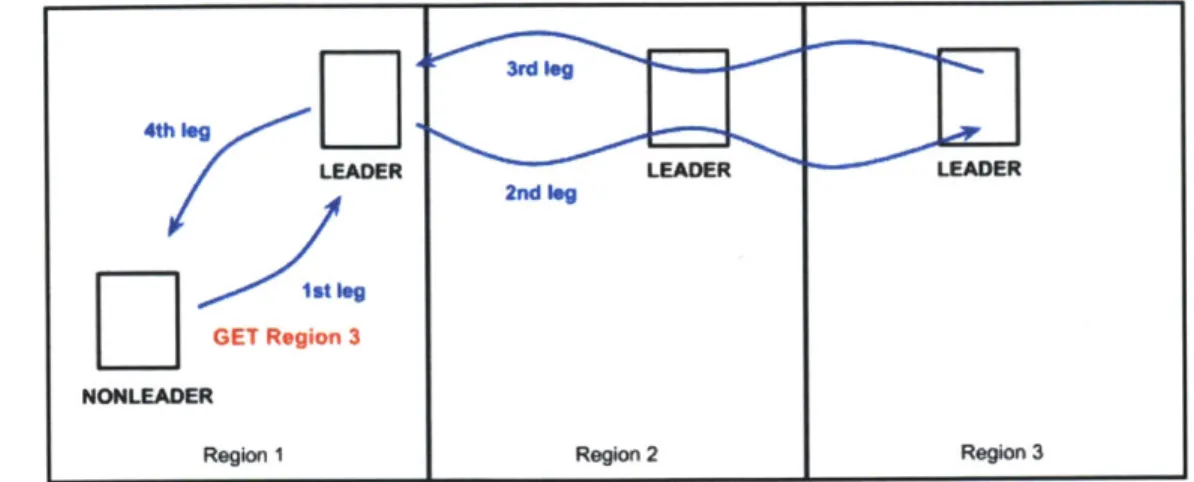
Figure 4-1: A GET Region 3 request pathway. Each leg is sent through ad-hoc
Wifi. In the first leg, the NONLEADER of Region 1 issues the GET request to
its local LEADER. The second and third legs are part of DIPLOMA, with
multi-hop transmissions that results in the local LEADER of Region 1 receiving the photo
information from the LEADER of Region 3. Finally in the fourth leg, the local
LEADER relays the photo data to the original request sender.
3. The DIPLOMA java files are tweaked to support CameraDP
StatusActivity.java contains listeners for the button presses that send requests to its
region leader and a handler that processes replies from the region leader. Each phone
has a unique id, based on the IP address of its ad-hoc wireless interface, that can help
a region's leader distinguish the non-leader phones in its region.
Pressing the TAKE request button triggers its button's listener to retrieve the
photo information from the CameraSurfaceView. The photo data is then put into a
packet along with the phone's ID, the phone's region number, and type of request:
UploadPhoto. This packet is serialized inside StatusActivity.java into a UDP
broad-cast that reaches the leader of the region (the first leg of Figure 4-1).
Similarly, pressing a GET request button triggers its button's listener to get
in-formation on the target region number that the user is requesting. A UDP packet
consisting of the phone's ID, the phone's region number, the target region number,
and the type of request: DownloadPhoto. Again, StatusActivity.java broadcasts this
packet to the leader of the region (the first leg of Figure 4-1).
3rd log
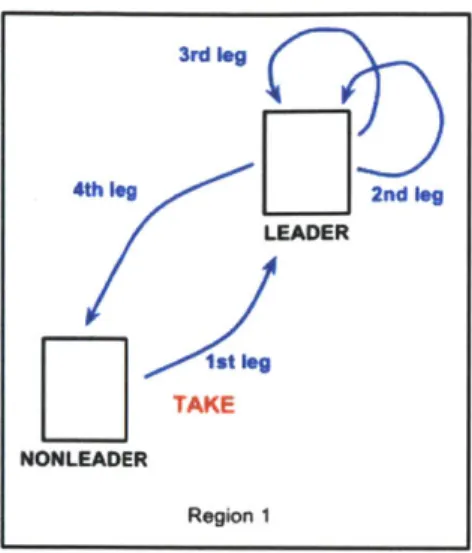
Figure 4-2: A TAKE request pathway always goes to the local leader and is processed
there.
the original leader of the request. The original leader's UserApp.java:handleClientRequest()
processes the UDP packet by the type of request. In both UploadPhoto and
Down-loadPhoto, the original leader sends a DIPLOMA request, along with the additional
information from the UDP packet, to the remote leader (the second leg of Figure
4-1). In the UploadPhoto case, the remote leader is the same as the original leader,
since new photos are processed locally (the second leg of Figure 4-2). In the
Down-loadPhoto case, the remote leader is the leader of the region of interest. The remote
leader's UserApp.java:handleDSMRequest() processes the DIPLOMA request from
the original leader. For UploadPhoto, the leader saves the new photo's byte array
as the first element of the photo array list on the region's DIPLOMA memory. (For
the experiment, we only saved the newest photo by overwriting the first element of
the ArrayList every time. But it is easy to edit the code to save multiple photos in
a region.) The reverse occurs for DownloadPhoto, where the remote leader retrieves
the newest photo from the photo array in its DIPLOMA memory. In both cases, the
remote leader sends a reply back to the original leader (the third leg of Figure 4-1),
arriving at the original leader's UserApp.java:handleDSMReply(.
A DIPLOMA
re-quest could time out if the original leader does not get a reply from the remote leader
within a certain time, in which case the original leader will send a fake self reply to
4th le | | I LEADER 1steg TAKE NONLEADER Region 1 2nd leg
itself with a timedOut field flag switched on. The handleDSMReply() function on
the original leader sends a UDP packet, containing the timed out flag and in the case
of DownloadPhoto, the photo data, back to the original phone that made the request
(the fourth leg of Figure 4-1).
Finally the original phone's StatusActivity.java handler receives the UDP reply
from its leader and logs the reply information, including whether the request was
completed successfully and whether DIPLOMA timed out. If the request was a GET,
the remote region's newest photo is displayed. For TAKE requests, the leader displays
the newest uploaded photo.
Server side DIPLOMA time-outs, which occur in the second or fourth leg, were
logged as failures. Failures in the first or fourth leg would trigger client side time outs
and be logged as timed-outs.
Latency is obtained from time stamps taken right before the first leg and right
after the fourth leg, so it measures the total time of all four legs. We also logged the
time for just the DIPLOMA portion, legs two and three, but we did not analyze this
data.
Chapter 5
CameraCL Android Application
In CameraCL, every request is sent to the cloud server. The cloud server keeps a dictionary linking each region to its newest photo. CameraCL only has one important file: CameraCL.java that is analogous to CameraDP's StatusActivity.java, but instead of sending UDP packets, CameraCL sends HTTP post requests. Latency is calculated from the difference of the time stamps gaurding the line that executes the http request. The code that assigns regions in CameraCL is identical to the code that assigns regions in CameraDP (see Chapter 3). Even though there are regions in Camer-aCL, all the phones in a region are treated equally, i.e. there are no LEADERS or NONLEADERs.
The cloud server returns a status for every request. For TAKE requests, this status indicates if the photo was saved successfully. For GET Requests, a status of failure does not distinguish between a null region or a region with phones but has not taken any photos, because CameraCL's cloud server only knows the existence of a region from the region's first TAKE request. Since CameraCL phones can directly obtain pictures from the cloud server, and need not to communicate with other phones, it is possible to GET photos from a region successfully even if all phones have left that region.
Chapter 6
Experiments and Code
Improvements
We performed a total of 6 data-collection experiments in a span of almost 2 months. Through time, the apps had fewer bugs and more robust code bases. However, there were issues we could not fix - the conditions of Wifi and Android Wifi range. The possible interference generated from 20 phones moving randomly outdoors made col-lecting meaningful data infeasible with the current Wifi technology. In the final 2 experiments, we resorted to a controlled indoor experiment with minimal Wifi inter-ference and obtained more expected results.
6.0.1
Experimental Setup and Measurement Methodology
We had a total of 40 Android phones 20 Nexus S phones and 20 Galaxy Note phones. The Nexus S phones ran the Ice Cream Sandwich platform (Android 4.0) and the Galaxy Note phones ran the Gingerbread platform (Android 2.3). The Nexus S phones had the 3G cellular connection and the Galaxy Note phones had the 4G cellular connection. In the later experiments the Galaxy Notes could switch between 3G and 4G. We ran the 3G and 4G experiments independently.For each phone type, we loaded CameraDP on half of the phones and CameraCL on the others. We installed onto the phones with the CameraDP app a customized
Barnacle Wifi tether app [7] to provide ad-hoc Wifi. The pre-experimental checklist:
1. Make sure 3G or 4G is on by checking the top right icon on the phones: "LTE" indicates 4G and "4G" indicates 3G (HSPA is originally considered a 3G tech-nology).
2. Start the CameraDP server and CameraCL server, also making sure that their IP addresses and port numbers are matched in the Globals. CSMSERVER.NAME and Globals. CLOUDSERVERNAME strings respectively.
3. Make sure the IP addresses are of the format 192.168.5. * and are all unique. 4. Start Barnacle on the CameraDP phones.
5. Turn off screen auto-rotate on all phones because screen rotation crashes the app.
6. Make sure the GPS is on (for outdoor experiments). 7. Clear the old log files saved on the SD cards.
The volunteers were instructed to walk around independently and freely in the valid regions, pressing buttons to TAKE and GET pictures at their own will and pace. Each volunteer had to hold a phone running CameraDP in one hand and a phone running CameraCL in the other hand. They were instructed to press buttons simultaneously and in the same sequence on both phones.
The volunteers did not know the details of DIPLOMA other than the fact that regions exist. However from the second experiment onwards, the UI improved so that unfavorable circumstances would prevent GET and TAKE buttons from working. Examples of unfavorable circumstances include: walking out of the valid regions, phones in a state other than LEADER or NONLEADER, e.g. JOIN.
If an app hangs for a certain period of time, the Android operating system would prompt a message saying "xxx is not responding. Would you like to close it? 'Wait'
'Okay"'. We instructed the volunteers that they must press "Wait", not "Okay" since pressing 'Okay' causes Camera DP to crash at times.
The post-experimental procedures:
1. Logs are saved on the SD card, each log file corresponding to an opened session of CameraDP or CameraCL app
2. Run Python scripts to generate experiment results by grepping for lines con-taining information on button clicks, successes, DIPLOMA failures, timeouts, and latency numbers.
6.1
Mico-Experiments
6.1.1
Micro-Experiment 1: Testing DIPLOMA multi-hop and
phone WiFi range
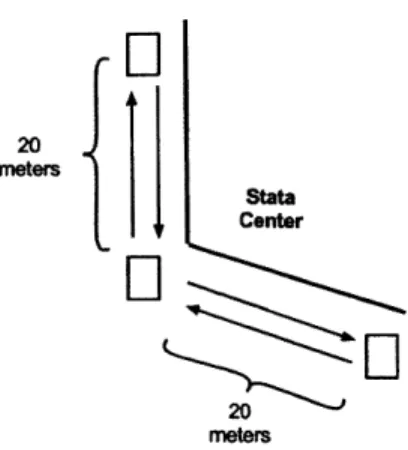
Three people, each holding Galaxy Note phone, conducted the experiment outside the northeastern entrance of the Stata Center. One person stood at the corner of the entrance while the other two people each stood along a different wall. The phones were held vertically, the outer phones faced the middle phone. There were no obstructions in the path of transmission. We would later find out that the range from this test would be too optimistic for multi-user experiments where users moved around and obstructed each other all the time. By first disabling CameraDP on the middle phone, we increased the distance between the middle phone to the two outer phones until the outer phones could not consistently complete GET requests, i.e. they were out of each other's WiFi range. This distance was about 20 meters for each leg, as labeled in Figure 6-1. We then turned on CameraDP on the middle phone and observed that GET requests between the two outer phones worked again, demonstrating that DIPLOMA multi-hop at least works for three phones.
While outside, we also conducted a 2-phone range test on an open field, where Phone A was stationary and Phone B moved away. When Phone B took a new
20 meters Stata Center
20
metersFigure 6-1: The setup of Micro-Experiment 1
picture, a hand gesture was shown and Phone A would try to get this newest picture. The GET requests did not work if the two phones stood more than 20 meters apart. However, when we used ping, the range of success increased to at least 25 meters. This led to our decision of compressing the photos further, as mentioned in Chapter 3.
6.1.2
Micro-Experiment 2: Test phone WiFi range at 436
Mass Ave
Two people holding two Galaxy Note phones walked near 436 Mass Ave using Cam-eraDP. Even though all future outdoor experiments were conducted strictly on the eastern sidewalk of Mass Ave, this experiment was run on both sidewalks. The phones successfully got each other's pictures at opposite ends of Mass Ave, spanning a distance of about 18 meters from Google Maps measurements.
6.2
Experiment 1
Location: 77 Massachusetts Avenue Date: March 15, 2012
Phones: 20 Nexus S: 10 running CameraDP, 10 running CameraCL
People: 10 People: each held 1 CameraDP and 1 CameraCL of same type of phone Regions: 6 linear regions each of width 52 meters
Files:
Code version: https: //github. com/haoqili/AndroidDIPLOMACAMERA/tree/81e87e790 c13ed3c8c4cd45703528e5216f04ec4
Phone logs and scripts: https: //github. com/haoqili/AndroidDIPLOMACAMERA/tree/ master/camera-diploma-exp1_data
CameraDP notes: https://github.com/haoqili/AndroidDIPLOMACAMERA/blob/ master/camera-diploma-expldata/diploma-notes.md
CloudDP notes: https: //github. com/haoqili/AndroidDIPLOMACAMERA/blob/ master/camera-diploma-expi-data/cloud-notes.md
Before walking to 77 Mass Ave, the servers and the apps were started with Region 0 located at the intersection of Amherst St and Mass Ave and the regions increment northwestwards.
No usable quantitative data was extracted from this experiment due to the fre-quent crashes on both the CameraDP app and CameraCL. Insufficient and inadequate stress testing beforehand meant that these problems were not discovered until the ex-periment started. Later analysis revealed that the crashes were mainly due to two reasons: double pressing the TAKE button and an OutOfMemory error caused by the camera interface using up too much of the VM heap.
The region width was too large, preventing successful communication even for phones in the same region. Compounding was a bug that forced users to walk to region 0 whenever the apps crashed. The region assignment based on GPS was observed to be robust.
6.2.1
Improvements
One of the biggest reason for the crashes, on both types of phones and on both CameraDP and CameraCL was due to double clicking a request button that causes
an inconsistent state by the different requests triggered in parallel. We fixed this bug by using a ProgressDialog to freeze the UI when a request is still being processed after its button click. In addition, a boolean flag was introduced as a double check to ensure that requests are strictly sequential and buttons must be pressed one at a time (refer to Chapter 3).
The OutOfMemory error on Nexus S phones occur when multiple TAKEs were pressed one after the other, which could also have contributed to the frequent crashing during the experiment. The first few TAKEs would behave normally and complete successfully. However around the third to sixth TAKE, the app would crash at the line 'BitmapFactory.decodeByteArray(', which converts the byte array of the image into a bitmap object to be displayed to the user. To work around this problem, we added an additional parameter into the decodeByteArray function so that the byte array is downsampled once every 12th pixel, greatly reducing the memory require-ment. In addition, we manually placed system garbage collection calls before the memory-intensive functions. After these two workarounds were coded, we tested the phone by continuously pressing the TAKEs over 100 times, multiple times, and did not observe any crashes.
The Region 0 bug that causes users to reset from region 0 after every crash was fixed. The bug came about from the logic to prevent inaccuracies in the GPS lo-cation. From pre experiment GPS testing, we observed some rare cases where GPS was very much off for a few seconds. In this case, the region assignment would un-realistically jump across multiple regions. So we put in the logic that unless a new region differs from the old region by 1, the old region remains the same. The code initializes the region to be -1. During Experiment 1, our logic backfired if the app crashes inside regions 1 or above. Since the app would restart and be set to -1 and GPS would indicate the new region should be 1 or above, the logic prevents the old region to be changed unless the user walks back to region 0, the only region that is 1 region away from -1.
new region, whether the regions might be next to each other or not. Even though we very occasionally notice that phones would jump to an insensible region, the GPS glitch would only last a few seconds, not long enough to cause any concern.
6.3
Experiment 2
Location: 436 Massachusetts Avenue Date: April 6, 2012
Weather: Sunny and cold
Phones: 20 Nexus S and 20 Galaxy Notes: each phone type with 10 running Camer-aDP, 10 running CameraCL
People: 10 People: each held 1 CameraDP and 1 CameraCL of same type of phone Regions: 6 linear regions each of width 52 meters
Files:
Code version: https: //github. com/haoqili/AndroidDIPLOMACAMERA/tree/
b8a64242d4e6974c74dic86abdfbb277b5e25f 60
Phone logs and scripts: https: //github .com/haoqili/AndroidDIPLOMA.CAMERA/
tree/master/experiment2_april_6
Results: https: //github. com/haoqili/AndroidDIPLOMACAMERA/blob/master/
experiment2_april_6/log-process-anirujason/0411c_meeting.txt
Table 6.1: Experiment 2: 4G (Galaxy Notes) Results of All Runs TAKEs TAKEs GETs GETs
CameraDP CameraCL CameraDP CameraCL total clicks 80 225 74 345
successes 54 202 15 314 percentage 67.5% 89.7% 20% 91%
The server was started in Stata on hermes5.csail.mit.edu, which we later discov-ered would terminate connections mysteriously and the server had to be restarted. The experiment was conducted on the eastern sidewalk of 436 Mass Ave to 2 blocks
Table 6.2: Experiment 2: 3G (Nexus S) Results of All Runs TAKEs TAKEs GETs GETs
CameraDP CameraCL CameraDP CameraCL total clicks 74 70 128 106
successes 73 62 39 95
percentage 99% 88.5% 30.4% 89.6%
Table 6.3: Experiment 2: 4G (Galaxy Notes) Latency of All Runs CameraDP CameraCL
mean 558 ms 837 ms
stdv 991 ms 769 ms
median 205 ms 479 ms
northwestwards. This stretch of road is very busy, filled with restaurants and small businesses, which possibly caused a lot of Wifi interference with the large number of Wifi hotspots.
Run 1: We handed 2 Nexus S phones to each of the 10 people, 1 Nexus and 1 Galaxy note. When people started to press buttons, the Cloud phone request made the phone hang for over 2-3 minutes. Some phones never stopped hanging. This can be seen in the large CameraCL latency numbers in Table 6.4, which are within a minute, but they are averaged over all the runs in this experiment. Still, these numbers are orders of magnitude larger than the rest of latencies in Table 6.3 and Table 6.4.
We decided to restart the servers by connecting a laptop to the strongest free Wifi in the area. Even though we were able to restart the server for run 2, we had to restart the server multiple times in the rest of the runs because the Wifi connection dropped frequently.
Table 6.4: Experiment 2: 3G (Nexus S) Latency CameraDP CameraCL
mean 263 ms 22546 ms stdv 276 ms 20284 ms median 205 ms 15557 ms
Run 2: With the server restarted, we started this run with Galaxy Notes phones instead of Nexus S phones and the exact setup.
The cloud requests did improve and were completed within 20 seconds. However, users complained about phones waiting for a long time to JOIN a region for reasons we will discuss later. People moved around a lot, sometimes forming occasional pairs or triples (to chat with each other). We do not know how many phones in close distance interfered with each other's Wifi. It would not be significant since we rarely
observed near-range interference indoors.
Run 3: In a highly mobile setting, we noticed that phones were stalling on JOIN. This was because each time the server had to time out an old region leader (one that has gone to another region) to let a new leader in. Hence, we decided to just have stationary leaders for this run. First we positioned individual people in the different regions and observed that they became leaders of their regions. After all the 6 leaders were set up, we had 2 non-leader phones as well as all the leaders pressing buttons (the other 2 people were monitoring the server, restarting it when necessary). The 2 non-leaders could walk around.
There were fewer JOIN request hangs in this run. Later we found and fixed bugs in DIPLOMA that caused these hangs.
We found in this experiment that the latency of CameraDP was orders of mag-nitudes smaller than the latency of CameraCL 3G (Table 6.4) and was only little smaller on 4G (Table 6.3). The low CameraDP GET success, see Tables 6.1 and 6.2, was a concern and we decided to improve the setup and code for another experiment. Also note from the result tables that CameraDP had higher success rates and lower latencies with 3G than 4G.
6.3.1
Improvements
The Wifi was not reliable during this experiment. Even testing pinging between two phones within an arm's distance would fail, most likely due to the Wifi hotspots interference. To fix this, the next experiment was moved back to 77 Mass Ave, a less congested section of the street where all the Wifi hotspots locations were coordinated and arranged by MIT, reducing interference.
The region width of 52 meters was too big. So phones within a region could not hear each other (nonleaders and leaders) and leaders in adjacent regions could not hear each other either. In the next experiment, the region width of the app was decreased to 20 meters. We also made it possible to modify the width during the experiment using the UI.
The phones were not at their optimal arrangement for ad-hoc Wifi communication. The volunteers held the phones flat on their palms. In Experiment 4 we discovered that this horizontal configuration reduced the Wifi range of the phones. In addition, people faced different directions, implying that many transmissions was not made in the optimal setting where two phones faced each other without any obstructions in between.
Most of the time half of the regions were unpopulated, which would cause multi-hop problems in CameraDP, since Wifi multi-hops in a chain would only work if there are leaders present in all the regions of the chain.
Since hermes5 would drop periodically, we switched to a more reliable server for future experiments. Upon further inspection we found the server would drop connections that have been alive for 12 hours, caused by an AFS permissions issue.
Unfortunately, the server was left on the night prior to this experiment.
We added acks for first and final legs of CameraDP, so that there are 4 chances to make the first leg or final leg succeed 4-1. However after the later experiments we found that this addition did not improve results drastically. Note that these acks had a reply counter bug that was not fixed until Experiment 5 (See section 6.5.1).
6.4
Experiment 3
Location: 77 Massachusetts Avenue Date: April 25, 2012
Weather: Sunny
Phones: 20 Nexus S and 20 Galaxy Notes: each phone type with 10 running Camer-aDP, 10 running CameraCL
People: 10 People: each held 1 CameraDP and 1 CameraCL of same type of phone Regions: 6 linear regions each of width 20 meters
Files:
Code version: https://github.com/haoqili/AndroidDIPLOMACAMERA/tree/ e22605b1b644aa60af f 54a086526d4bc0f 94a7cf
Phone logs and scripts: https://github.com/haoqili/AndroidDIPLOMACAMERA/
tree/master/experiment3_april_25_2011
Results: https://github.com/haoqili/AndroidDIPLOMACAMERA/blob/
master/experiment3_april_25_2011/results.txt
Table 6.5: Experiment 3: 4G (Galaxy Notes) Results TAKEs TAKEs GETs GETs CameraDP CameraCL CameraDP CameraCL total clicks 82 111 75 105 successes 22 83 17 58 percentage 26% 74% 22% 55% latency mean 206 ms 651 ms 1033 ms 268 ms latency stdv 455 ms 1450 ms 1048 ms 394 ms latency median 93 ms 495 ms 92 ms 166 ms
Table 6.6: Experiment 3: 3G (Nexus S) Results TAKEs TAKEs GETs GETs
CameraDP CameraCL CameraDP CameraCL
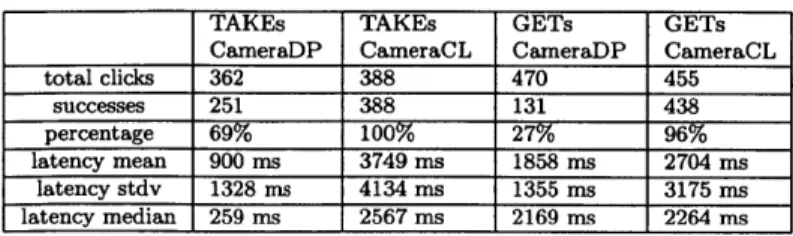
total clicks 362 388 470 455 successes 251 388 131 438 percentage 69% 100% 27% 96% latency mean 900 ms 3749 ms 1858 ms 2704 ms latency stdv 1328 ms 4134 ms 1355 ms 3175 ms latency median 259 ms 2567 ms 2169 ms 2264 ms
Table 6.7: Experiment 3: 4G (Galaxy Notes) GET Hop Results Hop O Hop1 Hop2 Hop3+
requests 123 28 21 3
success rate 65% 7% 0% 0%
Table 6.8: Experiment 3: 3G (Nexus S) GET Hop Results Hop 0 Hop 1 Hop 2 Hop 3+ requests 1126 1210 92 42 success rate 86% 7% 6% 0%
The first region of this experiment started around the intersection of Amherst St and Mass Ave, the last region ended around 77 Mass Ave. The location is chosen due to its much smaller number of Wifi hotspots compared to the busier location of the previous experiment. MIT Building 5 was the only building on the same side of the street as the experiment. Opposite the street were an MIT undergraduate dorm Maseeh Hall and the MIT Chapel.
In order to have a more stable server, we used a laptop connecting to the Ethernet in one of the Building 5 classrooms instead of connecting a Wifi. The connection was stable during the experiment, i.e. no server crashes occurred. One person was watching the server for the entire duration.
There were 4 runs, with the later runs of people concentrated in the first two regions. One trial with Nexus S set the region width to 10 meters instead of 20 meters, but the success rate of GETs did not improve (23%). (see the chapter on DIPLOMA to learn about complications with smaller region sizes.)
The results of the 4 trials are congregated into Tables 6.5 and 6.6. Again inexpli-cably, CameraDP had higher success rates on 3G than 4G. CameraDP TAKE failures came from time outs, i.e. requests that do not respond within 6 seconds, which was caused by weak Wifi conditions. For the Nexus S results, 58% of CameraDP GET requests failed in DIPLOMA, due to the leader being unable to get a response from the requested remote leader. There are two causes for DIPLOMA level failures, either the leaders were not in range with each other or at least one region in the multi-hop
path were absent of a leader. The rest of the CameraDP GET requests failed due to the 6-second time out just like the case in TAKEs. For Galaxy Notes, only 22% of CameraDP GET failures were cause by DIPLOMA.
This is the last experiment where we used multi-hop. The Wifi conditions were not good enough to yield good multi-hop results, see Tables 6.7 and 6.8 due to poor Wifi connectivity outdoors, the future experiments were run indoors in a much smaller area.
6.5
Experiment 4
Location: Inside Stata, in the lounge closest to the Vassar/Main St intersection in front of the curved mirror
Date: April 30, 2012 Weather: Sunny
Phones: 20 Galaxy Notes: with 10 running CameraDP, 10 running CameraCL People: 10 People: each held 1 CameraDP and 1 CameraCL of same type of phone Regions: 6 2x3 or 4 2x2 regions each of width of around 5 meters
Files:
Code version: https: //github. com/haoqili/AndroidDIPLOMACAMERA/tree/ 892b9793536613366b5293eeeda3c48155e70f05
Phone logs and scripts: https: //github. com/haoqili/AndroidDIPLOMACAMERA/ tree/master/experiment4_april30
Results: https://github.com/haoqili/AndroidDIPLOMACAMERA/blob/master/ experiment4_april30/results.txt
This is an indoors experiment with volunteers walking around different 5mx5m regions marked on the ground, manually pressing a button to change their region whenever a new region is entered (GPS turned off on all phones). In the 5 runs, only Run 2 used 3G (from a 3G/4G switch app).
Table 6.9: Experiment 4: Run 0 Results 4G TAKEs TAKEs GETs GETs
CameraDP CameraCL CameraDP CameraCL total clicks 87 87 160 159 successes 56 87 61 158 percentage 64% 100% 38% 99% latency mean 362 ms 871 ms 853 ms 395 ms latency stdv 652 ms 334 ms 1163 ms 432 ms latency median 102 ms 831 ms 344 ms 346 ms
Table 6.10: Experiment 4: Run 1 Results 4G TAKEs TAKEs GETs GETs
CameraDP CameraCL CameraDP CameraCL total clicks 154 150 238 351 successes 124 150 166 349 percentage 80% 100% 47% 99% latency mean 526 ms 909 ms 830 ms 366 ms latency stdv 965 ms 566ms 909 ms 288 ms latency median 183 ms 835 ms 638 ms 339 ms
DIPLOMA multi-hops were used, because every phone was in range of every other phone, regardless of the region. This was because we decreased the region width from 20 meters to 5 meters. Since Run 0 had the largest area of experiment, we would expect its success rates to be lower, but that's only the case for CameraDP TAKEs, and its CameraDP GETs result is the second lowest, only 2% better than the lowest (6.9). In the only 3G run CameraDP had both TAKE and GET success rates above 50% (Table 6.11).
Similar to the previous experiment, TAKE failures were mostly due to timeouts and GET failures were mostly due to a DIPLOMA failure of unable to contact remote regions. This should not have been the case since there were always at least 1 person
Table 6.11: Experiment 4: Run 2 Results
3G TAKEs TAKEs GETs GETs CameraDP CameraCL CameraDP CameraCL total clicks 131 136 279 286 successes 103 136 192 280 percentage 78% 100% 68% 9 latency mean 364 ms 2302 ms 857 ms 1215 ms latency stdv 718 ms 762 ms 939 ms 755 ms latency median 214 ms 2171 ms 599 ms 1080 ms
Table 6.12: Experiment 4: Run 3 Results 4G TAKEs TAKEs GETs GETs
CameraDP CameraCL CameraDP CameraCL total clicks 153 152 189 168 successes 124 152 69 168 percentage 81% 100% 36% 100% latency mean 772 ms 726 ms 774 ms 347 ms latency stdv 1172 ms 235 ms 757 ms 338 ms latency median 163 ms 716 is 483 ms 298 ms
Table 6.13: Experiment 4: Run 4 Results 4G TAKEs TAKEs GETs GETs
CameraDP CameraCL CameraDP CameraCL total clicks 271 272 370 355 successes 202 272 147 354 percentage 74% 100% 39% 99% latency mean 695 ms 769 ms 816 ms 361 ms latency stdv 1188 ms 311 ms 924 ms 316 ms latency median 146 ms 734 ms 444 ms 324 ms
in each region during the experiment, and leader transitions did not take very long. The first explanation is that Wifi still did not work consistently. Indeed, at one point when users were reporting low success rates, we tried pinging between two phones but failed. Another possibility could be the ack bug introduced pre-Experiment 3, described below.
The success rates were still too low, so we thought a static indoor experiment would improve the percentage of success.
6.5.1
Improvements
We fixed the bug that caused an entire region to not be able to GET and TAKE for a period of time. This was due to an error in the ack counter, where we set the reply counter independently from the request counter when in fact the standard correct practice is for the reply counter to be the same as its request counter or at least based on it. My erroneous ack counter was based on a counter in UserApp. During every UserApp reset, the counter would be reinitialized to 0, potentially resending the same counter to the same client of a previous reply. When this client received the
reply, it checks against the queue of received reply counters and finds a match, which causes the client to just ignore the reply, thinking that reply were a duplicate.
This mistake happened because of an oversight that UserApp does not continue from region to region, but is reinitialized at every new region. The fix was simply changing the construction of the leader reply counter to be based on the request counter. Since all request counters are unique, reply counters would also be unique.
6.6
Experiment 5
Location: Inside Stata, in the lounge closest to the Vassar/Main St intersection Date: May 6, 2012
Weather: Sunny
Phones: 19 Galaxy Notes: with 10 running CameraDP, 9 running CameraCL
People: 2, controlled experiment Regions: 6 2x3 regions each of width of around 5 meters
Files:
Code version: https: //github. com/haoqili/AndroidDIPLOMACAMERA/tree/ aeb358fc5a8f887c4193d7612538fifif46ee90c
Phone logs and scripts: https://github.com/haoqili/AndroidDIPLOMA_CAMERA/
tree/master/experiment5maySindoors
Results: https: //github. com/haoqili/AndroidDIPLOMACAMERA/blob/master/
experiment5_may6_indoors/results.txt
Table 6.14: Experiment 5: Run 0 Results 4G TAKEs TAKEs GETs GETs
CameraDP CaneraCL CameraDP CarneraCL total clicks 55 48 409 378
successes 55 48 404 378
percentage 100% 100% 98% 100%
latency mean 131 ms 515 ms 180 ms 267 ins
latency stdv 61 ms 85 ins 165 ms 142 ns latency median 91 ms 525 ms 146 ms 215 ins
Table 6.15: Experiment 5: Run 1 Results
3G TAKEs TAKEs GETs GETs
CameraDP CameraCL CameraDP CameraCL total clicks 41 36 180 171 successes 41 36 180 171 percentage 100% 100% 100% 100% latency mean 132 ms 1960 ms 208 ms 717 ms latency stdv 61 ms 793 ms 260 ms 727 ms latency median 104 ms 2362 ms 161 ms 398 ms
In this experiment, we placed the phones on the ground almost vertically,
sup-ported by plastic phone holders on the back, with GPS turned off. The phones were
placed in a 2x3 region arrangement with each region set to 5mx5m. There were either
2, 3, or 4 phones in each region as shown in Figure 6-2.
Figure 6-2: The setup of Experiment 5
This experiment contained two runs, one 4G and one 3G. For TAKE requests, the
"TAKE" buttons on all phones were pressed. For GET requests, we would press all
the "GET" buttons on one phone before moving on to press the "GET" buttons on
the next phone. We also switched regions a few times when no other phones were
making requests. So consequently, this did not have any effect on the success rate or
latency, but it increase the number of cloud server accesses.
We noticed the average latencies for CameraCL requests were under a second when
we observed many requests taking a few seconds. During Experiment 6 we discovered
the reason for this peculiarity.
6.6.1
Improvements
We added a latency information display on the screen so that in the next experiment
we could observe in real time the average latency, median latency, and the newest
request's latency. This UI addition helped us better understand the reasons behind
the results.
6.7
Experiment 6
Location: Inside Stata, in the lounge closest to the Vassar/Main St intersection
Date: May 6, 2012
Weather: Sunny
Phones: 20 Galaxy Notes: with 10 running CameraDP, 10 running CameraCL
People: 2, controlled experiment Regions: 6 2x3 regions each of width of around 5
meters
Files:
Code version: https: //github. com/haoqili/AndroidDIPLOMACAMERA/tree/ 7df 1600531f730d03cc824984ecb21bb60eabd63
Phone logs and scripts: https : //github. com/haoqili/AndroidDIPLOMACAMERA/tree/ master/experiment6_mayl2_indoors
Results: https : //github. com/haoqili/AndroidDIPLOMA _CAMERA/blob/master/ experiment6_mayl2_indoors/results-diploma.txt
and https : //github. com/haoqili/AndroidDIPLOMACAMERA/blob/master/ experiment6_mayl2.indoors/resultscloud.txt
In this experiment, the regions were set up similarly as before, each of area 5mx5m.
The two inner regions had two phones each, one running CameraDP and the other
Table 6.16: Experiment 6: Run 1 Results 4G TAKEs TAKEs GETs GETs
CameraDP CameraCL CameraDP CameraCL total clicks 40 41 242 241
successes 40 41 242 241 percentage 100% 100% 100% 100%
latency mean 146 ms 551 ms 190 ms 254 ins latency stdv 61 ins 90 Ms 144 ms 95 ins
latency median 148 ns 530 is 162 ins 226 ins
Table 6.17: Experiment 6: Run 2 Results
3G TAKEs TAKEs GETs GETs CaneraDP CameraCL CameraDP CaneraCL
total clicks 20 20 111 94
successes 20 20 105 94 percentage 100% 100% 94% 100%
latency mean 168 ms 2580 ms 225 ins 813 ins
latency stdv 146 ins 539 ins 268 ms 758 ns
latency median 111 ms 2464 ins 161 ms 415 ins
running CameraCL. The outer regions had four phones each, two running CameraDP and two running CameraCL (Figure 6-3). The phones this time were placed flat on stools (Figure 6-4).
We forgot to turn off the GPS at the beginning and one of the phones during run 2 got a GPS fix, messing up the results. Then we proceeded to turn off all the phone's GPS.
The cloud accesses consisted of leader to cloud server heartbeats and the few initial leadership grants from the cloud. In run 3, there axe 83 cloud accesses, cor-responding to 1 cloud access per 3.5 TAKE or GET requests. In run 4 there are 62 cloud accesses, corresponding to 1 cloud access per 4.6 TAKE or GET requests. The
Table 6.18: Experiment 6: Run 3 Results
3G TAKEs TAKEs GETs GETs CameraDP CaneraCL CameraDP CaneraCL total clicks 40 40 249 242
successes 39 40 242 242 percentage 97% 100% 97% 100%
latency mean 144 ins 2558 ms 217 ms 2279 ins
latency stdv 69 ins 408 ins 261 ins 285 ins