Bachelor thesis 2018
Analysis, design, and implementation of
an infrastructure-less situation
awareness application
Student
: Flavien Bonvin
Professor
: Yann Bocchi
ABSTRACT
This work aims to implement an application based on opportunistic communication. It must be operational in a disaster situation when the cellular network is not available.
During this work, a first part was consecrated to the study of the several types of ad hoc networks and the various technologies related to them. This has served as a foundation for the study of ad hoc networks in smartphones since an android application was developed.
In a second phase, we defined the main requirements and features of the application. After that, the analysis of the existing solution was effectuated. We took care to emphasize the differences between the market solution and our implementation of the use case. It was necessary for us to know if such an application had its place in the market and if it was the case, in which way it differs from the competition.
Once this was done, we developed the application. We have recorded the different reflections made during the implementation to show the different issues. Those issues can be related to either the back or the front end of the application. To do this, we had to project ourselves into the position of someone experiencing this kind of event.
Finally, we have devoted a part of the document to the analysis of the results to know if an application of this kind, relying on ad hoc networking, can be used during a disaster.
Keywords
FOREWORD
This work was done in the context of a bachelor’s thesis in Business Information Technology at the HES-SO Valais. It was proposed by the professor Yann Bocchi and Gianluca Rizzo. We received the task to develop a tool that will explore the potential of opportunistic communication offered by the Android system.
Theoretical research on ad hoc communications had been conducted in the past, but because of software and hardware limitations, it was difficult to implement them. Modern technologies such as Google Nearby and Apple iBeacon offer an abstraction layer and can provide a solution to some of the problems past studies had to cope with.
This thesis has multiple objectives; in the first instance, we will explain and give an overview of the solutions offered by the different actors of this sector. Some technologies unused during the implementation will be analyzed as well, for example Apple iBeacon or the fifth generation of wireless systems (5G).
After this research stage, we will implement an application capable of exchanging messages in ad hoc mode. The original idea was to implement a vehicular service such as traffic warning notification. However, the use case is flexible and can deviate from the initial concept.
At last, we will detail the actual limitations of the technologies we found during the implementation. On top of that, we will provide some recommendations that could help the future development of opportunistic communications. Those guidelines will provide advice on which technology to choose depending on the needs of the project.
ACKNOWLEDGMENT
We would like to sincerely thank all the people who have enabled us to carry out this bachelor’s work under the best conditions. Special thanks to:
Mr. Yann Bocchi, our teacher in charge, for having supervised and followed us throughout this work. We are very grateful for his advice and precious feedback.
Mr. Gianluca Rizzo for providing valuable technical advice through his expertise and for his feedback on the different documents made in the thesis.
Table of Contents
INTRODUCTION...1
1. What Is an Ad Hoc Network...2
1.1. Ad Hoc and Traditional Networks...2
1.2. Multi-Hop Communication...3
1.3. Advantages and Drawbacks of Ad Hoc Networks...3
1.4. Application of Ad Hoc Networks...4
1.5. Type of Routing Protocols...7
2. Ad Hoc Networks in Smartphones...10
2.1. Google Android...10
2.2. Apple iOS...17
2.3. Other Implementations...18
3. Use Case Analysis...28
3.1. Disaster Assistance Use Case...29
3.2. Comparison of the Existing Solutions...43
4. Use Case Implementation Reflection...44
4.1. Challenges — Application Back End...44
4.2. Challenges — User Experience...48
4.3. Challenges — User Interface...50
5. General Implementation...56
5.1. Technology Choice...56
5.2. Programming Language...56
5.3. Project Architecture...57
5.4. Gradle Dependencies...57
5.5. Constant of the Application...58
5.6. Google Nearby Configuration...61
5.7. Messages Object...62
5.8. Endpoint Object...66
6. Details of the Implementation...67
6.1. Application Back End...67
6.2. Application User Experience...74
6.3. Application User Interface...76
7. Discussion...79
7.1. Application Back End...79
7.3. Google Nearby...84
7.4. Future Improvements...85
8. Product Backlog...87
8.1. Implementation Feedback...87
9. Management of the Project...88
9.1. Planning of the Project...88
9.2. Tools Used...91
CONCLUSION... 93
Personal Experience feedback...94
REFERENCES...95
APPENDICES... 98
APPENDICES I – SPECIFICATION SHEET...98
APPENDICES II – USE CASE DEFINITION...108
APPENDICES III – PRODUCT BACKLOG...123
APPENDICES IV – LOGBOOK...129
APPENDICES V – VANETS TECHNOLOGIES...137
Illustration Index
1. Illustration: Divergences between ad hoc and traditional networks. From the authors...2
2. Illustration: Multi-hop demonstration. From the authors...3
3. Illustration: Sorting of routing protocols (Deepshikha and Durga Prasad, 2016)...7
4. Illustration: Floating content representation...9
5. Illustration: P2P_CLUSTER strategy. From the authors...16
6. Illustration: P2P_START strategy. From the authors...17
7. Illustration: Bluetooth 5 support of the Samsung Galaxy S8 (Sims Gary, 2017)...20
8. Illustration: Comparing 4G and 5G (Qorvo, 2017)...21
9. Illustration: Cloud to mesh (Open Garden 2018)...24
10. Illustration: Mesh to cloud (Open Gaden, 2018)...24
11. Illustration: Peer to peer (Open Garden, 2018)...24
12. Illustration: Peer to peer connection (Open Garden, 2018)...25
13. Illustration: goTenna Logo (goTenna, n.d.)...31
14. Illustration: goTenna Mesh (goTenna, n.d.)...31
15. Illustration: goTenna Pro (goTenna, n.d.)...31
16. Illustration: goTenna Pro size (goTenna, n.d.)...33
17. Illustration: goTenna deployment kit (goTenna, n.d.)...34
18. Illustration: goTenna Plus features (goTenna, n.d.)...34
19. Illustration: FireChat logo (Open Garden, 2018)...37
20. Illustration: Nearby Chat icon (Swain Daniel, 2017)...39
21. Illustration: Zello logo (Zello, 2018)...40
22. Illustration: Mock-up bottom navigation menu...50
23. Illustration: Mock-up message list...50
24. Illustration: Mock-up detail of one message...51
25. Illustration: Mock-up messages details...51
26. Illustration: Mock-up messages map...52
27. Illustration: Victim icon...54
28. Illustration: Danger icon...54
29. Illustration: Resource icon...54
30. Illustration: Caretaker icon...54
31. Illustration: Default application icon...55
32. Illustration: Round application icon...55
33. Illustration: Google nearby connection procedure (Android Developers, 2017)...61
34. Illustration: Message flow—Sending...63
36. Illustration: Message flow — Propagation...65
37. Illustration: Dynamic expiration date implementation...67
38. Illustration: Progress bar in message list...67
39. Illustration: Restore deprecated messages...68
40. Illustration: Floating content configured at 50 meters...69
41. Illustration: Illustration: Floating content configured at 400 meters...69
42. Illustration: Detail of a message in the map...69
43. Illustration: Potential duplicate message dialog...70
44. Illustration: Radius settings...73
45. Illustration: Pull to refresh...74
46. Illustration: Message creation...74
47. Illustration: Message confirmation...74
48. Illustration: Recipient count in message details...75
49. Illustration: Initial bottom navigation menu...76
50. Illustration: Final bottom navigation menu...76
51. Illustration: New settings menu location...76
52. Illustration: Tabs present in the home screen...77
53. Illustration: Initial message in the message list...77
54. Illustration: New message in the message list...77
55. Illustration: Requesting mandatory permission...78
56. Illustration: Asking for username...78
57. Illustration: Payload flow...82
58. Illustration: Initial planning...88
59. Illustration: Intermediate planning...89
Index of Tables
1. Table: Difference Bluetooth 4 and 5 (Collotta Mario, Pau Giovanni, Talty Timothy & Tonguz Ozan K., n.d.)... 192. Table: Comparison of Available Technologies...30
3. Table: Comparison of goTenna Mesh and Pro (goTenna, n.d.)...32
4. Table: Comparison of our use case with the existing solutions...43
5. Table: Application Primary Colors...53
6. Table: Application secondary colors...53
7. Table: Message categories color...54
8. Table: Application utility colors...54
9. Table: Product backlog implemented features summary...87
LIST OF ABBREVIATIONS
AODV Ad hoc On-Demand Distance Vector
APK Android Package Kit
CDMA Code Division Multiple Access
CRC Cyclic Redundancy Check
DC-DC Direct D2D communication with device controlled link establishment DC-OC Direct D2D communication with operator controlled link establishment
DR Device Relaying
DR-DC Device relaying with device controlled link establishment DR-OC Device relaying with operator controlled link establishment DSDV Destination Distance Vector
DSR Dynamic Source Routing
DSRC Dedicated Short Range Communication EPFL École Polytechnique fédérale de Lausanne EVDO Evolution-Data Optimized
FEC Forward Error Correction GPS Global Positioning System
GSM Global System for Mobile Communication GUID Globally Unique Identifier
HSPA High-Speed Packet Access
IMT International Mobile Telecommunication
IoT Internet of Things
ITS Intelligent Transportation Systems
ITS JPO Intelligent Transportation System Joint Program Office ITU International Telecommunication Union
L2CAP Logical link control and adaptation protocol
LAN Local Area Network
LAR Location-Aided Routing
LE Low Energy
LTE Long-Term Evolution
MANETs Mobile ad hoc networks MCU Micro-controller Unit
MIMO Multiple-Input Multiple-Output
MMDA The Metro Manila Development Authority
NFC Near-Field Communication
NGO Non-governmental organization OLSR Optimal Link State Routine
PAN Personal Area Network
RFCOMM Radio frequency communication SDK Software Development Kit SDP Service Discovery Protocol SIG Bluetooth Special Interest Group
SoC System on a chip
SPANs Smartphone ad hoc networks TCP Transmission Control Protocol UHF Ultra High Frequencies UUID Universally unique identifier V2I Vehicles to infrastructures V2V Vehicles to Vehicles VANETs Vehicular ad hoc networks
VHF Very High Frequencies
WARP Wireless Ad Hoc Routing Protocol Wi-Fi Wireless fidelity
WiMAX Worldwide Interoperability for Microwave Access WLAN Wireless Local Area Network
INTRODUCTION
During a disaster, victims are left to themselves until rescue teams arrive. These first hours or days are vital and can save lives if those affected had a way to communicate efficiently. Mobile phones are an option; unfortunately, in many cases, the network infrastructure is also destroyed, making these devices useless.
This is why an application that allows communication without using the traditional telephone network, based on technologies such as Bluetooth or Wi-Fi, is justified.
The objective of this work is, therefore, to know if such an application can see the light of day with existing technologies. That is the reason why an Android application is developed. However, the compatibility with Apple’s ecosystem must be taken into account.
In the first part of the work, we will analyze the different types of existing ad hoc networks as well as the underlying technologies. This analysis will provide us with a better understanding of the issues involved in such networks. After that, the definitions of the objectives that our application must meet will be established. This will allow us to know if similar solutions already exist on the market.
In a second phase, we will develop the application and we will detail the reflections made during this last part. The reflections will relate as much to the functioning of this type of network as to the interface of the application. These are points on which we have reflected and for which we have analyzed several options to select the best.
Finally, an analysis of the results obtained by the application will be carried out to determine if current technologies allow the implementation of this type of communication. Possible future developments will also be mentioned in this chapter.
1. What Is an Ad Hoc Network
The Cambridge Dictionary defines ad hoc as something that is made or happens only for a particular purpose or need, not planned before it occurs (Cambridge Dictionary, n.d.). Ad hoc is used on multiple occasions, such as ad hoc organizations which are created especially for a given task or project. Ad hoc is also utilized in the military where an ad hoc unit is quickly deployed to help other units or regroup survivors into one entity.
In this work, we will focus on ad hoc networks and the technologies surrounding them. Those types of networks are infrastructure less, meaning that they can be operated without any central control. Ad hoc networks can be set anywhere, whenever, due to their dynamic and self-configuring nature.
Because no network specific hardware is needed, data travel through the network from device to device called “nodes”. Each of those nodes forward packets onward until it reaches its destination. This type of exchange is called multi-hop networking; this involves two or more hops to send information from the source to the destination.
1.1.
Ad Hoc and Traditional Networks
1. Illustration: Divergences between ad hoc and traditional networks. From the authors
The illustration above shows the differences between ad hoc on the left and traditional networks on the right. As shown in the illustration, no central hardware is needed in ad hoc mode, each device connects one to another regardless the type of machine, assuming they both implement the same protocol and network radio, creating one large grid. On the other side, the more classic approach needs routers to establish a connection between the two networks; the example can be two Local Area Networks (LAN) connected.
1.2.
Multi-Hop Communication
The following illustration demonstrates what a multi-hop communication is. The path data will take change depending on the routing protocol used and on the routing table established by the network. In our example, there are seven smartphones constituting a smartphone ad hoc network (SPANs).
The source of the message is transmitted from the green phone, passes through three other phones and reaches the destination in blue.
1.3.
Advantages and Drawbacks of Ad Hoc Networks
What ad hoc networks offer is overwhelming and can change the way information is exchanged. However, this involves many technologies and challenges. We tried to establish a brief list of what the benefits are:
• Works where no service is available. In case of a war or a catastrophic event where existing infrastructure is destructed or disabled, ad hoc communication still works and can help people in this area to communicate.
• Setting up and transferring information are swift because of its absence of infrastructure to configure.
• Since there is no hardware to install (no antenna, relay, router) the costs are minimal and can be a significant advantage in developing areas.
• Communication is still possible in case of the unavailability or the destruction of a node in an ad hoc network as long as the devices remain connected by one link.
As said before, there are numerous challenges to face when we want to implement ad hoc networks, here are some:
• Each device is a router; this means that data has to transit frequently. This results in a higher battery drain than normal usage.
• Devices cannot be switched off depending on the number of nodes in a network. This can cause the whole network to collapse and make communications unusable.
• The dynamic nature of such networks makes the routing rough. Routing tables have to be continuously updated to ensure that each device is still present in the grid.
• If devices are moving, a wide bit rate variation can be expected.
1.4.
Application of Ad Hoc Networks
All types of network we will analyze can be regrouped as Mobile ad hoc network (MANET) because they all consist of devices that can move such as smartphones or vehicles. We will not explain what a MANET is but instead focus on details of the specific types of networks such as SPANs, vehicular ad hoc networks (VANETs) and Disaster rescue ad hoc networks. We will not describe all types of ad hoc networks, only those studied while we were defining the use case we implemented. More information about use cases can be found later in this document, chapter 3 – Use Case Analysis (p. 28).
The following part is a quick overview of what are those types of networks and what kinds of technologies they use. Technical details can be found later in this document, chapter 2 – Ad hoc Networks in Smartphones (p. 10).
1.4.1. Smartphone Ad Hoc Networks (SPANs)
Smartphones are portable devices with network capabilities using both licensed frequencies operated by cellular carriers and unlicensed ones used by Bluetooth and Wireless Fidelity (Wi-Fi). Those use the unlicensed ISM band ranging from 2.4 GHz to 2.5 GHz (Shoemake Matthew, 2001, p. 4).
Usage of These Types of Networks
Several usages of these types of networks have already been made during protestations where government entities either monitored or disabled the existing network infrastructure. This was the case during the Tunisian’s Arab spring (Hern Alex, 2014), where 40,000 Iraqis downloaded the application called FireChat allowing them to communicate. The same application was used at two other occasions, during the Hong Kong Protest in 2014 (Cohen Noam, 2014) and the same year in
Russia when anti-government leaders recommended their followers to install the application (Milian Mark, 2014).
1.4.2. Vehicular Ad Hoc Networks (VANETs)
Vehicles are becoming smarter generation after generation; they are loaded with numerous sensors and probes which make them aware of their environment. In the current state, data is processed and kept in the car but is not shared among other vehicles.
VANETs objective is to address this issue by allowing Vehicles to Vehicles (V2V) and Vehicles to Infrastructures (V2I) communications; it will provide a safer and more efficient driving experience. They are part of the Intelligent Transportation Systems (ITS) framework.
Intelligent Transportation System
ITS goal is to provide drivers a safer, more coordinate use of transport networks. Governments are developing a range of tools that will help them to achieve their objectives, V2V and V2I are a crucial element of it. Both European and American governments created special commissions dedicated to the development of ITS. They provide both financial and legislative help to support innovative ITS projects (European Commission, n.d.).
The American administration created the Intelligent Transportation System Joint Program Office (ITS JPO). In their latest report they established a strategic plan to contain multiple categories (Barbaresso Jim et al., 2014, p. V) such as:
• Connected vehicles: research and implementation on V2V and V2I solutions.
• Automation: research on automated V2I systems that will transfer some control from the driver to the vehicle.
• Interoperability: ensure that data will be compatible from one system to another.
Applications of VANETs
There are several applications that could make the traffic safer and more efficient.
• Car platooning: reducing the inter-vehicular distance, down to a few centimeters, this saves fuel for the following vehicles and allows a faster and safer highway driving. Acceleration and breaking will be synchronized across vehicles.
• Intelligent traffic system: reducing the time vehicles spend stopped, at traffic lights or crossroads, can significantly reduce pollution noise and help relieve traffic congestion.
• On the road services: marketing opportunities such as shop discovery and gas station advertising can be created with VANETs.
Technologies Used
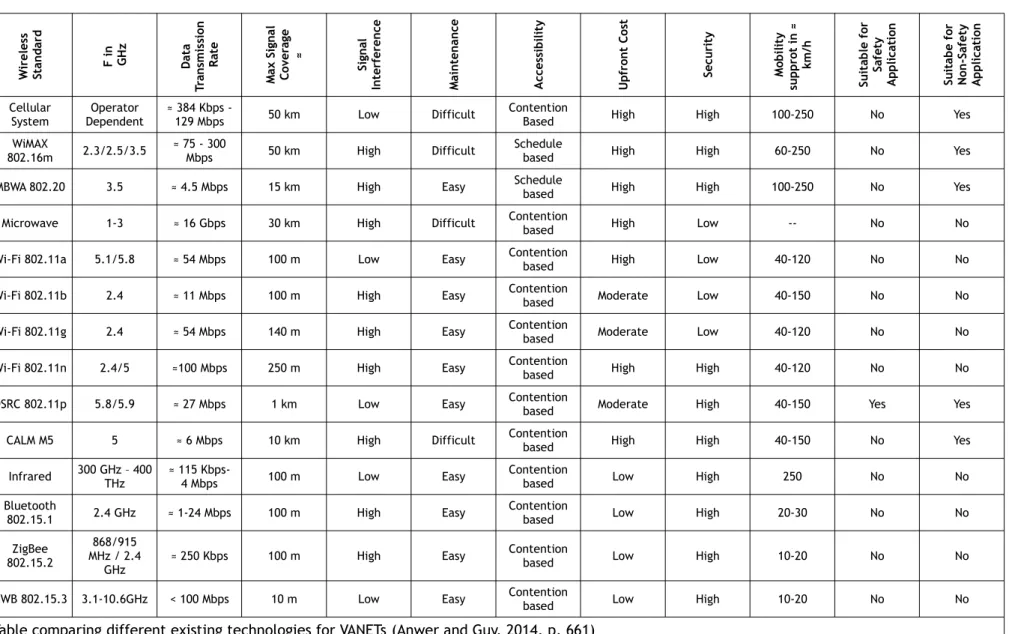
Short-range radio technologies are an obvious requirement for VANETs; a paper from University of Reading in England covered the existing technologies. They presented 14 different existing wireless standards, and they discussed the limitation and support of safety and non-safety applications for each of them.
During the paper, they defined two types of applications. Safety applications where data is processed in real time and is aimed at minimizing road accidents. Non-Safety applications that enable the passenger to access to a service such as the Internet or Voice over IP (VoIP) (Anwer Shahid & Guy Chris, 2014, p. 661). The summary of their research is in the appendix of this paper.
They came up with the conclusion that Dedicated Short Range Communication (DSRC) is the protocol that might suit most of these applications. It works on the 5.9 GHz frequency bands and can provide service for V2V and V2I (Anwer Shahid & Guy Chris, 2014, p. 667). However, they only analyzed existing technologies, some advancement promised by the incoming 5G network might be suited for V2V and V2I communications.
Well-known technologies such as Wi-Fi and Bluetooth have been reviewed by the authors of the study but are not recommended for VANETs.
Wi-Fi has many different standards such as 802.11 a, 802.11 ac, 802.11 b, 802.11 e, 802.11 g, and 802.11 n. The most appealing standard for VANETs is 802.11 ac because of its high data rate, up to 1Gbps, and its high-operating frequency, 5 GHz. However, it is not recommended by the authors of the paper because of the decrease of performance as the number of vehicles in the network increases. Other Wi-Fi standards are prone to interference because they operate on the unlicensed 2.4 GHz band and are therefore not recommended.
Bluetooth is used to create Personal Area Network (PAN) and can be used for V2V and V2I applications. Moreover, it cannot be used for safety applications because of its short range, slow transfer rate and air interference vulnerability (Anwer Shahid & Guy Chris, 2014, p. 665).
1.4.3. Disaster Rescue Ad Hoc Networks
When a catastrophic event occurs, like a flood, an earthquake or a fire, communication can save many lives. Frequently, radio towers are either destroyed by the event or congested; meaning
that civilians touched by the accident are left alone and cannot ask for help because no service is available.
Rescue teams use radios and can quickly deploy antennas to communicate in the affected areas. Unfortunately, this does not mean for civilians that the service is back, since they do not operate on the same frequencies as the one used by smartphones. In addition, those types of infrastructure are set up only when the catastrophe occurs, which, in the meantime, leaves people alone. Disaster rescue ad hoc networks want to empower the victims of those events during the first crucial days.
Existing Technologies
We have analyzed many existing technologies for those types of ad hoc networks, they are detailed in the chapter 3.1 – Disaster Assistance Use Cases (p. 29).
1.5.
Type of Routing Protocols
Routing data from one device to another in an ad hoc network is laborious because of its highly dynamic nature. Three types of routing protocols are used. We are not going to detail exactly how each of the following protocols work, the objective is to show the differences between proactive, reactive, on-demand and position-based protocols.
1.5.1. Proactive – Table Driven
Table-driven protocols maintain a routing table of the whole network; this table is periodically updated and thus generate additional traffic on the grid. Speed is an advantage of this type of protocol because each route is known before data is transmitted. There is no discovery time as it can be the case with reactive protocols. However, if data comes and the route is unknown, the message is put in a queue until the route is discovered. These types of protocols are not power efficient and are hard to recommend for IoT devices that want to be in a sleep state as much as possible.
The two most popular protocols are Optimal Link State Routing (OLSR) and Destination Distance Vector (DSDV) (Deepshikha Bhatia, 2016, p. 3387).
1.5.2. Reactive – On demand
Reactive protocols create routes on demand when an unknown route is required. If this is the case, the entire network is flooded by route request. All nodes on the network initiate a discovery process until a working route has been found.
If the transmission is a critical factor, on-demand protocols are not recommended. The route discovery can take time and increases with the number of nodes in the network.
Specific reactive protocols are ad hoc On-Demand Distance Vector (AODV) and Dynamic Source Routing (DSR) (Deepshikha Bhatia, 2016, p. 3388). AODV is one of the protocols used in ZigBee.
1.5.3. Hybrid
Hybrid protocols combine both proactive and reactive methods. Usually, those protocols start by creating a routing table (proactive) and then serve an unknown destination with a reactive protocol. Zone Routing Protocol (ZRP) for example, creates zones around a device, where all possible routes inside that zone are known. If data has to exit the area, the protocol will query other zones to find the correct destination and send the data.
1.5.4. Position-based Protocols
Because a lot of portable devices have a GPS, it is possible to use it to determine what route a data packet should take. Location-Aided Routing (LAR) is one of those types of protocols.
Floating Content
Floating content is a concept of data sharing in a restricted area and are a type of position-based protocols. Messages inside this area are exchanged to every peer. Once a peer exits the zone, it loses its access to the message, which are either destroyed or hidden. When a peer enters the sector, it will receive all the information contained in the sub-mentioned area.
This kind of content delivery system is challenging. Since they rely on the presence of peers inside an area, it is hard to ensure the persistence of information. Indeed, if every peer leaves a zone, the message will be lost permanently. However, a base station inside the zone can be a solution to that problem; it will secure data on a stationary device.
The following illustration shows how floating content works. The yellow area is the sector where messages are exchanged. All peers inside, represented as circles, hold the information, whereas those outside do not.
2. Ad Hoc Networks in Smartphones
We will focus now on the technologies embedded in smartphones as we will explore ad hoc networks through an Android application. However, we will not only focus on the Google platform but will also analyze what other companies are developing. Lastly, we will make a quick overview of future technologies that might help the development of ad hoc applications such as the latest Bluetooth iteration or the 5G mobile network.
2.1.
Google Android
Google offers multiple ways to implement ad hoc networks; developers can either use directly the interface they want to use, Bluetooth or Wi-Fi, with the API provided by the company or use an abstraction layer that takes care of everything in the background called Google Nearby. In the following part, we will focus on each of those technologies.
2.1.1. Bluetooth API
Two classes are needed to create a peer-to-peer Bluetooth connection:
• “BluetoothDevice”: represents a remote Bluetooth device. It lets the developer create a connection with the respective device or query information. This class will be used to create the peer-to-peer connection.
• “BluetoothAdapter”: represents the local Bluetooth adapter. It lets the developer perform fundamental Bluetooth tasks. This class will be used in our case to listen to an available connection.
The peer-to-peer connection methods developed by Google uses the Radio Frequency Communication (RFCOMM) protocol.
RFCOMM Protocol
The RFCOMM protocol is a transport layer protocol that emulates an RS-232 serial port. It is made on top of the Logical Link Control and Adaptation Protocol (L2CAP). This protocol is used across a broad set of devices because it helps manufacturers to implement Bluetooth capabilities on devices having a serial port. Because of its reliability, this protocol can be compared to the Transmission Control Protocol (TCP). One significant difference is the number of supported ports, TCP handles up to 65,535 and RFCOMM only 30 ("Choosing a transport protocol", 2008).
Google developed two different ways to create peer-to-peer Bluetooth connections, one is secure, and the other is not. If confidential information is exchanged, the secure connection is recommended because the other is prone to man-in-the-middle attacks.
Secure Method
To create a secure connection, two methods are used:
createRfcommSocketToServiceRecord()//from the BluetoothDevice class
listenUsingRfcommWithServiceRecord()//from the BluetoothAdapter class
This method was implemented at API Level 5; it uses the Service Discovery Protocol (SDP) and lookup Universally Unique Identifier (UUID). Explanation of both SDP and UUID can be found below. When connecting to another Android device, generating a UUID for the application is recommended.
Insecure Method
To create an insecure connection, two methods are used:
createInsecureRfcommSocketToServiceRecord()//from the BluetoothDevice class
listenUsingInsecureRfcommWithServiceRecord()//from the BluetoothAdapter class.
This method was implemented later on the Android development, at API Level 10, it is very similar to the one explained above. However, the data exchanged are not secured, and it is not recommended in scenarios where data are sensitive.
SDP and UUID
SDP allows one device to know what services are supported by the devices it tries to connect to. Those services are identified using a UUID. Every Bluetooth device implements this protocol (Poole, n.d.).
UUID, also called Globally Unique Identifier (GUID) is a unique 128 bit identifier; they are used to identify services and information. They do not rely on a central database to ensure their uniqueness; it implies that it is possible to have two similar UUIDs, but the probability is nearly zero and thereby making it negligible. They are displayed in 5 groups formatted as follows 8-4-4-4-12 making a total of 32 hexadecimal digits. Here is one randomly generated UUID:
Range of Connection
There are two major classes of Bluetooth devices, other exist but are not used as much:
• Class 1: maximum permitted power 20dBm (100 mW), range up to 100 meters. • Class 2: maximum permitted power 4dBm (2.5 mW), range up to 30 meters.
Smartphones are class 2 devices and can only be paired with devices closer than 30 meters in the ideal condition. However, manufacturers advertise a more conservative 5 to 10 meters range (Bluair, n.d.).
The Bluetooth Special Interest Group (SIG) states that a 350 meters Bluetooth 4 connection is possible. However, the test was made between a standard smartphone, and a Bluetooth Low Energy (LE) Microcontroller Unit (MCU). Only a notification was exchanged and no information about bit rate or stability was given in the article (Bluetooth SIG, 2016, p. 11).
2.1.2. Wi-Fi Direct API
The Wi-Fi peer-to-peer is available on Android since API Level 14 (Android 4.0). The API is fully compliant with the Wi-Fi Alliance’s Wi-Fi Direct specifications. The main advantage of Wi-Fi over Bluetooth is a more extended range.
Wi-Fi Direct
Wi-Fi Direct is a standard developed from the Wi-Fi Alliance, a nonprofit organization that promotes and maintains Wi-Fi standards, which allows devices to connect one to another without the need for a central access point and an Internet connection.
The objective of Wi-Fi Direct is to straighten some problems that Bluetooth has, such as slow transfer rates and lengthy pairing processes. On top of that, since Wi-Fi Direct uses the same technologies used by classic Wi-Fi, only one device needs to be Wi-Fi Direct compliant, not every machine in the network.
Wi-Fi Direct Support on Android
Several classes handle Wi-Fi Direct, they are all part of “android.net.wifi.p2p”. They allow to discover and connect to other devices. Contrary to the Wi-Fi Direct specification, each device on Android needs to support the protocol (Android Developers, 2018).
We will explain the classes needed to implement Wi-Fi Direct in an application. Nevertheless, we will not give full technical details about them.
The most important class is called “WifiP2pManager” with this class it is possible to:
• Initialize connection • Discover nearby devices • Start P2P connection
Sockets handle data transfer. Two classes are required to send data correctly:
• “ServerSocket”, that will wait for a client connection in the background. • “Socket” that will use the IP address and port of the “ServerSocket”.
Range of Connection
The Wi-Fi Alliance states that a 200-meter Wi-Fi Direct connection is possible (Wi-Fi Alliance, n.d.). However, they do not mention what devices are used or the transmission power of the latter.
Furthermore, we found many different regulations in the world concerning the maximum power emitted by Wi-Fi appliances. Nonetheless, we were not able to find maximal output power for home devices such as a router. In addition, no information was found regarding the emitting power of smartphones.
We concluded that smartphone manufacturers have some leeway in the implementation of the protocol leading to a wide disparity between devices, making it difficult to provide range numbers.
2.1.3. Google Nearby
As explained earlier, Google Nearby offers an abstraction layer allowing the programmer to focus on the coding of the application instead of spending time on network interface study. Everything is managed in the background by the operating system depending on the needs, network availability or the strength of the signal.
The API is available for both Google Android and Apple iOS. Because Google Nearby is integrated into the Google Play Service, it is available for all Android devices running Android 2.3 or higher. We consecrated a chapter later in this document on Google Nearby on iOS devices, chapter 2.2 – Apple iOS (p. 17).
To facilitate development, Google Nearby is divided into three different APIs:
• Message API: allows the exchange of small binary payload between devices. They need to have an Internet connection but do not necessarily need to be on the same network. The API uses Bluetooth, Bluetooth LE, and near-ultrasonic audio to communicate a pairing code between devices. Google Nearby Message is recommended for multiplayer gaming, sharing content or broadcasting a resource (Google Developers, 2018). More information about this API can be found in the following part of this paper.
• Connection API: creates a fast, reliable, secure connection between two or more devices in an entirely offline manner. A combination of Bluetooth, Bluetooth LE and Wi-Fi hotspots is idealized. Uses cases for this type of API are a collaborative whiteboard, create a multi-screen gaming experience where a smartphone becomes remote, and the game is displayed on a TV (Google Developers, 2018). More information about this API can be found in the following part of this paper.
• Notification API: allows the developer to create an interactive notification with nearby devices. Actions such as opening an HTTPS URL or trigger an application intent are possible. This API is developed for Bluetooth LE beacons. There are several usages for this API, but they all rely on the same principle of creating a notification on nearby devices.
All the code and methods are within the same class Google developed, called “Nearby”. In the following part, we will give more details about the Message and Connection API. We will not explain the Notification API because it does not suit our need for the application we will develop.
Message API in Detail
As said before, Nearby Message is used for the exchange of a pairing code between devices; this means that the service is not meant to exchange large data such as images or videos, it is a means of connection instead. An active Internet connection is needed because the pairing code received is sent to a Google Nearby Message server for validation.
The typical steps involved in the connection are the following (Google Developers, 2018):
1. The publisher application requests a message and a pairing code (token). The Nearby Message server makes an association between the payload and the token.
2. When the application is launched, the device will use Bluetooth, Bluetooth LE, Wi-Fi and ultrasounds to broadcast the message and make it detectable by other smartphones.
3. The subscribing device uses the same technologies. The device will send its token to the publisher and detect the publisher’s token.
4. Once both devices detect themselves, they send a report to the server. It will validate the tokens.
5. After the report, the server will handle the message exchange between devices.
We are not going to detail all the methods and how to implement this API in an application. We will show the basic methods that allow the publishing and listening of pairing codes. Because Nearby Message is a publish-subscribe API, there is a dedicated method for both of those actions:
Nearby.getMessageClient(activity).publish(message);
Nearby.getMessageClient(activity).subscribe(messageListener);
The message that will be broadcast can weigh up to 100 KB, but Google does not recommend anything bigger than 3 KB to ensure fast transfers (Google Developers, 2018).
Battery Usage
Because of the heavy use of radios and sensors, the battery consumption is increased by a 2.5 to a 3.5 rate with Google Nearby activated. To reduce the battery drain when using Communication API, Google made some recommendations:
Nearby.getMessagesClient(Activity).unpublish();
Nearby.getMessagesClient(Activity).unsubscribe();
Connection API in Detail
Connection API enables a true peer-to-peer communication between multiple devices. This API was created to help developers with the implementation of such networks. Since there is a wide range of different hardware and Android versions, it is hard to create a reliable, fast, and efficient ad hoc network using the Bluetooth or Wi-Fi API of Google. The connection API makes advertising, discovering and connecting between many devices fast and straightforward.
Only two phases are involved with the API:
1. Pre-connection where publishers will advertise themselves and discoverers will scan surroundings and send a connection request to any publisher it will encounter.
2. Post-connection when devices are connected, data can be exchanged in this phase.
Once devices are connected, there are no differences between publishers and subscribers; all the devices can send data. There are three different types of payload (Google Developers, 2018):
• BYTES, byte array limited to 32k. • FILE, file of any type is supported.
• STREAM can be used for files that we do not know the size beforehand, this can be recorded audio, for example.
Nearby Connection API supports two types of strategies; there is no strategy better than the other, their use depends on the use case. The topology is set during the creation of the advertising object:
Nearby.getConnectionsClient(this)
.startAdvertising(
mConnectionLifecycleCallback,
new AdvertisingOptions.Builder().setStrategy(Strategy.P2P_STAR).build());
Connection API Strategy P2P_CLUSTER
The P2P_CLUSTER strategy creates a mesh network; it is the default strategy used by the API. Devices up to 100 meters apart can be connected by using this strategy. This topology is flexible. However, the P2P_START topology offers a larger bandwidth.
This is an M-to-N topology; this means that any device in the network can initiate an outgoing connection to M other devices, they can also accept incoming connections from N other devices (Google Developers, 2018).
Connection API Strategy P2P_STAR
This star-shaped topology works well in situations where one device is the master of the network. Fewer devices transmit data simultaneously, this results in a better bandwidth and would allow, for example, video sharing across a group of smartphones. This topology is stricter than the P2P_CLUSTER topology.
2.2.
Apple iOS
2.2.1. MultipeerConnectivity
Apple developed a proprietary framework that allows devices running iOS, macOS, and tvOS to share files, messages, and streams. The portable devices, iPhone, iPad, and iPod, use a combination of infrastructure such as Wi-Fi, peer-to-peer Wi-Fi, and Bluetooth; on the other hand, laptops and computers use infrastructure Wi-Fi, peer-to-peer Wi-Fi and Ethernet (Apple Developers, 2018).
The framework can work on both infrastructure and ad hoc mode making it versatile. As it is the case for Google Nearby, Apple does not allow developers to choose the interface they want to use. Everything is handled by the operating system depending on an algorithm developed by the company.
There are two phases involved with this framework: discovery and session. In the discovery phase, the application will scan nearby devices and advertises itself as a new available device. The application advertises itself to allow other users to send a session invitation.
A session invitation is sent to the selected devices and users can accept or decline it. Once the invitation is accepted, applications can share data. A callback is fired when a peer joins or leaves the session.
Once the application moves into the background, any open sessions will close, and the application will stop advertising and browsing. If the application is reopened, browsing and advertising automatically restart but closed sessions need to be handled by the developer.
2.2.2. Google Nearby
Google made Google Nearby available on iOS; this makes Google Nearby and MeshKit from Open Garden the universal solutions since they are available on Apple’s iOS and Google’s Android.
To add Google Nearby to any iOS application, Google used the open source dependency manager CocoaPods. Developers have to create a file called “Podfile” in the project directory and insert the following code.
source 'https://github.com/CocoaPods/Specs.git' platform: ios, '7.0'
pod 'NearbyMessages'
2.3.
Other Implementations
2.3.1. Bluetooth 5
The newest Bluetooth 5 promises twice the speed and four times the range depending on the mode. In reality, the Bluetooth SIG created two new physical layer variants: LE2M, which provide twice the speed and LE Coded, who provide four times the range at the expense of the speed (Woolley Martin, 2017). It is not possible to have both speed and range at the same time.
Bluetooth 5 Range Increase
By using the Bluetooth 5 LE Coded the range is significantly improved. The Bluetooth SIG defined that the maximal Bit Error Rate (BER) to 0.1%. With Bluetooth 5 the SIG wanted to increase the range without increasing the transmitting power while keeping the BER at 0.1%. Bluetooth 5 uses two technologies to deal with errors (Bluetooth SIG, 2016, p. 12):
• Error detection: already used in Bluetooth 4.x, the Bluetooth protocol uses a Cyclic Redundancy Check (CRC) to ensure that the packet received is correct. If there is an error, it will not acknowledge it, and the transmitter will send the packet again.
• Error correction: this is a new addition to Bluetooth 5. On top of error detection, the protocol will try to correct errors up to a certain extent. Bluetooth 5 uses Forward Error Correction (FEC), no further details will be given in this document.
As for the Bluetooth 4 tests, a company, Nordic Semiconductor, tested a connection between two Bluetooth 5 MCU. They used the nRF52840 System on a chip (SoC), it has an 8dBm maximum output power (Nordic Semiconductor, 2018, p. 326). They were able to achieve a distance of 750 meters (Nordic Semiconductors, 2016). However, the test was only a connection test; no bit rate was given.
Summary Table of Bluetooth 5 Changes
The following part summarizes some of the differences between Bluetooth 4 and Bluetooth 5.
Feature Bluetooth 4.x Bluetooth 5
Radio Frequency (MHz) 2400 to 2483.5 2400 to 2483.5
Distance/Range (m) Up to 100 Up to 200
Nominal Data Rate (Mbps) 1 2
Latency (ms) <6 <3
Network topology Star-bus, Mesh Star-bus, Mesh
Multi-hop Solution Yes Yes
Message size (byte) 31 255
1. Table: Difference Bluetooth 4 and 5 (Collotta Mario, Pau Giovanni, Talty Timothy & Tonguz Ozan K., n.d.)
Bluetooth 5 Ad Hoc Improvements
There is no improvement for ad hoc networks implemented in the new Bluetooth 5 standard. The Bluetooth SIG made no statement regarding significant development in this field.
With the development of Google Nearby and MultipeerConnectivity by Apple, Bluetooth is becoming an underlying technology. This means that these services proposed by Google and Apple will benefit from the improvement made by the new Bluetooth standard. Both speed and range will be increased as a result of this new version.
An application that would implement the Bluetooth API from Google will also gain both range and speed depending on the mode used. Android supports this new standard since the Oreo version released in February 2018.
Regretfully, manufacturers are free to choose the features that are supported by the device they produce. The Samsung Galaxy S8 officially supports the last iteration of the Bluetooth, yet the Bluetooth LE Coded PHY is not (Sims Gary, 2017). This means that the device will be able to have twice the speed but not four times the range.
2.3.2. Fifth Generation Mobile Network
Still in a development stage, the 5G promises some considerable improvement over the actual cellular networks. In the coming years, the number of mobile devices connected to the Internet will skyrocket (Cisco, 2017) making the current infrastructure obsolete. The following illustration compares the differences between what is currently supported by the 4G and what the 5G needs to implement.
Even if the standard is not established yet, it is part of the International Telecommunication Union (ITU) International Mobile Telecommunication (IMT)-2020 standards, the ITU IMT-2020. In their 2017 article, Nordrum Amy, Clark Kristen, and IEEE Spectrum Staff listed technologies that will be part of the new standard.
Millimeter Wave
Mobile operators have been using the same frequencies for a long time; this result in crammed frequencies were adding traffic became complicated. The frequency band spectrum used by the 4G (700 MHz to 2600 MHz) remains, however, higher and less used frequencies are going to be added.
Those high frequencies also called millimeter waves because of their sub-centimeter size, range from 30 to 300 GHz (Rogerson James, n.d.). Not the whole millimeter wave spectrum will be used, Ofcom, the office of communication of the United Kingdom, and the European spectrum regulators identify three key bands, 700 MHz, 3.4-3.8 GHz and 24.25-27.5 GHz.
Smart Cells
Adding new frequencies to the cellular network will not be sufficient to achieve 5G requirements. This is why smart cells are necessary: instead of creating a massive cell tower providing a cellular network for a large area, carriers will develop smaller and less powerful antennas that will be installed throughout cities.
One objective of this antenna increase is to take advantage of the massive Multiple-Input Multiple-Output (MIMO) another critical feature of the 5G.
Massive MIMO
MIMO is already used in many wireless technologies such as Wi-Fi (IEEE 802.11n, IEEE 802.11 ac), 3G (HSPA+), 4G with Worldwide Interoperability for Microwave Access (WiMAX) and 4G Long Term Evolution (LTE). The technology uses multiple reviving and emitting antennas for the same base station.
Until now, a base station might rely on fewer than ten antennas, whereas a massive MIMO will use dozens of antenna that will allow better data. This much increase of antenna will increase interferences; this is why beam forming is another base technology of the 5G
Beam Forming
With the addition of cells and the massive MIMO interference will become a problem. Beam forming wants to address this issue by directing the signal to the user thereby reducing interference for nearby users.
Millimeter waves can transmit much more data than the actual spectrum used because of the higher frequency. Nonetheless, they cannot penetrate building, cars, trees as easily. This problem can be minimized with beams forming the signal in one direction.
Full Duplex
Actual technologies use two different frequency bands for receiving and sending data. With full duplex, it will be possible to use the same frequency for transmitting and receive information. This will theoretically double the capacity of a frequency band.
Full duplex generates more interference when an antenna transmits and emits at the same time on the same frequency. Also, an echo can be heard. An excellent echo-canceling protocol is required to make the full-duplex possible.
5G Ad Hoc Improvements
With the multiplication of mobile devices such as smartphones, laptops, tablets and the rise of new appliances like autonomous cars, beacons, and IoT devices, the need to have device-to-device (D2D) communication has become crucial. In their paper, Tehrani Mohsen Nader, Uysa Murat, and Yanikomeroglu Halim (2014) identified two different types of D2D communication.
Device relaying (DR) is a system where devices with weak signal coverage relay their information through another device to communicate to the base station of the operator. Direct D2D, consists of two devices or more communicating one to another without sending data to the base station.
With that in mind, they dressed a list of four different types of device-tier communications (Tehrani Mohsen Nader, Uysa Murat, & Yanikomeroglu Halim, 2014):
• Device relaying with operator controlled link establishment (DR-OC): D2D communication with the help of the operator to establish the link between devices.
• Direct D2D communication with operator controlled link establishment (DC-OC): devices communicate one to another without the need of a base station. However, the link establishment is handled by the operator.
• Device relaying with device controlled link establishment (DR-DC): devices themselves handle the link establishment procedure.
• Direct D2D communication with device controlled link establishment (DC-DC): everything handled by the devices, no operator control.
Those types communication help to reduce the network congestion that might appear. Nonetheless, interference can be caused by this type of communication. In the case of DR-OC and DC-OC, this can be handled by the base station that will allocate resources depending on the availability. In DR-DC and DC-DC, this will be handled by devices and great smart interference management is mandatory.
Final Words About the 5G
The 5G wants to improve cellular networks in many fields, and there is a real need for ad hoc communication as the number of devices increases. However, it is still difficult to see how it will be implemented because of the non-existing standardization yet.
Many fields would benefit from ad hoc communication with the 5G network. Autonomous cars require fast, reliable ways to communicate one to another, the <1 ms latency and 20 Gb/s data peak
promised by the future standard is precisely what is needed. Location-aware beacons or IoT will become more and more present in the future. By using ad hoc communication, they will not overload the network.
In this paper, we presented alternative technologies to a cellular network such as Wi-Fi and Bluetooth. However, all of them operate in unlicensed frequencies; this means that interferences are uncontrolled. If an excellent interference management software is developed with the 5G network, ad hoc communication should greatly benefit from this technology.
2.3.3. MeshKit
When Open Garden developed FireChat, Google Nearby was not released. The Californian company had to create its framework. The software is called MeshKit and is compatible with both Google’s Android and Apple’s iOS.
The MeshKit Software Development Kit (SDK) allows users to share content without the Internet (Open Garden, 2018). The API uses a combination of Bluetooth, Bluetooth LE, Wi-Fi Direct, ANT and other wireless protocols. The result is a complete infrastructure-less communication mean, as explained below, the framework is split in three different parts:
• Cloud to mesh: phones that are connected to the Internet share news and content to the disconnected one.
• Mesh to cloud: nodes without an Internet connection can send data to the Internet through other nodes
• Peer to peer: offline data sharing among peers. The report can be sent back to a server if needed.
9. Illustration: Cloud to
MeshKit Implementation
Metro Manila, one of the densest urban areas in the world, simulated a 7.2 magnitude earthquake. The drill test was conducted by The Metro Manila Development Authority (MMDA), in collaboration with non-governmental organizations (NGO), private and public organizations. They chose MeshKit to broadcast information because cell towers were either destructed or congested by traffic. A map of the network created during the drill showed that the mesh imitated by FireChat covered the vast majority of the city. The company states that 80 percent of the population were able to receive the messages delivered by the local authorities (Open Garden, 2016).
We were not able to find the content of the messages exchanged during this event, neither were we able to know if the population used FireChat during the drill.
MeshKit Availability
MeshKit is not publicly available, we tried to contact the company to know what the conditions are and if it was possible to test the technology. Unfortunately, we did not receive any answer, nor do we know how much MeshKit costs.
Final Words About MeshKit
Open Garden has developed a complete framework that can create mesh in multiple ways depending on the use case. The solution is different from Google Nearby. As it does not provide the same services, the Google Nearby Notification API is similar to the Peer to Peer part of MeshKit.
MeshKit stores messages when connection is lost and will forward them as soon as connectivity is back. This is particularly interesting in scenarios where only a few peers are close to the device, or in case the mesh would be defective.
One of the major problems we had with the framework is the lack of documentation offered by Open Garden. Everything we found was summarized in a single web page and we were not able to have technical information such as code snippets, best practices or references. We concluded that Open Garden sells the framework and those pieces of information are then available.
2.3.4. The Serval Project
The Serval Project is an Australian project that wants to create an alternative to infrastructure-based communications. The main benefits are the following (The Serval Project, 2017):
• Communication anytime: when infrastructure fails information exchanges are not possible, the Several Mesh allows nearby phones to communicate.
• Communication anywhere: not all countries are well covered with the cellular network. In Australia, for example, around 75% of does not have access to any connection. Ad hoc nets developed by Serval can help phones communicate directly with each other.
• Communication privately: end-to-end encryption (256-bit ECC) is activated by default on all exchanges using the Serval app.
• Communication with people: Several wants to connect everyone on earth regardless of the circumstances.
They developed an open-source Android application called “Serval Mesh”. It allows phone to calls, send messages and share files. The current version of the application is the 0.93 and was released in May 2016.
The wiki page of the application is confusing, and it is hard to understand how it works. They state that the application does not require any infrastructure. However, they suggest three ways of connecting and exchanging information (The Serval Project, 2015):
• Using an access point and exchanging data over the Internet. This is not infrastructure less since an access point is required.
• Creating a portable hotspot, one device create a hotspot (from the Android settings), and other devices connect to it.
• Using ad hoc mode, they do not give many details on how this works and which technologies are used. However, we concluded that it was not Google Nearby or any other classic API developed by Google as it requires root access.
We tested the application and its features. Let aside the old and tough to understand user interface; we were not convinced by the product. We were able to exchange files and messages, but it always needed either an access point or a portable hotspot created by one of the phones. This is not an ad hoc communication as a central appliance is needed.
We were not able to test the most interesting feature as we do not have root access to any of the phones we used. There are no explanations on how the ad hoc mode works and what technologies are used
Mesh Extender
The Serval Project team developed a hardware device called the Mesh Extender. It creates a Wi-Fi network that allows people nearby to connect and use the Serval Mesh application.
Final Words About the Serval Project
In the end, we found only a few information about the project; we are not able to know the team behind it, the date of creation or other crucial information. The wiki they created is complete but confusing. It seems that they are working on a lot of different projects such as mobile applications, hardware devices or protocols, but none of them seems to be finished.
3. Use Case Analysis
This thesis has several objectives; one of them is the implementation of an application that would present the current possibilities offered by ad hoc networks. Moreover, the application must demonstrate that ad hoc networks are a viable means of communication. For those reasons did we established the following list of requirements:
• Implementation of offline ad hoc communications exclusively • Respond to a real-world problem and provide an answer to it • Uniqueness in the way it implements the solution
• Presentable in a salon where there is not much room
Following those requirements, we suggested the following potential use cases:
• Peer reviewing: aimed at orators who want to improve their presentation. This application can provide a platform that allows the evaluation of a speech by the peers present in the audience. A dynamic list of criteria is established beforehand, and people can give their feedback once the presentation is finished. This use case is justified in scenarios where Wi-Fi infrastructure are mediocre and where people have trouble connecting to the Internet. Despite this, it was not retained because most of the time the available networks are sufficient making ad hoc communications not legitimate.
• Offline decentralized chat: targeted to the public of music festivals where some people do not have unlimited cellular data plan and have trouble communicating with friends because of non-existent or lousy Wi-Fi networks. The application has implemented private and public chatrooms. It has not been selected because some other application, like FireChat, provide the same services.
• Inter-vehicular communications: an experiment that would test the feasibility of communication between vehicles using smartphones. Ad hoc communications are mandatory in those types of scenarios because they can reduce the latency created by infrastructure architecture. Data do not need to go back and forth between the vehicle and the access point. It is a research implementation of ad hoc communications. Because of its complexity and its difficulty to be presented in a salon, this use cases have been rejected.
In the next part we will explain the application we decided to implement and analyze the alternatives currently existing on the market. In the final part, we will summarize what the competition offers and where our use case is different.
3.1.
Disaster Assistance Use Case
In case of a disaster such as an earthquake, a tsunami, an avalanche or even a war, infrastructure base communications are difficult or impossible to maintain. The population is then left alone in an emergency state until the rescue teams arrive. During those first crucial hours or even days, communication is more than mandatory, this can save lives.
This is for those reasons that we decided to implement an application that can be used in such type of situation. The application will be developed on Android and will neither require an account nor an Internet connection. All communication will be handled in ad hoc mode and a mesh network of peers will be dynamically created as they join the area.
We identified two distinct roles in our application, victims and helpers. Victims send messages asking for help. Helpers send messages and consult other people’s messages.
A message, composed of a title, a description, a category and the position, will be sent to nearby devices and users can read them. Since not all messages will be received, users will have to set a radius around them in order to receive messages inside this area, a predefined radius will be set in the application.
Users in the area will be able to validate a message, this ensures the freshness of information. We also imagined an automatic message deletion once a message has been confirmed three to five times as wrong.
As explained before, several features will be implemented. The following list is not exhaustive but here are the most important features sorted by priority:
• Send messages with a title, category and position • Receive every message in a configured zone • Ask for confirmation about a message
• Filter the messages by categories, distance, date. The filter may vary during the implementation.
• See the messages on a map, each message will have a marker • See deleted messages that are in a bin
• Adding images to a message to provide a better understanding of it
Other functionalities might be implemented. The full detail of them can be found in the product backlog of the implementation.
There will be several requirements. Because we do not know what technology will be used, we established the following table that summarizes the requirements of the technologies analyzed before. All of the technologies support basic unicast but no information was found about multicast and broadcast support.
Feature Bluetooth API Wi-Fi Direct API Google Nearby MeshKit Minimal Android
Version 2.0 4.0 2.3 —
Network interfaces Bluetooth Wi-Fi Bluetooth — Wi-Fi —Ultrasounds Bluetooth – Wi-Fi
Need infrastructure No No No No
iOS compatible No No Yes Yes
2. Table: Comparison of Available Technologies
The application will provide a quick and easy service to use for people in desperate need. It can help people organize themselves when rescue teams did not arrive, which can save lives or aid people share vital resources. Using ad hoc networks allows the exchange of messages, we analyzed similar solutions in the following part of this document but none of them respond to this particular problem.
However, the application will be only be developed on Android, there is no Apple iOS support yet. Despite the fact that it is important to keep in mind that an iOS application might be a future evolution and the technology choice need to take that in account. On top of that, this type of network heavily relies on people nearby: if there are not enough people using the application in a given area it will be impossible to exchange information.
In the following parts, we will explore what solutions exist on the market and how our application differs in terms of functionalities and requirements. After that, we will summarize the key differences of all the previous mentioned solutions.
3.1.1. goTenna
goTenna is a relatively new company, founded in New York, whose startup wants to create decentralized communications. The idea came after the hurricane Sandy that hit the United States in 2012. Daniela Perdomo saw the flaws of a centralized network when cell towers went down leaving millions of people alone (Rhodes Margaret, 2014).
At that time, cell phones were not able to establish a Bluetooth connection with other devices that were more than 10 meters away. An external contraption was required, and one week later Daniela already drew a prototype (Rhodes Margaret, 2014).
Since then, the company launched two portable devices, one aimed at professionals, the goTenna Pro and one simpler for the mass market, the goTenna Mesh. They both provide the same service; the professional model has some additional functionalities that are not relevant to the public. The mesh and the Pro are both simple Ultra High Frequencies (UHF) radios; however, the pro can emit on the Very High Frequencies (VHF) spectrum.
13. Illustration: goTenna Logo (goTenna, n.d.)
15. Illustration: goTenna Pro (goTenna, n.d.) 14. Illustration: goTenna Mesh (goTenna, n.d.)
Difference Between goTenna Mesh and goTenna Pro
As said before, the two products are not aimed for the same public. They share many similarities but are technically very different. The following chart will highlight the main variations.
goTenna Mesh goTenna Pro
Output power 1W 5W
Frequencies UHF 142–175 MHz (VHF)
445–480 MHz (UHF)
Battery life 24 hours 40 hours
Antenna Non-removable Removable, SMA connector
Protection No protection IP68 + MIL SPEC
Range 6.4 km in open area
0.8 km in a congested area
—
Encryption End-to-end 384-bit elliptic
curve encryption
End-to-end 384-bit elliptic curve encryption
3. Table: Comparison of goTenna Mesh and Pro (goTenna, n.d.)
How It Works
In this section we are going to see the default feature that the Mesh and the Pro have in common, where another chapter will be dedicated to the goTenna Pro additional features. By default, the Mesh and Pro are just antennas, to use them a connection with a smartphone is needed. The device automatically broadcasts information and creates a decentralized mesh network. Once the device is online, users can send a message and share their position in either a private conversation or a group chat. All communications are encrypted and cannot be tempered.
The goTenna Mesh and Pro have an excellent point-to-point communication range but can be widely increased by hopping through other goTenna units in the area. Even if not paired with a phone, a goTenna device will act as a relay node when switched on.