HAL Id: hal-01022318
https://hal-enac.archives-ouvertes.fr/hal-01022318
Submitted on 21 Jul 2014
HAL is a multi-disciplinary open access
archive for the deposit and dissemination of
sci-entific research documents, whether they are
pub-lished or not. The documents may come from
teaching and research institutions in France or
abroad, or from public or private research centers.
L’archive ouverte pluridisciplinaire HAL, est
destinée au dépôt et à la diffusion de documents
scientifiques de niveau recherche, publiés ou non,
émanant des établissements d’enseignement et de
recherche français ou étrangers, des laboratoires
publics ou privés.
activities
Christophe Hurter, Benjamin Cowan, Audrey Girouard, Nathalie Riche
To cite this version:
Christophe Hurter, Benjamin Cowan, Audrey Girouard, Nathalie Riche. Active progress bars : aiding
the switch to temporary activities. HCI 2012, 26th BCS Conference on Human Computer Interaction,
Sep 2012, Birmingham, United Kingdom. pp xxx. �hal-01022318�
Active Progress Bar: Aiding the switch to
temporary activities
Christophe Hurter University of Toulouse, ENAC,
IRIT
7, Avenue Edouard Belin 31055, Toulouse
France
Benjamin R. Cowan HCI Centre School of Computer Science
University of Birmingham Edgbaston B15 2TT [email protected] Audrey Girouard School of Information Technology Carleton University Ottawa, Ontario Canada [email protected]
Nathalie Henry Riche Microsoft Research One Microsoft Way
Redmond WA 98052
Can we design an interface to help people make use of the idle time spent looking at progress bars? We propose to augment progress bars with user-controlled functionalities facilitating the switch to temporary activities. We propose a taxonomy of waiting period contexts and possible temporary tasks, then report on participatory design sessions, and a follow-up survey. Finally we describe an early prototype of active progress bar and report a small controlled experiment used to identify the impact of the tool on primary task satisfaction. The findings suggest that Active Progress Bars lead to significantly higher satisfaction when compared to a control condition.
Keywords. Progress bars, participatory design, frustration, task switching, user satisfaction
1. INTRODUCTION
Encountering a progress bar and waiting for computer-based tasks to finish in order to resume our primary task is common when working with computer systems. Many designs have been proposed to improve progress bars themselves yet little has been done to help users make better use of the waiting time. We propose that progress bars can be augmented with simple functionalities to facilitate a switch to a temporary secondary activity, and a smooth return to the primary activity so that these waits can become useful. Currently users develop their own strategies for dealing with this delay. They may stretch, make coffee, rest, or stay on the computer and manually switch to a temporary activity such as checking email, Facebook, or reviewing their to-do list. This often leads users to forget to return to the primary task or alternatively they may choose not to return.
The completion of a secondary temporary activity when waiting in these experiences is likely to have a positive impact on the user experience of the primary task execution. The primary activity, its context and the duration of the wait may of course determine the type of temporary activities users engage in while the primary one is on hold. Context will also dictate the benefit – or danger - of switching to another activity. Users trying to stay focused on a single task may not want to switch, while others may welcome assistance in switching between tasks. Our goal with this research is to initially investigate possible user interface designs that would facilitate task switching when users
welcome it and then begin to explore how such a design would impact on primary task satisfaction. The paper focuses on three stages of work related to the design of a progress bar to facilitate the use of waiting time. We firstly describe the related work on waiting when conducting tasks on computer systems and develop a taxonomy of aspects which need to be considered in designing a system to impact on waiting time. Secondly we describe the design process of Active Progress Bar, including participatory design sessions to gather ideas for design situations where such a tool could be used and what it could be used for, as well as the development and informal evaluation of an early prototype by the authors. The paper then starts to investigate the impact of Active Progress Bar on users’ primary task satisfaction in a small pilot study. It explores how aspects highlighted in previous activities such as the passiveness of the secondary task supplied by Active Progress Bar and the context of primary task affect Active Progress Bar's impact on primary task satisfaction.
1.1 Related Work
Users are impatient (Zhang and Galletta, 2006). While there have been improvements in hardware and software leading to much faster download and processing time in all applications, files sizes and processing complexity have also increased. Designers strive to minimize the need for progress bars (e.g. using video streaming instead of downloading, or displaying partial visual content prior to the whole file being downloaded (Harrison,
Dey, et al., 2010)), but waiting and progress bars are still commonly seen as we deal with network congestion or farm out processing and storage to remote locations.
Early studies have shown that users prefer having progress indicators (Myers, 1985). Users, when given graphical dynamic progress indicators rather than static (“Please wait”), blinking, or numeric (number of seconds left) messages also report higher satisfaction and shorter perceived times to completion (Meyer et al., 1996). Many designs have attempted to alter users' perception of time (Harrison et al., 2007), for example a progress bar with animated ribbing that moves backwards in a decelerating manner was found to reduce the perceived wait time by 11% compared to a more traditional design (Harrison, Yeo, et al., 2010). Our goal is not to make the wait time appear shorter (when in fact it is not), but to try to make better use of the waiting time, something that has not been explored.
Task switching comes at a cost (Monsell, 2003). Psychologists have studied the experience of “being in the flow” (Csikszentmihalyi, 2008) which lead to design recommendations and examples (Bederson, 2004; Shneiderman and Bederson, 2005) for the design of applications. Researchers keep trying to better understand the effects of interruptions which are typically considered a significant nuisance (e.g (Gillie and Broadbent, 1989; Czerwinski et al., 2004)) and some tools have been proposed to facilitate the return to the primary task after interruption (Smith et al., 2003; Dragunov et al., 2005; Matthews et al., 2006). Interruptions are usually described as something that is not under users’ control (e.g. a phone call, somebody walking in the office), while a progress bar is generally the result of users’ actions and may be considered a break and not an interruption. With active progress bars users can be given control over the level of interruption they want from the primary activity by this break.
2. CHARACTERIZING WAITING & PROGRESS BARS
To guide our exploration of active toolbars we first defined a set of dimensions describing waiting and progress bars. From our results and previous work in the interruption literature (Iqbal and Bailey, 2010; Dabbish et al., 2011), we present a simple taxonomy iteratively refined from analysing the data from our participatory design sessions in Section 3. We identified three main temporal components: (1) the primary activity the user is performing before the progress bar appears; (2) the waiting period; and (3) the temporary activity the user can perform while waiting. For each component, we identified multiple dimensions that are crucial to these activities.
2.1 Primary Activities
This is the activity users were performing before the waiting period.
2.1.1 Primary Activity- Context
We identify three types of contexts: work,
entertainment, and idle. We use context as a
dimension and not the software currently used, as this might vary per user. For instance, checking emails might be considered work if done by a lawyer during a weekday, but might be entertainment for a teen user. Similarly, the use of Adobe Photoshop by an amateur photographer is recreational (entertainment), but not for a graphic designer at work. The third context – idle – refers to situations when the user was not performing any specific task before the start of the progress bar (such as when booting up a computer.).
2.1.2 Primary Activity- Stage
When the waiting occurs, the primary activity can be in one of four stages: (1) at the start of the activity, such as when loading a program; (2) during the activity, when performing a specific action during an activity such as performing some data transformation; (3) at the end of the activity, such as when logging off a program; and finally (4) in a peripheral activity, such as when downloading a file that will be required further along in the current primary activity.
2.2 Waiting Period
We characterize the waiting period during which the user is shown a progress bar with three dimensions.
2.2.1 Waiting Period- Control of Initiation
The start of the waiting period can be under user control or not. Users decide when to compile their code or save large documents as PDFs, but the waiting may also be triggered automatically during the primary activity, such as when a large document is saved automatically. Users may also be able to delay the start of the waiting period (e.g. when delaying a virus scan or installation of updates).
2.2.2 Waiting Period- Duration Predictability
The waiting period can be either determined or
undetermined. Determined waiting periods correspond to situations where an algorithm can estimate the length of the wait. Often the duration of the waiting period cannot be determined. It is often expressed in the interface by a rotating wheel or hourglass instead of a progress bar.
2.2.3 Waiting Period- Duration
Duration of the waiting period can also vary significantly. To simplify, we empirically distinguish four ranges: the waiting can be instant - less than 1
Active Progress Bar: Aiding the switch to temporary activities Hurter • Cowan • Girouard • Riche
second, short - less than 5 seconds, medium – between 5 and 20 seconds, or long - more than 20 seconds. An example of an instant wait is saving a small file. An example of a short wait can be loading a modest webpage or the automatic save of a very large document. Launching a program like Adobe Photoshop might be a medium wait, while installing new software is a long wait.
In this paper, we will discuss short, medium and long waits because they are more prominent to the user and influence the decision about what to do during this period. Note that recent work on progress bars only focused on short or medium wait times (5s for Harrison et al., (2007); Harrison, Yeo, et al., (2010)and 12s for Gronier and Gomri, (2008)).
2.2.4 Waiting Period- Control of Initiation
Finally, we also observed four states of notification of the progress during the waiting period. It can be discrete (e.g. number of seconds, if the end of the wait time is emphasized), continuous (percentage done), binary (icon or “please wait” message) or there can be no notification at all.
2.3 Temporary Activity
Finally, we characterize the type of activity performed during the waiting period.
2.3.1 Temporary Activity- Context
The temporary activity has a context with the same characteristics of the primary activity (work, entertainment or idle). However, the context of the temporary activity does not need to be identical to that of the initial activity. One could watch a short fun video (entertainment) while installing a statistical package (work). The idle context of a temporary activity refers to the user stopping all computer activity to stretch, get a snack or read a printed document.
2.3.2 Temporary Activity- Interaction
This dimension captures the level of involvement of the user in the temporary activity. The activity can be passive: an activity that does not require the user to perform any action, e.g. watching an animation or reading pieces of information. Or, the activity can be active and require users to interact with the computer, e.g. tagging a photo, browsing the web or playing games.
2.3.3 Temporary Activity- Determination of completion
The temporary activity may be finite or not. Finite activities have an identifiable end. Examples include adding a tag to a photo or updating one’s Facebook status. Finite activities may include activities with multiple steps achieved over multiple waits (e.g. tagging photos). Non-finite activities do not have an explicit end. They may be best accomplished during an undetermined length of
time. Examples are web browsing tasks or paper reading tasks.
3. DESIGN STAGE: PARTICIPATORY DESIGN
We conducted five participatory design sessions (Sannino et al., 2009) to better understand the experiences of users when they wait. We selected the groups (22 users total) through an iterative process. We started with two groups of computer scientists, based on the results of the preliminary questionnaire and in these, we reworked the taxonomy and identified professional groups more likely to shed light on the design space. Specifically, we had gathered from these initial sessions that downloading and editing pictures were common activities that required waiting, therefore we also selected a group of photographers to take part in the design sessions. We also identified that time and task management were likely to be important and that our design could have high relevance in a workplace scenario so we also recruited a group of managers. In each session, users were asked to identify and describe three typical waiting situations before brainstorming on activities they may want to conduct to improve how they spend their time waiting. The brainstorming was situated in up to five predefined use cases, and their own identified situations.
3.1 Participants
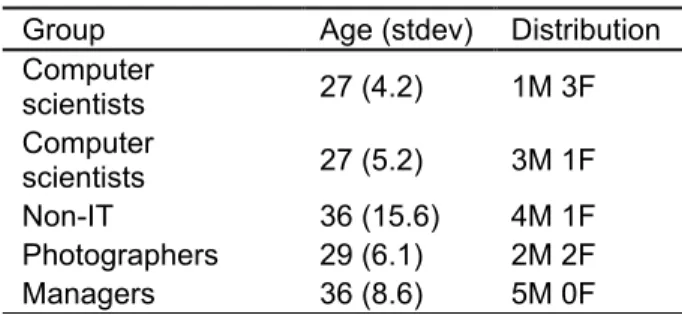
As stated we selected two groups of four computer scientists (CS) that included researchers and PhDs in computer science. Those two groups came from different institutions, one in the US and one in France; the third group of five participants had no formal information technology training (non-IT) but were regular computer users; the last groups consisted of four photographers and four managers. The latter three groups were conducted in the US. Table 1 details the participants.
Table 1: Description of participator design samples
Group Age (stdev) Distribution Computer scientists 27 (4.2) 1M 3F Computer scientists 27 (5.2) 3M 1F Non-IT 36 (15.6) 4M 1F Photographers 29 (6.1) 2M 2F Managers 36 (8.6) 5M 0F 3.2 Procedure
We first described the goal of the project and the structure of the session. Each participant filled in a questionnaire describing three situations where they waited when using a computer and ranked
both the frequency of the waiting time and their frustration level for each. Then, they each read aloud their answers and summarized the situations on a shared whiteboard. During this phase, we encouraged all participants to share both their frustrating and pleasant waiting experiences and discussed the characteristics that made them particularly enjoyable or not.
In the next phase, the facilitator picked waiting situations either from a pre-made list of five use cases or from the whiteboard and asked participants to brainstorm possible solutions to improve the wait situation. Three of the use cases described primary activities: downloading pictures from a camera, rebooting a computer, compiling software; while two use cases suggested possible temporary activities to perform: managing one’s time, and playing a social game. These use cases were developed to facilitate ideas in the design sessions and act as a context for participants. All ideas were noted on a second whiteboard and participants voted for their favourites. Finally participants worked in pairs to prototype an idea of their choice using pencils and paper. The final result was recorded using pictures and video.
3.3 Results
In this section, we report the results of our participatory design sessions and preliminary questionnaire. First we present the common waiting situations reported by our participants (3.3.1). Then, we describe the ideas designed by our participants to improve their waiting experience. We grouped the multiple ideas we collected in six categories: how to avoid the waiting situations (3.3.2), how to stay in context (3.3.3), how to stay in the flow and perform related activities (3.3.4), how to get back to frequently performed activities (3.3.5), how to improve time management (3.3.6) and finally, how to enjoy the waiting period by taking a break (3.3.7).
3.3.1 Common Waiting Situations
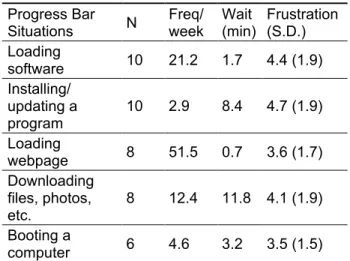
Table 2 reports on common situations reported by participants, their average occurrence per week, the average wait reported, and the associated frustration level.
Situations that received the highest frustration level from a single participant (6 or 7 on a 10 point scale)
include video rendering, data backup, installing software, downloading large files, and loading software. On the other hand, the waiting situations
with the lowest level of frustration (rating of 1 on the 1-10 frustration scale) include booking a flight,
booting the computer, loading email.
Users also reported a great diversity of situations, such as ripping and burning CDs, connecting to
Wifi, syncing a phone, streaming web content,
doing a backup, booking a flight, rendering video and logging off, although those situations were each reported only once.
Figure 1: Paper prototype for booking a flight.
3.3.2 Common Waiting Situations
Participants in different groups mentioned the importance of avoiding waiting time as much as possible.
This point was stressed by the group of managers, who emphasized their heavy schedules and their desire to organize their time effectively. The solutions proposed by this group reflected the necessity of managing their time and gaining more control over the computer’s activities. For example, they proposed to schedule the booting up of their computer a few minutes before their arrival and scheduling software updates after their departure from work. They also proposed to rank the applications to be launched at startup to get working immediately.
Other participants expressed the desire to gain more control over the computer memory, processor and bandwidth resources. Five participants designed a resource allocator where they could control the amount of bandwidth for each file download, or reassess the priority of program computations.
3.3.3 Staying in Context
For many situations, participants suggested presenting contextual information during the wait period. Specifically, several participants suggested temporary activities that were in the same context as the primary activity. However, to avoid interfering with the primary activity, these
Table 2: Most common progress bar situations.
(N=number of subjects that noted the situation)
Progress Bar Situations N Freq/ week Wait (min) Frustration (S.D.) Loading software 10 21.2 1.7 4.4 (1.9) Installing/ updating a program 10 2.9 8.4 4.7 (1.9) Loading webpage 8 51.5 0.7 3.6 (1.7) Downloading files, photos, etc. 8 12.4 11.8 4.1 (1.9) Booting a computer 6 4.6 3.2 3.5 (1.5)
Active Progress Bar: Aiding the switch to temporary activities Hurter • Cowan • Girouard • Riche
temporary ones should remain passive (not require any action).
One participant proposed the situation of booking a flight ticket, which lead to a large number of ideas. Most consisted of providing contextual information about the travel destination during the wait time, such as top tourists activities, weather, local headlines and events in the area.
Managers had suggestions focusing on keeping employees working. One participant who managed several architects and designers stated that waiting for large software suites such as Adobe Creative Suite or AutoCAD to load was a loss of time for his employees and distracted them from their work. In response to this observation, the group brainstormed solutions to inform, motivate and help employees focus on their work. Suggestions included seeing projects previously completed with this software, seeing other employees’ projects and even a “best project of the week” selected by the manager. Other general motivation ideas were mentioned such as providing the inspirational quote of the day, news article or advertisement of the company’s achievement. Some participants in the manager group also mentioned the possibility to have a message crafted by the managers themselves and use the loading time as a notice board. Who selects the temporary activity may be an important design choice for active progress bar.
3.3.4 Staying in the Flow (Performing Related Activities)
A subset goal of staying in context is to stay in the
flow, where users specifically continue their current
task in some way to maintain their train of thought, list and to maximize their productivity (Csikszentmihalyi, 2008). In contrast with our previous section describing passive activities to stay in context, staying in the flow is likely accomplished by performing active temporary activities specifically related to the primary activity. A good scenario illustrating this category came from the group of photographers. They discussed how transferring photos and uploading those to online sites was a regular task that took a significant portion of their time. They commented that this transfer/upload time was low compared to the time spent modifying pictures but that they felt idle during these downloading periods. They suggested merging those activities: while downloading pictures (as primary activity), a window could appear offering them to tag the picture and open it with their favourite software to modify them (switch to temporary activity).
Our predefined user case of compiling code also resulted in many suggestions of activities to stay in flow. Participants suggested static temporary activities such as reading documentation. Activities with active participation from the user included reviewing code statistics, compilation statistics (time it took to compile the previous time), to-do
lists generated directly from the code and showing the difference between the to-do lists from the previous and current version. Participants discussed seeing the software architecture, or the last modified files. Finally, participants suggested showing a short movie (or replay) or the last user actions (file edition, writing text, etc.). They made it clear that the temporary activity must depend on the memory required to load/compile program and the resources available.
3.3.5 Back to the most frequent activities
In two different groups, several participants mentioned the fact that in many cases, they did not care about staying in context or in the flow. Indeed, they commented that these waiting periods could serve as breaks since they already used them as such when they knew the wait would be long. For example, they explained that they would use the booting up time of their machine to get a coffee and greet their colleagues. Additionally they mentioned when downloading or during large software loading times they would browse the Internet and go to their favourite shopping site.
For such occasions, these participants suggested that a window should appear, showing them their top 5 most used applications. The participants envisioned that they could see their photos being downloaded as an indication of the progress and in the same window the program could suggest the four or five applications they often launch, such as Facebook or shopping websites. Several participants mocked up a prototype that contained a similar idea in the context of the computer start up. The prototype shows a window where users can order their four favourite applications. Thus, the computer will start launching them in this order to enable the user to perform an enjoyable task and limit their frustration while waiting.
3.3.6 Managing Time
The group of managers spent a significant amount of time discussing their time management and emphasizing their need to constantly refer to what they had to do next or check their email before their appointments with employees or customers. Many of them suggested that the waiting period could provide a reminder of what their next action item was or what appointment was coming next.
One of the participants also suggested that when waiting for the computer to log off and shut down information could be displayed on the traffic or bus timetable. They mocked up a paper prototype describing a window to be displayed at log off and shut down of the computer. This window shows the fastest way home according to the preset of the user beforehand. This participant commented that they then could select multiple ways to get back home including ride sharing or buses. This application could save them precious time by indicating which transit option would be faster.
3.3.7 Taking a Break
One of the predetermined temporary activity facilitators brought up was the inclusion of some type of entertainment application in the progress bar. Interestingly very few participants responded favourably to this suggestion. The entertainment ideas mentioned were to show feeds from Facebook, news headlines, RSS feeds or the word of the day. However those situations were mentioned in the context of an entertainment primary activity, such as surfing the web and waiting for a page to load. This highlights the potential importance of the link between primary and secondary activity. A few suggested presenting a game, such as online poker. Amusing suggestions included betting with other “waiters” on how long the wait will be, and playing chat “roulette” (chatting with a random fellow waiter). In one group, proposing such games was unsuccessful because they thought that short progress bars, or progress bars of undetermined amount of time were not suitable for games.
4. SURVEY
Based on our taxonomy, the participatory design sessions and the preliminary feedback on our prototype (see next section), we designed a survey to collect broader user preferences on temporary activities in different situations. This survey was sent via e-mails and we collected the answers of 96 participants (47 female, 49 male, 33 years of age on average, all regular computer users in US, Canada and France).
4.1 Current activities when waiting
While 20% of respondents said that they didn’t wait in front of their computers for more than 5 seconds, others (80%) confirmed that they did. 47% of the participants mentioned that they just stay idle for short waiting period (less than 5 seconds). 37% of the participants reported switching to a temporary activity. However, 65% answered that they switch to other activities for longer wait (from 15 sec and up). Surprisingly only 50% preferred to do something else when the waiting period was more than 1 minute.
4.2 Active Progress Bar design
65% of our participants indicated that they would be willing to use an active progress bar to help them switch to a temporary activity. They estimated that it was worth using the tool when the wait was over 36 seconds on average.
To switch to a temporary activity, 36 % preferred that a menu appeared allowing them to select a temporary activity among a few choices. At the end of the waiting period, 70% of the participants answered that they would switch back to their
primary activity. 36% of the participants would rather switch back to their activity on their own, by retrieving the appropriate window. However, they also answered that they wanted to be notified that the wait was over. Most of the participants preferred a visual artefact that displayed the end of the waiting period (windows, progress Bar).
4.3 Desired activities when waiting
We asked our participants which activities they would perform in situations varying in context and waiting length.
In work settings, 60% of our participants answered that they would prefer to stay in context and perform a work related activity or manage their to-do list and calendar during a wait of more than 1 minute. During a medium waiting period of 15sec, it appears that about 30% to 40% of the participants would rather perform a passive activity such as getting information about the program waiting or about the weather or traffic. Only 15% of our participants mentioned that they would perform similar passive activities for short waiting periods. In entertainment (home) settings, 67% of our participants favoured activities such as reading twitter or news feeds, in particular for longer waiting periods.
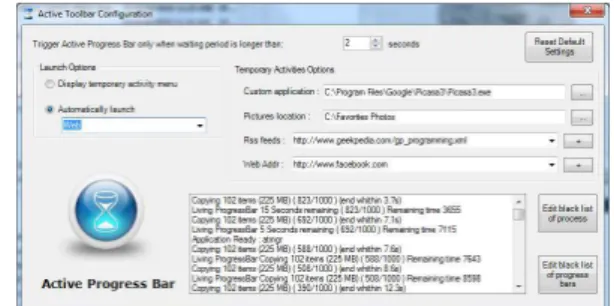
Figure 2: The Configuration window of the prototype.
5. EARLY PROTOTYPE DEVELOPMENT
We developed an Active Progress Bar prototype to investigate some of the ideas generated by participants. This software monitors the Operating System (OS) and when it detects a waiting period proposes temporary activities that the user can customize.
When a waiting period is detected the system proposes to switch to a temporary activity while waiting. Users can respond that the detection is invalid in order to adjust future detection. Different temporary activities are proposed and the user is notified when the waiting period is finished. A control panel allows users to customize Active Progress Bar. The first waiting periods can be used to customize the tool. In Figure 2, users can set their preferences about when to trigger the progress bar, what activity to trigger, and various parameters for temporary activities. At the bottom
Active Progress Bar: Aiding the switch to temporary activities Hurter • Cowan • Girouard • Riche
buttons give access to the black lists, and a debugging window shows an event log.
5.1 Detecting the wait
The detection of a waiting period is a complex problem. While the user is fully aware of a waiting period, in a multi-task and multi-threading OS the computer activity never stops. A common way to notify the user of a waiting period is to display a progress bar control that fills over time. Therefore the appearance of the progress bar may be the best trigger for Active Progress Bar. Thus, our tool monitors and evaluates the value of all available progress bars in the OS.
5.2 Progress bar monitoring
In order to retrieve all the progress bar information, we use a polling method. Other options do exist like pixel-based analysis that captures the current display and try, with an image recognizer, to detect the progress bar (Dixon and Fogarty, 2010). This process is not feasible, because when switching to a temporary activity the progress bar may not be visible anymore. Another approach is to use a hooking method that interfaces into the OS and duplicates messages sent to a progress bar. This requires a complex development process. Therefore, we preferred to use a simple method that consists of asking the OS to list all available windows. Then we ask all these windows the list of their components (with the Win32 API: EnumWindows and EnumChildWindows). If one of these components is a progress bar we retrieve its unique identifier and we record its current value. Then, with regular polling, we can (1) detect new progress bars, (2) estimate their filling speed, and (3) detect if they are full (which means that the waiting period is over).
5.3 Temporary activities
Our Active Progress Bar prototype proposes samples of secondary activity applications, combine existing applications with a normal progress bar.
i. Entertainment: games such as Sudoku, Web browser with Facebook, photo viewer.
ii. Work: FreeWriter that allows the user to manage a to-do list.
iii. Both: RSS feeds reading.
Users can also choose any other application of their choice to be launched but it would not include the integrated progress bar indicating the remaining time.
5.4 Software configuration
Users can select the value, in seconds, of the minimum estimated waiting time that should trigger the Active Progress Bar (the default value is 5
seconds). User can choose if they want the temporary activity to start automatically as soon as the wait is detected or be presented with a menu of activities. Options are available to choose a URL for the web browser or to select an RSS feed. A black list of progress bars can be updated to tailor which application should trigger Active Progress Bar or not.
5.5 Use of prototype by the authors
The early prototype was tested by two of the authors. This was to identify bugs, develop ideas for user testing and identify functionality issues. Our initial experience confirms that users will want a high level of customization of Active Progress Bar to adjust to their needs and preferences. Tuning Active Progress Bar’s configuration may in fact be a good candidate of temporary activity proposed by default. Initially all applications and processes could trigger Active Progress Bar. This triggered Active Progress Bar too often so a black list was added which improved the problem. To avoid having to “opt-out” too many times before the toolbar becomes useful, the toolbar could allow users to “opt-in” by selecting the applications they want to use Active Progress Bar with. They may select only a few at the beginning such as Photoshop or Illustrator, then add more as they become familiar with the behaviour of the toolbar and find other appropriate uses. The Active Progress Bar could provide statistical information about the applications or processes that make users wait the most, and guide their selection. Our initial prototype only includes visual notification that the wait is over and that the primary activity can resume. Users have to switch back to the primary task themselves (by clicking on the right window). Our initial use of Active Progress Bar leads us to believe that finite activities with a detectable ending (i.e. a user action such as sending a tweet or saving a tab) might be appropriate to trigger automatic returns to the primary activity. This is something we aim to investigate in further research.
The feedback from our limited testing about the choice of activities mostly matches the survey results but not entirely (e.g. we liked the photo browser while the survey didn’t show that). This confirms the need for a rich configuration panel.
6. EXPLORING THE IMPACT OF ACTIVE PROGRESS BAR ON PRIMARY TASK
After developing the prototype we wished to investigate two things. Firstly whether Active Progress Bar impacted primary task satisfaction compared to a common situation of waiting. This is important so as to identify whether our Active Progress Bar significantly impacts on their primary task satisfaction compared to a control condition. If
we find that Active Progress Bar brings more satisfaction then we can conclude that this tool has a positive impact on the user experience of these situations and warrants further exploration. Secondly we wanted to test some of the observations from the participatory design sessions in a more controlled way to gather causal insight into these observations. We wished to observe the impact of Active Progress Bar on different types of primary task contexts (more work related compared to more non work related) and how different types of activities (either active or passive) have an impact on primary task satisfaction. We did this by running a small-scale controlled experiment with 24 participants (23 Male and 1 Female), all regular computer users in France.
6.1 Tasks
We defined two tasks (between-user conditions) and three conditions in which users will have to wait (within-user conditions). In both tasks, Active Progress Bar notified the user when the waiting period was over. The order of the conditions was fully counterbalanced to reduce the impact of order and practice effects on completion satisfaction across the experiment. Each participant completed only one of the tasks, but did so for each waiting condition. After each condition, they completed a satisfaction questionnaire.
6.1.1 Task 1- Sending an email
Participants were asked to start their email software and send an email to a colleague. Since the email software takes one minute to start, the user needed to wait before they were able to send their email. The participant was provided the content for the email. Participants completed this task under three conditions:
i. No Active Progress Bar (Idle-Control). Participants waited 1 minute without doing anything before sending the email.
ii. Active Progress Bar + passive action (Passive). Participants read an RSS feed while waiting for the software to load. They then completed and sent the email.
iii. Active Progress Bar + active action (Active). The user immediately started writing the email, facilitated by Active Progress Bar, but they were not able to send it until the email software started.
6.1.2 Task 2- Copying camera images (Non-work)
Participants were asked to copy a set of images from a camera to their desktop. The copying process took one minute to complete.
i. No active Progress Bar (Idle-Control). Participants waited 1 minute without doing anything.
ii. Active Progress Bar + passive action (Passive). Participants saw a slideshow of the copying pictures while waiting for the pictures to transfer. iii. Active Progress Bar + active action (Active). Participants could rotate, delete, and rename pictures during the copying process before the task was complete.
6.2 Questionnaire
We designed a Task Satisfaction Inventory (TSI) for the experiment, using concepts from satisfaction measures such as the QUIS (Chin et al., 1988) and the MINERVA (Love et al., 1994). The measure is made up of 16 items (9 positively worded items, 7 negatively worded items), focusing on aspects of ease of task completion (“I thought completing the task was complicated”), affect (“Completing the task was fun”), efficiency (“Completing the task took too long”) and control (“when competing the task I always knew what to do next”). When completing the questionnaire participants were asked to think about the primary task they completed in the experiment. The questionnaire used a 5-point Likert scale ranging from Strongly Disagree to Strongly Agree. Negative items were reverse scored and the scores were summed to create a task satisfaction score. The scale range was from a minimum of 16 to a maximum of 80. The questionnaire items were randomly ordered into 3 order sets so as to reduce the opportunity of participants remembering their previous responses. Each order was used consecutively in each session.
6.3 Results
A reliability analysis was conducted to identify the TSI’s internal consistency. The measure was shown to hold high reliability (Idle Condition: α=0.866; Passive Condition: α= 0.893; Active Condition: α=0.910).
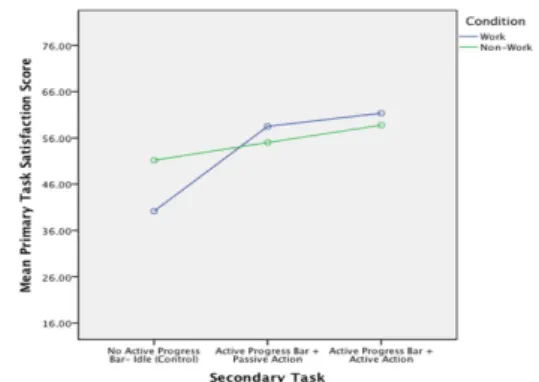
A 2x3 mixed effects ANOVA was conducted to identify the effects of Task (2 levels: work and non-work) and Progress Bar (3 levels: idle, passive and active) on task completion satisfaction. We found a significant main effect of Progress Bar on scores in the TSI [F (2,44)= 24.95, p=0.001]. Post Hoc tests suggest that the idle condition (M=45.67, S.D. = 9.63) was rated significantly lower on the scale than either the passive (M= 56.76; S.D.=9.82) (p<0.001) or active (M=60.04; S.D.=9.21) (p<0.001). We found no significant difference between the passive and active conditions (p=0.056). We also found a significant interaction between active Progress Bar and Task variables on user task satisfaction (F (2,44)= 7.25, p=0.002) (Figure 3).
Simple contrasts highlight that the difference between the Work and Non Work tasks in the Passive condition was not significantly different to
Active Progress Bar: Aiding the switch to temporary activities Hurter • Cowan • Girouard • Riche
the difference in the Work and Non Work tasks in the Active Condition [F (2,44)= 0.08, p=0.78]. However the differences in primary task satisfaction between the Non Work and Work tasks in the Idle (Control) condition and the Active Progress Bar condition were significantly different [F (2,44)= 7.94, p=0.01]. This suggests that the interaction effect is based on a significant difference in the control condition where users in the Work condition rated their primary task satisfaction as lower than those in the Non-Work condition. In experiences with the Active Progress Bar this significant difference was not apparent. From the graph in Figure 5 we can see that the satisfaction ratings in the Non Work condition seem to stay relatively consistent in comparison to the Work task where there seems to be a heightening of satisfaction from the control condition to the Active Progress Bar conditions. This would suggest that Active Progress Bar conditions had a positive impact on satisfaction in the Work condition when comparing it to the control condition.
Figure 3: Graphical representation of the interaction
between task and Active Progress Bar condition.
6.4 Discussion
These results show that our prototype, with active and passive actions, have a positive impact on primary task satisfaction level and that they have more impact on satisfaction levels from control conditions in work based tasks compared to non-work based tasks.
Interestingly our findings did not show a difference between active or passive tasks. This is likely to be because users prefer to be active during the wait, even if completing a passive or active task rather than doing nothing whilst waiting. Active Progress Bar aims to facilitate active interaction during task waiting and our findings show Active Progress Bar does achieve this.
We feel that the future research agenda related to such an application is varied and wide. For example there is a need for testing the interface of Active Progress Bar, the impact it has on primary task variables (as conducted here) and the satisfaction users have with the secondary task. These involve different dependent variables in analysis and need different approaches to study.
We investigated the effect of Active Progress Bar on primary task satisfaction as we wished to identify its impact on the overall task people were needing to achieve as our initial piece of investigatory work into the tools impact. We felt it was important to establish this before further development and research of the application. However further work should not only focus deeper on its effects on primary task but on the other aspects of the Active Progress Bar user experience to develop a more holistic view of this application. At the end of the authors initial stage of testing (described in Section 5.5) there were some hypotheses that through further testing we currently aim to explore. From our experiences with the system it seemed that temporary activities were not worth triggering for short waits, that passive activities seem more appropriate for medium waits (e.g. watching a slide show of photos is immediately rewarding), and that only long waits call for active temporary activities requiring user input (e.g. maintaining a to-do list). Similar interactions between waiting time and secondary activity were also highlighted in the surveys (see Section 6.3). A future avenue for testing Active Progress Bar lies in experimentally testing these hypotheses by varying the type of secondary task and the time of the wait to identify how that impacts on user experience.
It is important to highlight that although the tasks were written so as to make the dichotomy of the tasks into Work and Non-Work clear (indeed this was the reason they were conducted as between-participants conditions) the task in both settings are not necessarily exclusive to those contexts. For instance categorising and naming photographs may not be seen as a solely non-work based activity if the person taking part is a photographer, who would do this in a work scenario, although in our sample it would be safe to presume that such an activity is a recreational rather than work activity. Further research could experiment with the framing of these tasks to identify whether primary task satisfaction is impacted by context or whether the effect seen here is due to the type of task completed in the conditions.
Before concluding we would like to highlight the limitations of the sample homogeneity in terms of gender and profession and the size of the sample. A larger and wider array of participants with a more even gender balance is needed to make the conclusions more generalizable yet the findings here point to the promising positive influence of Active Progress Bar on primary task satisfaction. As this work was a small-scale pilot experiment we are currently aiming to expand and refine the original experiment design to include more defined and consistent tasks and to test this with a more heterogeneous sample.
7. CONCLUSION
In this paper, we introduced Active Progress Bar, a new approach facilitating the switching to temporary activities when a primary activity requires users to wait. We provided a taxonomy of waiting times and explored the design space of an Active Progress Bar tool using four approaches (participatory design, survey, informal discussions, and prototype). We report numerous situations where users wait, and propose relevant secondary activities. We demonstrated the feasibility of detecting the waiting with an Active Progress Bar prototype, and finally, we assessed that our tool impacts primary satisfaction levels with a controlled experiment. Results of our controlled experiment showed that the Active Progress Bar system impacts primary task satisfaction levels compared to control conditions in a work scenario. The next phase is to allow the user to customize the Active Progress Bar tool to define relevant secondary tasks during these waiting periods and identify the effects his may have on satisfaction. We believe that with adequate user control, Active Progress Bar has the potential to help users make better use of their time while waiting.
8. ACKNOWLEDGEMENT
We would like to thank Catherine Plaisant for her insightful comments and her help to design our prototype.
9. REFERENCES
Bederson, B.B. (2004) Interfaces for staying in the flow. Ubiquity 2004, pp.1–1.
Chin, J.P., Diehl, V.A., Norman, K.L. (1988) Development of an instrument measuring user satisfaction of the human-computer interface, Proceedings of CHI ’88, pp. 213–218. ACM, New York, NY.
Csikszentmihalyi, M. (2008) Flow: The Psychology of Optimal Experience, 2007th ed. Harper Perennial.
Czerwinski, M., Horvitz, E., Wilhite, S. (2004) A diary study of task switching and interruptions, in: Proceedings CHI ’04, pp. 175–182. ACM, New York, NY.
Dabbish, L., Mark, G., González, V.M. (2011) Why do I keep interrupting myself?: environment, habit and self-interruption, Proceedings of CHI ’11, pp. 3127–3130. ACM, New York, NY.
Dixon, M., Fogarty, J. (2010) Prefab: implementing advanced behaviors using pixel-based reverse engineering of interface structure, Proceedings of CHI ’10, pp. 1525–1534. ACM, New York, NY. Dragunov, A.N., Dietterich, T.G., Johnsrude, K., McLaughlin, M., Li, L., Herlocker, J.L. (2005) TaskTracer: a desktop environment to support
multi-tasking knowledge workers, Proceedings of IUI ’05, pp. 75–82. ACM, New York, NY.
Gillie, T., Broadbent, D. (1989) What makes interruptions disruptive? A study of length, similarity, and complexity. Psychological Research 50, pp.243–250.
Gronier, G., Gomri, S. (2008) Etude des métaphores temporelles sur la perception du temps d’attente, Proceedings of IHM ’08, pp. 205–208. ACM, New York, NY.
Harrison, C., Amento, B., Kuznetsov, S., Bell, R. (2007) Rethinking the progress bar, Proceedings of UIST ’07, pp. 115–118. ACM, New York, NY. Harrison, C., Dey, A.K., Hudson, S.E. (2010) Evaluation of progressive image loading schemes, Proceedings CHI ’10, pp 1549–1552. ACM, New York, NY.
Harrison, C., Yeo, Z., Hudson, S.E. (2010) Faster progress bars: manipulating perceived duration with visual augmentations, Proceedings of CHI ’10, pp. 1545–1548. ACM, New York, NY.
Iqbal, S.T., Bailey, B.P. (2010) Oasis: A framework for linking notification delivery to the perceptual structure of goal-directed tasks. ACM Transactions on Computer Human Interaction. 17, pp. 15:1– 15:28.
Matthews, T., Czerwinski, M., Robertson, G., Tan, D. (2006) Clipping lists and change borders: improving multitasking efficiency with peripheral information design, Proceedings of CHI ’06, pp 989–998. ACM, New York, NY.
Meyer, J., Shinar, D., Bitan, Y., Leiser, D. (1996) Duration estimates and users’ preferences in human-computer interaction. Ergonomics 39, pp 46–60.
Monsell, S. (2003) Task switching. Trends in Cognitive Sciences 7, pp. 134–140.
Myers, B.A. (1985) The importance of percent-done progress indicators for computer-human interfaces. SIGCHI Bulletin 16, pp. 11–17.
Sannino, A., Daniels, H., Gutierrez, K.D. (2009) Past Experiences and Recent Challenges in Participatory Design Research, in: Learning and Expanding with Activity Theory. pp. 274–285. Cambridge University Press, Cambridge.
Shneiderman, B., Bederson, B.B. (2005) Maintaining concentration to achieve task completion, Proceedings of DUX ’05, Article 9. AIGA, New York, NY.
Smith, G., Baudisch, P., Robertson, G., Czerwinski, M., Meyers, B., Robbins, D., Horvitz, E., Andrews, D. (2003) GroupBar: The TaskBar Evolved, in: Proceedings of OZCHI 2003. pp. 34–43.
Love, S., Dutton, R., Foster, J., Jack, M. & Stentiford, F. (1994) Identifying salient usability attributes for automated telephone services. Proceedings of ICSLP' 94, pp. 1307-1310.
Zhang, P., Galletta, D.F (2006) Human-Computer Interaction and Management Information Systems: Foundations. M.E. Sharpe.