HAL Id: hal-01090431
https://hal.archives-ouvertes.fr/hal-01090431
Submitted on 3 Dec 2014
HAL is a multi-disciplinary open access
archive for the deposit and dissemination of
sci-entific research documents, whether they are
pub-lished or not. The documents may come from
teaching and research institutions in France or
abroad, or from public or private research centers.
L’archive ouverte pluridisciplinaire HAL, est
destinée au dépôt et à la diffusion de documents
scientifiques de niveau recherche, publiés ou non,
émanant des établissements d’enseignement et de
recherche français ou étrangers, des laboratoires
publics ou privés.
devices: effects of screen sizes and interaction techniques
on accuracy
Lilian Genaro Motti, Nadine Vigouroux, Philippe Gorce
To cite this version:
Lilian Genaro Motti, Nadine Vigouroux, Philippe Gorce. Drag-and-drop for older adults using
touch-screen devices: effects of touch-screen sizes and interaction techniques on accuracy. IHM’14, 26e conférence
francophone sur l’Interaction Homme-Machine, Oct 2014, Lille, France. pp.139-146. �hal-01090431�
Drag-and-drop for older adults using touchscreen
devices: effects of screen sizes and interaction
techniques on accuracy
Lilian Genaro Motti
IRIT UMR 5505, Université
de Toulouse 3 Paul Sabatier
118 Route de Narbonne
31062, Toulouse, France
genaro[at]irit.fr
Nadine Vigouroux
IRIT UMR 5505, Université
de Toulouse 3 Paul Sabatier
118 Route de Narbonne
31062, Toulouse, France
vigourou[at]irit.fr
Philippe Gorce
HandiBio EA 43 22, Université
du Sud Toulon Var
Avenue de l’université
83957, Toulon, France
gorce[at]univ-tln.fr
ABSTRACTThis study investigates the accuracy of drag-and-drop interaction for older adults by analyzing the number of supplementary attempts for positioning a target during the execution of tactile puzzle games on two different screen sizes, tablet and smartphone, with finger and pen interaction. 24 older subjects (aged 65 to 86) participated of the experiment. The results showed that there is a significant effect of the interaction techniques during interaction on smartphone. Subjects were more accurate during pen interaction on both screen sizes. Age effects were significant but subjects aged 80 years old or oldest sometimes performed better than subjects aged 70 to 79 years old, especially during pen interaction. This study shows that drag-and-drop is an efficient technique for moving targets even on small touchscreen devices and pen interaction may help older users to execute more accurate drag-and-drop interaction on touchscreen devices.
Keywords
Touchscreen, older adults/elderly, interaction techniques, drag-and-drop, pen interaction, serious game.
ACM Classification Keywords
H 5.2 User interfaces: Input devices and strategies (e.g. mouse, touchscreen)
INTRODUCTION
Touchscreen interaction has been recommended for older adults for several reasons: devices are less intimidating [18], direct interaction on the display requires less cognitive, spatial or attentional demand [21] so older users performances are better than compared with others input devices [2] Touchscree also reduces the age-related differences of interaction when compared to traditional input devices [3,4,16].
There is still some reluctance of older adults on adopting new technologies and usability is one of the reasons [23].
Improving interaction by supporting users and preventing errors is an important matter for older adults because errors usually cause supplementary gestures, increasing the motor and cognitive load for accomplishing a task.
Serious games can facilitate the discovering of new technologies and interaction techniques by older adults [14]. The system Puzzle Touch has been designed to help older users to discover touchscreen technologies and learn tactile interaction. To the present study, this system has been adapted to evaluate drag-and-drop gestures of interaction by tracking every touch on the screen. This study investigates the effects of the screen size and interaction techniques for moving targets during the execution of tactile puzzle games. 24 volunteers aged 65 to 86 years old executed a series of puzzle games on two different devices, a smartphone and a tablet, with pen or finger interaction. The main task consisted of moving 12 pieces randomly placed on the bottom part of the screen and positioning them at their correct emplacement on a grid displayed on the top of the screen in order to recompose the original image.
The present study aims to further expand the understanding of the tactile interaction of older users. For this analysis, we will study the number of supplementary attempts for positioning a target (a piece of the puzzle game) according to the interaction technique and the two accuracy levels required on each screen size. The design of the system allows two levels of difficulty for positioning the targets.
The next section present some related work about the evaluation of older users interaction on touchscreen and drag-and-drop interaction. Then, the Puzzle Touch system is described on section 3, followed by the experiment procedures on section 4. Results are presented on section 5. Section 6 presents a discussion and future work. Finally, conclusion is presented on section 7.
RELATED WORK
Previous studies about touchscreen interaction by older adults evaluate different interaction gestures. Single and multi-touch gestures, including tapping, drag-and-drop, © ACM, 2014. This is the author's version of the work. It is posted here by
permission of ACM for your personal use. Not for redistribution. The definitive version was published in Actes de la 26ième conférence francophone sur l'Interac-tion Homme-Machine, 2014.
Figure 1 Older adult playing a tactile puzzle on a tablet
pinching and steering are commonly used for target selection, typing tasks and manipulating objects on touchscreen.
Kobayashi et al (2011) [10] observed that tapping was easy to learn for novice older users and a week of use increased pinching and dragging performances. They reported user’s preferences for dragging and pinching rather than tapping. Dragging performances also increased after a week practice. Findlater et al (2013) [4] compared different gestures on touchscreen and a mouse. They found that dragging was the slowest on the touchscreen. Stößel et al (2009) [17] evaluated the execution of patterns of gestures on touchscreen devices. They reported that older users preferred more accurate gestures even if it takes longer times. The distance of the trajectories is related to the screen sizes, requiring more amplitude of movements. This effect has been reported as causing deviation during the movements [17] but the accomplishment of dragging tasks is reported to be faster on bigger screen sizes [10].
Drag-and-drop interaction on touchscreen has been proposed to motor impaired users [5] and older users with tremor [12,20] because the continuous contact with the screen have an effect on finger oscillation, helping users to increase the accuracy. It has also been used with cognitive impaired people and mouse interaction [19]. As well as swabbing, drag-and-drop has been used for target acquisition, digit and text entry tasks with pen [5] and fingers [12,20].
During dragging tasks, slower movements can be related to the fact that the hand occludes a part of the screen [11] or the perception of the necessary friction to move the target. Pen interaction could be used to solve this problem but only few studies evaluated pen interaction for older users. Moffat & McGrenere (2007) [13] investigated the causes of target selection difficulties during pen interaction and observed that slipping is a common error for older adults, while drifting or missing just below occur to all age groups. This kind of errors also affects typing tasks, provoking omission, substitution or insertion of characters [22]. Nicolau & Jorge (2012) [15] have observed that typing errors are correlated to hand tremor and suggested bigger targets to help older users.
Few studies report the supplementary manipulation an user has to do to recover from an error [1] or other supplementary gestures. Harada et al (2013) [7] have observed that novice users make shorter gestures for panning or scrolling tasks.
The number of supplementary gestures could be a relevant criterion for evaluating interaction. Missing a target can enchain supplementary manipulations to accomplish an action, which can be troublesome for older users because supplementary gestures can trigger other errors. Sometimes, the user needs to start again from the beginning [1]. For the present study, the
supplementary gestures for correcting the positioning of a target will be used as an evaluation criterion for accuracy.
THE PUZZLE TOUCH SYSTEM
The Puzzle Touch System is a game destined to help older users discovering of touchscreen technologies and learning tactile interaction gestures. This is the third phase of a user-centered design method for improving this system towards a serious game. This version of the system applies the results of previous studies and the parameters of the game have been chosen to allow the evaluation of drag-and-drop interaction on two screen sizes with two interaction techniques and two accuracy levels.
Images from old colored postcards provided by the city hall archives have been used to generate puzzle games. These images present different views and times of the city subjects live in, helping to arouse their interest and create social interaction [14]. During the demonstration meetings, users can play in groups and share their experience about technologies. When playing games on touchscreen devices, users engage to two personal challenges: learning an interaction gesture and solving the puzzle (Figure 1).
At the beginning of the game, 12 rectangular pieces are placed at the bottom of the screen and should be moved by pen or finger interaction to their corresponding emplacement on a 3x4 grid, presented on the mid-top of the screen (Figure 2). Images have been homogenized on amount of colors and contrast levels. A watermark placed as a background for the grid provides support for the user, reducing the cognitive workload by providing visual cues.
When the interaction technique (pen or a finger) touches a piece, it comes on the top of the others. The piece follows the movement of the pen or the fingertip (drag). When the pen or the finger leaves the screen, the piece stops moving (drop) and the system test the piece’s emplacement. If the piece is placed on its correct emplacement, a visual feedback is shown (a “flash”) and the piece can no longer be moved. If the user touches a placed piece, the “flash” effect appears as a confirmation
of its validation. When the 12 pieces are correctly placed on the grid, a congratulation message is displayed and the experimenter selects another game.
The puzzle games were built on HTML5, CSS3, Javascript and Php and available on two touchscreen devices through Mozilla Firefox mobile web browser. Targets sizes (a puzzle piece) are 19x19mm on the smartphone (85 pixels width) and 35x35mm (195 pixels width) on the tablet. In order to compensate the lack of spacing between the targets, they are contoured by a 1mm dark border.
The system starts counting the number of attempts once a piece is already placed on its right emplacement. We have considered the right emplacement when the piece covers 50% of its emplacement on the grid (Figure 3). The number of attempts represents the supplementary gestures for correcting the positioning of the target. The positioning is verified when the user leaves the finger or pen according to the required accuracy levels. Normally, 12 precise gestures are needed to complete the game. The SNA represents the Supplementary Number of Attempts for reaching the target (correctly positioning a puzzle piece on the grid) according to the required accuracy levels. The system was designed with two accuracy levels to validate the correct emplacement of a piece: 80% of covering for lower accuracy level and 95% for higher accuracy level. There are two levels on the smartphone and two levels on the tablet. These covering requirements have been proportionally adapted (ratio= 2.29) to the targets sizes on each screen size.
Blank tests with old adults and demonstrations meetings validated the different levels of accuracy, our design choices and the playability of the game.
The system allows multi-touch interaction; two or more pieces can be moved at the same time. Accidental touches outside the game zone have not been blocked (buttons, menus and tactile shortcuts). The game can be restarted if necessary.
METHODOLOGY
The following analysis study the SNA according to the different conditions for executing the puzzle game: two accuracy levels, finger and pen interaction on two different screen sizes, a tablet and a smartphone. We will look for the effects of interaction technique, accuracy requirements and age on the different screen sizes.
Apparatus
The chosen devices have different screen sizes: a 5.5 inches screen smartphone Galaxy Note II (WXGA 1280x720 Super AMOLED) and a 10.1 inches screen tablet Galaxy Note 10.1 (WXGA 1280x800 LCD). Both allow interaction with pen and finger.
Recruitment
The Puzzle Touch system was presented on associations, senior clubs and libraries where older adults were used to frequent or take computer lessons at Toulouse. Being aged of 65 years old or more was the only criteria of inclusion. After a demonstration meeting, volunteers had an appointment for an individual session. Participants signed a written consent form.
Procedure
The activity took place in a quiet place (separated room or library) with artificial light at the sealing. All users were seat and placed the devices horizontally on the table. They were told to install themselves comfortably and to execute the movements with accuracy.
Every subject passed a learning phase (at least 4 practice games with both devices and interaction techniques at the lower accuracy level).
Figure 2 A screenshot of the system Puzzle Touch on a smartphone
Figure 3 Example of positioning: A) the piece is covering 60% of its emplacement and should be correctly
positioned, B) the piece is covering 100% of its emplacement and the positioning is validated
Then they passed sight tests. The goal of this pre-experiment measurement is to provide information about visual acuity or impairment of participants to better understand user’s difficulties during interaction. Three applications for eyesight tests, provided by healthcare4mobile1, installed and displayed at the 5.5 inches screen of the smartphone, were chosen to measure color perception, central vision acuity and contrast sensitivity. The screen was hold vertically about 30 cm from their faces. Subjects who wore glasses were told to keep them. The first test was designed to identify color deficiency. It presents 6 colored images and subjects should identify the number inside the pattern. The second test was designed to reveal visual impairment on a person’s central visual field (which could reveal age-related macular degeneration). Subjects should cover one eye and describe two images displayed on the screen, presenting a small dot in the center of a grid. They repeated the procedure covering the other eye. The third was designed to test contrast sensitivity. Eight images presenting numbers were displayed on the screen and subjects should read them, covering one eye then the other. The size and the contrast of the numbers reduced from one image to the following. At the end, participants respond to the third test with eyes uncovered.
Then subjects were questioned about any motor control problem, injury or difficulty of accuracy that could affect hands, fingers, arms or upper-limb movements. They were not questioned about their cognitive capabilities. After, subjects were questioned about their previous experience with technologies: how often they use computers, cell phones, tablets and smartphones, and if they have any of these devices.
Finally, they played 8 games at total, 4 games on each device (smartphone and tablet): with 2 interaction techniques (pen and finger) and 2 accuracy levels (80% and 95%). Therefore 8 images were selected generating one puzzle game for each condition. Devices, interaction techniques and accuracy levels have been counter balanced.
Measures
In order to analyze the accuracy of the gestures of interaction, we will focus on SNA criterion.
For the analysis of the interaction, we will use three independent variables:
x Accuracy level: 80% covering (lower accuracy) or 95% covering (higher accuracy).
x Interaction technique: pen or fingers. x Age range.
1
https://play.google.com/store/apps/ developer?id=healthcare4mobile
For the analysis of the user’s characteristics, we collected information about:
x Age
x Visual impairment x Motor impairment
x Previous experience and frequency of use of technologies: computer, cell phone, tablet and smartphone.
Additionally, the experimenter filled up an observation grid and took notes about the interaction.
When the user touches the game zone outside the pieces, there isn’t any action of the system but it registers the coordinates of the touch in order to allow further investigation about accidental touches. The targets positions, the movement’s paths and the drops of the pieces have been stored for future analyses of strategy and errors. Only the tracks of full games have been registered and used for this analysis. All data have been anonymized and kept confidential on a secure server.
Participants
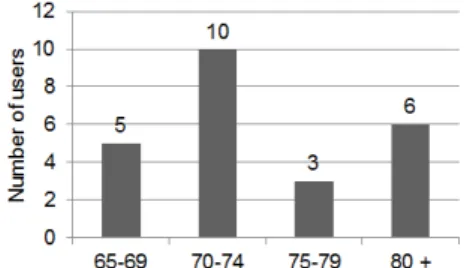
24 older adults aged of 65 years or more (65-86, mean 74.25, SD 5.8), 8 men (mean 73.12, SD 5.66) and 16 women (mean 74.81, SD 5.96), participated of the experiment. The number of subjects on each age range is represented on Figure 4.
All of them had visual impairments. 3 of them didn’t wear glasses. 2 had no or little sight on one eye due to injuries but sufficient correction for the healthy eye. Sight control before the experiment shows that none of them had problems to distinguish colors or a grid displayed on the screen placed near them. On the other hand, contrast sensitivity test shows that 2 persons had insufficient sight correction.
They were all right handed, 3 women were ambidextrous but used the right hand to interact. 3 women had dexterity problems and 1 had lost sensitivity due to injuries on one or more fingers of the dominant hand. 3 women had arthrosis on the hands. 2 subjects had tremor (1 woman, 1 man).
All the volunteers were interested on technologies, their impact on our daily lives, their usability and usefulness, as well as security and privacy issues. Most of them took computer lessons and felt concerned by its development.
16 participants used computers regularly and 8 used it rarely or never. 15 participants used mobile phones regularly; the others 9 used it rarely or never. 5 of them had a tactile mobile phone; the others had never used a smartphone before.
5 participants had a tablet, 3 of them used it every day or almost every day. 2 of them used it occasionally because they had difficulties using it. 18 subjects had never used a tablet before.
RESULTS
Observation results
All the subjects used the right hand to interact. Index and major were the common used fingers for finger interaction. Thumb, index and major were the three fingers used to hold the pen during pen interaction. No subject tried multi-touch interaction; they moved one piece at a time.
Statistical analysis of SNA
For a statistical analysis data normality was checked with Shapiro-Wilk tests. Results returned negative for the NSA data series on smartphone W= 0.8307, p-value= 4.149e-09) and on tablet (W= 0.6963, p-value= 8.586e-13). By consequence, data were analyzed with the non-parametric analysis of variance Friedman test.
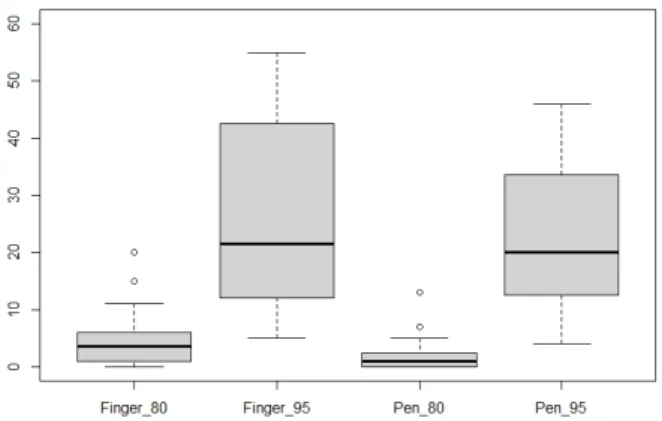
The following diagrams describe SNA for all subjects on each condition on smartphone (Figure 5) and on tablet (Figure 6).
Interaction on smartphone
Friedman test showed statistically significant differences on SNA between the different conditions of the experiment on smartphone (chi-squared= 57.0639, df= 23, p-value= 0.0001003).
A post-hoc analysis with Wilcoxon Signed Rank Tests was conducted with a Bonferroni correction applied, resulting in a significance level set at p<0.0125.
Results of Wilcoxon Signed Rank Tests showed a significant difference for interaction techniques (Z= 0.5384686, p-value= 0.006565) and significant difference for accuracy levels (Z= -6.030849, p-value= 2.457e-09).
Table 1 shows mean SNA for all subjects for pen and finger interaction on smartphone during each accuracy level.
SNA (Smartphone) Pen Finger
Low accuracy level (80%)
2.04 (SD=3.03)
4.50 (SD= 4.98)
High accuracy level (95%)
22.04 (SD= 12.41)
26.13 (SD= 16.40)
Table 1 Mean SNA on smartphone for each accuracy level
Figure 5 SNA during interaction on smartphone with finger or pen on low (80%) or high (95%) accuracy levels
Figure 6 SNA during interaction on tablet with finger or pen on low (80%) or high (95%) accuracy levels
The mean SNA for all the 24 subjects showed that pen interaction was more accurate than finger interaction for both accuracy levels on smartphone.
Interaction on tablet
Friedman test showed statistically significant differences in SNA between the different conditions of the experiment on smartphone (chi-squared= 56.9907, df= 23, p-value= 0.0001028).
A post-hoc analysis with Wilcoxon Signed Rank Tests was conducted with a Bonferroni correction applied, resulting in a significance level set at p<0.0125.
Results of Wilcoxon Signed Rank Tests showed no significant difference for interaction techniques (Z= 0.394877, p-value= 0.02874) and significant difference for accuracy levels (Z= -5.625715, p-value= 2.852e-08). Table 2 shows mean SNA for all subjects for pen and finger interaction on tablet during each accuracy level. Even if there was no significant difference for interaction techniques during tablet interaction, the mean SNA for all subjects on tablet showed that pen interaction was more accurate than finger interaction on both accuracy levels.
SNA (Tablet) Pen Finger
Low accuracy level (80%)
3.50 (SD= 3.40)
6.00 (SD=4.98)
High accuracy level (95%)
12.58 (SD= 13.30)
18.04 (SD=16.95)
Table 2 Mean SNA on tablet for each accuracy level
The statistical analysis showed a big variability of SNA for the higher accuracy level for both interaction techniques. This variability is more important on smartphone.
For better understanding this variability among the participants, we looked for potential age effects.
Age effects
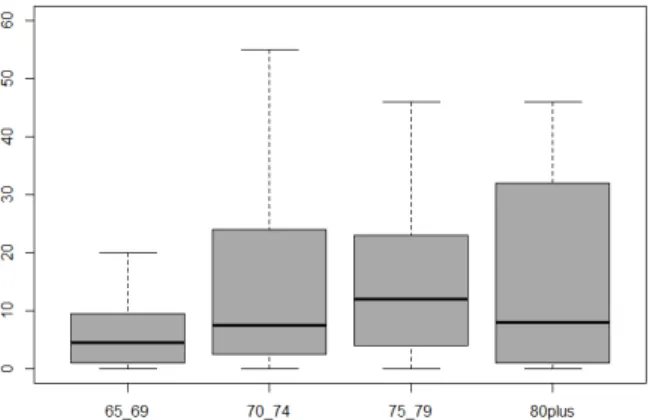
The collected data was divided according to the different age ranges. Results of Friedman tests show significant effect of age (chi-squared= 16.35, df= 3, p-value= 0.0009612).
Figure 7 and Figure 8 describe SNA during interaction on smartphone and tablet, respectively, according to the age range.
Figure 7 SNA during interaction on smartphone according to the age range
Figure 8 SNA during interaction on tablet according to the age range
Figure 9 SNA during finger interaction according to the age range
Figure 10 SNA during pen interaction according to the age range
Because of the aging effects on sensorial and cognitive skills [2] it would be expected that younger subjects interact more accurately, executing less SNA.
However, when analyzing each condition separately, subjects aged 80 years old or older sometimes performed better than younger subjects.
For better understanding these results, potential interaction techniques effects have been searched. Results of the Wilcoxon Signed Rank test for subjects aged 80 years old or older showed significant effects for interaction techniques ( Z= 1.528571, p-value= 0.01295). However, there were no significant effects for the interaction techniques for the other age ranges.
Figure 9 shows SNA during finger interaction and Figure 10 shows SNA during pen interaction according to the age groups. Subjects aged 80 years old or more were more accurate during pen interaction on both accuracy levels: mean SNA for 80 years old or older 11.08 (SD= 13.87), for subjects aged 75 to 79 14.17 (SD= 19.69), for subjects aged 70 to 74 11.23 (SD= 13.44) and for subjects aged 65 to 69 3.95 (SD= 5.21).
DISCUSSION
Tactile puzzle games for discovering touchscreen devices and learn tactile interaction
The Puzzle Touch system allowed novices and experienced older users to learn and accomplish tactile interaction during the execution of puzzle games on touchscreen devices.
During the demonstration meetings, this game helped older adults to discover touchscreen devices and drag-and-drop interaction with pen and fingers.
It is important to highlight that most of the participants of this study were interested on information and communication technologies (ICTs), 16 of them using a computer very often and 15 of them using cell phones. There is still some reluctance of older populations on adopting and using technologies. Games and social activities can help to change their negative subjective evaluation of technologies.
Besides, in addition to perceived usefulness, usability is an important issue for improving ICT’s acceptance, as pointed out by Hanson (2012) [6] and Zhou and al (2012) [23]. Including older users as participants during the design phases of an interactive system or device is important to improve usability of touchscreen devices preventing digital exclusion.
SNA as evaluation criterion
The statistical analysis of SNA on the present study allowed the assessment of the accuracy of the interaction gestures of older adult using touchscreen.
The number of supplementary gestures is an important issue of usability for older users and the results of this study show that this criterion can be used for qualifying interaction.
We propose that the SNA should be associated to other criteria for studies of human-computer interaction, complementary to time, accuracy rates and subjective assessment.
Screen size and interaction technique effects
The results of the statistical analysis of SNA showed a significant effect of the interaction techniques during interaction on smartphone. Subjects had less SNA during pen interaction, so they were more accurate.
Hourcade & Berkel (2006) [8] evaluated pen or finger interaction for target selection tasks with tapping gestures on a small screen device (about 3.5). Their results showed finger interaction were more accurate than pen interaction on time and accuracy. But older users were capable to perform 87.6 % accuracy rates during pen interaction tapping 16mm targets. Our results show that pen interaction may help older users to execute more accurate drag-and-drop gestures on touchscreen devices. Even if there was no significant difference for interaction techniques during tablet interaction, subjects also had less SNA during pen interaction on larger screen size and on both requirements for accuracy. Several authors suggest bigger targets to increase accuracy rates and they highlight the importance of preventing errors [8,9,10,13,15]. Our results also show less SNA on bigger screen size, where targets were bigger. Lowering the accuracy requirement could facilitate interaction with small targets. Adapting the systems requirements for accuracy according to the
screen sizes could also be helpful for target selection or even text entry tasks.
Age effects and user’s profile
Age effects were significant, but the analysis of SNA showed that the oldest group of users sometimes performed better than others groups. Leonard et al (2005) [21] evaluated drag-and-drop during pen interaction for older users with visual impairment. Subjects were able to interact with accuracy but the severity of the visual impairment was a predictor for interaction efficiency. A more significant number of participants would help us to understand the effects of user’s profile, including sensorial, cognitive or motor impairments.
We have found significant effects of the interaction techniques according to the age groups especially for the oldest group (80 or older) that were more accurate during pen interaction. Further studies should be done to identify the effects of user’s background as previous experience with computers, technologies and touchscreen devices on interaction performances.
Future work
Future work should compare SNA to other evaluation criteria as time and accuracy rates. Comparing performances of older and younger populations should provide information to better understanding the variability on SNA and help to characterize the older population.
More numbers of attempts could also indicate different strategies of interaction. The analysis of the trajectories could provide cues for developing new interaction gestures.
Further studies should evaluate the effects of drag-and-drop on common errors related to older users’ tactile interactions such as slipping errors in order to improve interaction.
CONCLUSION
This study has analyzed the accuracy of drag-and-drop during the execution of tactile puzzle games on touchscreen devices with finger and pen interaction on two different screen sizes, smartphone and tablet. The used criterion for evaluation was the number of attempts for positioning a puzzle piece (SNA).
Drag-and-drop was an efficient technique for moving targets even on small touchscreen devices. The results showed that there is a significant effect of the interaction technique during interaction on smartphone. Subjects were more accurate during pen interaction on both screen sizes and on both accuracy requirements.
Age effects were significant but subjects aged 80 years old or oldest sometimes performed better than subjects aged 70 to 79 years old, especially during pen interaction. Pen interaction may help older users to execute more accurate drag-and-drop interaction gestures on touchscreen devices.
Improving the usability of touchscreen devices would help older users to adopt and benefit of mobile devices, preventing digital exclusion.
ACKNOWLEDGMENTS
Phd Scholarship Ciências sem fronteiras, CNPQ, Brazil (#237079/2012-7).
We kindly thank all the participants and the organizations that helped us during the recruitment: Ateliers informatiques des Médiathèques Cabanis et Empalot and Association Générations Solidaires at Toulouse, France.
REFERENCES
1. Bradley, M., Langdon, P., and Clarkson, P.J. Older User Errors in Handheld Touchscreen Devices : To What Extent Is Prediction Possible ? C. Stephanidis (Ed.): Universal Access in HCI, Part II,
HCII 2011, LNCS 6766, (2011), 131–139.
2. Caprani, N., O’Connor, N., and Gurrin, C. Touch screens for the older user. In Assistive Technologies, Fernando A. Auat Cheein
(Ed.), ISBN: 978-953-51-0348-6, InTech, DOI: 10.5772/38302.
2012.
3. Chung, M.K., Kim, D., Na, S., and Lee, D. Usability evaluation of numeric entry tasks on keypad type and age. International Journal
of Industrial Ergonomics 40, 1 (2010), 97–105.
4. Findlater, L., Froehlich, J.E., Fattal, K., Wobbrock, J.O., and Dastyar, T. Age-related differences in performance with touchscreens compared to traditional mouse input. ACM CHI’13, (2013), 343–346.
5. Froehlich, J., Wobbrock, J., and Kane, S. Barrier pointing: using physical edges to assist target acquisition on mobile device touch screens. ACM ASSETS’07, (2007), 19–26.
6. Hanson, V. Age and web access: the next generation. 18th
International World Wide Web Conference W4A2009, (2009), 7–
15.
7. Harada, S., Sato, D., Takagi, H., and Asakawa, C. Characteristics of Elderly User Behavior on Mobile Multi-touch Devices. P. Kotzé
et al. (Eds.): INTERACT 2013, Part IV, LNCS 8120, (2013), 323–
341.
8. Hourcade, J.P. and Berkel, T. Tap or touch?: pen-based selection accuracy for the young and old. ACM CHI’06, (2006), 881–886. 9. Ji, Y.G., Hwangbo, H., Yi, J.S., Rau, P.L.P., Fang, X., and Ling, C.
The Influence of Cultural Differences on the Use of Social Network Services and the Formation of Social Capital.
International Journal of Human-Computer Interaction 26, 11-12
(2010), 1100–1121.
10. Kobayashi, M., Hiyama, A., and Miura, T. Elderly user evaluation of mobile touchscreen interactions. P. Campos et al. (Eds.):
INTERACT 2011, Part I, LNCS 6946, (2011), 83–99.
11. Lepicard, G. and Vigouroux, N. Comparison between single-touch and multi-touch interaction for older people. K. Miesenberger et al.
(Eds.): ICCHP 2012, Part I, LNCS 7382, (2012), 658–665.
12. Mertens, A. and Jochems, N. Design pattern TRABING: touchscreen-based input technique for people affected by intention tremor. ACM SIGCHI EICS (2010), (2010), 267–272.
13. Moffatt, K. and McGrenere, J. Slipping and drifting: using older users to uncover pen-based target acquisition difficulties.
Proceedings of the 9th international ACM SIGACCESS conference on Computers and accessibility - ASSETS’07, (2007), 11–18.
14. Motti, L.G., Vigouroux, N., and Gorce, P. Design of a social game for older adults using touchscreen devices and observations from an exploratory study. C. Stephanidis and M. Antona (Eds.):
UAHCI/HCII 2014, Part III, LNCS 8515, (2014), 69–78.
15. Nicolau, H. and Jorge, J. Elderly text-entry performance on touchscreens. Proceedings of the 14th international ACM
SIGACCESS conference on Computers and accessibility - ASSETS ’12, (2012), 127.
16. Schneider, N., Wilkes, Ja., Grandt, M., and Schlick, C.
Investigation of Input Devices for the Age-differentiated Design of Human-Computer Interaction. Human facttors and Ergonomics
Society 52nd annual meeting, (2008), 144–148.
17. Stößel, C., Wandke, H., and Blessing, L. Gestural interfaces for elderly users: help or hindrance? S. Kopp and I. Wachsmuth (Eds.):
GW 2009, LNAI 5934, (2010), 269–280.
18. Umemuro, H. Lowering elderly Japanese users? resistance towards computers by using touchscreen technology. Universal Access in
the Information Society 3, 3-4 (2004), 276–288.
19. Vella, F., Vigouroux, N., and Rumeau, P. Investigating drag and drop techniques for older people with cognitive impairment.
Human-Computer Interaction. Users and …, (2011), 530–538.
20. Wacharamanotham, C. Evaluating swabbing: a touchscreen input method for elderly users with tremor. ACM CHI’11, (2011), 623– 626.
21. Wood, E., Willoughby, T., Rushing, A., Bechtel, L., and Gilbert, J. Use of computer input devices by older adults. Journal of Applied
Gerontology 24, 5 (2005), 419–438.
22. Wright, P., Bartram, C., Rogers, N., and Emslie, H. Text entry on handheld computers by older users. Ergonomics 43:6, May 2013 (2000), 37–41.
23. Zhou, J., Rau, P.-L.P., and Salvendy, G. Use and Design of Handheld Computers for Older Adults: A Review and Appraisal.
International Journal of Human-Computer Interaction 28, 12