Publisher’s version / Version de l'éditeur:
Vous avez des questions? Nous pouvons vous aider. Pour communiquer directement avec un auteur, consultez la première page de la revue dans laquelle son article a été publié afin de trouver ses coordonnées. Si vous n’arrivez pas à les repérer, communiquez avec nous à [email protected]. Questions? Contact the NRC Publications Archive team at
[email protected]. If you wish to email the authors directly, please see the first page of the publication for their contact information.
https://publications-cnrc.canada.ca/fra/droits
L’accès à ce site Web et l’utilisation de son contenu sont assujettis aux conditions présentées dans le site LISEZ CES CONDITIONS ATTENTIVEMENT AVANT D’UTILISER CE SITE WEB.
Proceedings of the 6th Construction Specialty Conference, Canadian Society for
Civil Engineering, 2005
READ THESE TERMS AND CONDITIONS CAREFULLY BEFORE USING THIS WEBSITE. https://nrc-publications.canada.ca/eng/copyright
NRC Publications Archive Record / Notice des Archives des publications du CNRC :
https://nrc-publications.canada.ca/eng/view/object/?id=29d087ae-4132-480c-bd47-66ded2b5bd1e https://publications-cnrc.canada.ca/fra/voir/objet/?id=29d087ae-4132-480c-bd47-66ded2b5bd1e
NRC Publications Archive
Archives des publications du CNRC
This publication could be one of several versions: author’s original, accepted manuscript or the publisher’s version. / La version de cette publication peut être l’une des suivantes : la version prépublication de l’auteur, la version acceptée du manuscrit ou la version de l’éditeur.
Access and use of this website and the material on it are subject to the Terms and Conditions set forth at
Mobile Multimodal Solutions for Project Closeout
National Research Council Canada Institute for Information Technology Conseil national de recherches Canada Institut de technologie de l'information
Mobile Multimodal Solutions for Project Closeout *
Rankin, J., Christie, G., and Kondratova, I.
June 2005
* published in the Proceedings of the 6th Construction Specialty Conference, Canadian Society for Civil Engineering. Toronto, Ontario, Canada. June 2-5, 2005 . NRC 48240.
Copyright 2005 by
National Research Council of Canada
Permission is granted to quote short excerpts and to reproduce figures and tables from this report, provided that the source of such material is fully acknowledged.
MOBILE MULTIMODAL SOLUTIONS FOR PROJECT CLOSEOUT
J. H. Rankin1, G. Christie1, and I. Kondratova2
1. Department of Civil Engineering, University of New Brunswick, Fredericton, New Brunswick 2. NRC Institute for Information Technology – eBusiness, Fredericton, New Brunswick
ABSTRACT: Mobile computing devices have the capabilities and characteristics for wide use in real time communication of project information to project repositories or between project participants. As the industry moves away from the desktop and laptop web paradigms towards the mobile web paradigm, the availability of real time complete information exchange with the project information repository presents new opportunities for decision-making in the AEC industry. The development of leading-edge multimodal (e.g., concurrent text, voice and video capabilities) mobile applications is described, as a technology that holds promise for the construction industry. The details of a recent prototype in support of project closeout are presented. The current focus remains on usability issues and the addition of technologies that account for all formats of information required to support the construction process.
1. INTRODUCTION
Construction sites are established for limited periods often in places where wired telecommunication infrastructure is unavailable or limited; wireless communications are attractive to support communications between the head office and a construction site. Many challenges in today’s construction processes arise from poor access to the right information at the right time for decision-making and a general communication breakdown between the project participants. The potential for large time and cost saving through improved processes exists (Rankin and Waugh 2001). Research and development efforts in computer-integrated construction that are focused on solving these issues have already established the foundation and standards for an integrated project repository that allows all construction project participants to exchange information in an open industry standard environment (Russell and Froese 1997). However, the problem of timely and informed decision-making is still unsolved, as the project information loop is hampered by access to and from a construction site.
We have learned through the development of mobile devices for field data collection in which communication with the project data repository was conducted asynchronously by downloading field data from mobile devices onto desktop computers and then into the project information repository (Rankin et al. 2001). With the recent developments in mobile computing and wireless communications it is important to establish a framework for augmenting project information management systems with mobile wireless devices. Mobile workers on a construction site will be able to use these solutions to communicate with the project information repository in real-time thus enabling timely and informed decision making on the project.
6th Construction Specialty Conference 6e Conférence spécialisée sur le génie de la construction
Toronto, Ontario, Canada June 2-4, 2005 / 2-4 juin 2005
Recent research projects dealing with the use of mobile devices for synchronous project information communication have focused primarily on basic handheld mobile computing devices without the view of complete information representations (Liu et al. 2001). A complete representation of project information requires a combination of formats that combine textual, numeric, graphical, and audio information through technologies such as GPS, speech recognition, video capture, augmented reality, radio frequency identification and environmental sensors. The other aspect that remains relatively unexplored is improvements in the usability of handheld computing devices in the field. A small screen size and the need to use a pen to enter data and commands present a great inconvenience for field users. Speech recognition, along with voice technology providing wireless telephone access to web-based information systems is an example of technology with high potential in overcoming user interface limitations for mobile handheld device users.
The objectives of this paper are to describe the context for the technologies discussed, to summarize the overall technology infrastructure for mobile solutions, and to present the details of the technology implemented for a recent implementation (project close-out) for which the process details are described. 1.1. Advanced ICT for the AEC Industry
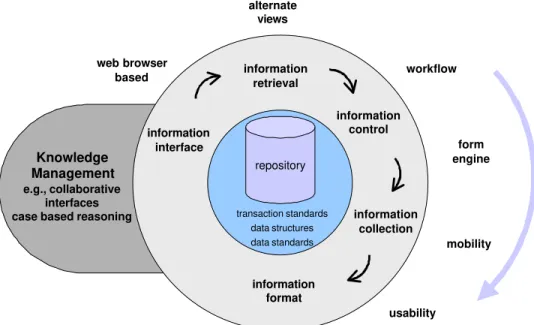
The concept of a centralized repository of information in support of Architectural Engineering and Construction (AEC) project processes is well established (O’Brien 1997). Although there remains technological challenges surrounding data exchange, information sharing, interoperability, and integration remain, there are viable solutions currently available and progress continues on improvements. Figure 1 represents the evolution of Information and Communication Technologies (ICT) tools in support of the construction process from the perspective of the knowledge hierarchy (data, information, knowledge) beginning at the center of the circle moving outward and tracking information management functionality in a clockwise direction. The foundation for the concept has been the development of industry specific data and transaction standards for application independent representation and exchange between applications such as IFCs and aecXML (IAINA 2005).
1.1.1 Information Interface, Retrieval and Control
Building on the central repository concept, the potential that data standards present, and the rapid acceptance of internet tools, a flurry of tools were developed in the late 1990s based on the client server model with a web browser interface to manage project information. Our involvement in these types of tools began with the development and implementation of solutions for the small to medium sized projects such as the Collaborative Project Environment (Rankin 1999) and later for specific information requirements for larger projects such as the Quality Management Tool (Rankin 2001). This category of applications is now fully developed and offered as commercial products (e.g., AutoDesk’s Buzzsaw, Citadon’s ProjectNet, Emerging Solution’s Constructware).
The initial functionality offered by most systems was limited to the management of electronic files through a basic information interface in the form of a file hierarchy and controlled file access. In recognition of the volume of information managed during a project, application functionality then focused on the ability to offered efficiency and flexibility in the way users manage information through alternative interfaces and effective searching and reporting capabilities (information retrieval). For example, every user has their own preferences in the way they view information, requiring flexibility in information hierarchical displays or alternative interfaces such as 3-dimensional representations.
A general attribute of project information is whether it is static or dynamic with respect to the project time line and the participant using the information. For example, static information can be thought of as reference information and include the latest version of drawings and specifications. However, dynamic information is created as the project progresses and capturing the details of its creation is relevant. The workflow functionality of an application supports dynamic information processes by partially automating the management of information, while tracking flow of information to and from project participants. Although there are some processes that are standard within the industry, such as change management, the details will be particular to a given project, if in the participants alone. Therefore, the ability to customize the flow of dynamic information is necessary, as is a need to provide the ability to develop accompanying structured input for information through form engines (information control).
Knowledge Management e.g., collaborative
interfaces case based reasoning
repository data standards data structures transaction standards information interface information retrieval information format information collection information control workflow usability form engine web browser based mobility alternate views
Figure 1: Development of central repository functionality.
1.1.2 Information Collection and Format
Ours is a mobile industry, where access to and collection of project information from remote locations is the norm. We need the ability to communicate through many modes (formats) of information (e.g., graphical, textual, audio) and by extension we need the ability to capture: graphical, textual, audio as well as spatial, and environmental through various means and methods depending on the process (e.g., measuring material properties and ambient conditions). This mobility functionality completes a basic field operations information loop for applications that rely on the central repository concept. We are currently focused on the control-collection-format aspects that explore two basic challenges: mobile technologies and usability.
1.2. Mobility Applications
Through current developments in information and communication technology, we are rapidly moving away from the Desktop and Laptop Web paradigms towards the Mobile Web paradigm, where mobile smart devices such as smart phones, handheld and wearable computers will become powerful enough to replace laptop computers in the field. The availability of real time complete information exchange is critical for effective and timely decision making in the construction field, as information frequently has to be transmitted to and received from the corporate database, or project repository, to the site. In some cases, when security and safety of the infrastructure are at stake, the importance of real-time communication of field data becomes paramount (Bacheldor, 2002).
One limitation to the use of mobile handheld devices in the field is the interface. Most of the handheld computers have a small screen size of about 9 mm x 13 mm and mobile phones have even smaller screens. The small screen size and the need to use a pen to enter data and commands present an inconvenience for field users, especially if their hands are busy using other field equipment or instruments. In order to assist users in managing mobile devices, user interface designers are starting to combine the traditional keyboard or pen input with “hands free” speech input (Wilson, 2004). As a result, speech processing is expected to be one of the key technologies to simplifying and expanding the use of handheld devices by mobile workers.
Voice input combined with the traditional keyboard-based or pen-based input model permits multimodal interaction in which the user has more that one means of accessing data in his or her device. This new
type of interface is called a multimodal interface. Multimodal interfaces allow speeder and more efficient communication with mobile devices and also accommodate different input modalities based on user preference or context usage.
Mobile computing is a relatively new technology and is not widely accepted yet by the AEC Industry. The widespread adoption of this technology will require, along with some changes in the industry, a significant amount of work on usability and applicability of mobile technology to the different usage scenarios in the industry. Menzel et al. (2004) are currently conducting research work on context-based mobile computing in construction in which they are “mapping” actors and roles and processes on the construction site into the functional requirements for mobile technology. Similar to this research work, a significant amount of research on “situation-aware” mobile computing for industrial mobile applications was completed by Bürgy and Garrett (2002).
1.3. Current Technology
To paraphrase Alexander Graham Bell (circa 1878): the great advantage the telephone possesses over every other form of electrical apparatus consists in the fact that it requires no skill to operate the instrument. Considering the fact that in spite of the recent progress in the introduction of information technology to industrial fieldwork the telephone is still the most widely used information communication tool in the construction industry (Egbu and Boterill, 2000; Flood et al, 2002), voice technology holds a great potential for construction field work.
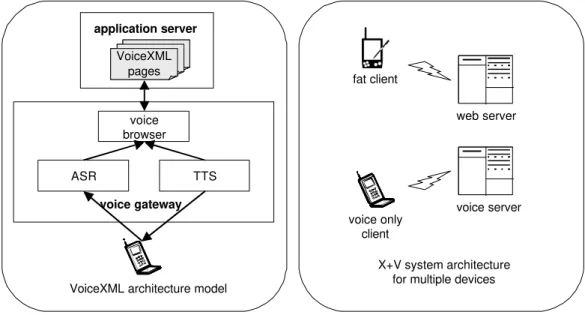
Modern voice technology offers the convenience of telephone usage and real-time access to the wealth of information stored in the Web-based construction project information repository or a corporate database. The technology combines the advantages and interoperability afforded by XML technology with Automatic Speech Recognition (ASR) and Text-to-Speech (TTS) processing. It is based on VoiceXML (Voice Extensible Markup Language). Currently, VoiceXML is the prominent W3C standards effort for voice-based services (W3C Voice Browser Activity, 2004). VoiceXML technology follows the same model as the HTML and Web browser technologies. Similar to HTML, VoiceXML does not contain any platform specific knowledge for processing the content; it does not have a platform specific processing capability. This capability is provided through the voice gateway (sometimes called speech server) that incorporates Automatic Speech Recognition (ASR) and Text-to-Speech (TTS) engines. The voice gateway architecture model uses the familiar client-server paradigm as represented in Figure 2.
VoiceXML technology provides an easy, standardized format for building speech-based applications and allows Internet service providers to open Web services using voice user interfaces (VUIs). Developers can use VoiceXML to create audio dialogues that feature synthesized speech, digitized audio, recognition of spoken and touchtone key input (DMTF), recording of spoken input, telephony, and mixed-initiative conversations. The words or phrases that a VoiceXML application must recognize are included in a grammar. The advantages afforded by field use of the VoiceXML technology to retrieve corporate and project information could be substantial. However, VoiceXML technology is limited to only one form of input and output, human voice. To overcome this limitation, multimodal technologies are considered. There are different models for implementing multimodal interaction on mobile devices. The fat client model employs embedded speech recognition on the mobile device and allows speech processing to be conducted locally. The thin client model involves speech processing on a speech server and is suitable for mobile phones. Currently, there are two markup languages proposed for creating applications that use voice input (speech recognition) and output (speech synthesis), and support multimodal interaction. Speech Application Language Tags (SALT) is a lightweight set of extensions to existing markup languages, in particular HTML and XHTML. Therefore, it enables multimodal and speech access to information applications and Web services from PCs, telephones, Tablet PCs and handheld devices. SALT applications can be implemented using the thin client model with speech processing done on the speech server, similar to the voice gateway. The second markup language that is currently proposed for developing multimodal Web applications combines XHTML with a subset of VoiceXML (W3C Multimodal Activity, 2004). Together, XHTML and VoiceXML (X+V) enable developers to add voice input and output to traditional, graphically based Web pages. This allows the development of multimodal applications for mobile devices based on the fat client model that includes a multimodal browser and embedded speech
recognition on a mobile device, and a Web application server as it is presented in Figure 2. While both X+V and SALT technologies use W3C standards for grammar and speech synthesis, only X+V is based entirely on standardized languages. X+V's modular architecture makes it very simple to separate an X+V application into different components. As a result, X+V applications can be developed in parts, with experts in voice programming developing voice elements and experts in visual programming developing visual ones. X+V's modularity also makes it adaptable to stand-alone voice application development.
voice only client fat client web server voice server X+V system architecture for multiple devices voice browser TTS ASR voice gateway VoiceXML pages VoiceXML pages application server
VoiceXML architecture model
Figure 2: Technology architectures.
2. PROGRESSION OF APPLICATIONS
A prototype multimodal application has been developed that facilitates the extension of a web-based collaborative information system through its application of leading-edge technology (e.g., VoiceXML) in support of field inspections. As depicted in Figure 3, this prototype completes the field operations information loop for an existing tool that offers a central repository of project information, workflow management, and user customization of data entry (shaded elements in the figure). Current development of this technology is focused on usability testing and examining additional technology to expand the format of information (e.g., video, spatial) available. This indicated by the elements within dotted circle in Figure 3 and is being conducted by examining the processes of project close-out and job hazard assessments.
web-based collaborative project information system
multimodal mobility alternate information interfaces
data and transaction standards workflow automation
generic solution improved usability web-based collaborative
project information system
multimodal mobility alternate information interfaces
data and transaction standards workflow automation
generic solution improved usability
Figure 3: Functionality of prototypes.
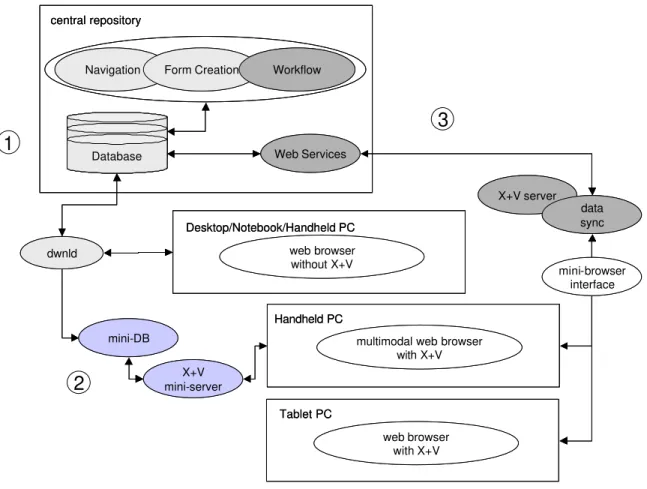
Figure 4 shows the progression of a series of multimodal mobility applications towards the completion of the current prototype. The first series of applications was developed for quality management information and provided a pack and go download for mobile platforms. The second series of applications concentrated on field inspections (primarily concrete quality control) and focused on the development of the X+V functionality for the mobile platform alone. The representation of the third series of applications indicates completion of the link with a central repository of project information through web services
developed with XML for project closeout. A precursor to the second series of applications were several related but stand alone VoiceXML developments completed in parallel for field inventory and time tracking.
central repository Desktop/Notebook/Handheld PC Handheld PC Tablet PC X+V server data sync web browser without X+V
multimodal web browser with X+V web browser with X+V X+V mini-server mini-DB dwnld Web Services Database
Navigation Form Creation Workflow
mini-browser interface central repository Desktop/Notebook/Handheld PC Handheld PC Tablet PC X+V server data sync web browser without X+V
multimodal web browser with X+V web browser with X+V X+V mini-server mini-DB dwnld Web Services Database Database
Navigation Form Creation Workflow
mini-browser interface
1
2
3
Figure 4: Progression of successive prototypes.
The technology of the current project closeout implementation employs a commercial application for the central repository (focalTRACK provided by AEC Innovations Inc.). The central repository application provides the full functionality for basic navigation form creation and workflow definition through common desktop platform web browsers, it is based on a .NET architecture using MS SQL Server as its enterprise database. Communication with the database is achieved through .NET web services, over which XML formatted data is exchanged. The conversion from the XML data to a webpage interface, including adding VoiceXML, is performed with the use of Java code and executed by Jakarta’s Apache Server (or any JSP Server). The X+V capable web browser used throughout development is NetFront multimodal browser. What remains to be complete and is dependent on further research surrounding usability issues is the automation (whether partial or full) of a conversion for different display types and for use on a handheld platform.
3. CURRENT APPLICATION
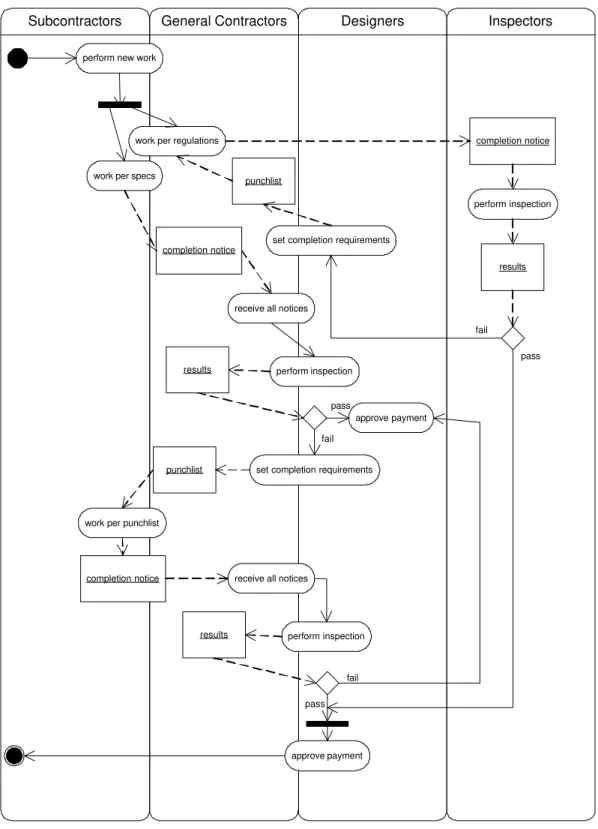
The application of project closeout was chosen for several reasons. It is an application that requires timely transfer of information to a broad representation of project participants and it is also a process that is critical “to run smoothly” as it has a high probability for introducing conflict in any project. It is also a process that has an obvious application of field information capture. The scope of the process is represented in the UML activity diagram presented in Figure 5. In this diagram, the basic steps are represented by actions work per specs
, objects punchlist
, decisions , and flows. Our approach is to begin with a rather generic process for project closeout (Liebing 2001) for the purpose of prototype development and later refined the prototype for implementation to a variety of workflow examples.
Inspectors Designers
General Contractors Subcontractors
perform new work
work per specs
work per regulations
completion notice
perform inspection
work per punchlist
completion notice
perform inspection
receive all notices
punchlist set completion requirements
completion notice receive all notices
perform inspection
approve payment
approve payment punchlist
set completion requirements
results results results pass fail pass fail fail pass
Figure 5: Activity diagram for project closeout.
Figure 5 presents two general loops of information flow representing firstly, work completed and inspected against project specification and industry regulations, and secondly a loop to account for the cycle of inspection and work that normally occur in the process of substantial and final completion. Both loops flow to the payment under the conditions of the contract. The objects that flow through the process include completion notices, inspection results and punch lists for remaining work.
3.1. Work process participants
An elaboration on the activity diagram results in the identification of participants in the work process, or users of a given application as a solution to information management. These participants and roles are identified as follows:
Designer: Each member of the Design Team for the project has designer access to project information. This means that they can look at all parts of the project they are given access to, which will probably be a significant portion of the design of the whole project. They are able to edit the portion that they are working on. They can also notify others if they think something they have seen needs work, or notify the General Contractor when the design work is complete.
General Contractor: Members of the General Contractor team can view a large portion of the project information. Presumably, as a whole they can access all of the design specifications. They in turn will assign Subcontractors to work on parts of the specifications and possibly work on some themselves. Of course, the General Contractors can notify whomever necessary in order to suggest changes to the design, notify Subcontractors when the work environment is ready or when they need to correct something in their work, and notify inspectors of when they can begin their inspections.
Subcontractors: Subcontractors will have a much more limited access to the project information, normally only to their own part of the project and some limited information about other relevant parts. They can only update the information about their project by noting how they attempted to complete it. They can notify the General Contractor and other Subcontractors when they need related work or upon completion. Inspectors: The main inspection team may be a large group consisting of the designers, general contractors, and owner. Some of this group (at least one) should be given access to edit the information that declares that certain work has been completed satisfactorily and what work needs to be corrected or finished. This group must see what was requested of the contractor in documentation and proceed from there to make sure that a proper solution is reached for any noticed shortcomings of the project. Often there will be a subset that is required to be completed for “substantial completion,” which may be done separately or simultaneously to the complete “punch list” inspection. This list will be viewed by a team of inspectors as they inspect the site, and the results of the inspections will need to be recorded. For all of these cases, some will access the design, some will write the results of the inspections, and most will need the ability to notify relevant people.
Supervisor: A Supervisor is someone who has only reading access to the system. They have some interest in viewing some of the information in the project and are given access to view it. This could be an auditor or the owner, for example.
3.2. Close-out Use Cases
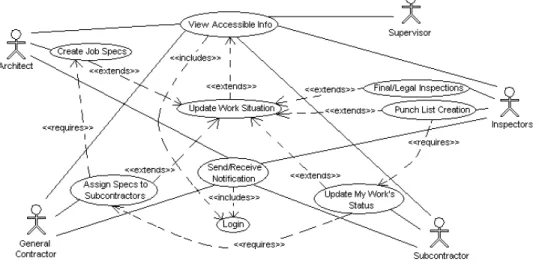
The use cases depicted in Figure 6 indicate the functionality provided by the developed prototype application. Actors D e s i g n e r are identified and communicate with through use cases
Create Job Spec
which are connected by extension or requirements to other use cases. The following summarizes the identified use cases. Create Job Specs: This is the place in the system where all the specs for the system are entered. It is an extension of “Update Work Situation” and it has no prerequisites. It is performed only by Architects. Assign Specs to Subcontractors: This is the place in the system where the design specifications are assigned to the subcontractors. It is an extension of “Update Work Situation” and requires “Create Job Specs” be completed relevantly before it can begin. This is done only by the General Contractor.
Update My Work’s Status: This is the place in the system where record is kept of what work has been done to a particular part of the project. It is an extension of “Update Work Situation” and requires relevant “Assign Specs to Subcontractors” be completed before it can begin. This work is only done by Subcontractors.
Punch List Creation: This is the place in the system where the results of an inspection by designers and other relevant project participants are recorded. The data recorded here is for purposes of informing Subcontractors if their work was found to be sufficient, lacking, and so on. “Punch List Creation” is an extension of “Update Work Situation” and requires “Update My Work’s Status” to declare the work ready for inspection before it can begin. This editing is only done by Inspectors.
Figure 6: Use case diagram for project closeout.
Final/Legal Inspections: This is the place where notes on legal and final inspections (after all necessary work has been completed) are kept for future reference for anyone concerned. “Final/Legal Inspections” is an extension of “Update Work Situation.” This entry is only done by Inspectors.
Update Work Situation: All work information that may be of interest in the future should be recorded. There are many different aspects, and possibly modes of entry for this information for a particular project. These aspects can be seen by the extensions of this Use Case. “Update Work Situation” extends “View Accessible Information,” as it requires access to information, but enables editing only part of that information, which is determined by the login and permissions information.
View Accessible Information: Anyone using the system will obviously want to see some information about the project, even if it is only enough to know they are adding data to the right place. Viewing accessible data is available based on logins and their permissions. “View Accessible Information” is only accessible after a “Login” is performed.
Send/Receive Notification: Sending and receiving notification about the project is available to everyone involved in the project. It is possible to limit the information about who one can notify, both for simplification of the interface and for ensuring things are done correctly by using the hierarchy of the project. To securely give the correct notifications, sending information, and contact list, “Send/Receive Notification” is only accessible after a “Login” is performed.
Login: A simple login with a password can usually provide a secure access for everything in a system. This login will result in giving the utilizing programs information as to what information to give the users and what information the database will return and what information the database will allow to be edited for that login information.
4. CONCLUSIONS
Using VoiceXML technology it is possible to develop solutions that deliver Web services using voice user interfaces (VUIs). From a technology perspective there are limitations with current solutions. For example, there is currently only a single software vendor offering multimodal capabilities for handheld devices. In addition to this, as with most new software development applications there are compatibility
issues for various system configurations. The VoiceXML technology also limits the capabilities of applications, as it does not support speech recognition for unconstrained voice input (the equivalent of freeform textual input).
We are encouraged by the development accomplishments to date and with these successive prototype developments, have reached a critical point in functionality (closed the information loop). Our current activities are focusing on the aspects of human computer interaction (usability testing for practical use in the field) and on finding the technological solutions for multimodal mobile solutions. In our prototype development efforts we have worked through numerous workflow adaptations for a variety of implementations and our experience has been that each industry process represents a unique set of challenges. We now have a flexible voice and multimodal technology platform with which to provide many flexible solutions and practical tools that are required by the AEC industry.
5. ACKNOWLEDGEMENTS
This research requires significant input from industry and computer science expertise. The authors acknowledge the support of many people involved from the Construction Technology Centre Atlantic and its industry representatives, AEC Innovations, and the National Research Council IIT eBusiness. The closeout development project received support through the funding provided by the NSERC Undergraduate Research Assistant Program and the New Brunswick Innovation Foundation Research Assistantship Initiative.
6. REFERENCES
Bacheldor, B. 2002. Handheld system assesses damage to see how buildings survived. Information Week, March 18.
Bürgy, C., J. H. Garrett, Jr. 2002. Situation-aware Interface Design: An Interaction Constraints Model for Finding the Right Interaction for Mobile and Wearable Computer Systems. Proceedings of ISARC2002, Washington, DC, 563-568.
Egbu C.O. and Boterill K. 2000. Information technologies for knowledge management: their usage and effectiveness, Electronic Journal of Information Technology in Construction 7: 125-136.
IAINA. 2004. Industry Foundation Classes (IFCs) model and aecXML schema, International Alliance for Interoperability North America. http://www.iai-na.org/, last visited January.
Liebling, R.W. 2001. The Construction Industry: Process, Players, and Practices. Prentice Hall, Upper Saddle River, NJ.
Liu, D. W., Law, K. H., Liston, K., and Wiederhold, G., 2001. Mobile computing and active mediation technology in a ubiquitous computing environment. CIFE Seed Proposal, Stanford University.
Menzel, K., Eisenblatter, K. and Keller, M. 2004. Issues of context sensitivity in mobile computing: restrictions and challenges in the construction sector. Proceedings of the European Conference on Products and Processes Modelling (ECPPM 2004). Taylor and Francis Group, London, 505-513. O'Brien, M. 1997. Integration at the Limit: Construction Systems. International Journal of Construction
Information Technology. 5(1): 89-98.
Rankin, J., Christian, J., Lundrigan, B., and Mrawira, D. 2001. A Quality Management Tool for a Public-Private Partnership Highway, Proceedings of the CSCE 4th Construction Specialty Conference, Victoria, BC.
Rankin, J. and Waugh, L. 2001. Collaborative Solutions and Handheld Extensions: AEC Industry Issues and Implications, Proceedings of the CSCE 4th Construction Specialty Conference, Victoria, BC. Russell, A. and Froese, T. 1997. Challenges and a vision for computer-integrated management systems
for medium-sized contractors. Canadian Journal of Civil Engineering. 24:180-190.
Wilson, L. 2004. Look Ma Bell, No Hands! – VoiceXML, X+V, and the Mobile Device. XML Journal, Sys-Con Media, August 3.
W3C. 2001. XHTML + Voice Profile 1.0, WC3 Note 21, World Wide Web Consortium. http://www.w3.org/ TR/xhtml+voice/, last visited January.
W3C. 2004. Voice Browser Activity. World Wide Web Consortium. http://www.w3org/Voice, last visited January.