HAL Id: hal-02388852
https://hal.archives-ouvertes.fr/hal-02388852
Submitted on 4 Dec 2019
HAL is a multi-disciplinary open access
archive for the deposit and dissemination of
sci-entific research documents, whether they are
pub-lished or not. The documents may come from
teaching and research institutions in France or
abroad, or from public or private research centers.
L’archive ouverte pluridisciplinaire HAL, est
destinée au dépôt et à la diffusion de documents
scientifiques de niveau recherche, publiés ou non,
émanant des établissements d’enseignement et de
recherche français ou étrangers, des laboratoires
publics ou privés.
Accessibility study for augmented keyboard for input
interaction techniques
Elio Keddisseh, Nicolas Issa Sayegh, Marcos Serrano, Emmanuel Dubois
To cite this version:
Elio Keddisseh, Nicolas Issa Sayegh, Marcos Serrano, Emmanuel Dubois. Accessibility study for
augmented keyboard for input interaction techniques. 31e conférence francophone sur l’Interaction
Homme-Machine (IHM 2019), Dec 2019, Grenoble, France. pp.6:1-8, �10.1145/3366551.3370345�.
�hal-02388852�
keyboard for input interaction
techniques
Etude d’accessibilité d’un clavier augmenté pour des techniques d’interaction en entré
Elio Keddisseh Univ. of Toulouse - IRIT OKTAL Sydac
Toulouse, France [email protected]
Nicolas Issa Sayegh OKTAL Sydac Toulouse, France
Marcos Serrano Univ. of Toulouse - IRIT Toulouse, France [email protected]
Emmanuel Dubois Univ. of Toulouse - IRIT Toulouse, France
ABSTRACT
We present SmartCom, a combination of a smartphone and the traditional physical keyboard to enhance command selection by 1) eliminating occlusion, 2) reducing command discoverability time and 3) reducing homing cost. We performed a reachability study to evaluate the feasibility of gestures combining key press and phone touch. The results are promising and none of our participants found SmartCom usage difficult. In the future, we plan to design and evaluate novel interaction techniques for SmartCom.
Permission to make digital or hard copies of part or all of this work for personal or classroom use is granted without fee provided that copies are not made or distributed for profit or commercial advantage and that copies bear this notice and the full citation on the first page. Copyrights for third-party components of this work must be honored. For all other uses, contact the owner/author(s).
IHM ’19 Adjunct, December 10–13, 2019, Grenoble, France © 2019 Copyright held by the owner/author(s). ACM ISBN 978-1-4503-7027-1/19/12. https://doi.org/10.1145/3366551.3370345
Accessibility study for reachable areas beneath the keyboard IHM ’19 Adjunct, December 10–13, 2019, Grenoble, France
CCS CONCEPTS
• Human-centered computing → Interaction techniques. KEYWORDS
Interaction technique; Command selection; MDE. RÉSUMÉ
Nous présentons SmartCom, une combinaison d’un smartphone et du clavier physique traditionnel pour améliorer la sélection des commandes en 1) éliminant l’occlusion, 2) réduisant le temps de découverte des commandes et 3) réduisant le coût de l’homing. Nous avons réalisé une étude d’accessibilité pour évaluer la faisabilité de gestes combinant l’appui sur les touches du clavier et le toucher sur le smartphone. Les résultats sont prometteurs et aucun de nos participants n’a trouvé l’utilisation de SmartCom diffi-cile. Prochainement, nous prévoyons de concevoir et évaluer de nouvelles techniques d’interaction pour SmartCom.
MOTS CLÉS
Techniques d’interaction ; Selection de commande ; MDE.
Figure 1: SmartCom setup.
Figure 2: Apple’s touchbar on MacBook Pro [3].
INTRODUCTION
Many of today’s most used desktop applications (Office applications, Adobe Photoshop, Illustrator and many more) still use drop down linear menus, contextual menus and some kind of toolbars (standard toolbar or ribbon control). Despite having keyboard shortcuts, acquiring any command from the listed menu controls, many desktop users still use the mouse and perform traditional pointing gesture. Moreover, 1) such menu interfaces often result with occlusion problems (displayed menu hides a part of the primary UI). For instance, when opening a contextual menu in Microsoft word, the opened menu covers part of the content being written. 2) In applications that have many commands (e.g. Office apps and Adobe design apps), users would have to spend time searching for commands that they don’t frequently use. 3) The traditional pointing interaction (using the mouse) with these menus often increases homing cost (i.e. when users are typing in Word, they have to remove the right hand from the keyboard to grab the mouse). It also requires users to move the pointer from the object of interest (e.g. text, picture, icon) to the menu area (e.g. Ribbon control in MS Word) and then come back to continue their initial task.
To avoid these issues existing in current desktop applications, software companies often implement keyboard shortcuts allowing direct access to most of the commands. However, it requires users to memorize the shortcuts key combination for each command [15], [16]. Over the past decades, the IHM'19 Adjunct, December 10–13, 2019, Grenoble, France SmartCom: Combining a smartphone and a keyboard for enhanced command selection on desktop…
HCI community proposed many solutions to enhance command selection. Research work varied from new menu interfaces [8],[17],[6],[21],[11], new interaction techniques [13],[14],[12],[5],[22], or new physical input devices [18],[19],[7],[20],[10]. Yet, none of them has proposed a solution that addresses the 3 problems we previously listed together. For instance, Marking menus [17],[6],[21] used on desktop environments uses the traditional mouse. As a result, homing cost is increased. Finger Arc and Finger Chord [22] do not address occlusion problem. The novel physical devices proposed by the community (e.g. LensMouse, TDK, Métamorphe) are prototypes built in research labs, that cannot be accessed by day to day desktop users. Therefore, a novel yet practical solution is needed to enhance command selection on desktop environments. In addition, laptop manufacturers started launching dual display laptops, with some positioning the extra display at the bottom of the keyboard (see fig. 3 and 4) and other at the top of the keyboard, just below the main screen (see fig. 2). This inspired us to augment the traditional keyboard with a tactile display.
In this work we propose SmartCom, a combination of the standard smartphone with the physical keyboard for enhanced command selection. We first explain the inspiration behind this combination. We then discuss the usage of SmartCom. Finally we present a study we performed on the reachable areas on SmartCom.
Figure 3: ScreenPad on Asus ZenBook[1].
Figure 4: Razer’s project Linda[4].
SMARTCOM
Our objectives in enhancing command selection are 1) eliminating occlusion, 2) reducing the time to find commands and 3) avoiding homing cost and have a fluid interaction flow.
According to Statista, there is 2.71 billion smartphones users in the world today [2]. With such high number of users, smartphone availability for the setup would not be an issue. Currently, the computer marketplace is being flooded by two-display laptops. Apple introduced the Touch-bar (see fig 2) in the latest MacBooks Pro. Asus has replaced the traditional trackpad on one of their Zenbook laptops with ScreenPad (see fig. 3), a tactile display. Razer on the other hand, proposed a dock like device called Project Linda (see fig. 4) conceived for Razer phones and especially designed for mobile gaming. However, all of these approaches only works on laptop computers and nothing was proposed for the desktop computers that is still widely used around the world. In addition, the proposed innovations only enhances command selection by showing only the main used commands for some of the applications. Inspired by the current marketplace and the augmented devices listed in the introduction, we combined a smartphone with the traditional physical keyboard. To eliminate the occlusion problems, we used the smartphone display to deport the menus from the primary display to the smartphone display. Therefore, every time a menu is activated it appears on the smartphone beneath the keyboard instead of covering the primary UI. Bi X et al. studied the areas of interaction around a desktop environment and found that users perform one and two handed tasks well in the bottom area of the keyboard [9]. Hence, placing the smartphone beneath the spacebar as seen in figure
Accessibility study for reachable areas beneath the keyboard IHM ’19 Adjunct, December 10–13, 2019, Grenoble, France 1. Moreover, we prototyped different applications for SmartCom like deported contextual menus, adding shortcut icons, gestures detector (e.g. strokes of different sizes, pinching) to trigger commands (e.g. Magnifier app), and teleporting the mouse cursor on SmartCom when a modifier key is held for a specific time (e.g. 2 seconds).
SmartCom Access
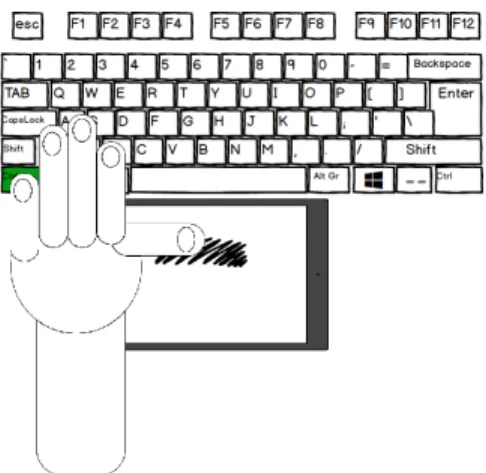
To activate SmartCom, users put their pinky finger on the “Ctrl” key leaving the 3 following fingers free to grab other keys, while the thumb is kept free to interact with SmartCom (see fig 5). By releasing the modifier key, SmartCom gets deactivated. However, before fully designing the interaction techniques for SmartCom, we wanted to know the reachable areas by the thumb beneath the keyboard. Therefore, we performed a formal reachability study.
Figure 5: Left hand positioning to activate SmartCom.
Figure 6: Participant performing the reachability study.
REACHABILITY STUDY
The objective of this study is to see what zones beneath the keyboard users can cover with their thumb while holding the “Ctrl” key.
Participants and Apparatus
We recruited 12 participants (3 females, 2 left handed) with an average age of 26. To generalize the results for smartphones of all sizes, we used a 10.1” Galaxy S4 tablet. We positioned the tablet beneath a traditional QWERTY keyboard (see fig 6.) connected to a DELL laptop with an i7 8thgeneration CPU.
Additionally, we noticed in our pretests that we might detect some false positives touchpoints due to the forearms and palms touching the sides of the tablet. We therefore brought long non-conductive gloves for users to wear during the experiment. On the computer screen we displayed the instructions and an image of a keyboard highlighting the keys to be pressed since they might not be familiar with the QWERTY keyboard. On the tablet we created a canvas that gets activated once the correct key combination is pressed, then draws the path in blue color when touched as a feedback for users, and finally gets disabled when modifier key is released. We created our tablet application using Java for android on Android Studio, and the desktop application using C# winform. We used standard .NET sockets for the communication between both devices.
Experimental Design
For our experimental protocol, we picked 5 keys from each side of the keyboard to be combined with the “Ctrl” key. We call left side keys (LShift, Q, R, Z and V) and right side keys (RShift, P, U, ‘.’ and N). Additionally a set of trials was dedicated for the “Ctrl” key alone in each side, and another set for the “Shift” key alone. Moreover, to differentiate between when the thumb reach becomes uncomfortable like in reachability studies for smartphone, we defined two reachable zones. We call IHM'19 Adjunct, December 10–13, 2019, Grenoble, France SmartCom: Combining a smartphone and a keyboard for enhanced command selection on desktop…
them “Comfort reach” where users are only allowed to move the thumb, and “Maximal reach” where users are allowed to stretch their thumb muscle and move their whole hand to cover as much area of the tablet as possible. Finally, we had a 7 key (combinations) x 2 (left and right hands) x 2 zones (Comfort and Maximal) x 3 (trial repetitions to avoid bias) design. Thus having 84 trials per participant. In addition we counter balanced the starting side, and randomly picked the combinations order between participants
Figure 7: Likert scale results showing that most participants agreed that the comfort reach zone is very easy to use, whereas the maximal reach zone is neither easy nor hard.
Task and Stimuli
Each trial started by displaying the first instruction on the primary screen (to hold the modifier key). Once the key is held, the instruction changed to “Keep holding [modifier key] and press then release [combination key]” (i.e. Keep holding Ctrl and press then release Q). Once correct key is pressed and released, we asked participants to reach the tablet with their thumb either in “Maximal reach” or “Comfort reach”. For maximal reach, we asked participants to draw an arc like shape from the top to the maximum bottom they could reach with their thumb, and then to fill the shape they drew. For comfort reach, we asked participants to lay down their thumb on the tablet and draw a filled circular shape with only their thumb. Once they finished with the shapes, they were asked to release their thumb and then release the modifier key. The canvas on the tablet gets cleared and that indicated the end of the trial.
Results
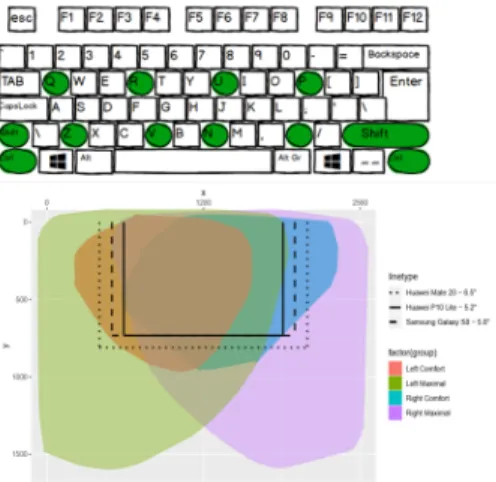
After each experiment we asked participants to fill a Likert scale questionnaire composed of 4 state-ments measuring the difficulty of each side and each area (left maximal, left comfort, right maximal and right comfort). We performed a count analysis on the Likert scale’s data and we present the results in figure 7. First, we see that only 2 participants found the maximal zone difficult to reach and none has found any of the zones very difficult to reach. Second, we see that there is no major difference between the left and right sides. These results tell us that our approach is coherent with the hotkeys principle using both sides of the keyboard in desktop environment. Moreover, we logged the x and y coordinates for every touch point. For every coordinate tuple, we saved the keys that were pressed and the state of the trial. We used R studio to analyze the logs. First, we checked that all the touchpoint data had the correct key combination pressed. Second, using the trial state variable, we filtered the data to only select touch points that are saved after the second key was released and before releasing the modifier key. Third, we applied K-Nearest Neighbors algorithm to remove outliers. In figure 8 we present the results of the areas participants had covered for each side and zone. Additionally, we overlaid 3 smartphones (Huawei Mate 20 – 6.5” display, Huawei P10 Lite – 5.2” and Samsung Galaxy S6 – 5.8” display) onto the graph to show the reachable areas for different smartphone sizes. We calculated the reachable areas and we got 61 cm2for left comfort ( 72% of a 5.8”
Accessibility study for reachable areas beneath the keyboard IHM ’19 Adjunct, December 10–13, 2019, Grenoble, France display), 74 cm2for Right comfort ( 87% of a 5.8” display), 180 cm2for Left Maximal and 177 cm2for
Right Maximal. Figure 8 shows that thanks to the possibility to activate SmartCom from a left or right modifier, the comfort reach area almost covers all of the tactile displays up to 6.5”:. This implicates that interaction technique designers can take advantage of a full display size. In addition, the intersection of the comfort reach area when SmartCom is activated from the left and right modifiers corresponds to the central part of the Smartphone: Hence this interaction area can be considered when designing interaction techniques with the SmartCom, independently of the activation side.
Moreover, to see where participants were frequently reaching, we generated two density maps (see fig. 9.) to reveal the most touched areas (left and right) for the comfort reach area. Figure 9 suggests that using the right hand, a small part of the bottom right area is the easiest to access. Oppositely, users were able to comfortably cover more surface on the left side of the tactile display. We explain this difference by the fact that users have the habit of using the left hand for hotkeys more than the right hand since the latter is usually on the mouse when doing tasks that requires it, which can result in different arm positions when asked to perform key combinations with the right hand.
Figure 8: Top: Keyboard with highlighted used keys during experiment. Bottom: Reachable areas for the all zone. Left to right: Left max., Left conf., Right conf., Right max..
Figure 9: Top (respectively bottom): Den-sity map representing touch points for right (respectively left) side in comfort zone.
CONCLUSION AND FUTURE WORK
We presented SmartCom, a combination of a smartphone with the traditional physical keyboard for input interaction techniques. Before proceeding with the design phase we studied the reachable areas on the smartphone while using the keyboard. Our reachability study showed that any display of size 5.8” is 80% reachable with the thumb. These results will be used during our interaction technique design phase. For example we might display the most frequent command for each combination in the densest zone for each side as seen in figure 9. According to our results, the SmartCom approach is promising. Moreover, it can be adopted by anyone with a smartphone, and can be thought of as an integrated display at the bottom of a keyboard.
ACKNOWLEDGMENTS
This project is a collaboration between OKTAL Sydac and IRIT. It is funded by OKTAL Sydac and ANRT.
IHM'19 Adjunct, December 10–13, 2019, Grenoble, France SmartCom: Combining a smartphone and a keyboard for enhanced command selection on desktop…
REFERENCES
[1] [n. d.]. Asus goes all in on touchscreen trackpads with new ZenBooks and VivoBooks - The Verge. https://www.theverge. com/2019/5/27/18641224/asus-screenpad-2-vivobooks-zenbooks-computex-2019
[2] [n. d.]. How Many People Have Phones Worldwide (Nov 2019). https://www.bankmycell.com/blog/ how-many-phones-are-in-the-world
[3] [n. d.]. MacBook Pro 13-inch Review: Why We Can’t Recommend It | Digital Trends. https://www.digitaltrends.com/ laptop-reviews/apple-macbook-pro-13-inch-touch-bar-review/
[4] [n. d.]. Razer’s Project Linda Could Arrive In September With The Razer Phone 2 | Digital Trends. https://www. digitaltrends.com/computing/razer-project-linda-phone-2-september-rumor/
[5] Caroline Appert and Shumin Zhai. 2009. Using strokes as command shortcuts. In Proceedings of the 27th international conference on Human factors in computing systems - CHI 09. ACM Press, New York, New York, USA, 2289. https: //doi.org/10.1145/1518701.1519052
[6] Gilles Bailly, Eric Lecolinet, and Laurence Nigay. 2008. Flower menus. In Proceedings of the working conference on Advanced visual interfaces - AVI ’08. https://doi.org/10.1145/1385569.1385575
[7] Gilles Bailly, Thomas Pietrzak, Jonathan Deber, and Daniel Wigdor. 2013. Métamorphe: Augmenting hotkey usage with actuated keys. In Conference on Human Factors in Computing Systems - Proceedings. 563–572. https://doi.org/10.1145/ 2470654.2470734
[8] Olivier Bau and Wendy E. Mackay. 2008. OctoPocus: A dynamic guide for learning gesture-based command sets. In UIST 2008 - Proceedings of the 21st Annual ACM Symposium on User Interface Software and Technology. 37–46. https: //doi.org/10.1145/1449715.1449724
[9] Xiaojun Bi, Tovi Grossman, Justin Matejka, and George Fitzmaurice. 2011. Magic desk. In Proceedings of the 2011 annual conference on Human factors in computing systems - CHI ’11. ACM Press, New York, New York, USA, 2511. https://doi.org/10.1145/1978942.1979309
[10] Florian Block, Hans Gellersen, and Nicolas Villar. 2010. Touch-display keyboards. In Proceedings of the 28th international conference on Human factors in computing systems - CHI ’10. ACM Press, New York, New York, USA, 1145. https: //doi.org/10.1145/1753326.1753498
[11] Jack Callahan, Don Hopkins, Mark Weiser, and Ben Shneiderman. 1988. An empirical comparison of Pie vs. Linear menus. In Conference on Human Factors in Computing Systems - Proceedings, Vol. Part F1302. Association for Computing Machinery, 95–100. https://doi.org/10.1145/57167.57182
[12] Wenzhe Cui, Jingjie Zheng, Blaine Lewis, Daniel Vogel, and Xiaojun Bi. 2019. Hotstrokes: Word-gesture shortcuts on a trackpad. In Conference on Human Factors in Computing Systems - Proceedings. Association for Computing Machinery. https://doi.org/10.1145/3290605.3300395
[13] Emmanuel Dubois, Marcos Serrano, and Mathieu Raynal. 2018. Rolling-menu: Rapid command selection in toolbars using Roll gestures with a multi-dof Mouse. In Conference on Human Factors in Computing Systems - Proceedings, Vol. 2018-April. Association for Computing Machinery. https://doi.org/10.1145/3173574.3173941
[14] Bruno Fruchard, Eric Lecolinet, and Olivier Chapuis. 2017. MarkPad. In Proceedings of the 2017 CHI Conference on Human Factors in Computing Systems - CHI ’17. ACM Press, New York, New York, USA, 5630–5642. https://doi.org/10.1145/ 3025453.3025486
[15] Emmanouil Giannisakis, Gilles Bailly, Sylvain Malacria, and Fanny Chevalier. 2017. IconHK. In Proceedings of the 2017 CHI Conference on Human Factors in Computing Systems - CHI ’17. ACM Press, New York, New York, USA, 4715–4726. https://doi.org/10.1145/3025453.3025595
Accessibility study for reachable areas beneath the keyboard IHM ’19 Adjunct, December 10–13, 2019, Grenoble, France
[16] Tovi Grossman, Pierre Dragicevic, and Ravin Balakrishnan. 2007. Strategies for accelerating on-line learning of hotkeys. In Proceedings of the SIGCHI conference on Human factors in computing systems - CHI ’07. ACM Press, New York, New York, USA, 1591. https://doi.org/10.1145/1240624.1240865
[17] Gordon Kurtenbach and William Buxton. 1991. Issues in combining marking and direct manipulation techniques. In Proceedings of the 4th annual ACM symposium on User interface software and technology - UIST ’91. ACM Press, New York, New York, USA, 137–144. https://doi.org/10.1145/120782.120797
[18] Gary Perelman, Marcos Serrano, Mathieu Raynal, Celia Picard, Mustapha Derras, and Emmanuel Dubois. 2015. The Roly-Poly Mouse. In Proceedings of the 33rd Annual ACM Conference on Human Factors in Computing Systems - CHI ’15. ACM Press, New York, New York, USA, 327–336. https://doi.org/10.1145/2702123.2702244
[19] Houssem Saidi, Marcos Serrano, Pourang Irani, and Emmanuel Dubois. 2017. TDome. In Proceedings of the 2017 CHI Conference on Human Factors in Computing Systems - CHI ’17. ACM Press, New York, New York, USA, 5892–5904. https://doi.org/10.1145/3025453.3025661
[20] Xing-Dong Yang, Edward Mak, David McCallum, Pourang Irani, Xiang Cao, and Shahram Izadi. 2010. LensMouse. In Proceedings of the 28th international conference on Human factors in computing systems - CHI ’10. ACM Press, New York, New York, USA, 2431. https://doi.org/10.1145/1753326.1753695
[21] Shengdong Zhao and Ravin Balakrishnan. 2004. Simple vs. compound mark hierarchical marking menus. In Proceedings of the 17th annual ACM symposium on User interface software and technology - UIST ’04. ACM Press, New York, New York, USA, 33. https://doi.org/10.1145/1029632.1029639
[22] Jingjie Zheng, Blaine Lewis, Jeff Avery, and Daniel Vogel. 2018. FingerArc and FingerChord. In The 31st Annual ACM Symposium on User Interface Software and Technology - UIST ’18. ACM Press, New York, New York, USA, 347–363. https://doi.org/10.1145/3242587.3242589
IHM'19 Adjunct, December 10–13, 2019, Grenoble, France SmartCom: Combining a smartphone and a keyboard for enhanced command selection on desktop…
![Figure 4: Razer’s project Linda[4].](https://thumb-eu.123doks.com/thumbv2/123doknet/14343013.499501/4.1188.107.363.643.813/figure-razer-s-project-linda.webp)