RESEARCH OUTPUTS / RÉSULTATS DE RECHERCHE
Author(s) - Auteur(s) :
Publication date - Date de publication :
Permanent link - Permalien :
Rights / License - Licence de droit d’auteur :
Bibliothèque Universitaire Moretus Plantin
Institutional Repository - Research Portal
Dépôt Institutionnel - Portail de la Recherche
researchportal.unamur.be
University of Namur
Voyager 2 (version 6 release 5): Reference Manual
Englebert, Vincent
Publication date:
2002
Link to publication
Citation for pulished version (HARVARD):
Englebert, V 2002, Voyager 2 (version 6 release 5): Reference Manual..
General rights
Copyright and moral rights for the publications made accessible in the public portal are retained by the authors and/or other copyright owners and it is a condition of accessing publications that users recognise and abide by the legal requirements associated with these rights. • Users may download and print one copy of any publication from the public portal for the purpose of private study or research. • You may not further distribute the material or use it for any profit-making activity or commercial gain
• You may freely distribute the URL identifying the publication in the public portal ? Take down policy
If you believe that this document breaches copyright please contact us providing details, and we will remove access to the work immediately and investigate your claim.
DB-Main Manual Series
The University of Namur - LIBD
V
OYAGER
2 R
EFERENCE MANUAL
P
REFACE
We believe that programs1 like emacs, AutoCAD2, Word3 and TeX owe their success partially to the
existence of a language4 allowing the user to write macros or even programs. Indeed, such languages
fill a gap between built-in functionalities and those expected by the user. This argument suffices to explain why we choose to define and to implement such a language for the DB-MAIN tool.
Because small steps are more secure than large ones, at the beginning - when Voyager did not exist yet - this language had to be a simple script facility for generating reports. Now, this language shares the characteristics of its big brothers and even has a name: Voyager 2. This last issue was the most difficult to settle!
This manual was written as a reference manual and therefore is quite concise in order to give the reader a maximum of detail economically. We are conscious that the examples are rather scarce, especially regarding the use of the repository. For this reason, this document is only a first version of what will ultimately become a series of manuals: reference manual; users’s guide; and tutorial.
I thank the DB-MAIN, DB-MAIN/01, INTER-DB, PROAGEC research groups and - last but not least - the Professor J.-L. Hainaut for their support in my work.
1. TeX is a sophisticated program designed to produce high-quality typesetting, especially for mathematical text. It was created by Donald Knuth.
2. AutoCad and AutoLisp are trademarks of Autodesk. 3. Word and WordBasic are trademarks of Microsoft. 4. Elisp, AutoLisp, WordBasic.
F
OREWORDS
Foreword to the Version 2 Release 1
The last edition of this manual was named release 1.0. We decided to split the version number and to name each part respectively version and release. A new version introduces important modifications or significative modifications although a new release means only minor changes.
The Version 2 release 1 introduces major changes like: lexical analysis facilities1, new object types2,
textual properties, object removal3, modification and meta-properties4 in the repository.
One major change in the environment is the new console. It is no more possible to quit DB-MAIN in closing the Voyager 2’s console. This console has one disadvantage: the display is quite slow. But be sure that your program is as fast than before.
In this release, the format of the .oxo files has changed. So it is a good idea to recompile your former programs with the new compiler. The compiler is backward compatible.
Foreword to the Version 3 Release 0
Voyager 2 has now the same version number as DB-MAIN.
Several mistakes in the reference manual have been corrected5. I thank Jean-Marc Hick for his help to
improve the quality of the "modular programming" part with his pertinent remarks. And last but not least, I thank Richard Mairesse for his kindness - the page 40 would never have been printed without his knowledge of Postscript.
The architecture of the abstract machine has been improved. In previous releases, the abstract machine was unique and static. We can now have several abstract machines at the same time, and the number of abstract machines is not limited. This improvement allows us to call functions/procedures from other V2 programs (cfr. 16).
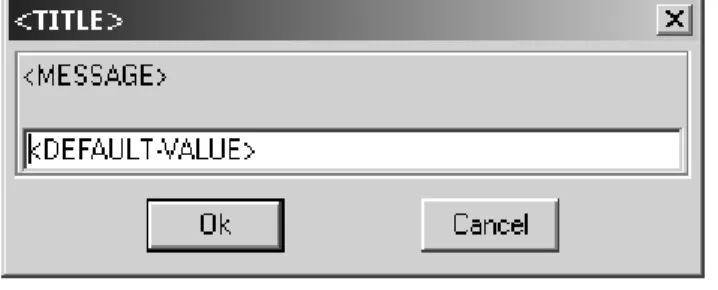
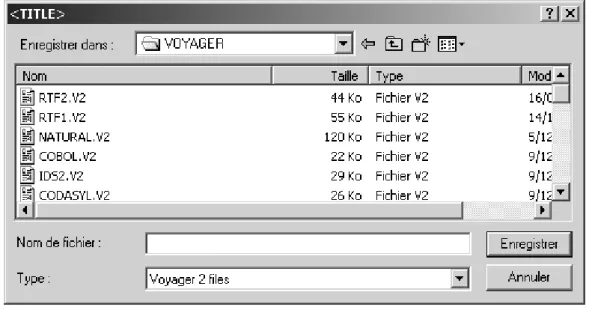
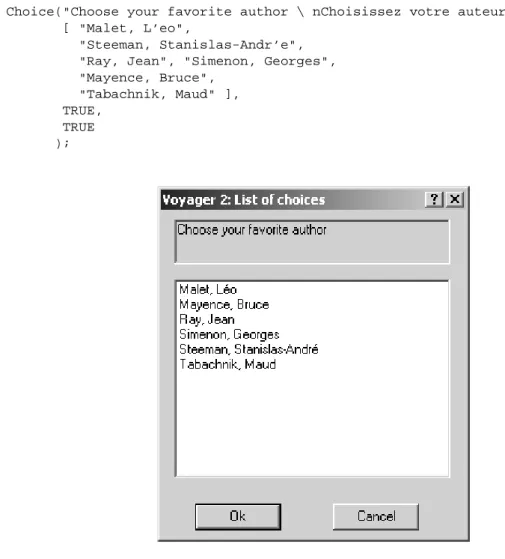
Voyager has now standard Windows dialog boxes (cfr. page 39).
The use of the compilers and DB-MAIN are now limited to people having an electronic key. That ’s the price we have to pay for being famous. Without the electronic key, it is impossible to run the compiler and DB-MAIN behaves in "demo" mode (the size of the repository is limited). A whole chapter explains these changes (cfr. 18).
The programs6 listings have been removed from the appendices and the font has been reduced to get a
smaller and more handy manual.
A β -version7 existed during a while between the releases 2.1 and 3.0. This version allowed the use of
one undocumented procedure (call_V2). This statement is now deprecated and should no more be used. (cfr. 16)
Foreword to the Version 4 Release 0
The abstract machine and the compilers have been translated in 32 bits. And hence, some limitations vanished. The repository has been improved in order to represent graphical properties (position, font, size, ...). The following bugs have been fixed:
• Concatenation of two empty lists.
• The documentation now describes the CharToStr function.
1. Chapter 9.
2. Sections 11.40 and 11.39. 3. Chapter 14.
4. Chapter 15.
5. I thank Philippe Thiran for his help.
6. The user can find these files in the DB-MAIN distribution.
• The SetFlag function is fixed.
The main change is - without contest - the evolution of the repository in order to generalize it and to represent various kind of information like programs, process, procedures, etc. For this reason, we deci-ded to attach the coll_et object-type to data_object via the DATA_COLET link and no more to the entity_type object-type. Unfortunately, Voyager 2 was not able to both take into account this generali-zation and to preserve the existent programs. The reason is a risk of failure when the user navigates through the old entity_colet link.
So, a query expressed as
entity_type: ent; ...
ENTITY_TYPE[ent]@ENTITY_COLET:L
should be translated into
data_object: dta;
dta2ent(DATA_OBJECT[dta]@DATA_COLET:L with GetType(dta)=ENTITY_TYPE) where dta2ent is a function that you can write yourself as:
function list dta2ent(list: L1) entity_type: ent; list: L2; { for ent in L1 do { AddLast(L2,ent); } return L2; }
As you understood it, the compiler will now stop if the entity_colet constant is encountered. Another modification was the introduction of the first concepts to represent "process"8 (see 78).
Foreword to the Version 5 Release 0
This version is endowed with a large number of new concepts. Processes and advanced graphical repre-sentations are now supported by DB-MAIN. The repository has thus considerably growed to such an extent that its representation does no more take up one sheet! Some functions have also been added (see section 7.8) since the previous version.
People have indicated some troubles when the path of the compiler contains one or several space cha-racter. This problem can be avoided with the -quote parameter in the command line. Unfortunately, this does not work with Windows NT.
They are now two switches in the electronic key. One to allow the programmer to port .oxo files to some other station with a precise electronic key; and another key to distribute them in an anonymous way (the -Kall option). The compiler displays the status of those switches.
The extension of the repository has introduced new keywords. The programmer should check if these words were not used as variables or functions names before. The posx, posy, and color attributes are now managed in a different way (see section 7.8).
Foreword to the Version 6 Release 0
This version has no great changes. Several bugs has been fixed (mainly in the libraries). Amongst the bugs, we can cite:
• the parameters of a foreign procedure.
• the assignment between processes when a process does not exists. • the behaviour of some dialog boxes.
• the compiler now generates error messages that are Emacs-compliant. • the size of the stack has been increased (3 X)
• the SetProperty has been fixed (carriage return). • the concatenation of strings (empty strings).
Foreword to the Version 6 Release 5
This version has two major changes. Several bugs has been also fixed. The changes are:
• The documentation describes the new CallSync function. This function allows that a Window or DOS program is executed and the calling Voyager 2 program waits for the Window program to be finished before continuing its execution.
• This version manages a new concept. The note object (free text attached to any generic object) is now supported by Voyager 2.
i
C
ONTENTS
PREFACE...3
FOREWORDS...5
CONTENTS...I LISTOF FIGURES...VII LISTOF TABLES...IX PARTI THE VOYAGER2 LANGUAGE... 1
CHAPTER1 PRELIMINARIES...3
CHAPTER2 LEXICAL ELEMENTS...5
2.1 Comments... 5 2.2 Operators ... 5 2.3 Identifiers... 5 2.4 Reserved words ... 6 2.5 Constants ... 6 CHAPTER3 TYPES...11 3.1 Integers ... 11 3.2 Characters ... 11 3.3 Strings... 12 3.4 Lists ... 13 3.5 Cursor ... 13 3.6 Files ... 13 3.7 References ... 14 CHAPTER4 EXPRESSIONS...15
4.1 Precedence and associativity of operators ... 15
4.2 Arithmetic Expressions ... 15
4.3 Reference Expression ... 16
4.4 Functional Assignment ... 17
CHAPTER5 LIST EXPRESSIONS...19
5.1 Overview ... 19 5.2 Operations Definitions... 22 5.2.1 Concatenation ... 22 5.2.2 Intersection ... 22 5.2.3 Insertion... 22 5.2.4 Miscellaneous... 23 CHAPTER6 STATEMENTS...25 6.1 Assignment ... 25 6.2 Selection Statement ... 27
6.2.1 The if-then Statement ... 27
6.2.2 The if-then-else Statement... 27
6.2.3 The switch Statement ... 27
6.3 Iteration Statement... 28
ii Contents
6.3.2 The repeat Statement ...29
6.3.3 The for Statement ...29
6.3.4 The goto Statement ...30
6.3.5 The label Statement ...30
6.3.6 The break Statement ...30
6.3.7 The continue Statement ...31
6.3.8 The halt Statement ...31
CHAPTER7 OPERATIONS... 33
7.1 Operations on Characters...33
7.2 Operations on Strings...34
7.3 Operations on Lists and Cursors ...36
7.4 Operations on Files ...36
7.5 Interface Operations...39
7.6 Time Operations...41
7.7 Flag Operations...42
7.8 General Operations ...42
CHAPTER8 FUNCTIONSAND PROCEDURES... 45
8.1 Definition ...45
8.2 Recursiveness...46
CHAPTER9 LEXICAL ANALYZER... 49
PART II THE REPOSITORY...53
CHAPTER 10 REPOSITORY DEFINITION... 55
CHAPTER 11 OBJECTS DEFINITION... 61
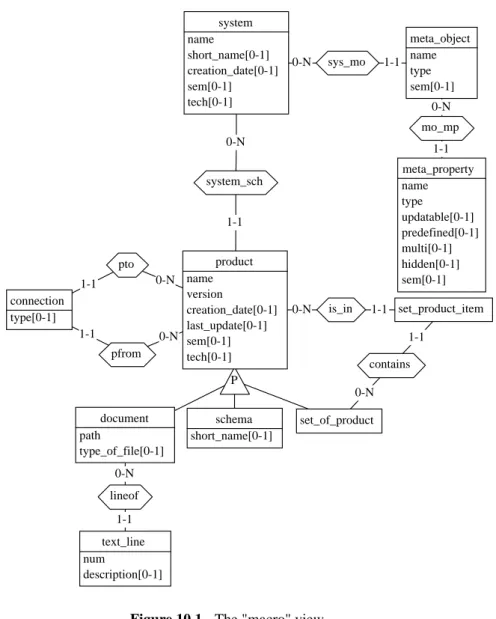
11.1 generic_object ...62 11.2 user_object ...63 11.3 note...64 11.4 system ...64 11.5 product ...65 11.6 schema ...65 11.7 set_of_product ...66 11.8 set_product_item...66 11.9 document...67 11.10 connection ...67 11.11 data_object ...68 11.12 ent_rel_type ...68 11.13 entity_type ...68 11.14 rel_type ...69 11.15 attribute ...69 11.16 si_attribute ...70 11.17 co_attribute ...71 11.18 owner_of_att ...72 11.19 component...72 11.20 group ...73 11.21 constraint...74 11.22 member_cst ...75 11.23 collection...75 11.24 coll_et...76 11.25 cluster...76 11.26 sub_type ...77 11.27 role ...77 11.28 et_role ...78
iii 11.29 real_component ... 78 11.30 proc_unit... 78 11.31 p_statement... 79 11.32 p_component ... 79 11.33 p_expression ... 80 11.34 p_environment ... 80 11.35 p_involve ... 81 11.36 p_function... 81 11.37 p_actor ... 82 11.38 owner_of_proc_unit ... 82 11.39 meta_object... 82 11.40 meta_property... 83 11.41 user_viewable ... 85 11.42 user_view... 85 11.43 product_type ... 86 11.44 schema_type ... 86 11.45 document_type ... 86
CHAPTER 12 PREDICATIVE QUERIES...87
12.1 Introduction ... 87
12.2 Specifications ... 88
12.2.1 Global Scope Queries... 88
12.2.2 Restricted Scope Queries... 88
CHAPTER 13 ITERATIVE QUERIES...91
CHAPTER 14 OBJECT REMOVAL...93
CHAPTER 15 PROPERTIES...95
15.1 Textual Properties ... 95
15.2 Dynamic Properties ... 97
15.2.1 Introduction ... 97
15.2.2 Explanation... 97
PART III MODULAR PROGRAMMING... 99
CHAPTER 16 LIBRARYANDPROCESS...101
16.1 The New Architecture ... 101
16.2 Voyager 2 Process... 102
16.3 Libraries... 105
16.4 Formal Definitions... 106
16.4.1 The use Function ... 106
16.4.2 The ! suffix unary operator... 106
16.4.3 The :: suffix unary Operator ... 106
16.4.4 The :: binary Operator ... 107
16.5 Literate Programming... 107
CHAPTER 17 THE INCLUDE DIRECTIVE...109
CHAPTER 18 SECURITY... 111
PART IV APPENDIX... 113
APPENDIX A THE VOYAGER2 ABSTRACT SYNTAX...115
iv Contents
A.2 Remarks ...117
APPENDIX B THE VAM ARCHITECTURE... 119
APPENDIX C ERROR MESSAGESWHILE COMPILING... 121
APPENDIX D ERROR MESSAGESDURINGTHE EXECUTION... 125
APPENDIX E FREQUENTLY ASKED QUESTIONS... 127
E.1 Environment Relation Questions ...127
E.1.1 How do I compile a program? ...127
E.1.2 Question How do I write efficient programs ? ...128
E.1.3 Why do I have two windows after the compilation? ...128
E.1.4 I can not close the console ! Why? ...128
E.1.5 When I load program, DB-MAIN tells me that the version of the program is too old! ...128
E.1.6 Why does the compiler find errors in my program although it was working fine with the former version?...128
E.2 Language Specific Questions...128
E.2.1 In a predicative query, DB-MAIN tells me that there is an invalid assignment. Why? ...128
E.2.2 Is there a nil value like in Pascal?...129
E.2.3 Why is my request looping? ...129
E.2.4 How may I empty a list L? ...129
E.2.5 How may I test if a list is empty ? ...129
APPENDIXF REGULAR EXPRESSIONS... 131
BIBLIOGRAPHY... 133
v
L
IST OF
F
IGURES
Figure 7.1 - A DialogBox Window. ... 39
Figure 7.2 - A File Browsing Window... 40
Figure 7.3 - A Message Box. ... 40
Figure 7.4 - A Choice Dialog... 41
Figure 10.1 - The "macro" view... 56
Figure 10.2 - The "data" view. ... 57
Figure 10.3 - The "process" view... 58
Figure 10.4 - The "graph" view... 59
Figure 10.5 - The "inheritance" view. ... 59
Figure 11.1 - Graphical representation of the employee table... 61
Figure 11.2 - Window sample showing the "mark" interface. ... 63
Figure 12.1 - Acadamic Schema. ... 89
Figure 16.1 - This schema depicts the memory state with two programs and three running process. ... 102
Figure 16.2 - Literate Programming: The .ixi file (bottom) is produced from the Voyager 2 program (top). Each "explain clause" is used to document exported functions as well as the library itself. ... 108
vii
L
IST OF
T
ABLES
Table 2.1 - Operators and separators. ... 5
Table 2.2 - Reserved keywords... 6
Table 2.3 - Reserved keywords (types)... 6
Table 2.4 - Constants denoting entity-types... 7
Table 2.5 - Constants denoting links... 7
Table 2.6 - Miscellaneous Constants. ... 8
Table 2.7 - Field Constants. ... 8
Table 2.8 - Error Constants. ... 9
Table 3.1 - Conventions about special characters... 11
Table 3.2 - Meta-characters used in string constants. ... 12
P
ART
I
Chapter 1
Preliminaries
Voyager 2 is an imperative language with original characteristics like list primitive type with garbage collection and declarative requests to the predefined repository of the DB-MAIN tool. Other characte-ristics will be discussed further in this document. Because Voyager 2 is similar to traditional languages like C and Pascal, we will suppose in this reference manual that the reader has a good knowledge of them.
A Voyager 2 program is composed of three distinct sections given below: global variables definitions
functions definitions begin
the main body end
The global variables definitions section contains the definition of all the global variables of the pro-gram. The scope of these will be the whole program as well as the functions and the procedures. Cons-tants can also be defined in this section. The functions definitions section will contain the definition of all the functions and all the procedures needed by the program. Functions will not be distinguished from procedures in this document unless they are explicitly mentioned. The scope of a function is the whole program1. The main body section is the main program, ie. a list of instructions enclosed between
the two keywords begin and end. Only the last section is mandatory in a Voyager 2 program. As you may have guessed it, the main program corresponds to the main function in C and thus Voyager 2 begins the execution there.
The Global Variables Definitions section contains the definition of all the global variables and all the constants of the program. This section is composed of definition lines, each one respects the following syntax:
〈definition line〉 ← 〈type〉: 〈var-const〉, …, 〈var-const〉; 〈var-const〉 ← 〈variable〉| 〈constant〉
〈variable〉 ← 〈identifier〉
〈constant〉 ← 〈identifier〉= 〈expression〉
Types are explained in chapter 3. In a line definition, when an expression is associated with an identi-fier, this variable is considered as being initialized by this expression. Each time this variable is used,
4 Chapter 1 Preliminaries
its occurrence is replaced by the corresponding expression. This characteristics differs from the langua-ges C2 and Pascal since these last ones evaluate the expression as soon as it is found. In the Voyager 2
language, the evaluation process is delayed until the variable is used. As a consequence, constant expression may contain identifiers and function names that are outside the scope of the expression. Unlike macros in C, constants have a type and the evaluation of the constant must match it.
Example: Program 1. integer: s=m+c2, age; integer: lname=strlen(pname),m,c2; string: pname="Einstein"; begin m:=2; c2=3; print(s*2); m:= 4; print(s*2); end
will print the values "10" ((2+3)2) and "14" ((4+3)2). Let us note that the evaluation of constants may return different values depending on the context.
Program 2. integer: sum=a+b; procedure foo(integer: a) integer: b; { b:=1; print(sum); } begin foo(2); end
will print the value "3". The functions definitions section will contain all the functions/procedures definitions. The syntax of a function/procedure definition is fully explained in the chapter 8. Each function/procedure can be called from anywhere in the program: from a function, from a procedure or from the main body even if the call to the function/procedure is before its definition. This does not matter in Voyager 2.
2. The comparison does not hold neither with the macros of the C language nor with the const type specifier of the C++ lan-guage
Chapter 2
Lexical Elements
2.1 Comments
A comment in a Voyager 2 program begins with an occurrence of the two characters /* not within a character or string constant and ends with the first of the occurrence of the two characters */. Comments may contain any characters and may spread over several lines of the program. Comments do not have any effect on the meaning of the program you are writing.
A comment may also be any characters found after the two characters // in one line. There may be not have other characters between the both //.
Example:
/* Add comments to
** your programs, please ! */ begin
x:=x+1; // and comments must be pertinent ! end
2.2 Operators
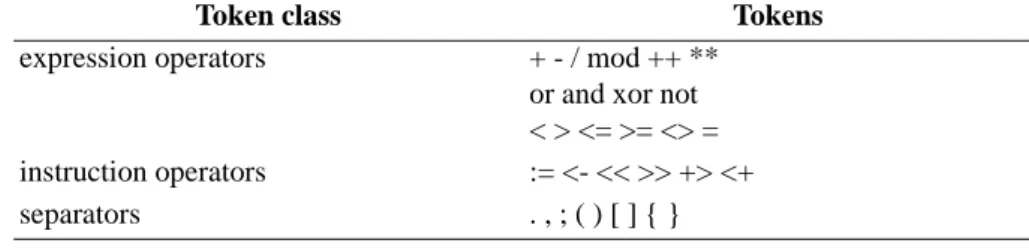
The operator tokens are divided in several groups as shown in the table 2.1.
Expression operators are used to build new expressions from other ones, instruction operators are a convenient way to replace classical functions by infix operators.
2.3 Identifiers
An identifier is a sequence of letters, digits and underscores. An identifier must begin with a letter, identifiers beginning with an underscore are reserved for keywords having a special meaning for the
Token class Tokens
expression operators + - / mod ++ ** or and xor not < > <= >= <> = instruction operators := <- << >> +> <+ separators . , ; ( ) [ ] { }
6 Chapter 2 Lexical Elements
language. There is no restriction on the length of an identifier. Finally an identifier must be distinct of any reserved keyword (cfr. section 2.4) and any predefined constant name (cfr. section 2.5).
Example:
2.4 Reserved words
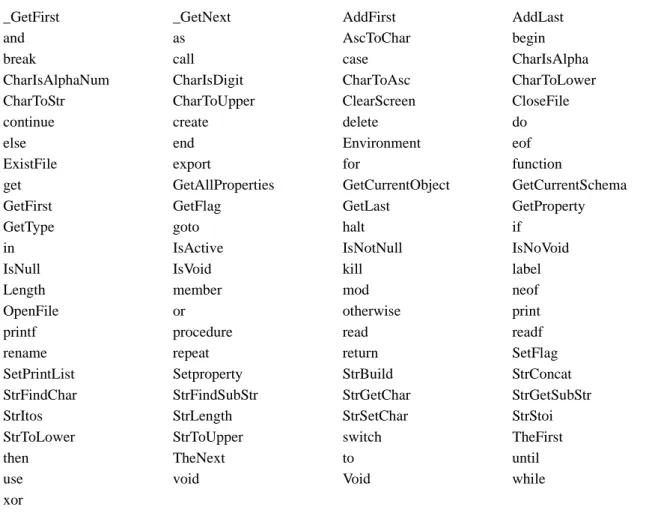
Some words (cfr. tables 2.2 and 2.3) are reserved for the language and can not be redefined by the user.
2.5 Constants
In Voyager 2, constants are predefined variables with constant expressions. The constants names are listed in tables 2.4, 2.5, 2.6, 2.8, and 2.7.
factorial PI_31415 A_B__C_ are all valid identifiers. _PI 314_PI for are all incorrect identifiers. A_Einstein A_EINSTEIN a_einstein are three distinct identifiers.
_GetFirst _GetNext AddFirst AddLast
and as AscToChar begin
break call case CharIsAlpha
CharIsAlphaNum CharIsDigit CharToAsc CharToLower CharToStr CharToUpper ClearScreen CloseFile
continue create delete do
else end Environment eof
ExistFile export for function
get GetAllProperties GetCurrentObject GetCurrentSchema
GetFirst GetFlag GetLast GetProperty
GetType goto halt if
in IsActive IsNotNull IsNoVoid
IsNull IsVoid kill label
Length member mod neof
OpenFile or otherwise print
printf procedure read readf
rename repeat return SetFlag
SetPrintList Setproperty StrBuild StrConcat StrFindChar StrFindSubStr StrGetChar StrGetSubStr
StrItos StrLength StrSetChar StrStoi
StrToLower StrToUpper switch TheFirst
then TheNext to until
use void Void while
xor
Table 2.2 - Reserved keywords.
attribute char cluster co_attribute coll_et collection complex_user_object component connection constraint data_object do_attribute document ent_rel_type
2.5 Constants 7 entity_type et_role file generic_object user_object group integer list member_cst meta_object meta_property owner_of_att product real_component rel_type role schema set_of_product set_product_item si_attribute string sub_type system _char _char _file _integer _lambda _list _program _string ATTRIBUTE CLUSTER CO_ATTRIBUTE COLL_ET COLLECTION COMPLEX_USER_OBJECT COMPONENT CONNECTION CONSTRAINT DATA_OBJECT DO_ATTRIBUTE DOCUMENT ENT_REL_TYPE ENTITY_TYPE ET_ROLE GENERIC_OBJECT USER_OBJECT GROUP MEMBER_CST META_OBJECT META_PROPERTY OWNER_OF_ATT PRODUCT REAL_COMPONENT REL_TYPE ROLE SCHEMA SI_ATTRIBUTE SUB_TYPE SYSTEM
Table 2.4 - Constants denoting entity-types.
CLU_SUB COLL_COLET CONST_MEM CONTAINS DATA_GR DOMAIN ENTITY_COLET ENTITY_CLU ENTITY_ETR ENTITY_SUB GR_COMP GR_MEM IS_IN MO_MP OWNER_ATT REAL_COMP REL_RO RO_ETR SCH_COLL SCH_DATA SYS_MO SYSTEM_SCH
Table 2.5 - Constants denoting links. Table 2.3 - Reserved keywords (types).
8 Chapter 2 Lexical Elements _A _R _W ARRAY_CONTAINER ASS_GROUP BAG_CONTAINER BOOL_ATT CHAR_ATT COMP_GROUP CON_COPY CON_DIC CON_GEN CON_INTEG CON_XTR CON_COPY DATE_ATT EQ_CONSTRAINT ETROUND ETSHADOW ETSQUARE FALSE FLOAT_ATT HIDEPROD INC_CONSTRAINT INDEX_ATT INT_MAX INT_MIN L_CRITERION L_DATE L_FREE L_NAME L_ROLE L_SNAME L_VERSION LIST_CONTAINER MARK1 MARK2 MARK3 MARK4 MARK5 MAX_STRING N_CARD NUM_ATT OBJECT_ATT OR_MEM_CST PROP_CORRUPTED
PROP_NOT_FOUND RTROUND RTSHADOW
RTSQUARE SCHEMA_DOMAINS
SELECT SEQ_ATT SET_CONTAINER
TAR_MEM_CST TRUE
UNIQUE_ARRAY_CONTAINER UNIQUE_LIST_CONTAINER
USER_ATT VARCHAR_ATT
Table 2.6 - Miscellaneous Constants.
atleastone coexistence container creation_date criterion decim disjoint exclusive file_desc filename flag font_name font_size identifier key last_update length mark_plan max_con max_rep mem_role min_con min_rep multi name other path posx posx2 posy posy2 predefined primary recyclable
2.5 Constants 9 reduce secondary sem short_name stable status tech text_font_name text_font_size total type_object type_of_file type updatable user_const value version view where xgrid ygrid zoom ERR_CALL ERR_CANCEL ERR_DIV_BY_ZERO ERR_ERROR ERR_FILE_CLOSE ERR_FILE_OPEN ERR_PATH_NOT_FOUND ERR_PERMISSION_DENIED Table 2.8 - Error Constants.
Chapter 3
Types
3.1 Integers
Integer type covers all the integer values from INT_MIN to INT_MAX. Integers are signed and the integer constant INT_MIN (resp. INT_MAX) is the smallest (resp. greatest) value of this type. Integer constants are signed1 literals composed of digits 0,1,…,8,9. The integer type is named integer.
Examples:
1, 123, -458, -1021 are valid integer constants +458, 3.1415, 3E+6 are not valid integer constants
3.2 Characters
The character type covers the whole ASCII character set from code 0 to 255. All the characters having a graphic representation have a corresponding constant in this type: the graphic representation itself enclosed between simple quotes. Otherwise characters can be represented by their ASCII value like '^val^'.
Examples:
char: a=’a’, Z=’Z’, plus=’+’; char: bell='^7^', strange='^236^';
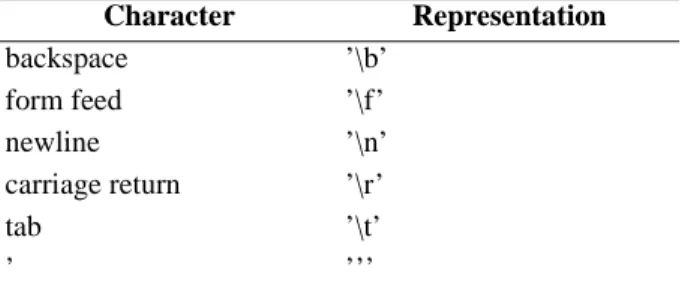
Some interesting non-graphic characters have a special representation illustrated in table 3.1.
1. The unary operator + is not allowed.
Character Representation backspace ’\b’ form feed ’\f’ newline ’\n’ carriage return ’\r’ tab ’\t’ ’ ’’’
12 Chapter 3 Types
3.3 Strings
Strings are sequences of characters. Although the programmer must take care of details like the size of the memory block where the string is stored in Pascal and C, these mechanisms are completely transpa-rent in Voyager 2. Thus in this manual, the sentence "the size of the string s" means the number of cha-racters stored in the string s. String constants are sequence of chacha-racters between double quotes. The length of a string must be less than the value found in the constant MAX_STRING.
Example: The statement print("Albert Einstein") will produce Albert Einstein and print("1\tone\n2\ttwo\n^51^\tthree\n") will produce 1 one 2 two 3 three
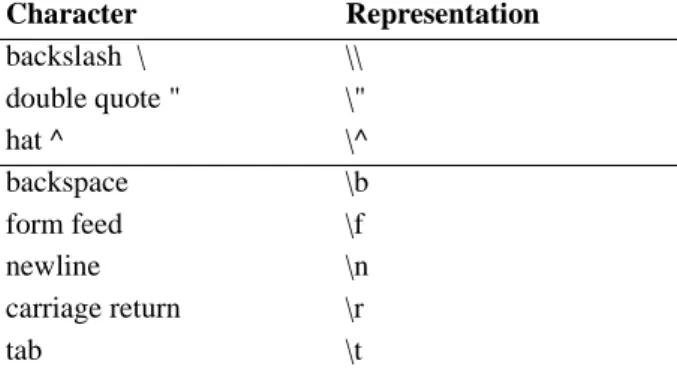
Let us note that in string constants some characters have a special representation depicted in table 3.2. The second part of the table uses the same conventions as for the characters.
With these conventions, the way the compiler interprets a string is not completely sound without some other rules:
1. Characters are examined from left to right.
2. If the ^ character is followed by a sequence of digits denoting a number between 0 and 255 followed by ^, then the whole sequence is replaced by exactly one character whose the ASCII code is the mentioned number found in the string. Otherwise, the first ^ character is interpreted literally, and the interpreter scans the right part of the string w.r.t. these rules.
3. If the \ character is followed by a letter (λ) and if \ λ does not denote a meta-character as depicted in table 3.2, then the sequence is replaced by λ. The \ character is thus removed from the string.
Example: The instruction print("^1234^55^\^\\\h"); Character Representation backslash \ \\ double quote " \" hat ^ \^ backspace \b form feed \f newline \n carriage return \r tab \t
3.4 Lists 13
will print
^12347^\h
3.4 Lists
Lists are ordered collections of values. These values can be of any type (list included). Because lists belong to a basic type (list), operations on lists are often easier than in other languages like Pascal and C. Another type - cursor - is strongly associated to lists and will be discussed in the next section. All the operations and operators available with this type are explained here below.
A programmer can directly enter a constant list in a program simply by specifying the components of the list between brackets like that:
list: lint_ext, lint_exp; begin
lint_exp:=[1..20];
lint_ext:=[1,2,3,5,8,13,21]; print(lint_exp**lint_ext); end
This program will print all the common values of the two lists: "1 2 3 5 8 13". The first list was defined
in expansion although the second one was defined in extension. The syntax of list constants is:
〈list constant〉 ← "[" 〈list expressions〉"]" | "[" 〈expression〉"..." 〈expression〉"]" 〈list expressions〉 ← Ø | 〈expression〉( "," 〈expression〉)*
More complicated list constant expressions follow:
Examples:
[1,[1..fact(1)],2,[1..fact(2)],3,[1..fact(3)],4,[1..fact(4)]] [[],[1,[]],[2,[1,[]]],[3,[2,[1,[]]]]]
[1,2,3..10,11] error: dots are not allowed here!
3.5 Cursor
Cursors are references to elements of lists. A cursor can either be null or be positioned. In the last case (positioned), it can be either active or passive. Let us examine the meaning of cursors in these different cases:
− null cursor: the cursor is not attached to any list and is not indicating any value.
− active cursor: the cursor is positioned on a value in a list, and this value can be consulted,
remo-ved, ...
− passive cursor: let us suppose that there was a cursor c positioned on the value 2 of the list l=[1,2,3]. Just afterwards, the value 2 is removed from the list l, therefore the cursor has no more
meaning and is said being passive. If the program consults the value indicated by this cursor c, he is getting an execution error. Although this situation looks like the null reference, the situation is quite different since the cursor is still attached to the list. This case will be discussed in the sec-tion 7.3.
3.6 Files
Objects of type file are references to files stored on disks managed by the DOS operating system. This object becomes a real reference after the call to the function OpenFile whose first argument is the name of the file and second argument is an integer constant. This constant indicates the mode: _W if the file is created for writing, _R if the file is opened for reading or _A is the file is opened for appending. Depen-ding on the mode, the program may read or write information. Writing always occurs at the end of the
14 Chapter 3 Types
file and characters are read from the current position. Programs must close all the opened files before leaving. More details are found in 7.4.
3.7 References
As mentioned in the section 1, Voyager 2 is integrated in the DB-MAIN tool and therefore it may access to the content of the repository. The definition of the repository needs too much pages to be explained here and a whole part is devoted to the repository in part II.
The repository of DB-MAIN is a database built upon a network-technology DBMS with inheritance. In this model, all the relations are one-to-many and for this reason, relations are named links. Because the model is endowed with the inheritance principle, entity types are named object-type. And thus a link binds two object types together. The attributes of an object type are named fields in our model. An ins-tance of an entity type is named object or reference. The following table summarizes the equivalence between these concepts:
To each object type present in the definition of the repository of DB-MAIN, there exists a type in Voya ger 2. For instance, the type group corresponds to the "group" object type. Variables or expressions of this type can either be references to an object of this object-type, or can be void (a special value deno-ting nothing), or can be not valid.
If a variable is a reference to an object, then we can get the value of a field with the "." operator. For instance, the following program prints the name of the object referenced by the variable ent:
entity_type: ent; begin ... print(ent.name); ... end
Expressions composed with the "." operator may also occur in the left hand side part of an assignment like in the following example:
entity_type: ent; begin ... ent.name:="CUSTOMERS"; ... end
The right hand part of the "." operator is in fact an integer value identifying the field among all the others. In this example, name is a predefined integer constant.
ER-schema ↔ Voyager 2 entity-type ↔ object-type entity ↔ object, reference attribute ↔ field
Chapter 4
Expressions
Expressions are classified into several classes depending on the type returned by the evaluation process. Some expressions are untyped mainly due to access to the repository and to lists, for these particular cases, the type verification is delayed until the execution time. The first subsection discuss the operators used in expressions. Next subsections treat operators and functions provided by the language for each type.
4.1 Precedence and associativity of operators
Each expression operator in Voyager 2 has a precedence level and a rule of associativity. Where paren-theses do not explicitly indicate the grouping of operands with operators, the operands are grouped with the operators having higher precedence. If two operators have the same precedence, there are grouped following the associativity rule (left/right associativity). The table 4.1 defines the precedence and asso-ciativity rules of each operator.
Example:
Following complex expressions may be reduced as follows with the precedence/associativity rules:
4.2 Arithmetic Expressions
Operators +1, -, *, /, mod, and, or, <, >, <=, >=, <>, =, not all require integer expressions as operand.
Their operands are fully evaluated before their own evaluation but the order is let unspecified. The defi-nition of +, -, *, / and mod is respectively addition, subtraction, multiplication, division and remainder.
Original expression Equivalent expression
a+bc a+(bc)
a=not b and c or d a=(((not b) and c) or d) a.length > 10 = 1 ((a.length)>10)=1
1. The + operator is overloaded in order to behave like the StrConcat function with strings.
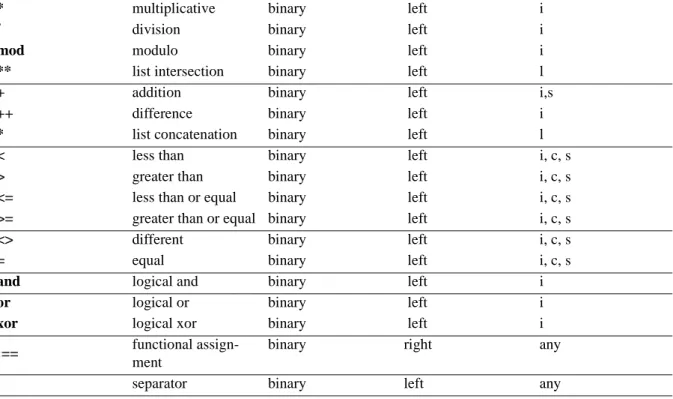
Token Operator Class Associates Operandsa
not logical not prefix no i
- unary minus unary no i
16 Chapter 4 Expressions
Lines separate operators following their precedence. One line separates two groups of operators and each operator inside one group have the same precedence. If a group is above another one, then the pre-cedence of its operator is higher than the other group. For instance: prec(*)>prec(+).
When the divisor is zero (x/y and y=0), then the result is 0 and the error register is set to DIV_BY_ZERO. For the other ones, the following table gives a formal definition:
4.3 Reference Expression
The word "reference" groups several types together and do not make distinction among them. Let us examine the following line:
attribute: att;
att is a variable that may reference an object in the repository. We will see in chapter 13 that the
fol-lowing statement:
att:=GetFirst(attribute[a]{TRUE})
puts into the variable att the reference to the first attribute found in the repository of DB-MAIN. This variable can be used to consult or modify properties of the object:
Example:
* multiplicative binary left i
/ division binary left i
mod modulo binary left i
** list intersection binary left l
+ addition binary left i,s
++ difference binary left i
* list concatenation binary left l
< less than binary left i, c, s
> greater than binary left i, c, s
<= less than or equal binary left i, c, s >= greater than or equal binary left i, c, s <> different binary left i, c, s
= equal binary left i, c, s
and logical and binary left i
or logical or binary left i
xor logical xor binary left i
:== functional assign-ment
binary right any
, separator binary left any
a. Operands must always be of the same type. Following letters denote expected types by previous operators: l: list, i: in-teger, c: char, s: string, any: any type.
a>b returns : if a>b then 1 else 0 a<b returns : if a<b then 1 else 0 a<=b returns : if ab then 1 else 0 a>=b returns : if ab then 1 else 0 a=b returns : if a=b then 1 else 0 a<>b returns : if a= b then 1 else 0 not (a) returns : if a≠0 then 1 else 0
4.4 Functional Assignment 17
print(att.name);
att.name:="FIRST-NAME";
The left part of the "." separator must be an identifier (global/local variable, parameter) denoting an object. The left part must be a field name valid for the object specified in the right part. The right expression must be either an integer expression or a string. String fields will be explained later in chap-ter 15.
4.4 Functional Assignment
This operator behaves like the assignment operator (:=) except that the left-hand-value is let on the stack afterwards. This operator is noted ":==".
integer: a,b; string: s; begin a:=(b:==0); if ((s:==read(_string))="Hello") then { print("World!"); } end
The first statement initializes the two variables a and b with the value 0. The second statement reads one string from the console, puts it into the variable s and then compares this string with the string "World!".
Chapter 5
List Expressions
5.1 Overview
Lists in Voyager 2 have no similar counterparts in Pascal and C. As explained in the subsection 3.4, lists are ordered collections of values. A list has an existence which is not directly linked to the scope of variables representing it. Values in lists may be of any type, even list, cursor, …A list exists in memory until the program can no more use the values contained in this list, and the programmer does not have to care about the memory management. Let us remember that values can be get through cursors or varia-bles of type list.
Because lists in Voyager 2 are quite different from lists in other languages like Pascal, C and Lisp, some definitions are necessary.
Definition 5.1 (List) Let l be a variable denoting a list of values v1, ...,vn, we write [v1,...,vn] the content of this list.
Definition 5.2 (Ghost) We define • (a ghost) a special value having no meaning in Voyager 2. This value may belong to lists.
Ghosts are invisible and therefore useless, but they will be used in list’s graphical representation and in explanations.
Definition 5.3 (∂) We define a unary operator ∂. Let l be a list, then ∂l returns the list l from where all the ghosts have been removed.
In other words, all the values are removed from the list. Then ∂[•,1,2,[3,•],•]=[1,2,[3]].
Definition 5.4 (list equality, =) l1= l2 iff ∂l1 ≡ ∂l2 where the ≡ operator has the usual meaning. This means that ghosts are not pertinent to compare lists in Voyager 2.
The list equality is the usual way to consider the equality between lists for the programmer.
We associate a graphical representation to the lists, to the variables of type list and to the cursors in order to make easier the explanations. A list is represented by a rectangle containing values linked by arrows. Values are represented by dashed boxes. A variable v of type list is represented by an arrow towards the graphical representation of the list. A cursor c pointing to a value inside the list is denoted by an arrow towards this value. Let us consider the following program:
1: List: L; 2: cursor: C; 3: begin
20 Chapter 5 List Expressions
5: attach C to L; 6: C >> 2;
7: end
At line 4, the list L is assigned to the list [1,2,3,4], at line 5, the cursor C is attached to the list L and the-refore is indicating the first value of L1. The instruction at line 6 moves the cursor two elements
forward, the cursor C is now indicating the value 3. The graphical representation of the state at line 7 is:
The instruction kill(C) destroys the value under the cursor. So, the instruction kill(C); will destroy the value 3 in L. We represent this action by replacing the value 3 in L by the special value: •. The cursor is still attached to the list L but it is now impossible to consult the value under C or to replace this value by another one. The graphic becomes:
With respect to the definition 5.4, the following property holds: L = [1,2,4]
Let us suppose that the next sequence is executed right now: "C <<; C+>[5..8]", the cursor C is moved one element backward and the list [5,6,7,8] is inserted just after C. The drawing becomes:
Let us remark that the ghost value has disappeared. The reason is simple: the cell containing the ghost value was no more referenced. So it was become safe to suppress it. From the user’s point of view, it was impossible to detect the presence of the ghost value after the execution of the instruction "C <<;". The value under a cursor can be consulted with the function get. We will use this function to attach C to the newly created list with the sequence of instructions: "C>>; attach C to get(C);". The cursor is now indicating the first element of the new list: 5. The following sequence will destroy the two elements 6 and 7 of this list: "C>>; kill(C); C>>; kill(C); C>>;", C is now indicating the last value: 8. This list is
1. This is a convention. Newly attached cursors always point to the first element. If the list is empty (L=[]) then the cursor is said to be null and has the special value void.
1 2 3 4 L C 1 2 4 L C 1 2 4 L C 5 6 7 8
5.1 Overview 21
now equivalent to the list [5,8] and for this reason if the cursor C is moved one element backward, "C<<", one finds the value 5 under C as it is illustrated by the drawing:
Although the general rule in Voyager 2 for passing values to functions is by value, list objects are always passed by address2. Let us examine the meaning of the following program:
1: list: L,R;
2: procedure RemFirst(list: arg) 3: cursor: C; 4: { attach C to arg; 5: kill(C); 6: } 7: begin 8: L:=[1,2,3]; 9: R:=RemFirst(L); 10: print([L,R]); 11: end
After line 8, the state is described by this schema:
at line 6, when the first element has been deleted and the RemFirst function has been called:
and finally at line 10:
and the result printed on the console will be:
[[2,3],[2,3]]
With respect to this principle, lists can be built inside a function and returned to the global environment. The following program is a good example of what happens when a list is returned from a function:
list: L;
function list foo() list: local; { local:=[1..3]; return local; } begin L:=foo();
2. Except some cases like the ++ operator and other functions.
1 2 4 L C 5 8 1 2 3 L 2 3 L arg C 2 3 L R
22 Chapter 5 List Expressions
print(L); end
Because the list [1,2,3] is first referenced by the variable local, then by an intermediate element placed on the stack and finally referenced by the global variable L, the list was not destroyed when the func-tion finished.
5.2 Operations Definitions
Several operators exist specifically for the lists. A description of each one follows.
5.2.1 Concatenation
The infixed operator ++ takes two distinct lists and returns the concatenation of both. Let us note that the arguments are detached of their body after execution. For instance, let us suppose that the cursor C is attached to the list L1 and that the instruction R:=L1++L2 is performed right now! Then the cursor C is now attached to the list R and no more to L1 the value of which is the empty list [].
function list: r ++ (list: l1, list: l2)
Precondition. lists l1 and l2 are two list expressions denoting distinct lists.
Postcondition. lists l1 and l2 are now empty. Let us suppose that list l1 is [v1,...,vn] and l2 is [w1,...,wm], then the result will be a new list: [v1,...,vn,w1,...,wm]. After the call, the following pro-perty holds: l1=[] and l2=[].
The following examples show what is the effect of this operator:
Examples: [1,2,3]++[4,5,6] → [1,2,3,4,5,6] L1:=[[’a’,1]]; L1:=L1++[[’b’,2]] → [[’a’,1],[’b’,2]] L2:=L1++L1; → error! L2:=L1; L3:=L1++L2; → error! 5.2.2 Intersection
The infixed operator ** is used between two lists to compute all the common elements. There is no res-trictions on the arguments of this operator.
function list: r ** (list: l1, list: l2)
Precondition. l1 and l2 are two lists. The type of the items stored in both lists may not be identical. Postcondition. r is the list of all the values common to lists l1 and l2. If one object is present in both
lists but with different types (one super-type3 and one sub-type4 for instance), they are considered as
distinct. The order of the returned list is left unspecified. The following instances show the power of this operator:
[1,1,2,4]**[1,5,2] → [1,2]
[[1,2],[3,4],’b’,7]**[’a’,7,[3,4],["ab",GetCurrentSchema()]] → [[3,4],7] l1:=[1,2,1,3,’a’,’a’,’b’];
l1**l1 → [1,2,3,’a’,’b’]
5.2.3 Insertion
To insert values in lists, several methods have already been presented. But no one is as general than the new operators +> and <+. These operators are infixed. For each one, the left hand operand must be an expression of type cursor and the right hand operand may be any expression that can be inserted in a
3. For instance: data_object 4. For instance: ent_rel_type
5.2 Operations Definitions 23
list. The effect of the first (resp. second) operator is to insert the result of the right hand expression just after (resp. before) the value designated by the cursor specified in the left operand.
In order to remove any ambiguity, we give here the formal definition of these two operators. Let us analyse the effect of the following instruction:
C +> E
where C is any expression of type cursor and E is an expression. 1. C is attached to a list L.
a) The cursor C is null. Then the value of E is inserted as being the first element of the list L. b) The cursor C is not null. Then the value of E is inserted just after the value designated by the
cursor C.
2. C is not attached to a list. The instruction fails as well as the program. This is an error of the programmer.
For the other operator <+, the effect of the following instruction: C <+ E
will be:
1. C is attached to a list L.
a) The cursor C is null. Then the value of E is inserted as being the last element of the list L. b) The cursor C is not null. Then the value of E is inserted just before the value designated by the
cursor C.
2. C is not attached to a list. The instruction fails as well as the program. This is an error of the programmer.
In all the cases, the cursor C is unchanged and is still designating the same value as before the call of the instruction.
5.2.4 Miscellaneous
function any: r get (cursor: c)
Precondition. IsVoid(c)<>TRUE
Postcondition. r is the value pointed by the cursor c.
Chapter 6
Statements
Each statement must be terminated by one semi-colon except for compound instructions where this character is optional. The empty statement is not allowed in Voyager 2, however a compound statement may be empty.
6.1 Assignment
Assignment statements must respect the following syntax: 〈assignment-inst〉 ← 〈lhs〉:= 〈rhs〉
〈rhs〉 ← 〈expression〉
〈lhs〉 ← 〈variable〉| 〈variable〉.〈field〉 〈field〉 ← 〈expression〉
The rhs-expression must have a type compatible with the type of the lhs-expression. If the lhs-expres-sion has a field, then the evaluation of the field must return an integer value. Fields are specific to varia-bles denoting a reference to a repository’s object and usually, the user will use a predefined constant (cfr. 2.6) in place of complex expression. When this instruction is executed, the rhs-expression is first computed and the result is then assigned to the lhs-expression.
Example: int: a,b; string: s; begin a:=1; b:=a*2; s:="Rob Roy"; end
But the assignment instruction does much more work than it is explained so far. Indeed, when inheritance is involved during the assignment, this instruction is able to solve automatically the ambiguity
-26 Chapter 6 Statements
dynamic type casting. Let us suppose that we have the following schema representing the inheritance between the object types1 :
and the following program:
A: a; B: b; C: c; begin ... b:=c; a:=b; ... end
The last assignment is not trivial since the object referenced by b could be either of type C or D. But the assignment is able to find the correct path between the type of a and the type of the object referenced by b2.
If the assignment fails - types are not compatible - then the program is aborted and the conflicting types are displayed in the console.
The dynamic type casting performed by the assignment is not a general rule in Voyager 2. Therefore, unless it is explicitly mentioned3, types must always be exactly identical. For instance, each time you
define a new function, arguments and parameters must always have the same type. For this reason the following program is wrong:
C: c; procedure foo(A:a){ ... } begin ... foo(c); end
The only way to pass the value c to the function is by using an explicit assignment like that:
C: c; A: a; procedure foo(A:a){ ... } begin ... a:=c; foo(a); end
1. The example is not a part of the real schema.
2. Let us remark here, that the type of an object referenced by a variable may be different of the type of the variable! For ins-tance, just after the first assignment, the type of the object referenced by b is C although the type of the variable b is B. 3. The dynamic type casting is applied for the arguments of the function create.
A B
6.2 Selection Statement 27
Often a suite of assignment is prone to be optimized. Although performances are not critical for the Voyager 2 programmer, strings may slow down some programs like parsers. For instance, the fol-lowing scheme is often observed in parsers:
while neof(f) do { s:=read(_string) ; if s="begin" then
... end
The scanned string will be put twice on the stack. The function read will read the string from the file and place it on the stack in order to put it into the variable s. And the next instruction will place the value of s on the stack. Conclusion: we put the value we have just removed before! One obvious opti-mization is to not remove the value from the stack. This optiopti-mization can be achieved by the program-mer in using the function assignment operator (:==) defined in the section 4.4.
6.2 Selection Statement
Selection statements direct the flow of control depending on the value of an expression.
6.2.1 The if-then Statement
The if-then statement executes a list of instructions if the evaluation of the condition is different from 0. The syntax is:
〈if-then-statement〉 ← if 〈condition〉then { 〈list-instruction〉 }
The evaluation of the expression condition must return an integer value d. If the value d is nonzero then the list of instructions list-instruction is executed.
Example:
if n=0 then { n:=1; }
6.2.2 The if-then-else Statement
The if-then-else statement executes a list of instructions among the candidates success and failure depending on the evaluation of the expression condition. The evaluation of this expression must return an integer value.
〈if-then-else-statement〉 ← if 〈condition〉then 〈success〉else 〈failure〉 〈success〉 ← { 〈list-instruction〉 }
〈failure〉 ← { 〈list-instruction〉 }
The evaluation of the expression condition must return an integer value (d). The flow of control is directed to the list of instructions success (resp. failure) if the evaluation of the expression condition is nonzero (resp. zero).
Example: if m<n then { v:=m; } else { v:=n; }
6.2.3 TheswitchStatement
The switch statement chooses one of several flows of control depending upon a criterion. The criterion must be either a variable or a variable with a field whose the type must be compatible with respect to the "="" operator with the values found in the case statements. Its syntax is:
〈switch-statement〉 ← switch (〈variable〉 ) { 〈case-list〉〈default〉 }
28 Chapter 6 Statements
〈case-list〉 ← Ø | 〈case-list〉〈case-sttmt〉
〈case-sttmt〉 ← case 〈expression〉: 〈list-instruction〉 〈default〉 ← Ø | otherwise : 〈list-instruction〉
The meaning of such a statement can be described by another equivalent if-then-else statement as it is showed below:
If the default clause is not present, then just consider that the s0 list is empty. This translation of the switch statement is in no way an explanation of the compilation process, so the order of evaluation of the ei expressions is not garanteed by the language Voyager 2. Therefore, expressions for which the evaluation has a side effect are discouraged since the semantics is unspecified.
When the switch statement is executed the value of the variable is compared to each expression ei until values are equal. Once this condition is satisfied, the respective list of instructions is executed. If all tests fail, then no instruction is executed unless the default case is present and then its list of instructions is executed. Example: switch (letter) { case ’B’: print("Belgium"); print(" (Belgique)"); case ’F’: print("France"); case ’S’: print("Spain"); print(" (Espagne)"); otherwise:
print("I don’t know!"); }
6.3 Iteration Statement
Iteration statements are the while, repeat and for instructions.
6.3.1 ThewhileStatement
The while statement has the following syntax: 〈while-statement〉 ← while 〈condition〉 do 〈body〉 〈condition〉 ← 〈expression〉
〈body〉 ← 〈list-instruction〉
The evaluation of the condition must be an integer value. While the evaluation of this expression will be nonzero, the body will be executed. The iteration stops when the evaluation of the condition returns the value 0. Example: switch (v) { case e1: s1 case e2: s2 . . . case en: sn otherwise: s0 } ⇔ if v=e1 then { s1 } else { if v=e2 then { s2 } else { . . . if v=en then { sn } else { s0 } . . . } }
6.3 Iteration Statement 29 f:=1; while n>0 do { f:=f*n; n:=n-1; }
6.3.2 TherepeatStatement
The repeat statement has the following syntax:
〈repeat-statement〉 ← repeat 〈body〉 until 〈condition〉 〈body〉 ← 〈list-instruction〉
〈condition〉 ← 〈expression〉
The evaluation of the expression condition must return an integer value. The body is executed until the evaluation of the condition returns a nonzero value.
Example:
n:=read(_integer); repeat {
n:=n-1; } until n=0;
6.3.3 TheforStatement
The for statement is probably the most usual instruction for doing iterations among a set of values. The original feature of this statement is certainly the iteration through elements of lists. This characteristic allows it to be used to visit references coming from the evaluation of a request. Its syntax is:
〈for-statement〉 ← for 〈iterator〉 in 〈list〉 do 〈body〉 〈iterator〉 ← 〈variable〉
〈list〉 ← 〈expression〉 〈body〉 ← 〈list-instruction〉
The evaluation of the expression list must return a value of type list. Moreover, each element of this list must be of the same type as the variable iterator. If the list is empty, this statement has no effect except the evaluation of the list. Otherwise, the variable iterator is instantiated with the first value found in the list, and the body is executed. Afterwards, we try to iterate through the suffix of this list until the prefix becomes empty. When the for statement is completed, the variable iterator is instantiated with the last value found in the list (the value is unspecified if the list is empty).
Let us note that one do not tell neither how nor when the list is evaluated! So we recommend to avoid any instruction that could have a side-effect on the evaluation of the list. The following examples show very dangerous programs:
Examples: for i in [1..n] do { print(i); n:=n+1; } b:=1; for i in [a,b] do { b:=2; } l:=[1..10]; for i in l do{ l:=l++[11]; }
Here follow some correct use of the for instruction.
30 Chapter 6 Statements
for i in [1..5+5] do { print(i);
}
for data in DATA_OBJECT[data]{@SCH_DATA:[sch]
with data.name="Foo"} do { print(data.short_name); for gr in GROUP[gr1]{@DATA_GR:[data]} do { print(gr.name); } } for c in [’a’,’b’]++[’e’,’f’] do { print(CharToUpper(c)); } for my_list in [[1,2],[3,4],[5]] do { print(my_list); }
6.3.4 ThegotoStatement
The goto statement directs the flow of control to a statement labeled by an identifier. If this instruction is used inside a function, the flow of control can not go out the body of the function. In the same way, the control flow can not be directed from the main body to the inside of a function. See 6.3.5 for a detailed example.
〈goto-statement〉 ← goto 〈identifier〉
6.3.5 ThelabelStatement
The label statement is used to put a label in front of a statement. The syntax is: 〈label-statement〉 ← label 〈identifier〉
Example: i:=0; label loop; if i<10 then { i:=i+1; goto loop; }
6.3.6 ThebreakStatement
The break instruction can only be used in for-in-do, while and repeat instructions. For the while and repeat instructions, the effect of this instruction is equivalent to a goto instruction to a label put just after the while/repeat instruction. This "breaks" the loop.
For the for-in-do instruction, the explanation depends on the list used for the iteration. If the list expres-sion is a predicative query, then the effect of the break instruction is to skip to the brother of the father of the current item. Let us consider the following example:
Example: 1: owner_of_att: o,o1,o2,o3; 2: attribute: a; . . 3: . 4: for a in ATTRIBUTE[a]{@OWNER_ATT:[o1,o2,o3]} do { 5: if GetFirst(OWNER_OF_ATT[o]{OWNER_ATT:[a]})=o1 6: then { break; } 7: print(a.name); 8: }
6.3 Iteration Statement 31
where o1 owns three attributes: a1, a2 and a3 ; and o2 owns two attributes: b1 and b2. Then the first attribute at line 5 will be a1. Since the owner of a1 is o1, the test succeeds and the break instruction is called. Its effect will be to skip all the sons of the o1 owner and to go directly to the next owner: o2. The program will thus print: b1, b2, …
If the list expression is not a request, then the break instruction will break the loop and will continue with the instruction following the for-in-do instruction.
6.3.7 ThecontinueStatement
The continue instruction can only be called inside for-do-in, while and repeat instructions. In the while/ repeat instructions, continue will skip the rest of the instruction’s body and causes the reevaluation of condition expression.
If the instruction is used inside the for-do-in instruction with a request as list-expression, then its effect will be different. Let us get a look at the followiing example:
Example: owner_of_att: o,o1,o2,o3; attribute: a; . . . for a in ATTRIBUTE[a]{@OWNER_ATT:[o1,o2,o3]} do { if a=a2 then { continue; } print(a.name); }
where the context is the same as in 6.3.6. When the current item becomes a2, then the continue instruc-tion is called. The instrucinstruc-tion will skip the rest of the body and will look for the brother of the current element, a2, which is a3. If a2 were the last son of the owner, o1, then the for-do-in instruction will ter-minate the processing the o1 ’s sons and go to the next owner: o2.
If the list expression is not a request, then the continue expression will just skip the rest of the body for the current element and will process the next value in the list.
6.3.8 ThehaltStatement
The halt instruction can be called anywhere in the program where an instruction is expected. This ins-truction will stop the program. As when your program terminates, this insins-truction will not close your opened files!
Chapter 7
Operations
Operations are statements having the form of a call to a predefined procedure/function. Because their syntax has already been defined, we have isolated them from other statements.
7.1 Operations on Characters
function integer: d CharIsDigit (char: c)
Precondition. Ø
Postcondition. d ≠ 0 if c ∈ {0,...,9} and 0 otherwise. function integer: d CharIsAlpha (char: c)
Precondition. Ø
Postcondition. d ≠ 0 if c ∈ {a,...,z,A,...,Z} and 0 otherwise. function integer: d CharIsAlphaNum (char: c)
Precondition. Ø
Postcondition. d ≠ 0 if c ∈ {0,...,9,a,...,z,A,...,Z} and 0 otherwise. function string: s CharToStr (char: c)
Precondition. Ø
Postcondition. s is a string composed of the c character.
function char: c’ CharToUpper (char: c)
Precondition. Ø
Postcondition. if c ∈ {a,...,z} then c’ is the respective upper case letter. All other characters are left unchanged.
function char: c’ CharToLower (char: c)
Precondition. Ø
Postcondition. if c ∈ {A,...,Z} then c’ is the respective lower case letter. All other characters are left unchanged.
34 Chapter 7 Operations
function integer: d AscToChar (char: c)
Precondition. Ø
Postcondition. Character c has the ASCII code: d. on error: c = ’^0^’.
function integer: d CharToAsc (char: c)
Precondition. Ø
Postcondition. d is the ASCII code of the character c.
7.2 Operations on Strings
We will define here some definitions to make easier the explanations that follow. First of all, let s denote a string and d a positive number. Then we note sd the dth character of the string s, and s
d→ the
suffix of the string s starting at the position d (included) in the string and sd→d+l the substring comprised between positions d and d+l where l is a positive number such that d+l does not exceed the length of the string. Let us remember a last detail: the first character of a string is placed at the position 0, and thus if l is the length of s, the last character is placed at the position l-1. The following operations are safe with respect to two criteria:
• The program can never write a character outside strings. • The program can never place the null character inside a string1.
This is a valuable guaranty against frequent bugs that C and Pascal programmers certainly know. function string: s StrBuild (integer: d)
Precondition. d ≥ 0 and d ≤ MAX_STRING
Postcondition. s is a string composed of d space characters (’ ’). on error: s is the empty string.
function string: s StrConcat (string: s1, string: s2)
Precondition. Ø
Postcondition. This function appends the string s2 at the end of s1 and the result is stored in s. The
length of the resulting string is StrLength(s1)+StrLength(s2). The infix operator "+" can also be used in place of the StrConcat function.
function integer: r StrFindChar (string: s, integer: d, char: c)
Precondition. 0 ≤ d < StrLength(s).
Postcondition. If r ≥ 0 then sr = c and ∀ i, d ≤ i < r: si≠ c. Otherwise if r = -1 then ∀ i, d ≤ i < Str-Length(s): si≠ c.
on error: r = -1.
function integer: r StrFindSubStr (string: s, integer: d, string: t)
Precondition. 0 ≤ d < StrLength(s).
Postcondition. If r ≥ 0 then t is a prefix of sd+r→. Otherwise if r = -1 then ∀ i ≥ 0, t never is a prefix of sd+i→.
on error: r = -1
function char: c StrGetChar (string: s, integer: d)
7.2 Operations on Strings 35
Precondition. 0 ≤ d < StrLength(s).
Postcondition. c = sd.
on error: c = ’^0^’
function string: r StrGetSubStr (string: s, integer: d, integer: l)
Precondition. 0 ≤ d < StrLength(s) ∧ 0 ≤ l ≤ StrLength(s)-d
Postcondition. r = sd→d+l
on error: if d < 0 then d ← 0; if d ≥ StrLength (s) then d ← StrLength(s) ; if l < 0 then l ← 0 ; if l > StrLength (s)-d then the function will consider that l- StrLength (s)+d space characters are added at the end of the string s.
function string: s StrItos (integer: d)
Precondition. Ø
Postcondition. Converts the integer d into the string s.
function integer: d StrLength (string: s)
Precondition. Ø
Postcondition. d is the length of the string s.
function string: s’ StrSetChar (string: s, integer: d, char: c)
Precondition. 0 ≤ d < StrLength (s) and c ≠ ’^0^’.
Postcondition. ∀ i ∈ {0 ... StrLength (s)-1} \ {d}: s’i = si and s’d = c.
on error: s’ = s.
function integer: d StrStoi (string: s)
Precondition. 1) The number represented by s is a number between INT_MIN and INT_MAX. 2)
The string must match this regular expression: [\t ]*[+-]?[0..9]+ (see appendix F for more details about regular expressions). The string may start with spaces or tabular characters but must end with a number. A number may have a sign (+ or -) and must have at least one digit.
Postcondition. Converts the longest prefix of s satisfying the above regular expression to an integer
d. Space and tabular characters at the beginning of s are omitted.
on error: If the value d is outside the integer range, then the result d is undefined. If the string s does
not match the regular expression, then d = 0. function string: s’ StrToLower (string: s)
Precondition. Ø
Postcondition. All the characters c ∈ {A,...,Z} in the string s are replaced by their corresponding lowercase letters, the result is stored in s’. No other characters are changed.
function string: s’ StrToUpper (string: s)
Precondition. Ø
Postcondition. All the characters c ∈ {a,...,z} in the string s are replaced by their corresponding upper case letters, the result is stored in s’. No other characters are changed.
function integer StrCmp (string: s1, string: s2)
Precondition. Ø